fxcss 0.6.1__tar.gz
This diff represents the content of publicly available package versions that have been released to one of the supported registries. The information contained in this diff is provided for informational purposes only and reflects changes between package versions as they appear in their respective public registries.
- fxcss-0.6.1/LICENSE +21 -0
- fxcss-0.6.1/PKG-INFO +572 -0
- fxcss-0.6.1/README.md +551 -0
- fxcss-0.6.1/fxcss/__init__.py +3 -0
- fxcss-0.6.1/fxcss/__main__.py +6 -0
- fxcss-0.6.1/fxcss/audit.py +595 -0
- fxcss-0.6.1/fxcss/catalogue.py +385 -0
- fxcss-0.6.1/fxcss/cli.py +558 -0
- fxcss-0.6.1/fxcss/compare.py +189 -0
- fxcss-0.6.1/fxcss/core.py +999 -0
- fxcss-0.6.1/fxcss/fetch.py +255 -0
- fxcss-0.6.1/fxcss/probe.py +220 -0
- fxcss-0.6.1/fxcss.egg-info/PKG-INFO +572 -0
- fxcss-0.6.1/fxcss.egg-info/SOURCES.txt +18 -0
- fxcss-0.6.1/fxcss.egg-info/dependency_links.txt +1 -0
- fxcss-0.6.1/fxcss.egg-info/entry_points.txt +2 -0
- fxcss-0.6.1/fxcss.egg-info/requires.txt +3 -0
- fxcss-0.6.1/fxcss.egg-info/top_level.txt +1 -0
- fxcss-0.6.1/pyproject.toml +37 -0
- fxcss-0.6.1/setup.cfg +4 -0
fxcss-0.6.1/LICENSE
ADDED
|
@@ -0,0 +1,21 @@
|
|
|
1
|
+
MIT License
|
|
2
|
+
|
|
3
|
+
Copyright (c) 2026 AdamXweb
|
|
4
|
+
|
|
5
|
+
Permission is hereby granted, free of charge, to any person obtaining a copy
|
|
6
|
+
of this software and associated documentation files (the "Software"), to deal
|
|
7
|
+
in the Software without restriction, including without limitation the rights
|
|
8
|
+
to use, copy, modify, merge, publish, distribute, sublicense, and/or sell
|
|
9
|
+
copies of the Software, and to permit persons to whom the Software is
|
|
10
|
+
furnished to do so, subject to the following conditions:
|
|
11
|
+
|
|
12
|
+
The above copyright notice and this permission notice shall be included in all
|
|
13
|
+
copies or substantial portions of the Software.
|
|
14
|
+
|
|
15
|
+
THE SOFTWARE IS PROVIDED "AS IS", WITHOUT WARRANTY OF ANY KIND, EXPRESS OR
|
|
16
|
+
IMPLIED, INCLUDING BUT NOT LIMITED TO THE WARRANTIES OF MERCHANTABILITY,
|
|
17
|
+
FITNESS FOR A PARTICULAR PURPOSE AND NONINFRINGEMENT. IN NO EVENT SHALL THE
|
|
18
|
+
AUTHORS OR COPYRIGHT HOLDERS BE LIABLE FOR ANY CLAIM, DAMAGES OR OTHER
|
|
19
|
+
LIABILITY, WHETHER IN AN ACTION OF CONTRACT, TORT OR OTHERWISE, ARISING FROM,
|
|
20
|
+
OUT OF OR IN CONNECTION WITH THE SOFTWARE OR THE USE OR OTHER DEALINGS IN THE
|
|
21
|
+
SOFTWARE.
|
fxcss-0.6.1/PKG-INFO
ADDED
|
@@ -0,0 +1,572 @@
|
|
|
1
|
+
Metadata-Version: 2.4
|
|
2
|
+
Name: fxcss
|
|
3
|
+
Version: 0.6.1
|
|
4
|
+
Summary: Live-reload, inspect and screenshot-test Firefox userChrome.css themes
|
|
5
|
+
Author: AdamXweb
|
|
6
|
+
License: MIT
|
|
7
|
+
Project-URL: Homepage, https://github.com/AdamXweb/fxcss
|
|
8
|
+
Project-URL: Issues, https://github.com/AdamXweb/fxcss/issues
|
|
9
|
+
Keywords: firefox,userchrome,css,theme,firefoxcss,testing
|
|
10
|
+
Classifier: Environment :: Console
|
|
11
|
+
Classifier: Intended Audience :: Developers
|
|
12
|
+
Classifier: License :: OSI Approved :: MIT License
|
|
13
|
+
Classifier: Programming Language :: Python :: 3
|
|
14
|
+
Classifier: Topic :: Software Development :: Testing
|
|
15
|
+
Requires-Python: >=3.9
|
|
16
|
+
Description-Content-Type: text/markdown
|
|
17
|
+
License-File: LICENSE
|
|
18
|
+
Provides-Extra: images
|
|
19
|
+
Requires-Dist: pillow>=10.1; extra == "images"
|
|
20
|
+
Dynamic: license-file
|
|
21
|
+
|
|
22
|
+
## fxcss
|
|
23
|
+
|
|
24
|
+
<p align="center">
|
|
25
|
+
<img width="120" src="https://raw.githubusercontent.com/AdamXweb/fxcss/main/docs/icon.png" alt="fxcss">
|
|
26
|
+
<br>
|
|
27
|
+
A testing toolkit for <code>userChrome.css</code> Firefox themes.<br>
|
|
28
|
+
Edit your CSS and see it live, click any part of the UI to get its selector,
|
|
29
|
+
and screenshot-test changes in CI.
|
|
30
|
+
</p>
|
|
31
|
+
|
|
32
|
+
## Description
|
|
33
|
+
|
|
34
|
+
Working on a Firefox theme normally means: edit CSS, restart Firefox, squint,
|
|
35
|
+
repeat — and guessing at element names, because the browser's own UI isn't in
|
|
36
|
+
any page inspector you're used to.
|
|
37
|
+
|
|
38
|
+
fxcss removes both problems. It installs your theme into a throwaway profile,
|
|
39
|
+
drives Firefox over **Marionette** (Firefox's built-in automation protocol), and
|
|
40
|
+
gives you a live-reload loop, an element picker, and a screenshot differ.
|
|
41
|
+
|
|
42
|
+
Your real Firefox profile is never touched.
|
|
43
|
+
|
|
44
|
+
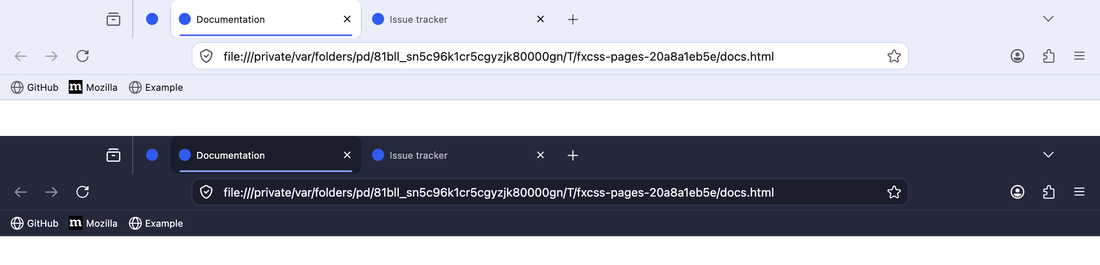
|
|
45
|
+
|
|
46
|
+
<p align="center"><sub><code>examples/minimal-theme</code>, light and dark — every screenshot in this
|
|
47
|
+
README was generated by fxcss itself.</sub></p>
|
|
48
|
+
|
|
49
|
+
## Requirements
|
|
50
|
+
|
|
51
|
+
- Python 3.9+
|
|
52
|
+
- Firefox (any recent release; the toolkit finds it automatically on macOS,
|
|
53
|
+
Windows and Linux, or set `FIREFOX_BIN`)
|
|
54
|
+
- `pillow`, only for `catalogue` and `compare`
|
|
55
|
+
|
|
56
|
+
## Installation
|
|
57
|
+
|
|
58
|
+
The tidiest way, which keeps fxcss and its one dependency out of your other
|
|
59
|
+
Python environments:
|
|
60
|
+
|
|
61
|
+
```bash
|
|
62
|
+
pipx install "fxcss[images] @ git+https://github.com/AdamXweb/fxcss@v0.6.1"
|
|
63
|
+
```
|
|
64
|
+
|
|
65
|
+
Or with pip, pinned to a release so a change here cannot alter your setup
|
|
66
|
+
unannounced:
|
|
67
|
+
|
|
68
|
+
```bash
|
|
69
|
+
python3 -m pip install "fxcss[images] @ git+https://github.com/AdamXweb/fxcss@v0.6.1"
|
|
70
|
+
```
|
|
71
|
+
|
|
72
|
+
Either gives you an `fxcss` command. To hack on it, clone and install editable:
|
|
73
|
+
|
|
74
|
+
```bash
|
|
75
|
+
git clone https://github.com/AdamXweb/fxcss.git
|
|
76
|
+
cd fxcss && python3 -m pip install -e ".[images]"
|
|
77
|
+
```
|
|
78
|
+
|
|
79
|
+
And if you would rather install nothing at all, the repo runs as-is:
|
|
80
|
+
|
|
81
|
+
```bash
|
|
82
|
+
python3 -m fxcss <command>
|
|
83
|
+
```
|
|
84
|
+
|
|
85
|
+
Run commands from your theme's root (the folder containing `chrome/`), or point
|
|
86
|
+
at it with `--theme /path/to/theme`.
|
|
87
|
+
|
|
88
|
+
## Commands
|
|
89
|
+
|
|
90
|
+
| Command | What it's for |
|
|
91
|
+
| --- | --- |
|
|
92
|
+
| [`try`](#fxcss-try) | Download a theme from GitHub and test-drive it |
|
|
93
|
+
| [`watch`](#fxcss-watch) | Edit CSS and see it live, no restart |
|
|
94
|
+
| [`pick`](#fxcss-pick) | Click any part of the UI to get its CSS selector |
|
|
95
|
+
| [`inspect`](#fxcss-inspect) | Look up a selector you already have |
|
|
96
|
+
| [`audit`](#fxcss-audit) | Find every selector that no longer matches, and suggest fixes |
|
|
97
|
+
| [`changelog`](#fxcss-changelog) | Diff two Firefox builds to see what chrome changed |
|
|
98
|
+
| [`snapshot`](#fxcss-changelog) | Record a Firefox's chrome names, to diff against later |
|
|
99
|
+
| [`catalogue`](#fxcss-catalogue) | Build a directory of themeable UI parts |
|
|
100
|
+
| [`shot`](#fxcss-shot) / [`compare`](#fxcss-compare) | Screenshot and diff two versions |
|
|
101
|
+
| [`doctor`](#fxcss-doctor) | Report what your Firefox supports |
|
|
102
|
+
|
|
103
|
+
### fxcss try
|
|
104
|
+
|
|
105
|
+
```bash
|
|
106
|
+
fxcss try adamXweb/WhiteSurFirefoxThemeMacOS
|
|
107
|
+
fxcss try github.com/owner/theme --with compact-tabs
|
|
108
|
+
fxcss try owner/theme --info # report what's there, launch nothing
|
|
109
|
+
```
|
|
110
|
+
|
|
111
|
+
**Test-drive a theme before committing to it.** Downloads it, installs it into a
|
|
112
|
+
throwaway profile, and opens Firefox so you can actually use it. Your own profile
|
|
113
|
+
is never touched — close the window and nothing remains.
|
|
114
|
+
|
|
115
|
+
It reports what it found before doing anything:
|
|
116
|
+
|
|
117
|
+
```
|
|
118
|
+
adamxweb/whitesurfirefoxthememacos ★614 MIT
|
|
119
|
+
MacOS Big Sur like theme for Firefox on MacOS & Windows.
|
|
120
|
+
latest release v1.6.3 (2025-07-26)
|
|
121
|
+
latest commit b10c574 (2025-07-26) Merge pull request #167 …
|
|
122
|
+
|
|
123
|
+
fetching release v1.6.3 …
|
|
124
|
+
theme found at the repository root (39 stylesheets, 134 KB)
|
|
125
|
+
|
|
126
|
+
This theme ships install.sh. fxcss does not run it —
|
|
127
|
+
it installs the files itself, which is all those scripts do.
|
|
128
|
+
|
|
129
|
+
Options its README documents:
|
|
130
|
+
-c Left hand side tab close button
|
|
131
|
+
-p Makes tabs height compact like current Safari
|
|
132
|
+
…
|
|
133
|
+
|
|
134
|
+
Optional stylesheets you can layer on with --with:
|
|
135
|
+
compact-tabs, hideextension, noidentity, tabs-swapclose, …
|
|
136
|
+
```
|
|
137
|
+
|
|
138
|
+
Releases are preferred over branch tips, since that is what the author blessed;
|
|
139
|
+
`--commit` takes the latest commit instead, and `--ref` takes any tag, branch or
|
|
140
|
+
SHA. `--with name,name` layers on the theme's optional stylesheets so you can see
|
|
141
|
+
a variant without hunting through install flags. `--shot dir` captures the
|
|
142
|
+
standard screenshots instead of opening a window, and `--keep dir` leaves the
|
|
143
|
+
download behind so you can start editing it with `watch`.
|
|
144
|
+
|
|
145
|
+
#### It does not run the theme's install script
|
|
146
|
+
|
|
147
|
+
That is deliberate, and worth being plain about: fetching a shell script from a
|
|
148
|
+
URL and executing it to preview a stylesheet is a bad trade. Those scripts are,
|
|
149
|
+
in substance, `cp -r chrome/ <profile>/` plus flipping a pref — which fxcss
|
|
150
|
+
already does. So it finds the script, tells you it exists, parses the options its
|
|
151
|
+
README documents, and then installs the files itself.
|
|
152
|
+
|
|
153
|
+
What is left is the theme's own content: CSS, SVG, and occasionally a `.js` file.
|
|
154
|
+
Firefox does not execute a `.js` file sitting in a profile's chrome folder; that
|
|
155
|
+
requires an autoconfig hook in the *application* directory, which fxcss does not
|
|
156
|
+
create. Archives are size-capped and path-checked on extraction, and symlinks in
|
|
157
|
+
them are skipped.
|
|
158
|
+
|
|
159
|
+
If you decide you want the theme permanently, follow its own install
|
|
160
|
+
instructions — that part is between you and the theme.
|
|
161
|
+
|
|
162
|
+
### fxcss watch
|
|
163
|
+
|
|
164
|
+
```bash
|
|
165
|
+
fxcss watch
|
|
166
|
+
```
|
|
167
|
+
|
|
168
|
+
Opens Firefox with your theme applied and watches `chrome/` and `custom/`. Save
|
|
169
|
+
a file in your editor and the running window updates in about 50ms.
|
|
170
|
+
|
|
171
|
+
The window is yours to drive — open menus, resize it, type in the address bar,
|
|
172
|
+
right-click things. Nothing is scripted.
|
|
173
|
+
|
|
174
|
+
| flag | effect |
|
|
175
|
+
| --- | --- |
|
|
176
|
+
| `--dark` | start in dark mode, for testing `prefers-color-scheme` rules |
|
|
177
|
+
| `--native-menus=false` | make right-click menus themeable (see [Context menus](#context-menus-are-native-on-macos)) |
|
|
178
|
+
| `--shot out.png` | write a screenshot after every reload |
|
|
179
|
+
| `--no-devtools` | don't enable the Browser Toolbox |
|
|
180
|
+
|
|
181
|
+
### fxcss pick
|
|
182
|
+
|
|
183
|
+
```bash
|
|
184
|
+
fxcss pick
|
|
185
|
+
```
|
|
186
|
+
|
|
187
|
+
**The answer to "what is this thing called?"** Move the mouse over the browser
|
|
188
|
+
window and the element under the cursor is outlined, with its selector shown in
|
|
189
|
+
a label:
|
|
190
|
+
|
|
191
|
+

|
|
192
|
+
|
|
193
|
+
Click it and your terminal prints everything you need:
|
|
194
|
+
|
|
195
|
+
```
|
|
196
|
+
toolbarbutton → #back-button
|
|
197
|
+
classes toolbarbutton-1 chromeclass-toolbar-additional
|
|
198
|
+
box 32×36 at (88, 8)
|
|
199
|
+
styles
|
|
200
|
+
color: rgba(46, 52, 54, 0.35)
|
|
201
|
+
border-radius: 8px
|
|
202
|
+
list-style-image: url("chrome://browser/skin/back.svg")
|
|
203
|
+
styled by 11 rules in this theme
|
|
204
|
+
chrome/parts/buttons-fixes.css:5 :root:not([uidensity=compact]) #back-button {
|
|
205
|
+
chrome/parts/custom-icons.css:6 #nav-bar #back-button .toolbarbutton-icon {
|
|
206
|
+
chrome/parts/headerbar.css:76 #nav-bar #back-button:not(#hack) {
|
|
207
|
+
```
|
|
208
|
+
|
|
209
|
+
That last section is the useful part: not just what the element is, but which of
|
|
210
|
+
your files already style it, with line numbers. Keep clicking to pick more; Esc
|
|
211
|
+
in the browser or Ctrl-C in the terminal stops.
|
|
212
|
+
|
|
213
|
+
### fxcss inspect
|
|
214
|
+
|
|
215
|
+
```bash
|
|
216
|
+
fxcss inspect '#urlbar'
|
|
217
|
+
fxcss inspect '.tab-close-button' --dark
|
|
218
|
+
```
|
|
219
|
+
|
|
220
|
+
The same report, for a selector you already have. Useful for checking whether a
|
|
221
|
+
selector still matches anything after a Firefox update — a common cause of
|
|
222
|
+
themes quietly breaking.
|
|
223
|
+
|
|
224
|
+
If it matches nothing, it says so:
|
|
225
|
+
|
|
226
|
+
```
|
|
227
|
+
$ fxcss inspect '#urlbar-background'
|
|
228
|
+
no elements match '#urlbar-background' in this Firefox
|
|
229
|
+
```
|
|
230
|
+
|
|
231
|
+
That is a real example, not a contrived one: this repo's own example theme
|
|
232
|
+
styled `#urlbar-background` by id, which many older themes still do. The id was
|
|
233
|
+
replaced by a class, so the rule silently did nothing and the address bar
|
|
234
|
+
rendered unstyled. One command found it; the fix was `.urlbar-background`.
|
|
235
|
+
|
|
236
|
+
### fxcss audit
|
|
237
|
+
|
|
238
|
+
```bash
|
|
239
|
+
fxcss audit
|
|
240
|
+
fxcss audit --patch fix.diff # write the confident fixes as a patch
|
|
241
|
+
fxcss audit --strict # exit non-zero if anything needs attention
|
|
242
|
+
```
|
|
243
|
+
|
|
244
|
+
**Upgrading a theme after Firefox moved on.** `inspect` answers the question one
|
|
245
|
+
selector at a time; `audit` does the whole theme at once. It walks every id and
|
|
246
|
+
class your CSS mentions, resolves each against a running Firefox, and shows what
|
|
247
|
+
to change — with the real line from your file and the replacement applied:
|
|
248
|
+
|
|
249
|
+
```
|
|
250
|
+
14 selectors need attention
|
|
251
|
+
|
|
252
|
+
RENAMED #urlbar-background → .urlbar-background
|
|
253
|
+
same name, now a class rather than an id
|
|
254
|
+
|
|
255
|
+
chrome/parts/headerbar-urlbar.css:52
|
|
256
|
+
- #urlbar-background {
|
|
257
|
+
+ .urlbar-background {
|
|
258
|
+
|
|
259
|
+
SIMILAR #appMenu-fullscreen-button → #appMenu-fullscreen-button2
|
|
260
|
+
no exact match; closest live name is #appMenu-fullscreen-button2
|
|
261
|
+
|
|
262
|
+
chrome/parts/icons.css:198
|
|
263
|
+
- #appMenu-fullscreen-button {
|
|
264
|
+
+ #appMenu-fullscreen-button2 {
|
|
265
|
+
```
|
|
266
|
+
|
|
267
|
+
That output is real — it is what this finds in a long-running theme. The
|
|
268
|
+
`…-button2` pattern is how Firefox has been versioning app-menu controls, and it
|
|
269
|
+
breaks menu styling silently.
|
|
270
|
+
|
|
271
|
+
Findings come in three kinds:
|
|
272
|
+
|
|
273
|
+
| | meaning |
|
|
274
|
+
| --- | --- |
|
|
275
|
+
| **RENAMED** | The same name exists, but as a class instead of an id, or the reverse. The suggestion is exact. |
|
|
276
|
+
| **SIMILAR** | No exact counterpart, but a close name exists. Usually a Firefox suffix change, or a typo in your CSS. |
|
|
277
|
+
| *unresolved* | Nothing close. Listed separately with `--all` and **not** counted as a problem — normally an element that only appears in a state fxcss cannot reach, not one that was removed. |
|
|
278
|
+
|
|
279
|
+
That last distinction is the point. Reporting every unmatched selector as broken
|
|
280
|
+
would be noise; a theme legitimately styles things that only exist in private
|
|
281
|
+
windows, on other platforms, or inside popups.
|
|
282
|
+
|
|
283
|
+
Suggestions are inferred from the live browser, not from a hardcoded list of
|
|
284
|
+
Firefox versions, so they keep working for releases that came out after this
|
|
285
|
+
tool did.
|
|
286
|
+
|
|
287
|
+
`--patch` writes a unified diff of the **RENAMED** findings only — the ones where
|
|
288
|
+
the replacement is certain. Review it, then `git apply`. SIMILAR findings are
|
|
289
|
+
deliberately excluded: they are usually right, but "usually" is not good enough
|
|
290
|
+
to rewrite your CSS unattended.
|
|
291
|
+
|
|
292
|
+
### fxcss changelog
|
|
293
|
+
|
|
294
|
+
```bash
|
|
295
|
+
fxcss changelog --firefox /path/to/old/firefox --against /path/to/new/firefox
|
|
296
|
+
```
|
|
297
|
+
|
|
298
|
+
**What actually changed between two Firefox releases.** Collects every chrome id
|
|
299
|
+
and class from both builds, diffs them, and tells you which of the removals your
|
|
300
|
+
theme depends on:
|
|
301
|
+
|
|
302
|
+
```
|
|
303
|
+
Firefox 140.13.0 → 153.0.3
|
|
304
|
+
52 chrome names gone, 221 new
|
|
305
|
+
|
|
306
|
+
2 of them are used by this theme:
|
|
307
|
+
#urlbar-background chrome/parts/headerbar-urlbar.css:52
|
|
308
|
+
#urlbar-go-button chrome/parts/buttons-fixes.css:202
|
|
309
|
+
```
|
|
310
|
+
|
|
311
|
+
Point it at an ESR build and current release to see what a year of Firefox did
|
|
312
|
+
to your theme, or at a Beta to find out what is about to break before your users
|
|
313
|
+
do. `--show-all` lists every name that changed, not just the ones you use.
|
|
314
|
+
|
|
315
|
+
You do not need to keep an old browser around. `fxcss snapshot --out
|
|
316
|
+
baseline.json` records what a Firefox has; commit that file and compare later
|
|
317
|
+
with `--baseline`:
|
|
318
|
+
|
|
319
|
+
```bash
|
|
320
|
+
fxcss snapshot --out .fxcss/firefox-140.json # once
|
|
321
|
+
fxcss changelog --baseline .fxcss/firefox-140.json
|
|
322
|
+
```
|
|
323
|
+
|
|
324
|
+
#### Watching Firefox for breakage
|
|
325
|
+
|
|
326
|
+
Firefox ships every few weeks, and a theme does not break loudly when it
|
|
327
|
+
renames something. A scheduled job can audit each channel and tell you before
|
|
328
|
+
your users find out — Beta and Nightly give weeks of warning.
|
|
329
|
+
|
|
330
|
+
`examples/firefox-watch.yml` is a working workflow that does this: it downloads
|
|
331
|
+
release, beta and nightly, audits the theme against each, opens a **pull
|
|
332
|
+
request** when the fixes are ones `--patch` is certain about, opens an issue
|
|
333
|
+
when they are not, and closes the issue once the channel is clean again.
|
|
334
|
+
|
|
335
|
+
#### Unused and unreachable code
|
|
336
|
+
|
|
337
|
+
`audit` also reports housekeeping, in its own section, separate from breakage:
|
|
338
|
+
|
|
339
|
+
- **Stylesheets nothing imports.** Files under `chrome/` unreachable by
|
|
340
|
+
following `@import` from `userChrome.css`. Sheets in a `custom/` or
|
|
341
|
+
`optional/` folder are excluded — being opt-in is the point of those.
|
|
342
|
+
- **Custom properties used but never set**, where an unthemed Firefox does not
|
|
343
|
+
provide them either. These are usually typos: the `var()` silently falls back.
|
|
344
|
+
- **Custom properties set but read nowhere.** Reported cautiously — setting
|
|
345
|
+
`--arrowpanel-background` exists precisely so Firefox's own rules pick it up,
|
|
346
|
+
so this section excludes every name an unthemed Firefox resolves.
|
|
347
|
+
|
|
348
|
+
That last check is why `audit` briefly starts a second, unthemed browser: asked
|
|
349
|
+
of the themed one, every name resolves, because the theme set it.
|
|
350
|
+
|
|
351
|
+
Pass `--no-unused` to skip the section.
|
|
352
|
+
|
|
353
|
+
**Should it gate CI?** Report it, don't fail on it. `--strict` covers selectors
|
|
354
|
+
that no longer match, which is real breakage. Unused code is tidiness, and a
|
|
355
|
+
tidiness check that blocks merges gets disabled. The example CI here runs
|
|
356
|
+
`audit --strict` and lets the unused section be advisory.
|
|
357
|
+
|
|
358
|
+
### fxcss catalogue
|
|
359
|
+
|
|
360
|
+
```bash
|
|
361
|
+
fxcss catalogue --open
|
|
362
|
+
```
|
|
363
|
+
|
|
364
|
+
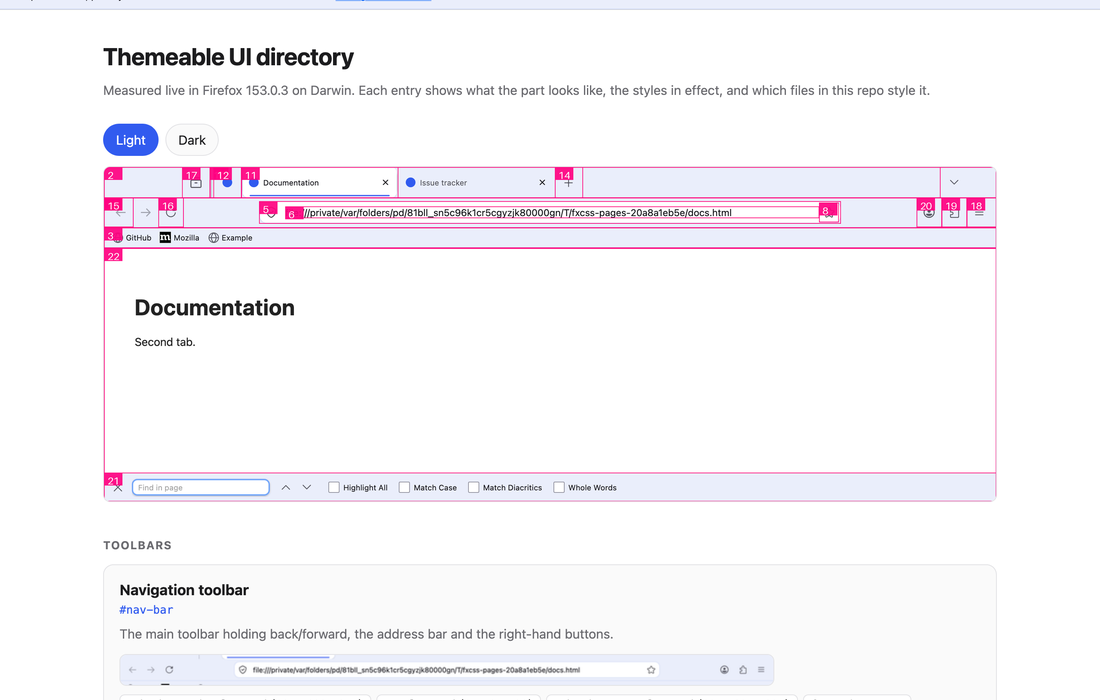
Builds an HTML directory of the UI parts a theme can target. For each one: a
|
|
365
|
+
cropped screenshot of the real element in light and dark, its selector, the
|
|
366
|
+
styles in effect, and every rule in your theme that targets it. Plus an
|
|
367
|
+
annotated overview screenshot with each part numbered.
|
|
368
|
+
|
|
369
|
+
|
|
370
|
+
|
|
371
|
+
Everything is measured from a running browser rather than hardcoded, so it stays
|
|
372
|
+
honest as Firefox changes — an element that no longer exists is reported as
|
|
373
|
+
missing rather than quietly documented.
|
|
374
|
+
|
|
375
|
+
Add `--self-contained` to also get a single `catalogue.html` with the images
|
|
376
|
+
inlined, for attaching to an issue.
|
|
377
|
+
|
|
378
|
+
### fxcss shot
|
|
379
|
+
|
|
380
|
+
```bash
|
|
381
|
+
fxcss shot --out shots/before
|
|
382
|
+
```
|
|
383
|
+
|
|
384
|
+
Captures a set of views — browser window, focused address bar, find bar, each in
|
|
385
|
+
light and dark — as PNGs.
|
|
386
|
+
|
|
387
|
+
#### Against real websites
|
|
388
|
+
|
|
389
|
+
```bash
|
|
390
|
+
fxcss shot --out shots --url https://github.com/AdamXweb/WhiteSurFirefoxThemeMacOS
|
|
391
|
+
fxcss shot --out shots --only-live --url https://example.com --url https://news.ycombinator.com
|
|
392
|
+
```
|
|
393
|
+
|
|
394
|
+
Captures the theme against live sites, light and dark, for showing it off —
|
|
395
|
+
README screenshots, release notes, an issue thread.
|
|
396
|
+
|
|
397
|
+
These land in `<out>/live/` and are **never part of a comparison**. That is the
|
|
398
|
+
whole point of keeping them separate: someone else's page can change its
|
|
399
|
+
content, title or favicon between two runs, and a theme pull request should not
|
|
400
|
+
be blamed for it. `compare` only looks at PNGs at the top level, so they are
|
|
401
|
+
excluded by construction rather than by a rule someone has to remember.
|
|
402
|
+
|
|
403
|
+
`examples/showcase.yml` automates it — regenerate on every release, publish to a
|
|
404
|
+
`showcase` branch, and link stable raw URLs from your README.
|
|
405
|
+
|
|
406
|
+
### fxcss compare
|
|
407
|
+
|
|
408
|
+
```bash
|
|
409
|
+
fxcss compare --base shots/before --head shots/after --out diff/
|
|
410
|
+
```
|
|
411
|
+
|
|
412
|
+
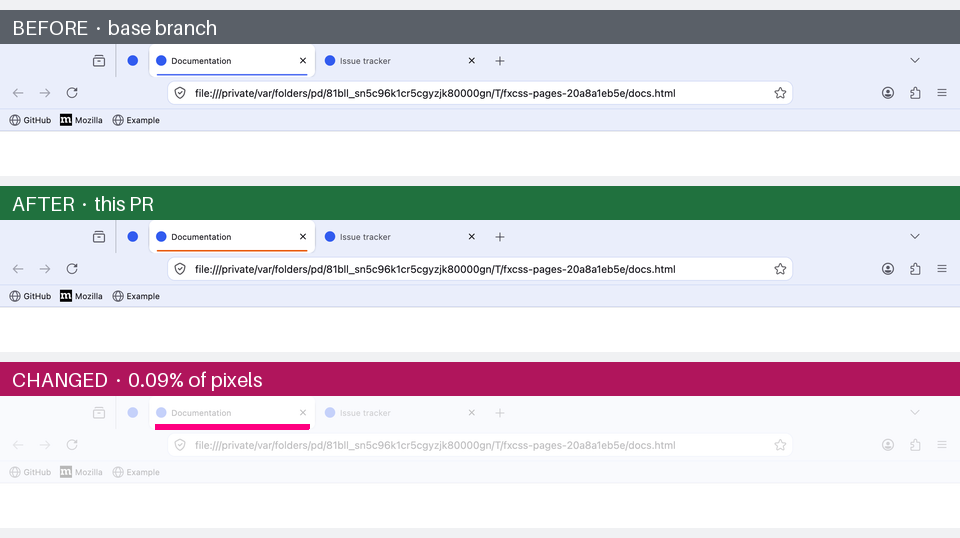
Diffs two sets and writes one stacked **before / after / changed-pixels** image
|
|
413
|
+
per view that differs. Views that render identically are reported rather than
|
|
414
|
+
pictured, so you only look at what actually changed.
|
|
415
|
+
|
|
416
|
+
|
|
417
|
+
|
|
418
|
+
<p align="center"><sub>One changed value — the accent colour behind the active tab. The bottom panel
|
|
419
|
+
highlights the 0.09% of pixels that moved.</sub></p>
|
|
420
|
+
|
|
421
|
+
This is what makes it useful in CI: render your theme at the base commit and at
|
|
422
|
+
a pull request, and the diff shows a reviewer exactly what the change does. See
|
|
423
|
+
[Using it in CI](#using-it-in-ci).
|
|
424
|
+
|
|
425
|
+
### fxcss doctor
|
|
426
|
+
|
|
427
|
+
```bash
|
|
428
|
+
fxcss doctor
|
|
429
|
+
```
|
|
430
|
+
|
|
431
|
+
Reports your Firefox version, whether `userChrome.css` is enabled, whether
|
|
432
|
+
context menus are themeable on your platform, and how many stylesheets your
|
|
433
|
+
theme has. Start here if something isn't behaving.
|
|
434
|
+
|
|
435
|
+
## Inspecting the UI with devtools
|
|
436
|
+
|
|
437
|
+
Firefox's normal inspector only sees page content. The **Browser Toolbox** is
|
|
438
|
+
the version that can inspect the browser's own UI, and it's off by default
|
|
439
|
+
behind four prefs. fxcss turns them on in its throwaway profile, so in `watch`
|
|
440
|
+
and `pick` you can just press:
|
|
441
|
+
|
|
442
|
+
- **macOS** — `Cmd+Opt+Shift+I`
|
|
443
|
+
- **Windows / Linux** — `Ctrl+Alt+Shift+I`
|
|
444
|
+
|
|
445
|
+
You get a full inspector over the browser chrome: hover to highlight, read
|
|
446
|
+
computed styles, and live-edit rules to try things before committing them to
|
|
447
|
+
your CSS. `fxcss pick` is the fast path for "what is this called"; the Browser
|
|
448
|
+
Toolbox is the thorough one for "why is this rule not winning".
|
|
449
|
+
|
|
450
|
+
## Using it in CI
|
|
451
|
+
|
|
452
|
+
`shot` and `compare` are designed to run on a hosted runner. The shape is:
|
|
453
|
+
check out the base revision and the pull request revision, render both, compare,
|
|
454
|
+
and publish the result.
|
|
455
|
+
|
|
456
|
+
```yaml
|
|
457
|
+
- run: pip install "fxcss[images] @ git+https://github.com/AdamXweb/fxcss"
|
|
458
|
+
- run: fxcss shot --theme base --out shots/base
|
|
459
|
+
- run: fxcss shot --theme head --out shots/head
|
|
460
|
+
- run: fxcss compare --base shots/base --head shots/head --out out/ --platform ${{ runner.os }}
|
|
461
|
+
```
|
|
462
|
+
|
|
463
|
+
Two things to know before wiring this up:
|
|
464
|
+
|
|
465
|
+
- **Don't use headless mode.** Firefox headless renders no browser chrome at
|
|
466
|
+
all, so a headless screenshot is an empty window. Runners need a real display;
|
|
467
|
+
macOS and Windows runners have one, Linux needs `xvfb-run`.
|
|
468
|
+
- **Pull requests from forks get a read-only token.** If you want the result
|
|
469
|
+
posted as a comment, build the images in the `pull_request` job (no write
|
|
470
|
+
permissions, no secrets) and publish from a separate `workflow_run` job.
|
|
471
|
+
|
|
472
|
+
`examples/` has working workflows to copy — the pull request preview pair, the
|
|
473
|
+
scheduled Firefox-channel watcher, and the showcase capture. See
|
|
474
|
+
[`examples/README.md`](examples/README.md) for which to start with and why the
|
|
475
|
+
preview is split into two files. This repo's own `.github/workflows/ci.yml`
|
|
476
|
+
runs the whole thing against `examples/minimal-theme` on macOS and Windows.
|
|
477
|
+
|
|
478
|
+
## Things worth knowing
|
|
479
|
+
|
|
480
|
+
### Context menus are native on macOS
|
|
481
|
+
|
|
482
|
+
Firefox sets `widget.macos.native-context-menus` to `true` by default, which
|
|
483
|
+
means **macOS draws right-click menus itself and CSS cannot style them at all**.
|
|
484
|
+
`menupopup` and `menuitem` rules have no effect there. They do apply on Windows
|
|
485
|
+
and Linux.
|
|
486
|
+
|
|
487
|
+
`fxcss doctor` reports the setting for your platform, and
|
|
488
|
+
`fxcss watch --native-menus=false` switches Firefox to XUL menus so you can work
|
|
489
|
+
on that styling from a Mac.
|
|
490
|
+
|
|
491
|
+
### Popups can't be screenshotted
|
|
492
|
+
|
|
493
|
+
Menus and the app menu are separate OS-level windows, so they appear in neither
|
|
494
|
+
a Marionette chrome screenshot nor a `drawWindow` rasterisation of the browser
|
|
495
|
+
window. Capturing the whole screen instead is worse: it depends on window
|
|
496
|
+
stacking and picks up whatever else is on your desktop. Every view `shot`
|
|
497
|
+
captures is therefore an in-document surface.
|
|
498
|
+
|
|
499
|
+
You can still *look* at popups in `watch`, and inspect them with the Browser
|
|
500
|
+
Toolbox. They just can't be captured.
|
|
501
|
+
|
|
502
|
+
### Why not Selenium?
|
|
503
|
+
|
|
504
|
+
Marionette is plain TCP with length-prefixed JSON, so the client here is about a
|
|
505
|
+
hundred lines of standard library. No geckodriver to keep in step with your
|
|
506
|
+
Firefox version — a common source of CI breakage — and no dependency to install
|
|
507
|
+
for the core commands.
|
|
508
|
+
|
|
509
|
+
More importantly, screenshots are taken in Marionette's **chrome context**,
|
|
510
|
+
which captures the browser window's own document. An ordinary WebDriver
|
|
511
|
+
screenshot only captures page content, so toolbars and tabs would never appear
|
|
512
|
+
at all.
|
|
513
|
+
|
|
514
|
+
### Reproducibility
|
|
515
|
+
|
|
516
|
+
Screenshot comparison only works if an unchanged theme renders identically
|
|
517
|
+
twice. The throwaway profile pins what would otherwise drift: first-run tours,
|
|
518
|
+
telemetry prompts, update checks and animations are off; pages are local files
|
|
519
|
+
rather than live sites; and Nimbus/Normandy are disabled so Mozilla can't switch
|
|
520
|
+
a toolbar feature on remotely between two runs.
|
|
521
|
+
|
|
522
|
+
Two CSS rules hide artifacts of the harness itself — the robot icon Firefox
|
|
523
|
+
shows in automated sessions, and the rollout-gated IP Protection button. Neither
|
|
524
|
+
is part of your theme.
|
|
525
|
+
|
|
526
|
+
Each session also picks its own Marionette port. Firefox's fixed default of 2828
|
|
527
|
+
means a browser leaked by an earlier run would silently accept the next
|
|
528
|
+
session's connection, which shows up as your theme mysteriously not applying.
|
|
529
|
+
|
|
530
|
+
## Contributing
|
|
531
|
+
|
|
532
|
+
Issues and pull requests welcome — particularly landmark definitions for UI
|
|
533
|
+
parts the catalogue doesn't cover yet, and reports of selectors that changed in
|
|
534
|
+
a new Firefox release.
|
|
535
|
+
|
|
536
|
+
## How this was built
|
|
537
|
+
|
|
538
|
+
fxcss was written with the assistance of **Claude** (Anthropic's Claude Opus 5),
|
|
539
|
+
working alongside [@AdamXweb](https://github.com/AdamXweb). Every change was
|
|
540
|
+
reviewed by a human before it landed.
|
|
541
|
+
|
|
542
|
+
Which commits are which is recorded in the history rather than asserted here:
|
|
543
|
+
|
|
544
|
+
| Author | |
|
|
545
|
+
| --- | --- |
|
|
546
|
+
| **`adamXbot`** | AI-assisted. Every one carries a `Co-Authored-By: Claude` trailer. |
|
|
547
|
+
| **`AdamXweb`** | Adam. |
|
|
548
|
+
|
|
549
|
+
Both halves of that are checkable:
|
|
550
|
+
|
|
551
|
+
```bash
|
|
552
|
+
git log --format='%an' # who authored each commit
|
|
553
|
+
git log --format='%b' | grep Co-Authored-By # which were AI-assisted
|
|
554
|
+
```
|
|
555
|
+
|
|
556
|
+
Behaviour is not taken on trust either. CI runs on macOS and Windows on every
|
|
557
|
+
push and asserts the comparison in **both** directions: an unchanged theme must
|
|
558
|
+
render identically across runs, and an obvious CSS change must be detected.
|
|
559
|
+
That check found most of the real bugs in this tool — a random temp path leaking
|
|
560
|
+
into the address bar, Firefox flashing the find bar yellow as it opens, a
|
|
561
|
+
scrollbar appearing in one private-window capture and not the next — none of
|
|
562
|
+
which review had caught.
|
|
563
|
+
|
|
564
|
+
## Credits
|
|
565
|
+
|
|
566
|
+
Built while adding visual PR previews to
|
|
567
|
+
[WhiteSurFirefoxThemeMacOS](https://github.com/AdamXweb/WhiteSurFirefoxThemeMacOS),
|
|
568
|
+
and generalised so it works for any userChrome theme.
|
|
569
|
+
|
|
570
|
+
## License
|
|
571
|
+
|
|
572
|
+
[MIT](LICENSE)
|