fxcss 0.20.0__tar.gz → 0.22.0__tar.gz
This diff represents the content of publicly available package versions that have been released to one of the supported registries. The information contained in this diff is provided for informational purposes only and reflects changes between package versions as they appear in their respective public registries.
- {fxcss-0.20.0 → fxcss-0.22.0}/PKG-INFO +819 -548
- {fxcss-0.20.0 → fxcss-0.22.0}/README.md +818 -547
- {fxcss-0.20.0 → fxcss-0.22.0}/fxcss/__init__.py +1 -1
- {fxcss-0.20.0 → fxcss-0.22.0}/fxcss/audit.py +134 -11
- fxcss-0.22.0/fxcss/capture.py +78 -0
- fxcss-0.22.0/fxcss/check.py +286 -0
- {fxcss-0.20.0 → fxcss-0.22.0}/fxcss/cli.py +182 -40
- {fxcss-0.20.0 → fxcss-0.22.0}/fxcss/compare.py +53 -4
- {fxcss-0.20.0 → fxcss-0.22.0}/fxcss/complete.py +1 -1
- {fxcss-0.20.0 → fxcss-0.22.0}/fxcss/core.py +289 -98
- {fxcss-0.20.0 → fxcss-0.22.0}/fxcss/fetch.py +5 -8
- {fxcss-0.20.0 → fxcss-0.22.0}/fxcss/install.py +258 -195
- {fxcss-0.20.0 → fxcss-0.22.0}/fxcss/scaffold.py +10 -20
- {fxcss-0.20.0 → fxcss-0.22.0}/fxcss/templates/firefox-watch.yml +28 -12
- {fxcss-0.20.0 → fxcss-0.22.0}/fxcss/templates/pr-preview-publish.yml +52 -16
- {fxcss-0.20.0 → fxcss-0.22.0}/fxcss/templates/pr-preview.yml +12 -7
- {fxcss-0.20.0 → fxcss-0.22.0}/fxcss/templates/readme-previews.yml +6 -4
- {fxcss-0.20.0 → fxcss-0.22.0}/fxcss/templates/starter/chrome/userChrome.css +4 -4
- {fxcss-0.20.0 → fxcss-0.22.0}/fxcss.egg-info/PKG-INFO +819 -548
- {fxcss-0.20.0 → fxcss-0.22.0}/fxcss.egg-info/SOURCES.txt +8 -1
- fxcss-0.22.0/tests/test_capture_coverage.py +93 -0
- fxcss-0.22.0/tests/test_checks.py +353 -0
- fxcss-0.22.0/tests/test_patch_duplicates.py +94 -0
- fxcss-0.22.0/tests/test_profile_safety.py +175 -0
- {fxcss-0.20.0 → fxcss-0.22.0}/tests/test_units.py +685 -13
- fxcss-0.22.0/tests/test_workflows.py +225 -0
- {fxcss-0.20.0 → fxcss-0.22.0}/LICENSE +0 -0
- {fxcss-0.20.0 → fxcss-0.22.0}/fxcss/__main__.py +0 -0
- {fxcss-0.20.0 → fxcss-0.22.0}/fxcss/adopt.py +0 -0
- {fxcss-0.20.0 → fxcss-0.22.0}/fxcss/catalogue.py +0 -0
- {fxcss-0.20.0 → fxcss-0.22.0}/fxcss/omni.py +0 -0
- {fxcss-0.20.0 → fxcss-0.22.0}/fxcss/probe.py +0 -0
- {fxcss-0.20.0 → fxcss-0.22.0}/fxcss/sheets.py +0 -0
- {fxcss-0.20.0 → fxcss-0.22.0}/fxcss/templates/pr-preview-cleanup.yml +0 -0
- {fxcss-0.20.0 → fxcss-0.22.0}/fxcss/templates/showcase.yml +0 -0
- {fxcss-0.20.0 → fxcss-0.22.0}/fxcss/templates/starter/custom/accent-red.css +0 -0
- {fxcss-0.20.0 → fxcss-0.22.0}/fxcss/tweaks.py +0 -0
- {fxcss-0.20.0 → fxcss-0.22.0}/fxcss.egg-info/dependency_links.txt +0 -0
- {fxcss-0.20.0 → fxcss-0.22.0}/fxcss.egg-info/entry_points.txt +0 -0
- {fxcss-0.20.0 → fxcss-0.22.0}/fxcss.egg-info/requires.txt +0 -0
- {fxcss-0.20.0 → fxcss-0.22.0}/fxcss.egg-info/top_level.txt +0 -0
- {fxcss-0.20.0 → fxcss-0.22.0}/pyproject.toml +0 -0
- {fxcss-0.20.0 → fxcss-0.22.0}/setup.cfg +0 -0
|
@@ -1,6 +1,6 @@
|
|
|
1
1
|
Metadata-Version: 2.4
|
|
2
2
|
Name: fxcss
|
|
3
|
-
Version: 0.
|
|
3
|
+
Version: 0.22.0
|
|
4
4
|
Summary: Live-reload, inspect and screenshot-test Firefox userChrome.css themes
|
|
5
5
|
Author: AdamXweb
|
|
6
6
|
License: MIT
|
|
@@ -21,7 +21,7 @@ Provides-Extra: images
|
|
|
21
21
|
Requires-Dist: pillow>=10.1; extra == "images"
|
|
22
22
|
Dynamic: license-file
|
|
23
23
|
|
|
24
|
-
|
|
24
|
+
# fxcss
|
|
25
25
|
|
|
26
26
|
<p align="center">
|
|
27
27
|
<img width="120" src="https://raw.githubusercontent.com/AdamXweb/fxcss/main/docs/icon.png" alt="fxcss">
|
|
@@ -29,141 +29,64 @@ Dynamic: license-file
|
|
|
29
29
|
<a href="https://pypi.org/project/fxcss/"><img src="https://img.shields.io/pypi/v/fxcss" alt="PyPI"></a>
|
|
30
30
|
<img src="https://github.com/AdamXweb/fxcss/actions/workflows/ci.yml/badge.svg" alt="CI">
|
|
31
31
|
<br>
|
|
32
|
-
|
|
33
|
-
|
|
34
|
-
and
|
|
32
|
+
An all-in-one toolkit for <code>userChrome.css</code> Firefox themes.<br>
|
|
33
|
+
Try and install themes, build them with live editing, and keep them tested
|
|
34
|
+
with visual previews and Firefox compatibility checks.
|
|
35
35
|
</p>
|
|
36
36
|
|
|
37
|
-
|
|
37
|
+
## Getting started
|
|
38
38
|
|
|
39
|
-
|
|
40
|
-
|
|
41
|
-
|
|
42
|
-
| **Trying someone's theme** | `fxcss try owner/repo` — test-drive it in a throwaway profile; close the window and nothing remains. Sure about it? `fxcss install owner/repo` puts it in your real profile, with a backup. |
|
|
43
|
-
| **Maintaining a theme repo** | `fxcss init` — before/after screenshots on every pull request, on macOS, Windows and Linux. |
|
|
44
|
-
|
|
45
|
-
## Your first ten minutes
|
|
46
|
-
|
|
47
|
-
```bash
|
|
48
|
-
pipx install "fxcss[images]" # no pipx? brew install pipx / sudo apt install pipx
|
|
49
|
-
|
|
50
|
-
# See it work on a real theme before touching your own:
|
|
51
|
-
fxcss try AdamXweb/WhiteSurFirefoxThemeMacOS
|
|
52
|
-
|
|
53
|
-
# No theme yet? Start from a small working one:
|
|
54
|
-
fxcss new my-theme
|
|
55
|
-
|
|
56
|
-
# Point it at your theme (the folder containing chrome/) and edit live:
|
|
57
|
-
cd my-theme && fxcss watch
|
|
58
|
-
|
|
59
|
-
# Can't name the element you want to style? Click it:
|
|
60
|
-
fxcss pick
|
|
61
|
-
|
|
62
|
-
# Happy? Give the repo CI previews:
|
|
63
|
-
fxcss init && git add .github && git commit -m "ci: theme previews"
|
|
64
|
-
```
|
|
65
|
-
|
|
66
|
-
Every one of these runs in a throwaway profile. Looking for themes to try?
|
|
67
|
-
Browse [firefoxcss-store.github.io](https://firefoxcss-store.github.io/) or
|
|
68
|
-
[r/FirefoxCSS](https://www.reddit.com/r/FirefoxCSS/) — anything with a
|
|
69
|
-
`userChrome.css` on GitHub works with `fxcss try owner/repo`.
|
|
70
|
-
|
|
71
|
-
## Description
|
|
72
|
-
|
|
73
|
-
Working on a Firefox theme normally means: edit CSS, restart Firefox, squint,
|
|
74
|
-
repeat — and guessing at element names, because the browser's own UI isn't in
|
|
75
|
-
any page inspector you're used to.
|
|
76
|
-
|
|
77
|
-
fxcss removes both problems. It installs your theme into a throwaway profile,
|
|
78
|
-
drives Firefox over **Marionette** (Firefox's built-in automation protocol), and
|
|
79
|
-
gives you a live-reload loop, an element picker, and a screenshot differ.
|
|
80
|
-
|
|
81
|
-
Your real Firefox profile is never touched — except by the one command whose
|
|
82
|
-
job that is: `fxcss install`, which backs up what it replaces and keeps a
|
|
83
|
-
manifest so `fxcss uninstall` can put everything back.
|
|
84
|
-
|
|
85
|
-

|
|
86
|
-
|
|
87
|
-
<p align="center"><sub>Three saves in <code>fxcss watch</code> — the window updates in ~50ms.
|
|
88
|
-
Every image in this README was generated by fxcss itself.</sub></p>
|
|
89
|
-
|
|
90
|
-
## Requirements
|
|
91
|
-
|
|
92
|
-
- Python 3.9+
|
|
93
|
-
- Firefox (any recent release; the toolkit finds it automatically on macOS,
|
|
94
|
-
Windows and Linux, or set `FIREFOX_BIN`)
|
|
95
|
-
- `pillow`, only for `catalogue`, `compare` and `tweaks` — every other
|
|
96
|
-
command is standard library. Added later with `pipx inject fxcss pillow`.
|
|
97
|
-
|
|
98
|
-
## Installation
|
|
99
|
-
|
|
100
|
-
fxcss is [on PyPI](https://pypi.org/project/fxcss/). Install it with **pipx**,
|
|
101
|
-
which gives it its own environment and puts `fxcss` on your PATH:
|
|
39
|
+
You need **Python 3.9+** and an installed **Firefox** on macOS, Windows or
|
|
40
|
+
Linux. Install fxcss with its image tools, then try a theme in a disposable
|
|
41
|
+
profile:
|
|
102
42
|
|
|
103
43
|
```bash
|
|
104
44
|
pipx install "fxcss[images]"
|
|
45
|
+
fxcss try AdamXweb/WhiteSurFirefoxThemeMacOS
|
|
105
46
|
```
|
|
106
47
|
|
|
107
|
-
|
|
108
|
-
|
|
109
|
-
|
|
110
|
-
> **Why not plain pip?** On current Homebrew, Debian and Ubuntu Pythons,
|
|
111
|
-
> `python3 -m pip install` refuses with `error: externally-managed-environment`
|
|
112
|
-
> — that's [PEP 668](https://peps.python.org/pep-0668/) protecting your system
|
|
113
|
-
> Python, not fxcss being broken. pipx is the intended answer for installing an
|
|
114
|
-
> application. pip still works fine *inside a virtual environment*:
|
|
115
|
-
>
|
|
116
|
-
> ```bash
|
|
117
|
-
> python3 -m venv ~/.venvs/fxcss && ~/.venvs/fxcss/bin/pip install "fxcss[images]"
|
|
118
|
-
> ```
|
|
119
|
-
|
|
120
|
-
For CI, or anywhere a surprise upgrade would be unwelcome, pin the release —
|
|
121
|
-
the [releases page](https://github.com/AdamXweb/fxcss/releases) has the latest.
|
|
122
|
-
CI runners' Pythons are not externally managed, so plain pip is fine there:
|
|
123
|
-
|
|
124
|
-
```bash
|
|
125
|
-
pip install "fxcss[images]==0.20.0"
|
|
126
|
-
```
|
|
127
|
-
|
|
128
|
-
Either gives you an `fxcss` command. To hack on it, clone and install editable:
|
|
129
|
-
|
|
130
|
-
```bash
|
|
131
|
-
git clone https://github.com/AdamXweb/fxcss.git
|
|
132
|
-
cd fxcss && python3 -m pip install -e ".[images]"
|
|
133
|
-
```
|
|
48
|
+
Close the preview window when you are done; your everyday Firefox profile is
|
|
49
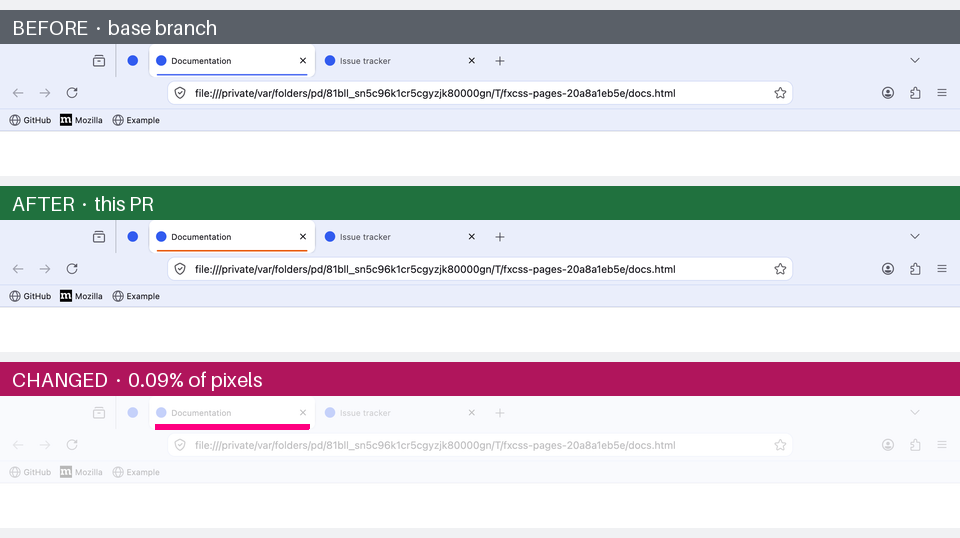
|
+
unchanged. See [installation options](#installation) if you do not have pipx.
|
|
134
50
|
|
|
135
|
-
|
|
51
|
+
Choose what you want to do next:
|
|
136
52
|
|
|
137
|
-
|
|
138
|
-
|
|
139
|
-
|
|
53
|
+
| I want to… | Next step |
|
|
54
|
+
| --- | --- |
|
|
55
|
+
| Use a theme in my everyday browser | [Install it](#fxcss-install), then check updates, change options or roll back. |
|
|
56
|
+
| Create or edit a theme | [Start a theme](#fxcss-new), see edits live and inspect Firefox's interface. |
|
|
57
|
+
| Maintain a theme on GitHub | [Generate workflows](#fxcss-init) for PR previews and scheduled Firefox checks. |
|
|
140
58
|
|
|
141
|
-
|
|
142
|
-
|
|
59
|
+
For local development and testing, run commands from the theme's root (the
|
|
60
|
+
folder containing `chrome/`), or pass `--theme /path/to/theme`. Use
|
|
61
|
+
`fxcss <command> --help` for its options.
|
|
143
62
|
|
|
144
|
-
##
|
|
63
|
+
## Explore the toolkit
|
|
145
64
|
|
|
146
|
-
|
|
|
65
|
+
| Section | What you can do |
|
|
147
66
|
| --- | --- |
|
|
148
|
-
|
|
|
149
|
-
| [
|
|
150
|
-
| [
|
|
151
|
-
| [
|
|
152
|
-
| [
|
|
153
|
-
| [
|
|
154
|
-
| [
|
|
155
|
-
| [
|
|
156
|
-
|
|
157
|
-
|
|
158
|
-
|
|
159
|
-
|
|
160
|
-
|
|
161
|
-
|
|
162
|
-
|
|
163
|
-
|
|
164
|
-
|
|
165
|
-
|
|
166
|
-
|
|
67
|
+
| [Using and managing themes](#using-and-managing-themes) | Preview, install, adopt, update, roll back and remove themes; see what is installed in each profile. |
|
|
68
|
+
| [Building and inspecting themes](#building-and-inspecting-themes) | Start a theme, reload CSS live and find the selectors and rules behind the UI. |
|
|
69
|
+
| [Testing appearance](#testing-appearance) | Run saved project checks, capture browser states and review visual differences. |
|
|
70
|
+
| [Tracking Firefox compatibility](#tracking-firefox-compatibility) | Save structural snapshots, compare Firefox builds and audit theme breakage. |
|
|
71
|
+
| [GitHub Actions workflows](#github-actions-workflows) | Automate PR previews, Firefox checks and screenshot publishing. |
|
|
72
|
+
| [Documenting and showcasing themes](#documenting-and-showcasing-themes) | Explain install options with images and generate a visual UI reference. |
|
|
73
|
+
| [Troubleshooting and configuration](#troubleshooting-and-configuration) | Diagnose setup problems, choose installation options and understand capture limits. |
|
|
74
|
+
| [Commands](#commands) | Jump directly to any command. |
|
|
75
|
+
|
|
76
|
+
Previewing, editing and browser testing use disposable profiles. The theme
|
|
77
|
+
management commands `install`, `adopt`, `upgrade`, `rollback` and `uninstall`
|
|
78
|
+
work on a selected real profile; `profiles` only reads it.
|
|
79
|
+
|
|
80
|
+
## Using and managing themes
|
|
81
|
+
|
|
82
|
+
Start with a preview, then install into the profile you choose. fxcss records
|
|
83
|
+
what it installs, checks for local edits before upgrades and keeps backups
|
|
84
|
+
when replacing an existing theme. Already have a manually installed theme?
|
|
85
|
+
Use `adopt` to bring it under management.
|
|
86
|
+
|
|
87
|
+
Looking for a theme? Browse the [Firefox CSS Store](https://firefoxcss-store.github.io/)
|
|
88
|
+
or [r/FirefoxCSS](https://www.reddit.com/r/FirefoxCSS/), then pass its GitHub
|
|
89
|
+
repository to `fxcss try`.
|
|
167
90
|
|
|
168
91
|
### fxcss try
|
|
169
92
|
|
|
@@ -209,11 +132,10 @@ download behind so you can start editing it with `watch`.
|
|
|
209
132
|
|
|
210
133
|
#### It does not run the theme's install script
|
|
211
134
|
|
|
212
|
-
|
|
213
|
-
|
|
214
|
-
|
|
215
|
-
|
|
216
|
-
README documents, and then installs the files itself.
|
|
135
|
+
fxcss installs the theme's files and supported preferences itself. It reports
|
|
136
|
+
any installer it finds and reads the options documented in the theme's README.
|
|
137
|
+
A theme that requires additional setup outside those files and preferences may
|
|
138
|
+
still need manual steps.
|
|
217
139
|
|
|
218
140
|
What is left is the theme's own content: CSS, SVG, and occasionally a `.js` file.
|
|
219
141
|
Firefox does not execute a `.js` file sitting in a profile's chrome folder; that
|
|
@@ -232,7 +154,6 @@ fxcss install owner/theme # into your default profile
|
|
|
232
154
|
fxcss install owner/theme --with compact-tabs # optional sheets, permanently
|
|
233
155
|
fxcss install ~/src/my-theme # a local checkout works too
|
|
234
156
|
fxcss install --list-profiles # see what it found first
|
|
235
|
-
fxcss uninstall # put everything back
|
|
236
157
|
```
|
|
237
158
|
|
|
238
159
|
**Put a theme into the Firefox profile you actually use** — the cross-platform
|
|
@@ -345,10 +266,10 @@ wins, as before, with a one-line note that `--commit` exists.
|
|
|
345
266
|
|
|
346
267
|
The install is what a theme's install script does, done carefully:
|
|
347
268
|
|
|
348
|
-
-
|
|
349
|
-
|
|
350
|
-
-
|
|
351
|
-
|
|
269
|
+
- the complete replacement is prepared before your existing `chrome/` moves
|
|
270
|
+
to a timestamped `chrome.backup-*` sibling; a failed swap restores it;
|
|
271
|
+
- any `--with` optional sheets go where the theme's own `@import`s expect
|
|
272
|
+
them, or load after the base theme through an import-only wrapper;
|
|
352
273
|
- `toolkit.legacyUserProfileCustomizations.stylesheets` is enabled in
|
|
353
274
|
`user.js` — inside a clearly marked block, so it can be removed cleanly —
|
|
354
275
|
together with any `configuration/user.js` the theme ships;
|
|
@@ -356,105 +277,8 @@ The install is what a theme's install script does, done carefully:
|
|
|
356
277
|
sha256, and where the theme came from — which repo, which ref, and whether
|
|
357
278
|
that ref was a release or a branch.
|
|
358
279
|
|
|
359
|
-
|
|
360
|
-
|
|
361
|
-
fxcss wrote are never deleted — they are kept, or moved aside, never removed.
|
|
362
|
-
Restart Firefox after either command; it reads `userChrome.css` at startup.
|
|
363
|
-
|
|
364
|
-
> **Changed in 0.13:** before 0.13, `fxcss install` was an alias for `try`
|
|
365
|
-
> and touched nothing real. The throwaway test-drive lives on, unchanged, as
|
|
366
|
-
> `fxcss try`.
|
|
367
|
-
|
|
368
|
-
### fxcss upgrade
|
|
369
|
-
|
|
370
|
-
```bash
|
|
371
|
-
fxcss upgrade # take the newest version of what you have
|
|
372
|
-
fxcss upgrade --check # report only; exit code says what it found
|
|
373
|
-
fxcss upgrade --audit # check the new version against your Firefox first
|
|
374
|
-
fxcss upgrade --compare # see it before deciding: installed vs new, rendered
|
|
375
|
-
fxcss upgrade --ref v2.1.0 # somewhere specific
|
|
376
|
-
fxcss rollback # …and back again
|
|
377
|
-
```
|
|
378
|
-
|
|
379
|
-
`upgrade` re-installs the theme the profile already has, at whatever is newest
|
|
380
|
-
*of the kind it tracks*: an install that took a release moves to the newest
|
|
381
|
-
tag, one that followed a branch moves to that branch's current commit, and one
|
|
382
|
-
pinned with `--ref` does not move at all unless you say so.
|
|
383
|
-
|
|
384
|
-
It stops rather than surprise you, in three places:
|
|
385
|
-
|
|
386
|
-
- **Files you edited yourself.** Every install records a sha256 per file, so
|
|
387
|
-
an upgrade knows which ones you have since changed and refuses to write over
|
|
388
|
-
them until `--force`. Files you *added* are never touched either way.
|
|
389
|
-
- **Options that vanished.** If you installed `--with theme-nord` and the new
|
|
390
|
-
version renamed or dropped that sheet, the `@import` would simply stop
|
|
391
|
-
resolving and the option would turn itself off. `upgrade` names the loss and
|
|
392
|
-
makes you choose instead.
|
|
393
|
-
- **Selectors the new version needs and your Firefox lacks** — with `--audit`,
|
|
394
|
-
which runs the same check as [`fxcss audit`](#fxcss-audit) against the
|
|
395
|
-
fetched copy *before* anything is installed.
|
|
396
|
-
|
|
397
|
-
`--compare` renders what is installed and what the upgrade would install —
|
|
398
|
-
the profile's own `chrome/`, local edits and carried-over sheets included, not
|
|
399
|
-
a re-fetch of what the manifest says — and diffs them before the confirmation
|
|
400
|
-
prompt, printing where the before/after images landed. It completes the three
|
|
401
|
-
questions an upgrade can answer about a theme with no API: do the selectors
|
|
402
|
-
still exist (`--audit`), has the user edited anything (always checked), and
|
|
403
|
-
what actually changes on screen (`--compare`). Needs Pillow and a local
|
|
404
|
-
Firefox, like `shot`.
|
|
405
|
-
|
|
406
|
-
`--check` changes nothing and answers with its exit code, for cron, launchd or
|
|
407
|
-
CI: **0** up to date, **1** an upgrade is available, **2** it cannot be told
|
|
408
|
-
(no install here, an unreachable repo, or a manifest too old to say what it
|
|
409
|
-
tracked). fxcss deliberately ships no scheduler of its own — this is the piece
|
|
410
|
-
you point yours at.
|
|
411
|
-
|
|
412
|
-
```console
|
|
413
|
-
$ fxcss upgrade
|
|
414
|
-
|
|
415
|
-
profile: default-release (~/Library/…/8f2h1kqp.default-release)
|
|
416
|
-
installed: AdamXweb/WhiteSurFirefoxThemeMacOS @ v1.6.3
|
|
417
|
-
upstream: v2.0.0 — 2026-08-16
|
|
418
|
-
|
|
419
|
-
fetching v2.0.0 …
|
|
420
|
-
keeping optional sheets: theme-nord
|
|
421
|
-
|
|
422
|
-
Upgrade to v2.0.0? [Y/n]
|
|
423
|
-
|
|
424
|
-
upgraded to v2.0.0
|
|
425
|
-
the previous version is kept as chrome.backup-20260817014202
|
|
426
|
-
|
|
427
|
-
Restart Firefox to see it. `fxcss rollback` puts the previous version back.
|
|
428
|
-
```
|
|
429
|
-
|
|
430
|
-
#### Going back
|
|
431
|
-
|
|
432
|
-
Every install and every upgrade leaves a `chrome.backup-*` behind, and the
|
|
433
|
-
manifest travels inside `chrome/` — so each backup can say what it holds:
|
|
434
|
-
|
|
435
|
-
```console
|
|
436
|
-
$ fxcss rollback --list
|
|
437
|
-
|
|
438
|
-
Backups, newest first:
|
|
439
|
-
|
|
440
|
-
chrome.backup-20260817014202
|
|
441
|
-
AdamXweb/WhiteSurFirefoxThemeMacOS@v1.6.3
|
|
442
|
-
chrome.backup-20260817014143 (the original)
|
|
443
|
-
your own chrome/, from before fxcss
|
|
444
|
-
```
|
|
445
|
-
|
|
446
|
-
`fxcss rollback` restores the most recent, or `--to <name>` any of them.
|
|
447
|
-
What was installed becomes a backup in its turn, so a rollback can itself be
|
|
448
|
-
rolled back, and `user.js` follows: each version records the prefs it asked
|
|
449
|
-
for, and rolling back to the original — the one backup with no manifest in it,
|
|
450
|
-
because it is *your* chrome folder from before any of this — takes the fxcss
|
|
451
|
-
pref block out with it.
|
|
452
|
-
|
|
453
|
-
That original is the reason upgrades chain rather than stack blindly. After
|
|
454
|
-
five upgrades the newest backup holds *the theme*, not your files, so the
|
|
455
|
-
manifest carries the original's name forward and `fxcss uninstall` still
|
|
456
|
-
restores what you had before you ever ran fxcss. `--keep N` (default 3) prunes
|
|
457
|
-
older backups; the original is never one of them.
|
|
280
|
+
Restart Firefox after installation; it reads `userChrome.css` at startup.
|
|
281
|
+
See [uninstall](#fxcss-uninstall) to remove a theme later.
|
|
458
282
|
|
|
459
283
|
### fxcss adopt
|
|
460
284
|
|
|
@@ -568,68 +392,180 @@ The same reservation covers local edits: installs from before 0.16 recorded no
|
|
|
568
392
|
file hashes, so `fxcss profiles` reports them as *not checked for edits*
|
|
569
393
|
rather than as unmodified. Reinstalling records them.
|
|
570
394
|
|
|
571
|
-
### fxcss
|
|
395
|
+
### fxcss upgrade
|
|
572
396
|
|
|
573
397
|
```bash
|
|
574
|
-
|
|
575
|
-
|
|
576
|
-
fxcss
|
|
398
|
+
fxcss upgrade # take the newest version of what you have
|
|
399
|
+
fxcss upgrade --check # report only; exit code says what it found
|
|
400
|
+
fxcss upgrade --audit # check the new version against your Firefox first
|
|
401
|
+
fxcss upgrade --compare # see it before deciding: installed vs new, rendered
|
|
402
|
+
fxcss upgrade --ref v2.1.0 # somewhere specific
|
|
403
|
+
fxcss rollback # …and back again
|
|
577
404
|
```
|
|
578
405
|
|
|
579
|
-
|
|
580
|
-
|
|
406
|
+
`upgrade` updates the installed theme, not Firefox itself. It re-installs the theme the profile already has, at whatever is newest
|
|
407
|
+
*of the kind it tracks*: an install that took a release moves to the newest
|
|
408
|
+
tag, one that followed a branch moves to that branch's current commit, and one
|
|
409
|
+
pinned with `--ref` does not move at all unless you say so.
|
|
581
410
|
|
|
582
|
-
|
|
583
|
-
$ fxcss install ~/src/whitesur --with theme-mat<TAB>
|
|
584
|
-
theme-material-ocean theme-material-palenight
|
|
585
|
-
```
|
|
411
|
+
It stops rather than surprise you, in three places:
|
|
586
412
|
|
|
587
|
-
|
|
588
|
-
|
|
589
|
-
|
|
590
|
-
|
|
591
|
-
|
|
592
|
-
|
|
593
|
-
|
|
413
|
+
- **Files you edited yourself.** Every install records a sha256 per file, so
|
|
414
|
+
an upgrade knows which ones you have since changed and refuses to write over
|
|
415
|
+
them until `--force`. Files you *added* are never touched either way.
|
|
416
|
+
- **Options that vanished.** If you installed `--with theme-nord` and the new
|
|
417
|
+
version renamed or dropped that sheet, the `@import` would simply stop
|
|
418
|
+
resolving and the option would turn itself off. `upgrade` names the loss and
|
|
419
|
+
makes you choose instead.
|
|
420
|
+
- **Selectors the new version needs and your Firefox lacks** — with `--audit`,
|
|
421
|
+
which runs the same check as [`fxcss audit`](#fxcss-audit) against the
|
|
422
|
+
fetched copy *before* anything is installed.
|
|
594
423
|
|
|
595
|
-
|
|
424
|
+
`--compare` renders what is installed and what the upgrade would install —
|
|
425
|
+
the profile's own `chrome/`, local edits and carried-over sheets included, not
|
|
426
|
+
a re-fetch of what the manifest says — and diffs them before the confirmation
|
|
427
|
+
prompt, printing where the before/after images landed. It completes the three
|
|
428
|
+
questions an upgrade can answer about a theme with no API: do the selectors
|
|
429
|
+
still exist (`--audit`), has the user edited anything (always checked), and
|
|
430
|
+
what actually changes on screen (`--compare`). Needs Pillow and a local
|
|
431
|
+
Firefox, like `shot`.
|
|
596
432
|
|
|
597
|
-
|
|
598
|
-
|
|
599
|
-
|
|
433
|
+
`--check` changes nothing and answers with its exit code, for cron, launchd or
|
|
434
|
+
CI: **0** up to date, **1** an upgrade is available, **2** it cannot be told
|
|
435
|
+
(no install here, an unreachable repo, or a manifest too old to say what it
|
|
436
|
+
tracked). fxcss deliberately ships no scheduler of its own — this is the piece
|
|
437
|
+
you point yours at.
|
|
600
438
|
|
|
601
|
-
|
|
602
|
-
|
|
439
|
+
```console
|
|
440
|
+
$ fxcss upgrade
|
|
603
441
|
|
|
604
|
-
|
|
605
|
-
|
|
442
|
+
profile: default-release (~/Library/…/8f2h1kqp.default-release)
|
|
443
|
+
installed: AdamXweb/WhiteSurFirefoxThemeMacOS @ v1.6.3
|
|
444
|
+
upstream: v2.0.0 — 2026-08-16
|
|
606
445
|
|
|
607
|
-
|
|
608
|
-
|
|
609
|
-
your edits too — the same reach an installed `userChrome.css` has.
|
|
446
|
+
fetching v2.0.0 …
|
|
447
|
+
keeping optional sheets: theme-nord
|
|
610
448
|
|
|
611
|
-
|
|
449
|
+
Upgrade to v2.0.0? [Y/n]
|
|
612
450
|
|
|
613
|
-
|
|
614
|
-
|
|
615
|
-
| `--dark` | start in dark mode, for testing `prefers-color-scheme` rules |
|
|
616
|
-
| `--native-menus=false` | make right-click menus themeable (see [Context menus](#context-menus-are-native-on-macos)) |
|
|
617
|
-
| `--shot out.png` | write a screenshot after every reload |
|
|
618
|
-
| `--no-devtools` | don't enable the Browser Toolbox |
|
|
451
|
+
upgraded to v2.0.0
|
|
452
|
+
the previous version is kept as chrome.backup-20260817014202
|
|
619
453
|
|
|
620
|
-
|
|
454
|
+
Restart Firefox to see it. `fxcss rollback` puts the previous version back.
|
|
455
|
+
```
|
|
456
|
+
|
|
457
|
+
### fxcss rollback
|
|
458
|
+
|
|
459
|
+
Restore the newest backup, or choose one by name:
|
|
621
460
|
|
|
622
461
|
```bash
|
|
623
|
-
fxcss
|
|
462
|
+
fxcss rollback
|
|
463
|
+
fxcss rollback --list
|
|
464
|
+
fxcss rollback --to chrome.backup-20260817014202
|
|
624
465
|
```
|
|
625
466
|
|
|
626
|
-
|
|
627
|
-
|
|
628
|
-
|
|
467
|
+
Installs and upgrades that replace an existing `chrome/` keep it as a
|
|
468
|
+
`chrome.backup-*`. Managed backups include the installation record, so the
|
|
469
|
+
list can show what each one holds:
|
|
629
470
|
|
|
630
|
-
|
|
471
|
+
```console
|
|
472
|
+
$ fxcss rollback --list
|
|
631
473
|
|
|
632
|
-
|
|
474
|
+
Backups, newest first:
|
|
475
|
+
|
|
476
|
+
chrome.backup-20260817014202
|
|
477
|
+
AdamXweb/WhiteSurFirefoxThemeMacOS@v1.6.3
|
|
478
|
+
chrome.backup-20260817014143 (the original)
|
|
479
|
+
your own chrome/, from before fxcss
|
|
480
|
+
```
|
|
481
|
+
|
|
482
|
+
`fxcss rollback` restores the most recent, or `--to <name>` any of them.
|
|
483
|
+
What was installed becomes a backup in its turn, so a rollback can itself be
|
|
484
|
+
rolled back, and `user.js` follows: each version records the prefs it asked
|
|
485
|
+
for, and rolling back to the original — the one backup with no manifest in it,
|
|
486
|
+
because it is *your* chrome folder from before any of this — takes the fxcss
|
|
487
|
+
pref block out with it.
|
|
488
|
+
|
|
489
|
+
That original is the reason upgrades chain rather than stack blindly. After
|
|
490
|
+
five upgrades the newest backup holds *the theme*, not your files, so the
|
|
491
|
+
manifest carries the original's name forward and `fxcss uninstall` still
|
|
492
|
+
restores what you had before you ever ran fxcss. `--keep N` (default 3) prunes
|
|
493
|
+
older backups; the original is never one of them.
|
|
494
|
+
|
|
495
|
+
### fxcss uninstall
|
|
496
|
+
|
|
497
|
+
```bash
|
|
498
|
+
fxcss uninstall
|
|
499
|
+
fxcss uninstall --profile default-release
|
|
500
|
+
```
|
|
501
|
+
|
|
502
|
+
Removes the managed theme and its `user.js` preference block. Recorded files
|
|
503
|
+
are removed only when their hashes still match; added, edited, unreadable or
|
|
504
|
+
unverifiable files are kept. If nothing needs to be retained, the original
|
|
505
|
+
`chrome/` backup is restored. Otherwise the backup stays alongside the retained
|
|
506
|
+
files so it cannot overwrite your work.
|
|
507
|
+
|
|
508
|
+
If the profile originally had no `chrome/`, uninstalling after an upgrade
|
|
509
|
+
returns it to that state when no files need to be kept. Restart Firefox to see
|
|
510
|
+
the result.
|
|
511
|
+
|
|
512
|
+
## Building and inspecting themes
|
|
513
|
+
|
|
514
|
+
Work on Firefox's tabs, toolbars and other browser UI with a live preview.
|
|
515
|
+
Use the picker to find an element, then inspect the rules behind it. All of
|
|
516
|
+
these browser sessions use disposable profiles.
|
|
517
|
+
|
|
518
|
+
### fxcss new
|
|
519
|
+
|
|
520
|
+
```bash
|
|
521
|
+
fxcss new my-theme
|
|
522
|
+
cd my-theme
|
|
523
|
+
fxcss watch
|
|
524
|
+
```
|
|
525
|
+
|
|
526
|
+
Creates a small working theme you can edit immediately. Save changes to
|
|
527
|
+
`chrome/userChrome.css` while `watch` is running to see them in Firefox. Stop
|
|
528
|
+
with Ctrl-C when you want to run another command. The starter is also used by
|
|
529
|
+
fxcss's own browser tests; an existing non-empty directory is left alone.
|
|
530
|
+
|
|
531
|
+
### fxcss watch
|
|
532
|
+
|
|
533
|
+
```bash
|
|
534
|
+
fxcss watch
|
|
535
|
+
```
|
|
536
|
+
|
|
537
|
+
Opens Firefox with your theme applied and watches `chrome/` and `custom/`. Save
|
|
538
|
+
a CSS file in your editor and the running window reloads it automatically.
|
|
539
|
+
|
|
540
|
+
The window is yours to drive — open menus, resize it, type in the address bar,
|
|
541
|
+
right-click things. Nothing is scripted.
|
|
542
|
+
|
|
543
|
+
Reloads reach every chrome document, not just the browser window: new windows,
|
|
544
|
+
and separate documents like the window-modal dialog (the quit prompt), pick up
|
|
545
|
+
your edits too — the same reach an installed `userChrome.css` has.
|
|
546
|
+
|
|
547
|
+

|
|
548
|
+
|
|
549
|
+
| flag | effect |
|
|
550
|
+
| --- | --- |
|
|
551
|
+
| `--dark` | start in dark mode, for testing `prefers-color-scheme` rules |
|
|
552
|
+
| `--native-menus=false` | make right-click menus themeable (see [Context menus](#context-menus-are-native-on-macos)) |
|
|
553
|
+
| `--shot out.png` | write a screenshot after every reload |
|
|
554
|
+
| `--no-devtools` | don't enable the Browser Toolbox |
|
|
555
|
+
|
|
556
|
+
### fxcss pick
|
|
557
|
+
|
|
558
|
+
```bash
|
|
559
|
+
fxcss pick
|
|
560
|
+
```
|
|
561
|
+
|
|
562
|
+
**The answer to "what is this thing called?"** Move the mouse over the browser
|
|
563
|
+
window and the element under the cursor is outlined, with its selector shown in
|
|
564
|
+
a label:
|
|
565
|
+
|
|
566
|
+

|
|
567
|
+
|
|
568
|
+
Click it and your terminal prints everything you need:
|
|
633
569
|
|
|
634
570
|
```
|
|
635
571
|
toolbarbutton → #back-button
|
|
@@ -672,83 +608,299 @@ styled `#urlbar-background` by id, which many older themes still do. The id was
|
|
|
672
608
|
replaced by a class, so the rule silently did nothing and the address bar
|
|
673
609
|
rendered unstyled. One command found it; the fix was `.urlbar-background`.
|
|
674
610
|
|
|
675
|
-
###
|
|
611
|
+
### Inspecting the UI with devtools
|
|
612
|
+
|
|
613
|
+
Firefox's normal inspector only sees page content. The **Browser Toolbox** is
|
|
614
|
+
the version that can inspect the browser's own UI, and it's off by default
|
|
615
|
+
behind four prefs. fxcss turns them on in its throwaway profile, so in `watch`
|
|
616
|
+
and `pick` you can just press:
|
|
617
|
+
|
|
618
|
+
- **macOS** — `Cmd+Opt+Shift+I`
|
|
619
|
+
- **Windows / Linux** — `Ctrl+Alt+Shift+I`
|
|
620
|
+
|
|
621
|
+
You get a full inspector over the browser chrome: hover to highlight, read
|
|
622
|
+
computed styles, and live-edit rules to try things before committing them to
|
|
623
|
+
your CSS. `fxcss pick` is the fast path for "what is this called"; the Browser
|
|
624
|
+
Toolbox is the thorough one for "why is this rule not winning".
|
|
625
|
+
|
|
626
|
+
## Testing appearance
|
|
627
|
+
|
|
628
|
+
Use [`fxcss check`](#fxcss-check) for an audit, screenshots and a combined
|
|
629
|
+
report. Use `shot` and `compare` separately when you want to control each step.
|
|
630
|
+
|
|
631
|
+
Capture the same browser states before and after a theme change, then inspect
|
|
632
|
+
what moved or changed colour:
|
|
676
633
|
|
|
677
634
|
```bash
|
|
678
|
-
fxcss
|
|
679
|
-
|
|
680
|
-
|
|
681
|
-
fxcss
|
|
682
|
-
# current: every view and variant, re-rendered
|
|
683
|
-
# on each change and pushed to a previews branch
|
|
635
|
+
fxcss shot --out shots/before --variants all
|
|
636
|
+
# Edit your theme, then capture it again.
|
|
637
|
+
fxcss shot --out shots/after --variants all
|
|
638
|
+
fxcss compare --base shots/before --head shots/after --out diff/
|
|
684
639
|
```
|
|
685
640
|
|
|
686
|
-
|
|
687
|
-
|
|
688
|
-
|
|
689
|
-
after the change, with changed pixels highlighted — rendered on macOS, Windows
|
|
690
|
-
and Linux, across twenty views and every variant stylesheet you ship.
|
|
691
|
-
|
|
692
|
-
The generation is the point, not a convenience: the fxcss version is pinned to
|
|
693
|
-
the one doing the generating, and the publish allowlist is enumerated from
|
|
694
|
-
*your* theme's variant folder — the two things that had to be hand-edited, and
|
|
695
|
-
the second one silently drops views when forgotten. Existing files are never
|
|
696
|
-
overwritten without `--force`, and the output tells you the things that
|
|
697
|
-
otherwise surprise people (the comment starts after the workflows reach your
|
|
698
|
-
default branch; first-time contributors need one approval click).
|
|
699
|
-
|
|
700
|
-
Each render captures the base branch and the pull request and diffs them. The
|
|
701
|
-
base half is cached: its captures are deterministic — that is the contract
|
|
702
|
-
fxcss's own CI asserts — so after a pull request's first push, later pushes
|
|
703
|
-
render only the change. The key names everything that could alter a pixel
|
|
704
|
-
(base commit, runner image, Firefox version, fxcss version, the workflow file
|
|
705
|
-
itself), and a miss on any of them re-renders rather than falling back to a
|
|
706
|
-
near match. GitHub scopes caches to the branch that made them, so this helps
|
|
707
|
-
the second push onward, not the first: a pull request that takes six pushes
|
|
708
|
-
to land renders the base once, not six times.
|
|
709
|
-
|
|
710
|
-
If you'd like people to know:
|
|
641
|
+
Keep the Firefox build, operating system and capture settings the same when
|
|
642
|
+
reviewing a CSS change. For a Firefox update, keep the theme unchanged and
|
|
643
|
+
capture each browser build with `--firefox`.
|
|
711
644
|
|
|
712
|
-
|
|
645
|
+
### fxcss check
|
|
713
646
|
|
|
714
|
-
|
|
647
|
+
```bash
|
|
648
|
+
fxcss check
|
|
649
|
+
```
|
|
650
|
+
|
|
651
|
+
Runs a compatibility audit and captures the theme in a disposable Firefox
|
|
652
|
+
profile. It writes a Markdown report, a machine-readable `summary.json`, logs
|
|
653
|
+
and screenshots into a fresh run folder under `.fxcss/checks/`. Without a
|
|
654
|
+
configuration file, it uses installed Stable, captures all optional
|
|
655
|
+
stylesheets and fails on actionable selector findings. Visual comparison is
|
|
656
|
+
enabled when you supply a baseline.
|
|
657
|
+
|
|
658
|
+
Save settings in `.fxcss.json` at the theme's root to use the same checks
|
|
659
|
+
locally and in CI:
|
|
660
|
+
|
|
661
|
+
```json
|
|
662
|
+
{
|
|
663
|
+
"firefox": ["stable"],
|
|
664
|
+
"variants": "all",
|
|
665
|
+
"baseline": ".fxcss/baseline",
|
|
666
|
+
"out": ".fxcss/checks",
|
|
667
|
+
"strict": true,
|
|
668
|
+
"strict_vars": false,
|
|
669
|
+
"max_changed_percent": 0.1
|
|
670
|
+
}
|
|
671
|
+
```
|
|
672
|
+
|
|
673
|
+
Create a baseline explicitly, then compare later runs against it:
|
|
715
674
|
|
|
716
675
|
```bash
|
|
717
|
-
fxcss
|
|
718
|
-
|
|
676
|
+
fxcss check --update-baseline
|
|
677
|
+
# Edit the theme, then review the combined report.
|
|
678
|
+
fxcss check
|
|
719
679
|
```
|
|
720
680
|
|
|
721
|
-
|
|
722
|
-
|
|
723
|
-
|
|
724
|
-
|
|
725
|
-
|
|
726
|
-
|
|
681
|
+
`--update-baseline` accepts new captures only when every configured browser's
|
|
682
|
+
audit and capture succeed under your settings. It skips comparison with the
|
|
683
|
+
old baseline during that run. Existing baselines are preserved on a failed
|
|
684
|
+
check; normal runs never replace them. Review the new captures when accepting
|
|
685
|
+
a baseline. Existing directories not created by `check` are not replaced.
|
|
686
|
+
Every standard view and selected option must be accounted for in
|
|
687
|
+
`capture-coverage.json`: captured, explicitly unsupported, or failed. A missing
|
|
688
|
+
view or failed browser state prevents baseline updates, even on the first run.
|
|
689
|
+
Baselines made before coverage reports were added must be captured again.
|
|
690
|
+
|
|
691
|
+
Add installed channels such as `"beta"` or `"nightly"` to the browser list;
|
|
692
|
+
each gets a separate baseline. Missing browsers are reported as errors while
|
|
693
|
+
the remaining browsers are still checked. Keep baselines for different
|
|
694
|
+
operating systems separate. `--firefox beta` overrides the list for one run.
|
|
695
|
+
|
|
696
|
+
| Setting or option | Behavior |
|
|
697
|
+
| --- | --- |
|
|
698
|
+
| `strict` / `--strict` | Fail on actionable selector findings; `--no-strict` makes them advisory. |
|
|
699
|
+
| `strict_vars` / `--strict-vars` | Also fail on dead custom properties; deliberate `fxcss-keep` overrides remain exempt. |
|
|
700
|
+
| `max_changed_percent` / `--max-changed-percent` | Fail when any view exceeds this percentage, or a new view has no baseline. Set the saved value to `null` for advisory pixel differences. Missing baseline views always need attention. |
|
|
701
|
+
| `variants` / `--variants` | Capture `all`, named stylesheets or combinations such as `compact+dark`. Set the saved value to `null` to capture the base theme only. |
|
|
702
|
+
| `toolbar` / `--toolbar` | Apply a toolbar arrangement to the toolbar capture. |
|
|
703
|
+
| `baseline`, `out` | Paths relative to the theme root; absolute paths also work. `baseline: null` runs audits and captures without visual comparison. |
|
|
704
|
+
| `--config FILE` | Read a different JSON settings file. Command-line options override saved values. |
|
|
705
|
+
|
|
706
|
+
Exit codes are **0** for completed checks within the configured policy,
|
|
707
|
+
**1** for findings, and **2** for configuration, browser, capture or comparison
|
|
708
|
+
errors. A configured baseline that is missing is an error, not an unchanged
|
|
709
|
+
result. Invalid settings fail before Firefox is started.
|
|
710
|
+
|
|
711
|
+
For a custom GitHub workflow with Firefox and a display already available,
|
|
712
|
+
run `fxcss check` and upload `.fxcss/checks/` even when the check fails. Keep the
|
|
713
|
+
baseline available in the checkout or download it before checking; update it
|
|
714
|
+
explicitly when accepting a theme change. Use `--firefox "$FIREFOX_BIN"` when a
|
|
715
|
+
runner installs Firefox outside the usual locations. Add generated check reports to your
|
|
716
|
+
theme repository's `.gitignore` if you do not intend to commit them.
|
|
727
717
|
|
|
728
|
-
|
|
729
|
-
pixel-identically to `b` alone, then `a` did nothing in that combination, and
|
|
730
|
-
TWEAKS.md says so rather than presenting the pair as a real option. That is
|
|
731
|
-
the check the static conflict analysis in `install` cannot make — two sheets
|
|
732
|
-
can fight over the same pixels through entirely different rules — and the
|
|
733
|
-
rendered images settle it as a fact rather than a judgement.
|
|
718
|
+
### fxcss shot
|
|
734
719
|
|
|
735
|
-
|
|
736
|
-
|
|
737
|
-
|
|
738
|
-
which is what makes the common cases readable: swapping the tab close button
|
|
739
|
-
changes every tab, and a crop of all of them is the tab strip again, shrunk
|
|
740
|
-
until nothing is visible. One tab, magnified, shows the option. Panels scale up
|
|
741
|
-
as well as down for the same reason — a correctly cropped 16px button is still
|
|
742
|
-
a 16px button.
|
|
720
|
+
```bash
|
|
721
|
+
fxcss shot --out shots/before
|
|
722
|
+
```
|
|
743
723
|
|
|
744
|
-
|
|
745
|
-
|
|
746
|
-
|
|
747
|
-
|
|
724
|
+
Captures the standard set of views as PNGs: browser window, focused address bar,
|
|
725
|
+
find bar and the window-modal dialog in light and dark, then playing and muted
|
|
726
|
+
audio tab indicators, container tabs, an overflowing tab strip, a private window,
|
|
727
|
+
compact density, the sidebar, right-to-left chrome, and customize mode.
|
|
748
728
|
|
|
749
|
-
|
|
750
|
-
|
|
751
|
-
|
|
729
|
+
Audio views set Firefox's playing and muted tab attributes directly. They test
|
|
730
|
+
the appearance of those indicators without requiring a sound device or playing
|
|
731
|
+
a tone. CI also verifies that CSS targeting each state changes its screenshot.
|
|
732
|
+
|
|
733
|
+
The dialog view is the quit-confirmation prompt (commonDialog), opened for
|
|
734
|
+
real. It is its own chrome document, painted from different rules than the
|
|
735
|
+
window around it, which is why themes break it without noticing — a dark theme
|
|
736
|
+
whose dialog body renders white shows up here and nowhere else.
|
|
737
|
+
|
|
738
|
+
The captures land **flat** in `--out`, one file per view (`shots/before/light-01-window.png`);
|
|
739
|
+
`--url` captures go to `<out>/live/`. This is the directory to publish from if
|
|
740
|
+
you want plain screenshots — `fxcss compare` writes a different shape, below.
|
|
741
|
+
|
|
742
|
+
```bash
|
|
743
|
+
fxcss shot --out shots --variants all
|
|
744
|
+
```
|
|
745
|
+
|
|
746
|
+
`--variants` additionally captures one view per optional stylesheet the theme
|
|
747
|
+
ships (`custom/`, `optional/`, `variants/`…), each loaded on its own and removed
|
|
748
|
+
again — so `tabs-swapclose` or `compact-tabs` are checked by CI without a
|
|
749
|
+
separate install. Name specific ones (`--variants a,b`) or take them all.
|
|
750
|
+
|
|
751
|
+
#### Browser states it captures
|
|
752
|
+
|
|
753
|
+
`fxcss shot` renders a standard set of views, so a change is judged against the
|
|
754
|
+
states people actually use rather than one idle window: light and dark, the
|
|
755
|
+
focused address bar, find bar, modal dialog, audio and muted tabs, container
|
|
756
|
+
tabs, an overflowing tab strip, a private window, compact density,
|
|
757
|
+
right-to-left chrome, Customize
|
|
758
|
+
mode — and three that a theme is most likely to have never been tested in:
|
|
759
|
+
|
|
760
|
+
- **Sidebar — bookmarks and history.** Both panels, with their trees expanded,
|
|
761
|
+
because a fresh profile shows them collapsed and a collapsed panel has almost
|
|
762
|
+
nothing in it to style.
|
|
763
|
+
- **Vertical tabs.** Firefox 133+ does not restyle the tab strip here, it
|
|
764
|
+
*moves* it: `#tabbrowser-tabs` leaves `#TabsToolbar` for `#vertical-tabs`, so
|
|
765
|
+
every `#TabsToolbar > …` rule a theme owns silently stops matching while its
|
|
766
|
+
unscoped `.tabbrowser-tab` rules keep applying horizontal geometry to a
|
|
767
|
+
vertical column. Older builds without vertical tabs skip the view.
|
|
768
|
+
- **Customised toolbar.** The nav bar with widgets moved into it — by default
|
|
769
|
+
including the new tab button, which is the rearrangement plenty of theme
|
|
770
|
+
READMEs ask users to make by hand and which nothing could test until now.
|
|
771
|
+
|
|
772
|
+
Set your own arrangement with `--toolbar`, on `shot`, `watch` or `try`:
|
|
773
|
+
|
|
774
|
+
```bash
|
|
775
|
+
fxcss watch --toolbar "new-tab-button>nav-bar, -downloads-button"
|
|
776
|
+
fxcss shot --toolbar "home-button>nav-bar@0" --out shots/
|
|
777
|
+
```
|
|
778
|
+
|
|
779
|
+
`widget>area` moves a widget (optionally `@position`), `-widget` removes one.
|
|
780
|
+
Areas are `nav-bar`, `TabsToolbar`, `PersonalToolbar`, `vertical-tabs`,
|
|
781
|
+
`unified-extensions-area`. A widget id Firefox does not recognise is reported
|
|
782
|
+
rather than ignored — Firefox itself accepts any string and then quietly
|
|
783
|
+
renders nothing.
|
|
784
|
+
|
|
785
|
+
Some states depend on the Firefox build; unavailable states are reported and
|
|
786
|
+
skipped rather than treated as captured.
|
|
787
|
+
|
|
788
|
+
### fxcss compare
|
|
789
|
+
|
|
790
|
+
```bash
|
|
791
|
+
fxcss compare --base shots/before --head shots/after --out diff/
|
|
792
|
+
```
|
|
793
|
+
|
|
794
|
+
Diffs two sets and writes one stacked **before / after / changed-pixels** image
|
|
795
|
+
per view that differs. Views that render identically are reported rather than
|
|
796
|
+
pictured, so you only look at what actually changed.
|
|
797
|
+
|
|
798
|
+
`--out` therefore holds comparison images for changed views only, plus a
|
|
799
|
+
`summary.json` and a `full/` directory carrying a normalised copy of *every*
|
|
800
|
+
head capture, changed or not. So `<out>/full/` is what a preview comment shows
|
|
801
|
+
when nothing differs — and `shot`'s own `--out` (flat, no `full/`) is what to
|
|
802
|
+
read when you just want the screenshots.
|
|
803
|
+
|
|
804
|
+
|
|
805
|
+
|
|
806
|
+
<p align="center"><sub>One changed value — the accent colour behind the active tab. The bottom panel
|
|
807
|
+
highlights the 0.09% of pixels that moved.</sub></p>
|
|
808
|
+
|
|
809
|
+
This is what makes it useful in CI: render your theme at the base commit and at
|
|
810
|
+
a pull request, and the diff shows a reviewer exactly what the change does. See
|
|
811
|
+
[Using it in CI](#using-it-in-ci).
|
|
812
|
+
|
|
813
|
+
A successful comparison reports differences; changed pixels alone do not make
|
|
814
|
+
`compare` fail. Review the images to decide whether a change is intended. If
|
|
815
|
+
your project needs a pass/fail threshold, use `fxcss check` or a custom check
|
|
816
|
+
using `summary.json`. Added and missing views are reported as changes. Missing,
|
|
817
|
+
empty or unreadable screenshot inputs return an error. Reusing an output
|
|
818
|
+
directory clears the previous report's generated images so stale comparisons
|
|
819
|
+
do not survive into a new result.
|
|
820
|
+
|
|
821
|
+
## Tracking Firefox compatibility
|
|
822
|
+
|
|
823
|
+
Firefox changes can leave a theme partly unstyled even when its CSS still
|
|
824
|
+
loads. These tools help you inspect the browser you have and prepare for the
|
|
825
|
+
builds your users will get next.
|
|
826
|
+
|
|
827
|
+
| Tool | What it tells you |
|
|
828
|
+
| --- | --- |
|
|
829
|
+
| `snapshot` | Which browser UI IDs and classes were observed in a Firefox build; saves a JSON baseline. |
|
|
830
|
+
| `changelog` | Which names changed between that baseline and another build, and which removals the theme uses. |
|
|
831
|
+
| `audit` | Which selectors and custom properties need attention in the selected Firefox, with suggested fixes. |
|
|
832
|
+
|
|
833
|
+
A snapshot records structure; `shot` records appearance. Neither is a profile
|
|
834
|
+
backup. Use audits and visual comparisons together: a selector can still
|
|
835
|
+
exist while its layout looks wrong.
|
|
836
|
+
|
|
837
|
+
### Testing against Nightly, Developer Edition, ESR — or a fork
|
|
838
|
+
|
|
839
|
+
Every command that opens a browser takes a channel name as well as a path:
|
|
840
|
+
|
|
841
|
+
```bash
|
|
842
|
+
fxcss watch --firefox nightly
|
|
843
|
+
fxcss audit --firefox dev # what will break before it ships
|
|
844
|
+
fxcss shot --firefox esr --out shots/esr
|
|
845
|
+
```
|
|
846
|
+
|
|
847
|
+
Recognised names: `stable`, `beta`, `dev`, `nightly`, `esr`, and the Gecko
|
|
848
|
+
forks theme users actually run — `librewolf`, `floorp`, `waterfox`, `zen`.
|
|
849
|
+
They resolve against what is installed in the usual places; a build kept
|
|
850
|
+
somewhere unusual can be added with `FXCSS_FIREFOX_ROOTS=/path/to/dir`.
|
|
851
|
+
|
|
852
|
+
With **several builds installed and no `--firefox` given**, interactive
|
|
853
|
+
commands show a picker — press Enter for stable, or a number for another
|
|
854
|
+
build. CI and scripts are never prompted: non-interactive runs keep the old
|
|
855
|
+
behaviour exactly.
|
|
856
|
+
|
|
857
|
+
These names select browsers already installed on your machine. The local
|
|
858
|
+
commands do not install or update Firefox.
|
|
859
|
+
|
|
860
|
+
### fxcss snapshot
|
|
861
|
+
|
|
862
|
+
```bash
|
|
863
|
+
fxcss snapshot --firefox stable --out .fxcss/firefox-baseline.json
|
|
864
|
+
```
|
|
865
|
+
|
|
866
|
+
Saves the UI IDs and classes observed in the collected browser states, along
|
|
867
|
+
with the Firefox version, build ID and operating system. Keep this JSON file
|
|
868
|
+
with your theme to compare later, without keeping the old browser installed:
|
|
869
|
+
|
|
870
|
+
```bash
|
|
871
|
+
fxcss changelog --baseline .fxcss/firefox-baseline.json --firefox beta
|
|
872
|
+
```
|
|
873
|
+
|
|
874
|
+
The snapshot covers the states fxcss collected; it is not a full DOM archive
|
|
875
|
+
or a guarantee that every Firefox UI element was observed.
|
|
876
|
+
|
|
877
|
+
### fxcss changelog
|
|
878
|
+
|
|
879
|
+
```bash
|
|
880
|
+
fxcss changelog --against /path/to/old/firefox --firefox /path/to/new/firefox
|
|
881
|
+
```
|
|
882
|
+
|
|
883
|
+
**What actually changed between two Firefox releases.** Compares the chrome IDs
|
|
884
|
+
and classes collected from both builds and tells you which of the removals your
|
|
885
|
+
theme depends on:
|
|
886
|
+
|
|
887
|
+
```
|
|
888
|
+
Firefox 140.13.0 → 153.0.3
|
|
889
|
+
52 chrome names gone, 221 new
|
|
890
|
+
|
|
891
|
+
2 of them are used by this theme:
|
|
892
|
+
#urlbar-background chrome/parts/headerbar-urlbar.css:52
|
|
893
|
+
#urlbar-go-button chrome/parts/buttons-fixes.css:202
|
|
894
|
+
```
|
|
895
|
+
|
|
896
|
+
Point it at an ESR build and current release to see what a year of Firefox did
|
|
897
|
+
to your theme, or at a Beta to find out what is about to break before your users
|
|
898
|
+
do. `--show-all` lists every name that changed, not just the ones you use.
|
|
899
|
+
|
|
900
|
+
`--against` supplies the older baseline; `--firefox` supplies the newer target.
|
|
901
|
+
Use `--baseline` with a [saved snapshot](#fxcss-snapshot) when the old build is
|
|
902
|
+
no longer installed. Run `fxcss audit --firefox beta` to investigate findings
|
|
903
|
+
against a selected channel.
|
|
752
904
|
|
|
753
905
|
### fxcss audit
|
|
754
906
|
|
|
@@ -774,19 +926,18 @@ to change — with the real line from your file and the replacement applied:
|
|
|
774
926
|
- #urlbar-background {
|
|
775
927
|
+ .urlbar-background {
|
|
776
928
|
|
|
777
|
-
SIMILAR #appMenu-fullscreen-button → #appMenu-fullscreen-button2
|
|
929
|
+
SIMILAR #appMenu-fullscreen-button → #appMenu-fullscreen-button2 (a guess, not applied)
|
|
778
930
|
no exact match; closest live name is #appMenu-fullscreen-button2
|
|
779
931
|
|
|
780
932
|
chrome/parts/icons.css:198
|
|
781
|
-
|
|
782
|
-
+ #appMenu-fullscreen-button2 {
|
|
933
|
+
#appMenu-fullscreen-button {
|
|
783
934
|
```
|
|
784
935
|
|
|
785
|
-
|
|
936
|
+
These examples come from findings in a long-running theme. The
|
|
786
937
|
`…-button2` pattern is how Firefox has been versioning app-menu controls, and it
|
|
787
938
|
breaks menu styling silently.
|
|
788
939
|
|
|
789
|
-
Findings
|
|
940
|
+
Findings are grouped as follows:
|
|
790
941
|
|
|
791
942
|
| | meaning |
|
|
792
943
|
| --- | --- |
|
|
@@ -804,7 +955,10 @@ Firefox versions, so they keep working for releases that came out after this
|
|
|
804
955
|
tool did.
|
|
805
956
|
|
|
806
957
|
`--patch` writes a unified diff of the **RENAMED** findings only — the ones where
|
|
807
|
-
the replacement is certain.
|
|
958
|
+
the replacement is certain. If a replacement would repeat another selector in
|
|
959
|
+
the same rule, that occurrence is left out of the patch and the report asks
|
|
960
|
+
you to remove the redundant selector manually. Other safe occurrences are
|
|
961
|
+
still patched. Review the diff, then `git apply`. SIMILAR findings are
|
|
808
962
|
deliberately excluded: they are usually right, but "usually" is not good enough
|
|
809
963
|
to rewrite your CSS unattended.
|
|
810
964
|
|
|
@@ -816,96 +970,205 @@ parsing, keeps resolving, and paints nothing — `--in-content-page-background`
|
|
|
816
970
|
did exactly that, and a theme's dialog body silently rendered white under its
|
|
817
971
|
dark palettes for months.
|
|
818
972
|
|
|
819
|
-
When fxcss can find this Firefox's `omni.ja` archives (it can, for every
|
|
820
|
-
packaged build), the audit reads the shipped chrome directly and separates
|
|
821
|
-
three cases a live probe cannot tell apart:
|
|
973
|
+
When fxcss can find this Firefox's `omni.ja` archives (it can, for every
|
|
974
|
+
packaged build), the audit reads the shipped chrome directly and separates
|
|
975
|
+
three cases a live probe cannot tell apart:
|
|
976
|
+
|
|
977
|
+
- **set and read by Firefox** — a working override, counted quietly;
|
|
978
|
+
- **SET, NEVER READ** — this Firefox still declares the name but no rule or
|
|
979
|
+
script consumes it any more, so the override changes nothing;
|
|
980
|
+
- **DEFINED ONLY** — the shipped chrome neither declares nor reads the name,
|
|
981
|
+
with the closest consumed name suggested when there is one
|
|
982
|
+
(`--panel-background` → `--panel-background-color`).
|
|
983
|
+
|
|
984
|
+
Reading the shipped sources also covers documents the live audit cannot open —
|
|
985
|
+
dialogs, DevTools, in-content pages — and replaces the second, unthemed
|
|
986
|
+
Firefox launch the probe needed.
|
|
987
|
+
|
|
988
|
+
A name you keep deliberately — for an ESR that still reads it, say — gets an
|
|
989
|
+
inline pragma rather than a CI flag nobody finds later:
|
|
990
|
+
|
|
991
|
+
```css
|
|
992
|
+
--in-content-page-background: var(--gnome-menu-background) !important; /* fxcss-keep: ESR 140 reads it */
|
|
993
|
+
```
|
|
994
|
+
|
|
995
|
+
`--strict-vars` turns dead and stale overrides into a non-zero exit for CI;
|
|
996
|
+
`fxcss-keep` lines are exempt.
|
|
997
|
+
|
|
998
|
+
#### Unused and unreachable code
|
|
999
|
+
|
|
1000
|
+
`audit` also reports housekeeping, in its own section, separate from breakage:
|
|
1001
|
+
|
|
1002
|
+
- **Stylesheets nothing imports.** Files under `chrome/` unreachable by
|
|
1003
|
+
following `@import` from `userChrome.css`. Sheets in a `custom/` or
|
|
1004
|
+
`optional/` folder are excluded — being opt-in is the point of those.
|
|
1005
|
+
- **Custom properties used but never set**, where an unthemed Firefox does not
|
|
1006
|
+
provide them either. These are usually typos: the `var()` silently falls back.
|
|
1007
|
+
- **Custom properties set but read nowhere.** Reported cautiously — setting
|
|
1008
|
+
`--arrowpanel-background` exists precisely so Firefox's own rules pick it up,
|
|
1009
|
+
so this section excludes every name an unthemed Firefox resolves.
|
|
1010
|
+
|
|
1011
|
+
The audit reads Firefox's shipped sources where available. Otherwise it uses
|
|
1012
|
+
a second, unthemed browser to distinguish theme-defined properties from those
|
|
1013
|
+
Firefox provides.
|
|
1014
|
+
|
|
1015
|
+
Pass `--no-unused` to skip the section.
|
|
1016
|
+
|
|
1017
|
+
Use `--strict` to fail on actionable selector findings and `--strict-vars`
|
|
1018
|
+
for dead custom properties. Unreachable stylesheet reports remain advisory;
|
|
1019
|
+
`/* fxcss-keep */` marks deliberate property overrides.
|
|
1020
|
+
|
|
1021
|
+
## GitHub Actions workflows
|
|
1022
|
+
|
|
1023
|
+
Give reviewers images of a proposed change, check upcoming Firefox builds and
|
|
1024
|
+
keep published screenshots current. Generate the workflows from your theme's
|
|
1025
|
+
root, then commit them to its GitHub repository.
|
|
1026
|
+
|
|
1027
|
+
### fxcss init
|
|
1028
|
+
|
|
1029
|
+
```bash
|
|
1030
|
+
fxcss init # PR previews
|
|
1031
|
+
fxcss init --watch # also check Firefox weekly
|
|
1032
|
+
fxcss init --showcase --previews # also publish screenshots
|
|
1033
|
+
fxcss init --watch --showcase --previews # generate all six workflow files
|
|
1034
|
+
```
|
|
1035
|
+
|
|
1036
|
+
`init` writes to `.github/workflows/`. Existing files are preserved unless you
|
|
1037
|
+
pass `--force`; review regenerated files before committing, especially if you
|
|
1038
|
+
have customised them. Generation pins the installed fxcss version. The preview publisher validates
|
|
1039
|
+
variant filenames and PNG headers, including options added by later PRs.
|
|
1040
|
+
Updating fxcss locally does not update workflows already in a repository.
|
|
1041
|
+
|
|
1042
|
+
| Feature | Enable with | When it runs | What readers see |
|
|
1043
|
+
| --- | --- | --- | --- |
|
|
1044
|
+
| PR previews | `init` | Relevant pull request changes; macOS, Windows and Linux. | A comment showing before/after views and highlighted differences, including optional stylesheets. |
|
|
1045
|
+
| Firefox watch | `init --watch` | Weekly on Mondays, or manually; Release, Beta and Nightly on macOS. | Fix PRs or issues for actionable selector findings, plus a separate issue if screenshot capture fails. |
|
|
1046
|
+
| README previews | `init --previews` | Matching theme changes on `main`/`master`, or manually; macOS. | Refreshed standard and variant screenshots plus cropped option comparisons on the `previews` branch. |
|
|
1047
|
+
| Release showcase | `init --showcase` | A release is published, or manually; macOS. | Light/dark screenshots against live websites on the `showcase` branch. |
|
|
1048
|
+
|
|
1049
|
+
The workflows download Firefox on their runners. Generated preview triggers
|
|
1050
|
+
cover `chrome/`, `configuration/`, `custom/`, `optional/`, `options/`, `extras/`
|
|
1051
|
+
and `variants/`. Review the filters if you keep theme assets elsewhere.
|
|
1052
|
+
Re-run generation and review the changes to update the pinned fxcss version
|
|
1053
|
+
or adopt improvements to the workflow templates. New variants are included automatically.
|
|
1054
|
+
|
|
1055
|
+
### Pull request previews
|
|
1056
|
+
|
|
1057
|
+
The default setup writes three cooperating workflows:
|
|
1058
|
+
|
|
1059
|
+
1. **Render:** capture the base and proposed theme revisions on each operating
|
|
1060
|
+
system, compare them and upload the images. Matching base captures are
|
|
1061
|
+
cached for later pushes to the same PR.
|
|
1062
|
+
2. **Publish:** validate the artifacts, publish images to `ci-previews`, and
|
|
1063
|
+
create or update the preview comment. Unchanged views remain available as
|
|
1064
|
+
full screenshots.
|
|
1065
|
+
3. **Clean up:** remove a PR's published images when it closes.
|
|
1066
|
+
|
|
1067
|
+
Preview comments start once the workflows are on the default branch.
|
|
1068
|
+
First-time contributor runs may need GitHub's approval step. Rendering PR
|
|
1069
|
+
content uses read-only permissions; the separate publisher can post comments
|
|
1070
|
+
but does not execute PR code.
|
|
1071
|
+
|
|
1072
|
+
The preview shows what changed, leaving the reviewer to decide whether it is
|
|
1073
|
+
correct. It does not reject a PR simply because the screenshots differ.
|
|
822
1074
|
|
|
823
|
-
|
|
824
|
-
- **SET, NEVER READ** — this Firefox still declares the name but no rule or
|
|
825
|
-
script consumes it any more, so the override changes nothing;
|
|
826
|
-
- **DEFINED ONLY** — the shipped chrome neither declares nor reads the name,
|
|
827
|
-
with the closest consumed name suggested when there is one
|
|
828
|
-
(`--panel-background` → `--panel-background-color`).
|
|
1075
|
+
### Watching Firefox for breakage
|
|
829
1076
|
|
|
830
|
-
|
|
831
|
-
dialogs, DevTools, in-content pages — and replaces the second, unthemed
|
|
832
|
-
Firefox launch the probe needed.
|
|
1077
|
+
The weekly watch checks two things independently:
|
|
833
1078
|
|
|
834
|
-
|
|
835
|
-
|
|
1079
|
+
- **Theme selectors:** run an audit against each channel. If exact ID/class
|
|
1080
|
+
replacements can be patched, open a PR with those fixes and the full report.
|
|
1081
|
+
Otherwise, actionable findings open or update an issue for that channel.
|
|
1082
|
+
- **Screenshot capture:** run the standard capture to detect Firefox changes
|
|
1083
|
+
that stop previews from rendering at all. Failures get a separate issue.
|
|
836
1084
|
|
|
837
|
-
|
|
838
|
-
|
|
839
|
-
|
|
1085
|
+
Issues close when the associated check is healthy again. Proposed fixes still
|
|
1086
|
+
need review and merging. The default audit uses `--strict --no-unused`, so
|
|
1087
|
+
custom-property failure checks are not enabled in this workflow.
|
|
840
1088
|
|
|
841
|
-
|
|
842
|
-
|
|
1089
|
+
The generated watch does not save structural snapshots or compare screenshots
|
|
1090
|
+
across Firefox releases. To add that history, compose `snapshot`, `changelog`,
|
|
1091
|
+
`shot` and `compare` in a custom workflow.
|
|
843
1092
|
|
|
844
|
-
###
|
|
1093
|
+
### Keeping README and release images current
|
|
845
1094
|
|
|
846
|
-
|
|
847
|
-
|
|
848
|
-
|
|
1095
|
+
Embed the generated image links in your README once; subsequent workflow runs
|
|
1096
|
+
refresh the images behind those links. The workflows do not edit the README's
|
|
1097
|
+
text.
|
|
849
1098
|
|
|
850
|
-
**
|
|
851
|
-
|
|
852
|
-
|
|
1099
|
+
- **README previews** publish the current standard views, individual optional
|
|
1100
|
+
stylesheet captures and cropped option comparisons to `previews`, replacing
|
|
1101
|
+
the previous images.
|
|
1102
|
+
- **Release showcase** publishes live-website captures under
|
|
1103
|
+
`showcase/screenshots/`, with URLs printed in the workflow summary.
|
|
853
1104
|
|
|
854
|
-
|
|
855
|
-
Firefox 140.13.0 → 153.0.3
|
|
856
|
-
52 chrome names gone, 221 new
|
|
1105
|
+
### Using it in CI
|
|
857
1106
|
|
|
858
|
-
|
|
859
|
-
|
|
860
|
-
|
|
1107
|
+
For a custom workflow, the core capture-and-compare steps are:
|
|
1108
|
+
|
|
1109
|
+
```yaml
|
|
1110
|
+
- run: pip install "fxcss[images]==0.22.0"
|
|
1111
|
+
- run: fxcss shot --theme base --out shots/base
|
|
1112
|
+
- run: fxcss shot --theme head --out shots/head
|
|
1113
|
+
- run: fxcss compare --base shots/base --head shots/head --out out/ --platform ${{ runner.os }}
|
|
861
1114
|
```
|
|
862
1115
|
|
|
863
|
-
|
|
864
|
-
|
|
865
|
-
|
|
1116
|
+
These steps assume the two theme revisions are checked out, Firefox is
|
|
1117
|
+
installed and a display is available. Browser chrome requires a rendered
|
|
1118
|
+
window: macOS and Windows runners have a display; Linux needs Xvfb. Firefox's
|
|
1119
|
+
headless mode does not render the browser chrome.
|
|
866
1120
|
|
|
867
|
-
|
|
868
|
-
|
|
869
|
-
|
|
1121
|
+
Start with `fxcss init` for the complete setup. The
|
|
1122
|
+
[workflow examples](examples/README.md) explain the generated files. If your
|
|
1123
|
+
project needs a visual pass/fail policy, read `compare`'s `summary.json` and
|
|
1124
|
+
apply its chosen threshold.
|
|
870
1125
|
|
|
871
|
-
|
|
872
|
-
fxcss snapshot --out .fxcss/firefox-140.json # once
|
|
873
|
-
fxcss changelog --baseline .fxcss/firefox-140.json
|
|
874
|
-
```
|
|
1126
|
+
[](https://github.com/AdamXweb/fxcss)
|
|
875
1127
|
|
|
876
|
-
|
|
1128
|
+
## Documenting and showcasing themes
|
|
877
1129
|
|
|
878
|
-
|
|
879
|
-
|
|
880
|
-
|
|
1130
|
+
Help users see what they are choosing. Generate images of install options,
|
|
1131
|
+
explore the UI parts a theme can style, or capture the theme against websites
|
|
1132
|
+
for a README or release announcement.
|
|
881
1133
|
|
|
882
|
-
|
|
883
|
-
release, beta and nightly, audits the theme against each, opens a **pull
|
|
884
|
-
request** when the fixes are ones `--patch` is certain about, opens an issue
|
|
885
|
-
when they are not, and closes the issue once the channel is clean again.
|
|
1134
|
+
### fxcss tweaks
|
|
886
1135
|
|
|
887
|
-
|
|
1136
|
+
```bash
|
|
1137
|
+
fxcss tweaks
|
|
1138
|
+
fxcss tweaks --combo compact-tabs+tabs-swapclose
|
|
1139
|
+
```
|
|
888
1140
|
|
|
889
|
-
|
|
1141
|
+
**Document your install options with screenshots.** Themes describe their
|
|
1142
|
+
optional stylesheets in prose — accordions of flags, `install.sh -c -n -s`
|
|
1143
|
+
incantations — and a user assembles their preferred setup in their head. This
|
|
1144
|
+
renders the answer instead: the base theme, every optional stylesheet, and any
|
|
1145
|
+
combination you bless with `--combo`, each with a labelled **before/after crop
|
|
1146
|
+
of the region it actually changes** and how much of the chrome it touches.
|
|
890
1147
|
|
|
891
|
-
|
|
892
|
-
|
|
893
|
-
|
|
894
|
-
|
|
895
|
-
|
|
896
|
-
|
|
897
|
-
`--arrowpanel-background` exists precisely so Firefox's own rules pick it up,
|
|
898
|
-
so this section excludes every name an unthemed Firefox resolves.
|
|
1148
|
+
A `--combo` is also judged against its own parts: if `a+b` renders
|
|
1149
|
+
pixel-identically to `b` alone, then `a` did nothing in that combination, and
|
|
1150
|
+
TWEAKS.md says so rather than presenting the pair as a real option. That is
|
|
1151
|
+
the check the static conflict analysis in `install` cannot make — two sheets
|
|
1152
|
+
can fight over the same pixels through entirely different rules — and the
|
|
1153
|
+
rendered images settle it as a fact rather than a judgement.
|
|
899
1154
|
|
|
900
|
-
|
|
901
|
-
|
|
1155
|
+
The crop is built from the changed pixels, so it needs no per-option
|
|
1156
|
+
configuration and cannot drift when Firefox moves something. It centres on the
|
|
1157
|
+
busiest *cluster* of changes rather than the bounding box of all of them,
|
|
1158
|
+
which is what makes the common cases readable: swapping the tab close button
|
|
1159
|
+
changes every tab, and a crop of all of them is the tab strip again, shrunk
|
|
1160
|
+
until nothing is visible. One tab, magnified, shows the option. Panels scale up
|
|
1161
|
+
as well as down for the same reason — a correctly cropped 16px button is still
|
|
1162
|
+
a 16px button.
|
|
902
1163
|
|
|
903
|
-
|
|
1164
|
+
The output is a folder of PNGs plus `TWEAKS.md`, written to be committed:
|
|
1165
|
+
relative links, and a `<details>` accordion per option so a long list stays
|
|
1166
|
+
scannable on GitHub. If your README documents installer flags, they are parsed
|
|
1167
|
+
and included as a table.
|
|
904
1168
|
|
|
905
|
-
|
|
906
|
-
|
|
907
|
-
|
|
908
|
-
`audit --strict` and lets the unused section be advisory.
|
|
1169
|
+
A tweak that changes nothing in the captured state is reported as exactly that — *"changes nothing on
|
|
1170
|
+
current Firefox, possibly stale"*. Optional sheets rot at least as fast as
|
|
1171
|
+
selectors do, and nobody notices because nobody has them enabled.
|
|
909
1172
|
|
|
910
1173
|
### fxcss catalogue
|
|
911
1174
|
|
|
@@ -927,36 +1190,7 @@ missing rather than quietly documented.
|
|
|
927
1190
|
Add `--self-contained` to also get a single `catalogue.html` with the images
|
|
928
1191
|
inlined, for attaching to an issue.
|
|
929
1192
|
|
|
930
|
-
###
|
|
931
|
-
|
|
932
|
-
```bash
|
|
933
|
-
fxcss shot --out shots/before
|
|
934
|
-
```
|
|
935
|
-
|
|
936
|
-
Captures the standard set of views as PNGs: browser window, focused address bar,
|
|
937
|
-
find bar and the window-modal dialog in light and dark, then a tab playing
|
|
938
|
-
audio, the same tab muted, container tabs, an overflowing tab strip, a private
|
|
939
|
-
window, compact density, the sidebar, right-to-left chrome, and customize mode.
|
|
940
|
-
|
|
941
|
-
The dialog view is the quit-confirmation prompt (commonDialog), opened for
|
|
942
|
-
real. It is its own chrome document, painted from different rules than the
|
|
943
|
-
window around it, which is why themes break it without noticing — a dark theme
|
|
944
|
-
whose dialog body renders white shows up here and nowhere else.
|
|
945
|
-
|
|
946
|
-
The captures land **flat** in `--out`, one file per view (`shots/before/light-01-window.png`);
|
|
947
|
-
`--url` captures go to `<out>/live/`. This is the directory to publish from if
|
|
948
|
-
you want plain screenshots — `fxcss compare` writes a different shape, below.
|
|
949
|
-
|
|
950
|
-
```bash
|
|
951
|
-
fxcss shot --out shots --variants all
|
|
952
|
-
```
|
|
953
|
-
|
|
954
|
-
`--variants` additionally captures one view per optional stylesheet the theme
|
|
955
|
-
ships (`custom/`, `optional/`, `variants/`…), each loaded on its own and removed
|
|
956
|
-
again — so `tabs-swapclose` or `compact-tabs` are checked by CI without a
|
|
957
|
-
separate install. Name specific ones (`--variants a,b`) or take them all.
|
|
958
|
-
|
|
959
|
-
#### Against real websites
|
|
1193
|
+
### Against real websites
|
|
960
1194
|
|
|
961
1195
|
```bash
|
|
962
1196
|
fxcss shot --out shots --url https://github.com/AdamXweb/WhiteSurFirefoxThemeMacOS
|
|
@@ -972,33 +1206,14 @@ content, title or favicon between two runs, and a theme pull request should not
|
|
|
972
1206
|
be blamed for it. `compare` only looks at PNGs at the top level, so they are
|
|
973
1207
|
excluded by construction rather than by a rule someone has to remember.
|
|
974
1208
|
|
|
975
|
-
|
|
976
|
-
`showcase`
|
|
977
|
-
|
|
978
|
-
### fxcss compare
|
|
979
|
-
|
|
980
|
-
```bash
|
|
981
|
-
fxcss compare --base shots/before --head shots/after --out diff/
|
|
982
|
-
```
|
|
983
|
-
|
|
984
|
-
Diffs two sets and writes one stacked **before / after / changed-pixels** image
|
|
985
|
-
per view that differs. Views that render identically are reported rather than
|
|
986
|
-
pictured, so you only look at what actually changed.
|
|
987
|
-
|
|
988
|
-
`--out` therefore holds comparison images for changed views only, plus a
|
|
989
|
-
`summary.json` and a `full/` directory carrying a normalised copy of *every*
|
|
990
|
-
head capture, changed or not. So `<out>/full/` is what a preview comment shows
|
|
991
|
-
when nothing differs — and `shot`'s own `--out` (flat, no `full/`) is what to
|
|
992
|
-
read when you just want the screenshots.
|
|
993
|
-
|
|
994
|
-

|
|
1209
|
+
Generate the [release showcase workflow](#keeping-readme-and-release-images-current)
|
|
1210
|
+
with `fxcss init --showcase` to refresh these images when a release is published.
|
|
995
1211
|
|
|
996
|
-
|
|
997
|
-
highlights the 0.09% of pixels that moved.</sub></p>
|
|
1212
|
+
## Troubleshooting and configuration
|
|
998
1213
|
|
|
999
|
-
|
|
1000
|
-
|
|
1001
|
-
|
|
1214
|
+
Start with `doctor` when a browser or theme does not behave as expected. This
|
|
1215
|
+
section also covers installation alternatives, shell completion and the limits
|
|
1216
|
+
of browser chrome capture.
|
|
1002
1217
|
|
|
1003
1218
|
### fxcss doctor
|
|
1004
1219
|
|
|
@@ -1011,104 +1226,92 @@ context menus are themeable on your platform, how many stylesheets your theme
|
|
|
1011
1226
|
has — and **every Gecko build installed on the machine**, with versions. Start
|
|
1012
1227
|
here if something isn't behaving.
|
|
1013
1228
|
|
|
1014
|
-
|
|
1229
|
+
### Requirements
|
|
1015
1230
|
|
|
1016
|
-
|
|
1017
|
-
|
|
1018
|
-
|
|
1019
|
-
|
|
1020
|
-
|
|
1231
|
+
- Python 3.9+
|
|
1232
|
+
- Firefox (any recent release; the toolkit finds it automatically on macOS,
|
|
1233
|
+
Windows and Linux, or set `FIREFOX_BIN`)
|
|
1234
|
+
- Pillow for `catalogue`, `compare`, `check`, `tweaks` and `upgrade --compare`.
|
|
1235
|
+
The `fxcss[images]` extra includes it; add it later with
|
|
1236
|
+
`pipx inject fxcss pillow`. Other commands use the Python standard library.
|
|
1021
1237
|
|
|
1022
|
-
|
|
1023
|
-
because a fresh profile shows them collapsed and a collapsed panel has almost
|
|
1024
|
-
nothing in it to style.
|
|
1025
|
-
- **Vertical tabs.** Firefox 133+ does not restyle the tab strip here, it
|
|
1026
|
-
*moves* it: `#tabbrowser-tabs` leaves `#TabsToolbar` for `#vertical-tabs`, so
|
|
1027
|
-
every `#TabsToolbar > …` rule a theme owns silently stops matching while its
|
|
1028
|
-
unscoped `.tabbrowser-tab` rules keep applying horizontal geometry to a
|
|
1029
|
-
vertical column. Older builds without vertical tabs skip the view.
|
|
1030
|
-
- **Customised toolbar.** The nav bar with widgets moved into it — by default
|
|
1031
|
-
including the new tab button, which is the rearrangement plenty of theme
|
|
1032
|
-
READMEs ask users to make by hand and which nothing could test until now.
|
|
1238
|
+
### Installation
|
|
1033
1239
|
|
|
1034
|
-
|
|
1240
|
+
fxcss is [on PyPI](https://pypi.org/project/fxcss/). Install it with **pipx**,
|
|
1241
|
+
which gives it its own environment and puts `fxcss` on your PATH:
|
|
1035
1242
|
|
|
1036
1243
|
```bash
|
|
1037
|
-
|
|
1038
|
-
fxcss shot --toolbar "home-button>nav-bar@0" --out shots/
|
|
1244
|
+
pipx install "fxcss[images]"
|
|
1039
1245
|
```
|
|
1040
1246
|
|
|
1041
|
-
|
|
1042
|
-
|
|
1043
|
-
`unified-extensions-area`. A widget id Firefox does not recognise is reported
|
|
1044
|
-
rather than ignored — Firefox itself accepts any string and then quietly
|
|
1045
|
-
renders nothing.
|
|
1247
|
+
No pipx yet? `brew install pipx` (macOS), `sudo apt install pipx` (Debian and
|
|
1248
|
+
Ubuntu), or `python3 -m pip install --user pipx` elsewhere.
|
|
1046
1249
|
|
|
1047
|
-
|
|
1250
|
+
> **Why not plain pip?** On current Homebrew, Debian and Ubuntu Pythons,
|
|
1251
|
+
> `python3 -m pip install` refuses with `error: externally-managed-environment`
|
|
1252
|
+
> — that's [PEP 668](https://peps.python.org/pep-0668/) protecting your system
|
|
1253
|
+
> Python, not fxcss being broken. pipx is the intended answer for installing an
|
|
1254
|
+
> application. pip still works fine *inside a virtual environment*:
|
|
1255
|
+
>
|
|
1256
|
+
> ```bash
|
|
1257
|
+
> python3 -m venv ~/.venvs/fxcss && ~/.venvs/fxcss/bin/pip install "fxcss[images]"
|
|
1258
|
+
> ```
|
|
1048
1259
|
|
|
1049
|
-
|
|
1260
|
+
For CI, or anywhere a surprise upgrade would be unwelcome, pin the release —
|
|
1261
|
+
the [releases page](https://github.com/AdamXweb/fxcss/releases) has the latest.
|
|
1262
|
+
CI runners' Pythons are not externally managed, so plain pip is fine there:
|
|
1050
1263
|
|
|
1051
1264
|
```bash
|
|
1052
|
-
|
|
1053
|
-
fxcss audit --firefox dev # what will break before it ships
|
|
1054
|
-
fxcss shot --firefox esr --out shots/esr
|
|
1265
|
+
pip install "fxcss[images]==0.22.0"
|
|
1055
1266
|
```
|
|
1056
1267
|
|
|
1057
|
-
|
|
1058
|
-
forks theme users actually run — `librewolf`, `floorp`, `waterfox`, `zen`.
|
|
1059
|
-
They resolve against what is installed in the usual places; a build kept
|
|
1060
|
-
somewhere unusual can be added with `FXCSS_FIREFOX_ROOTS=/path/to/dir`.
|
|
1061
|
-
|
|
1062
|
-
With **several builds installed and no `--firefox` given**, interactive
|
|
1063
|
-
commands show a picker — press Enter for stable, or a number for another
|
|
1064
|
-
build. CI and scripts are never prompted: non-interactive runs keep the old
|
|
1065
|
-
behaviour exactly.
|
|
1268
|
+
Upgrade an existing pipx installation with `pipx upgrade fxcss`.
|
|
1066
1269
|
|
|
1067
|
-
|
|
1270
|
+
### Upgrading to 0.22
|
|
1068
1271
|
|
|
1069
|
-
|
|
1070
|
-
|
|
1071
|
-
|
|
1072
|
-
and `pick` you can just press:
|
|
1272
|
+
The new `check` command requires baselines with a complete capture coverage
|
|
1273
|
+
report. To start using it with an older collection of screenshots, choose a
|
|
1274
|
+
fresh baseline directory, then review the new images:
|
|
1073
1275
|
|
|
1074
|
-
|
|
1075
|
-
|
|
1276
|
+
```bash
|
|
1277
|
+
fxcss check --baseline .fxcss/baseline-0.22 --update-baseline
|
|
1278
|
+
```
|
|
1076
1279
|
|
|
1077
|
-
|
|
1078
|
-
|
|
1079
|
-
|
|
1080
|
-
|
|
1280
|
+
Save that path as `baseline` in `.fxcss.json` for subsequent checks. Existing
|
|
1281
|
+
directories not managed by `check` are preserved. Missing views and failed
|
|
1282
|
+
browser states prevent a baseline update. You can still use `compare` directly
|
|
1283
|
+
with older screenshots.
|
|
1081
1284
|
|
|
1082
|
-
|
|
1285
|
+
Theme repositories keep their generated workflows and pinned fxcss version
|
|
1286
|
+
until you update those files. To pick up the capture fixes and workflow
|
|
1287
|
+
improvements, [regenerate the workflows](#github-actions-workflows) with
|
|
1288
|
+
your existing options and review the changes before committing them. The
|
|
1289
|
+
generator skips existing files unless you pass `--force`; preserve any custom
|
|
1290
|
+
workflow edits when reviewing the regenerated files.
|
|
1083
1291
|
|
|
1084
|
-
|
|
1085
|
-
check out the base revision and the pull request revision, render both, compare,
|
|
1086
|
-
and publish the result.
|
|
1292
|
+
### fxcss completions
|
|
1087
1293
|
|
|
1088
|
-
```
|
|
1089
|
-
|
|
1090
|
-
|
|
1091
|
-
|
|
1092
|
-
- run: fxcss compare --base shots/base --head shots/head --out out/ --platform ${{ runner.os }}
|
|
1294
|
+
```bash
|
|
1295
|
+
eval "$(fxcss completions bash)" # add to ~/.bashrc
|
|
1296
|
+
eval "$(fxcss completions zsh)" # add to ~/.zshrc
|
|
1297
|
+
fxcss completions fish | source # add to config.fish
|
|
1093
1298
|
```
|
|
1094
1299
|
|
|
1095
|
-
|
|
1096
|
-
|
|
1097
|
-
- **Don't use headless mode.** Firefox headless renders no browser chrome at
|
|
1098
|
-
all, so a headless screenshot is an empty window. Runners need a real display;
|
|
1099
|
-
macOS and Windows runners have one, Linux needs `xvfb-run`.
|
|
1100
|
-
- **Pull requests from forks get a read-only token.** If you want the result
|
|
1101
|
-
posted as a comment, build the images in the `pull_request` job (no write
|
|
1102
|
-
permissions, no secrets) and publish from a separate `workflow_run` job.
|
|
1300
|
+
Tab-completes subcommands, the flags each one takes, `--firefox` channel names
|
|
1301
|
+
— and, reading the theme in front of it, the names of its optional stylesheets:
|
|
1103
1302
|
|
|
1104
|
-
|
|
1105
|
-
|
|
1106
|
-
|
|
1107
|
-
|
|
1108
|
-
cannot be the half that posts the comment). This repo's own CI runs the full
|
|
1109
|
-
pipeline against the packaged starter theme on macOS, Windows and Linux.
|
|
1303
|
+
```console
|
|
1304
|
+
$ fxcss install ~/src/whitesur --with theme-mat<TAB>
|
|
1305
|
+
theme-material-ocean theme-material-palenight
|
|
1306
|
+
```
|
|
1110
1307
|
|
|
1111
|
-
|
|
1308
|
+
Comma-separated lists complete element by element, and values already chosen
|
|
1309
|
+
are not offered twice. The candidates are read off the real argument parser, so
|
|
1310
|
+
a command or flag becomes completable the moment it exists rather than when
|
|
1311
|
+
someone remembers to update a shell script. Completion never touches the
|
|
1312
|
+
network: sheet names for a remote `owner/repo` are not known locally, and a Tab
|
|
1313
|
+
that pauses to talk to GitHub would be worse than no completion at all — the
|
|
1314
|
+
picker during `install` covers that case instead.
|
|
1112
1315
|
|
|
1113
1316
|
### Context menus are native on macOS
|
|
1114
1317
|
|
|
@@ -1130,7 +1333,8 @@ stacking and picks up whatever else is on your desktop. Every view `shot`
|
|
|
1130
1333
|
captures is therefore an in-document surface.
|
|
1131
1334
|
|
|
1132
1335
|
You can still *look* at popups in `watch`, and inspect them with the Browser
|
|
1133
|
-
Toolbox.
|
|
1336
|
+
Toolbox. These separate popup windows cannot be captured. The standard
|
|
1337
|
+
screenshot set does include the window-modal quit-confirmation dialog.
|
|
1134
1338
|
|
|
1135
1339
|
### Why not Selenium?
|
|
1136
1340
|
|
|
@@ -1160,12 +1364,87 @@ Each session also picks its own Marionette port. Firefox's fixed default of 2828
|
|
|
1160
1364
|
means a browser leaked by an earlier run would silently accept the next
|
|
1161
1365
|
session's connection, which shows up as your theme mysteriously not applying.
|
|
1162
1366
|
|
|
1367
|
+
## Commands
|
|
1368
|
+
|
|
1369
|
+
| Command | What it's for |
|
|
1370
|
+
| --- | --- |
|
|
1371
|
+
| [`new`](#fxcss-new) | Start a theme from a small, working scaffold |
|
|
1372
|
+
| [`try`](#fxcss-try) | Download a theme from GitHub and test-drive it |
|
|
1373
|
+
| [`install`](#fxcss-install) | Install a theme into your real Firefox profile |
|
|
1374
|
+
| [`uninstall`](#fxcss-uninstall) | Remove managed files while preserving local changes |
|
|
1375
|
+
| [`upgrade`](#fxcss-upgrade) | Fetch a newer version of the theme you installed |
|
|
1376
|
+
| [`rollback`](#fxcss-rollback) | Put the previous version back |
|
|
1377
|
+
| [`adopt`](#fxcss-adopt) | Take over a theme installed some other way |
|
|
1378
|
+
| [`profiles`](#fxcss-profiles) | List every Firefox profile and what is themed in it |
|
|
1379
|
+
| [`watch`](#fxcss-watch) | Edit CSS and see it live, no restart |
|
|
1380
|
+
| [`pick`](#fxcss-pick) | Click any part of the UI to get its CSS selector |
|
|
1381
|
+
| [`inspect`](#fxcss-inspect) | Look up a selector you already have |
|
|
1382
|
+
| [`init`](#fxcss-init) | Add PR previews and CI checks to your theme repo |
|
|
1383
|
+
| [`tweaks`](#fxcss-tweaks) | Screenshot every install option into a committable doc |
|
|
1384
|
+
| [`audit`](#fxcss-audit) | Check selectors and custom properties for compatibility findings |
|
|
1385
|
+
| [`changelog`](#fxcss-changelog) | Diff two Firefox builds to see what chrome changed |
|
|
1386
|
+
| [`snapshot`](#fxcss-snapshot) | Record a Firefox's chrome names, to diff against later |
|
|
1387
|
+
| [`catalogue`](#fxcss-catalogue) | Build a directory of themeable UI parts |
|
|
1388
|
+
| [`shot`](#fxcss-shot) / [`compare`](#fxcss-compare) | Screenshot and diff two versions |
|
|
1389
|
+
| [`check`](#fxcss-check) | Run saved audit, capture and comparison settings with one combined report |
|
|
1390
|
+
| [`doctor`](#fxcss-doctor) | Report what your Firefox supports |
|
|
1391
|
+
| [`completions`](#fxcss-completions) | Enable Bash, Zsh or Fish tab completion |
|
|
1392
|
+
|
|
1163
1393
|
## Contributing
|
|
1164
1394
|
|
|
1165
1395
|
Issues and pull requests welcome — particularly landmark definitions for UI
|
|
1166
1396
|
parts the catalogue doesn't cover yet, and reports of selectors that changed in
|
|
1167
1397
|
a new Firefox release.
|
|
1168
1398
|
|
|
1399
|
+
To work on fxcss itself, clone and install it in an editable environment:
|
|
1400
|
+
|
|
1401
|
+
```bash
|
|
1402
|
+
git clone https://github.com/AdamXweb/fxcss.git
|
|
1403
|
+
cd fxcss && python3 -m pip install -e ".[images]"
|
|
1404
|
+
```
|
|
1405
|
+
|
|
1406
|
+
And if you would rather install nothing at all, the repo runs as-is:
|
|
1407
|
+
|
|
1408
|
+
```bash
|
|
1409
|
+
python3 -m fxcss <command>
|
|
1410
|
+
```
|
|
1411
|
+
|
|
1412
|
+
### Testing fxcss itself
|
|
1413
|
+
|
|
1414
|
+
The toolkit's own CI runs unit tests on Python 3.9, 3.12 and 3.14. Profile
|
|
1415
|
+
installation, upgrade, rollback, removal and failure recovery are checked on
|
|
1416
|
+
macOS, Windows and Linux, including edited files and paths with spaces and
|
|
1417
|
+
non-ASCII characters. Real Firefox checks cover Stable on all three platforms
|
|
1418
|
+
and ESR on Linux, repeated capture consistency, deliberate CSS changes,
|
|
1419
|
+
nested imports, content stylesheets and stacked optional stylesheets.
|
|
1420
|
+
|
|
1421
|
+
A separate compatibility workflow checks Stable, ESR, Beta and Nightly on Linux
|
|
1422
|
+
every Monday and Thursday, or on demand. Failed audits, incomplete captures and
|
|
1423
|
+
rendering differences fail the run; reports and screenshots are retained as
|
|
1424
|
+
workflow artifacts. These checks help detect browser changes between releases.
|
|
1425
|
+
To test a development branch before merging, manually run **CI** on that branch
|
|
1426
|
+
and enable **compatibility** to include all four channels. Normal PR CI runs
|
|
1427
|
+
Stable and ESR; the additional channels are optional for manual runs.
|
|
1428
|
+
|
|
1429
|
+
Package publishing is gated on CI and checks of the exact wheel and source
|
|
1430
|
+
archive being published. Clean environments outside the checkout test the
|
|
1431
|
+
base install, optional image dependencies, generated workflows and profile
|
|
1432
|
+
compatibility with the latest released fxcss. Package checks run on all three
|
|
1433
|
+
operating systems with Python 3.9 and 3.14; the release tag must also match the
|
|
1434
|
+
built package version. These are fxcss's own checks; `init` generates the theme
|
|
1435
|
+
repository workflows described above.
|
|
1436
|
+
|
|
1437
|
+
Run the checks locally with:
|
|
1438
|
+
|
|
1439
|
+
```bash
|
|
1440
|
+
python3 -m unittest discover -s tests -v
|
|
1441
|
+
python3 -m tests.smoke_themes # requires Firefox and a display
|
|
1442
|
+
python3 -m tests.smoke_variants # requires Firefox and a display
|
|
1443
|
+
python3 -m pip install build
|
|
1444
|
+
python3 -m build
|
|
1445
|
+
python3 scripts/package_smoke.py --dist dist # downloads the released package and image dependencies
|
|
1446
|
+
```
|
|
1447
|
+
|
|
1169
1448
|
## How this was built
|
|
1170
1449
|
|
|
1171
1450
|
fxcss was written with the assistance of **Claude** (Anthropic's Claude Opus 5),
|
|
@@ -1186,14 +1465,6 @@ git log --format='%an' # who authored each commit
|
|
|
1186
1465
|
git log --format='%b' | grep Co-Authored-By # which were AI-assisted
|
|
1187
1466
|
```
|
|
1188
1467
|
|
|
1189
|
-
Behaviour is not taken on trust either. CI runs on macOS and Windows on every
|
|
1190
|
-
push and asserts the comparison in **both** directions: an unchanged theme must
|
|
1191
|
-
render identically across runs, and an obvious CSS change must be detected.
|
|
1192
|
-
That check found most of the real bugs in this tool — a random temp path leaking
|
|
1193
|
-
into the address bar, Firefox flashing the find bar yellow as it opens, a
|
|
1194
|
-
scrollbar appearing in one private-window capture and not the next — none of
|
|
1195
|
-
which review had caught.
|
|
1196
|
-
|
|
1197
1468
|
## Credits
|
|
1198
1469
|
|
|
1199
1470
|
Built while adding visual PR previews to
|