experiment_server 0.3.4__tar.gz
This diff represents the content of publicly available package versions that have been released to one of the supported registries. The information contained in this diff is provided for informational purposes only and reflects changes between package versions as they appear in their respective public registries.
- experiment_server-0.3.4/LICENSE.md +21 -0
- experiment_server-0.3.4/PKG-INFO +316 -0
- experiment_server-0.3.4/README.md +277 -0
- experiment_server-0.3.4/experiment_server/__init__.py +31 -0
- experiment_server-0.3.4/experiment_server/_api.py +200 -0
- experiment_server-0.3.4/experiment_server/_client.py +109 -0
- experiment_server-0.3.4/experiment_server/_participant_ordering.py +126 -0
- experiment_server-0.3.4/experiment_server/_process_config.py +348 -0
- experiment_server-0.3.4/experiment_server/_server.py +410 -0
- experiment_server-0.3.4/experiment_server/cli.py +104 -0
- experiment_server-0.3.4/experiment_server/static/css/bootstrap-5.2.3.min.css +7 -0
- experiment_server-0.3.4/experiment_server/static/index.html +217 -0
- experiment_server-0.3.4/experiment_server/static/initconfig.html +143 -0
- experiment_server-0.3.4/experiment_server/static/js/alpinejs3.min.js +5 -0
- experiment_server-0.3.4/experiment_server/static/js/bootstrap-4.5.0.min.js +7 -0
- experiment_server-0.3.4/experiment_server/static/js/fontawesome-1e694dd391.js +2 -0
- experiment_server-0.3.4/experiment_server/static/js/htmx-1.9.10.js +1 -0
- experiment_server-0.3.4/experiment_server/static/js/jquery-3.5.1.min.js +2 -0
- experiment_server-0.3.4/experiment_server/static/js/popper-1.16.0.min.js +5 -0
- experiment_server-0.3.4/experiment_server/static/js/sweetalert2-11.js +6 -0
- experiment_server-0.3.4/experiment_server/utils.py +99 -0
- experiment_server-0.3.4/pyproject.toml +74 -0
- experiment_server-0.3.4/sample_config.toml +57 -0
|
@@ -0,0 +1,21 @@
|
|
|
1
|
+
**The MIT License (MIT)**
|
|
2
|
+
|
|
3
|
+
Copyright © 2020, Ahmed Shariff
|
|
4
|
+
|
|
5
|
+
Permission is hereby granted, free of charge, to any person obtaining a copy
|
|
6
|
+
of this software and associated documentation files (the "Software"), to deal
|
|
7
|
+
in the Software without restriction, including without limitation the rights
|
|
8
|
+
to use, copy, modify, merge, publish, distribute, sublicense, and/or sell
|
|
9
|
+
copies of the Software, and to permit persons to whom the Software is
|
|
10
|
+
furnished to do so, subject to the following conditions:
|
|
11
|
+
|
|
12
|
+
The above copyright notice and this permission notice shall be included in
|
|
13
|
+
all copies or substantial portions of the Software.
|
|
14
|
+
|
|
15
|
+
THE SOFTWARE IS PROVIDED "AS IS", WITHOUT WARRANTY OF ANY KIND, EXPRESS OR
|
|
16
|
+
IMPLIED, INCLUDING BUT NOT LIMITED TO THE WARRANTIES OF MERCHANTABILITY,
|
|
17
|
+
FITNESS FOR A PARTICULAR PURPOSE AND NONINFRINGEMENT. IN NO EVENT SHALL THE
|
|
18
|
+
AUTHORS OR COPYRIGHT HOLDERS BE LIABLE FOR ANY CLAIM, DAMAGES OR OTHER
|
|
19
|
+
LIABILITY, WHETHER IN AN ACTION OF CONTRACT, TORT OR OTHERWISE, ARISING FROM,
|
|
20
|
+
OUT OF OR IN CONNECTION WITH THE SOFTWARE OR THE USE OR OTHER DEALINGS IN
|
|
21
|
+
THE SOFTWARE.
|
|
@@ -0,0 +1,316 @@
|
|
|
1
|
+
Metadata-Version: 2.1
|
|
2
|
+
Name: experiment_server
|
|
3
|
+
Version: 0.3.4
|
|
4
|
+
Summary: Server for experiments to get configuarations from
|
|
5
|
+
Home-page: https://shariff-faleel.com/experiment_server/
|
|
6
|
+
License: MIT
|
|
7
|
+
Keywords: experiment,study-design
|
|
8
|
+
Author: Ahmed Shariff
|
|
9
|
+
Author-email: shariff.mfa@outlook.com
|
|
10
|
+
Requires-Python: >=3.8
|
|
11
|
+
Classifier: Development Status :: 1 - Planning
|
|
12
|
+
Classifier: License :: OSI Approved :: MIT License
|
|
13
|
+
Classifier: Natural Language :: English
|
|
14
|
+
Classifier: Operating System :: OS Independent
|
|
15
|
+
Classifier: Programming Language :: Python
|
|
16
|
+
Classifier: Programming Language :: Python :: 3
|
|
17
|
+
Classifier: Programming Language :: Python :: 3.8
|
|
18
|
+
Classifier: Programming Language :: Python :: 3.9
|
|
19
|
+
Classifier: Programming Language :: Python :: 3.10
|
|
20
|
+
Classifier: Programming Language :: Python :: 3.11
|
|
21
|
+
Classifier: Programming Language :: Python :: 3.12
|
|
22
|
+
Requires-Dist: Jinja2 (>=3.1.2)
|
|
23
|
+
Requires-Dist: asyncio (>=3.4.3)
|
|
24
|
+
Requires-Dist: click (>=6.0)
|
|
25
|
+
Requires-Dist: click-aliases (>=1.0.4)
|
|
26
|
+
Requires-Dist: easydict (>=1)
|
|
27
|
+
Requires-Dist: importlib-metadata (>=6.8.0)
|
|
28
|
+
Requires-Dist: loguru (>=0.5,<0.6)
|
|
29
|
+
Requires-Dist: pandas (>=1)
|
|
30
|
+
Requires-Dist: requests (>=2.25.1)
|
|
31
|
+
Requires-Dist: tabulate (>=0.8.9)
|
|
32
|
+
Requires-Dist: toml (>=0.10.2)
|
|
33
|
+
Requires-Dist: tornado (>=6.2)
|
|
34
|
+
Requires-Dist: watchdog (>=2.1.9)
|
|
35
|
+
Project-URL: Documentation, https://shariff-faleel.com/experiment_server/documentation/
|
|
36
|
+
Project-URL: Repository, https://github.com/ahmed-shariff/experiment_server
|
|
37
|
+
Description-Content-Type: text/markdown
|
|
38
|
+
|
|
39
|
+
# Overview
|
|
40
|
+
|
|
41
|
+
This is a Python application that allows you to create/maintain/manage study configurations away from your implementations. `experiment-server` has several different interfaces (see below) to allow using it in a range of different scenarios. I've used it with Python, js and [Unity projects](https://github.com/ahmed-shariff/experiment_server/wiki/Using-with-Unity). See the [wiki](https://github.com/ahmed-shariff/experiment_server/wiki) for examples.
|
|
42
|
+
|
|
43
|
+
Documentation is available at [https://shariff-faleel.com/experiment_server/](https://shariff-faleel.com/experiment_server/)
|
|
44
|
+
|
|
45
|
+
# Content
|
|
46
|
+
|
|
47
|
+
- [Overview](#overview)
|
|
48
|
+
- [Installation](#installation)
|
|
49
|
+
- [Usage](#usage)
|
|
50
|
+
- [Configuration of an experiment](#configuration-of-an-experiment)
|
|
51
|
+
- [Verify config](#verify-config)
|
|
52
|
+
- [Loading experiment through server](#loading-experiment-through-server)
|
|
53
|
+
- [Loading experiment through API](#loading-experiment-through-api)
|
|
54
|
+
- [Generate expanded config files](#generate-expanded-config-files)
|
|
55
|
+
- [Function calls in config](#function-calls-in-config)
|
|
56
|
+
- [Supported functions](#supported-functions)
|
|
57
|
+
- [Example function calls](#example-function-calls)
|
|
58
|
+
|
|
59
|
+
# Installation
|
|
60
|
+
|
|
61
|
+
Install it directly into an activated virtual environment:
|
|
62
|
+
|
|
63
|
+
```text
|
|
64
|
+
$ pip install experiment-server
|
|
65
|
+
```
|
|
66
|
+
|
|
67
|
+
or add it to your [Poetry](https://poetry.eustace.io/) project:
|
|
68
|
+
|
|
69
|
+
```text
|
|
70
|
+
$ poetry add experiment-server
|
|
71
|
+
```
|
|
72
|
+
|
|
73
|
+
# Usage
|
|
74
|
+
## Configuration of an experiment
|
|
75
|
+
The configuration is defined in a [toml](https://toml.io/en/) file.
|
|
76
|
+
|
|
77
|
+
A config file can be generated as follows
|
|
78
|
+
```sh
|
|
79
|
+
$ experiment-server new-config-file new_config.toml
|
|
80
|
+
```
|
|
81
|
+
|
|
82
|
+
See example `.toml` below for how the configuration can be defined.
|
|
83
|
+
|
|
84
|
+
```toml
|
|
85
|
+
# The `configuration` table contains the settings of the study/experiment itself
|
|
86
|
+
[configuration]
|
|
87
|
+
# The `order` is an array of block names or an array of array of block names.
|
|
88
|
+
order = [["conditionA", "conditionB", "conditionA", "conditionB"]]
|
|
89
|
+
# The `groups` and `within_groups` are optional keys that allows you to define how the
|
|
90
|
+
# conditions specified in `order` will be managed. `groups` would dictate how the top
|
|
91
|
+
# level array of `order` will be handled. `within_groups` would dictate how the conditions
|
|
92
|
+
# in the nested arrays (if specified) would be managed. These keys can have one
|
|
93
|
+
# of the following values.
|
|
94
|
+
# - "latin_square": Apply latin square to balance the values.
|
|
95
|
+
# - "randomize": For each participant randomize the order of the values in the array.
|
|
96
|
+
# - "as_is": Use the order of the values as specified.
|
|
97
|
+
# When not specified, the default value is "as_is" for both keys.
|
|
98
|
+
groups = "latin_square"
|
|
99
|
+
within_groups= "randomize"
|
|
100
|
+
# The random seed to use for any randomization. Default seed is 0. The seed will be
|
|
101
|
+
# the value of random_seed + participant_index
|
|
102
|
+
random_seed = 0
|
|
103
|
+
|
|
104
|
+
# The subtable `variabels` are values that can be used anywhere when defining the blocks.
|
|
105
|
+
# Any variable can be used by appending "$" before the variable name in the blocks. See
|
|
106
|
+
# below for an exmaple of how variables can be used
|
|
107
|
+
[configuration.variables]
|
|
108
|
+
TRIALS_PER_ITEM = 3
|
|
109
|
+
|
|
110
|
+
# Blocks are defined as an array of tables. Each block must contain `name` and the
|
|
111
|
+
# subtable `config`. Optionally, a block can also specify `extends`, whish is a `name` of
|
|
112
|
+
# another block. See below for more explanation on how `extends` works
|
|
113
|
+
|
|
114
|
+
# Block: Condition A
|
|
115
|
+
[[blocks]]
|
|
116
|
+
name = "conditionA"
|
|
117
|
+
|
|
118
|
+
# The `config` subtable can have any key-values. Note that `name` and `participant_index`
|
|
119
|
+
# will be added to the `config` when this file is being processed. Hence, those keys
|
|
120
|
+
# will be overwritten if used in this subtable.
|
|
121
|
+
[blocks.config]
|
|
122
|
+
trialsPerItem = "$TRIALS_PER_ITEM"
|
|
123
|
+
param1 = 1
|
|
124
|
+
# The value can also be a function call. A function call is represented as a table
|
|
125
|
+
# The following function call will be replaced with a call to
|
|
126
|
+
# [random.choices](https://docs.python.org/3/library/random.html#random.choices)
|
|
127
|
+
# See `# Function calls` in README for more information.
|
|
128
|
+
param2 = { function_name = "choices", args = { population = [1 , 2 , 3 ], k = 2}}
|
|
129
|
+
param3 = { function_name = "choices", args = [[1 , 2 , 3 ]], params = { unique = true } }
|
|
130
|
+
|
|
131
|
+
# Block: Condition B
|
|
132
|
+
[[blocks]]
|
|
133
|
+
name = "conditionB"
|
|
134
|
+
extends = "conditionA"
|
|
135
|
+
|
|
136
|
+
# Since "conditionB" is extending "conditionA", the keys in the `config` subtable of
|
|
137
|
+
# the block "conditionA" not defined in the `config` subtable of "conditionB" will be copied
|
|
138
|
+
# to the `config` subtable of "conditionB". In this example, `param1`, `param2` and
|
|
139
|
+
# `trialsPerItem` will be copied over here.
|
|
140
|
+
[blocks.config]
|
|
141
|
+
param3 = [2]
|
|
142
|
+
```
|
|
143
|
+
|
|
144
|
+
See [toml spec](https://toml.io/en/v1.0.0) for more information on the format of a toml file.
|
|
145
|
+
|
|
146
|
+
The above config file, after being processed, would result in the following list of blocks for participant number 1:
|
|
147
|
+
```json
|
|
148
|
+
[
|
|
149
|
+
{
|
|
150
|
+
"name": "conditionB",
|
|
151
|
+
"extends": "conditionA",
|
|
152
|
+
"config": {
|
|
153
|
+
"param3": [
|
|
154
|
+
2
|
|
155
|
+
],
|
|
156
|
+
"trialsPerItem": 3,
|
|
157
|
+
"param1": 1,
|
|
158
|
+
"param2": [
|
|
159
|
+
1,
|
|
160
|
+
2
|
|
161
|
+
],
|
|
162
|
+
"participant_index": 1,
|
|
163
|
+
"name": "conditionB",
|
|
164
|
+
"block_id": 0
|
|
165
|
+
}
|
|
166
|
+
},
|
|
167
|
+
{
|
|
168
|
+
"name": "conditionA",
|
|
169
|
+
"config": {
|
|
170
|
+
"trialsPerItem": 3,
|
|
171
|
+
"param1": 1,
|
|
172
|
+
"param2": [
|
|
173
|
+
2,
|
|
174
|
+
2
|
|
175
|
+
],
|
|
176
|
+
"param3": [
|
|
177
|
+
3
|
|
178
|
+
],
|
|
179
|
+
"participant_index": 1,
|
|
180
|
+
"name": "conditionA",
|
|
181
|
+
"block_id": 1
|
|
182
|
+
}
|
|
183
|
+
},
|
|
184
|
+
{
|
|
185
|
+
"name": "conditionA",
|
|
186
|
+
"config": {
|
|
187
|
+
"trialsPerItem": 3,
|
|
188
|
+
"param1": 1,
|
|
189
|
+
"param2": [
|
|
190
|
+
1,
|
|
191
|
+
1
|
|
192
|
+
],
|
|
193
|
+
"param3": [
|
|
194
|
+
2
|
|
195
|
+
],
|
|
196
|
+
"participant_index": 1,
|
|
197
|
+
"name": "conditionA",
|
|
198
|
+
"block_id": 2
|
|
199
|
+
}
|
|
200
|
+
},
|
|
201
|
+
{
|
|
202
|
+
"name": "conditionB",
|
|
203
|
+
"extends": "conditionA",
|
|
204
|
+
"config": {
|
|
205
|
+
"param3": [
|
|
206
|
+
2
|
|
207
|
+
],
|
|
208
|
+
"trialsPerItem": 3,
|
|
209
|
+
"param1": 1,
|
|
210
|
+
"param2": [
|
|
211
|
+
3,
|
|
212
|
+
1
|
|
213
|
+
],
|
|
214
|
+
"participant_index": 1,
|
|
215
|
+
"name": "conditionB",
|
|
216
|
+
"block_id": 3
|
|
217
|
+
}
|
|
218
|
+
}
|
|
219
|
+
]
|
|
220
|
+
```
|
|
221
|
+
|
|
222
|
+
## Verify config
|
|
223
|
+
A config file can be validated by running:
|
|
224
|
+
```sh
|
|
225
|
+
$ experiment-server verify-config-file sample_config.toml
|
|
226
|
+
```
|
|
227
|
+
This will show how the expanded config looks like for the first 5 participants.
|
|
228
|
+
|
|
229
|
+
## Loading experiment through server
|
|
230
|
+
After installation, the server can used as:
|
|
231
|
+
|
|
232
|
+
```sh
|
|
233
|
+
$ experiment-server run sample_config.toml
|
|
234
|
+
```
|
|
235
|
+
|
|
236
|
+
See more options with `--help`
|
|
237
|
+
|
|
238
|
+
The server exposes the following REST API:
|
|
239
|
+
|
|
240
|
+
- [GET] `/api/blocks-count` / `/api/blocks-count/:participant-id` - Return the number of blocks in the configuration loaded. For a given config, the `blocks-count` will be the same for all participants.
|
|
241
|
+
|
|
242
|
+
- [GET] `/api/block-id` / `/api/block-id/:participant-id` - Returns the current block-id. If `participant-id` is provided, the blcok-id of the participant will be returned, if not the default participant's block-id will be returned. Note that the block-id is 0 indexed. i.e., the first block's block-id is 0.
|
|
243
|
+
|
|
244
|
+
- [GET] `/api/active` / `/api/active/:participant-id` - Returns the status for `participant-id`, if `participant-id` is not provided, will return the status of the default participant. Will be `false` if the participant was just initialized or the participant has gone through all blocks. To initialize the participant's status (or move to a given block), use the `move-to-next` or `move-to-block` endpoints.
|
|
245
|
+
|
|
246
|
+
- [GET] `/api/config` / `api/config/:participant-id` - Return the config for `participant-id`, if `participant-id` is not provided, will return the config for the default participant.
|
|
247
|
+
|
|
248
|
+
- [GET] `/api/summary-data` / `/api/summary-data/:participant-id` - Returns the summary of the configs for `participant-id`, if `participant-id` is not provided, returns the summary of the configs for the default participant. Currently, the summary is a JSON with the following keys
|
|
249
|
+
|
|
250
|
+
- "participant_index"
|
|
251
|
+
|
|
252
|
+
- "config_length"
|
|
253
|
+
|
|
254
|
+
- [GET] `/api/all-configs` / `/api/all-configs/:participant-id` - Returns all the configs as a list for the `participant-id`, if `participant-id` is not provided, returns the configs for the default participant.This is akin having all the results from calling the `config` endpoint for each block in one list.
|
|
255
|
+
|
|
256
|
+
- [GET] `/api/status-string` / `/api/status-string/:participant-id` - Returns status string for `participant-id`, if `participant-id` is not provided, returns statu string the default participant.
|
|
257
|
+
|
|
258
|
+
- [POST] `/api/move-to-next` / `/api/move-to-next/:participant-id` - Move `participant-id` to the next block, if `participant-id` is not provided, move the default participant to the next block. If the participant was not initialized (`active` is false), will make be marked as active (`active` will be set to true). If the block the participant was in was the last block, they will be marked as not active (`active` will be set to false).
|
|
259
|
+
|
|
260
|
+
- [POST] `/api/move-to-block/:block-id` / `/api/move-to-block/:participant-id/:block-id` - Move `participant-id` to the block number indicated by `block-id`, if `participant-id` is not provided, move the default participant to the block number indicated by `block-id`. If the participant was not initialized (`active` is false), will make be marked as active (`active` will be set to true). Will fail if the `block-id` is below 0 or above the length of the config.
|
|
261
|
+
|
|
262
|
+
- [POST] `/api/move-all-to-block/:block-id` - Move all active participants (`active` returns true) to the block number indicated by `block-id`.
|
|
263
|
+
|
|
264
|
+
- [POST] `/api/shutdown` - Shuts-down the server.
|
|
265
|
+
|
|
266
|
+
- [PUT] `/api/new-participant` - Adds a new participant and returns the new participant-id. The new participant-id will be the largest current participant-id +1.
|
|
267
|
+
|
|
268
|
+
- [PUT] `/api/add-participant/:participant-id` - Add a new participant with `participant-id`. If there is already a participant with the `participant-id`, this will fail.
|
|
269
|
+
|
|
270
|
+
For a Python application, `experiment_server.Client` can be used to access configs from the server. Also, the server can be launched programmatically using `experiment_server.server_process` which returns a [`Process`](https://docs.python.org/3/library/multiprocessing.html#multiprocessing.Process) object.
|
|
271
|
+
|
|
272
|
+
**NOTE**: If the config file served is changed, the new config will be loaded, but the state of the participants will be maintained. i.e., the added participants and the block id they are at will not change. To move the block ids for all active participants, you would have to call the `move-all-to-block` endpoint.
|
|
273
|
+
|
|
274
|
+
The server also provides a simple web interface, which can be accessed at `/` or `/index`. This interface allows to manage and monitor the flow of the experiment:
|
|
275
|
+
|
|
276
|
+
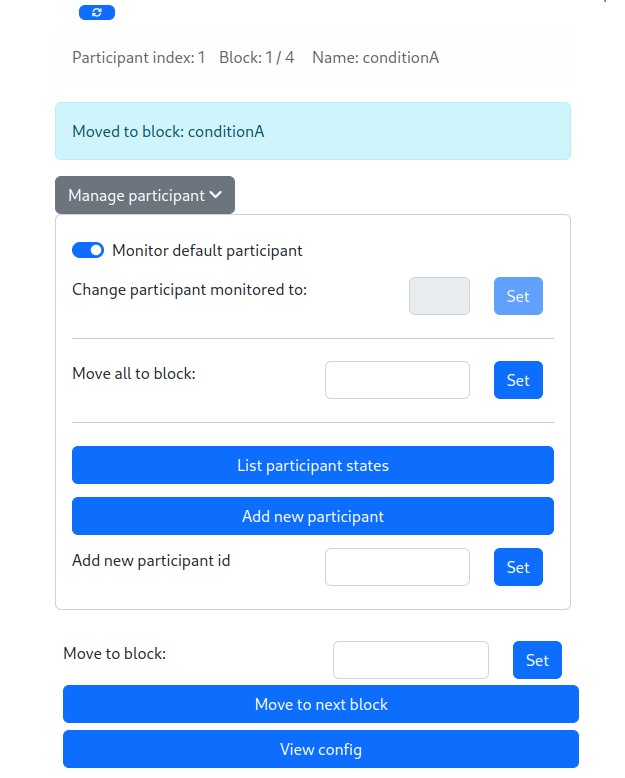
|
|
277
|
+
|
|
278
|
+
|
|
279
|
+
## Loading experiment through API
|
|
280
|
+
A configuration can be loaded and managed by importing `experiment_server.Experiment`.
|
|
281
|
+
|
|
282
|
+
## Generate expanded configs
|
|
283
|
+
A config file (i.e. `.toml` file), can be expanded to JSON with the following command
|
|
284
|
+
|
|
285
|
+
```sh
|
|
286
|
+
$ experiment-server generate-config-json sample_config.toml --participant-range 5
|
|
287
|
+
```
|
|
288
|
+
|
|
289
|
+
The above will generate the expanded configs for participant indices 1 to 5 as JSON output on stdout. This result can be written out to individual JSON files by setting the `--out-dir`/`-d` to a directory. See more options with `--help`
|
|
290
|
+
|
|
291
|
+
## Function calls in config
|
|
292
|
+
A function call in the config is represented by a table, with the following keys
|
|
293
|
+
- `function_name`: This should be one of the names in the supported functions list below.
|
|
294
|
+
- `args`: The arguments to be passed to the function represented by `function_name`. This can be a list or a table/dict. They should unpack with `*` or `**` respectively when called with the corresponding function.
|
|
295
|
+
- (optional) `params`: function-specific configurations to apply with the function calls.
|
|
296
|
+
- (optional) `id`: A unique identifier to group function calls.
|
|
297
|
+
|
|
298
|
+
A table that has keys other than the above keys would not be treated as a function call. Any function calls in different places of the config with the same `id` would be treated as a single group. Tables without an `id` are grouped based on their key-value pairs. Groups are used to identify how some parameters affect the results (e.g., `unique` for `choices`). Function calls can also be in `configurations.variabels`. Note that all function calls are made after the `extends` are resolved and variables from `configurations.variabels` are replaced.
|
|
299
|
+
|
|
300
|
+
### Supported functions
|
|
301
|
+
- `choices`: Calls [random.choices](https://docs.python.org/3/library/random.html#random.choices). `params` can be a table/dictionary which can have the key `unique`. The value of `unique` must be `true` or `false`. By default `unique` is `false`. If it's `true`, within a group of function calls, no value from the population passed to `random.choices` is repeated for a given participant.
|
|
302
|
+
|
|
303
|
+
### Example function calls
|
|
304
|
+
```toml
|
|
305
|
+
param = { function_name = "choices", args = [[1 , 2 , 3 , 4]], params = { unique = true } }
|
|
306
|
+
```
|
|
307
|
+
```toml
|
|
308
|
+
param = { foo = "test", bar = { function_name = "choices", args = { population = ["w", "x", "y", "z"], k = 1 } } }
|
|
309
|
+
```
|
|
310
|
+
|
|
311
|
+
For more on the `experiemnt-server` and how it can be used see the [wiki](https://github.com/ahmed-shariff/experiment_server/wiki)
|
|
312
|
+
|
|
313
|
+
# Wishlist (todo list?)
|
|
314
|
+
- Improved docs
|
|
315
|
+
- Add the option of using dict values in order
|
|
316
|
+
|
|
@@ -0,0 +1,277 @@
|
|
|
1
|
+
# Overview
|
|
2
|
+
|
|
3
|
+
This is a Python application that allows you to create/maintain/manage study configurations away from your implementations. `experiment-server` has several different interfaces (see below) to allow using it in a range of different scenarios. I've used it with Python, js and [Unity projects](https://github.com/ahmed-shariff/experiment_server/wiki/Using-with-Unity). See the [wiki](https://github.com/ahmed-shariff/experiment_server/wiki) for examples.
|
|
4
|
+
|
|
5
|
+
Documentation is available at [https://shariff-faleel.com/experiment_server/](https://shariff-faleel.com/experiment_server/)
|
|
6
|
+
|
|
7
|
+
# Content
|
|
8
|
+
|
|
9
|
+
- [Overview](#overview)
|
|
10
|
+
- [Installation](#installation)
|
|
11
|
+
- [Usage](#usage)
|
|
12
|
+
- [Configuration of an experiment](#configuration-of-an-experiment)
|
|
13
|
+
- [Verify config](#verify-config)
|
|
14
|
+
- [Loading experiment through server](#loading-experiment-through-server)
|
|
15
|
+
- [Loading experiment through API](#loading-experiment-through-api)
|
|
16
|
+
- [Generate expanded config files](#generate-expanded-config-files)
|
|
17
|
+
- [Function calls in config](#function-calls-in-config)
|
|
18
|
+
- [Supported functions](#supported-functions)
|
|
19
|
+
- [Example function calls](#example-function-calls)
|
|
20
|
+
|
|
21
|
+
# Installation
|
|
22
|
+
|
|
23
|
+
Install it directly into an activated virtual environment:
|
|
24
|
+
|
|
25
|
+
```text
|
|
26
|
+
$ pip install experiment-server
|
|
27
|
+
```
|
|
28
|
+
|
|
29
|
+
or add it to your [Poetry](https://poetry.eustace.io/) project:
|
|
30
|
+
|
|
31
|
+
```text
|
|
32
|
+
$ poetry add experiment-server
|
|
33
|
+
```
|
|
34
|
+
|
|
35
|
+
# Usage
|
|
36
|
+
## Configuration of an experiment
|
|
37
|
+
The configuration is defined in a [toml](https://toml.io/en/) file.
|
|
38
|
+
|
|
39
|
+
A config file can be generated as follows
|
|
40
|
+
```sh
|
|
41
|
+
$ experiment-server new-config-file new_config.toml
|
|
42
|
+
```
|
|
43
|
+
|
|
44
|
+
See example `.toml` below for how the configuration can be defined.
|
|
45
|
+
|
|
46
|
+
```toml
|
|
47
|
+
# The `configuration` table contains the settings of the study/experiment itself
|
|
48
|
+
[configuration]
|
|
49
|
+
# The `order` is an array of block names or an array of array of block names.
|
|
50
|
+
order = [["conditionA", "conditionB", "conditionA", "conditionB"]]
|
|
51
|
+
# The `groups` and `within_groups` are optional keys that allows you to define how the
|
|
52
|
+
# conditions specified in `order` will be managed. `groups` would dictate how the top
|
|
53
|
+
# level array of `order` will be handled. `within_groups` would dictate how the conditions
|
|
54
|
+
# in the nested arrays (if specified) would be managed. These keys can have one
|
|
55
|
+
# of the following values.
|
|
56
|
+
# - "latin_square": Apply latin square to balance the values.
|
|
57
|
+
# - "randomize": For each participant randomize the order of the values in the array.
|
|
58
|
+
# - "as_is": Use the order of the values as specified.
|
|
59
|
+
# When not specified, the default value is "as_is" for both keys.
|
|
60
|
+
groups = "latin_square"
|
|
61
|
+
within_groups= "randomize"
|
|
62
|
+
# The random seed to use for any randomization. Default seed is 0. The seed will be
|
|
63
|
+
# the value of random_seed + participant_index
|
|
64
|
+
random_seed = 0
|
|
65
|
+
|
|
66
|
+
# The subtable `variabels` are values that can be used anywhere when defining the blocks.
|
|
67
|
+
# Any variable can be used by appending "$" before the variable name in the blocks. See
|
|
68
|
+
# below for an exmaple of how variables can be used
|
|
69
|
+
[configuration.variables]
|
|
70
|
+
TRIALS_PER_ITEM = 3
|
|
71
|
+
|
|
72
|
+
# Blocks are defined as an array of tables. Each block must contain `name` and the
|
|
73
|
+
# subtable `config`. Optionally, a block can also specify `extends`, whish is a `name` of
|
|
74
|
+
# another block. See below for more explanation on how `extends` works
|
|
75
|
+
|
|
76
|
+
# Block: Condition A
|
|
77
|
+
[[blocks]]
|
|
78
|
+
name = "conditionA"
|
|
79
|
+
|
|
80
|
+
# The `config` subtable can have any key-values. Note that `name` and `participant_index`
|
|
81
|
+
# will be added to the `config` when this file is being processed. Hence, those keys
|
|
82
|
+
# will be overwritten if used in this subtable.
|
|
83
|
+
[blocks.config]
|
|
84
|
+
trialsPerItem = "$TRIALS_PER_ITEM"
|
|
85
|
+
param1 = 1
|
|
86
|
+
# The value can also be a function call. A function call is represented as a table
|
|
87
|
+
# The following function call will be replaced with a call to
|
|
88
|
+
# [random.choices](https://docs.python.org/3/library/random.html#random.choices)
|
|
89
|
+
# See `# Function calls` in README for more information.
|
|
90
|
+
param2 = { function_name = "choices", args = { population = [1 , 2 , 3 ], k = 2}}
|
|
91
|
+
param3 = { function_name = "choices", args = [[1 , 2 , 3 ]], params = { unique = true } }
|
|
92
|
+
|
|
93
|
+
# Block: Condition B
|
|
94
|
+
[[blocks]]
|
|
95
|
+
name = "conditionB"
|
|
96
|
+
extends = "conditionA"
|
|
97
|
+
|
|
98
|
+
# Since "conditionB" is extending "conditionA", the keys in the `config` subtable of
|
|
99
|
+
# the block "conditionA" not defined in the `config` subtable of "conditionB" will be copied
|
|
100
|
+
# to the `config` subtable of "conditionB". In this example, `param1`, `param2` and
|
|
101
|
+
# `trialsPerItem` will be copied over here.
|
|
102
|
+
[blocks.config]
|
|
103
|
+
param3 = [2]
|
|
104
|
+
```
|
|
105
|
+
|
|
106
|
+
See [toml spec](https://toml.io/en/v1.0.0) for more information on the format of a toml file.
|
|
107
|
+
|
|
108
|
+
The above config file, after being processed, would result in the following list of blocks for participant number 1:
|
|
109
|
+
```json
|
|
110
|
+
[
|
|
111
|
+
{
|
|
112
|
+
"name": "conditionB",
|
|
113
|
+
"extends": "conditionA",
|
|
114
|
+
"config": {
|
|
115
|
+
"param3": [
|
|
116
|
+
2
|
|
117
|
+
],
|
|
118
|
+
"trialsPerItem": 3,
|
|
119
|
+
"param1": 1,
|
|
120
|
+
"param2": [
|
|
121
|
+
1,
|
|
122
|
+
2
|
|
123
|
+
],
|
|
124
|
+
"participant_index": 1,
|
|
125
|
+
"name": "conditionB",
|
|
126
|
+
"block_id": 0
|
|
127
|
+
}
|
|
128
|
+
},
|
|
129
|
+
{
|
|
130
|
+
"name": "conditionA",
|
|
131
|
+
"config": {
|
|
132
|
+
"trialsPerItem": 3,
|
|
133
|
+
"param1": 1,
|
|
134
|
+
"param2": [
|
|
135
|
+
2,
|
|
136
|
+
2
|
|
137
|
+
],
|
|
138
|
+
"param3": [
|
|
139
|
+
3
|
|
140
|
+
],
|
|
141
|
+
"participant_index": 1,
|
|
142
|
+
"name": "conditionA",
|
|
143
|
+
"block_id": 1
|
|
144
|
+
}
|
|
145
|
+
},
|
|
146
|
+
{
|
|
147
|
+
"name": "conditionA",
|
|
148
|
+
"config": {
|
|
149
|
+
"trialsPerItem": 3,
|
|
150
|
+
"param1": 1,
|
|
151
|
+
"param2": [
|
|
152
|
+
1,
|
|
153
|
+
1
|
|
154
|
+
],
|
|
155
|
+
"param3": [
|
|
156
|
+
2
|
|
157
|
+
],
|
|
158
|
+
"participant_index": 1,
|
|
159
|
+
"name": "conditionA",
|
|
160
|
+
"block_id": 2
|
|
161
|
+
}
|
|
162
|
+
},
|
|
163
|
+
{
|
|
164
|
+
"name": "conditionB",
|
|
165
|
+
"extends": "conditionA",
|
|
166
|
+
"config": {
|
|
167
|
+
"param3": [
|
|
168
|
+
2
|
|
169
|
+
],
|
|
170
|
+
"trialsPerItem": 3,
|
|
171
|
+
"param1": 1,
|
|
172
|
+
"param2": [
|
|
173
|
+
3,
|
|
174
|
+
1
|
|
175
|
+
],
|
|
176
|
+
"participant_index": 1,
|
|
177
|
+
"name": "conditionB",
|
|
178
|
+
"block_id": 3
|
|
179
|
+
}
|
|
180
|
+
}
|
|
181
|
+
]
|
|
182
|
+
```
|
|
183
|
+
|
|
184
|
+
## Verify config
|
|
185
|
+
A config file can be validated by running:
|
|
186
|
+
```sh
|
|
187
|
+
$ experiment-server verify-config-file sample_config.toml
|
|
188
|
+
```
|
|
189
|
+
This will show how the expanded config looks like for the first 5 participants.
|
|
190
|
+
|
|
191
|
+
## Loading experiment through server
|
|
192
|
+
After installation, the server can used as:
|
|
193
|
+
|
|
194
|
+
```sh
|
|
195
|
+
$ experiment-server run sample_config.toml
|
|
196
|
+
```
|
|
197
|
+
|
|
198
|
+
See more options with `--help`
|
|
199
|
+
|
|
200
|
+
The server exposes the following REST API:
|
|
201
|
+
|
|
202
|
+
- [GET] `/api/blocks-count` / `/api/blocks-count/:participant-id` - Return the number of blocks in the configuration loaded. For a given config, the `blocks-count` will be the same for all participants.
|
|
203
|
+
|
|
204
|
+
- [GET] `/api/block-id` / `/api/block-id/:participant-id` - Returns the current block-id. If `participant-id` is provided, the blcok-id of the participant will be returned, if not the default participant's block-id will be returned. Note that the block-id is 0 indexed. i.e., the first block's block-id is 0.
|
|
205
|
+
|
|
206
|
+
- [GET] `/api/active` / `/api/active/:participant-id` - Returns the status for `participant-id`, if `participant-id` is not provided, will return the status of the default participant. Will be `false` if the participant was just initialized or the participant has gone through all blocks. To initialize the participant's status (or move to a given block), use the `move-to-next` or `move-to-block` endpoints.
|
|
207
|
+
|
|
208
|
+
- [GET] `/api/config` / `api/config/:participant-id` - Return the config for `participant-id`, if `participant-id` is not provided, will return the config for the default participant.
|
|
209
|
+
|
|
210
|
+
- [GET] `/api/summary-data` / `/api/summary-data/:participant-id` - Returns the summary of the configs for `participant-id`, if `participant-id` is not provided, returns the summary of the configs for the default participant. Currently, the summary is a JSON with the following keys
|
|
211
|
+
|
|
212
|
+
- "participant_index"
|
|
213
|
+
|
|
214
|
+
- "config_length"
|
|
215
|
+
|
|
216
|
+
- [GET] `/api/all-configs` / `/api/all-configs/:participant-id` - Returns all the configs as a list for the `participant-id`, if `participant-id` is not provided, returns the configs for the default participant.This is akin having all the results from calling the `config` endpoint for each block in one list.
|
|
217
|
+
|
|
218
|
+
- [GET] `/api/status-string` / `/api/status-string/:participant-id` - Returns status string for `participant-id`, if `participant-id` is not provided, returns statu string the default participant.
|
|
219
|
+
|
|
220
|
+
- [POST] `/api/move-to-next` / `/api/move-to-next/:participant-id` - Move `participant-id` to the next block, if `participant-id` is not provided, move the default participant to the next block. If the participant was not initialized (`active` is false), will make be marked as active (`active` will be set to true). If the block the participant was in was the last block, they will be marked as not active (`active` will be set to false).
|
|
221
|
+
|
|
222
|
+
- [POST] `/api/move-to-block/:block-id` / `/api/move-to-block/:participant-id/:block-id` - Move `participant-id` to the block number indicated by `block-id`, if `participant-id` is not provided, move the default participant to the block number indicated by `block-id`. If the participant was not initialized (`active` is false), will make be marked as active (`active` will be set to true). Will fail if the `block-id` is below 0 or above the length of the config.
|
|
223
|
+
|
|
224
|
+
- [POST] `/api/move-all-to-block/:block-id` - Move all active participants (`active` returns true) to the block number indicated by `block-id`.
|
|
225
|
+
|
|
226
|
+
- [POST] `/api/shutdown` - Shuts-down the server.
|
|
227
|
+
|
|
228
|
+
- [PUT] `/api/new-participant` - Adds a new participant and returns the new participant-id. The new participant-id will be the largest current participant-id +1.
|
|
229
|
+
|
|
230
|
+
- [PUT] `/api/add-participant/:participant-id` - Add a new participant with `participant-id`. If there is already a participant with the `participant-id`, this will fail.
|
|
231
|
+
|
|
232
|
+
For a Python application, `experiment_server.Client` can be used to access configs from the server. Also, the server can be launched programmatically using `experiment_server.server_process` which returns a [`Process`](https://docs.python.org/3/library/multiprocessing.html#multiprocessing.Process) object.
|
|
233
|
+
|
|
234
|
+
**NOTE**: If the config file served is changed, the new config will be loaded, but the state of the participants will be maintained. i.e., the added participants and the block id they are at will not change. To move the block ids for all active participants, you would have to call the `move-all-to-block` endpoint.
|
|
235
|
+
|
|
236
|
+
The server also provides a simple web interface, which can be accessed at `/` or `/index`. This interface allows to manage and monitor the flow of the experiment:
|
|
237
|
+
|
|
238
|
+

|
|
239
|
+
|
|
240
|
+
|
|
241
|
+
## Loading experiment through API
|
|
242
|
+
A configuration can be loaded and managed by importing `experiment_server.Experiment`.
|
|
243
|
+
|
|
244
|
+
## Generate expanded configs
|
|
245
|
+
A config file (i.e. `.toml` file), can be expanded to JSON with the following command
|
|
246
|
+
|
|
247
|
+
```sh
|
|
248
|
+
$ experiment-server generate-config-json sample_config.toml --participant-range 5
|
|
249
|
+
```
|
|
250
|
+
|
|
251
|
+
The above will generate the expanded configs for participant indices 1 to 5 as JSON output on stdout. This result can be written out to individual JSON files by setting the `--out-dir`/`-d` to a directory. See more options with `--help`
|
|
252
|
+
|
|
253
|
+
## Function calls in config
|
|
254
|
+
A function call in the config is represented by a table, with the following keys
|
|
255
|
+
- `function_name`: This should be one of the names in the supported functions list below.
|
|
256
|
+
- `args`: The arguments to be passed to the function represented by `function_name`. This can be a list or a table/dict. They should unpack with `*` or `**` respectively when called with the corresponding function.
|
|
257
|
+
- (optional) `params`: function-specific configurations to apply with the function calls.
|
|
258
|
+
- (optional) `id`: A unique identifier to group function calls.
|
|
259
|
+
|
|
260
|
+
A table that has keys other than the above keys would not be treated as a function call. Any function calls in different places of the config with the same `id` would be treated as a single group. Tables without an `id` are grouped based on their key-value pairs. Groups are used to identify how some parameters affect the results (e.g., `unique` for `choices`). Function calls can also be in `configurations.variabels`. Note that all function calls are made after the `extends` are resolved and variables from `configurations.variabels` are replaced.
|
|
261
|
+
|
|
262
|
+
### Supported functions
|
|
263
|
+
- `choices`: Calls [random.choices](https://docs.python.org/3/library/random.html#random.choices). `params` can be a table/dictionary which can have the key `unique`. The value of `unique` must be `true` or `false`. By default `unique` is `false`. If it's `true`, within a group of function calls, no value from the population passed to `random.choices` is repeated for a given participant.
|
|
264
|
+
|
|
265
|
+
### Example function calls
|
|
266
|
+
```toml
|
|
267
|
+
param = { function_name = "choices", args = [[1 , 2 , 3 , 4]], params = { unique = true } }
|
|
268
|
+
```
|
|
269
|
+
```toml
|
|
270
|
+
param = { foo = "test", bar = { function_name = "choices", args = { population = ["w", "x", "y", "z"], k = 1 } } }
|
|
271
|
+
```
|
|
272
|
+
|
|
273
|
+
For more on the `experiemnt-server` and how it can be used see the [wiki](https://github.com/ahmed-shariff/experiment_server/wiki)
|
|
274
|
+
|
|
275
|
+
# Wishlist (todo list?)
|
|
276
|
+
- Improved docs
|
|
277
|
+
- Add the option of using dict values in order
|
|
@@ -0,0 +1,31 @@
|
|
|
1
|
+
from importlib_metadata import version
|
|
2
|
+
import logging
|
|
3
|
+
from loguru import logger
|
|
4
|
+
|
|
5
|
+
__version__ = version(__package__)
|
|
6
|
+
|
|
7
|
+
|
|
8
|
+
class __InterceptHandler(logging.Handler):
|
|
9
|
+
def emit(self, record):
|
|
10
|
+
# Get corresponding Loguru level if it exists
|
|
11
|
+
try:
|
|
12
|
+
level = logger.level(record.levelname).name
|
|
13
|
+
except ValueError:
|
|
14
|
+
level = record.levelno
|
|
15
|
+
|
|
16
|
+
# Find caller from where originated the logged message
|
|
17
|
+
frame, depth = logging.currentframe(), 2
|
|
18
|
+
while frame.f_code.co_filename == logging.__file__:
|
|
19
|
+
frame = frame.f_back
|
|
20
|
+
depth += 1
|
|
21
|
+
|
|
22
|
+
logger.opt(depth=depth, exception=record.exc_info).log(level, record.getMessage())
|
|
23
|
+
|
|
24
|
+
|
|
25
|
+
logging.basicConfig(handlers=[__InterceptHandler()], level=0)
|
|
26
|
+
|
|
27
|
+
from experiment_server._server import server_process
|
|
28
|
+
from experiment_server._client import Client
|
|
29
|
+
from experiment_server._api import Experiment
|
|
30
|
+
|
|
31
|
+
__all__ = ['server_process', 'Client', 'Experiment']
|