experiment_server 0.3.0__tar.gz → 0.3.2__tar.gz
This diff represents the content of publicly available package versions that have been released to one of the supported registries. The information contained in this diff is provided for informational purposes only and reflects changes between package versions as they appear in their respective public registries.
- {experiment_server-0.3.0 → experiment_server-0.3.2}/PKG-INFO +25 -5
- {experiment_server-0.3.0 → experiment_server-0.3.2}/README.md +21 -4
- {experiment_server-0.3.0 → experiment_server-0.3.2}/experiment_server/__init__.py +1 -1
- {experiment_server-0.3.0 → experiment_server-0.3.2}/experiment_server/_client.py +35 -2
- {experiment_server-0.3.0 → experiment_server-0.3.2}/experiment_server/_server.py +8 -1
- {experiment_server-0.3.0 → experiment_server-0.3.2}/experiment_server/cli.py +14 -1
- {experiment_server-0.3.0 → experiment_server-0.3.2}/pyproject.toml +8 -1
- {experiment_server-0.3.0 → experiment_server-0.3.2}/LICENSE.md +0 -0
- {experiment_server-0.3.0 → experiment_server-0.3.2}/experiment_server/_api.py +0 -0
- {experiment_server-0.3.0 → experiment_server-0.3.2}/experiment_server/_participant_ordering.py +0 -0
- {experiment_server-0.3.0 → experiment_server-0.3.2}/experiment_server/_process_config.py +0 -0
- {experiment_server-0.3.0 → experiment_server-0.3.2}/experiment_server/static/css/bootstrap-5.2.3.min.css +0 -0
- {experiment_server-0.3.0 → experiment_server-0.3.2}/experiment_server/static/index.html +0 -0
- {experiment_server-0.3.0 → experiment_server-0.3.2}/experiment_server/static/initconfig.html +0 -0
- {experiment_server-0.3.0 → experiment_server-0.3.2}/experiment_server/static/js/alpinejs3.min.js +0 -0
- {experiment_server-0.3.0 → experiment_server-0.3.2}/experiment_server/static/js/bootstrap-4.5.0.min.js +0 -0
- {experiment_server-0.3.0 → experiment_server-0.3.2}/experiment_server/static/js/fontawesome-1e694dd391.js +0 -0
- {experiment_server-0.3.0 → experiment_server-0.3.2}/experiment_server/static/js/htmx-1.9.10.js +0 -0
- {experiment_server-0.3.0 → experiment_server-0.3.2}/experiment_server/static/js/jquery-3.5.1.min.js +0 -0
- {experiment_server-0.3.0 → experiment_server-0.3.2}/experiment_server/static/js/popper-1.16.0.min.js +0 -0
- {experiment_server-0.3.0 → experiment_server-0.3.2}/experiment_server/static/js/sweetalert2-11.js +0 -0
- {experiment_server-0.3.0 → experiment_server-0.3.2}/experiment_server/utils.py +0 -0
- {experiment_server-0.3.0 → experiment_server-0.3.2}/sample_config.toml +0 -0
|
@@ -1,7 +1,8 @@
|
|
|
1
1
|
Metadata-Version: 2.1
|
|
2
2
|
Name: experiment-server
|
|
3
|
-
Version: 0.3.
|
|
3
|
+
Version: 0.3.2
|
|
4
4
|
Summary: Server for experiments to get configuarations from
|
|
5
|
+
Home-page: https://shariff-faleel.com/experiment_server/
|
|
5
6
|
License: MIT
|
|
6
7
|
Keywords: experiment,study-design
|
|
7
8
|
Author: Ahmed Shariff
|
|
@@ -30,12 +31,16 @@ Requires-Dist: tabulate (>=0.8.9)
|
|
|
30
31
|
Requires-Dist: toml (>=0.10.2)
|
|
31
32
|
Requires-Dist: tornado (>=6.2)
|
|
32
33
|
Requires-Dist: watchdog (>=2.1.9)
|
|
34
|
+
Project-URL: Documentation, https://shariff-faleel.com/experiment_server/documentation/
|
|
35
|
+
Project-URL: Repository, https://github.com/ahmed-shariff/experiment_server
|
|
33
36
|
Description-Content-Type: text/markdown
|
|
34
37
|
|
|
35
38
|
# Overview
|
|
36
39
|
|
|
37
40
|
This is a Python application that allows you to create/maintain/manage study configurations away from your implementations. `experiment-server` has several different interfaces (see below) to allow using it in a range of different scenarios. I've used it with Python, js and [Unity projects](https://github.com/ahmed-shariff/experiment_server/wiki/Using-with-Unity). See the [wiki](https://github.com/ahmed-shariff/experiment_server/wiki) for examples.
|
|
38
41
|
|
|
42
|
+
Documentation is available at [https://shariff-faleel.com/experiment_server/](https://shariff-faleel.com/experiment_server/)
|
|
43
|
+
|
|
39
44
|
# Content
|
|
40
45
|
|
|
41
46
|
- [Overview](#overview)
|
|
@@ -230,20 +235,35 @@ $ experiment-server run sample_config.toml
|
|
|
230
235
|
See more options with `--help`
|
|
231
236
|
|
|
232
237
|
The server exposes the following REST API:
|
|
233
|
-
|
|
238
|
+
|
|
239
|
+
- [GET] `/api/blocks-count` / `/api/blocks-count/:participant-id` - Return the number of blocks in the configuration loaded. For a given config, the `blocks-count` will be the same for all participants.
|
|
240
|
+
|
|
234
241
|
- [GET] `/api/block-id` / `/api/block-id/:participant-id` - Returns the current block-id. If `participant-id` is provided, the blcok-id of the participant will be returned, if not the default participant's block-id will be returned. Note that the block-id is 0 indexed. i.e., the first block's block-id is 0.
|
|
242
|
+
|
|
235
243
|
- [GET] `/api/active` / `/api/active/:participant-id` - Returns the status for `participant-id`, if `participant-id` is not provided, will return the status of the default participant. Will be `false` if the participant was just initialized or the participant has gone through all blocks. To initialize the participant's status (or move to a given block), use the `move-to-next` or `move-to-block` endpoints.
|
|
236
|
-
|
|
244
|
+
|
|
245
|
+
- [GET] `/api/config` / `api/config/:participant-id` - Return the config for `participant-id`, if `participant-id` is not provided, will return the config for the default participant.
|
|
246
|
+
|
|
237
247
|
- [GET] `/api/summary-data` / `/api/summary-data/:participant-id` - Returns the summary of the configs for `participant-id`, if `participant-id` is not provided, returns the summary of the configs for the default participant. Currently, the summary is a JSON with the following keys
|
|
248
|
+
|
|
238
249
|
- "participant_index"
|
|
250
|
+
|
|
239
251
|
- "config_length"
|
|
240
|
-
|
|
252
|
+
|
|
253
|
+
- [GET] `/api/all-configs` / `/api/all-configs/:participant-id` - Returns all the configs as a list for the `participant-id`, if `participant-id` is not provided, returns the configs for the default participant.This is akin having all the results from calling the `config` endpoint for each block in one list.
|
|
254
|
+
|
|
241
255
|
- [GET] `/api/status-string` / `/api/status-string/:participant-id` - Returns status string for `participant-id`, if `participant-id` is not provided, returns statu string the default participant.
|
|
256
|
+
|
|
242
257
|
- [POST] `/api/move-to-next` / `/api/move-to-next/:participant-id` - Move `participant-id` to the next block, if `participant-id` is not provided, move the default participant to the next block. If the participant was not initialized (`active` is false), will make be marked as active (`active` will be set to true). If the block the participant was in was the last block, they will be marked as not active (`active` will be set to false).
|
|
258
|
+
|
|
243
259
|
- [POST] `/api/move-to-block/:block-id` / `/api/move-to-block/:participant-id/:block-id` - Move `participant-id` to the block number indicated by `block-id`, if `participant-id` is not provided, move the default participant to the block number indicated by `block-id`. If the participant was not initialized (`active` is false), will make be marked as active (`active` will be set to true). Will fail if the `block-id` is below 0 or above the length of the config.
|
|
260
|
+
|
|
244
261
|
- [POST] `/api/move-all-to-block/:block-id` - Move all active participants (`active` returns true) to the block number indicated by `block-id`.
|
|
262
|
+
|
|
245
263
|
- [POST] `/api/shutdown` - Shuts-down the server.
|
|
264
|
+
|
|
246
265
|
- [PUT] `/api/new-participant` - Adds a new participant and returns the new participant-id. The new participant-id will be the largest current participant-id +1.
|
|
266
|
+
|
|
247
267
|
- [PUT] `/api/add-participant/:participant-id` - Add a new participant with `participant-id`. If there is already a participant with the `participant-id`, this will fail.
|
|
248
268
|
|
|
249
269
|
For a Python application, `experiment_server.Client` can be used to access configs from the server. Also, the server can be launched programmatically using `experiment_server.server_process` which returns a [`Process`](https://docs.python.org/3/library/multiprocessing.html#multiprocessing.Process) object.
|
|
@@ -252,7 +272,7 @@ For a Python application, `experiment_server.Client` can be used to access confi
|
|
|
252
272
|
|
|
253
273
|
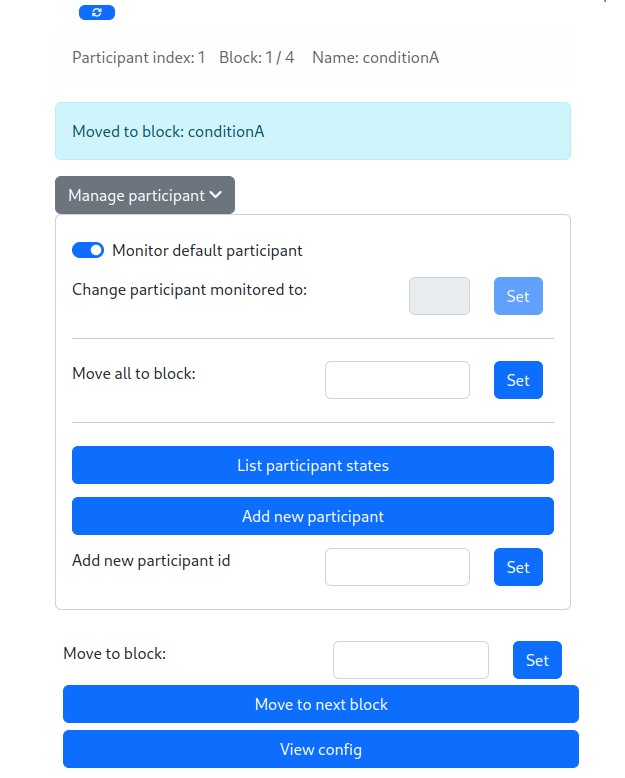
The server also provides a simple web interface, which can be accessed at `/` or `/index`. This interface allows to manage and monitor the flow of the experiment:
|
|
254
274
|
|
|
255
|
-

|
|
275
|
+
|
|
256
276
|
|
|
257
277
|
|
|
258
278
|
## Loading experiment through API
|
|
@@ -2,6 +2,8 @@
|
|
|
2
2
|
|
|
3
3
|
This is a Python application that allows you to create/maintain/manage study configurations away from your implementations. `experiment-server` has several different interfaces (see below) to allow using it in a range of different scenarios. I've used it with Python, js and [Unity projects](https://github.com/ahmed-shariff/experiment_server/wiki/Using-with-Unity). See the [wiki](https://github.com/ahmed-shariff/experiment_server/wiki) for examples.
|
|
4
4
|
|
|
5
|
+
Documentation is available at [https://shariff-faleel.com/experiment_server/](https://shariff-faleel.com/experiment_server/)
|
|
6
|
+
|
|
5
7
|
# Content
|
|
6
8
|
|
|
7
9
|
- [Overview](#overview)
|
|
@@ -196,20 +198,35 @@ $ experiment-server run sample_config.toml
|
|
|
196
198
|
See more options with `--help`
|
|
197
199
|
|
|
198
200
|
The server exposes the following REST API:
|
|
199
|
-
|
|
201
|
+
|
|
202
|
+
- [GET] `/api/blocks-count` / `/api/blocks-count/:participant-id` - Return the number of blocks in the configuration loaded. For a given config, the `blocks-count` will be the same for all participants.
|
|
203
|
+
|
|
200
204
|
- [GET] `/api/block-id` / `/api/block-id/:participant-id` - Returns the current block-id. If `participant-id` is provided, the blcok-id of the participant will be returned, if not the default participant's block-id will be returned. Note that the block-id is 0 indexed. i.e., the first block's block-id is 0.
|
|
205
|
+
|
|
201
206
|
- [GET] `/api/active` / `/api/active/:participant-id` - Returns the status for `participant-id`, if `participant-id` is not provided, will return the status of the default participant. Will be `false` if the participant was just initialized or the participant has gone through all blocks. To initialize the participant's status (or move to a given block), use the `move-to-next` or `move-to-block` endpoints.
|
|
202
|
-
|
|
207
|
+
|
|
208
|
+
- [GET] `/api/config` / `api/config/:participant-id` - Return the config for `participant-id`, if `participant-id` is not provided, will return the config for the default participant.
|
|
209
|
+
|
|
203
210
|
- [GET] `/api/summary-data` / `/api/summary-data/:participant-id` - Returns the summary of the configs for `participant-id`, if `participant-id` is not provided, returns the summary of the configs for the default participant. Currently, the summary is a JSON with the following keys
|
|
211
|
+
|
|
204
212
|
- "participant_index"
|
|
213
|
+
|
|
205
214
|
- "config_length"
|
|
206
|
-
|
|
215
|
+
|
|
216
|
+
- [GET] `/api/all-configs` / `/api/all-configs/:participant-id` - Returns all the configs as a list for the `participant-id`, if `participant-id` is not provided, returns the configs for the default participant.This is akin having all the results from calling the `config` endpoint for each block in one list.
|
|
217
|
+
|
|
207
218
|
- [GET] `/api/status-string` / `/api/status-string/:participant-id` - Returns status string for `participant-id`, if `participant-id` is not provided, returns statu string the default participant.
|
|
219
|
+
|
|
208
220
|
- [POST] `/api/move-to-next` / `/api/move-to-next/:participant-id` - Move `participant-id` to the next block, if `participant-id` is not provided, move the default participant to the next block. If the participant was not initialized (`active` is false), will make be marked as active (`active` will be set to true). If the block the participant was in was the last block, they will be marked as not active (`active` will be set to false).
|
|
221
|
+
|
|
209
222
|
- [POST] `/api/move-to-block/:block-id` / `/api/move-to-block/:participant-id/:block-id` - Move `participant-id` to the block number indicated by `block-id`, if `participant-id` is not provided, move the default participant to the block number indicated by `block-id`. If the participant was not initialized (`active` is false), will make be marked as active (`active` will be set to true). Will fail if the `block-id` is below 0 or above the length of the config.
|
|
223
|
+
|
|
210
224
|
- [POST] `/api/move-all-to-block/:block-id` - Move all active participants (`active` returns true) to the block number indicated by `block-id`.
|
|
225
|
+
|
|
211
226
|
- [POST] `/api/shutdown` - Shuts-down the server.
|
|
227
|
+
|
|
212
228
|
- [PUT] `/api/new-participant` - Adds a new participant and returns the new participant-id. The new participant-id will be the largest current participant-id +1.
|
|
229
|
+
|
|
213
230
|
- [PUT] `/api/add-participant/:participant-id` - Add a new participant with `participant-id`. If there is already a participant with the `participant-id`, this will fail.
|
|
214
231
|
|
|
215
232
|
For a Python application, `experiment_server.Client` can be used to access configs from the server. Also, the server can be launched programmatically using `experiment_server.server_process` which returns a [`Process`](https://docs.python.org/3/library/multiprocessing.html#multiprocessing.Process) object.
|
|
@@ -218,7 +235,7 @@ For a Python application, `experiment_server.Client` can be used to access confi
|
|
|
218
235
|
|
|
219
236
|
The server also provides a simple web interface, which can be accessed at `/` or `/index`. This interface allows to manage and monitor the flow of the experiment:
|
|
220
237
|
|
|
221
|
-

|
|
238
|
+

|
|
222
239
|
|
|
223
240
|
|
|
224
241
|
## Loading experiment through API
|
|
@@ -34,38 +34,71 @@ class Client:
|
|
|
34
34
|
return self._request(end_point, "PUT")
|
|
35
35
|
|
|
36
36
|
def move_to_next(self, participant_index:int|None=None) -> Tuple[bool, dict]:
|
|
37
|
+
""" Moves the pointer to the current block to the next block for `participant_index`.
|
|
38
|
+
if `participant_index` is None, seld.default_participant_index is used."""
|
|
37
39
|
url = _process_participant_index("move-to-next", participant_index)
|
|
38
40
|
return self._post(url)
|
|
39
41
|
|
|
40
42
|
def get_config(self, participant_index:int|None=None) -> Tuple[bool, dict]:
|
|
43
|
+
"""Return the config of the current block for `participant_index`.
|
|
44
|
+
if `participant_index` is None, seld.default_participant_index is used.
|
|
45
|
+
If the experiment has not started (`move_to_next` has not
|
|
46
|
+
been called atleast once), this will return `None`."""
|
|
41
47
|
url = _process_participant_index("config", participant_index)
|
|
42
48
|
return self._get(url)
|
|
43
49
|
|
|
44
|
-
def server_is_active(self) -> Tuple[bool, dict]:
|
|
45
|
-
|
|
50
|
+
def server_is_active(self, participant_index:int|None=None) -> Tuple[bool, dict]:
|
|
51
|
+
"""Returns the status for `participant-id`, if
|
|
52
|
+
`participant-id` is not provided, will return the status of
|
|
53
|
+
the default participant. Will be `false` if the participant
|
|
54
|
+
was just initialized or the participant has gone through all
|
|
55
|
+
blocks. To initialize the participant's status (or move to a
|
|
56
|
+
given block), use the `move-to-next` or `move-to-block`"""
|
|
57
|
+
url = _process_participant_index("active", participant_index)
|
|
58
|
+
return self._get(url)
|
|
46
59
|
|
|
47
60
|
def get_blocks_count(self, participant_index:int|None=None) -> Tuple[bool, dict]:
|
|
61
|
+
"""Return the number of blocks in the configuration
|
|
62
|
+
loaded. For a given config, the `blocks-count` will be the
|
|
63
|
+
same for all participants."""
|
|
48
64
|
url = _process_participant_index("blocks-count", participant_index)
|
|
49
65
|
return self._get(url)
|
|
50
66
|
|
|
51
67
|
def get_all_configs(self, participant_index:int|None=None) -> Tuple[bool, dict]:
|
|
68
|
+
"""Returns all the configs as a list for the `participant_index`,
|
|
69
|
+
if `participant_index` is not provided, returns the configs for
|
|
70
|
+
the default participant. This is akin having all the results
|
|
71
|
+
from calling `config` for each block in one list."""
|
|
52
72
|
url = _process_participant_index("all-configs", participant_index)
|
|
53
73
|
return self._get(url)
|
|
54
74
|
|
|
55
75
|
def move_to_block(self, block_id:int, participant_index:int|None=None) -> Tuple[bool, dict]:
|
|
76
|
+
"""Move `participant-id` to the block number indicated by
|
|
77
|
+
`block_id`, if `participant_index` is not provided, move the
|
|
78
|
+
default participant to the block number indicated by
|
|
79
|
+
`block_id`. If the participant was not initialized (`active`
|
|
80
|
+
is false), will make be marked as active (`active` will be set
|
|
81
|
+
to true). Will fail if the `block_id` is below 0 or above the
|
|
82
|
+
length of the config."""
|
|
56
83
|
assert isinstance(block_id, int), "`block` should be a int"
|
|
57
84
|
url = _process_participant_index("move-to-block", participant_index)
|
|
58
85
|
return self._post(f"{url}/{block_id}")
|
|
59
86
|
|
|
60
87
|
def new_participant(self) -> Tuple[bool, dict]:
|
|
88
|
+
"""Adds a new participant and returns the new
|
|
89
|
+
participant_index. The new participant_index will be the largest
|
|
90
|
+
current participant_index +1."""
|
|
61
91
|
return self._put("new-participant");
|
|
62
92
|
|
|
63
93
|
def add_participant(self, participant_index:int) -> Tuple[bool, dict]:
|
|
94
|
+
"""Add a new participant with `participant_index`. If there is already
|
|
95
|
+
a participant with the `participant_index`, this will fail. """
|
|
64
96
|
assert participant_index is not None
|
|
65
97
|
url = _process_participant_index("add-participant", participant_index)
|
|
66
98
|
return self._put(url);
|
|
67
99
|
|
|
68
100
|
def shutdown(self) -> Tuple[bool, dict]:
|
|
101
|
+
"""Shuts down the server."""
|
|
69
102
|
return self._post("shutdown")
|
|
70
103
|
|
|
71
104
|
|
|
@@ -43,6 +43,13 @@ def _server(config_file, default_participant_index, host="127.0.0.1", port=5000)
|
|
|
43
43
|
|
|
44
44
|
|
|
45
45
|
def server_process(config_file, default_participant_index=None, host="127.0.0.1", port="5000"):
|
|
46
|
+
"""Returns a Process object which can be used to launch experiment_server.
|
|
47
|
+
For example:
|
|
48
|
+
```py
|
|
49
|
+
p = server_process(config_file=config_file)
|
|
50
|
+
p.start()
|
|
51
|
+
```
|
|
52
|
+
"""
|
|
46
53
|
p = Process(target=_server,
|
|
47
54
|
kwargs={
|
|
48
55
|
"default_participant_index":default_participant_index,
|
|
@@ -275,7 +282,7 @@ class ExperimentHandler(RequestHandler):
|
|
|
275
282
|
return
|
|
276
283
|
|
|
277
284
|
if action == "blocks-count":
|
|
278
|
-
self.write(json.dumps(self.experiment.get_blocks_count()))
|
|
285
|
+
self.write(json.dumps(self.experiment.get_blocks_count(participant_id)))
|
|
279
286
|
elif action == "block-id":
|
|
280
287
|
self.write(json.dumps(self.experiment.get_participant_state(participant_id).block_id))
|
|
281
288
|
elif action == "active":
|
|
@@ -56,8 +56,21 @@ def generate_config_json(config_file, participant_index, participant_range, out_
|
|
|
56
56
|
@cli.command(aliases=["n", "new"])
|
|
57
57
|
@click.argument("new-file-location")
|
|
58
58
|
def new_config_file(new_file_location):
|
|
59
|
-
"""Create a new config file.
|
|
59
|
+
"""Create a new config file.
|
|
60
|
+
|
|
61
|
+
If parameter does not end with `.toml` assums it is a directory and create a directory.
|
|
62
|
+
If parameter is directory, creates a file named `new_config.toml` in the directory.
|
|
63
|
+
If parents do not exists, create them all!.
|
|
64
|
+
"""
|
|
60
65
|
out_location = Path(new_file_location)
|
|
66
|
+
|
|
67
|
+
if out_location.suffix is not ".toml":
|
|
68
|
+
if out_location.exists():
|
|
69
|
+
logger.error(f"{out_location} exists and does not end with `.toml`")
|
|
70
|
+
return
|
|
71
|
+
else:
|
|
72
|
+
out_location.mkdir(parents=True, exist_ok=True)
|
|
73
|
+
|
|
61
74
|
if out_location.is_dir():
|
|
62
75
|
out_location = out_location / "new_config.toml"
|
|
63
76
|
|
|
@@ -1,7 +1,7 @@
|
|
|
1
1
|
[tool.poetry]
|
|
2
2
|
|
|
3
3
|
name = "experiment_server"
|
|
4
|
-
version = "0.3.
|
|
4
|
+
version = "0.3.2"
|
|
5
5
|
description = "Server for experiments to get configuarations from"
|
|
6
6
|
|
|
7
7
|
license = "MIT"
|
|
@@ -11,6 +11,9 @@ authors = ["Ahmed Shariff <shariff.mfa@outlook.com>"]
|
|
|
11
11
|
readme = "README.md"
|
|
12
12
|
|
|
13
13
|
keywords = [ "experiment", "study-design" ]
|
|
14
|
+
homepage = "https://shariff-faleel.com/experiment_server/"
|
|
15
|
+
documentation = "https://shariff-faleel.com/experiment_server/documentation/"
|
|
16
|
+
repository = "https://github.com/ahmed-shariff/experiment_server"
|
|
14
17
|
|
|
15
18
|
classifiers = [
|
|
16
19
|
"Development Status :: 1 - Planning",
|
|
@@ -53,6 +56,10 @@ deepdiff = ">=5.8.1"
|
|
|
53
56
|
[tool.poetry.group.dev.dependencies]
|
|
54
57
|
mypy = ">=0.990"
|
|
55
58
|
debugpy = ">=1.6.3"
|
|
59
|
+
mkdocs = "^1.5.3"
|
|
60
|
+
pymdown-extensions = "^10.7.1"
|
|
61
|
+
mkdocstrings = {extras = ["python"], version = "^0.24.1"}
|
|
62
|
+
mkdocs-material = "^9.5.15"
|
|
56
63
|
|
|
57
64
|
[build-system]
|
|
58
65
|
requires = ["poetry-core>=1.0.0"]
|
|
File without changes
|
|
File without changes
|
{experiment_server-0.3.0 → experiment_server-0.3.2}/experiment_server/_participant_ordering.py
RENAMED
|
File without changes
|
|
File without changes
|
|
File without changes
|
|
File without changes
|
{experiment_server-0.3.0 → experiment_server-0.3.2}/experiment_server/static/initconfig.html
RENAMED
|
File without changes
|
{experiment_server-0.3.0 → experiment_server-0.3.2}/experiment_server/static/js/alpinejs3.min.js
RENAMED
|
File without changes
|
|
File without changes
|
|
File without changes
|
{experiment_server-0.3.0 → experiment_server-0.3.2}/experiment_server/static/js/htmx-1.9.10.js
RENAMED
|
File without changes
|
{experiment_server-0.3.0 → experiment_server-0.3.2}/experiment_server/static/js/jquery-3.5.1.min.js
RENAMED
|
File without changes
|
{experiment_server-0.3.0 → experiment_server-0.3.2}/experiment_server/static/js/popper-1.16.0.min.js
RENAMED
|
File without changes
|
{experiment_server-0.3.0 → experiment_server-0.3.2}/experiment_server/static/js/sweetalert2-11.js
RENAMED
|
File without changes
|
|
File without changes
|
|
File without changes
|