ethercat-master 0.1.2__tar.gz → 0.1.3__tar.gz
This diff represents the content of publicly available package versions that have been released to one of the supported registries. The information contained in this diff is provided for informational purposes only and reflects changes between package versions as they appear in their respective public registries.
- {ethercat_master-0.1.2 → ethercat_master-0.1.3}/PKG-INFO +343 -343
- {ethercat_master-0.1.2 → ethercat_master-0.1.3}/README.md +313 -313
- {ethercat_master-0.1.2 → ethercat_master-0.1.3}/ethercat_master/__init__.py +47 -47
- {ethercat_master-0.1.2 → ethercat_master-0.1.3}/ethercat_master/bus.py +813 -813
- {ethercat_master-0.1.2 → ethercat_master-0.1.3}/ethercat_master/ethercat_config.json +29 -29
- {ethercat_master-0.1.2 → ethercat_master-0.1.3}/ethercat_master/exceptions.py +23 -23
- {ethercat_master-0.1.2 → ethercat_master-0.1.3}/ethercat_master/network_test.py +148 -148
- {ethercat_master-0.1.2 → ethercat_master-0.1.3}/ethercat_master/pdo.py +129 -129
- {ethercat_master-0.1.2 → ethercat_master-0.1.3}/ethercat_master/slave.py +105 -105
- {ethercat_master-0.1.2 → ethercat_master-0.1.3}/ethercat_master/webgui/index.html +421 -421
- {ethercat_master-0.1.2 → ethercat_master-0.1.3}/ethercat_master/webgui/style.css +57 -57
- {ethercat_master-0.1.2 → ethercat_master-0.1.3}/ethercat_master/webserver.py +390 -390
- {ethercat_master-0.1.2 → ethercat_master-0.1.3}/ethercat_master.egg-info/PKG-INFO +343 -343
- {ethercat_master-0.1.2 → ethercat_master-0.1.3}/pyproject.toml +60 -60
- {ethercat_master-0.1.2 → ethercat_master-0.1.3}/setup.cfg +4 -4
- {ethercat_master-0.1.2 → ethercat_master-0.1.3}/ethercat_master.egg-info/SOURCES.txt +0 -0
- {ethercat_master-0.1.2 → ethercat_master-0.1.3}/ethercat_master.egg-info/dependency_links.txt +0 -0
- {ethercat_master-0.1.2 → ethercat_master-0.1.3}/ethercat_master.egg-info/entry_points.txt +0 -0
- {ethercat_master-0.1.2 → ethercat_master-0.1.3}/ethercat_master.egg-info/requires.txt +0 -0
- {ethercat_master-0.1.2 → ethercat_master-0.1.3}/ethercat_master.egg-info/top_level.txt +0 -0
|
@@ -1,343 +1,343 @@
|
|
|
1
|
-
Metadata-Version: 2.4
|
|
2
|
-
Name: ethercat-master
|
|
3
|
-
Version: 0.1.
|
|
4
|
-
Summary: Generic EtherCAT master library built on PySOEM — bus management, PDO mapping, slave discovery
|
|
5
|
-
Author-email: Henschel Robotics GmbH <info@henschel-robotics.ch>
|
|
6
|
-
License: MIT
|
|
7
|
-
Project-URL: Homepage, https://henschel-robotics.ch
|
|
8
|
-
Project-URL: Repository, https://github.com/henschel-robotics/python-ethercat-master
|
|
9
|
-
Keywords: ethercat,pysoem,fieldbus,motion-control,industrial,automation
|
|
10
|
-
Classifier: Development Status :: 3 - Alpha
|
|
11
|
-
Classifier: Intended Audience :: Developers
|
|
12
|
-
Classifier: Intended Audience :: Science/Research
|
|
13
|
-
Classifier: License :: OSI Approved :: MIT License
|
|
14
|
-
Classifier: Operating System :: OS Independent
|
|
15
|
-
Classifier: Programming Language :: Python :: 3
|
|
16
|
-
Classifier: Programming Language :: Python :: 3.8
|
|
17
|
-
Classifier: Programming Language :: Python :: 3.9
|
|
18
|
-
Classifier: Programming Language :: Python :: 3.10
|
|
19
|
-
Classifier: Programming Language :: Python :: 3.11
|
|
20
|
-
Classifier: Programming Language :: Python :: 3.12
|
|
21
|
-
Classifier: Programming Language :: Python :: 3.13
|
|
22
|
-
Classifier: Topic :: Scientific/Engineering
|
|
23
|
-
Classifier: Topic :: System :: Hardware :: Hardware Drivers
|
|
24
|
-
Requires-Python: >=3.8
|
|
25
|
-
Description-Content-Type: text/markdown
|
|
26
|
-
Requires-Dist: pysoem>=1.1.0
|
|
27
|
-
Provides-Extra: dev
|
|
28
|
-
Requires-Dist: pytest>=7.0; extra == "dev"
|
|
29
|
-
Requires-Dist: ruff>=0.1.0; extra == "dev"
|
|
30
|
-
|
|
31
|
-
# EtherCAT Master
|
|
32
|
-
|
|
33
|
-
Generic EtherCAT master library built on [PySOEM](https://github.com/bnjmnp/pysoem). Provides bus management, slave discovery, configurable PDO mapping, automatic reconnection, and a built-in web interface for configuration.
|
|
34
|
-
|
|
35
|
-
Developed by [Henschel Robotics GmbH](https://henschel-robotics.ch).
|
|
36
|
-
|
|
37
|
-

|
|
43
|
-
- **PDO mapping** -- configure SyncManager assignments per slave via a JSON file or SDO writes
|
|
44
|
-
- **Bus discovery** -- scan the bus and detect any EtherCAT device (Beckhoff, Henschel, or any other vendor)
|
|
45
|
-
- **Auto-reconnect** -- background health monitoring with automatic recovery on cable disconnect
|
|
46
|
-
- **Web interface** -- built-in browser GUI for adapter selection, bus scanning, PDO configuration, and going OP
|
|
47
|
-
- **Extensible** -- subclass `GenericSlave` or implement the slave handle interface to build device-specific drivers (see [python-hdrive-etc](https://github.com/henschel-robotics/python-hdrive-etc))
|
|
48
|
-
|
|
49
|
-
## Prerequisites
|
|
50
|
-
|
|
51
|
-
### Windows
|
|
52
|
-
|
|
53
|
-
| Dependency | Purpose | License |
|
|
54
|
-
|---|---|---|
|
|
55
|
-
| [Npcap](https://npcap.com/) | Raw Ethernet packet capture | **Free for personal use** (up to 5 systems). Commercial / redistribution requires an [Npcap OEM license](https://npcap.com/oem/). |
|
|
56
|
-
|
|
57
|
-
Install Npcap with **WinPcap API-compatible mode** enabled (checkbox during setup).
|
|
58
|
-
|
|
59
|
-
### Linux
|
|
60
|
-
|
|
61
|
-
| Dependency | Purpose | License |
|
|
62
|
-
|---|---|---|
|
|
63
|
-
| `libpcap` | Raw Ethernet packet capture | BSD (free for any use) |
|
|
64
|
-
|
|
65
|
-
Install via your package manager:
|
|
66
|
-
|
|
67
|
-
```bash
|
|
68
|
-
# Debian / Ubuntu
|
|
69
|
-
sudo apt install libpcap-dev
|
|
70
|
-
|
|
71
|
-
# Fedora / RHEL
|
|
72
|
-
sudo dnf install libpcap-devel
|
|
73
|
-
```
|
|
74
|
-
|
|
75
|
-
On Linux, raw Ethernet access requires **root**. Either run with `sudo` or grant the capability once:
|
|
76
|
-
|
|
77
|
-
```bash
|
|
78
|
-
# Option A – run with sudo
|
|
79
|
-
sudo pip install ethercat-master --break-system-packages
|
|
80
|
-
sudo ecmaster-web
|
|
81
|
-
|
|
82
|
-
# Option B – grant raw socket capability (no sudo needed afterwards)
|
|
83
|
-
sudo setcap cap_net_raw=ep $(readlink -f $(which python3))
|
|
84
|
-
```
|
|
85
|
-
|
|
86
|
-
> Npcap is **not** needed on Linux -- `libpcap` provides the same functionality and is BSD-licensed.
|
|
87
|
-
|
|
88
|
-
### Raspberry Pi Quick-Start
|
|
89
|
-
|
|
90
|
-
```bash
|
|
91
|
-
# 1. Install libpcap
|
|
92
|
-
sudo apt update
|
|
93
|
-
sudo apt install libpcap-dev
|
|
94
|
-
|
|
95
|
-
# 2. Install ethercat-master system-wide (so sudo can find it)
|
|
96
|
-
sudo pip install ethercat-master --break-system-packages
|
|
97
|
-
|
|
98
|
-
# 3. Add ~/.local/bin to PATH (if not already)
|
|
99
|
-
echo 'export PATH="$HOME/.local/bin:$PATH"' >> ~/.bashrc
|
|
100
|
-
source ~/.bashrc
|
|
101
|
-
|
|
102
|
-
# 4. Launch the web interface (requires root for raw Ethernet)
|
|
103
|
-
sudo ecmaster-web --adapter eth0
|
|
104
|
-
```
|
|
105
|
-
|
|
106
|
-
Open `http://<pi-ip>:8080` from any device on your network.
|
|
107
|
-
|
|
108
|
-
> Connect the EtherCAT slave(s) directly to the Pi's Ethernet port (`eth0`).
|
|
109
|
-
> Use Wi-Fi or a second USB-Ethernet adapter for SSH / network access.
|
|
110
|
-
|
|
111
|
-
### Python
|
|
112
|
-
|
|
113
|
-
- **Python 3.8+**
|
|
114
|
-
- **PySOEM >= 1.1.0** -- Cython wrapper around [SOEM](https://github.com/OpenEtherCATsociety/SOEM) (installed automatically by pip)
|
|
115
|
-
|
|
116
|
-
## Installation
|
|
117
|
-
|
|
118
|
-
```bash
|
|
119
|
-
pip install ethercat-master
|
|
120
|
-
```
|
|
121
|
-
|
|
122
|
-
Or install from source:
|
|
123
|
-
|
|
124
|
-
```bash
|
|
125
|
-
git clone https://github.com/henschel-robotics/python-ethercat-master.git
|
|
126
|
-
cd python-ethercat-master
|
|
127
|
-
pip install -e .
|
|
128
|
-
```
|
|
129
|
-
|
|
130
|
-
## Quickstart
|
|
131
|
-
|
|
132
|
-
### 1. Find your network adapter
|
|
133
|
-
|
|
134
|
-
```python
|
|
135
|
-
from ethercat_master import EtherCATBus
|
|
136
|
-
|
|
137
|
-
for a in EtherCATBus.list_adapters():
|
|
138
|
-
print(f"{a.desc} -> {a.name}")
|
|
139
|
-
```
|
|
140
|
-
|
|
141
|
-
Copy the adapter `name` (e.g. `\Device\NPF_{GUID}` on Windows, `eth0` on Linux).
|
|
142
|
-
|
|
143
|
-
### 2. Connect and read PDO data
|
|
144
|
-
|
|
145
|
-
```python
|
|
146
|
-
from ethercat_master import EtherCATBus, GenericSlave
|
|
147
|
-
import time
|
|
148
|
-
|
|
149
|
-
bus = EtherCATBus(adapter=r"\Device\NPF_{...}", cycle_time_ms=1)
|
|
150
|
-
|
|
151
|
-
slave = GenericSlave(0)
|
|
152
|
-
bus.register_slave(slave)
|
|
153
|
-
bus.open()
|
|
154
|
-
|
|
155
|
-
# Read inputs
|
|
156
|
-
print(slave.input.hex())
|
|
157
|
-
|
|
158
|
-
# Write outputs
|
|
159
|
-
slave.output = bytes([0xFF])
|
|
160
|
-
|
|
161
|
-
time.sleep(2)
|
|
162
|
-
bus.close()
|
|
163
|
-
```
|
|
164
|
-
|
|
165
|
-
### 3. Discover slaves on the bus
|
|
166
|
-
|
|
167
|
-
```python
|
|
168
|
-
slaves = EtherCATBus.discover(adapter=r"\Device\NPF_{...}")
|
|
169
|
-
for s in slaves:
|
|
170
|
-
print(f"[{s['index']}] {s['device_name']} "
|
|
171
|
-
f"In={s['input_bytes']}B Out={s['output_bytes']}B")
|
|
172
|
-
```
|
|
173
|
-
|
|
174
|
-
## PDO Configuration
|
|
175
|
-
|
|
176
|
-
Create a `ethercat_config.json` to control which PDOs are assigned per slave:
|
|
177
|
-
|
|
178
|
-
```json
|
|
179
|
-
{
|
|
180
|
-
"network": {
|
|
181
|
-
"adapter": "\\Device\\NPF_{...}",
|
|
182
|
-
"cycle_ms": 1.0
|
|
183
|
-
},
|
|
184
|
-
"default": {},
|
|
185
|
-
"slaves": {
|
|
186
|
-
"0": {
|
|
187
|
-
"rx_pdo": ["0x1600", "0x1605"],
|
|
188
|
-
"tx_pdo": ["0x1A00", "0x1A05"]
|
|
189
|
-
}
|
|
190
|
-
}
|
|
191
|
-
}
|
|
192
|
-
```
|
|
193
|
-
|
|
194
|
-
Pass it when creating the bus:
|
|
195
|
-
|
|
196
|
-
```python
|
|
197
|
-
bus = EtherCATBus(adapter=..., cycle_time_ms=1, pdo_config_path="ethercat_config.json")
|
|
198
|
-
```
|
|
199
|
-
|
|
200
|
-
Or use the web interface to scan the bus, select PDOs with checkboxes, and save.
|
|
201
|
-
|
|
202
|
-
> **Raspberry Pi / Linux:** When installed via pip, the default `ethercat_config.json` is inside the package directory (e.g. `/usr/local/lib/python3.13/dist-packages/ethercat_master/ethercat_config.json`). Copy it to your working directory for easy editing:
|
|
203
|
-
>
|
|
204
|
-
> ```bash
|
|
205
|
-
> cp $(python3 -c "import ethercat_master, os; print(os.path.join(os.path.dirname(ethercat_master.__file__), 'ethercat_config.json'))") .
|
|
206
|
-
> ```
|
|
207
|
-
|
|
208
|
-
## Web Interface
|
|
209
|
-
|
|
210
|
-
Start the built-in web server:
|
|
211
|
-
|
|
212
|
-
```bash
|
|
213
|
-
sudo ecmaster-web
|
|
214
|
-
sudo ecmaster-web --port 8080
|
|
215
|
-
sudo ecmaster-web --pdo-config /path/to/ethercat_config.json
|
|
216
|
-
```
|
|
217
|
-
|
|
218
|
-
Then open `http://localhost:8080` in your browser.
|
|
219
|
-
|
|
220
|
-

|
|
229
|
-
|
|
230
|
-
| Mixed bus (Beckhoff + HDrive) | Network Latency Test |
|
|
231
|
-
|---|---|
|
|
232
|
-
| 
|
|
235
|
-
|
|
236
|
-
## Project Structure
|
|
237
|
-
|
|
238
|
-
```
|
|
239
|
-
python-ethercat-master/
|
|
240
|
-
├── ethercat_master/
|
|
241
|
-
│ ├── __init__.py # Public API
|
|
242
|
-
│ ├── bus.py # EtherCATBus — core bus management
|
|
243
|
-
│ ├── slave.py # GenericSlave — universal slave handle
|
|
244
|
-
│ ├── pdo.py # PDO mapping configuration
|
|
245
|
-
│ ├── exceptions.py # Custom exceptions
|
|
246
|
-
│ ├── webserver.py # Built-in web server
|
|
247
|
-
│ └── webgui/
|
|
248
|
-
│ ├── index.html # Web GUI frontend
|
|
249
|
-
│ └── style.css # Stylesheet
|
|
250
|
-
├── examples/
|
|
251
|
-
│ ├── connect.py # Minimal single-slave example
|
|
252
|
-
│ ├── beckhoff.py # Beckhoff EK1100 + terminals
|
|
253
|
-
│ └── mixed_bus.py # HDrive motor + Beckhoff terminals
|
|
254
|
-
├── ethercat_config.json # Example PDO config
|
|
255
|
-
└── pyproject.toml
|
|
256
|
-
```
|
|
257
|
-
|
|
258
|
-
## Examples
|
|
259
|
-
|
|
260
|
-
The [`examples/`](examples/) folder contains ready-to-run scripts. The recommended workflow is:
|
|
261
|
-
|
|
262
|
-
1. **Configure the bus** using the web interface (`ecmaster-web`):
|
|
263
|
-
- Select your network adapter
|
|
264
|
-
- Click **Scan Bus** to discover all slaves
|
|
265
|
-
- Expand each slave and configure the PDO assignments
|
|
266
|
-
- Click **Save PDO Config** — this writes `ethercat_config.json` with the adapter, cycle time, and per-slave PDO mapping
|
|
267
|
-
|
|
268
|
-
2. **Copy `ethercat_config.json`** next to your script (or point to it with `pdo_config_path`)
|
|
269
|
-
|
|
270
|
-
3. **Run the example** — the bus uses the preconfigured adapter and PDO mapping from the file:
|
|
271
|
-
|
|
272
|
-
```bash
|
|
273
|
-
sudo python3 examples/connect.py # Linux
|
|
274
|
-
python examples\connect.py # Windows
|
|
275
|
-
```
|
|
276
|
-
|
|
277
|
-
### `connect.py` — Minimal single-slave example
|
|
278
|
-
|
|
279
|
-
Connects to one slave and continuously prints the raw input PDO bytes. Good for verifying that the bus works and PDOs are mapped correctly.
|
|
280
|
-
|
|
281
|
-
### `beckhoff.py` — Beckhoff coupler + terminals
|
|
282
|
-
|
|
283
|
-
Scans the bus, discovers all terminals behind an EK1100 coupler, and reads their inputs in a loop. Standard Beckhoff terminals use factory-default PDO mappings from the SII EEPROM, so no `ethercat_config.json` is needed.
|
|
284
|
-
|
|
285
|
-
### `mixed_bus.py` — HDrive motor + Beckhoff terminals
|
|
286
|
-
|
|
287
|
-
Demonstrates running an HDrive servo motor alongside Beckhoff I/O terminals on the same bus. Requires `pip install hdrive-etc`. The `HDriveETC` class is a slave handle that plugs into `EtherCATBus` just like `GenericSlave`, so you can combine any devices.
|
|
288
|
-
|
|
289
|
-
## API Overview
|
|
290
|
-
|
|
291
|
-
### `EtherCATBus`
|
|
292
|
-
|
|
293
|
-
| Method | Description |
|
|
294
|
-
|---|---|
|
|
295
|
-
| `EtherCATBus(adapter, cycle_time_ms, pdo_config_path)` | Create a bus instance |
|
|
296
|
-
| `list_adapters()` | List available network adapters |
|
|
297
|
-
| `discover(adapter, pdo_config_path)` | Scan the bus without going to OP |
|
|
298
|
-
| `register_slave(handle)` | Register a slave handle |
|
|
299
|
-
| `open()` | Configure slaves, map PDOs, start threads, go to OP |
|
|
300
|
-
| `close()` | Stop all slaves and close the connection |
|
|
301
|
-
|
|
302
|
-
### `GenericSlave`
|
|
303
|
-
|
|
304
|
-
| Property / Method | Description |
|
|
305
|
-
|---|---|
|
|
306
|
-
| `GenericSlave(slave_index, use_default_pdo)` | Create a handle for slave at the given index |
|
|
307
|
-
| `slave.input` | Read-only bytes of the last received input PDO |
|
|
308
|
-
| `slave.output` | Read/write bytes for the output PDO |
|
|
309
|
-
|
|
310
|
-
### Exceptions
|
|
311
|
-
|
|
312
|
-
| Exception | When |
|
|
313
|
-
|---|---|
|
|
314
|
-
| `ConnectionError` | Adapter not found, no slaves, state transition failed |
|
|
315
|
-
| `CommunicationError` | Bus communication lost or timed out |
|
|
316
|
-
| `ConfigurationError` | PDO mapping or `config_map()` failed |
|
|
317
|
-
|
|
318
|
-
## Background Threads
|
|
319
|
-
|
|
320
|
-
When `bus.open()` is called, three background threads are started:
|
|
321
|
-
|
|
322
|
-
| Thread | Interval | Purpose |
|
|
323
|
-
|---|---|---|
|
|
324
|
-
| ProcessData | 1 ms | Raw EtherCAT frame send/receive |
|
|
325
|
-
| PDO Update | configurable | Decode RX / encode TX per slave |
|
|
326
|
-
| State Check | 300 ms | Health monitoring, auto-reconnect |
|
|
327
|
-
|
|
328
|
-
## License
|
|
329
|
-
|
|
330
|
-
This project is MIT-licensed -- see [pyproject.toml](pyproject.toml).
|
|
331
|
-
|
|
332
|
-
Copyright (c) Henschel Robotics GmbH
|
|
333
|
-
|
|
334
|
-
### Third-party license notice
|
|
335
|
-
|
|
336
|
-
| Component | License | Notes |
|
|
337
|
-
|---|---|---|
|
|
338
|
-
| [PySOEM](https://github.com/bnjmnp/pysoem) | MIT | Cython wrapper (installed via pip) |
|
|
339
|
-
| [SOEM](https://github.com/OpenEtherCATsociety/SOEM) | **GPLv3 / Commercial** | Bundled inside PySOEM. As of SOEM 2.0 the license is GPLv3 or a commercial license from [rt-labs](https://rt-labs.com/). If GPLv3 is incompatible with your product, contact rt-labs for a commercial SOEM license. |
|
|
340
|
-
| [Npcap](https://npcap.com/) (Windows only) | **Proprietary** | Free for personal use (≤ 5 installs). Commercial use or redistribution requires an [Npcap OEM license](https://npcap.com/oem/). |
|
|
341
|
-
| [libpcap](https://www.tcpdump.org/) (Linux only) | BSD | Free for any use, no restrictions. |
|
|
342
|
-
|
|
343
|
-
> **Important for commercial products:** If you ship a product that includes this library, you need to consider the SOEM (GPLv3) and Npcap (proprietary) license obligations. On Linux, only the SOEM license applies since libpcap is BSD.
|
|
1
|
+
Metadata-Version: 2.4
|
|
2
|
+
Name: ethercat-master
|
|
3
|
+
Version: 0.1.3
|
|
4
|
+
Summary: Generic EtherCAT master library built on PySOEM — bus management, PDO mapping, slave discovery
|
|
5
|
+
Author-email: Henschel Robotics GmbH <info@henschel-robotics.ch>
|
|
6
|
+
License: MIT
|
|
7
|
+
Project-URL: Homepage, https://henschel-robotics.ch
|
|
8
|
+
Project-URL: Repository, https://github.com/henschel-robotics/python-ethercat-master
|
|
9
|
+
Keywords: ethercat,pysoem,fieldbus,motion-control,industrial,automation
|
|
10
|
+
Classifier: Development Status :: 3 - Alpha
|
|
11
|
+
Classifier: Intended Audience :: Developers
|
|
12
|
+
Classifier: Intended Audience :: Science/Research
|
|
13
|
+
Classifier: License :: OSI Approved :: MIT License
|
|
14
|
+
Classifier: Operating System :: OS Independent
|
|
15
|
+
Classifier: Programming Language :: Python :: 3
|
|
16
|
+
Classifier: Programming Language :: Python :: 3.8
|
|
17
|
+
Classifier: Programming Language :: Python :: 3.9
|
|
18
|
+
Classifier: Programming Language :: Python :: 3.10
|
|
19
|
+
Classifier: Programming Language :: Python :: 3.11
|
|
20
|
+
Classifier: Programming Language :: Python :: 3.12
|
|
21
|
+
Classifier: Programming Language :: Python :: 3.13
|
|
22
|
+
Classifier: Topic :: Scientific/Engineering
|
|
23
|
+
Classifier: Topic :: System :: Hardware :: Hardware Drivers
|
|
24
|
+
Requires-Python: >=3.8
|
|
25
|
+
Description-Content-Type: text/markdown
|
|
26
|
+
Requires-Dist: pysoem>=1.1.0
|
|
27
|
+
Provides-Extra: dev
|
|
28
|
+
Requires-Dist: pytest>=7.0; extra == "dev"
|
|
29
|
+
Requires-Dist: ruff>=0.1.0; extra == "dev"
|
|
30
|
+
|
|
31
|
+
# EtherCAT Master
|
|
32
|
+
|
|
33
|
+
Generic EtherCAT master library built on [PySOEM](https://github.com/bnjmnp/pysoem). Provides bus management, slave discovery, configurable PDO mapping, automatic reconnection, and a built-in web interface for configuration.
|
|
34
|
+
|
|
35
|
+
Developed by [Henschel Robotics GmbH](https://henschel-robotics.ch).
|
|
36
|
+
|
|
37
|
+
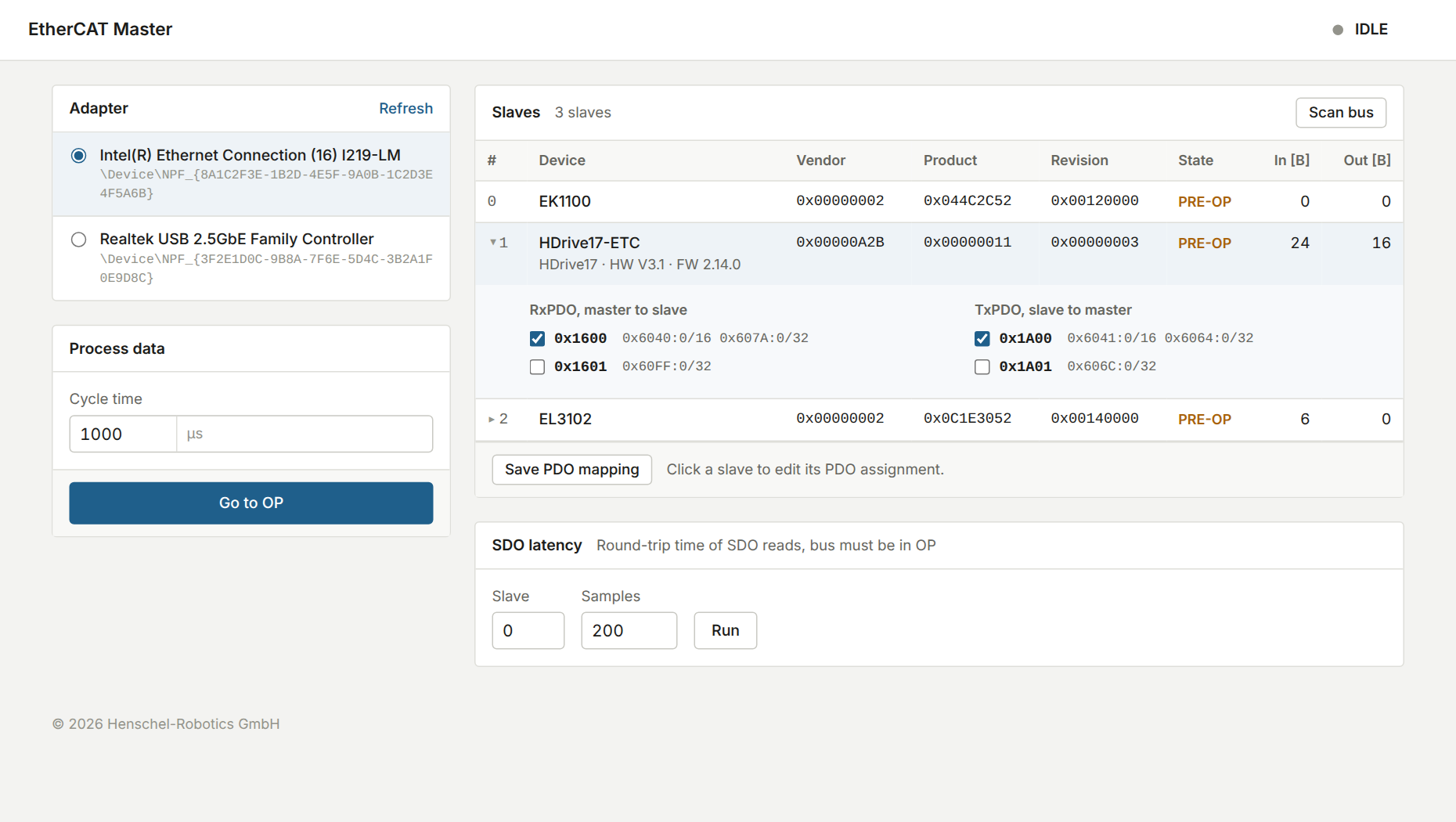
|
|
38
|
+
|
|
39
|
+
## Features
|
|
40
|
+
|
|
41
|
+
- **Bus management** -- connect, configure, and run an EtherCAT bus with one or more slaves
|
|
42
|
+
- **Generic slave handle** -- read/write raw PDO bytes for any device (Beckhoff terminals, servos, I/O modules, ...)
|
|
43
|
+
- **PDO mapping** -- configure SyncManager assignments per slave via a JSON file or SDO writes
|
|
44
|
+
- **Bus discovery** -- scan the bus and detect any EtherCAT device (Beckhoff, Henschel, or any other vendor)
|
|
45
|
+
- **Auto-reconnect** -- background health monitoring with automatic recovery on cable disconnect
|
|
46
|
+
- **Web interface** -- built-in browser GUI for adapter selection, bus scanning, PDO configuration, and going OP
|
|
47
|
+
- **Extensible** -- subclass `GenericSlave` or implement the slave handle interface to build device-specific drivers (see [python-hdrive-etc](https://github.com/henschel-robotics/python-hdrive-etc))
|
|
48
|
+
|
|
49
|
+
## Prerequisites
|
|
50
|
+
|
|
51
|
+
### Windows
|
|
52
|
+
|
|
53
|
+
| Dependency | Purpose | License |
|
|
54
|
+
|---|---|---|
|
|
55
|
+
| [Npcap](https://npcap.com/) | Raw Ethernet packet capture | **Free for personal use** (up to 5 systems). Commercial / redistribution requires an [Npcap OEM license](https://npcap.com/oem/). |
|
|
56
|
+
|
|
57
|
+
Install Npcap with **WinPcap API-compatible mode** enabled (checkbox during setup).
|
|
58
|
+
|
|
59
|
+
### Linux
|
|
60
|
+
|
|
61
|
+
| Dependency | Purpose | License |
|
|
62
|
+
|---|---|---|
|
|
63
|
+
| `libpcap` | Raw Ethernet packet capture | BSD (free for any use) |
|
|
64
|
+
|
|
65
|
+
Install via your package manager:
|
|
66
|
+
|
|
67
|
+
```bash
|
|
68
|
+
# Debian / Ubuntu
|
|
69
|
+
sudo apt install libpcap-dev
|
|
70
|
+
|
|
71
|
+
# Fedora / RHEL
|
|
72
|
+
sudo dnf install libpcap-devel
|
|
73
|
+
```
|
|
74
|
+
|
|
75
|
+
On Linux, raw Ethernet access requires **root**. Either run with `sudo` or grant the capability once:
|
|
76
|
+
|
|
77
|
+
```bash
|
|
78
|
+
# Option A – run with sudo
|
|
79
|
+
sudo pip install ethercat-master --break-system-packages
|
|
80
|
+
sudo ecmaster-web
|
|
81
|
+
|
|
82
|
+
# Option B – grant raw socket capability (no sudo needed afterwards)
|
|
83
|
+
sudo setcap cap_net_raw=ep $(readlink -f $(which python3))
|
|
84
|
+
```
|
|
85
|
+
|
|
86
|
+
> Npcap is **not** needed on Linux -- `libpcap` provides the same functionality and is BSD-licensed.
|
|
87
|
+
|
|
88
|
+
### Raspberry Pi Quick-Start
|
|
89
|
+
|
|
90
|
+
```bash
|
|
91
|
+
# 1. Install libpcap
|
|
92
|
+
sudo apt update
|
|
93
|
+
sudo apt install libpcap-dev
|
|
94
|
+
|
|
95
|
+
# 2. Install ethercat-master system-wide (so sudo can find it)
|
|
96
|
+
sudo pip install ethercat-master --break-system-packages
|
|
97
|
+
|
|
98
|
+
# 3. Add ~/.local/bin to PATH (if not already)
|
|
99
|
+
echo 'export PATH="$HOME/.local/bin:$PATH"' >> ~/.bashrc
|
|
100
|
+
source ~/.bashrc
|
|
101
|
+
|
|
102
|
+
# 4. Launch the web interface (requires root for raw Ethernet)
|
|
103
|
+
sudo ecmaster-web --adapter eth0
|
|
104
|
+
```
|
|
105
|
+
|
|
106
|
+
Open `http://<pi-ip>:8080` from any device on your network.
|
|
107
|
+
|
|
108
|
+
> Connect the EtherCAT slave(s) directly to the Pi's Ethernet port (`eth0`).
|
|
109
|
+
> Use Wi-Fi or a second USB-Ethernet adapter for SSH / network access.
|
|
110
|
+
|
|
111
|
+
### Python
|
|
112
|
+
|
|
113
|
+
- **Python 3.8+**
|
|
114
|
+
- **PySOEM >= 1.1.0** -- Cython wrapper around [SOEM](https://github.com/OpenEtherCATsociety/SOEM) (installed automatically by pip)
|
|
115
|
+
|
|
116
|
+
## Installation
|
|
117
|
+
|
|
118
|
+
```bash
|
|
119
|
+
pip install ethercat-master
|
|
120
|
+
```
|
|
121
|
+
|
|
122
|
+
Or install from source:
|
|
123
|
+
|
|
124
|
+
```bash
|
|
125
|
+
git clone https://github.com/henschel-robotics/python-ethercat-master.git
|
|
126
|
+
cd python-ethercat-master
|
|
127
|
+
pip install -e .
|
|
128
|
+
```
|
|
129
|
+
|
|
130
|
+
## Quickstart
|
|
131
|
+
|
|
132
|
+
### 1. Find your network adapter
|
|
133
|
+
|
|
134
|
+
```python
|
|
135
|
+
from ethercat_master import EtherCATBus
|
|
136
|
+
|
|
137
|
+
for a in EtherCATBus.list_adapters():
|
|
138
|
+
print(f"{a.desc} -> {a.name}")
|
|
139
|
+
```
|
|
140
|
+
|
|
141
|
+
Copy the adapter `name` (e.g. `\Device\NPF_{GUID}` on Windows, `eth0` on Linux).
|
|
142
|
+
|
|
143
|
+
### 2. Connect and read PDO data
|
|
144
|
+
|
|
145
|
+
```python
|
|
146
|
+
from ethercat_master import EtherCATBus, GenericSlave
|
|
147
|
+
import time
|
|
148
|
+
|
|
149
|
+
bus = EtherCATBus(adapter=r"\Device\NPF_{...}", cycle_time_ms=1)
|
|
150
|
+
|
|
151
|
+
slave = GenericSlave(0)
|
|
152
|
+
bus.register_slave(slave)
|
|
153
|
+
bus.open()
|
|
154
|
+
|
|
155
|
+
# Read inputs
|
|
156
|
+
print(slave.input.hex())
|
|
157
|
+
|
|
158
|
+
# Write outputs
|
|
159
|
+
slave.output = bytes([0xFF])
|
|
160
|
+
|
|
161
|
+
time.sleep(2)
|
|
162
|
+
bus.close()
|
|
163
|
+
```
|
|
164
|
+
|
|
165
|
+
### 3. Discover slaves on the bus
|
|
166
|
+
|
|
167
|
+
```python
|
|
168
|
+
slaves = EtherCATBus.discover(adapter=r"\Device\NPF_{...}")
|
|
169
|
+
for s in slaves:
|
|
170
|
+
print(f"[{s['index']}] {s['device_name']} "
|
|
171
|
+
f"In={s['input_bytes']}B Out={s['output_bytes']}B")
|
|
172
|
+
```
|
|
173
|
+
|
|
174
|
+
## PDO Configuration
|
|
175
|
+
|
|
176
|
+
Create a `ethercat_config.json` to control which PDOs are assigned per slave:
|
|
177
|
+
|
|
178
|
+
```json
|
|
179
|
+
{
|
|
180
|
+
"network": {
|
|
181
|
+
"adapter": "\\Device\\NPF_{...}",
|
|
182
|
+
"cycle_ms": 1.0
|
|
183
|
+
},
|
|
184
|
+
"default": {},
|
|
185
|
+
"slaves": {
|
|
186
|
+
"0": {
|
|
187
|
+
"rx_pdo": ["0x1600", "0x1605"],
|
|
188
|
+
"tx_pdo": ["0x1A00", "0x1A05"]
|
|
189
|
+
}
|
|
190
|
+
}
|
|
191
|
+
}
|
|
192
|
+
```
|
|
193
|
+
|
|
194
|
+
Pass it when creating the bus:
|
|
195
|
+
|
|
196
|
+
```python
|
|
197
|
+
bus = EtherCATBus(adapter=..., cycle_time_ms=1, pdo_config_path="ethercat_config.json")
|
|
198
|
+
```
|
|
199
|
+
|
|
200
|
+
Or use the web interface to scan the bus, select PDOs with checkboxes, and save.
|
|
201
|
+
|
|
202
|
+
> **Raspberry Pi / Linux:** When installed via pip, the default `ethercat_config.json` is inside the package directory (e.g. `/usr/local/lib/python3.13/dist-packages/ethercat_master/ethercat_config.json`). Copy it to your working directory for easy editing:
|
|
203
|
+
>
|
|
204
|
+
> ```bash
|
|
205
|
+
> cp $(python3 -c "import ethercat_master, os; print(os.path.join(os.path.dirname(ethercat_master.__file__), 'ethercat_config.json'))") .
|
|
206
|
+
> ```
|
|
207
|
+
|
|
208
|
+
## Web Interface
|
|
209
|
+
|
|
210
|
+
Start the built-in web server:
|
|
211
|
+
|
|
212
|
+
```bash
|
|
213
|
+
sudo ecmaster-web
|
|
214
|
+
sudo ecmaster-web --port 8080
|
|
215
|
+
sudo ecmaster-web --pdo-config /path/to/ethercat_config.json
|
|
216
|
+
```
|
|
217
|
+
|
|
218
|
+
Then open `http://localhost:8080` in your browser.
|
|
219
|
+
|
|
220
|
+

|
|
221
|
+
|
|
222
|
+
The web GUI lets you:
|
|
223
|
+
|
|
224
|
+
- Select a network adapter
|
|
225
|
+
- Scan the bus and discover **any EtherCAT device** — Beckhoff terminals, IO modules, servo drives, and more
|
|
226
|
+
- Configure PDO assignments per slave
|
|
227
|
+
- Set the cycle time and go to OP state
|
|
228
|
+
- Run network latency tests (SDO round-trip measurement with histogram)
|
|
229
|
+
|
|
230
|
+
| Mixed bus (Beckhoff + HDrive) | Network Latency Test |
|
|
231
|
+
|---|---|
|
|
232
|
+
| 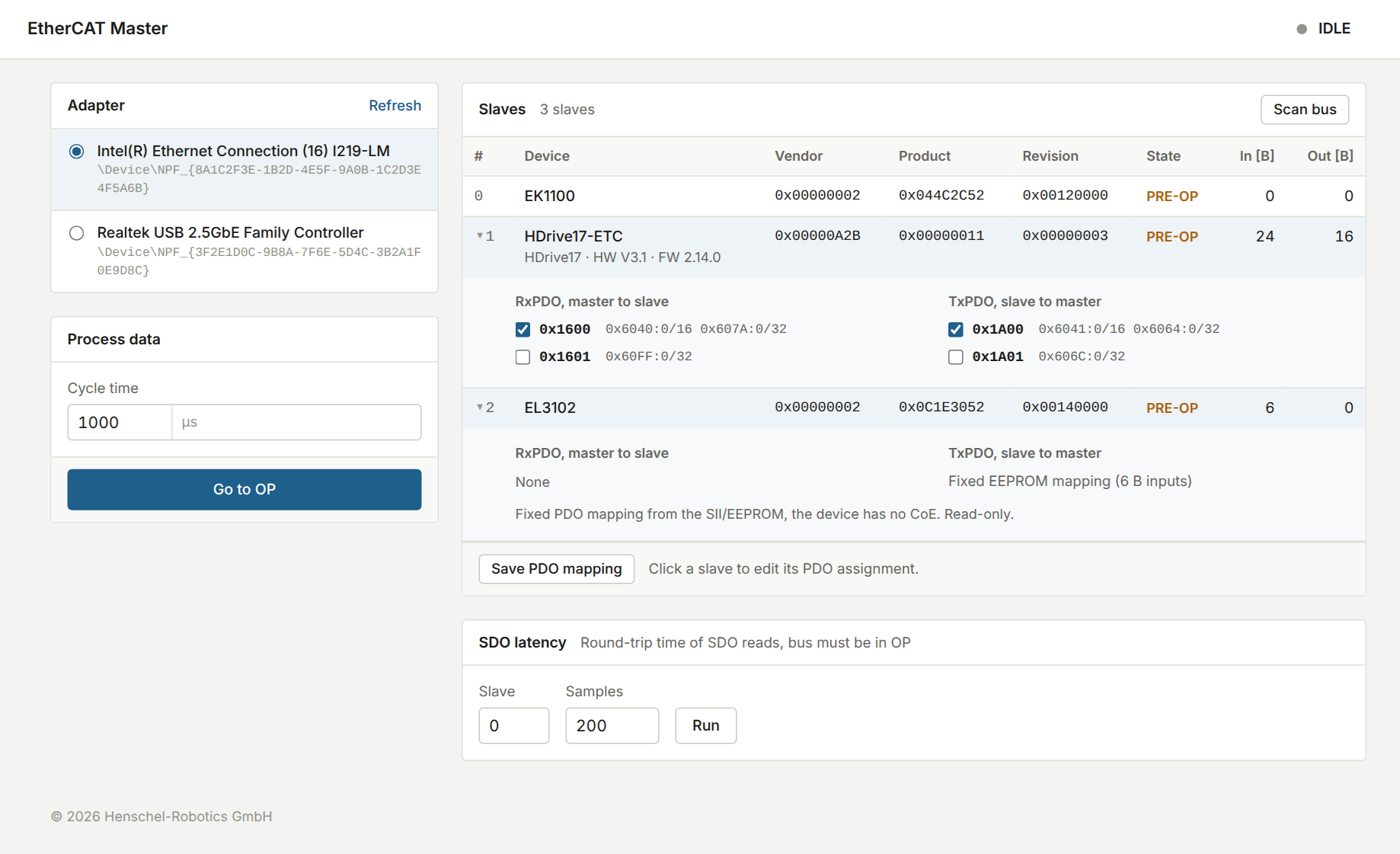 | 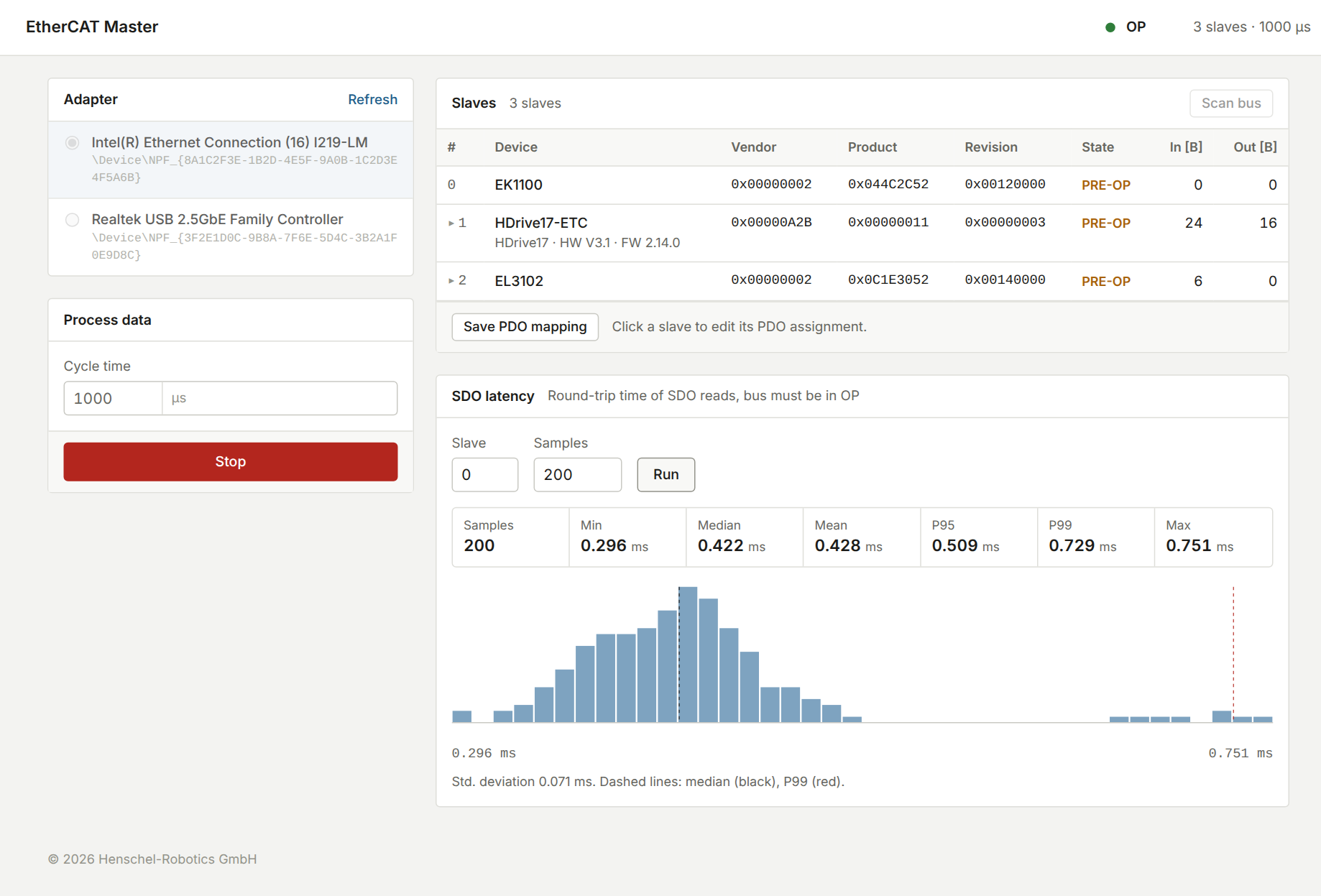 |
|
|
233
|
+
|
|
234
|
+
> **Full guide:** [`docs/web-interface.md`](docs/web-interface.md)
|
|
235
|
+
|
|
236
|
+
## Project Structure
|
|
237
|
+
|
|
238
|
+
```
|
|
239
|
+
python-ethercat-master/
|
|
240
|
+
├── ethercat_master/
|
|
241
|
+
│ ├── __init__.py # Public API
|
|
242
|
+
│ ├── bus.py # EtherCATBus — core bus management
|
|
243
|
+
│ ├── slave.py # GenericSlave — universal slave handle
|
|
244
|
+
│ ├── pdo.py # PDO mapping configuration
|
|
245
|
+
│ ├── exceptions.py # Custom exceptions
|
|
246
|
+
│ ├── webserver.py # Built-in web server
|
|
247
|
+
│ └── webgui/
|
|
248
|
+
│ ├── index.html # Web GUI frontend
|
|
249
|
+
│ └── style.css # Stylesheet
|
|
250
|
+
├── examples/
|
|
251
|
+
│ ├── connect.py # Minimal single-slave example
|
|
252
|
+
│ ├── beckhoff.py # Beckhoff EK1100 + terminals
|
|
253
|
+
│ └── mixed_bus.py # HDrive motor + Beckhoff terminals
|
|
254
|
+
├── ethercat_config.json # Example PDO config
|
|
255
|
+
└── pyproject.toml
|
|
256
|
+
```
|
|
257
|
+
|
|
258
|
+
## Examples
|
|
259
|
+
|
|
260
|
+
The [`examples/`](examples/) folder contains ready-to-run scripts. The recommended workflow is:
|
|
261
|
+
|
|
262
|
+
1. **Configure the bus** using the web interface (`ecmaster-web`):
|
|
263
|
+
- Select your network adapter
|
|
264
|
+
- Click **Scan Bus** to discover all slaves
|
|
265
|
+
- Expand each slave and configure the PDO assignments
|
|
266
|
+
- Click **Save PDO Config** — this writes `ethercat_config.json` with the adapter, cycle time, and per-slave PDO mapping
|
|
267
|
+
|
|
268
|
+
2. **Copy `ethercat_config.json`** next to your script (or point to it with `pdo_config_path`)
|
|
269
|
+
|
|
270
|
+
3. **Run the example** — the bus uses the preconfigured adapter and PDO mapping from the file:
|
|
271
|
+
|
|
272
|
+
```bash
|
|
273
|
+
sudo python3 examples/connect.py # Linux
|
|
274
|
+
python examples\connect.py # Windows
|
|
275
|
+
```
|
|
276
|
+
|
|
277
|
+
### `connect.py` — Minimal single-slave example
|
|
278
|
+
|
|
279
|
+
Connects to one slave and continuously prints the raw input PDO bytes. Good for verifying that the bus works and PDOs are mapped correctly.
|
|
280
|
+
|
|
281
|
+
### `beckhoff.py` — Beckhoff coupler + terminals
|
|
282
|
+
|
|
283
|
+
Scans the bus, discovers all terminals behind an EK1100 coupler, and reads their inputs in a loop. Standard Beckhoff terminals use factory-default PDO mappings from the SII EEPROM, so no `ethercat_config.json` is needed.
|
|
284
|
+
|
|
285
|
+
### `mixed_bus.py` — HDrive motor + Beckhoff terminals
|
|
286
|
+
|
|
287
|
+
Demonstrates running an HDrive servo motor alongside Beckhoff I/O terminals on the same bus. Requires `pip install hdrive-etc`. The `HDriveETC` class is a slave handle that plugs into `EtherCATBus` just like `GenericSlave`, so you can combine any devices.
|
|
288
|
+
|
|
289
|
+
## API Overview
|
|
290
|
+
|
|
291
|
+
### `EtherCATBus`
|
|
292
|
+
|
|
293
|
+
| Method | Description |
|
|
294
|
+
|---|---|
|
|
295
|
+
| `EtherCATBus(adapter, cycle_time_ms, pdo_config_path)` | Create a bus instance |
|
|
296
|
+
| `list_adapters()` | List available network adapters |
|
|
297
|
+
| `discover(adapter, pdo_config_path)` | Scan the bus without going to OP |
|
|
298
|
+
| `register_slave(handle)` | Register a slave handle |
|
|
299
|
+
| `open()` | Configure slaves, map PDOs, start threads, go to OP |
|
|
300
|
+
| `close()` | Stop all slaves and close the connection |
|
|
301
|
+
|
|
302
|
+
### `GenericSlave`
|
|
303
|
+
|
|
304
|
+
| Property / Method | Description |
|
|
305
|
+
|---|---|
|
|
306
|
+
| `GenericSlave(slave_index, use_default_pdo)` | Create a handle for slave at the given index |
|
|
307
|
+
| `slave.input` | Read-only bytes of the last received input PDO |
|
|
308
|
+
| `slave.output` | Read/write bytes for the output PDO |
|
|
309
|
+
|
|
310
|
+
### Exceptions
|
|
311
|
+
|
|
312
|
+
| Exception | When |
|
|
313
|
+
|---|---|
|
|
314
|
+
| `ConnectionError` | Adapter not found, no slaves, state transition failed |
|
|
315
|
+
| `CommunicationError` | Bus communication lost or timed out |
|
|
316
|
+
| `ConfigurationError` | PDO mapping or `config_map()` failed |
|
|
317
|
+
|
|
318
|
+
## Background Threads
|
|
319
|
+
|
|
320
|
+
When `bus.open()` is called, three background threads are started:
|
|
321
|
+
|
|
322
|
+
| Thread | Interval | Purpose |
|
|
323
|
+
|---|---|---|
|
|
324
|
+
| ProcessData | 1 ms | Raw EtherCAT frame send/receive |
|
|
325
|
+
| PDO Update | configurable | Decode RX / encode TX per slave |
|
|
326
|
+
| State Check | 300 ms | Health monitoring, auto-reconnect |
|
|
327
|
+
|
|
328
|
+
## License
|
|
329
|
+
|
|
330
|
+
This project is MIT-licensed -- see [pyproject.toml](pyproject.toml).
|
|
331
|
+
|
|
332
|
+
Copyright (c) Henschel Robotics GmbH
|
|
333
|
+
|
|
334
|
+
### Third-party license notice
|
|
335
|
+
|
|
336
|
+
| Component | License | Notes |
|
|
337
|
+
|---|---|---|
|
|
338
|
+
| [PySOEM](https://github.com/bnjmnp/pysoem) | MIT | Cython wrapper (installed via pip) |
|
|
339
|
+
| [SOEM](https://github.com/OpenEtherCATsociety/SOEM) | **GPLv3 / Commercial** | Bundled inside PySOEM. As of SOEM 2.0 the license is GPLv3 or a commercial license from [rt-labs](https://rt-labs.com/). If GPLv3 is incompatible with your product, contact rt-labs for a commercial SOEM license. |
|
|
340
|
+
| [Npcap](https://npcap.com/) (Windows only) | **Proprietary** | Free for personal use (≤ 5 installs). Commercial use or redistribution requires an [Npcap OEM license](https://npcap.com/oem/). |
|
|
341
|
+
| [libpcap](https://www.tcpdump.org/) (Linux only) | BSD | Free for any use, no restrictions. |
|
|
342
|
+
|
|
343
|
+
> **Important for commercial products:** If you ship a product that includes this library, you need to consider the SOEM (GPLv3) and Npcap (proprietary) license obligations. On Linux, only the SOEM license applies since libpcap is BSD.
|