engine-mcp 0.1.0__tar.gz
This diff represents the content of publicly available package versions that have been released to one of the supported registries. The information contained in this diff is provided for informational purposes only and reflects changes between package versions as they appear in their respective public registries.
- engine_mcp-0.1.0/LICENSE +21 -0
- engine_mcp-0.1.0/PKG-INFO +210 -0
- engine_mcp-0.1.0/README.md +182 -0
- engine_mcp-0.1.0/pyproject.toml +50 -0
- engine_mcp-0.1.0/setup.cfg +4 -0
- engine_mcp-0.1.0/src/engine_mcp/__init__.py +3 -0
- engine_mcp-0.1.0/src/engine_mcp/godot_connect.py +279 -0
- engine_mcp-0.1.0/src/engine_mcp/spine_core.py +626 -0
- engine_mcp-0.1.0/src/engine_mcp/spine_server.py +150 -0
- engine_mcp-0.1.0/src/engine_mcp.egg-info/PKG-INFO +210 -0
- engine_mcp-0.1.0/src/engine_mcp.egg-info/SOURCES.txt +16 -0
- engine_mcp-0.1.0/src/engine_mcp.egg-info/dependency_links.txt +1 -0
- engine_mcp-0.1.0/src/engine_mcp.egg-info/entry_points.txt +3 -0
- engine_mcp-0.1.0/src/engine_mcp.egg-info/requires.txt +6 -0
- engine_mcp-0.1.0/src/engine_mcp.egg-info/top_level.txt +1 -0
- engine_mcp-0.1.0/tests/test_godot_connect.py +121 -0
- engine_mcp-0.1.0/tests/test_spine_core.py +208 -0
- engine_mcp-0.1.0/tests/test_spine_server.py +29 -0
engine_mcp-0.1.0/LICENSE
ADDED
|
@@ -0,0 +1,21 @@
|
|
|
1
|
+
MIT License
|
|
2
|
+
|
|
3
|
+
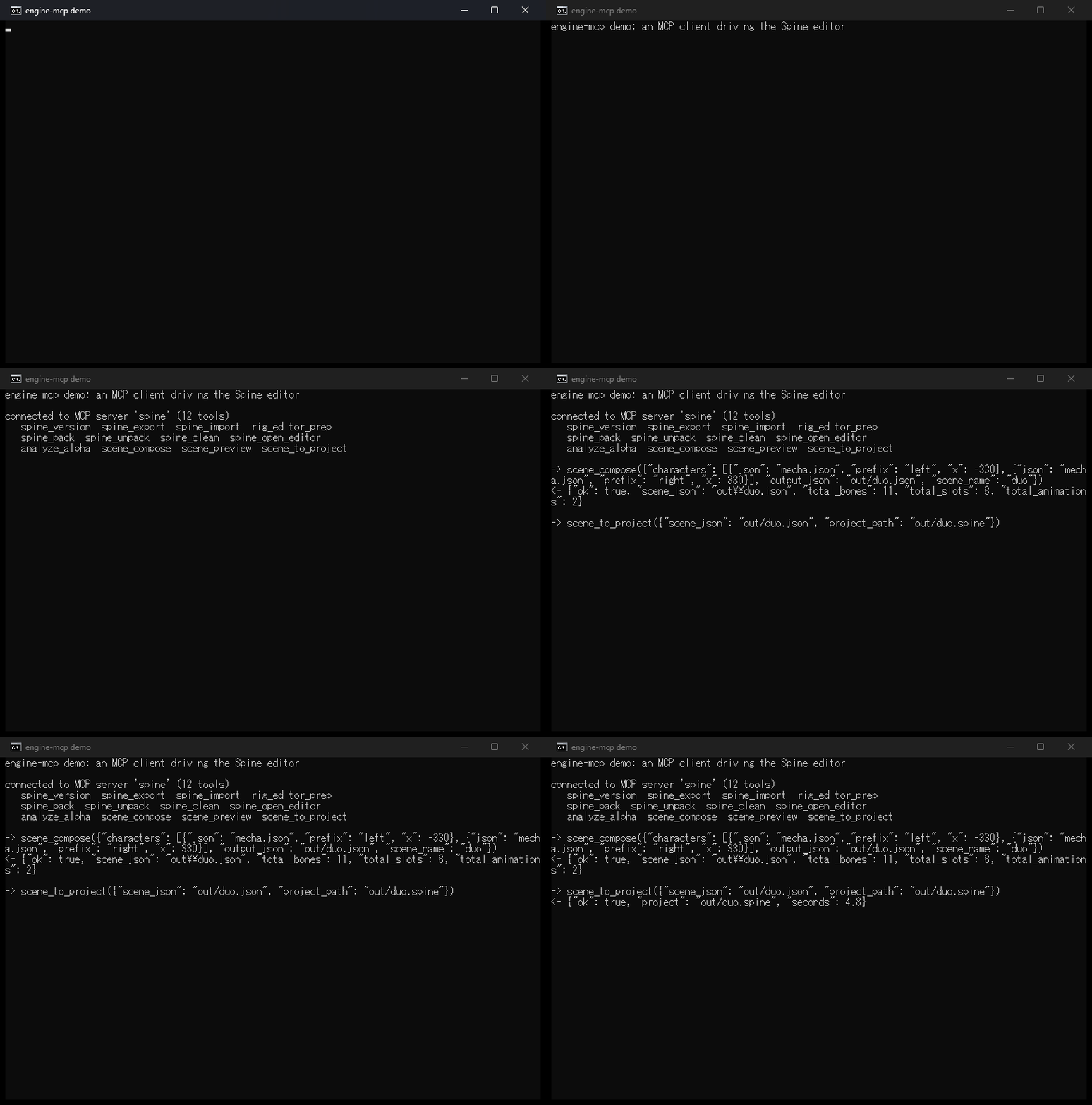
Copyright (c) 2026 Kurtlon Earl Sta. Ines
|
|
4
|
+
|
|
5
|
+
Permission is hereby granted, free of charge, to any person obtaining a copy
|
|
6
|
+
of this software and associated documentation files (the "Software"), to deal
|
|
7
|
+
in the Software without restriction, including without limitation the rights
|
|
8
|
+
to use, copy, modify, merge, publish, distribute, sublicense, and/or sell
|
|
9
|
+
copies of the Software, and to permit persons to whom the Software is
|
|
10
|
+
furnished to do so, subject to the following conditions:
|
|
11
|
+
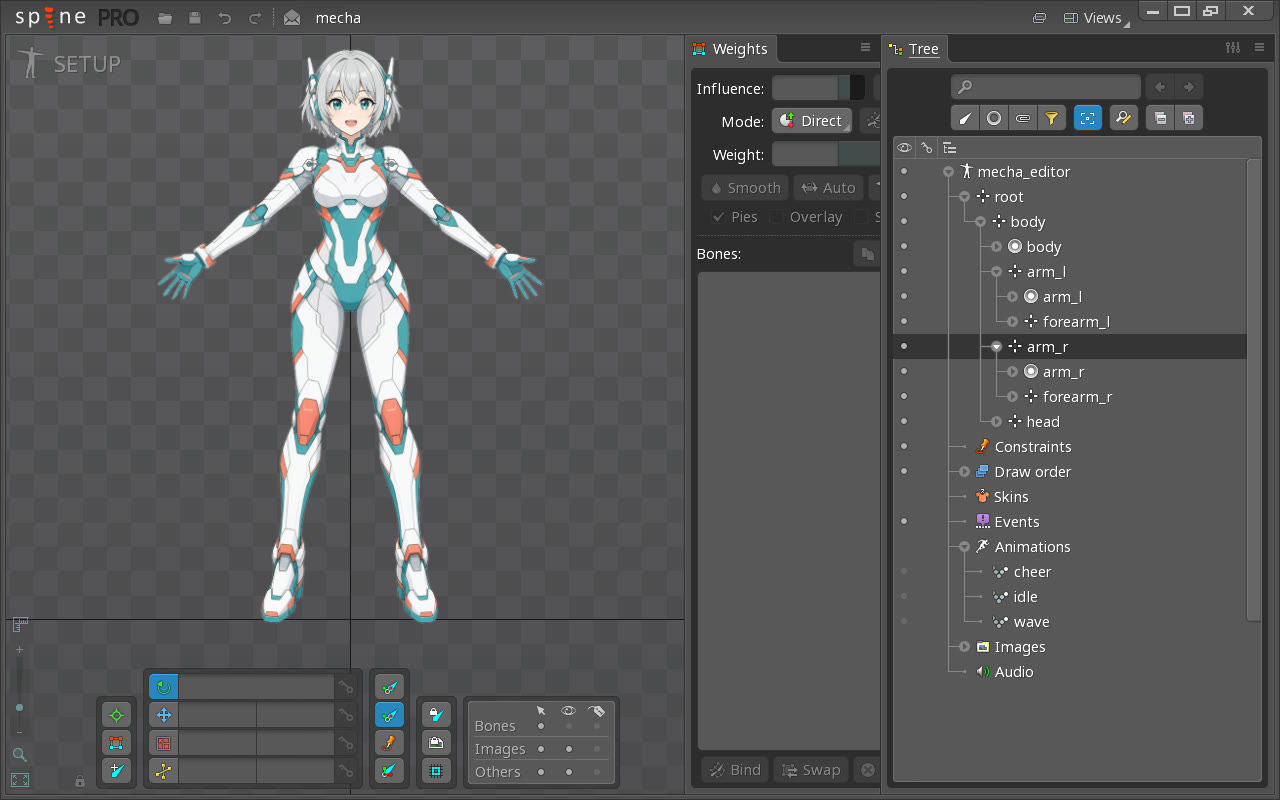
|
|
12
|
+
The above copyright notice and this permission notice shall be included in all
|
|
13
|
+
copies or substantial portions of the Software.
|
|
14
|
+
|
|
15
|
+
THE SOFTWARE IS PROVIDED "AS IS", WITHOUT WARRANTY OF ANY KIND, EXPRESS OR
|
|
16
|
+
IMPLIED, INCLUDING BUT NOT LIMITED TO THE WARRANTIES OF MERCHANTABILITY,
|
|
17
|
+
FITNESS FOR A PARTICULAR PURPOSE AND NONINFRINGEMENT. IN NO EVENT SHALL THE
|
|
18
|
+
AUTHORS OR COPYRIGHT HOLDERS BE LIABLE FOR ANY CLAIM, DAMAGES OR OTHER
|
|
19
|
+
LIABILITY, WHETHER IN AN ACTION OF CONTRACT, TORT OR OTHERWISE, ARISING FROM,
|
|
20
|
+
OUT OF OR IN CONNECTION WITH THE SOFTWARE OR THE USE OR OTHER DEALINGS IN THE
|
|
21
|
+
SOFTWARE.
|
|
@@ -0,0 +1,210 @@
|
|
|
1
|
+
Metadata-Version: 2.4
|
|
2
|
+
Name: engine-mcp
|
|
3
|
+
Version: 0.1.0
|
|
4
|
+
Summary: MCP tooling for game-engine work: a Spine 2D MCP server and a Godot MCP endpoint connector.
|
|
5
|
+
Author: Kurtlon Earl Sta. Ines
|
|
6
|
+
License-Expression: MIT
|
|
7
|
+
Project-URL: Homepage, https://github.com/kurtstaines/engine-mcp
|
|
8
|
+
Project-URL: Issues, https://github.com/kurtstaines/engine-mcp/issues
|
|
9
|
+
Keywords: mcp,model-context-protocol,spine,spine2d,godot,ai-agents,game-dev
|
|
10
|
+
Classifier: Development Status :: 3 - Alpha
|
|
11
|
+
Classifier: Intended Audience :: Developers
|
|
12
|
+
Classifier: Programming Language :: Python :: 3
|
|
13
|
+
Classifier: Programming Language :: Python :: 3.10
|
|
14
|
+
Classifier: Programming Language :: Python :: 3.11
|
|
15
|
+
Classifier: Programming Language :: Python :: 3.12
|
|
16
|
+
Classifier: Programming Language :: Python :: 3.13
|
|
17
|
+
Classifier: Topic :: Games/Entertainment
|
|
18
|
+
Classifier: Topic :: Multimedia :: Graphics
|
|
19
|
+
Requires-Python: >=3.10
|
|
20
|
+
Description-Content-Type: text/markdown
|
|
21
|
+
License-File: LICENSE
|
|
22
|
+
Requires-Dist: mcp<2,>=1.2
|
|
23
|
+
Requires-Dist: pillow>=10
|
|
24
|
+
Provides-Extra: dev
|
|
25
|
+
Requires-Dist: pytest>=8; extra == "dev"
|
|
26
|
+
Requires-Dist: ruff>=0.6; extra == "dev"
|
|
27
|
+
Dynamic: license-file
|
|
28
|
+
|
|
29
|
+
# engine-mcp
|
|
30
|
+
|
|
31
|
+
[](https://github.com/kurtstaines/engine-mcp/actions/workflows/ci.yml)
|
|
32
|
+
[](https://github.com/kurtstaines/engine-mcp/blob/main/LICENSE)
|
|
33
|
+

|
|
34
|
+
|
|
35
|
+
**Let an AI agent drive the Spine 2D animation editor, and plug a Godot MCP endpoint into every AI client with one command.**
|
|
36
|
+
|
|
37
|
+
Game-engine tools are built for hands on a mouse. `engine-mcp` exposes them over the [Model Context Protocol](https://modelcontextprotocol.io) so an agent can export, import, pack, repair and compose skeletal animation assets itself, and get back a structured result it can branch on instead of a wall of console text.
|
|
38
|
+
|
|
39
|
+
|
|
40
|
+
|
|
41
|
+
*A real client session against the server: connect, list tools, compose two characters into one scene, import it into a Spine project.*
|
|
42
|
+
|
|
43
|
+
Status: **v0.1, early.** Small on purpose.
|
|
44
|
+
|
|
45
|
+
## Features
|
|
46
|
+
|
|
47
|
+
- **Spine MCP server**: 12 tools over stdio, usable from Claude Desktop, Claude Code, Cursor, Codex CLI or any other MCP client.
|
|
48
|
+
- **Editor lane**: wraps the official Spine command-line interface (export, import, texture pack and unpack, animation clean-up, open the editor).
|
|
49
|
+
- **Prep lane**: repairs generated skeleton JSON so the Spine 4.x importer accepts it. Converts weighted meshes to unweighted, loose keyframe lists to proper timelines, and 3.x Bezier curves to 4.x form. Pure Python, writes a new file, never touches the source.
|
|
50
|
+
- **Scene lane**: merges several rigged characters into one skeleton with prefixed names and re-based mesh bone indices, and renders a layout preview PNG. Pure Python.
|
|
51
|
+
- **Godot connector**: a small CLI that checks a Godot MCP addon's HTTP endpoint and registers it with Claude Code, Codex, Grok, Hermes and a project `.mcp.json`.
|
|
52
|
+
- **One result contract**: every tool returns a dict with an `ok` flag.
|
|
53
|
+
|
|
54
|
+
## Quickstart
|
|
55
|
+
|
|
56
|
+
```bash
|
|
57
|
+
pip install engine-mcp
|
|
58
|
+
engine-mcp-spine --selftest
|
|
59
|
+
```
|
|
60
|
+
|
|
61
|
+
To run the examples, work from a clone instead:
|
|
62
|
+
|
|
63
|
+
```bash
|
|
64
|
+
git clone https://github.com/kurtstaines/engine-mcp.git
|
|
65
|
+
cd engine-mcp
|
|
66
|
+
pip install -e .
|
|
67
|
+
python examples/compose_scene.py
|
|
68
|
+
```
|
|
69
|
+
|
|
70
|
+
`--selftest` lists the registered tools and reports whether the Spine CLI was found. The example composes two characters into one scene with no Spine install needed.
|
|
71
|
+
|
|
72
|
+
<img src="https://raw.githubusercontent.com/kurtstaines/engine-mcp/main/docs/screenshots/sample-rig.gif" alt="The sample character playing its idle, wave and cheer animations" width="300">
|
|
73
|
+
|
|
74
|
+
*The sample rig's `idle`, `wave` and `cheer` animations, recorded playing in the Spine editor.*
|
|
75
|
+
|
|
76
|
+
### The sample rig
|
|
77
|
+
|
|
78
|
+
[examples/build_rig.py](https://github.com/kurtstaines/engine-mcp/blob/main/examples/build_rig.py) turns one flat character image into a Spine skeleton:
|
|
79
|
+
|
|
80
|
+
- keys out the background and cuts the art into six parts (body, head, upper arms, forearms)
|
|
81
|
+
- writes `examples/mecha.json` with seven bones and region attachments
|
|
82
|
+
- generates three animations as functions of time, with each part trailing the body a beat late so the idle loop breathes instead of bobbing
|
|
83
|
+
|
|
84
|
+
The cut lines and joint positions are hand-picked for this one image; it is an example, not a general auto-rigger. The source art was generated with Grok Imagine.
|
|
85
|
+
|
|
86
|
+
|
|
87
|
+
|
|
88
|
+
*`examples/mecha.json` imported into a Spine project with `spine_import` and opened with `spine_open_editor`: seven bones, six image parts and three animations.*
|
|
89
|
+
|
|
90
|
+
Requirements: Python 3.10+. The editor lane also needs a licensed [Spine](https://esotericsoftware.com) install; set `SPINE_EXE` if the CLI is not at `C:\Program Files\Spine\Spine.com`. The prep, scene and image tools work without it.
|
|
91
|
+
|
|
92
|
+
## Connect an MCP client
|
|
93
|
+
|
|
94
|
+
**Claude Code**
|
|
95
|
+
|
|
96
|
+
```bash
|
|
97
|
+
claude mcp add spine -- engine-mcp-spine
|
|
98
|
+
```
|
|
99
|
+
|
|
100
|
+
**Claude Desktop** (`claude_desktop_config.json`), **Cursor**, or a project **`.mcp.json`**:
|
|
101
|
+
|
|
102
|
+
```json
|
|
103
|
+
{
|
|
104
|
+
"mcpServers": {
|
|
105
|
+
"spine": {
|
|
106
|
+
"command": "engine-mcp-spine",
|
|
107
|
+
"env": { "SPINE_EXE": "C:/Program Files/Spine/Spine.com" }
|
|
108
|
+
}
|
|
109
|
+
}
|
|
110
|
+
}
|
|
111
|
+
```
|
|
112
|
+
|
|
113
|
+
With [uv](https://docs.astral.sh/uv/) installed you can skip the install step and let the client fetch the package: set `"command": "uvx"` and `"args": ["--from", "engine-mcp", "engine-mcp-spine"]`.
|
|
114
|
+
|
|
115
|
+
If the client cannot find `engine-mcp-spine` on its `PATH` (common when you installed into a virtual environment), point `command` at that environment's Python and use `"args": ["-m", "engine_mcp.spine_server"]`. A copy of this config lives in [examples/mcp.json](https://github.com/kurtstaines/engine-mcp/blob/main/examples/mcp.json).
|
|
116
|
+
|
|
117
|
+
| Variable | Purpose |
|
|
118
|
+
|---|---|
|
|
119
|
+
| `SPINE_EXE` | Path to the Spine CLI. Default `C:\Program Files\Spine\Spine.com`. |
|
|
120
|
+
| `SPINE_UPDATE` | Optional. Pins the editor version for every call, for example `4.2.43`. |
|
|
121
|
+
|
|
122
|
+
## Tools
|
|
123
|
+
|
|
124
|
+
| Tool | Inputs | What it does |
|
|
125
|
+
|---|---|---|
|
|
126
|
+
| `spine_version` | none | Reports the Spine version and the CLI path in use. |
|
|
127
|
+
| `spine_export` | `input_path`, `output_path`, `export="json"`, `clean=False`, `version=""` | Exports a project or skeleton data. `export` is `json`, `binary`, `json+pack`, `binary+pack`, or a path to an export-settings JSON saved from the editor. |
|
|
128
|
+
| `spine_import` | `data_path`, `project_path`, `name=""`, `scale=0.0`, `prep=True` | Imports skeleton JSON or `.skel` into a `.spine` project. Runs `rig_editor_prep` on JSON first unless `prep` is false. |
|
|
129
|
+
| `spine_pack` | `images_dir`, `output_dir`, `name="atlas"`, `pack_settings=""`, `project=""` | Packs a folder of images into a texture atlas. |
|
|
130
|
+
| `spine_unpack` | `atlas_path`, `images_dir`, `output_dir` | Unpacks a texture atlas back into images. |
|
|
131
|
+
| `spine_clean` | `project_path`, `output_path=""` | Runs Spine's animation clean-up. |
|
|
132
|
+
| `spine_open_editor` | `project_path=""` | Opens the Spine editor, optionally with a project. Does not block. Spine shows its launcher first and waits for **Start** unless "Start automatically" is ticked there. The editor closes when the MCP client disconnects. |
|
|
133
|
+
| `rig_editor_prep` | `rig_json`, `output=""` | Repairs skeleton JSON for the editor importer. Writes `<stem>_editor.json`. |
|
|
134
|
+
| `analyze_alpha` | `image` | Reports transparent, opaque and partial alpha percentages and whether the image is already keyed. |
|
|
135
|
+
| `scene_compose` | `characters`, `output_json`, `scene_name="scene"` | Merges characters into one skeleton. Each character is `{"json", "prefix", "x", "y", "scale", "rotation"}`. |
|
|
136
|
+
| `scene_preview` | `characters`, `output_png`, `width=1920`, `height=1080` | Composites each character's texture at its placement into a layout PNG. |
|
|
137
|
+
| `scene_to_project` | `scene_json`, `project_path`, `scale=0.0` | Imports a composed scene into a `.spine` project. |
|
|
138
|
+
|
|
139
|
+
### Godot connector
|
|
140
|
+
|
|
141
|
+
Needs a Godot project with an MCP addon that serves HTTP from the running editor. Defaults: endpoint `http://127.0.0.1:8000/mcp`, addon folder `addons/godot_ai`, server name `godot-ai`; override with `--url`, `--addon`, `--name`.
|
|
142
|
+
|
|
143
|
+
```bash
|
|
144
|
+
engine-mcp-godot --project path/to/godot_project doctor
|
|
145
|
+
engine-mcp-godot verify
|
|
146
|
+
engine-mcp-godot --clients claude,codex connect
|
|
147
|
+
```
|
|
148
|
+
|
|
149
|
+
| Command | What it does |
|
|
150
|
+
|---|---|
|
|
151
|
+
| `status` | Shows whether the endpoint port is open and which clients are registered. |
|
|
152
|
+
| `doctor` | Reports addon install, endpoint liveness and client registration as three separate facts, because each fails for a different reason. |
|
|
153
|
+
| `verify` | Sends a real MCP `initialize` request and reports the response. |
|
|
154
|
+
| `connect` | Registers the endpoint with `claude`, `codex`, `grok`, `hermes` and/or `project` (`.mcp.json`). |
|
|
155
|
+
|
|
156
|
+
## Architecture
|
|
157
|
+
|
|
158
|
+
```mermaid
|
|
159
|
+
flowchart LR
|
|
160
|
+
client["MCP client<br/>Claude Desktop, Claude Code, Cursor"]
|
|
161
|
+
server["spine_server.py<br/>FastMCP, 12 tools"]
|
|
162
|
+
core["spine_core.py"]
|
|
163
|
+
cli["Spine CLI"]
|
|
164
|
+
json["Skeleton JSON<br/>prep and scene lanes"]
|
|
165
|
+
png["Pillow<br/>alpha check, preview"]
|
|
166
|
+
connector["godot_connect.py<br/>engine-mcp-godot"]
|
|
167
|
+
godot["Godot editor<br/>MCP addon over HTTP"]
|
|
168
|
+
configs["Client configs<br/>Claude, Codex, Grok, Hermes, .mcp.json"]
|
|
169
|
+
|
|
170
|
+
client -- stdio --> server --> core
|
|
171
|
+
core -- subprocess --> cli
|
|
172
|
+
core --> json
|
|
173
|
+
core --> png
|
|
174
|
+
connector -- "initialize probe" --> godot
|
|
175
|
+
connector -- registers --> configs
|
|
176
|
+
client -. "HTTP, after connect" .-> godot
|
|
177
|
+
```
|
|
178
|
+
|
|
179
|
+
The server is a thin layer: each tool is one call into `spine_core`, which you can also import directly from a script (see [examples/compose_scene.py](https://github.com/kurtstaines/engine-mcp/blob/main/examples/compose_scene.py)).
|
|
180
|
+
|
|
181
|
+
## Tests
|
|
182
|
+
|
|
183
|
+
```bash
|
|
184
|
+
pip install -e ".[dev]"
|
|
185
|
+
pytest
|
|
186
|
+
```
|
|
187
|
+
|
|
188
|
+
24 tests cover the prep, scene and image lanes end to end on a synthetic rig, the MCP tool registration and a tool call round trip, and the Godot connector against a local stand-in HTTP endpoint. The editor lane is tested at the level of the arguments it passes to the Spine CLI; CI does not have Spine installed, so the CLI itself is not exercised there. Registration through the `claude` and `codex` CLIs is not covered.
|
|
189
|
+
|
|
190
|
+
## Roadmap
|
|
191
|
+
|
|
192
|
+
- Command-line front door for the Spine tools, for agents without an MCP client
|
|
193
|
+
- Engine registry and status server (which engine adapters are installed and live)
|
|
194
|
+
- Bone-marker tool: draw markers on art and save them as rig presets
|
|
195
|
+
- Automatic rigging lane (image to rigged skeleton)
|
|
196
|
+
- 3D animation workflow for Godot driven through MCP
|
|
197
|
+
|
|
198
|
+
## Contributing
|
|
199
|
+
|
|
200
|
+
Issues and pull requests are welcome. Before opening a PR:
|
|
201
|
+
|
|
202
|
+
```bash
|
|
203
|
+
ruff check . && ruff format --check . && pytest
|
|
204
|
+
```
|
|
205
|
+
|
|
206
|
+
Keep tools returning the `{"ok": bool, ...}` contract, and add a test for anything that does not need the Spine editor to run.
|
|
207
|
+
|
|
208
|
+
## License
|
|
209
|
+
|
|
210
|
+
MIT. See [LICENSE](https://github.com/kurtstaines/engine-mcp/blob/main/LICENSE).
|
|
@@ -0,0 +1,182 @@
|
|
|
1
|
+
# engine-mcp
|
|
2
|
+
|
|
3
|
+
[](https://github.com/kurtstaines/engine-mcp/actions/workflows/ci.yml)
|
|
4
|
+
[](https://github.com/kurtstaines/engine-mcp/blob/main/LICENSE)
|
|
5
|
+

|
|
6
|
+
|
|
7
|
+
**Let an AI agent drive the Spine 2D animation editor, and plug a Godot MCP endpoint into every AI client with one command.**
|
|
8
|
+
|
|
9
|
+
Game-engine tools are built for hands on a mouse. `engine-mcp` exposes them over the [Model Context Protocol](https://modelcontextprotocol.io) so an agent can export, import, pack, repair and compose skeletal animation assets itself, and get back a structured result it can branch on instead of a wall of console text.
|
|
10
|
+
|
|
11
|
+

|
|
12
|
+
|
|
13
|
+
*A real client session against the server: connect, list tools, compose two characters into one scene, import it into a Spine project.*
|
|
14
|
+
|
|
15
|
+
Status: **v0.1, early.** Small on purpose.
|
|
16
|
+
|
|
17
|
+
## Features
|
|
18
|
+
|
|
19
|
+
- **Spine MCP server**: 12 tools over stdio, usable from Claude Desktop, Claude Code, Cursor, Codex CLI or any other MCP client.
|
|
20
|
+
- **Editor lane**: wraps the official Spine command-line interface (export, import, texture pack and unpack, animation clean-up, open the editor).
|
|
21
|
+
- **Prep lane**: repairs generated skeleton JSON so the Spine 4.x importer accepts it. Converts weighted meshes to unweighted, loose keyframe lists to proper timelines, and 3.x Bezier curves to 4.x form. Pure Python, writes a new file, never touches the source.
|
|
22
|
+
- **Scene lane**: merges several rigged characters into one skeleton with prefixed names and re-based mesh bone indices, and renders a layout preview PNG. Pure Python.
|
|
23
|
+
- **Godot connector**: a small CLI that checks a Godot MCP addon's HTTP endpoint and registers it with Claude Code, Codex, Grok, Hermes and a project `.mcp.json`.
|
|
24
|
+
- **One result contract**: every tool returns a dict with an `ok` flag.
|
|
25
|
+
|
|
26
|
+
## Quickstart
|
|
27
|
+
|
|
28
|
+
```bash
|
|
29
|
+
pip install engine-mcp
|
|
30
|
+
engine-mcp-spine --selftest
|
|
31
|
+
```
|
|
32
|
+
|
|
33
|
+
To run the examples, work from a clone instead:
|
|
34
|
+
|
|
35
|
+
```bash
|
|
36
|
+
git clone https://github.com/kurtstaines/engine-mcp.git
|
|
37
|
+
cd engine-mcp
|
|
38
|
+
pip install -e .
|
|
39
|
+
python examples/compose_scene.py
|
|
40
|
+
```
|
|
41
|
+
|
|
42
|
+
`--selftest` lists the registered tools and reports whether the Spine CLI was found. The example composes two characters into one scene with no Spine install needed.
|
|
43
|
+
|
|
44
|
+
<img src="https://raw.githubusercontent.com/kurtstaines/engine-mcp/main/docs/screenshots/sample-rig.gif" alt="The sample character playing its idle, wave and cheer animations" width="300">
|
|
45
|
+
|
|
46
|
+
*The sample rig's `idle`, `wave` and `cheer` animations, recorded playing in the Spine editor.*
|
|
47
|
+
|
|
48
|
+
### The sample rig
|
|
49
|
+
|
|
50
|
+
[examples/build_rig.py](https://github.com/kurtstaines/engine-mcp/blob/main/examples/build_rig.py) turns one flat character image into a Spine skeleton:
|
|
51
|
+
|
|
52
|
+
- keys out the background and cuts the art into six parts (body, head, upper arms, forearms)
|
|
53
|
+
- writes `examples/mecha.json` with seven bones and region attachments
|
|
54
|
+
- generates three animations as functions of time, with each part trailing the body a beat late so the idle loop breathes instead of bobbing
|
|
55
|
+
|
|
56
|
+
The cut lines and joint positions are hand-picked for this one image; it is an example, not a general auto-rigger. The source art was generated with Grok Imagine.
|
|
57
|
+
|
|
58
|
+

|
|
59
|
+
|
|
60
|
+
*`examples/mecha.json` imported into a Spine project with `spine_import` and opened with `spine_open_editor`: seven bones, six image parts and three animations.*
|
|
61
|
+
|
|
62
|
+
Requirements: Python 3.10+. The editor lane also needs a licensed [Spine](https://esotericsoftware.com) install; set `SPINE_EXE` if the CLI is not at `C:\Program Files\Spine\Spine.com`. The prep, scene and image tools work without it.
|
|
63
|
+
|
|
64
|
+
## Connect an MCP client
|
|
65
|
+
|
|
66
|
+
**Claude Code**
|
|
67
|
+
|
|
68
|
+
```bash
|
|
69
|
+
claude mcp add spine -- engine-mcp-spine
|
|
70
|
+
```
|
|
71
|
+
|
|
72
|
+
**Claude Desktop** (`claude_desktop_config.json`), **Cursor**, or a project **`.mcp.json`**:
|
|
73
|
+
|
|
74
|
+
```json
|
|
75
|
+
{
|
|
76
|
+
"mcpServers": {
|
|
77
|
+
"spine": {
|
|
78
|
+
"command": "engine-mcp-spine",
|
|
79
|
+
"env": { "SPINE_EXE": "C:/Program Files/Spine/Spine.com" }
|
|
80
|
+
}
|
|
81
|
+
}
|
|
82
|
+
}
|
|
83
|
+
```
|
|
84
|
+
|
|
85
|
+
With [uv](https://docs.astral.sh/uv/) installed you can skip the install step and let the client fetch the package: set `"command": "uvx"` and `"args": ["--from", "engine-mcp", "engine-mcp-spine"]`.
|
|
86
|
+
|
|
87
|
+
If the client cannot find `engine-mcp-spine` on its `PATH` (common when you installed into a virtual environment), point `command` at that environment's Python and use `"args": ["-m", "engine_mcp.spine_server"]`. A copy of this config lives in [examples/mcp.json](https://github.com/kurtstaines/engine-mcp/blob/main/examples/mcp.json).
|
|
88
|
+
|
|
89
|
+
| Variable | Purpose |
|
|
90
|
+
|---|---|
|
|
91
|
+
| `SPINE_EXE` | Path to the Spine CLI. Default `C:\Program Files\Spine\Spine.com`. |
|
|
92
|
+
| `SPINE_UPDATE` | Optional. Pins the editor version for every call, for example `4.2.43`. |
|
|
93
|
+
|
|
94
|
+
## Tools
|
|
95
|
+
|
|
96
|
+
| Tool | Inputs | What it does |
|
|
97
|
+
|---|---|---|
|
|
98
|
+
| `spine_version` | none | Reports the Spine version and the CLI path in use. |
|
|
99
|
+
| `spine_export` | `input_path`, `output_path`, `export="json"`, `clean=False`, `version=""` | Exports a project or skeleton data. `export` is `json`, `binary`, `json+pack`, `binary+pack`, or a path to an export-settings JSON saved from the editor. |
|
|
100
|
+
| `spine_import` | `data_path`, `project_path`, `name=""`, `scale=0.0`, `prep=True` | Imports skeleton JSON or `.skel` into a `.spine` project. Runs `rig_editor_prep` on JSON first unless `prep` is false. |
|
|
101
|
+
| `spine_pack` | `images_dir`, `output_dir`, `name="atlas"`, `pack_settings=""`, `project=""` | Packs a folder of images into a texture atlas. |
|
|
102
|
+
| `spine_unpack` | `atlas_path`, `images_dir`, `output_dir` | Unpacks a texture atlas back into images. |
|
|
103
|
+
| `spine_clean` | `project_path`, `output_path=""` | Runs Spine's animation clean-up. |
|
|
104
|
+
| `spine_open_editor` | `project_path=""` | Opens the Spine editor, optionally with a project. Does not block. Spine shows its launcher first and waits for **Start** unless "Start automatically" is ticked there. The editor closes when the MCP client disconnects. |
|
|
105
|
+
| `rig_editor_prep` | `rig_json`, `output=""` | Repairs skeleton JSON for the editor importer. Writes `<stem>_editor.json`. |
|
|
106
|
+
| `analyze_alpha` | `image` | Reports transparent, opaque and partial alpha percentages and whether the image is already keyed. |
|
|
107
|
+
| `scene_compose` | `characters`, `output_json`, `scene_name="scene"` | Merges characters into one skeleton. Each character is `{"json", "prefix", "x", "y", "scale", "rotation"}`. |
|
|
108
|
+
| `scene_preview` | `characters`, `output_png`, `width=1920`, `height=1080` | Composites each character's texture at its placement into a layout PNG. |
|
|
109
|
+
| `scene_to_project` | `scene_json`, `project_path`, `scale=0.0` | Imports a composed scene into a `.spine` project. |
|
|
110
|
+
|
|
111
|
+
### Godot connector
|
|
112
|
+
|
|
113
|
+
Needs a Godot project with an MCP addon that serves HTTP from the running editor. Defaults: endpoint `http://127.0.0.1:8000/mcp`, addon folder `addons/godot_ai`, server name `godot-ai`; override with `--url`, `--addon`, `--name`.
|
|
114
|
+
|
|
115
|
+
```bash
|
|
116
|
+
engine-mcp-godot --project path/to/godot_project doctor
|
|
117
|
+
engine-mcp-godot verify
|
|
118
|
+
engine-mcp-godot --clients claude,codex connect
|
|
119
|
+
```
|
|
120
|
+
|
|
121
|
+
| Command | What it does |
|
|
122
|
+
|---|---|
|
|
123
|
+
| `status` | Shows whether the endpoint port is open and which clients are registered. |
|
|
124
|
+
| `doctor` | Reports addon install, endpoint liveness and client registration as three separate facts, because each fails for a different reason. |
|
|
125
|
+
| `verify` | Sends a real MCP `initialize` request and reports the response. |
|
|
126
|
+
| `connect` | Registers the endpoint with `claude`, `codex`, `grok`, `hermes` and/or `project` (`.mcp.json`). |
|
|
127
|
+
|
|
128
|
+
## Architecture
|
|
129
|
+
|
|
130
|
+
```mermaid
|
|
131
|
+
flowchart LR
|
|
132
|
+
client["MCP client<br/>Claude Desktop, Claude Code, Cursor"]
|
|
133
|
+
server["spine_server.py<br/>FastMCP, 12 tools"]
|
|
134
|
+
core["spine_core.py"]
|
|
135
|
+
cli["Spine CLI"]
|
|
136
|
+
json["Skeleton JSON<br/>prep and scene lanes"]
|
|
137
|
+
png["Pillow<br/>alpha check, preview"]
|
|
138
|
+
connector["godot_connect.py<br/>engine-mcp-godot"]
|
|
139
|
+
godot["Godot editor<br/>MCP addon over HTTP"]
|
|
140
|
+
configs["Client configs<br/>Claude, Codex, Grok, Hermes, .mcp.json"]
|
|
141
|
+
|
|
142
|
+
client -- stdio --> server --> core
|
|
143
|
+
core -- subprocess --> cli
|
|
144
|
+
core --> json
|
|
145
|
+
core --> png
|
|
146
|
+
connector -- "initialize probe" --> godot
|
|
147
|
+
connector -- registers --> configs
|
|
148
|
+
client -. "HTTP, after connect" .-> godot
|
|
149
|
+
```
|
|
150
|
+
|
|
151
|
+
The server is a thin layer: each tool is one call into `spine_core`, which you can also import directly from a script (see [examples/compose_scene.py](https://github.com/kurtstaines/engine-mcp/blob/main/examples/compose_scene.py)).
|
|
152
|
+
|
|
153
|
+
## Tests
|
|
154
|
+
|
|
155
|
+
```bash
|
|
156
|
+
pip install -e ".[dev]"
|
|
157
|
+
pytest
|
|
158
|
+
```
|
|
159
|
+
|
|
160
|
+
24 tests cover the prep, scene and image lanes end to end on a synthetic rig, the MCP tool registration and a tool call round trip, and the Godot connector against a local stand-in HTTP endpoint. The editor lane is tested at the level of the arguments it passes to the Spine CLI; CI does not have Spine installed, so the CLI itself is not exercised there. Registration through the `claude` and `codex` CLIs is not covered.
|
|
161
|
+
|
|
162
|
+
## Roadmap
|
|
163
|
+
|
|
164
|
+
- Command-line front door for the Spine tools, for agents without an MCP client
|
|
165
|
+
- Engine registry and status server (which engine adapters are installed and live)
|
|
166
|
+
- Bone-marker tool: draw markers on art and save them as rig presets
|
|
167
|
+
- Automatic rigging lane (image to rigged skeleton)
|
|
168
|
+
- 3D animation workflow for Godot driven through MCP
|
|
169
|
+
|
|
170
|
+
## Contributing
|
|
171
|
+
|
|
172
|
+
Issues and pull requests are welcome. Before opening a PR:
|
|
173
|
+
|
|
174
|
+
```bash
|
|
175
|
+
ruff check . && ruff format --check . && pytest
|
|
176
|
+
```
|
|
177
|
+
|
|
178
|
+
Keep tools returning the `{"ok": bool, ...}` contract, and add a test for anything that does not need the Spine editor to run.
|
|
179
|
+
|
|
180
|
+
## License
|
|
181
|
+
|
|
182
|
+
MIT. See [LICENSE](https://github.com/kurtstaines/engine-mcp/blob/main/LICENSE).
|
|
@@ -0,0 +1,50 @@
|
|
|
1
|
+
[build-system]
|
|
2
|
+
requires = ["setuptools>=77"]
|
|
3
|
+
build-backend = "setuptools.build_meta"
|
|
4
|
+
|
|
5
|
+
[project]
|
|
6
|
+
name = "engine-mcp"
|
|
7
|
+
version = "0.1.0"
|
|
8
|
+
description = "MCP tooling for game-engine work: a Spine 2D MCP server and a Godot MCP endpoint connector."
|
|
9
|
+
readme = "README.md"
|
|
10
|
+
requires-python = ">=3.10"
|
|
11
|
+
license = "MIT"
|
|
12
|
+
license-files = ["LICENSE"]
|
|
13
|
+
authors = [{ name = "Kurtlon Earl Sta. Ines" }]
|
|
14
|
+
dependencies = ["mcp>=1.2,<2", "pillow>=10"]
|
|
15
|
+
keywords = ["mcp", "model-context-protocol", "spine", "spine2d", "godot", "ai-agents", "game-dev"]
|
|
16
|
+
classifiers = [
|
|
17
|
+
"Development Status :: 3 - Alpha",
|
|
18
|
+
"Intended Audience :: Developers",
|
|
19
|
+
"Programming Language :: Python :: 3",
|
|
20
|
+
"Programming Language :: Python :: 3.10",
|
|
21
|
+
"Programming Language :: Python :: 3.11",
|
|
22
|
+
"Programming Language :: Python :: 3.12",
|
|
23
|
+
"Programming Language :: Python :: 3.13",
|
|
24
|
+
"Topic :: Games/Entertainment",
|
|
25
|
+
"Topic :: Multimedia :: Graphics",
|
|
26
|
+
]
|
|
27
|
+
|
|
28
|
+
[project.urls]
|
|
29
|
+
Homepage = "https://github.com/kurtstaines/engine-mcp"
|
|
30
|
+
Issues = "https://github.com/kurtstaines/engine-mcp/issues"
|
|
31
|
+
|
|
32
|
+
[project.optional-dependencies]
|
|
33
|
+
dev = ["pytest>=8", "ruff>=0.6"]
|
|
34
|
+
|
|
35
|
+
[project.scripts]
|
|
36
|
+
engine-mcp-spine = "engine_mcp.spine_server:main"
|
|
37
|
+
engine-mcp-godot = "engine_mcp.godot_connect:main"
|
|
38
|
+
|
|
39
|
+
[tool.setuptools.packages.find]
|
|
40
|
+
where = ["src"]
|
|
41
|
+
|
|
42
|
+
[tool.pytest.ini_options]
|
|
43
|
+
testpaths = ["tests"]
|
|
44
|
+
|
|
45
|
+
[tool.ruff]
|
|
46
|
+
line-length = 100
|
|
47
|
+
target-version = "py310"
|
|
48
|
+
|
|
49
|
+
[tool.ruff.lint]
|
|
50
|
+
select = ["E", "F", "I", "UP", "B"]
|