efibootdude 0.2__tar.gz → 2.0.0__tar.gz
This diff represents the content of publicly available package versions that have been released to one of the supported registries. The information contained in this diff is provided for informational purposes only and reflects changes between package versions as they appear in their respective public registries.
- efibootdude-2.0.0/.gitignore +7 -0
- efibootdude-2.0.0/PKG-INFO +93 -0
- efibootdude-2.0.0/README.md +75 -0
- efibootdude-2.0.0/efibootdude/main.py +1085 -0
- efibootdude-2.0.0/images/efiboot-2026-01-24=16-37.gif +0 -0
- efibootdude-2.0.0/images/efibootdude-screenshot.png +0 -0
- efibootdude-2.0.0/pyproject.toml +31 -0
- efibootdude-2.0.0/runner +19 -0
- efibootdude-2.0.0/tests/efibootmgr.peggy.txt +13 -0
- efibootdude-0.2/PKG-INFO +0 -70
- efibootdude-0.2/README.md +0 -52
- efibootdude-0.2/pyproject.toml +0 -97
- efibootdude-0.2/setup.cfg +0 -4
- efibootdude-0.2/src/efibootdude/PowerWindow.py +0 -740
- efibootdude-0.2/src/efibootdude/main.py +0 -524
- efibootdude-0.2/src/efibootdude.egg-info/PKG-INFO +0 -70
- efibootdude-0.2/src/efibootdude.egg-info/SOURCES.txt +0 -12
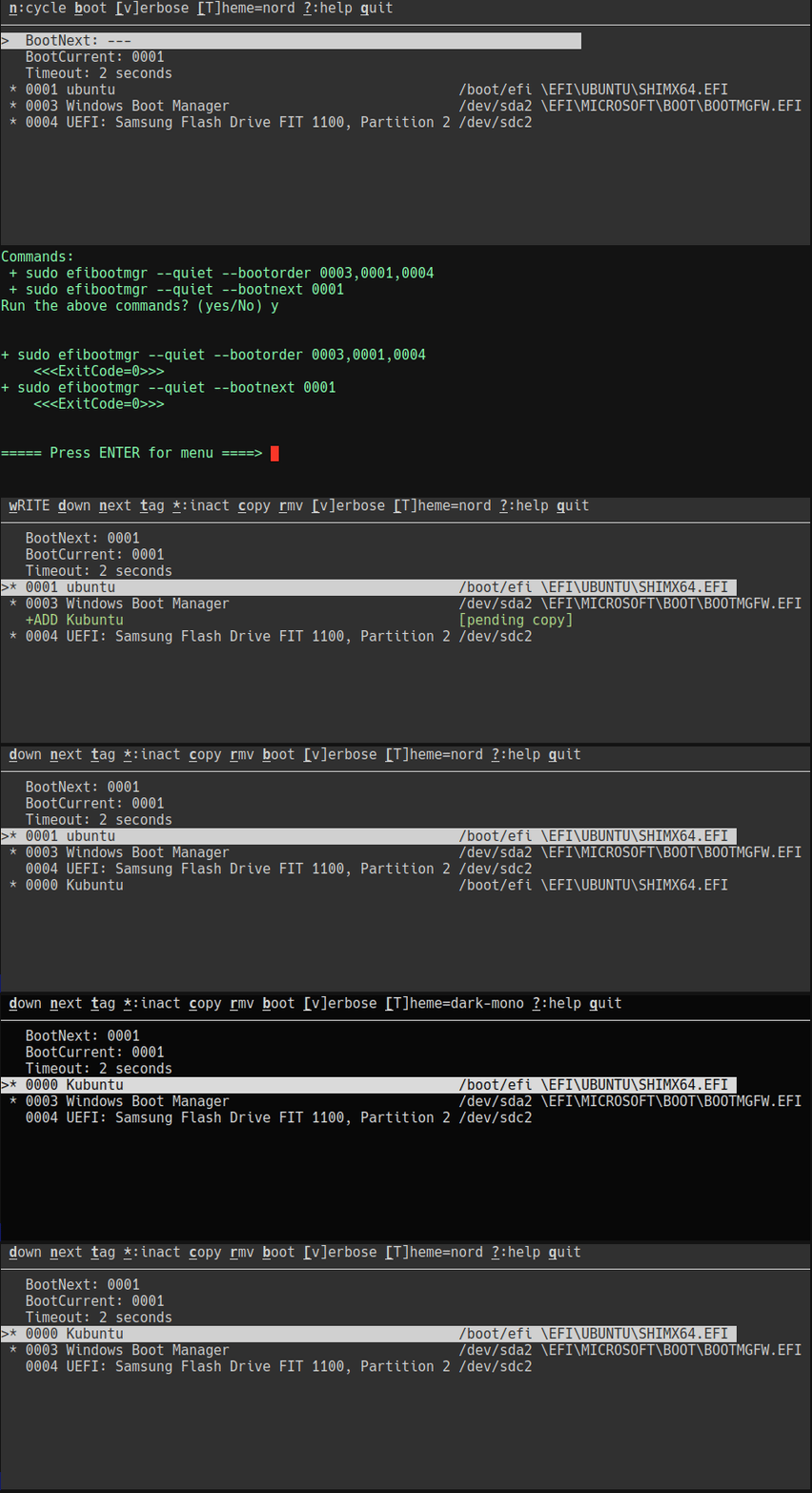
- efibootdude-0.2/src/efibootdude.egg-info/dependency_links.txt +0 -1
- efibootdude-0.2/src/efibootdude.egg-info/entry_points.txt +0 -2
- efibootdude-0.2/src/efibootdude.egg-info/requires.txt +0 -4
- efibootdude-0.2/src/efibootdude.egg-info/top_level.txt +0 -1
- {efibootdude-0.2 → efibootdude-2.0.0}/LICENSE +0 -0
- {efibootdude-0.2/src → efibootdude-2.0.0}/efibootdude/__init__.py +0 -0
|
@@ -0,0 +1,93 @@
|
|
|
1
|
+
Metadata-Version: 2.4
|
|
2
|
+
Name: efibootdude
|
|
3
|
+
Version: 2.0.0
|
|
4
|
+
Summary: A visual wrapper for efibootmgr
|
|
5
|
+
Keywords: app,installer,manager,appimages
|
|
6
|
+
Author-email: Joe Defen <joedef@duck.com>
|
|
7
|
+
Requires-Python: >=3.8
|
|
8
|
+
Description-Content-Type: text/markdown
|
|
9
|
+
Classifier: Programming Language :: Python :: 3
|
|
10
|
+
Classifier: License :: OSI Approved :: MIT License
|
|
11
|
+
Classifier: Operating System :: POSIX :: Linux
|
|
12
|
+
License-File: LICENSE
|
|
13
|
+
Requires-Dist: importlib-metadata; python_version<"3.8"
|
|
14
|
+
Requires-Dist: console-window == 1.4.3
|
|
15
|
+
Project-URL: Bug Tracker, https://github.com/joedefen/efibootdude/issues
|
|
16
|
+
Project-URL: Homepage, https://github.com/joedefen/efibootdude
|
|
17
|
+
|
|
18
|
+
# EfiBootDude
|
|
19
|
+
`efibootdude` presents a visual (curses) interface to `efibootmgr` which allows editing the bios boot menu and parameters while running Linux.
|
|
20
|
+
|
|
21
|
+
* **Installation**: `pipx install efibootdude`
|
|
22
|
+
* **Prerequisites**: install [rhboot/efibootmgr](https://github.com/rhboot/efibootmgr)
|
|
23
|
+
* For example, on a Debian derived distro, use `sudo apt install efibootmgr`.
|
|
24
|
+
|
|
25
|
+
|
|
26
|
+
|
|
27
|
+
|
|
28
|
+
`efibootdude` covers the most commonly used capabilities of `efibootmgr`; you can:
|
|
29
|
+
|
|
30
|
+
* reorder, enable/disable, copy, and remove boot entries
|
|
31
|
+
* choose what to boot on the next reboot (BootNext)
|
|
32
|
+
* set the timeout before auto-booting
|
|
33
|
+
* save your changes and reboot
|
|
34
|
+
|
|
35
|
+
Note: Copying a boot entry effectively adds a new entry with a different label. For more esoteric uses of `efibootmgr` (like setting custom boot variables), use `efibootmgr` directly.
|
|
36
|
+
|
|
37
|
+
## Usage
|
|
38
|
+
After running `efibootdude` and making some changes, you'll see a screen comparable to this:
|
|
39
|
+
```
|
|
40
|
+
wRITE down next tag *:inact copy rmv [v]erbose [T]heme ?:help quit
|
|
41
|
+
──────────────────────────────────────────────────────────────────────────────
|
|
42
|
+
BootNext: ---
|
|
43
|
+
BootCurrent: 0007
|
|
44
|
+
Timeout: 2 seconds
|
|
45
|
+
>* 0006 Linux Boot Manager /dev/nvme0n1p1 \EFI\systemd\systemd-b
|
|
46
|
+
* 0000 Enter Setup [Firmware]
|
|
47
|
+
* 0001 NVMe: SAMSUNG MZALQ128HBHQ-000L2 [Auto]
|
|
48
|
+
* 0002 UEFI Shell [Firmware]
|
|
49
|
+
+ADD Linux Boot Manager Copy [pending copy]
|
|
50
|
+
* -RMV Ubuntu /boot/efi \EFI\ubuntu\shimx64.ef
|
|
51
|
+
|
|
52
|
+
```
|
|
53
|
+
At this point
|
|
54
|
+
* The "current" line starts with `>` and is highlighted.
|
|
55
|
+
* The top line shows actions for the current line; type the underscored letter to effect its action.
|
|
56
|
+
* Type `?` for a more complete explanation of the keys, navigation keys, etc.
|
|
57
|
+
* **ALWAYS** view the help at least once if unfamiliar with this tool,
|
|
58
|
+
it navigation, and/or uncertain of keys not shown on top line.
|
|
59
|
+
* With this current line, we can:
|
|
60
|
+
* Type `u` or `d` to move it up or down in the boot order.
|
|
61
|
+
* Type `t` to relabel the boot entry (prompts for new name).
|
|
62
|
+
* Type `c` to copy the boot entry with a new label (prompts for new name).
|
|
63
|
+
* Type `r` to remove the boot entry.
|
|
64
|
+
* Type `m` on the Timeout line to change the boot timeout in seconds.
|
|
65
|
+
* Type `T` to cycle through available themes.
|
|
66
|
+
* And so forth.
|
|
67
|
+
* The entries with `*` on the left are active boot entries; toggle whether
|
|
68
|
+
active by typing `*` for the corresponding entries.
|
|
69
|
+
* Special status lines at the top:
|
|
70
|
+
* `BootNext:` shows which entry will boot next (use `n` to set it, or leave as `---`)
|
|
71
|
+
* `BootCurrent:` shows which entry is currently booted (read-only, set by firmware)
|
|
72
|
+
* `Timeout:` shows boot timeout in seconds (use `m` to modify)
|
|
73
|
+
* Special indicators:
|
|
74
|
+
* `+ADD` shows pending copy operations (press `r` to cancel before writing)
|
|
75
|
+
* `-RMV` shows entries marked for removal (press `r` to undo before writing)
|
|
76
|
+
* Press `ESC` key to abandon any changes and reload the boot information.
|
|
77
|
+
* When ready to write the changes to the BIOS, enter `w`.
|
|
78
|
+
* When writing the changes, `efibootdude` drops out of menu mode so you can verify the underlying commands, error codes, and error messages.
|
|
79
|
+
* After you write changes, type `b` to reboot, if you wish and the boot menu looks OK.
|
|
80
|
+
* BTW, the top-line keys vary per context; e.g.:
|
|
81
|
+
* `w` is only shown with pending changes, and
|
|
82
|
+
* `b` is only shown w/o pending changes.
|
|
83
|
+
|
|
84
|
+
## Caveats - BIOSes Vary in What They Implement Correctly
|
|
85
|
+
* Some operations may not work permanently even though there is no indication from `efibootmgr` (e.g., on my desktop, I cannot re-label boot entries); copy an entry and later remove the old one as a safe workaround.
|
|
86
|
+
* Some operations may only work (again) after re-booting (e.g., you might find activating an entry does not work, but it does so after a reboot).
|
|
87
|
+
|
|
88
|
+
## About this Project
|
|
89
|
+
This project was inspired by [Elinvention/efiboots](https://github.com/Elinvention/efiboots). Relative to that project, the aims of `efibootdude` are:
|
|
90
|
+
* to be easier to install especially when not in your distro's repos.
|
|
91
|
+
* to clearly present the partition of the boot entries (as a mount point if mounted and, otherwise, the device pathname).
|
|
92
|
+
* to show the underlying commands being run for education, for verification, and for help on investigating issues.
|
|
93
|
+
|
|
@@ -0,0 +1,75 @@
|
|
|
1
|
+
# EfiBootDude
|
|
2
|
+
`efibootdude` presents a visual (curses) interface to `efibootmgr` which allows editing the bios boot menu and parameters while running Linux.
|
|
3
|
+
|
|
4
|
+
* **Installation**: `pipx install efibootdude`
|
|
5
|
+
* **Prerequisites**: install [rhboot/efibootmgr](https://github.com/rhboot/efibootmgr)
|
|
6
|
+
* For example, on a Debian derived distro, use `sudo apt install efibootmgr`.
|
|
7
|
+
|
|
8
|
+

|
|
9
|
+
|
|
10
|
+
|
|
11
|
+
`efibootdude` covers the most commonly used capabilities of `efibootmgr`; you can:
|
|
12
|
+
|
|
13
|
+
* reorder, enable/disable, copy, and remove boot entries
|
|
14
|
+
* choose what to boot on the next reboot (BootNext)
|
|
15
|
+
* set the timeout before auto-booting
|
|
16
|
+
* save your changes and reboot
|
|
17
|
+
|
|
18
|
+
Note: Copying a boot entry effectively adds a new entry with a different label. For more esoteric uses of `efibootmgr` (like setting custom boot variables), use `efibootmgr` directly.
|
|
19
|
+
|
|
20
|
+
## Usage
|
|
21
|
+
After running `efibootdude` and making some changes, you'll see a screen comparable to this:
|
|
22
|
+
```
|
|
23
|
+
wRITE down next tag *:inact copy rmv [v]erbose [T]heme ?:help quit
|
|
24
|
+
──────────────────────────────────────────────────────────────────────────────
|
|
25
|
+
BootNext: ---
|
|
26
|
+
BootCurrent: 0007
|
|
27
|
+
Timeout: 2 seconds
|
|
28
|
+
>* 0006 Linux Boot Manager /dev/nvme0n1p1 \EFI\systemd\systemd-b
|
|
29
|
+
* 0000 Enter Setup [Firmware]
|
|
30
|
+
* 0001 NVMe: SAMSUNG MZALQ128HBHQ-000L2 [Auto]
|
|
31
|
+
* 0002 UEFI Shell [Firmware]
|
|
32
|
+
+ADD Linux Boot Manager Copy [pending copy]
|
|
33
|
+
* -RMV Ubuntu /boot/efi \EFI\ubuntu\shimx64.ef
|
|
34
|
+
|
|
35
|
+
```
|
|
36
|
+
At this point
|
|
37
|
+
* The "current" line starts with `>` and is highlighted.
|
|
38
|
+
* The top line shows actions for the current line; type the underscored letter to effect its action.
|
|
39
|
+
* Type `?` for a more complete explanation of the keys, navigation keys, etc.
|
|
40
|
+
* **ALWAYS** view the help at least once if unfamiliar with this tool,
|
|
41
|
+
it navigation, and/or uncertain of keys not shown on top line.
|
|
42
|
+
* With this current line, we can:
|
|
43
|
+
* Type `u` or `d` to move it up or down in the boot order.
|
|
44
|
+
* Type `t` to relabel the boot entry (prompts for new name).
|
|
45
|
+
* Type `c` to copy the boot entry with a new label (prompts for new name).
|
|
46
|
+
* Type `r` to remove the boot entry.
|
|
47
|
+
* Type `m` on the Timeout line to change the boot timeout in seconds.
|
|
48
|
+
* Type `T` to cycle through available themes.
|
|
49
|
+
* And so forth.
|
|
50
|
+
* The entries with `*` on the left are active boot entries; toggle whether
|
|
51
|
+
active by typing `*` for the corresponding entries.
|
|
52
|
+
* Special status lines at the top:
|
|
53
|
+
* `BootNext:` shows which entry will boot next (use `n` to set it, or leave as `---`)
|
|
54
|
+
* `BootCurrent:` shows which entry is currently booted (read-only, set by firmware)
|
|
55
|
+
* `Timeout:` shows boot timeout in seconds (use `m` to modify)
|
|
56
|
+
* Special indicators:
|
|
57
|
+
* `+ADD` shows pending copy operations (press `r` to cancel before writing)
|
|
58
|
+
* `-RMV` shows entries marked for removal (press `r` to undo before writing)
|
|
59
|
+
* Press `ESC` key to abandon any changes and reload the boot information.
|
|
60
|
+
* When ready to write the changes to the BIOS, enter `w`.
|
|
61
|
+
* When writing the changes, `efibootdude` drops out of menu mode so you can verify the underlying commands, error codes, and error messages.
|
|
62
|
+
* After you write changes, type `b` to reboot, if you wish and the boot menu looks OK.
|
|
63
|
+
* BTW, the top-line keys vary per context; e.g.:
|
|
64
|
+
* `w` is only shown with pending changes, and
|
|
65
|
+
* `b` is only shown w/o pending changes.
|
|
66
|
+
|
|
67
|
+
## Caveats - BIOSes Vary in What They Implement Correctly
|
|
68
|
+
* Some operations may not work permanently even though there is no indication from `efibootmgr` (e.g., on my desktop, I cannot re-label boot entries); copy an entry and later remove the old one as a safe workaround.
|
|
69
|
+
* Some operations may only work (again) after re-booting (e.g., you might find activating an entry does not work, but it does so after a reboot).
|
|
70
|
+
|
|
71
|
+
## About this Project
|
|
72
|
+
This project was inspired by [Elinvention/efiboots](https://github.com/Elinvention/efiboots). Relative to that project, the aims of `efibootdude` are:
|
|
73
|
+
* to be easier to install especially when not in your distro's repos.
|
|
74
|
+
* to clearly present the partition of the boot entries (as a mount point if mounted and, otherwise, the device pathname).
|
|
75
|
+
* to show the underlying commands being run for education, for verification, and for help on investigating issues.
|