easympv 1.4.0__tar.gz
This diff represents the content of publicly available package versions that have been released to one of the supported registries. The information contained in this diff is provided for informational purposes only and reflects changes between package versions as they appear in their respective public registries.
- easympv-1.4.0/MANIFEST.in +3 -0
- easympv-1.4.0/PKG-INFO +147 -0
- easympv-1.4.0/README.md +137 -0
- easympv-1.4.0/easympv.egg-info/PKG-INFO +147 -0
- easympv-1.4.0/easympv.egg-info/SOURCES.txt +81 -0
- easympv-1.4.0/easympv.egg-info/dependency_links.txt +1 -0
- easympv-1.4.0/easympv.egg-info/entry_points.txt +2 -0
- easympv-1.4.0/easympv.egg-info/requires.txt +1 -0
- easympv-1.4.0/easympv.egg-info/top_level.txt +1 -0
- easympv-1.4.0/easyplayer/AudioPlay.py +210 -0
- easympv-1.4.0/easyplayer/EasyPlayer.py +1456 -0
- easympv-1.4.0/easyplayer/FFMPEGTools.py +1420 -0
- easympv-1.4.0/easyplayer/Playlist.py +281 -0
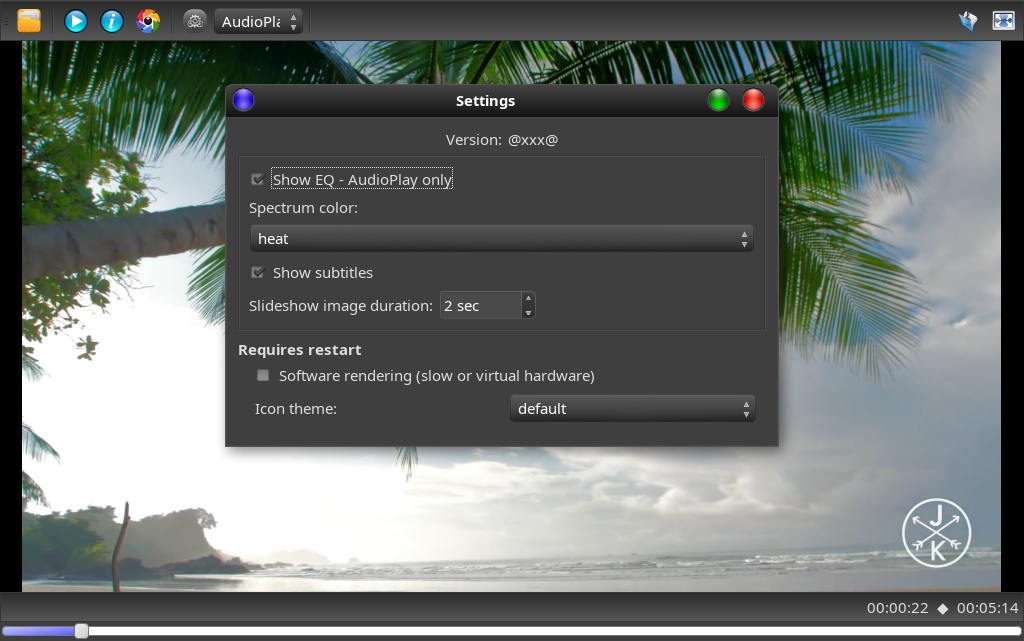
- easympv-1.4.0/easyplayer/QtTools.py +59 -0
- easympv-1.4.0/easyplayer/Slideshow.py +107 -0
- easympv-1.4.0/easyplayer/__init__.py +0 -0
- easympv-1.4.0/easyplayer/icons/Pictures-icon.png +0 -0
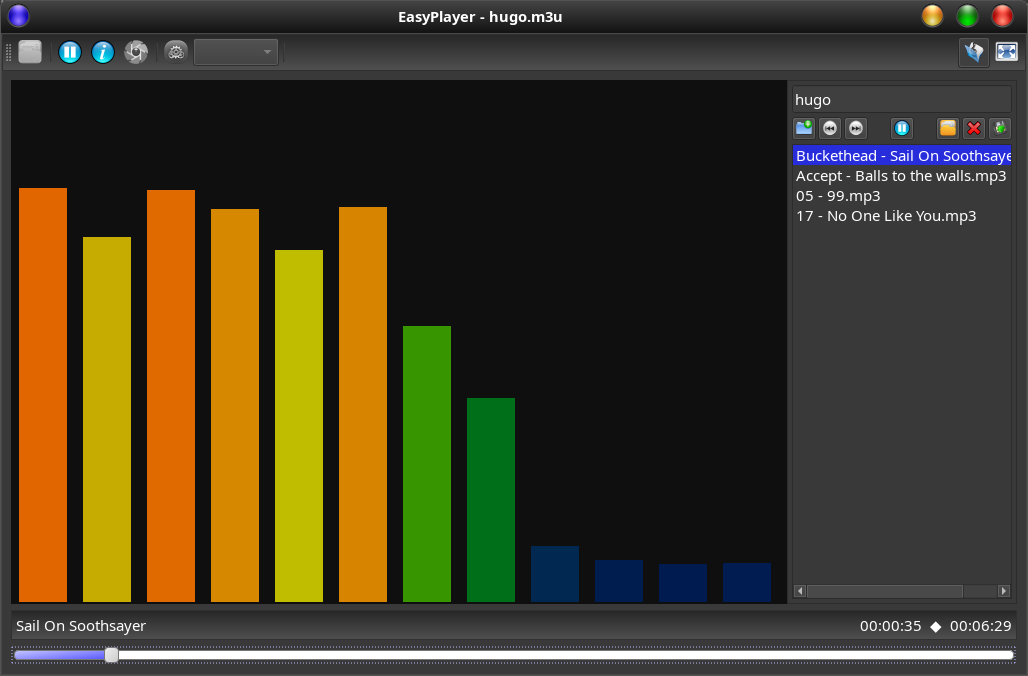
- easympv-1.4.0/easyplayer/icons/clear-all.png +0 -0
- easympv-1.4.0/easyplayer/icons/close-x.png +0 -0
- easympv-1.4.0/easyplayer/icons/easyPlay.png +0 -0
- easympv-1.4.0/easyplayer/icons/easyPlay.svg +121 -0
- easympv-1.4.0/easyplayer/icons/film-clapper.png +0 -0
- easympv-1.4.0/easyplayer/icons/flatdark/fullscreen.png +65 -0
- easympv-1.4.0/easyplayer/icons/flatdark/goto.svg +72 -0
- easympv-1.4.0/easyplayer/icons/flatdark/info.svg +76 -0
- easympv-1.4.0/easyplayer/icons/flatdark/mute.svg +73 -0
- easympv-1.4.0/easyplayer/icons/flatdark/newList.svg +62 -0
- easympv-1.4.0/easyplayer/icons/flatdark/open.svg +51 -0
- easympv-1.4.0/easyplayer/icons/flatdark/pause.svg +48 -0
- easympv-1.4.0/easyplayer/icons/flatdark/play.svg +49 -0
- easympv-1.4.0/easyplayer/icons/flatdark/remove.svg +50 -0
- easympv-1.4.0/easyplayer/icons/flatdark/remove_all.svg +88 -0
- easympv-1.4.0/easyplayer/icons/flatdark/save.svg +66 -0
- easympv-1.4.0/easyplayer/icons/flatdark/screenshot.svg +44 -0
- easympv-1.4.0/easyplayer/icons/flatdark/settings.svg +49 -0
- easympv-1.4.0/easyplayer/icons/flatdark/sound.svg +67 -0
- easympv-1.4.0/easyplayer/icons/flatdark/splitVertical.svg +1 -0
- easympv-1.4.0/easyplayer/icons/flatdark/start-cut.svg +7 -0
- easympv-1.4.0/easyplayer/icons/flatdark/stop-cut.svg +7 -0
- easympv-1.4.0/easyplayer/icons/flaticons/fullscreen.png +0 -0
- easympv-1.4.0/easyplayer/icons/flaticons/goto.svg +7 -0
- easympv-1.4.0/easyplayer/icons/flaticons/info.svg +9 -0
- easympv-1.4.0/easyplayer/icons/flaticons/mute.svg +13 -0
- easympv-1.4.0/easyplayer/icons/flaticons/newList.svg +8 -0
- easympv-1.4.0/easyplayer/icons/flaticons/open.svg +4 -0
- easympv-1.4.0/easyplayer/icons/flaticons/pause.svg +4 -0
- easympv-1.4.0/easyplayer/icons/flaticons/play.svg +46 -0
- easympv-1.4.0/easyplayer/icons/flaticons/remove.svg +4 -0
- easympv-1.4.0/easyplayer/icons/flaticons/remove_all.svg +12 -0
- easympv-1.4.0/easyplayer/icons/flaticons/save.svg +8 -0
- easympv-1.4.0/easyplayer/icons/flaticons/screenshot.svg +8 -0
- easympv-1.4.0/easyplayer/icons/flaticons/settings.svg +4 -0
- easympv-1.4.0/easyplayer/icons/flaticons/sound.svg +12 -0
- easympv-1.4.0/easyplayer/icons/flaticons/splitVertical.svg +1 -0
- easympv-1.4.0/easyplayer/icons/flaticons/start-cut.svg +7 -0
- easympv-1.4.0/easyplayer/icons/flaticons/stop-cut.svg +7 -0
- easympv-1.4.0/easyplayer/icons/fullscreen.png +0 -0
- easympv-1.4.0/easyplayer/icons/go-next.png +0 -0
- easympv-1.4.0/easyplayer/icons/icomap.json +74 -0
- easympv-1.4.0/easyplayer/icons/info.png +0 -0
- easympv-1.4.0/easyplayer/icons/langflags.png +0 -0
- easympv-1.4.0/easyplayer/icons/license.txt +6 -0
- easympv-1.4.0/easyplayer/icons/loadfile.png +0 -0
- easympv-1.4.0/easyplayer/icons/movie-icon.png +0 -0
- easympv-1.4.0/easyplayer/icons/newList.png +0 -0
- easympv-1.4.0/easyplayer/icons/next.png +0 -0
- easympv-1.4.0/easyplayer/icons/pause.png +0 -0
- easympv-1.4.0/easyplayer/icons/play.png +0 -0
- easympv-1.4.0/easyplayer/icons/previous.png +0 -0
- easympv-1.4.0/easyplayer/icons/save-as-icon.png +0 -0
- easympv-1.4.0/easyplayer/icons/screenshot.png +0 -0
- easympv-1.4.0/easyplayer/icons/settings.png +0 -0
- easympv-1.4.0/easyplayer/icons/speaker-high.png +0 -0
- easympv-1.4.0/easyplayer/icons/speaker-muted.png +0 -0
- easympv-1.4.0/easyplayer/icons/splitVertical.png +0 -0
- easympv-1.4.0/easyplayer/icons/start-icon.png +0 -0
- easympv-1.4.0/easyplayer/icons/stop-red-icon.png +0 -0
- easympv-1.4.0/easyplayer/icons/video_clapper.png +0 -0
- easympv-1.4.0/easyplayer/icons/window-close.png +0 -0
- easympv-1.4.0/easyplayer/lib/__init__.py +0 -0
- easympv-1.4.0/easyplayer/lib/mpv.py +2206 -0
- easympv-1.4.0/pyproject.toml +24 -0
- easympv-1.4.0/setup.cfg +4 -0
easympv-1.4.0/PKG-INFO
ADDED
|
@@ -0,0 +1,147 @@
|
|
|
1
|
+
Metadata-Version: 2.4
|
|
2
|
+
Name: easympv
|
|
3
|
+
Version: 1.4.0
|
|
4
|
+
Summary: Simple video and audio player based on mpv
|
|
5
|
+
License: GPL-2.0-or-later
|
|
6
|
+
Project-URL: Homepage, https://github.com/kanehekili/EasyPlayer
|
|
7
|
+
Requires-Python: >=3.9
|
|
8
|
+
Description-Content-Type: text/markdown
|
|
9
|
+
Requires-Dist: PyQt6
|
|
10
|
+
|
|
11
|
+
# EasyPlayer
|
|
12
|
+
Version 1.4.0
|
|
13
|
+
|
|
14
|
+
|
|
15
|
+
A simple video and audio player based on mpv and QT6 . It is a spin off of my VideoCut app. It handles pictures, plays videos and audio files.
|
|
16
|
+
|
|
17
|
+
|
|
18
|
+
|
|
19
|
+
Configurable Spectrum Analyzer:
|
|
20
|
+
|
|
21
|
+
|
|
22
|
+
|
|
23
|
+
### Prerequisites
|
|
24
|
+
* Arch: python3, python-pillow and mpv
|
|
25
|
+
* Debian/Mint/Ubuntu: python3 python3-pil libmpv2 (or libmpv1) (no-recommends)
|
|
26
|
+
* Ubuntu 26.04 needs additionally qt6-svg-plugins
|
|
27
|
+
#not working for Ubuntu 18.4: libmpv - use python3-opencv instead
|
|
28
|
+
* Fedora: python3-pillow-qt and mpv-libs.x86_64
|
|
29
|
+
* ffmpeg > 3.X to 8.X
|
|
30
|
+
* python3-pyqt6
|
|
31
|
+
|
|
32
|
+
#### Set GTK Theme for this QT application
|
|
33
|
+
If you are running a DE with GTK/Gnome (as opposed to LXQT or KDE) you might set QT_QPA_PLATFORMTHEME:
|
|
34
|
+
* Depending on the distro and version this variable may be defined with one of:
|
|
35
|
+
* gtk2, qt6ct, fusion, gtk3
|
|
36
|
+
* Easyplayer will enforce "QT_QPA_PLATFORM=xcb" on Wayland for SSD decorations.
|
|
37
|
+
* On Ubuntu 26.04 you need to install qt6-gtk-platformtheme. This will get your GTK theme into any QT6 app.
|
|
38
|
+
* On Ubuntu(with libadwaita) use /etc/environment to add GTK_THEME=yourTheme to enforce a third party theme. (Hack)
|
|
39
|
+
|
|
40
|
+
### Features
|
|
41
|
+
* Easyplayer supports wayland and orientation recognition (which mplayer does not).
|
|
42
|
+
* Has been tested with interlaced video and 4K
|
|
43
|
+
* Subtitles can be shown (settings)
|
|
44
|
+
* Playlist support
|
|
45
|
+
* Picture/image viewer (png, jpg, bmp, gif, webp, tiff)
|
|
46
|
+
* Slideshow with configurable timeout
|
|
47
|
+
* Flat and non flat icon set
|
|
48
|
+
* Language can be selected
|
|
49
|
+
* Supports an EQ-display for audio files - Some distros need to install python3-sounddevice via pip. (Not mandatory)
|
|
50
|
+
* Colors of the EQ display can be changed live via the settings dialog.
|
|
51
|
+
* Settings allows you to switch to software mode (old hardware & virtual environments)
|
|
52
|
+
|
|
53
|
+
|
|
54
|
+
### Support for Qemu and old hardware:
|
|
55
|
+
* -v will use a virtual GL driver or software for rendering. (easyplayer -v)
|
|
56
|
+
* Can be set via the "Settings dialog - Software mode" as well.
|
|
57
|
+
|
|
58
|
+
|
|
59
|
+
#### Install via ppa on Linux Mint or Ubuntu (Mint 22.2, Ubuntu 22.04 and newer versions)
|
|
60
|
+
```
|
|
61
|
+
sudo add-apt-repository ppa:jentiger-moratai/mediatools
|
|
62
|
+
sudo apt update
|
|
63
|
+
sudo apt install --no-install-recommends easyplayer
|
|
64
|
+
```
|
|
65
|
+
(--no-install-recommends will install only what is required)
|
|
66
|
+
Select video and open it with "Open with ->EasyPlayer", oder via terminal "easyplayer"
|
|
67
|
+
|
|
68
|
+
Remove with:
|
|
69
|
+
`sudo apt remove easyplayer`
|
|
70
|
+
|
|
71
|
+
#### Install EasyPlayer via AUR (Arch Linux /Manjaro only)
|
|
72
|
+
* Use pamac or other GUI tools, search for "easyplayer" in AUR, click install
|
|
73
|
+
* Manually :
|
|
74
|
+
* Download [PKGBUILD ](https://aur.archlinux.org/cgit/aur.git/snapshot/easyplayer.tar.gz)
|
|
75
|
+
* unpack it and go into the "easyplayer" folder
|
|
76
|
+
* execute `makepkg -s`
|
|
77
|
+
* excute `sudo pacman -U easyplayer-1.x.x.x-1-x86_64.pkg.tar.zst`
|
|
78
|
+
* uninstall via `sudo pacman -Rs easyplayer`
|
|
79
|
+
|
|
80
|
+
Select video and open it with "Open with ->EasyPlayer", oder via terminal "easyplayer"
|
|
81
|
+
|
|
82
|
+
|
|
83
|
+
#### Install dependencies manually on Linux Mint or Ubuntu (tested from noble to resolute)
|
|
84
|
+
```
|
|
85
|
+
sudo apt –no-install-recommends install python3-pyqt6 ffmpeg python3-pil libmpv2
|
|
86
|
+
```
|
|
87
|
+
|
|
88
|
+
#### Install dependencies on Fedora
|
|
89
|
+
```
|
|
90
|
+
sudo dnf python3-qt6 ffmpeg python3-pillow-qt mpv-libs.x86_64
|
|
91
|
+
```
|
|
92
|
+
|
|
93
|
+
### How to install with a terminal
|
|
94
|
+
* Install dependencies (see prerequisites)
|
|
95
|
+
* Download the easyplayer*.tar from the download link (see above)
|
|
96
|
+
* Extract it to a location that suits you.
|
|
97
|
+
* Open a terminal to execute the install.sh file inside the folder with sudo like `sudo ./install.sh`
|
|
98
|
+
* (if you are in the download directory - just an example)
|
|
99
|
+
* The app will be installed in /opt/easyplayer with a link to /usr/bin.
|
|
100
|
+
* The app should be appear in a menu or "Actvities"
|
|
101
|
+
* Can be openend by selecting a video file & Open with...
|
|
102
|
+
* In the terminal can be started via `easyplayer`
|
|
103
|
+
* python qt6, mpv and ffmpeg are required
|
|
104
|
+
* you may now remove that download directory.
|
|
105
|
+
* logs can be found in the user home ".config/EasyPlayer" folder
|
|
106
|
+
|
|
107
|
+
### How to remove
|
|
108
|
+
* Open a terminal
|
|
109
|
+
* execute `sudo /opt/easyplayer/uninstall.sh`
|
|
110
|
+
|
|
111
|
+
### Changes
|
|
112
|
+
23.04.2026:
|
|
113
|
+
* Added slideshow features for pictures
|
|
114
|
+
* Improved scrolling while playing
|
|
115
|
+
|
|
116
|
+
18.04.2026
|
|
117
|
+
* Remove outer border for fullscreen
|
|
118
|
+
* Picture/image support added to file dialog and MIME types
|
|
119
|
+
* Fix playlist errors
|
|
120
|
+
|
|
121
|
+
30.03.2026
|
|
122
|
+
* Playlist support
|
|
123
|
+
* Fix scaled Xwayland desktops
|
|
124
|
+
|
|
125
|
+
21.03.2026
|
|
126
|
+
* Support for virtual environments or slow hardware via SettingsDialog
|
|
127
|
+
|
|
128
|
+
20.03.2026
|
|
129
|
+
* introducing "parec" for Spectrum EQ (Ubuntu)
|
|
130
|
+
|
|
131
|
+
16.03.2026
|
|
132
|
+
* Configuration of Spectrum EQ
|
|
133
|
+
* Reviewed Pulseaudio dependencies
|
|
134
|
+
* Distro agnostic installation (Debian & Arch)
|
|
135
|
+
|
|
136
|
+
12.03.2026
|
|
137
|
+
* Graphic EQ display for audio files
|
|
138
|
+
|
|
139
|
+
09.03.2026
|
|
140
|
+
* Support for playlists and streams
|
|
141
|
+
|
|
142
|
+
05.03.2026
|
|
143
|
+
* Hardened interlacing recognition, fixed interprocess communication
|
|
144
|
+
|
|
145
|
+
26..12.2025
|
|
146
|
+
* Initial start
|
|
147
|
+
|
easympv-1.4.0/README.md
ADDED
|
@@ -0,0 +1,137 @@
|
|
|
1
|
+
# EasyPlayer
|
|
2
|
+
Version 1.4.0
|
|
3
|
+
|
|
4
|
+
|
|
5
|
+
A simple video and audio player based on mpv and QT6 . It is a spin off of my VideoCut app. It handles pictures, plays videos and audio files.
|
|
6
|
+
|
|
7
|
+

|
|
8
|
+
|
|
9
|
+
Configurable Spectrum Analyzer:
|
|
10
|
+
|
|
11
|
+

|
|
12
|
+
|
|
13
|
+
### Prerequisites
|
|
14
|
+
* Arch: python3, python-pillow and mpv
|
|
15
|
+
* Debian/Mint/Ubuntu: python3 python3-pil libmpv2 (or libmpv1) (no-recommends)
|
|
16
|
+
* Ubuntu 26.04 needs additionally qt6-svg-plugins
|
|
17
|
+
#not working for Ubuntu 18.4: libmpv - use python3-opencv instead
|
|
18
|
+
* Fedora: python3-pillow-qt and mpv-libs.x86_64
|
|
19
|
+
* ffmpeg > 3.X to 8.X
|
|
20
|
+
* python3-pyqt6
|
|
21
|
+
|
|
22
|
+
#### Set GTK Theme for this QT application
|
|
23
|
+
If you are running a DE with GTK/Gnome (as opposed to LXQT or KDE) you might set QT_QPA_PLATFORMTHEME:
|
|
24
|
+
* Depending on the distro and version this variable may be defined with one of:
|
|
25
|
+
* gtk2, qt6ct, fusion, gtk3
|
|
26
|
+
* Easyplayer will enforce "QT_QPA_PLATFORM=xcb" on Wayland for SSD decorations.
|
|
27
|
+
* On Ubuntu 26.04 you need to install qt6-gtk-platformtheme. This will get your GTK theme into any QT6 app.
|
|
28
|
+
* On Ubuntu(with libadwaita) use /etc/environment to add GTK_THEME=yourTheme to enforce a third party theme. (Hack)
|
|
29
|
+
|
|
30
|
+
### Features
|
|
31
|
+
* Easyplayer supports wayland and orientation recognition (which mplayer does not).
|
|
32
|
+
* Has been tested with interlaced video and 4K
|
|
33
|
+
* Subtitles can be shown (settings)
|
|
34
|
+
* Playlist support
|
|
35
|
+
* Picture/image viewer (png, jpg, bmp, gif, webp, tiff)
|
|
36
|
+
* Slideshow with configurable timeout
|
|
37
|
+
* Flat and non flat icon set
|
|
38
|
+
* Language can be selected
|
|
39
|
+
* Supports an EQ-display for audio files - Some distros need to install python3-sounddevice via pip. (Not mandatory)
|
|
40
|
+
* Colors of the EQ display can be changed live via the settings dialog.
|
|
41
|
+
* Settings allows you to switch to software mode (old hardware & virtual environments)
|
|
42
|
+
|
|
43
|
+
|
|
44
|
+
### Support for Qemu and old hardware:
|
|
45
|
+
* -v will use a virtual GL driver or software for rendering. (easyplayer -v)
|
|
46
|
+
* Can be set via the "Settings dialog - Software mode" as well.
|
|
47
|
+
|
|
48
|
+
|
|
49
|
+
#### Install via ppa on Linux Mint or Ubuntu (Mint 22.2, Ubuntu 22.04 and newer versions)
|
|
50
|
+
```
|
|
51
|
+
sudo add-apt-repository ppa:jentiger-moratai/mediatools
|
|
52
|
+
sudo apt update
|
|
53
|
+
sudo apt install --no-install-recommends easyplayer
|
|
54
|
+
```
|
|
55
|
+
(--no-install-recommends will install only what is required)
|
|
56
|
+
Select video and open it with "Open with ->EasyPlayer", oder via terminal "easyplayer"
|
|
57
|
+
|
|
58
|
+
Remove with:
|
|
59
|
+
`sudo apt remove easyplayer`
|
|
60
|
+
|
|
61
|
+
#### Install EasyPlayer via AUR (Arch Linux /Manjaro only)
|
|
62
|
+
* Use pamac or other GUI tools, search for "easyplayer" in AUR, click install
|
|
63
|
+
* Manually :
|
|
64
|
+
* Download [PKGBUILD ](https://aur.archlinux.org/cgit/aur.git/snapshot/easyplayer.tar.gz)
|
|
65
|
+
* unpack it and go into the "easyplayer" folder
|
|
66
|
+
* execute `makepkg -s`
|
|
67
|
+
* excute `sudo pacman -U easyplayer-1.x.x.x-1-x86_64.pkg.tar.zst`
|
|
68
|
+
* uninstall via `sudo pacman -Rs easyplayer`
|
|
69
|
+
|
|
70
|
+
Select video and open it with "Open with ->EasyPlayer", oder via terminal "easyplayer"
|
|
71
|
+
|
|
72
|
+
|
|
73
|
+
#### Install dependencies manually on Linux Mint or Ubuntu (tested from noble to resolute)
|
|
74
|
+
```
|
|
75
|
+
sudo apt –no-install-recommends install python3-pyqt6 ffmpeg python3-pil libmpv2
|
|
76
|
+
```
|
|
77
|
+
|
|
78
|
+
#### Install dependencies on Fedora
|
|
79
|
+
```
|
|
80
|
+
sudo dnf python3-qt6 ffmpeg python3-pillow-qt mpv-libs.x86_64
|
|
81
|
+
```
|
|
82
|
+
|
|
83
|
+
### How to install with a terminal
|
|
84
|
+
* Install dependencies (see prerequisites)
|
|
85
|
+
* Download the easyplayer*.tar from the download link (see above)
|
|
86
|
+
* Extract it to a location that suits you.
|
|
87
|
+
* Open a terminal to execute the install.sh file inside the folder with sudo like `sudo ./install.sh`
|
|
88
|
+
* (if you are in the download directory - just an example)
|
|
89
|
+
* The app will be installed in /opt/easyplayer with a link to /usr/bin.
|
|
90
|
+
* The app should be appear in a menu or "Actvities"
|
|
91
|
+
* Can be openend by selecting a video file & Open with...
|
|
92
|
+
* In the terminal can be started via `easyplayer`
|
|
93
|
+
* python qt6, mpv and ffmpeg are required
|
|
94
|
+
* you may now remove that download directory.
|
|
95
|
+
* logs can be found in the user home ".config/EasyPlayer" folder
|
|
96
|
+
|
|
97
|
+
### How to remove
|
|
98
|
+
* Open a terminal
|
|
99
|
+
* execute `sudo /opt/easyplayer/uninstall.sh`
|
|
100
|
+
|
|
101
|
+
### Changes
|
|
102
|
+
23.04.2026:
|
|
103
|
+
* Added slideshow features for pictures
|
|
104
|
+
* Improved scrolling while playing
|
|
105
|
+
|
|
106
|
+
18.04.2026
|
|
107
|
+
* Remove outer border for fullscreen
|
|
108
|
+
* Picture/image support added to file dialog and MIME types
|
|
109
|
+
* Fix playlist errors
|
|
110
|
+
|
|
111
|
+
30.03.2026
|
|
112
|
+
* Playlist support
|
|
113
|
+
* Fix scaled Xwayland desktops
|
|
114
|
+
|
|
115
|
+
21.03.2026
|
|
116
|
+
* Support for virtual environments or slow hardware via SettingsDialog
|
|
117
|
+
|
|
118
|
+
20.03.2026
|
|
119
|
+
* introducing "parec" for Spectrum EQ (Ubuntu)
|
|
120
|
+
|
|
121
|
+
16.03.2026
|
|
122
|
+
* Configuration of Spectrum EQ
|
|
123
|
+
* Reviewed Pulseaudio dependencies
|
|
124
|
+
* Distro agnostic installation (Debian & Arch)
|
|
125
|
+
|
|
126
|
+
12.03.2026
|
|
127
|
+
* Graphic EQ display for audio files
|
|
128
|
+
|
|
129
|
+
09.03.2026
|
|
130
|
+
* Support for playlists and streams
|
|
131
|
+
|
|
132
|
+
05.03.2026
|
|
133
|
+
* Hardened interlacing recognition, fixed interprocess communication
|
|
134
|
+
|
|
135
|
+
26..12.2025
|
|
136
|
+
* Initial start
|
|
137
|
+
|
|
@@ -0,0 +1,147 @@
|
|
|
1
|
+
Metadata-Version: 2.4
|
|
2
|
+
Name: easympv
|
|
3
|
+
Version: 1.4.0
|
|
4
|
+
Summary: Simple video and audio player based on mpv
|
|
5
|
+
License: GPL-2.0-or-later
|
|
6
|
+
Project-URL: Homepage, https://github.com/kanehekili/EasyPlayer
|
|
7
|
+
Requires-Python: >=3.9
|
|
8
|
+
Description-Content-Type: text/markdown
|
|
9
|
+
Requires-Dist: PyQt6
|
|
10
|
+
|
|
11
|
+
# EasyPlayer
|
|
12
|
+
Version 1.4.0
|
|
13
|
+
|
|
14
|
+
|
|
15
|
+
A simple video and audio player based on mpv and QT6 . It is a spin off of my VideoCut app. It handles pictures, plays videos and audio files.
|
|
16
|
+
|
|
17
|
+

|
|
18
|
+
|
|
19
|
+
Configurable Spectrum Analyzer:
|
|
20
|
+
|
|
21
|
+

|
|
22
|
+
|
|
23
|
+
### Prerequisites
|
|
24
|
+
* Arch: python3, python-pillow and mpv
|
|
25
|
+
* Debian/Mint/Ubuntu: python3 python3-pil libmpv2 (or libmpv1) (no-recommends)
|
|
26
|
+
* Ubuntu 26.04 needs additionally qt6-svg-plugins
|
|
27
|
+
#not working for Ubuntu 18.4: libmpv - use python3-opencv instead
|
|
28
|
+
* Fedora: python3-pillow-qt and mpv-libs.x86_64
|
|
29
|
+
* ffmpeg > 3.X to 8.X
|
|
30
|
+
* python3-pyqt6
|
|
31
|
+
|
|
32
|
+
#### Set GTK Theme for this QT application
|
|
33
|
+
If you are running a DE with GTK/Gnome (as opposed to LXQT or KDE) you might set QT_QPA_PLATFORMTHEME:
|
|
34
|
+
* Depending on the distro and version this variable may be defined with one of:
|
|
35
|
+
* gtk2, qt6ct, fusion, gtk3
|
|
36
|
+
* Easyplayer will enforce "QT_QPA_PLATFORM=xcb" on Wayland for SSD decorations.
|
|
37
|
+
* On Ubuntu 26.04 you need to install qt6-gtk-platformtheme. This will get your GTK theme into any QT6 app.
|
|
38
|
+
* On Ubuntu(with libadwaita) use /etc/environment to add GTK_THEME=yourTheme to enforce a third party theme. (Hack)
|
|
39
|
+
|
|
40
|
+
### Features
|
|
41
|
+
* Easyplayer supports wayland and orientation recognition (which mplayer does not).
|
|
42
|
+
* Has been tested with interlaced video and 4K
|
|
43
|
+
* Subtitles can be shown (settings)
|
|
44
|
+
* Playlist support
|
|
45
|
+
* Picture/image viewer (png, jpg, bmp, gif, webp, tiff)
|
|
46
|
+
* Slideshow with configurable timeout
|
|
47
|
+
* Flat and non flat icon set
|
|
48
|
+
* Language can be selected
|
|
49
|
+
* Supports an EQ-display for audio files - Some distros need to install python3-sounddevice via pip. (Not mandatory)
|
|
50
|
+
* Colors of the EQ display can be changed live via the settings dialog.
|
|
51
|
+
* Settings allows you to switch to software mode (old hardware & virtual environments)
|
|
52
|
+
|
|
53
|
+
|
|
54
|
+
### Support for Qemu and old hardware:
|
|
55
|
+
* -v will use a virtual GL driver or software for rendering. (easyplayer -v)
|
|
56
|
+
* Can be set via the "Settings dialog - Software mode" as well.
|
|
57
|
+
|
|
58
|
+
|
|
59
|
+
#### Install via ppa on Linux Mint or Ubuntu (Mint 22.2, Ubuntu 22.04 and newer versions)
|
|
60
|
+
```
|
|
61
|
+
sudo add-apt-repository ppa:jentiger-moratai/mediatools
|
|
62
|
+
sudo apt update
|
|
63
|
+
sudo apt install --no-install-recommends easyplayer
|
|
64
|
+
```
|
|
65
|
+
(--no-install-recommends will install only what is required)
|
|
66
|
+
Select video and open it with "Open with ->EasyPlayer", oder via terminal "easyplayer"
|
|
67
|
+
|
|
68
|
+
Remove with:
|
|
69
|
+
`sudo apt remove easyplayer`
|
|
70
|
+
|
|
71
|
+
#### Install EasyPlayer via AUR (Arch Linux /Manjaro only)
|
|
72
|
+
* Use pamac or other GUI tools, search for "easyplayer" in AUR, click install
|
|
73
|
+
* Manually :
|
|
74
|
+
* Download [PKGBUILD ](https://aur.archlinux.org/cgit/aur.git/snapshot/easyplayer.tar.gz)
|
|
75
|
+
* unpack it and go into the "easyplayer" folder
|
|
76
|
+
* execute `makepkg -s`
|
|
77
|
+
* excute `sudo pacman -U easyplayer-1.x.x.x-1-x86_64.pkg.tar.zst`
|
|
78
|
+
* uninstall via `sudo pacman -Rs easyplayer`
|
|
79
|
+
|
|
80
|
+
Select video and open it with "Open with ->EasyPlayer", oder via terminal "easyplayer"
|
|
81
|
+
|
|
82
|
+
|
|
83
|
+
#### Install dependencies manually on Linux Mint or Ubuntu (tested from noble to resolute)
|
|
84
|
+
```
|
|
85
|
+
sudo apt –no-install-recommends install python3-pyqt6 ffmpeg python3-pil libmpv2
|
|
86
|
+
```
|
|
87
|
+
|
|
88
|
+
#### Install dependencies on Fedora
|
|
89
|
+
```
|
|
90
|
+
sudo dnf python3-qt6 ffmpeg python3-pillow-qt mpv-libs.x86_64
|
|
91
|
+
```
|
|
92
|
+
|
|
93
|
+
### How to install with a terminal
|
|
94
|
+
* Install dependencies (see prerequisites)
|
|
95
|
+
* Download the easyplayer*.tar from the download link (see above)
|
|
96
|
+
* Extract it to a location that suits you.
|
|
97
|
+
* Open a terminal to execute the install.sh file inside the folder with sudo like `sudo ./install.sh`
|
|
98
|
+
* (if you are in the download directory - just an example)
|
|
99
|
+
* The app will be installed in /opt/easyplayer with a link to /usr/bin.
|
|
100
|
+
* The app should be appear in a menu or "Actvities"
|
|
101
|
+
* Can be openend by selecting a video file & Open with...
|
|
102
|
+
* In the terminal can be started via `easyplayer`
|
|
103
|
+
* python qt6, mpv and ffmpeg are required
|
|
104
|
+
* you may now remove that download directory.
|
|
105
|
+
* logs can be found in the user home ".config/EasyPlayer" folder
|
|
106
|
+
|
|
107
|
+
### How to remove
|
|
108
|
+
* Open a terminal
|
|
109
|
+
* execute `sudo /opt/easyplayer/uninstall.sh`
|
|
110
|
+
|
|
111
|
+
### Changes
|
|
112
|
+
23.04.2026:
|
|
113
|
+
* Added slideshow features for pictures
|
|
114
|
+
* Improved scrolling while playing
|
|
115
|
+
|
|
116
|
+
18.04.2026
|
|
117
|
+
* Remove outer border for fullscreen
|
|
118
|
+
* Picture/image support added to file dialog and MIME types
|
|
119
|
+
* Fix playlist errors
|
|
120
|
+
|
|
121
|
+
30.03.2026
|
|
122
|
+
* Playlist support
|
|
123
|
+
* Fix scaled Xwayland desktops
|
|
124
|
+
|
|
125
|
+
21.03.2026
|
|
126
|
+
* Support for virtual environments or slow hardware via SettingsDialog
|
|
127
|
+
|
|
128
|
+
20.03.2026
|
|
129
|
+
* introducing "parec" for Spectrum EQ (Ubuntu)
|
|
130
|
+
|
|
131
|
+
16.03.2026
|
|
132
|
+
* Configuration of Spectrum EQ
|
|
133
|
+
* Reviewed Pulseaudio dependencies
|
|
134
|
+
* Distro agnostic installation (Debian & Arch)
|
|
135
|
+
|
|
136
|
+
12.03.2026
|
|
137
|
+
* Graphic EQ display for audio files
|
|
138
|
+
|
|
139
|
+
09.03.2026
|
|
140
|
+
* Support for playlists and streams
|
|
141
|
+
|
|
142
|
+
05.03.2026
|
|
143
|
+
* Hardened interlacing recognition, fixed interprocess communication
|
|
144
|
+
|
|
145
|
+
26..12.2025
|
|
146
|
+
* Initial start
|
|
147
|
+
|
|
@@ -0,0 +1,81 @@
|
|
|
1
|
+
MANIFEST.in
|
|
2
|
+
README.md
|
|
3
|
+
pyproject.toml
|
|
4
|
+
easympv.egg-info/PKG-INFO
|
|
5
|
+
easympv.egg-info/SOURCES.txt
|
|
6
|
+
easympv.egg-info/dependency_links.txt
|
|
7
|
+
easympv.egg-info/entry_points.txt
|
|
8
|
+
easympv.egg-info/requires.txt
|
|
9
|
+
easympv.egg-info/top_level.txt
|
|
10
|
+
easyplayer/AudioPlay.py
|
|
11
|
+
easyplayer/EasyPlayer.py
|
|
12
|
+
easyplayer/FFMPEGTools.py
|
|
13
|
+
easyplayer/Playlist.py
|
|
14
|
+
easyplayer/QtTools.py
|
|
15
|
+
easyplayer/Slideshow.py
|
|
16
|
+
easyplayer/__init__.py
|
|
17
|
+
easyplayer/icons/Pictures-icon.png
|
|
18
|
+
easyplayer/icons/clear-all.png
|
|
19
|
+
easyplayer/icons/close-x.png
|
|
20
|
+
easyplayer/icons/easyPlay.png
|
|
21
|
+
easyplayer/icons/easyPlay.svg
|
|
22
|
+
easyplayer/icons/film-clapper.png
|
|
23
|
+
easyplayer/icons/fullscreen.png
|
|
24
|
+
easyplayer/icons/go-next.png
|
|
25
|
+
easyplayer/icons/icomap.json
|
|
26
|
+
easyplayer/icons/info.png
|
|
27
|
+
easyplayer/icons/langflags.png
|
|
28
|
+
easyplayer/icons/license.txt
|
|
29
|
+
easyplayer/icons/loadfile.png
|
|
30
|
+
easyplayer/icons/movie-icon.png
|
|
31
|
+
easyplayer/icons/newList.png
|
|
32
|
+
easyplayer/icons/next.png
|
|
33
|
+
easyplayer/icons/pause.png
|
|
34
|
+
easyplayer/icons/play.png
|
|
35
|
+
easyplayer/icons/previous.png
|
|
36
|
+
easyplayer/icons/save-as-icon.png
|
|
37
|
+
easyplayer/icons/screenshot.png
|
|
38
|
+
easyplayer/icons/settings.png
|
|
39
|
+
easyplayer/icons/speaker-high.png
|
|
40
|
+
easyplayer/icons/speaker-muted.png
|
|
41
|
+
easyplayer/icons/splitVertical.png
|
|
42
|
+
easyplayer/icons/start-icon.png
|
|
43
|
+
easyplayer/icons/stop-red-icon.png
|
|
44
|
+
easyplayer/icons/video_clapper.png
|
|
45
|
+
easyplayer/icons/window-close.png
|
|
46
|
+
easyplayer/icons/flatdark/fullscreen.png
|
|
47
|
+
easyplayer/icons/flatdark/goto.svg
|
|
48
|
+
easyplayer/icons/flatdark/info.svg
|
|
49
|
+
easyplayer/icons/flatdark/mute.svg
|
|
50
|
+
easyplayer/icons/flatdark/newList.svg
|
|
51
|
+
easyplayer/icons/flatdark/open.svg
|
|
52
|
+
easyplayer/icons/flatdark/pause.svg
|
|
53
|
+
easyplayer/icons/flatdark/play.svg
|
|
54
|
+
easyplayer/icons/flatdark/remove.svg
|
|
55
|
+
easyplayer/icons/flatdark/remove_all.svg
|
|
56
|
+
easyplayer/icons/flatdark/save.svg
|
|
57
|
+
easyplayer/icons/flatdark/screenshot.svg
|
|
58
|
+
easyplayer/icons/flatdark/settings.svg
|
|
59
|
+
easyplayer/icons/flatdark/sound.svg
|
|
60
|
+
easyplayer/icons/flatdark/splitVertical.svg
|
|
61
|
+
easyplayer/icons/flatdark/start-cut.svg
|
|
62
|
+
easyplayer/icons/flatdark/stop-cut.svg
|
|
63
|
+
easyplayer/icons/flaticons/fullscreen.png
|
|
64
|
+
easyplayer/icons/flaticons/goto.svg
|
|
65
|
+
easyplayer/icons/flaticons/info.svg
|
|
66
|
+
easyplayer/icons/flaticons/mute.svg
|
|
67
|
+
easyplayer/icons/flaticons/newList.svg
|
|
68
|
+
easyplayer/icons/flaticons/open.svg
|
|
69
|
+
easyplayer/icons/flaticons/pause.svg
|
|
70
|
+
easyplayer/icons/flaticons/play.svg
|
|
71
|
+
easyplayer/icons/flaticons/remove.svg
|
|
72
|
+
easyplayer/icons/flaticons/remove_all.svg
|
|
73
|
+
easyplayer/icons/flaticons/save.svg
|
|
74
|
+
easyplayer/icons/flaticons/screenshot.svg
|
|
75
|
+
easyplayer/icons/flaticons/settings.svg
|
|
76
|
+
easyplayer/icons/flaticons/sound.svg
|
|
77
|
+
easyplayer/icons/flaticons/splitVertical.svg
|
|
78
|
+
easyplayer/icons/flaticons/start-cut.svg
|
|
79
|
+
easyplayer/icons/flaticons/stop-cut.svg
|
|
80
|
+
easyplayer/lib/__init__.py
|
|
81
|
+
easyplayer/lib/mpv.py
|
|
@@ -0,0 +1 @@
|
|
|
1
|
+
|
|
@@ -0,0 +1 @@
|
|
|
1
|
+
PyQt6
|
|
@@ -0,0 +1 @@
|
|
|
1
|
+
easyplayer
|