dwipe 2.0.1__tar.gz → 3.0.0__tar.gz
This diff represents the content of publicly available package versions that have been released to one of the supported registries. The information contained in this diff is provided for informational purposes only and reflects changes between package versions as they appear in their respective public registries.
- {dwipe-2.0.1 → dwipe-3.0.0}/.gitignore +1 -0
- dwipe-3.0.0/PKG-INFO +566 -0
- dwipe-3.0.0/README.md +550 -0
- dwipe-3.0.0/dwipe/DeviceChangeMonitor.py +244 -0
- dwipe-3.0.0/dwipe/DeviceInfo.py +1119 -0
- dwipe-3.0.0/dwipe/DeviceWorker.py +566 -0
- dwipe-3.0.0/dwipe/DiskWipe.py +1629 -0
- dwipe-3.0.0/dwipe/DrivePreChecker.py +203 -0
- dwipe-3.0.0/dwipe/FirmwareWipeTask.py +865 -0
- dwipe-3.0.0/dwipe/NvmeTool.py +225 -0
- {dwipe-2.0.1 → dwipe-3.0.0}/dwipe/PersistentState.py +45 -16
- dwipe-3.0.0/dwipe/Prereqs.py +84 -0
- dwipe-3.0.0/dwipe/SataTool.py +499 -0
- dwipe-3.0.0/dwipe/StructuredLogger.py +644 -0
- dwipe-3.0.0/dwipe/Tunables.py +62 -0
- dwipe-3.0.0/dwipe/Utils.py +494 -0
- dwipe-3.0.0/dwipe/VerifyTask.py +412 -0
- {dwipe-2.0.1 → dwipe-3.0.0}/dwipe/WipeJob.py +631 -171
- dwipe-3.0.0/dwipe/WipeTask.py +150 -0
- dwipe-3.0.0/dwipe/WriteTask.py +402 -0
- dwipe-3.0.0/dwipe/main.py +83 -0
- dwipe-3.0.0/linter +6 -0
- {dwipe-2.0.1 → dwipe-3.0.0}/pyproject.toml +3 -3
- dwipe-3.0.0/runner +19 -0
- dwipe-2.0.1/PKG-INFO +0 -410
- dwipe-2.0.1/README.md +0 -394
- dwipe-2.0.1/demo/DiskWiperThrottled.py +0 -398
- dwipe-2.0.1/demo/IMPLEMENTATION_SUMMARY.md +0 -227
- dwipe-2.0.1/demo/QUICKSTART_THROTTLE.md +0 -102
- dwipe-2.0.1/demo/THROTTLING.md +0 -172
- dwipe-2.0.1/demo/o_direct_example.py +0 -233
- dwipe-2.0.1/demo/test_buffered_sync_speed.py +0 -150
- dwipe-2.0.1/demo/test_direct_proper.py +0 -152
- dwipe-2.0.1/demo/test_direct_speed.py +0 -159
- dwipe-2.0.1/demo/test_osync_speed.py +0 -131
- dwipe-2.0.1/demo/test_smart_throttle.py +0 -105
- dwipe-2.0.1/demo/test_throttle.py +0 -82
- dwipe-2.0.1/demo/test_wipejob_debug.py +0 -79
- dwipe-2.0.1/demo/test_wipejob_odirect.py +0 -151
- dwipe-2.0.1/dwipe/DeviceInfo.py +0 -593
- dwipe-2.0.1/dwipe/DiskWipe.py +0 -890
- dwipe-2.0.1/dwipe/ToolManager.py +0 -637
- dwipe-2.0.1/dwipe/Utils.py +0 -199
- dwipe-2.0.1/dwipe/WipeJobFuture.py +0 -245
- dwipe-2.0.1/dwipe/main.py +0 -58
- dwipe-2.0.1/runner +0 -19
- {dwipe-2.0.1 → dwipe-3.0.0}/LICENSE +0 -0
- {dwipe-2.0.1 → dwipe-3.0.0}/dwipe/__init__.py +0 -0
- {dwipe-2.0.1 → dwipe-3.0.0}/images/dwipe-2025-12-31-09-37.gif +0 -0
- {dwipe-2.0.1 → dwipe-3.0.0}/resources/dwipe-help-screen.png +0 -0
- {dwipe-2.0.1 → dwipe-3.0.0}/resources/dwipe-main-screen.png +0 -0
dwipe-3.0.0/PKG-INFO
ADDED
|
@@ -0,0 +1,566 @@
|
|
|
1
|
+
Metadata-Version: 2.4
|
|
2
|
+
Name: dwipe
|
|
3
|
+
Version: 3.0.0
|
|
4
|
+
Summary: A tool to wipe disks and partitions for Linux
|
|
5
|
+
Keywords: disk,partition,wipe,clean,scrub
|
|
6
|
+
Author-email: Joe Defen <joedef@google.com>
|
|
7
|
+
Requires-Python: >=3.10
|
|
8
|
+
Description-Content-Type: text/markdown
|
|
9
|
+
Classifier: Programming Language :: Python :: 3
|
|
10
|
+
Classifier: License :: OSI Approved :: MIT License
|
|
11
|
+
Classifier: Operating System :: POSIX :: Linux
|
|
12
|
+
License-File: LICENSE
|
|
13
|
+
Requires-Dist: console-window == 1.4.2
|
|
14
|
+
Project-URL: Bug Tracker, https://github.com/joedefen/dwipe/issues
|
|
15
|
+
Project-URL: Homepage, https://github.com/joedefen/dwipe
|
|
16
|
+
|
|
17
|
+
# dwipe
|
|
18
|
+
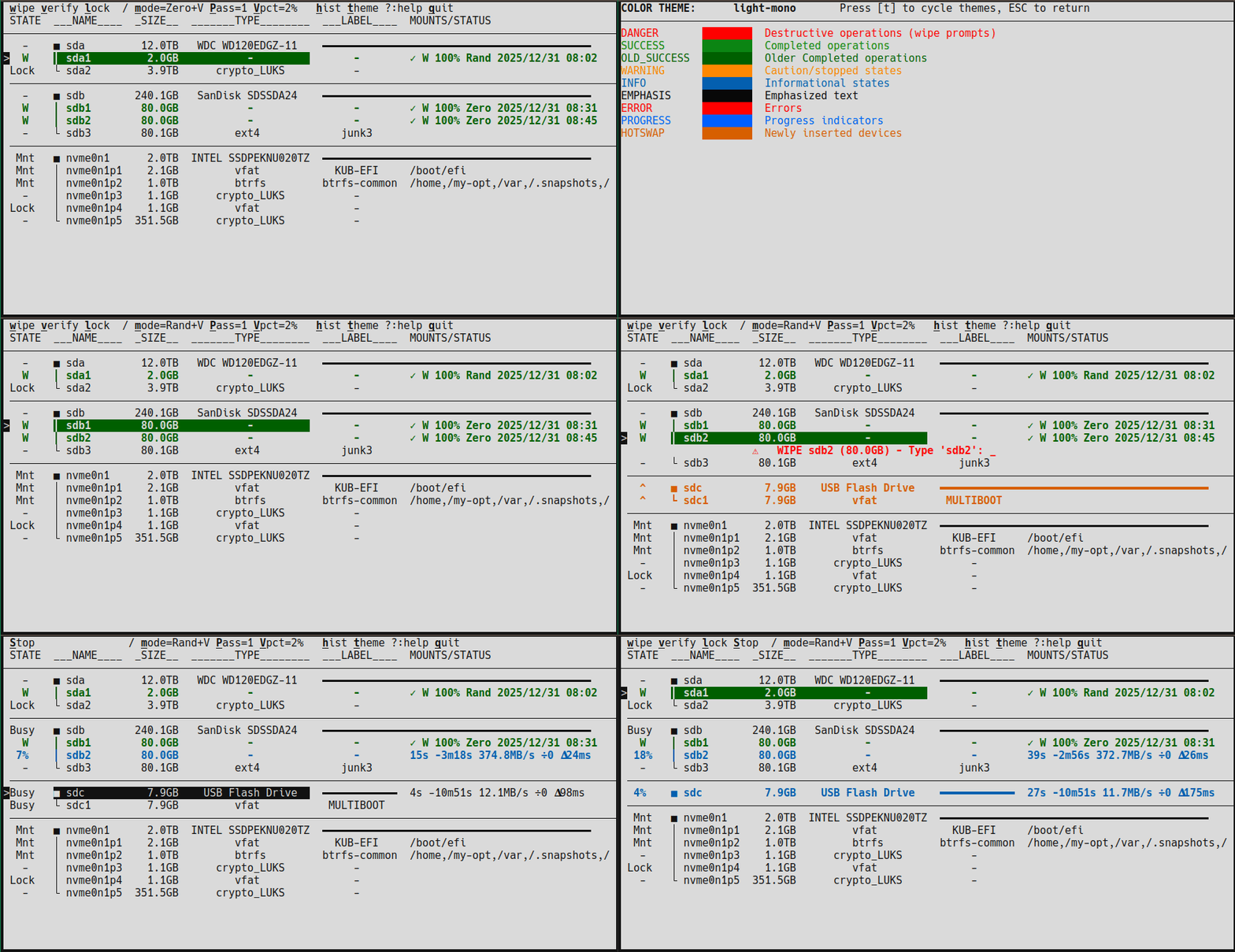
`dwipe` is a tool to wipe disks and partitions for Linux to help secure your data. `dwipe` aims to reduce mistakes by providing ample information about your devices during selection.
|
|
19
|
+
|
|
20
|
+
|
|
21
|
+
### Quick Comparison
|
|
22
|
+
|
|
23
|
+
| Feature | dwipe | nwipe | shred | dd |
|
|
24
|
+
|---------|-------|-------|-------|-----|
|
|
25
|
+
| Firmware wipes (SATA/NVMe secure erase) | ✓ | ✗ | ✗ | ✗ |
|
|
26
|
+
| Software wipes (Zero, Pseudo Random) | ✓ | ✓ | ✓ | ✗ |
|
|
27
|
+
| Interactive TUI | ✓ | ✓ | ✗ | ✗ |
|
|
28
|
+
| Multiple simultaneous wipes | ✓ | ✗ | ✗ | ✗ |
|
|
29
|
+
| Persistent wipe state | ✓ | ✗ | ✗ | ✗ |
|
|
30
|
+
| Hot-swap detection / release | ✓ | ✗ | ✗ | ✗ |
|
|
31
|
+
| Device/partition blocking | ✓ | ✗ | ✗ | ✗ |
|
|
32
|
+
| Resume interrupted software wipes | ✓ | ✗ | ✗ | ✗ |
|
|
33
|
+
| Wipe operation logging | ✓ | ✗ | ✗ | ✗ |
|
|
34
|
+
| Mount detection/prevention | ✓ | ✓ | ✗ | ✗ |
|
|
35
|
+
| Fast Statistical sampling verification | ✓ | ✗ | ✗ | ✗ |
|
|
36
|
+
| Certified destruction (DoD/Gutmann standards, full verification, certificates) | ✗ | ✓ | ✗ | ✗ |
|
|
37
|
+
|
|
38
|
+
> * **Firmware wipes (SATA/NVMe) are the most complete and fastest**: Hardware-accelerated erase operates at controller level (seconds to minutes), clears all drive mappings, but requires whole-device erase with no progress reporting or visible verification.
|
|
39
|
+
> * **Software wipes with one-pass zeros are sufficient**: Modern drives (post-2001) are reliably wiped with a single pass of zeros (NIST SP 800-88). Multi-pass modes are available for additional confidence but provide no additional security guarantee.
|
|
40
|
+
> * **Verification uses intelligent statistical sampling**: Even 1% verification samples across the entire disk via 100 sections, providing comprehensive coverage without full sequential read.
|
|
41
|
+
|
|
42
|
+
## Marquee Features
|
|
43
|
+
|
|
44
|
+
* **Interactive TUI with hot-swap detection** - Real-time device list updates as storage changes, newly added devices marked with **^**
|
|
45
|
+
* **Hardware-accelerated firmware wipes** - Full support for firmware-level secure erase operations (NVMe Sanitize/Format, SATA ATA Security Erase) that complete in seconds to minutes instead of hours
|
|
46
|
+
* **Multiple simultaneous wipes** - Start wipes on multiple devices at once with individual progress tracking and completion states
|
|
47
|
+
* **Persistent state tracking** - Wipe status survives reboots; partially wiped and completed states persist on the device (can resume wipes across power cycles)
|
|
48
|
+
* **Smart device identification** - Uses UUID/PARTUUID/serial numbers for stable device tracking across reconnections
|
|
49
|
+
* **Safety protections** - Prevents wiping mounted devices, detects overlapping wipes, supports device blocking, inline confirmation prompts
|
|
50
|
+
* **Intelligent verification with statistical sampling** - Fast verification that covers entire disk even at low percentages (1% verification samples from all 100 disk sections)
|
|
51
|
+
* **Direct I/O to disk** - Fast and efficient wiping that avoids page cache pollution with automatic slowdown/stall detection and graceful abort
|
|
52
|
+
* **Multiple color themes** - Terminal color themes designed for readability with context-sensitive visual feedback (mounted devices dimmed, active wipes bright)
|
|
53
|
+
* **Wipe history with logging** - Detailed wipe history viewer shows timestamps, filesystems, labels, and completion percentages with persistent records
|
|
54
|
+
|
|
55
|
+
## Requirements
|
|
56
|
+
- **Linux operating system** (uses `/dev/`, `/sys/`, `/proc/` interfaces)
|
|
57
|
+
- **Python 3.10 or higher**
|
|
58
|
+
- **Root/sudo privileges** (automatically requested when you run the tool)
|
|
59
|
+
- **lsblk utility** (usually pre-installed on most Linux distributions)
|
|
60
|
+
- **nvme-cli** - For NVMe operations (Sanitize/Format detection)
|
|
61
|
+
- **hdparm** - For SATA operations (ATA Security Erase detection)
|
|
62
|
+
|
|
63
|
+
**Optional (for clipboard copy in history screen):**
|
|
64
|
+
- **xclip** or **xsel** - For X11 clipboard (`apt install xclip` or `xsel`)
|
|
65
|
+
- **wl-clipboard** - For Wayland clipboard (`apt install wl-clipboard`)
|
|
66
|
+
- SSH sessions use OSC 52 terminal escape (no extra packages needed)
|
|
67
|
+
|
|
68
|
+
## Installation
|
|
69
|
+
|
|
70
|
+
* **Recommended (using pipx):** `pipx install dwipe`
|
|
71
|
+
* **Verify installation:** `dwipe --help`
|
|
72
|
+
* **Uninstall:** `pipx uninstall dwipe`
|
|
73
|
+
|
|
74
|
+
## Quick Start (please READ THIS, at least)
|
|
75
|
+
1. Install `dwipe`
|
|
76
|
+
1. Run `dwipe` from a terminal (`sudo` will be requested automatically)
|
|
77
|
+
1. Observe the context-sensitive help on the first line
|
|
78
|
+
1. Navigate with arrow keys or vi-like keys (j/k)
|
|
79
|
+
1. Press **?** for full help screen
|
|
80
|
+
1. **When you press `w` to wipe a drive,** you must type the abbreviation (e.g., `Rand`, `Zero`, `Crypto`); wipes are presented from least to most recommended, and the last one is marked with `*`. Normally, pick the last choice, but ...
|
|
81
|
+
1. **Drives and the OS often lie about drive type.** Outwit them both:
|
|
82
|
+
* For spinning HDDs, **always** use `Rand` or `Zero` (interruptible, shows progress).
|
|
83
|
+
* For SSDs, **always** use firmware wipes if available (faster, reaches hidden blocks).
|
|
84
|
+
1. **If a drive is 'Frozen'**, press `DEL` to detach it and, when gone, press `r` to rescan; it should come back unfrozen.
|
|
85
|
+
1. **If a drive is 'Locked'**, you must unlock it manually (see "Unlock Locked Device" section below). If `dwipe` locked it, the password is `NULL`; otherwise use the password that locked it.
|
|
86
|
+
1. **Hot-swap workflow for SATA drives**: `DEL` to detach, physically swap drives, then `r` to rescan (if needed).
|
|
87
|
+
|
|
88
|
+
|
|
89
|
+
## Features
|
|
90
|
+
|
|
91
|
+
`dwipe` provides comprehensive disk wiping capabilities with safety features:
|
|
92
|
+
|
|
93
|
+
* **Smart device display** - Shows disks and partitions with labels, sizes, types, and vendor/model information to help identify devices correctly
|
|
94
|
+
* **Safety protections** - Prevents wiping mounted devices, detects overlapping wipes, supports manual disk blocking
|
|
95
|
+
* **Hot-swap detection** - Updates the device list when storage changes; newly added devices are marked with **^** to make them easy to spot
|
|
96
|
+
* **Multiple simultaneous wipes** - Start wipes on multiple devices at once, with individual progress tracking and completion states
|
|
97
|
+
* **Flexible wipe modes** - Choose between Rand, Zero, Rand+V (with auto-verify), or Zero+V (with auto-verify)
|
|
98
|
+
* **Device filtering** - Filter devices by name/pattern using regex in case of too many for one screen
|
|
99
|
+
* **Stop capability** - Stop individual wipes or all wipes in progress
|
|
100
|
+
* **Disk blocking** - Manually block disks to prevent accidental wiping (blocks hide all partitions)
|
|
101
|
+
|
|
102
|
+
|
|
103
|
+
> **Note:** `dwipe` shows file system labels, and if not available, the partition label. It is best practice to label partitions and file systems well to make selection easier.
|
|
104
|
+
|
|
105
|
+
## Usage
|
|
106
|
+
|
|
107
|
+
Simply run `dwipe` from the command line without arguments: `dwipe`
|
|
108
|
+
|
|
109
|
+
### Command-Line Options
|
|
110
|
+
|
|
111
|
+
**Note:** All preference options use your **last saved values** as defaults. These defaults are shown in `--help` and can be changed interactively with keyboard shortcuts. Command-line arguments override saved preferences.
|
|
112
|
+
|
|
113
|
+
#### Wipe Configuration
|
|
114
|
+
- `--mode {-V,+V}` - Verification mode (default: your last preference)
|
|
115
|
+
- `-V` - Wipe without automatic verification
|
|
116
|
+
- `+V` - Verify device after wipe completes
|
|
117
|
+
- `--passes {1,2,4}` - Number of passes for software wipes (default: your last preference)
|
|
118
|
+
- Single pass (1) is standard for most use cases
|
|
119
|
+
- Multi-pass (2 or 4) alternates between zero and random patterns
|
|
120
|
+
- `--verify-pct {1,3,10,30,100}` - Verification percentage (default: your last preference)
|
|
121
|
+
- Percentage of disk to verify after wipe (1% = quick spot-check, 100% = full verify)
|
|
122
|
+
|
|
123
|
+
#### Display and Performance
|
|
124
|
+
- `--dense {True,False}` - Compact view mode (default: your last preference)
|
|
125
|
+
- `True` - Compact spacing (fewer blank lines between disks)
|
|
126
|
+
- `False` - Spaced view (blank lines between disks for readability)
|
|
127
|
+
- `--port-serial {Auto,On,Off}` - Disk port/serial display (default: your last preference)
|
|
128
|
+
- `Auto` - Show port/serial only for whole disks (recommended)
|
|
129
|
+
- `On` - Always show port and serial number
|
|
130
|
+
- `Off` - Never show port and serial number
|
|
131
|
+
|
|
132
|
+
#### Drive Handling Tuning
|
|
133
|
+
- `--slowdown-stop {0,4,16,64,256}` - Stop if disk slows down (default: your last preference, milliseconds)
|
|
134
|
+
- `0` = Disabled
|
|
135
|
+
- Other values = Check interval in milliseconds for performance degradation
|
|
136
|
+
- `--stall-timeout {0,60,120,300,600}` - Stall timeout in seconds (default: your last preference)
|
|
137
|
+
- `0` = Disabled (never timeout)
|
|
138
|
+
- Other values = Stop wipe if no data transfer progress for this many seconds
|
|
139
|
+
|
|
140
|
+
#### Advanced Options
|
|
141
|
+
- `--firmware-wipes` or `-F` - Enable firmware wipes
|
|
142
|
+
- Enables hardware-based secure erase operations (NVMe Sanitize/Format, SATA ATA Security Erase)
|
|
143
|
+
- Without this flag, only software wipes (Zero/Rand) are available
|
|
144
|
+
- `--dump-lsblk` - Dump parsed device information and exit (for debugging)
|
|
145
|
+
- `--help` - Show help message with all available options
|
|
146
|
+
|
|
147
|
+
### Color Legend
|
|
148
|
+
|
|
149
|
+
`dwipe` uses color coding to provide instant visual feedback about device and operation status:
|
|
150
|
+
|
|
151
|
+
- **Dimmed (gray)** - Mounted or blocked devices (cannot be wiped)
|
|
152
|
+
- **Default (white)** - Ready to wipe, idle state, or previously wiped (before this session)
|
|
153
|
+
- **Bright cyan/blue + bold** - Active wipe or verification in progress (0-100% write, v0-v100% verify)
|
|
154
|
+
- **Bold yellow** - Stopped or partially completed wipe
|
|
155
|
+
- **Bold green** - ✅ Successfully completed wipe in THIS session (ready to swap out!)
|
|
156
|
+
- **Dimmer green** - ✅ Successfully completed wipe in previous session .
|
|
157
|
+
- **Bold orange** - Newly inserted (hot-swapped) device
|
|
158
|
+
- **Bold red** - Destructive operation prompts (wipe confirmation)
|
|
159
|
+
|
|
160
|
+
### Color Themes
|
|
161
|
+
|
|
162
|
+
`dwipe` supports multiple color themes for improved visibility and aesthetics.
|
|
163
|
+
|
|
164
|
+
**Available themes:**
|
|
165
|
+
- `default` - Terminal Default (basic ANSI colors)
|
|
166
|
+
- `dark-mono` - Dark Mono (almost-white on almost-black with bright colors)
|
|
167
|
+
- `light-mono` - Light Mono (almost-black on almost-white with bright colors)
|
|
168
|
+
- `solarized-dark` - Solarized Dark palette
|
|
169
|
+
- `solarized-light` - Solarized Light palette (for light terminal backgrounds)
|
|
170
|
+
- `gruvbox` - Gruvbox Dark palette
|
|
171
|
+
- `nord` - Nord palette
|
|
172
|
+
|
|
173
|
+
**Changing themes:**
|
|
174
|
+
- Press **t** from the main screen to open the theme preview screen
|
|
175
|
+
- The theme screen shows color examples for each color purpose (DANGER, SUCCESS, WARNING, etc.)
|
|
176
|
+
- Press **t** while on the theme screen to cycle through available themes and preview them live
|
|
177
|
+
- Press **ESC** or **ENTER** to return to the main screen
|
|
178
|
+
- Selected theme is saved and persists across sessions
|
|
179
|
+
|
|
180
|
+
**Theme features:**
|
|
181
|
+
- Yellow/warning color for stopped wipes (state **s**) - highly visible even when not selected
|
|
182
|
+
- Red/danger color for wipe confirmation prompts
|
|
183
|
+
- Coordinated color palettes designed for terminal readability
|
|
184
|
+
|
|
185
|
+
### Device State Values
|
|
186
|
+
|
|
187
|
+
The **STATE** column shows the current status of each device:
|
|
188
|
+
|
|
189
|
+
| State | Meaning |
|
|
190
|
+
|-------|---------|
|
|
191
|
+
| **-** | Device is ready for wiping |
|
|
192
|
+
| **^** | Device is ready for wiping AND was added after `dwipe` started (hot-swapped) |
|
|
193
|
+
| **Mnt** | Partition is mounted or disk has mounted partitions - cannot be wiped |
|
|
194
|
+
| **N%** | Wipe is in progress (shows percentage complete, 0-100%) |
|
|
195
|
+
| **vN%** | Verification is in progress (shows percentage complete, v0-v100%) |
|
|
196
|
+
| **STOP** | Wipe or verification is being stopped |
|
|
197
|
+
| **s** | Wipe was stopped - device is partially wiped (can restart or verify) |
|
|
198
|
+
| **W** | Wipe was completed successfully (can wipe again or verify) |
|
|
199
|
+
| **Blk** | Disk is manually blocked - partitions are hidden and cannot be wiped |
|
|
200
|
+
| **Unbl** | Disk was just unblocked (transitory state) |
|
|
201
|
+
|
|
202
|
+
### Available Actions
|
|
203
|
+
|
|
204
|
+
The top line shows available actions. Some are context-sensitive (only available for certain devices):
|
|
205
|
+
|
|
206
|
+
| Key | Action | Description |
|
|
207
|
+
|-----|--------|-------------|
|
|
208
|
+
| **w** | wipe | Wipe the selected device (requires confirmation) |
|
|
209
|
+
| **v** | verify | Verify a wiped device or detect pattern on unmarked disk (context-sensitive) |
|
|
210
|
+
| **s** | stop | Stop the selected wipe in progress (context-sensitive) |
|
|
211
|
+
| **S** | Stop All | Stop all wipes in progress |
|
|
212
|
+
| **DEL** | delete | Remove disk from system (whole disks only, context-sensitive) |
|
|
213
|
+
| **b** | block/unblock | Block or unblock a disk to prevent accidental wiping |
|
|
214
|
+
| **/** | filter | Filter devices by regex pattern (shows matching devices + all active wipes) |
|
|
215
|
+
| **r** | rescan | Rescan all devices and reset hardware capabilities detection |
|
|
216
|
+
| **h** | history | Show wipe history log |
|
|
217
|
+
| **t** | themes | Open theme preview screen to view and change color themes |
|
|
218
|
+
| **q** or **x** | quit | Quit the application (stops all wipes first) |
|
|
219
|
+
| **?** | help | Show help screen with all actions and navigation keys |
|
|
220
|
+
| **ESC** | clear filter | Clear the filter and jump to top of list |
|
|
221
|
+
| **ESC** | back | Return to previous screen if on nested screen |
|
|
222
|
+
| **a** | time format | Cycle wipe history time display format (ago+time, ago, time) |
|
|
223
|
+
|
|
224
|
+
### History Screen
|
|
225
|
+
|
|
226
|
+
Press **h** to view the wipe history log. The history screen shows all wipe and verify operations with timestamps, device info, and results.
|
|
227
|
+
|
|
228
|
+
**History screen actions:**
|
|
229
|
+
- **e** - Expand/collapse entry to show full JSON details
|
|
230
|
+
- **c** - Copy current entry to clipboard (see below)
|
|
231
|
+
- **/** - Search/filter entries (prefix with `/` for deep JSON search)
|
|
232
|
+
- **a** - Cycle time format (ago+time, ago, time)
|
|
233
|
+
- **ESC** - Return to main screen
|
|
234
|
+
|
|
235
|
+
**Clipboard copy methods** (detected automatically):
|
|
236
|
+
| Environment | Method | Notes |
|
|
237
|
+
|-------------|--------|-------|
|
|
238
|
+
| SSH session | OSC 52 | Terminal escape sequence; requires terminal support (iTerm2, kitty, alacritty, Windows Terminal, tmux with `set-clipboard on`) |
|
|
239
|
+
| Wayland | wl-copy | Requires `wl-clipboard` package |
|
|
240
|
+
| X11 | xclip/xsel | Requires `xclip` or `xsel` package |
|
|
241
|
+
| Fallback | Terminal | Exits to shell, prints entry for manual copy |
|
|
242
|
+
|
|
243
|
+
> **Note:** If OSC 52 doesn't work with your terminal, the text still appears on screen for manual selection. For tmux, enable clipboard with `set -g set-clipboard on` in your `.tmux.conf`.
|
|
244
|
+
|
|
245
|
+
### Wipe Types
|
|
246
|
+
|
|
247
|
+
`dwipe` supports firmware wipes (hardware-accelerated) and software wipes. Firmware wipes require the `--firmware-wipes` or `-F` flag. Tables below list wipe methods from most desirable (Rank 1) to least.
|
|
248
|
+
|
|
249
|
+
#### NVMe Drives
|
|
250
|
+
|
|
251
|
+
| Rank | Abbrev | Official Name | Remarks |
|
|
252
|
+
|------|--------|---------------|---------|
|
|
253
|
+
| 1 | Crypto | Sanitize Cryptographic Erase | Fastest; erases encryption keys; instant data invalidation |
|
|
254
|
+
| 2 | Block | Sanitize Block Erase | Fast; resets all blocks to deallocated state |
|
|
255
|
+
| 3 | FCrypto | Format with Crypto Erase | Fast; reformats namespace with key erasure |
|
|
256
|
+
| 4 | FErase | Format with User Data Erase | Fast; reformats with simple data erase; less thorough than crypto |
|
|
257
|
+
| 5 | Ovwr | Sanitize Overwrite | Minutes; writes pattern to all blocks; most thorough but rarely needed |
|
|
258
|
+
| 6 | Rand | Software Random Write | Fallback; writes random data via software; hours for large drives |
|
|
259
|
+
| 7 | Zero | Software Zero Write | Fallback; writes zeros via software; verifiable but slower |
|
|
260
|
+
|
|
261
|
+
#### SATA SSDs (with crypto/sanitize features)
|
|
262
|
+
|
|
263
|
+
| Rank | Abbrev | Official Name | Remarks |
|
|
264
|
+
|------|--------|---------------|---------|
|
|
265
|
+
| 1 | SCrypto | Sanitize Cryptographic Erase | Fastest; erases encryption keys; requires SANITIZE feature |
|
|
266
|
+
| 2 | Enhanced | ATA Security Erase Enhanced | Fast; vendor-specific deep erase with crypto key destruction |
|
|
267
|
+
| 3 | SBlock | Sanitize Block Erase | Fast; resets blocks to factory state; requires SANITIZE feature |
|
|
268
|
+
| 4 | Erase | ATA Security Erase Normal | Minutes; writes zeros to all sectors; widely supported |
|
|
269
|
+
| 5 | SOverwrite | Sanitize Overwrite | Minutes; overwrites with pattern; requires SANITIZE feature |
|
|
270
|
+
| 6 | Rand | Software Random Write | Fallback; can't reach wear-leveled or remapped blocks |
|
|
271
|
+
| 7 | Zero | Software Zero Write | Fallback; can't reach wear-leveled or remapped blocks |
|
|
272
|
+
|
|
273
|
+
#### SATA HDDs (spinning drives)
|
|
274
|
+
|
|
275
|
+
| Rank | Abbrev | Official Name | Remarks |
|
|
276
|
+
|------|--------|---------------|---------|
|
|
277
|
+
| 1 | Rand | Software Random Write | Preferred; interruptible, resumable, shows progress |
|
|
278
|
+
| 2 | Zero | Software Zero Write | Preferred; interruptible, resumable, fast verification |
|
|
279
|
+
| 3 | Enhanced | ATA Security Erase Enhanced | Slow (hours); not interruptible; no progress; same result as software |
|
|
280
|
+
| 4 | Erase | ATA Security Erase Normal | Slow (hours); not interruptible; no progress; same result as software |
|
|
281
|
+
|
|
282
|
+
> **Note:** HDDs don't have wear leveling or hidden blocks, so software wipes are equally thorough as firmware wipes but offer better control (progress, pause/resume, interruptibility).
|
|
283
|
+
|
|
284
|
+
#### Partitions and USB/Thumb Drives
|
|
285
|
+
|
|
286
|
+
| Rank | Abbrev | Official Name | Remarks |
|
|
287
|
+
|------|--------|---------------|---------|
|
|
288
|
+
| 1 | Rand | Software Random Write | Preferred; unpredictable pattern; statistical verification |
|
|
289
|
+
| 2 | Zero | Software Zero Write | Simpler; fast verification (fails on first non-zero byte) |
|
|
290
|
+
|
|
291
|
+
> **Notes:**
|
|
292
|
+
> - Firmware wipes show only methods supported by each drive (see FwCAPS column).
|
|
293
|
+
> - Firmware wipes include automatic spotcheck verification.
|
|
294
|
+
> - The `+V` suffix enables automatic verification after software wipes. Without `+V`, press **v** to verify manually.
|
|
295
|
+
> - Multi-pass software wipes (2 or 4) alternate zero/random patterns, ending on your selected mode.
|
|
296
|
+
> - USB drives and partitions lack firmware erase—only software wipes available.
|
|
297
|
+
|
|
298
|
+
### Resuming Stopped SOFTWARE Wipes
|
|
299
|
+
|
|
300
|
+
Stopped wipes (state **s**) can be resumed by pressing **w** on the device. Choose the same type of wipe or it will start over at 0% complete.
|
|
301
|
+
|
|
302
|
+
**How Resume Works:**
|
|
303
|
+
- Preserves the original wipe mode (Rand or Zero) from when the wipe was started
|
|
304
|
+
- Uses the **current** passes setting to determine how much more to write
|
|
305
|
+
- Continues from the exact byte offset where it marked that stopped (rounded to buffer boundary). "Marks" are written about every 30s so for non-gracefully ended wipes, the position may be as much as 30s (or somewhat more) from the last wiped disk blocks.
|
|
306
|
+
|
|
307
|
+
**Resume Examples:**
|
|
308
|
+
|
|
309
|
+
| Stopped At | Current Passes | What Happens |
|
|
310
|
+
|------------|----------------|--------------|
|
|
311
|
+
| 50% | 1 pass | Resumes: writes remaining 50% |
|
|
312
|
+
| 150% (1.5 of 4 passes) | 1 pass | Already complete (150% > 100%) |
|
|
313
|
+
| 150% (1.5 of 4 passes) | 4 passes | Resumes: writes 2.5 more passes (150% → 400%) |
|
|
314
|
+
| 100% (1 pass complete) | 2 passes | Resumes: writes pass 2 (100% → 200%) |
|
|
315
|
+
|
|
316
|
+
**Benefits:**
|
|
317
|
+
- Change passes setting before resuming to finish faster (reduce) or add more passes (increase)
|
|
318
|
+
- No need to restart from beginning
|
|
319
|
+
- Progress marker updated every 30 seconds, so resume works even after crashes or power loss
|
|
320
|
+
- Automatic validation prevents corrupted final patterns
|
|
321
|
+
|
|
322
|
+
### Software Wipe Verification Strategy
|
|
323
|
+
|
|
324
|
+
Software wipes use intelligent verification with statistical analysis and fast-fail optimizations. Verification is **configurable and optional**.
|
|
325
|
+
|
|
326
|
+
**Smart Sampling:**
|
|
327
|
+
- Divides disk into 100 equal sections
|
|
328
|
+
- Randomly samples configurable percentage (1%, 3%, 10%, 30%, 100%) from EACH section
|
|
329
|
+
- Ensures complete disk coverage even with 1% verification
|
|
330
|
+
- Set verification percentage with `--verify-pct` command-line option (saved as preference)
|
|
331
|
+
|
|
332
|
+
**Pattern Detection:**
|
|
333
|
+
- **Zero verification**: Fails immediately on first non-zero byte (fast!)
|
|
334
|
+
- **Random verification**: Statistical analysis of byte distribution
|
|
335
|
+
- Tests if byte distribution is uniform (all byte values 0-255 appear fairly equally)
|
|
336
|
+
- Fast-fails periodically if non-random pattern detected
|
|
337
|
+
- Checks for evidence of randomness to distinguish from structured data
|
|
338
|
+
|
|
339
|
+
**Verification Modes:**
|
|
340
|
+
1. **Automatic verification** (after wipe): Use a mode with `+V` suffix (Rand+V or Zero+V) and set verify % > 0
|
|
341
|
+
2. **Manual verification** (press **v**): Verify previously wiped devices or detect pattern on unmarked disks (requires verify % > 0)
|
|
342
|
+
3. **Unmarked disk detection**: Can verify disks with no filesystem to detect if all zeros or random
|
|
343
|
+
- If passes, writes marker as if disk had been wiped
|
|
344
|
+
- Useful for detecting pre-wiped drives or verifying manufacturer erasure
|
|
345
|
+
|
|
346
|
+
**Verification States:**
|
|
347
|
+
- ✓ (green checkmark) - Verification passed
|
|
348
|
+
- ✗ (red X) - Verification failed
|
|
349
|
+
- No symbol - Not verified
|
|
350
|
+
- During verify: **vN%** shows progress (v0% to v100%)
|
|
351
|
+
|
|
352
|
+
**Why statistical sampling is better than sequential:**
|
|
353
|
+
- Statistical sampling with 100 sections provides better coverage than sequential read at same percentage
|
|
354
|
+
- Detects problems faster (could hit bad sector in early sections)
|
|
355
|
+
- Statistical analysis actually validates randomness (sequential can't do this)
|
|
356
|
+
- Much faster than 100% sequential verification
|
|
357
|
+
|
|
358
|
+
### Firmware Wipe Verification Strategy
|
|
359
|
+
|
|
360
|
+
Firmware wipes (SATA/NVMe secure erase) use an **unconditional spotcheck verification** that is **performed automatically for all firmware wipes**. This verifies that the hardware erase command actually executed.
|
|
361
|
+
|
|
362
|
+
**Spotcheck Approach:**
|
|
363
|
+
- Before the wipe: Write test data blocks at three strategic locations (front, middle, tail of drive)
|
|
364
|
+
- Execute the firmware erase command at the controller level
|
|
365
|
+
- After the wipe: Read those three test locations and verify they no longer contain the original data
|
|
366
|
+
- If any test block still contains similar data, the erase has failed and is reported
|
|
367
|
+
|
|
368
|
+
**Why Spotchecks Are Effective:**
|
|
369
|
+
- Proves the drive's internal erase actually processed (not just a command acknowledgment)
|
|
370
|
+
- Three-location strategy (0%, 50%, 100% of drive) ensures coverage across the entire device
|
|
371
|
+
- Catches firmware bugs or hardware failures that might claim success but do nothing
|
|
372
|
+
- Much faster than sequential verification (only 3 blocks read instead of percentage of whole drive)
|
|
373
|
+
- **Mandatory and unconditional**: No user configuration or additional verification step needed
|
|
374
|
+
|
|
375
|
+
**Important Note:** Firmware wipes do not show percentage-based verification like software wipes. The spotcheck happens silently as part of the wipe operation, and success/failure is recorded in the persistent wipe state marker.
|
|
376
|
+
|
|
377
|
+
### Progress Information
|
|
378
|
+
|
|
379
|
+
When software wiping a device, `dwipe` displays:
|
|
380
|
+
- **Elapsed time** - Time since wipe started (e.g., 1m18s)
|
|
381
|
+
- **Remaining time** - Estimated time to completion (e.g., -3m6s)
|
|
382
|
+
- **Write rate** - Current throughput (e.g., "45.2MB/s")
|
|
383
|
+
- **MaxSlowDown** - Ratio of Fastest/Slowest write speed (e.g, ÷2). If over threshold, the write job stops.
|
|
384
|
+
- **MaxWriteDelay** - Largest write delay detected (e.g., 𝚫122ms). If over threshold, the write job stops.
|
|
385
|
+
|
|
386
|
+
### Persistent State
|
|
387
|
+
|
|
388
|
+
The **W** (wiped) and **s** (partially wiped) states are persistent across reboots. This is achieved by writing metadata to the first 16KB of the device:
|
|
389
|
+
- First 15KB: zeros
|
|
390
|
+
- Next 1KB: JSON metadata (timestamp, bytes written, total size, mode, verification status)
|
|
391
|
+
|
|
392
|
+
When a device with persistent state is displayed, additional information shows:
|
|
393
|
+
- When it was wiped and the completion percentage
|
|
394
|
+
- Verification status: ✓ (passed), ✗ (failed), or no symbol (not verified)
|
|
395
|
+
|
|
396
|
+
|
|
397
|
+
### The Help Screen
|
|
398
|
+
When **?** is typed, you can see the available keys and command-line options with their current settings.
|
|
399
|
+
|
|
400
|
+
### Navigation
|
|
401
|
+
|
|
402
|
+
You can navigate the device list using:
|
|
403
|
+
- **Arrow keys** - Up/Down to move through the list
|
|
404
|
+
- **Vi-like keys** - j (down), k (up), g (top), G (bottom)
|
|
405
|
+
- **Page Up/Down** - Quick navigation through long lists
|
|
406
|
+
|
|
407
|
+
## Device Filtering
|
|
408
|
+
|
|
409
|
+
The **/** key activates incremental search filtering with vim-style behavior:
|
|
410
|
+
|
|
411
|
+
**How it works:**
|
|
412
|
+
- Press **/** to start filtering
|
|
413
|
+
- Type your regex pattern - the device list updates **as you type** (real-time filtering)
|
|
414
|
+
- Your cursor position is shown with **|** in the header
|
|
415
|
+
- **Arrow keys**, **Home**/**End**, and **Backspace** work for editing
|
|
416
|
+
- **ENTER** to accept the filter
|
|
417
|
+
- **ESC** to cancel and restore the previous filter
|
|
418
|
+
|
|
419
|
+
**Filter Examples:**
|
|
420
|
+
|
|
421
|
+
The filter supports regex patterns. Here are some useful examples:
|
|
422
|
+
|
|
423
|
+
```
|
|
424
|
+
/sda # Show only sda and its partitions
|
|
425
|
+
/sd[ab] # Show sda, sdb and their partitions
|
|
426
|
+
/nvme # Show all NVMe devices
|
|
427
|
+
/nvme0n1p[12] # Show only partitions 1 and 2 of nvme0n1
|
|
428
|
+
/usb # Show devices with "usb" in their labels
|
|
429
|
+
```
|
|
430
|
+
|
|
431
|
+
Press **ESC** from the main screen to clear the filter and return to showing all devices.
|
|
432
|
+
|
|
433
|
+
**Note:** Invalid regex patterns are ignored - the filter stays at the last valid pattern while you type.
|
|
434
|
+
|
|
435
|
+
## Security Considerations
|
|
436
|
+
|
|
437
|
+
**Important limitations of software wipes:**
|
|
438
|
+
|
|
439
|
+
- `dwipe` supports multi-pass wiping with alternating patterns, but does not implement specific DoD 5220.22-M or Gutmann certified pattern sequences
|
|
440
|
+
- More than adequate for **personal and business data** that doesn't require (antiquated) certified destruction
|
|
441
|
+
- **NOT suitable for** classified, top-secret, or highly sensitive data requiring certified pattern-specific wiping with compliance certificates
|
|
442
|
+
- **SSD considerations**:
|
|
443
|
+
- Modern SSDs use wear-leveling and may retain data in unmapped blocks
|
|
444
|
+
- TRIM/DISCARD may prevent complete data erasure
|
|
445
|
+
- For SSDs, consider manufacturer's secure erase utilities for maximum security
|
|
446
|
+
- Random mode may not provide additional security over zeros on SSDs
|
|
447
|
+
|
|
448
|
+
**Best practices:**
|
|
449
|
+
- Verify device labels and sizes carefully before wiping
|
|
450
|
+
- Use the **Block** feature to protect critical disks
|
|
451
|
+
- Consider encryption for sensitive data as the primary security measure
|
|
452
|
+
|
|
453
|
+
---
|
|
454
|
+
---
|
|
455
|
+
|
|
456
|
+
## Troubleshooting
|
|
457
|
+
|
|
458
|
+
### dwipe won't start
|
|
459
|
+
- **Error: "cannot find lsblk on $PATH"** - Install `util-linux` package
|
|
460
|
+
- **Permission denied** - `dwipe` automatically requests sudo; ensure you can use sudo
|
|
461
|
+
|
|
462
|
+
### Terminal display issues
|
|
463
|
+
- **Corrupted display after crash** - Run `reset` or `stty sane` command
|
|
464
|
+
- **Colors don't work** - Ensure your terminal supports colors (most modern terminals do)
|
|
465
|
+
|
|
466
|
+
### Wipe issues
|
|
467
|
+
- **Can't wipe a device** - Check the STATE column:
|
|
468
|
+
- **Mnt** - Unmount the partition first: `sudo umount /dev/sdXN`
|
|
469
|
+
- **Blk** - Press **b** to unblock
|
|
470
|
+
- **Busy** - Another partition on the disk is being wiped
|
|
471
|
+
- **Wipe is very slow** - Normal for large drives; check write rate to verify progress
|
|
472
|
+
- **Wipe seems stuck** - Most likely due to bad disks; Direct I/O makes progress almost constant on good disks.
|
|
473
|
+
|
|
474
|
+
---
|
|
475
|
+
### Firmware Wipe Considerations
|
|
476
|
+
|
|
477
|
+
Firmware wipes (SATA/NVMe secure erase operations) have different characteristics than software wipes:
|
|
478
|
+
|
|
479
|
+
**Frozen Drives:**
|
|
480
|
+
- Firmware wipes sometimes report the drive as "Frozen" if the device is present (mounted or in use) when capabilities are detected
|
|
481
|
+
- This is a drive-level security feature, not a `dwipe` limitation
|
|
482
|
+
- **Solution**: Unmount the device, wait briefly (often just a few seconds of idle time is enough), then use **r** to rescan capabilities
|
|
483
|
+
- The freeze state is usually temporary and clears after the device is no longer actively in use
|
|
484
|
+
- If the drive remains frozen, try hot-swapping (remove and reinsert) or power-cycling the device
|
|
485
|
+
|
|
486
|
+
**Device Quirks and Compatibility:**
|
|
487
|
+
- Storage devices have various firmware implementations and hardware quirks that affect secure erase operations
|
|
488
|
+
- Some drives may not fully support certain sanitize operations, have timing issues, or exhibit unexpected behavior
|
|
489
|
+
- `dwipe` cannot guarantee that all devices will be successfully wiped—some hardware simply may not cooperate with erase commands
|
|
490
|
+
- Always verify a drive after wiping (use **v** key) to confirm the erase actually completed
|
|
491
|
+
- For mission-critical data destruction on quirky hardware, consider using manufacturer-specific secure erase tools as a fallback
|
|
492
|
+
|
|
493
|
+
---
|
|
494
|
+
### Dealing with Bad or Failing Disks
|
|
495
|
+
|
|
496
|
+
dwipe includes built-in protections for problematic storage devices:
|
|
497
|
+
|
|
498
|
+
**Automatic Error Handling.** When encountering disk errors during wiping:
|
|
499
|
+
* Consecutive write errors: Wipe aborts after 3 consecutive failed writes
|
|
500
|
+
* Total error threshold: Wipe aborts after 100 total write errors
|
|
501
|
+
* Automatic retry: On write failure, device is automatically closed and reopened (transient error recovery)
|
|
502
|
+
* File descriptor recovery: Bad FD states are detected and handles are refreshed
|
|
503
|
+
|
|
504
|
+
**Stall and Slowdown Detection.** dwipe monitors write performance and can abort problematic operations:
|
|
505
|
+
* Stall detection: Aborts if no progress for 5 minutes (configurable)
|
|
506
|
+
* Slowdown detection: Measures baseline speed during first 5 seconds, aborts if speed drops below threshold (e.g., 1/4 of baseline)
|
|
507
|
+
* Progress tracking: Continuous monitoring ensures writes are actually reaching the device
|
|
508
|
+
|
|
509
|
+
**If a Wipe Gets Stuck...** If a wipe appears frozen or unresponsive:
|
|
510
|
+
* First attempt: Press s to gracefully stop the selected wipe
|
|
511
|
+
* Wait patiently: Some disk operations can take minutes to timeout at the kernel level
|
|
512
|
+
* If still stuck: Press S (Shift+s) to stop ALL wipes
|
|
513
|
+
* Last resort: If the interface is completely frozen:
|
|
514
|
+
* Press Ctrl-Z to suspend `dwipe`
|
|
515
|
+
* In the terminal, run: `sudo pkill -f "python.*dwipe" (targets only dwipe processes)`
|
|
516
|
+
* Run reset to restore terminal if display is corrupted
|
|
517
|
+
|
|
518
|
+
**Preventing Issues with Problematic Media.** For known bad disks or questionable hardware:
|
|
519
|
+
* Start with verification: Press v first to test readability
|
|
520
|
+
* Use lower speeds: Enable dirty page throttling (d key) to reduce I/O pressure
|
|
521
|
+
* Monitor system logs: Check dmesg -w in another terminal for disk errors
|
|
522
|
+
* Consider hardware issues: USB enclosures, cables, and controllers often cause issues
|
|
523
|
+
|
|
524
|
+
**Common Disk Error Patterns**
|
|
525
|
+
* USB connection drops: dwipe will detect and attempt recovery
|
|
526
|
+
* Bad sectors: Errors will be counted; job aborts if excessive
|
|
527
|
+
* Controller timeouts: Kernel may hang; stall detection should trigger
|
|
528
|
+
* Full disk: Write past end-of-device errors are handled gracefully
|
|
529
|
+
|
|
530
|
+
**Recovery After Abort.** If a wipe aborts due to disk errors:
|
|
531
|
+
* Device state shows s (stopped/partial)
|
|
532
|
+
* You can attempt to resume (w) - may succeed if error was transient
|
|
533
|
+
* Or verify (v) to see what was actually written
|
|
534
|
+
* Consider replacing the disk if errors persist
|
|
535
|
+
|
|
536
|
+
Note: Some disks are fundamentally broken and cannot be reliably wiped. dwipe will protect itself and your system, but cannot fix hardware failures.
|
|
537
|
+
---
|
|
538
|
+
#### Recommendations for SATA Wiping over USB
|
|
539
|
+
* Requirement 1: SAT (SCSI-ATA Translation) Support
|
|
540
|
+
|
|
541
|
+
* The USB bridge must be capable of "passing through" ATA commands.
|
|
542
|
+
* The Test: If the app can see the "Security" section in the drive details, the bridge supports SAT.
|
|
543
|
+
|
|
544
|
+
* Requirement 2: Stable Power
|
|
545
|
+
* Firmware wipes (especially on 3.5" HDDs) draw significant peak power.
|
|
546
|
+
* The Risk: If a USB-powered "bus-only" cable is used, the voltage might sag during the wipe, causing the bridge to reset and "brick" the drive in a locked state.
|
|
547
|
+
* The Recommendation: Always use an externally powered USB dock for 3.5" drives.
|
|
548
|
+
|
|
549
|
+
* Requirement 3: Command Timeout Integrity
|
|
550
|
+
* The bridge must not have an aggressive "Watchdog Timer."
|
|
551
|
+
* The Risk: Some bridges disconnect if they don't see "data" for 60 seconds. During a firmware wipe, the drive is busy internally and doesn't send data.
|
|
552
|
+
* The Recommendation: Use high-quality chipsets like ASMedia (1153E) or JMicron (JMS578).
|
|
553
|
+
|
|
554
|
+
##### Unlock Locked Device
|
|
555
|
+
```
|
|
556
|
+
sudo hdparm --user-master u --security-unlock NULL /dev/sdX
|
|
557
|
+
sudo hdparm --user-master u --security-disable NULL /dev/sdX
|
|
558
|
+
```
|
|
559
|
+
---
|
|
560
|
+
|
|
561
|
+
### Contributing
|
|
562
|
+
Issues and pull requests welcome at [github.com/joedefen/dwipe](https://github.com/joedefen/dwipe)
|
|
563
|
+
|
|
564
|
+
## License
|
|
565
|
+
|
|
566
|
+
MIT License - see [LICENSE](LICENSE) file for details.
|