dwipe 1.0.4__tar.gz → 1.0.5__tar.gz
This diff represents the content of publicly available package versions that have been released to one of the supported registries. The information contained in this diff is provided for informational purposes only and reflects changes between package versions as they appear in their respective public registries.
- dwipe-1.0.5/.gitignore +6 -0
- {dwipe-1.0.4/src/dwipe.egg-info → dwipe-1.0.5}/PKG-INFO +8 -10
- dwipe-1.0.5/deploy +9 -0
- {dwipe-1.0.4/src → dwipe-1.0.5}/dwipe/main.py +8 -43
- dwipe-1.0.5/pyproject.toml +30 -0
- dwipe-1.0.5/resources/dwipe-help-screen.png +0 -0
- dwipe-1.0.5/resources/dwipe-main-screen.png +0 -0
- dwipe-1.0.5/run.sh +9 -0
- dwipe-1.0.4/PKG-INFO +0 -74
- dwipe-1.0.4/pyproject.toml +0 -89
- dwipe-1.0.4/setup.cfg +0 -4
- dwipe-1.0.4/src/dwipe.egg-info/SOURCES.txt +0 -12
- dwipe-1.0.4/src/dwipe.egg-info/dependency_links.txt +0 -1
- dwipe-1.0.4/src/dwipe.egg-info/entry_points.txt +0 -2
- dwipe-1.0.4/src/dwipe.egg-info/requires.txt +0 -4
- dwipe-1.0.4/src/dwipe.egg-info/top_level.txt +0 -1
- {dwipe-1.0.4 → dwipe-1.0.5}/LICENSE +0 -0
- {dwipe-1.0.4 → dwipe-1.0.5}/README.md +0 -0
- {dwipe-1.0.4/src → dwipe-1.0.5}/dwipe/PowerWindow.py +0 -0
- {dwipe-1.0.4/src → dwipe-1.0.5}/dwipe/__init__.py +0 -0
dwipe-1.0.5/.gitignore
ADDED
|
@@ -1,20 +1,18 @@
|
|
|
1
|
-
Metadata-Version: 2.
|
|
1
|
+
Metadata-Version: 2.4
|
|
2
2
|
Name: dwipe
|
|
3
|
-
Version: 1.0.
|
|
3
|
+
Version: 1.0.5
|
|
4
4
|
Summary: A tool to wipe disks and partitions for Linux
|
|
5
|
-
Author-email: Joe Defen <joedef@google.com>
|
|
6
|
-
License: MIT
|
|
7
|
-
Project-URL: Homepage, https://github.com/joedefen/dwipe
|
|
8
|
-
Project-URL: Bug Tracker, https://github.com/joedefen/dwipe/issues
|
|
9
5
|
Keywords: disk,partition,wipe,clean,scrub
|
|
6
|
+
Author-email: Joe Defen <joedef@google.com>
|
|
7
|
+
Requires-Python: >=3.8
|
|
8
|
+
Description-Content-Type: text/markdown
|
|
10
9
|
Classifier: Programming Language :: Python :: 3
|
|
11
10
|
Classifier: License :: OSI Approved :: MIT License
|
|
12
11
|
Classifier: Operating System :: POSIX :: Linux
|
|
13
|
-
Requires-Python: >=3.8
|
|
14
|
-
Description-Content-Type: text/markdown
|
|
15
12
|
License-File: LICENSE
|
|
16
|
-
Requires-Dist: importlib-metadata; python_version
|
|
17
|
-
|
|
13
|
+
Requires-Dist: importlib-metadata; python_version<"3.8"
|
|
14
|
+
Project-URL: Bug Tracker, https://github.com/joedefen/dwipe/issues
|
|
15
|
+
Project-URL: Homepage, https://github.com/joedefen/dwipe
|
|
18
16
|
|
|
19
17
|
# dwipe
|
|
20
18
|
`dwipe` is tool to wipe disks and partitions for Linux helps secure you data. `dwipes` aims to reduce mistakes by providing ample information about your devices during selection.
|
dwipe-1.0.5/deploy
ADDED
|
@@ -1,7 +1,7 @@
|
|
|
1
1
|
#!/usr/bin/env python3
|
|
2
|
-
"""
|
|
3
|
-
|
|
4
|
-
|
|
2
|
+
"""
|
|
3
|
+
dwipe: curse based tool to wipe physical disks or partitions including
|
|
4
|
+
markers to know their state when wiped.
|
|
5
5
|
"""
|
|
6
6
|
# pylint: disable=too-many-branches,too-many-statements,import-outside-toplevel
|
|
7
7
|
# pylint: disable=too-many-instance-attributes,invalid-name
|
|
@@ -290,6 +290,7 @@ class DeviceInfo:
|
|
|
290
290
|
entry.fstype = device.get('fstype', '')
|
|
291
291
|
if entry.fstype is None:
|
|
292
292
|
entry.fstype = ''
|
|
293
|
+
entry.type = device.get('type', '')
|
|
293
294
|
entry.label = device.get('label', '')
|
|
294
295
|
if not entry.label:
|
|
295
296
|
entry.label=device.get('partlabel', '')
|
|
@@ -319,7 +320,7 @@ class DeviceInfo:
|
|
|
319
320
|
|
|
320
321
|
# Run the `lsblk` command and get its output in JSON format with additional columns
|
|
321
322
|
result = subprocess.run(['lsblk', '-J', '--bytes', '-o',
|
|
322
|
-
'NAME,MAJ:MIN,FSTYPE,LABEL,PARTLABEL,FSUSE%,SIZE,MOUNTPOINTS', ],
|
|
323
|
+
'NAME,MAJ:MIN,FSTYPE,TYPE,LABEL,PARTLABEL,FSUSE%,SIZE,MOUNTPOINTS', ],
|
|
323
324
|
stdout=subprocess.PIPE, text=True, check=False)
|
|
324
325
|
parsed_data = json.loads(result.stdout)
|
|
325
326
|
entries = {}
|
|
@@ -413,47 +414,10 @@ class DeviceInfo:
|
|
|
413
414
|
|
|
414
415
|
def get_disk_partitions(self, nss):
|
|
415
416
|
""" Determine which partitions we want some are bogus like zram """
|
|
416
|
-
|
|
417
|
-
def whitelisted(device_name):
|
|
418
|
-
"""Check if device_name matches any pattern in whitelist
|
|
419
|
-
which are the disk devices."""
|
|
420
|
-
WHITELIST = ['nvme*', 'sd*', 'hd*', 'mmcblk*']
|
|
421
|
-
for pattern in WHITELIST:
|
|
422
|
-
if fnmatch(device_name, pattern):
|
|
423
|
-
return True
|
|
424
|
-
return False
|
|
425
|
-
|
|
426
|
-
def blacklisted(device_name):
|
|
427
|
-
"""Check if device_name matches any pattern in black list
|
|
428
|
-
which are know not to be physical disks."""
|
|
429
|
-
BLACKLIST = ['zram*', 'ram*', 'dm-*', 'loop*', 'sr*']
|
|
430
|
-
for pattern in BLACKLIST:
|
|
431
|
-
if fnmatch(device_name, pattern):
|
|
432
|
-
return 'blkLst'
|
|
433
|
-
return ''
|
|
434
|
-
|
|
435
|
-
def writable(device_name):
|
|
436
|
-
"""Check if the device is writable."""
|
|
437
|
-
device_path = f'/dev/{device_name}'
|
|
438
|
-
try: # Check if the device file exists and is writable
|
|
439
|
-
return os.access(device_path, os.W_OK)
|
|
440
|
-
except FileNotFoundError:
|
|
441
|
-
return False
|
|
442
|
-
|
|
443
417
|
ok_nss = {}
|
|
444
418
|
for name, ns in nss.items():
|
|
445
|
-
if ns.
|
|
446
|
-
ok_nss[name] = ns
|
|
447
|
-
continue
|
|
448
|
-
if blacklisted(name):
|
|
449
|
-
continue
|
|
450
|
-
if writable(name):
|
|
451
|
-
if self.DB:
|
|
452
|
-
print(r'DB:include {repr(name)} [not white/black but writable]')
|
|
419
|
+
if ns.type in ('disk', 'part'):
|
|
453
420
|
ok_nss[name] = ns
|
|
454
|
-
continue
|
|
455
|
-
if self.DB:
|
|
456
|
-
print(r'DB:exclude {repr(name)} [not white/black but unwritable]')
|
|
457
421
|
return ok_nss
|
|
458
422
|
|
|
459
423
|
def compute_field_widths(self, nss):
|
|
@@ -858,7 +822,8 @@ class DiskWipe:
|
|
|
858
822
|
partition.state = pct
|
|
859
823
|
partition.mounts = [f'{elapsed} {rate} REM:{until}']
|
|
860
824
|
|
|
861
|
-
if partition.parent and
|
|
825
|
+
if partition.parent and partition.parent in self.partitions and (
|
|
826
|
+
self.partitions[partition.parent].state == 'Lock'):
|
|
862
827
|
continue
|
|
863
828
|
|
|
864
829
|
if wanted(name) or partition.job:
|
|
@@ -0,0 +1,30 @@
|
|
|
1
|
+
[build-system]
|
|
2
|
+
requires = ["flit_core>=3.4"]
|
|
3
|
+
build-backend = "flit_core.buildapi"
|
|
4
|
+
|
|
5
|
+
[project]
|
|
6
|
+
name = "dwipe"
|
|
7
|
+
version = "1.0.5"
|
|
8
|
+
description = "A tool to wipe disks and partitions for Linux"
|
|
9
|
+
authors = [
|
|
10
|
+
{ name = "Joe Defen", email = "joedef@google.com" }
|
|
11
|
+
]
|
|
12
|
+
readme = "README.md"
|
|
13
|
+
license = { text = "MIT" }
|
|
14
|
+
requires-python = ">=3.8"
|
|
15
|
+
keywords = ["disk", "partition", "wipe", "clean", "scrub"]
|
|
16
|
+
classifiers = [
|
|
17
|
+
"Programming Language :: Python :: 3",
|
|
18
|
+
"License :: OSI Approved :: MIT License",
|
|
19
|
+
"Operating System :: POSIX :: Linux"
|
|
20
|
+
]
|
|
21
|
+
dependencies = [
|
|
22
|
+
'importlib-metadata; python_version<"3.8"',
|
|
23
|
+
]
|
|
24
|
+
|
|
25
|
+
[project.urls]
|
|
26
|
+
"Homepage" = "https://github.com/joedefen/dwipe"
|
|
27
|
+
"Bug Tracker" = "https://github.com/joedefen/dwipe/issues"
|
|
28
|
+
|
|
29
|
+
[project.scripts]
|
|
30
|
+
dwipe = "dwipe.main:main"
|
|
Binary file
|
|
Binary file
|
dwipe-1.0.5/run.sh
ADDED
dwipe-1.0.4/PKG-INFO
DELETED
|
@@ -1,74 +0,0 @@
|
|
|
1
|
-
Metadata-Version: 2.1
|
|
2
|
-
Name: dwipe
|
|
3
|
-
Version: 1.0.4
|
|
4
|
-
Summary: A tool to wipe disks and partitions for Linux
|
|
5
|
-
Author-email: Joe Defen <joedef@google.com>
|
|
6
|
-
License: MIT
|
|
7
|
-
Project-URL: Homepage, https://github.com/joedefen/dwipe
|
|
8
|
-
Project-URL: Bug Tracker, https://github.com/joedefen/dwipe/issues
|
|
9
|
-
Keywords: disk,partition,wipe,clean,scrub
|
|
10
|
-
Classifier: Programming Language :: Python :: 3
|
|
11
|
-
Classifier: License :: OSI Approved :: MIT License
|
|
12
|
-
Classifier: Operating System :: POSIX :: Linux
|
|
13
|
-
Requires-Python: >=3.8
|
|
14
|
-
Description-Content-Type: text/markdown
|
|
15
|
-
License-File: LICENSE
|
|
16
|
-
Requires-Dist: importlib-metadata; python_version < "3.8"
|
|
17
|
-
Requires-Dist: psutil>=5.9
|
|
18
|
-
|
|
19
|
-
# dwipe
|
|
20
|
-
`dwipe` is tool to wipe disks and partitions for Linux helps secure you data. `dwipes` aims to reduce mistakes by providing ample information about your devices during selection.
|
|
21
|
-
|
|
22
|
-
> **Quick Start:**
|
|
23
|
-
> * Install `dwipe` using `pipx install dwipe`, or however you install python scripts from PyPi.org.
|
|
24
|
-
> * Run `dwipe` from a terminal and observe the context sensitive help on the 1st line.
|
|
25
|
-
|
|
26
|
-
To help with your disk scrubbing, `dwipe`:
|
|
27
|
-
* shows disks and partitions that can be wiped along with selected information to help choose them (i.e.,; labels, sizes, and types); disallowed are mounted devices and overlapping wipes and manually "locked" disks.
|
|
28
|
-
* updates the device list when it changes; newly added devices are marked differently to make it easier to see them.
|
|
29
|
-
* supports starting multiple wipes, shows their progress, and shows completion states.
|
|
30
|
-
* supports either zeroing devices or filling with random data.
|
|
31
|
-
* supports filtering for devices by name/pattern in case of too many for one screen, etc.
|
|
32
|
-
* supports stopping wipes in progress.
|
|
33
|
-
|
|
34
|
-
`dwipe` shows file system labels, and if not the partition label. It is best practice to label partitions and file systems well to make selection easier.
|
|
35
|
-
|
|
36
|
-
## Usage
|
|
37
|
-
> Simply run `dwipe` from the command line w/o arguments normally. Its command line arguments mostly for debugging including "--dry-run" which lets you test/practice the interface w/o risk.
|
|
38
|
-
|
|
39
|
-
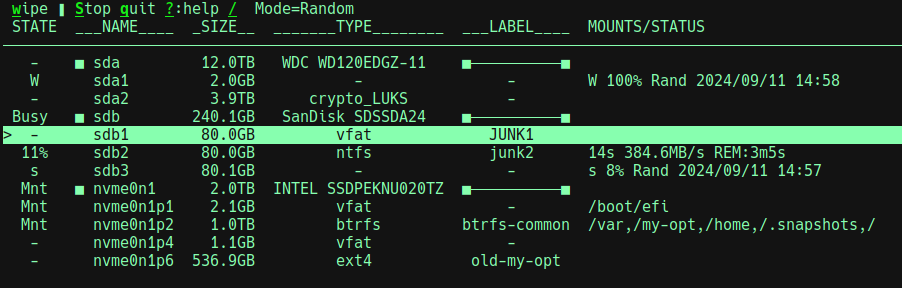
Here is a typical screen:
|
|
40
|
-
|
|
41
|
-
|
|
42
|
-
|
|
43
|
-
The possible state values and meanings are:
|
|
44
|
-
* **-** : indicates the device is ready for wiping if desired.
|
|
45
|
-
* **^** : similar to **-**, but also indicates the device was added after `dwipe` started
|
|
46
|
-
* **Mnt** : the partition is mounted or the disk has partitions that are mounted. You cannot wipe the device in this state.
|
|
47
|
-
* **N%** : if a percent is seen, then a wipe is in progress.
|
|
48
|
-
* **STOP** : indicates that a wipe is being stopped.
|
|
49
|
-
* **s** : indicates that a wipe was stopped (so the device is partly wiped) and wiping can be restarted.
|
|
50
|
-
* **W** : indicates that a wipe was completed and wiping can be restarted.
|
|
51
|
-
* **Lock** : indicates that the disk is manually locked, its partitions are hidden, and you cannot wipe the disk or its partitions.
|
|
52
|
-
* **Unlk** : indicates that the disk was manually unlocked after a manual lock; this is a transitory state.
|
|
53
|
-
|
|
54
|
-
The top line shows available actions and other info. Some actions are context sensitive:
|
|
55
|
-
* **w** : **wipe** : wipe the selected device; before starting, you must confirm your intent.
|
|
56
|
-
* **s** : **stop** : stops the selected wipe in progress (can take a while).
|
|
57
|
-
* **S** : **Stop** : stops all wipes in progress (can take a while).
|
|
58
|
-
* **q** : **quit** : quits the app after stopping wipes in progress.
|
|
59
|
-
* **?** : **help** : bring up help screen with all actions and navigation keys explained.
|
|
60
|
-
* **/** : **search** : limits the show devices to those matching the given regex plus all wipes in progress.
|
|
61
|
-
|
|
62
|
-
The top line shows the "Mode" which is Random or Zeros. For some disks, zeroing may be faster than random. Typing **r** toggles the mode (this is seen on the help screen). When Random, a wiped device is filled with random data and then the first 16KB is zeroed.
|
|
63
|
-
|
|
64
|
-
The write rate and estimating remaining times are shown when wiping a device. Due to write queueing, the initial rates may be inflated, final rates are deflated, and the times are optimistic.
|
|
65
|
-
|
|
66
|
-
The 'W' (Wiped) and 's' (partly wiped) states are disk persistent. For those states, more information is provided about the wipe including when and percent complete.
|
|
67
|
-
|
|
68
|
-
|
|
69
|
-
### The Help Screen
|
|
70
|
-
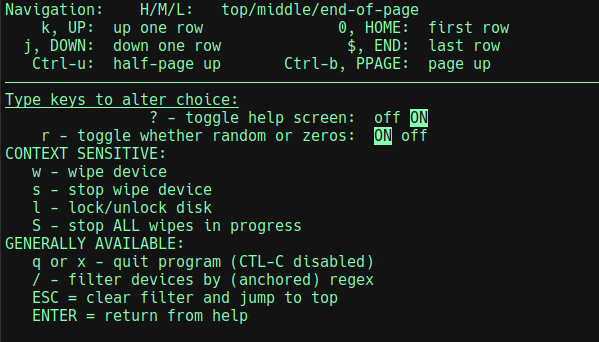
When **?** is typed, the help screen looks like:
|
|
71
|
-
|
|
72
|
-
|
|
73
|
-
|
|
74
|
-
You can navigate the list of devices with arrow keys and vi-like keys.
|
dwipe-1.0.4/pyproject.toml
DELETED
|
@@ -1,89 +0,0 @@
|
|
|
1
|
-
# HOW TO DEVELOP
|
|
2
|
-
|
|
3
|
-
#
|
|
4
|
-
# Prep Work (ensure need modules are up-to-date):
|
|
5
|
-
# sudo apt install python3-pip
|
|
6
|
-
# sudo apt install python3-pip-whl
|
|
7
|
-
# pip install build --break-system-packages
|
|
8
|
-
# sudo apt install twine
|
|
9
|
-
# -- antiquated way
|
|
10
|
-
# sudo pacman -Syu python-pip
|
|
11
|
-
# sudo pacman -Syu python-build
|
|
12
|
-
# sudo pacman -Syu python-twine
|
|
13
|
-
# -- antiquated way
|
|
14
|
-
# python3 -m pip install --upgrade pip
|
|
15
|
-
# python3 -m pip install --upgrade build
|
|
16
|
-
# python3 -m pip install --upgrade twine
|
|
17
|
-
#
|
|
18
|
-
# Optionally, `python3 -m venv venv`, and then
|
|
19
|
-
# - source env/bin/activate # to activate
|
|
20
|
-
# - deactivate # to deactivate
|
|
21
|
-
#
|
|
22
|
-
# For a "live" local install:
|
|
23
|
-
# ./deploy # uninstall: pip uninstall dwipe # to remove
|
|
24
|
-
# To run: ./run.sh
|
|
25
|
-
|
|
26
|
-
# HOW TO PUBLISH...
|
|
27
|
-
# PUBLIC Build and deploy (from project directory):
|
|
28
|
-
# ## BUMP the version (below in [project])
|
|
29
|
-
# rm -rf dist && python3 -m build; ls dist/. && python3 -m twine upload dist/*
|
|
30
|
-
# NOTE: # keyring --disable # may be required
|
|
31
|
-
# ## Enter __token__ and the saved TOKEN (in bitwarden)
|
|
32
|
-
# pipx upgrade dwipe || pipx install dwipe # >= python3.11
|
|
33
|
-
# --OR-- sudo python3 -m pip install dwipe # <= python3.10
|
|
34
|
-
# ## VISIT https://pypi.org/project/dwipe and delete old versions
|
|
35
|
-
#
|
|
36
|
-
# TEST Build and test (from project directory):
|
|
37
|
-
# ## BUMP the version (below in [project])
|
|
38
|
-
# rm -r dist; python3 -m build
|
|
39
|
-
# python3 -m twine upload --repository testpypi dist/* # keyring --disable # may be required
|
|
40
|
-
# ## Enter __token__ and the saved TOKEN (in bitwarden)
|
|
41
|
-
# sudo python3 -m pip install --upgrade --index-url https://test.pypi.org/simple/ --no-deps --break-system-packages dwipe
|
|
42
|
-
# ## VISIT https://test.pypi.org/project/dwipe and delete old versions
|
|
43
|
-
|
|
44
|
-
[build-system]
|
|
45
|
-
requires = ["setuptools>=42", "wheel"]
|
|
46
|
-
build-backend = "setuptools.build_meta"
|
|
47
|
-
|
|
48
|
-
[project]
|
|
49
|
-
name = "dwipe"
|
|
50
|
-
version = "1.0.4"
|
|
51
|
-
description = "A tool to wipe disks and partitions for Linux"
|
|
52
|
-
authors = [
|
|
53
|
-
{ name = "Joe Defen", email = "joedef@google.com" }
|
|
54
|
-
]
|
|
55
|
-
readme = "README.md"
|
|
56
|
-
license = { text = "MIT" }
|
|
57
|
-
requires-python = ">=3.8"
|
|
58
|
-
|
|
59
|
-
keywords = ["disk", "partition", "wipe", "clean", "scrub" ]
|
|
60
|
-
|
|
61
|
-
classifiers = [
|
|
62
|
-
"Programming Language :: Python :: 3",
|
|
63
|
-
"License :: OSI Approved :: MIT License",
|
|
64
|
-
"Operating System :: POSIX :: Linux"
|
|
65
|
-
]
|
|
66
|
-
dependencies = [
|
|
67
|
-
'importlib-metadata; python_version<"3.8"',
|
|
68
|
-
'psutil>=5.9',
|
|
69
|
-
]
|
|
70
|
-
|
|
71
|
-
[project.urls]
|
|
72
|
-
"Homepage" = "https://github.com/joedefen/dwipe"
|
|
73
|
-
"Bug Tracker" = "https://github.com/joedefen/dwipe/issues"
|
|
74
|
-
|
|
75
|
-
[project.scripts]
|
|
76
|
-
dwipe = "dwipe.main:main"
|
|
77
|
-
|
|
78
|
-
[tool.setuptools]
|
|
79
|
-
package-dir = {"" = "src"}
|
|
80
|
-
|
|
81
|
-
[tool.setuptools.packages.find]
|
|
82
|
-
where = ["src"]
|
|
83
|
-
|
|
84
|
-
[tool.setuptools.package-data]
|
|
85
|
-
|
|
86
|
-
exclude = [
|
|
87
|
-
"__pycache__",
|
|
88
|
-
]
|
|
89
|
-
|
dwipe-1.0.4/setup.cfg
DELETED
|
@@ -1,12 +0,0 @@
|
|
|
1
|
-
LICENSE
|
|
2
|
-
README.md
|
|
3
|
-
pyproject.toml
|
|
4
|
-
src/dwipe/PowerWindow.py
|
|
5
|
-
src/dwipe/__init__.py
|
|
6
|
-
src/dwipe/main.py
|
|
7
|
-
src/dwipe.egg-info/PKG-INFO
|
|
8
|
-
src/dwipe.egg-info/SOURCES.txt
|
|
9
|
-
src/dwipe.egg-info/dependency_links.txt
|
|
10
|
-
src/dwipe.egg-info/entry_points.txt
|
|
11
|
-
src/dwipe.egg-info/requires.txt
|
|
12
|
-
src/dwipe.egg-info/top_level.txt
|
|
@@ -1 +0,0 @@
|
|
|
1
|
-
|
|
@@ -1 +0,0 @@
|
|
|
1
|
-
dwipe
|
|
File without changes
|
|
File without changes
|
|
File without changes
|
|
File without changes
|