dwipe 1.0.0__tar.gz → 1.0.1__tar.gz
This diff represents the content of publicly available package versions that have been released to one of the supported registries. The information contained in this diff is provided for informational purposes only and reflects changes between package versions as they appear in their respective public registries.
- {dwipe-1.0.0/src/dwipe.egg-info → dwipe-1.0.1}/PKG-INFO +18 -13
- {dwipe-1.0.0 → dwipe-1.0.1}/README.md +16 -11
- {dwipe-1.0.0 → dwipe-1.0.1}/pyproject.toml +4 -4
- {dwipe-1.0.0 → dwipe-1.0.1/src/dwipe.egg-info}/PKG-INFO +18 -13
- {dwipe-1.0.0 → dwipe-1.0.1}/LICENSE +0 -0
- {dwipe-1.0.0 → dwipe-1.0.1}/setup.cfg +0 -0
- {dwipe-1.0.0 → dwipe-1.0.1}/src/dwipe/PowerWindow.py +0 -0
- {dwipe-1.0.0 → dwipe-1.0.1}/src/dwipe/__init__.py +0 -0
- {dwipe-1.0.0 → dwipe-1.0.1}/src/dwipe/main.py +0 -0
- {dwipe-1.0.0 → dwipe-1.0.1}/src/dwipe.egg-info/SOURCES.txt +0 -0
- {dwipe-1.0.0 → dwipe-1.0.1}/src/dwipe.egg-info/dependency_links.txt +0 -0
- {dwipe-1.0.0 → dwipe-1.0.1}/src/dwipe.egg-info/entry_points.txt +0 -0
- {dwipe-1.0.0 → dwipe-1.0.1}/src/dwipe.egg-info/requires.txt +0 -0
- {dwipe-1.0.0 → dwipe-1.0.1}/src/dwipe.egg-info/top_level.txt +0 -0
|
@@ -1,12 +1,12 @@
|
|
|
1
1
|
Metadata-Version: 2.1
|
|
2
2
|
Name: dwipe
|
|
3
|
-
Version: 1.0.
|
|
3
|
+
Version: 1.0.1
|
|
4
4
|
Summary: A tool to wipe disks and partitions for Linux
|
|
5
5
|
Author-email: Joe Defen <joedef@google.com>
|
|
6
6
|
License: MIT
|
|
7
7
|
Project-URL: Homepage, https://github.com/joedefen/dwipe
|
|
8
8
|
Project-URL: Bug Tracker, https://github.com/joedefen/dwipe/issues
|
|
9
|
-
Keywords: disk,partition,wipe,clean
|
|
9
|
+
Keywords: disk,partition,wipe,clean,scrub
|
|
10
10
|
Classifier: Programming Language :: Python :: 3
|
|
11
11
|
Classifier: License :: OSI Approved :: MIT License
|
|
12
12
|
Classifier: Operating System :: POSIX :: Linux
|
|
@@ -17,27 +17,30 @@ Requires-Dist: importlib-metadata; python_version < "3.8"
|
|
|
17
17
|
Requires-Dist: psutil>=5.9
|
|
18
18
|
|
|
19
19
|
# dwipe
|
|
20
|
-
`dwipe` to wipe disks and partitions for Linux
|
|
20
|
+
`dwipe` is tool to wipe disks and partitions for Linux helps secure you data. `dwipes` aims to reduce mistakes by providing ample information about your devices during selection.
|
|
21
21
|
|
|
22
|
-
|
|
22
|
+
> **Quick Start:**
|
|
23
|
+
> * Install `dwipe` using `pipx install dwipe`, or however you install python scripts from PyPi.org.
|
|
24
|
+
> * Run `dwipe` from a terminal and observe the context sensitive help on the 1st line.
|
|
23
25
|
|
|
26
|
+
To help with your disk scrubbing, `dwipe`:
|
|
27
|
+
* shows disks and partitions that can be wiped along with selected information to help choose them (i.e.,; labels, sizes, and types); disallowed are mounted devices and overlapping wipes and manually "locked" disks.
|
|
28
|
+
* updates the device list when it changes; newly added devices are marked differently to make it easier to see them.
|
|
29
|
+
* supports starting multiple wipes, shows their progress, and shows completion states.
|
|
30
|
+
* supports either zeroing devices or filling with random data.
|
|
31
|
+
* supports filtering for devices by name/pattern in case of too many for one screen, etc.
|
|
32
|
+
* supports stopping wipes in progress.
|
|
24
33
|
|
|
25
|
-
`dwipe`
|
|
26
|
-
* shows the disks and partitions that could be wiped along with useful information to help choose them (i.e., labels, sizes, and types)
|
|
27
|
-
* allows starting multiple wipes and shows their progress.
|
|
28
|
-
* allows filtering for devices by name in case of too many for one screen.
|
|
29
|
-
* allows stopping wipes in progress.
|
|
30
|
-
* not offering to wipe disks that are mounted or would have conflicting/overlapping wipes in progress.
|
|
31
|
-
* allowing to "lock" a disk to prevent mistaken wipes on that disk.
|
|
34
|
+
`dwipe` shows file system labels, and if not the partition label. It is best practice to label partitions and file systems well to make selection easier.
|
|
32
35
|
|
|
33
36
|
## Usage
|
|
34
|
-
|
|
37
|
+
> Simply run `dwipe` from the command line w/o arguments normally. Its command line arguments mostly for debugging including "--dry-run" which lets you test/practice the interface w/o risk.
|
|
35
38
|
|
|
36
39
|
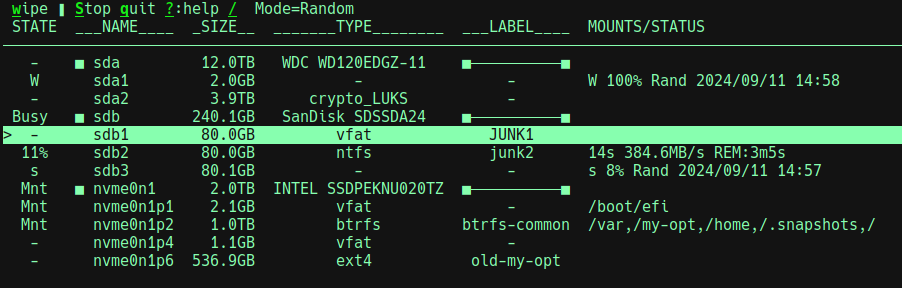
Here is a typical screen:
|
|
37
40
|
|
|
38
41
|
|
|
39
42
|
|
|
40
|
-
The possible state values and
|
|
43
|
+
The possible state values and meanings are:
|
|
41
44
|
* **-** : indicates the device is ready for wiping if desired.
|
|
42
45
|
* **^** : similar to **-**, but also indicates the device was added after `dwipe` started
|
|
43
46
|
* **Mnt** : the partition is mounted or the disk has partitions that are mounted. You cannot wipe the device in this state.
|
|
@@ -65,3 +68,5 @@ The write rate and estimating remaining times are shown when wiping a device. D
|
|
|
65
68
|
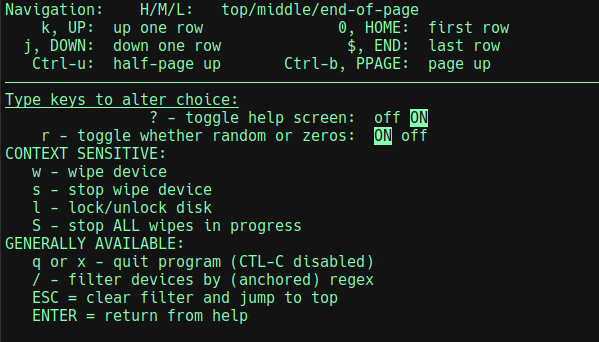
When **?** is typed, the help screen looks like:
|
|
66
69
|
|
|
67
70
|
|
|
71
|
+
|
|
72
|
+
You can navigate the list of devices with arrow keys and vi-like keys.
|
|
@@ -1,25 +1,28 @@
|
|
|
1
1
|
# dwipe
|
|
2
|
-
`dwipe` to wipe disks and partitions for Linux
|
|
2
|
+
`dwipe` is tool to wipe disks and partitions for Linux helps secure you data. `dwipes` aims to reduce mistakes by providing ample information about your devices during selection.
|
|
3
3
|
|
|
4
|
-
|
|
4
|
+
> **Quick Start:**
|
|
5
|
+
> * Install `dwipe` using `pipx install dwipe`, or however you install python scripts from PyPi.org.
|
|
6
|
+
> * Run `dwipe` from a terminal and observe the context sensitive help on the 1st line.
|
|
5
7
|
|
|
8
|
+
To help with your disk scrubbing, `dwipe`:
|
|
9
|
+
* shows disks and partitions that can be wiped along with selected information to help choose them (i.e.,; labels, sizes, and types); disallowed are mounted devices and overlapping wipes and manually "locked" disks.
|
|
10
|
+
* updates the device list when it changes; newly added devices are marked differently to make it easier to see them.
|
|
11
|
+
* supports starting multiple wipes, shows their progress, and shows completion states.
|
|
12
|
+
* supports either zeroing devices or filling with random data.
|
|
13
|
+
* supports filtering for devices by name/pattern in case of too many for one screen, etc.
|
|
14
|
+
* supports stopping wipes in progress.
|
|
6
15
|
|
|
7
|
-
`dwipe`
|
|
8
|
-
* shows the disks and partitions that could be wiped along with useful information to help choose them (i.e., labels, sizes, and types)
|
|
9
|
-
* allows starting multiple wipes and shows their progress.
|
|
10
|
-
* allows filtering for devices by name in case of too many for one screen.
|
|
11
|
-
* allows stopping wipes in progress.
|
|
12
|
-
* not offering to wipe disks that are mounted or would have conflicting/overlapping wipes in progress.
|
|
13
|
-
* allowing to "lock" a disk to prevent mistaken wipes on that disk.
|
|
16
|
+
`dwipe` shows file system labels, and if not the partition label. It is best practice to label partitions and file systems well to make selection easier.
|
|
14
17
|
|
|
15
18
|
## Usage
|
|
16
|
-
|
|
19
|
+
> Simply run `dwipe` from the command line w/o arguments normally. Its command line arguments mostly for debugging including "--dry-run" which lets you test/practice the interface w/o risk.
|
|
17
20
|
|
|
18
21
|
Here is a typical screen:
|
|
19
22
|
|
|
20
23
|

|
|
21
24
|
|
|
22
|
-
The possible state values and
|
|
25
|
+
The possible state values and meanings are:
|
|
23
26
|
* **-** : indicates the device is ready for wiping if desired.
|
|
24
27
|
* **^** : similar to **-**, but also indicates the device was added after `dwipe` started
|
|
25
28
|
* **Mnt** : the partition is mounted or the disk has partitions that are mounted. You cannot wipe the device in this state.
|
|
@@ -47,3 +50,5 @@ The write rate and estimating remaining times are shown when wiping a device. D
|
|
|
47
50
|
When **?** is typed, the help screen looks like:
|
|
48
51
|
|
|
49
52
|

|
|
53
|
+
|
|
54
|
+
You can navigate the list of devices with arrow keys and vi-like keys.
|
|
@@ -26,8 +26,8 @@
|
|
|
26
26
|
# HOW TO PUBLISH...
|
|
27
27
|
# PUBLIC Build and deploy (from project directory):
|
|
28
28
|
# ## BUMP the version (below in [project])
|
|
29
|
-
# rm -rf dist
|
|
30
|
-
#
|
|
29
|
+
# rm -rf dist && python3 -m build; ls dist/. && python3 -m twine upload dist/*
|
|
30
|
+
# NOTE: # keyring --disable # may be required
|
|
31
31
|
# ## Enter __token__ and the saved TOKEN (in bitwarden)
|
|
32
32
|
# pipx upgrade dwipe || pipx install dwipe # >= python3.11
|
|
33
33
|
# --OR-- sudo python3 -m pip install dwipe # <= python3.10
|
|
@@ -47,7 +47,7 @@ build-backend = "setuptools.build_meta"
|
|
|
47
47
|
|
|
48
48
|
[project]
|
|
49
49
|
name = "dwipe"
|
|
50
|
-
version = "1.0.
|
|
50
|
+
version = "1.0.1"
|
|
51
51
|
description = "A tool to wipe disks and partitions for Linux"
|
|
52
52
|
authors = [
|
|
53
53
|
{ name = "Joe Defen", email = "joedef@google.com" }
|
|
@@ -56,7 +56,7 @@ readme = "README.md"
|
|
|
56
56
|
license = { text = "MIT" }
|
|
57
57
|
requires-python = ">=3.8"
|
|
58
58
|
|
|
59
|
-
keywords = ["disk", "partition", "wipe", "clean", ]
|
|
59
|
+
keywords = ["disk", "partition", "wipe", "clean", "scrub" ]
|
|
60
60
|
|
|
61
61
|
classifiers = [
|
|
62
62
|
"Programming Language :: Python :: 3",
|
|
@@ -1,12 +1,12 @@
|
|
|
1
1
|
Metadata-Version: 2.1
|
|
2
2
|
Name: dwipe
|
|
3
|
-
Version: 1.0.
|
|
3
|
+
Version: 1.0.1
|
|
4
4
|
Summary: A tool to wipe disks and partitions for Linux
|
|
5
5
|
Author-email: Joe Defen <joedef@google.com>
|
|
6
6
|
License: MIT
|
|
7
7
|
Project-URL: Homepage, https://github.com/joedefen/dwipe
|
|
8
8
|
Project-URL: Bug Tracker, https://github.com/joedefen/dwipe/issues
|
|
9
|
-
Keywords: disk,partition,wipe,clean
|
|
9
|
+
Keywords: disk,partition,wipe,clean,scrub
|
|
10
10
|
Classifier: Programming Language :: Python :: 3
|
|
11
11
|
Classifier: License :: OSI Approved :: MIT License
|
|
12
12
|
Classifier: Operating System :: POSIX :: Linux
|
|
@@ -17,27 +17,30 @@ Requires-Dist: importlib-metadata; python_version < "3.8"
|
|
|
17
17
|
Requires-Dist: psutil>=5.9
|
|
18
18
|
|
|
19
19
|
# dwipe
|
|
20
|
-
`dwipe` to wipe disks and partitions for Linux
|
|
20
|
+
`dwipe` is tool to wipe disks and partitions for Linux helps secure you data. `dwipes` aims to reduce mistakes by providing ample information about your devices during selection.
|
|
21
21
|
|
|
22
|
-
|
|
22
|
+
> **Quick Start:**
|
|
23
|
+
> * Install `dwipe` using `pipx install dwipe`, or however you install python scripts from PyPi.org.
|
|
24
|
+
> * Run `dwipe` from a terminal and observe the context sensitive help on the 1st line.
|
|
23
25
|
|
|
26
|
+
To help with your disk scrubbing, `dwipe`:
|
|
27
|
+
* shows disks and partitions that can be wiped along with selected information to help choose them (i.e.,; labels, sizes, and types); disallowed are mounted devices and overlapping wipes and manually "locked" disks.
|
|
28
|
+
* updates the device list when it changes; newly added devices are marked differently to make it easier to see them.
|
|
29
|
+
* supports starting multiple wipes, shows their progress, and shows completion states.
|
|
30
|
+
* supports either zeroing devices or filling with random data.
|
|
31
|
+
* supports filtering for devices by name/pattern in case of too many for one screen, etc.
|
|
32
|
+
* supports stopping wipes in progress.
|
|
24
33
|
|
|
25
|
-
`dwipe`
|
|
26
|
-
* shows the disks and partitions that could be wiped along with useful information to help choose them (i.e., labels, sizes, and types)
|
|
27
|
-
* allows starting multiple wipes and shows their progress.
|
|
28
|
-
* allows filtering for devices by name in case of too many for one screen.
|
|
29
|
-
* allows stopping wipes in progress.
|
|
30
|
-
* not offering to wipe disks that are mounted or would have conflicting/overlapping wipes in progress.
|
|
31
|
-
* allowing to "lock" a disk to prevent mistaken wipes on that disk.
|
|
34
|
+
`dwipe` shows file system labels, and if not the partition label. It is best practice to label partitions and file systems well to make selection easier.
|
|
32
35
|
|
|
33
36
|
## Usage
|
|
34
|
-
|
|
37
|
+
> Simply run `dwipe` from the command line w/o arguments normally. Its command line arguments mostly for debugging including "--dry-run" which lets you test/practice the interface w/o risk.
|
|
35
38
|
|
|
36
39
|
Here is a typical screen:
|
|
37
40
|
|
|
38
41
|

|
|
39
42
|
|
|
40
|
-
The possible state values and
|
|
43
|
+
The possible state values and meanings are:
|
|
41
44
|
* **-** : indicates the device is ready for wiping if desired.
|
|
42
45
|
* **^** : similar to **-**, but also indicates the device was added after `dwipe` started
|
|
43
46
|
* **Mnt** : the partition is mounted or the disk has partitions that are mounted. You cannot wipe the device in this state.
|
|
@@ -65,3 +68,5 @@ The write rate and estimating remaining times are shown when wiping a device. D
|
|
|
65
68
|
When **?** is typed, the help screen looks like:
|
|
66
69
|
|
|
67
70
|

|
|
71
|
+
|
|
72
|
+
You can navigate the list of devices with arrow keys and vi-like keys.
|
|
File without changes
|
|
File without changes
|
|
File without changes
|
|
File without changes
|
|
File without changes
|
|
File without changes
|
|
File without changes
|
|
File without changes
|
|
File without changes
|
|
File without changes
|