dwipe 1.0.0__tar.gz
This diff represents the content of publicly available package versions that have been released to one of the supported registries. The information contained in this diff is provided for informational purposes only and reflects changes between package versions as they appear in their respective public registries.
- dwipe-1.0.0/LICENSE +21 -0
- dwipe-1.0.0/PKG-INFO +67 -0
- dwipe-1.0.0/README.md +49 -0
- dwipe-1.0.0/pyproject.toml +89 -0
- dwipe-1.0.0/setup.cfg +4 -0
- dwipe-1.0.0/src/dwipe/PowerWindow.py +740 -0
- dwipe-1.0.0/src/dwipe/__init__.py +0 -0
- dwipe-1.0.0/src/dwipe/main.py +806 -0
- dwipe-1.0.0/src/dwipe.egg-info/PKG-INFO +67 -0
- dwipe-1.0.0/src/dwipe.egg-info/SOURCES.txt +12 -0
- dwipe-1.0.0/src/dwipe.egg-info/dependency_links.txt +1 -0
- dwipe-1.0.0/src/dwipe.egg-info/entry_points.txt +2 -0
- dwipe-1.0.0/src/dwipe.egg-info/requires.txt +4 -0
- dwipe-1.0.0/src/dwipe.egg-info/top_level.txt +1 -0
dwipe-1.0.0/LICENSE
ADDED
|
@@ -0,0 +1,21 @@
|
|
|
1
|
+
MIT License
|
|
2
|
+
|
|
3
|
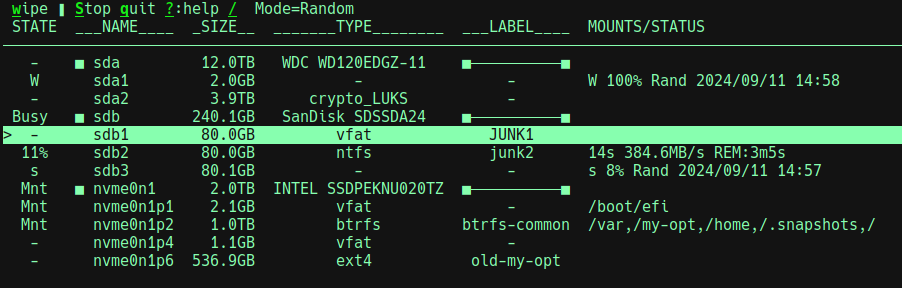
+
Copyright (c) 2024 Joe D
|
|
4
|
+
|
|
5
|
+
Permission is hereby granted, free of charge, to any person obtaining a copy
|
|
6
|
+
of this software and associated documentation files (the "Software"), to deal
|
|
7
|
+
in the Software without restriction, including without limitation the rights
|
|
8
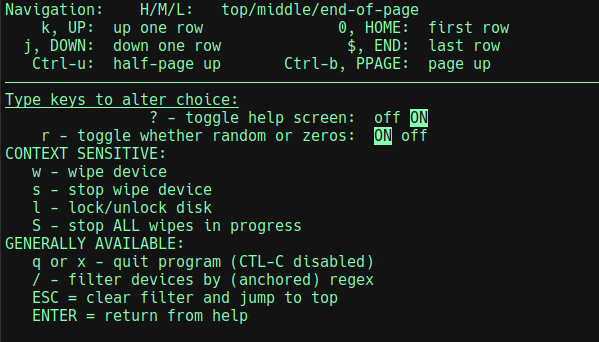
|
+
to use, copy, modify, merge, publish, distribute, sublicense, and/or sell
|
|
9
|
+
copies of the Software, and to permit persons to whom the Software is
|
|
10
|
+
furnished to do so, subject to the following conditions:
|
|
11
|
+
|
|
12
|
+
The above copyright notice and this permission notice shall be included in all
|
|
13
|
+
copies or substantial portions of the Software.
|
|
14
|
+
|
|
15
|
+
THE SOFTWARE IS PROVIDED "AS IS", WITHOUT WARRANTY OF ANY KIND, EXPRESS OR
|
|
16
|
+
IMPLIED, INCLUDING BUT NOT LIMITED TO THE WARRANTIES OF MERCHANTABILITY,
|
|
17
|
+
FITNESS FOR A PARTICULAR PURPOSE AND NONINFRINGEMENT. IN NO EVENT SHALL THE
|
|
18
|
+
AUTHORS OR COPYRIGHT HOLDERS BE LIABLE FOR ANY CLAIM, DAMAGES OR OTHER
|
|
19
|
+
LIABILITY, WHETHER IN AN ACTION OF CONTRACT, TORT OR OTHERWISE, ARISING FROM,
|
|
20
|
+
OUT OF OR IN CONNECTION WITH THE SOFTWARE OR THE USE OR OTHER DEALINGS IN THE
|
|
21
|
+
SOFTWARE.
|
dwipe-1.0.0/PKG-INFO
ADDED
|
@@ -0,0 +1,67 @@
|
|
|
1
|
+
Metadata-Version: 2.1
|
|
2
|
+
Name: dwipe
|
|
3
|
+
Version: 1.0.0
|
|
4
|
+
Summary: A tool to wipe disks and partitions for Linux
|
|
5
|
+
Author-email: Joe Defen <joedef@google.com>
|
|
6
|
+
License: MIT
|
|
7
|
+
Project-URL: Homepage, https://github.com/joedefen/dwipe
|
|
8
|
+
Project-URL: Bug Tracker, https://github.com/joedefen/dwipe/issues
|
|
9
|
+
Keywords: disk,partition,wipe,clean
|
|
10
|
+
Classifier: Programming Language :: Python :: 3
|
|
11
|
+
Classifier: License :: OSI Approved :: MIT License
|
|
12
|
+
Classifier: Operating System :: POSIX :: Linux
|
|
13
|
+
Requires-Python: >=3.8
|
|
14
|
+
Description-Content-Type: text/markdown
|
|
15
|
+
License-File: LICENSE
|
|
16
|
+
Requires-Dist: importlib-metadata; python_version < "3.8"
|
|
17
|
+
Requires-Dist: psutil>=5.9
|
|
18
|
+
|
|
19
|
+
# dwipe
|
|
20
|
+
`dwipe` to wipe disks and partitions for Linux for your security.
|
|
21
|
+
|
|
22
|
+
* Install `dwipe` using `pipx install dwipe`, or however you python scripts from PyPi.org.
|
|
23
|
+
|
|
24
|
+
|
|
25
|
+
`dwipe` features include:
|
|
26
|
+
* shows the disks and partitions that could be wiped along with useful information to help choose them (i.e., labels, sizes, and types)
|
|
27
|
+
* allows starting multiple wipes and shows their progress.
|
|
28
|
+
* allows filtering for devices by name in case of too many for one screen.
|
|
29
|
+
* allows stopping wipes in progress.
|
|
30
|
+
* not offering to wipe disks that are mounted or would have conflicting/overlapping wipes in progress.
|
|
31
|
+
* allowing to "lock" a disk to prevent mistaken wipes on that disk.
|
|
32
|
+
|
|
33
|
+
## Usage
|
|
34
|
+
* Run `dwipe` from the command line.
|
|
35
|
+
|
|
36
|
+
Here is a typical screen:
|
|
37
|
+
|
|
38
|
+
|
|
39
|
+
|
|
40
|
+
The possible state values and meaning are:
|
|
41
|
+
* **-** : indicates the device is ready for wiping if desired.
|
|
42
|
+
* **^** : similar to **-**, but also indicates the device was added after `dwipe` started
|
|
43
|
+
* **Mnt** : the partition is mounted or the disk has partitions that are mounted. You cannot wipe the device in this state.
|
|
44
|
+
* **N%** : if a percent is seen, then a wipe is in progress.
|
|
45
|
+
* **STOP** : indicates that a wipe is being stopped.
|
|
46
|
+
* **s** : indicates that a wipe was stopped (so the device is partly wiped) and wiping can be restarted.
|
|
47
|
+
* **W** : indicates that a wipe was completed and wiping can be restarted.
|
|
48
|
+
* **Lock** : indicates that the disk is manually locked, its partitions are hidden, and you cannot wipe the disk or its partitions.
|
|
49
|
+
* **Unlk** : indicates that the disk was manually unlocked after a manual lock; this is a transitory state.
|
|
50
|
+
|
|
51
|
+
The top line shows available actions and other info. Some actions are context sensitive:
|
|
52
|
+
* **w** : **wipe** : wipe the selected device; before starting, you must confirm your intent.
|
|
53
|
+
* **s** : **stop** : stops the selected wipe in progress (can take a while).
|
|
54
|
+
* **S** : **Stop** : stops all wipes in progress (can take a while).
|
|
55
|
+
* **q** : **quit** : quits the app after stopping wipes in progress.
|
|
56
|
+
* **?** : **help** : bring up help screen with all actions and navigation keys explained.
|
|
57
|
+
* **/** : **search** : limits the show devices to those matching the given regex plus all wipes in progress.
|
|
58
|
+
|
|
59
|
+
The top line shows the "Mode" which is Random or Zeros. For some disks, zeroing may be faster than random. Typing **r** toggles the mode (this is seen on the help screen). When Random, a wiped device is filled with random data and then the first 16KB is zeroed.
|
|
60
|
+
|
|
61
|
+
The write rate and estimating remaining times are shown when wiping a device. Due to write queueing, the initial rates may be inflated, final rates are deflated, and the times are optimistic.
|
|
62
|
+
|
|
63
|
+
|
|
64
|
+
### The Help Screen
|
|
65
|
+
When **?** is typed, the help screen looks like:
|
|
66
|
+
|
|
67
|
+
|
dwipe-1.0.0/README.md
ADDED
|
@@ -0,0 +1,49 @@
|
|
|
1
|
+
# dwipe
|
|
2
|
+
`dwipe` to wipe disks and partitions for Linux for your security.
|
|
3
|
+
|
|
4
|
+
* Install `dwipe` using `pipx install dwipe`, or however you python scripts from PyPi.org.
|
|
5
|
+
|
|
6
|
+
|
|
7
|
+
`dwipe` features include:
|
|
8
|
+
* shows the disks and partitions that could be wiped along with useful information to help choose them (i.e., labels, sizes, and types)
|
|
9
|
+
* allows starting multiple wipes and shows their progress.
|
|
10
|
+
* allows filtering for devices by name in case of too many for one screen.
|
|
11
|
+
* allows stopping wipes in progress.
|
|
12
|
+
* not offering to wipe disks that are mounted or would have conflicting/overlapping wipes in progress.
|
|
13
|
+
* allowing to "lock" a disk to prevent mistaken wipes on that disk.
|
|
14
|
+
|
|
15
|
+
## Usage
|
|
16
|
+
* Run `dwipe` from the command line.
|
|
17
|
+
|
|
18
|
+
Here is a typical screen:
|
|
19
|
+
|
|
20
|
+

|
|
21
|
+
|
|
22
|
+
The possible state values and meaning are:
|
|
23
|
+
* **-** : indicates the device is ready for wiping if desired.
|
|
24
|
+
* **^** : similar to **-**, but also indicates the device was added after `dwipe` started
|
|
25
|
+
* **Mnt** : the partition is mounted or the disk has partitions that are mounted. You cannot wipe the device in this state.
|
|
26
|
+
* **N%** : if a percent is seen, then a wipe is in progress.
|
|
27
|
+
* **STOP** : indicates that a wipe is being stopped.
|
|
28
|
+
* **s** : indicates that a wipe was stopped (so the device is partly wiped) and wiping can be restarted.
|
|
29
|
+
* **W** : indicates that a wipe was completed and wiping can be restarted.
|
|
30
|
+
* **Lock** : indicates that the disk is manually locked, its partitions are hidden, and you cannot wipe the disk or its partitions.
|
|
31
|
+
* **Unlk** : indicates that the disk was manually unlocked after a manual lock; this is a transitory state.
|
|
32
|
+
|
|
33
|
+
The top line shows available actions and other info. Some actions are context sensitive:
|
|
34
|
+
* **w** : **wipe** : wipe the selected device; before starting, you must confirm your intent.
|
|
35
|
+
* **s** : **stop** : stops the selected wipe in progress (can take a while).
|
|
36
|
+
* **S** : **Stop** : stops all wipes in progress (can take a while).
|
|
37
|
+
* **q** : **quit** : quits the app after stopping wipes in progress.
|
|
38
|
+
* **?** : **help** : bring up help screen with all actions and navigation keys explained.
|
|
39
|
+
* **/** : **search** : limits the show devices to those matching the given regex plus all wipes in progress.
|
|
40
|
+
|
|
41
|
+
The top line shows the "Mode" which is Random or Zeros. For some disks, zeroing may be faster than random. Typing **r** toggles the mode (this is seen on the help screen). When Random, a wiped device is filled with random data and then the first 16KB is zeroed.
|
|
42
|
+
|
|
43
|
+
The write rate and estimating remaining times are shown when wiping a device. Due to write queueing, the initial rates may be inflated, final rates are deflated, and the times are optimistic.
|
|
44
|
+
|
|
45
|
+
|
|
46
|
+
### The Help Screen
|
|
47
|
+
When **?** is typed, the help screen looks like:
|
|
48
|
+
|
|
49
|
+

|
|
@@ -0,0 +1,89 @@
|
|
|
1
|
+
# HOW TO DEVELOP
|
|
2
|
+
|
|
3
|
+
#
|
|
4
|
+
# Prep Work (ensure need modules are up-to-date):
|
|
5
|
+
# sudo apt install python3-pip
|
|
6
|
+
# sudo apt install python3-pip-whl
|
|
7
|
+
# pip install build --break-system-packages
|
|
8
|
+
# sudo apt install twine
|
|
9
|
+
# -- antiquated way
|
|
10
|
+
# sudo pacman -Syu python-pip
|
|
11
|
+
# sudo pacman -Syu python-build
|
|
12
|
+
# sudo pacman -Syu python-twine
|
|
13
|
+
# -- antiquated way
|
|
14
|
+
# python3 -m pip install --upgrade pip
|
|
15
|
+
# python3 -m pip install --upgrade build
|
|
16
|
+
# python3 -m pip install --upgrade twine
|
|
17
|
+
#
|
|
18
|
+
# Optionally, `python3 -m venv venv`, and then
|
|
19
|
+
# - source env/bin/activate # to activate
|
|
20
|
+
# - deactivate # to deactivate
|
|
21
|
+
#
|
|
22
|
+
# For a "live" local install:
|
|
23
|
+
# ./deploy # uninstall: pip uninstall dwipe # to remove
|
|
24
|
+
# To run: ./run.sh
|
|
25
|
+
|
|
26
|
+
# HOW TO PUBLISH...
|
|
27
|
+
# PUBLIC Build and deploy (from project directory):
|
|
28
|
+
# ## BUMP the version (below in [project])
|
|
29
|
+
# rm -rf dist; python3 -m build; ls dist/.
|
|
30
|
+
# python3 -m twine upload dist/* # keyring --disable # may be required
|
|
31
|
+
# ## Enter __token__ and the saved TOKEN (in bitwarden)
|
|
32
|
+
# pipx upgrade dwipe || pipx install dwipe # >= python3.11
|
|
33
|
+
# --OR-- sudo python3 -m pip install dwipe # <= python3.10
|
|
34
|
+
# ## VISIT https://pypi.org/project/dwipe and delete old versions
|
|
35
|
+
#
|
|
36
|
+
# TEST Build and test (from project directory):
|
|
37
|
+
# ## BUMP the version (below in [project])
|
|
38
|
+
# rm -r dist; python3 -m build
|
|
39
|
+
# python3 -m twine upload --repository testpypi dist/* # keyring --disable # may be required
|
|
40
|
+
# ## Enter __token__ and the saved TOKEN (in bitwarden)
|
|
41
|
+
# sudo python3 -m pip install --upgrade --index-url https://test.pypi.org/simple/ --no-deps --break-system-packages dwipe
|
|
42
|
+
# ## VISIT https://test.pypi.org/project/dwipe and delete old versions
|
|
43
|
+
|
|
44
|
+
[build-system]
|
|
45
|
+
requires = ["setuptools>=42", "wheel"]
|
|
46
|
+
build-backend = "setuptools.build_meta"
|
|
47
|
+
|
|
48
|
+
[project]
|
|
49
|
+
name = "dwipe"
|
|
50
|
+
version = "1.0.0"
|
|
51
|
+
description = "A tool to wipe disks and partitions for Linux"
|
|
52
|
+
authors = [
|
|
53
|
+
{ name = "Joe Defen", email = "joedef@google.com" }
|
|
54
|
+
]
|
|
55
|
+
readme = "README.md"
|
|
56
|
+
license = { text = "MIT" }
|
|
57
|
+
requires-python = ">=3.8"
|
|
58
|
+
|
|
59
|
+
keywords = ["disk", "partition", "wipe", "clean", ]
|
|
60
|
+
|
|
61
|
+
classifiers = [
|
|
62
|
+
"Programming Language :: Python :: 3",
|
|
63
|
+
"License :: OSI Approved :: MIT License",
|
|
64
|
+
"Operating System :: POSIX :: Linux"
|
|
65
|
+
]
|
|
66
|
+
dependencies = [
|
|
67
|
+
'importlib-metadata; python_version<"3.8"',
|
|
68
|
+
'psutil>=5.9',
|
|
69
|
+
]
|
|
70
|
+
|
|
71
|
+
[project.urls]
|
|
72
|
+
"Homepage" = "https://github.com/joedefen/dwipe"
|
|
73
|
+
"Bug Tracker" = "https://github.com/joedefen/dwipe/issues"
|
|
74
|
+
|
|
75
|
+
[project.scripts]
|
|
76
|
+
dwipe = "dwipe.main:main"
|
|
77
|
+
|
|
78
|
+
[tool.setuptools]
|
|
79
|
+
package-dir = {"" = "src"}
|
|
80
|
+
|
|
81
|
+
[tool.setuptools.packages.find]
|
|
82
|
+
where = ["src"]
|
|
83
|
+
|
|
84
|
+
[tool.setuptools.package-data]
|
|
85
|
+
|
|
86
|
+
exclude = [
|
|
87
|
+
"__pycache__",
|
|
88
|
+
]
|
|
89
|
+
|
dwipe-1.0.0/setup.cfg
ADDED