drawlib 0.2.0.dev1__tar.gz → 0.2.1__tar.gz
This diff represents the content of publicly available package versions that have been released to one of the supported registries. The information contained in this diff is provided for informational purposes only and reflects changes between package versions as they appear in their respective public registries.
Potentially problematic release.
This version of drawlib might be problematic. Click here for more details.
- {drawlib-0.2.0.dev1 → drawlib-0.2.1}/PKG-INFO +33 -10
- {drawlib-0.2.0.dev1 → drawlib-0.2.1}/drawlib/__init__.py +1 -1
- drawlib-0.2.1/pypi.md +77 -0
- {drawlib-0.2.0.dev1 → drawlib-0.2.1}/pyproject.toml +2 -2
- drawlib-0.2.0.dev1/pypi.md +0 -54
- {drawlib-0.2.0.dev1 → drawlib-0.2.1}/LICENSE.txt +0 -0
- {drawlib-0.2.0.dev1 → drawlib-0.2.1}/drawlib/__main__.py +0 -0
- {drawlib-0.2.0.dev1 → drawlib-0.2.1}/drawlib/apis.py +0 -0
- {drawlib-0.2.0.dev1 → drawlib-0.2.1}/drawlib/assets/__init__.py +0 -0
- {drawlib-0.2.0.dev1 → drawlib-0.2.1}/drawlib/assets/v0_2/__init__.py +0 -0
- {drawlib-0.2.0.dev1 → drawlib-0.2.1}/drawlib/assets/v0_2/fonticons/__init__.py +0 -0
- {drawlib-0.2.0.dev1 → drawlib-0.2.1}/drawlib/assets/v0_2/fonts/__init__.py +0 -0
- {drawlib-0.2.0.dev1 → drawlib-0.2.1}/drawlib/py.typed +0 -0
- {drawlib-0.2.0.dev1 → drawlib-0.2.1}/drawlib/v0_2/__init__.py +0 -0
- {drawlib-0.2.0.dev1 → drawlib-0.2.1}/drawlib/v0_2/__main__.py +0 -0
- {drawlib-0.2.0.dev1 → drawlib-0.2.1}/drawlib/v0_2/apis.py +0 -0
- {drawlib-0.2.0.dev1 → drawlib-0.2.1}/drawlib/v0_2/private/__init__.py +0 -0
- {drawlib-0.2.0.dev1 → drawlib-0.2.1}/drawlib/v0_2/private/command.py +0 -0
- {drawlib-0.2.0.dev1 → drawlib-0.2.1}/drawlib/v0_2/private/core/__init__.py +0 -0
- {drawlib-0.2.0.dev1 → drawlib-0.2.1}/drawlib/v0_2/private/core/colors.py +0 -0
- {drawlib-0.2.0.dev1 → drawlib-0.2.1}/drawlib/v0_2/private/core/dimage.py +0 -0
- {drawlib-0.2.0.dev1 → drawlib-0.2.1}/drawlib/v0_2/private/core/fonts.py +0 -0
- {drawlib-0.2.0.dev1 → drawlib-0.2.1}/drawlib/v0_2/private/core/model.py +0 -0
- {drawlib-0.2.0.dev1 → drawlib-0.2.1}/drawlib/v0_2/private/core/model_system_default.py +0 -0
- {drawlib-0.2.0.dev1 → drawlib-0.2.1}/drawlib/v0_2/private/core/theme.py +0 -0
- {drawlib-0.2.0.dev1 → drawlib-0.2.1}/drawlib/v0_2/private/core/theme_officials.py +0 -0
- {drawlib-0.2.0.dev1 → drawlib-0.2.1}/drawlib/v0_2/private/core/theme_style_caches.py +0 -0
- {drawlib-0.2.0.dev1 → drawlib-0.2.1}/drawlib/v0_2/private/core/util.py +0 -0
- {drawlib-0.2.0.dev1 → drawlib-0.2.1}/drawlib/v0_2/private/core_canvas/__init__.py +0 -0
- {drawlib-0.2.0.dev1 → drawlib-0.2.1}/drawlib/v0_2/private/core_canvas/base.py +0 -0
- {drawlib-0.2.0.dev1 → drawlib-0.2.1}/drawlib/v0_2/private/core_canvas/canvas.py +0 -0
- {drawlib-0.2.0.dev1 → drawlib-0.2.1}/drawlib/v0_2/private/core_canvas/image.py +0 -0
- {drawlib-0.2.0.dev1 → drawlib-0.2.1}/drawlib/v0_2/private/core_canvas/line.py +0 -0
- {drawlib-0.2.0.dev1 → drawlib-0.2.1}/drawlib/v0_2/private/core_canvas/original_arrow.py +0 -0
- {drawlib-0.2.0.dev1 → drawlib-0.2.1}/drawlib/v0_2/private/core_canvas/original_polygon.py +0 -0
- {drawlib-0.2.0.dev1 → drawlib-0.2.1}/drawlib/v0_2/private/core_canvas/patches.py +0 -0
- {drawlib-0.2.0.dev1 → drawlib-0.2.1}/drawlib/v0_2/private/core_canvas/text.py +0 -0
- {drawlib-0.2.0.dev1 → drawlib-0.2.1}/drawlib/v0_2/private/download.py +0 -0
- {drawlib-0.2.0.dev1 → drawlib-0.2.1}/drawlib/v0_2/private/dutil/__init__.py +0 -0
- {drawlib-0.2.0.dev1 → drawlib-0.2.1}/drawlib/v0_2/private/dutil/dutil_canvas.py +0 -0
- {drawlib-0.2.0.dev1 → drawlib-0.2.1}/drawlib/v0_2/private/dutil/dutil_color.py +0 -0
- {drawlib-0.2.0.dev1 → drawlib-0.2.1}/drawlib/v0_2/private/dutil/dutil_script.py +0 -0
- {drawlib-0.2.0.dev1 → drawlib-0.2.1}/drawlib/v0_2/private/dutil/settings.py +0 -0
- {drawlib-0.2.0.dev1 → drawlib-0.2.1}/drawlib/v0_2/private/icons/__init__.py +0 -0
- {drawlib-0.2.0.dev1 → drawlib-0.2.1}/drawlib/v0_2/private/icons/phosphor.py +0 -0
- {drawlib-0.2.0.dev1 → drawlib-0.2.1}/drawlib/v0_2/private/icons/util.py +0 -0
- {drawlib-0.2.0.dev1 → drawlib-0.2.1}/drawlib/v0_2/private/logging.py +0 -0
- {drawlib-0.2.0.dev1 → drawlib-0.2.1}/drawlib/v0_2/private/smartarts/__init__.py +0 -0
- {drawlib-0.2.0.dev1 → drawlib-0.2.1}/drawlib/v0_2/private/smartarts/bubblespeech.py +0 -0
- {drawlib-0.2.0.dev1 → drawlib-0.2.1}/drawlib/v0_2/private/smartarts/dsart.py +0 -0
- {drawlib-0.2.0.dev1 → drawlib-0.2.1}/drawlib/v0_2/private/smartarts/sourcecode.py +0 -0
- {drawlib-0.2.0.dev1 → drawlib-0.2.1}/drawlib/v0_2/private/util.py +0 -0
- {drawlib-0.2.0.dev1 → drawlib-0.2.1}/drawlib/v0_2/private/validators/__init__.py +0 -0
- {drawlib-0.2.0.dev1 → drawlib-0.2.1}/drawlib/v0_2/private/validators/args.py +0 -0
- {drawlib-0.2.0.dev1 → drawlib-0.2.1}/drawlib/v0_2/private/validators/color.py +0 -0
- {drawlib-0.2.0.dev1 → drawlib-0.2.1}/drawlib/v0_2/private/validators/coordinate.py +0 -0
- {drawlib-0.2.0.dev1 → drawlib-0.2.1}/drawlib/v0_2/private/validators/icon.py +0 -0
- {drawlib-0.2.0.dev1 → drawlib-0.2.1}/drawlib/v0_2/private/validators/image.py +0 -0
- {drawlib-0.2.0.dev1 → drawlib-0.2.1}/drawlib/v0_2/private/validators/line.py +0 -0
- {drawlib-0.2.0.dev1 → drawlib-0.2.1}/drawlib/v0_2/private/validators/shape.py +0 -0
- {drawlib-0.2.0.dev1 → drawlib-0.2.1}/drawlib/v0_2/private/validators/smartarts.py +0 -0
- {drawlib-0.2.0.dev1 → drawlib-0.2.1}/drawlib/v0_2/private/validators/style.py +0 -0
- {drawlib-0.2.0.dev1 → drawlib-0.2.1}/drawlib/v0_2/private/validators/text.py +0 -0
- {drawlib-0.2.0.dev1 → drawlib-0.2.1}/drawlib/v0_2/private/validators/types.py +0 -0
|
@@ -1,6 +1,6 @@
|
|
|
1
1
|
Metadata-Version: 2.1
|
|
2
2
|
Name: drawlib
|
|
3
|
-
Version: 0.2.
|
|
3
|
+
Version: 0.2.1
|
|
4
4
|
Summary: Python drawing library. Illustration as Code.
|
|
5
5
|
Home-page: https://www.drawlib.com
|
|
6
6
|
Author: Yuichi Ito
|
|
@@ -18,17 +18,32 @@ Description-Content-Type: text/markdown
|
|
|
18
18
|
|
|
19
19
|
## About
|
|
20
20
|
|
|
21
|
-
Drawlib is a Python drawing library
|
|
21
|
+
Drawlib is a pure Python drawing library crafted to facilitate Illustration as Code rather than focusing solely on creating polished illustrations.
|
|
22
|
+
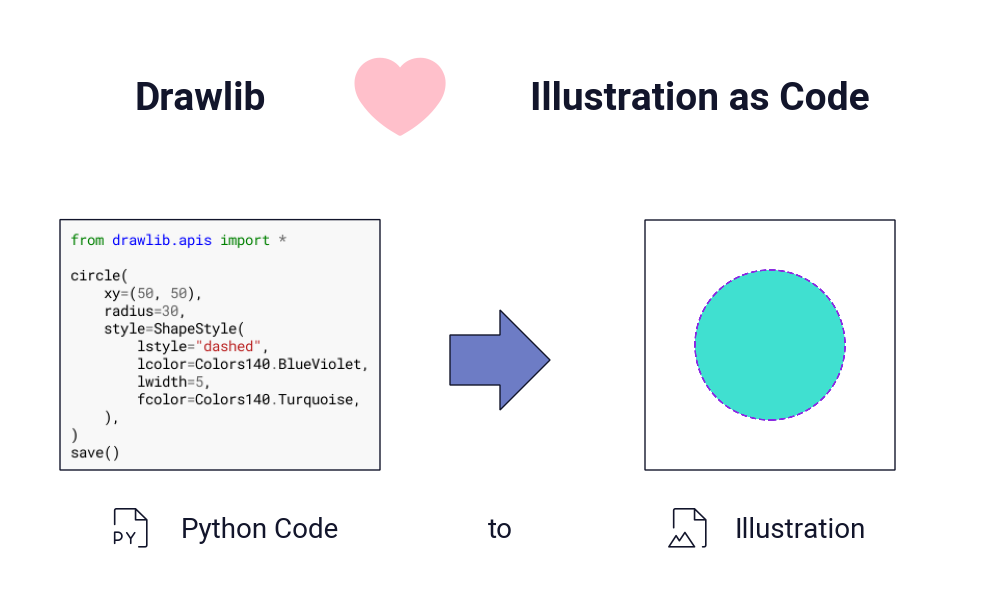
Witness Python code in action generating a circular image:
|
|
22
23
|
|
|
23
|
-

|
|
24
25
|
|
|
25
|
-
In this example, we import drawlib APIs and call the `circle()` function.
|
|
26
|
+
In this example, we import drawlib APIs and call the `circle()` function.
|
|
27
|
+
We provide XY coordinates, radius, and optional style with `ShapeStyle` class.
|
|
28
|
+
|
|
29
|
+
Defining styles directly within the drawing object is straightforward, similar to writing styles within HTML tags.
|
|
30
|
+
However, just as HTML recommends using a separate CSS file, Drawlib recommends creating a separate styling code file and referencing it in multiple illustration codes.
|
|
31
|
+
Following this guide simplifies the above code.
|
|
32
|
+
|
|
33
|
+
## Documentation
|
|
34
|
+
|
|
35
|
+
We have official documentation.
|
|
36
|
+
Please check it out if you're interested in Drawlib.
|
|
37
|
+
|
|
38
|
+
[Drawlib Official Documentation](https://www.drawlib.com/docs/)
|
|
39
|
+
|
|
40
|
+
## API Design
|
|
26
41
|
|
|
27
42
|
Drawlib offers a range of basic drawing features, including:
|
|
28
43
|
|
|
29
44
|
- Icon
|
|
30
45
|
- Image
|
|
31
|
-
- Line
|
|
46
|
+
- Line
|
|
32
47
|
- Shape
|
|
33
48
|
- Text
|
|
34
49
|
- Others
|
|
@@ -37,18 +52,25 @@ All with a consistent syntax.
|
|
|
37
52
|
|
|
38
53
|
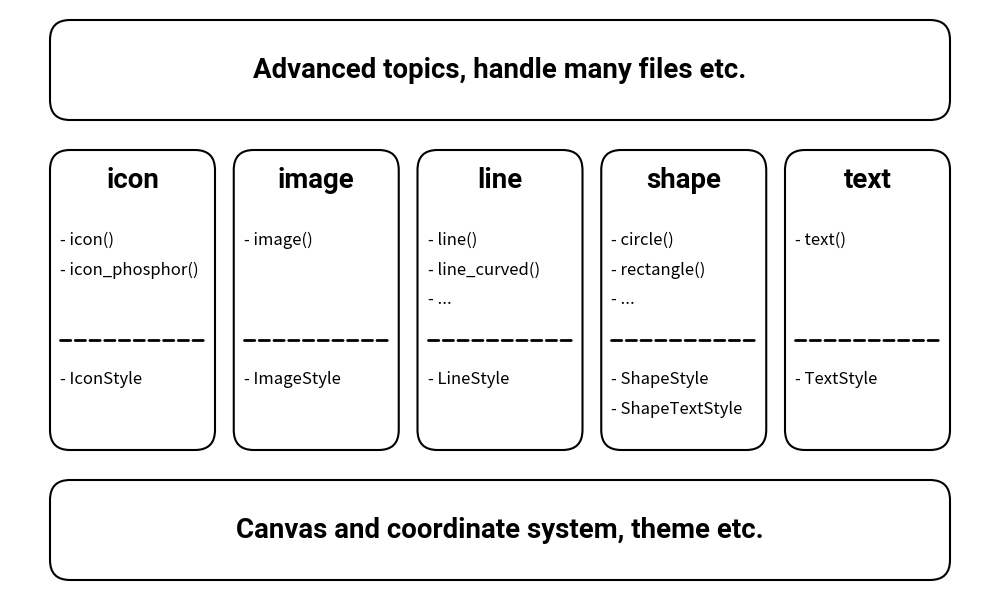
Here is a brief overview of the library's API design.
|
|
39
54
|
|
|
40
|
-

|
|
41
56
|
|
|
42
57
|
As you can see, the core drawing components rely on the same canvas and coordinate systems.
|
|
43
58
|
Styling for each component is slightly different but mostly similar.
|
|
44
59
|
If you require advanced use cases, many helper classes and functions can resolve the situation.
|
|
45
60
|
|
|
61
|
+
## Good IDE Help and Python Ecosystem
|
|
62
|
+
|
|
46
63
|
It's important to note that drawlib is a pure Python library. This means you can leverage the entire Python ecosystem, including:
|
|
47
64
|
|
|
48
65
|
- Accessing library help and code completion via IDEs.
|
|
49
66
|
- Using programming constructs such as creating functions for grouping drawing tasks and using loops.
|
|
50
67
|
|
|
51
|
-
|
|
68
|
+
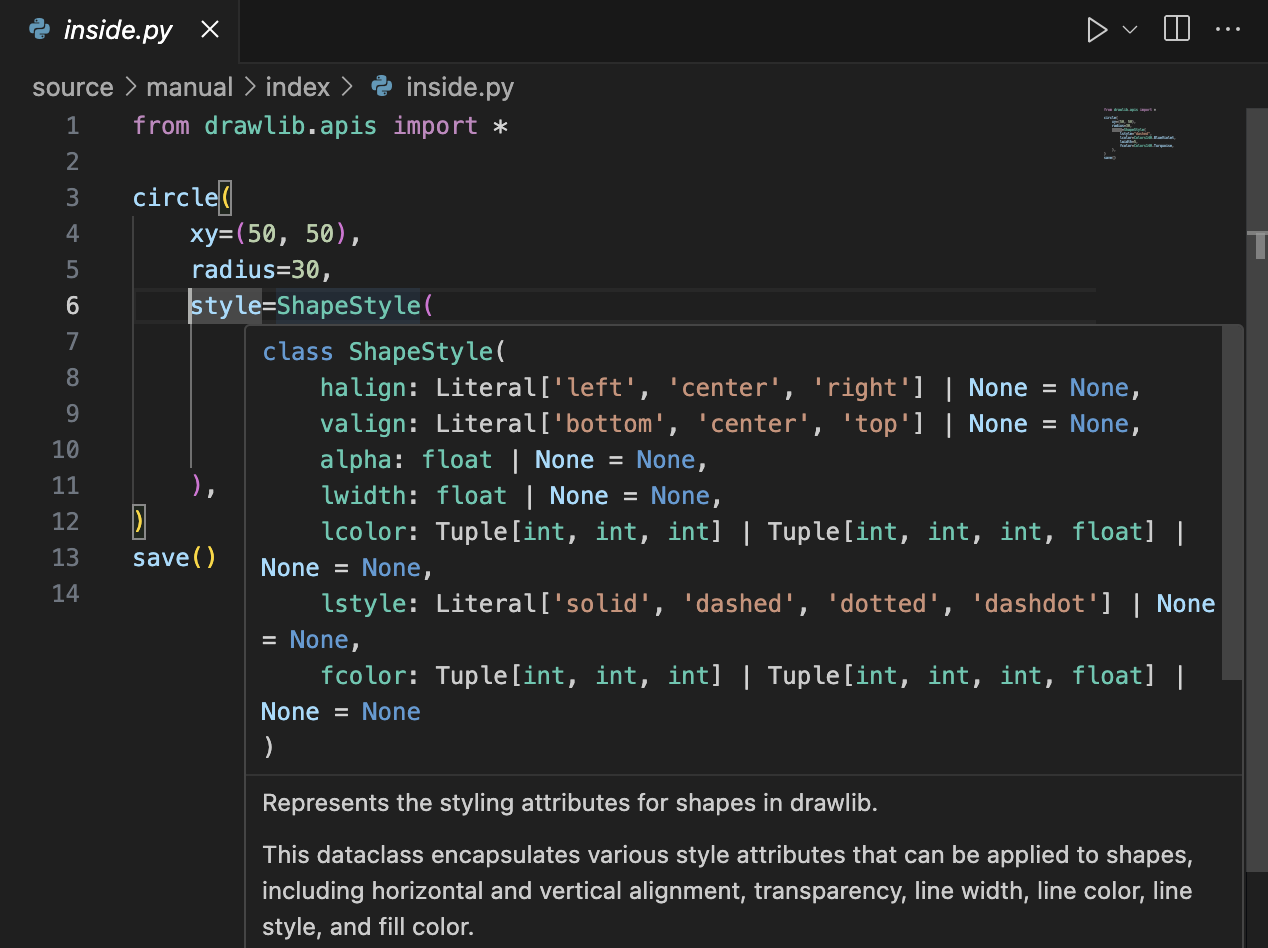
Here is a screenshot of my VS Code providing help for the `ShapeStyle` class when I point to it.
|
|
69
|
+
All other functions and classes are also well-documented, offering comprehensive help and intelligent code completion.
|
|
70
|
+
|
|
71
|
+
|
|
72
|
+
|
|
73
|
+
## Good for Documentations and Books
|
|
52
74
|
|
|
53
75
|
In today's world, many technical documents are managed using version control systems such as Git.
|
|
54
76
|
However, managing illustrations poses a challenge as they are typically binary files rather than text-based.
|
|
@@ -56,12 +78,13 @@ Drawlib offers a solution by generating illustrations from pure Python code.
|
|
|
56
78
|
This means that if you create your illustrations using Python and drawlib, you can manage them using version control systems too.
|
|
57
79
|
|
|
58
80
|
Drawlib is optimized for drawing a large number of illustrations with a consistent style.
|
|
59
|
-
You can easily achieve this by creating a
|
|
81
|
+
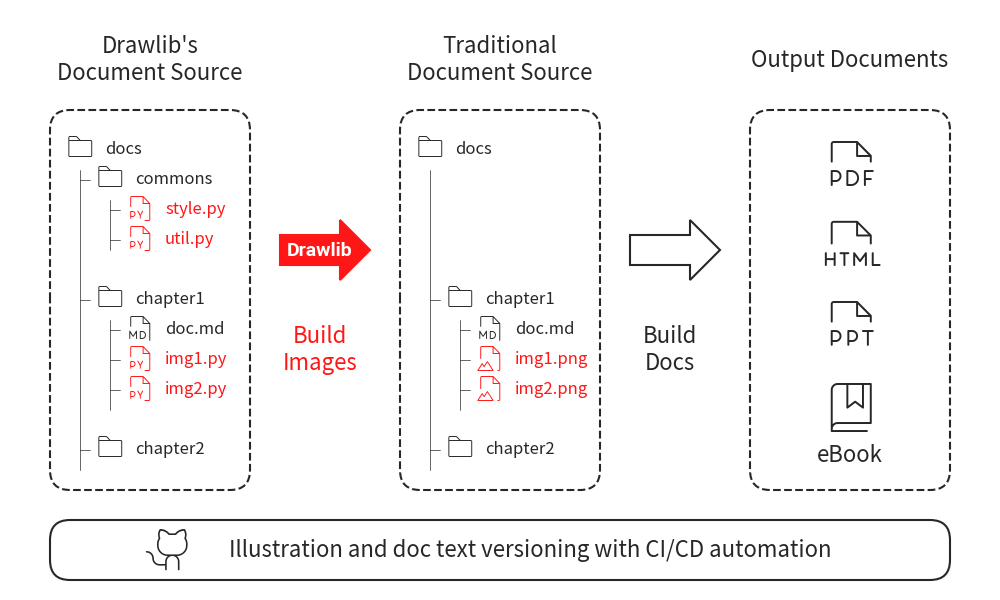
You can easily achieve this by creating a style code and importing it into your illustration codes.
|
|
60
82
|
Here is a typical use case of drawlib.
|
|
61
83
|
|
|
62
|
-

|
|
63
85
|
|
|
64
|
-
|
|
86
|
+
Integrating Drawlib into your workflow is straightforward and doesn’t significantly differ from managing markdown documents.
|
|
87
|
+
If you create your documentation using markdown or a similar format, you can easily adopt drawlib.
|
|
65
88
|
|
|
66
89
|
## Links
|
|
67
90
|
|
drawlib-0.2.1/pypi.md
ADDED
|
@@ -0,0 +1,77 @@
|
|
|
1
|
+
## About
|
|
2
|
+
|
|
3
|
+
Drawlib is a pure Python drawing library crafted to facilitate Illustration as Code rather than focusing solely on creating polished illustrations.
|
|
4
|
+
Witness Python code in action generating a circular image:
|
|
5
|
+
|
|
6
|
+
|
|
7
|
+
|
|
8
|
+
In this example, we import drawlib APIs and call the `circle()` function.
|
|
9
|
+
We provide XY coordinates, radius, and optional style with `ShapeStyle` class.
|
|
10
|
+
|
|
11
|
+
Defining styles directly within the drawing object is straightforward, similar to writing styles within HTML tags.
|
|
12
|
+
However, just as HTML recommends using a separate CSS file, Drawlib recommends creating a separate styling code file and referencing it in multiple illustration codes.
|
|
13
|
+
Following this guide simplifies the above code.
|
|
14
|
+
|
|
15
|
+
## Documentation
|
|
16
|
+
|
|
17
|
+
We have official documentation.
|
|
18
|
+
Please check it out if you're interested in Drawlib.
|
|
19
|
+
|
|
20
|
+
[Drawlib Official Documentation](https://www.drawlib.com/docs/)
|
|
21
|
+
|
|
22
|
+
## API Design
|
|
23
|
+
|
|
24
|
+
Drawlib offers a range of basic drawing features, including:
|
|
25
|
+
|
|
26
|
+
- Icon
|
|
27
|
+
- Image
|
|
28
|
+
- Line
|
|
29
|
+
- Shape
|
|
30
|
+
- Text
|
|
31
|
+
- Others
|
|
32
|
+
|
|
33
|
+
All with a consistent syntax.
|
|
34
|
+
|
|
35
|
+
Here is a brief overview of the library's API design.
|
|
36
|
+
|
|
37
|
+
|
|
38
|
+
|
|
39
|
+
As you can see, the core drawing components rely on the same canvas and coordinate systems.
|
|
40
|
+
Styling for each component is slightly different but mostly similar.
|
|
41
|
+
If you require advanced use cases, many helper classes and functions can resolve the situation.
|
|
42
|
+
|
|
43
|
+
## Good IDE Help and Python Ecosystem
|
|
44
|
+
|
|
45
|
+
It's important to note that drawlib is a pure Python library. This means you can leverage the entire Python ecosystem, including:
|
|
46
|
+
|
|
47
|
+
- Accessing library help and code completion via IDEs.
|
|
48
|
+
- Using programming constructs such as creating functions for grouping drawing tasks and using loops.
|
|
49
|
+
|
|
50
|
+
Here is a screenshot of my VS Code providing help for the `ShapeStyle` class when I point to it.
|
|
51
|
+
All other functions and classes are also well-documented, offering comprehensive help and intelligent code completion.
|
|
52
|
+
|
|
53
|
+

|
|
54
|
+
|
|
55
|
+
## Good for Documentations and Books
|
|
56
|
+
|
|
57
|
+
In today's world, many technical documents are managed using version control systems such as Git.
|
|
58
|
+
However, managing illustrations poses a challenge as they are typically binary files rather than text-based.
|
|
59
|
+
Drawlib offers a solution by generating illustrations from pure Python code.
|
|
60
|
+
This means that if you create your illustrations using Python and drawlib, you can manage them using version control systems too.
|
|
61
|
+
|
|
62
|
+
Drawlib is optimized for drawing a large number of illustrations with a consistent style.
|
|
63
|
+
You can easily achieve this by creating a style code and importing it into your illustration codes.
|
|
64
|
+
Here is a typical use case of drawlib.
|
|
65
|
+
|
|
66
|
+
|
|
67
|
+
|
|
68
|
+
Integrating Drawlib into your workflow is straightforward and doesn’t significantly differ from managing markdown documents.
|
|
69
|
+
If you create your documentation using markdown or a similar format, you can easily adopt drawlib.
|
|
70
|
+
|
|
71
|
+
## Links
|
|
72
|
+
|
|
73
|
+
- [Documentation](https://www.drawlib.com/docs/)
|
|
74
|
+
- [PyPI](https://pypi.org/project/drawlib/)
|
|
75
|
+
- [Code repository](https://github.com/yuichi110/drawlib)
|
|
76
|
+
- [Docs repository](https://github.com/yuichi110/drawlib_docs)
|
|
77
|
+
- [Assets repository](https://github.com/yuichi110/drawlib_assets)
|
|
@@ -7,7 +7,7 @@ build-backend = "poetry.core.masonry.api"
|
|
|
7
7
|
|
|
8
8
|
[tool.poetry]
|
|
9
9
|
name = "drawlib"
|
|
10
|
-
version = "0.2.
|
|
10
|
+
version = "0.2.1"
|
|
11
11
|
description = "Python drawing library. Illustration as Code."
|
|
12
12
|
homepage = "https://www.drawlib.com"
|
|
13
13
|
repository = "https://github.com/yuichi110/drawlib"
|
|
@@ -95,4 +95,4 @@ ignore = [
|
|
|
95
95
|
]
|
|
96
96
|
|
|
97
97
|
[tool.ruff.lint.pydocstyle]
|
|
98
|
-
convention = "google"
|
|
98
|
+
convention = "google"
|
drawlib-0.2.0.dev1/pypi.md
DELETED
|
@@ -1,54 +0,0 @@
|
|
|
1
|
-
## About
|
|
2
|
-
|
|
3
|
-
Drawlib is a Python drawing library designed to achieve *Illustration as Code*.
|
|
4
|
-
|
|
5
|
-

|
|
6
|
-
|
|
7
|
-
In this example, we import drawlib APIs and call the `circle()` function. We provide XY coordinates, radius, and optional style. If a style is not provided, the default style (which you can manage) is applied.
|
|
8
|
-
|
|
9
|
-
Drawlib offers a range of basic drawing features, including:
|
|
10
|
-
|
|
11
|
-
- Icon
|
|
12
|
-
- Image
|
|
13
|
-
- Line and Arrow-line
|
|
14
|
-
- Shape
|
|
15
|
-
- Text
|
|
16
|
-
- Others
|
|
17
|
-
|
|
18
|
-
All with a consistent syntax.
|
|
19
|
-
|
|
20
|
-
Here is a brief overview of the library's API design.
|
|
21
|
-
|
|
22
|
-

|
|
23
|
-
|
|
24
|
-
As you can see, the core drawing components rely on the same canvas and coordinate systems.
|
|
25
|
-
Styling for each component is slightly different but mostly similar.
|
|
26
|
-
If you require advanced use cases, many helper classes and functions can resolve the situation.
|
|
27
|
-
|
|
28
|
-
It's important to note that drawlib is a pure Python library. This means you can leverage the entire Python ecosystem, including:
|
|
29
|
-
|
|
30
|
-
- Accessing library help and code completion via IDEs.
|
|
31
|
-
- Using programming constructs such as creating functions for grouping drawing tasks and using loops.
|
|
32
|
-
|
|
33
|
-
## Why Illustration as Code
|
|
34
|
-
|
|
35
|
-
In today's world, many technical documents are managed using version control systems such as Git.
|
|
36
|
-
However, managing illustrations poses a challenge as they are typically binary files rather than text-based.
|
|
37
|
-
Drawlib offers a solution by generating illustrations from pure Python code.
|
|
38
|
-
This means that if you create your illustrations using Python and drawlib, you can manage them using version control systems too.
|
|
39
|
-
|
|
40
|
-
Drawlib is optimized for drawing a large number of illustrations with a consistent style.
|
|
41
|
-
You can easily achieve this by creating a theme file (which is simply Python code) and importing it into your illustration codes (also Python code).
|
|
42
|
-
Here is a typical use case of drawlib.
|
|
43
|
-
|
|
44
|
-

|
|
45
|
-
|
|
46
|
-
We have provided examples of building Sphinx-based documentation with numerous drawlib images. If you're interested, please check out our documentation.
|
|
47
|
-
|
|
48
|
-
## Links
|
|
49
|
-
|
|
50
|
-
- [Documentation](https://www.drawlib.com/docs/)
|
|
51
|
-
- [PyPI](https://pypi.org/project/drawlib/)
|
|
52
|
-
- [Code repository](https://github.com/yuichi110/drawlib)
|
|
53
|
-
- [Docs repository](https://github.com/yuichi110/drawlib_docs)
|
|
54
|
-
- [Assets repository](https://github.com/yuichi110/drawlib_assets)
|
|
File without changes
|
|
File without changes
|
|
File without changes
|
|
File without changes
|
|
File without changes
|
|
File without changes
|
|
File without changes
|
|
File without changes
|
|
File without changes
|
|
File without changes
|
|
File without changes
|
|
File without changes
|
|
File without changes
|
|
File without changes
|
|
File without changes
|
|
File without changes
|
|
File without changes
|
|
File without changes
|
|
File without changes
|
|
File without changes
|
|
File without changes
|
|
File without changes
|
|
File without changes
|
|
File without changes
|
|
File without changes
|
|
File without changes
|
|
File without changes
|
|
File without changes
|
|
File without changes
|
|
File without changes
|
|
File without changes
|
|
File without changes
|
|
File without changes
|
|
File without changes
|
|
File without changes
|
|
File without changes
|
|
File without changes
|
|
File without changes
|
|
File without changes
|
|
File without changes
|
|
File without changes
|
|
File without changes
|
|
File without changes
|
|
File without changes
|
|
File without changes
|
|
File without changes
|
|
File without changes
|
|
File without changes
|
|
File without changes
|
|
File without changes
|
|
File without changes
|
|
File without changes
|
|
File without changes
|
|
File without changes
|
|
File without changes
|
|
File without changes
|
|
File without changes
|
|
File without changes
|
|
File without changes
|