draintracer 5.1.1__tar.gz
This diff represents the content of publicly available package versions that have been released to one of the supported registries. The information contained in this diff is provided for informational purposes only and reflects changes between package versions as they appear in their respective public registries.
- draintracer-5.1.1/LICENSE +21 -0
- draintracer-5.1.1/MANIFEST.in +9 -0
- draintracer-5.1.1/PKG-INFO +104 -0
- draintracer-5.1.1/README.md +306 -0
- draintracer-5.1.1/TITLE.txt +6 -0
- draintracer-5.1.1/docs/pypi.md +77 -0
- draintracer-5.1.1/draintracer.egg-info/PKG-INFO +104 -0
- draintracer-5.1.1/draintracer.egg-info/SOURCES.txt +73 -0
- draintracer-5.1.1/draintracer.egg-info/dependency_links.txt +1 -0
- draintracer-5.1.1/draintracer.egg-info/entry_points.txt +2 -0
- draintracer-5.1.1/draintracer.egg-info/requires.txt +5 -0
- draintracer-5.1.1/draintracer.egg-info/top_level.txt +1 -0
- draintracer-5.1.1/examples/drainrc.toml +61 -0
- draintracer-5.1.1/leak_reports/frames/report.css +121 -0
- draintracer-5.1.1/leak_reports/frames/report.js +592 -0
- draintracer-5.1.1/pyproject.toml +41 -0
- draintracer-5.1.1/requirements.txt +3 -0
- draintracer-5.1.1/runtime-manifest.json +38 -0
- draintracer-5.1.1/setup.cfg +4 -0
- draintracer-5.1.1/setup.py +78 -0
- draintracer-5.1.1/src/__init__.py +1 -0
- draintracer-5.1.1/src/__main__.py +14 -0
- draintracer-5.1.1/src/analysis.py +511 -0
- draintracer-5.1.1/src/config.py +386 -0
- draintracer-5.1.1/src/dashboard.py +1194 -0
- draintracer-5.1.1/src/diff_command.py +271 -0
- draintracer-5.1.1/src/events.py +209 -0
- draintracer-5.1.1/src/file_picker.py +180 -0
- draintracer-5.1.1/src/handle_types.py +314 -0
- draintracer-5.1.1/src/headless.py +417 -0
- draintracer-5.1.1/src/history.py +98 -0
- draintracer-5.1.1/src/html_report.py +569 -0
- draintracer-5.1.1/src/leak_detector.py +763 -0
- draintracer-5.1.1/src/main.py +767 -0
- draintracer-5.1.1/src/picker_input.py +68 -0
- draintracer-5.1.1/src/process_picker.py +235 -0
- draintracer-5.1.1/src/process_runner.py +800 -0
- draintracer-5.1.1/src/process_table.py +199 -0
- draintracer-5.1.1/src/report.py +152 -0
- draintracer-5.1.1/src/report_diff.py +392 -0
- draintracer-5.1.1/src/resources.py +16 -0
- draintracer-5.1.1/src/running_processes.py +55 -0
- draintracer-5.1.1/src/session.py +615 -0
- draintracer-5.1.1/src/startup.py +41 -0
- draintracer-5.1.1/src/stats.py +29 -0
- draintracer-5.1.1/src/theme.py +131 -0
- draintracer-5.1.1/src/units.py +204 -0
- draintracer-5.1.1/src/widgets.py +94 -0
- draintracer-5.1.1/tests/helpers.py +119 -0
- draintracer-5.1.1/tests/test_analysis.py +250 -0
- draintracer-5.1.1/tests/test_config.py +250 -0
- draintracer-5.1.1/tests/test_dashboard.py +631 -0
- draintracer-5.1.1/tests/test_diff_command.py +105 -0
- draintracer-5.1.1/tests/test_handle_types.py +156 -0
- draintracer-5.1.1/tests/test_headless.py +265 -0
- draintracer-5.1.1/tests/test_history.py +69 -0
- draintracer-5.1.1/tests/test_html_report.py +203 -0
- draintracer-5.1.1/tests/test_installation.py +195 -0
- draintracer-5.1.1/tests/test_installation_entrypoint.py +147 -0
- draintracer-5.1.1/tests/test_installation_repair.py +401 -0
- draintracer-5.1.1/tests/test_leak_detector.py +404 -0
- draintracer-5.1.1/tests/test_main.py +350 -0
- draintracer-5.1.1/tests/test_packaging.py +174 -0
- draintracer-5.1.1/tests/test_picker_input.py +68 -0
- draintracer-5.1.1/tests/test_process_attach.py +196 -0
- draintracer-5.1.1/tests/test_process_launch.py +187 -0
- draintracer-5.1.1/tests/test_process_picker.py +281 -0
- draintracer-5.1.1/tests/test_process_table.py +117 -0
- draintracer-5.1.1/tests/test_report.py +140 -0
- draintracer-5.1.1/tests/test_report_diff.py +176 -0
- draintracer-5.1.1/tests/test_running_processes.py +103 -0
- draintracer-5.1.1/tests/test_session.py +355 -0
- draintracer-5.1.1/tests/test_startup.py +49 -0
- draintracer-5.1.1/tests/test_units.py +152 -0
- draintracer-5.1.1/tests/verify_distribution.py +172 -0
|
@@ -0,0 +1,21 @@
|
|
|
1
|
+
MIT License
|
|
2
|
+
|
|
3
|
+
Copyright (c) 2026 Junaid Ahamed
|
|
4
|
+
|
|
5
|
+
Permission is hereby granted, free of charge, to any person obtaining a copy
|
|
6
|
+
of this software and associated documentation files (the "Software"), to deal
|
|
7
|
+
in the Software without restriction, including without limitation the rights
|
|
8
|
+
to use, copy, modify, merge, publish, distribute, sublicense, and/or sell
|
|
9
|
+
copies of the Software, and to permit persons to whom the Software is
|
|
10
|
+
furnished to do so, subject to the following conditions:
|
|
11
|
+
|
|
12
|
+
The above copyright notice and this permission notice shall be included in all
|
|
13
|
+
copies or substantial portions of the Software.
|
|
14
|
+
|
|
15
|
+
THE SOFTWARE IS PROVIDED "AS IS", WITHOUT WARRANTY OF ANY KIND, EXPRESS OR
|
|
16
|
+
IMPLIED, INCLUDING BUT NOT LIMITED TO THE WARRANTIES OF MERCHANTABILITY,
|
|
17
|
+
FITNESS FOR A PARTICULAR PURPOSE AND NONINFRINGEMENT. IN NO EVENT SHALL THE
|
|
18
|
+
AUTHORS OR COPYRIGHT HOLDERS BE LIABLE FOR ANY CLAIM, DAMAGES OR OTHER
|
|
19
|
+
LIABILITY, WHETHER IN AN ACTION OF CONTRACT, TORT OR OTHERWISE, ARISING FROM,
|
|
20
|
+
OUT OF OR IN CONNECTION WITH THE SOFTWARE OR THE USE OR OTHER DEALINGS IN THE
|
|
21
|
+
SOFTWARE.
|
|
@@ -0,0 +1,9 @@
|
|
|
1
|
+
include TITLE.txt
|
|
2
|
+
include runtime-manifest.json
|
|
3
|
+
include requirements.txt
|
|
4
|
+
include leak_reports/frames/report.css
|
|
5
|
+
include leak_reports/frames/report.js
|
|
6
|
+
recursive-include src *.py
|
|
7
|
+
recursive-include tests *.py
|
|
8
|
+
include examples/drainrc.toml
|
|
9
|
+
include docs/pypi.md
|
|
@@ -0,0 +1,104 @@
|
|
|
1
|
+
Metadata-Version: 2.4
|
|
2
|
+
Name: draintracer
|
|
3
|
+
Version: 5.1.1
|
|
4
|
+
Summary: Resource growth monitoring for Windows process trees
|
|
5
|
+
Author: Junaid Ahamed
|
|
6
|
+
License-Expression: MIT
|
|
7
|
+
Project-URL: Homepage, https://github.com/JunaidAhamed-7777/DrainTracer
|
|
8
|
+
Project-URL: Documentation, https://github.com/JunaidAhamed-7777/DrainTracer#readme
|
|
9
|
+
Project-URL: Issues, https://github.com/JunaidAhamed-7777/DrainTracer/issues
|
|
10
|
+
Project-URL: Releases, https://github.com/JunaidAhamed-7777/DrainTracer/blob/main/RELEASES.md
|
|
11
|
+
Keywords: windows,memory-leak,resource-monitor,cli,tui
|
|
12
|
+
Classifier: Environment :: Console
|
|
13
|
+
Classifier: Intended Audience :: Developers
|
|
14
|
+
Classifier: Operating System :: Microsoft :: Windows
|
|
15
|
+
Classifier: Programming Language :: Python :: 3
|
|
16
|
+
Classifier: Programming Language :: Python :: 3 :: Only
|
|
17
|
+
Classifier: Programming Language :: Python :: 3.10
|
|
18
|
+
Classifier: Topic :: Software Development :: Debuggers
|
|
19
|
+
Classifier: Topic :: System :: Monitoring
|
|
20
|
+
Requires-Python: >=3.10
|
|
21
|
+
Description-Content-Type: text/markdown
|
|
22
|
+
License-File: LICENSE
|
|
23
|
+
Requires-Dist: psutil>=5.9.0
|
|
24
|
+
Requires-Dist: rich>=13.7.0
|
|
25
|
+
Requires-Dist: tomli>=1.1.0; python_version < "3.11"
|
|
26
|
+
Dynamic: license-file
|
|
27
|
+
|
|
28
|
+
# DrainTracer
|
|
29
|
+
|
|
30
|
+

|
|
31
|
+
|
|
32
|
+
Resource growth monitoring for **Windows 10/11** and **Python 3.10+**.
|
|
33
|
+
Launch an executable or script, or attach to a PID, and watch its recursive
|
|
34
|
+
process tree in a live terminal dashboard. The target needs no source
|
|
35
|
+
changes or instrumentation.
|
|
36
|
+
|
|
37
|
+
DrainTracer flags sustained growth in private memory, handles, and threads.
|
|
38
|
+
A signal is a lead for investigation, not proof of an unreleased allocation.
|
|
39
|
+
Process counters do not identify allocation sites, and short runs can be
|
|
40
|
+
inconclusive.
|
|
41
|
+
|
|
42
|
+
## Install and run
|
|
43
|
+
|
|
44
|
+
From PowerShell:
|
|
45
|
+
|
|
46
|
+
```powershell
|
|
47
|
+
python -m pip install draintracer
|
|
48
|
+
draintracer --version
|
|
49
|
+
draintracer
|
|
50
|
+
```
|
|
51
|
+
|
|
52
|
+
If the command is not on `PATH`, use `python -m draintracer` with the same
|
|
53
|
+
Python used for installation. The startup menu lets you open a program or
|
|
54
|
+
select a running process.
|
|
55
|
+
|
|
56
|
+
```powershell
|
|
57
|
+
# Launch a program
|
|
58
|
+
draintracer --target "C:\work\My App\worker.exe"
|
|
59
|
+
|
|
60
|
+
# Attach to an existing process; substitute its actual PID
|
|
61
|
+
draintracer --pid 4820
|
|
62
|
+
|
|
63
|
+
# Allow startup growth before checking a representative workload
|
|
64
|
+
draintracer --target .\server.exe --warmup 15s --timeout 2m
|
|
65
|
+
```
|
|
66
|
+
|
|
67
|
+
Quitting stops a launched target and its tracked tree. Quitting an attached
|
|
68
|
+
session leaves the target running. Launched targets have their console
|
|
69
|
+
input and output redirected; use their own file logging when needed.
|
|
70
|
+
|
|
71
|
+
Python script targets use DrainTracer's Python interpreter. Install
|
|
72
|
+
DrainTracer in the target's environment, or launch that environment's
|
|
73
|
+
Python explicitly and put the script after `--`:
|
|
74
|
+
|
|
75
|
+
```powershell
|
|
76
|
+
draintracer --target "C:\work\app\.venv\Scripts\python.exe" -- "C:\work\app\worker.py"
|
|
77
|
+
```
|
|
78
|
+
|
|
79
|
+
## Inspect and save evidence
|
|
80
|
+
|
|
81
|
+
|
|
82
|
+
|
|
83
|
+
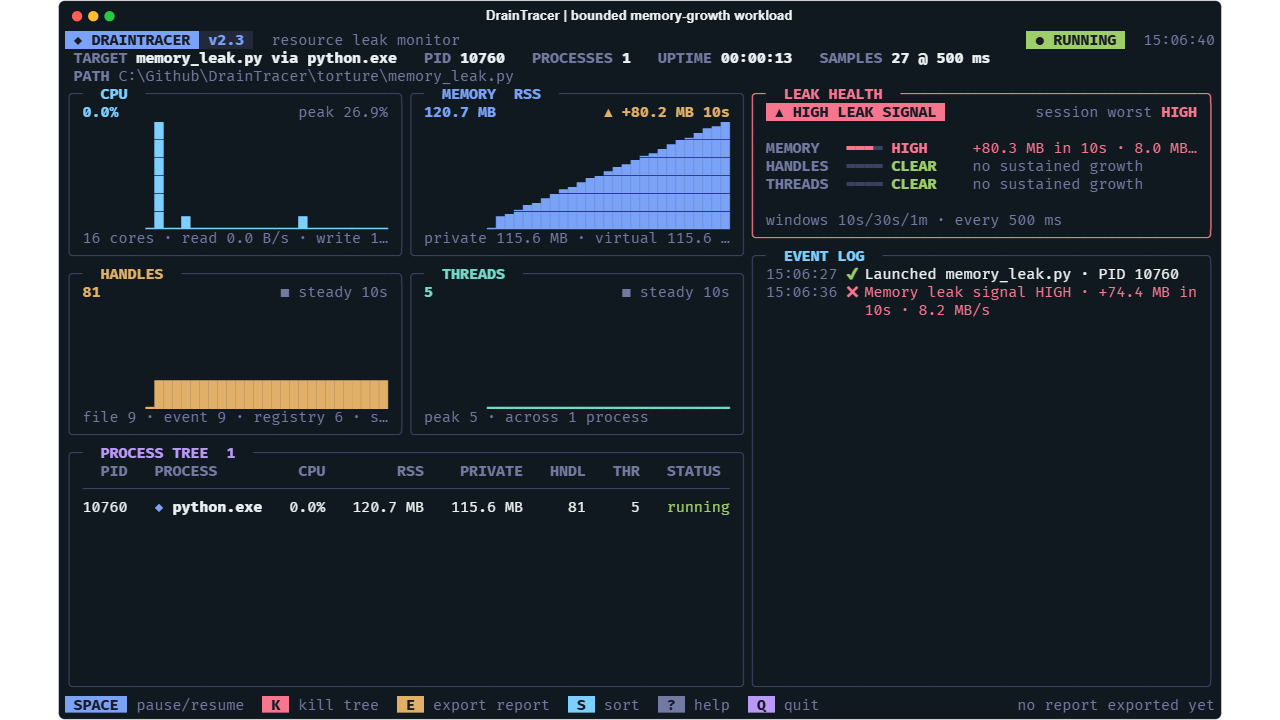
Track CPU, memory, handles, threads, and I/O across the discovered process
|
|
84
|
+
tree. Use warm-up settings and project profiles to account for startup or
|
|
85
|
+
legitimate workload growth. Press `E` to export JSON and an offline
|
|
86
|
+
interactive HTML report; press `O` to open the latest report.
|
|
87
|
+
|
|
88
|
+
Headless mode supports bounded checks, severity-based exit codes, and
|
|
89
|
+
GitHub Actions annotations and summaries. Compare saved evidence with
|
|
90
|
+
`draintracer diff before.json after.json`. Reports default to
|
|
91
|
+
`leak_reports/reports` under the working directory. Review local paths and
|
|
92
|
+
process details before sharing exports.
|
|
93
|
+
|
|
94
|
+
## Documentation and contributions
|
|
95
|
+
|
|
96
|
+
- [Usage and troubleshooting](https://github.com/JunaidAhamed-7777/DrainTracer/blob/main/docs/usage.md)
|
|
97
|
+
- [Configuration](https://github.com/JunaidAhamed-7777/DrainTracer/blob/main/docs/configuration.md)
|
|
98
|
+
- [Reports and comparisons](https://github.com/JunaidAhamed-7777/DrainTracer/blob/main/docs/reports.md)
|
|
99
|
+
- [Detection and process handling](https://github.com/JunaidAhamed-7777/DrainTracer/blob/main/working-principle.md)
|
|
100
|
+
- [Release notes](https://github.com/JunaidAhamed-7777/DrainTracer/blob/main/RELEASES.md)
|
|
101
|
+
- [Source and contributions](https://github.com/JunaidAhamed-7777/DrainTracer)
|
|
102
|
+
- [Report a bug](https://github.com/JunaidAhamed-7777/DrainTracer/issues/new/choose)
|
|
103
|
+
|
|
104
|
+
Released under the [MIT license](https://github.com/JunaidAhamed-7777/DrainTracer/blob/main/LICENSE).
|
|
@@ -0,0 +1,306 @@
|
|
|
1
|
+
<p align="center">
|
|
2
|
+
<img src="docs/assets/hero.png" alt="DrainTracer. See what keeps growing. Blue liquid leaks from a crack in a straight horizontal pipe into a tracing reticle." width="100%">
|
|
3
|
+
</p>
|
|
4
|
+
|
|
5
|
+
<p align="center">
|
|
6
|
+
<a href="docs/usage.md"><img src="https://img.shields.io/badge/platform-Windows_10%20%2F%2011-101820?style=flat-square&labelColor=196F69" alt="Windows 10 and 11"></a>
|
|
7
|
+
<a href="requirements.txt"><img src="https://img.shields.io/badge/python-3.10%2B-101820?style=flat-square&labelColor=196F69" alt="Python 3.10 or newer"></a>
|
|
8
|
+
<a href="LICENSE"><img src="https://img.shields.io/badge/license-MIT-101820?style=flat-square&labelColor=0069B8" alt="MIT license"></a>
|
|
9
|
+
</p>
|
|
10
|
+
|
|
11
|
+
<h1 align="center">DrainTracer</h1>
|
|
12
|
+
|
|
13
|
+
<p align="center">
|
|
14
|
+
<strong>Release series: v5.1.0</strong> ·
|
|
15
|
+
<a href="RELEASES.md">Current version and release notes</a>
|
|
16
|
+
</p>
|
|
17
|
+
|
|
18
|
+
<p align="center">
|
|
19
|
+
Resource leak monitoring for Windows process trees.<br>
|
|
20
|
+
Launch a program or attach to a PID. Watch what keeps growing.
|
|
21
|
+
</p>
|
|
22
|
+
|
|
23
|
+
<p align="center">
|
|
24
|
+
<a href="#get-started">Get started</a> ·
|
|
25
|
+
<a href="docs/usage.md">Usage</a> ·
|
|
26
|
+
<a href="working-principle.md">How it works</a> ·
|
|
27
|
+
<a href="CONTRIBUTING.md">Contribute</a> ·
|
|
28
|
+
<a href="docs/branding.md">Brand kit</a>
|
|
29
|
+
</p>
|
|
30
|
+
|
|
31
|
+
DrainTracer is a Python CLI/TUI that watches an executable or script and its
|
|
32
|
+
recursive child processes. It shows resource usage in a live terminal dashboard
|
|
33
|
+
and flags sustained growth in **private memory, handles, and threads**.
|
|
34
|
+
|
|
35
|
+
Use it to investigate a worker that grows over time, catch resource regressions
|
|
36
|
+
in a Windows CI job, or compare the same workload before and after a fix.
|
|
37
|
+
The target needs no source changes or instrumentation.
|
|
38
|
+
|
|
39
|
+
**A leak signal is a lead for investigation, not proof of an unreleased
|
|
40
|
+
allocation.** DrainTracer measures process counters; it does not identify
|
|
41
|
+
allocation sites. Short runs can be inconclusive.
|
|
42
|
+
|
|
43
|
+
## See the process behind the growth
|
|
44
|
+
|
|
45
|
+

|
|
46
|
+
|
|
47
|
+
*Captured from the real dashboard while monitoring the included bounded
|
|
48
|
+
memory-growth workload. Values and process IDs vary by run.*
|
|
49
|
+
|
|
50
|
+
- **Follow the whole tree.** Observe a target and its discovered descendants,
|
|
51
|
+
including children that outlive their root.
|
|
52
|
+
- **Read the trends.** Watch CPU, RSS, private bytes, virtual memory, handles,
|
|
53
|
+
threads, and I/O, with sparklines and per-process measurements.
|
|
54
|
+
- **Separate startup from steady state.** Use a warm-up and project profiles
|
|
55
|
+
for cache loading, JIT compilation, or heavier workloads.
|
|
56
|
+
- **Investigate handle growth.** See file, socket, registry, event, and other
|
|
57
|
+
handle categories when Windows exposes them.
|
|
58
|
+
- **Keep the evidence.** Export JSON and an offline interactive HTML report;
|
|
59
|
+
compare two reports for resolved, new, or worsening signals.
|
|
60
|
+
- **Check in CI.** Run headless with a time limit, configurable failure
|
|
61
|
+
severity, GitHub Actions annotations, and a job summary.
|
|
62
|
+
|
|
63
|
+
## Get started
|
|
64
|
+
|
|
65
|
+
You need **Windows 10/11** and **Python 3.10+**. Use PowerShell for the
|
|
66
|
+
commands below.
|
|
67
|
+
|
|
68
|
+
### Install from PyPI (after the first release is published)
|
|
69
|
+
|
|
70
|
+
```powershell
|
|
71
|
+
python -m pip install draintracer
|
|
72
|
+
draintracer --help
|
|
73
|
+
draintracer
|
|
74
|
+
```
|
|
75
|
+
|
|
76
|
+
The first PyPI publication is being prepared. Until it succeeds, install
|
|
77
|
+
the current `main` branch from GitHub without needing Git:
|
|
78
|
+
|
|
79
|
+
```powershell
|
|
80
|
+
python -m pip install https://github.com/JunaidAhamed-7777/DrainTracer/archive/refs/heads/main.zip
|
|
81
|
+
```
|
|
82
|
+
|
|
83
|
+
You can also install a built wheel or source archive with
|
|
84
|
+
`python -m pip install PATH_TO_FILE`.
|
|
85
|
+
|
|
86
|
+
If the command is not on `PATH`, use `python -m draintracer --help` or
|
|
87
|
+
`python -m draintracer` with the same Python used to install it. Run from
|
|
88
|
+
your project folder: configuration discovery starts there, and reports
|
|
89
|
+
are written relative to that working directory by default.
|
|
90
|
+
|
|
91
|
+
### Install from a checkout
|
|
92
|
+
|
|
93
|
+
Clone the repository to use the included workloads or develop DrainTracer.
|
|
94
|
+
This route needs Git:
|
|
95
|
+
|
|
96
|
+
```powershell
|
|
97
|
+
git clone https://github.com/JunaidAhamed-7777/DrainTracer.git
|
|
98
|
+
cd DrainTracer
|
|
99
|
+
python -m venv .venv
|
|
100
|
+
.\.venv\Scripts\python.exe -m pip install .
|
|
101
|
+
.\.venv\Scripts\python.exe -m draintracer
|
|
102
|
+
```
|
|
103
|
+
|
|
104
|
+
The existing source command also works: install `requirements.txt` with
|
|
105
|
+
the same Python, then run `python src/main.py` from the checkout. For the
|
|
106
|
+
source examples below, activate the environment or replace `python` with
|
|
107
|
+
`.\.venv\Scripts\python.exe`. Calling that executable directly avoids
|
|
108
|
+
PowerShell activation-policy changes.
|
|
109
|
+
|
|
110
|
+
Before starting from a checkout, DrainTracer checks the committed
|
|
111
|
+
[runtime snapshot](runtime-manifest.json) for required source files, title
|
|
112
|
+
artwork, and report frames. If files are missing, it lists them and offers
|
|
113
|
+
**Enter** to run `git pull --ff-only origin main`, restore missing tracked
|
|
114
|
+
files, and restart with the same Python and arguments. **Q** cancels.
|
|
115
|
+
The check runs on every launch, including the first. Generated reports and
|
|
116
|
+
user settings are not required. Headless or redirected runs report missing
|
|
117
|
+
files with exit code `2` without prompting or pulling. Installed packages
|
|
118
|
+
check their bundled runtime files and assets instead; an incomplete
|
|
119
|
+
installation gives pip reinstall guidance and never attempts Git recovery.
|
|
120
|
+
|
|
121
|
+
Once the check passes, `draintracer` offers two startup choices:
|
|
122
|
+
|
|
123
|
+
- **1 — Open a program:** select an executable, Python script, or Windows
|
|
124
|
+
batch file in the native file picker.
|
|
125
|
+
- **2 — Hook to a running program:** browse up to 15 names and PIDs at a
|
|
126
|
+
time. Use **Up/Down** to highlight a program and **Enter** to select it,
|
|
127
|
+
or type a listed PID and press Enter. The list filters as you type a
|
|
128
|
+
name or PID; Backspace updates it immediately. Use `/next` and `/prev`
|
|
129
|
+
for pages, `/refresh` to reload, and
|
|
130
|
+
`/clear` to reset the search. Quitting detaches and leaves the program running.
|
|
131
|
+
|
|
132
|
+
Type `Q` to cancel either startup prompt. Supplying `--target` or `--pid`
|
|
133
|
+
skips the menu. All installed-command examples also work with
|
|
134
|
+
`python -m draintracer`; checkout users can use `python src/main.py`.
|
|
135
|
+
|
|
136
|
+
### Try an included workload
|
|
137
|
+
|
|
138
|
+
These fixtures are in the source checkout; run from its root:
|
|
139
|
+
|
|
140
|
+
```powershell
|
|
141
|
+
python src/main.py --target .\torture\memory_leak.py --timeout 20s
|
|
142
|
+
```
|
|
143
|
+
|
|
144
|
+
This fixture deliberately grows memory within a fixed bound. Press `E` to
|
|
145
|
+
export evidence and `O` to open the HTML report. Try
|
|
146
|
+
`.\torture\steady.py` for a stable baseline. The [torture guide](torture/README.md)
|
|
147
|
+
explains all fixtures and their limits.
|
|
148
|
+
|
|
149
|
+
### Monitor your program
|
|
150
|
+
|
|
151
|
+
```powershell
|
|
152
|
+
# Launch a target; quote paths containing spaces
|
|
153
|
+
draintracer --target "C:\work\My App\worker.exe"
|
|
154
|
+
|
|
155
|
+
# Pass arguments to the target after --
|
|
156
|
+
draintracer --target .\worker.py -- --iterations 10
|
|
157
|
+
|
|
158
|
+
# Attach to a running process; replace 4820 with its actual PID
|
|
159
|
+
draintracer --pid 4820
|
|
160
|
+
|
|
161
|
+
# Allow startup growth, then watch a representative workload
|
|
162
|
+
draintracer --target .\server.exe --warmup 15s --timeout 2m
|
|
163
|
+
```
|
|
164
|
+
|
|
165
|
+
Python script targets run with DrainTracer's Python interpreter. Install
|
|
166
|
+
DrainTracer in the target's environment, or explicitly launch that
|
|
167
|
+
environment's Python and pass the script after `--`:
|
|
168
|
+
|
|
169
|
+
```powershell
|
|
170
|
+
draintracer --target "C:\work\app\.venv\Scripts\python.exe" -- "C:\work\app\worker.py"
|
|
171
|
+
```
|
|
172
|
+
|
|
173
|
+
**Process ownership matters:** quitting or timing out stops a launched target
|
|
174
|
+
and its tracked tree. An attached target keeps running when you quit.
|
|
175
|
+
`Space` pauses the target as well as sampling; `K` terminates it and requires
|
|
176
|
+
a second press within three seconds when attached. Protected ancestor trees
|
|
177
|
+
disable pause and kill to keep DrainTracer's own terminal usable.
|
|
178
|
+
|
|
179
|
+
Launched targets have stdin, stdout, and stderr redirected to the null device.
|
|
180
|
+
They cannot accept interactive input, and their console logs are not captured.
|
|
181
|
+
Use the target's own file logging when needed. See the
|
|
182
|
+
[usage guide](docs/usage.md) for attachment, access-denied readings, and cleanup.
|
|
183
|
+
|
|
184
|
+
## Dashboard keys
|
|
185
|
+
|
|
186
|
+
- `Space` — pause or resume sampling and the target tree.
|
|
187
|
+
- `S` — cycle process order: tree, memory, handles, CPU.
|
|
188
|
+
- `E` — export JSON and HTML reports.
|
|
189
|
+
- `O` — open the latest HTML export.
|
|
190
|
+
- `?` / `H` — show help and active settings; `Esc` closes it.
|
|
191
|
+
- `K` — terminate the monitored tree; confirm with a second press when attached.
|
|
192
|
+
- `Q` — quit, cleaning up a launched tree or detaching from an attached tree.
|
|
193
|
+
|
|
194
|
+
The layout adapts to terminal size and uses ASCII fallbacks for legacy Windows
|
|
195
|
+
encodings. Startup artwork still comes from [TITLE.txt](TITLE.txt), with a
|
|
196
|
+
readable fallback when it cannot be displayed.
|
|
197
|
+
|
|
198
|
+
## Run a leak check in CI
|
|
199
|
+
|
|
200
|
+
From the source checkout, use the included stable workload:
|
|
201
|
+
|
|
202
|
+
```powershell
|
|
203
|
+
python src/main.py --headless --target .\torture\steady.py --timeout 15s --fail-on medium
|
|
204
|
+
```
|
|
205
|
+
|
|
206
|
+
Headless mode prints progress, exports reports, and exits when the monitored
|
|
207
|
+
tree finishes or the time limit passes. Its exit code describes the monitor's
|
|
208
|
+
result, rather than forwarding the target's exit code:
|
|
209
|
+
|
|
210
|
+
- `0` — no observed signal reached the selected threshold. This includes
|
|
211
|
+
`INCONCLUSIVE` runs that never filled a detection window.
|
|
212
|
+
- `1` — a signal reached the threshold at any point, even if it later cleared.
|
|
213
|
+
- `2` — a usage, startup, monitoring, or report error, unless a higher-priority
|
|
214
|
+
failing signal or interruption applies.
|
|
215
|
+
- `130` — interrupted with Ctrl+C before a failing signal.
|
|
216
|
+
|
|
217
|
+
The default failure threshold is `high`. Allow enough time after warm-up for
|
|
218
|
+
a detection window to fill, and inspect the verdict as well as the exit code.
|
|
219
|
+
The [headless guide](docs/usage.md#run-without-a-dashboard) covers outcome
|
|
220
|
+
priority and GitHub Actions integration.
|
|
221
|
+
|
|
222
|
+
## Tune it to your workload
|
|
223
|
+
|
|
224
|
+
Copy [examples/drainrc.toml](examples/drainrc.toml) to `.drainrc` in your project.
|
|
225
|
+
From a source checkout, you can also select that example explicitly:
|
|
226
|
+
|
|
227
|
+
```powershell
|
|
228
|
+
draintracer --config .\examples\drainrc.toml --profile heavy --target .\server.exe
|
|
229
|
+
```
|
|
230
|
+
|
|
231
|
+
Profiles configure sampling, detection windows, warm-up, thresholds, time
|
|
232
|
+
limits, and report directories. CLI flags override file settings. The default
|
|
233
|
+
sample interval is **500 ms**, with **10 s, 30 s, and 60 s** detection windows.
|
|
234
|
+
|
|
235
|
+
The detector combines trend slope, monotonic growth, and recovery checks across
|
|
236
|
+
eligible windows. A single sample cannot establish a leak signal. Private bytes
|
|
237
|
+
drive memory alerts; RSS, CPU, and I/O provide context. Read the
|
|
238
|
+
[configuration reference](docs/configuration.md) for discovery, precedence, and
|
|
239
|
+
units, and [working-principle.md](working-principle.md) for the detection math.
|
|
240
|
+
|
|
241
|
+
## Save and compare evidence
|
|
242
|
+
|
|
243
|
+
Press `E` in the dashboard; headless runs export automatically. Each export
|
|
244
|
+
creates a JSON/HTML pair under
|
|
245
|
+
`leak_reports/reports/worker.exe_2026-10-21/` for a program named `worker.exe`
|
|
246
|
+
on that date. The actual program filename and recorded creation date name
|
|
247
|
+
the folder; UUID filenames keep repeated exports distinct. `--report-dir`
|
|
248
|
+
changes the output root while keeping that grouping. The default output root
|
|
249
|
+
is relative to your working directory, including for installed packages.
|
|
250
|
+
Reusable HTML styles and chart code live in the committed
|
|
251
|
+
`leak_reports/frames/` directory and are bundled in installed packages;
|
|
252
|
+
generated reports are ignored by Git.
|
|
253
|
+
|
|
254
|
+
The HTML report works offline, with interactive charts, signal episodes, events,
|
|
255
|
+
and a process list. JSON supports scripts and report comparisons:
|
|
256
|
+
|
|
257
|
+
```powershell
|
|
258
|
+
draintracer diff .\before.json .\after.json
|
|
259
|
+
draintracer diff .\before.json .\after.json --fail-on-regression
|
|
260
|
+
```
|
|
261
|
+
|
|
262
|
+
Use comparable workloads, durations, warm-ups, and settings. Long sessions use
|
|
263
|
+
bounded, thinned history; exported summaries can differ from complete live
|
|
264
|
+
history. Reports include local paths and process details, so review them before
|
|
265
|
+
sharing. The [report guide](docs/reports.md) covers the schema, retention,
|
|
266
|
+
interpretation, and comparison exit codes.
|
|
267
|
+
|
|
268
|
+
## Documentation
|
|
269
|
+
|
|
270
|
+
- [Usage and troubleshooting](docs/usage.md) — launch, attach, controls, warm-up,
|
|
271
|
+
headless operation, and diagnostic logging.
|
|
272
|
+
- [Configuration](docs/configuration.md) — TOML discovery, profiles, thresholds,
|
|
273
|
+
units, and CLI overrides.
|
|
274
|
+
- [Reports and comparisons](docs/reports.md) — export, offline charts, JSON,
|
|
275
|
+
retention, and regression checks.
|
|
276
|
+
- [Working principles](working-principle.md) — architecture, metrics, detection
|
|
277
|
+
formulas, process handling, and report fields.
|
|
278
|
+
- [Development](docs/development.md) — module map, setup, validation, and
|
|
279
|
+
release preparation.
|
|
280
|
+
- [Torture workloads](torture/README.md) — bounded demonstrations and
|
|
281
|
+
real-process verification.
|
|
282
|
+
- [Roadmap](future-plan.md) · [Changelog](CHANGELOG.md) ·
|
|
283
|
+
[Brand guide and assets](docs/branding.md).
|
|
284
|
+
|
|
285
|
+
## Contribute
|
|
286
|
+
|
|
287
|
+
Bug reports, reproducible workloads, documentation fixes, and focused code
|
|
288
|
+
contributions are welcome. Start with [CONTRIBUTING.md](CONTRIBUTING.md);
|
|
289
|
+
it covers setup, design boundaries, versioning, and checks.
|
|
290
|
+
|
|
291
|
+
```powershell
|
|
292
|
+
python -m compileall -q src
|
|
293
|
+
python -m unittest discover -s tests
|
|
294
|
+
python torture\verify_suite.py
|
|
295
|
+
```
|
|
296
|
+
|
|
297
|
+
The real-process suite takes roughly 90 seconds. See
|
|
298
|
+
[development](docs/development.md) for focused checks.
|
|
299
|
+
|
|
300
|
+
[Get help](SUPPORT.md) ·
|
|
301
|
+
[Report a bug](https://github.com/JunaidAhamed-7777/DrainTracer/issues/new/choose) ·
|
|
302
|
+
[Security policy](SECURITY.md) · [Code of conduct](CODE_OF_CONDUCT.md)
|
|
303
|
+
|
|
304
|
+
## License
|
|
305
|
+
|
|
306
|
+
[MIT](LICENSE) · Copyright © 2026 Junaid Ahamed.
|
|
@@ -0,0 +1,6 @@
|
|
|
1
|
+
██████╗ ██████╗ █████╗ ██╗███╗ ██╗ ████████╗██████╗ █████╗ █████╗ ███████╗██████╗
|
|
2
|
+
██╔══██╗██╔══██╗██╔══██╗██║████╗ ██║ ╚══██╔══╝██╔══██╗██╔══██╗██╔══██╗██╔════╝██╔══██╗
|
|
3
|
+
██║ ██║██████╔╝███████║██║██╔██╗██║ ██║ ██████╔╝███████║██║ ╚═╝█████╗ ██████╔╝
|
|
4
|
+
██║ ██║██╔══██╗██╔══██║██║██║╚████║ ██║ ██╔══██╗██╔══██║██║ ██╗██╔══╝ ██╔══██╗
|
|
5
|
+
██████╔╝██║ ██║██║ ██║██║██║ ╚███║ ██║ ██║ ██║██║ ██║╚█████╔╝███████╗██║ ██║
|
|
6
|
+
╚═════╝ ╚═╝ ╚═╝╚═╝ ╚═╝╚═╝╚═╝ ╚══╝ ╚═╝ ╚═╝ ╚═╝╚═╝ ╚═╝ ╚════╝ ╚══════╝╚═╝ ╚═╝
|
|
@@ -0,0 +1,77 @@
|
|
|
1
|
+
# DrainTracer
|
|
2
|
+
|
|
3
|
+

|
|
4
|
+
|
|
5
|
+
Resource growth monitoring for **Windows 10/11** and **Python 3.10+**.
|
|
6
|
+
Launch an executable or script, or attach to a PID, and watch its recursive
|
|
7
|
+
process tree in a live terminal dashboard. The target needs no source
|
|
8
|
+
changes or instrumentation.
|
|
9
|
+
|
|
10
|
+
DrainTracer flags sustained growth in private memory, handles, and threads.
|
|
11
|
+
A signal is a lead for investigation, not proof of an unreleased allocation.
|
|
12
|
+
Process counters do not identify allocation sites, and short runs can be
|
|
13
|
+
inconclusive.
|
|
14
|
+
|
|
15
|
+
## Install and run
|
|
16
|
+
|
|
17
|
+
From PowerShell:
|
|
18
|
+
|
|
19
|
+
```powershell
|
|
20
|
+
python -m pip install draintracer
|
|
21
|
+
draintracer --version
|
|
22
|
+
draintracer
|
|
23
|
+
```
|
|
24
|
+
|
|
25
|
+
If the command is not on `PATH`, use `python -m draintracer` with the same
|
|
26
|
+
Python used for installation. The startup menu lets you open a program or
|
|
27
|
+
select a running process.
|
|
28
|
+
|
|
29
|
+
```powershell
|
|
30
|
+
# Launch a program
|
|
31
|
+
draintracer --target "C:\work\My App\worker.exe"
|
|
32
|
+
|
|
33
|
+
# Attach to an existing process; substitute its actual PID
|
|
34
|
+
draintracer --pid 4820
|
|
35
|
+
|
|
36
|
+
# Allow startup growth before checking a representative workload
|
|
37
|
+
draintracer --target .\server.exe --warmup 15s --timeout 2m
|
|
38
|
+
```
|
|
39
|
+
|
|
40
|
+
Quitting stops a launched target and its tracked tree. Quitting an attached
|
|
41
|
+
session leaves the target running. Launched targets have their console
|
|
42
|
+
input and output redirected; use their own file logging when needed.
|
|
43
|
+
|
|
44
|
+
Python script targets use DrainTracer's Python interpreter. Install
|
|
45
|
+
DrainTracer in the target's environment, or launch that environment's
|
|
46
|
+
Python explicitly and put the script after `--`:
|
|
47
|
+
|
|
48
|
+
```powershell
|
|
49
|
+
draintracer --target "C:\work\app\.venv\Scripts\python.exe" -- "C:\work\app\worker.py"
|
|
50
|
+
```
|
|
51
|
+
|
|
52
|
+
## Inspect and save evidence
|
|
53
|
+
|
|
54
|
+

|
|
55
|
+
|
|
56
|
+
Track CPU, memory, handles, threads, and I/O across the discovered process
|
|
57
|
+
tree. Use warm-up settings and project profiles to account for startup or
|
|
58
|
+
legitimate workload growth. Press `E` to export JSON and an offline
|
|
59
|
+
interactive HTML report; press `O` to open the latest report.
|
|
60
|
+
|
|
61
|
+
Headless mode supports bounded checks, severity-based exit codes, and
|
|
62
|
+
GitHub Actions annotations and summaries. Compare saved evidence with
|
|
63
|
+
`draintracer diff before.json after.json`. Reports default to
|
|
64
|
+
`leak_reports/reports` under the working directory. Review local paths and
|
|
65
|
+
process details before sharing exports.
|
|
66
|
+
|
|
67
|
+
## Documentation and contributions
|
|
68
|
+
|
|
69
|
+
- [Usage and troubleshooting](https://github.com/JunaidAhamed-7777/DrainTracer/blob/main/docs/usage.md)
|
|
70
|
+
- [Configuration](https://github.com/JunaidAhamed-7777/DrainTracer/blob/main/docs/configuration.md)
|
|
71
|
+
- [Reports and comparisons](https://github.com/JunaidAhamed-7777/DrainTracer/blob/main/docs/reports.md)
|
|
72
|
+
- [Detection and process handling](https://github.com/JunaidAhamed-7777/DrainTracer/blob/main/working-principle.md)
|
|
73
|
+
- [Release notes](https://github.com/JunaidAhamed-7777/DrainTracer/blob/main/RELEASES.md)
|
|
74
|
+
- [Source and contributions](https://github.com/JunaidAhamed-7777/DrainTracer)
|
|
75
|
+
- [Report a bug](https://github.com/JunaidAhamed-7777/DrainTracer/issues/new/choose)
|
|
76
|
+
|
|
77
|
+
Released under the [MIT license](https://github.com/JunaidAhamed-7777/DrainTracer/blob/main/LICENSE).
|
|
@@ -0,0 +1,104 @@
|
|
|
1
|
+
Metadata-Version: 2.4
|
|
2
|
+
Name: draintracer
|
|
3
|
+
Version: 5.1.1
|
|
4
|
+
Summary: Resource growth monitoring for Windows process trees
|
|
5
|
+
Author: Junaid Ahamed
|
|
6
|
+
License-Expression: MIT
|
|
7
|
+
Project-URL: Homepage, https://github.com/JunaidAhamed-7777/DrainTracer
|
|
8
|
+
Project-URL: Documentation, https://github.com/JunaidAhamed-7777/DrainTracer#readme
|
|
9
|
+
Project-URL: Issues, https://github.com/JunaidAhamed-7777/DrainTracer/issues
|
|
10
|
+
Project-URL: Releases, https://github.com/JunaidAhamed-7777/DrainTracer/blob/main/RELEASES.md
|
|
11
|
+
Keywords: windows,memory-leak,resource-monitor,cli,tui
|
|
12
|
+
Classifier: Environment :: Console
|
|
13
|
+
Classifier: Intended Audience :: Developers
|
|
14
|
+
Classifier: Operating System :: Microsoft :: Windows
|
|
15
|
+
Classifier: Programming Language :: Python :: 3
|
|
16
|
+
Classifier: Programming Language :: Python :: 3 :: Only
|
|
17
|
+
Classifier: Programming Language :: Python :: 3.10
|
|
18
|
+
Classifier: Topic :: Software Development :: Debuggers
|
|
19
|
+
Classifier: Topic :: System :: Monitoring
|
|
20
|
+
Requires-Python: >=3.10
|
|
21
|
+
Description-Content-Type: text/markdown
|
|
22
|
+
License-File: LICENSE
|
|
23
|
+
Requires-Dist: psutil>=5.9.0
|
|
24
|
+
Requires-Dist: rich>=13.7.0
|
|
25
|
+
Requires-Dist: tomli>=1.1.0; python_version < "3.11"
|
|
26
|
+
Dynamic: license-file
|
|
27
|
+
|
|
28
|
+
# DrainTracer
|
|
29
|
+
|
|
30
|
+

|
|
31
|
+
|
|
32
|
+
Resource growth monitoring for **Windows 10/11** and **Python 3.10+**.
|
|
33
|
+
Launch an executable or script, or attach to a PID, and watch its recursive
|
|
34
|
+
process tree in a live terminal dashboard. The target needs no source
|
|
35
|
+
changes or instrumentation.
|
|
36
|
+
|
|
37
|
+
DrainTracer flags sustained growth in private memory, handles, and threads.
|
|
38
|
+
A signal is a lead for investigation, not proof of an unreleased allocation.
|
|
39
|
+
Process counters do not identify allocation sites, and short runs can be
|
|
40
|
+
inconclusive.
|
|
41
|
+
|
|
42
|
+
## Install and run
|
|
43
|
+
|
|
44
|
+
From PowerShell:
|
|
45
|
+
|
|
46
|
+
```powershell
|
|
47
|
+
python -m pip install draintracer
|
|
48
|
+
draintracer --version
|
|
49
|
+
draintracer
|
|
50
|
+
```
|
|
51
|
+
|
|
52
|
+
If the command is not on `PATH`, use `python -m draintracer` with the same
|
|
53
|
+
Python used for installation. The startup menu lets you open a program or
|
|
54
|
+
select a running process.
|
|
55
|
+
|
|
56
|
+
```powershell
|
|
57
|
+
# Launch a program
|
|
58
|
+
draintracer --target "C:\work\My App\worker.exe"
|
|
59
|
+
|
|
60
|
+
# Attach to an existing process; substitute its actual PID
|
|
61
|
+
draintracer --pid 4820
|
|
62
|
+
|
|
63
|
+
# Allow startup growth before checking a representative workload
|
|
64
|
+
draintracer --target .\server.exe --warmup 15s --timeout 2m
|
|
65
|
+
```
|
|
66
|
+
|
|
67
|
+
Quitting stops a launched target and its tracked tree. Quitting an attached
|
|
68
|
+
session leaves the target running. Launched targets have their console
|
|
69
|
+
input and output redirected; use their own file logging when needed.
|
|
70
|
+
|
|
71
|
+
Python script targets use DrainTracer's Python interpreter. Install
|
|
72
|
+
DrainTracer in the target's environment, or launch that environment's
|
|
73
|
+
Python explicitly and put the script after `--`:
|
|
74
|
+
|
|
75
|
+
```powershell
|
|
76
|
+
draintracer --target "C:\work\app\.venv\Scripts\python.exe" -- "C:\work\app\worker.py"
|
|
77
|
+
```
|
|
78
|
+
|
|
79
|
+
## Inspect and save evidence
|
|
80
|
+
|
|
81
|
+

|
|
82
|
+
|
|
83
|
+
Track CPU, memory, handles, threads, and I/O across the discovered process
|
|
84
|
+
tree. Use warm-up settings and project profiles to account for startup or
|
|
85
|
+
legitimate workload growth. Press `E` to export JSON and an offline
|
|
86
|
+
interactive HTML report; press `O` to open the latest report.
|
|
87
|
+
|
|
88
|
+
Headless mode supports bounded checks, severity-based exit codes, and
|
|
89
|
+
GitHub Actions annotations and summaries. Compare saved evidence with
|
|
90
|
+
`draintracer diff before.json after.json`. Reports default to
|
|
91
|
+
`leak_reports/reports` under the working directory. Review local paths and
|
|
92
|
+
process details before sharing exports.
|
|
93
|
+
|
|
94
|
+
## Documentation and contributions
|
|
95
|
+
|
|
96
|
+
- [Usage and troubleshooting](https://github.com/JunaidAhamed-7777/DrainTracer/blob/main/docs/usage.md)
|
|
97
|
+
- [Configuration](https://github.com/JunaidAhamed-7777/DrainTracer/blob/main/docs/configuration.md)
|
|
98
|
+
- [Reports and comparisons](https://github.com/JunaidAhamed-7777/DrainTracer/blob/main/docs/reports.md)
|
|
99
|
+
- [Detection and process handling](https://github.com/JunaidAhamed-7777/DrainTracer/blob/main/working-principle.md)
|
|
100
|
+
- [Release notes](https://github.com/JunaidAhamed-7777/DrainTracer/blob/main/RELEASES.md)
|
|
101
|
+
- [Source and contributions](https://github.com/JunaidAhamed-7777/DrainTracer)
|
|
102
|
+
- [Report a bug](https://github.com/JunaidAhamed-7777/DrainTracer/issues/new/choose)
|
|
103
|
+
|
|
104
|
+
Released under the [MIT license](https://github.com/JunaidAhamed-7777/DrainTracer/blob/main/LICENSE).
|