draftwatch 0.2.0__tar.gz → 0.2.1__tar.gz
This diff represents the content of publicly available package versions that have been released to one of the supported registries. The information contained in this diff is provided for informational purposes only and reflects changes between package versions as they appear in their respective public registries.
- {draftwatch-0.2.0 → draftwatch-0.2.1}/PKG-INFO +24 -40
- draftwatch-0.2.1/README.md +89 -0
- {draftwatch-0.2.0 → draftwatch-0.2.1}/draftwatch/app.py +74 -5
- {draftwatch-0.2.0 → draftwatch-0.2.1}/draftwatch.egg-info/PKG-INFO +24 -40
- {draftwatch-0.2.0 → draftwatch-0.2.1}/pyproject.toml +1 -1
- draftwatch-0.2.0/README.md +0 -105
- {draftwatch-0.2.0 → draftwatch-0.2.1}/LICENSE +0 -0
- {draftwatch-0.2.0 → draftwatch-0.2.1}/draftwatch/__init__.py +0 -0
- {draftwatch-0.2.0 → draftwatch-0.2.1}/draftwatch/__main__.py +0 -0
- {draftwatch-0.2.0 → draftwatch-0.2.1}/draftwatch/assets/codemirror.js +0 -0
- {draftwatch-0.2.0 → draftwatch-0.2.1}/draftwatch/assets/marked.js +0 -0
- {draftwatch-0.2.0 → draftwatch-0.2.1}/draftwatch/assets/purify.js +0 -0
- {draftwatch-0.2.0 → draftwatch-0.2.1}/draftwatch/assets/turndown.js +0 -0
- {draftwatch-0.2.0 → draftwatch-0.2.1}/draftwatch/assets/xterm.css +0 -0
- {draftwatch-0.2.0 → draftwatch-0.2.1}/draftwatch/assets/xterm.js +0 -0
- {draftwatch-0.2.0 → draftwatch-0.2.1}/draftwatch/term.py +0 -0
- {draftwatch-0.2.0 → draftwatch-0.2.1}/draftwatch.egg-info/SOURCES.txt +0 -0
- {draftwatch-0.2.0 → draftwatch-0.2.1}/draftwatch.egg-info/dependency_links.txt +0 -0
- {draftwatch-0.2.0 → draftwatch-0.2.1}/draftwatch.egg-info/entry_points.txt +0 -0
- {draftwatch-0.2.0 → draftwatch-0.2.1}/draftwatch.egg-info/requires.txt +0 -0
- {draftwatch-0.2.0 → draftwatch-0.2.1}/draftwatch.egg-info/top_level.txt +0 -0
- {draftwatch-0.2.0 → draftwatch-0.2.1}/setup.cfg +0 -0
|
@@ -1,6 +1,6 @@
|
|
|
1
1
|
Metadata-Version: 2.4
|
|
2
2
|
Name: draftwatch
|
|
3
|
-
Version: 0.2.
|
|
3
|
+
Version: 0.2.1
|
|
4
4
|
Summary: Review an AI agent's edits to your writing files as a real git word-diff — keep or revert changes hunk by hunk, then commit.
|
|
5
5
|
Author: Mike Konczal
|
|
6
6
|
License: MIT
|
|
@@ -22,13 +22,19 @@ Dynamic: license-file
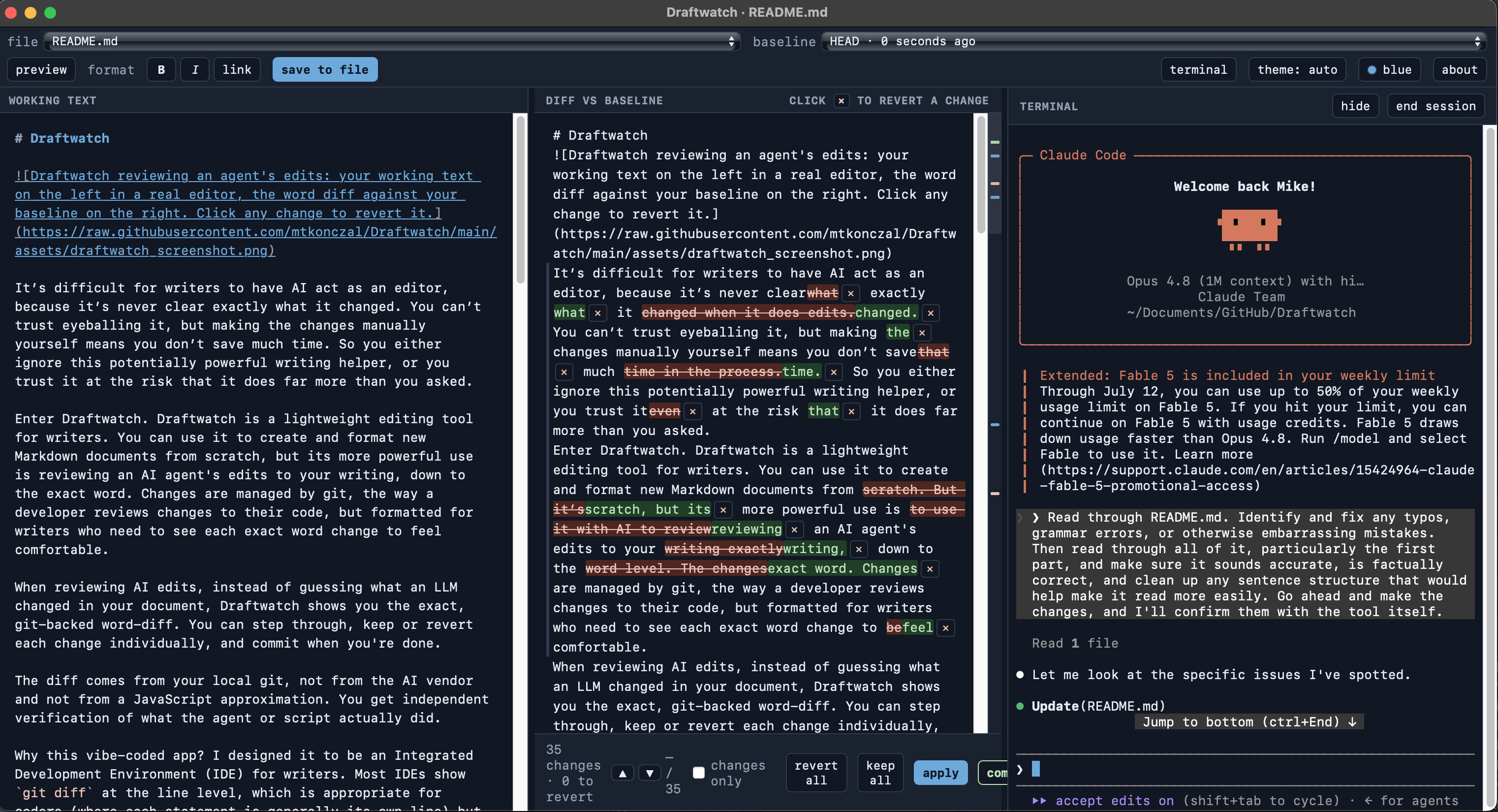
|
|
|
22
22
|
|
|
23
23
|
# Draftwatch
|
|
24
24
|
|
|
25
|
-
Draftwatch
|
|
25
|
+
|
|
26
|
+
|
|
27
|
+
It’s difficult for writers to have AI act as an editor, because it’s never clear exactly what it changed. You can’t trust eyeballing it, but making the changes manually yourself means you don’t save much time. So you either ignore this potentially powerful writing helper, or you trust it at the risk that it does far more than you asked.
|
|
28
|
+
|
|
29
|
+
Enter Draftwatch. Draftwatch is a lightweight editing tool for writers. You can use it to create and format new Markdown documents from scratch, but its more powerful use is reviewing an AI agent's edits to your writing, down to the exact word. Changes are managed by git, the way a developer reviews changes to their code, but formatted for writers who need to see each exact word change to feel comfortable.
|
|
26
30
|
|
|
27
31
|
When reviewing AI edits, instead of guessing what an LLM changed in your document, Draftwatch shows you the exact, git-backed word-diff. You can step through, keep or revert each change individually, and commit when you're done.
|
|
28
32
|
|
|
29
|
-
|
|
33
|
+
The diff comes from your local git, not from the AI vendor and not from a JavaScript approximation. You get independent verification of what the agent or script actually did.
|
|
30
34
|
|
|
31
|
-
|
|
35
|
+
Why this vibe-coded app? I designed it to be an Integrated Development Environment (IDE) for writers. Most IDEs show `git diff` at the line level, which is appropriate for coders (where each statement is generally its own line) but terrible for writers, who work at the paragraph level. This IDE is built around displaying `git diff --word-diff=porcelain`, which lets writers see the specific words being edited. Even the IDEs that do show this make it harder for writers to track edits, and they carry coding features and visual baggage that writers won’t need.
|
|
36
|
+
|
|
37
|
+
Python 3.9+ and git are the only requirements. If you are a writer, AI itself can help you install these widely used tools. The front-end libraries (CodeMirror 6, marked, DOMPurify, Turndown, xterm.js) are vendored and served locally, so Draftwatch works completely offline and binds to your local computer.
|
|
32
38
|
|
|
33
39
|
## Install
|
|
34
40
|
|
|
@@ -59,36 +65,17 @@ Or to start with a specific file:
|
|
|
59
65
|
draftwatch draft.md
|
|
60
66
|
```
|
|
61
67
|
|
|
62
|
-
You can also run it outside any git repository. Draftwatch starts in
|
|
63
|
-
**write-only mode** — the editor, preview, and saving all work, but the review
|
|
64
|
-
loop (diffs, revert, commit) is off because there's no git to compare against.
|
|
65
|
-
The right panel offers a one-click **initialize git here** to turn the folder
|
|
66
|
-
into a repo and switch on the full review loop.
|
|
68
|
+
You can also run it outside any git repository. Draftwatch starts in **write-only mode**: the editor, preview, and saving all work, but the review loop (diffs, revert, commit) is off because there's no git to compare against. The right panel offers a one-click **initialize git here** to turn the folder into a repo and switch on the full review loop.
|
|
67
69
|
|
|
68
|
-
Starting a second instance while one is already running just works: if the
|
|
69
|
-
default port is busy, Draftwatch picks a free one and prints the URL.
|
|
70
|
+
Starting a second instance while one is already running just works: if the default port is busy, Draftwatch picks a free one and prints the URL.
|
|
70
71
|
|
|
71
72
|
Draftwatch opens a two-panel review window: your source on the left (a real editor with markdown highlighting, search, and a live preview), the diff against your baseline on the right. Review the changes, revert the ones you don't want, apply, then commit. Committing advances the baseline, so the next agent pass starts clean.
|
|
72
73
|
|
|
73
74
|
Start without a file (`draftwatch`) to pick one in the window.
|
|
74
75
|
|
|
75
|
-
### Options
|
|
76
|
-
|
|
77
|
-
```
|
|
78
|
-
draftwatch [target] [--port 8787] [--no-open] [--no-terminal] [--app | --no-app]
|
|
79
|
-
```
|
|
80
|
-
|
|
81
|
-
- `target`: file to watch. Optional; omit it to pick one in the UI.
|
|
82
|
-
- `--port`: default `8787`. If omitted and the default is busy, Draftwatch
|
|
83
|
-
picks a free port automatically; pass `--port` to pin an exact one (it then
|
|
84
|
-
fails loudly if that port is taken).
|
|
85
|
-
- `--no-open`: don't auto-open a window (useful headless or over SSH).
|
|
86
|
-
- `--no-terminal`: disable the embedded terminal panel entirely (its routes are removed from the server, not just hidden in the UI).
|
|
87
|
-
- `--app` / `--no-app`: force or disable the native window. It is on by default when pywebview is installed and falls back to the browser otherwise.
|
|
88
|
-
|
|
89
76
|
## The terminal panel
|
|
90
77
|
|
|
91
|
-
Click **terminal** in the toolbar to open a third panel running a real shell in your repo (macOS/Linux). Launch `claude`, `codex`, or any command there: when the agent edits the file you're watching, the diff panel lights up live
|
|
78
|
+
Click **terminal** in the toolbar to open a third panel running a real shell in your repo (macOS/Linux). Launch `claude`, `codex`, or any command there: when the agent edits the file you're watching, the diff panel lights up live: prompt on the right, review in the middle, write on the left. **hide** collapses the panel and leaves the shell running (an agent mid-task keeps working); **end session** kills the shell and everything it started. No snapshots are taken when you run commands; edits accumulate against whatever baseline you've selected, and you review them on your schedule. On Windows the panel is unavailable and Draftwatch runs without it.
|
|
92
79
|
|
|
93
80
|
## Features
|
|
94
81
|
|
|
@@ -101,26 +88,23 @@ Click **terminal** in the toolbar to open a third panel running a real shell in
|
|
|
101
88
|
- Embedded terminal panel (macOS/Linux): run your agent next to the diff without leaving the window.
|
|
102
89
|
- Resizable panels: drag the dividers to change the split (double-click to reset).
|
|
103
90
|
|
|
104
|
-
|
|
105
|
-
|
|
106
|
-
Draftwatch binds `127.0.0.1` only — there is deliberately no option to bind another interface, so the tool is never exposed on your network. Every request carries a per-session token, the Host and Origin headers are validated to defeat DNS-rebinding, and the markdown preview is sanitized with DOMPurify before rendering. The tool never talks to any LLM.
|
|
107
|
-
|
|
108
|
-
The terminal panel is a real shell, so it gets extra care: its input routes accept the session token **only** as a request header (keystrokes never appear in URLs, browser history, or logs), the server pipes bytes to the PTY without ever parsing them, ending a session kills the shell's whole process group, and no shell outlives Draftwatch. `--no-terminal` removes the feature from the server entirely.
|
|
109
|
-
|
|
110
|
-
## Tests
|
|
91
|
+
### Options
|
|
111
92
|
|
|
112
|
-
```
|
|
113
|
-
|
|
114
|
-
python3 testing/test_acceptance.py # end-to-end server tests
|
|
93
|
+
```
|
|
94
|
+
draftwatch [target] [--port 8787] [--no-open] [--no-terminal] [--app | --no-app]
|
|
115
95
|
```
|
|
116
96
|
|
|
117
|
-
|
|
118
|
-
|
|
119
|
-
|
|
97
|
+
- `target`: file to watch. Optional; omit it to pick one in the UI.
|
|
98
|
+
- `--port`: default `8787`. If omitted and the default is busy, Draftwatch
|
|
99
|
+
picks a free port automatically; pass `--port` to pin an exact one (it then
|
|
100
|
+
fails loudly if that port is taken).
|
|
101
|
+
- `--no-open`: don't auto-open a window (useful headless or over SSH).
|
|
102
|
+
- `--no-terminal`: disable the embedded terminal panel entirely (its routes are removed from the server, not just hidden in the UI).
|
|
103
|
+
- `--app` / `--no-app`: force or disable the native window. It is on by default when pywebview is installed and falls back to the browser otherwise.
|
|
120
104
|
|
|
121
105
|
## Author
|
|
122
106
|
|
|
123
|
-
Built by Mike Konczal. Vibe-coded with Fable 5.
|
|
107
|
+
Built by Mike Konczal. You can find out more about me at my webpage [here](https://www.mikekonczal.com/). Vibe-coded with Fable 5.
|
|
124
108
|
|
|
125
109
|
## License
|
|
126
110
|
|
|
@@ -0,0 +1,89 @@
|
|
|
1
|
+
# Draftwatch
|
|
2
|
+
|
|
3
|
+

|
|
4
|
+
|
|
5
|
+
It’s difficult for writers to have AI act as an editor, because it’s never clear exactly what it changed. You can’t trust eyeballing it, but making the changes manually yourself means you don’t save much time. So you either ignore this potentially powerful writing helper, or you trust it at the risk that it does far more than you asked.
|
|
6
|
+
|
|
7
|
+
Enter Draftwatch. Draftwatch is a lightweight editing tool for writers. You can use it to create and format new Markdown documents from scratch, but its more powerful use is reviewing an AI agent's edits to your writing, down to the exact word. Changes are managed by git, the way a developer reviews changes to their code, but formatted for writers who need to see each exact word change to feel comfortable.
|
|
8
|
+
|
|
9
|
+
When reviewing AI edits, instead of guessing what an LLM changed in your document, Draftwatch shows you the exact, git-backed word-diff. You can step through, keep or revert each change individually, and commit when you're done.
|
|
10
|
+
|
|
11
|
+
The diff comes from your local git, not from the AI vendor and not from a JavaScript approximation. You get independent verification of what the agent or script actually did.
|
|
12
|
+
|
|
13
|
+
Why this vibe-coded app? I designed it to be an Integrated Development Environment (IDE) for writers. Most IDEs show `git diff` at the line level, which is appropriate for coders (where each statement is generally its own line) but terrible for writers, who work at the paragraph level. This IDE is built around displaying `git diff --word-diff=porcelain`, which lets writers see the specific words being edited. Even the IDEs that do show this make it harder for writers to track edits, and they carry coding features and visual baggage that writers won’t need.
|
|
14
|
+
|
|
15
|
+
Python 3.9+ and git are the only requirements. If you are a writer, AI itself can help you install these widely used tools. The front-end libraries (CodeMirror 6, marked, DOMPurify, Turndown, xterm.js) are vendored and served locally, so Draftwatch works completely offline and binds to your local computer.
|
|
16
|
+
|
|
17
|
+
## Install
|
|
18
|
+
|
|
19
|
+
Draftwatch is available on PyPI. You can install or run it using your preferred Python package manager:
|
|
20
|
+
|
|
21
|
+
```bash
|
|
22
|
+
# pipx
|
|
23
|
+
pipx install draftwatch
|
|
24
|
+
|
|
25
|
+
# uv
|
|
26
|
+
uv tool install draftwatch
|
|
27
|
+
|
|
28
|
+
# standard pip
|
|
29
|
+
pip install draftwatch
|
|
30
|
+
```
|
|
31
|
+
|
|
32
|
+
## Usage
|
|
33
|
+
|
|
34
|
+
Run it from inside a git repository you write in:
|
|
35
|
+
|
|
36
|
+
```bash
|
|
37
|
+
draftwatch
|
|
38
|
+
```
|
|
39
|
+
|
|
40
|
+
Or to start with a specific file:
|
|
41
|
+
|
|
42
|
+
```bash
|
|
43
|
+
draftwatch draft.md
|
|
44
|
+
```
|
|
45
|
+
|
|
46
|
+
You can also run it outside any git repository. Draftwatch starts in **write-only mode**: the editor, preview, and saving all work, but the review loop (diffs, revert, commit) is off because there's no git to compare against. The right panel offers a one-click **initialize git here** to turn the folder into a repo and switch on the full review loop.
|
|
47
|
+
|
|
48
|
+
Starting a second instance while one is already running just works: if the default port is busy, Draftwatch picks a free one and prints the URL.
|
|
49
|
+
|
|
50
|
+
Draftwatch opens a two-panel review window: your source on the left (a real editor with markdown highlighting, search, and a live preview), the diff against your baseline on the right. Review the changes, revert the ones you don't want, apply, then commit. Committing advances the baseline, so the next agent pass starts clean.
|
|
51
|
+
|
|
52
|
+
Start without a file (`draftwatch`) to pick one in the window.
|
|
53
|
+
|
|
54
|
+
## The terminal panel
|
|
55
|
+
|
|
56
|
+
Click **terminal** in the toolbar to open a third panel running a real shell in your repo (macOS/Linux). Launch `claude`, `codex`, or any command there: when the agent edits the file you're watching, the diff panel lights up live: prompt on the right, review in the middle, write on the left. **hide** collapses the panel and leaves the shell running (an agent mid-task keeps working); **end session** kills the shell and everything it started. No snapshots are taken when you run commands; edits accumulate against whatever baseline you've selected, and you review them on your schedule. On Windows the panel is unavailable and Draftwatch runs without it.
|
|
57
|
+
|
|
58
|
+
## Features
|
|
59
|
+
|
|
60
|
+
- Real git word-diffs, so what you see is exactly what git sees.
|
|
61
|
+
- Keep or revert changes one hunk at a time, or all at once, then commit from the UI.
|
|
62
|
+
- Switchable baseline: last push, HEAD, or an earlier commit.
|
|
63
|
+
- Jump between changes or collapse to a changes-only view for long documents.
|
|
64
|
+
- Editable markdown preview alongside the raw source.
|
|
65
|
+
- You and the agent can both edit; your unsaved work is never clobbered when the file changes on disk.
|
|
66
|
+
- Embedded terminal panel (macOS/Linux): run your agent next to the diff without leaving the window.
|
|
67
|
+
- Resizable panels: drag the dividers to change the split (double-click to reset).
|
|
68
|
+
|
|
69
|
+
### Options
|
|
70
|
+
|
|
71
|
+
```
|
|
72
|
+
draftwatch [target] [--port 8787] [--no-open] [--no-terminal] [--app | --no-app]
|
|
73
|
+
```
|
|
74
|
+
|
|
75
|
+
- `target`: file to watch. Optional; omit it to pick one in the UI.
|
|
76
|
+
- `--port`: default `8787`. If omitted and the default is busy, Draftwatch
|
|
77
|
+
picks a free port automatically; pass `--port` to pin an exact one (it then
|
|
78
|
+
fails loudly if that port is taken).
|
|
79
|
+
- `--no-open`: don't auto-open a window (useful headless or over SSH).
|
|
80
|
+
- `--no-terminal`: disable the embedded terminal panel entirely (its routes are removed from the server, not just hidden in the UI).
|
|
81
|
+
- `--app` / `--no-app`: force or disable the native window. It is on by default when pywebview is installed and falls back to the browser otherwise.
|
|
82
|
+
|
|
83
|
+
## Author
|
|
84
|
+
|
|
85
|
+
Built by Mike Konczal. You can find out more about me at my webpage [here](https://www.mikekonczal.com/). Vibe-coded with Fable 5.
|
|
86
|
+
|
|
87
|
+
## License
|
|
88
|
+
|
|
89
|
+
MIT. See `LICENSE`.
|
|
@@ -40,8 +40,8 @@ TERM_SUPPORTED = _term is not None
|
|
|
40
40
|
# Single source of truth for the version and the date of the latest release.
|
|
41
41
|
# __init__.py re-exports __version__; the About panel shows both (injected into
|
|
42
42
|
# the served page from these constants).
|
|
43
|
-
__version__ = "0.2.
|
|
44
|
-
RELEASE_DATE = "2026-07-
|
|
43
|
+
__version__ = "0.2.1"
|
|
44
|
+
RELEASE_DATE = "2026-07-07"
|
|
45
45
|
|
|
46
46
|
# Preferred port. When --port is not given, Draftwatch tries this first and
|
|
47
47
|
# falls back to a free port if it is busy (so a second instance can start while
|
|
@@ -145,6 +145,21 @@ def push_ref(root):
|
|
|
145
145
|
return None, None, None
|
|
146
146
|
|
|
147
147
|
|
|
148
|
+
def verify_commit_ref(root, ref):
|
|
149
|
+
"""True only if `ref` names an existing commit object in `root`.
|
|
150
|
+
|
|
151
|
+
Two guards: reject anything not a plain string or beginning with '-' (so a
|
|
152
|
+
ref can never be parsed by a later `git diff <ref>` as an option — e.g.
|
|
153
|
+
`--output=FILE` would make git write to an arbitrary path), then confirm the
|
|
154
|
+
ref actually resolves to a commit with `rev-parse --verify`. The client only
|
|
155
|
+
ever sends full SHAs from the commit dropdown; this hardens the API against a
|
|
156
|
+
hand-crafted request (which still needs the session token to arrive)."""
|
|
157
|
+
if not isinstance(ref, str) or not ref or ref.startswith("-"):
|
|
158
|
+
return False
|
|
159
|
+
rc, _, _ = run_git(["rev-parse", "--verify", "--quiet", ref + "^{commit}"], root)
|
|
160
|
+
return rc == 0
|
|
161
|
+
|
|
162
|
+
|
|
148
163
|
def git_diff_text(root, baseline, relpath, abspath):
|
|
149
164
|
"""Run the appropriate word-diff command. Returns diff text ('' if no diff).
|
|
150
165
|
|
|
@@ -860,6 +875,29 @@ class Handler(BaseHTTPRequestHandler):
|
|
|
860
875
|
self.send_header("Content-Type", ctype)
|
|
861
876
|
self.send_header("Content-Length", str(len(body)))
|
|
862
877
|
self.send_header("Cache-Control", "no-store")
|
|
878
|
+
# Defense-in-depth headers. The preview already runs agent-authored
|
|
879
|
+
# markdown through DOMPurify; these add a second layer and, crucially,
|
|
880
|
+
# keep the session token from leaking off-origin:
|
|
881
|
+
# Referrer-Policy — the token rides in the launch URL; never send a
|
|
882
|
+
# Referer carrying it to any resource the page loads.
|
|
883
|
+
# CSP — scripts/styles/fetch are same-origin only, so a
|
|
884
|
+
# sanitizer bypass still can't call out or exfiltrate
|
|
885
|
+
# (connect-src 'self'). base/form/frame are locked
|
|
886
|
+
# down. img-src stays permissive (data:/https:) so a
|
|
887
|
+
# writer's legitimate external images still render;
|
|
888
|
+
# with connect-src+Referrer-Policy above, a stray
|
|
889
|
+
# image beacon carries no token and no document data.
|
|
890
|
+
# nosniff — don't let a response be reinterpreted as another type.
|
|
891
|
+
self.send_header("Referrer-Policy", "no-referrer")
|
|
892
|
+
self.send_header("X-Content-Type-Options", "nosniff")
|
|
893
|
+
self.send_header(
|
|
894
|
+
"Content-Security-Policy",
|
|
895
|
+
"default-src 'self'; "
|
|
896
|
+
"script-src 'self' 'unsafe-inline'; "
|
|
897
|
+
"style-src 'self' 'unsafe-inline'; "
|
|
898
|
+
"img-src 'self' data: https:; "
|
|
899
|
+
"connect-src 'self'; "
|
|
900
|
+
"base-uri 'none'; form-action 'none'; frame-ancestors 'none'")
|
|
863
901
|
self.end_headers()
|
|
864
902
|
try:
|
|
865
903
|
self.wfile.write(body)
|
|
@@ -1170,6 +1208,8 @@ class Handler(BaseHTTPRequestHandler):
|
|
|
1170
1208
|
ref = body.get("ref")
|
|
1171
1209
|
if not ref:
|
|
1172
1210
|
return self._json({"error": "missing ref"}, 400)
|
|
1211
|
+
if not verify_commit_ref(st.root, ref):
|
|
1212
|
+
return self._json({"error": "invalid or unknown commit ref"}, 400)
|
|
1173
1213
|
label = body.get("label", ref)
|
|
1174
1214
|
with st.lock:
|
|
1175
1215
|
st.baseline = {"kind": "commit", "ref": ref, "label": label}
|
|
@@ -1352,6 +1392,7 @@ INDEX_HTML = r"""<!DOCTYPE html>
|
|
|
1352
1392
|
<html lang="en">
|
|
1353
1393
|
<head>
|
|
1354
1394
|
<meta charset="utf-8">
|
|
1395
|
+
<meta name="referrer" content="no-referrer">
|
|
1355
1396
|
<meta name="viewport" content="width=device-width, initial-scale=1">
|
|
1356
1397
|
<title>Draftwatch</title>
|
|
1357
1398
|
<script src="/static/codemirror.js"></script>
|
|
@@ -1639,8 +1680,13 @@ INDEX_HTML = r"""<!DOCTYPE html>
|
|
|
1639
1680
|
.panel.term h2 button {
|
|
1640
1681
|
text-transform: none; letter-spacing: normal; font-weight: 400;
|
|
1641
1682
|
}
|
|
1642
|
-
|
|
1643
|
-
|
|
1683
|
+
/* Padding lives on the xterm element, not #term-host: the fit addon sizes
|
|
1684
|
+
the terminal from the parent's computed width/height (which, with the
|
|
1685
|
+
global border-box rule, includes the parent's padding) minus the
|
|
1686
|
+
terminal element's own padding. Padding the host makes fit() run one
|
|
1687
|
+
column wide, pushing text under the viewport scrollbar. */
|
|
1688
|
+
#term-host { flex: 1; min-height: 0; }
|
|
1689
|
+
#term-host .terminal { height: 100%; padding: 6px 2px 2px 8px; }
|
|
1644
1690
|
.panel h2 {
|
|
1645
1691
|
margin: 0;
|
|
1646
1692
|
padding: 6px 12px;
|
|
@@ -2083,9 +2129,21 @@ INDEX_HTML = r"""<!DOCTYPE html>
|
|
|
2083
2129
|
}
|
|
2084
2130
|
|
|
2085
2131
|
// ---- session token (from the URL draftwatch printed/opened) ----
|
|
2132
|
+
// Read it once, then keep it in sessionStorage and strip it out of the
|
|
2133
|
+
// visible URL. This keeps the token out of the address bar, browser history,
|
|
2134
|
+
// and any screen-share, while a reload still authenticates (sessionStorage
|
|
2135
|
+
// survives reloads within the tab). Note: this does NOT remove the token from
|
|
2136
|
+
// the browser process's command line on a shared host — see the README
|
|
2137
|
+
// security notes; prefer the native window (--app) there.
|
|
2086
2138
|
var TOKEN = (function () {
|
|
2139
|
+
var t = "";
|
|
2087
2140
|
var m = /(?:\?|&)t=([^&]+)/.exec(window.location.search);
|
|
2088
|
-
|
|
2141
|
+
if (m) t = decodeURIComponent(m[1]);
|
|
2142
|
+
try {
|
|
2143
|
+
if (t) sessionStorage.setItem("draftwatch-token", t);
|
|
2144
|
+
else t = sessionStorage.getItem("draftwatch-token") || "";
|
|
2145
|
+
} catch (e) {}
|
|
2146
|
+
return t;
|
|
2089
2147
|
})();
|
|
2090
2148
|
|
|
2091
2149
|
// ---- launch surface (native window vs browser) ----
|
|
@@ -2096,6 +2154,17 @@ INDEX_HTML = r"""<!DOCTYPE html>
|
|
|
2096
2154
|
var APP_FALLBACK = /(?:\?|&)appfallback=1(?:&|$)/.test(window.location.search);
|
|
2097
2155
|
if (APP_MODE) document.body.classList.add("app-mode");
|
|
2098
2156
|
|
|
2157
|
+
// Now that the token and launch flags have been read, drop `t` from the
|
|
2158
|
+
// address bar (other params are preserved). The token still lives in the JS
|
|
2159
|
+
// var and sessionStorage, so requests and reloads keep working.
|
|
2160
|
+
try {
|
|
2161
|
+
var _u = new URL(window.location.href);
|
|
2162
|
+
if (_u.searchParams.has("t")) {
|
|
2163
|
+
_u.searchParams.delete("t");
|
|
2164
|
+
window.history.replaceState({}, "", _u.pathname + _u.search + _u.hash);
|
|
2165
|
+
}
|
|
2166
|
+
} catch (e) {}
|
|
2167
|
+
|
|
2099
2168
|
// ---- server notification of client state (turn-based contract) ----
|
|
2100
2169
|
function postJSON(url, obj, cb) {
|
|
2101
2170
|
fetch(url, {
|
|
@@ -1,6 +1,6 @@
|
|
|
1
1
|
Metadata-Version: 2.4
|
|
2
2
|
Name: draftwatch
|
|
3
|
-
Version: 0.2.
|
|
3
|
+
Version: 0.2.1
|
|
4
4
|
Summary: Review an AI agent's edits to your writing files as a real git word-diff — keep or revert changes hunk by hunk, then commit.
|
|
5
5
|
Author: Mike Konczal
|
|
6
6
|
License: MIT
|
|
@@ -22,13 +22,19 @@ Dynamic: license-file
|
|
|
22
22
|
|
|
23
23
|
# Draftwatch
|
|
24
24
|
|
|
25
|
-
Draftwatch
|
|
25
|
+

|
|
26
|
+
|
|
27
|
+
It’s difficult for writers to have AI act as an editor, because it’s never clear exactly what it changed. You can’t trust eyeballing it, but making the changes manually yourself means you don’t save much time. So you either ignore this potentially powerful writing helper, or you trust it at the risk that it does far more than you asked.
|
|
28
|
+
|
|
29
|
+
Enter Draftwatch. Draftwatch is a lightweight editing tool for writers. You can use it to create and format new Markdown documents from scratch, but its more powerful use is reviewing an AI agent's edits to your writing, down to the exact word. Changes are managed by git, the way a developer reviews changes to their code, but formatted for writers who need to see each exact word change to feel comfortable.
|
|
26
30
|
|
|
27
31
|
When reviewing AI edits, instead of guessing what an LLM changed in your document, Draftwatch shows you the exact, git-backed word-diff. You can step through, keep or revert each change individually, and commit when you're done.
|
|
28
32
|
|
|
29
|
-
|
|
33
|
+
The diff comes from your local git, not from the AI vendor and not from a JavaScript approximation. You get independent verification of what the agent or script actually did.
|
|
30
34
|
|
|
31
|
-
|
|
35
|
+
Why this vibe-coded app? I designed it to be an Integrated Development Environment (IDE) for writers. Most IDEs show `git diff` at the line level, which is appropriate for coders (where each statement is generally its own line) but terrible for writers, who work at the paragraph level. This IDE is built around displaying `git diff --word-diff=porcelain`, which lets writers see the specific words being edited. Even the IDEs that do show this make it harder for writers to track edits, and they carry coding features and visual baggage that writers won’t need.
|
|
36
|
+
|
|
37
|
+
Python 3.9+ and git are the only requirements. If you are a writer, AI itself can help you install these widely used tools. The front-end libraries (CodeMirror 6, marked, DOMPurify, Turndown, xterm.js) are vendored and served locally, so Draftwatch works completely offline and binds to your local computer.
|
|
32
38
|
|
|
33
39
|
## Install
|
|
34
40
|
|
|
@@ -59,36 +65,17 @@ Or to start with a specific file:
|
|
|
59
65
|
draftwatch draft.md
|
|
60
66
|
```
|
|
61
67
|
|
|
62
|
-
You can also run it outside any git repository. Draftwatch starts in
|
|
63
|
-
**write-only mode** — the editor, preview, and saving all work, but the review
|
|
64
|
-
loop (diffs, revert, commit) is off because there's no git to compare against.
|
|
65
|
-
The right panel offers a one-click **initialize git here** to turn the folder
|
|
66
|
-
into a repo and switch on the full review loop.
|
|
68
|
+
You can also run it outside any git repository. Draftwatch starts in **write-only mode**: the editor, preview, and saving all work, but the review loop (diffs, revert, commit) is off because there's no git to compare against. The right panel offers a one-click **initialize git here** to turn the folder into a repo and switch on the full review loop.
|
|
67
69
|
|
|
68
|
-
Starting a second instance while one is already running just works: if the
|
|
69
|
-
default port is busy, Draftwatch picks a free one and prints the URL.
|
|
70
|
+
Starting a second instance while one is already running just works: if the default port is busy, Draftwatch picks a free one and prints the URL.
|
|
70
71
|
|
|
71
72
|
Draftwatch opens a two-panel review window: your source on the left (a real editor with markdown highlighting, search, and a live preview), the diff against your baseline on the right. Review the changes, revert the ones you don't want, apply, then commit. Committing advances the baseline, so the next agent pass starts clean.
|
|
72
73
|
|
|
73
74
|
Start without a file (`draftwatch`) to pick one in the window.
|
|
74
75
|
|
|
75
|
-
### Options
|
|
76
|
-
|
|
77
|
-
```
|
|
78
|
-
draftwatch [target] [--port 8787] [--no-open] [--no-terminal] [--app | --no-app]
|
|
79
|
-
```
|
|
80
|
-
|
|
81
|
-
- `target`: file to watch. Optional; omit it to pick one in the UI.
|
|
82
|
-
- `--port`: default `8787`. If omitted and the default is busy, Draftwatch
|
|
83
|
-
picks a free port automatically; pass `--port` to pin an exact one (it then
|
|
84
|
-
fails loudly if that port is taken).
|
|
85
|
-
- `--no-open`: don't auto-open a window (useful headless or over SSH).
|
|
86
|
-
- `--no-terminal`: disable the embedded terminal panel entirely (its routes are removed from the server, not just hidden in the UI).
|
|
87
|
-
- `--app` / `--no-app`: force or disable the native window. It is on by default when pywebview is installed and falls back to the browser otherwise.
|
|
88
|
-
|
|
89
76
|
## The terminal panel
|
|
90
77
|
|
|
91
|
-
Click **terminal** in the toolbar to open a third panel running a real shell in your repo (macOS/Linux). Launch `claude`, `codex`, or any command there: when the agent edits the file you're watching, the diff panel lights up live
|
|
78
|
+
Click **terminal** in the toolbar to open a third panel running a real shell in your repo (macOS/Linux). Launch `claude`, `codex`, or any command there: when the agent edits the file you're watching, the diff panel lights up live: prompt on the right, review in the middle, write on the left. **hide** collapses the panel and leaves the shell running (an agent mid-task keeps working); **end session** kills the shell and everything it started. No snapshots are taken when you run commands; edits accumulate against whatever baseline you've selected, and you review them on your schedule. On Windows the panel is unavailable and Draftwatch runs without it.
|
|
92
79
|
|
|
93
80
|
## Features
|
|
94
81
|
|
|
@@ -101,26 +88,23 @@ Click **terminal** in the toolbar to open a third panel running a real shell in
|
|
|
101
88
|
- Embedded terminal panel (macOS/Linux): run your agent next to the diff without leaving the window.
|
|
102
89
|
- Resizable panels: drag the dividers to change the split (double-click to reset).
|
|
103
90
|
|
|
104
|
-
|
|
105
|
-
|
|
106
|
-
Draftwatch binds `127.0.0.1` only — there is deliberately no option to bind another interface, so the tool is never exposed on your network. Every request carries a per-session token, the Host and Origin headers are validated to defeat DNS-rebinding, and the markdown preview is sanitized with DOMPurify before rendering. The tool never talks to any LLM.
|
|
107
|
-
|
|
108
|
-
The terminal panel is a real shell, so it gets extra care: its input routes accept the session token **only** as a request header (keystrokes never appear in URLs, browser history, or logs), the server pipes bytes to the PTY without ever parsing them, ending a session kills the shell's whole process group, and no shell outlives Draftwatch. `--no-terminal` removes the feature from the server entirely.
|
|
109
|
-
|
|
110
|
-
## Tests
|
|
91
|
+
### Options
|
|
111
92
|
|
|
112
|
-
```
|
|
113
|
-
|
|
114
|
-
python3 testing/test_acceptance.py # end-to-end server tests
|
|
93
|
+
```
|
|
94
|
+
draftwatch [target] [--port 8787] [--no-open] [--no-terminal] [--app | --no-app]
|
|
115
95
|
```
|
|
116
96
|
|
|
117
|
-
|
|
118
|
-
|
|
119
|
-
|
|
97
|
+
- `target`: file to watch. Optional; omit it to pick one in the UI.
|
|
98
|
+
- `--port`: default `8787`. If omitted and the default is busy, Draftwatch
|
|
99
|
+
picks a free port automatically; pass `--port` to pin an exact one (it then
|
|
100
|
+
fails loudly if that port is taken).
|
|
101
|
+
- `--no-open`: don't auto-open a window (useful headless or over SSH).
|
|
102
|
+
- `--no-terminal`: disable the embedded terminal panel entirely (its routes are removed from the server, not just hidden in the UI).
|
|
103
|
+
- `--app` / `--no-app`: force or disable the native window. It is on by default when pywebview is installed and falls back to the browser otherwise.
|
|
120
104
|
|
|
121
105
|
## Author
|
|
122
106
|
|
|
123
|
-
Built by Mike Konczal. Vibe-coded with Fable 5.
|
|
107
|
+
Built by Mike Konczal. You can find out more about me at my webpage [here](https://www.mikekonczal.com/). Vibe-coded with Fable 5.
|
|
124
108
|
|
|
125
109
|
## License
|
|
126
110
|
|
|
@@ -4,7 +4,7 @@ build-backend = "setuptools.build_meta"
|
|
|
4
4
|
|
|
5
5
|
[project]
|
|
6
6
|
name = "draftwatch"
|
|
7
|
-
version = "0.2.
|
|
7
|
+
version = "0.2.1"
|
|
8
8
|
description = "Review an AI agent's edits to your writing files as a real git word-diff — keep or revert changes hunk by hunk, then commit."
|
|
9
9
|
readme = "README.md"
|
|
10
10
|
requires-python = ">=3.9"
|
draftwatch-0.2.0/README.md
DELETED
|
@@ -1,105 +0,0 @@
|
|
|
1
|
-
# Draftwatch
|
|
2
|
-
|
|
3
|
-
Draftwatch is a lightweight IDE for writers. You can use it to create and format new Markdown documents from scratch, or use it to review an AI agent's edits to your writing exactly the way a developer reviews a pull request.
|
|
4
|
-
|
|
5
|
-
When reviewing AI edits, instead of guessing what an LLM changed in your document, Draftwatch shows you the exact, git-backed word-diff. You can step through, keep or revert each change individually, and commit when you're done.
|
|
6
|
-
|
|
7
|
-
Crucially, the diff comes from your local git—not from the AI vendor and not from a JavaScript approximation. You get absolute, independent verification of what the agent or script actually did.
|
|
8
|
-
|
|
9
|
-
Python 3.9+ and git are the only requirements. The front-end libraries (CodeMirror 6, marked, DOMPurify, Turndown, xterm.js) are vendored and served locally, so Draftwatch works completely offline and binds to localhost only.
|
|
10
|
-
|
|
11
|
-
## Install
|
|
12
|
-
|
|
13
|
-
Draftwatch is available on PyPI. You can install or run it using your preferred Python package manager:
|
|
14
|
-
|
|
15
|
-
```bash
|
|
16
|
-
# pipx
|
|
17
|
-
pipx install draftwatch
|
|
18
|
-
|
|
19
|
-
# uv
|
|
20
|
-
uv tool install draftwatch
|
|
21
|
-
|
|
22
|
-
# standard pip
|
|
23
|
-
pip install draftwatch
|
|
24
|
-
```
|
|
25
|
-
|
|
26
|
-
## Usage
|
|
27
|
-
|
|
28
|
-
Run it from inside a git repository you write in:
|
|
29
|
-
|
|
30
|
-
```bash
|
|
31
|
-
draftwatch
|
|
32
|
-
```
|
|
33
|
-
|
|
34
|
-
Or to start with a specific file:
|
|
35
|
-
|
|
36
|
-
```bash
|
|
37
|
-
draftwatch draft.md
|
|
38
|
-
```
|
|
39
|
-
|
|
40
|
-
You can also run it outside any git repository. Draftwatch starts in
|
|
41
|
-
**write-only mode** — the editor, preview, and saving all work, but the review
|
|
42
|
-
loop (diffs, revert, commit) is off because there's no git to compare against.
|
|
43
|
-
The right panel offers a one-click **initialize git here** to turn the folder
|
|
44
|
-
into a repo and switch on the full review loop.
|
|
45
|
-
|
|
46
|
-
Starting a second instance while one is already running just works: if the
|
|
47
|
-
default port is busy, Draftwatch picks a free one and prints the URL.
|
|
48
|
-
|
|
49
|
-
Draftwatch opens a two-panel review window: your source on the left (a real editor with markdown highlighting, search, and a live preview), the diff against your baseline on the right. Review the changes, revert the ones you don't want, apply, then commit. Committing advances the baseline, so the next agent pass starts clean.
|
|
50
|
-
|
|
51
|
-
Start without a file (`draftwatch`) to pick one in the window.
|
|
52
|
-
|
|
53
|
-
### Options
|
|
54
|
-
|
|
55
|
-
```
|
|
56
|
-
draftwatch [target] [--port 8787] [--no-open] [--no-terminal] [--app | --no-app]
|
|
57
|
-
```
|
|
58
|
-
|
|
59
|
-
- `target`: file to watch. Optional; omit it to pick one in the UI.
|
|
60
|
-
- `--port`: default `8787`. If omitted and the default is busy, Draftwatch
|
|
61
|
-
picks a free port automatically; pass `--port` to pin an exact one (it then
|
|
62
|
-
fails loudly if that port is taken).
|
|
63
|
-
- `--no-open`: don't auto-open a window (useful headless or over SSH).
|
|
64
|
-
- `--no-terminal`: disable the embedded terminal panel entirely (its routes are removed from the server, not just hidden in the UI).
|
|
65
|
-
- `--app` / `--no-app`: force or disable the native window. It is on by default when pywebview is installed and falls back to the browser otherwise.
|
|
66
|
-
|
|
67
|
-
## The terminal panel
|
|
68
|
-
|
|
69
|
-
Click **terminal** in the toolbar to open a third panel running a real shell in your repo (macOS/Linux). Launch `claude`, `codex`, or any command there: when the agent edits the file you're watching, the diff panel lights up live — prompt on the right, review in the middle, write on the left. **hide** collapses the panel and leaves the shell running (an agent mid-task keeps working); **end session** kills the shell and everything it started. No snapshots are taken when you run commands — edits accumulate against whatever baseline you've selected, and you review them on your schedule. On Windows the panel is unavailable and Draftwatch simply runs without it.
|
|
70
|
-
|
|
71
|
-
## Features
|
|
72
|
-
|
|
73
|
-
- Real git word-diffs, so what you see is exactly what git sees.
|
|
74
|
-
- Keep or revert changes one hunk at a time, or all at once, then commit from the UI.
|
|
75
|
-
- Switchable baseline: last push, HEAD, or an earlier commit.
|
|
76
|
-
- Jump between changes or collapse to a changes-only view for long documents.
|
|
77
|
-
- Editable markdown preview alongside the raw source.
|
|
78
|
-
- You and the agent can both edit; your unsaved work is never clobbered when the file changes on disk.
|
|
79
|
-
- Embedded terminal panel (macOS/Linux): run your agent next to the diff without leaving the window.
|
|
80
|
-
- Resizable panels: drag the dividers to change the split (double-click to reset).
|
|
81
|
-
|
|
82
|
-
## Security
|
|
83
|
-
|
|
84
|
-
Draftwatch binds `127.0.0.1` only — there is deliberately no option to bind another interface, so the tool is never exposed on your network. Every request carries a per-session token, the Host and Origin headers are validated to defeat DNS-rebinding, and the markdown preview is sanitized with DOMPurify before rendering. The tool never talks to any LLM.
|
|
85
|
-
|
|
86
|
-
The terminal panel is a real shell, so it gets extra care: its input routes accept the session token **only** as a request header (keystrokes never appear in URLs, browser history, or logs), the server pipes bytes to the PTY without ever parsing them, ending a session kills the shell's whole process group, and no shell outlives Draftwatch. `--no-terminal` removes the feature from the server entirely.
|
|
87
|
-
|
|
88
|
-
## Tests
|
|
89
|
-
|
|
90
|
-
```bash
|
|
91
|
-
python3 testing/test_reconstruct.py # reconstruction invariants
|
|
92
|
-
python3 testing/test_acceptance.py # end-to-end server tests
|
|
93
|
-
```
|
|
94
|
-
|
|
95
|
-
## Development
|
|
96
|
-
|
|
97
|
-
The front-end libraries are vendored into `draftwatch/assets/` and committed, so end users never need Node. To rebuild them: `npm install && npm run build:vendor`.
|
|
98
|
-
|
|
99
|
-
## Author
|
|
100
|
-
|
|
101
|
-
Built by Mike Konczal. Vibe-coded with Fable 5.
|
|
102
|
-
|
|
103
|
-
## License
|
|
104
|
-
|
|
105
|
-
MIT. See `LICENSE`.
|
|
File without changes
|
|
File without changes
|
|
File without changes
|
|
File without changes
|
|
File without changes
|
|
File without changes
|
|
File without changes
|
|
File without changes
|
|
File without changes
|
|
File without changes
|
|
File without changes
|
|
File without changes
|
|
File without changes
|
|
File without changes
|
|
File without changes
|
|
File without changes
|