django-explain-errors 0.7.0__tar.gz → 0.9.0__tar.gz
This diff represents the content of publicly available package versions that have been released to one of the supported registries. The information contained in this diff is provided for informational purposes only and reflects changes between package versions as they appear in their respective public registries.
- {django_explain_errors-0.7.0/django_explain_errors.egg-info → django_explain_errors-0.9.0}/PKG-INFO +135 -32
- {django_explain_errors-0.7.0 → django_explain_errors-0.9.0}/README.md +134 -31
- {django_explain_errors-0.7.0 → django_explain_errors-0.9.0/django_explain_errors.egg-info}/PKG-INFO +135 -32
- {django_explain_errors-0.7.0 → django_explain_errors-0.9.0}/django_explain_errors.egg-info/SOURCES.txt +3 -0
- {django_explain_errors-0.7.0 → django_explain_errors-0.9.0}/explain_errors/client.py +3 -2
- django_explain_errors-0.9.0/explain_errors/debug_page.py +261 -0
- {django_explain_errors-0.7.0 → django_explain_errors-0.9.0}/explain_errors/management/commands/build_error_index.py +2 -2
- {django_explain_errors-0.7.0 → django_explain_errors-0.9.0}/explain_errors/middleware.py +66 -11
- {django_explain_errors-0.7.0 → django_explain_errors-0.9.0}/setup.py +1 -1
- {django_explain_errors-0.7.0 → django_explain_errors-0.9.0}/tests/test_build_error_index.py +1 -1
- {django_explain_errors-0.7.0 → django_explain_errors-0.9.0}/tests/test_client.py +3 -2
- django_explain_errors-0.9.0/tests/test_debug_page.py +464 -0
- {django_explain_errors-0.7.0 → django_explain_errors-0.9.0}/tests/test_middleware.py +1 -1
- django_explain_errors-0.9.0/tests/test_print_stdout.py +130 -0
- {django_explain_errors-0.7.0 → django_explain_errors-0.9.0}/LICENSE +0 -0
- {django_explain_errors-0.7.0 → django_explain_errors-0.9.0}/MANIFEST.in +0 -0
- {django_explain_errors-0.7.0 → django_explain_errors-0.9.0}/django_explain_errors.egg-info/dependency_links.txt +0 -0
- {django_explain_errors-0.7.0 → django_explain_errors-0.9.0}/django_explain_errors.egg-info/requires.txt +0 -0
- {django_explain_errors-0.7.0 → django_explain_errors-0.9.0}/django_explain_errors.egg-info/top_level.txt +0 -0
- {django_explain_errors-0.7.0 → django_explain_errors-0.9.0}/explain_errors/__init__.py +0 -0
- {django_explain_errors-0.7.0 → django_explain_errors-0.9.0}/explain_errors/management/__init__.py +0 -0
- {django_explain_errors-0.7.0 → django_explain_errors-0.9.0}/explain_errors/management/commands/__init__.py +0 -0
- {django_explain_errors-0.7.0 → django_explain_errors-0.9.0}/explain_errors/rag/__init__.py +0 -0
- {django_explain_errors-0.7.0 → django_explain_errors-0.9.0}/explain_errors/rag/indexer.py +0 -0
- {django_explain_errors-0.7.0 → django_explain_errors-0.9.0}/explain_errors/rag/retriever.py +0 -0
- {django_explain_errors-0.7.0 → django_explain_errors-0.9.0}/explain_errors/rag/store.py +0 -0
- {django_explain_errors-0.7.0 → django_explain_errors-0.9.0}/explain_errors/sanitize.py +0 -0
- {django_explain_errors-0.7.0 → django_explain_errors-0.9.0}/explain_errors/throttle.py +0 -0
- {django_explain_errors-0.7.0 → django_explain_errors-0.9.0}/explain_errors/tracebacks.py +0 -0
- {django_explain_errors-0.7.0 → django_explain_errors-0.9.0}/setup.cfg +0 -0
- {django_explain_errors-0.7.0 → django_explain_errors-0.9.0}/tests/test_eval_fixtures.py +0 -0
- {django_explain_errors-0.7.0 → django_explain_errors-0.9.0}/tests/test_eval_judge.py +0 -0
- {django_explain_errors-0.7.0 → django_explain_errors-0.9.0}/tests/test_eval_run.py +0 -0
- {django_explain_errors-0.7.0 → django_explain_errors-0.9.0}/tests/test_language.py +0 -0
- {django_explain_errors-0.7.0 → django_explain_errors-0.9.0}/tests/test_rag.py +0 -0
- {django_explain_errors-0.7.0 → django_explain_errors-0.9.0}/tests/test_sanitize.py +0 -0
- {django_explain_errors-0.7.0 → django_explain_errors-0.9.0}/tests/test_signals.py +0 -0
- {django_explain_errors-0.7.0 → django_explain_errors-0.9.0}/tests/test_throttle.py +0 -0
- {django_explain_errors-0.7.0 → django_explain_errors-0.9.0}/tests/test_tracebacks.py +0 -0
- {django_explain_errors-0.7.0 → django_explain_errors-0.9.0}/tests/test_truncation.py +0 -0
{django_explain_errors-0.7.0/django_explain_errors.egg-info → django_explain_errors-0.9.0}/PKG-INFO
RENAMED
|
@@ -1,6 +1,6 @@
|
|
|
1
1
|
Metadata-Version: 2.4
|
|
2
2
|
Name: django-explain-errors
|
|
3
|
-
Version: 0.
|
|
3
|
+
Version: 0.9.0
|
|
4
4
|
Summary: Django middleware that explains unhandled exceptions in DEBUG using an LLM, optionally grounded in your own project source via a local vector index. Works with OpenAI, Claude, or any OpenAI-compatible endpoint including local models.
|
|
5
5
|
Home-page: https://github.com/topunix/django-explain-errors
|
|
6
6
|
Author: topunix
|
|
@@ -44,18 +44,24 @@ Dynamic: summary
|
|
|
44
44
|
|
|
45
45
|
# Django Explain Errors Middleware
|
|
46
46
|
|
|
47
|
-
|
|
48
|
-
to a language model
|
|
49
|
-
|
|
50
|
-
|
|
51
|
-
|
|
52
|
-
|
|
53
|
-
|
|
54
|
-
|
|
55
|
-
|
|
56
|
-
|
|
57
|
-
|
|
58
|
-
|
|
47
|
+
When debug mode is on, this Django middleware sends each unhandled exception
|
|
48
|
+
to a language model and shows its explanation of what went wrong and how to
|
|
49
|
+
fix it on Django's debug page, directly under the exception headline. The
|
|
50
|
+
explanation is also printed to stdout. The middleware works with the OpenAI
|
|
51
|
+
API out of the box, with Anthropic's Claude models through Anthropic's
|
|
52
|
+
OpenAI-compatible endpoint, and with any other OpenAI-compatible endpoint
|
|
53
|
+
(Ollama, LM Studio, Azure, or a corporate gateway) by setting a base URL, so
|
|
54
|
+
explanations can run entirely on a local model if you prefer not to send
|
|
55
|
+
code off your machine.
|
|
56
|
+
|
|
57
|
+
Enabling RAG is strongly recommended. With it, the middleware retrieves the
|
|
58
|
+
relevant parts of your own project source from a local vector index, so
|
|
59
|
+
explanations name the actual file and function that failed instead of
|
|
60
|
+
guessing. In the package's eval harness, RAG-grounded explanations won 35
|
|
61
|
+
of 43 blind comparisons, with the gap concentrated in pointing at the right
|
|
62
|
+
fix location and not inventing details (see "Does RAG actually help?"
|
|
63
|
+
below). It is off by default because it needs an optional extra and a
|
|
64
|
+
one-time index build.
|
|
59
65
|
|
|
60
66
|
The middleware supports both synchronous (WSGI) and asynchronous (ASGI)
|
|
61
67
|
views. It auto-detects the view chain at startup and routes requests through
|
|
@@ -63,11 +69,17 @@ the matching path, so no extra configuration is required for either server
|
|
|
63
69
|
type. Tracebacks are sanitized before leaving the process, and API calls are
|
|
64
70
|
rate limited.
|
|
65
71
|
|
|
72
|
+
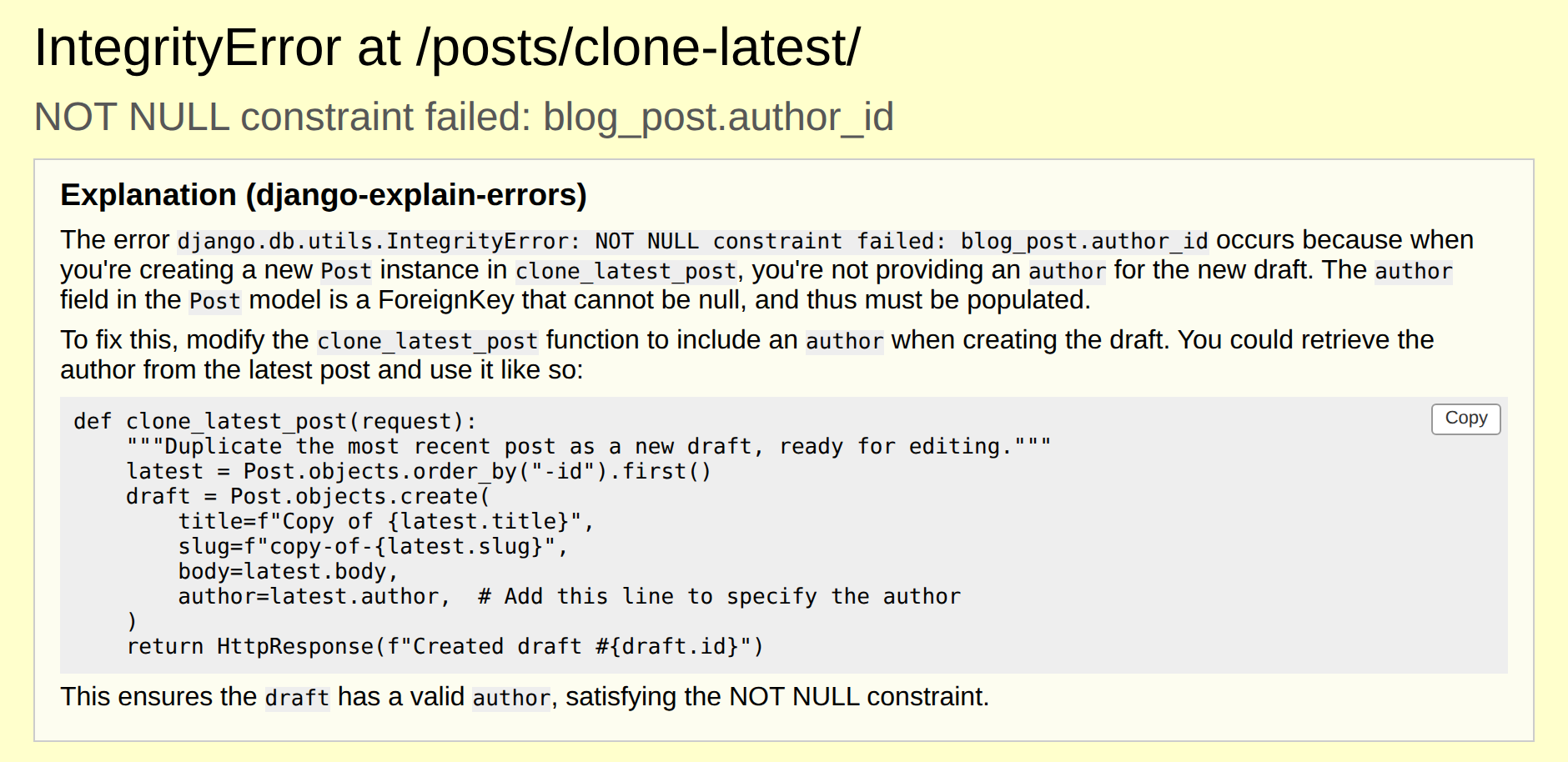
|
|
73
|
+
|
|
74
|
+
*Real `gpt-4o-mini` output with RAG enabled, recorded by the eval harness
|
|
75
|
+
on its `missing_fk` fixture.*
|
|
76
|
+
|
|
66
77
|
## Scope
|
|
67
78
|
|
|
68
79
|
This package explains errors for a person, not for a coding agent to consume
|
|
69
|
-
programmatically. The explanation is written for a human reader,
|
|
70
|
-
|
|
80
|
+
programmatically. The explanation is written for a human reader, on Django's
|
|
81
|
+
debug page in the browser or in a terminal, and the output format assumes
|
|
82
|
+
that reader.
|
|
71
83
|
|
|
72
84
|
If a coding agent is doing the debugging, it does not need this. Agents read tracebacks directly,
|
|
73
85
|
and tools that expose live runtime state (debugger-over-MCP servers, `mcp-django`) serve that case
|
|
@@ -78,9 +90,18 @@ Local development only. It requires `DEBUG = True` and is inert otherwise.
|
|
|
78
90
|
## Features
|
|
79
91
|
|
|
80
92
|
- Captures Django errors and exceptions
|
|
93
|
+
- Shows the explanation on Django's debug page, directly under the
|
|
94
|
+
exception headline (`EXPLAIN_ERRORS_INJECT_DEBUG_PAGE`, on by default)
|
|
95
|
+
- Copy button on each code block in the explanation, so a suggested fix
|
|
96
|
+
copies in one click
|
|
97
|
+
- Prints the explanation to stdout, for terminal workflows and logs
|
|
98
|
+
(`EXPLAIN_ERRORS_PRINT_STDOUT`, on by default)
|
|
99
|
+
- Optional JSON 500 response instead of the debug page
|
|
100
|
+
(`EXPLAIN_ERRORS_PRESERVE_DEBUG_PAGE = False`)
|
|
81
101
|
- Explains errors using OpenAI, Anthropic's Claude models, or any other
|
|
82
102
|
OpenAI-compatible endpoint (Ollama, LM Studio, Azure, gateways) via `OPENAI_BASE_URL`
|
|
83
|
-
-
|
|
103
|
+
- Codebase-aware explanations via RAG over a local sqlite-vec index
|
|
104
|
+
(recommended; see "Codebase-aware explanations" below)
|
|
84
105
|
- Explanations in your language via `EXPLAIN_ERRORS_LANGUAGE`, with exception names,
|
|
85
106
|
identifiers, and code kept in English
|
|
86
107
|
- Redacts secrets, tokens, and emails from tracebacks before sending
|
|
@@ -97,13 +118,16 @@ pip install django-explain-errors
|
|
|
97
118
|
|
|
98
119
|
2. **Add the middleware to your Django project**:
|
|
99
120
|
|
|
100
|
-
- Open your `settings.py` file and
|
|
121
|
+
- Open your `settings.py` file and register the middleware only when `DEBUG` is on (see
|
|
122
|
+
Production Safety below for why):
|
|
101
123
|
|
|
102
124
|
```python
|
|
103
125
|
MIDDLEWARE = [
|
|
104
126
|
...
|
|
105
|
-
'explain_errors.middleware.ExplainErrorsMiddleware',
|
|
106
127
|
]
|
|
128
|
+
|
|
129
|
+
if DEBUG:
|
|
130
|
+
MIDDLEWARE.append('explain_errors.middleware.ExplainErrorsMiddleware')
|
|
107
131
|
```
|
|
108
132
|
|
|
109
133
|
In the default preserve mode, `process_exception` returns `None`, so exception handling
|
|
@@ -117,15 +141,39 @@ pip install django-explain-errors
|
|
|
117
141
|
|
|
118
142
|
3. **Set up environment variables**:
|
|
119
143
|
|
|
120
|
-
- Create a `.env` file in your project's root directory and add your
|
|
144
|
+
- Create a `.env` file in your project's root directory and add your API key. Alternatively, you can set it in `settings.py`:
|
|
121
145
|
|
|
122
146
|
```plaintext
|
|
123
|
-
OPENAI_API_KEY=
|
|
147
|
+
OPENAI_API_KEY=your_api_key_here
|
|
124
148
|
```
|
|
125
149
|
|
|
126
150
|
The API key is not required if you set `OPENAI_BASE_URL` to a local
|
|
127
151
|
server such as Ollama, which does not authenticate requests.
|
|
128
152
|
|
|
153
|
+
## Production Safety
|
|
154
|
+
|
|
155
|
+
This middleware is intended for local development only. When active, it sends exception
|
|
156
|
+
tracebacks to the configured LLM provider, which may include source code, file paths, and
|
|
157
|
+
local variable values. Keep it out of production.
|
|
158
|
+
|
|
159
|
+
**Primary safeguard:** register the middleware only when `DEBUG` is on, or only in your
|
|
160
|
+
development settings module:
|
|
161
|
+
|
|
162
|
+
```python
|
|
163
|
+
# settings.py
|
|
164
|
+
if DEBUG:
|
|
165
|
+
MIDDLEWARE.append("explain_errors.middleware.ExplainErrorsMiddleware")
|
|
166
|
+
```
|
|
167
|
+
|
|
168
|
+
See Installation above for where the middleware can sit in `MIDDLEWARE`.
|
|
169
|
+
|
|
170
|
+
**Secondary safeguard:** run Django's deployment checks in CI against your production settings.
|
|
171
|
+
This fails the build if `DEBUG = True` (`security.W018`):
|
|
172
|
+
|
|
173
|
+
```bash
|
|
174
|
+
python manage.py check --deploy --fail-level WARNING
|
|
175
|
+
```
|
|
176
|
+
|
|
129
177
|
## Usage
|
|
130
178
|
|
|
131
179
|
1. **Ensure DEBUG is set to True**:
|
|
@@ -138,17 +186,63 @@ pip install django-explain-errors
|
|
|
138
186
|
|
|
139
187
|
2. **Trigger an error in your Django application**:
|
|
140
188
|
|
|
141
|
-
The middleware captures the error, sends it to the configured model for explanation,
|
|
189
|
+
The middleware captures the error, sends it to the configured model for explanation, prints the explanation to stdout, and adds it as a banner on Django's debug page. By default (`EXPLAIN_ERRORS_PRESERVE_DEBUG_PAGE=True`), exception handling then continues normally, so Django (or whatever else is watching, such as `runserver_plus` or Sentry, see Compatibility below) renders its usual response. The only change is the banner on Django's own debug page. Set `EXPLAIN_ERRORS_INJECT_DEBUG_PAGE = False` to remove it, or `EXPLAIN_ERRORS_PRESERVE_DEBUG_PAGE = False` to instead get a JSON `500` response containing the error message and the explanation.
|
|
190
|
+
|
|
191
|
+
In the terminal, the explanation is printed with the model that produced it:
|
|
192
|
+
|
|
193
|
+
```
|
|
194
|
+
Error explanation (gpt-4o-mini):
|
|
195
|
+
The view raised a ValueError because ...
|
|
196
|
+
```
|
|
142
197
|
|
|
143
198
|
## Async Support
|
|
144
199
|
|
|
145
200
|
The middleware exposes both `sync_capable = True` and `async_capable = True`. At initialization it inspects `get_response` to decide whether it is part of a sync or async chain:
|
|
146
201
|
|
|
147
202
|
- Under WSGI (for example `runserver` with sync views), requests flow through the synchronous handler.
|
|
148
|
-
- Under ASGI (for example with async views), requests are awaited through the async handler. The blocking
|
|
203
|
+
- Under ASGI (for example with async views), requests are awaited through the async handler. The blocking model API call is offloaded with `asgiref.sync.sync_to_async` so the event loop is not blocked.
|
|
149
204
|
|
|
150
205
|
No additional settings are needed. See Installation above for where to place the middleware in `MIDDLEWARE`.
|
|
151
206
|
|
|
207
|
+
## Debug page injection
|
|
208
|
+
|
|
209
|
+
When Django renders its debug page for a 500, `explain_errors` also inserts a banner
|
|
210
|
+
containing the explanation directly under the exception headline, in addition to printing
|
|
211
|
+
it to stdout.
|
|
212
|
+
|
|
213
|
+
Controlled by `EXPLAIN_ERRORS_INJECT_DEBUG_PAGE`, default `True`. Injection happens only
|
|
214
|
+
when all of the following hold:
|
|
215
|
+
|
|
216
|
+
- `DEBUG` is `True`
|
|
217
|
+
- `EXPLAIN_ERRORS_INJECT_DEBUG_PAGE` is `True` (the default)
|
|
218
|
+
- `EXPLAIN_ERRORS_PRESERVE_DEBUG_PAGE` is `True` (the default). With
|
|
219
|
+
`EXPLAIN_ERRORS_PRESERVE_DEBUG_PAGE=False`, the JSON 500 path runs instead and there is
|
|
220
|
+
no debug page to inject into.
|
|
221
|
+
- an explanation was actually produced (not throttled, and the API call succeeded)
|
|
222
|
+
|
|
223
|
+
The banner appears only on the HTML debug page, styled inline (bordered box, light
|
|
224
|
+
background) so it reads on Django's page. The explanation is HTML-escaped first, then a small
|
|
225
|
+
Markdown subset (inline code, code blocks, bold, lists) is rendered as HTML. Nothing from the
|
|
226
|
+
model is ever marked safe.
|
|
227
|
+
|
|
228
|
+
Each fenced code block gets a "Copy" button that copies the exact code (via
|
|
229
|
+
`navigator.clipboard` on secure contexts such as `localhost`, or a text-selection fallback
|
|
230
|
+
otherwise, for example when `runserver` is reached by IP over plain HTTP).
|
|
231
|
+
|
|
232
|
+
**Fails open.** Any problem building or inserting the banner (a missing request, an
|
|
233
|
+
unexpected debug page layout, anything else) logs one warning and leaves Django's normal
|
|
234
|
+
debug page untouched. This code can never turn a working debug page into a broken one.
|
|
235
|
+
|
|
236
|
+
**Custom exception reporters.** If your project already sets a custom
|
|
237
|
+
`DEFAULT_EXCEPTION_REPORTER`, or something earlier in the request sets
|
|
238
|
+
`request.exception_reporter_class`, `explain_errors` leaves it alone and skips injection
|
|
239
|
+
(logged at debug level) rather than overriding it.
|
|
240
|
+
|
|
241
|
+
**Upgrading.** Turning this on, or upgrading to a version where it defaults on, changes
|
|
242
|
+
what Django's debug page looks like: a new section appears above the request metadata
|
|
243
|
+
table. If you rely on the debug page's exact markup (a scraper, a screenshot test), account
|
|
244
|
+
for this.
|
|
245
|
+
|
|
152
246
|
## Compatibility
|
|
153
247
|
|
|
154
248
|
How this middleware interacts with other error-handling and debugging tools, in the default
|
|
@@ -156,10 +250,10 @@ preserve mode and with `EXPLAIN_ERRORS_PRESERVE_DEBUG_PAGE=False`:
|
|
|
156
250
|
|
|
157
251
|
| Package | Preserve mode (default) | `EXPLAIN_ERRORS_PRESERVE_DEBUG_PAGE=False` |
|
|
158
252
|
| ------- | ------------------------ | ------------------------------------------- |
|
|
159
|
-
| Django Debug Toolbar | Works — Django renders its
|
|
253
|
+
| Django Debug Toolbar | Works — Django renders its debug page (with the explanation banner, unless `EXPLAIN_ERRORS_INJECT_DEBUG_PAGE = False`), and Debug Toolbar injects into it. | Broken — the JSON 500 response has no HTML to inject into. |
|
|
160
254
|
| Sentry, Rollbar | Work — the exception propagates and Django re-raises it, so `got_request_exception` fires. | Broken — returning a response ends exception handling before `got_request_exception` fires. |
|
|
161
255
|
| Django REST Framework | Partial — only exceptions DRF does not already handle itself reach this middleware. | Partial, same reason. |
|
|
162
|
-
| Silk and other profiling panels | Timings are inflated by the
|
|
256
|
+
| Silk and other profiling panels | Timings are inflated by the model API call, since `process_exception` blocks the request path. | Same. |
|
|
163
257
|
| CORS, GZip, WhiteNoise | No interaction. | No interaction. |
|
|
164
258
|
| `runserver_plus` / Werkzeug debugger | Works — returning `None` re-raises the original exception, and `django-extensions` replaces Django's debug-page renderer with one that re-raises instead, so Werkzeug's WSGI wrapper catches it and shows the interactive debugger. | Broken — the JSON 500 response ends exception handling before it reaches `runserver_plus`'s exception hook, so the Werkzeug debugger never appears. |
|
|
165
259
|
|
|
@@ -183,9 +277,11 @@ developer is actually investigating.
|
|
|
183
277
|
| `DEBUG` | Yes | The middleware is only active when `DEBUG=True`. When `False`, requests pass through untouched. |
|
|
184
278
|
| `OPENAI_MODEL` | No | Model used for explanations. Defaults to `gpt-4o-mini`. |
|
|
185
279
|
| `OPENAI_MAX_TOKENS` | No | Ceiling on tokens generated for the explanation, not a target — the system prompt itself asks for a concise answer. Defaults to `1000`; scales up automatically when `EXPLAIN_ERRORS_LANGUAGE` is set (see below), unless you set this explicitly, which always overrides the scaling. |
|
|
186
|
-
| `OPENAI_TIMEOUT` | No | Request timeout in seconds for
|
|
280
|
+
| `OPENAI_TIMEOUT` | No | Request timeout in seconds for model API calls. Defaults to `10`. |
|
|
187
281
|
| `OPENAI_MAX_TRACEBACK_CHARS` | No | Total character budget for the traceback sent to the model. Application frames (your own code, as opposed to Django, the standard library, or installed packages) are always kept; library frames fill whatever budget remains, nearest the raise point first, with an `... N library frames omitted ...` line where frames are dropped. If the application frames alone exceed the budget, falls back to keeping the last N characters of the raw traceback. Defaults to `3000`. |
|
|
188
|
-
| `EXPLAIN_ERRORS_PRESERVE_DEBUG_PAGE` | No | When `True` (the default), the middleware
|
|
282
|
+
| `EXPLAIN_ERRORS_PRESERVE_DEBUG_PAGE` | No | When `True` (the default), the middleware returns `None` (after printing the explanation to stdout, unless `EXPLAIN_ERRORS_PRINT_STDOUT = False`), so exception handling continues normally and Django renders its debug page (with the explanation banner, controlled by `EXPLAIN_ERRORS_INJECT_DEBUG_PAGE`). Set to `False` to instead return a JSON 500 response, which ends exception handling early (see Compatibility above). |
|
|
283
|
+
| `EXPLAIN_ERRORS_INJECT_DEBUG_PAGE` | No | When `True` (the default), also injects the explanation as a banner into Django's debug page, in addition to stdout. Requires `EXPLAIN_ERRORS_PRESERVE_DEBUG_PAGE=True` (the default); see Debug Page Injection above. |
|
|
284
|
+
| `EXPLAIN_ERRORS_PRINT_STDOUT` | No | When `True` (the default), prints the explanation to stdout. Set to `False` to suppress it, for example when `EXPLAIN_ERRORS_INJECT_DEBUG_PAGE` already shows it in the browser. The failure message (when the model API call itself errors) always prints. For requests where nobody views the debug page (API clients, which get Django's plain-text error response, and `fetch`/HTMX requests, whose HTML response is never displayed), stdout is the only channel that shows the explanation, so turn this off only in browser-first workflows. |
|
|
189
285
|
| `OPENAI_BASE_URL` (env or settings) | No | Base URL for any OpenAI-compatible API (for example Ollama at `http://localhost:11434/v1`). When set, a missing API key is replaced with a placeholder since local servers do not require one. |
|
|
190
286
|
| `EXPLAIN_ERRORS_MAX_CALLS` | No | Together with `EXPLAIN_ERRORS_WINDOW_SECONDS`, caps API spend to at most this many explanations within a rolling window; once the cap is hit, further errors in that window are not sent for explanation until an earlier call ages out. Defaults to `5`. |
|
|
191
287
|
| `EXPLAIN_ERRORS_WINDOW_SECONDS` | No | Length in seconds of the rolling window `EXPLAIN_ERRORS_MAX_CALLS` is measured against. Defaults to `60` (with the defaults, at most 5 explanations per 60-second window). |
|
|
@@ -299,7 +395,9 @@ also retrieves the most relevant chunks of your own project's source code
|
|
|
299
395
|
from a local vector index and includes them in the prompt, so explanations
|
|
300
396
|
can reference your actual functions and classes instead of guessing at them.
|
|
301
397
|
|
|
302
|
-
|
|
398
|
+
Recommended for most projects. It is opt-in only because setup takes three
|
|
399
|
+
steps (install the extra, build the index, enable it), and it adds no
|
|
400
|
+
dependencies or behavior until you do.
|
|
303
401
|
|
|
304
402
|
### Install the extra
|
|
305
403
|
|
|
@@ -322,7 +420,7 @@ python manage.py build_error_index
|
|
|
322
420
|
|
|
323
421
|
This walks your project, chunks Python files by top-level function/class
|
|
324
422
|
(and other text files by fixed-size line windows), embeds each chunk with
|
|
325
|
-
the
|
|
423
|
+
the configured endpoint's embeddings API, and writes them to a local index file. Re-run it
|
|
326
424
|
whenever your source changes meaningfully. Indexing is not automatic.
|
|
327
425
|
Rebuilding is idempotent: it builds into a temp file and atomically replaces
|
|
328
426
|
the previous index.
|
|
@@ -342,15 +440,14 @@ EXPLAIN_ERRORS_RAG_ENABLED = True
|
|
|
342
440
|
| `EXPLAIN_ERRORS_RAG_ENABLED` | `False` | Master switch for the RAG layer. |
|
|
343
441
|
| `EXPLAIN_ERRORS_RAG_INDEX_PATH` | `<BASE_DIR>/.explain_errors_index.db` | Path to the local vector index file. |
|
|
344
442
|
| `EXPLAIN_ERRORS_RAG_TOP_K` | `4` | Number of chunks retrieved and injected into the prompt. |
|
|
345
|
-
| `EXPLAIN_ERRORS_RAG_EMBED_MODEL` | `"text-embedding-3-small"` |
|
|
443
|
+
| `EXPLAIN_ERRORS_RAG_EMBED_MODEL` | `"text-embedding-3-small"` | Embedding model used for indexing and retrieval. Must exist on the configured endpoint. |
|
|
346
444
|
| `EXPLAIN_ERRORS_RAG_INCLUDE` | `None` (defaults to `BASE_DIR`) | List of directories to index. |
|
|
347
445
|
| `EXPLAIN_ERRORS_RAG_EXCLUDE` | migrations, venvs, `node_modules`, static, media, `.git` | Directory names to skip while indexing. |
|
|
348
446
|
| `EXPLAIN_ERRORS_RAG_MAX_PROMPT_CHARS` | `6000` | Combined character budget for the traceback + retrieved source sections of the prompt. |
|
|
349
447
|
|
|
350
448
|
Every chunk of source code and every retrieval query is passed through the
|
|
351
449
|
same `sanitize_traceback()` redaction used for tracebacks, which strips
|
|
352
|
-
patterns that look like secrets, tokens, and emails before anything is sent
|
|
353
|
-
to OpenAI or written to the index. It's a pattern-based filter, not a
|
|
450
|
+
patterns that look like secrets, tokens, and emails before anything is sent to the model API or written to the index. It's a pattern-based filter, not a
|
|
354
451
|
guarantee: it catches recognizable secret shapes, not arbitrary sensitive
|
|
355
452
|
data that doesn't match one.
|
|
356
453
|
|
|
@@ -380,6 +477,12 @@ required `author` foreign key. The traceback the model actually received
|
|
|
380
477
|
was already truncated to `OPENAI_MAX_TRACEBACK_CHARS`, so it contains no
|
|
381
478
|
application code at all, only Django/SQLite internals:
|
|
382
479
|
|
|
480
|
+
This example was recorded before 0.7.0, when tracebacks were trimmed to
|
|
481
|
+
their last N characters. Since 0.7.0 your application's frames are always
|
|
482
|
+
kept, so a traceback-only explanation would now see `clone_latest_post`
|
|
483
|
+
too. The measured results in "Does RAG actually help?" below were run
|
|
484
|
+
after that change.
|
|
485
|
+
|
|
383
486
|
```
|
|
384
487
|
...(truncated)...
|
|
385
488
|
File ".../django/db/models/base.py", line 904, in save
|
|
@@ -486,5 +589,5 @@ Contributions are welcome! Please open an issue or submit a pull request for any
|
|
|
486
589
|
## Acknowledgements
|
|
487
590
|
|
|
488
591
|
- [Django](https://www.djangoproject.com/)
|
|
489
|
-
- [OpenAI](https://
|
|
592
|
+
- [OpenAI Python SDK](https://github.com/openai/openai-python)
|
|
490
593
|
- [python-dotenv](https://github.com/theskumar/python-dotenv)
|
|
@@ -1,17 +1,23 @@
|
|
|
1
1
|
# Django Explain Errors Middleware
|
|
2
2
|
|
|
3
|
-
|
|
4
|
-
to a language model
|
|
5
|
-
|
|
6
|
-
|
|
7
|
-
|
|
8
|
-
|
|
9
|
-
|
|
10
|
-
|
|
11
|
-
|
|
12
|
-
|
|
13
|
-
|
|
14
|
-
|
|
3
|
+
When debug mode is on, this Django middleware sends each unhandled exception
|
|
4
|
+
to a language model and shows its explanation of what went wrong and how to
|
|
5
|
+
fix it on Django's debug page, directly under the exception headline. The
|
|
6
|
+
explanation is also printed to stdout. The middleware works with the OpenAI
|
|
7
|
+
API out of the box, with Anthropic's Claude models through Anthropic's
|
|
8
|
+
OpenAI-compatible endpoint, and with any other OpenAI-compatible endpoint
|
|
9
|
+
(Ollama, LM Studio, Azure, or a corporate gateway) by setting a base URL, so
|
|
10
|
+
explanations can run entirely on a local model if you prefer not to send
|
|
11
|
+
code off your machine.
|
|
12
|
+
|
|
13
|
+
Enabling RAG is strongly recommended. With it, the middleware retrieves the
|
|
14
|
+
relevant parts of your own project source from a local vector index, so
|
|
15
|
+
explanations name the actual file and function that failed instead of
|
|
16
|
+
guessing. In the package's eval harness, RAG-grounded explanations won 35
|
|
17
|
+
of 43 blind comparisons, with the gap concentrated in pointing at the right
|
|
18
|
+
fix location and not inventing details (see "Does RAG actually help?"
|
|
19
|
+
below). It is off by default because it needs an optional extra and a
|
|
20
|
+
one-time index build.
|
|
15
21
|
|
|
16
22
|
The middleware supports both synchronous (WSGI) and asynchronous (ASGI)
|
|
17
23
|
views. It auto-detects the view chain at startup and routes requests through
|
|
@@ -19,11 +25,17 @@ the matching path, so no extra configuration is required for either server
|
|
|
19
25
|
type. Tracebacks are sanitized before leaving the process, and API calls are
|
|
20
26
|
rate limited.
|
|
21
27
|
|
|
28
|
+

|
|
29
|
+
|
|
30
|
+
*Real `gpt-4o-mini` output with RAG enabled, recorded by the eval harness
|
|
31
|
+
on its `missing_fk` fixture.*
|
|
32
|
+
|
|
22
33
|
## Scope
|
|
23
34
|
|
|
24
35
|
This package explains errors for a person, not for a coding agent to consume
|
|
25
|
-
programmatically. The explanation is written for a human reader,
|
|
26
|
-
|
|
36
|
+
programmatically. The explanation is written for a human reader, on Django's
|
|
37
|
+
debug page in the browser or in a terminal, and the output format assumes
|
|
38
|
+
that reader.
|
|
27
39
|
|
|
28
40
|
If a coding agent is doing the debugging, it does not need this. Agents read tracebacks directly,
|
|
29
41
|
and tools that expose live runtime state (debugger-over-MCP servers, `mcp-django`) serve that case
|
|
@@ -34,9 +46,18 @@ Local development only. It requires `DEBUG = True` and is inert otherwise.
|
|
|
34
46
|
## Features
|
|
35
47
|
|
|
36
48
|
- Captures Django errors and exceptions
|
|
49
|
+
- Shows the explanation on Django's debug page, directly under the
|
|
50
|
+
exception headline (`EXPLAIN_ERRORS_INJECT_DEBUG_PAGE`, on by default)
|
|
51
|
+
- Copy button on each code block in the explanation, so a suggested fix
|
|
52
|
+
copies in one click
|
|
53
|
+
- Prints the explanation to stdout, for terminal workflows and logs
|
|
54
|
+
(`EXPLAIN_ERRORS_PRINT_STDOUT`, on by default)
|
|
55
|
+
- Optional JSON 500 response instead of the debug page
|
|
56
|
+
(`EXPLAIN_ERRORS_PRESERVE_DEBUG_PAGE = False`)
|
|
37
57
|
- Explains errors using OpenAI, Anthropic's Claude models, or any other
|
|
38
58
|
OpenAI-compatible endpoint (Ollama, LM Studio, Azure, gateways) via `OPENAI_BASE_URL`
|
|
39
|
-
-
|
|
59
|
+
- Codebase-aware explanations via RAG over a local sqlite-vec index
|
|
60
|
+
(recommended; see "Codebase-aware explanations" below)
|
|
40
61
|
- Explanations in your language via `EXPLAIN_ERRORS_LANGUAGE`, with exception names,
|
|
41
62
|
identifiers, and code kept in English
|
|
42
63
|
- Redacts secrets, tokens, and emails from tracebacks before sending
|
|
@@ -53,13 +74,16 @@ pip install django-explain-errors
|
|
|
53
74
|
|
|
54
75
|
2. **Add the middleware to your Django project**:
|
|
55
76
|
|
|
56
|
-
- Open your `settings.py` file and
|
|
77
|
+
- Open your `settings.py` file and register the middleware only when `DEBUG` is on (see
|
|
78
|
+
Production Safety below for why):
|
|
57
79
|
|
|
58
80
|
```python
|
|
59
81
|
MIDDLEWARE = [
|
|
60
82
|
...
|
|
61
|
-
'explain_errors.middleware.ExplainErrorsMiddleware',
|
|
62
83
|
]
|
|
84
|
+
|
|
85
|
+
if DEBUG:
|
|
86
|
+
MIDDLEWARE.append('explain_errors.middleware.ExplainErrorsMiddleware')
|
|
63
87
|
```
|
|
64
88
|
|
|
65
89
|
In the default preserve mode, `process_exception` returns `None`, so exception handling
|
|
@@ -73,15 +97,39 @@ pip install django-explain-errors
|
|
|
73
97
|
|
|
74
98
|
3. **Set up environment variables**:
|
|
75
99
|
|
|
76
|
-
- Create a `.env` file in your project's root directory and add your
|
|
100
|
+
- Create a `.env` file in your project's root directory and add your API key. Alternatively, you can set it in `settings.py`:
|
|
77
101
|
|
|
78
102
|
```plaintext
|
|
79
|
-
OPENAI_API_KEY=
|
|
103
|
+
OPENAI_API_KEY=your_api_key_here
|
|
80
104
|
```
|
|
81
105
|
|
|
82
106
|
The API key is not required if you set `OPENAI_BASE_URL` to a local
|
|
83
107
|
server such as Ollama, which does not authenticate requests.
|
|
84
108
|
|
|
109
|
+
## Production Safety
|
|
110
|
+
|
|
111
|
+
This middleware is intended for local development only. When active, it sends exception
|
|
112
|
+
tracebacks to the configured LLM provider, which may include source code, file paths, and
|
|
113
|
+
local variable values. Keep it out of production.
|
|
114
|
+
|
|
115
|
+
**Primary safeguard:** register the middleware only when `DEBUG` is on, or only in your
|
|
116
|
+
development settings module:
|
|
117
|
+
|
|
118
|
+
```python
|
|
119
|
+
# settings.py
|
|
120
|
+
if DEBUG:
|
|
121
|
+
MIDDLEWARE.append("explain_errors.middleware.ExplainErrorsMiddleware")
|
|
122
|
+
```
|
|
123
|
+
|
|
124
|
+
See Installation above for where the middleware can sit in `MIDDLEWARE`.
|
|
125
|
+
|
|
126
|
+
**Secondary safeguard:** run Django's deployment checks in CI against your production settings.
|
|
127
|
+
This fails the build if `DEBUG = True` (`security.W018`):
|
|
128
|
+
|
|
129
|
+
```bash
|
|
130
|
+
python manage.py check --deploy --fail-level WARNING
|
|
131
|
+
```
|
|
132
|
+
|
|
85
133
|
## Usage
|
|
86
134
|
|
|
87
135
|
1. **Ensure DEBUG is set to True**:
|
|
@@ -94,17 +142,63 @@ pip install django-explain-errors
|
|
|
94
142
|
|
|
95
143
|
2. **Trigger an error in your Django application**:
|
|
96
144
|
|
|
97
|
-
The middleware captures the error, sends it to the configured model for explanation,
|
|
145
|
+
The middleware captures the error, sends it to the configured model for explanation, prints the explanation to stdout, and adds it as a banner on Django's debug page. By default (`EXPLAIN_ERRORS_PRESERVE_DEBUG_PAGE=True`), exception handling then continues normally, so Django (or whatever else is watching, such as `runserver_plus` or Sentry, see Compatibility below) renders its usual response. The only change is the banner on Django's own debug page. Set `EXPLAIN_ERRORS_INJECT_DEBUG_PAGE = False` to remove it, or `EXPLAIN_ERRORS_PRESERVE_DEBUG_PAGE = False` to instead get a JSON `500` response containing the error message and the explanation.
|
|
146
|
+
|
|
147
|
+
In the terminal, the explanation is printed with the model that produced it:
|
|
148
|
+
|
|
149
|
+
```
|
|
150
|
+
Error explanation (gpt-4o-mini):
|
|
151
|
+
The view raised a ValueError because ...
|
|
152
|
+
```
|
|
98
153
|
|
|
99
154
|
## Async Support
|
|
100
155
|
|
|
101
156
|
The middleware exposes both `sync_capable = True` and `async_capable = True`. At initialization it inspects `get_response` to decide whether it is part of a sync or async chain:
|
|
102
157
|
|
|
103
158
|
- Under WSGI (for example `runserver` with sync views), requests flow through the synchronous handler.
|
|
104
|
-
- Under ASGI (for example with async views), requests are awaited through the async handler. The blocking
|
|
159
|
+
- Under ASGI (for example with async views), requests are awaited through the async handler. The blocking model API call is offloaded with `asgiref.sync.sync_to_async` so the event loop is not blocked.
|
|
105
160
|
|
|
106
161
|
No additional settings are needed. See Installation above for where to place the middleware in `MIDDLEWARE`.
|
|
107
162
|
|
|
163
|
+
## Debug page injection
|
|
164
|
+
|
|
165
|
+
When Django renders its debug page for a 500, `explain_errors` also inserts a banner
|
|
166
|
+
containing the explanation directly under the exception headline, in addition to printing
|
|
167
|
+
it to stdout.
|
|
168
|
+
|
|
169
|
+
Controlled by `EXPLAIN_ERRORS_INJECT_DEBUG_PAGE`, default `True`. Injection happens only
|
|
170
|
+
when all of the following hold:
|
|
171
|
+
|
|
172
|
+
- `DEBUG` is `True`
|
|
173
|
+
- `EXPLAIN_ERRORS_INJECT_DEBUG_PAGE` is `True` (the default)
|
|
174
|
+
- `EXPLAIN_ERRORS_PRESERVE_DEBUG_PAGE` is `True` (the default). With
|
|
175
|
+
`EXPLAIN_ERRORS_PRESERVE_DEBUG_PAGE=False`, the JSON 500 path runs instead and there is
|
|
176
|
+
no debug page to inject into.
|
|
177
|
+
- an explanation was actually produced (not throttled, and the API call succeeded)
|
|
178
|
+
|
|
179
|
+
The banner appears only on the HTML debug page, styled inline (bordered box, light
|
|
180
|
+
background) so it reads on Django's page. The explanation is HTML-escaped first, then a small
|
|
181
|
+
Markdown subset (inline code, code blocks, bold, lists) is rendered as HTML. Nothing from the
|
|
182
|
+
model is ever marked safe.
|
|
183
|
+
|
|
184
|
+
Each fenced code block gets a "Copy" button that copies the exact code (via
|
|
185
|
+
`navigator.clipboard` on secure contexts such as `localhost`, or a text-selection fallback
|
|
186
|
+
otherwise, for example when `runserver` is reached by IP over plain HTTP).
|
|
187
|
+
|
|
188
|
+
**Fails open.** Any problem building or inserting the banner (a missing request, an
|
|
189
|
+
unexpected debug page layout, anything else) logs one warning and leaves Django's normal
|
|
190
|
+
debug page untouched. This code can never turn a working debug page into a broken one.
|
|
191
|
+
|
|
192
|
+
**Custom exception reporters.** If your project already sets a custom
|
|
193
|
+
`DEFAULT_EXCEPTION_REPORTER`, or something earlier in the request sets
|
|
194
|
+
`request.exception_reporter_class`, `explain_errors` leaves it alone and skips injection
|
|
195
|
+
(logged at debug level) rather than overriding it.
|
|
196
|
+
|
|
197
|
+
**Upgrading.** Turning this on, or upgrading to a version where it defaults on, changes
|
|
198
|
+
what Django's debug page looks like: a new section appears above the request metadata
|
|
199
|
+
table. If you rely on the debug page's exact markup (a scraper, a screenshot test), account
|
|
200
|
+
for this.
|
|
201
|
+
|
|
108
202
|
## Compatibility
|
|
109
203
|
|
|
110
204
|
How this middleware interacts with other error-handling and debugging tools, in the default
|
|
@@ -112,10 +206,10 @@ preserve mode and with `EXPLAIN_ERRORS_PRESERVE_DEBUG_PAGE=False`:
|
|
|
112
206
|
|
|
113
207
|
| Package | Preserve mode (default) | `EXPLAIN_ERRORS_PRESERVE_DEBUG_PAGE=False` |
|
|
114
208
|
| ------- | ------------------------ | ------------------------------------------- |
|
|
115
|
-
| Django Debug Toolbar | Works — Django renders its
|
|
209
|
+
| Django Debug Toolbar | Works — Django renders its debug page (with the explanation banner, unless `EXPLAIN_ERRORS_INJECT_DEBUG_PAGE = False`), and Debug Toolbar injects into it. | Broken — the JSON 500 response has no HTML to inject into. |
|
|
116
210
|
| Sentry, Rollbar | Work — the exception propagates and Django re-raises it, so `got_request_exception` fires. | Broken — returning a response ends exception handling before `got_request_exception` fires. |
|
|
117
211
|
| Django REST Framework | Partial — only exceptions DRF does not already handle itself reach this middleware. | Partial, same reason. |
|
|
118
|
-
| Silk and other profiling panels | Timings are inflated by the
|
|
212
|
+
| Silk and other profiling panels | Timings are inflated by the model API call, since `process_exception` blocks the request path. | Same. |
|
|
119
213
|
| CORS, GZip, WhiteNoise | No interaction. | No interaction. |
|
|
120
214
|
| `runserver_plus` / Werkzeug debugger | Works — returning `None` re-raises the original exception, and `django-extensions` replaces Django's debug-page renderer with one that re-raises instead, so Werkzeug's WSGI wrapper catches it and shows the interactive debugger. | Broken — the JSON 500 response ends exception handling before it reaches `runserver_plus`'s exception hook, so the Werkzeug debugger never appears. |
|
|
121
215
|
|
|
@@ -139,9 +233,11 @@ developer is actually investigating.
|
|
|
139
233
|
| `DEBUG` | Yes | The middleware is only active when `DEBUG=True`. When `False`, requests pass through untouched. |
|
|
140
234
|
| `OPENAI_MODEL` | No | Model used for explanations. Defaults to `gpt-4o-mini`. |
|
|
141
235
|
| `OPENAI_MAX_TOKENS` | No | Ceiling on tokens generated for the explanation, not a target — the system prompt itself asks for a concise answer. Defaults to `1000`; scales up automatically when `EXPLAIN_ERRORS_LANGUAGE` is set (see below), unless you set this explicitly, which always overrides the scaling. |
|
|
142
|
-
| `OPENAI_TIMEOUT` | No | Request timeout in seconds for
|
|
236
|
+
| `OPENAI_TIMEOUT` | No | Request timeout in seconds for model API calls. Defaults to `10`. |
|
|
143
237
|
| `OPENAI_MAX_TRACEBACK_CHARS` | No | Total character budget for the traceback sent to the model. Application frames (your own code, as opposed to Django, the standard library, or installed packages) are always kept; library frames fill whatever budget remains, nearest the raise point first, with an `... N library frames omitted ...` line where frames are dropped. If the application frames alone exceed the budget, falls back to keeping the last N characters of the raw traceback. Defaults to `3000`. |
|
|
144
|
-
| `EXPLAIN_ERRORS_PRESERVE_DEBUG_PAGE` | No | When `True` (the default), the middleware
|
|
238
|
+
| `EXPLAIN_ERRORS_PRESERVE_DEBUG_PAGE` | No | When `True` (the default), the middleware returns `None` (after printing the explanation to stdout, unless `EXPLAIN_ERRORS_PRINT_STDOUT = False`), so exception handling continues normally and Django renders its debug page (with the explanation banner, controlled by `EXPLAIN_ERRORS_INJECT_DEBUG_PAGE`). Set to `False` to instead return a JSON 500 response, which ends exception handling early (see Compatibility above). |
|
|
239
|
+
| `EXPLAIN_ERRORS_INJECT_DEBUG_PAGE` | No | When `True` (the default), also injects the explanation as a banner into Django's debug page, in addition to stdout. Requires `EXPLAIN_ERRORS_PRESERVE_DEBUG_PAGE=True` (the default); see Debug Page Injection above. |
|
|
240
|
+
| `EXPLAIN_ERRORS_PRINT_STDOUT` | No | When `True` (the default), prints the explanation to stdout. Set to `False` to suppress it, for example when `EXPLAIN_ERRORS_INJECT_DEBUG_PAGE` already shows it in the browser. The failure message (when the model API call itself errors) always prints. For requests where nobody views the debug page (API clients, which get Django's plain-text error response, and `fetch`/HTMX requests, whose HTML response is never displayed), stdout is the only channel that shows the explanation, so turn this off only in browser-first workflows. |
|
|
145
241
|
| `OPENAI_BASE_URL` (env or settings) | No | Base URL for any OpenAI-compatible API (for example Ollama at `http://localhost:11434/v1`). When set, a missing API key is replaced with a placeholder since local servers do not require one. |
|
|
146
242
|
| `EXPLAIN_ERRORS_MAX_CALLS` | No | Together with `EXPLAIN_ERRORS_WINDOW_SECONDS`, caps API spend to at most this many explanations within a rolling window; once the cap is hit, further errors in that window are not sent for explanation until an earlier call ages out. Defaults to `5`. |
|
|
147
243
|
| `EXPLAIN_ERRORS_WINDOW_SECONDS` | No | Length in seconds of the rolling window `EXPLAIN_ERRORS_MAX_CALLS` is measured against. Defaults to `60` (with the defaults, at most 5 explanations per 60-second window). |
|
|
@@ -255,7 +351,9 @@ also retrieves the most relevant chunks of your own project's source code
|
|
|
255
351
|
from a local vector index and includes them in the prompt, so explanations
|
|
256
352
|
can reference your actual functions and classes instead of guessing at them.
|
|
257
353
|
|
|
258
|
-
|
|
354
|
+
Recommended for most projects. It is opt-in only because setup takes three
|
|
355
|
+
steps (install the extra, build the index, enable it), and it adds no
|
|
356
|
+
dependencies or behavior until you do.
|
|
259
357
|
|
|
260
358
|
### Install the extra
|
|
261
359
|
|
|
@@ -278,7 +376,7 @@ python manage.py build_error_index
|
|
|
278
376
|
|
|
279
377
|
This walks your project, chunks Python files by top-level function/class
|
|
280
378
|
(and other text files by fixed-size line windows), embeds each chunk with
|
|
281
|
-
the
|
|
379
|
+
the configured endpoint's embeddings API, and writes them to a local index file. Re-run it
|
|
282
380
|
whenever your source changes meaningfully. Indexing is not automatic.
|
|
283
381
|
Rebuilding is idempotent: it builds into a temp file and atomically replaces
|
|
284
382
|
the previous index.
|
|
@@ -298,15 +396,14 @@ EXPLAIN_ERRORS_RAG_ENABLED = True
|
|
|
298
396
|
| `EXPLAIN_ERRORS_RAG_ENABLED` | `False` | Master switch for the RAG layer. |
|
|
299
397
|
| `EXPLAIN_ERRORS_RAG_INDEX_PATH` | `<BASE_DIR>/.explain_errors_index.db` | Path to the local vector index file. |
|
|
300
398
|
| `EXPLAIN_ERRORS_RAG_TOP_K` | `4` | Number of chunks retrieved and injected into the prompt. |
|
|
301
|
-
| `EXPLAIN_ERRORS_RAG_EMBED_MODEL` | `"text-embedding-3-small"` |
|
|
399
|
+
| `EXPLAIN_ERRORS_RAG_EMBED_MODEL` | `"text-embedding-3-small"` | Embedding model used for indexing and retrieval. Must exist on the configured endpoint. |
|
|
302
400
|
| `EXPLAIN_ERRORS_RAG_INCLUDE` | `None` (defaults to `BASE_DIR`) | List of directories to index. |
|
|
303
401
|
| `EXPLAIN_ERRORS_RAG_EXCLUDE` | migrations, venvs, `node_modules`, static, media, `.git` | Directory names to skip while indexing. |
|
|
304
402
|
| `EXPLAIN_ERRORS_RAG_MAX_PROMPT_CHARS` | `6000` | Combined character budget for the traceback + retrieved source sections of the prompt. |
|
|
305
403
|
|
|
306
404
|
Every chunk of source code and every retrieval query is passed through the
|
|
307
405
|
same `sanitize_traceback()` redaction used for tracebacks, which strips
|
|
308
|
-
patterns that look like secrets, tokens, and emails before anything is sent
|
|
309
|
-
to OpenAI or written to the index. It's a pattern-based filter, not a
|
|
406
|
+
patterns that look like secrets, tokens, and emails before anything is sent to the model API or written to the index. It's a pattern-based filter, not a
|
|
310
407
|
guarantee: it catches recognizable secret shapes, not arbitrary sensitive
|
|
311
408
|
data that doesn't match one.
|
|
312
409
|
|
|
@@ -336,6 +433,12 @@ required `author` foreign key. The traceback the model actually received
|
|
|
336
433
|
was already truncated to `OPENAI_MAX_TRACEBACK_CHARS`, so it contains no
|
|
337
434
|
application code at all, only Django/SQLite internals:
|
|
338
435
|
|
|
436
|
+
This example was recorded before 0.7.0, when tracebacks were trimmed to
|
|
437
|
+
their last N characters. Since 0.7.0 your application's frames are always
|
|
438
|
+
kept, so a traceback-only explanation would now see `clone_latest_post`
|
|
439
|
+
too. The measured results in "Does RAG actually help?" below were run
|
|
440
|
+
after that change.
|
|
441
|
+
|
|
339
442
|
```
|
|
340
443
|
...(truncated)...
|
|
341
444
|
File ".../django/db/models/base.py", line 904, in save
|
|
@@ -442,5 +545,5 @@ Contributions are welcome! Please open an issue or submit a pull request for any
|
|
|
442
545
|
## Acknowledgements
|
|
443
546
|
|
|
444
547
|
- [Django](https://www.djangoproject.com/)
|
|
445
|
-
- [OpenAI](https://
|
|
548
|
+
- [OpenAI Python SDK](https://github.com/openai/openai-python)
|
|
446
549
|
- [python-dotenv](https://github.com/theskumar/python-dotenv)
|