django-debug-toolbar-datastar 0.1.0__tar.gz
This diff represents the content of publicly available package versions that have been released to one of the supported registries. The information contained in this diff is provided for informational purposes only and reflects changes between package versions as they appear in their respective public registries.
- django_debug_toolbar_datastar-0.1.0/.gitignore +12 -0
- django_debug_toolbar_datastar-0.1.0/LICENSE +29 -0
- django_debug_toolbar_datastar-0.1.0/PKG-INFO +120 -0
- django_debug_toolbar_datastar-0.1.0/README.md +99 -0
- django_debug_toolbar_datastar-0.1.0/pyproject.toml +33 -0
- django_debug_toolbar_datastar-0.1.0/src/django_datastar_toolbar/__init__.py +1 -0
- django_debug_toolbar_datastar-0.1.0/src/django_datastar_toolbar/apps.py +6 -0
- django_debug_toolbar_datastar-0.1.0/src/django_datastar_toolbar/panels.py +28 -0
- django_debug_toolbar_datastar-0.1.0/src/django_datastar_toolbar/static/django_datastar_toolbar/css/datastar_store.css +57 -0
- django_debug_toolbar_datastar-0.1.0/src/django_datastar_toolbar/static/django_datastar_toolbar/img/rocket.svg +6 -0
- django_debug_toolbar_datastar-0.1.0/src/django_datastar_toolbar/static/django_datastar_toolbar/js/datastar_store.js +160 -0
- django_debug_toolbar_datastar-0.1.0/src/django_datastar_toolbar/static/django_datastar_toolbar/js/display.js +113 -0
- django_debug_toolbar_datastar-0.1.0/src/django_datastar_toolbar/static/django_datastar_toolbar/js/search.js +76 -0
- django_debug_toolbar_datastar-0.1.0/src/django_datastar_toolbar/templates/django_datastar_toolbar/panels/datastar_store.html +11 -0
|
@@ -0,0 +1,29 @@
|
|
|
1
|
+
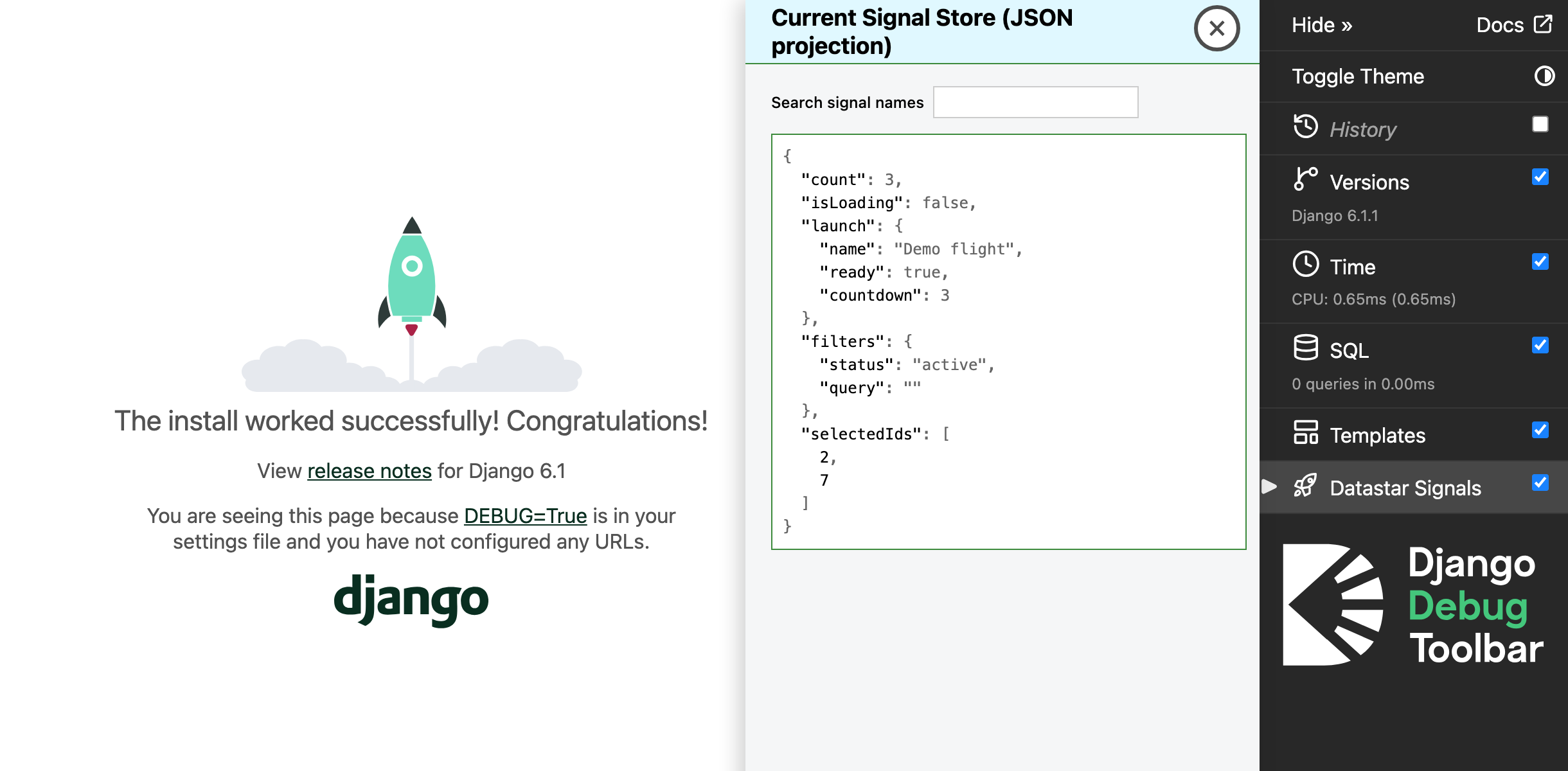
BSD 3-Clause License
|
|
2
|
+
|
|
3
|
+
Copyright (c) 2026, Marcus A. Lee, MarcusL11
|
|
4
|
+
All rights reserved.
|
|
5
|
+
|
|
6
|
+
Redistribution and use in source and binary forms, with or without
|
|
7
|
+
modification, are permitted provided that the following conditions are met:
|
|
8
|
+
|
|
9
|
+
1. Redistributions of source code must retain the above copyright notice, this
|
|
10
|
+
list of conditions and the following disclaimer.
|
|
11
|
+
|
|
12
|
+
2. Redistributions in binary form must reproduce the above copyright notice,
|
|
13
|
+
this list of conditions and the following disclaimer in the documentation
|
|
14
|
+
and/or other materials provided with the distribution.
|
|
15
|
+
|
|
16
|
+
3. Neither the name of the copyright holder nor the names of its contributors
|
|
17
|
+
may be used to endorse or promote products derived from this software without
|
|
18
|
+
specific prior written permission.
|
|
19
|
+
|
|
20
|
+
THIS SOFTWARE IS PROVIDED BY THE COPYRIGHT HOLDERS AND CONTRIBUTORS "AS IS"
|
|
21
|
+
AND ANY EXPRESS OR IMPLIED WARRANTIES, INCLUDING, BUT NOT LIMITED TO, THE
|
|
22
|
+
IMPLIED WARRANTIES OF MERCHANTABILITY AND FITNESS FOR A PARTICULAR PURPOSE ARE
|
|
23
|
+
DISCLAIMED. IN NO EVENT SHALL THE COPYRIGHT HOLDER OR CONTRIBUTORS BE LIABLE
|
|
24
|
+
FOR ANY DIRECT, INDIRECT, INCIDENTAL, SPECIAL, EXEMPLARY, OR CONSEQUENTIAL
|
|
25
|
+
DAMAGES (INCLUDING, BUT NOT LIMITED TO, PROCUREMENT OF SUBSTITUTE GOODS OR
|
|
26
|
+
SERVICES; LOSS OF USE, DATA, OR PROFITS; OR BUSINESS INTERRUPTION) HOWEVER
|
|
27
|
+
CAUSED AND ON ANY THEORY OF LIABILITY, WHETHER IN CONTRACT, STRICT LIABILITY,
|
|
28
|
+
OR TORT (INCLUDING NEGLIGENCE OR OTHERWISE) ARISING IN ANY WAY OUT OF THE USE
|
|
29
|
+
OF THIS SOFTWARE, EVEN IF ADVISED OF THE POSSIBILITY OF SUCH DAMAGE.
|
|
@@ -0,0 +1,120 @@
|
|
|
1
|
+
Metadata-Version: 2.5
|
|
2
|
+
Name: django-debug-toolbar-datastar
|
|
3
|
+
Version: 0.1.0
|
|
4
|
+
Summary: Community-maintained Datastar signal projection panel for Django Debug Toolbar
|
|
5
|
+
Project-URL: Homepage, https://github.com/MarcusL11/django-debug-toolbar-datastar
|
|
6
|
+
Project-URL: Issues, https://github.com/MarcusL11/django-debug-toolbar-datastar/issues
|
|
7
|
+
Project-URL: Source, https://github.com/MarcusL11/django-debug-toolbar-datastar
|
|
8
|
+
License-Expression: BSD-3-Clause
|
|
9
|
+
License-File: LICENSE
|
|
10
|
+
Classifier: Development Status :: 3 - Alpha
|
|
11
|
+
Classifier: Environment :: Web Environment
|
|
12
|
+
Classifier: Framework :: Django
|
|
13
|
+
Classifier: Intended Audience :: Developers
|
|
14
|
+
Classifier: Operating System :: OS Independent
|
|
15
|
+
Classifier: Programming Language :: Python :: 3
|
|
16
|
+
Classifier: Programming Language :: Python :: 3 :: Only
|
|
17
|
+
Requires-Python: >=3.10
|
|
18
|
+
Requires-Dist: django-debug-toolbar>=8.0.0
|
|
19
|
+
Requires-Dist: django>=5.2
|
|
20
|
+
Description-Content-Type: text/markdown
|
|
21
|
+
|
|
22
|
+
# Datastar Signals for Django Debug Toolbar
|
|
23
|
+
|
|
24
|
+
This is a **third-party panel** for [Django Debug Toolbar](https://django-debug-toolbar.readthedocs.io/en/latest/). It displays a browser-side JSON view of the current page's [Datastar signals](https://data-star.dev/guide/reactive_signals).
|
|
25
|
+
|
|
26
|
+
|
|
27
|
+
|
|
28
|
+
Search highlights matching signal names and paths without hiding other values.
|
|
29
|
+
|
|
30
|
+
<img src="https://raw.githubusercontent.com/MarcusL11/django-debug-toolbar-datastar/main/docs/images/datastar-signals-search.png" alt="Search results with four matching paths" width="400" height="480">
|
|
31
|
+
|
|
32
|
+
## Core idea
|
|
33
|
+
|
|
34
|
+
This plugin displays Datastar signals from the page DOM. The template includes a search field. A script creates a hidden collector element in the document body for Datastar.
|
|
35
|
+
|
|
36
|
+
The collector shows the current signals as JSON. Datastar reads `data-json-signals__terse` and writes JSON to the collector text. The panel reads this text and does not keep a history.
|
|
37
|
+
|
|
38
|
+
For example, the collector holds `{"count":2}` when `count` is 2. When `count` changes to 3, a `MutationObserver` calls `render()` and the panel shows the new value. A panel that opens later reads the current JSON from the collector.
|
|
39
|
+
|
|
40
|
+
## Install in a Django project
|
|
41
|
+
|
|
42
|
+
Use a local development environment with Python 3.10+, Django 5.2+, and Django Debug Toolbar 8.0.0+.
|
|
43
|
+
|
|
44
|
+
Install version `0.1.0` from PyPI after its release:
|
|
45
|
+
|
|
46
|
+
```sh
|
|
47
|
+
python -m pip install django-debug-toolbar-datastar==0.1.0
|
|
48
|
+
```
|
|
49
|
+
|
|
50
|
+
Before publication, build and install the wheel from this checkout:
|
|
51
|
+
|
|
52
|
+
```sh
|
|
53
|
+
python -m pip install build
|
|
54
|
+
python -m build
|
|
55
|
+
python -m pip install dist/django_debug_toolbar_datastar-0.1.0-py3-none-any.whl
|
|
56
|
+
```
|
|
57
|
+
|
|
58
|
+
Keep your existing apps, including `django.contrib.staticfiles` and `debug_toolbar`. Add `django_datastar_toolbar` to `INSTALLED_APPS`:
|
|
59
|
+
|
|
60
|
+
```python
|
|
61
|
+
INSTALLED_APPS = [
|
|
62
|
+
# Keep the other apps from your project here.
|
|
63
|
+
"django.contrib.staticfiles",
|
|
64
|
+
"debug_toolbar",
|
|
65
|
+
"django_datastar_toolbar",
|
|
66
|
+
]
|
|
67
|
+
```
|
|
68
|
+
|
|
69
|
+
Add `"django_datastar_toolbar.panels.DatastarStorePanel"` to your existing complete ordered `DEBUG_TOOLBAR_PANELS` list. This setting replaces the toolbar defaults. Keep every other panel that you want to use.
|
|
70
|
+
|
|
71
|
+
For a short test only, you can use the History panel and the Datastar panel. This list removes the other default panels. Copy the complete panel list for your installed toolbar version if you want to keep them.
|
|
72
|
+
|
|
73
|
+
```python
|
|
74
|
+
DEBUG_TOOLBAR_PANELS = [
|
|
75
|
+
"debug_toolbar.panels.history.HistoryPanel",
|
|
76
|
+
"django_datastar_toolbar.panels.DatastarStorePanel",
|
|
77
|
+
]
|
|
78
|
+
```
|
|
79
|
+
|
|
80
|
+
Installing the package does not activate the toolbar or the panel. If your project does not use Django Debug Toolbar yet, follow its [installation guide](https://django-debug-toolbar.readthedocs.io/en/latest/installation.html). Add its middleware and URLs to your project. Set `DEBUG=True` for local development, allow your local IP in `INTERNAL_IPS`, and enable the app-directory template loader (`APP_DIRS=True`). The page must load the official full Datastar bundle. The core bundle alone does not include the built-in `data-json-signals` attribute.
|
|
81
|
+
|
|
82
|
+
Run Django checks and find the add-on script:
|
|
83
|
+
|
|
84
|
+
```sh
|
|
85
|
+
python manage.py check
|
|
86
|
+
python manage.py findstatic django_datastar_toolbar/js/datastar_store.js
|
|
87
|
+
```
|
|
88
|
+
|
|
89
|
+
Start your project and open a page that uses Datastar. Select Datastar Signals in the toolbar, then change a sample signal and check the JSON display. The package does not ship or inject any Datastar bundle or Inspector assets.
|
|
90
|
+
|
|
91
|
+
Use sample data only. This panel does not hide sensitive values, and its raw JSON projection remains in the page DOM.
|
|
92
|
+
|
|
93
|
+
## AI-assisted development
|
|
94
|
+
|
|
95
|
+
Large language models (LLMs) helped create parts of this project's code and documentation.
|
|
96
|
+
The author reviewed and edited all LLM-assisted content.
|
|
97
|
+
|
|
98
|
+
## Run tests
|
|
99
|
+
|
|
100
|
+
Run the Python panel tests:
|
|
101
|
+
|
|
102
|
+
```sh
|
|
103
|
+
python -m pytest tests/python/test_panel.py
|
|
104
|
+
```
|
|
105
|
+
|
|
106
|
+
Run the JavaScript tests in headless Chromium. Use Node.js 22.12 or newer in the 22 series, or use Node.js 24:
|
|
107
|
+
|
|
108
|
+
```sh
|
|
109
|
+
npm ci
|
|
110
|
+
npx playwright install chromium
|
|
111
|
+
npm test
|
|
112
|
+
```
|
|
113
|
+
|
|
114
|
+
The `npm test` suite tests the DOM without Django or Datastar.
|
|
115
|
+
The full browser tests start Django and load the pinned full Datastar bundle.
|
|
116
|
+
Run them with the Python environment that has this package installed:
|
|
117
|
+
|
|
118
|
+
```sh
|
|
119
|
+
TEST_PYTHON=python npm run test:e2e
|
|
120
|
+
```
|
|
@@ -0,0 +1,99 @@
|
|
|
1
|
+
# Datastar Signals for Django Debug Toolbar
|
|
2
|
+
|
|
3
|
+
This is a **third-party panel** for [Django Debug Toolbar](https://django-debug-toolbar.readthedocs.io/en/latest/). It displays a browser-side JSON view of the current page's [Datastar signals](https://data-star.dev/guide/reactive_signals).
|
|
4
|
+
|
|
5
|
+

|
|
6
|
+
|
|
7
|
+
Search highlights matching signal names and paths without hiding other values.
|
|
8
|
+
|
|
9
|
+
<img src="https://raw.githubusercontent.com/MarcusL11/django-debug-toolbar-datastar/main/docs/images/datastar-signals-search.png" alt="Search results with four matching paths" width="400" height="480">
|
|
10
|
+
|
|
11
|
+
## Core idea
|
|
12
|
+
|
|
13
|
+
This plugin displays Datastar signals from the page DOM. The template includes a search field. A script creates a hidden collector element in the document body for Datastar.
|
|
14
|
+
|
|
15
|
+
The collector shows the current signals as JSON. Datastar reads `data-json-signals__terse` and writes JSON to the collector text. The panel reads this text and does not keep a history.
|
|
16
|
+
|
|
17
|
+
For example, the collector holds `{"count":2}` when `count` is 2. When `count` changes to 3, a `MutationObserver` calls `render()` and the panel shows the new value. A panel that opens later reads the current JSON from the collector.
|
|
18
|
+
|
|
19
|
+
## Install in a Django project
|
|
20
|
+
|
|
21
|
+
Use a local development environment with Python 3.10+, Django 5.2+, and Django Debug Toolbar 8.0.0+.
|
|
22
|
+
|
|
23
|
+
Install version `0.1.0` from PyPI after its release:
|
|
24
|
+
|
|
25
|
+
```sh
|
|
26
|
+
python -m pip install django-debug-toolbar-datastar==0.1.0
|
|
27
|
+
```
|
|
28
|
+
|
|
29
|
+
Before publication, build and install the wheel from this checkout:
|
|
30
|
+
|
|
31
|
+
```sh
|
|
32
|
+
python -m pip install build
|
|
33
|
+
python -m build
|
|
34
|
+
python -m pip install dist/django_debug_toolbar_datastar-0.1.0-py3-none-any.whl
|
|
35
|
+
```
|
|
36
|
+
|
|
37
|
+
Keep your existing apps, including `django.contrib.staticfiles` and `debug_toolbar`. Add `django_datastar_toolbar` to `INSTALLED_APPS`:
|
|
38
|
+
|
|
39
|
+
```python
|
|
40
|
+
INSTALLED_APPS = [
|
|
41
|
+
# Keep the other apps from your project here.
|
|
42
|
+
"django.contrib.staticfiles",
|
|
43
|
+
"debug_toolbar",
|
|
44
|
+
"django_datastar_toolbar",
|
|
45
|
+
]
|
|
46
|
+
```
|
|
47
|
+
|
|
48
|
+
Add `"django_datastar_toolbar.panels.DatastarStorePanel"` to your existing complete ordered `DEBUG_TOOLBAR_PANELS` list. This setting replaces the toolbar defaults. Keep every other panel that you want to use.
|
|
49
|
+
|
|
50
|
+
For a short test only, you can use the History panel and the Datastar panel. This list removes the other default panels. Copy the complete panel list for your installed toolbar version if you want to keep them.
|
|
51
|
+
|
|
52
|
+
```python
|
|
53
|
+
DEBUG_TOOLBAR_PANELS = [
|
|
54
|
+
"debug_toolbar.panels.history.HistoryPanel",
|
|
55
|
+
"django_datastar_toolbar.panels.DatastarStorePanel",
|
|
56
|
+
]
|
|
57
|
+
```
|
|
58
|
+
|
|
59
|
+
Installing the package does not activate the toolbar or the panel. If your project does not use Django Debug Toolbar yet, follow its [installation guide](https://django-debug-toolbar.readthedocs.io/en/latest/installation.html). Add its middleware and URLs to your project. Set `DEBUG=True` for local development, allow your local IP in `INTERNAL_IPS`, and enable the app-directory template loader (`APP_DIRS=True`). The page must load the official full Datastar bundle. The core bundle alone does not include the built-in `data-json-signals` attribute.
|
|
60
|
+
|
|
61
|
+
Run Django checks and find the add-on script:
|
|
62
|
+
|
|
63
|
+
```sh
|
|
64
|
+
python manage.py check
|
|
65
|
+
python manage.py findstatic django_datastar_toolbar/js/datastar_store.js
|
|
66
|
+
```
|
|
67
|
+
|
|
68
|
+
Start your project and open a page that uses Datastar. Select Datastar Signals in the toolbar, then change a sample signal and check the JSON display. The package does not ship or inject any Datastar bundle or Inspector assets.
|
|
69
|
+
|
|
70
|
+
Use sample data only. This panel does not hide sensitive values, and its raw JSON projection remains in the page DOM.
|
|
71
|
+
|
|
72
|
+
## AI-assisted development
|
|
73
|
+
|
|
74
|
+
Large language models (LLMs) helped create parts of this project's code and documentation.
|
|
75
|
+
The author reviewed and edited all LLM-assisted content.
|
|
76
|
+
|
|
77
|
+
## Run tests
|
|
78
|
+
|
|
79
|
+
Run the Python panel tests:
|
|
80
|
+
|
|
81
|
+
```sh
|
|
82
|
+
python -m pytest tests/python/test_panel.py
|
|
83
|
+
```
|
|
84
|
+
|
|
85
|
+
Run the JavaScript tests in headless Chromium. Use Node.js 22.12 or newer in the 22 series, or use Node.js 24:
|
|
86
|
+
|
|
87
|
+
```sh
|
|
88
|
+
npm ci
|
|
89
|
+
npx playwright install chromium
|
|
90
|
+
npm test
|
|
91
|
+
```
|
|
92
|
+
|
|
93
|
+
The `npm test` suite tests the DOM without Django or Datastar.
|
|
94
|
+
The full browser tests start Django and load the pinned full Datastar bundle.
|
|
95
|
+
Run them with the Python environment that has this package installed:
|
|
96
|
+
|
|
97
|
+
```sh
|
|
98
|
+
TEST_PYTHON=python npm run test:e2e
|
|
99
|
+
```
|
|
@@ -0,0 +1,33 @@
|
|
|
1
|
+
[build-system]
|
|
2
|
+
requires = ["hatchling"]
|
|
3
|
+
build-backend = "hatchling.build"
|
|
4
|
+
|
|
5
|
+
[project]
|
|
6
|
+
name = "django-debug-toolbar-datastar"
|
|
7
|
+
version = "0.1.0"
|
|
8
|
+
description = "Community-maintained Datastar signal projection panel for Django Debug Toolbar"
|
|
9
|
+
readme = "README.md"
|
|
10
|
+
license = "BSD-3-Clause"
|
|
11
|
+
license-files = ["LICENSE"]
|
|
12
|
+
requires-python = ">=3.10"
|
|
13
|
+
dependencies = ["django>=5.2", "django-debug-toolbar>=8.0.0"]
|
|
14
|
+
classifiers = [
|
|
15
|
+
"Development Status :: 3 - Alpha",
|
|
16
|
+
"Environment :: Web Environment",
|
|
17
|
+
"Framework :: Django",
|
|
18
|
+
"Intended Audience :: Developers",
|
|
19
|
+
"Operating System :: OS Independent",
|
|
20
|
+
"Programming Language :: Python :: 3",
|
|
21
|
+
"Programming Language :: Python :: 3 :: Only",
|
|
22
|
+
]
|
|
23
|
+
|
|
24
|
+
[project.urls]
|
|
25
|
+
Homepage = "https://github.com/MarcusL11/django-debug-toolbar-datastar"
|
|
26
|
+
Issues = "https://github.com/MarcusL11/django-debug-toolbar-datastar/issues"
|
|
27
|
+
Source = "https://github.com/MarcusL11/django-debug-toolbar-datastar"
|
|
28
|
+
|
|
29
|
+
[tool.hatch.build.targets.wheel]
|
|
30
|
+
packages = ["src/django_datastar_toolbar"]
|
|
31
|
+
|
|
32
|
+
[tool.hatch.build.targets.sdist]
|
|
33
|
+
include = ["/src/django_datastar_toolbar", "/README.md", "/LICENSE", "/pyproject.toml"]
|
|
@@ -0,0 +1 @@
|
|
|
1
|
+
"""Datastar signal projection panel for Django Debug Toolbar."""
|
|
@@ -0,0 +1,28 @@
|
|
|
1
|
+
from debug_toolbar.panels import Panel
|
|
2
|
+
from django.templatetags.static import static
|
|
3
|
+
from django.utils.translation import gettext_lazy as _
|
|
4
|
+
|
|
5
|
+
|
|
6
|
+
class DatastarStorePanel(Panel):
|
|
7
|
+
"""Render a browser-owned view of the current Datastar JSON projection."""
|
|
8
|
+
|
|
9
|
+
is_async = True
|
|
10
|
+
title = _("Current Signal Store (JSON projection)")
|
|
11
|
+
nav_title = _("Datastar Signals")
|
|
12
|
+
nav_icon = "django_datastar_toolbar/img/rocket.svg"
|
|
13
|
+
template = "django_datastar_toolbar/panels/datastar_store.html"
|
|
14
|
+
|
|
15
|
+
@property
|
|
16
|
+
def is_historical(self):
|
|
17
|
+
return False
|
|
18
|
+
|
|
19
|
+
@property
|
|
20
|
+
def scripts(self):
|
|
21
|
+
return [
|
|
22
|
+
*super().scripts,
|
|
23
|
+
static("django_datastar_toolbar/js/datastar_store.js"),
|
|
24
|
+
]
|
|
25
|
+
|
|
26
|
+
def generate_stats(self, request, response):
|
|
27
|
+
# Only shell availability is stored; browser values never cross to Django.
|
|
28
|
+
self.record_stats({"available": True})
|
|
@@ -0,0 +1,57 @@
|
|
|
1
|
+
#djDebug #DatastarStorePanel {
|
|
2
|
+
left: auto;
|
|
3
|
+
right: 240px;
|
|
4
|
+
width: min(400px, calc(100vw - 240px));
|
|
5
|
+
box-sizing: border-box;
|
|
6
|
+
box-shadow: -4px 0 16px rgba(0, 0, 0, 0.2);
|
|
7
|
+
}
|
|
8
|
+
|
|
9
|
+
#djDebug #DatastarStorePanel .djDebugPanelTitle {
|
|
10
|
+
box-sizing: border-box;
|
|
11
|
+
padding-right: 60px;
|
|
12
|
+
}
|
|
13
|
+
|
|
14
|
+
#djDebug #DatastarStorePanel .djDebugPanelTitle h3 {
|
|
15
|
+
font-size: 18px;
|
|
16
|
+
line-height: 1.2;
|
|
17
|
+
}
|
|
18
|
+
|
|
19
|
+
@media (max-width: 800px) {
|
|
20
|
+
#djDebug #DatastarStorePanel {
|
|
21
|
+
right: 0;
|
|
22
|
+
width: min(400px, 100vw);
|
|
23
|
+
z-index: 100000001;
|
|
24
|
+
}
|
|
25
|
+
}
|
|
26
|
+
|
|
27
|
+
#djDebug .djdt-datastar-controls {
|
|
28
|
+
display: flex;
|
|
29
|
+
flex-wrap: wrap;
|
|
30
|
+
align-items: center;
|
|
31
|
+
gap: 0.6em;
|
|
32
|
+
margin: 1em 0;
|
|
33
|
+
}
|
|
34
|
+
|
|
35
|
+
#djDebug .djdt-datastar-controls input {
|
|
36
|
+
min-width: 12em;
|
|
37
|
+
padding: 0.3em;
|
|
38
|
+
color: var(--djdt-font-color);
|
|
39
|
+
background: var(--djdt-background-color);
|
|
40
|
+
border: 1px solid var(--djdt-button-border-color);
|
|
41
|
+
}
|
|
42
|
+
|
|
43
|
+
#djDebug
|
|
44
|
+
[data-datastar-store-output]
|
|
45
|
+
[data-datastar-store-path].djdt-datastar-match {
|
|
46
|
+
background-color: #ffe761;
|
|
47
|
+
color: #111;
|
|
48
|
+
}
|
|
49
|
+
|
|
50
|
+
#djDebug [data-datastar-store-output] .djdt-datastar-current-match {
|
|
51
|
+
outline: 2px solid var(--djdt-focus-color);
|
|
52
|
+
}
|
|
53
|
+
|
|
54
|
+
#djDebug [data-datastar-store-status][hidden],
|
|
55
|
+
#djDebug [data-datastar-store-match-count][hidden] {
|
|
56
|
+
display: none;
|
|
57
|
+
}
|
|
@@ -0,0 +1,6 @@
|
|
|
1
|
+
<svg xmlns="http://www.w3.org/2000/svg" viewBox="0 0 24 24" fill="none" stroke="currentColor" stroke-width="1.8" stroke-linecap="round" stroke-linejoin="round">
|
|
2
|
+
<path d="M8 15 9 9c2-4 6-6 11-6 0 5-2 9-6 11l-6 1Z"/>
|
|
3
|
+
<path d="M9 9H5l-2 4 5 2M15 15v4l-4 2-2-5"/>
|
|
4
|
+
<circle cx="15.5" cy="8.5" r="1.5"/>
|
|
5
|
+
<path d="M6 17c-2 0-3 2-3 4 2 0 4-1 4-3"/>
|
|
6
|
+
</svg>
|
|
@@ -0,0 +1,160 @@
|
|
|
1
|
+
import { renderProjection, setStatus, setText } from "./display.js";
|
|
2
|
+
import { handleInput, handleKeyDown, resetSearch, updateMatches } from "./search.js";
|
|
3
|
+
|
|
4
|
+
const panelId = "DatastarStorePanel";
|
|
5
|
+
const waitMs = 2_000;
|
|
6
|
+
let toolbar;
|
|
7
|
+
let shellObserver;
|
|
8
|
+
let bodyObserver;
|
|
9
|
+
let collector;
|
|
10
|
+
let collectorObserver;
|
|
11
|
+
let pendingTimer;
|
|
12
|
+
let attachedContent;
|
|
13
|
+
let projectionText = "";
|
|
14
|
+
|
|
15
|
+
function sync() {
|
|
16
|
+
// Attach to the current toolbar and keep one collector for its panel.
|
|
17
|
+
// Checks whether the toolbar and our panel exist. It starts a collector
|
|
18
|
+
// for a new panel or stops the old one. If the panel already exists, it calls render(),
|
|
19
|
+
// which returns without changing the display when the JSON has not changed.
|
|
20
|
+
const nextToolbar = currentToolbar();
|
|
21
|
+
if (nextToolbar !== toolbar) {
|
|
22
|
+
stopCollector();
|
|
23
|
+
shellObserver?.disconnect();
|
|
24
|
+
toolbar?.removeEventListener("djdt.panel.render", onPanelRender);
|
|
25
|
+
toolbar?.removeEventListener("input", onInput);
|
|
26
|
+
toolbar?.removeEventListener("keydown", onKeyDown);
|
|
27
|
+
toolbar = nextToolbar;
|
|
28
|
+
if (toolbar) {
|
|
29
|
+
toolbar.addEventListener("djdt.panel.render", onPanelRender);
|
|
30
|
+
toolbar.addEventListener("input", onInput);
|
|
31
|
+
toolbar.addEventListener("keydown", onKeyDown);
|
|
32
|
+
shellObserver = new MutationObserver(sync);
|
|
33
|
+
shellObserver.observe(toolbar, { childList: true, subtree: true });
|
|
34
|
+
}
|
|
35
|
+
}
|
|
36
|
+
const panel = content();
|
|
37
|
+
if (!panel) {
|
|
38
|
+
stopCollector();
|
|
39
|
+
return;
|
|
40
|
+
}
|
|
41
|
+
if (panel !== attachedContent) {
|
|
42
|
+
stopCollector();
|
|
43
|
+
attachedContent = panel;
|
|
44
|
+
startCollector();
|
|
45
|
+
} else {
|
|
46
|
+
render();
|
|
47
|
+
}
|
|
48
|
+
}
|
|
49
|
+
|
|
50
|
+
function currentToolbar() {
|
|
51
|
+
// Find the current Debug Toolbar in the host or its shadow root.
|
|
52
|
+
const host = document.getElementById("djDebugRoot");
|
|
53
|
+
return (host?.shadowRoot ?? host)?.querySelector("#djDebug") ?? null;
|
|
54
|
+
}
|
|
55
|
+
|
|
56
|
+
function content() {
|
|
57
|
+
// Find this panel's content in the current toolbar.
|
|
58
|
+
return (
|
|
59
|
+
toolbar?.querySelector(`#${panelId} [data-datastar-store-panel]`) ??
|
|
60
|
+
null
|
|
61
|
+
);
|
|
62
|
+
}
|
|
63
|
+
|
|
64
|
+
function render() {
|
|
65
|
+
// Read new collector text, parse it, and show the result or an error.
|
|
66
|
+
const panel = content();
|
|
67
|
+
if (!panel || !collector) return;
|
|
68
|
+
const text = collector.textContent;
|
|
69
|
+
if (!text || text === projectionText) return;
|
|
70
|
+
let projection;
|
|
71
|
+
try {
|
|
72
|
+
projection = JSON.parse(text);
|
|
73
|
+
} catch {
|
|
74
|
+
projectionText = "";
|
|
75
|
+
clearTimeout(pendingTimer);
|
|
76
|
+
setStatus(
|
|
77
|
+
panel,
|
|
78
|
+
"Invalid JSON projection. The panel cleared the previous display."
|
|
79
|
+
);
|
|
80
|
+
setText(panel.querySelector("[data-datastar-store-output]"), "");
|
|
81
|
+
updateMatches(panel, Boolean(projectionText));
|
|
82
|
+
return;
|
|
83
|
+
}
|
|
84
|
+
projectionText = text;
|
|
85
|
+
clearTimeout(pendingTimer);
|
|
86
|
+
setStatus(panel, "");
|
|
87
|
+
if (renderProjection(panel, projection))
|
|
88
|
+
updateMatches(panel, Boolean(projectionText));
|
|
89
|
+
}
|
|
90
|
+
|
|
91
|
+
function onInput(event) {
|
|
92
|
+
// Give search the active panel and its projection status.
|
|
93
|
+
handleInput(event, content(), Boolean(projectionText));
|
|
94
|
+
}
|
|
95
|
+
|
|
96
|
+
function onKeyDown(event) {
|
|
97
|
+
// Give search the active panel for keyboard navigation.
|
|
98
|
+
handleKeyDown(event, content());
|
|
99
|
+
}
|
|
100
|
+
|
|
101
|
+
function stopCollector() {
|
|
102
|
+
// Remove the collector and its observer, then clear panel state.
|
|
103
|
+
clearTimeout(pendingTimer);
|
|
104
|
+
collectorObserver?.disconnect();
|
|
105
|
+
collectorObserver = null;
|
|
106
|
+
collector?.remove();
|
|
107
|
+
collector = null;
|
|
108
|
+
attachedContent = null;
|
|
109
|
+
projectionText = "";
|
|
110
|
+
resetSearch();
|
|
111
|
+
}
|
|
112
|
+
|
|
113
|
+
function startCollector() {
|
|
114
|
+
// Create the hidden JSON collector and watch it for changes.
|
|
115
|
+
setStatus(content(), "Waiting for Datastar signal data…");
|
|
116
|
+
collector = document.createElement("pre");
|
|
117
|
+
collector.hidden = true;
|
|
118
|
+
collector.setAttribute("data-json-signals__terse", "");
|
|
119
|
+
collector.setAttribute("data-djdt-datastar-collector", "");
|
|
120
|
+
// Datastar observes the host's light DOM, not the toolbar's shadow root.
|
|
121
|
+
document.body.append(collector);
|
|
122
|
+
collectorObserver = new MutationObserver(render);
|
|
123
|
+
collectorObserver.observe(collector, {
|
|
124
|
+
subtree: true,
|
|
125
|
+
childList: true,
|
|
126
|
+
characterData: true,
|
|
127
|
+
});
|
|
128
|
+
pendingTimer = setTimeout(() => {
|
|
129
|
+
if (collector && collector.textContent === "") {
|
|
130
|
+
setStatus(
|
|
131
|
+
content(),
|
|
132
|
+
"Still waiting for Datastar signal data…"
|
|
133
|
+
);
|
|
134
|
+
}
|
|
135
|
+
}, waitMs);
|
|
136
|
+
render();
|
|
137
|
+
}
|
|
138
|
+
|
|
139
|
+
function onPanelRender(event) {
|
|
140
|
+
// Check this panel when the toolbar adds its HTML.
|
|
141
|
+
// If the ID is DatastarStorePanel, it calls sync()
|
|
142
|
+
if (event.detail?.panelId === panelId) sync();
|
|
143
|
+
}
|
|
144
|
+
|
|
145
|
+
function watchBody() {
|
|
146
|
+
// Watch for a body change, then ask sync() to find the toolbar
|
|
147
|
+
bodyObserver?.disconnect();
|
|
148
|
+
bodyObserver = new MutationObserver(sync);
|
|
149
|
+
if (document.body) bodyObserver.observe(document.body, { childList: true });
|
|
150
|
+
sync();
|
|
151
|
+
}
|
|
152
|
+
|
|
153
|
+
// Module scripts can execute before eager panel markup or after lazy render's event.
|
|
154
|
+
// Future patch history needs a listener before the first patch.
|
|
155
|
+
// Lazy panels can load this script after users open the panel, so this script cannot recover earlier patch events.
|
|
156
|
+
const documentObserver = new MutationObserver(watchBody);
|
|
157
|
+
documentObserver.observe(document.documentElement, { childList: true });
|
|
158
|
+
watchBody();
|
|
159
|
+
if (document.readyState === "loading")
|
|
160
|
+
document.addEventListener("DOMContentLoaded", watchBody, { once: true });
|
|
@@ -0,0 +1,113 @@
|
|
|
1
|
+
export function setText(node, text) {
|
|
2
|
+
// Write text only when it changes, so the DOM gets fewer changes.
|
|
3
|
+
if (node && node.textContent !== text) node.textContent = text;
|
|
4
|
+
}
|
|
5
|
+
|
|
6
|
+
export function setStatus(panel, text) {
|
|
7
|
+
// Set the status text and hide the line when it is empty.
|
|
8
|
+
const status = panel?.querySelector("[data-datastar-store-status]");
|
|
9
|
+
setText(status, text);
|
|
10
|
+
if (status) status.hidden = !text;
|
|
11
|
+
}
|
|
12
|
+
|
|
13
|
+
export function renderProjection(panel, value) {
|
|
14
|
+
// Build the new display before replacing the old display.
|
|
15
|
+
const output = panel.querySelector("[data-datastar-store-output]");
|
|
16
|
+
if (!output) return false;
|
|
17
|
+
const fragment = document.createDocumentFragment();
|
|
18
|
+
appendJsonValue(fragment, value, "", 0);
|
|
19
|
+
output.replaceChildren(fragment);
|
|
20
|
+
output.hidden = false;
|
|
21
|
+
return true;
|
|
22
|
+
}
|
|
23
|
+
|
|
24
|
+
function appendJsonValue(parent, value, path, depth, marker) {
|
|
25
|
+
// Walk the JSON value and add text and path markers to the display.
|
|
26
|
+
if (!isBranch(value)) {
|
|
27
|
+
appendPrimitive(parent, value, marker);
|
|
28
|
+
return;
|
|
29
|
+
}
|
|
30
|
+
|
|
31
|
+
const array = Array.isArray(value);
|
|
32
|
+
const children = entries(value);
|
|
33
|
+
|
|
34
|
+
appendOpening(parent, array, marker);
|
|
35
|
+
|
|
36
|
+
for (const [index, [key, child]] of children.entries()) {
|
|
37
|
+
const childPath = displayPath(path, key);
|
|
38
|
+
const childMarker = keyMarker(key, childPath);
|
|
39
|
+
parent.append("\n", " ".repeat(depth + 1));
|
|
40
|
+
if (array) {
|
|
41
|
+
appendJsonValue(parent, child, childPath, depth + 1, childMarker);
|
|
42
|
+
} else {
|
|
43
|
+
childMarker.textContent = JSON.stringify(key);
|
|
44
|
+
parent.append(childMarker, ": ");
|
|
45
|
+
appendJsonValue(parent, child, childPath, depth + 1);
|
|
46
|
+
}
|
|
47
|
+
if (index < children.length - 1) parent.append(",");
|
|
48
|
+
}
|
|
49
|
+
if (children.length) appendIndentNewline(parent, depth);
|
|
50
|
+
appendClosing(parent, array);
|
|
51
|
+
}
|
|
52
|
+
|
|
53
|
+
function isBranch(value) {
|
|
54
|
+
// Treat arrays and non-null objects as JSON branches.
|
|
55
|
+
return value !== null && typeof value === "object";
|
|
56
|
+
}
|
|
57
|
+
|
|
58
|
+
function entries(value) {
|
|
59
|
+
// Pair array items with indexes, or get object key-value pairs.
|
|
60
|
+
return Array.isArray(value)
|
|
61
|
+
? value.map((item, index) => [index, item])
|
|
62
|
+
: Object.entries(value);
|
|
63
|
+
}
|
|
64
|
+
|
|
65
|
+
function displayPath(parent, key) {
|
|
66
|
+
// Build a readable path for an object key or array index.
|
|
67
|
+
if (typeof key === "number") return `${parent}[${key}]`;
|
|
68
|
+
const part = /^[a-zA-Z_$][\w$]*$/.test(key)
|
|
69
|
+
? key
|
|
70
|
+
: `[${JSON.stringify(key)}]`;
|
|
71
|
+
return parent
|
|
72
|
+
? part.startsWith("[")
|
|
73
|
+
? `${parent}${part}`
|
|
74
|
+
: `${parent}.${part}`
|
|
75
|
+
: part;
|
|
76
|
+
}
|
|
77
|
+
|
|
78
|
+
function keyMarker(key, path) {
|
|
79
|
+
// Mark a key with its path so search can find it.
|
|
80
|
+
const marker = document.createElement("span");
|
|
81
|
+
marker.dataset.datastarStorePath = path;
|
|
82
|
+
marker.dataset.datastarStoreKey =
|
|
83
|
+
typeof key === "number" ? `[${key}]` : key;
|
|
84
|
+
return marker;
|
|
85
|
+
}
|
|
86
|
+
|
|
87
|
+
function appendPrimitive(parent, value, marker) {
|
|
88
|
+
const text = JSON.stringify(value);
|
|
89
|
+
if (marker) {
|
|
90
|
+
marker.textContent = text;
|
|
91
|
+
parent.append(marker);
|
|
92
|
+
} else {
|
|
93
|
+
parent.append(text);
|
|
94
|
+
}
|
|
95
|
+
}
|
|
96
|
+
|
|
97
|
+
function appendOpening(parent, array, marker) {
|
|
98
|
+
const opening = array ? "[" : "{";
|
|
99
|
+
if (marker) {
|
|
100
|
+
marker.textContent = opening;
|
|
101
|
+
parent.append(marker);
|
|
102
|
+
} else {
|
|
103
|
+
parent.append(opening);
|
|
104
|
+
}
|
|
105
|
+
}
|
|
106
|
+
|
|
107
|
+
function appendClosing(parent, array) {
|
|
108
|
+
parent.append(array ? "]" : "}");
|
|
109
|
+
}
|
|
110
|
+
|
|
111
|
+
function appendIndentNewline(parent, depth) {
|
|
112
|
+
parent.append("\n", " ".repeat(depth));
|
|
113
|
+
}
|
|
@@ -0,0 +1,76 @@
|
|
|
1
|
+
import { setText } from "./display.js";
|
|
2
|
+
|
|
3
|
+
let matches = [];
|
|
4
|
+
let currentMatch = 0;
|
|
5
|
+
|
|
6
|
+
export function updateMatches(panel, hasProjection) {
|
|
7
|
+
// Mark matching names and paths without hiding other values.
|
|
8
|
+
const count = panel.querySelector("[data-datastar-store-match-count]");
|
|
9
|
+
const query = panel
|
|
10
|
+
.querySelector("[data-datastar-store-search]")
|
|
11
|
+
?.value.trim()
|
|
12
|
+
.toLocaleLowerCase();
|
|
13
|
+
matches = [];
|
|
14
|
+
currentMatch = 0;
|
|
15
|
+
if (count) count.hidden = !query || !hasProjection;
|
|
16
|
+
for (const marker of panel.querySelectorAll("[data-datastar-store-path]")) {
|
|
17
|
+
const matchesQuery =
|
|
18
|
+
Boolean(query) &&
|
|
19
|
+
(marker.dataset.datastarStorePath
|
|
20
|
+
.toLocaleLowerCase()
|
|
21
|
+
.includes(query) ||
|
|
22
|
+
marker.dataset.datastarStoreKey
|
|
23
|
+
.toLocaleLowerCase()
|
|
24
|
+
.includes(query));
|
|
25
|
+
marker.classList.toggle("djdt-datastar-match", matchesQuery);
|
|
26
|
+
marker.classList.remove("djdt-datastar-current-match");
|
|
27
|
+
if (matchesQuery) matches.push(marker);
|
|
28
|
+
}
|
|
29
|
+
if (query && hasProjection) showCurrentMatch(panel);
|
|
30
|
+
}
|
|
31
|
+
|
|
32
|
+
export function handleInput(event, panel, hasProjection) {
|
|
33
|
+
// Refresh the search results only when the search field changes.
|
|
34
|
+
if (event.target === panel?.querySelector("[data-datastar-store-search]"))
|
|
35
|
+
updateMatches(panel, hasProjection);
|
|
36
|
+
}
|
|
37
|
+
|
|
38
|
+
export function handleKeyDown(event, panel) {
|
|
39
|
+
// Use Enter to move through matches, and Shift+Enter to move back.
|
|
40
|
+
if (
|
|
41
|
+
event.key !== "Enter" ||
|
|
42
|
+
event.target !== panel?.querySelector("[data-datastar-store-search]") ||
|
|
43
|
+
!matches.length
|
|
44
|
+
)
|
|
45
|
+
return;
|
|
46
|
+
event.preventDefault();
|
|
47
|
+
currentMatch =
|
|
48
|
+
(currentMatch + (event.shiftKey ? -1 : 1) + matches.length) %
|
|
49
|
+
matches.length;
|
|
50
|
+
showCurrentMatch(panel);
|
|
51
|
+
}
|
|
52
|
+
|
|
53
|
+
export function resetSearch() {
|
|
54
|
+
// Clear matches when the toolbar changes or removes the panel.
|
|
55
|
+
matches = [];
|
|
56
|
+
currentMatch = 0;
|
|
57
|
+
}
|
|
58
|
+
function showCurrentMatch(panel) {
|
|
59
|
+
// Mark the selected match, show its count, and scroll to it.
|
|
60
|
+
for (const match of matches)
|
|
61
|
+
match.classList.remove("djdt-datastar-current-match");
|
|
62
|
+
const count = panel.querySelector("[data-datastar-store-match-count]");
|
|
63
|
+
setText(
|
|
64
|
+
count,
|
|
65
|
+
matches.length
|
|
66
|
+
? `${currentMatch + 1} of ${matches.length} matching paths (Enter for next)`
|
|
67
|
+
: "No matching signal names or paths."
|
|
68
|
+
);
|
|
69
|
+
if (matches.length) {
|
|
70
|
+
matches[currentMatch].classList.add("djdt-datastar-current-match");
|
|
71
|
+
if (panel.getClientRects().length)
|
|
72
|
+
matches[currentMatch].scrollIntoView({ block: "nearest" });
|
|
73
|
+
}
|
|
74
|
+
}
|
|
75
|
+
|
|
76
|
+
|
|
@@ -0,0 +1,11 @@
|
|
|
1
|
+
{% load i18n static %}
|
|
2
|
+
<link rel="stylesheet" href="{% static 'django_datastar_toolbar/css/datastar_store.css' %}">
|
|
3
|
+
<div data-datastar-store-panel>
|
|
4
|
+
<p role="status" data-datastar-store-status>{% translate "Waiting for Datastar signal data…" %}</p>
|
|
5
|
+
<div class="djdt-datastar-controls">
|
|
6
|
+
<label for="djdt-datastar-search">{% translate "Search signal names" %}</label>
|
|
7
|
+
<input id="djdt-datastar-search" type="search" autocomplete="off" title="{% translate 'Press Enter for the next match' %}" data-datastar-store-search>
|
|
8
|
+
<span data-datastar-store-match-count role="status" hidden></span>
|
|
9
|
+
</div>
|
|
10
|
+
<pre data-datastar-store-output></pre>
|
|
11
|
+
</div>
|