dirgo 1.1.0__tar.gz
This diff represents the content of publicly available package versions that have been released to one of the supported registries. The information contained in this diff is provided for informational purposes only and reflects changes between package versions as they appear in their respective public registries.
- dirgo-1.1.0/LICENSE +21 -0
- dirgo-1.1.0/PKG-INFO +195 -0
- dirgo-1.1.0/README.md +170 -0
- dirgo-1.1.0/dirgo.egg-info/PKG-INFO +195 -0
- dirgo-1.1.0/dirgo.egg-info/SOURCES.txt +10 -0
- dirgo-1.1.0/dirgo.egg-info/dependency_links.txt +1 -0
- dirgo-1.1.0/dirgo.egg-info/entry_points.txt +2 -0
- dirgo-1.1.0/dirgo.egg-info/top_level.txt +1 -0
- dirgo-1.1.0/dirgo_python/__init__.py +3 -0
- dirgo-1.1.0/dirgo_python/_cli.py +96 -0
- dirgo-1.1.0/pyproject.toml +36 -0
- dirgo-1.1.0/setup.cfg +4 -0
dirgo-1.1.0/LICENSE
ADDED
|
@@ -0,0 +1,21 @@
|
|
|
1
|
+
MIT License
|
|
2
|
+
|
|
3
|
+
Copyright (c) 2025 Mohsin Kaleem
|
|
4
|
+
|
|
5
|
+
Permission is hereby granted, free of charge, to any person obtaining a copy
|
|
6
|
+
of this software and associated documentation files (the "Software"), to deal
|
|
7
|
+
in the Software without restriction, including without limitation the rights
|
|
8
|
+
to use, copy, modify, merge, publish, distribute, sublicense, and/or sell
|
|
9
|
+
copies of the Software, and to permit persons to whom the Software is
|
|
10
|
+
furnished to do so, subject to the following conditions:
|
|
11
|
+
|
|
12
|
+
The above copyright notice and this permission notice shall be included in all
|
|
13
|
+
copies or substantial portions of the Software.
|
|
14
|
+
|
|
15
|
+
THE SOFTWARE IS PROVIDED "AS IS", WITHOUT WARRANTY OF ANY KIND, EXPRESS OR
|
|
16
|
+
IMPLIED, INCLUDING BUT NOT LIMITED TO THE WARRANTIES OF MERCHANTABILITY,
|
|
17
|
+
FITNESS FOR A PARTICULAR PURPOSE AND NONINFRINGEMENT. IN NO EVENT SHALL THE
|
|
18
|
+
AUTHORS OR COPYRIGHT HOLDERS BE LIABLE FOR ANY CLAIM, DAMAGES OR OTHER
|
|
19
|
+
LIABILITY, WHETHER IN AN ACTION OF CONTRACT, TORT OR OTHERWISE, ARISING FROM,
|
|
20
|
+
OUT OF OR IN CONNECTION WITH THE SOFTWARE OR THE USE OR OTHER DEALINGS IN THE
|
|
21
|
+
SOFTWARE.
|
dirgo-1.1.0/PKG-INFO
ADDED
|
@@ -0,0 +1,195 @@
|
|
|
1
|
+
Metadata-Version: 2.4
|
|
2
|
+
Name: dirgo
|
|
3
|
+
Version: 1.1.0
|
|
4
|
+
Summary: Fast, minimal and interactive terminal directory analyzer
|
|
5
|
+
Author: Mohsin Kaleem
|
|
6
|
+
License-Expression: MIT
|
|
7
|
+
Project-URL: Homepage, https://github.com/mohsinkaleem/dirgo
|
|
8
|
+
Project-URL: Repository, https://github.com/mohsinkaleem/dirgo
|
|
9
|
+
Project-URL: Issues, https://github.com/mohsinkaleem/dirgo/issues
|
|
10
|
+
Keywords: terminal,directory,disk-usage,cli,tui
|
|
11
|
+
Classifier: Development Status :: 4 - Beta
|
|
12
|
+
Classifier: Environment :: Console
|
|
13
|
+
Classifier: Intended Audience :: Developers
|
|
14
|
+
Classifier: Intended Audience :: System Administrators
|
|
15
|
+
Classifier: Operating System :: MacOS
|
|
16
|
+
Classifier: Operating System :: POSIX :: Linux
|
|
17
|
+
Classifier: Operating System :: Microsoft :: Windows
|
|
18
|
+
Classifier: Programming Language :: Other
|
|
19
|
+
Classifier: Topic :: System :: Filesystems
|
|
20
|
+
Classifier: Topic :: Utilities
|
|
21
|
+
Requires-Python: >=3.8
|
|
22
|
+
Description-Content-Type: text/markdown
|
|
23
|
+
License-File: LICENSE
|
|
24
|
+
Dynamic: license-file
|
|
25
|
+
|
|
26
|
+
# dirgo
|
|
27
|
+
|
|
28
|
+
[](https://github.com/mohsinkaleem/dirgo/actions/workflows/ci.yml)
|
|
29
|
+
[](https://github.com/mohsinkaleem/dirgo/actions/workflows/release.yml)
|
|
30
|
+
[](LICENSE)
|
|
31
|
+
|
|
32
|
+
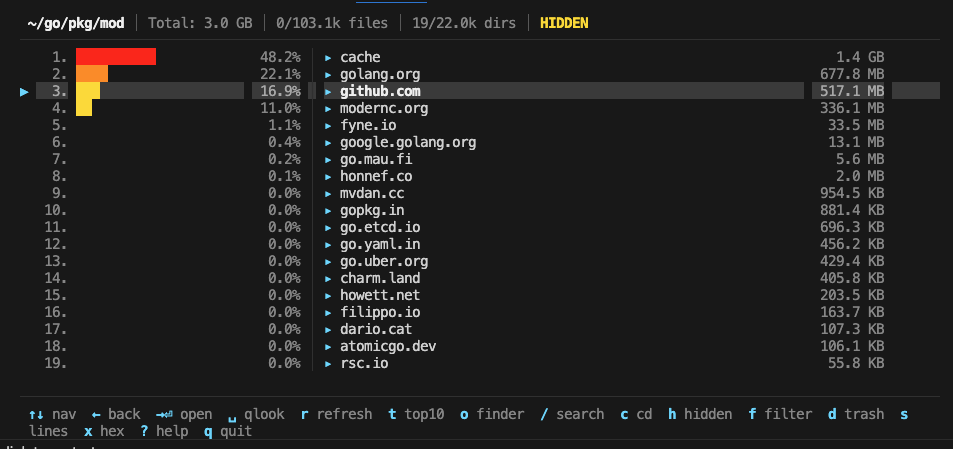
A fast, minimal and interactive terminal directory analyzer built with Go and [Bubble Tea](https://github.com/charmbracelet/bubbletea). Visualize disk usage, explore directories, files, and identify space hogs — all from your terminal.
|
|
33
|
+
|
|
34
|
+
|
|
35
|
+
|
|
36
|
+
## Features
|
|
37
|
+
|
|
38
|
+
- **Instant directory listing** — files appear immediately; directory sizes compute in the background
|
|
39
|
+
- **Proportional size bars** — color-coded percentage bars for quick visual scanning
|
|
40
|
+
- **Efficient directory scanning** — uses `os.ReadDir` + manual recursion to minimize syscalls; parallel stat with bounded concurrency
|
|
41
|
+
- **Smart refresh** — checks directory modtime before rescanning; skips unchanged directories
|
|
42
|
+
- **LRU cache** — bounded in-memory cache (100 entries) with disk persistence across sessions (respects `XDG_CACHE_HOME`)
|
|
43
|
+
- **Line counting** — automatic line count for the selected text file; batch count all with `s`
|
|
44
|
+
- **Hex view** — built-in hex dump for binary files (`xxd` on macOS, `hexdump` fallback on Linux)
|
|
45
|
+
- **Large file protection** — prevents accidentally opening very large blob files
|
|
46
|
+
- **Fuzzy search** — filter entries in real time with subsequence matching
|
|
47
|
+
- **Symlink detection** — symlinks shown with `→` / `⇢` indicators
|
|
48
|
+
- **Move to trash** — safely delete files/directories with `d`
|
|
49
|
+
- **Cross-platform** — works on macOS, Linux, and Windows (Quick Look, file open, and cache paths adapt per OS)
|
|
50
|
+
- **CPU profiling** — built-in `--profile` flag for performance analysis
|
|
51
|
+
|
|
52
|
+
## Install
|
|
53
|
+
|
|
54
|
+
### pip / uv (any platform)
|
|
55
|
+
|
|
56
|
+
```bash
|
|
57
|
+
pip install dirgo
|
|
58
|
+
```
|
|
59
|
+
|
|
60
|
+
```bash
|
|
61
|
+
uv tool install dirgo
|
|
62
|
+
```
|
|
63
|
+
|
|
64
|
+
### Go install
|
|
65
|
+
|
|
66
|
+
```bash
|
|
67
|
+
go install github.com/mohsinkaleem/dirgo@latest
|
|
68
|
+
```
|
|
69
|
+
|
|
70
|
+
### From source
|
|
71
|
+
|
|
72
|
+
```bash
|
|
73
|
+
git clone https://github.com/mohsinkaleem/dirgo.git
|
|
74
|
+
cd dirgo
|
|
75
|
+
make build
|
|
76
|
+
```
|
|
77
|
+
|
|
78
|
+
### Homebrew
|
|
79
|
+
|
|
80
|
+
```bash
|
|
81
|
+
brew tap mohsinkaleem/tap
|
|
82
|
+
brew install dirgo
|
|
83
|
+
```
|
|
84
|
+
|
|
85
|
+
For maintainers, release + tap publishing steps are documented in [docs/release-and-homebrew.md](docs/release-and-homebrew.md).
|
|
86
|
+
|
|
87
|
+
## Usage
|
|
88
|
+
|
|
89
|
+
```bash
|
|
90
|
+
# Analyze current directory
|
|
91
|
+
dirgo
|
|
92
|
+
|
|
93
|
+
# Analyze a specific path
|
|
94
|
+
dirgo ~/Documents
|
|
95
|
+
|
|
96
|
+
# Print version
|
|
97
|
+
dirgo --version
|
|
98
|
+
|
|
99
|
+
# Enable CPU profiling
|
|
100
|
+
dirgo --profile /path/to/dir
|
|
101
|
+
```
|
|
102
|
+
|
|
103
|
+
## Keybindings
|
|
104
|
+
|
|
105
|
+
| Key | Action |
|
|
106
|
+
|---|---|
|
|
107
|
+
| `↑` / `k` | Move cursor up |
|
|
108
|
+
| `↓` / `j` | Move cursor down |
|
|
109
|
+
| `←` / `Backspace` | Go to parent directory |
|
|
110
|
+
| `→` / `l` / `Enter` | Open selected directory / file |
|
|
111
|
+
| `Space` | Quick Look preview (macOS `qlmanage`, Linux `xdg-open`, Windows `start`) |
|
|
112
|
+
| `g` | Jump to top |
|
|
113
|
+
| `G` | Jump to bottom |
|
|
114
|
+
| `PgUp` / `Ctrl+U` | Page up |
|
|
115
|
+
| `PgDn` / `Ctrl+D` | Page down |
|
|
116
|
+
| `r` | Smart refresh (skips if unchanged) |
|
|
117
|
+
| `t` | Toggle top 10 view |
|
|
118
|
+
| `o` | Open in Finder / file manager |
|
|
119
|
+
| `/` | Search / filter |
|
|
120
|
+
| `Esc` | Cancel search / close help |
|
|
121
|
+
| `h` | Toggle hidden files |
|
|
122
|
+
| `f` | Cycle filter (all → dirs only → files only) |
|
|
123
|
+
| `s` | Count lines for all files |
|
|
124
|
+
| `c` | cd to path |
|
|
125
|
+
| `x` | Hex view (binary files) |
|
|
126
|
+
| `d` | Move to trash |
|
|
127
|
+
| `?` | Help |
|
|
128
|
+
| `q` / `Ctrl+C` | Quit |
|
|
129
|
+
|
|
130
|
+
## Architecture
|
|
131
|
+
|
|
132
|
+
```
|
|
133
|
+
main.go Entry point, --profile/--version flags, Bubble Tea program setup
|
|
134
|
+
model.go Application state, Update loop, message handling
|
|
135
|
+
scanner.go Directory scanning with os.ReadDir + manual recursion, bounded concurrency
|
|
136
|
+
cache.go LRU cache with bounded eviction + gob disk persistence (XDG-aware)
|
|
137
|
+
entry.go FileEntry data model, sorting, filtering, fuzzy match
|
|
138
|
+
render.go Row rendering, header/footer, help overlay
|
|
139
|
+
keys.go Key bindings
|
|
140
|
+
styles.go Lipgloss color and style definitions (pre-defined bar color styles)
|
|
141
|
+
utils.go Formatting, line counting (bytes.Count + sync.Pool), helpers
|
|
142
|
+
```
|
|
143
|
+
|
|
144
|
+
### Scanning Pipeline
|
|
145
|
+
|
|
146
|
+
1. `scanDirectory()` calls `os.ReadDir` to read the directory in a single syscall, immediately stats files, and separates directories from files.
|
|
147
|
+
2. Directory sizes are computed in parallel using `dirSizeRecursive()` — a manual recursive function using `os.ReadDir` that avoids the overhead of `filepath.WalkDir`. Bounded concurrency is enforced via a semaphore (CPU count, max 16).
|
|
148
|
+
3. File stat is parallelised for directories with 20+ files to leverage multi-core CPUs.
|
|
149
|
+
|
|
150
|
+
### Caching
|
|
151
|
+
|
|
152
|
+
- **In-memory**: LRU cache holding up to 100 directory scan results. Accessed on navigation; updated on scan completion.
|
|
153
|
+
- **On-disk**: Not implemented as of now. Wanted to keep it simple and deterministic.
|
|
154
|
+
|
|
155
|
+
### Smart Refresh
|
|
156
|
+
|
|
157
|
+
Pressing `r` compares the directory's current modtime against the cached value. If unchanged, the rescan is skipped entirely (~microseconds). If changed, a full rescan is triggered.
|
|
158
|
+
|
|
159
|
+
## Development
|
|
160
|
+
|
|
161
|
+
```bash
|
|
162
|
+
# Run tests
|
|
163
|
+
make test
|
|
164
|
+
|
|
165
|
+
# Run benchmarks
|
|
166
|
+
make bench
|
|
167
|
+
|
|
168
|
+
# CPU profile a benchmark
|
|
169
|
+
make profile-cpu
|
|
170
|
+
|
|
171
|
+
# Memory profile
|
|
172
|
+
make profile-mem
|
|
173
|
+
|
|
174
|
+
# Build cross-platform release binaries
|
|
175
|
+
make release
|
|
176
|
+
```
|
|
177
|
+
|
|
178
|
+
## Requirements
|
|
179
|
+
|
|
180
|
+
- Go 1.21+
|
|
181
|
+
- macOS / Linux / Windows
|
|
182
|
+
|
|
183
|
+
## Contributing
|
|
184
|
+
|
|
185
|
+
Contributions are welcome! Please open an issue or submit a pull request.
|
|
186
|
+
|
|
187
|
+
1. Fork the repository
|
|
188
|
+
2. Create your feature branch (`git checkout -b feature/amazing-feature`)
|
|
189
|
+
3. Commit your changes (`git commit -m 'Add amazing feature'`)
|
|
190
|
+
4. Push to the branch (`git push origin feature/amazing-feature`)
|
|
191
|
+
5. Open a Pull Request
|
|
192
|
+
|
|
193
|
+
## License
|
|
194
|
+
|
|
195
|
+
[MIT](LICENSE)
|
dirgo-1.1.0/README.md
ADDED
|
@@ -0,0 +1,170 @@
|
|
|
1
|
+
# dirgo
|
|
2
|
+
|
|
3
|
+
[](https://github.com/mohsinkaleem/dirgo/actions/workflows/ci.yml)
|
|
4
|
+
[](https://github.com/mohsinkaleem/dirgo/actions/workflows/release.yml)
|
|
5
|
+
[](LICENSE)
|
|
6
|
+
|
|
7
|
+
A fast, minimal and interactive terminal directory analyzer built with Go and [Bubble Tea](https://github.com/charmbracelet/bubbletea). Visualize disk usage, explore directories, files, and identify space hogs — all from your terminal.
|
|
8
|
+
|
|
9
|
+

|
|
10
|
+
|
|
11
|
+
## Features
|
|
12
|
+
|
|
13
|
+
- **Instant directory listing** — files appear immediately; directory sizes compute in the background
|
|
14
|
+
- **Proportional size bars** — color-coded percentage bars for quick visual scanning
|
|
15
|
+
- **Efficient directory scanning** — uses `os.ReadDir` + manual recursion to minimize syscalls; parallel stat with bounded concurrency
|
|
16
|
+
- **Smart refresh** — checks directory modtime before rescanning; skips unchanged directories
|
|
17
|
+
- **LRU cache** — bounded in-memory cache (100 entries) with disk persistence across sessions (respects `XDG_CACHE_HOME`)
|
|
18
|
+
- **Line counting** — automatic line count for the selected text file; batch count all with `s`
|
|
19
|
+
- **Hex view** — built-in hex dump for binary files (`xxd` on macOS, `hexdump` fallback on Linux)
|
|
20
|
+
- **Large file protection** — prevents accidentally opening very large blob files
|
|
21
|
+
- **Fuzzy search** — filter entries in real time with subsequence matching
|
|
22
|
+
- **Symlink detection** — symlinks shown with `→` / `⇢` indicators
|
|
23
|
+
- **Move to trash** — safely delete files/directories with `d`
|
|
24
|
+
- **Cross-platform** — works on macOS, Linux, and Windows (Quick Look, file open, and cache paths adapt per OS)
|
|
25
|
+
- **CPU profiling** — built-in `--profile` flag for performance analysis
|
|
26
|
+
|
|
27
|
+
## Install
|
|
28
|
+
|
|
29
|
+
### pip / uv (any platform)
|
|
30
|
+
|
|
31
|
+
```bash
|
|
32
|
+
pip install dirgo
|
|
33
|
+
```
|
|
34
|
+
|
|
35
|
+
```bash
|
|
36
|
+
uv tool install dirgo
|
|
37
|
+
```
|
|
38
|
+
|
|
39
|
+
### Go install
|
|
40
|
+
|
|
41
|
+
```bash
|
|
42
|
+
go install github.com/mohsinkaleem/dirgo@latest
|
|
43
|
+
```
|
|
44
|
+
|
|
45
|
+
### From source
|
|
46
|
+
|
|
47
|
+
```bash
|
|
48
|
+
git clone https://github.com/mohsinkaleem/dirgo.git
|
|
49
|
+
cd dirgo
|
|
50
|
+
make build
|
|
51
|
+
```
|
|
52
|
+
|
|
53
|
+
### Homebrew
|
|
54
|
+
|
|
55
|
+
```bash
|
|
56
|
+
brew tap mohsinkaleem/tap
|
|
57
|
+
brew install dirgo
|
|
58
|
+
```
|
|
59
|
+
|
|
60
|
+
For maintainers, release + tap publishing steps are documented in [docs/release-and-homebrew.md](docs/release-and-homebrew.md).
|
|
61
|
+
|
|
62
|
+
## Usage
|
|
63
|
+
|
|
64
|
+
```bash
|
|
65
|
+
# Analyze current directory
|
|
66
|
+
dirgo
|
|
67
|
+
|
|
68
|
+
# Analyze a specific path
|
|
69
|
+
dirgo ~/Documents
|
|
70
|
+
|
|
71
|
+
# Print version
|
|
72
|
+
dirgo --version
|
|
73
|
+
|
|
74
|
+
# Enable CPU profiling
|
|
75
|
+
dirgo --profile /path/to/dir
|
|
76
|
+
```
|
|
77
|
+
|
|
78
|
+
## Keybindings
|
|
79
|
+
|
|
80
|
+
| Key | Action |
|
|
81
|
+
|---|---|
|
|
82
|
+
| `↑` / `k` | Move cursor up |
|
|
83
|
+
| `↓` / `j` | Move cursor down |
|
|
84
|
+
| `←` / `Backspace` | Go to parent directory |
|
|
85
|
+
| `→` / `l` / `Enter` | Open selected directory / file |
|
|
86
|
+
| `Space` | Quick Look preview (macOS `qlmanage`, Linux `xdg-open`, Windows `start`) |
|
|
87
|
+
| `g` | Jump to top |
|
|
88
|
+
| `G` | Jump to bottom |
|
|
89
|
+
| `PgUp` / `Ctrl+U` | Page up |
|
|
90
|
+
| `PgDn` / `Ctrl+D` | Page down |
|
|
91
|
+
| `r` | Smart refresh (skips if unchanged) |
|
|
92
|
+
| `t` | Toggle top 10 view |
|
|
93
|
+
| `o` | Open in Finder / file manager |
|
|
94
|
+
| `/` | Search / filter |
|
|
95
|
+
| `Esc` | Cancel search / close help |
|
|
96
|
+
| `h` | Toggle hidden files |
|
|
97
|
+
| `f` | Cycle filter (all → dirs only → files only) |
|
|
98
|
+
| `s` | Count lines for all files |
|
|
99
|
+
| `c` | cd to path |
|
|
100
|
+
| `x` | Hex view (binary files) |
|
|
101
|
+
| `d` | Move to trash |
|
|
102
|
+
| `?` | Help |
|
|
103
|
+
| `q` / `Ctrl+C` | Quit |
|
|
104
|
+
|
|
105
|
+
## Architecture
|
|
106
|
+
|
|
107
|
+
```
|
|
108
|
+
main.go Entry point, --profile/--version flags, Bubble Tea program setup
|
|
109
|
+
model.go Application state, Update loop, message handling
|
|
110
|
+
scanner.go Directory scanning with os.ReadDir + manual recursion, bounded concurrency
|
|
111
|
+
cache.go LRU cache with bounded eviction + gob disk persistence (XDG-aware)
|
|
112
|
+
entry.go FileEntry data model, sorting, filtering, fuzzy match
|
|
113
|
+
render.go Row rendering, header/footer, help overlay
|
|
114
|
+
keys.go Key bindings
|
|
115
|
+
styles.go Lipgloss color and style definitions (pre-defined bar color styles)
|
|
116
|
+
utils.go Formatting, line counting (bytes.Count + sync.Pool), helpers
|
|
117
|
+
```
|
|
118
|
+
|
|
119
|
+
### Scanning Pipeline
|
|
120
|
+
|
|
121
|
+
1. `scanDirectory()` calls `os.ReadDir` to read the directory in a single syscall, immediately stats files, and separates directories from files.
|
|
122
|
+
2. Directory sizes are computed in parallel using `dirSizeRecursive()` — a manual recursive function using `os.ReadDir` that avoids the overhead of `filepath.WalkDir`. Bounded concurrency is enforced via a semaphore (CPU count, max 16).
|
|
123
|
+
3. File stat is parallelised for directories with 20+ files to leverage multi-core CPUs.
|
|
124
|
+
|
|
125
|
+
### Caching
|
|
126
|
+
|
|
127
|
+
- **In-memory**: LRU cache holding up to 100 directory scan results. Accessed on navigation; updated on scan completion.
|
|
128
|
+
- **On-disk**: Not implemented as of now. Wanted to keep it simple and deterministic.
|
|
129
|
+
|
|
130
|
+
### Smart Refresh
|
|
131
|
+
|
|
132
|
+
Pressing `r` compares the directory's current modtime against the cached value. If unchanged, the rescan is skipped entirely (~microseconds). If changed, a full rescan is triggered.
|
|
133
|
+
|
|
134
|
+
## Development
|
|
135
|
+
|
|
136
|
+
```bash
|
|
137
|
+
# Run tests
|
|
138
|
+
make test
|
|
139
|
+
|
|
140
|
+
# Run benchmarks
|
|
141
|
+
make bench
|
|
142
|
+
|
|
143
|
+
# CPU profile a benchmark
|
|
144
|
+
make profile-cpu
|
|
145
|
+
|
|
146
|
+
# Memory profile
|
|
147
|
+
make profile-mem
|
|
148
|
+
|
|
149
|
+
# Build cross-platform release binaries
|
|
150
|
+
make release
|
|
151
|
+
```
|
|
152
|
+
|
|
153
|
+
## Requirements
|
|
154
|
+
|
|
155
|
+
- Go 1.21+
|
|
156
|
+
- macOS / Linux / Windows
|
|
157
|
+
|
|
158
|
+
## Contributing
|
|
159
|
+
|
|
160
|
+
Contributions are welcome! Please open an issue or submit a pull request.
|
|
161
|
+
|
|
162
|
+
1. Fork the repository
|
|
163
|
+
2. Create your feature branch (`git checkout -b feature/amazing-feature`)
|
|
164
|
+
3. Commit your changes (`git commit -m 'Add amazing feature'`)
|
|
165
|
+
4. Push to the branch (`git push origin feature/amazing-feature`)
|
|
166
|
+
5. Open a Pull Request
|
|
167
|
+
|
|
168
|
+
## License
|
|
169
|
+
|
|
170
|
+
[MIT](LICENSE)
|
|
@@ -0,0 +1,195 @@
|
|
|
1
|
+
Metadata-Version: 2.4
|
|
2
|
+
Name: dirgo
|
|
3
|
+
Version: 1.1.0
|
|
4
|
+
Summary: Fast, minimal and interactive terminal directory analyzer
|
|
5
|
+
Author: Mohsin Kaleem
|
|
6
|
+
License-Expression: MIT
|
|
7
|
+
Project-URL: Homepage, https://github.com/mohsinkaleem/dirgo
|
|
8
|
+
Project-URL: Repository, https://github.com/mohsinkaleem/dirgo
|
|
9
|
+
Project-URL: Issues, https://github.com/mohsinkaleem/dirgo/issues
|
|
10
|
+
Keywords: terminal,directory,disk-usage,cli,tui
|
|
11
|
+
Classifier: Development Status :: 4 - Beta
|
|
12
|
+
Classifier: Environment :: Console
|
|
13
|
+
Classifier: Intended Audience :: Developers
|
|
14
|
+
Classifier: Intended Audience :: System Administrators
|
|
15
|
+
Classifier: Operating System :: MacOS
|
|
16
|
+
Classifier: Operating System :: POSIX :: Linux
|
|
17
|
+
Classifier: Operating System :: Microsoft :: Windows
|
|
18
|
+
Classifier: Programming Language :: Other
|
|
19
|
+
Classifier: Topic :: System :: Filesystems
|
|
20
|
+
Classifier: Topic :: Utilities
|
|
21
|
+
Requires-Python: >=3.8
|
|
22
|
+
Description-Content-Type: text/markdown
|
|
23
|
+
License-File: LICENSE
|
|
24
|
+
Dynamic: license-file
|
|
25
|
+
|
|
26
|
+
# dirgo
|
|
27
|
+
|
|
28
|
+
[](https://github.com/mohsinkaleem/dirgo/actions/workflows/ci.yml)
|
|
29
|
+
[](https://github.com/mohsinkaleem/dirgo/actions/workflows/release.yml)
|
|
30
|
+
[](LICENSE)
|
|
31
|
+
|
|
32
|
+
A fast, minimal and interactive terminal directory analyzer built with Go and [Bubble Tea](https://github.com/charmbracelet/bubbletea). Visualize disk usage, explore directories, files, and identify space hogs — all from your terminal.
|
|
33
|
+
|
|
34
|
+

|
|
35
|
+
|
|
36
|
+
## Features
|
|
37
|
+
|
|
38
|
+
- **Instant directory listing** — files appear immediately; directory sizes compute in the background
|
|
39
|
+
- **Proportional size bars** — color-coded percentage bars for quick visual scanning
|
|
40
|
+
- **Efficient directory scanning** — uses `os.ReadDir` + manual recursion to minimize syscalls; parallel stat with bounded concurrency
|
|
41
|
+
- **Smart refresh** — checks directory modtime before rescanning; skips unchanged directories
|
|
42
|
+
- **LRU cache** — bounded in-memory cache (100 entries) with disk persistence across sessions (respects `XDG_CACHE_HOME`)
|
|
43
|
+
- **Line counting** — automatic line count for the selected text file; batch count all with `s`
|
|
44
|
+
- **Hex view** — built-in hex dump for binary files (`xxd` on macOS, `hexdump` fallback on Linux)
|
|
45
|
+
- **Large file protection** — prevents accidentally opening very large blob files
|
|
46
|
+
- **Fuzzy search** — filter entries in real time with subsequence matching
|
|
47
|
+
- **Symlink detection** — symlinks shown with `→` / `⇢` indicators
|
|
48
|
+
- **Move to trash** — safely delete files/directories with `d`
|
|
49
|
+
- **Cross-platform** — works on macOS, Linux, and Windows (Quick Look, file open, and cache paths adapt per OS)
|
|
50
|
+
- **CPU profiling** — built-in `--profile` flag for performance analysis
|
|
51
|
+
|
|
52
|
+
## Install
|
|
53
|
+
|
|
54
|
+
### pip / uv (any platform)
|
|
55
|
+
|
|
56
|
+
```bash
|
|
57
|
+
pip install dirgo
|
|
58
|
+
```
|
|
59
|
+
|
|
60
|
+
```bash
|
|
61
|
+
uv tool install dirgo
|
|
62
|
+
```
|
|
63
|
+
|
|
64
|
+
### Go install
|
|
65
|
+
|
|
66
|
+
```bash
|
|
67
|
+
go install github.com/mohsinkaleem/dirgo@latest
|
|
68
|
+
```
|
|
69
|
+
|
|
70
|
+
### From source
|
|
71
|
+
|
|
72
|
+
```bash
|
|
73
|
+
git clone https://github.com/mohsinkaleem/dirgo.git
|
|
74
|
+
cd dirgo
|
|
75
|
+
make build
|
|
76
|
+
```
|
|
77
|
+
|
|
78
|
+
### Homebrew
|
|
79
|
+
|
|
80
|
+
```bash
|
|
81
|
+
brew tap mohsinkaleem/tap
|
|
82
|
+
brew install dirgo
|
|
83
|
+
```
|
|
84
|
+
|
|
85
|
+
For maintainers, release + tap publishing steps are documented in [docs/release-and-homebrew.md](docs/release-and-homebrew.md).
|
|
86
|
+
|
|
87
|
+
## Usage
|
|
88
|
+
|
|
89
|
+
```bash
|
|
90
|
+
# Analyze current directory
|
|
91
|
+
dirgo
|
|
92
|
+
|
|
93
|
+
# Analyze a specific path
|
|
94
|
+
dirgo ~/Documents
|
|
95
|
+
|
|
96
|
+
# Print version
|
|
97
|
+
dirgo --version
|
|
98
|
+
|
|
99
|
+
# Enable CPU profiling
|
|
100
|
+
dirgo --profile /path/to/dir
|
|
101
|
+
```
|
|
102
|
+
|
|
103
|
+
## Keybindings
|
|
104
|
+
|
|
105
|
+
| Key | Action |
|
|
106
|
+
|---|---|
|
|
107
|
+
| `↑` / `k` | Move cursor up |
|
|
108
|
+
| `↓` / `j` | Move cursor down |
|
|
109
|
+
| `←` / `Backspace` | Go to parent directory |
|
|
110
|
+
| `→` / `l` / `Enter` | Open selected directory / file |
|
|
111
|
+
| `Space` | Quick Look preview (macOS `qlmanage`, Linux `xdg-open`, Windows `start`) |
|
|
112
|
+
| `g` | Jump to top |
|
|
113
|
+
| `G` | Jump to bottom |
|
|
114
|
+
| `PgUp` / `Ctrl+U` | Page up |
|
|
115
|
+
| `PgDn` / `Ctrl+D` | Page down |
|
|
116
|
+
| `r` | Smart refresh (skips if unchanged) |
|
|
117
|
+
| `t` | Toggle top 10 view |
|
|
118
|
+
| `o` | Open in Finder / file manager |
|
|
119
|
+
| `/` | Search / filter |
|
|
120
|
+
| `Esc` | Cancel search / close help |
|
|
121
|
+
| `h` | Toggle hidden files |
|
|
122
|
+
| `f` | Cycle filter (all → dirs only → files only) |
|
|
123
|
+
| `s` | Count lines for all files |
|
|
124
|
+
| `c` | cd to path |
|
|
125
|
+
| `x` | Hex view (binary files) |
|
|
126
|
+
| `d` | Move to trash |
|
|
127
|
+
| `?` | Help |
|
|
128
|
+
| `q` / `Ctrl+C` | Quit |
|
|
129
|
+
|
|
130
|
+
## Architecture
|
|
131
|
+
|
|
132
|
+
```
|
|
133
|
+
main.go Entry point, --profile/--version flags, Bubble Tea program setup
|
|
134
|
+
model.go Application state, Update loop, message handling
|
|
135
|
+
scanner.go Directory scanning with os.ReadDir + manual recursion, bounded concurrency
|
|
136
|
+
cache.go LRU cache with bounded eviction + gob disk persistence (XDG-aware)
|
|
137
|
+
entry.go FileEntry data model, sorting, filtering, fuzzy match
|
|
138
|
+
render.go Row rendering, header/footer, help overlay
|
|
139
|
+
keys.go Key bindings
|
|
140
|
+
styles.go Lipgloss color and style definitions (pre-defined bar color styles)
|
|
141
|
+
utils.go Formatting, line counting (bytes.Count + sync.Pool), helpers
|
|
142
|
+
```
|
|
143
|
+
|
|
144
|
+
### Scanning Pipeline
|
|
145
|
+
|
|
146
|
+
1. `scanDirectory()` calls `os.ReadDir` to read the directory in a single syscall, immediately stats files, and separates directories from files.
|
|
147
|
+
2. Directory sizes are computed in parallel using `dirSizeRecursive()` — a manual recursive function using `os.ReadDir` that avoids the overhead of `filepath.WalkDir`. Bounded concurrency is enforced via a semaphore (CPU count, max 16).
|
|
148
|
+
3. File stat is parallelised for directories with 20+ files to leverage multi-core CPUs.
|
|
149
|
+
|
|
150
|
+
### Caching
|
|
151
|
+
|
|
152
|
+
- **In-memory**: LRU cache holding up to 100 directory scan results. Accessed on navigation; updated on scan completion.
|
|
153
|
+
- **On-disk**: Not implemented as of now. Wanted to keep it simple and deterministic.
|
|
154
|
+
|
|
155
|
+
### Smart Refresh
|
|
156
|
+
|
|
157
|
+
Pressing `r` compares the directory's current modtime against the cached value. If unchanged, the rescan is skipped entirely (~microseconds). If changed, a full rescan is triggered.
|
|
158
|
+
|
|
159
|
+
## Development
|
|
160
|
+
|
|
161
|
+
```bash
|
|
162
|
+
# Run tests
|
|
163
|
+
make test
|
|
164
|
+
|
|
165
|
+
# Run benchmarks
|
|
166
|
+
make bench
|
|
167
|
+
|
|
168
|
+
# CPU profile a benchmark
|
|
169
|
+
make profile-cpu
|
|
170
|
+
|
|
171
|
+
# Memory profile
|
|
172
|
+
make profile-mem
|
|
173
|
+
|
|
174
|
+
# Build cross-platform release binaries
|
|
175
|
+
make release
|
|
176
|
+
```
|
|
177
|
+
|
|
178
|
+
## Requirements
|
|
179
|
+
|
|
180
|
+
- Go 1.21+
|
|
181
|
+
- macOS / Linux / Windows
|
|
182
|
+
|
|
183
|
+
## Contributing
|
|
184
|
+
|
|
185
|
+
Contributions are welcome! Please open an issue or submit a pull request.
|
|
186
|
+
|
|
187
|
+
1. Fork the repository
|
|
188
|
+
2. Create your feature branch (`git checkout -b feature/amazing-feature`)
|
|
189
|
+
3. Commit your changes (`git commit -m 'Add amazing feature'`)
|
|
190
|
+
4. Push to the branch (`git push origin feature/amazing-feature`)
|
|
191
|
+
5. Open a Pull Request
|
|
192
|
+
|
|
193
|
+
## License
|
|
194
|
+
|
|
195
|
+
[MIT](LICENSE)
|
|
@@ -0,0 +1 @@
|
|
|
1
|
+
|
|
@@ -0,0 +1 @@
|
|
|
1
|
+
dirgo_python
|
|
@@ -0,0 +1,96 @@
|
|
|
1
|
+
"""Download and run the dirgo Go binary for the current platform."""
|
|
2
|
+
|
|
3
|
+
import os
|
|
4
|
+
import platform
|
|
5
|
+
import stat
|
|
6
|
+
import subprocess
|
|
7
|
+
import sys
|
|
8
|
+
import tarfile
|
|
9
|
+
import tempfile
|
|
10
|
+
import zipfile
|
|
11
|
+
from io import BytesIO
|
|
12
|
+
from pathlib import Path
|
|
13
|
+
from urllib.request import urlopen
|
|
14
|
+
|
|
15
|
+
from dirgo_python import __version__
|
|
16
|
+
|
|
17
|
+
GITHUB_REPO = "mohsinkaleem/dirgo"
|
|
18
|
+
_BIN_DIR = Path(__file__).parent / "_bin"
|
|
19
|
+
|
|
20
|
+
|
|
21
|
+
def _platform_key():
|
|
22
|
+
system = platform.system().lower()
|
|
23
|
+
machine = platform.machine().lower()
|
|
24
|
+
|
|
25
|
+
os_map = {"darwin": "darwin", "linux": "linux", "windows": "windows"}
|
|
26
|
+
arch_map = {
|
|
27
|
+
"x86_64": "amd64",
|
|
28
|
+
"amd64": "amd64",
|
|
29
|
+
"arm64": "arm64",
|
|
30
|
+
"aarch64": "arm64",
|
|
31
|
+
}
|
|
32
|
+
|
|
33
|
+
os_name = os_map.get(system)
|
|
34
|
+
arch = arch_map.get(machine)
|
|
35
|
+
if not os_name or not arch:
|
|
36
|
+
sys.exit(f"dirgo: unsupported platform {system}/{machine}")
|
|
37
|
+
return os_name, arch
|
|
38
|
+
|
|
39
|
+
|
|
40
|
+
def _binary_path():
|
|
41
|
+
os_name, _ = _platform_key()
|
|
42
|
+
name = "dirgo.exe" if os_name == "windows" else "dirgo"
|
|
43
|
+
return _BIN_DIR / name
|
|
44
|
+
|
|
45
|
+
|
|
46
|
+
def _download_url():
|
|
47
|
+
os_name, arch = _platform_key()
|
|
48
|
+
ext = "zip" if os_name == "windows" else "tar.gz"
|
|
49
|
+
version = __version__
|
|
50
|
+
filename = f"dirgo_{version}_{os_name}_{arch}.{ext}"
|
|
51
|
+
return f"https://github.com/{GITHUB_REPO}/releases/download/v{version}/{filename}"
|
|
52
|
+
|
|
53
|
+
|
|
54
|
+
def _ensure_binary():
|
|
55
|
+
binary = _binary_path()
|
|
56
|
+
if binary.exists():
|
|
57
|
+
return binary
|
|
58
|
+
|
|
59
|
+
url = _download_url()
|
|
60
|
+
print(f"dirgo: downloading {url} ...", file=sys.stderr)
|
|
61
|
+
|
|
62
|
+
with urlopen(url) as resp: # noqa: S310 — URL is hardcoded to GitHub
|
|
63
|
+
data = resp.read()
|
|
64
|
+
|
|
65
|
+
_BIN_DIR.mkdir(parents=True, exist_ok=True)
|
|
66
|
+
os_name, _ = _platform_key()
|
|
67
|
+
|
|
68
|
+
if os_name == "windows":
|
|
69
|
+
with zipfile.ZipFile(BytesIO(data)) as zf:
|
|
70
|
+
for member in zf.namelist():
|
|
71
|
+
if member.endswith("dirgo.exe"):
|
|
72
|
+
binary.write_bytes(zf.read(member))
|
|
73
|
+
break
|
|
74
|
+
else:
|
|
75
|
+
with tarfile.open(fileobj=BytesIO(data), mode="r:gz") as tf:
|
|
76
|
+
for member in tf.getmembers():
|
|
77
|
+
if member.name.endswith("dirgo"):
|
|
78
|
+
f = tf.extractfile(member)
|
|
79
|
+
if f:
|
|
80
|
+
binary.write_bytes(f.read())
|
|
81
|
+
break
|
|
82
|
+
|
|
83
|
+
if not binary.exists():
|
|
84
|
+
sys.exit("dirgo: failed to extract binary from archive")
|
|
85
|
+
|
|
86
|
+
binary.chmod(binary.stat().st_mode | stat.S_IEXEC | stat.S_IXGRP | stat.S_IXOTH)
|
|
87
|
+
return binary
|
|
88
|
+
|
|
89
|
+
|
|
90
|
+
def main():
|
|
91
|
+
binary = _ensure_binary()
|
|
92
|
+
raise SystemExit(subprocess.call([str(binary)] + sys.argv[1:]))
|
|
93
|
+
|
|
94
|
+
|
|
95
|
+
if __name__ == "__main__":
|
|
96
|
+
main()
|
|
@@ -0,0 +1,36 @@
|
|
|
1
|
+
[build-system]
|
|
2
|
+
requires = ["setuptools>=68.0"]
|
|
3
|
+
build-backend = "setuptools.build_meta"
|
|
4
|
+
|
|
5
|
+
[project]
|
|
6
|
+
name = "dirgo"
|
|
7
|
+
version = "1.1.0"
|
|
8
|
+
description = "Fast, minimal and interactive terminal directory analyzer"
|
|
9
|
+
readme = "README.md"
|
|
10
|
+
license = "MIT"
|
|
11
|
+
requires-python = ">=3.8"
|
|
12
|
+
authors = [{ name = "Mohsin Kaleem" }]
|
|
13
|
+
keywords = ["terminal", "directory", "disk-usage", "cli", "tui"]
|
|
14
|
+
classifiers = [
|
|
15
|
+
"Development Status :: 4 - Beta",
|
|
16
|
+
"Environment :: Console",
|
|
17
|
+
"Intended Audience :: Developers",
|
|
18
|
+
"Intended Audience :: System Administrators",
|
|
19
|
+
"Operating System :: MacOS",
|
|
20
|
+
"Operating System :: POSIX :: Linux",
|
|
21
|
+
"Operating System :: Microsoft :: Windows",
|
|
22
|
+
"Programming Language :: Other",
|
|
23
|
+
"Topic :: System :: Filesystems",
|
|
24
|
+
"Topic :: Utilities",
|
|
25
|
+
]
|
|
26
|
+
|
|
27
|
+
[project.urls]
|
|
28
|
+
Homepage = "https://github.com/mohsinkaleem/dirgo"
|
|
29
|
+
Repository = "https://github.com/mohsinkaleem/dirgo"
|
|
30
|
+
Issues = "https://github.com/mohsinkaleem/dirgo/issues"
|
|
31
|
+
|
|
32
|
+
[project.scripts]
|
|
33
|
+
dirgo = "dirgo_python._cli:main"
|
|
34
|
+
|
|
35
|
+
[tool.setuptools.packages.find]
|
|
36
|
+
include = ["dirgo_python*"]
|
dirgo-1.1.0/setup.cfg
ADDED