dev-link-mcp 0.1.0__tar.gz
This diff represents the content of publicly available package versions that have been released to one of the supported registries. The information contained in this diff is provided for informational purposes only and reflects changes between package versions as they appear in their respective public registries.
- dev_link_mcp-0.1.0/LICENSE +21 -0
- dev_link_mcp-0.1.0/PKG-INFO +291 -0
- dev_link_mcp-0.1.0/README.md +250 -0
- dev_link_mcp-0.1.0/pyproject.toml +122 -0
- dev_link_mcp-0.1.0/pyproject.toml.orig +95 -0
- dev_link_mcp-0.1.0/src/dev_link_mcp/__init__.py +5 -0
- dev_link_mcp-0.1.0/src/dev_link_mcp/__main__.py +3 -0
- dev_link_mcp-0.1.0/src/dev_link_mcp/app.py +308 -0
- dev_link_mcp-0.1.0/src/dev_link_mcp/audit.py +625 -0
- dev_link_mcp-0.1.0/src/dev_link_mcp/browse.py +260 -0
- dev_link_mcp-0.1.0/src/dev_link_mcp/cli/__init__.py +5 -0
- dev_link_mcp-0.1.0/src/dev_link_mcp/cli/common.py +75 -0
- dev_link_mcp-0.1.0/src/dev_link_mcp/cli/config_cmd.py +88 -0
- dev_link_mcp-0.1.0/src/dev_link_mcp/cli/doctor.py +184 -0
- dev_link_mcp-0.1.0/src/dev_link_mcp/cli/info.py +102 -0
- dev_link_mcp-0.1.0/src/dev_link_mcp/cli/instance.py +232 -0
- dev_link_mcp-0.1.0/src/dev_link_mcp/cli/main.py +177 -0
- dev_link_mcp-0.1.0/src/dev_link_mcp/cli/serve.py +303 -0
- dev_link_mcp-0.1.0/src/dev_link_mcp/cli/tools_cmd.py +92 -0
- dev_link_mcp-0.1.0/src/dev_link_mcp/cli/tunnel.py +134 -0
- dev_link_mcp-0.1.0/src/dev_link_mcp/config/__init__.py +31 -0
- dev_link_mcp-0.1.0/src/dev_link_mcp/config/loader.py +248 -0
- dev_link_mcp-0.1.0/src/dev_link_mcp/config/models.py +291 -0
- dev_link_mcp-0.1.0/src/dev_link_mcp/config/schema.py +41 -0
- dev_link_mcp-0.1.0/src/dev_link_mcp/dashboard/__init__.py +0 -0
- dev_link_mcp-0.1.0/src/dev_link_mcp/dashboard/css/app.css +326 -0
- dev_link_mcp-0.1.0/src/dev_link_mcp/dashboard/index.html +181 -0
- dev_link_mcp-0.1.0/src/dev_link_mcp/dashboard/js/activity.js +389 -0
- dev_link_mcp-0.1.0/src/dev_link_mcp/dashboard/js/api.js +39 -0
- dev_link_mcp-0.1.0/src/dev_link_mcp/dashboard/js/dom.js +36 -0
- dev_link_mcp-0.1.0/src/dev_link_mcp/dashboard/js/drawer.js +195 -0
- dev_link_mcp-0.1.0/src/dev_link_mcp/dashboard/js/files.js +273 -0
- dev_link_mcp-0.1.0/src/dev_link_mcp/dashboard/js/fmt.js +33 -0
- dev_link_mcp-0.1.0/src/dev_link_mcp/dashboard/js/live.js +56 -0
- dev_link_mcp-0.1.0/src/dev_link_mcp/dashboard/js/main.js +100 -0
- dev_link_mcp-0.1.0/src/dev_link_mcp/dashboard/js/processes.js +214 -0
- dev_link_mcp-0.1.0/src/dev_link_mcp/dashboard/js/stats.js +200 -0
- dev_link_mcp-0.1.0/src/dev_link_mcp/dashboard/js/tasks.js +63 -0
- dev_link_mcp-0.1.0/src/dev_link_mcp/dashboard/js/tools.js +152 -0
- dev_link_mcp-0.1.0/src/dev_link_mcp/dashboard/js/ui.js +70 -0
- dev_link_mcp-0.1.0/src/dev_link_mcp/dashboard/js/vlist.js +110 -0
- dev_link_mcp-0.1.0/src/dev_link_mcp/live.py +41 -0
- dev_link_mcp-0.1.0/src/dev_link_mcp/middleware.py +110 -0
- dev_link_mcp-0.1.0/src/dev_link_mcp/orphans.py +96 -0
- dev_link_mcp-0.1.0/src/dev_link_mcp/patterns.py +232 -0
- dev_link_mcp-0.1.0/src/dev_link_mcp/private.py +21 -0
- dev_link_mcp-0.1.0/src/dev_link_mcp/processes.py +467 -0
- dev_link_mcp-0.1.0/src/dev_link_mcp/py.typed +0 -0
- dev_link_mcp-0.1.0/src/dev_link_mcp/runtime.py +121 -0
- dev_link_mcp-0.1.0/src/dev_link_mcp/sandbox/__init__.py +454 -0
- dev_link_mcp-0.1.0/src/dev_link_mcp/sandbox/backends/__init__.py +63 -0
- dev_link_mcp-0.1.0/src/dev_link_mcp/sandbox/backends/bubblewrap.py +235 -0
- dev_link_mcp-0.1.0/src/dev_link_mcp/sandbox/backends/none.py +21 -0
- dev_link_mcp-0.1.0/src/dev_link_mcp/sandbox/limits.py +162 -0
- dev_link_mcp-0.1.0/src/dev_link_mcp/tools/__init__.py +394 -0
- dev_link_mcp-0.1.0/src/dev_link_mcp/tools/base.py +52 -0
- dev_link_mcp-0.1.0/src/dev_link_mcp/tools/browser.py +1099 -0
- dev_link_mcp-0.1.0/src/dev_link_mcp/tools/checkpoints.py +387 -0
- dev_link_mcp-0.1.0/src/dev_link_mcp/tools/code.py +488 -0
- dev_link_mcp-0.1.0/src/dev_link_mcp/tools/common.py +22 -0
- dev_link_mcp-0.1.0/src/dev_link_mcp/tools/data.py +444 -0
- dev_link_mcp-0.1.0/src/dev_link_mcp/tools/docker.py +1072 -0
- dev_link_mcp-0.1.0/src/dev_link_mcp/tools/files.py +813 -0
- dev_link_mcp-0.1.0/src/dev_link_mcp/tools/http.py +500 -0
- dev_link_mcp-0.1.0/src/dev_link_mcp/tools/processes.py +269 -0
- dev_link_mcp-0.1.0/src/dev_link_mcp/tools/project/__init__.py +227 -0
- dev_link_mcp-0.1.0/src/dev_link_mcp/tools/project/detect.py +775 -0
- dev_link_mcp-0.1.0/src/dev_link_mcp/tools/project/parsers.py +400 -0
- dev_link_mcp-0.1.0/src/dev_link_mcp/tools/search.py +443 -0
- dev_link_mcp-0.1.0/src/dev_link_mcp/tools/shell.py +134 -0
- dev_link_mcp-0.1.0/src/dev_link_mcp/tools/system.py +123 -0
- dev_link_mcp-0.1.0/src/dev_link_mcp/tools/tasks.py +347 -0
- dev_link_mcp-0.1.0/src/dev_link_mcp/web.py +375 -0
- dev_link_mcp-0.1.0/src/dev_link_mcp/workspace.py +320 -0
|
@@ -0,0 +1,21 @@
|
|
|
1
|
+
MIT License
|
|
2
|
+
|
|
3
|
+
Copyright (c) 2026 Amit Kharel
|
|
4
|
+
|
|
5
|
+
Permission is hereby granted, free of charge, to any person obtaining a copy
|
|
6
|
+
of this software and associated documentation files (the "Software"), to deal
|
|
7
|
+
in the Software without restriction, including without limitation the rights
|
|
8
|
+
to use, copy, modify, merge, publish, distribute, sublicense, and/or sell
|
|
9
|
+
copies of the Software, and to permit persons to whom the Software is
|
|
10
|
+
furnished to do so, subject to the following conditions:
|
|
11
|
+
|
|
12
|
+
The above copyright notice and this permission notice shall be included in all
|
|
13
|
+
copies or substantial portions of the Software.
|
|
14
|
+
|
|
15
|
+
THE SOFTWARE IS PROVIDED "AS IS", WITHOUT WARRANTY OF ANY KIND, EXPRESS OR
|
|
16
|
+
IMPLIED, INCLUDING BUT NOT LIMITED TO THE WARRANTIES OF MERCHANTABILITY,
|
|
17
|
+
FITNESS FOR A PARTICULAR PURPOSE AND NONINFRINGEMENT. IN NO EVENT SHALL THE
|
|
18
|
+
AUTHORS OR COPYRIGHT HOLDERS BE LIABLE FOR ANY CLAIM, DAMAGES OR OTHER
|
|
19
|
+
LIABILITY, WHETHER IN AN ACTION OF CONTRACT, TORT OR OTHERWISE, ARISING FROM,
|
|
20
|
+
OUT OF OR IN CONNECTION WITH THE SOFTWARE OR THE USE OR OTHER DEALINGS IN THE
|
|
21
|
+
SOFTWARE.
|
|
@@ -0,0 +1,291 @@
|
|
|
1
|
+
Metadata-Version: 2.4
|
|
2
|
+
Name: dev-link-mcp
|
|
3
|
+
Version: 0.1.0
|
|
4
|
+
Summary: Sandboxed, fully logged development environment for one folder that any MCP client, from coding agents to web chats, can use
|
|
5
|
+
Keywords: mcp,model-context-protocol,chatgpt,coding-agent,sandbox,bubblewrap,developer-tools
|
|
6
|
+
Author: Amit Kharel
|
|
7
|
+
License-Expression: MIT
|
|
8
|
+
License-File: LICENSE
|
|
9
|
+
Classifier: Development Status :: 3 - Alpha
|
|
10
|
+
Classifier: Environment :: Console
|
|
11
|
+
Classifier: Intended Audience :: Developers
|
|
12
|
+
Classifier: Operating System :: MacOS
|
|
13
|
+
Classifier: Operating System :: POSIX :: Linux
|
|
14
|
+
Classifier: Programming Language :: Python :: 3
|
|
15
|
+
Classifier: Programming Language :: Python :: 3 :: Only
|
|
16
|
+
Classifier: Programming Language :: Python :: 3.11
|
|
17
|
+
Classifier: Programming Language :: Python :: 3.12
|
|
18
|
+
Classifier: Programming Language :: Python :: 3.13
|
|
19
|
+
Classifier: Programming Language :: Python :: 3.14
|
|
20
|
+
Classifier: Topic :: Software Development
|
|
21
|
+
Classifier: Typing :: Typed
|
|
22
|
+
Requires-Dist: httpx>=0.28.1
|
|
23
|
+
Requires-Dist: mcp>=2.3.0,<3
|
|
24
|
+
Requires-Dist: pydantic>=2.13.5
|
|
25
|
+
Requires-Dist: pyyaml>=6.0.3
|
|
26
|
+
Requires-Dist: starlette>=1.7.0
|
|
27
|
+
Requires-Dist: uvicorn>=0.54.0
|
|
28
|
+
Requires-Dist: dev-link-mcp[browser,code] ; extra == 'all'
|
|
29
|
+
Requires-Dist: playwright>=1.63.0 ; extra == 'browser'
|
|
30
|
+
Requires-Dist: tree-sitter-language-pack>=1.21.0 ; extra == 'code'
|
|
31
|
+
Requires-Python: >=3.11
|
|
32
|
+
Project-URL: Homepage, https://github.com/ajeetkharel/dev-link-mcp
|
|
33
|
+
Project-URL: Repository, https://github.com/ajeetkharel/dev-link-mcp
|
|
34
|
+
Project-URL: Issues, https://github.com/ajeetkharel/dev-link-mcp/issues
|
|
35
|
+
Project-URL: Changelog, https://github.com/ajeetkharel/dev-link-mcp/blob/main/CHANGELOG.md
|
|
36
|
+
Project-URL: Documentation, https://github.com/ajeetkharel/dev-link-mcp/tree/main/docs
|
|
37
|
+
Provides-Extra: all
|
|
38
|
+
Provides-Extra: browser
|
|
39
|
+
Provides-Extra: code
|
|
40
|
+
Description-Content-Type: text/markdown
|
|
41
|
+
|
|
42
|
+
<p align="center">
|
|
43
|
+
<img src="https://raw.githubusercontent.com/ajeetkharel/dev-link-mcp/main/docs/assets/logo.png" width="112" alt="dev-link-mcp logo">
|
|
44
|
+
</p>
|
|
45
|
+
|
|
46
|
+
<h1 align="center">dev-link-mcp</h1>
|
|
47
|
+
|
|
48
|
+
<!-- mcp-name: io.github.ajeetkharel/dev-link-mcp -->
|
|
49
|
+
|
|
50
|
+
<p align="center">
|
|
51
|
+
Turn the AI you already use, whether ChatGPT, Grok, Claude Code, Codex, Cursor or VS Code, into a coding agent for one folder on your machine, sandboxed and logged on a live dashboard.
|
|
52
|
+
</p>
|
|
53
|
+
|
|
54
|
+
<p align="center">
|
|
55
|
+
<a href="https://pypi.org/project/dev-link-mcp/"><img src="https://img.shields.io/pypi/v/dev-link-mcp" alt="PyPI version"></a>
|
|
56
|
+
<a href="https://pypi.org/project/dev-link-mcp/"><img src="https://img.shields.io/pypi/pyversions/dev-link-mcp" alt="Python versions"></a>
|
|
57
|
+
<a href="https://github.com/ajeetkharel/dev-link-mcp/blob/main/LICENSE"><img src="https://img.shields.io/github/license/ajeetkharel/dev-link-mcp" alt="License"></a>
|
|
58
|
+
<a href="https://github.com/ajeetkharel/dev-link-mcp/actions/workflows/ci.yml"><img src="https://github.com/ajeetkharel/dev-link-mcp/actions/workflows/ci.yml/badge.svg?branch=main" alt="CI"></a>
|
|
59
|
+
</p>
|
|
60
|
+
|
|
61
|
+
|
|
62
|
+
|
|
63
|
+
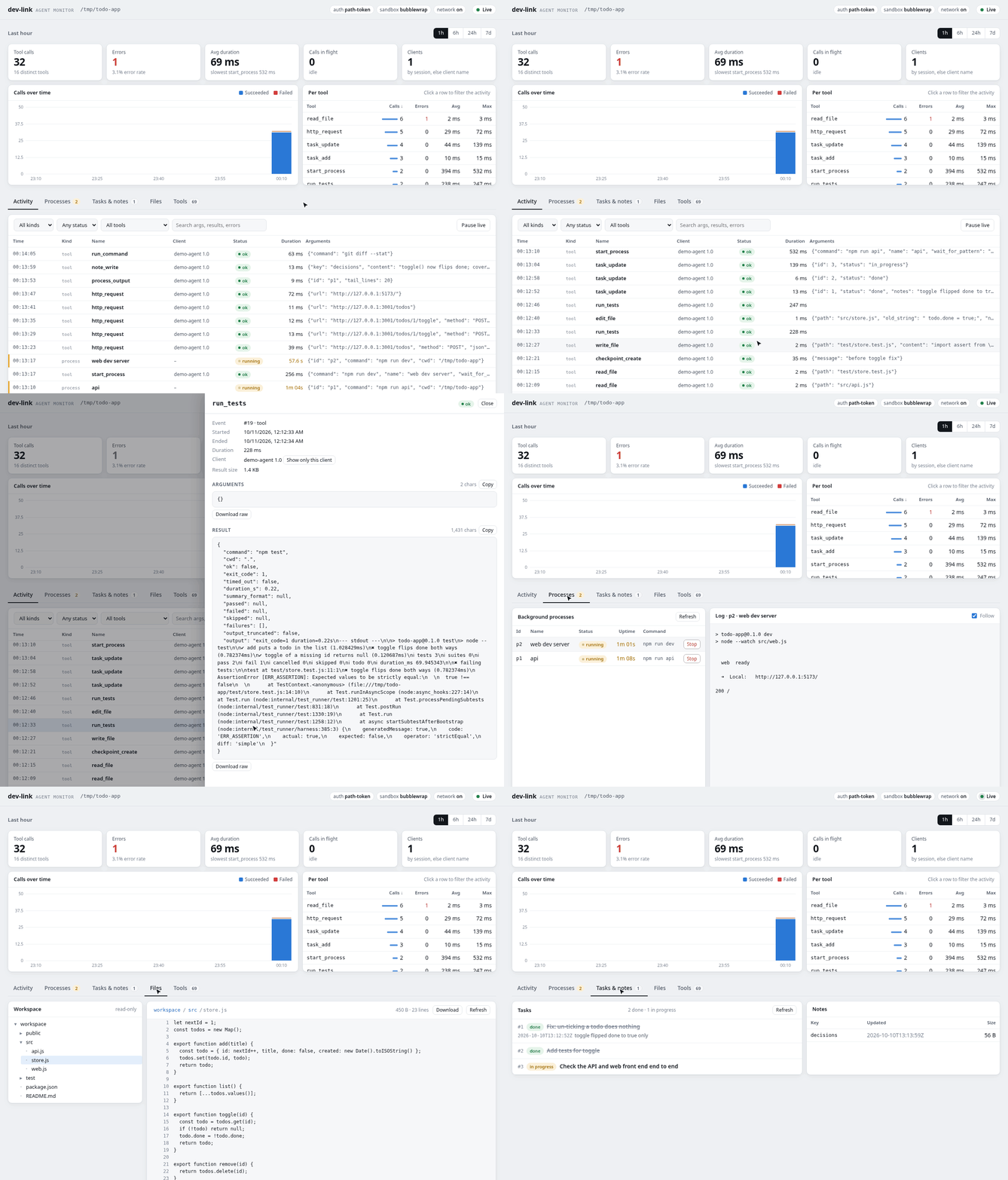
**What.** dev-link is an MCP server that runs on your machine and gives your AI a complete
|
|
64
|
+
development environment for one project folder: 78 tools that read and edit files, search code,
|
|
65
|
+
run commands, keep dev servers running, build, lint and test, navigate code, call HTTP APIs, query
|
|
66
|
+
SQLite, JSON and CSV, take checkpoints, keep a task list and drive a headless browser, plus
|
|
67
|
+
Docker when you turn it on. [Tools](#tools) lists every one.
|
|
68
|
+
|
|
69
|
+
**Why.** Web chats such as ChatGPT and Grok can add a custom MCP server, and so can every coding
|
|
70
|
+
agent and editor, including Claude Code, Codex CLI, Cursor and VS Code. dev-link gives any of them
|
|
71
|
+
the same development environment, with no API key and no extra model bill. The folder is sandboxed,
|
|
72
|
+
and every call is logged on a dashboard you can watch.
|
|
73
|
+
|
|
74
|
+
**How.** Start a server for the folder, then paste its URL into your client as a remote MCP server.
|
|
75
|
+
Any client that gains MCP support later works the same way.
|
|
76
|
+
|
|
77
|
+
## Quick start
|
|
78
|
+
|
|
79
|
+
```bash
|
|
80
|
+
curl -fsSL https://raw.githubusercontent.com/ajeetkharel/dev-link-mcp/main/scripts/install.sh | sh
|
|
81
|
+
cd your-project && dev-link start . --tunnel # prints the URL to give your client
|
|
82
|
+
```
|
|
83
|
+
|
|
84
|
+
Copy the `public MCP URL` from the output and add it to your AI client as a custom (remote) MCP
|
|
85
|
+
server with no authentication. [What you will see](#what-you-will-see) shows the output, and
|
|
86
|
+
[Add it to your client](#add-it-to-your-client) says where to paste it.
|
|
87
|
+
|
|
88
|
+
Using a client on this machine (Claude Code, Codex, Cursor, VS Code)? Drop `--tunnel`.
|
|
89
|
+
|
|
90
|
+
The [install script](https://github.com/ajeetkharel/dev-link-mcp/blob/main/scripts/install.sh) installs uv, dev-link, Chromium for the browser tools
|
|
91
|
+
and cloudflared, and on Linux the bubblewrap sandbox, git and ripgrep through your package manager,
|
|
92
|
+
so it asks for sudo. To install by hand instead, see [Requirements](#requirements).
|
|
93
|
+
|
|
94
|
+
## Why
|
|
95
|
+
|
|
96
|
+
The model stays in your client. dev-link talks to no model and needs no API key, so the plan you
|
|
97
|
+
already pay for does the work. dev-link uses only standard MCP over Streamable HTTP, with the token
|
|
98
|
+
in the URL or in a bearer header, so it works with any client that can add a remote MCP server
|
|
99
|
+
that way.
|
|
100
|
+
|
|
101
|
+
dev-link adds what a chat window or an editor lacks: your files, a shell and a browser.
|
|
102
|
+
|
|
103
|
+
You expose one folder, not your machine. On Linux every command runs in a bubblewrap sandbox
|
|
104
|
+
where that folder is writable, system tools are read-only, and your home, SSH keys and other
|
|
105
|
+
projects are not there.
|
|
106
|
+
|
|
107
|
+
Every tool call is saved with its arguments and result to an audit log outside the folder. The
|
|
108
|
+
dashboard shows the calls as they happen, along with running processes, the agent's task list
|
|
109
|
+
and the workspace files.
|
|
110
|
+
|
|
111
|
+
The agent gets a development environment, not just file access. It can run any command, install
|
|
112
|
+
packages, start a dev server and wait for its port, click through the app in a headless browser,
|
|
113
|
+
and take checkpoints it can diff and restore.
|
|
114
|
+
|
|
115
|
+
## What you will see
|
|
116
|
+
|
|
117
|
+
`dev-link start . --tunnel` prints this (the token and hostname are random on every start):
|
|
118
|
+
|
|
119
|
+
```text
|
|
120
|
+
dev-link started for /home/you/your-project
|
|
121
|
+
|
|
122
|
+
MCP URL : http://127.0.0.1:8765/mcp/<token>
|
|
123
|
+
dashboard : http://127.0.0.1:8765/ui/<token>/
|
|
124
|
+
public MCP URL: https://<random>.trycloudflare.com/mcp/<token>
|
|
125
|
+
public dash: https://<random>.trycloudflare.com/ui/<token>/
|
|
126
|
+
PID : 371145
|
|
127
|
+
logs : /home/you/.local/state/dev-link-mcp/your-project-<id>/server.log
|
|
128
|
+
|
|
129
|
+
The token in these URLs is new on every start; anyone with the URL can use the server.
|
|
130
|
+
The public URL is reachable from the internet: anyone with it can run commands here.
|
|
131
|
+
```
|
|
132
|
+
|
|
133
|
+
- **Give your client the `public MCP URL`.** `dev-link url .` prints the same line on its own,
|
|
134
|
+
which is handy for `$(...)` in a command.
|
|
135
|
+
- **Without `--tunnel`** there are no public lines. Clients on your machine use the `MCP URL`.
|
|
136
|
+
- **Watch the agent work** by opening the `dashboard` URL from your own machine. Keep the
|
|
137
|
+
`public dash` line to yourself.
|
|
138
|
+
- **Check or stop the server** with `dev-link status .` and `dev-link stop .`. A restart gives a
|
|
139
|
+
new URL, so add the server to your client again.
|
|
140
|
+
|
|
141
|
+
## Add it to your client
|
|
142
|
+
|
|
143
|
+
| Client | Run `start` | Where to paste the URL |
|
|
144
|
+
| --- | --- | --- |
|
|
145
|
+
| ChatGPT | with `--tunnel` | [chatgpt.com/plugins](https://chatgpt.com/plugins), plus button, **Add custom MCP server**, **No authentication** |
|
|
146
|
+
| Grok | with `--tunnel` | [grok.com/connectors](https://grok.com/connectors), **New Connector**, **Custom** |
|
|
147
|
+
| Claude Code, Codex CLI, Cursor, VS Code | without `--tunnel` | the commands and files below |
|
|
148
|
+
| Any other MCP client | `--tunnel` for web, none for local | its "add remote MCP server" setting |
|
|
149
|
+
|
|
150
|
+
Web chats are covered step by step in [docs/clients/web.md](https://github.com/ajeetkharel/dev-link-mcp/blob/main/docs/clients/web.md), and
|
|
151
|
+
[docs/clients](https://github.com/ajeetkharel/dev-link-mcp/blob/main/docs/clients/README.md) covers every client, fixed URLs, bearer auth and how to
|
|
152
|
+
check the connection.
|
|
153
|
+
|
|
154
|
+
<details>
|
|
155
|
+
<summary>Claude Code</summary>
|
|
156
|
+
|
|
157
|
+
```bash
|
|
158
|
+
claude mcp add --transport http dev-link "$(dev-link url DIR)"
|
|
159
|
+
```
|
|
160
|
+
|
|
161
|
+
After a restart, run `claude mcp remove dev-link` and add it again.
|
|
162
|
+
</details>
|
|
163
|
+
|
|
164
|
+
<details>
|
|
165
|
+
<summary>Codex CLI</summary>
|
|
166
|
+
|
|
167
|
+
```bash
|
|
168
|
+
codex mcp add dev-link --url "$(dev-link url DIR)"
|
|
169
|
+
```
|
|
170
|
+
|
|
171
|
+
Codex waits 60 s for a tool call by default, less than dev-link's command timeout, so raise it in
|
|
172
|
+
`~/.codex/config.toml`:
|
|
173
|
+
|
|
174
|
+
```toml
|
|
175
|
+
[mcp_servers.dev-link]
|
|
176
|
+
url = "http://127.0.0.1:8765/mcp/<token>"
|
|
177
|
+
tool_timeout_sec = 600
|
|
178
|
+
```
|
|
179
|
+
</details>
|
|
180
|
+
|
|
181
|
+
<details>
|
|
182
|
+
<summary>Cursor</summary>
|
|
183
|
+
|
|
184
|
+
`~/.cursor/mcp.json` (all projects) or `.cursor/mcp.json` in the project root:
|
|
185
|
+
|
|
186
|
+
```json
|
|
187
|
+
{
|
|
188
|
+
"mcpServers": {
|
|
189
|
+
"dev-link": { "url": "http://127.0.0.1:8765/mcp/<token>" }
|
|
190
|
+
}
|
|
191
|
+
}
|
|
192
|
+
```
|
|
193
|
+
</details>
|
|
194
|
+
|
|
195
|
+
<details>
|
|
196
|
+
<summary>VS Code</summary>
|
|
197
|
+
|
|
198
|
+
`.vscode/mcp.json` in the workspace, or your user `mcp.json`:
|
|
199
|
+
|
|
200
|
+
```json
|
|
201
|
+
{
|
|
202
|
+
"servers": {
|
|
203
|
+
"dev-link": { "type": "http", "url": "http://127.0.0.1:8765/mcp/<token>" }
|
|
204
|
+
}
|
|
205
|
+
}
|
|
206
|
+
```
|
|
207
|
+
</details>
|
|
208
|
+
|
|
209
|
+
## Requirements
|
|
210
|
+
|
|
211
|
+
The install script sets all of this up. By hand:
|
|
212
|
+
|
|
213
|
+
```bash
|
|
214
|
+
sudo apt install bubblewrap git ripgrep # or dnf, pacman, zypper, brew
|
|
215
|
+
uv tool install --python 3.13 'dev-link-mcp[all] @ git+https://github.com/ajeetkharel/dev-link-mcp'
|
|
216
|
+
dev-link install-browser # Chromium for the browser tools
|
|
217
|
+
```
|
|
218
|
+
|
|
219
|
+
- **bubblewrap** (Linux): the sandbox. `dev-link start` refuses to run without it, unless you pass
|
|
220
|
+
`--no-sandbox`, which gives the agent your full user access. Ubuntu 23.10 and later block the
|
|
221
|
+
user namespaces bubblewrap needs; see the [AppArmor note](https://github.com/ajeetkharel/dev-link-mcp/blob/main/CONTRIBUTING.md#setup).
|
|
222
|
+
- **git and ripgrep**: used by the tools (`sudo apt install git ripgrep`).
|
|
223
|
+
- **cloudflared**: only for `--tunnel`. See [Install cloudflared](https://github.com/ajeetkharel/dev-link-mcp/blob/main/docs/clients/web.md#install-cloudflared).
|
|
224
|
+
- **macOS** (experimental): runs only with `--no-sandbox`. With `--tunnel` as well, anyone with the public URL gets
|
|
225
|
+
your full user access.
|
|
226
|
+
|
|
227
|
+
`dev-link doctor` checks each of these and says how to fix what is missing.
|
|
228
|
+
|
|
229
|
+
## Tools
|
|
230
|
+
|
|
231
|
+
78 tools in 13 groups. Every group is on by default except docker (`--enable docker`). The code
|
|
232
|
+
and browser groups need the `[code]` and `[browser]` extras; `[all]` installs both.
|
|
233
|
+
|
|
234
|
+
| Group | For | Tools |
|
|
235
|
+
| --- | --- | --- |
|
|
236
|
+
| `system` | workspace and server info | `server_status`, `workspace_info` |
|
|
237
|
+
| `files` | read, write, edit, move and delete files | `read_file`, `read_many_files`, `write_file`, `edit_file`, `multi_edit`, `apply_patch`, `list_dir`, `tree`, `file_info`, `make_dir`, `copy_path`, `move_path`, `delete_path` |
|
|
238
|
+
| `search` | find files, grep, search and replace (ripgrep) | `find_files`, `grep`, `replace_in_files` |
|
|
239
|
+
| `shell` | run commands and code snippets | `run_command`, `run_code` |
|
|
240
|
+
| `processes` | dev servers and watchers in the background | `start_process`, `list_processes`, `process_output`, `process_input`, `wait_for_process`, `stop_process` |
|
|
241
|
+
| `code` | outlines, definitions and references (tree-sitter) | `code_outline`, `code_stats`, `find_symbol`, `find_references` |
|
|
242
|
+
| `project` | detect the stack; install, build, lint, format, test | `project_detect`, `install_deps`, `run_build`, `run_lint`, `run_format`, `run_tests` |
|
|
243
|
+
| `http` | HTTP requests, fetch pages, downloads | `http_request`, `fetch_url`, `download_file` |
|
|
244
|
+
| `data` | SQLite, jq and CSV | `sqlite_query`, `sqlite_schema`, `json_query`, `csv_preview` |
|
|
245
|
+
| `checkpoints` | snapshot, diff and restore the workspace | `checkpoint_create`, `checkpoint_list`, `checkpoint_diff`, `checkpoint_restore` |
|
|
246
|
+
| `tasks` | a persistent task list and notes | `task_add`, `task_list`, `task_update`, `note_write`, `note_read`, `note_list`, `note_delete` |
|
|
247
|
+
| `browser` | a headless Chromium (Playwright) | `browser_open`, `browser_navigate`, `browser_snapshot`, `browser_screenshot`, `browser_click`, `browser_type`, `browser_press`, `browser_select`, `browser_wait`, `browser_eval`, `browser_console`, `browser_network`, `browser_set_viewport`, `browser_list_pages`, `browser_close` |
|
|
248
|
+
| `docker` | containers and compose, limited to the workspace | `docker_run`, `docker_exec`, `docker_ps`, `docker_logs`, `docker_stop`, `docker_rm`, `docker_build`, `docker_images`, `compose` |
|
|
249
|
+
|
|
250
|
+
A group whose extra is missing is reported as not installed. Git, package managers and any
|
|
251
|
+
other CLI run through `run_command`, as in your own terminal. Every tool and its parameters are
|
|
252
|
+
listed in [docs/tools.md](https://github.com/ajeetkharel/dev-link-mcp/blob/main/docs/tools.md).
|
|
253
|
+
|
|
254
|
+
## Security
|
|
255
|
+
|
|
256
|
+
The MCP URL contains a random token that changes on every start. Anyone with the URL can run
|
|
257
|
+
commands in the folder, so treat it like a password. On Linux, commands run in a bubblewrap
|
|
258
|
+
sandbox that sees the folder, read-only system paths and toolchains, and a private home. The
|
|
259
|
+
network is on by default, so the agent can reach the internet, your LAN and services on
|
|
260
|
+
localhost; `--no-network` turns it off. `--no-sandbox` gives the agent your full user access,
|
|
261
|
+
and the docker group is root-equivalent when you enable it. Details are in
|
|
262
|
+
[docs/security.md](https://github.com/ajeetkharel/dev-link-mcp/blob/main/docs/security.md);
|
|
263
|
+
report vulnerabilities as described in
|
|
264
|
+
[SECURITY.md](https://github.com/ajeetkharel/dev-link-mcp/blob/main/SECURITY.md).
|
|
265
|
+
|
|
266
|
+
## Platforms
|
|
267
|
+
|
|
268
|
+
| Platform | Support |
|
|
269
|
+
| --- | --- |
|
|
270
|
+
| Linux | Supported. Commands run in a bubblewrap sandbox. |
|
|
271
|
+
| macOS | Experimental. Only with `--no-sandbox`, which gives the agent your full user access. Not tested in CI yet, and `wait_for_process` may not see a dev server's port. |
|
|
272
|
+
| Windows | Not supported. |
|
|
273
|
+
|
|
274
|
+
## Documentation
|
|
275
|
+
|
|
276
|
+
- [Configuration](https://github.com/ajeetkharel/dev-link-mcp/blob/main/docs/configuration.md): config files, environment variables and every setting.
|
|
277
|
+
- [Tools](https://github.com/ajeetkharel/dev-link-mcp/blob/main/docs/tools.md): every tool with its parameters.
|
|
278
|
+
- [Clients](https://github.com/ajeetkharel/dev-link-mcp/blob/main/docs/clients/README.md): [web](https://github.com/ajeetkharel/dev-link-mcp/blob/main/docs/clients/web.md) (ChatGPT, Grok) and [local](https://github.com/ajeetkharel/dev-link-mcp/blob/main/docs/clients/local.md) (Claude Code, Codex CLI, Cursor, VS Code).
|
|
279
|
+
- [Architecture](https://github.com/ajeetkharel/dev-link-mcp/blob/main/docs/architecture.md): how a tool call flows and where state lives.
|
|
280
|
+
- [Security](https://github.com/ajeetkharel/dev-link-mcp/blob/main/docs/security.md): what the sandbox holds back and what it does not.
|
|
281
|
+
- [Extending](https://github.com/ajeetkharel/dev-link-mcp/blob/main/docs/extending.md): tool groups from other packages.
|
|
282
|
+
|
|
283
|
+
`dev-link --help` lists every command.
|
|
284
|
+
|
|
285
|
+
## Contributing
|
|
286
|
+
|
|
287
|
+
See [CONTRIBUTING.md](https://github.com/ajeetkharel/dev-link-mcp/blob/main/CONTRIBUTING.md).
|
|
288
|
+
|
|
289
|
+
## License
|
|
290
|
+
|
|
291
|
+
MIT License. See [LICENSE](https://github.com/ajeetkharel/dev-link-mcp/blob/main/LICENSE).
|
|
@@ -0,0 +1,250 @@
|
|
|
1
|
+
<p align="center">
|
|
2
|
+
<img src="https://raw.githubusercontent.com/ajeetkharel/dev-link-mcp/main/docs/assets/logo.png" width="112" alt="dev-link-mcp logo">
|
|
3
|
+
</p>
|
|
4
|
+
|
|
5
|
+
<h1 align="center">dev-link-mcp</h1>
|
|
6
|
+
|
|
7
|
+
<!-- mcp-name: io.github.ajeetkharel/dev-link-mcp -->
|
|
8
|
+
|
|
9
|
+
<p align="center">
|
|
10
|
+
Turn the AI you already use, whether ChatGPT, Grok, Claude Code, Codex, Cursor or VS Code, into a coding agent for one folder on your machine, sandboxed and logged on a live dashboard.
|
|
11
|
+
</p>
|
|
12
|
+
|
|
13
|
+
<p align="center">
|
|
14
|
+
<a href="https://pypi.org/project/dev-link-mcp/"><img src="https://img.shields.io/pypi/v/dev-link-mcp" alt="PyPI version"></a>
|
|
15
|
+
<a href="https://pypi.org/project/dev-link-mcp/"><img src="https://img.shields.io/pypi/pyversions/dev-link-mcp" alt="Python versions"></a>
|
|
16
|
+
<a href="https://github.com/ajeetkharel/dev-link-mcp/blob/main/LICENSE"><img src="https://img.shields.io/github/license/ajeetkharel/dev-link-mcp" alt="License"></a>
|
|
17
|
+
<a href="https://github.com/ajeetkharel/dev-link-mcp/actions/workflows/ci.yml"><img src="https://github.com/ajeetkharel/dev-link-mcp/actions/workflows/ci.yml/badge.svg?branch=main" alt="CI"></a>
|
|
18
|
+
</p>
|
|
19
|
+
|
|
20
|
+

|
|
21
|
+
|
|
22
|
+
**What.** dev-link is an MCP server that runs on your machine and gives your AI a complete
|
|
23
|
+
development environment for one project folder: 78 tools that read and edit files, search code,
|
|
24
|
+
run commands, keep dev servers running, build, lint and test, navigate code, call HTTP APIs, query
|
|
25
|
+
SQLite, JSON and CSV, take checkpoints, keep a task list and drive a headless browser, plus
|
|
26
|
+
Docker when you turn it on. [Tools](#tools) lists every one.
|
|
27
|
+
|
|
28
|
+
**Why.** Web chats such as ChatGPT and Grok can add a custom MCP server, and so can every coding
|
|
29
|
+
agent and editor, including Claude Code, Codex CLI, Cursor and VS Code. dev-link gives any of them
|
|
30
|
+
the same development environment, with no API key and no extra model bill. The folder is sandboxed,
|
|
31
|
+
and every call is logged on a dashboard you can watch.
|
|
32
|
+
|
|
33
|
+
**How.** Start a server for the folder, then paste its URL into your client as a remote MCP server.
|
|
34
|
+
Any client that gains MCP support later works the same way.
|
|
35
|
+
|
|
36
|
+
## Quick start
|
|
37
|
+
|
|
38
|
+
```bash
|
|
39
|
+
curl -fsSL https://raw.githubusercontent.com/ajeetkharel/dev-link-mcp/main/scripts/install.sh | sh
|
|
40
|
+
cd your-project && dev-link start . --tunnel # prints the URL to give your client
|
|
41
|
+
```
|
|
42
|
+
|
|
43
|
+
Copy the `public MCP URL` from the output and add it to your AI client as a custom (remote) MCP
|
|
44
|
+
server with no authentication. [What you will see](#what-you-will-see) shows the output, and
|
|
45
|
+
[Add it to your client](#add-it-to-your-client) says where to paste it.
|
|
46
|
+
|
|
47
|
+
Using a client on this machine (Claude Code, Codex, Cursor, VS Code)? Drop `--tunnel`.
|
|
48
|
+
|
|
49
|
+
The [install script](https://github.com/ajeetkharel/dev-link-mcp/blob/main/scripts/install.sh) installs uv, dev-link, Chromium for the browser tools
|
|
50
|
+
and cloudflared, and on Linux the bubblewrap sandbox, git and ripgrep through your package manager,
|
|
51
|
+
so it asks for sudo. To install by hand instead, see [Requirements](#requirements).
|
|
52
|
+
|
|
53
|
+
## Why
|
|
54
|
+
|
|
55
|
+
The model stays in your client. dev-link talks to no model and needs no API key, so the plan you
|
|
56
|
+
already pay for does the work. dev-link uses only standard MCP over Streamable HTTP, with the token
|
|
57
|
+
in the URL or in a bearer header, so it works with any client that can add a remote MCP server
|
|
58
|
+
that way.
|
|
59
|
+
|
|
60
|
+
dev-link adds what a chat window or an editor lacks: your files, a shell and a browser.
|
|
61
|
+
|
|
62
|
+
You expose one folder, not your machine. On Linux every command runs in a bubblewrap sandbox
|
|
63
|
+
where that folder is writable, system tools are read-only, and your home, SSH keys and other
|
|
64
|
+
projects are not there.
|
|
65
|
+
|
|
66
|
+
Every tool call is saved with its arguments and result to an audit log outside the folder. The
|
|
67
|
+
dashboard shows the calls as they happen, along with running processes, the agent's task list
|
|
68
|
+
and the workspace files.
|
|
69
|
+
|
|
70
|
+
The agent gets a development environment, not just file access. It can run any command, install
|
|
71
|
+
packages, start a dev server and wait for its port, click through the app in a headless browser,
|
|
72
|
+
and take checkpoints it can diff and restore.
|
|
73
|
+
|
|
74
|
+
## What you will see
|
|
75
|
+
|
|
76
|
+
`dev-link start . --tunnel` prints this (the token and hostname are random on every start):
|
|
77
|
+
|
|
78
|
+
```text
|
|
79
|
+
dev-link started for /home/you/your-project
|
|
80
|
+
|
|
81
|
+
MCP URL : http://127.0.0.1:8765/mcp/<token>
|
|
82
|
+
dashboard : http://127.0.0.1:8765/ui/<token>/
|
|
83
|
+
public MCP URL: https://<random>.trycloudflare.com/mcp/<token>
|
|
84
|
+
public dash: https://<random>.trycloudflare.com/ui/<token>/
|
|
85
|
+
PID : 371145
|
|
86
|
+
logs : /home/you/.local/state/dev-link-mcp/your-project-<id>/server.log
|
|
87
|
+
|
|
88
|
+
The token in these URLs is new on every start; anyone with the URL can use the server.
|
|
89
|
+
The public URL is reachable from the internet: anyone with it can run commands here.
|
|
90
|
+
```
|
|
91
|
+
|
|
92
|
+
- **Give your client the `public MCP URL`.** `dev-link url .` prints the same line on its own,
|
|
93
|
+
which is handy for `$(...)` in a command.
|
|
94
|
+
- **Without `--tunnel`** there are no public lines. Clients on your machine use the `MCP URL`.
|
|
95
|
+
- **Watch the agent work** by opening the `dashboard` URL from your own machine. Keep the
|
|
96
|
+
`public dash` line to yourself.
|
|
97
|
+
- **Check or stop the server** with `dev-link status .` and `dev-link stop .`. A restart gives a
|
|
98
|
+
new URL, so add the server to your client again.
|
|
99
|
+
|
|
100
|
+
## Add it to your client
|
|
101
|
+
|
|
102
|
+
| Client | Run `start` | Where to paste the URL |
|
|
103
|
+
| --- | --- | --- |
|
|
104
|
+
| ChatGPT | with `--tunnel` | [chatgpt.com/plugins](https://chatgpt.com/plugins), plus button, **Add custom MCP server**, **No authentication** |
|
|
105
|
+
| Grok | with `--tunnel` | [grok.com/connectors](https://grok.com/connectors), **New Connector**, **Custom** |
|
|
106
|
+
| Claude Code, Codex CLI, Cursor, VS Code | without `--tunnel` | the commands and files below |
|
|
107
|
+
| Any other MCP client | `--tunnel` for web, none for local | its "add remote MCP server" setting |
|
|
108
|
+
|
|
109
|
+
Web chats are covered step by step in [docs/clients/web.md](https://github.com/ajeetkharel/dev-link-mcp/blob/main/docs/clients/web.md), and
|
|
110
|
+
[docs/clients](https://github.com/ajeetkharel/dev-link-mcp/blob/main/docs/clients/README.md) covers every client, fixed URLs, bearer auth and how to
|
|
111
|
+
check the connection.
|
|
112
|
+
|
|
113
|
+
<details>
|
|
114
|
+
<summary>Claude Code</summary>
|
|
115
|
+
|
|
116
|
+
```bash
|
|
117
|
+
claude mcp add --transport http dev-link "$(dev-link url DIR)"
|
|
118
|
+
```
|
|
119
|
+
|
|
120
|
+
After a restart, run `claude mcp remove dev-link` and add it again.
|
|
121
|
+
</details>
|
|
122
|
+
|
|
123
|
+
<details>
|
|
124
|
+
<summary>Codex CLI</summary>
|
|
125
|
+
|
|
126
|
+
```bash
|
|
127
|
+
codex mcp add dev-link --url "$(dev-link url DIR)"
|
|
128
|
+
```
|
|
129
|
+
|
|
130
|
+
Codex waits 60 s for a tool call by default, less than dev-link's command timeout, so raise it in
|
|
131
|
+
`~/.codex/config.toml`:
|
|
132
|
+
|
|
133
|
+
```toml
|
|
134
|
+
[mcp_servers.dev-link]
|
|
135
|
+
url = "http://127.0.0.1:8765/mcp/<token>"
|
|
136
|
+
tool_timeout_sec = 600
|
|
137
|
+
```
|
|
138
|
+
</details>
|
|
139
|
+
|
|
140
|
+
<details>
|
|
141
|
+
<summary>Cursor</summary>
|
|
142
|
+
|
|
143
|
+
`~/.cursor/mcp.json` (all projects) or `.cursor/mcp.json` in the project root:
|
|
144
|
+
|
|
145
|
+
```json
|
|
146
|
+
{
|
|
147
|
+
"mcpServers": {
|
|
148
|
+
"dev-link": { "url": "http://127.0.0.1:8765/mcp/<token>" }
|
|
149
|
+
}
|
|
150
|
+
}
|
|
151
|
+
```
|
|
152
|
+
</details>
|
|
153
|
+
|
|
154
|
+
<details>
|
|
155
|
+
<summary>VS Code</summary>
|
|
156
|
+
|
|
157
|
+
`.vscode/mcp.json` in the workspace, or your user `mcp.json`:
|
|
158
|
+
|
|
159
|
+
```json
|
|
160
|
+
{
|
|
161
|
+
"servers": {
|
|
162
|
+
"dev-link": { "type": "http", "url": "http://127.0.0.1:8765/mcp/<token>" }
|
|
163
|
+
}
|
|
164
|
+
}
|
|
165
|
+
```
|
|
166
|
+
</details>
|
|
167
|
+
|
|
168
|
+
## Requirements
|
|
169
|
+
|
|
170
|
+
The install script sets all of this up. By hand:
|
|
171
|
+
|
|
172
|
+
```bash
|
|
173
|
+
sudo apt install bubblewrap git ripgrep # or dnf, pacman, zypper, brew
|
|
174
|
+
uv tool install --python 3.13 'dev-link-mcp[all] @ git+https://github.com/ajeetkharel/dev-link-mcp'
|
|
175
|
+
dev-link install-browser # Chromium for the browser tools
|
|
176
|
+
```
|
|
177
|
+
|
|
178
|
+
- **bubblewrap** (Linux): the sandbox. `dev-link start` refuses to run without it, unless you pass
|
|
179
|
+
`--no-sandbox`, which gives the agent your full user access. Ubuntu 23.10 and later block the
|
|
180
|
+
user namespaces bubblewrap needs; see the [AppArmor note](https://github.com/ajeetkharel/dev-link-mcp/blob/main/CONTRIBUTING.md#setup).
|
|
181
|
+
- **git and ripgrep**: used by the tools (`sudo apt install git ripgrep`).
|
|
182
|
+
- **cloudflared**: only for `--tunnel`. See [Install cloudflared](https://github.com/ajeetkharel/dev-link-mcp/blob/main/docs/clients/web.md#install-cloudflared).
|
|
183
|
+
- **macOS** (experimental): runs only with `--no-sandbox`. With `--tunnel` as well, anyone with the public URL gets
|
|
184
|
+
your full user access.
|
|
185
|
+
|
|
186
|
+
`dev-link doctor` checks each of these and says how to fix what is missing.
|
|
187
|
+
|
|
188
|
+
## Tools
|
|
189
|
+
|
|
190
|
+
78 tools in 13 groups. Every group is on by default except docker (`--enable docker`). The code
|
|
191
|
+
and browser groups need the `[code]` and `[browser]` extras; `[all]` installs both.
|
|
192
|
+
|
|
193
|
+
| Group | For | Tools |
|
|
194
|
+
| --- | --- | --- |
|
|
195
|
+
| `system` | workspace and server info | `server_status`, `workspace_info` |
|
|
196
|
+
| `files` | read, write, edit, move and delete files | `read_file`, `read_many_files`, `write_file`, `edit_file`, `multi_edit`, `apply_patch`, `list_dir`, `tree`, `file_info`, `make_dir`, `copy_path`, `move_path`, `delete_path` |
|
|
197
|
+
| `search` | find files, grep, search and replace (ripgrep) | `find_files`, `grep`, `replace_in_files` |
|
|
198
|
+
| `shell` | run commands and code snippets | `run_command`, `run_code` |
|
|
199
|
+
| `processes` | dev servers and watchers in the background | `start_process`, `list_processes`, `process_output`, `process_input`, `wait_for_process`, `stop_process` |
|
|
200
|
+
| `code` | outlines, definitions and references (tree-sitter) | `code_outline`, `code_stats`, `find_symbol`, `find_references` |
|
|
201
|
+
| `project` | detect the stack; install, build, lint, format, test | `project_detect`, `install_deps`, `run_build`, `run_lint`, `run_format`, `run_tests` |
|
|
202
|
+
| `http` | HTTP requests, fetch pages, downloads | `http_request`, `fetch_url`, `download_file` |
|
|
203
|
+
| `data` | SQLite, jq and CSV | `sqlite_query`, `sqlite_schema`, `json_query`, `csv_preview` |
|
|
204
|
+
| `checkpoints` | snapshot, diff and restore the workspace | `checkpoint_create`, `checkpoint_list`, `checkpoint_diff`, `checkpoint_restore` |
|
|
205
|
+
| `tasks` | a persistent task list and notes | `task_add`, `task_list`, `task_update`, `note_write`, `note_read`, `note_list`, `note_delete` |
|
|
206
|
+
| `browser` | a headless Chromium (Playwright) | `browser_open`, `browser_navigate`, `browser_snapshot`, `browser_screenshot`, `browser_click`, `browser_type`, `browser_press`, `browser_select`, `browser_wait`, `browser_eval`, `browser_console`, `browser_network`, `browser_set_viewport`, `browser_list_pages`, `browser_close` |
|
|
207
|
+
| `docker` | containers and compose, limited to the workspace | `docker_run`, `docker_exec`, `docker_ps`, `docker_logs`, `docker_stop`, `docker_rm`, `docker_build`, `docker_images`, `compose` |
|
|
208
|
+
|
|
209
|
+
A group whose extra is missing is reported as not installed. Git, package managers and any
|
|
210
|
+
other CLI run through `run_command`, as in your own terminal. Every tool and its parameters are
|
|
211
|
+
listed in [docs/tools.md](https://github.com/ajeetkharel/dev-link-mcp/blob/main/docs/tools.md).
|
|
212
|
+
|
|
213
|
+
## Security
|
|
214
|
+
|
|
215
|
+
The MCP URL contains a random token that changes on every start. Anyone with the URL can run
|
|
216
|
+
commands in the folder, so treat it like a password. On Linux, commands run in a bubblewrap
|
|
217
|
+
sandbox that sees the folder, read-only system paths and toolchains, and a private home. The
|
|
218
|
+
network is on by default, so the agent can reach the internet, your LAN and services on
|
|
219
|
+
localhost; `--no-network` turns it off. `--no-sandbox` gives the agent your full user access,
|
|
220
|
+
and the docker group is root-equivalent when you enable it. Details are in
|
|
221
|
+
[docs/security.md](https://github.com/ajeetkharel/dev-link-mcp/blob/main/docs/security.md);
|
|
222
|
+
report vulnerabilities as described in
|
|
223
|
+
[SECURITY.md](https://github.com/ajeetkharel/dev-link-mcp/blob/main/SECURITY.md).
|
|
224
|
+
|
|
225
|
+
## Platforms
|
|
226
|
+
|
|
227
|
+
| Platform | Support |
|
|
228
|
+
| --- | --- |
|
|
229
|
+
| Linux | Supported. Commands run in a bubblewrap sandbox. |
|
|
230
|
+
| macOS | Experimental. Only with `--no-sandbox`, which gives the agent your full user access. Not tested in CI yet, and `wait_for_process` may not see a dev server's port. |
|
|
231
|
+
| Windows | Not supported. |
|
|
232
|
+
|
|
233
|
+
## Documentation
|
|
234
|
+
|
|
235
|
+
- [Configuration](https://github.com/ajeetkharel/dev-link-mcp/blob/main/docs/configuration.md): config files, environment variables and every setting.
|
|
236
|
+
- [Tools](https://github.com/ajeetkharel/dev-link-mcp/blob/main/docs/tools.md): every tool with its parameters.
|
|
237
|
+
- [Clients](https://github.com/ajeetkharel/dev-link-mcp/blob/main/docs/clients/README.md): [web](https://github.com/ajeetkharel/dev-link-mcp/blob/main/docs/clients/web.md) (ChatGPT, Grok) and [local](https://github.com/ajeetkharel/dev-link-mcp/blob/main/docs/clients/local.md) (Claude Code, Codex CLI, Cursor, VS Code).
|
|
238
|
+
- [Architecture](https://github.com/ajeetkharel/dev-link-mcp/blob/main/docs/architecture.md): how a tool call flows and where state lives.
|
|
239
|
+
- [Security](https://github.com/ajeetkharel/dev-link-mcp/blob/main/docs/security.md): what the sandbox holds back and what it does not.
|
|
240
|
+
- [Extending](https://github.com/ajeetkharel/dev-link-mcp/blob/main/docs/extending.md): tool groups from other packages.
|
|
241
|
+
|
|
242
|
+
`dev-link --help` lists every command.
|
|
243
|
+
|
|
244
|
+
## Contributing
|
|
245
|
+
|
|
246
|
+
See [CONTRIBUTING.md](https://github.com/ajeetkharel/dev-link-mcp/blob/main/CONTRIBUTING.md).
|
|
247
|
+
|
|
248
|
+
## License
|
|
249
|
+
|
|
250
|
+
MIT License. See [LICENSE](https://github.com/ajeetkharel/dev-link-mcp/blob/main/LICENSE).
|