desktop-notifier 5.0.0.dev2__tar.gz → 5.0.1__tar.gz
This diff represents the content of publicly available package versions that have been released to one of the supported registries. The information contained in this diff is provided for informational purposes only and reflects changes between package versions as they appear in their respective public registries.
- {desktop_notifier-5.0.0.dev2/src/desktop_notifier.egg-info → desktop_notifier-5.0.1}/PKG-INFO +79 -81
- {desktop_notifier-5.0.0.dev2 → desktop_notifier-5.0.1}/README.md +67 -78
- {desktop_notifier-5.0.0.dev2 → desktop_notifier-5.0.1}/pyproject.toml +18 -3
- {desktop_notifier-5.0.0.dev2 → desktop_notifier-5.0.1}/src/desktop_notifier/__init__.py +1 -1
- {desktop_notifier-5.0.0.dev2 → desktop_notifier-5.0.1}/src/desktop_notifier/base.py +0 -1
- {desktop_notifier-5.0.0.dev2 → desktop_notifier-5.0.1}/src/desktop_notifier/dbus.py +0 -1
- {desktop_notifier-5.0.0.dev2 → desktop_notifier-5.0.1}/src/desktop_notifier/dummy.py +0 -1
- {desktop_notifier-5.0.0.dev2 → desktop_notifier-5.0.1}/src/desktop_notifier/macos.py +2 -0
- {desktop_notifier-5.0.0.dev2 → desktop_notifier-5.0.1}/src/desktop_notifier/macos_support.py +1 -0
- {desktop_notifier-5.0.0.dev2 → desktop_notifier-5.0.1}/src/desktop_notifier/main.py +0 -1
- {desktop_notifier-5.0.0.dev2 → desktop_notifier-5.0.1}/src/desktop_notifier/sync.py +0 -1
- {desktop_notifier-5.0.0.dev2 → desktop_notifier-5.0.1}/src/desktop_notifier/winrt.py +0 -1
- {desktop_notifier-5.0.0.dev2 → desktop_notifier-5.0.1/src/desktop_notifier.egg-info}/PKG-INFO +79 -81
- {desktop_notifier-5.0.0.dev2 → desktop_notifier-5.0.1}/LICENSE +0 -0
- {desktop_notifier-5.0.0.dev2 → desktop_notifier-5.0.1}/setup.cfg +0 -0
- {desktop_notifier-5.0.0.dev2 → desktop_notifier-5.0.1}/src/desktop_notifier/py.typed +0 -0
- {desktop_notifier-5.0.0.dev2 → desktop_notifier-5.0.1}/src/desktop_notifier/resources/__init__.py +0 -0
- {desktop_notifier-5.0.0.dev2 → desktop_notifier-5.0.1}/src/desktop_notifier/resources/python.png +0 -0
- {desktop_notifier-5.0.0.dev2 → desktop_notifier-5.0.1}/src/desktop_notifier.egg-info/SOURCES.txt +0 -0
- {desktop_notifier-5.0.0.dev2 → desktop_notifier-5.0.1}/src/desktop_notifier.egg-info/dependency_links.txt +0 -0
- {desktop_notifier-5.0.0.dev2 → desktop_notifier-5.0.1}/src/desktop_notifier.egg-info/requires.txt +0 -0
- {desktop_notifier-5.0.0.dev2 → desktop_notifier-5.0.1}/src/desktop_notifier.egg-info/top_level.txt +0 -0
- {desktop_notifier-5.0.0.dev2 → desktop_notifier-5.0.1}/tests/test_api.py +0 -0
- {desktop_notifier-5.0.0.dev2 → desktop_notifier-5.0.1}/tests/test_sync_api.py +0 -0
{desktop_notifier-5.0.0.dev2/src/desktop_notifier.egg-info → desktop_notifier-5.0.1}/PKG-INFO
RENAMED
|
@@ -1,22 +1,31 @@
|
|
|
1
1
|
Metadata-Version: 2.1
|
|
2
2
|
Name: desktop-notifier
|
|
3
|
-
Version: 5.0.
|
|
3
|
+
Version: 5.0.1
|
|
4
4
|
Summary: Python library for cross-platform desktop notifications
|
|
5
5
|
Author-email: Sam Schott <sam.schott@outlook.com>
|
|
6
6
|
License: MIT
|
|
7
7
|
Project-URL: Homepage, https://github.com/samschott/desktop-notifier
|
|
8
|
-
Keywords: desktop-notifier
|
|
9
|
-
Classifier: Development Status ::
|
|
8
|
+
Keywords: desktop-notifier,notifications,Notification Center,push notifications,Toast notifications
|
|
9
|
+
Classifier: Development Status :: 5 - Production/Stable
|
|
10
10
|
Classifier: Intended Audience :: Developers
|
|
11
11
|
Classifier: License :: OSI Approved :: MIT License
|
|
12
12
|
Classifier: Natural Language :: English
|
|
13
|
+
Classifier: Operating System :: MacOS :: MacOS X
|
|
14
|
+
Classifier: Operating System :: Microsoft :: Windows
|
|
15
|
+
Classifier: Operating System :: OS Independent
|
|
13
16
|
Classifier: Programming Language :: Python :: 3
|
|
14
17
|
Classifier: Programming Language :: Python :: 3.7
|
|
15
18
|
Classifier: Programming Language :: Python :: 3.8
|
|
16
19
|
Classifier: Programming Language :: Python :: 3.9
|
|
17
20
|
Classifier: Programming Language :: Python :: 3.10
|
|
18
21
|
Classifier: Programming Language :: Python :: 3.11
|
|
22
|
+
Classifier: Programming Language :: Python :: 3.12
|
|
19
23
|
Classifier: Programming Language :: Python :: 3 :: Only
|
|
24
|
+
Classifier: Topic :: Communications
|
|
25
|
+
Classifier: Topic :: Desktop Environment
|
|
26
|
+
Classifier: Topic :: Desktop Environment :: Gnome
|
|
27
|
+
Classifier: Topic :: Desktop Environment :: K Desktop Environment (KDE)
|
|
28
|
+
Classifier: Topic :: Software Development :: Libraries :: Python Modules
|
|
20
29
|
Requires-Python: >=3.7
|
|
21
30
|
Description-Content-Type: text/markdown
|
|
22
31
|
License-File: LICENSE
|
|
@@ -44,30 +53,22 @@ Requires-Dist: sphinx==7.3.7; extra == "docs"
|
|
|
44
53
|
Requires-Dist: sphinx-autoapi==3.1.2; extra == "docs"
|
|
45
54
|
Requires-Dist: sphinx-mdinclude==0.6.1; extra == "docs"
|
|
46
55
|
|
|
56
|
+
|
|
57
|
+
# Desktop Notifier
|
|
58
|
+
|
|
47
59
|
[](https://pypi.org/project/desktop-notifier/)
|
|
48
60
|
[](https://pypi.org/pypi/desktop-notifier/)
|
|
49
61
|
[](https://desktop-notifier.readthedocs.io/en/latest/?badge=latest)
|
|
50
62
|
|
|
51
|
-
# Desktop Notifier
|
|
52
|
-
|
|
53
63
|
`desktop-notifier` is a Python library for cross-platform desktop notifications.
|
|
54
64
|
Currently supported platforms are:
|
|
55
65
|
|
|
56
66
|
* Linux via the dbus service org.freedesktop.Notifications
|
|
57
67
|
* macOS and iOS via the Notification Center framework
|
|
58
|
-
*
|
|
59
|
-
|
|
60
|
-

|
|
68
|
+
* Windows via the WinRT / Python bridge
|
|
61
69
|
|
|
62
70
|
## Features
|
|
63
71
|
|
|
64
|
-
`desktop-notifier` aims to be a good citizen of the platforms which it supports. It
|
|
65
|
-
therefore stays within the limits of the native platform APIs and does not try to work
|
|
66
|
-
around limitations which are often deliberate UI choices. For example, on macOS and
|
|
67
|
-
iOS, it is not possible to change the app icon which is shown on notifications. There
|
|
68
|
-
are possible workarounds - that would likely be rejected by an App Store review - and
|
|
69
|
-
desktop-notifier deliberately stays away from those.
|
|
70
|
-
|
|
71
72
|
Where supported by the native platform APIs, `desktop-notifier` allows for:
|
|
72
73
|
|
|
73
74
|
* Clickable notifications with callbacks on user interaction
|
|
@@ -77,16 +78,17 @@ Where supported by the native platform APIs, `desktop-notifier` allows for:
|
|
|
77
78
|
* Notification threads (grouping notifications by topic)
|
|
78
79
|
* Limiting the maximum number of notifications shown in the notification center
|
|
79
80
|
|
|
81
|
+
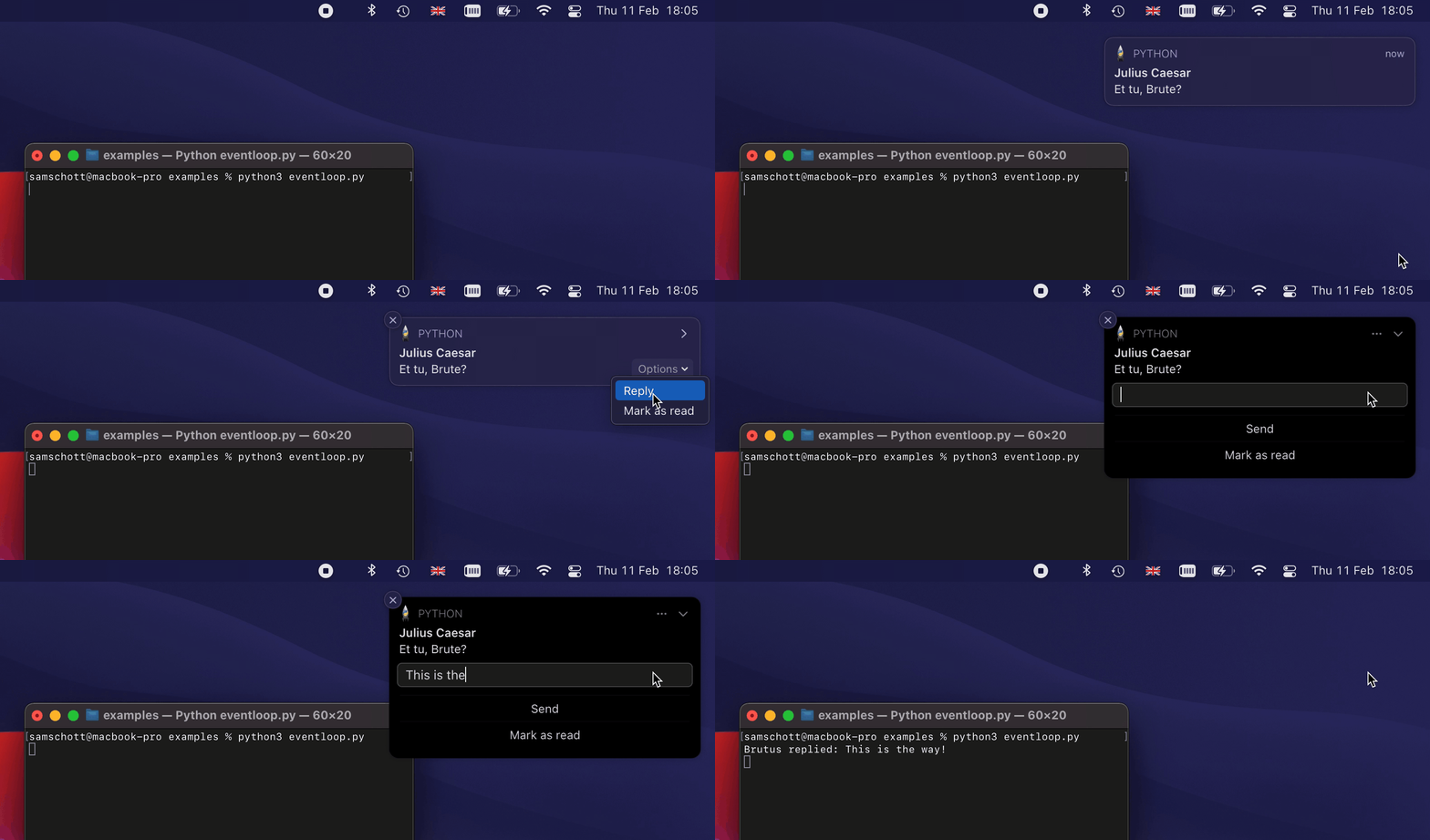
An example of how some of this looks like on macOS:
|
|
82
|
+
|
|
83
|
+
|
|
84
|
+
|
|
80
85
|
An exhaustive list of features and their platform support is provided in the
|
|
81
86
|
[documentation](https://desktop-notifier.readthedocs.io/en/latest/background/platform_support.html).
|
|
87
|
+
In addition, you can query supported features at runtime with
|
|
88
|
+
`DesktopNotifier.get_capabilities()`.
|
|
82
89
|
|
|
83
|
-
|
|
84
|
-
|
|
85
|
-
* Async API: The main API consists of async methods and a running event loop
|
|
86
|
-
is required to respond to user interactions with a notification.
|
|
87
|
-
* Prefer pure Python dependencies over extension modules. We make an exception for
|
|
88
|
-
Windows because interoperability with the Windows Runtime is difficult to achieve
|
|
89
|
-
otherwise.
|
|
90
|
+
Any options or configurations which are not supported by the platform will be silently
|
|
91
|
+
ignored.
|
|
90
92
|
|
|
91
93
|
## Installation
|
|
92
94
|
|
|
@@ -108,71 +110,58 @@ from desktop_notifier import DesktopNotifier
|
|
|
108
110
|
notifier = DesktopNotifier()
|
|
109
111
|
|
|
110
112
|
async def main():
|
|
111
|
-
|
|
112
|
-
|
|
113
|
-
await asyncio.sleep(5) # wait a bit before clearing notification
|
|
114
|
-
|
|
115
|
-
await notifier.clear(n) # removes the notification
|
|
116
|
-
await notifier.clear_all() # removes all notifications for this app
|
|
113
|
+
await notifier.send(title="Hello world!", message="Sent from Python")
|
|
117
114
|
|
|
118
115
|
asyncio.run(main())
|
|
119
116
|
```
|
|
120
117
|
|
|
121
|
-
For convenience, there is also a synchronous method ``send_sync()`` to send
|
|
122
|
-
notifications without manually starting an asyncio event loop:
|
|
123
|
-
|
|
124
|
-
```Python
|
|
125
|
-
notifier.send_sync(title="Hello world!", message="Sent from Python")
|
|
126
|
-
```
|
|
127
|
-
|
|
128
118
|
By default, "Python" will be used as the app name for all notifications, but you can
|
|
129
119
|
manually specify an app name and icon in the ``DesktopNotifier`` constructor. Advanced
|
|
130
120
|
usage also allows setting different notification options such as urgency, buttons,
|
|
131
|
-
callbacks, etc.
|
|
132
|
-
the top of the page:
|
|
121
|
+
callbacks, etc. For example, for the gif displayed above:
|
|
133
122
|
|
|
134
123
|
```Python
|
|
135
124
|
import asyncio
|
|
136
|
-
|
|
125
|
+
import signal
|
|
137
126
|
|
|
138
|
-
|
|
127
|
+
from desktop_notifier import DesktopNotifier, Urgency, Button, ReplyField, DEFAULT_SOUND
|
|
139
128
|
|
|
140
|
-
async def main():
|
|
141
|
-
await notifier.send(
|
|
142
|
-
title="Julius Caesar",
|
|
143
|
-
message="Et tu, Brute?",
|
|
144
|
-
urgency=Urgency.Critical,
|
|
145
|
-
buttons=[
|
|
146
|
-
Button(
|
|
147
|
-
title="Mark as read",
|
|
148
|
-
on_pressed=lambda: print("Marked as read")),
|
|
149
|
-
],
|
|
150
|
-
reply_field=ReplyField(
|
|
151
|
-
title="Reply",
|
|
152
|
-
button_title="Send",
|
|
153
|
-
on_replied=lambda text: print("Brutus replied:", text),
|
|
154
|
-
),
|
|
155
|
-
on_clicked=lambda: print("Notification clicked"),
|
|
156
|
-
on_dismissed=lambda: print("Notification dismissed"),
|
|
157
|
-
sound_file=DEFAULT_SOUND,
|
|
158
|
-
)
|
|
159
|
-
|
|
160
|
-
|
|
161
|
-
loop = asyncio.get_event_loop()
|
|
162
|
-
loop.create_task(main())
|
|
163
|
-
loop.run_forever()
|
|
164
|
-
```
|
|
165
129
|
|
|
166
|
-
|
|
167
|
-
|
|
168
|
-
|
|
169
|
-
|
|
170
|
-
|
|
171
|
-
|
|
172
|
-
|
|
130
|
+
async def main() -> None:
|
|
131
|
+
notifier = DesktopNotifier(
|
|
132
|
+
app_name="Sample App",
|
|
133
|
+
notification_limit=10,
|
|
134
|
+
)
|
|
135
|
+
|
|
136
|
+
await notifier.send(
|
|
137
|
+
title="Julius Caesar",
|
|
138
|
+
message="Et tu, Brute?",
|
|
139
|
+
urgency=Urgency.Critical,
|
|
140
|
+
buttons=[
|
|
141
|
+
Button(
|
|
142
|
+
title="Mark as read",
|
|
143
|
+
on_pressed=lambda: print("Marked as read"),
|
|
144
|
+
)
|
|
145
|
+
],
|
|
146
|
+
reply_field=ReplyField(
|
|
147
|
+
on_replied=lambda text: print("Brutus replied:", text),
|
|
148
|
+
),
|
|
149
|
+
on_clicked=lambda: print("Notification clicked"),
|
|
150
|
+
on_dismissed=lambda: print("Notification dismissed"),
|
|
151
|
+
sound=DEFAULT_SOUND,
|
|
152
|
+
)
|
|
153
|
+
|
|
154
|
+
# Run the event loop forever to respond to user interactions with the notification.
|
|
155
|
+
stop_event = asyncio.Event()
|
|
156
|
+
loop = asyncio.get_running_loop()
|
|
157
|
+
|
|
158
|
+
loop.add_signal_handler(signal.SIGINT, stop_event.set)
|
|
159
|
+
loop.add_signal_handler(signal.SIGTERM, stop_event.set)
|
|
160
|
+
|
|
161
|
+
await stop_event.wait()
|
|
173
162
|
|
|
174
|
-
|
|
175
|
-
|
|
163
|
+
asyncio.run(main())
|
|
164
|
+
```
|
|
176
165
|
|
|
177
166
|
## Event loop integration
|
|
178
167
|
|
|
@@ -190,10 +179,6 @@ from rubicon.objc.eventloop import EventLoopPolicy
|
|
|
190
179
|
|
|
191
180
|
# Install the event loop policy
|
|
192
181
|
asyncio.set_event_loop_policy(EventLoopPolicy())
|
|
193
|
-
|
|
194
|
-
# Get an event loop, and run it!
|
|
195
|
-
loop = asyncio.get_event_loop()
|
|
196
|
-
loop.run_forever()
|
|
197
182
|
```
|
|
198
183
|
|
|
199
184
|
Desktop-notifier itself uses Rubicon Objective-C to interface with Cocoa APIs. A full
|
|
@@ -221,13 +206,26 @@ the resulting app bundle for notifications to work. An ad-hoc signature will be
|
|
|
221
206
|
sufficient but signing with an Apple developer certificate is recommended for
|
|
222
207
|
distribution and may be required on future releases of macOS.
|
|
223
208
|
|
|
224
|
-
##
|
|
209
|
+
## Design choices
|
|
210
|
+
|
|
211
|
+
This package is opinionated in a few ways:
|
|
225
212
|
|
|
226
|
-
*
|
|
227
|
-
|
|
213
|
+
* It does not try to work around platform restrictions, such as changing the app icon on
|
|
214
|
+
macOS. Workarounds would be hacky and likely be rejected by an App Store review.
|
|
215
|
+
* The main API consists of async methods and a running event loop is required to respond
|
|
216
|
+
to user interactions with a notification. This simplifies integration with GUI apps.
|
|
217
|
+
* Dependencies are pure Python packages without extension modules. This simplifies app
|
|
218
|
+
bundling and distribution. We make an exception for Windows because interoperability
|
|
219
|
+
with the Windows Runtime is difficult to achieve without extension modules.
|
|
220
|
+
* If a certain feature is not supported by a platform, using it will not raise an
|
|
221
|
+
exception. This allows clients to use a wide feature set where available without
|
|
222
|
+
worrying about exception handling.
|
|
223
|
+
* If a notification cannot be scheduled, this is logged as a warning and does not raise
|
|
224
|
+
an exception. Most platforms allow the user to control if and how notifications are
|
|
225
|
+
delivered and notification delivery therefore cannot be taken as guaranteed.
|
|
228
226
|
|
|
229
227
|
## Dependencies
|
|
230
228
|
|
|
231
229
|
* [dbus-next](https://github.com/altdesktop/python-dbus-next) on Linux
|
|
232
230
|
* [rubicon-objc](https://github.com/beeware/rubicon-objc) on macOS
|
|
233
|
-
* [
|
|
231
|
+
* [pywinrt](https://github.com/pywinrt/pywinrt) on Windows
|
|
@@ -1,27 +1,19 @@
|
|
|
1
|
+
|
|
2
|
+
# Desktop Notifier
|
|
3
|
+
|
|
1
4
|
[](https://pypi.org/project/desktop-notifier/)
|
|
2
5
|
[](https://pypi.org/pypi/desktop-notifier/)
|
|
3
6
|
[](https://desktop-notifier.readthedocs.io/en/latest/?badge=latest)
|
|
4
7
|
|
|
5
|
-
# Desktop Notifier
|
|
6
|
-
|
|
7
8
|
`desktop-notifier` is a Python library for cross-platform desktop notifications.
|
|
8
9
|
Currently supported platforms are:
|
|
9
10
|
|
|
10
11
|
* Linux via the dbus service org.freedesktop.Notifications
|
|
11
12
|
* macOS and iOS via the Notification Center framework
|
|
12
|
-
*
|
|
13
|
-
|
|
14
|
-

|
|
13
|
+
* Windows via the WinRT / Python bridge
|
|
15
14
|
|
|
16
15
|
## Features
|
|
17
16
|
|
|
18
|
-
`desktop-notifier` aims to be a good citizen of the platforms which it supports. It
|
|
19
|
-
therefore stays within the limits of the native platform APIs and does not try to work
|
|
20
|
-
around limitations which are often deliberate UI choices. For example, on macOS and
|
|
21
|
-
iOS, it is not possible to change the app icon which is shown on notifications. There
|
|
22
|
-
are possible workarounds - that would likely be rejected by an App Store review - and
|
|
23
|
-
desktop-notifier deliberately stays away from those.
|
|
24
|
-
|
|
25
17
|
Where supported by the native platform APIs, `desktop-notifier` allows for:
|
|
26
18
|
|
|
27
19
|
* Clickable notifications with callbacks on user interaction
|
|
@@ -31,16 +23,17 @@ Where supported by the native platform APIs, `desktop-notifier` allows for:
|
|
|
31
23
|
* Notification threads (grouping notifications by topic)
|
|
32
24
|
* Limiting the maximum number of notifications shown in the notification center
|
|
33
25
|
|
|
26
|
+
An example of how some of this looks like on macOS:
|
|
27
|
+
|
|
28
|
+

|
|
29
|
+
|
|
34
30
|
An exhaustive list of features and their platform support is provided in the
|
|
35
31
|
[documentation](https://desktop-notifier.readthedocs.io/en/latest/background/platform_support.html).
|
|
32
|
+
In addition, you can query supported features at runtime with
|
|
33
|
+
`DesktopNotifier.get_capabilities()`.
|
|
36
34
|
|
|
37
|
-
|
|
38
|
-
|
|
39
|
-
* Async API: The main API consists of async methods and a running event loop
|
|
40
|
-
is required to respond to user interactions with a notification.
|
|
41
|
-
* Prefer pure Python dependencies over extension modules. We make an exception for
|
|
42
|
-
Windows because interoperability with the Windows Runtime is difficult to achieve
|
|
43
|
-
otherwise.
|
|
35
|
+
Any options or configurations which are not supported by the platform will be silently
|
|
36
|
+
ignored.
|
|
44
37
|
|
|
45
38
|
## Installation
|
|
46
39
|
|
|
@@ -62,71 +55,58 @@ from desktop_notifier import DesktopNotifier
|
|
|
62
55
|
notifier = DesktopNotifier()
|
|
63
56
|
|
|
64
57
|
async def main():
|
|
65
|
-
|
|
66
|
-
|
|
67
|
-
await asyncio.sleep(5) # wait a bit before clearing notification
|
|
68
|
-
|
|
69
|
-
await notifier.clear(n) # removes the notification
|
|
70
|
-
await notifier.clear_all() # removes all notifications for this app
|
|
58
|
+
await notifier.send(title="Hello world!", message="Sent from Python")
|
|
71
59
|
|
|
72
60
|
asyncio.run(main())
|
|
73
61
|
```
|
|
74
62
|
|
|
75
|
-
For convenience, there is also a synchronous method ``send_sync()`` to send
|
|
76
|
-
notifications without manually starting an asyncio event loop:
|
|
77
|
-
|
|
78
|
-
```Python
|
|
79
|
-
notifier.send_sync(title="Hello world!", message="Sent from Python")
|
|
80
|
-
```
|
|
81
|
-
|
|
82
63
|
By default, "Python" will be used as the app name for all notifications, but you can
|
|
83
64
|
manually specify an app name and icon in the ``DesktopNotifier`` constructor. Advanced
|
|
84
65
|
usage also allows setting different notification options such as urgency, buttons,
|
|
85
|
-
callbacks, etc.
|
|
86
|
-
the top of the page:
|
|
66
|
+
callbacks, etc. For example, for the gif displayed above:
|
|
87
67
|
|
|
88
68
|
```Python
|
|
89
69
|
import asyncio
|
|
90
|
-
|
|
70
|
+
import signal
|
|
91
71
|
|
|
92
|
-
|
|
72
|
+
from desktop_notifier import DesktopNotifier, Urgency, Button, ReplyField, DEFAULT_SOUND
|
|
93
73
|
|
|
94
|
-
async def main():
|
|
95
|
-
await notifier.send(
|
|
96
|
-
title="Julius Caesar",
|
|
97
|
-
message="Et tu, Brute?",
|
|
98
|
-
urgency=Urgency.Critical,
|
|
99
|
-
buttons=[
|
|
100
|
-
Button(
|
|
101
|
-
title="Mark as read",
|
|
102
|
-
on_pressed=lambda: print("Marked as read")),
|
|
103
|
-
],
|
|
104
|
-
reply_field=ReplyField(
|
|
105
|
-
title="Reply",
|
|
106
|
-
button_title="Send",
|
|
107
|
-
on_replied=lambda text: print("Brutus replied:", text),
|
|
108
|
-
),
|
|
109
|
-
on_clicked=lambda: print("Notification clicked"),
|
|
110
|
-
on_dismissed=lambda: print("Notification dismissed"),
|
|
111
|
-
sound_file=DEFAULT_SOUND,
|
|
112
|
-
)
|
|
113
|
-
|
|
114
|
-
|
|
115
|
-
loop = asyncio.get_event_loop()
|
|
116
|
-
loop.create_task(main())
|
|
117
|
-
loop.run_forever()
|
|
118
|
-
```
|
|
119
74
|
|
|
120
|
-
|
|
121
|
-
|
|
122
|
-
|
|
123
|
-
|
|
124
|
-
|
|
125
|
-
|
|
126
|
-
|
|
75
|
+
async def main() -> None:
|
|
76
|
+
notifier = DesktopNotifier(
|
|
77
|
+
app_name="Sample App",
|
|
78
|
+
notification_limit=10,
|
|
79
|
+
)
|
|
80
|
+
|
|
81
|
+
await notifier.send(
|
|
82
|
+
title="Julius Caesar",
|
|
83
|
+
message="Et tu, Brute?",
|
|
84
|
+
urgency=Urgency.Critical,
|
|
85
|
+
buttons=[
|
|
86
|
+
Button(
|
|
87
|
+
title="Mark as read",
|
|
88
|
+
on_pressed=lambda: print("Marked as read"),
|
|
89
|
+
)
|
|
90
|
+
],
|
|
91
|
+
reply_field=ReplyField(
|
|
92
|
+
on_replied=lambda text: print("Brutus replied:", text),
|
|
93
|
+
),
|
|
94
|
+
on_clicked=lambda: print("Notification clicked"),
|
|
95
|
+
on_dismissed=lambda: print("Notification dismissed"),
|
|
96
|
+
sound=DEFAULT_SOUND,
|
|
97
|
+
)
|
|
98
|
+
|
|
99
|
+
# Run the event loop forever to respond to user interactions with the notification.
|
|
100
|
+
stop_event = asyncio.Event()
|
|
101
|
+
loop = asyncio.get_running_loop()
|
|
102
|
+
|
|
103
|
+
loop.add_signal_handler(signal.SIGINT, stop_event.set)
|
|
104
|
+
loop.add_signal_handler(signal.SIGTERM, stop_event.set)
|
|
105
|
+
|
|
106
|
+
await stop_event.wait()
|
|
127
107
|
|
|
128
|
-
|
|
129
|
-
|
|
108
|
+
asyncio.run(main())
|
|
109
|
+
```
|
|
130
110
|
|
|
131
111
|
## Event loop integration
|
|
132
112
|
|
|
@@ -144,10 +124,6 @@ from rubicon.objc.eventloop import EventLoopPolicy
|
|
|
144
124
|
|
|
145
125
|
# Install the event loop policy
|
|
146
126
|
asyncio.set_event_loop_policy(EventLoopPolicy())
|
|
147
|
-
|
|
148
|
-
# Get an event loop, and run it!
|
|
149
|
-
loop = asyncio.get_event_loop()
|
|
150
|
-
loop.run_forever()
|
|
151
127
|
```
|
|
152
128
|
|
|
153
129
|
Desktop-notifier itself uses Rubicon Objective-C to interface with Cocoa APIs. A full
|
|
@@ -175,13 +151,26 @@ the resulting app bundle for notifications to work. An ad-hoc signature will be
|
|
|
175
151
|
sufficient but signing with an Apple developer certificate is recommended for
|
|
176
152
|
distribution and may be required on future releases of macOS.
|
|
177
153
|
|
|
178
|
-
##
|
|
154
|
+
## Design choices
|
|
155
|
+
|
|
156
|
+
This package is opinionated in a few ways:
|
|
179
157
|
|
|
180
|
-
*
|
|
181
|
-
|
|
158
|
+
* It does not try to work around platform restrictions, such as changing the app icon on
|
|
159
|
+
macOS. Workarounds would be hacky and likely be rejected by an App Store review.
|
|
160
|
+
* The main API consists of async methods and a running event loop is required to respond
|
|
161
|
+
to user interactions with a notification. This simplifies integration with GUI apps.
|
|
162
|
+
* Dependencies are pure Python packages without extension modules. This simplifies app
|
|
163
|
+
bundling and distribution. We make an exception for Windows because interoperability
|
|
164
|
+
with the Windows Runtime is difficult to achieve without extension modules.
|
|
165
|
+
* If a certain feature is not supported by a platform, using it will not raise an
|
|
166
|
+
exception. This allows clients to use a wide feature set where available without
|
|
167
|
+
worrying about exception handling.
|
|
168
|
+
* If a notification cannot be scheduled, this is logged as a warning and does not raise
|
|
169
|
+
an exception. Most platforms allow the user to control if and how notifications are
|
|
170
|
+
delivered and notification delivery therefore cannot be taken as guaranteed.
|
|
182
171
|
|
|
183
172
|
## Dependencies
|
|
184
173
|
|
|
185
174
|
* [dbus-next](https://github.com/altdesktop/python-dbus-next) on Linux
|
|
186
175
|
* [rubicon-objc](https://github.com/beeware/rubicon-objc) on macOS
|
|
187
|
-
* [
|
|
176
|
+
* [pywinrt](https://github.com/pywinrt/pywinrt) on Windows
|
|
@@ -4,23 +4,38 @@ build-backend = "setuptools.build_meta"
|
|
|
4
4
|
|
|
5
5
|
[project]
|
|
6
6
|
name = "desktop-notifier"
|
|
7
|
-
version = "5.0.
|
|
7
|
+
version = "5.0.1"
|
|
8
8
|
authors = [{name = "Sam Schott", email = "sam.schott@outlook.com"}]
|
|
9
9
|
license = {text = "MIT"}
|
|
10
10
|
description = "Python library for cross-platform desktop notifications"
|
|
11
|
-
keywords = [
|
|
11
|
+
keywords = [
|
|
12
|
+
"desktop-notifier",
|
|
13
|
+
"notifications",
|
|
14
|
+
"Notification Center",
|
|
15
|
+
"push notifications",
|
|
16
|
+
"Toast notifications",
|
|
17
|
+
]
|
|
12
18
|
classifiers = [
|
|
13
|
-
"Development Status ::
|
|
19
|
+
"Development Status :: 5 - Production/Stable",
|
|
14
20
|
"Intended Audience :: Developers",
|
|
15
21
|
"License :: OSI Approved :: MIT License",
|
|
16
22
|
"Natural Language :: English",
|
|
23
|
+
"Operating System :: MacOS :: MacOS X",
|
|
24
|
+
"Operating System :: Microsoft :: Windows",
|
|
25
|
+
"Operating System :: OS Independent",
|
|
17
26
|
"Programming Language :: Python :: 3",
|
|
18
27
|
"Programming Language :: Python :: 3.7",
|
|
19
28
|
"Programming Language :: Python :: 3.8",
|
|
20
29
|
"Programming Language :: Python :: 3.9",
|
|
21
30
|
"Programming Language :: Python :: 3.10",
|
|
22
31
|
"Programming Language :: Python :: 3.11",
|
|
32
|
+
"Programming Language :: Python :: 3.12",
|
|
23
33
|
"Programming Language :: Python :: 3 :: Only",
|
|
34
|
+
"Topic :: Communications",
|
|
35
|
+
"Topic :: Desktop Environment",
|
|
36
|
+
"Topic :: Desktop Environment :: Gnome",
|
|
37
|
+
"Topic :: Desktop Environment :: K Desktop Environment (KDE)",
|
|
38
|
+
"Topic :: Software Development :: Libraries :: Python Modules",
|
|
24
39
|
]
|
|
25
40
|
requires-python = ">=3.7"
|
|
26
41
|
dependencies = [
|
|
@@ -7,7 +7,6 @@ ctypes because the C winapi only supports basic notifications with a title and m
|
|
|
7
7
|
This backend therefore requires interaction with the Windows Runtime and uses the winrt
|
|
8
8
|
package with compiled components.
|
|
9
9
|
"""
|
|
10
|
-
|
|
11
10
|
from __future__ import annotations
|
|
12
11
|
|
|
13
12
|
# system imports
|
{desktop_notifier-5.0.0.dev2 → desktop_notifier-5.0.1/src/desktop_notifier.egg-info}/PKG-INFO
RENAMED
|
@@ -1,22 +1,31 @@
|
|
|
1
1
|
Metadata-Version: 2.1
|
|
2
2
|
Name: desktop-notifier
|
|
3
|
-
Version: 5.0.
|
|
3
|
+
Version: 5.0.1
|
|
4
4
|
Summary: Python library for cross-platform desktop notifications
|
|
5
5
|
Author-email: Sam Schott <sam.schott@outlook.com>
|
|
6
6
|
License: MIT
|
|
7
7
|
Project-URL: Homepage, https://github.com/samschott/desktop-notifier
|
|
8
|
-
Keywords: desktop-notifier
|
|
9
|
-
Classifier: Development Status ::
|
|
8
|
+
Keywords: desktop-notifier,notifications,Notification Center,push notifications,Toast notifications
|
|
9
|
+
Classifier: Development Status :: 5 - Production/Stable
|
|
10
10
|
Classifier: Intended Audience :: Developers
|
|
11
11
|
Classifier: License :: OSI Approved :: MIT License
|
|
12
12
|
Classifier: Natural Language :: English
|
|
13
|
+
Classifier: Operating System :: MacOS :: MacOS X
|
|
14
|
+
Classifier: Operating System :: Microsoft :: Windows
|
|
15
|
+
Classifier: Operating System :: OS Independent
|
|
13
16
|
Classifier: Programming Language :: Python :: 3
|
|
14
17
|
Classifier: Programming Language :: Python :: 3.7
|
|
15
18
|
Classifier: Programming Language :: Python :: 3.8
|
|
16
19
|
Classifier: Programming Language :: Python :: 3.9
|
|
17
20
|
Classifier: Programming Language :: Python :: 3.10
|
|
18
21
|
Classifier: Programming Language :: Python :: 3.11
|
|
22
|
+
Classifier: Programming Language :: Python :: 3.12
|
|
19
23
|
Classifier: Programming Language :: Python :: 3 :: Only
|
|
24
|
+
Classifier: Topic :: Communications
|
|
25
|
+
Classifier: Topic :: Desktop Environment
|
|
26
|
+
Classifier: Topic :: Desktop Environment :: Gnome
|
|
27
|
+
Classifier: Topic :: Desktop Environment :: K Desktop Environment (KDE)
|
|
28
|
+
Classifier: Topic :: Software Development :: Libraries :: Python Modules
|
|
20
29
|
Requires-Python: >=3.7
|
|
21
30
|
Description-Content-Type: text/markdown
|
|
22
31
|
License-File: LICENSE
|
|
@@ -44,30 +53,22 @@ Requires-Dist: sphinx==7.3.7; extra == "docs"
|
|
|
44
53
|
Requires-Dist: sphinx-autoapi==3.1.2; extra == "docs"
|
|
45
54
|
Requires-Dist: sphinx-mdinclude==0.6.1; extra == "docs"
|
|
46
55
|
|
|
56
|
+
|
|
57
|
+
# Desktop Notifier
|
|
58
|
+
|
|
47
59
|
[](https://pypi.org/project/desktop-notifier/)
|
|
48
60
|
[](https://pypi.org/pypi/desktop-notifier/)
|
|
49
61
|
[](https://desktop-notifier.readthedocs.io/en/latest/?badge=latest)
|
|
50
62
|
|
|
51
|
-
# Desktop Notifier
|
|
52
|
-
|
|
53
63
|
`desktop-notifier` is a Python library for cross-platform desktop notifications.
|
|
54
64
|
Currently supported platforms are:
|
|
55
65
|
|
|
56
66
|
* Linux via the dbus service org.freedesktop.Notifications
|
|
57
67
|
* macOS and iOS via the Notification Center framework
|
|
58
|
-
*
|
|
59
|
-
|
|
60
|
-

|
|
68
|
+
* Windows via the WinRT / Python bridge
|
|
61
69
|
|
|
62
70
|
## Features
|
|
63
71
|
|
|
64
|
-
`desktop-notifier` aims to be a good citizen of the platforms which it supports. It
|
|
65
|
-
therefore stays within the limits of the native platform APIs and does not try to work
|
|
66
|
-
around limitations which are often deliberate UI choices. For example, on macOS and
|
|
67
|
-
iOS, it is not possible to change the app icon which is shown on notifications. There
|
|
68
|
-
are possible workarounds - that would likely be rejected by an App Store review - and
|
|
69
|
-
desktop-notifier deliberately stays away from those.
|
|
70
|
-
|
|
71
72
|
Where supported by the native platform APIs, `desktop-notifier` allows for:
|
|
72
73
|
|
|
73
74
|
* Clickable notifications with callbacks on user interaction
|
|
@@ -77,16 +78,17 @@ Where supported by the native platform APIs, `desktop-notifier` allows for:
|
|
|
77
78
|
* Notification threads (grouping notifications by topic)
|
|
78
79
|
* Limiting the maximum number of notifications shown in the notification center
|
|
79
80
|
|
|
81
|
+
An example of how some of this looks like on macOS:
|
|
82
|
+
|
|
83
|
+

|
|
84
|
+
|
|
80
85
|
An exhaustive list of features and their platform support is provided in the
|
|
81
86
|
[documentation](https://desktop-notifier.readthedocs.io/en/latest/background/platform_support.html).
|
|
87
|
+
In addition, you can query supported features at runtime with
|
|
88
|
+
`DesktopNotifier.get_capabilities()`.
|
|
82
89
|
|
|
83
|
-
|
|
84
|
-
|
|
85
|
-
* Async API: The main API consists of async methods and a running event loop
|
|
86
|
-
is required to respond to user interactions with a notification.
|
|
87
|
-
* Prefer pure Python dependencies over extension modules. We make an exception for
|
|
88
|
-
Windows because interoperability with the Windows Runtime is difficult to achieve
|
|
89
|
-
otherwise.
|
|
90
|
+
Any options or configurations which are not supported by the platform will be silently
|
|
91
|
+
ignored.
|
|
90
92
|
|
|
91
93
|
## Installation
|
|
92
94
|
|
|
@@ -108,71 +110,58 @@ from desktop_notifier import DesktopNotifier
|
|
|
108
110
|
notifier = DesktopNotifier()
|
|
109
111
|
|
|
110
112
|
async def main():
|
|
111
|
-
|
|
112
|
-
|
|
113
|
-
await asyncio.sleep(5) # wait a bit before clearing notification
|
|
114
|
-
|
|
115
|
-
await notifier.clear(n) # removes the notification
|
|
116
|
-
await notifier.clear_all() # removes all notifications for this app
|
|
113
|
+
await notifier.send(title="Hello world!", message="Sent from Python")
|
|
117
114
|
|
|
118
115
|
asyncio.run(main())
|
|
119
116
|
```
|
|
120
117
|
|
|
121
|
-
For convenience, there is also a synchronous method ``send_sync()`` to send
|
|
122
|
-
notifications without manually starting an asyncio event loop:
|
|
123
|
-
|
|
124
|
-
```Python
|
|
125
|
-
notifier.send_sync(title="Hello world!", message="Sent from Python")
|
|
126
|
-
```
|
|
127
|
-
|
|
128
118
|
By default, "Python" will be used as the app name for all notifications, but you can
|
|
129
119
|
manually specify an app name and icon in the ``DesktopNotifier`` constructor. Advanced
|
|
130
120
|
usage also allows setting different notification options such as urgency, buttons,
|
|
131
|
-
callbacks, etc.
|
|
132
|
-
the top of the page:
|
|
121
|
+
callbacks, etc. For example, for the gif displayed above:
|
|
133
122
|
|
|
134
123
|
```Python
|
|
135
124
|
import asyncio
|
|
136
|
-
|
|
125
|
+
import signal
|
|
137
126
|
|
|
138
|
-
|
|
127
|
+
from desktop_notifier import DesktopNotifier, Urgency, Button, ReplyField, DEFAULT_SOUND
|
|
139
128
|
|
|
140
|
-
async def main():
|
|
141
|
-
await notifier.send(
|
|
142
|
-
title="Julius Caesar",
|
|
143
|
-
message="Et tu, Brute?",
|
|
144
|
-
urgency=Urgency.Critical,
|
|
145
|
-
buttons=[
|
|
146
|
-
Button(
|
|
147
|
-
title="Mark as read",
|
|
148
|
-
on_pressed=lambda: print("Marked as read")),
|
|
149
|
-
],
|
|
150
|
-
reply_field=ReplyField(
|
|
151
|
-
title="Reply",
|
|
152
|
-
button_title="Send",
|
|
153
|
-
on_replied=lambda text: print("Brutus replied:", text),
|
|
154
|
-
),
|
|
155
|
-
on_clicked=lambda: print("Notification clicked"),
|
|
156
|
-
on_dismissed=lambda: print("Notification dismissed"),
|
|
157
|
-
sound_file=DEFAULT_SOUND,
|
|
158
|
-
)
|
|
159
|
-
|
|
160
|
-
|
|
161
|
-
loop = asyncio.get_event_loop()
|
|
162
|
-
loop.create_task(main())
|
|
163
|
-
loop.run_forever()
|
|
164
|
-
```
|
|
165
129
|
|
|
166
|
-
|
|
167
|
-
|
|
168
|
-
|
|
169
|
-
|
|
170
|
-
|
|
171
|
-
|
|
172
|
-
|
|
130
|
+
async def main() -> None:
|
|
131
|
+
notifier = DesktopNotifier(
|
|
132
|
+
app_name="Sample App",
|
|
133
|
+
notification_limit=10,
|
|
134
|
+
)
|
|
135
|
+
|
|
136
|
+
await notifier.send(
|
|
137
|
+
title="Julius Caesar",
|
|
138
|
+
message="Et tu, Brute?",
|
|
139
|
+
urgency=Urgency.Critical,
|
|
140
|
+
buttons=[
|
|
141
|
+
Button(
|
|
142
|
+
title="Mark as read",
|
|
143
|
+
on_pressed=lambda: print("Marked as read"),
|
|
144
|
+
)
|
|
145
|
+
],
|
|
146
|
+
reply_field=ReplyField(
|
|
147
|
+
on_replied=lambda text: print("Brutus replied:", text),
|
|
148
|
+
),
|
|
149
|
+
on_clicked=lambda: print("Notification clicked"),
|
|
150
|
+
on_dismissed=lambda: print("Notification dismissed"),
|
|
151
|
+
sound=DEFAULT_SOUND,
|
|
152
|
+
)
|
|
153
|
+
|
|
154
|
+
# Run the event loop forever to respond to user interactions with the notification.
|
|
155
|
+
stop_event = asyncio.Event()
|
|
156
|
+
loop = asyncio.get_running_loop()
|
|
157
|
+
|
|
158
|
+
loop.add_signal_handler(signal.SIGINT, stop_event.set)
|
|
159
|
+
loop.add_signal_handler(signal.SIGTERM, stop_event.set)
|
|
160
|
+
|
|
161
|
+
await stop_event.wait()
|
|
173
162
|
|
|
174
|
-
|
|
175
|
-
|
|
163
|
+
asyncio.run(main())
|
|
164
|
+
```
|
|
176
165
|
|
|
177
166
|
## Event loop integration
|
|
178
167
|
|
|
@@ -190,10 +179,6 @@ from rubicon.objc.eventloop import EventLoopPolicy
|
|
|
190
179
|
|
|
191
180
|
# Install the event loop policy
|
|
192
181
|
asyncio.set_event_loop_policy(EventLoopPolicy())
|
|
193
|
-
|
|
194
|
-
# Get an event loop, and run it!
|
|
195
|
-
loop = asyncio.get_event_loop()
|
|
196
|
-
loop.run_forever()
|
|
197
182
|
```
|
|
198
183
|
|
|
199
184
|
Desktop-notifier itself uses Rubicon Objective-C to interface with Cocoa APIs. A full
|
|
@@ -221,13 +206,26 @@ the resulting app bundle for notifications to work. An ad-hoc signature will be
|
|
|
221
206
|
sufficient but signing with an Apple developer certificate is recommended for
|
|
222
207
|
distribution and may be required on future releases of macOS.
|
|
223
208
|
|
|
224
|
-
##
|
|
209
|
+
## Design choices
|
|
210
|
+
|
|
211
|
+
This package is opinionated in a few ways:
|
|
225
212
|
|
|
226
|
-
*
|
|
227
|
-
|
|
213
|
+
* It does not try to work around platform restrictions, such as changing the app icon on
|
|
214
|
+
macOS. Workarounds would be hacky and likely be rejected by an App Store review.
|
|
215
|
+
* The main API consists of async methods and a running event loop is required to respond
|
|
216
|
+
to user interactions with a notification. This simplifies integration with GUI apps.
|
|
217
|
+
* Dependencies are pure Python packages without extension modules. This simplifies app
|
|
218
|
+
bundling and distribution. We make an exception for Windows because interoperability
|
|
219
|
+
with the Windows Runtime is difficult to achieve without extension modules.
|
|
220
|
+
* If a certain feature is not supported by a platform, using it will not raise an
|
|
221
|
+
exception. This allows clients to use a wide feature set where available without
|
|
222
|
+
worrying about exception handling.
|
|
223
|
+
* If a notification cannot be scheduled, this is logged as a warning and does not raise
|
|
224
|
+
an exception. Most platforms allow the user to control if and how notifications are
|
|
225
|
+
delivered and notification delivery therefore cannot be taken as guaranteed.
|
|
228
226
|
|
|
229
227
|
## Dependencies
|
|
230
228
|
|
|
231
229
|
* [dbus-next](https://github.com/altdesktop/python-dbus-next) on Linux
|
|
232
230
|
* [rubicon-objc](https://github.com/beeware/rubicon-objc) on macOS
|
|
233
|
-
* [
|
|
231
|
+
* [pywinrt](https://github.com/pywinrt/pywinrt) on Windows
|
|
File without changes
|
|
File without changes
|
|
File without changes
|
{desktop_notifier-5.0.0.dev2 → desktop_notifier-5.0.1}/src/desktop_notifier/resources/__init__.py
RENAMED
|
File without changes
|
{desktop_notifier-5.0.0.dev2 → desktop_notifier-5.0.1}/src/desktop_notifier/resources/python.png
RENAMED
|
File without changes
|
{desktop_notifier-5.0.0.dev2 → desktop_notifier-5.0.1}/src/desktop_notifier.egg-info/SOURCES.txt
RENAMED
|
File without changes
|
|
File without changes
|
{desktop_notifier-5.0.0.dev2 → desktop_notifier-5.0.1}/src/desktop_notifier.egg-info/requires.txt
RENAMED
|
File without changes
|
{desktop_notifier-5.0.0.dev2 → desktop_notifier-5.0.1}/src/desktop_notifier.egg-info/top_level.txt
RENAMED
|
File without changes
|
|
File without changes
|
|
File without changes
|