daylogs 0.2.0__tar.gz
This diff represents the content of publicly available package versions that have been released to one of the supported registries. The information contained in this diff is provided for informational purposes only and reflects changes between package versions as they appear in their respective public registries.
- daylogs-0.2.0/LICENSE +21 -0
- daylogs-0.2.0/PKG-INFO +446 -0
- daylogs-0.2.0/README.md +418 -0
- daylogs-0.2.0/daylogs/__init__.py +3 -0
- daylogs-0.2.0/daylogs/__main__.py +160 -0
- daylogs-0.2.0/daylogs/body.py +255 -0
- daylogs-0.2.0/daylogs/categories.py +88 -0
- daylogs-0.2.0/daylogs/claude.py +165 -0
- daylogs-0.2.0/daylogs/complete.py +72 -0
- daylogs-0.2.0/daylogs/config.py +151 -0
- daylogs-0.2.0/daylogs/db.py +124 -0
- daylogs-0.2.0/daylogs/estimate.py +101 -0
- daylogs-0.2.0/daylogs/export.py +77 -0
- daylogs-0.2.0/daylogs/fmt.py +25 -0
- daylogs-0.2.0/daylogs/horizon.py +215 -0
- daylogs-0.2.0/daylogs/log.py +34 -0
- daylogs-0.2.0/daylogs/markup.py +31 -0
- daylogs-0.2.0/daylogs/money.py +576 -0
- daylogs-0.2.0/daylogs/moneyview.py +124 -0
- daylogs-0.2.0/daylogs/parse.py +414 -0
- daylogs-0.2.0/daylogs/photo.py +107 -0
- daylogs-0.2.0/daylogs/sigil.py +113 -0
- daylogs-0.2.0/daylogs/summary.py +260 -0
- daylogs-0.2.0/daylogs/tui/__init__.py +2 -0
- daylogs-0.2.0/daylogs/tui/app.py +381 -0
- daylogs-0.2.0/daylogs/tui/app.tcss +144 -0
- daylogs-0.2.0/daylogs/tui/body_tab.py +624 -0
- daylogs-0.2.0/daylogs/tui/chart.py +126 -0
- daylogs-0.2.0/daylogs/tui/common.py +41 -0
- daylogs-0.2.0/daylogs/tui/footer.py +150 -0
- daylogs-0.2.0/daylogs/tui/help.py +63 -0
- daylogs-0.2.0/daylogs/tui/hints.py +119 -0
- daylogs-0.2.0/daylogs/tui/keymap.py +149 -0
- daylogs-0.2.0/daylogs/tui/money_tab.py +596 -0
- daylogs-0.2.0/daylogs/tui/prompt.py +153 -0
- daylogs-0.2.0/daylogs/tui/summary_tab.py +229 -0
- daylogs-0.2.0/daylogs/tui/widgets.py +215 -0
- daylogs-0.2.0/daylogs/undo.py +22 -0
- daylogs-0.2.0/daylogs.egg-info/PKG-INFO +446 -0
- daylogs-0.2.0/daylogs.egg-info/SOURCES.txt +81 -0
- daylogs-0.2.0/daylogs.egg-info/dependency_links.txt +1 -0
- daylogs-0.2.0/daylogs.egg-info/entry_points.txt +2 -0
- daylogs-0.2.0/daylogs.egg-info/requires.txt +7 -0
- daylogs-0.2.0/daylogs.egg-info/top_level.txt +1 -0
- daylogs-0.2.0/pyproject.toml +64 -0
- daylogs-0.2.0/setup.cfg +4 -0
- daylogs-0.2.0/tests/test_body.py +232 -0
- daylogs-0.2.0/tests/test_categories.py +77 -0
- daylogs-0.2.0/tests/test_chart.py +143 -0
- daylogs-0.2.0/tests/test_claude.py +229 -0
- daylogs-0.2.0/tests/test_cli.py +245 -0
- daylogs-0.2.0/tests/test_complete.py +89 -0
- daylogs-0.2.0/tests/test_config.py +140 -0
- daylogs-0.2.0/tests/test_db.py +105 -0
- daylogs-0.2.0/tests/test_estimate.py +95 -0
- daylogs-0.2.0/tests/test_export.py +198 -0
- daylogs-0.2.0/tests/test_hints.py +171 -0
- daylogs-0.2.0/tests/test_horizon.py +278 -0
- daylogs-0.2.0/tests/test_keymap.py +128 -0
- daylogs-0.2.0/tests/test_markup.py +49 -0
- daylogs-0.2.0/tests/test_money_budget.py +259 -0
- daylogs-0.2.0/tests/test_money_expense.py +91 -0
- daylogs-0.2.0/tests/test_money_range.py +226 -0
- daylogs-0.2.0/tests/test_money_summary.py +179 -0
- daylogs-0.2.0/tests/test_moneyview.py +197 -0
- daylogs-0.2.0/tests/test_packaging.py +45 -0
- daylogs-0.2.0/tests/test_parse.py +632 -0
- daylogs-0.2.0/tests/test_photo.py +131 -0
- daylogs-0.2.0/tests/test_readme.py +104 -0
- daylogs-0.2.0/tests/test_sigil.py +163 -0
- daylogs-0.2.0/tests/test_summary.py +235 -0
- daylogs-0.2.0/tests/test_tui_body.py +1463 -0
- daylogs-0.2.0/tests/test_tui_body_chart.py +255 -0
- daylogs-0.2.0/tests/test_tui_footer.py +331 -0
- daylogs-0.2.0/tests/test_tui_money.py +778 -0
- daylogs-0.2.0/tests/test_tui_money_view.py +388 -0
- daylogs-0.2.0/tests/test_tui_nav.py +570 -0
- daylogs-0.2.0/tests/test_tui_perf.py +32 -0
- daylogs-0.2.0/tests/test_tui_prompt_errors.py +368 -0
- daylogs-0.2.0/tests/test_tui_shell.py +143 -0
- daylogs-0.2.0/tests/test_tui_summary.py +491 -0
- daylogs-0.2.0/tests/test_undo.py +31 -0
- daylogs-0.2.0/tests/test_widgets.py +332 -0
daylogs-0.2.0/LICENSE
ADDED
|
@@ -0,0 +1,21 @@
|
|
|
1
|
+
MIT License
|
|
2
|
+
|
|
3
|
+
Copyright (c) 2026 Zeying Tian
|
|
4
|
+
|
|
5
|
+
Permission is hereby granted, free of charge, to any person obtaining a copy
|
|
6
|
+
of this software and associated documentation files (the "Software"), to deal
|
|
7
|
+
in the Software without restriction, including without limitation the rights
|
|
8
|
+
to use, copy, modify, merge, publish, distribute, sublicense, and/or sell
|
|
9
|
+
copies of the Software, and to permit persons to whom the Software is
|
|
10
|
+
furnished to do so, subject to the following conditions:
|
|
11
|
+
|
|
12
|
+
The above copyright notice and this permission notice shall be included in all
|
|
13
|
+
copies or substantial portions of the Software.
|
|
14
|
+
|
|
15
|
+
THE SOFTWARE IS PROVIDED "AS IS", WITHOUT WARRANTY OF ANY KIND, EXPRESS OR
|
|
16
|
+
IMPLIED, INCLUDING BUT NOT LIMITED TO THE WARRANTIES OF MERCHANTABILITY,
|
|
17
|
+
FITNESS FOR A PARTICULAR PURPOSE AND NONINFRINGEMENT. IN NO EVENT SHALL THE
|
|
18
|
+
AUTHORS OR COPYRIGHT HOLDERS BE LIABLE FOR ANY CLAIM, DAMAGES OR OTHER
|
|
19
|
+
LIABILITY, WHETHER IN AN ACTION OF CONTRACT, TORT OR OTHERWISE, ARISING FROM,
|
|
20
|
+
OUT OF OR IN CONNECTION WITH THE SOFTWARE OR THE USE OR OTHER DEALINGS IN THE
|
|
21
|
+
SOFTWARE.
|
daylogs-0.2.0/PKG-INFO
ADDED
|
@@ -0,0 +1,446 @@
|
|
|
1
|
+
Metadata-Version: 2.4
|
|
2
|
+
Name: daylogs
|
|
3
|
+
Version: 0.2.0
|
|
4
|
+
Summary: A personal daily log in the terminal: weight, food, expenses, and one daily summary.
|
|
5
|
+
License-Expression: MIT
|
|
6
|
+
Project-URL: Homepage, https://github.com/IngTian/daylogs
|
|
7
|
+
Project-URL: Repository, https://github.com/IngTian/daylogs
|
|
8
|
+
Project-URL: Issues, https://github.com/IngTian/daylogs/issues
|
|
9
|
+
Keywords: tui,terminal,textual,expenses,budget,weight,self-tracking
|
|
10
|
+
Classifier: Development Status :: 4 - Beta
|
|
11
|
+
Classifier: Environment :: Console
|
|
12
|
+
Classifier: Intended Audience :: End Users/Desktop
|
|
13
|
+
Classifier: Operating System :: MacOS
|
|
14
|
+
Classifier: Operating System :: POSIX :: Linux
|
|
15
|
+
Classifier: Programming Language :: Python :: 3.12
|
|
16
|
+
Classifier: Topic :: Office/Business :: Financial
|
|
17
|
+
Classifier: Topic :: Utilities
|
|
18
|
+
Requires-Python: >=3.12
|
|
19
|
+
Description-Content-Type: text/markdown
|
|
20
|
+
License-File: LICENSE
|
|
21
|
+
Requires-Dist: textual<9,>=8.2
|
|
22
|
+
Provides-Extra: dev
|
|
23
|
+
Requires-Dist: pytest>=8; extra == "dev"
|
|
24
|
+
Requires-Dist: pytest-asyncio>=0.24; extra == "dev"
|
|
25
|
+
Requires-Dist: pytest-textual-snapshot>=1; extra == "dev"
|
|
26
|
+
Requires-Dist: ruff>=0.6; extra == "dev"
|
|
27
|
+
Dynamic: license-file
|
|
28
|
+
|
|
29
|
+
# daylogs
|
|
30
|
+
|
|
31
|
+
I only get real control of my weight and my spending when I type the numbers in
|
|
32
|
+
myself — not when something syncs them for me, but when I deliberately type them.
|
|
33
|
+
The typing is what makes me notice, and noticing is what changes the next
|
|
34
|
+
decision. A number that arrives on its own gets read once and forgotten.
|
|
35
|
+
|
|
36
|
+
So daylogs has no bank integration and no health-app import, deliberately. The
|
|
37
|
+
manual entry isn't friction waiting to be automated away; it is the mechanism.
|
|
38
|
+
Everything here exists to make that daily typing fast enough that I keep doing
|
|
39
|
+
it — a grammar that takes a whole entry on one line, and one keystroke per view.
|
|
40
|
+
|
|
41
|
+
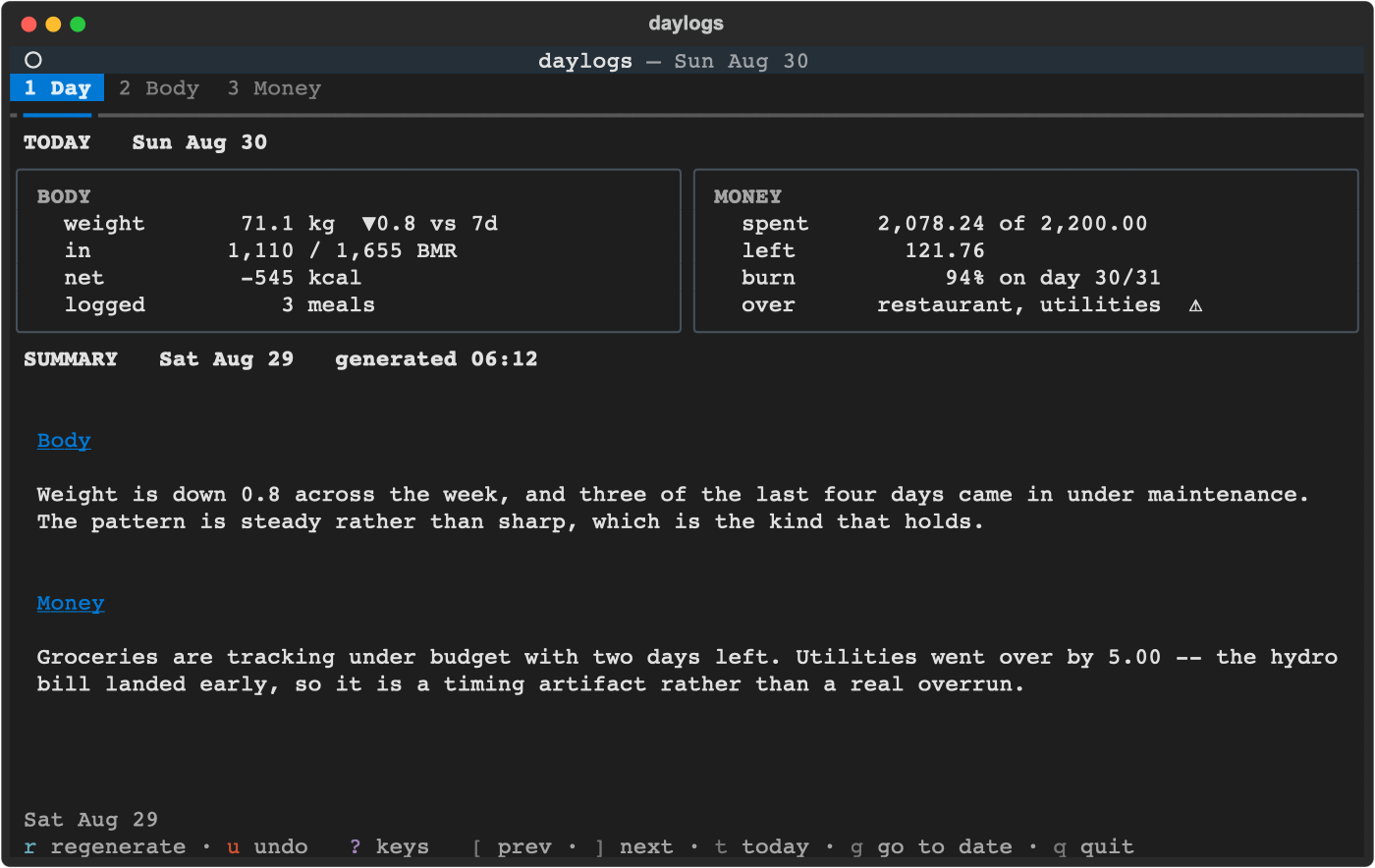
Three things, in a terminal: what you weigh, what you eat, and what you spend —
|
|
42
|
+
plus one short daily read of all of it, written by Claude.
|
|
43
|
+
|
|
44
|
+
One command. One process. No server, no browser, no ports.
|
|
45
|
+
|
|
46
|
+
|
|
47
|
+
|
|
48
|
+
## What it is, and what it isn't
|
|
49
|
+
|
|
50
|
+
Three things, deliberately. There is no income tracking, no net worth, no cash
|
|
51
|
+
projection, no investments, no journal, no sync, no server and no web UI. Money
|
|
52
|
+
answers one question: where did it go this period, and am I inside the budget.
|
|
53
|
+
|
|
54
|
+
The design rule: **anything that doesn't survive daily use doesn't ship.**
|
|
55
|
+
|
|
56
|
+
## Install
|
|
57
|
+
|
|
58
|
+
```bash
|
|
59
|
+
uv tool install git+https://github.com/IngTian/daylogs
|
|
60
|
+
```
|
|
61
|
+
|
|
62
|
+
or, equivalently, `pipx install git+https://github.com/IngTian/daylogs`. Either
|
|
63
|
+
one puts `day` on your `PATH` in its own isolated environment — no environment to
|
|
64
|
+
activate, nothing added to whatever Python you use for other work. If you have
|
|
65
|
+
neither tool, `uv` installs in one line:
|
|
66
|
+
|
|
67
|
+
```bash
|
|
68
|
+
curl -LsSf https://astral.sh/uv/install.sh | sh
|
|
69
|
+
```
|
|
70
|
+
|
|
71
|
+
Upgrade with `uv tool upgrade daylogs`, remove with `uv tool uninstall
|
|
72
|
+
daylogs`. Working on daylogs itself is a different setup — see
|
|
73
|
+
[Development](#development).
|
|
74
|
+
|
|
75
|
+
**Requirements.** Python 3.12+ and any terminal with truecolour. macOS and Linux;
|
|
76
|
+
not tested on Windows.
|
|
77
|
+
|
|
78
|
+
The [Claude Code CLI](https://claude.com/claude-code) on `PATH` is needed for
|
|
79
|
+
calorie estimation and the daily summary — everything else works without it, and
|
|
80
|
+
the app degrades to plain messages rather than failing.
|
|
81
|
+
|
|
82
|
+
Pasting a photo from the clipboard uses `osascript`, so that one path is macOS
|
|
83
|
+
only. The inbox folder and a pasted file path work anywhere.
|
|
84
|
+
|
|
85
|
+
## Use
|
|
86
|
+
|
|
87
|
+
```bash
|
|
88
|
+
day # the TUI
|
|
89
|
+
day summary # generate yesterday's summary, print to stdout
|
|
90
|
+
day summary --date 2026-08-20 # a specific day
|
|
91
|
+
day backup ~/Drive/daylogs # consistent DB copy (cron-friendly)
|
|
92
|
+
day export ~/Drive/daylogs # one CSV per table, readable anywhere
|
|
93
|
+
day --version
|
|
94
|
+
```
|
|
95
|
+
|
|
96
|
+
`uv tool install` already puts `day` on your `PATH`, so there is no environment to
|
|
97
|
+
activate. If you installed into an environment by hand instead, symlink the
|
|
98
|
+
console script:
|
|
99
|
+
|
|
100
|
+
```bash
|
|
101
|
+
ln -sf "$(command -v day)" ~/.local/bin/day
|
|
102
|
+
```
|
|
103
|
+
|
|
104
|
+
`build_binary.sh` produces a standalone PyInstaller executable for a machine with
|
|
105
|
+
no Python at all — but it starts in ~4,770 ms against ~60 ms for an installed
|
|
106
|
+
console script, because `--onefile` unpacks 15 MB on every launch. Prefer a real
|
|
107
|
+
install unless you genuinely have no Python.
|
|
108
|
+
|
|
109
|
+
### Keys
|
|
110
|
+
|
|
111
|
+
Press `?` for the full map at any time — it's generated from the same table the
|
|
112
|
+
bindings and the footer come from, so it can't be out of date.
|
|
113
|
+
|
|
114
|
+
The footer is two rows: what you're looking at on top (range, sort, filters), and
|
|
115
|
+
the keys below, grouped into actions, view controls and navigation and coloured by
|
|
116
|
+
group. On a narrow terminal it sheds navigation keys first and never `?` or `q`.
|
|
117
|
+
|
|
118
|
+
**Everywhere**
|
|
119
|
+
|
|
120
|
+
| Key | Does |
|
|
121
|
+
|---|---|
|
|
122
|
+
| `1` `2` `3` | Day / Body / Money |
|
|
123
|
+
| `←` `→` | previous / next tab — stops at the ends rather than wrapping |
|
|
124
|
+
| `tab` `shift+tab` | next / previous sub-view *within* the tab (Body, Money) |
|
|
125
|
+
| `[` `]` | previous / next period — report on Day, day on Body, month on Money |
|
|
126
|
+
| `t` | **jump to now** — today, this month, newest report |
|
|
127
|
+
| `g` | go to a date (`2026-06-15` or `2026-06`) |
|
|
128
|
+
| `+` `-` | widen / narrow the time horizon (Body, Money): `1w` `1m` `MTD` `3m` `YTD` `1y` `all` |
|
|
129
|
+
| `?` | the full keymap |
|
|
130
|
+
| `u` | undo the last delete or edit |
|
|
131
|
+
| `esc` | back out one step — never quits |
|
|
132
|
+
| `q` | quit |
|
|
133
|
+
|
|
134
|
+
`t` and `g` are why `[` / `]` stepping one period at a time is fine: you're
|
|
135
|
+
never more than two keystrokes from anywhere.
|
|
136
|
+
|
|
137
|
+
**Day — `1`** · `r` regenerates the daily read. `[` `]` browse earlier ones; the
|
|
138
|
+
figures above them are always today's.
|
|
139
|
+
|
|
140
|
+
**Body — `2`**
|
|
141
|
+
|
|
142
|
+
| Key | Does |
|
|
143
|
+
|---|---|
|
|
144
|
+
| `w` | weigh in |
|
|
145
|
+
| `f` | log food |
|
|
146
|
+
| `p` | log food from a photo |
|
|
147
|
+
| `h` | set height, sex and birthday (for BMR) |
|
|
148
|
+
| `enter` | edit the selected row |
|
|
149
|
+
| `x` | delete the selected row (confirm with `y`) |
|
|
150
|
+
|
|
151
|
+
**Money — `3`**
|
|
152
|
+
|
|
153
|
+
| Key | Does |
|
|
154
|
+
|---|---|
|
|
155
|
+
| `e` | log an expense |
|
|
156
|
+
| `b` | set a budget line |
|
|
157
|
+
| `s` | add or update a recurring item |
|
|
158
|
+
| `r` | roll active recurring items into the month's budget |
|
|
159
|
+
| `d` `c` `k` | sort by date / cost / category — press again to flip direction |
|
|
160
|
+
| `/` | filter by text |
|
|
161
|
+
| `G` | group the expense list by category |
|
|
162
|
+
| `enter` | drill into a category, fold a group, or edit the selected row |
|
|
163
|
+
| `x` | delete the selected row (confirm with `y`) |
|
|
164
|
+
|
|
165
|
+
### What you type
|
|
166
|
+
|
|
167
|
+
| Prompt | Type | Result |
|
|
168
|
+
|---|---|---|
|
|
169
|
+
| `weigh ›` | `78.2` | logged now |
|
|
170
|
+
| `weigh ›` | `78.2 post-run @07:30` | with a note, at a time |
|
|
171
|
+
| `food ›` | `chicken salad =610` | labelled — no LLM call |
|
|
172
|
+
| `food ›` | `chicken salad` | Claude estimates; review and accept |
|
|
173
|
+
| `expense ›` | `12.40 lunch !restaurant` | amount, description, category |
|
|
174
|
+
| `expense ›` | `127 Grocery Item X !grocery ~receipt in wallet` | with a note |
|
|
175
|
+
| `expense ›` | `-24.99 returned shoes !grocery` | a refund |
|
|
176
|
+
| `budget ›` | `500 !grocery` | named after the category |
|
|
177
|
+
| `recurring ›` | `20.99 Streaming !subscriptions #monthly` | monthly |
|
|
178
|
+
|
|
179
|
+
Sigils mark the fields, so nothing is ever taken out of your own words:
|
|
180
|
+
|
|
181
|
+
! a category tab completes
|
|
182
|
+
# a cycle tab completes
|
|
183
|
+
@ a date and/or a time @2026-08-24 @08-24 @14:30 @08-24/14:30
|
|
184
|
+
~ a note (may contain spaces)
|
|
185
|
+
= calories
|
|
186
|
+
|
|
187
|
+
Everything unsigiled is the description. The first token is the amount. `\` escapes
|
|
188
|
+
a leading sigil, so `\!important` is just a word.
|
|
189
|
+
|
|
190
|
+
Every prompt shows what it wants, in three places and no extra screen rows:
|
|
191
|
+
|
|
192
|
+
```
|
|
193
|
+
╭─ profile › ───────────────────────────────────────╮
|
|
194
|
+
│ 180 male 1990-01-01 │ the example, greyed
|
|
195
|
+
╰─ height · m/f · birthday — any order, partial ok ─╯ the grammar, persistent
|
|
196
|
+
```
|
|
197
|
+
|
|
198
|
+
The example is the placeholder, so it gets out of the way as soon as you type. The
|
|
199
|
+
grammar stays, because that's the part you still want halfway through a line. Every
|
|
200
|
+
example is a line the parser actually accepts — a test parses all of them.
|
|
201
|
+
|
|
202
|
+
Every write answers with its consequence, not just an acknowledgement —
|
|
203
|
+
`78.2 kg logged · ▼0.4 vs 7d`, or `12.40 lunch → restaurant 289.50 of 200.00 ⚠`.
|
|
204
|
+
|
|
205
|
+
A rejected entry **keeps your text** and shows why on the bottom border, so one
|
|
206
|
+
wrong character costs one correction rather than a retype.
|
|
207
|
+
|
|
208
|
+
Amounts take `$` and thousands separators (`$1,240.50`), but a comma is never a
|
|
209
|
+
decimal point — `12,40` is rejected with a suggestion rather than quietly becoming
|
|
210
|
+
1240.
|
|
211
|
+
|
|
212
|
+
### Editing
|
|
213
|
+
|
|
214
|
+
`enter` acts on whatever is under the cursor: a weight, food, expense or recurring
|
|
215
|
+
row opens for editing, a category drills in, a group folds.
|
|
216
|
+
|
|
217
|
+
Editing prefills the same grammar you used for entry. The submitted line is
|
|
218
|
+
authoritative: drop the note words and the note is cleared; submit unchanged and
|
|
219
|
+
the note survives. Food entries always require `=kcal` — dropping it is rejected
|
|
220
|
+
rather than silently zeroing the calories. Each line carries exactly the columns
|
|
221
|
+
that row's table shows, so what you can see is what you can edit.
|
|
222
|
+
|
|
223
|
+
`u` undoes an edit as well as a delete.
|
|
224
|
+
|
|
225
|
+
### Time horizons
|
|
226
|
+
|
|
227
|
+
One list serves both tabs, so `+` and `-` mean the same thing everywhere:
|
|
228
|
+
|
|
229
|
+
1w · 1m · MTD · 3m · YTD · 1y · all
|
|
230
|
+
|
|
231
|
+
`1w`/`1m`/`3m`/`1y` look back from the day you're on; `MTD` and `YTD` run from the
|
|
232
|
+
start of that month or year. `[` and `]` then step by one whole horizon — on `MTD`
|
|
233
|
+
that's a calendar month, so you compare the same elapsed slice of the previous
|
|
234
|
+
month rather than a ragged window.
|
|
235
|
+
|
|
236
|
+
`g 2026-06` lands on the **last** day of June, so under `MTD` you get all of it.
|
|
237
|
+
|
|
238
|
+
### Reading money
|
|
239
|
+
|
|
240
|
+
Over several months the budget column is the **sum** of those months' lines.
|
|
241
|
+
|
|
242
|
+
Green means inside the budget, amber means within 10% of a cap, red means over —
|
|
243
|
+
alongside the `⚠` glyph, never instead of it. On Body, a falling weight is green and
|
|
244
|
+
a rising one red; there's no goal weight to compare against, so that's an
|
|
245
|
+
assumption, and the arrow carries the direction either way.
|
|
246
|
+
|
|
247
|
+
A month nobody has rolled yet has no budget at all, and the header says so and
|
|
248
|
+
names the key rather than reporting a meaningless "0.00 budget".
|
|
249
|
+
|
|
250
|
+
The burn bar's `┃` marker is how far through the month you are — 84% of budget
|
|
251
|
+
spent on day 27 of 31 is fine, the same number on day 12 is not. It only appears
|
|
252
|
+
for the current single month, because burn-against-elapsed means nothing across a
|
|
253
|
+
quarter; the bar says so when it's hidden.
|
|
254
|
+
|
|
255
|
+
### Panels
|
|
256
|
+
|
|
257
|
+
**Day** shows BODY beside MONEY — today's weight and trend, intake against BMR,
|
|
258
|
+
this month's spend against its budget and how far through the month you are — with
|
|
259
|
+
the generated daily read scrolling underneath. The figures are always today's; the
|
|
260
|
+
read is dated by the day it describes, which is why each half carries its own date.
|
|
261
|
+
|
|
262
|
+
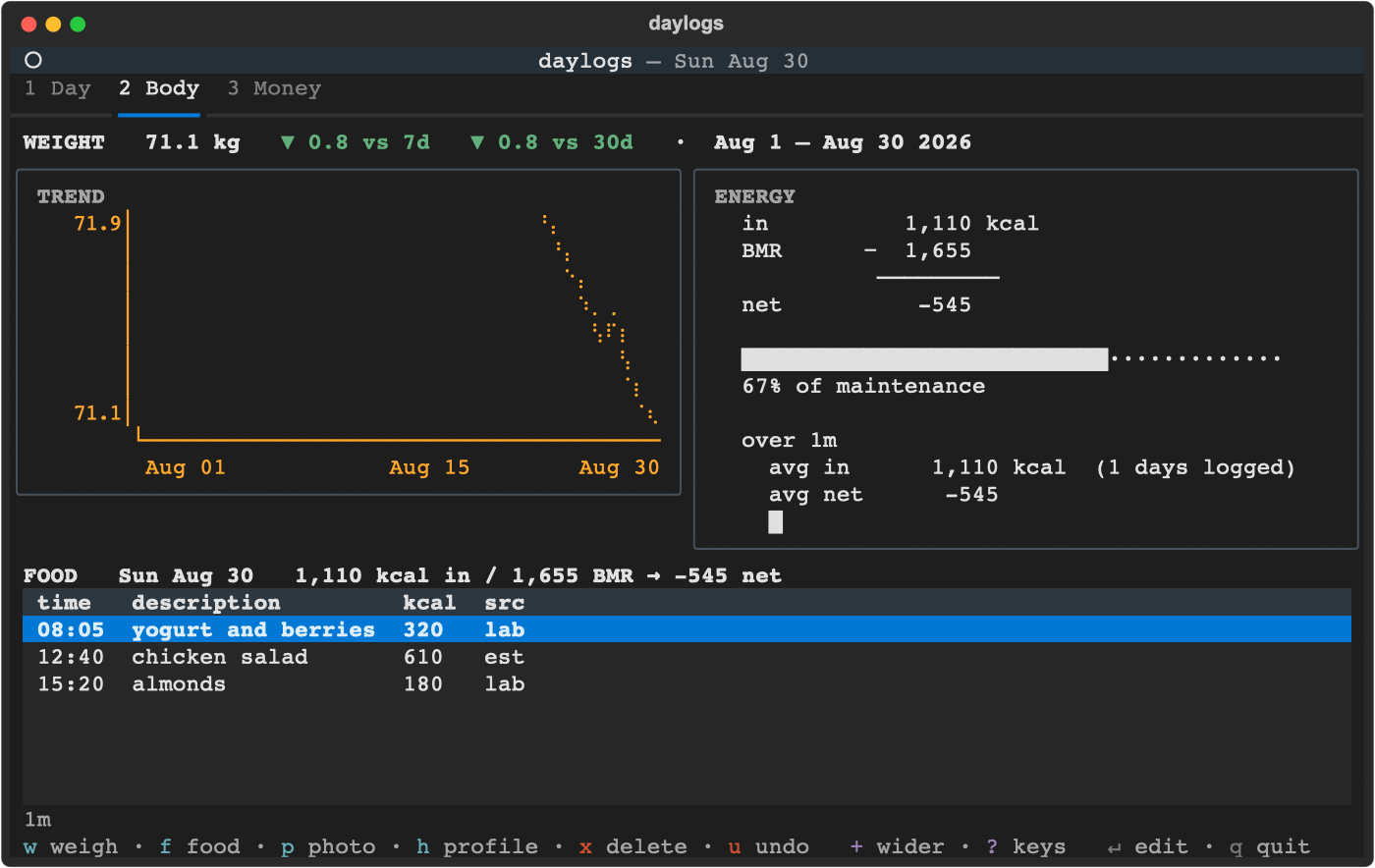
**Body** shows TREND (the braille chart) beside ENERGY — intake against BMR for
|
|
263
|
+
the day, then the average and a sparkline over the horizon.
|
|
264
|
+
|
|
265
|
+
|
|
266
|
+
|
|
267
|
+
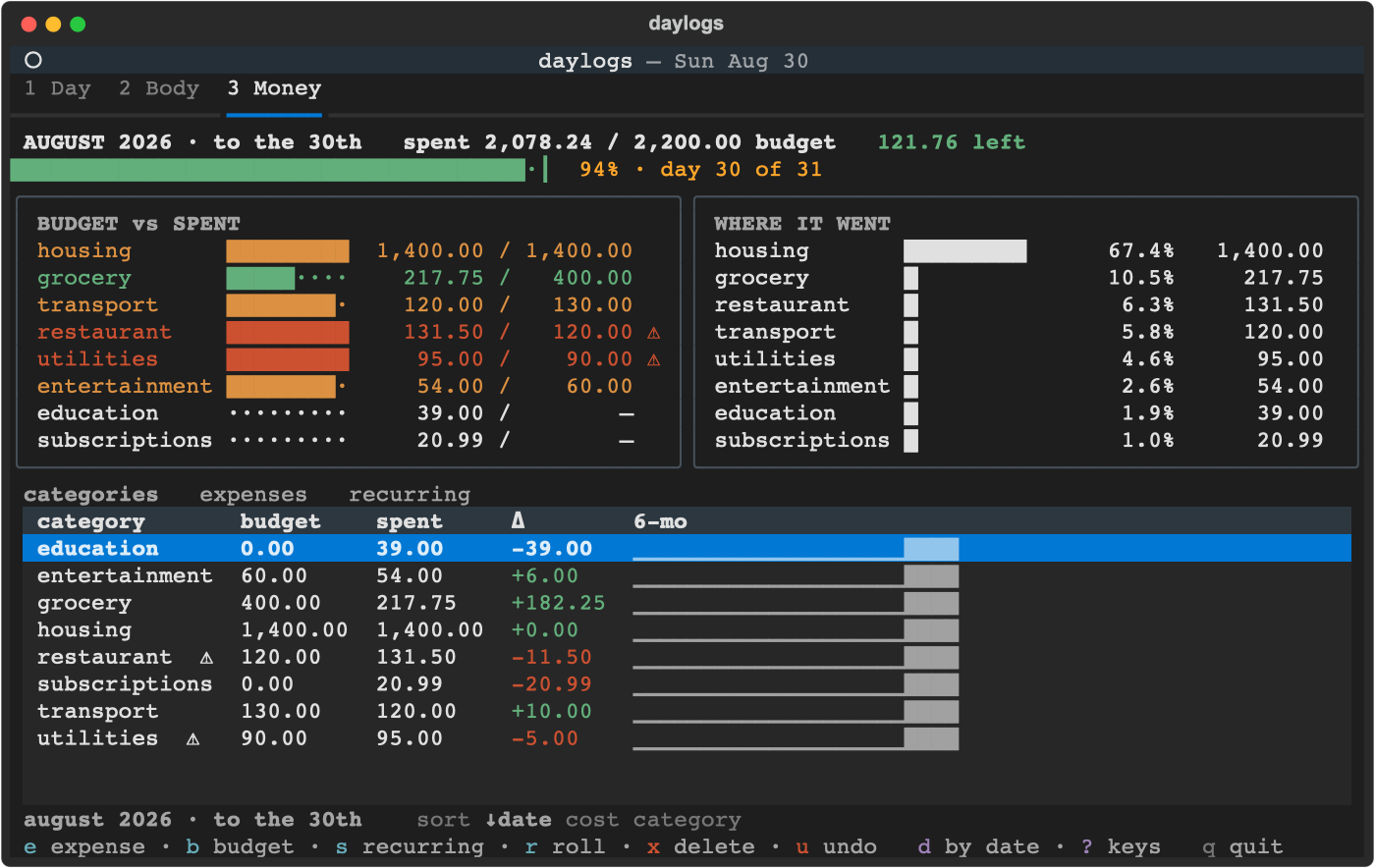
**Money** shows BUDGET vs SPENT beside WHERE IT WENT. The first scales each bar to
|
|
268
|
+
that category's own cap, so "how close to this limit" is readable per row; the
|
|
269
|
+
second is a ranked share list.
|
|
270
|
+
|
|
271
|
+
|
|
272
|
+
|
|
273
|
+
Ranked bars rather than pie charts, deliberately: a terminal has about eight
|
|
274
|
+
distinguishable fill glyphs and there are nine categories, so a pie collides — and
|
|
275
|
+
you still need a legend to read any amount.
|
|
276
|
+
|
|
277
|
+
Shares are of **gross** spend. A refund can push a category below zero for the
|
|
278
|
+
window — a reimbursed bill, a returned order — and such a row keeps its amount but
|
|
279
|
+
shows no share, because a part-to-whole has no negative slice. It still appears on
|
|
280
|
+
both panels, so the rows and the header total reconcile.
|
|
281
|
+
|
|
282
|
+
### The weight chart
|
|
283
|
+
|
|
284
|
+
A braille line chart: 2×4 dots per cell, so an 8-row by 48-column chart carries
|
|
285
|
+
96×32 dot resolution. The width follows the panel, so a wider terminal buys more
|
|
286
|
+
horizontal detail.
|
|
287
|
+
|
|
288
|
+
Points sit at their real dates, not spread evenly across the panel. Two weigh-ins a
|
|
289
|
+
day apart show up as two weigh-ins a day apart, with the weeks you didn't step on
|
|
290
|
+
the scale visibly empty — a gap is information.
|
|
291
|
+
|
|
292
|
+
It's a line rather than bars deliberately. Weight sits in a narrow band, and a
|
|
293
|
+
bar or filled area implies a meaningful zero baseline — anchored at your minimum
|
|
294
|
+
it would render as a solid block whose only readable feature is its top edge.
|
|
295
|
+
Spend is a magnitude from zero, so bars stay correct there.
|
|
296
|
+
|
|
297
|
+
### The daily summary
|
|
298
|
+
|
|
299
|
+
One `claude -p` call, once a day, over whatever the other two tabs recorded. It
|
|
300
|
+
runs unattended the first time you open the app after `summary_after_hour`, and `r`
|
|
301
|
+
regenerates it.
|
|
302
|
+
|
|
303
|
+
A report is dated by the day it *describes*, not the day it runs — a summary of
|
|
304
|
+
today would be reading a half-finished day, so the target is yesterday.
|
|
305
|
+
|
|
306
|
+
Anything you put in `memory.md` (see Configuration) is passed along as context for
|
|
307
|
+
who you are, so the summary can be about you rather than about a table of numbers.
|
|
308
|
+
|
|
309
|
+
### Any entry prompt
|
|
310
|
+
|
|
311
|
+
In the weigh / food / expense prompts, `@2026-08-25` or `@08-25` sets the date
|
|
312
|
+
and `@13:05` sets the time, wherever you put them in the line.
|
|
313
|
+
|
|
314
|
+
Everywhere: `esc` cancels, `↑` / `↓` walk that prompt's history.
|
|
315
|
+
|
|
316
|
+
## Configuration
|
|
317
|
+
|
|
318
|
+
Optional. `~/Documents/daylogs/config.toml`; every key has a default.
|
|
319
|
+
|
|
320
|
+
```toml
|
|
321
|
+
timezone = "America/Toronto"
|
|
322
|
+
height_cm = 170 # BMR input
|
|
323
|
+
sex = "female" # BMR constant term only
|
|
324
|
+
birthday = "1990-01-01" # age, for BMR
|
|
325
|
+
claude_model = "" # empty = CLI default
|
|
326
|
+
summary_after_hour = 6
|
|
327
|
+
summary_timeout_sec = 120
|
|
328
|
+
estimate_timeout_sec = 60
|
|
329
|
+
|
|
330
|
+
# Paths. Relative values resolve against the data root above.
|
|
331
|
+
db_path = "daylogs.db"
|
|
332
|
+
inbox_dir = "inbox" # phone photos land here
|
|
333
|
+
memory_path = "memory.md" # free text passed to the daily summary
|
|
334
|
+
|
|
335
|
+
[[category]]
|
|
336
|
+
slug = "gym"
|
|
337
|
+
display = "Gym"
|
|
338
|
+
color = "#9ba068"
|
|
339
|
+
```
|
|
340
|
+
|
|
341
|
+
Built-in categories: `grocery`, `restaurant`, `transport`, `housing`,
|
|
342
|
+
`utilities`, `subscriptions`, `entertainment`, `education`, `other`. Adding
|
|
343
|
+
one needs no code change — just a `[[category]]` block.
|
|
344
|
+
|
|
345
|
+
Height, sex and birthday only feed the Mifflin-St Jeor BMR line. Leave them
|
|
346
|
+
out and the Body tab shows calories without a maintenance baseline. You don't have
|
|
347
|
+
to edit the file for those three — `h` on the Body tab writes them here for you,
|
|
348
|
+
keeping your comments and `[[category]]` blocks intact.
|
|
349
|
+
|
|
350
|
+
## Photos from a phone
|
|
351
|
+
|
|
352
|
+
Three ways in, tried in that order when you press `p`:
|
|
353
|
+
|
|
354
|
+
1. **Clipboard** — screenshot or Continuity Camera, then `p`.
|
|
355
|
+
2. **Inbox** — on the phone: Photos → Share → Save to Files →
|
|
356
|
+
`daylogs/inbox`. The Body tab shows a pending count; `p` takes the oldest
|
|
357
|
+
and moves it to `inbox/processed/` once the row is written. Shoot at lunch,
|
|
358
|
+
log at night.
|
|
359
|
+
3. **Path** — paste or drag a file into the prompt.
|
|
360
|
+
|
|
361
|
+
A failed estimate leaves the file pending rather than silently consuming it.
|
|
362
|
+
|
|
363
|
+
## Data
|
|
364
|
+
|
|
365
|
+
SQLite, six tables, at `~/Documents/daylogs/daylogs.db`. Logs at
|
|
366
|
+
`~/.daylogs/logs/`. Override the data root with `DAYLOGS_HOME`.
|
|
367
|
+
|
|
368
|
+
This project was called **daybook** until 0.2.0, and the data root moved with the
|
|
369
|
+
rename. If a `~/Documents/daybook/` is still there, `day` refuses to start and
|
|
370
|
+
prints the two `mv` commands that move it — rather than quietly opening a new,
|
|
371
|
+
empty database beside your old one.
|
|
372
|
+
|
|
373
|
+
The connection runs `PRAGMA journal_mode=DELETE` on purpose. WAL's `-wal` and
|
|
374
|
+
`-shm` sidecars can sync independently of the main file under iCloud Drive and
|
|
375
|
+
corrupt the database on the receiving device; rollback-journal keeps SQLite to
|
|
376
|
+
one file. daylogs is read-heavy, so the write cost is noise.
|
|
377
|
+
|
|
378
|
+
**Back it up.** A synced folder is not a backup: it replicates a deletion or a
|
|
379
|
+
corruption as faithfully as it replicates a write. `day backup <dir>` writes a
|
|
380
|
+
consistent copy via `VACUUM INTO`; point it somewhere else you own and run it
|
|
381
|
+
from cron.
|
|
382
|
+
|
|
383
|
+
**And get it out.** A backup only daylogs can open is a weaker promise than a file
|
|
384
|
+
anything can read, so `day export <dir>` writes one CSV per table into a dated
|
|
385
|
+
subdirectory — `weight`, `food`, `expense`, `recurring`, `budget`, `report`, with
|
|
386
|
+
the schema's own column names as headers. The table list comes from the database
|
|
387
|
+
rather than a hand-kept list, so nothing is silently left out. It prints the
|
|
388
|
+
directory on stdout and per-table row counts on stderr, so `cd "$(day export
|
|
389
|
+
~/Drive/daylogs)"` works and cron logs stay readable.
|
|
390
|
+
|
|
391
|
+
CSV, because every table is flat and "open it in a spreadsheet" is the point. The
|
|
392
|
+
one cost: CSV cannot tell an empty note from an absent one — both come out blank.
|
|
393
|
+
It is an export, not an import; loading it back in is not supported.
|
|
394
|
+
|
|
395
|
+
## Development
|
|
396
|
+
|
|
397
|
+
Working on daylogs wants an editable install with the dev extras, which is a
|
|
398
|
+
different thing from the isolated tool install above. Any environment manager
|
|
399
|
+
does; this is conda because that's what I use:
|
|
400
|
+
|
|
401
|
+
```bash
|
|
402
|
+
conda create -n daylogs python=3.12
|
|
403
|
+
conda activate daylogs
|
|
404
|
+
pip install -e '.[dev]'
|
|
405
|
+
```
|
|
406
|
+
|
|
407
|
+
```bash
|
|
408
|
+
pytest
|
|
409
|
+
ruff check .
|
|
410
|
+
```
|
|
411
|
+
|
|
412
|
+
Runtime dependency: `textual`. Everything else is the standard library.
|
|
413
|
+
|
|
414
|
+
The README's three screenshots are generated, not drawn:
|
|
415
|
+
|
|
416
|
+
```bash
|
|
417
|
+
python tools/screenshots.py # rewrites assets/{day,body,money}.{svg,png}
|
|
418
|
+
```
|
|
419
|
+
|
|
420
|
+
Run it after anything that moves the layout and commit the result. The seed data
|
|
421
|
+
is synthetic and the clock is pinned, so two runs produce byte-identical files —
|
|
422
|
+
a diff means the UI actually changed. The previous hand-drawn ASCII had drifted
|
|
423
|
+
out of alignment and had once advertised a key that was never bound; an
|
|
424
|
+
illustration nobody can verify against the app is an illustration that lies
|
|
425
|
+
eventually.
|
|
426
|
+
|
|
427
|
+
Design notes:
|
|
428
|
+
|
|
429
|
+
- Business logic never lives in `daylogs/tui/`. Tabs render and handle keys;
|
|
430
|
+
arithmetic lives in `body.py` / `money.py` / `summary.py` with tests.
|
|
431
|
+
- The `claude -p` runners are always injected, so no test spawns a subprocess.
|
|
432
|
+
- Parsers in `parse.py` are pure functions with `now` passed in — no test
|
|
433
|
+
depends on when it runs.
|
|
434
|
+
- Deletes are hard, with a session-scoped undo ring. That drops a `deleted_at`
|
|
435
|
+
column from every table, the active/in-use query wrappers, a trash service,
|
|
436
|
+
and a partial unique index.
|
|
437
|
+
|
|
438
|
+
## Contributing
|
|
439
|
+
|
|
440
|
+
See [CONTRIBUTING.md](CONTRIBUTING.md). Short version: improvements to the three
|
|
441
|
+
existing features are welcome; a fourth feature needs an issue first, because
|
|
442
|
+
staying small is the point.
|
|
443
|
+
|
|
444
|
+
## Licence
|
|
445
|
+
|
|
446
|
+
MIT — see [LICENSE](LICENSE).
|