dataframe-textual 3.3.0__tar.gz → 3.5.0__tar.gz
This diff represents the content of publicly available package versions that have been released to one of the supported registries. The information contained in this diff is provided for informational purposes only and reflects changes between package versions as they appear in their respective public registries.
- {dataframe_textual-3.3.0 → dataframe_textual-3.5.0}/.gitignore +1 -0
- dataframe_textual-3.3.0/README.md → dataframe_textual-3.5.0/PKG-INFO +137 -38
- dataframe_textual-3.3.0/PKG-INFO → dataframe_textual-3.5.0/README.md +97 -78
- {dataframe_textual-3.3.0 → dataframe_textual-3.5.0}/pyproject.toml +11 -8
- {dataframe_textual-3.3.0 → dataframe_textual-3.5.0}/src/dataframe_textual/__init__.py +0 -1
- {dataframe_textual-3.3.0 → dataframe_textual-3.5.0}/src/dataframe_textual/__main__.py +14 -15
- {dataframe_textual-3.3.0 → dataframe_textual-3.5.0}/src/dataframe_textual/commands.py +43 -17
- {dataframe_textual-3.3.0 → dataframe_textual-3.5.0}/src/dataframe_textual/common.py +21 -13
- {dataframe_textual-3.3.0 → dataframe_textual-3.5.0}/src/dataframe_textual/console_panel.py +2 -1
- {dataframe_textual-3.3.0 → dataframe_textual-3.5.0}/src/dataframe_textual/data_frame_table.py +254 -62
- {dataframe_textual-3.3.0 → dataframe_textual-3.5.0}/src/dataframe_textual/data_frame_viewer.py +13 -8
- {dataframe_textual-3.3.0 → dataframe_textual-3.5.0}/src/dataframe_textual/file_picker_screen.py +3 -3
- {dataframe_textual-3.3.0 → dataframe_textual-3.5.0}/src/dataframe_textual/loading_screen.py +4 -3
- dataframe_textual-3.5.0/src/dataframe_textual/plot_screen.py +581 -0
- {dataframe_textual-3.3.0 → dataframe_textual-3.5.0}/src/dataframe_textual/run_command_screen.py +2 -1
- {dataframe_textual-3.3.0 → dataframe_textual-3.5.0}/src/dataframe_textual/table_screen.py +50 -92
- {dataframe_textual-3.3.0 → dataframe_textual-3.5.0}/src/dataframe_textual/text_screen.py +2 -1
- {dataframe_textual-3.3.0 → dataframe_textual-3.5.0}/src/dataframe_textual/theme_screen.py +4 -2
- {dataframe_textual-3.3.0 → dataframe_textual-3.5.0}/src/dataframe_textual/yes_no_screen.py +10 -10
- {dataframe_textual-3.3.0 → dataframe_textual-3.5.0}/uv.lock +82 -305
- {dataframe_textual-3.3.0 → dataframe_textual-3.5.0}/LICENSE +0 -0
- {dataframe_textual-3.3.0 → dataframe_textual-3.5.0}/main.py +0 -0
- {dataframe_textual-3.3.0 → dataframe_textual-3.5.0}/src/dataframe_textual/help_panel.py +0 -0
- {dataframe_textual-3.3.0 → dataframe_textual-3.5.0}/src/dataframe_textual/keybindings.py +0 -0
- {dataframe_textual-3.3.0 → dataframe_textual-3.5.0}/src/dataframe_textual/status_bar.py +0 -0
|
@@ -1,6 +1,46 @@
|
|
|
1
|
+
Metadata-Version: 2.5
|
|
2
|
+
Name: dataframe-textual
|
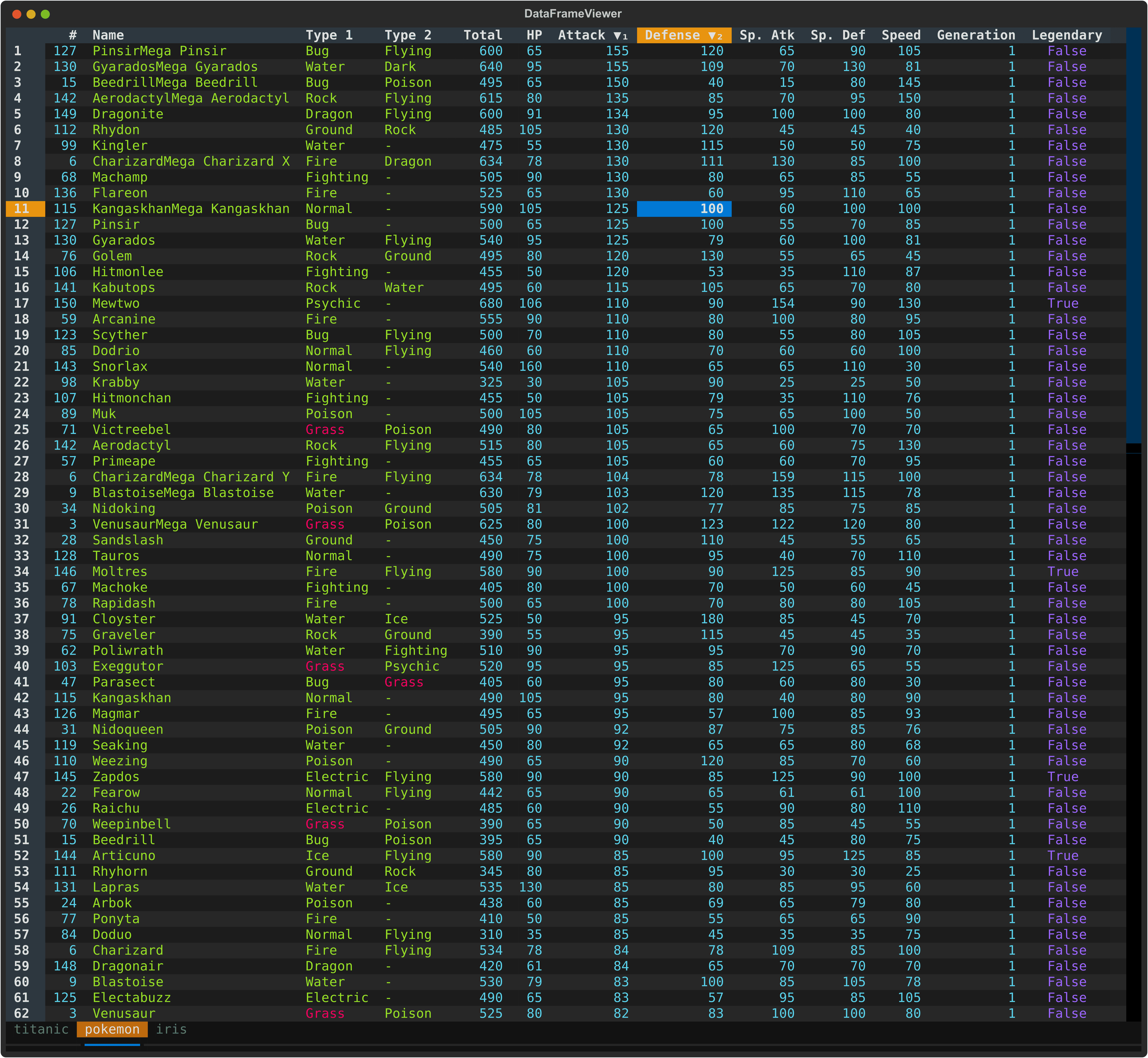
|
3
|
+
Version: 3.5.0
|
|
4
|
+
Summary: Interactive terminal viewer/editor (TUI) for CSV/TSV, Excel, Parquet, JSONL, etc.
|
|
5
|
+
Project-URL: Homepage, https://github.com/need47/dataframe-textual
|
|
6
|
+
Project-URL: Repository, https://github.com/need47/dataframe-textual.git
|
|
7
|
+
Project-URL: Documentation, https://github.com/need47/dataframe-textual#readme
|
|
8
|
+
Project-URL: Bug Tracker, https://github.com/need47/dataframe-textual/issues
|
|
9
|
+
Author-email: Tiejun Cheng <need47@gmail.com>
|
|
10
|
+
License: MIT
|
|
11
|
+
License-File: LICENSE
|
|
12
|
+
Keywords: csv,data-analysis,editor,excel,interactive,jsonl,parquet,polars,terminal,textual,tsv,tui,viewer
|
|
13
|
+
Classifier: Development Status :: 3 - Alpha
|
|
14
|
+
Classifier: Environment :: Console
|
|
15
|
+
Classifier: Intended Audience :: Developers
|
|
16
|
+
Classifier: Intended Audience :: End Users/Desktop
|
|
17
|
+
Classifier: License :: OSI Approved :: MIT License
|
|
18
|
+
Classifier: Natural Language :: English
|
|
19
|
+
Classifier: Operating System :: MacOS
|
|
20
|
+
Classifier: Operating System :: POSIX
|
|
21
|
+
Classifier: Operating System :: Unix
|
|
22
|
+
Classifier: Programming Language :: Python :: 3
|
|
23
|
+
Classifier: Programming Language :: Python :: 3.13
|
|
24
|
+
Classifier: Programming Language :: Python :: 3.14
|
|
25
|
+
Classifier: Programming Language :: Python :: 3.15
|
|
26
|
+
Classifier: Topic :: Office/Business
|
|
27
|
+
Classifier: Topic :: Utilities
|
|
28
|
+
Classifier: Typing :: Typed
|
|
29
|
+
Requires-Python: >=3.13
|
|
30
|
+
Requires-Dist: fastexcel>=0.16.0
|
|
31
|
+
Requires-Dist: polars>=2.1.0
|
|
32
|
+
Requires-Dist: textual[syntax]>=8.2.8
|
|
33
|
+
Requires-Dist: xlsxwriter>=3.2.9
|
|
34
|
+
Provides-Extra: dev
|
|
35
|
+
Requires-Dist: textual-dev>=1.8.0; extra == 'dev'
|
|
36
|
+
Provides-Extra: extra
|
|
37
|
+
Requires-Dist: plotext>=6.1.0; extra == 'extra'
|
|
38
|
+
Requires-Dist: vortex-data>=0.93.0; extra == 'extra'
|
|
39
|
+
Description-Content-Type: text/markdown
|
|
40
|
+
|
|
1
41
|
# DataFrame Textual
|
|
2
42
|
|
|
3
|
-
A powerful, interactive terminal-based viewer/editor for CSV/TSV/Excel/[Parquet](https://parquet.apache.org/)/[
|
|
43
|
+
A powerful, interactive terminal-based viewer/editor for CSV/TSV/Excel/[Parquet](https://parquet.apache.org/)/JSON/[NDJSON](https://jsonlines.org/)/[Vortex](https://vortex.dev/) built with Python, [Polars](https://pola.rs/), and [Textual](https://textual.textualize.io/). Inspired by [VisiData](https://www.visidata.org/), this tool provides smooth keyboard navigation, data manipulation, and a clean interface for exploring, analyzing, and plotting tabular data directly in terminal with multi-tab support for multiple files!
|
|
4
44
|
|
|
5
45
|
|
|
6
46
|
|
|
@@ -21,6 +61,7 @@ A powerful, interactive terminal-based viewer/editor for CSV/TSV/Excel/[Parquet]
|
|
|
21
61
|
- 🔍 **Search & Filter** - Find values, highlight matches, and filter selected rows
|
|
22
62
|
- ↔️ **Column/Row Reordering** - Move columns and rows with simple keyboard shortcuts
|
|
23
63
|
- 📈 **Sorting & Statistics** - Multi-column sorting, frequency distribution, and histogram analysis
|
|
64
|
+
- 📊 **Plotting** - Draw line, scatter, box, bar, histogram, and confusion matrix plots via [plotext](https://github.com/piccolomo/plotext)
|
|
24
65
|
- 💾 **Save & Undo** - Save edits back to file with full undo/redo support
|
|
25
66
|
|
|
26
67
|
### Advanced Features
|
|
@@ -64,8 +105,8 @@ uvx dataframe-textual <csvfile>
|
|
|
64
105
|
git clone https://github.com/need47/dataframe-textual.git
|
|
65
106
|
cd dataframe-textual
|
|
66
107
|
|
|
67
|
-
# Install from local source with development dependencies
|
|
68
|
-
pip install -e ".[dev]"
|
|
108
|
+
# Install from local source with development and extra dependencies
|
|
109
|
+
pip install -e ".[dev,extra]"
|
|
69
110
|
```
|
|
70
111
|
|
|
71
112
|
## Usage
|
|
@@ -314,29 +355,31 @@ Useful examples from current bindings:
|
|
|
314
355
|
|
|
315
356
|
#### Undo/Redo/Reset
|
|
316
357
|
|
|
317
|
-
| Key
|
|
318
|
-
|
|
|
358
|
+
| Key | Action |
|
|
359
|
+
| --------- | ----------------------- |
|
|
319
360
|
| `u` / `U` | Undo last action |
|
|
320
361
|
| `R` | Redo last undone action |
|
|
321
|
-
| `gU`
|
|
362
|
+
| `gU` | Reset to initial state |
|
|
322
363
|
|
|
323
364
|
#### Navigation
|
|
324
365
|
|
|
325
|
-
| Key
|
|
326
|
-
|
|
|
327
|
-
| `gg`
|
|
328
|
-
| `G`
|
|
329
|
-
| `Ctrl+G`
|
|
330
|
-
| `←` / `↓` / `↑` / `→`
|
|
331
|
-
| `h` / `j` / `k` / `l`
|
|
332
|
-
| `gh` / `g←`
|
|
333
|
-
| `gj` / `g↓`
|
|
334
|
-
| `gk` / `g↑`
|
|
335
|
-
| `gl` / `g→`
|
|
336
|
-
| `Home` / `End`
|
|
337
|
-
| `Ctrl+Home` / `Ctrl+End`
|
|
338
|
-
| `PageUp` / `Ctrl+B`
|
|
339
|
-
| `PageDown` / `Ctrl+F`
|
|
366
|
+
| Key | Action |
|
|
367
|
+
| ------------------------------------------------- | ----------------------------------- |
|
|
368
|
+
| `gg` | Go to first row |
|
|
369
|
+
| `G` | Go to last row |
|
|
370
|
+
| `Ctrl+G` | Go to specific row |
|
|
371
|
+
| `←` / `↓` / `↑` / `→` | Move left/down/up/right |
|
|
372
|
+
| `h` / `j` / `k` / `l` | Move left/down/up/right (Vim-style) |
|
|
373
|
+
| `gh` / `g←` | Scroll to leftmost column |
|
|
374
|
+
| `gj` / `g↓` | Scroll to last row |
|
|
375
|
+
| `gk` / `g↑` | Scroll to first row |
|
|
376
|
+
| `gl` / `g→` | Scroll to rightmost column |
|
|
377
|
+
| `Home` / `End` | Go to first/last column |
|
|
378
|
+
| `Ctrl+Home` / `Ctrl+End` | Go to page top/bottom |
|
|
379
|
+
| `PageUp` / `Ctrl+B` | Page backward |
|
|
380
|
+
| `PageDown` / `Ctrl+F` | Page forward |
|
|
381
|
+
| `MouseScrollUp` / `MouseScrollDown` | Scroll vertically |
|
|
382
|
+
| `Ctrl + MouseScrollUp` / `Ctrl + MouseScrollDown` | Scroll horizontally |
|
|
340
383
|
|
|
341
384
|
#### Display
|
|
342
385
|
|
|
@@ -366,6 +409,20 @@ Useful examples from current bindings:
|
|
|
366
409
|
| `g^` | Set current row as the new header row |
|
|
367
410
|
| `Shift+Tab` | Cycle cursor type (cell -> row -> column) |
|
|
368
411
|
|
|
412
|
+
#### Plotting
|
|
413
|
+
|
|
414
|
+
| Key | Action |
|
|
415
|
+
| ---- | ---------------------------------------------------------------------- |
|
|
416
|
+
| `pl` | Line plot: one numeric column against row position, or selected x/y |
|
|
417
|
+
| `ps` | Scatter plot: one numeric column against row position, or selected x/y |
|
|
418
|
+
| `po` | Box plot for selected numeric columns, or the current column |
|
|
419
|
+
| `pb` | Bar plot for selected numeric columns; a selected string column is x |
|
|
420
|
+
| `ph` | Histogram for selected numeric columns, or the current column |
|
|
421
|
+
| `pc` | Confusion matrix from two selected string columns |
|
|
422
|
+
| `pm` | Heatmap for selected numeric columns, or all visible columns |
|
|
423
|
+
|
|
424
|
+
Plot keys are leader sequences: press `p`, then the second key. They require the optional `plotext` package; install it with `pip install plotext`.
|
|
425
|
+
|
|
369
426
|
#### Editing
|
|
370
427
|
|
|
371
428
|
| Key | Action |
|
|
@@ -375,9 +432,9 @@ Useful examples from current bindings:
|
|
|
375
432
|
| `Shift+Delete` | Clear current column (set matching cells to NULL) |
|
|
376
433
|
| `e` | Edit current cell (respects data type) |
|
|
377
434
|
| `E` | Edit entire column with value/expression |
|
|
378
|
-
| `a` | Add empty column after current
|
|
379
|
-
| `A` | Add column with name and value/expression
|
|
380
|
-
| `i` | Add index column after current
|
|
435
|
+
| `a` | Add an empty column after current |
|
|
436
|
+
| `A` | Add a column with name and value/expression |
|
|
437
|
+
| `i` | Add an index column after current |
|
|
381
438
|
| `za` | Add a link column from URL template |
|
|
382
439
|
| `^` | Rename current column |
|
|
383
440
|
| `*` | Delete selected columns or current column |
|
|
@@ -411,20 +468,22 @@ Useful examples from current bindings:
|
|
|
411
468
|
| `g,` | Select rows with cell matches or those matching cursor value in all columns |
|
|
412
469
|
| `\|` (pipe) | Select rows where expression matches in current column |
|
|
413
470
|
| `g\|` | Select rows where expression matches in all columns |
|
|
414
|
-
| `\` |
|
|
415
|
-
| `g\` |
|
|
471
|
+
| `\` | Deselect selected rows where expression matches in current column |
|
|
472
|
+
| `g\` | Deselect selected rows where expression matches in all columns |
|
|
416
473
|
| `{` | Go to previous selected row |
|
|
417
474
|
| `}` | Go to next selected row |
|
|
418
475
|
| `s` | Select/deselect current row |
|
|
419
476
|
| `gs` | Select current row and all rows above |
|
|
420
477
|
| `zs` | Select current row and all rows below |
|
|
421
|
-
| `gu` |
|
|
478
|
+
| `gu` | Deselect all rows |
|
|
422
479
|
| `'` (apostrophe) | Select/deselect current column |
|
|
423
480
|
| `g'` | Select current column and all columns to the left |
|
|
424
481
|
| `z'` | Select current column and all columns to the right |
|
|
425
482
|
| `t` | Toggle row selections (invert) |
|
|
426
483
|
| `T` | Clear all row/column selections and cell matches |
|
|
427
484
|
|
|
485
|
+
Column selections retain the order in which columns are selected, not their left-to-right table order. Each selected column header shows a check mark with a subscript number indicating its position in the selection. Deselecting and reselecting a column moves it to the end of selection. Selection order may affect subsequent operations. For example, scatter plot uses the first two selected columns as x and y.
|
|
486
|
+
|
|
428
487
|
#### Find & Replace
|
|
429
488
|
|
|
430
489
|
| Key | Action |
|
|
@@ -506,7 +565,7 @@ Useful examples from current bindings:
|
|
|
506
565
|
|
|
507
566
|
These actions are the fastest way to get out of trouble after a mistaken edit, delete, sort, filter, or other table change.
|
|
508
567
|
|
|
509
|
-
- `U`: Undo the last action and restore the previous state.
|
|
568
|
+
- `u` / `U`: Undo the last action and restore the previous state.
|
|
510
569
|
- `R`: Redo the last undone action.
|
|
511
570
|
- `gU`: Reset the table to its original loaded state if you want to start over.
|
|
512
571
|
|
|
@@ -686,13 +745,12 @@ The application provides multiple ways to select rows (for filtering or collecti
|
|
|
686
745
|
- `g,` - Select rows with cell matches or those matching cursor value in all columns
|
|
687
746
|
- `|` - Select rows where expression matches in the current column
|
|
688
747
|
- `g|` - Select rows where expression matches in all columns
|
|
689
|
-
- `\` -
|
|
690
|
-
- `g\` -
|
|
748
|
+
- `\` - Deselect currently selected rows where expression matches in the current column
|
|
749
|
+
- `g\` - Deselect currently selected rows where expression matches in all columns
|
|
691
750
|
- `s` - Select/deselect current row
|
|
692
751
|
- `gs` - Select current row and all rows above
|
|
693
752
|
- `zs` - Select current row and all rows below
|
|
694
|
-
- `
|
|
695
|
-
- `gu` - Unselect all rows
|
|
753
|
+
- `gu` - Deselect all rows
|
|
696
754
|
- `'` (apostrophe) - Select/deselect current column
|
|
697
755
|
- `g'` - Select current column and all columns to the left
|
|
698
756
|
- `z'` - Select current column and all columns to the right
|
|
@@ -795,7 +853,7 @@ Both actions work on a subset of the original dataframe, but they serve differen
|
|
|
795
853
|
|
|
796
854
|
**Collect** (`"`):
|
|
797
855
|
|
|
798
|
-
- Creates a separate tab containing only the chosen rows/columns
|
|
856
|
+
- Creates a separate tab containing only the chosen rows and/or columns
|
|
799
857
|
- The collected tab is independent from the source dataframe
|
|
800
858
|
- Edits in the collected tab do not modify the original table
|
|
801
859
|
|
|
@@ -820,15 +878,16 @@ Editing covers cell updates, structural table changes, and quick cleanup.
|
|
|
820
878
|
|
|
821
879
|
- `e` or **Double-click**: Edit the current cell with type-aware validation.
|
|
822
880
|
- `^` or **Double-click** column header: Rename the current column.
|
|
823
|
-
- `d`: Delete the selected rows, or the current row if
|
|
881
|
+
- `d`: Delete the selected rows, or the current row if none is selected.
|
|
824
882
|
- `gd`: Delete the current row and all rows above it.
|
|
825
883
|
- `zd`: Delete the current row and all rows below it.
|
|
826
|
-
- `*`: Delete selected columns, or the current column if
|
|
884
|
+
- `*`: Delete selected columns, or the current column if none is selected.
|
|
827
885
|
- `g*`: Delete the current column and all columns to its left.
|
|
828
886
|
- `z*`: Delete the current column and all columns to its right.
|
|
829
887
|
- `a`: Add an empty column after the current column.
|
|
830
888
|
- `A`: Add a column after the current column using a value or expression such as `$age * 2`.
|
|
831
|
-
- `i`:
|
|
889
|
+
- `i`: Add an index column after the current column.
|
|
890
|
+
- `za`: Add a link column from URL template
|
|
832
891
|
- `D`: Duplicate the current row.
|
|
833
892
|
- `zD`: Duplicate the current column using a `_copy` suffix.
|
|
834
893
|
- `zU`: Remove duplicate rows while keeping the first occurrence, based on visible-column values.
|
|
@@ -860,7 +919,7 @@ Editing covers cell updates, structural table changes, and quick cleanup.
|
|
|
860
919
|
**Pin Column**: `!`
|
|
861
920
|
|
|
862
921
|
- Moves the current column to the leftmost unfrozen position and freezes it
|
|
863
|
-
- If columns are already frozen, appends to the frozen set
|
|
922
|
+
- If columns are already frozen, appends to the frozen set
|
|
864
923
|
|
|
865
924
|
### 16. Save File
|
|
866
925
|
|
|
@@ -945,6 +1004,13 @@ Complex values, filters, and advanced operations can be specified via Polars exp
|
|
|
945
1004
|
- `$email.str.ends_with("@company.com")` - Email ends with domain
|
|
946
1005
|
- `$code.str.starts_with("ABC")` - Code starts with "ABC"
|
|
947
1006
|
- `$name.str.len_chars() < 7` - Length of name shorter than 7
|
|
1007
|
+
- `$name.str.to_lowercase() == "alice"` - Match regardless of letter case
|
|
1008
|
+
- `$name.str.strip_chars() == "Alice"` - Ignore leading and trailing whitespace
|
|
1009
|
+
- `$description.str.replace("old", "new") == "new value"` - Replace the first occurrence
|
|
1010
|
+
- `$description.str.replace_all("old", "new").str.contains("new")` - Replace all occurrences, then check the result
|
|
1011
|
+
- `$code.str.slice(0, 3) == "ABC"` - First three characters match "ABC"
|
|
1012
|
+
- `$path.str.split("/").list.last() == "report.csv"` - Last slash-separated part is "report.csv"
|
|
1013
|
+
- `$text.str.contains(r"\d+")` - Text contains one or more digits (regex)
|
|
948
1014
|
|
|
949
1015
|
**Number Operations:**
|
|
950
1016
|
|
|
@@ -952,6 +1018,18 @@ Complex values, filters, and advanced operations can be specified via Polars exp
|
|
|
952
1018
|
- `($salary + $bonus) > 150000` - Total compensation over 150,000
|
|
953
1019
|
- `$percentage >= 50` - Percentage at least 50%
|
|
954
1020
|
|
|
1021
|
+
**List Operations:** ([Polars list API reference](https://docs.pola.rs/api/python/stable/reference/series/list.html))
|
|
1022
|
+
|
|
1023
|
+
- `$tags.list.contains("python")` - List column contains the value "python"
|
|
1024
|
+
- `$scores.list.len() > 3` - List has more than 3 elements
|
|
1025
|
+
- `$scores.list.max() >= 90` - Largest element at least 90
|
|
1026
|
+
- `$scores.list.min() < 10` - Smallest element less than 10
|
|
1027
|
+
- `$scores.list.sum() > 100` - Sum of elements greater than 100
|
|
1028
|
+
- `$scores.list.mean() >= 75` - Average of elements at least 75
|
|
1029
|
+
- `$items.list.first() == 'A'` - First element is 'A'
|
|
1030
|
+
- `$items.list.last() != 'Z'` - Last element is not 'Z'
|
|
1031
|
+
- `$items.list.get(1) == 'B'` - Second element (0-based index) is 'B'
|
|
1032
|
+
|
|
955
1033
|
**Null Handling:**
|
|
956
1034
|
|
|
957
1035
|
- `$column.is_null()` - Find null values
|
|
@@ -1043,6 +1121,26 @@ Use the built-in Python console for quick interactive transformations without le
|
|
|
1043
1121
|
|
|
1044
1122
|
|
|
1045
1123
|
|
|
1124
|
+
### 23. Plotting
|
|
1125
|
+
|
|
1126
|
+
Plot commands open a plot modal. Most plots require numeric data columns; confusion matrices use string labels, and bar plots can use string category labels. Install the optional dependency with `pip install plotext` if plotting is unavailable.
|
|
1127
|
+
|
|
1128
|
+
- `pl`: Line plot. With one selected numeric column, row position is used for x; with two selected numeric columns, the first is x and the second is y. With no selection, the cursor column is plotted against row position.
|
|
1129
|
+
- `ps`: Scatter plot with the same one-column or x/y selection behavior as line plots.
|
|
1130
|
+
- `po`: Box plots for selected numeric columns, or the cursor column if none are selected.
|
|
1131
|
+
- `pb`: Bar plot for selected numeric columns. When the first selected column is a string, it supplies category labels and the remaining selected columns are numeric series. Otherwise, selected numeric columns are plotted against row positions.
|
|
1132
|
+
- `ph`: Histograms for selected numeric columns, or the cursor column if none are selected.
|
|
1133
|
+
- `pc`: Confusion matrix from exactly two selected string columns. Select the actual/true-label column first and the predicted-label column second. Rows represent actual labels; columns represent predicted labels. Each cell shows the count for that label pair.
|
|
1134
|
+
|
|
1135
|
+
**Plot modal controls:**
|
|
1136
|
+
|
|
1137
|
+
- `q` / `Escape`: Closes the plot.
|
|
1138
|
+
- `x` / `y`: Independently toggles the corresponding axis between linear (default) and logarithmic scales. Logarithmic axes require strictly positive plotted coordinates, including baselines and cell edges.
|
|
1139
|
+
- `o`: Toggles vertical/horizontal orientation for bar, box and histgram plots
|
|
1140
|
+
- Bar plot: `s` toggles grouped/stacked bars, and `c` cycles data labels through none, counts, percentages, and counts plus percentages. Percentages are calculated within each series.
|
|
1141
|
+
- Histogram: `#` sets the bin count (default `10`), and `n` toggles normalization of bin counts to proportions.
|
|
1142
|
+
- Confusion matrix: `n` toggles between raw counts (default) and normalized percentages.
|
|
1143
|
+
|
|
1046
1144
|
## Handling Loading Errors
|
|
1047
1145
|
|
|
1048
1146
|
Most loading failures come from malformed CSV/TSV input, quoting issues, or mixed column types. When this happens, the application prints a hint with a suggested retry option.
|
|
@@ -1107,11 +1205,12 @@ dv partially_broken.csv -E
|
|
|
1107
1205
|
- **textual**: Terminal UI framework
|
|
1108
1206
|
- **fastexcel**: Read Excel files
|
|
1109
1207
|
- **xlsxwriter**: Write Excel files
|
|
1208
|
+
- **plotext**: Render interactive terminal plots (optional)
|
|
1110
1209
|
- **vortex-data**: Read/Write Vortex files (optional)
|
|
1111
1210
|
|
|
1112
1211
|
## Requirements
|
|
1113
1212
|
|
|
1114
|
-
- Python 3.
|
|
1213
|
+
- Python 3.13+
|
|
1115
1214
|
- POSIX-compatible terminal (macOS, Linux, WSL)
|
|
1116
1215
|
- Terminal supporting ANSI escape sequences and mouse events
|
|
1117
1216
|
|
|
@@ -1,46 +1,6 @@
|
|
|
1
|
-
Metadata-Version: 2.5
|
|
2
|
-
Name: dataframe-textual
|
|
3
|
-
Version: 3.3.0
|
|
4
|
-
Summary: Interactive terminal viewer/editor (TUI) for CSV/TSV, Excel, Parquet, JSONL, etc.
|
|
5
|
-
Project-URL: Homepage, https://github.com/need47/dataframe-textual
|
|
6
|
-
Project-URL: Repository, https://github.com/need47/dataframe-textual.git
|
|
7
|
-
Project-URL: Documentation, https://github.com/need47/dataframe-textual#readme
|
|
8
|
-
Project-URL: Bug Tracker, https://github.com/need47/dataframe-textual/issues
|
|
9
|
-
Author-email: Tiejun Cheng <need47@gmail.com>
|
|
10
|
-
License: MIT
|
|
11
|
-
License-File: LICENSE
|
|
12
|
-
Keywords: csv,data-analysis,editor,excel,interactive,jsonl,parquet,polars,terminal,textual,tsv,tui,viewer
|
|
13
|
-
Classifier: Development Status :: 3 - Alpha
|
|
14
|
-
Classifier: Environment :: Console
|
|
15
|
-
Classifier: Intended Audience :: Developers
|
|
16
|
-
Classifier: Intended Audience :: End Users/Desktop
|
|
17
|
-
Classifier: License :: OSI Approved :: MIT License
|
|
18
|
-
Classifier: Natural Language :: English
|
|
19
|
-
Classifier: Operating System :: MacOS
|
|
20
|
-
Classifier: Operating System :: POSIX
|
|
21
|
-
Classifier: Operating System :: Unix
|
|
22
|
-
Classifier: Programming Language :: Python :: 3
|
|
23
|
-
Classifier: Programming Language :: Python :: 3.11
|
|
24
|
-
Classifier: Programming Language :: Python :: 3.12
|
|
25
|
-
Classifier: Programming Language :: Python :: 3.13
|
|
26
|
-
Classifier: Programming Language :: Python :: 3.14
|
|
27
|
-
Classifier: Topic :: Office/Business
|
|
28
|
-
Classifier: Topic :: Utilities
|
|
29
|
-
Classifier: Typing :: Typed
|
|
30
|
-
Requires-Python: >=3.11
|
|
31
|
-
Requires-Dist: fastexcel>=0.16.0
|
|
32
|
-
Requires-Dist: polars>=1.41.0
|
|
33
|
-
Requires-Dist: textual[syntax]>=8.0.2
|
|
34
|
-
Requires-Dist: xlsxwriter>=3.2.9
|
|
35
|
-
Provides-Extra: dev
|
|
36
|
-
Requires-Dist: textual-dev>=1.8.0; extra == 'dev'
|
|
37
|
-
Provides-Extra: vortex
|
|
38
|
-
Requires-Dist: vortex-data>=0.75.0; extra == 'vortex'
|
|
39
|
-
Description-Content-Type: text/markdown
|
|
40
|
-
|
|
41
1
|
# DataFrame Textual
|
|
42
2
|
|
|
43
|
-
A powerful, interactive terminal-based viewer/editor for CSV/TSV/Excel/[Parquet](https://parquet.apache.org/)/[
|
|
3
|
+
A powerful, interactive terminal-based viewer/editor for CSV/TSV/Excel/[Parquet](https://parquet.apache.org/)/JSON/[NDJSON](https://jsonlines.org/)/[Vortex](https://vortex.dev/) built with Python, [Polars](https://pola.rs/), and [Textual](https://textual.textualize.io/). Inspired by [VisiData](https://www.visidata.org/), this tool provides smooth keyboard navigation, data manipulation, and a clean interface for exploring, analyzing, and plotting tabular data directly in terminal with multi-tab support for multiple files!
|
|
44
4
|
|
|
45
5
|

|
|
46
6
|
|
|
@@ -61,6 +21,7 @@ A powerful, interactive terminal-based viewer/editor for CSV/TSV/Excel/[Parquet]
|
|
|
61
21
|
- 🔍 **Search & Filter** - Find values, highlight matches, and filter selected rows
|
|
62
22
|
- ↔️ **Column/Row Reordering** - Move columns and rows with simple keyboard shortcuts
|
|
63
23
|
- 📈 **Sorting & Statistics** - Multi-column sorting, frequency distribution, and histogram analysis
|
|
24
|
+
- 📊 **Plotting** - Draw line, scatter, box, bar, histogram, and confusion matrix plots via [plotext](https://github.com/piccolomo/plotext)
|
|
64
25
|
- 💾 **Save & Undo** - Save edits back to file with full undo/redo support
|
|
65
26
|
|
|
66
27
|
### Advanced Features
|
|
@@ -104,8 +65,8 @@ uvx dataframe-textual <csvfile>
|
|
|
104
65
|
git clone https://github.com/need47/dataframe-textual.git
|
|
105
66
|
cd dataframe-textual
|
|
106
67
|
|
|
107
|
-
# Install from local source with development dependencies
|
|
108
|
-
pip install -e ".[dev]"
|
|
68
|
+
# Install from local source with development and extra dependencies
|
|
69
|
+
pip install -e ".[dev,extra]"
|
|
109
70
|
```
|
|
110
71
|
|
|
111
72
|
## Usage
|
|
@@ -354,29 +315,31 @@ Useful examples from current bindings:
|
|
|
354
315
|
|
|
355
316
|
#### Undo/Redo/Reset
|
|
356
317
|
|
|
357
|
-
| Key
|
|
358
|
-
|
|
|
318
|
+
| Key | Action |
|
|
319
|
+
| --------- | ----------------------- |
|
|
359
320
|
| `u` / `U` | Undo last action |
|
|
360
321
|
| `R` | Redo last undone action |
|
|
361
|
-
| `gU`
|
|
322
|
+
| `gU` | Reset to initial state |
|
|
362
323
|
|
|
363
324
|
#### Navigation
|
|
364
325
|
|
|
365
|
-
| Key
|
|
366
|
-
|
|
|
367
|
-
| `gg`
|
|
368
|
-
| `G`
|
|
369
|
-
| `Ctrl+G`
|
|
370
|
-
| `←` / `↓` / `↑` / `→`
|
|
371
|
-
| `h` / `j` / `k` / `l`
|
|
372
|
-
| `gh` / `g←`
|
|
373
|
-
| `gj` / `g↓`
|
|
374
|
-
| `gk` / `g↑`
|
|
375
|
-
| `gl` / `g→`
|
|
376
|
-
| `Home` / `End`
|
|
377
|
-
| `Ctrl+Home` / `Ctrl+End`
|
|
378
|
-
| `PageUp` / `Ctrl+B`
|
|
379
|
-
| `PageDown` / `Ctrl+F`
|
|
326
|
+
| Key | Action |
|
|
327
|
+
| ------------------------------------------------- | ----------------------------------- |
|
|
328
|
+
| `gg` | Go to first row |
|
|
329
|
+
| `G` | Go to last row |
|
|
330
|
+
| `Ctrl+G` | Go to specific row |
|
|
331
|
+
| `←` / `↓` / `↑` / `→` | Move left/down/up/right |
|
|
332
|
+
| `h` / `j` / `k` / `l` | Move left/down/up/right (Vim-style) |
|
|
333
|
+
| `gh` / `g←` | Scroll to leftmost column |
|
|
334
|
+
| `gj` / `g↓` | Scroll to last row |
|
|
335
|
+
| `gk` / `g↑` | Scroll to first row |
|
|
336
|
+
| `gl` / `g→` | Scroll to rightmost column |
|
|
337
|
+
| `Home` / `End` | Go to first/last column |
|
|
338
|
+
| `Ctrl+Home` / `Ctrl+End` | Go to page top/bottom |
|
|
339
|
+
| `PageUp` / `Ctrl+B` | Page backward |
|
|
340
|
+
| `PageDown` / `Ctrl+F` | Page forward |
|
|
341
|
+
| `MouseScrollUp` / `MouseScrollDown` | Scroll vertically |
|
|
342
|
+
| `Ctrl + MouseScrollUp` / `Ctrl + MouseScrollDown` | Scroll horizontally |
|
|
380
343
|
|
|
381
344
|
#### Display
|
|
382
345
|
|
|
@@ -406,6 +369,20 @@ Useful examples from current bindings:
|
|
|
406
369
|
| `g^` | Set current row as the new header row |
|
|
407
370
|
| `Shift+Tab` | Cycle cursor type (cell -> row -> column) |
|
|
408
371
|
|
|
372
|
+
#### Plotting
|
|
373
|
+
|
|
374
|
+
| Key | Action |
|
|
375
|
+
| ---- | ---------------------------------------------------------------------- |
|
|
376
|
+
| `pl` | Line plot: one numeric column against row position, or selected x/y |
|
|
377
|
+
| `ps` | Scatter plot: one numeric column against row position, or selected x/y |
|
|
378
|
+
| `po` | Box plot for selected numeric columns, or the current column |
|
|
379
|
+
| `pb` | Bar plot for selected numeric columns; a selected string column is x |
|
|
380
|
+
| `ph` | Histogram for selected numeric columns, or the current column |
|
|
381
|
+
| `pc` | Confusion matrix from two selected string columns |
|
|
382
|
+
| `pm` | Heatmap for selected numeric columns, or all visible columns |
|
|
383
|
+
|
|
384
|
+
Plot keys are leader sequences: press `p`, then the second key. They require the optional `plotext` package; install it with `pip install plotext`.
|
|
385
|
+
|
|
409
386
|
#### Editing
|
|
410
387
|
|
|
411
388
|
| Key | Action |
|
|
@@ -415,9 +392,9 @@ Useful examples from current bindings:
|
|
|
415
392
|
| `Shift+Delete` | Clear current column (set matching cells to NULL) |
|
|
416
393
|
| `e` | Edit current cell (respects data type) |
|
|
417
394
|
| `E` | Edit entire column with value/expression |
|
|
418
|
-
| `a` | Add empty column after current
|
|
419
|
-
| `A` | Add column with name and value/expression
|
|
420
|
-
| `i` | Add index column after current
|
|
395
|
+
| `a` | Add an empty column after current |
|
|
396
|
+
| `A` | Add a column with name and value/expression |
|
|
397
|
+
| `i` | Add an index column after current |
|
|
421
398
|
| `za` | Add a link column from URL template |
|
|
422
399
|
| `^` | Rename current column |
|
|
423
400
|
| `*` | Delete selected columns or current column |
|
|
@@ -451,20 +428,22 @@ Useful examples from current bindings:
|
|
|
451
428
|
| `g,` | Select rows with cell matches or those matching cursor value in all columns |
|
|
452
429
|
| `\|` (pipe) | Select rows where expression matches in current column |
|
|
453
430
|
| `g\|` | Select rows where expression matches in all columns |
|
|
454
|
-
| `\` |
|
|
455
|
-
| `g\` |
|
|
431
|
+
| `\` | Deselect selected rows where expression matches in current column |
|
|
432
|
+
| `g\` | Deselect selected rows where expression matches in all columns |
|
|
456
433
|
| `{` | Go to previous selected row |
|
|
457
434
|
| `}` | Go to next selected row |
|
|
458
435
|
| `s` | Select/deselect current row |
|
|
459
436
|
| `gs` | Select current row and all rows above |
|
|
460
437
|
| `zs` | Select current row and all rows below |
|
|
461
|
-
| `gu` |
|
|
438
|
+
| `gu` | Deselect all rows |
|
|
462
439
|
| `'` (apostrophe) | Select/deselect current column |
|
|
463
440
|
| `g'` | Select current column and all columns to the left |
|
|
464
441
|
| `z'` | Select current column and all columns to the right |
|
|
465
442
|
| `t` | Toggle row selections (invert) |
|
|
466
443
|
| `T` | Clear all row/column selections and cell matches |
|
|
467
444
|
|
|
445
|
+
Column selections retain the order in which columns are selected, not their left-to-right table order. Each selected column header shows a check mark with a subscript number indicating its position in the selection. Deselecting and reselecting a column moves it to the end of selection. Selection order may affect subsequent operations. For example, scatter plot uses the first two selected columns as x and y.
|
|
446
|
+
|
|
468
447
|
#### Find & Replace
|
|
469
448
|
|
|
470
449
|
| Key | Action |
|
|
@@ -546,7 +525,7 @@ Useful examples from current bindings:
|
|
|
546
525
|
|
|
547
526
|
These actions are the fastest way to get out of trouble after a mistaken edit, delete, sort, filter, or other table change.
|
|
548
527
|
|
|
549
|
-
- `U`: Undo the last action and restore the previous state.
|
|
528
|
+
- `u` / `U`: Undo the last action and restore the previous state.
|
|
550
529
|
- `R`: Redo the last undone action.
|
|
551
530
|
- `gU`: Reset the table to its original loaded state if you want to start over.
|
|
552
531
|
|
|
@@ -726,13 +705,12 @@ The application provides multiple ways to select rows (for filtering or collecti
|
|
|
726
705
|
- `g,` - Select rows with cell matches or those matching cursor value in all columns
|
|
727
706
|
- `|` - Select rows where expression matches in the current column
|
|
728
707
|
- `g|` - Select rows where expression matches in all columns
|
|
729
|
-
- `\` -
|
|
730
|
-
- `g\` -
|
|
708
|
+
- `\` - Deselect currently selected rows where expression matches in the current column
|
|
709
|
+
- `g\` - Deselect currently selected rows where expression matches in all columns
|
|
731
710
|
- `s` - Select/deselect current row
|
|
732
711
|
- `gs` - Select current row and all rows above
|
|
733
712
|
- `zs` - Select current row and all rows below
|
|
734
|
-
- `
|
|
735
|
-
- `gu` - Unselect all rows
|
|
713
|
+
- `gu` - Deselect all rows
|
|
736
714
|
- `'` (apostrophe) - Select/deselect current column
|
|
737
715
|
- `g'` - Select current column and all columns to the left
|
|
738
716
|
- `z'` - Select current column and all columns to the right
|
|
@@ -835,7 +813,7 @@ Both actions work on a subset of the original dataframe, but they serve differen
|
|
|
835
813
|
|
|
836
814
|
**Collect** (`"`):
|
|
837
815
|
|
|
838
|
-
- Creates a separate tab containing only the chosen rows/columns
|
|
816
|
+
- Creates a separate tab containing only the chosen rows and/or columns
|
|
839
817
|
- The collected tab is independent from the source dataframe
|
|
840
818
|
- Edits in the collected tab do not modify the original table
|
|
841
819
|
|
|
@@ -860,15 +838,16 @@ Editing covers cell updates, structural table changes, and quick cleanup.
|
|
|
860
838
|
|
|
861
839
|
- `e` or **Double-click**: Edit the current cell with type-aware validation.
|
|
862
840
|
- `^` or **Double-click** column header: Rename the current column.
|
|
863
|
-
- `d`: Delete the selected rows, or the current row if
|
|
841
|
+
- `d`: Delete the selected rows, or the current row if none is selected.
|
|
864
842
|
- `gd`: Delete the current row and all rows above it.
|
|
865
843
|
- `zd`: Delete the current row and all rows below it.
|
|
866
|
-
- `*`: Delete selected columns, or the current column if
|
|
844
|
+
- `*`: Delete selected columns, or the current column if none is selected.
|
|
867
845
|
- `g*`: Delete the current column and all columns to its left.
|
|
868
846
|
- `z*`: Delete the current column and all columns to its right.
|
|
869
847
|
- `a`: Add an empty column after the current column.
|
|
870
848
|
- `A`: Add a column after the current column using a value or expression such as `$age * 2`.
|
|
871
|
-
- `i`:
|
|
849
|
+
- `i`: Add an index column after the current column.
|
|
850
|
+
- `za`: Add a link column from URL template
|
|
872
851
|
- `D`: Duplicate the current row.
|
|
873
852
|
- `zD`: Duplicate the current column using a `_copy` suffix.
|
|
874
853
|
- `zU`: Remove duplicate rows while keeping the first occurrence, based on visible-column values.
|
|
@@ -900,7 +879,7 @@ Editing covers cell updates, structural table changes, and quick cleanup.
|
|
|
900
879
|
**Pin Column**: `!`
|
|
901
880
|
|
|
902
881
|
- Moves the current column to the leftmost unfrozen position and freezes it
|
|
903
|
-
- If columns are already frozen, appends to the frozen set
|
|
882
|
+
- If columns are already frozen, appends to the frozen set
|
|
904
883
|
|
|
905
884
|
### 16. Save File
|
|
906
885
|
|
|
@@ -985,6 +964,13 @@ Complex values, filters, and advanced operations can be specified via Polars exp
|
|
|
985
964
|
- `$email.str.ends_with("@company.com")` - Email ends with domain
|
|
986
965
|
- `$code.str.starts_with("ABC")` - Code starts with "ABC"
|
|
987
966
|
- `$name.str.len_chars() < 7` - Length of name shorter than 7
|
|
967
|
+
- `$name.str.to_lowercase() == "alice"` - Match regardless of letter case
|
|
968
|
+
- `$name.str.strip_chars() == "Alice"` - Ignore leading and trailing whitespace
|
|
969
|
+
- `$description.str.replace("old", "new") == "new value"` - Replace the first occurrence
|
|
970
|
+
- `$description.str.replace_all("old", "new").str.contains("new")` - Replace all occurrences, then check the result
|
|
971
|
+
- `$code.str.slice(0, 3) == "ABC"` - First three characters match "ABC"
|
|
972
|
+
- `$path.str.split("/").list.last() == "report.csv"` - Last slash-separated part is "report.csv"
|
|
973
|
+
- `$text.str.contains(r"\d+")` - Text contains one or more digits (regex)
|
|
988
974
|
|
|
989
975
|
**Number Operations:**
|
|
990
976
|
|
|
@@ -992,6 +978,18 @@ Complex values, filters, and advanced operations can be specified via Polars exp
|
|
|
992
978
|
- `($salary + $bonus) > 150000` - Total compensation over 150,000
|
|
993
979
|
- `$percentage >= 50` - Percentage at least 50%
|
|
994
980
|
|
|
981
|
+
**List Operations:** ([Polars list API reference](https://docs.pola.rs/api/python/stable/reference/series/list.html))
|
|
982
|
+
|
|
983
|
+
- `$tags.list.contains("python")` - List column contains the value "python"
|
|
984
|
+
- `$scores.list.len() > 3` - List has more than 3 elements
|
|
985
|
+
- `$scores.list.max() >= 90` - Largest element at least 90
|
|
986
|
+
- `$scores.list.min() < 10` - Smallest element less than 10
|
|
987
|
+
- `$scores.list.sum() > 100` - Sum of elements greater than 100
|
|
988
|
+
- `$scores.list.mean() >= 75` - Average of elements at least 75
|
|
989
|
+
- `$items.list.first() == 'A'` - First element is 'A'
|
|
990
|
+
- `$items.list.last() != 'Z'` - Last element is not 'Z'
|
|
991
|
+
- `$items.list.get(1) == 'B'` - Second element (0-based index) is 'B'
|
|
992
|
+
|
|
995
993
|
**Null Handling:**
|
|
996
994
|
|
|
997
995
|
- `$column.is_null()` - Find null values
|
|
@@ -1083,6 +1081,26 @@ Use the built-in Python console for quick interactive transformations without le
|
|
|
1083
1081
|
|
|
1084
1082
|

|
|
1085
1083
|
|
|
1084
|
+
### 23. Plotting
|
|
1085
|
+
|
|
1086
|
+
Plot commands open a plot modal. Most plots require numeric data columns; confusion matrices use string labels, and bar plots can use string category labels. Install the optional dependency with `pip install plotext` if plotting is unavailable.
|
|
1087
|
+
|
|
1088
|
+
- `pl`: Line plot. With one selected numeric column, row position is used for x; with two selected numeric columns, the first is x and the second is y. With no selection, the cursor column is plotted against row position.
|
|
1089
|
+
- `ps`: Scatter plot with the same one-column or x/y selection behavior as line plots.
|
|
1090
|
+
- `po`: Box plots for selected numeric columns, or the cursor column if none are selected.
|
|
1091
|
+
- `pb`: Bar plot for selected numeric columns. When the first selected column is a string, it supplies category labels and the remaining selected columns are numeric series. Otherwise, selected numeric columns are plotted against row positions.
|
|
1092
|
+
- `ph`: Histograms for selected numeric columns, or the cursor column if none are selected.
|
|
1093
|
+
- `pc`: Confusion matrix from exactly two selected string columns. Select the actual/true-label column first and the predicted-label column second. Rows represent actual labels; columns represent predicted labels. Each cell shows the count for that label pair.
|
|
1094
|
+
|
|
1095
|
+
**Plot modal controls:**
|
|
1096
|
+
|
|
1097
|
+
- `q` / `Escape`: Closes the plot.
|
|
1098
|
+
- `x` / `y`: Independently toggles the corresponding axis between linear (default) and logarithmic scales. Logarithmic axes require strictly positive plotted coordinates, including baselines and cell edges.
|
|
1099
|
+
- `o`: Toggles vertical/horizontal orientation for bar, box and histgram plots
|
|
1100
|
+
- Bar plot: `s` toggles grouped/stacked bars, and `c` cycles data labels through none, counts, percentages, and counts plus percentages. Percentages are calculated within each series.
|
|
1101
|
+
- Histogram: `#` sets the bin count (default `10`), and `n` toggles normalization of bin counts to proportions.
|
|
1102
|
+
- Confusion matrix: `n` toggles between raw counts (default) and normalized percentages.
|
|
1103
|
+
|
|
1086
1104
|
## Handling Loading Errors
|
|
1087
1105
|
|
|
1088
1106
|
Most loading failures come from malformed CSV/TSV input, quoting issues, or mixed column types. When this happens, the application prints a hint with a suggested retry option.
|
|
@@ -1147,11 +1165,12 @@ dv partially_broken.csv -E
|
|
|
1147
1165
|
- **textual**: Terminal UI framework
|
|
1148
1166
|
- **fastexcel**: Read Excel files
|
|
1149
1167
|
- **xlsxwriter**: Write Excel files
|
|
1168
|
+
- **plotext**: Render interactive terminal plots (optional)
|
|
1150
1169
|
- **vortex-data**: Read/Write Vortex files (optional)
|
|
1151
1170
|
|
|
1152
1171
|
## Requirements
|
|
1153
1172
|
|
|
1154
|
-
- Python 3.
|
|
1173
|
+
- Python 3.13+
|
|
1155
1174
|
- POSIX-compatible terminal (macOS, Linux, WSL)
|
|
1156
1175
|
- Terminal supporting ANSI escape sequences and mouse events
|
|
1157
1176
|
|