dataframe-textual 2.47.0__tar.gz → 2.48.0__tar.gz
This diff represents the content of publicly available package versions that have been released to one of the supported registries. The information contained in this diff is provided for informational purposes only and reflects changes between package versions as they appear in their respective public registries.
- {dataframe_textual-2.47.0 → dataframe_textual-2.48.0}/PKG-INFO +104 -13
- {dataframe_textual-2.47.0 → dataframe_textual-2.48.0}/README.md +101 -10
- {dataframe_textual-2.47.0 → dataframe_textual-2.48.0}/pyproject.toml +3 -3
- {dataframe_textual-2.47.0 → dataframe_textual-2.48.0}/src/dataframe_textual/common.py +60 -37
- {dataframe_textual-2.47.0 → dataframe_textual-2.48.0}/src/dataframe_textual/data_frame_table.py +239 -109
- {dataframe_textual-2.47.0 → dataframe_textual-2.48.0}/src/dataframe_textual/data_frame_viewer.py +14 -14
- {dataframe_textual-2.47.0 → dataframe_textual-2.48.0}/src/dataframe_textual/file_picker_screen.py +4 -4
- {dataframe_textual-2.47.0 → dataframe_textual-2.48.0}/src/dataframe_textual/loading_screen.py +2 -1
- {dataframe_textual-2.47.0 → dataframe_textual-2.48.0}/src/dataframe_textual/yes_no_screen.py +14 -21
- {dataframe_textual-2.47.0 → dataframe_textual-2.48.0}/uv.lock +1 -1
- {dataframe_textual-2.47.0 → dataframe_textual-2.48.0}/.gitignore +0 -0
- {dataframe_textual-2.47.0 → dataframe_textual-2.48.0}/LICENSE +0 -0
- {dataframe_textual-2.47.0 → dataframe_textual-2.48.0}/main.py +0 -0
- {dataframe_textual-2.47.0 → dataframe_textual-2.48.0}/src/dataframe_textual/__init__.py +0 -0
- {dataframe_textual-2.47.0 → dataframe_textual-2.48.0}/src/dataframe_textual/__main__.py +0 -0
- {dataframe_textual-2.47.0 → dataframe_textual-2.48.0}/src/dataframe_textual/console_panel.py +0 -0
- {dataframe_textual-2.47.0 → dataframe_textual-2.48.0}/src/dataframe_textual/data_frame_help_panel.py +0 -0
- {dataframe_textual-2.47.0 → dataframe_textual-2.48.0}/src/dataframe_textual/status_bar.py +0 -0
- {dataframe_textual-2.47.0 → dataframe_textual-2.48.0}/src/dataframe_textual/table_screen.py +0 -0
- {dataframe_textual-2.47.0 → dataframe_textual-2.48.0}/src/dataframe_textual/text_screen.py +0 -0
- {dataframe_textual-2.47.0 → dataframe_textual-2.48.0}/src/dataframe_textual/theme_screen.py +0 -0
|
@@ -1,7 +1,7 @@
|
|
|
1
1
|
Metadata-Version: 2.4
|
|
2
2
|
Name: dataframe-textual
|
|
3
|
-
Version: 2.
|
|
4
|
-
Summary: Interactive terminal viewer/editor for
|
|
3
|
+
Version: 2.48.0
|
|
4
|
+
Summary: Interactive terminal viewer/editor (TUI) for CSV/TSV, Excel, Parquet, JSONL, etc.
|
|
5
5
|
Project-URL: Homepage, https://github.com/need47/dataframe-textual
|
|
6
6
|
Project-URL: Repository, https://github.com/need47/dataframe-textual.git
|
|
7
7
|
Project-URL: Documentation, https://github.com/need47/dataframe-textual#readme
|
|
@@ -9,7 +9,7 @@ Project-URL: Bug Tracker, https://github.com/need47/dataframe-textual/issues
|
|
|
9
9
|
Author-email: Tiejun Cheng <need47@gmail.com>
|
|
10
10
|
License: MIT
|
|
11
11
|
License-File: LICENSE
|
|
12
|
-
Keywords: csv,data-analysis,editor,excel,interactive,polars,terminal,textual,tui,viewer
|
|
12
|
+
Keywords: csv,data-analysis,editor,excel,interactive,jsonl,parquet,polars,terminal,textual,tsv,tui,viewer
|
|
13
13
|
Classifier: Development Status :: 3 - Alpha
|
|
14
14
|
Classifier: Environment :: Console
|
|
15
15
|
Classifier: Intended Audience :: Developers
|
|
@@ -46,6 +46,7 @@ A powerful, interactive terminal-based viewer/editor for CSV/TSV/Excel/[Parquet]
|
|
|
46
46
|
## Features
|
|
47
47
|
|
|
48
48
|
### Data Viewing
|
|
49
|
+
|
|
49
50
|
- 🚀 **Fast Loading** - Powered by Polars for efficient batch data handling
|
|
50
51
|
- 🎨 **Rich Terminal UI** - Beautiful, color-coded columns with various data types (e.g., integer, float, string)
|
|
51
52
|
- ⌨️ **Comprehensive Keyboard Navigation** - Intuitive controls
|
|
@@ -53,6 +54,7 @@ A powerful, interactive terminal-based viewer/editor for CSV/TSV/Excel/[Parquet]
|
|
|
53
54
|
- 🔄 **Smart Pagination** - Lazy load rows on demand for handling large datasets
|
|
54
55
|
|
|
55
56
|
### Data Manipulation
|
|
57
|
+
|
|
56
58
|
- 📝 **Data Editing** - Edit cells, delete rows, remove columns, and explode columns
|
|
57
59
|
- 🧹 **Duplicate Removal** - Remove duplicate rows
|
|
58
60
|
- 🔍 **Search & Filter** - Find values, highlight matches, and filter selected rows
|
|
@@ -61,6 +63,7 @@ A powerful, interactive terminal-based viewer/editor for CSV/TSV/Excel/[Parquet]
|
|
|
61
63
|
- 💾 **Save & Undo** - Save edits back to file with full undo/redo support
|
|
62
64
|
|
|
63
65
|
### Advanced Features
|
|
66
|
+
|
|
64
67
|
- 📂 **Multi-File Support** - Open multiple files in separate tabs
|
|
65
68
|
- 🔄 **Tab Management** - Seamlessly switch between open files with keyboard shortcuts
|
|
66
69
|
- 📑 **Duplicate Tab** - Create a copy of the current tab with the same data
|
|
@@ -80,7 +83,6 @@ pip install dataframe-textual
|
|
|
80
83
|
|
|
81
84
|
This installs an executable `dv`.
|
|
82
85
|
|
|
83
|
-
|
|
84
86
|
### Using [uv](https://docs.astral.sh/uv/)
|
|
85
87
|
|
|
86
88
|
```bash
|
|
@@ -281,6 +283,7 @@ dv data.csv -o data.parquet
|
|
|
281
283
|
| `Double-click` | Rename tab |
|
|
282
284
|
|
|
283
285
|
**Tips:**
|
|
286
|
+
|
|
284
287
|
- Tabs with unsaved changes are indicated with a bright background
|
|
285
288
|
- Closing a tab with unsaved changes triggers a save prompt
|
|
286
289
|
- Use `Esc` to bypass save prompts and quit the current tab/view immediately
|
|
@@ -314,6 +317,7 @@ dv data.csv -o data.parquet
|
|
|
314
317
|
| `Ctrl+B` | Page backforward |
|
|
315
318
|
|
|
316
319
|
#### Undo/Redo/Reset
|
|
320
|
+
|
|
317
321
|
| Key | Action |
|
|
318
322
|
| -------- | ----------------------- |
|
|
319
323
|
| `u` | Undo last action |
|
|
@@ -334,10 +338,12 @@ dv data.csv -o data.parquet
|
|
|
334
338
|
| `=` | Show histogram using first column as label and current column as value |
|
|
335
339
|
| `m` | Show metadata for columns (e.g., data types) |
|
|
336
340
|
| `K` | Cycle cursor types: cell → row → column → cell |
|
|
337
|
-
| `~` | Toggle
|
|
341
|
+
| `~` | Toggle column index prefix |
|
|
338
342
|
| `_` (underscore) | Toggle column full width |
|
|
339
343
|
| `+` | Toggle freeze rows and/or columns |
|
|
340
|
-
| `,` | Toggle thousand separator for
|
|
344
|
+
| `,` | Toggle thousand separator for current column |
|
|
345
|
+
| `n` | Decrease float precision for current column |
|
|
346
|
+
| `N` | Increase float precision for current column |
|
|
341
347
|
| `^` | Toggle internal row index column (RID) |
|
|
342
348
|
| `&` | Set current row as the new header row |
|
|
343
349
|
| `h` | Hide current column |
|
|
@@ -385,12 +391,13 @@ dv data.csv -o data.parquet
|
|
|
385
391
|
| `?` | Find across all columns with expression and highlight matching cells |
|
|
386
392
|
| `;` | Find in current column with cursor value and highlight matching cells |
|
|
387
393
|
| `:` | Find in current column with expression and highlight matching cells |
|
|
388
|
-
| `
|
|
389
|
-
| `
|
|
394
|
+
| `)` | Go to next matching cell |
|
|
395
|
+
| `(` | Go to previous matching cell |
|
|
390
396
|
| `r` | Find and replace in current column (interactive or replace all) |
|
|
391
397
|
| `R` | Find and replace across all columns (interactive or replace all) |
|
|
392
398
|
|
|
393
399
|
#### Filter & Collect
|
|
400
|
+
|
|
394
401
|
| Key | Action |
|
|
395
402
|
| ------------------ | ------------------------------------------------------ |
|
|
396
403
|
| `v` | Basic filter using the current cell value |
|
|
@@ -454,20 +461,37 @@ Columns are automatically styled based on their data types:
|
|
|
454
461
|
| temporal | Magenta | centered |
|
|
455
462
|
|
|
456
463
|
**Hide/Show Columns** (`h` / `H`):
|
|
464
|
+
|
|
457
465
|
- `h` - Temporarily hide current column (data preserved)
|
|
458
466
|
- `H` - Restore all hidden columns
|
|
459
467
|
|
|
460
468
|
**Freeze Rows and Columns** (`+`):
|
|
469
|
+
|
|
461
470
|
- Toggle frozen rows and/or columns to keep important headers and fields visible while scrolling
|
|
462
471
|
|
|
472
|
+
**Column Index Prefix Toggle** (`~`):
|
|
473
|
+
|
|
474
|
+
- Adds/removes a 1-based index prefix in visible column headers (e.g., `1_colname`)
|
|
475
|
+
- Display-only: does not modify underlying data or column names
|
|
476
|
+
|
|
463
477
|
**Thousand Separator Toggle** (`,`):
|
|
464
|
-
|
|
478
|
+
|
|
479
|
+
- Applies to the **current cursor column** (integer and float columns)
|
|
465
480
|
- Formats large numbers with commas for readability (e.g., `1000000` → `1,000,000`)
|
|
466
|
-
-
|
|
481
|
+
- Each column can be toggled independently
|
|
467
482
|
- Toggle on/off as needed for different viewing preferences
|
|
468
483
|
- Display-only: does not modify underlying data in the dataframe
|
|
469
484
|
|
|
485
|
+
**Float Precision** (`n`/`N`):
|
|
486
|
+
|
|
487
|
+
- Applies to the **current cursor column** (float columns only)
|
|
488
|
+
- `n` decreases precision (fewer decimal places), `N` increases precision
|
|
489
|
+
- Each column can have its own precision setting
|
|
490
|
+
- Precision of 0 means full (default) display
|
|
491
|
+
- Display-only: does not modify underlying data in the dataframe
|
|
492
|
+
|
|
470
493
|
**Cursor Type Cycling** (`K`):
|
|
494
|
+
|
|
471
495
|
- Cycles through cell, row, and column selection modes
|
|
472
496
|
- Use it to switch between inspecting a single cell, an entire row, or an entire column
|
|
473
497
|
|
|
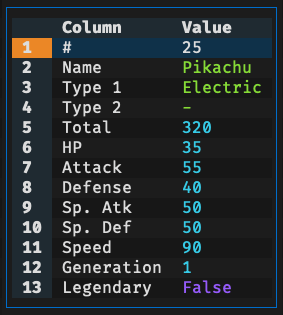
@@ -479,6 +503,7 @@ Useful for examining wide table where columns don't fit well on screen.
|
|
|
479
503
|
|
|
480
504
|
|
|
481
505
|
**In the Row Detail Modal**:
|
|
506
|
+
|
|
482
507
|
- Press `v` to **filter** all rows containing the selected column value
|
|
483
508
|
- Press `"` to **collect** all rows containing the selected column value to a new tab
|
|
484
509
|
- Press `{` to move to the previous row
|
|
@@ -517,6 +542,7 @@ The application provides multiple modes for selecting rows (marks it for filteri
|
|
|
517
542
|
**Advanced Options**:
|
|
518
543
|
|
|
519
544
|
When searching or finding, you can use checkboxes in the dialog to enable:
|
|
545
|
+
|
|
520
546
|
- Match option `Nocase` for case-insensitive matching
|
|
521
547
|
- Match option `Whole` to match full text
|
|
522
548
|
- Match option `Literal` to ignore special regex characters
|
|
@@ -525,25 +551,29 @@ When searching or finding, you can use checkboxes in the dialog to enable:
|
|
|
525
551
|
These options work with plain text searches. Use Polars regex patterns in expressions for more control. For example, use `(?i)` prefix in regex (e.g., `(?i)john`) for case-insensitive matching.
|
|
526
552
|
|
|
527
553
|
**Quick Tips:**
|
|
554
|
+
|
|
528
555
|
- Search results highlight matching rows in **red**
|
|
529
556
|
- Use expression for advanced selection (e.g., $attack > $defense)
|
|
530
557
|
- Type-aware matching automatically converts values. Resort to string comparison if conversion fails
|
|
531
558
|
- Use `u` to undo any search or filter
|
|
532
559
|
|
|
533
560
|
### 5. Find & Replace
|
|
561
|
+
|
|
534
562
|
Find by value/expression and highlight matching cells:
|
|
563
|
+
|
|
535
564
|
- `/` - Find cursor value across all columns (global search)
|
|
536
565
|
- `?` - Open dialog to search all columns with expression (global search)
|
|
537
566
|
- `;` - Find cursor value within current column (respects data type)
|
|
538
567
|
- `:` - Open dialog to search current column with expression
|
|
539
|
-
- `
|
|
540
|
-
- `
|
|
568
|
+
- `)` - Go to next matching cell
|
|
569
|
+
- `(` - Go to previous matching cell
|
|
541
570
|
|
|
542
571
|
Replace values in current column (`r`) or across all columns (`R`).
|
|
543
572
|
|
|
544
573
|
**How It Works:**
|
|
545
574
|
|
|
546
575
|
When you press `r` or `R`, enter:
|
|
576
|
+
|
|
547
577
|
1. **Find term**: Value or expression to search for (done by string value)
|
|
548
578
|
2. **Replace term**: Replacement value
|
|
549
579
|
3. **Matching options**:
|
|
@@ -554,14 +584,17 @@ When you press `r` or `R`, enter:
|
|
|
554
584
|
4. **Replace mode**: All at once or interactive review
|
|
555
585
|
|
|
556
586
|
**Replace All**:
|
|
587
|
+
|
|
557
588
|
- Replaces all matches with one operation
|
|
558
589
|
- Shows confirmation with match count
|
|
559
590
|
|
|
560
591
|
**Replace Interactive**:
|
|
592
|
+
|
|
561
593
|
- Review each match one at a time (confirm, skip, or cancel)
|
|
562
594
|
- Shows progress
|
|
563
595
|
|
|
564
596
|
**Tips:**
|
|
597
|
+
|
|
565
598
|
- Search are done by string value (i.e., ignoring data type)
|
|
566
599
|
- Type `NULL` to find or replace null values
|
|
567
600
|
- Support undo (`u`)
|
|
@@ -573,6 +606,7 @@ Both actions work on a subset of the original dataframe, but they serve differen
|
|
|
573
606
|
**Filtering options**:
|
|
574
607
|
|
|
575
608
|
**Basic Filter** (`v`):
|
|
609
|
+
|
|
576
610
|
- Opens the chose subset as a derived view inside the current workflow
|
|
577
611
|
- Edits made in the filtered view still apply to the original dataframe
|
|
578
612
|
- Press `Ctrl+V` to save the current view to a file
|
|
@@ -580,10 +614,12 @@ Both actions work on a subset of the original dataframe, but they serve differen
|
|
|
580
614
|
- Supports undo with `u`
|
|
581
615
|
|
|
582
616
|
**Advanced Filter** (`V`):
|
|
617
|
+
|
|
583
618
|
- Opens a dialog for value-based or expression-based filtering
|
|
584
619
|
- Useful when you want to define the subset directly
|
|
585
620
|
|
|
586
621
|
**Column Filter** (`f`):
|
|
622
|
+
|
|
587
623
|
- Opens a type-aware filter dialog for the current column
|
|
588
624
|
- Numeric columns support `=`, `!=`, `<`, `<=`, `>=`, and `>`
|
|
589
625
|
- String columns support exact match, prefix, suffix, contains, and regex matching
|
|
@@ -592,6 +628,7 @@ Both actions work on a subset of the original dataframe, but they serve differen
|
|
|
592
628
|
- List columns support exact-list matching and item membership checks such as "contains"
|
|
593
629
|
|
|
594
630
|
**Collect** (`"`):
|
|
631
|
+
|
|
595
632
|
- Creates a separate tab containing only the chosen rows
|
|
596
633
|
- The collected tab is independent from the source dataframe
|
|
597
634
|
- Edits in the collected tab do not modify the original table
|
|
@@ -607,18 +644,22 @@ For **Basic Filter** (`v`) and **Collect** (`"`), rows are chosen in this order:
|
|
|
607
644
|
Complex values, filters, and advanced operations can be specified via Polars expressions, with the following adaptions for convenience:
|
|
608
645
|
|
|
609
646
|
**Column References:**
|
|
647
|
+
|
|
610
648
|
- `$_` - Current column (based on cursor position)
|
|
611
649
|
- `$1`, `$2`, etc. - Column by 1-based index
|
|
612
650
|
- `$age`, `$salary` - Column by name (use actual column names)
|
|
613
651
|
- `` $`col name` `` - Column by name with spaces (backtick quoted)
|
|
614
652
|
|
|
615
653
|
**Row References:**
|
|
654
|
+
|
|
616
655
|
- `$#` - Current row index (1-based)
|
|
617
656
|
|
|
618
657
|
**DataFrame References:**
|
|
658
|
+
|
|
619
659
|
- `self` - Current dataframe
|
|
620
660
|
|
|
621
661
|
**Basic Comparisons:**
|
|
662
|
+
|
|
622
663
|
- `$_ > 50` - Current column greater than 50
|
|
623
664
|
- `$salary >= 100000` - Salary at least 100,000
|
|
624
665
|
- `$age < 30` - Age less than 30
|
|
@@ -627,11 +668,13 @@ Complex values, filters, and advanced operations can be specified via Polars exp
|
|
|
627
668
|
- `$# <= 10` - Top 10 rows
|
|
628
669
|
|
|
629
670
|
**Logical Operators:**
|
|
671
|
+
|
|
630
672
|
- `&` - AND
|
|
631
673
|
- `|` - OR
|
|
632
674
|
- `~` - NOT
|
|
633
675
|
|
|
634
676
|
**Practical Examples:**
|
|
677
|
+
|
|
635
678
|
- `($age < 30) & ($status == 'active')` - Age less than 30 AND status is active
|
|
636
679
|
- `($name == 'Alice') | ($name == 'Bob')` - Name is Alice or Bob
|
|
637
680
|
- `$salary / 1000 >= 50` - Salary divided by 1,000 is at least 50
|
|
@@ -643,6 +686,7 @@ Complex values, filters, and advanced operations can be specified via Polars exp
|
|
|
643
686
|
- `self.drop(RID).is_duplicated()` - Duplicate rows (note: the internal RID column must be excluded)
|
|
644
687
|
|
|
645
688
|
**String Operations:** ([Polars string API reference](https://docs.pola.rs/api/python/stable/reference/series/string.html))
|
|
689
|
+
|
|
646
690
|
- `$name.str.contains("John")` - Name contains "John" (case-sensitive)
|
|
647
691
|
- `$name.str.contains("(?i)john")` - Name contains "john" (case-insensitive)
|
|
648
692
|
- `$email.str.ends_with("@company.com")` - Email ends with domain
|
|
@@ -650,16 +694,19 @@ Complex values, filters, and advanced operations can be specified via Polars exp
|
|
|
650
694
|
- `$name.str.len_chars() < 7` - Length of name shorter than 7
|
|
651
695
|
|
|
652
696
|
**Number Operations:**
|
|
697
|
+
|
|
653
698
|
- `$age * 2 > 100` - Double age greater than 100
|
|
654
699
|
- `($salary + $bonus) > 150000` - Total compensation over 150,000
|
|
655
700
|
- `$percentage >= 50` - Percentage at least 50%
|
|
656
701
|
|
|
657
702
|
**Null Handling:**
|
|
703
|
+
|
|
658
704
|
- `$column.is_null()` - Find null values
|
|
659
705
|
- `$column.is_not_null()` - Find non-null values
|
|
660
706
|
- `NULL` - a value to represent null for convenience
|
|
661
707
|
|
|
662
708
|
**Tips:**
|
|
709
|
+
|
|
663
710
|
- Use column indices (e.g., `$1`, `$2`) for faster column access.
|
|
664
711
|
- Use column names that match exactly (case-sensitive)
|
|
665
712
|
- Use parentheses to clarify complex expressions: `($a & $b) | ($c & $d)`
|
|
@@ -676,24 +723,29 @@ Complex values, filters, and advanced operations can be specified via Polars exp
|
|
|
676
723
|
View quick metadata about your columns to understand their structure and content.
|
|
677
724
|
|
|
678
725
|
**Column Metadata** (`m`):
|
|
726
|
+
|
|
679
727
|
- Press `m` to open a modal displaying details for all columns:
|
|
680
728
|
- **Column** - Column name
|
|
681
729
|
- **Type** - Data type (e.g., Int64, String, Float64, Boolean)
|
|
682
730
|
|
|
683
731
|
**In the Column Metadata Table**
|
|
732
|
+
|
|
684
733
|
- Press `F` to show the frequency table for the selected column
|
|
685
734
|
- Press `s` to show the statistics table for the selected column
|
|
686
735
|
|
|
687
736
|
**In Metadata Modals**:
|
|
737
|
+
|
|
688
738
|
- Press `q` or `Escape` to close
|
|
689
739
|
|
|
690
740
|
### 10. Frequency Distribution
|
|
691
741
|
|
|
692
742
|
Press `F` to see value distributions of the current column. The modal shows:
|
|
743
|
+
|
|
693
744
|
- Value, Count, Percentage, Histogram
|
|
694
745
|
- **Total row** at the bottom
|
|
695
746
|
|
|
696
747
|
**In the Frequency Modal**:
|
|
748
|
+
|
|
697
749
|
- Press `[` and `]` to sort by any column (value, count, or percentage)
|
|
698
750
|
- Press `v` to **filter** all rows containing the selected value
|
|
699
751
|
- Press `"` to **collect** all rows containing the selected value to a new tab
|
|
@@ -704,6 +756,7 @@ Press `F` to see value distributions of the current column. The modal shows:
|
|
|
704
756
|
- Press `q` or `Escape` to close the modal
|
|
705
757
|
|
|
706
758
|
This is useful for:
|
|
759
|
+
|
|
707
760
|
- Understanding value distributions
|
|
708
761
|
- Quickly filtering to specific values
|
|
709
762
|
- Identifying rare or common values
|
|
@@ -712,14 +765,17 @@ This is useful for:
|
|
|
712
765
|
### 11. Column & Dataframe Statistics
|
|
713
766
|
|
|
714
767
|
Show summary statistics such as count, null count, mean, median, standard deviation, min, and max using Polars' `describe()` method.
|
|
768
|
+
|
|
715
769
|
- `s` shows statistics for the current column, with an additional `sum` field for numeric columns
|
|
716
770
|
- `S` shows statistics for all columns in the dataframe
|
|
717
771
|
|
|
718
772
|
**In the Statistics Modal**:
|
|
773
|
+
|
|
719
774
|
- Use arrow keys to navigate
|
|
720
775
|
- Press `q` or `Escape` to close the modal
|
|
721
776
|
|
|
722
777
|
This is useful for:
|
|
778
|
+
|
|
723
779
|
- Understanding data distributions and overall column behavior
|
|
724
780
|
- Identifying outliers and anomalies
|
|
725
781
|
- Checking data quality quickly
|
|
@@ -729,48 +785,59 @@ This is useful for:
|
|
|
729
785
|
### 12. Editing
|
|
730
786
|
|
|
731
787
|
**Edit Cell** (`e` or **Double-click**):
|
|
788
|
+
|
|
732
789
|
- Opens modal for editing current cell
|
|
733
790
|
- Validates input based on column data type
|
|
734
791
|
|
|
735
792
|
**Rename Column Header** (**Double-click** column header):
|
|
793
|
+
|
|
736
794
|
- Quick rename by double-clicking the column header
|
|
737
795
|
|
|
738
796
|
**Delete Row** (`x`):
|
|
797
|
+
|
|
739
798
|
- Delete all selected rows (if any) at once
|
|
740
799
|
- Or delete single row at cursor
|
|
741
800
|
|
|
742
801
|
**Delete Row and Below** (`X`):
|
|
802
|
+
|
|
743
803
|
- Deletes the current row and all rows below it
|
|
744
804
|
- Useful for removing trailing data or the end of a dataset
|
|
745
805
|
|
|
746
806
|
**Delete Row and Above** (`Ctrl+X`):
|
|
807
|
+
|
|
747
808
|
- Deletes the current row and all rows above it
|
|
748
809
|
- Useful for removing leading rows or the beginning of a dataset
|
|
749
810
|
|
|
750
811
|
**Delete Column** (`-`):
|
|
812
|
+
|
|
751
813
|
- Removes the entire column from display and dataframe
|
|
752
814
|
|
|
753
815
|
**Add Empty Column** (`a`):
|
|
816
|
+
|
|
754
817
|
- Adds a new empty column after the current column
|
|
755
818
|
- Column is initialized with NULL values for all rows
|
|
756
819
|
|
|
757
820
|
**Add Column with Value/Expression** (`A`):
|
|
821
|
+
|
|
758
822
|
- Opens dialog to specify column name and initial value/expression
|
|
759
823
|
- Value can be a constant (e.g., `0`, `"text"`) or a Polars expression (e.g., `$age * 2`)
|
|
760
824
|
- Expression can reference other columns and perform calculations
|
|
761
825
|
- Useful for creating derived columns or adding data with formulas
|
|
762
826
|
|
|
763
827
|
**Duplicate Column** (`d`):
|
|
828
|
+
|
|
764
829
|
- Creates a new column immediately after the current column
|
|
765
|
-
- New column has '_copy' suffix (e.g., 'price' → 'price_copy')
|
|
830
|
+
- New column has '\_copy' suffix (e.g., 'price' → 'price_copy')
|
|
766
831
|
- Useful for creating backups before transformation
|
|
767
832
|
|
|
768
833
|
**Duplicate Row** (`D`):
|
|
834
|
+
|
|
769
835
|
- Creates a new row immediately after the current row
|
|
770
836
|
- Duplicate preserves all data from original row
|
|
771
837
|
- Useful for batch adding similar records
|
|
772
838
|
|
|
773
839
|
**Remove Duplicate Rows** (`Ctrl+Delete`):
|
|
840
|
+
|
|
774
841
|
- Removes duplicated rows while keeping the first occurrence
|
|
775
842
|
- Compares row values across the visible columns
|
|
776
843
|
- Useful for quick deduplication before further editing, collecting, or exporting
|
|
@@ -779,10 +846,12 @@ This is useful for:
|
|
|
779
846
|
### 13. Column & Row Reordering
|
|
780
847
|
|
|
781
848
|
**Move Columns**: `Shift+←` and `Shift+→`
|
|
849
|
+
|
|
782
850
|
- Swaps adjacent columns
|
|
783
851
|
- Reorder is preserved when saving
|
|
784
852
|
|
|
785
853
|
**Move Rows**: `Shift+↑` and `Shift+↓`
|
|
854
|
+
|
|
786
855
|
- Swaps adjacent rows
|
|
787
856
|
- Reorder is preserved when saving
|
|
788
857
|
|
|
@@ -791,14 +860,17 @@ This is useful for:
|
|
|
791
860
|
The application provides separate save actions for the current tab, all tabs, and the current filtered view.
|
|
792
861
|
|
|
793
862
|
**Save Current Tab** (`Ctrl+T`):
|
|
863
|
+
|
|
794
864
|
- Saves the active tab to file
|
|
795
865
|
- Useful when you want to export only the dataframe you are currently working on
|
|
796
866
|
|
|
797
867
|
**Save All Tabs** (`Ctrl+S`):
|
|
868
|
+
|
|
798
869
|
- Saves every open tab to file
|
|
799
870
|
- Useful after editing multiple datasets in the same session
|
|
800
871
|
|
|
801
872
|
**Save Current View** (`Ctrl+V`):
|
|
873
|
+
|
|
802
874
|
- Saves only the current filtered or derived view to file
|
|
803
875
|
- Useful for exporting a subset without replacing the source dataframe
|
|
804
876
|
|
|
@@ -807,17 +879,20 @@ The output format is determined by the file extension, making it easy to convert
|
|
|
807
879
|
### 15. Undo/Redo/Reset
|
|
808
880
|
|
|
809
881
|
**Undo** (`u`):
|
|
882
|
+
|
|
810
883
|
- Reverts last action with full state restoration
|
|
811
884
|
- Works for edits, deletions, sorts, searches, etc.
|
|
812
885
|
- Shows description of reverted action
|
|
813
886
|
|
|
814
887
|
**Redo** (`U`):
|
|
888
|
+
|
|
815
889
|
- Reapplies the last undone action
|
|
816
890
|
- Restores the state before the undo was performed
|
|
817
891
|
- Useful for redoing actions you've undone by mistake
|
|
818
892
|
- Useful for alternating between two different states
|
|
819
893
|
|
|
820
894
|
**Reset** (`Ctrl+U`):
|
|
895
|
+
|
|
821
896
|
- Reverts all changes and returns to original data state when file was first loaded
|
|
822
897
|
- Clears all edits, deletions, selections, filters, and sorts
|
|
823
898
|
- Useful for starting fresh without reloading the file
|
|
@@ -827,12 +902,14 @@ The output format is determined by the file extension, making it easy to convert
|
|
|
827
902
|
Press the type conversion keys to instantly cast the current column to a different data type:
|
|
828
903
|
|
|
829
904
|
**Type Conversion Shortcuts**:
|
|
905
|
+
|
|
830
906
|
- `#` - Cast to **integer**
|
|
831
907
|
- `%` - Cast to **float**
|
|
832
908
|
- `!` - Cast to **boolean**
|
|
833
909
|
- `$` - Cast to **string**
|
|
834
910
|
|
|
835
911
|
**Features**:
|
|
912
|
+
|
|
836
913
|
- Instant conversion with visual feedback
|
|
837
914
|
- Full undo support - press `u` to revert
|
|
838
915
|
- Leverage Polars' robust type casting
|
|
@@ -844,19 +921,24 @@ Press the type conversion keys to instantly cast the current column to a differe
|
|
|
844
921
|
The SQL interface provides two modes for querying your dataframe:
|
|
845
922
|
|
|
846
923
|
#### Simple SQL Interface (`l`)
|
|
924
|
+
|
|
847
925
|
SELECT specific columns and apply WHERE conditions without writing full SQL:
|
|
926
|
+
|
|
848
927
|
- Choose which columns to include in results
|
|
849
928
|
- Specify WHERE clause for filtering
|
|
850
929
|
- Ideal for quick filtering and column selection
|
|
851
930
|
|
|
852
931
|
#### Advanced SQL Interface (`L`)
|
|
932
|
+
|
|
853
933
|
Execute complete SQL queries for advanced data manipulation:
|
|
934
|
+
|
|
854
935
|
- Write full SQL queries with standard [SQL syntax](https://docs.pola.rs/api/python/stable/reference/sql/index.html)
|
|
855
936
|
- Access to all SQL capabilities for complex transformations
|
|
856
937
|
- Always use `self` as the table name
|
|
857
938
|
- Syntax highlighted
|
|
858
939
|
|
|
859
940
|
**Examples:**
|
|
941
|
+
|
|
860
942
|
```sql
|
|
861
943
|
-- Filter and select specific rows and/or columns
|
|
862
944
|
SELECT name, age
|
|
@@ -895,10 +977,12 @@ The link template supports multiple placeholder types for maximum flexibility:
|
|
|
895
977
|
- **`$name`** - Column by name (use actual column names), e.g., `https://example.com/$region/$city/data` - Uses `region` and `city` columns
|
|
896
978
|
|
|
897
979
|
**Features:**
|
|
980
|
+
|
|
898
981
|
- **Multiple Placeholders**: Mix and match placeholders in a single template
|
|
899
982
|
- **URL Prefix**: Automatically prepends `https://` if URL doesn't start with `http://` or `https://`
|
|
900
983
|
|
|
901
984
|
**Tips:**
|
|
985
|
+
|
|
902
986
|
- Use full undo (`u`) if template produces unexpected URLs
|
|
903
987
|
- For complex multi-column URLs, use column names (`$name`) for clarity over positions (`$1`)
|
|
904
988
|
|
|
@@ -918,6 +1002,7 @@ Use the built-in Python console for quick interactive transformations without le
|
|
|
918
1002
|
Most loading failures come from malformed CSV/TSV input, quoting issues, or mixed column types. When this happens, the application prints a hint with a suggested retry option.
|
|
919
1003
|
|
|
920
1004
|
**Common fixes:**
|
|
1005
|
+
|
|
921
1006
|
- Use `-Q` if quote characters are mismatched, improperly escaped, or should be ignored entirely
|
|
922
1007
|
- Use `-T` when rows contain more fields than expected and you want to truncate ragged lines
|
|
923
1008
|
- Use `-L` to increase the number of rows used for schema inference when early rows do not represent the full column types
|
|
@@ -928,25 +1013,31 @@ Most loading failures come from malformed CSV/TSV input, quoting issues, or mixe
|
|
|
928
1013
|
**Typical cases:**
|
|
929
1014
|
|
|
930
1015
|
**Malformed CSV or broken quoting**:
|
|
1016
|
+
|
|
931
1017
|
- Symptom: errors mentioning malformed CSV, mismatched quotes, or improperly escaped fields
|
|
932
1018
|
- Try: `-Q` to disable quoting or choose a different quote character
|
|
933
1019
|
|
|
934
1020
|
**Ragged lines or inconsistent field counts**:
|
|
1021
|
+
|
|
935
1022
|
- Symptom: errors saying the input has more fields than defined in the schema
|
|
936
1023
|
- Try: `-T` to truncate ragged lines
|
|
937
1024
|
|
|
938
1025
|
**Mixed data types in one column**:
|
|
1026
|
+
|
|
939
1027
|
- Symptom: errors saying a value could not be parsed as an integer, float, or other inferred type at a specific column
|
|
940
1028
|
- Try: `-L` first, then `-I` if the column is genuinely mixed
|
|
941
1029
|
|
|
942
1030
|
**No data could be loaded**:
|
|
1031
|
+
|
|
943
1032
|
- Symptom: errors indicating that no data was available to load
|
|
944
1033
|
- Check: whether the file is empty, the format is correct, and the delimiter matches the input
|
|
945
1034
|
|
|
946
1035
|
**Fallback option**:
|
|
1036
|
+
|
|
947
1037
|
- If none of the above helps and the file is mostly usable, retry with `-E` to ignore parsing errors
|
|
948
1038
|
|
|
949
1039
|
**Examples:**
|
|
1040
|
+
|
|
950
1041
|
```bash
|
|
951
1042
|
# Disable quote handling when CSV quoting is broken
|
|
952
1043
|
dv bad.csv -Q
|