dataframe-textual 2.45.0__tar.gz → 2.47.0__tar.gz
This diff represents the content of publicly available package versions that have been released to one of the supported registries. The information contained in this diff is provided for informational purposes only and reflects changes between package versions as they appear in their respective public registries.
- {dataframe_textual-2.45.0 → dataframe_textual-2.47.0}/.gitignore +5 -0
- {dataframe_textual-2.45.0 → dataframe_textual-2.47.0}/PKG-INFO +71 -62
- {dataframe_textual-2.45.0 → dataframe_textual-2.47.0}/README.md +68 -59
- {dataframe_textual-2.45.0 → dataframe_textual-2.47.0}/pyproject.toml +3 -3
- {dataframe_textual-2.45.0 → dataframe_textual-2.47.0}/src/dataframe_textual/__init__.py +0 -2
- {dataframe_textual-2.45.0 → dataframe_textual-2.47.0}/src/dataframe_textual/common.py +10 -9
- dataframe_textual-2.47.0/src/dataframe_textual/console_panel.py +381 -0
- {dataframe_textual-2.45.0 → dataframe_textual-2.47.0}/src/dataframe_textual/data_frame_help_panel.py +1 -1
- {dataframe_textual-2.45.0 → dataframe_textual-2.47.0}/src/dataframe_textual/data_frame_table.py +315 -281
- {dataframe_textual-2.45.0 → dataframe_textual-2.47.0}/src/dataframe_textual/data_frame_viewer.py +232 -46
- {dataframe_textual-2.45.0 → dataframe_textual-2.47.0}/src/dataframe_textual/file_picker_screen.py +9 -10
- {dataframe_textual-2.45.0 → dataframe_textual-2.47.0}/src/dataframe_textual/loading_screen.py +3 -3
- dataframe_textual-2.47.0/src/dataframe_textual/status_bar.py +96 -0
- {dataframe_textual-2.45.0 → dataframe_textual-2.47.0}/src/dataframe_textual/table_screen.py +162 -83
- {dataframe_textual-2.45.0 → dataframe_textual-2.47.0}/src/dataframe_textual/theme_screen.py +2 -0
- {dataframe_textual-2.45.0 → dataframe_textual-2.47.0}/src/dataframe_textual/yes_no_screen.py +116 -81
- {dataframe_textual-2.45.0 → dataframe_textual-2.47.0}/uv.lock +65 -65
- {dataframe_textual-2.45.0 → dataframe_textual-2.47.0}/LICENSE +0 -0
- {dataframe_textual-2.45.0 → dataframe_textual-2.47.0}/main.py +0 -0
- {dataframe_textual-2.45.0 → dataframe_textual-2.47.0}/src/dataframe_textual/__main__.py +0 -0
- {dataframe_textual-2.45.0 → dataframe_textual-2.47.0}/src/dataframe_textual/text_screen.py +0 -0
|
@@ -1,6 +1,6 @@
|
|
|
1
1
|
Metadata-Version: 2.4
|
|
2
2
|
Name: dataframe-textual
|
|
3
|
-
Version: 2.
|
|
3
|
+
Version: 2.47.0
|
|
4
4
|
Summary: Interactive terminal viewer/editor for tabular data
|
|
5
5
|
Project-URL: Homepage, https://github.com/need47/dataframe-textual
|
|
6
6
|
Project-URL: Repository, https://github.com/need47/dataframe-textual.git
|
|
@@ -29,9 +29,9 @@ Classifier: Topic :: Utilities
|
|
|
29
29
|
Classifier: Typing :: Typed
|
|
30
30
|
Requires-Python: >=3.11
|
|
31
31
|
Requires-Dist: fastexcel>=0.16.0
|
|
32
|
-
Requires-Dist: polars>=1.
|
|
32
|
+
Requires-Dist: polars>=1.41.0
|
|
33
33
|
Requires-Dist: textual[syntax]>=8.0.2
|
|
34
|
-
Requires-Dist: vortex-data>=0.
|
|
34
|
+
Requires-Dist: vortex-data>=0.71.0
|
|
35
35
|
Requires-Dist: xlsxwriter>=3.2.9
|
|
36
36
|
Provides-Extra: dev
|
|
37
37
|
Requires-Dist: textual-dev>=1.8.0; extra == 'dev'
|
|
@@ -39,7 +39,7 @@ Description-Content-Type: text/markdown
|
|
|
39
39
|
|
|
40
40
|
# DataFrame Textual
|
|
41
41
|
|
|
42
|
-
A powerful, interactive terminal-based viewer/editor for CSV/TSV/Excel/[Parquet](https://parquet.apache.org/)/[Vortex](https://vortex.dev/)/JSON/[NDJSON](https://jsonlines.org/) built with Python, [Polars](https://pola.rs/), and [Textual](https://textual.textualize.io/). Inspired by [VisiData](https://www.visidata.org/), this tool provides smooth keyboard navigation, data manipulation, and a clean interface for exploring tabular data directly in terminal with multi-tab support for multiple files!
|
|
42
|
+
A powerful, interactive terminal-based viewer/editor for CSV/TSV/Excel/[Parquet](https://parquet.apache.org/)/[Vortex](https://vortex.dev/)/JSON/[NDJSON](https://jsonlines.org/) built with Python, [Polars](https://pola.rs/), and [Textual](https://textual.textualize.io/). Inspired by [VisiData](https://www.visidata.org/), this tool provides smooth keyboard navigation, data manipulation, and a clean interface for exploring and analyzing tabular data directly in terminal with multi-tab support for multiple files!
|
|
43
43
|
|
|
44
44
|
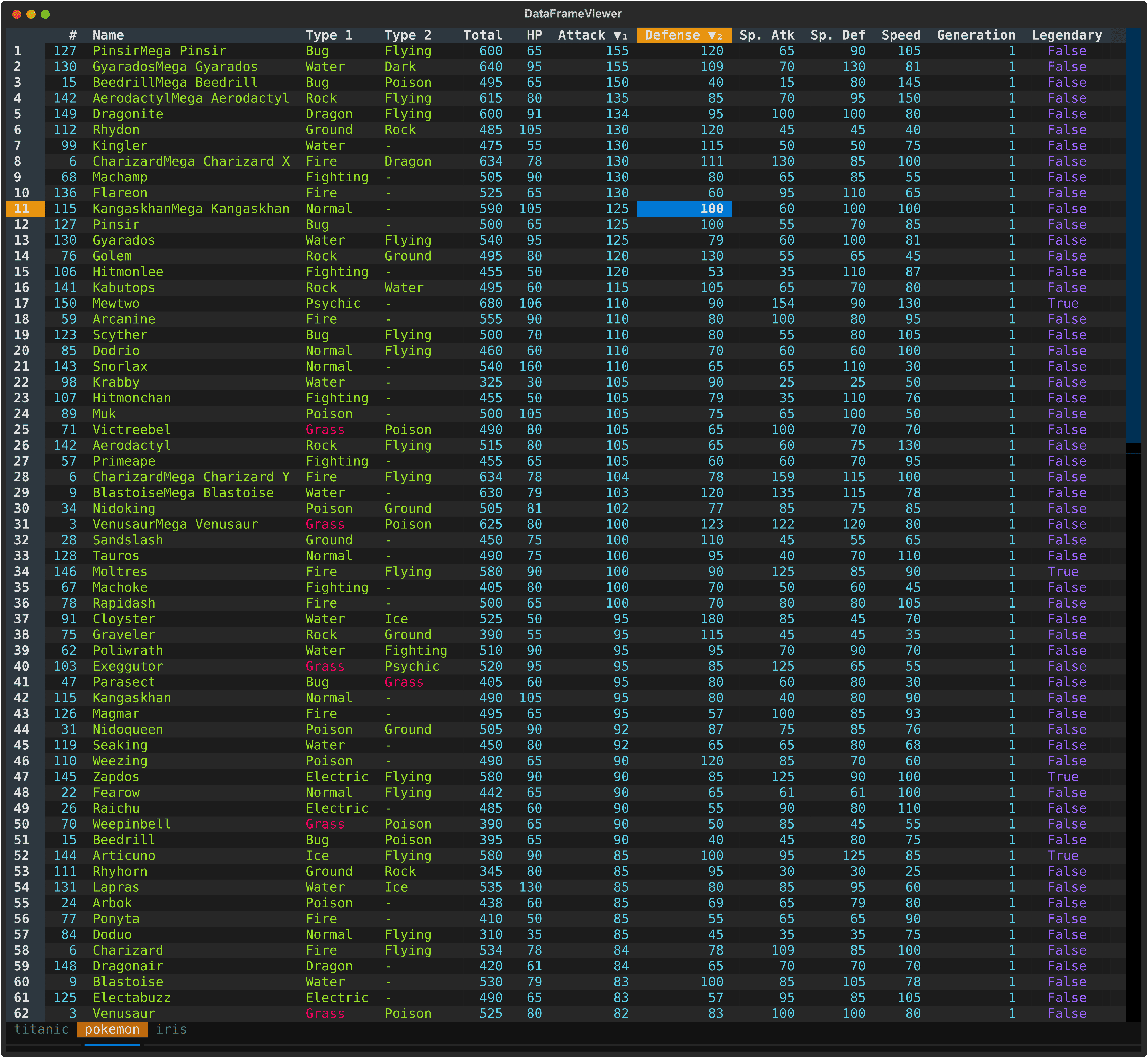
|
|
45
45
|
|
|
@@ -64,6 +64,7 @@ A powerful, interactive terminal-based viewer/editor for CSV/TSV/Excel/[Parquet]
|
|
|
64
64
|
- 📂 **Multi-File Support** - Open multiple files in separate tabs
|
|
65
65
|
- 🔄 **Tab Management** - Seamlessly switch between open files with keyboard shortcuts
|
|
66
66
|
- 📑 **Duplicate Tab** - Create a copy of the current tab with the same data
|
|
67
|
+
- 🐍 **Embedded Python Console** - Inspect and transform the active table with `df` and `pl` directly in-app
|
|
67
68
|
- 📌 **Freeze Rows/Columns** - Keep important rows and columns visible while scrolling
|
|
68
69
|
- 🎯 **Cursor Type Cycling** - Switch between cell, row, and column selection modes
|
|
69
70
|
- 📸 **Take Screenshot** - Capture terminal view as a SVG image
|
|
@@ -258,29 +259,31 @@ dv data.csv -o data.parquet
|
|
|
258
259
|
|
|
259
260
|
#### File & Tab Management
|
|
260
261
|
|
|
261
|
-
| Key | Action
|
|
262
|
-
| -------------- |
|
|
263
|
-
| `q` |
|
|
264
|
-
| `Q` |
|
|
265
|
-
| `Ctrl+Q` | Force to quit app (
|
|
266
|
-
| `
|
|
267
|
-
| `
|
|
268
|
-
| `
|
|
269
|
-
|
|
|
270
|
-
|
|
|
271
|
-
|
|
|
272
|
-
| `Ctrl+
|
|
273
|
-
| `Ctrl+
|
|
274
|
-
| `
|
|
275
|
-
| `
|
|
276
|
-
| `
|
|
277
|
-
| `Ctrl+
|
|
278
|
-
| `Ctrl+
|
|
279
|
-
| `
|
|
262
|
+
| Key | Action |
|
|
263
|
+
| -------------- | ------------------------------------------------------------ |
|
|
264
|
+
| `q` | Quit current tab (prompts to save unsaved changes) or view |
|
|
265
|
+
| `Q` | Quit all tabs then app (prompts to save unsaved changes) |
|
|
266
|
+
| `Ctrl+Q` | Force to quit app (discards unsaved changes) |
|
|
267
|
+
| `Esc` | Force to quit current tab (discards unsaved changes) or view |
|
|
268
|
+
| `Space` | Toggle tab bar visibility |
|
|
269
|
+
| `b` | Next tab |
|
|
270
|
+
| `B` | Previous tab |
|
|
271
|
+
| `>` | Move current tab right (wrap to first) |
|
|
272
|
+
| `<` | Move current tab left (wrap to last) |
|
|
273
|
+
| `Ctrl+T` | Save current tab to file |
|
|
274
|
+
| `Ctrl+S` | Save all tabs to file |
|
|
275
|
+
| `Ctrl+V` | Save current view to file |
|
|
276
|
+
| `w` | Save current tab to file (overwrite without prompt) |
|
|
277
|
+
| `W` | Save all tabs to file (overwrite without prompt) |
|
|
278
|
+
| `Ctrl+D` | Duplicate current tab |
|
|
279
|
+
| `Ctrl+O` | Open file in a new tab |
|
|
280
|
+
| `Ctrl+N` | Create new tab from Polars expression |
|
|
281
|
+
| `Double-click` | Rename tab |
|
|
280
282
|
|
|
281
283
|
**Tips:**
|
|
282
284
|
- Tabs with unsaved changes are indicated with a bright background
|
|
283
|
-
- Closing
|
|
285
|
+
- Closing a tab with unsaved changes triggers a save prompt
|
|
286
|
+
- Use `Esc` to bypass save prompts and quit the current tab/view immediately
|
|
284
287
|
|
|
285
288
|
#### View & Settings
|
|
286
289
|
|
|
@@ -288,6 +291,7 @@ dv data.csv -o data.parquet
|
|
|
288
291
|
| ------------------------ | ------------------------------------ |
|
|
289
292
|
| `F1` | Toggle help panel |
|
|
290
293
|
| `k` | Select theme |
|
|
294
|
+
| `` ` `` (backtick) | Toggle Python console |
|
|
291
295
|
| `Ctrl+P` -> `Screenshot` | Capture terminal view as a SVG image |
|
|
292
296
|
|
|
293
297
|
---
|
|
@@ -328,8 +332,7 @@ dv data.csv -o data.parquet
|
|
|
328
332
|
| `s` | Show statistics for current column |
|
|
329
333
|
| `S` | Show statistics for entire dataframe |
|
|
330
334
|
| `=` | Show histogram using first column as label and current column as value |
|
|
331
|
-
| `m` | Show metadata for
|
|
332
|
-
| `M` | Show metadata for columns (e.g., data types) |
|
|
335
|
+
| `m` | Show metadata for columns (e.g., data types) |
|
|
333
336
|
| `K` | Cycle cursor types: cell → row → column → cell |
|
|
334
337
|
| `~` | Toggle row labels |
|
|
335
338
|
| `_` (underscore) | Toggle column full width |
|
|
@@ -364,15 +367,15 @@ dv data.csv -o data.parquet
|
|
|
364
367
|
|
|
365
368
|
#### Row Selection
|
|
366
369
|
|
|
367
|
-
| Key
|
|
368
|
-
|
|
|
369
|
-
| `\`
|
|
370
|
-
| `\|` (pipe)
|
|
371
|
-
| `{`
|
|
372
|
-
| `}`
|
|
373
|
-
| `'`
|
|
374
|
-
| `t`
|
|
375
|
-
| `T`
|
|
370
|
+
| Key | Action |
|
|
371
|
+
| ------------------ | ----------------------------------------------------------------------------- |
|
|
372
|
+
| `\` | Select rows wth cell matches or those matching cursor value in current column |
|
|
373
|
+
| `\|` (pipe) | Select rows by expression |
|
|
374
|
+
| `{` | Go to previous selected row |
|
|
375
|
+
| `}` | Go to next selected row |
|
|
376
|
+
| `'` (single quote) | Select/deselect current row |
|
|
377
|
+
| `t` | Toggle row selections (invert) |
|
|
378
|
+
| `T` | Clear all row selections and/or cell matches |
|
|
376
379
|
|
|
377
380
|
#### Find & Replace
|
|
378
381
|
|
|
@@ -388,13 +391,13 @@ dv data.csv -o data.parquet
|
|
|
388
391
|
| `R` | Find and replace across all columns (interactive or replace all) |
|
|
389
392
|
|
|
390
393
|
#### Filter & Collect
|
|
391
|
-
| Key
|
|
392
|
-
|
|
|
393
|
-
| `v`
|
|
394
|
-
| `V`
|
|
395
|
-
| `.`
|
|
396
|
-
| `f`
|
|
397
|
-
| `"` (quote) | Collect rows to a new tab |
|
|
394
|
+
| Key | Action |
|
|
395
|
+
| ------------------ | ------------------------------------------------------ |
|
|
396
|
+
| `v` | Basic filter using the current cell value |
|
|
397
|
+
| `V` | Advanced filter with value or expression |
|
|
398
|
+
| `.` | Filter rows with non-null values in the current column |
|
|
399
|
+
| `f` | Filter rows using values in the current column |
|
|
400
|
+
| `"` (double quote) | Collect rows to a new tab |
|
|
398
401
|
|
|
399
402
|
#### Sorting (supporting multiple columns)
|
|
400
403
|
|
|
@@ -578,7 +581,7 @@ Both actions work on a subset of the original dataframe, but they serve differen
|
|
|
578
581
|
|
|
579
582
|
**Advanced Filter** (`V`):
|
|
580
583
|
- Opens a dialog for value-based or expression-based filtering
|
|
581
|
-
- Useful when you want to define the subset directly
|
|
584
|
+
- Useful when you want to define the subset directly
|
|
582
585
|
|
|
583
586
|
**Column Filter** (`f`):
|
|
584
587
|
- Opens a type-aware filter dialog for the current column
|
|
@@ -668,18 +671,12 @@ Complex values, filters, and advanced operations can be specified via Polars exp
|
|
|
668
671
|
- Multi-column sorting supported (press multiple times on different columns)
|
|
669
672
|
- Press same key twice to remove the current column from sorting
|
|
670
673
|
|
|
671
|
-
### 9.
|
|
672
|
-
|
|
673
|
-
View quick metadata about your dataframe and columns to understand their structure and content.
|
|
674
|
+
### 9. Column Metadata
|
|
674
675
|
|
|
675
|
-
|
|
676
|
-
- Press `m` to open a modal displaying:
|
|
677
|
-
- **File Name** - File name of current file
|
|
678
|
-
- **Row Count** - Total number of rows in the dataframe
|
|
679
|
-
- **Column Count** - Total number of columns in the dataframe
|
|
676
|
+
View quick metadata about your columns to understand their structure and content.
|
|
680
677
|
|
|
681
|
-
**Column Metadata** (`
|
|
682
|
-
- Press `
|
|
678
|
+
**Column Metadata** (`m`):
|
|
679
|
+
- Press `m` to open a modal displaying details for all columns:
|
|
683
680
|
- **Column** - Column name
|
|
684
681
|
- **Type** - Data type (e.g., Int64, String, Float64, Boolean)
|
|
685
682
|
|
|
@@ -714,20 +711,20 @@ This is useful for:
|
|
|
714
711
|
|
|
715
712
|
### 11. Column & Dataframe Statistics
|
|
716
713
|
|
|
717
|
-
Show summary statistics
|
|
718
|
-
- `s` for the current column
|
|
719
|
-
- `S` for all columns
|
|
714
|
+
Show summary statistics such as count, null count, mean, median, standard deviation, min, and max using Polars' `describe()` method.
|
|
715
|
+
- `s` shows statistics for the current column, with an additional `sum` field for numeric columns
|
|
716
|
+
- `S` shows statistics for all columns in the dataframe
|
|
720
717
|
|
|
721
718
|
**In the Statistics Modal**:
|
|
722
719
|
- Use arrow keys to navigate
|
|
723
720
|
- Press `q` or `Escape` to close the modal
|
|
724
721
|
|
|
725
722
|
This is useful for:
|
|
726
|
-
- Understanding data distributions and
|
|
723
|
+
- Understanding data distributions and overall column behavior
|
|
727
724
|
- Identifying outliers and anomalies
|
|
728
|
-
-
|
|
729
|
-
-
|
|
730
|
-
- Comparing
|
|
725
|
+
- Checking data quality quickly
|
|
726
|
+
- Reviewing summary statistics without leaving the TUI
|
|
727
|
+
- Comparing columns at a glance
|
|
731
728
|
|
|
732
729
|
### 12. Editing
|
|
733
730
|
|
|
@@ -775,7 +772,7 @@ This is useful for:
|
|
|
775
772
|
|
|
776
773
|
**Remove Duplicate Rows** (`Ctrl+Delete`):
|
|
777
774
|
- Removes duplicated rows while keeping the first occurrence
|
|
778
|
-
- Compares row values across the visible columns
|
|
775
|
+
- Compares row values across the visible columns
|
|
779
776
|
- Useful for quick deduplication before further editing, collecting, or exporting
|
|
780
777
|
- Supports undo with `u`
|
|
781
778
|
|
|
@@ -905,7 +902,18 @@ The link template supports multiple placeholder types for maximum flexibility:
|
|
|
905
902
|
- Use full undo (`u`) if template produces unexpected URLs
|
|
906
903
|
- For complex multi-column URLs, use column names (`$name`) for clarity over positions (`$1`)
|
|
907
904
|
|
|
908
|
-
### 20.
|
|
905
|
+
### 20. Python Console
|
|
906
|
+
|
|
907
|
+
Use the built-in Python console for quick interactive transformations without leaving the TUI.
|
|
908
|
+
|
|
909
|
+
- Open/close console: `` ` ``
|
|
910
|
+
- Run shell commands: prefix with `!` (example: `!ls`)
|
|
911
|
+
- In console: `clear` or `cls` clears console output
|
|
912
|
+
- In console: `Esc` closes the console panel
|
|
913
|
+
- Available names: `df` (active DataFrame), `self` (active table), `app` (viewer app), `pl` (Polars)
|
|
914
|
+
- Assign a DataFrame or Series back to `df` to refresh the current table immediately
|
|
915
|
+
|
|
916
|
+
## Handling Loading Errors
|
|
909
917
|
|
|
910
918
|
Most loading failures come from malformed CSV/TSV input, quoting issues, or mixed column types. When this happens, the application prints a hint with a suggested retry option.
|
|
911
919
|
|
|
@@ -962,6 +970,7 @@ dv partially_broken.csv -E
|
|
|
962
970
|
- **textual**: Terminal UI framework
|
|
963
971
|
- **fastexcel**: Read Excel files
|
|
964
972
|
- **xlsxwriter**: Write Excel files
|
|
973
|
+
- **vortex-data**: Read/Write Vortex files
|
|
965
974
|
|
|
966
975
|
## Requirements
|
|
967
976
|
|
|
@@ -1,6 +1,6 @@
|
|
|
1
1
|
# DataFrame Textual
|
|
2
2
|
|
|
3
|
-
A powerful, interactive terminal-based viewer/editor for CSV/TSV/Excel/[Parquet](https://parquet.apache.org/)/[Vortex](https://vortex.dev/)/JSON/[NDJSON](https://jsonlines.org/) built with Python, [Polars](https://pola.rs/), and [Textual](https://textual.textualize.io/). Inspired by [VisiData](https://www.visidata.org/), this tool provides smooth keyboard navigation, data manipulation, and a clean interface for exploring tabular data directly in terminal with multi-tab support for multiple files!
|
|
3
|
+
A powerful, interactive terminal-based viewer/editor for CSV/TSV/Excel/[Parquet](https://parquet.apache.org/)/[Vortex](https://vortex.dev/)/JSON/[NDJSON](https://jsonlines.org/) built with Python, [Polars](https://pola.rs/), and [Textual](https://textual.textualize.io/). Inspired by [VisiData](https://www.visidata.org/), this tool provides smooth keyboard navigation, data manipulation, and a clean interface for exploring and analyzing tabular data directly in terminal with multi-tab support for multiple files!
|
|
4
4
|
|
|
5
5
|

|
|
6
6
|
|
|
@@ -25,6 +25,7 @@ A powerful, interactive terminal-based viewer/editor for CSV/TSV/Excel/[Parquet]
|
|
|
25
25
|
- 📂 **Multi-File Support** - Open multiple files in separate tabs
|
|
26
26
|
- 🔄 **Tab Management** - Seamlessly switch between open files with keyboard shortcuts
|
|
27
27
|
- 📑 **Duplicate Tab** - Create a copy of the current tab with the same data
|
|
28
|
+
- 🐍 **Embedded Python Console** - Inspect and transform the active table with `df` and `pl` directly in-app
|
|
28
29
|
- 📌 **Freeze Rows/Columns** - Keep important rows and columns visible while scrolling
|
|
29
30
|
- 🎯 **Cursor Type Cycling** - Switch between cell, row, and column selection modes
|
|
30
31
|
- 📸 **Take Screenshot** - Capture terminal view as a SVG image
|
|
@@ -219,29 +220,31 @@ dv data.csv -o data.parquet
|
|
|
219
220
|
|
|
220
221
|
#### File & Tab Management
|
|
221
222
|
|
|
222
|
-
| Key | Action
|
|
223
|
-
| -------------- |
|
|
224
|
-
| `q` |
|
|
225
|
-
| `Q` |
|
|
226
|
-
| `Ctrl+Q` | Force to quit app (
|
|
227
|
-
| `
|
|
228
|
-
| `
|
|
229
|
-
| `
|
|
230
|
-
|
|
|
231
|
-
|
|
|
232
|
-
|
|
|
233
|
-
| `Ctrl+
|
|
234
|
-
| `Ctrl+
|
|
235
|
-
| `
|
|
236
|
-
| `
|
|
237
|
-
| `
|
|
238
|
-
| `Ctrl+
|
|
239
|
-
| `Ctrl+
|
|
240
|
-
| `
|
|
223
|
+
| Key | Action |
|
|
224
|
+
| -------------- | ------------------------------------------------------------ |
|
|
225
|
+
| `q` | Quit current tab (prompts to save unsaved changes) or view |
|
|
226
|
+
| `Q` | Quit all tabs then app (prompts to save unsaved changes) |
|
|
227
|
+
| `Ctrl+Q` | Force to quit app (discards unsaved changes) |
|
|
228
|
+
| `Esc` | Force to quit current tab (discards unsaved changes) or view |
|
|
229
|
+
| `Space` | Toggle tab bar visibility |
|
|
230
|
+
| `b` | Next tab |
|
|
231
|
+
| `B` | Previous tab |
|
|
232
|
+
| `>` | Move current tab right (wrap to first) |
|
|
233
|
+
| `<` | Move current tab left (wrap to last) |
|
|
234
|
+
| `Ctrl+T` | Save current tab to file |
|
|
235
|
+
| `Ctrl+S` | Save all tabs to file |
|
|
236
|
+
| `Ctrl+V` | Save current view to file |
|
|
237
|
+
| `w` | Save current tab to file (overwrite without prompt) |
|
|
238
|
+
| `W` | Save all tabs to file (overwrite without prompt) |
|
|
239
|
+
| `Ctrl+D` | Duplicate current tab |
|
|
240
|
+
| `Ctrl+O` | Open file in a new tab |
|
|
241
|
+
| `Ctrl+N` | Create new tab from Polars expression |
|
|
242
|
+
| `Double-click` | Rename tab |
|
|
241
243
|
|
|
242
244
|
**Tips:**
|
|
243
245
|
- Tabs with unsaved changes are indicated with a bright background
|
|
244
|
-
- Closing
|
|
246
|
+
- Closing a tab with unsaved changes triggers a save prompt
|
|
247
|
+
- Use `Esc` to bypass save prompts and quit the current tab/view immediately
|
|
245
248
|
|
|
246
249
|
#### View & Settings
|
|
247
250
|
|
|
@@ -249,6 +252,7 @@ dv data.csv -o data.parquet
|
|
|
249
252
|
| ------------------------ | ------------------------------------ |
|
|
250
253
|
| `F1` | Toggle help panel |
|
|
251
254
|
| `k` | Select theme |
|
|
255
|
+
| `` ` `` (backtick) | Toggle Python console |
|
|
252
256
|
| `Ctrl+P` -> `Screenshot` | Capture terminal view as a SVG image |
|
|
253
257
|
|
|
254
258
|
---
|
|
@@ -289,8 +293,7 @@ dv data.csv -o data.parquet
|
|
|
289
293
|
| `s` | Show statistics for current column |
|
|
290
294
|
| `S` | Show statistics for entire dataframe |
|
|
291
295
|
| `=` | Show histogram using first column as label and current column as value |
|
|
292
|
-
| `m` | Show metadata for
|
|
293
|
-
| `M` | Show metadata for columns (e.g., data types) |
|
|
296
|
+
| `m` | Show metadata for columns (e.g., data types) |
|
|
294
297
|
| `K` | Cycle cursor types: cell → row → column → cell |
|
|
295
298
|
| `~` | Toggle row labels |
|
|
296
299
|
| `_` (underscore) | Toggle column full width |
|
|
@@ -325,15 +328,15 @@ dv data.csv -o data.parquet
|
|
|
325
328
|
|
|
326
329
|
#### Row Selection
|
|
327
330
|
|
|
328
|
-
| Key
|
|
329
|
-
|
|
|
330
|
-
| `\`
|
|
331
|
-
| `\|` (pipe)
|
|
332
|
-
| `{`
|
|
333
|
-
| `}`
|
|
334
|
-
| `'`
|
|
335
|
-
| `t`
|
|
336
|
-
| `T`
|
|
331
|
+
| Key | Action |
|
|
332
|
+
| ------------------ | ----------------------------------------------------------------------------- |
|
|
333
|
+
| `\` | Select rows wth cell matches or those matching cursor value in current column |
|
|
334
|
+
| `\|` (pipe) | Select rows by expression |
|
|
335
|
+
| `{` | Go to previous selected row |
|
|
336
|
+
| `}` | Go to next selected row |
|
|
337
|
+
| `'` (single quote) | Select/deselect current row |
|
|
338
|
+
| `t` | Toggle row selections (invert) |
|
|
339
|
+
| `T` | Clear all row selections and/or cell matches |
|
|
337
340
|
|
|
338
341
|
#### Find & Replace
|
|
339
342
|
|
|
@@ -349,13 +352,13 @@ dv data.csv -o data.parquet
|
|
|
349
352
|
| `R` | Find and replace across all columns (interactive or replace all) |
|
|
350
353
|
|
|
351
354
|
#### Filter & Collect
|
|
352
|
-
| Key
|
|
353
|
-
|
|
|
354
|
-
| `v`
|
|
355
|
-
| `V`
|
|
356
|
-
| `.`
|
|
357
|
-
| `f`
|
|
358
|
-
| `"` (quote) | Collect rows to a new tab |
|
|
355
|
+
| Key | Action |
|
|
356
|
+
| ------------------ | ------------------------------------------------------ |
|
|
357
|
+
| `v` | Basic filter using the current cell value |
|
|
358
|
+
| `V` | Advanced filter with value or expression |
|
|
359
|
+
| `.` | Filter rows with non-null values in the current column |
|
|
360
|
+
| `f` | Filter rows using values in the current column |
|
|
361
|
+
| `"` (double quote) | Collect rows to a new tab |
|
|
359
362
|
|
|
360
363
|
#### Sorting (supporting multiple columns)
|
|
361
364
|
|
|
@@ -539,7 +542,7 @@ Both actions work on a subset of the original dataframe, but they serve differen
|
|
|
539
542
|
|
|
540
543
|
**Advanced Filter** (`V`):
|
|
541
544
|
- Opens a dialog for value-based or expression-based filtering
|
|
542
|
-
- Useful when you want to define the subset directly
|
|
545
|
+
- Useful when you want to define the subset directly
|
|
543
546
|
|
|
544
547
|
**Column Filter** (`f`):
|
|
545
548
|
- Opens a type-aware filter dialog for the current column
|
|
@@ -629,18 +632,12 @@ Complex values, filters, and advanced operations can be specified via Polars exp
|
|
|
629
632
|
- Multi-column sorting supported (press multiple times on different columns)
|
|
630
633
|
- Press same key twice to remove the current column from sorting
|
|
631
634
|
|
|
632
|
-
### 9.
|
|
633
|
-
|
|
634
|
-
View quick metadata about your dataframe and columns to understand their structure and content.
|
|
635
|
+
### 9. Column Metadata
|
|
635
636
|
|
|
636
|
-
|
|
637
|
-
- Press `m` to open a modal displaying:
|
|
638
|
-
- **File Name** - File name of current file
|
|
639
|
-
- **Row Count** - Total number of rows in the dataframe
|
|
640
|
-
- **Column Count** - Total number of columns in the dataframe
|
|
637
|
+
View quick metadata about your columns to understand their structure and content.
|
|
641
638
|
|
|
642
|
-
**Column Metadata** (`
|
|
643
|
-
- Press `
|
|
639
|
+
**Column Metadata** (`m`):
|
|
640
|
+
- Press `m` to open a modal displaying details for all columns:
|
|
644
641
|
- **Column** - Column name
|
|
645
642
|
- **Type** - Data type (e.g., Int64, String, Float64, Boolean)
|
|
646
643
|
|
|
@@ -675,20 +672,20 @@ This is useful for:
|
|
|
675
672
|
|
|
676
673
|
### 11. Column & Dataframe Statistics
|
|
677
674
|
|
|
678
|
-
Show summary statistics
|
|
679
|
-
- `s` for the current column
|
|
680
|
-
- `S` for all columns
|
|
675
|
+
Show summary statistics such as count, null count, mean, median, standard deviation, min, and max using Polars' `describe()` method.
|
|
676
|
+
- `s` shows statistics for the current column, with an additional `sum` field for numeric columns
|
|
677
|
+
- `S` shows statistics for all columns in the dataframe
|
|
681
678
|
|
|
682
679
|
**In the Statistics Modal**:
|
|
683
680
|
- Use arrow keys to navigate
|
|
684
681
|
- Press `q` or `Escape` to close the modal
|
|
685
682
|
|
|
686
683
|
This is useful for:
|
|
687
|
-
- Understanding data distributions and
|
|
684
|
+
- Understanding data distributions and overall column behavior
|
|
688
685
|
- Identifying outliers and anomalies
|
|
689
|
-
-
|
|
690
|
-
-
|
|
691
|
-
- Comparing
|
|
686
|
+
- Checking data quality quickly
|
|
687
|
+
- Reviewing summary statistics without leaving the TUI
|
|
688
|
+
- Comparing columns at a glance
|
|
692
689
|
|
|
693
690
|
### 12. Editing
|
|
694
691
|
|
|
@@ -736,7 +733,7 @@ This is useful for:
|
|
|
736
733
|
|
|
737
734
|
**Remove Duplicate Rows** (`Ctrl+Delete`):
|
|
738
735
|
- Removes duplicated rows while keeping the first occurrence
|
|
739
|
-
- Compares row values across the visible columns
|
|
736
|
+
- Compares row values across the visible columns
|
|
740
737
|
- Useful for quick deduplication before further editing, collecting, or exporting
|
|
741
738
|
- Supports undo with `u`
|
|
742
739
|
|
|
@@ -866,7 +863,18 @@ The link template supports multiple placeholder types for maximum flexibility:
|
|
|
866
863
|
- Use full undo (`u`) if template produces unexpected URLs
|
|
867
864
|
- For complex multi-column URLs, use column names (`$name`) for clarity over positions (`$1`)
|
|
868
865
|
|
|
869
|
-
### 20.
|
|
866
|
+
### 20. Python Console
|
|
867
|
+
|
|
868
|
+
Use the built-in Python console for quick interactive transformations without leaving the TUI.
|
|
869
|
+
|
|
870
|
+
- Open/close console: `` ` ``
|
|
871
|
+
- Run shell commands: prefix with `!` (example: `!ls`)
|
|
872
|
+
- In console: `clear` or `cls` clears console output
|
|
873
|
+
- In console: `Esc` closes the console panel
|
|
874
|
+
- Available names: `df` (active DataFrame), `self` (active table), `app` (viewer app), `pl` (Polars)
|
|
875
|
+
- Assign a DataFrame or Series back to `df` to refresh the current table immediately
|
|
876
|
+
|
|
877
|
+
## Handling Loading Errors
|
|
870
878
|
|
|
871
879
|
Most loading failures come from malformed CSV/TSV input, quoting issues, or mixed column types. When this happens, the application prints a hint with a suggested retry option.
|
|
872
880
|
|
|
@@ -923,6 +931,7 @@ dv partially_broken.csv -E
|
|
|
923
931
|
- **textual**: Terminal UI framework
|
|
924
932
|
- **fastexcel**: Read Excel files
|
|
925
933
|
- **xlsxwriter**: Write Excel files
|
|
934
|
+
- **vortex-data**: Read/Write Vortex files
|
|
926
935
|
|
|
927
936
|
## Requirements
|
|
928
937
|
|
|
@@ -4,7 +4,7 @@ build-backend = "hatchling.build"
|
|
|
4
4
|
|
|
5
5
|
[project]
|
|
6
6
|
name = "dataframe-textual"
|
|
7
|
-
version = "2.
|
|
7
|
+
version = "2.47.0"
|
|
8
8
|
description = "Interactive terminal viewer/editor for tabular data"
|
|
9
9
|
readme = "README.md"
|
|
10
10
|
requires-python = ">=3.11"
|
|
@@ -33,11 +33,11 @@ classifiers = [
|
|
|
33
33
|
"Typing :: Typed",
|
|
34
34
|
]
|
|
35
35
|
dependencies = [
|
|
36
|
-
"polars>=1.39.3",
|
|
37
36
|
"fastexcel>=0.16.0",
|
|
38
37
|
"xlsxwriter>=3.2.9",
|
|
39
38
|
"textual[syntax]>=8.0.2",
|
|
40
|
-
"vortex-data>=0.
|
|
39
|
+
"vortex-data>=0.71.0",
|
|
40
|
+
"polars>=1.41.0",
|
|
41
41
|
]
|
|
42
42
|
|
|
43
43
|
[project.urls]
|
|
@@ -10,7 +10,6 @@ from .data_frame_viewer import DataFrameViewer
|
|
|
10
10
|
from .table_screen import (
|
|
11
11
|
FrequencyScreen,
|
|
12
12
|
MetaColumnScreen,
|
|
13
|
-
MetaShape,
|
|
14
13
|
RowDetailScreen,
|
|
15
14
|
StatisticsScreen,
|
|
16
15
|
TableScreen,
|
|
@@ -43,7 +42,6 @@ __all__ = [
|
|
|
43
42
|
"FrequencyScreen",
|
|
44
43
|
"History",
|
|
45
44
|
"MetaColumnScreen",
|
|
46
|
-
"MetaShape",
|
|
47
45
|
"OpenFileScreen",
|
|
48
46
|
"RenameColumnScreen",
|
|
49
47
|
"RenameTabScreen",
|
|
@@ -98,7 +98,7 @@ class DtypeClass:
|
|
|
98
98
|
style: str | None = None,
|
|
99
99
|
justify: str | None = None,
|
|
100
100
|
thousand_separator: bool = False,
|
|
101
|
-
) ->
|
|
101
|
+
) -> Text:
|
|
102
102
|
"""Format the value according to its data type.
|
|
103
103
|
|
|
104
104
|
Args:
|
|
@@ -308,7 +308,7 @@ def tentative_expr(expr: str) -> bool:
|
|
|
308
308
|
|
|
309
309
|
|
|
310
310
|
def validate_expr(
|
|
311
|
-
expr: str, columns: list[str], current_col_idx: int = 0, df: pl.DataFrame = None
|
|
311
|
+
expr: str, columns: list[str], current_col_idx: int = 0, df: pl.DataFrame | None = None
|
|
312
312
|
) -> pl.Expr | pl.DataFrame | pl.Series | None:
|
|
313
313
|
"""Validate and return the expression.
|
|
314
314
|
|
|
@@ -494,7 +494,7 @@ def parse_placeholders(template: str, columns: list[str], current_cidx: int) ->
|
|
|
494
494
|
|
|
495
495
|
# If no placeholders found, treat entire template as literal
|
|
496
496
|
if not parts:
|
|
497
|
-
parts = [template]
|
|
497
|
+
parts: list[str | pl.Expr] = [template]
|
|
498
498
|
|
|
499
499
|
return parts
|
|
500
500
|
|
|
@@ -713,10 +713,7 @@ def scan_vortex(source: str | list[str], n_rows: int | None = None) -> pl.LazyFr
|
|
|
713
713
|
import vortex as vx
|
|
714
714
|
|
|
715
715
|
if isinstance(source, list):
|
|
716
|
-
lf =
|
|
717
|
-
for src in source:
|
|
718
|
-
lf_src = vx.open(src).to_polars()
|
|
719
|
-
lf = lf_src if lf is None else pl.concat([lf, lf_src])
|
|
716
|
+
lf = pl.concat([vx.open(src).to_polars() for src in source])
|
|
720
717
|
else:
|
|
721
718
|
lf = vx.open(source).to_polars()
|
|
722
719
|
|
|
@@ -792,6 +789,8 @@ def load_dataframe(
|
|
|
792
789
|
data: list[Source] = []
|
|
793
790
|
lfs_aio = []
|
|
794
791
|
prefix_sheet = len(filenames) > 1
|
|
792
|
+
# If all_in_one, only load first sheet for each file to ensure consistent structure
|
|
793
|
+
first_sheet = all_in_one
|
|
795
794
|
|
|
796
795
|
# Read files individually
|
|
797
796
|
for filename in filenames:
|
|
@@ -814,6 +813,7 @@ def load_dataframe(
|
|
|
814
813
|
# Load the file
|
|
815
814
|
ds = load_file(
|
|
816
815
|
source,
|
|
816
|
+
first_sheet=first_sheet,
|
|
817
817
|
prefix_sheet=prefix_sheet,
|
|
818
818
|
delimiter=delimiter,
|
|
819
819
|
format=format,
|
|
@@ -832,7 +832,8 @@ def load_dataframe(
|
|
|
832
832
|
)
|
|
833
833
|
|
|
834
834
|
if all_in_one:
|
|
835
|
-
|
|
835
|
+
# For all-in-one, add a column to keep track of the source filename for each row
|
|
836
|
+
lfs_aio.extend([src.lf.with_columns(pl.lit(src.filename).alias("^_FILE_^")) for src in ds])
|
|
836
837
|
else:
|
|
837
838
|
data.extend(ds)
|
|
838
839
|
|
|
@@ -996,7 +997,7 @@ def load_file(
|
|
|
996
997
|
|
|
997
998
|
data = ds
|
|
998
999
|
except Exception as e:
|
|
999
|
-
print(f"Error loading file `{filename}`: {
|
|
1000
|
+
print(f"Error loading file `{filename}`: {e}", file=sys.stderr)
|
|
1000
1001
|
sys.exit(1)
|
|
1001
1002
|
|
|
1002
1003
|
return data
|