dataframe-textual 2.45.0__tar.gz → 2.46.0__tar.gz
This diff represents the content of publicly available package versions that have been released to one of the supported registries. The information contained in this diff is provided for informational purposes only and reflects changes between package versions as they appear in their respective public registries.
- {dataframe_textual-2.45.0 → dataframe_textual-2.46.0}/PKG-INFO +13 -12
- {dataframe_textual-2.45.0 → dataframe_textual-2.46.0}/README.md +11 -10
- {dataframe_textual-2.45.0 → dataframe_textual-2.46.0}/pyproject.toml +2 -2
- {dataframe_textual-2.45.0 → dataframe_textual-2.46.0}/src/dataframe_textual/common.py +6 -2
- {dataframe_textual-2.45.0 → dataframe_textual-2.46.0}/src/dataframe_textual/data_frame_table.py +227 -222
- {dataframe_textual-2.45.0 → dataframe_textual-2.46.0}/src/dataframe_textual/data_frame_viewer.py +184 -32
- {dataframe_textual-2.45.0 → dataframe_textual-2.46.0}/src/dataframe_textual/file_picker_screen.py +2 -2
- {dataframe_textual-2.45.0 → dataframe_textual-2.46.0}/src/dataframe_textual/table_screen.py +88 -7
- {dataframe_textual-2.45.0 → dataframe_textual-2.46.0}/src/dataframe_textual/yes_no_screen.py +89 -54
- {dataframe_textual-2.45.0 → dataframe_textual-2.46.0}/uv.lock +51 -51
- {dataframe_textual-2.45.0 → dataframe_textual-2.46.0}/.gitignore +0 -0
- {dataframe_textual-2.45.0 → dataframe_textual-2.46.0}/LICENSE +0 -0
- {dataframe_textual-2.45.0 → dataframe_textual-2.46.0}/main.py +0 -0
- {dataframe_textual-2.45.0 → dataframe_textual-2.46.0}/src/dataframe_textual/__init__.py +0 -0
- {dataframe_textual-2.45.0 → dataframe_textual-2.46.0}/src/dataframe_textual/__main__.py +0 -0
- {dataframe_textual-2.45.0 → dataframe_textual-2.46.0}/src/dataframe_textual/data_frame_help_panel.py +0 -0
- {dataframe_textual-2.45.0 → dataframe_textual-2.46.0}/src/dataframe_textual/loading_screen.py +0 -0
- {dataframe_textual-2.45.0 → dataframe_textual-2.46.0}/src/dataframe_textual/text_screen.py +0 -0
- {dataframe_textual-2.45.0 → dataframe_textual-2.46.0}/src/dataframe_textual/theme_screen.py +0 -0
|
@@ -1,6 +1,6 @@
|
|
|
1
1
|
Metadata-Version: 2.4
|
|
2
2
|
Name: dataframe-textual
|
|
3
|
-
Version: 2.
|
|
3
|
+
Version: 2.46.0
|
|
4
4
|
Summary: Interactive terminal viewer/editor for tabular data
|
|
5
5
|
Project-URL: Homepage, https://github.com/need47/dataframe-textual
|
|
6
6
|
Project-URL: Repository, https://github.com/need47/dataframe-textual.git
|
|
@@ -31,7 +31,7 @@ Requires-Python: >=3.11
|
|
|
31
31
|
Requires-Dist: fastexcel>=0.16.0
|
|
32
32
|
Requires-Dist: polars>=1.39.3
|
|
33
33
|
Requires-Dist: textual[syntax]>=8.0.2
|
|
34
|
-
Requires-Dist: vortex-data>=0.
|
|
34
|
+
Requires-Dist: vortex-data>=0.71.0
|
|
35
35
|
Requires-Dist: xlsxwriter>=3.2.9
|
|
36
36
|
Provides-Extra: dev
|
|
37
37
|
Requires-Dist: textual-dev>=1.8.0; extra == 'dev'
|
|
@@ -39,7 +39,7 @@ Description-Content-Type: text/markdown
|
|
|
39
39
|
|
|
40
40
|
# DataFrame Textual
|
|
41
41
|
|
|
42
|
-
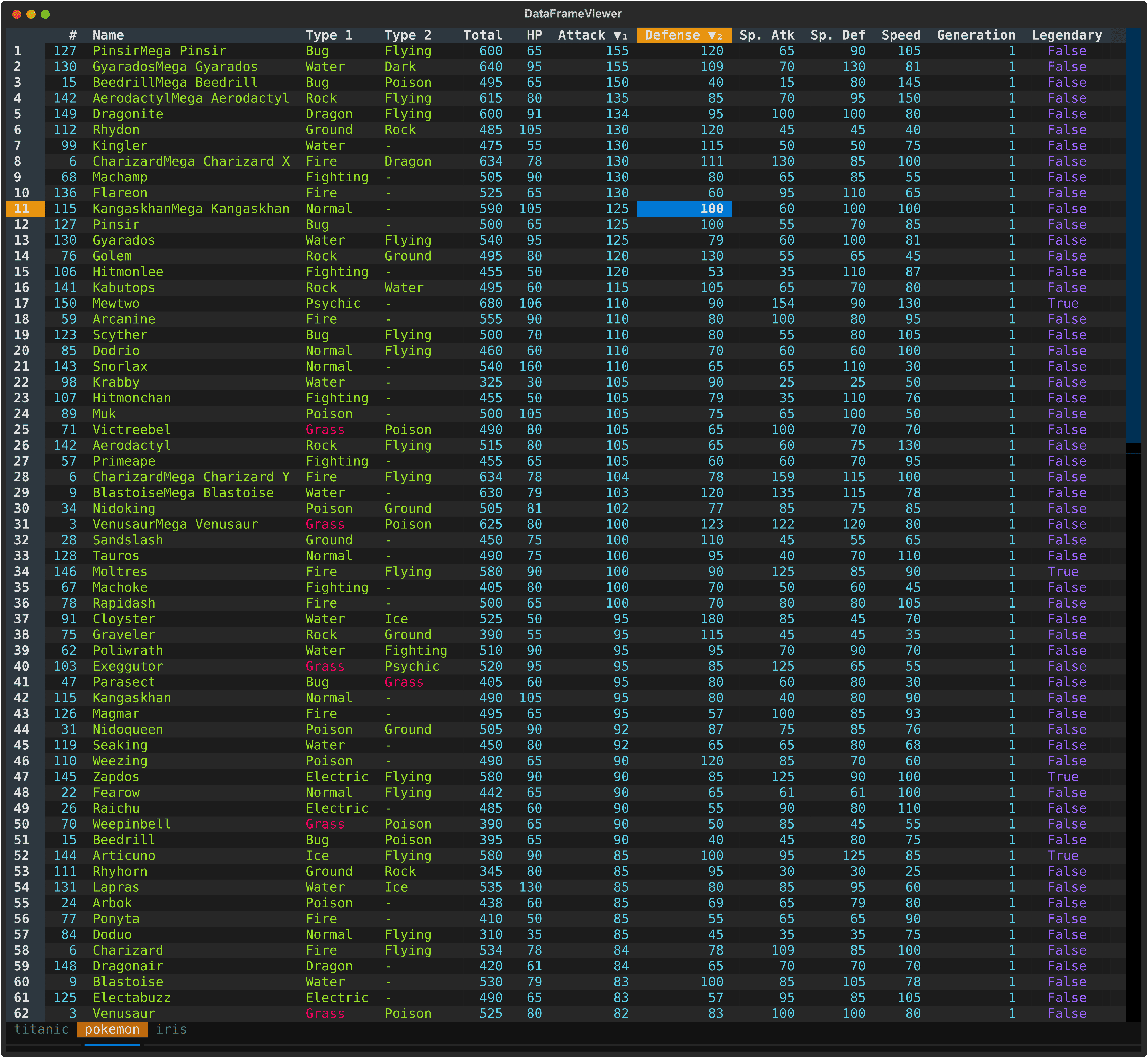
A powerful, interactive terminal-based viewer/editor for CSV/TSV/Excel/[Parquet](https://parquet.apache.org/)/[Vortex](https://vortex.dev/)/JSON/[NDJSON](https://jsonlines.org/) built with Python, [Polars](https://pola.rs/), and [Textual](https://textual.textualize.io/). Inspired by [VisiData](https://www.visidata.org/), this tool provides smooth keyboard navigation, data manipulation, and a clean interface for exploring tabular data directly in terminal with multi-tab support for multiple files!
|
|
42
|
+
A powerful, interactive terminal-based viewer/editor for CSV/TSV/Excel/[Parquet](https://parquet.apache.org/)/[Vortex](https://vortex.dev/)/JSON/[NDJSON](https://jsonlines.org/) built with Python, [Polars](https://pola.rs/), and [Textual](https://textual.textualize.io/). Inspired by [VisiData](https://www.visidata.org/), this tool provides smooth keyboard navigation, data manipulation, and a clean interface for exploring and analyzing tabular data directly in terminal with multi-tab support for multiple files!
|
|
43
43
|
|
|
44
44
|
|
|
45
45
|
|
|
@@ -578,7 +578,7 @@ Both actions work on a subset of the original dataframe, but they serve differen
|
|
|
578
578
|
|
|
579
579
|
**Advanced Filter** (`V`):
|
|
580
580
|
- Opens a dialog for value-based or expression-based filtering
|
|
581
|
-
- Useful when you want to define the subset directly
|
|
581
|
+
- Useful when you want to define the subset directly
|
|
582
582
|
|
|
583
583
|
**Column Filter** (`f`):
|
|
584
584
|
- Opens a type-aware filter dialog for the current column
|
|
@@ -714,20 +714,20 @@ This is useful for:
|
|
|
714
714
|
|
|
715
715
|
### 11. Column & Dataframe Statistics
|
|
716
716
|
|
|
717
|
-
Show summary statistics
|
|
718
|
-
- `s` for the current column
|
|
719
|
-
- `S` for all columns
|
|
717
|
+
Show summary statistics such as count, null count, mean, median, standard deviation, min, and max using Polars' `describe()` method.
|
|
718
|
+
- `s` shows statistics for the current column, with an additional `sum` field for numeric columns
|
|
719
|
+
- `S` shows statistics for all columns in the dataframe
|
|
720
720
|
|
|
721
721
|
**In the Statistics Modal**:
|
|
722
722
|
- Use arrow keys to navigate
|
|
723
723
|
- Press `q` or `Escape` to close the modal
|
|
724
724
|
|
|
725
725
|
This is useful for:
|
|
726
|
-
- Understanding data distributions and
|
|
726
|
+
- Understanding data distributions and overall column behavior
|
|
727
727
|
- Identifying outliers and anomalies
|
|
728
|
-
-
|
|
729
|
-
-
|
|
730
|
-
- Comparing
|
|
728
|
+
- Checking data quality quickly
|
|
729
|
+
- Reviewing summary statistics without leaving the TUI
|
|
730
|
+
- Comparing columns at a glance
|
|
731
731
|
|
|
732
732
|
### 12. Editing
|
|
733
733
|
|
|
@@ -775,7 +775,7 @@ This is useful for:
|
|
|
775
775
|
|
|
776
776
|
**Remove Duplicate Rows** (`Ctrl+Delete`):
|
|
777
777
|
- Removes duplicated rows while keeping the first occurrence
|
|
778
|
-
- Compares row values across the visible columns
|
|
778
|
+
- Compares row values across the visible columns
|
|
779
779
|
- Useful for quick deduplication before further editing, collecting, or exporting
|
|
780
780
|
- Supports undo with `u`
|
|
781
781
|
|
|
@@ -962,6 +962,7 @@ dv partially_broken.csv -E
|
|
|
962
962
|
- **textual**: Terminal UI framework
|
|
963
963
|
- **fastexcel**: Read Excel files
|
|
964
964
|
- **xlsxwriter**: Write Excel files
|
|
965
|
+
- **vortex-data**: Read/Write Vortex files
|
|
965
966
|
|
|
966
967
|
## Requirements
|
|
967
968
|
|
|
@@ -1,6 +1,6 @@
|
|
|
1
1
|
# DataFrame Textual
|
|
2
2
|
|
|
3
|
-
A powerful, interactive terminal-based viewer/editor for CSV/TSV/Excel/[Parquet](https://parquet.apache.org/)/[Vortex](https://vortex.dev/)/JSON/[NDJSON](https://jsonlines.org/) built with Python, [Polars](https://pola.rs/), and [Textual](https://textual.textualize.io/). Inspired by [VisiData](https://www.visidata.org/), this tool provides smooth keyboard navigation, data manipulation, and a clean interface for exploring tabular data directly in terminal with multi-tab support for multiple files!
|
|
3
|
+
A powerful, interactive terminal-based viewer/editor for CSV/TSV/Excel/[Parquet](https://parquet.apache.org/)/[Vortex](https://vortex.dev/)/JSON/[NDJSON](https://jsonlines.org/) built with Python, [Polars](https://pola.rs/), and [Textual](https://textual.textualize.io/). Inspired by [VisiData](https://www.visidata.org/), this tool provides smooth keyboard navigation, data manipulation, and a clean interface for exploring and analyzing tabular data directly in terminal with multi-tab support for multiple files!
|
|
4
4
|
|
|
5
5
|

|
|
6
6
|
|
|
@@ -539,7 +539,7 @@ Both actions work on a subset of the original dataframe, but they serve differen
|
|
|
539
539
|
|
|
540
540
|
**Advanced Filter** (`V`):
|
|
541
541
|
- Opens a dialog for value-based or expression-based filtering
|
|
542
|
-
- Useful when you want to define the subset directly
|
|
542
|
+
- Useful when you want to define the subset directly
|
|
543
543
|
|
|
544
544
|
**Column Filter** (`f`):
|
|
545
545
|
- Opens a type-aware filter dialog for the current column
|
|
@@ -675,20 +675,20 @@ This is useful for:
|
|
|
675
675
|
|
|
676
676
|
### 11. Column & Dataframe Statistics
|
|
677
677
|
|
|
678
|
-
Show summary statistics
|
|
679
|
-
- `s` for the current column
|
|
680
|
-
- `S` for all columns
|
|
678
|
+
Show summary statistics such as count, null count, mean, median, standard deviation, min, and max using Polars' `describe()` method.
|
|
679
|
+
- `s` shows statistics for the current column, with an additional `sum` field for numeric columns
|
|
680
|
+
- `S` shows statistics for all columns in the dataframe
|
|
681
681
|
|
|
682
682
|
**In the Statistics Modal**:
|
|
683
683
|
- Use arrow keys to navigate
|
|
684
684
|
- Press `q` or `Escape` to close the modal
|
|
685
685
|
|
|
686
686
|
This is useful for:
|
|
687
|
-
- Understanding data distributions and
|
|
687
|
+
- Understanding data distributions and overall column behavior
|
|
688
688
|
- Identifying outliers and anomalies
|
|
689
|
-
-
|
|
690
|
-
-
|
|
691
|
-
- Comparing
|
|
689
|
+
- Checking data quality quickly
|
|
690
|
+
- Reviewing summary statistics without leaving the TUI
|
|
691
|
+
- Comparing columns at a glance
|
|
692
692
|
|
|
693
693
|
### 12. Editing
|
|
694
694
|
|
|
@@ -736,7 +736,7 @@ This is useful for:
|
|
|
736
736
|
|
|
737
737
|
**Remove Duplicate Rows** (`Ctrl+Delete`):
|
|
738
738
|
- Removes duplicated rows while keeping the first occurrence
|
|
739
|
-
- Compares row values across the visible columns
|
|
739
|
+
- Compares row values across the visible columns
|
|
740
740
|
- Useful for quick deduplication before further editing, collecting, or exporting
|
|
741
741
|
- Supports undo with `u`
|
|
742
742
|
|
|
@@ -923,6 +923,7 @@ dv partially_broken.csv -E
|
|
|
923
923
|
- **textual**: Terminal UI framework
|
|
924
924
|
- **fastexcel**: Read Excel files
|
|
925
925
|
- **xlsxwriter**: Write Excel files
|
|
926
|
+
- **vortex-data**: Read/Write Vortex files
|
|
926
927
|
|
|
927
928
|
## Requirements
|
|
928
929
|
|
|
@@ -4,7 +4,7 @@ build-backend = "hatchling.build"
|
|
|
4
4
|
|
|
5
5
|
[project]
|
|
6
6
|
name = "dataframe-textual"
|
|
7
|
-
version = "2.
|
|
7
|
+
version = "2.46.0"
|
|
8
8
|
description = "Interactive terminal viewer/editor for tabular data"
|
|
9
9
|
readme = "README.md"
|
|
10
10
|
requires-python = ">=3.11"
|
|
@@ -37,7 +37,7 @@ dependencies = [
|
|
|
37
37
|
"fastexcel>=0.16.0",
|
|
38
38
|
"xlsxwriter>=3.2.9",
|
|
39
39
|
"textual[syntax]>=8.0.2",
|
|
40
|
-
"vortex-data>=0.
|
|
40
|
+
"vortex-data>=0.71.0",
|
|
41
41
|
]
|
|
42
42
|
|
|
43
43
|
[project.urls]
|
|
@@ -792,6 +792,8 @@ def load_dataframe(
|
|
|
792
792
|
data: list[Source] = []
|
|
793
793
|
lfs_aio = []
|
|
794
794
|
prefix_sheet = len(filenames) > 1
|
|
795
|
+
# If all_in_one, only load first sheet for each file to ensure consistent structure
|
|
796
|
+
first_sheet = all_in_one
|
|
795
797
|
|
|
796
798
|
# Read files individually
|
|
797
799
|
for filename in filenames:
|
|
@@ -814,6 +816,7 @@ def load_dataframe(
|
|
|
814
816
|
# Load the file
|
|
815
817
|
ds = load_file(
|
|
816
818
|
source,
|
|
819
|
+
first_sheet=first_sheet,
|
|
817
820
|
prefix_sheet=prefix_sheet,
|
|
818
821
|
delimiter=delimiter,
|
|
819
822
|
format=format,
|
|
@@ -832,7 +835,8 @@ def load_dataframe(
|
|
|
832
835
|
)
|
|
833
836
|
|
|
834
837
|
if all_in_one:
|
|
835
|
-
|
|
838
|
+
# For all-in-one, add a column to keep track of the source filename for each row
|
|
839
|
+
lfs_aio.extend([src.lf.with_columns(pl.lit(src.filename).alias("^_FILE_^")) for src in ds])
|
|
836
840
|
else:
|
|
837
841
|
data.extend(ds)
|
|
838
842
|
|
|
@@ -996,7 +1000,7 @@ def load_file(
|
|
|
996
1000
|
|
|
997
1001
|
data = ds
|
|
998
1002
|
except Exception as e:
|
|
999
|
-
print(f"Error loading file `{filename}`: {
|
|
1003
|
+
print(f"Error loading file `{filename}`: {e}", file=sys.stderr)
|
|
1000
1004
|
sys.exit(1)
|
|
1001
1005
|
|
|
1002
1006
|
return data
|