dataframe-textual 2.41.1__tar.gz → 2.45.0__tar.gz
This diff represents the content of publicly available package versions that have been released to one of the supported registries. The information contained in this diff is provided for informational purposes only and reflects changes between package versions as they appear in their respective public registries.
- {dataframe_textual-2.41.1 → dataframe_textual-2.45.0}/PKG-INFO +220 -140
- {dataframe_textual-2.41.1 → dataframe_textual-2.45.0}/README.md +219 -139
- {dataframe_textual-2.41.1 → dataframe_textual-2.45.0}/pyproject.toml +1 -1
- {dataframe_textual-2.41.1 → dataframe_textual-2.45.0}/src/dataframe_textual/__main__.py +40 -5
- {dataframe_textual-2.41.1 → dataframe_textual-2.45.0}/src/dataframe_textual/common.py +51 -65
- {dataframe_textual-2.41.1 → dataframe_textual-2.45.0}/src/dataframe_textual/data_frame_table.py +249 -95
- {dataframe_textual-2.41.1 → dataframe_textual-2.45.0}/src/dataframe_textual/data_frame_viewer.py +71 -10
- {dataframe_textual-2.41.1 → dataframe_textual-2.45.0}/src/dataframe_textual/table_screen.py +405 -212
- dataframe_textual-2.45.0/src/dataframe_textual/text_screen.py +33 -0
- {dataframe_textual-2.41.1 → dataframe_textual-2.45.0}/src/dataframe_textual/yes_no_screen.py +654 -5
- {dataframe_textual-2.41.1 → dataframe_textual-2.45.0}/uv.lock +1 -1
- {dataframe_textual-2.41.1 → dataframe_textual-2.45.0}/.gitignore +0 -0
- {dataframe_textual-2.41.1 → dataframe_textual-2.45.0}/LICENSE +0 -0
- {dataframe_textual-2.41.1 → dataframe_textual-2.45.0}/main.py +0 -0
- {dataframe_textual-2.41.1 → dataframe_textual-2.45.0}/src/dataframe_textual/__init__.py +0 -0
- {dataframe_textual-2.41.1 → dataframe_textual-2.45.0}/src/dataframe_textual/data_frame_help_panel.py +0 -0
- {dataframe_textual-2.41.1 → dataframe_textual-2.45.0}/src/dataframe_textual/file_picker_screen.py +0 -0
- {dataframe_textual-2.41.1 → dataframe_textual-2.45.0}/src/dataframe_textual/loading_screen.py +0 -0
- {dataframe_textual-2.41.1 → dataframe_textual-2.45.0}/src/dataframe_textual/theme_screen.py +0 -0
|
@@ -1,6 +1,6 @@
|
|
|
1
1
|
Metadata-Version: 2.4
|
|
2
2
|
Name: dataframe-textual
|
|
3
|
-
Version: 2.
|
|
3
|
+
Version: 2.45.0
|
|
4
4
|
Summary: Interactive terminal viewer/editor for tabular data
|
|
5
5
|
Project-URL: Homepage, https://github.com/need47/dataframe-textual
|
|
6
6
|
Project-URL: Repository, https://github.com/need47/dataframe-textual.git
|
|
@@ -54,7 +54,7 @@ A powerful, interactive terminal-based viewer/editor for CSV/TSV/Excel/[Parquet]
|
|
|
54
54
|
|
|
55
55
|
### Data Manipulation
|
|
56
56
|
- 📝 **Data Editing** - Edit cells, delete rows, remove columns, and explode columns
|
|
57
|
-
- 🧹 **Duplicate Removal** - Remove duplicate rows
|
|
57
|
+
- 🧹 **Duplicate Removal** - Remove duplicate rows
|
|
58
58
|
- 🔍 **Search & Filter** - Find values, highlight matches, and filter selected rows
|
|
59
59
|
- ↔️ **Column/Row Reordering** - Move columns and rows with simple keyboard shortcuts
|
|
60
60
|
- 📈 **Sorting & Statistics** - Multi-column sorting, frequency distribution, and histogram analysis
|
|
@@ -134,8 +134,8 @@ dv *.parquet --all-in-one
|
|
|
134
134
|
## Command Line Options
|
|
135
135
|
|
|
136
136
|
```
|
|
137
|
-
usage: dv [-h] [-V] [-d DELIMITER] [-f FORMAT] [-F [FIELDS ...]] [-H [HEADER ...]] [-L [N]] [-I] [-T] [-E] [-C [
|
|
138
|
-
[--
|
|
137
|
+
usage: dv [-h] [-V] [-d DELIMITER] [-f FORMAT] [-F [FIELDS ...]] [-H [HEADER ...]] [-L [N]] [-I] [-T] [-E] [-C [C]] [-Q [C]] [-K N] [-A N] [-M [N]] [-N NULL [NULL ...]] [--theme [THEME]] [--all-in-one]
|
|
138
|
+
[--expr EXPR] [--sql SQL] [-o OUTPUT]
|
|
139
139
|
[files ...]
|
|
140
140
|
|
|
141
141
|
TUI viewer/editor for tabular data (e.g., CSV/Excel).
|
|
@@ -157,12 +157,12 @@ options:
|
|
|
157
157
|
Specify header info. When reading CSV/TSV. If used without values, assumes no header. Otherwise, use provided values as column header (e.g., `-H col1 col2 col3`).
|
|
158
158
|
-L, --infer_schema_length [N]
|
|
159
159
|
Number of rows to use for inferring schema when reading CSV/TSV. Defaults to 100. When used without value, uses all rows for schema inference (can be slow for large files).
|
|
160
|
-
-I, --no-inference Do not infer data types when reading CSV/TSV
|
|
160
|
+
-I, --no-inference Do not infer data types when reading CSV/TSV. All values will be of string type.
|
|
161
161
|
-T, --truncate-ragged-lines
|
|
162
162
|
Truncate ragged lines when reading CSV/TSV
|
|
163
163
|
-E, --ignore-errors Ignore errors when reading CSV/TSV
|
|
164
|
-
-C, --comment-prefix [
|
|
165
|
-
Skip comment lines starting with `
|
|
164
|
+
-C, --comment-prefix [C]
|
|
165
|
+
Skip comment lines starting with `C` when reading CSV/TSV
|
|
166
166
|
-Q, --quote-char [C] Use `C` as quote character for reading CSV/TSV. When used without value, disables special handling of quote characters.
|
|
167
167
|
-K, --skip-lines N Skip first N lines when reading CSV/TSV
|
|
168
168
|
-A, --skip-rows-after-header N
|
|
@@ -173,6 +173,7 @@ options:
|
|
|
173
173
|
--theme [THEME] Set the theme for the application. If used without value, show available themes.
|
|
174
174
|
--all-in-one, --aio, --one
|
|
175
175
|
Read all files (must be of same format and same structure) into one single table.
|
|
176
|
+
--expr EXPR Specify a Polars expression to filter data (e.g., $age > 30)
|
|
176
177
|
--sql SQL Specify a SQL query to execute on the input file (e.g., to select and filter data)
|
|
177
178
|
-o, --output OUTPUT Output file (optionally modified) with specified format, which is inferred from file extension (e.g., .csv, .xlsx).
|
|
178
179
|
```
|
|
@@ -202,13 +203,13 @@ dv data_no_header.csv -H
|
|
|
202
203
|
# View headless CSV file with provided header
|
|
203
204
|
dv data_no_header.csv -H country ip requests
|
|
204
205
|
|
|
205
|
-
# Skip first 3
|
|
206
|
+
# Skip first 3 rows (e.g., metadata)
|
|
206
207
|
dv data_with_meta.csv -K 3
|
|
207
208
|
|
|
208
209
|
# Skip 1 row after header (e.g., units row)
|
|
209
210
|
dv data_with_units.csv -A 1
|
|
210
211
|
|
|
211
|
-
#
|
|
212
|
+
# Skip 3 rows before header and 1 row after
|
|
212
213
|
dv messy_scientific_data.csv -K 3 -A 1
|
|
213
214
|
|
|
214
215
|
# Skip comment lines (or just -C)
|
|
@@ -220,7 +221,7 @@ dv large_data.csv -I
|
|
|
220
221
|
# Ignore parsing errors in malformed CSV
|
|
221
222
|
dv data_with_errors.csv -E
|
|
222
223
|
|
|
223
|
-
# Treat specific values as null
|
|
224
|
+
# Treat specific values as null (e.g., 'NA', 'N/A')
|
|
224
225
|
dv data.csv -N NA N/A
|
|
225
226
|
|
|
226
227
|
# Use different quote character (e.g., single quote for CSV)
|
|
@@ -241,6 +242,9 @@ dv data.csv -F name age 1 -1
|
|
|
241
242
|
# Read all files (must be of same format and same structure) into one single table
|
|
242
243
|
dv data-1.csv data-2.csv --all-in-one
|
|
243
244
|
|
|
245
|
+
# Filter rows before opening the TUI using a Polars expression
|
|
246
|
+
dv data.csv --expr '$age > 30'
|
|
247
|
+
|
|
244
248
|
# Filter data using SQL query (use 'self' as the table name)
|
|
245
249
|
dv data.csv --sql 'SELECT * FROM self WHERE age > 30'
|
|
246
250
|
|
|
@@ -258,21 +262,26 @@ dv data.csv -o data.parquet
|
|
|
258
262
|
| -------------- | ------------------------------------------------------------- |
|
|
259
263
|
| `q` | Close current tab (prompts to save unsaved changes) |
|
|
260
264
|
| `Q` | Close all tabs and quit app (prompts to save unsaved changes) |
|
|
265
|
+
| `Ctrl+Q` | Force to quit app (regardless of unsaved changes) |
|
|
261
266
|
| `space` | Toggle tab bar visibility |
|
|
262
267
|
| `b` | Next tab |
|
|
263
268
|
| `B` | Previous tab |
|
|
264
269
|
| `>` | Move current tab right (wrap to first) |
|
|
265
270
|
| `<` | Move current tab left (wrap to last) |
|
|
266
|
-
| `Ctrl+Q` | Force to quit app (regardless of unsaved changes) |
|
|
267
|
-
| `Ctrl+V` | Save current view to file |
|
|
268
271
|
| `Ctrl+T` | Save current tab to file |
|
|
269
272
|
| `Ctrl+S` | Save all tabs to file |
|
|
273
|
+
| `Ctrl+V` | Save current view to file |
|
|
270
274
|
| `w` | Save current tab to file (overwrite without prompt) |
|
|
271
275
|
| `W` | Save all tabs to file (overwrite without prompt) |
|
|
272
276
|
| `Ctrl+D` | Duplicate current tab |
|
|
273
277
|
| `Ctrl+O` | Open file in a new tab |
|
|
278
|
+
| `Ctrl+N` | Create new tab from Polars expression |
|
|
274
279
|
| `Double-click` | Rename tab |
|
|
275
280
|
|
|
281
|
+
**Tips:**
|
|
282
|
+
- Tabs with unsaved changes are indicated with a bright background
|
|
283
|
+
- Closing or quitting a tab with unsaved changes triggers a save prompt
|
|
284
|
+
|
|
276
285
|
#### View & Settings
|
|
277
286
|
|
|
278
287
|
| Key | Action |
|
|
@@ -291,7 +300,7 @@ dv data.csv -o data.parquet
|
|
|
291
300
|
| ---------------------------- | -------------------------- |
|
|
292
301
|
| `g` | Go to first row |
|
|
293
302
|
| `G` | Go to last row |
|
|
294
|
-
| `Ctrl + G` | Go to row
|
|
303
|
+
| `Ctrl + G` | Go to specific row |
|
|
295
304
|
| `↑` / `↓` | Move up/down one row |
|
|
296
305
|
| `←` / `→` | Move left/right one column |
|
|
297
306
|
| `Home` / `End` | Go to first/last column |
|
|
@@ -309,25 +318,27 @@ dv data.csv -o data.parquet
|
|
|
309
318
|
|
|
310
319
|
#### Display
|
|
311
320
|
|
|
312
|
-
| Key | Action
|
|
313
|
-
| ---------------- |
|
|
314
|
-
| `Enter` | Show details for the current row
|
|
315
|
-
| `Tab` | Show current cell details; press `Tab` again there to drill deeper
|
|
316
|
-
| `F` | Show frequency distribution for current column
|
|
317
|
-
| `i` | Show histogram for current column
|
|
318
|
-
| `I` | Show histogram for current column with custom bins
|
|
319
|
-
| `s` | Show statistics for current column
|
|
320
|
-
| `S` | Show statistics for entire dataframe
|
|
321
|
-
|
|
|
322
|
-
| `
|
|
323
|
-
| `
|
|
324
|
-
|
|
|
325
|
-
|
|
|
326
|
-
| `
|
|
327
|
-
|
|
|
328
|
-
|
|
|
329
|
-
|
|
|
330
|
-
|
|
|
321
|
+
| Key | Action |
|
|
322
|
+
| ---------------- | ---------------------------------------------------------------------- |
|
|
323
|
+
| `Enter` | Show details for the current row as two-column key–value pairs |
|
|
324
|
+
| `Tab` | Show current cell details; press `Tab` again there to drill deeper |
|
|
325
|
+
| `F` | Show frequency distribution for current column |
|
|
326
|
+
| `i` | Show histogram for current column |
|
|
327
|
+
| `I` | Show histogram for current column with custom bins |
|
|
328
|
+
| `s` | Show statistics for current column |
|
|
329
|
+
| `S` | Show statistics for entire dataframe |
|
|
330
|
+
| `=` | Show histogram using first column as label and current column as value |
|
|
331
|
+
| `m` | Show metadata for file name, row count, and column count |
|
|
332
|
+
| `M` | Show metadata for columns (e.g., data types) |
|
|
333
|
+
| `K` | Cycle cursor types: cell → row → column → cell |
|
|
334
|
+
| `~` | Toggle row labels |
|
|
335
|
+
| `_` (underscore) | Toggle column full width |
|
|
336
|
+
| `+` | Toggle freeze rows and/or columns |
|
|
337
|
+
| `,` | Toggle thousand separator for numeric display |
|
|
338
|
+
| `^` | Toggle internal row index column (RID) |
|
|
339
|
+
| `&` | Set current row as the new header row |
|
|
340
|
+
| `h` | Hide current column |
|
|
341
|
+
| `H` | Show all hidden columns |
|
|
331
342
|
|
|
332
343
|
#### Editing
|
|
333
344
|
|
|
@@ -347,7 +358,7 @@ dv data.csv -o data.parquet
|
|
|
347
358
|
| `Ctrl+X` | Delete current row and all those above |
|
|
348
359
|
| `d` | Duplicate current column |
|
|
349
360
|
| `D` | Duplicate current row |
|
|
350
|
-
|
|
|
361
|
+
| `Ctrl+Delete` | Remove duplicate rows (keep first occurrence) |
|
|
351
362
|
| `o` | Explode current list column into multiple rows |
|
|
352
363
|
| `O` | Explode current string column by delimiter into multiple rows |
|
|
353
364
|
|
|
@@ -376,13 +387,14 @@ dv data.csv -o data.parquet
|
|
|
376
387
|
| `r` | Find and replace in current column (interactive or replace all) |
|
|
377
388
|
| `R` | Find and replace across all columns (interactive or replace all) |
|
|
378
389
|
|
|
379
|
-
####
|
|
380
|
-
| Key | Action
|
|
381
|
-
| ----------- |
|
|
382
|
-
| `v` |
|
|
383
|
-
| `V` |
|
|
384
|
-
| `.` |
|
|
385
|
-
| `
|
|
390
|
+
#### Filter & Collect
|
|
391
|
+
| Key | Action |
|
|
392
|
+
| ----------- | ------------------------------------------------------ |
|
|
393
|
+
| `v` | Basic filter using the current cell value |
|
|
394
|
+
| `V` | Advanced filter with value or expression |
|
|
395
|
+
| `.` | Filter rows with non-null values in the current column |
|
|
396
|
+
| `f` | Filter rows using values in the current column |
|
|
397
|
+
| `"` (quote) | Collect rows to a new tab |
|
|
386
398
|
|
|
387
399
|
#### Sorting (supporting multiple columns)
|
|
388
400
|
|
|
@@ -426,23 +438,46 @@ dv data.csv -o data.parquet
|
|
|
426
438
|
|
|
427
439
|
## Features in Detail
|
|
428
440
|
|
|
429
|
-
### 1.
|
|
441
|
+
### 1. Display & UI
|
|
442
|
+
|
|
443
|
+
Columns are automatically styled based on their data types:
|
|
444
|
+
|
|
445
|
+
| Data Type | Text Color | Alignment |
|
|
446
|
+
| --------- | ---------- | --------- |
|
|
447
|
+
| integer | Cyan | right |
|
|
448
|
+
| float | Yellow | right |
|
|
449
|
+
| string | Green | left |
|
|
450
|
+
| boolean | Blue | centered |
|
|
451
|
+
| temporal | Magenta | centered |
|
|
452
|
+
|
|
453
|
+
**Hide/Show Columns** (`h` / `H`):
|
|
454
|
+
- `h` - Temporarily hide current column (data preserved)
|
|
455
|
+
- `H` - Restore all hidden columns
|
|
430
456
|
|
|
431
|
-
|
|
432
|
-
-
|
|
433
|
-
|
|
434
|
-
|
|
435
|
-
- **
|
|
436
|
-
-
|
|
457
|
+
**Freeze Rows and Columns** (`+`):
|
|
458
|
+
- Toggle frozen rows and/or columns to keep important headers and fields visible while scrolling
|
|
459
|
+
|
|
460
|
+
**Thousand Separator Toggle** (`,`):
|
|
461
|
+
- Applies to **integer** and **float** columns
|
|
462
|
+
- Formats large numbers with commas for readability (e.g., `1000000` → `1,000,000`)
|
|
463
|
+
- Works across all numeric columns in the table
|
|
464
|
+
- Toggle on/off as needed for different viewing preferences
|
|
465
|
+
- Display-only: does not modify underlying data in the dataframe
|
|
466
|
+
|
|
467
|
+
**Cursor Type Cycling** (`K`):
|
|
468
|
+
- Cycles through cell, row, and column selection modes
|
|
469
|
+
- Use it to switch between inspecting a single cell, an entire row, or an entire column
|
|
437
470
|
|
|
438
471
|
### 2. Row Detail View
|
|
439
472
|
|
|
440
473
|
Press `Enter` on any row to open a modal showing all column values for that row.
|
|
441
|
-
Useful for examining wide
|
|
474
|
+
Useful for examining wide table where columns don't fit well on screen.
|
|
475
|
+
|
|
476
|
+
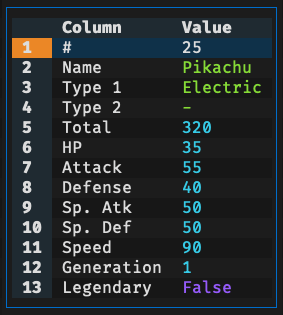
|
|
442
477
|
|
|
443
478
|
**In the Row Detail Modal**:
|
|
444
|
-
- Press `v` to **
|
|
445
|
-
- Press `"` to **
|
|
479
|
+
- Press `v` to **filter** all rows containing the selected column value
|
|
480
|
+
- Press `"` to **collect** all rows containing the selected column value to a new tab
|
|
446
481
|
- Press `{` to move to the previous row
|
|
447
482
|
- Press `}` to move to the next row
|
|
448
483
|
- Press `F` to show the frequency table for the selected column
|
|
@@ -454,11 +489,11 @@ Useful for examining wide datasets where columns don't fit well on screen.
|
|
|
454
489
|
|
|
455
490
|
Press `Tab` in the main table to inspect the current cell in its own modal.
|
|
456
491
|
|
|
457
|
-
You can also press `Tab` from the
|
|
492
|
+
You can also press `Tab` from the Row Detail modal to drill into the selected field.
|
|
458
493
|
|
|
459
494
|
Inside the cell-detail modal, press `Tab` again on the selected row/column to keep drilling into nested values.
|
|
460
495
|
|
|
461
|
-
- Scalar values are
|
|
496
|
+
- Scalar values are displayed inline. For long text, press `Tab` again to view the full content in a multi-line modal.
|
|
462
497
|
- String values are split into multiple rows using `|` by default
|
|
463
498
|
- List-like values are expanded into a one-column table
|
|
464
499
|
- Dict-like values are shown as key/value columns
|
|
@@ -466,7 +501,7 @@ Inside the cell-detail modal, press `Tab` again on the selected row/column to ke
|
|
|
466
501
|
|
|
467
502
|
### 4. Row Selection
|
|
468
503
|
|
|
469
|
-
The application provides multiple modes for selecting rows (marks it for filtering or
|
|
504
|
+
The application provides multiple modes for selecting rows (marks it for filtering or collecting):
|
|
470
505
|
|
|
471
506
|
- `\` - Select rows with cell matches or those matching cursor value in current column (respects data type)
|
|
472
507
|
- `|` - Opens dialog to select rows with custom expression
|
|
@@ -479,8 +514,10 @@ The application provides multiple modes for selecting rows (marks it for filteri
|
|
|
479
514
|
**Advanced Options**:
|
|
480
515
|
|
|
481
516
|
When searching or finding, you can use checkboxes in the dialog to enable:
|
|
482
|
-
-
|
|
483
|
-
-
|
|
517
|
+
- Match option `Nocase` for case-insensitive matching
|
|
518
|
+
- Match option `Whole` to match full text
|
|
519
|
+
- Match option `Literal` to ignore special regex characters
|
|
520
|
+
- Match option `Reverse` to perform reverse match
|
|
484
521
|
|
|
485
522
|
These options work with plain text searches. Use Polars regex patterns in expressions for more control. For example, use `(?i)` prefix in regex (e.g., `(?i)john`) for case-insensitive matching.
|
|
486
523
|
|
|
@@ -506,7 +543,11 @@ Replace values in current column (`r`) or across all columns (`R`).
|
|
|
506
543
|
When you press `r` or `R`, enter:
|
|
507
544
|
1. **Find term**: Value or expression to search for (done by string value)
|
|
508
545
|
2. **Replace term**: Replacement value
|
|
509
|
-
3. **Matching options**:
|
|
546
|
+
3. **Matching options**:
|
|
547
|
+
- `Nocase` for case-insensitive matching
|
|
548
|
+
- `Whole` to match full text
|
|
549
|
+
- `Literal` to ignore special regex characters
|
|
550
|
+
- `Reverse` to perform reverse match
|
|
510
551
|
4. **Replace mode**: All at once or interactive review
|
|
511
552
|
|
|
512
553
|
**Replace All**:
|
|
@@ -519,34 +560,48 @@ When you press `r` or `R`, enter:
|
|
|
519
560
|
|
|
520
561
|
**Tips:**
|
|
521
562
|
- Search are done by string value (i.e., ignoring data type)
|
|
522
|
-
- Type `NULL` to replace null
|
|
523
|
-
- Use `Match Nocase` for case-insensitive matching
|
|
524
|
-
- Use `Match Whole` to avoid partial replacements
|
|
563
|
+
- Type `NULL` to find or replace null values
|
|
525
564
|
- Support undo (`u`)
|
|
526
565
|
|
|
527
|
-
### 6.
|
|
566
|
+
### 6. Filter & Collect
|
|
567
|
+
|
|
568
|
+
Both actions work on a subset of the original dataframe, but they serve different workflows.
|
|
569
|
+
|
|
570
|
+
**Filtering options**:
|
|
571
|
+
|
|
572
|
+
**Basic Filter** (`v`):
|
|
573
|
+
- Opens the chose subset as a derived view inside the current workflow
|
|
574
|
+
- Edits made in the filtered view still apply to the original dataframe
|
|
575
|
+
- Press `Ctrl+V` to save the current view to a file
|
|
576
|
+
- Press `q` to leave the filtered view and return to the main table
|
|
577
|
+
- Supports undo with `u`
|
|
528
578
|
|
|
529
|
-
|
|
579
|
+
**Advanced Filter** (`V`):
|
|
580
|
+
- Opens a dialog for value-based or expression-based filtering
|
|
581
|
+
- Useful when you want to define the subset directly
|
|
530
582
|
|
|
531
|
-
**
|
|
532
|
-
-
|
|
533
|
-
-
|
|
534
|
-
-
|
|
535
|
-
-
|
|
536
|
-
-
|
|
583
|
+
**Column Filter** (`f`):
|
|
584
|
+
- Opens a type-aware filter dialog for the current column
|
|
585
|
+
- Numeric columns support `=`, `!=`, `<`, `<=`, `>=`, and `>`
|
|
586
|
+
- String columns support exact match, prefix, suffix, contains, and regex matching
|
|
587
|
+
- Boolean columns support true, false, and null filtering
|
|
588
|
+
- Temporal columns support the same comparison operators as numeric columns
|
|
589
|
+
- List columns support exact-list matching and item membership checks such as "contains"
|
|
537
590
|
|
|
538
|
-
**
|
|
539
|
-
-
|
|
540
|
-
-
|
|
541
|
-
- Edits
|
|
591
|
+
**Collect** (`"`):
|
|
592
|
+
- Creates a separate tab containing only the chosen rows
|
|
593
|
+
- The collected tab is independent from the source dataframe
|
|
594
|
+
- Edits in the collected tab do not modify the original table
|
|
542
595
|
|
|
543
|
-
**
|
|
544
|
-
|
|
545
|
-
-
|
|
596
|
+
For **Basic Filter** (`v`) and **Collect** (`"`), rows are chosen in this order:
|
|
597
|
+
|
|
598
|
+
- Use selected rows if any are present
|
|
599
|
+
- Otherwise, use rows with active matches from search or find
|
|
600
|
+
- Otherwise, use rows whose current-column value matches the current cell
|
|
546
601
|
|
|
547
602
|
### 7. [Polars Expressions](https://docs.pola.rs/api/python/stable/reference/expressions/index.html)
|
|
548
603
|
|
|
549
|
-
Complex values
|
|
604
|
+
Complex values, filters, and advanced operations can be specified via Polars expressions, with the following adaptions for convenience:
|
|
550
605
|
|
|
551
606
|
**Column References:**
|
|
552
607
|
- `$_` - Current column (based on cursor position)
|
|
@@ -557,6 +612,9 @@ Complex values or filters can be specified via Polars expressions, with the foll
|
|
|
557
612
|
**Row References:**
|
|
558
613
|
- `$#` - Current row index (1-based)
|
|
559
614
|
|
|
615
|
+
**DataFrame References:**
|
|
616
|
+
- `self` - Current dataframe
|
|
617
|
+
|
|
560
618
|
**Basic Comparisons:**
|
|
561
619
|
- `$_ > 50` - Current column greater than 50
|
|
562
620
|
- `$salary >= 100000` - Salary at least 100,000
|
|
@@ -579,13 +637,14 @@ Complex values or filters can be specified via Polars expressions, with the foll
|
|
|
579
637
|
- `~($status == 'inactive')` - Status is not inactive
|
|
580
638
|
- `$revenue > $expenses` - Revenue exceeds expenses
|
|
581
639
|
- ``$`product id` > 100`` - Product ID with spaces in column name greater than 100
|
|
640
|
+
- `self.drop(RID).is_duplicated()` - Duplicate rows (note: the internal RID column must be excluded)
|
|
582
641
|
|
|
583
|
-
**String
|
|
642
|
+
**String Operations:** ([Polars string API reference](https://docs.pola.rs/api/python/stable/reference/series/string.html))
|
|
584
643
|
- `$name.str.contains("John")` - Name contains "John" (case-sensitive)
|
|
585
644
|
- `$name.str.contains("(?i)john")` - Name contains "john" (case-insensitive)
|
|
586
645
|
- `$email.str.ends_with("@company.com")` - Email ends with domain
|
|
587
646
|
- `$code.str.starts_with("ABC")` - Code starts with "ABC"
|
|
588
|
-
- `$
|
|
647
|
+
- `$name.str.len_chars() < 7` - Length of name shorter than 7
|
|
589
648
|
|
|
590
649
|
**Number Operations:**
|
|
591
650
|
- `$age * 2 > 100` - Double age greater than 100
|
|
@@ -593,11 +652,12 @@ Complex values or filters can be specified via Polars expressions, with the foll
|
|
|
593
652
|
- `$percentage >= 50` - Percentage at least 50%
|
|
594
653
|
|
|
595
654
|
**Null Handling:**
|
|
596
|
-
- `$column.is_null()` - Find null
|
|
655
|
+
- `$column.is_null()` - Find null values
|
|
597
656
|
- `$column.is_not_null()` - Find non-null values
|
|
598
657
|
- `NULL` - a value to represent null for convenience
|
|
599
658
|
|
|
600
659
|
**Tips:**
|
|
660
|
+
- Use column indices (e.g., `$1`, `$2`) for faster column access.
|
|
601
661
|
- Use column names that match exactly (case-sensitive)
|
|
602
662
|
- Use parentheses to clarify complex expressions: `($a & $b) | ($c & $d)`
|
|
603
663
|
|
|
@@ -606,7 +666,7 @@ Complex values or filters can be specified via Polars expressions, with the foll
|
|
|
606
666
|
- Press `[` to sort current column ascending
|
|
607
667
|
- Press `]` to sort current column descending
|
|
608
668
|
- Multi-column sorting supported (press multiple times on different columns)
|
|
609
|
-
- Press same key twice to remove the column from sorting
|
|
669
|
+
- Press same key twice to remove the current column from sorting
|
|
610
670
|
|
|
611
671
|
### 9. Dataframe & Column Metadata
|
|
612
672
|
|
|
@@ -614,8 +674,9 @@ View quick metadata about your dataframe and columns to understand their structu
|
|
|
614
674
|
|
|
615
675
|
**Dataframe Metadata** (`m`):
|
|
616
676
|
- Press `m` to open a modal displaying:
|
|
617
|
-
- **
|
|
618
|
-
- **
|
|
677
|
+
- **File Name** - File name of current file
|
|
678
|
+
- **Row Count** - Total number of rows in the dataframe
|
|
679
|
+
- **Column Count** - Total number of columns in the dataframe
|
|
619
680
|
|
|
620
681
|
**Column Metadata** (`M`):
|
|
621
682
|
- Press `M` to open a modal displaying details for all columns:
|
|
@@ -635,15 +696,15 @@ Press `F` to see value distributions of the current column. The modal shows:
|
|
|
635
696
|
- Value, Count, Percentage, Histogram
|
|
636
697
|
- **Total row** at the bottom
|
|
637
698
|
|
|
638
|
-
**In the Frequency
|
|
699
|
+
**In the Frequency Modal**:
|
|
639
700
|
- Press `[` and `]` to sort by any column (value, count, or percentage)
|
|
640
|
-
- Press `v` to **
|
|
641
|
-
- Press `"` to **
|
|
642
|
-
- Press `,` to toggle thousand separator
|
|
701
|
+
- Press `v` to **filter** all rows containing the selected value
|
|
702
|
+
- Press `"` to **collect** all rows containing the selected value to a new tab
|
|
703
|
+
- Press `,` to toggle thousand separator for numeric values
|
|
643
704
|
- Press `g` to scroll to top
|
|
644
705
|
- Press `G` to scroll to bottom
|
|
645
706
|
- Press `Ctrl+S` to save the frequency table to file
|
|
646
|
-
- Press `q` or `Escape` to close the
|
|
707
|
+
- Press `q` or `Escape` to close the modal
|
|
647
708
|
|
|
648
709
|
This is useful for:
|
|
649
710
|
- Understanding value distributions
|
|
@@ -658,9 +719,8 @@ Show summary statistics (count, null count, mean, median, std, min, max, etc.) u
|
|
|
658
719
|
- `S` for all columns across the entire dataframe
|
|
659
720
|
|
|
660
721
|
**In the Statistics Modal**:
|
|
661
|
-
- Press `q` or `Escape` to close the statistics table
|
|
662
722
|
- Use arrow keys to navigate
|
|
663
|
-
-
|
|
723
|
+
- Press `q` or `Escape` to close the modal
|
|
664
724
|
|
|
665
725
|
This is useful for:
|
|
666
726
|
- Understanding data distributions and characteristics
|
|
@@ -713,9 +773,11 @@ This is useful for:
|
|
|
713
773
|
- Duplicate preserves all data from original row
|
|
714
774
|
- Useful for batch adding similar records
|
|
715
775
|
|
|
716
|
-
**
|
|
717
|
-
-
|
|
718
|
-
-
|
|
776
|
+
**Remove Duplicate Rows** (`Ctrl+Delete`):
|
|
777
|
+
- Removes duplicated rows while keeping the first occurrence
|
|
778
|
+
- Compares row values across the visible columns
|
|
779
|
+
- Useful for quick deduplication before further editing, collecting, or exporting
|
|
780
|
+
- Supports undo with `u`
|
|
719
781
|
|
|
720
782
|
### 13. Column & Row Reordering
|
|
721
783
|
|
|
@@ -727,26 +789,25 @@ This is useful for:
|
|
|
727
789
|
- Swaps adjacent rows
|
|
728
790
|
- Reorder is preserved when saving
|
|
729
791
|
|
|
730
|
-
### 14.
|
|
792
|
+
### 14. Save File
|
|
731
793
|
|
|
732
|
-
|
|
733
|
-
- Enter number of fixed rows and/or columns to keep top rows/columns visible while scrolling
|
|
794
|
+
The application provides separate save actions for the current tab, all tabs, and the current filtered view.
|
|
734
795
|
|
|
735
|
-
|
|
796
|
+
**Save Current Tab** (`Ctrl+T`):
|
|
797
|
+
- Saves the active tab to file
|
|
798
|
+
- Useful when you want to export only the dataframe you are currently working on
|
|
736
799
|
|
|
737
|
-
|
|
738
|
-
-
|
|
739
|
-
-
|
|
740
|
-
- Works across all numeric columns in the table
|
|
741
|
-
- Toggle on/off as needed for different viewing preferences
|
|
742
|
-
- Display-only: does not modify underlying data in the dataframe
|
|
743
|
-
- State persists during the session
|
|
800
|
+
**Save All Tabs** (`Ctrl+S`):
|
|
801
|
+
- Saves every open tab to file
|
|
802
|
+
- Useful after editing multiple datasets in the same session
|
|
744
803
|
|
|
745
|
-
|
|
804
|
+
**Save Current View** (`Ctrl+V`):
|
|
805
|
+
- Saves only the current filtered or derived view to file
|
|
806
|
+
- Useful for exporting a subset without replacing the source dataframe
|
|
746
807
|
|
|
747
|
-
|
|
808
|
+
The output format is determined by the file extension, making it easy to convert between formats such as CSV, TSV, Parquet, or Excel.
|
|
748
809
|
|
|
749
|
-
###
|
|
810
|
+
### 15. Undo/Redo/Reset
|
|
750
811
|
|
|
751
812
|
**Undo** (`u`):
|
|
752
813
|
- Reverts last action with full state restoration
|
|
@@ -764,7 +825,7 @@ Press `Ctrl+S` to save filtered, edited, or sorted data back to file. The output
|
|
|
764
825
|
- Clears all edits, deletions, selections, filters, and sorts
|
|
765
826
|
- Useful for starting fresh without reloading the file
|
|
766
827
|
|
|
767
|
-
###
|
|
828
|
+
### 16. Column Type Conversion
|
|
768
829
|
|
|
769
830
|
Press the type conversion keys to instantly cast the current column to a different data type:
|
|
770
831
|
|
|
@@ -781,14 +842,7 @@ Press the type conversion keys to instantly cast the current column to a differe
|
|
|
781
842
|
|
|
782
843
|
**Note**: Type conversion attempts to preserve data where possible. Conversions may lose data (e.g., float to int rounding).
|
|
783
844
|
|
|
784
|
-
###
|
|
785
|
-
|
|
786
|
-
Press `K` to cycle through selection modes:
|
|
787
|
-
1. **Cell mode**: Highlight individual cell (and its row/column headers)
|
|
788
|
-
2. **Row mode**: Highlight entire row
|
|
789
|
-
3. **Column mode**: Highlight entire column
|
|
790
|
-
|
|
791
|
-
### 20. SQL Interface
|
|
845
|
+
### 17. SQL Interface
|
|
792
846
|
|
|
793
847
|
The SQL interface provides two modes for querying your dataframe:
|
|
794
848
|
|
|
@@ -818,7 +872,7 @@ FROM self
|
|
|
818
872
|
WHERE `product id` = 7
|
|
819
873
|
```
|
|
820
874
|
|
|
821
|
-
###
|
|
875
|
+
### 18. Clipboard Operations
|
|
822
876
|
|
|
823
877
|
Copies value to system clipboard with `pbcopy` on macOS and `xclip` on Linux.
|
|
824
878
|
|
|
@@ -829,9 +883,9 @@ Copies value to system clipboard with `pbcopy` on macOS and `xclip` on Linux.
|
|
|
829
883
|
- Press `Ctrl+R` to copy row values (delimited by tab)
|
|
830
884
|
- Hold `Shift` to select with mouse
|
|
831
885
|
|
|
832
|
-
###
|
|
886
|
+
### 19. Link Column Creation
|
|
833
887
|
|
|
834
|
-
Press `@` to create a new column containing dynamically generated URLs using template.
|
|
888
|
+
Press `@` to create a new column containing dynamically generated URLs using template. Links are typically clickable in a terminal emulator using Ctrl+Click.
|
|
835
889
|
|
|
836
890
|
**Template Placeholders:**
|
|
837
891
|
|
|
@@ -851,30 +905,56 @@ The link template supports multiple placeholder types for maximum flexibility:
|
|
|
851
905
|
- Use full undo (`u`) if template produces unexpected URLs
|
|
852
906
|
- For complex multi-column URLs, use column names (`$name`) for clarity over positions (`$1`)
|
|
853
907
|
|
|
854
|
-
###
|
|
855
|
-
|
|
856
|
-
Manage multiple files and dataframes simultaneously with tabs.
|
|
857
|
-
|
|
858
|
-
**Tab Operations:**
|
|
859
|
-
- **`Ctrl+O`** - Open file in a new tab
|
|
860
|
-
- **`b`** - Go to the next tab
|
|
861
|
-
- **`B`** - Go to the previous tab
|
|
862
|
-
- **`space`** - Toggle the tab bar visibility
|
|
863
|
-
- **`>`** - Move the current tab right
|
|
864
|
-
- **`<`** - Move the current tab left
|
|
865
|
-
- **`Double-click`** - Rename the tab
|
|
866
|
-
- **`Ctrl+D`** - Duplicate current tab (creates a copy with same data and state)
|
|
867
|
-
- **`Ctrl+T`** - Save current tab to file
|
|
868
|
-
- **`Ctrl+S`** - Save all tabs to file
|
|
869
|
-
- **`w`** - Save current tab to file (overwrite without prompt)
|
|
870
|
-
- **`W`** - Save all tabs to file (overwrite without prompt)
|
|
871
|
-
- **`q`** - Close current tab (closes tab, prompts to save if unsaved changes)
|
|
872
|
-
- **`Q`** - Close all tabs and exit app (prompts to save tabs with unsaved changes)
|
|
873
|
-
- **`Ctrl+Q`** - Force to quit app regardless of unsaved changes
|
|
908
|
+
### 20. Handling Loading Errors
|
|
874
909
|
|
|
875
|
-
|
|
876
|
-
|
|
877
|
-
|
|
910
|
+
Most loading failures come from malformed CSV/TSV input, quoting issues, or mixed column types. When this happens, the application prints a hint with a suggested retry option.
|
|
911
|
+
|
|
912
|
+
**Common fixes:**
|
|
913
|
+
- Use `-Q` if quote characters are mismatched, improperly escaped, or should be ignored entirely
|
|
914
|
+
- Use `-T` when rows contain more fields than expected and you want to truncate ragged lines
|
|
915
|
+
- Use `-L` to increase the number of rows used for schema inference when early rows do not represent the full column types
|
|
916
|
+
- Use `-I` to disable type inference and read CSV/TSV values as strings
|
|
917
|
+
- Check the delimiter and format options if the input appears empty or unreadable
|
|
918
|
+
- Use `-E` as a last resort to ignore recoverable parsing errors
|
|
919
|
+
|
|
920
|
+
**Typical cases:**
|
|
921
|
+
|
|
922
|
+
**Malformed CSV or broken quoting**:
|
|
923
|
+
- Symptom: errors mentioning malformed CSV, mismatched quotes, or improperly escaped fields
|
|
924
|
+
- Try: `-Q` to disable quoting or choose a different quote character
|
|
925
|
+
|
|
926
|
+
**Ragged lines or inconsistent field counts**:
|
|
927
|
+
- Symptom: errors saying the input has more fields than defined in the schema
|
|
928
|
+
- Try: `-T` to truncate ragged lines
|
|
929
|
+
|
|
930
|
+
**Mixed data types in one column**:
|
|
931
|
+
- Symptom: errors saying a value could not be parsed as an integer, float, or other inferred type at a specific column
|
|
932
|
+
- Try: `-L` first, then `-I` if the column is genuinely mixed
|
|
933
|
+
|
|
934
|
+
**No data could be loaded**:
|
|
935
|
+
- Symptom: errors indicating that no data was available to load
|
|
936
|
+
- Check: whether the file is empty, the format is correct, and the delimiter matches the input
|
|
937
|
+
|
|
938
|
+
**Fallback option**:
|
|
939
|
+
- If none of the above helps and the file is mostly usable, retry with `-E` to ignore parsing errors
|
|
940
|
+
|
|
941
|
+
**Examples:**
|
|
942
|
+
```bash
|
|
943
|
+
# Disable quote handling when CSV quoting is broken
|
|
944
|
+
dv bad.csv -Q
|
|
945
|
+
|
|
946
|
+
# Truncate ragged lines
|
|
947
|
+
dv messy.tsv -T
|
|
948
|
+
|
|
949
|
+
# Increase schema inference depth
|
|
950
|
+
dv mixed_types.csv -L 1000
|
|
951
|
+
|
|
952
|
+
# Disable type inference entirely
|
|
953
|
+
dv mixed_types.csv -I
|
|
954
|
+
|
|
955
|
+
# Ignore recoverable parsing errors
|
|
956
|
+
dv partially_broken.csv -E
|
|
957
|
+
```
|
|
878
958
|
|
|
879
959
|
## Dependencies
|
|
880
960
|
|