dataframe-textual 2.36.0__tar.gz → 2.38.0__tar.gz
This diff represents the content of publicly available package versions that have been released to one of the supported registries. The information contained in this diff is provided for informational purposes only and reflects changes between package versions as they appear in their respective public registries.
- {dataframe_textual-2.36.0 → dataframe_textual-2.38.0}/PKG-INFO +61 -66
- {dataframe_textual-2.36.0 → dataframe_textual-2.38.0}/README.md +60 -65
- {dataframe_textual-2.36.0 → dataframe_textual-2.38.0}/pyproject.toml +1 -1
- {dataframe_textual-2.36.0 → dataframe_textual-2.38.0}/src/dataframe_textual/__main__.py +42 -15
- {dataframe_textual-2.36.0 → dataframe_textual-2.38.0}/src/dataframe_textual/common.py +105 -29
- {dataframe_textual-2.36.0 → dataframe_textual-2.38.0}/src/dataframe_textual/data_frame_table.py +277 -79
- {dataframe_textual-2.36.0 → dataframe_textual-2.38.0}/src/dataframe_textual/data_frame_viewer.py +12 -11
- {dataframe_textual-2.36.0 → dataframe_textual-2.38.0}/src/dataframe_textual/file_picker_screen.py +5 -5
- {dataframe_textual-2.36.0 → dataframe_textual-2.38.0}/src/dataframe_textual/loading_screen.py +38 -0
- {dataframe_textual-2.36.0 → dataframe_textual-2.38.0}/src/dataframe_textual/table_screen.py +108 -4
- {dataframe_textual-2.36.0 → dataframe_textual-2.38.0}/src/dataframe_textual/yes_no_screen.py +130 -44
- {dataframe_textual-2.36.0 → dataframe_textual-2.38.0}/uv.lock +4 -4
- {dataframe_textual-2.36.0 → dataframe_textual-2.38.0}/.gitignore +0 -0
- {dataframe_textual-2.36.0 → dataframe_textual-2.38.0}/LICENSE +0 -0
- {dataframe_textual-2.36.0 → dataframe_textual-2.38.0}/main.py +0 -0
- {dataframe_textual-2.36.0 → dataframe_textual-2.38.0}/src/dataframe_textual/__init__.py +0 -0
- {dataframe_textual-2.36.0 → dataframe_textual-2.38.0}/src/dataframe_textual/data_frame_help_panel.py +0 -0
- {dataframe_textual-2.36.0 → dataframe_textual-2.38.0}/src/dataframe_textual/theme_screen.py +0 -0
- {dataframe_textual-2.36.0 → dataframe_textual-2.38.0}/xbk/common.py_w_compute_error +0 -0
|
@@ -1,6 +1,6 @@
|
|
|
1
1
|
Metadata-Version: 2.4
|
|
2
2
|
Name: dataframe-textual
|
|
3
|
-
Version: 2.
|
|
3
|
+
Version: 2.38.0
|
|
4
4
|
Summary: Interactive terminal viewer/editor for tabular data
|
|
5
5
|
Project-URL: Homepage, https://github.com/need47/dataframe-textual
|
|
6
6
|
Project-URL: Repository, https://github.com/need47/dataframe-textual.git
|
|
@@ -39,7 +39,7 @@ Description-Content-Type: text/markdown
|
|
|
39
39
|
|
|
40
40
|
# DataFrame Textual
|
|
41
41
|
|
|
42
|
-
A powerful, interactive terminal-based viewer/editor for CSV/TSV/Excel/[Parquet](https://parquet.apache.org/)/[Vortex](https://vortex.dev/)/JSON/NDJSON built with Python, [Polars](https://pola.rs/), and [Textual](https://textual.textualize.io/). Inspired by [VisiData](https://www.visidata.org/), this tool provides smooth keyboard navigation, data manipulation, and a clean interface for exploring tabular data directly in terminal with multi-tab support for multiple files!
|
|
42
|
+
A powerful, interactive terminal-based viewer/editor for CSV/TSV/Excel/[Parquet](https://parquet.apache.org/)/[Vortex](https://vortex.dev/)/JSON/[NDJSON](https://jsonlines.org/) built with Python, [Polars](https://pola.rs/), and [Textual](https://textual.textualize.io/). Inspired by [VisiData](https://www.visidata.org/), this tool provides smooth keyboard navigation, data manipulation, and a clean interface for exploring tabular data directly in terminal with multi-tab support for multiple files!
|
|
43
43
|
|
|
44
44
|
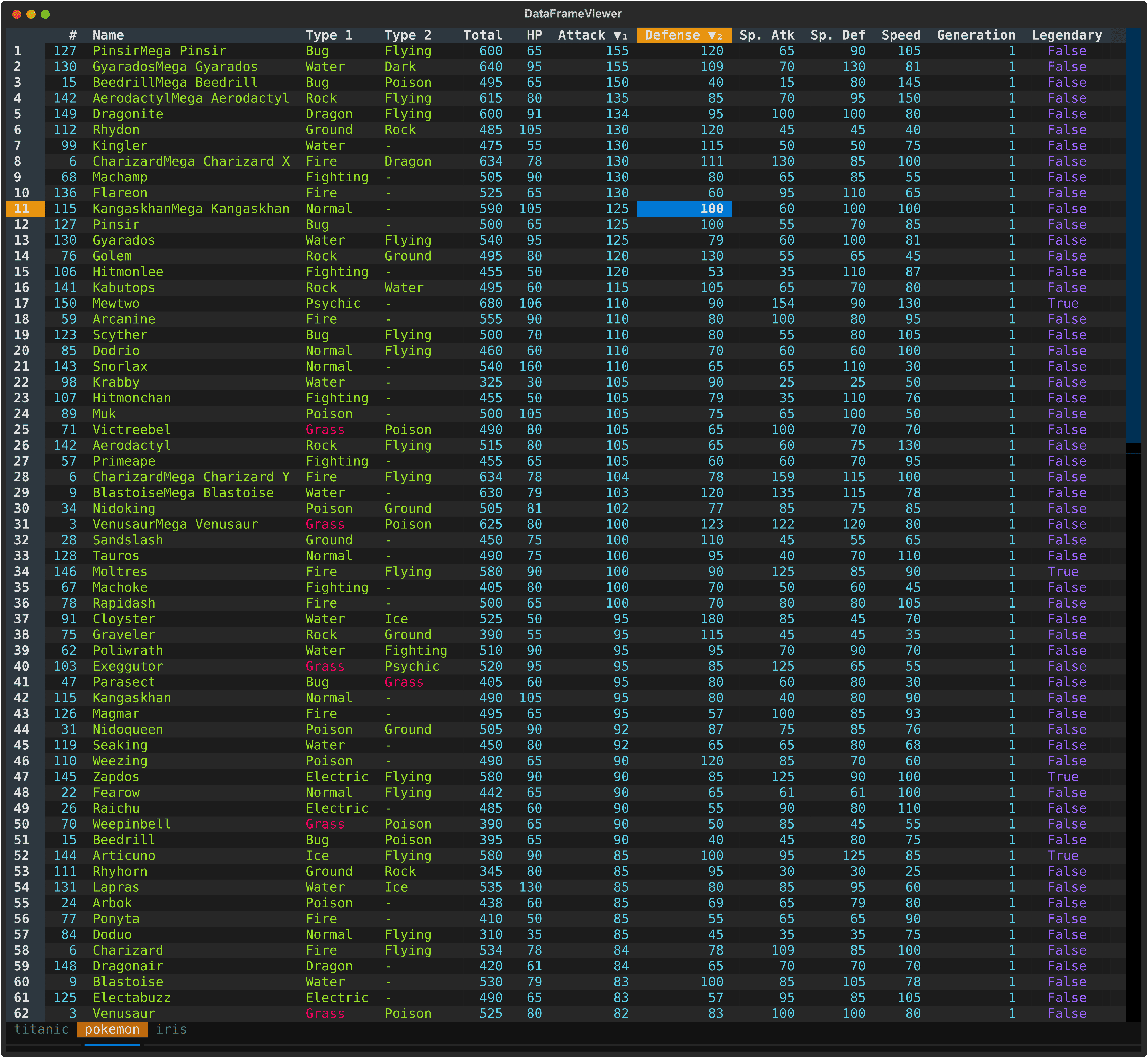
|
|
45
45
|
|
|
@@ -53,10 +53,10 @@ A powerful, interactive terminal-based viewer/editor for CSV/TSV/Excel/[Parquet]
|
|
|
53
53
|
- 🔄 **Smart Pagination** - Lazy load rows on demand for handling large datasets
|
|
54
54
|
|
|
55
55
|
### Data Manipulation
|
|
56
|
-
- 📝 **Data Editing** - Edit cells, delete rows, and
|
|
56
|
+
- 📝 **Data Editing** - Edit cells, delete rows, remove columns, and explode columns
|
|
57
57
|
- 🔍 **Search & Filter** - Find values, highlight matches, and filter selected rows
|
|
58
58
|
- ↔️ **Column/Row Reordering** - Move columns and rows with simple keyboard shortcuts
|
|
59
|
-
- 📈 **Sorting & Statistics** - Multi-column sorting
|
|
59
|
+
- 📈 **Sorting & Statistics** - Multi-column sorting, frequency distribution, and histogram analysis
|
|
60
60
|
- 💾 **Save & Undo** - Save edits back to file with full undo/redo support
|
|
61
61
|
|
|
62
62
|
### Advanced Features
|
|
@@ -105,18 +105,8 @@ pip install -e ".[dev]"
|
|
|
105
105
|
### Basic Usage - Single File
|
|
106
106
|
|
|
107
107
|
```bash
|
|
108
|
-
#
|
|
108
|
+
# Open one file
|
|
109
109
|
dv pokemon.csv
|
|
110
|
-
|
|
111
|
-
# Read from stdin (defaults to TSV)
|
|
112
|
-
cat data.tsv | dv
|
|
113
|
-
dv < data.tsv
|
|
114
|
-
|
|
115
|
-
# Specify delimiter
|
|
116
|
-
dv data.txt -d '|'
|
|
117
|
-
|
|
118
|
-
# Gzipped files are supported
|
|
119
|
-
dv data.csv.gz
|
|
120
110
|
```
|
|
121
111
|
|
|
122
112
|
### Multi-File Usage - Multiple Tabs
|
|
@@ -125,7 +115,7 @@ dv data.csv.gz
|
|
|
125
115
|
# Open multiple files in tabs
|
|
126
116
|
dv file1.csv file2.csv file3.csv
|
|
127
117
|
|
|
128
|
-
# Open multiple sheets in
|
|
118
|
+
# Open multiple sheets in an Excel file as separate tabs
|
|
129
119
|
dv file.xlsx
|
|
130
120
|
|
|
131
121
|
# Mix files and stdin
|
|
@@ -140,20 +130,11 @@ dv data1.tsv < data2.tsv
|
|
|
140
130
|
dv *.parquet --all-in-one
|
|
141
131
|
```
|
|
142
132
|
|
|
143
|
-
When multiple files are opened:
|
|
144
|
-
- Each file appears as a separate tab. An Excel file may contain multiple tabs.
|
|
145
|
-
- Move the current tab with `>` (right, wrap to first) or `<` (left, wrap to last); use `b` to cycle tabs
|
|
146
|
-
- Save current tab to file with `Ctrl+T`
|
|
147
|
-
- Save all tabs to file with `Ctrl+S`
|
|
148
|
-
- Duplicate the current tab with `Ctrl+D`
|
|
149
|
-
- Open additional files with `Ctrl+O`
|
|
150
|
-
- Each file maintains its own state (edits, sort order, selections, history, etc.) and allow undo/redo.
|
|
151
|
-
|
|
152
133
|
## Command Line Options
|
|
153
134
|
|
|
154
135
|
```
|
|
155
|
-
usage: dv [-h] [-V] [-d DELIMITER] [-f [FIELDS ...]] [-H [HEADER ...]] [-L [N]] [-I] [-T] [-E] [-C [PREFIX]] [-Q [C]] [-K N] [-A N] [-M [N]] [-N NULL [NULL ...]] [--theme [THEME]]
|
|
156
|
-
[--sql SQL] [-o OUTPUT]
|
|
136
|
+
usage: dv [-h] [-V] [-d DELIMITER] [-f FORMAT] [-F [FIELDS ...]] [-H [HEADER ...]] [-L [N]] [-I] [-T] [-E] [-C [PREFIX]] [-Q [C]] [-K N] [-A N] [-M [N]] [-N NULL [NULL ...]] [--theme [THEME]]
|
|
137
|
+
[--all-in-one] [--sql SQL] [-o OUTPUT]
|
|
157
138
|
[files ...]
|
|
158
139
|
|
|
159
140
|
TUI viewer/editor for tabular data (e.g., CSV/Excel).
|
|
@@ -165,8 +146,11 @@ options:
|
|
|
165
146
|
-h, --help show this help message and exit
|
|
166
147
|
-V, --version show program's version number and exit
|
|
167
148
|
-d, --delimiter DELIMITER
|
|
168
|
-
Specify the delimiter of the input files (must be a single character, e.g., `|` or `;`)
|
|
169
|
-
|
|
149
|
+
Specify the delimiter of the input files (must be a single character, e.g., `|` or `;`). By default, the delimiter is inferred from the file extension. If reading from stdin, the
|
|
150
|
+
delimiter must be specified unless it is tab delimited.
|
|
151
|
+
-f, --format FORMAT Specify the format of the input files (e.g., `csv` or `excel`). By default, the format is inferred from the file extension. If reading from stdin, the format must be specified
|
|
152
|
+
unless it is tab delimited.
|
|
153
|
+
-F, --fields [FIELDS ...]
|
|
170
154
|
When used without values, list available fields. Otherwise, read only specified fields.
|
|
171
155
|
-H, --header [HEADER ...]
|
|
172
156
|
Specify header info. When reading CSV/TSV. If used without values, assumes no header. Otherwise, use provided values as column header (e.g., `-H col1 col2 col3`).
|
|
@@ -198,11 +182,18 @@ options:
|
|
|
198
182
|
# Open a file
|
|
199
183
|
dv data.csv
|
|
200
184
|
|
|
201
|
-
#
|
|
185
|
+
# Gzipped files are supported
|
|
202
186
|
dv data.csv.gz
|
|
203
187
|
|
|
204
|
-
# Read from stdin
|
|
205
|
-
|
|
188
|
+
# Read from stdin (defaults to TSV)
|
|
189
|
+
cat data.tsv | dv
|
|
190
|
+
dv < data.tsv
|
|
191
|
+
|
|
192
|
+
# Specify delimiter
|
|
193
|
+
dv data.txt -d '|'
|
|
194
|
+
|
|
195
|
+
# Specify format
|
|
196
|
+
dv data.json -f ndjson
|
|
206
197
|
|
|
207
198
|
# View headless CSV file
|
|
208
199
|
dv data_no_header.csv -H
|
|
@@ -241,10 +232,10 @@ dv data.tsv -Q
|
|
|
241
232
|
dv data.csv --theme monokai
|
|
242
233
|
|
|
243
234
|
# Show column headers
|
|
244
|
-
dv data.csv -
|
|
235
|
+
dv data.csv -F
|
|
245
236
|
|
|
246
237
|
# Read only specific columns: 'name', 'age', first column, and last column
|
|
247
|
-
dv data.csv -
|
|
238
|
+
dv data.csv -F name age 1 -1
|
|
248
239
|
|
|
249
240
|
# Read all files (must be of same format and same structure) into one single table
|
|
250
241
|
dv data-1.csv data-2.csv --all-in-one
|
|
@@ -317,41 +308,45 @@ dv data.csv -o data.parquet
|
|
|
317
308
|
|
|
318
309
|
#### Display
|
|
319
310
|
|
|
320
|
-
| Key | Action
|
|
321
|
-
| ---------------- |
|
|
322
|
-
| `Enter` | Record view of current row transposed
|
|
323
|
-
| `F` | Show frequency distribution for current column
|
|
324
|
-
| `
|
|
325
|
-
| `
|
|
326
|
-
| `
|
|
327
|
-
| `
|
|
328
|
-
| `
|
|
329
|
-
|
|
|
330
|
-
| `
|
|
331
|
-
|
|
|
332
|
-
|
|
|
333
|
-
|
|
|
334
|
-
|
|
|
335
|
-
|
|
|
311
|
+
| Key | Action |
|
|
312
|
+
| ---------------- | -------------------------------------------------- |
|
|
313
|
+
| `Enter` | Record view of current row transposed |
|
|
314
|
+
| `F` | Show frequency distribution for current column |
|
|
315
|
+
| `i` | Show histogram for current column |
|
|
316
|
+
| `I` | Show histogram for current column with custom bins |
|
|
317
|
+
| `s` | Show statistics for current column |
|
|
318
|
+
| `S` | Show statistics for entire dataframe |
|
|
319
|
+
| `m` | Show metadata for row count and column count |
|
|
320
|
+
| `M` | Show metadata for current column |
|
|
321
|
+
| `K` | Cycle cursor types: cell → row → column → cell |
|
|
322
|
+
| `~` | Toggle row labels |
|
|
323
|
+
| `_` (underscore) | Toggle column full width |
|
|
324
|
+
| `f` | Toggle freeze rows and/or columns |
|
|
325
|
+
| `,` | Toggle thousand separator for numeric display |
|
|
326
|
+
| `&` | Set current row as the new header row |
|
|
327
|
+
| `h` | Hide current column |
|
|
328
|
+
| `H` | Show all hidden columns |
|
|
336
329
|
|
|
337
330
|
#### Editing
|
|
338
331
|
|
|
339
|
-
| Key | Action
|
|
340
|
-
| -------------- |
|
|
341
|
-
| `Double-click` | Edit cell or rename column header
|
|
342
|
-
| `Delete` | Clear current cell (set to NULL)
|
|
343
|
-
| `Shift+Delete` | Clear current column (set matching cells to NULL)
|
|
344
|
-
| `e` | Edit current cell (respects data type)
|
|
345
|
-
| `E` | Edit entire column with value/expression
|
|
346
|
-
| `a` | Add empty column after current
|
|
347
|
-
| `A` | Add column with name and value/expression
|
|
348
|
-
| `@` | Add a link column from URL template
|
|
349
|
-
| `-` (minus) | Delete current column
|
|
350
|
-
| `x` | Delete current row
|
|
351
|
-
| `X` | Delete current row and all those below
|
|
352
|
-
| `Ctrl+X` | Delete current row and all those above
|
|
353
|
-
| `d` | Duplicate current column
|
|
354
|
-
| `D` | Duplicate current row
|
|
332
|
+
| Key | Action |
|
|
333
|
+
| -------------- | ------------------------------------------------------------- |
|
|
334
|
+
| `Double-click` | Edit cell or rename column header |
|
|
335
|
+
| `Delete` | Clear current cell (set to NULL) |
|
|
336
|
+
| `Shift+Delete` | Clear current column (set matching cells to NULL) |
|
|
337
|
+
| `e` | Edit current cell (respects data type) |
|
|
338
|
+
| `E` | Edit entire column with value/expression |
|
|
339
|
+
| `a` | Add empty column after current |
|
|
340
|
+
| `A` | Add column with name and value/expression |
|
|
341
|
+
| `@` | Add a link column from URL template |
|
|
342
|
+
| `-` (minus) | Delete current column |
|
|
343
|
+
| `x` | Delete current row |
|
|
344
|
+
| `X` | Delete current row and all those below |
|
|
345
|
+
| `Ctrl+X` | Delete current row and all those above |
|
|
346
|
+
| `d` | Duplicate current column |
|
|
347
|
+
| `D` | Duplicate current row |
|
|
348
|
+
| `o` | Explode current list column into multiple rows |
|
|
349
|
+
| `O` | Explode current string column by delimiter into multiple rows |
|
|
355
350
|
|
|
356
351
|
#### Row Selection
|
|
357
352
|
|
|
@@ -1,6 +1,6 @@
|
|
|
1
1
|
# DataFrame Textual
|
|
2
2
|
|
|
3
|
-
A powerful, interactive terminal-based viewer/editor for CSV/TSV/Excel/[Parquet](https://parquet.apache.org/)/[Vortex](https://vortex.dev/)/JSON/NDJSON built with Python, [Polars](https://pola.rs/), and [Textual](https://textual.textualize.io/). Inspired by [VisiData](https://www.visidata.org/), this tool provides smooth keyboard navigation, data manipulation, and a clean interface for exploring tabular data directly in terminal with multi-tab support for multiple files!
|
|
3
|
+
A powerful, interactive terminal-based viewer/editor for CSV/TSV/Excel/[Parquet](https://parquet.apache.org/)/[Vortex](https://vortex.dev/)/JSON/[NDJSON](https://jsonlines.org/) built with Python, [Polars](https://pola.rs/), and [Textual](https://textual.textualize.io/). Inspired by [VisiData](https://www.visidata.org/), this tool provides smooth keyboard navigation, data manipulation, and a clean interface for exploring tabular data directly in terminal with multi-tab support for multiple files!
|
|
4
4
|
|
|
5
5
|

|
|
6
6
|
|
|
@@ -14,10 +14,10 @@ A powerful, interactive terminal-based viewer/editor for CSV/TSV/Excel/[Parquet]
|
|
|
14
14
|
- 🔄 **Smart Pagination** - Lazy load rows on demand for handling large datasets
|
|
15
15
|
|
|
16
16
|
### Data Manipulation
|
|
17
|
-
- 📝 **Data Editing** - Edit cells, delete rows, and
|
|
17
|
+
- 📝 **Data Editing** - Edit cells, delete rows, remove columns, and explode columns
|
|
18
18
|
- 🔍 **Search & Filter** - Find values, highlight matches, and filter selected rows
|
|
19
19
|
- ↔️ **Column/Row Reordering** - Move columns and rows with simple keyboard shortcuts
|
|
20
|
-
- 📈 **Sorting & Statistics** - Multi-column sorting
|
|
20
|
+
- 📈 **Sorting & Statistics** - Multi-column sorting, frequency distribution, and histogram analysis
|
|
21
21
|
- 💾 **Save & Undo** - Save edits back to file with full undo/redo support
|
|
22
22
|
|
|
23
23
|
### Advanced Features
|
|
@@ -66,18 +66,8 @@ pip install -e ".[dev]"
|
|
|
66
66
|
### Basic Usage - Single File
|
|
67
67
|
|
|
68
68
|
```bash
|
|
69
|
-
#
|
|
69
|
+
# Open one file
|
|
70
70
|
dv pokemon.csv
|
|
71
|
-
|
|
72
|
-
# Read from stdin (defaults to TSV)
|
|
73
|
-
cat data.tsv | dv
|
|
74
|
-
dv < data.tsv
|
|
75
|
-
|
|
76
|
-
# Specify delimiter
|
|
77
|
-
dv data.txt -d '|'
|
|
78
|
-
|
|
79
|
-
# Gzipped files are supported
|
|
80
|
-
dv data.csv.gz
|
|
81
71
|
```
|
|
82
72
|
|
|
83
73
|
### Multi-File Usage - Multiple Tabs
|
|
@@ -86,7 +76,7 @@ dv data.csv.gz
|
|
|
86
76
|
# Open multiple files in tabs
|
|
87
77
|
dv file1.csv file2.csv file3.csv
|
|
88
78
|
|
|
89
|
-
# Open multiple sheets in
|
|
79
|
+
# Open multiple sheets in an Excel file as separate tabs
|
|
90
80
|
dv file.xlsx
|
|
91
81
|
|
|
92
82
|
# Mix files and stdin
|
|
@@ -101,20 +91,11 @@ dv data1.tsv < data2.tsv
|
|
|
101
91
|
dv *.parquet --all-in-one
|
|
102
92
|
```
|
|
103
93
|
|
|
104
|
-
When multiple files are opened:
|
|
105
|
-
- Each file appears as a separate tab. An Excel file may contain multiple tabs.
|
|
106
|
-
- Move the current tab with `>` (right, wrap to first) or `<` (left, wrap to last); use `b` to cycle tabs
|
|
107
|
-
- Save current tab to file with `Ctrl+T`
|
|
108
|
-
- Save all tabs to file with `Ctrl+S`
|
|
109
|
-
- Duplicate the current tab with `Ctrl+D`
|
|
110
|
-
- Open additional files with `Ctrl+O`
|
|
111
|
-
- Each file maintains its own state (edits, sort order, selections, history, etc.) and allow undo/redo.
|
|
112
|
-
|
|
113
94
|
## Command Line Options
|
|
114
95
|
|
|
115
96
|
```
|
|
116
|
-
usage: dv [-h] [-V] [-d DELIMITER] [-f [FIELDS ...]] [-H [HEADER ...]] [-L [N]] [-I] [-T] [-E] [-C [PREFIX]] [-Q [C]] [-K N] [-A N] [-M [N]] [-N NULL [NULL ...]] [--theme [THEME]]
|
|
117
|
-
[--sql SQL] [-o OUTPUT]
|
|
97
|
+
usage: dv [-h] [-V] [-d DELIMITER] [-f FORMAT] [-F [FIELDS ...]] [-H [HEADER ...]] [-L [N]] [-I] [-T] [-E] [-C [PREFIX]] [-Q [C]] [-K N] [-A N] [-M [N]] [-N NULL [NULL ...]] [--theme [THEME]]
|
|
98
|
+
[--all-in-one] [--sql SQL] [-o OUTPUT]
|
|
118
99
|
[files ...]
|
|
119
100
|
|
|
120
101
|
TUI viewer/editor for tabular data (e.g., CSV/Excel).
|
|
@@ -126,8 +107,11 @@ options:
|
|
|
126
107
|
-h, --help show this help message and exit
|
|
127
108
|
-V, --version show program's version number and exit
|
|
128
109
|
-d, --delimiter DELIMITER
|
|
129
|
-
Specify the delimiter of the input files (must be a single character, e.g., `|` or `;`)
|
|
130
|
-
|
|
110
|
+
Specify the delimiter of the input files (must be a single character, e.g., `|` or `;`). By default, the delimiter is inferred from the file extension. If reading from stdin, the
|
|
111
|
+
delimiter must be specified unless it is tab delimited.
|
|
112
|
+
-f, --format FORMAT Specify the format of the input files (e.g., `csv` or `excel`). By default, the format is inferred from the file extension. If reading from stdin, the format must be specified
|
|
113
|
+
unless it is tab delimited.
|
|
114
|
+
-F, --fields [FIELDS ...]
|
|
131
115
|
When used without values, list available fields. Otherwise, read only specified fields.
|
|
132
116
|
-H, --header [HEADER ...]
|
|
133
117
|
Specify header info. When reading CSV/TSV. If used without values, assumes no header. Otherwise, use provided values as column header (e.g., `-H col1 col2 col3`).
|
|
@@ -159,11 +143,18 @@ options:
|
|
|
159
143
|
# Open a file
|
|
160
144
|
dv data.csv
|
|
161
145
|
|
|
162
|
-
#
|
|
146
|
+
# Gzipped files are supported
|
|
163
147
|
dv data.csv.gz
|
|
164
148
|
|
|
165
|
-
# Read from stdin
|
|
166
|
-
|
|
149
|
+
# Read from stdin (defaults to TSV)
|
|
150
|
+
cat data.tsv | dv
|
|
151
|
+
dv < data.tsv
|
|
152
|
+
|
|
153
|
+
# Specify delimiter
|
|
154
|
+
dv data.txt -d '|'
|
|
155
|
+
|
|
156
|
+
# Specify format
|
|
157
|
+
dv data.json -f ndjson
|
|
167
158
|
|
|
168
159
|
# View headless CSV file
|
|
169
160
|
dv data_no_header.csv -H
|
|
@@ -202,10 +193,10 @@ dv data.tsv -Q
|
|
|
202
193
|
dv data.csv --theme monokai
|
|
203
194
|
|
|
204
195
|
# Show column headers
|
|
205
|
-
dv data.csv -
|
|
196
|
+
dv data.csv -F
|
|
206
197
|
|
|
207
198
|
# Read only specific columns: 'name', 'age', first column, and last column
|
|
208
|
-
dv data.csv -
|
|
199
|
+
dv data.csv -F name age 1 -1
|
|
209
200
|
|
|
210
201
|
# Read all files (must be of same format and same structure) into one single table
|
|
211
202
|
dv data-1.csv data-2.csv --all-in-one
|
|
@@ -278,41 +269,45 @@ dv data.csv -o data.parquet
|
|
|
278
269
|
|
|
279
270
|
#### Display
|
|
280
271
|
|
|
281
|
-
| Key | Action
|
|
282
|
-
| ---------------- |
|
|
283
|
-
| `Enter` | Record view of current row transposed
|
|
284
|
-
| `F` | Show frequency distribution for current column
|
|
285
|
-
| `
|
|
286
|
-
| `
|
|
287
|
-
| `
|
|
288
|
-
| `
|
|
289
|
-
| `
|
|
290
|
-
|
|
|
291
|
-
| `
|
|
292
|
-
|
|
|
293
|
-
|
|
|
294
|
-
|
|
|
295
|
-
|
|
|
296
|
-
|
|
|
272
|
+
| Key | Action |
|
|
273
|
+
| ---------------- | -------------------------------------------------- |
|
|
274
|
+
| `Enter` | Record view of current row transposed |
|
|
275
|
+
| `F` | Show frequency distribution for current column |
|
|
276
|
+
| `i` | Show histogram for current column |
|
|
277
|
+
| `I` | Show histogram for current column with custom bins |
|
|
278
|
+
| `s` | Show statistics for current column |
|
|
279
|
+
| `S` | Show statistics for entire dataframe |
|
|
280
|
+
| `m` | Show metadata for row count and column count |
|
|
281
|
+
| `M` | Show metadata for current column |
|
|
282
|
+
| `K` | Cycle cursor types: cell → row → column → cell |
|
|
283
|
+
| `~` | Toggle row labels |
|
|
284
|
+
| `_` (underscore) | Toggle column full width |
|
|
285
|
+
| `f` | Toggle freeze rows and/or columns |
|
|
286
|
+
| `,` | Toggle thousand separator for numeric display |
|
|
287
|
+
| `&` | Set current row as the new header row |
|
|
288
|
+
| `h` | Hide current column |
|
|
289
|
+
| `H` | Show all hidden columns |
|
|
297
290
|
|
|
298
291
|
#### Editing
|
|
299
292
|
|
|
300
|
-
| Key | Action
|
|
301
|
-
| -------------- |
|
|
302
|
-
| `Double-click` | Edit cell or rename column header
|
|
303
|
-
| `Delete` | Clear current cell (set to NULL)
|
|
304
|
-
| `Shift+Delete` | Clear current column (set matching cells to NULL)
|
|
305
|
-
| `e` | Edit current cell (respects data type)
|
|
306
|
-
| `E` | Edit entire column with value/expression
|
|
307
|
-
| `a` | Add empty column after current
|
|
308
|
-
| `A` | Add column with name and value/expression
|
|
309
|
-
| `@` | Add a link column from URL template
|
|
310
|
-
| `-` (minus) | Delete current column
|
|
311
|
-
| `x` | Delete current row
|
|
312
|
-
| `X` | Delete current row and all those below
|
|
313
|
-
| `Ctrl+X` | Delete current row and all those above
|
|
314
|
-
| `d` | Duplicate current column
|
|
315
|
-
| `D` | Duplicate current row
|
|
293
|
+
| Key | Action |
|
|
294
|
+
| -------------- | ------------------------------------------------------------- |
|
|
295
|
+
| `Double-click` | Edit cell or rename column header |
|
|
296
|
+
| `Delete` | Clear current cell (set to NULL) |
|
|
297
|
+
| `Shift+Delete` | Clear current column (set matching cells to NULL) |
|
|
298
|
+
| `e` | Edit current cell (respects data type) |
|
|
299
|
+
| `E` | Edit entire column with value/expression |
|
|
300
|
+
| `a` | Add empty column after current |
|
|
301
|
+
| `A` | Add column with name and value/expression |
|
|
302
|
+
| `@` | Add a link column from URL template |
|
|
303
|
+
| `-` (minus) | Delete current column |
|
|
304
|
+
| `x` | Delete current row |
|
|
305
|
+
| `X` | Delete current row and all those below |
|
|
306
|
+
| `Ctrl+X` | Delete current row and all those above |
|
|
307
|
+
| `d` | Duplicate current column |
|
|
308
|
+
| `D` | Duplicate current row |
|
|
309
|
+
| `o` | Explode current list column into multiple rows |
|
|
310
|
+
| `O` | Explode current string column by delimiter into multiple rows |
|
|
316
311
|
|
|
317
312
|
#### Row Selection
|
|
318
313
|
|
|
@@ -67,10 +67,15 @@ def cli() -> argparse.Namespace:
|
|
|
67
67
|
parser.add_argument(
|
|
68
68
|
"-d",
|
|
69
69
|
"--delimiter",
|
|
70
|
-
help="Specify the delimiter of the input files (must be a single character, e.g., `|` or `;`)",
|
|
70
|
+
help="Specify the delimiter of the input files (must be a single character, e.g., `|` or `;`). By default, the delimiter is inferred from the file extension. If reading from stdin, the delimiter must be specified unless it is tab delimited.",
|
|
71
71
|
)
|
|
72
72
|
parser.add_argument(
|
|
73
73
|
"-f",
|
|
74
|
+
"--format",
|
|
75
|
+
help="Specify the format of the input files (e.g., `csv` or `excel`). By default, the format is inferred from the file extension. If reading from stdin, the format must be specified unless it is tab delimited.",
|
|
76
|
+
)
|
|
77
|
+
parser.add_argument(
|
|
78
|
+
"-F",
|
|
74
79
|
"--fields",
|
|
75
80
|
nargs="*",
|
|
76
81
|
action=ConstWithMultiArgs,
|
|
@@ -166,10 +171,7 @@ def cli() -> argparse.Namespace:
|
|
|
166
171
|
)
|
|
167
172
|
|
|
168
173
|
args = parser.parse_args()
|
|
169
|
-
|
|
170
|
-
if args.delimiter and len(args.delimiter) != 1:
|
|
171
|
-
print("Delimiter must be a single character.", file=sys.stderr)
|
|
172
|
-
sys.exit(1)
|
|
174
|
+
validate_args(args)
|
|
173
175
|
|
|
174
176
|
# List available themes and exit
|
|
175
177
|
if args.theme == "list":
|
|
@@ -215,17 +217,10 @@ def cli() -> argparse.Namespace:
|
|
|
215
217
|
def main() -> None:
|
|
216
218
|
args = cli()
|
|
217
219
|
|
|
218
|
-
if args.output:
|
|
219
|
-
if not (fmt := guess_file_format(args.output)):
|
|
220
|
-
print(
|
|
221
|
-
f"Unsupported output file format for `{args.output}`. Supported formats: {', '.join(SUPPORTED_FORMATS)}",
|
|
222
|
-
file=sys.stderr,
|
|
223
|
-
)
|
|
224
|
-
sys.exit(1)
|
|
225
|
-
|
|
226
220
|
sources = load_dataframe(
|
|
227
221
|
args.files,
|
|
228
222
|
delimiter=args.delimiter,
|
|
223
|
+
format=args.format,
|
|
229
224
|
header=args.header,
|
|
230
225
|
infer_schema=not args.no_inference,
|
|
231
226
|
infer_schema_length=args.infer_schema_length,
|
|
@@ -260,13 +255,45 @@ def main() -> None:
|
|
|
260
255
|
sys.exit(1)
|
|
261
256
|
|
|
262
257
|
# If output file is specified, write the (optionally modified) data to the output file and exit
|
|
263
|
-
if args.output:
|
|
264
|
-
return write_file(sources,
|
|
258
|
+
if filename := args.output:
|
|
259
|
+
return write_file(sources, filename)
|
|
265
260
|
|
|
266
261
|
# Run the DataFrame Viewer application
|
|
267
262
|
app = DataFrameViewer(*sources, theme=args.theme)
|
|
268
263
|
handle_compute_error(app.run())
|
|
269
264
|
|
|
270
265
|
|
|
266
|
+
def validate_args(args: argparse.Namespace) -> None:
|
|
267
|
+
"""Validate command-line arguments and exit with an error message if invalid.
|
|
268
|
+
|
|
269
|
+
Checks for various argument conditions such as file existence, valid delimiters,
|
|
270
|
+
supported formats, and consistency between format and delimiter specifications.
|
|
271
|
+
|
|
272
|
+
Args:
|
|
273
|
+
args: The parsed command-line arguments to validate.
|
|
274
|
+
"""
|
|
275
|
+
if args.delimiter and len(args.delimiter) != 1:
|
|
276
|
+
print("Delimiter must be a single character.", file=sys.stderr)
|
|
277
|
+
sys.exit(1)
|
|
278
|
+
|
|
279
|
+
if args.format and args.format not in SUPPORTED_FORMATS:
|
|
280
|
+
print(
|
|
281
|
+
f"Unsupported format: `{args.format}`. Supported formats: {', '.join(SUPPORTED_FORMATS)}", file=sys.stderr
|
|
282
|
+
)
|
|
283
|
+
sys.exit(1)
|
|
284
|
+
|
|
285
|
+
if args.delimiter and args.format:
|
|
286
|
+
print("Cannot specify both delimiter and format.", file=sys.stderr)
|
|
287
|
+
sys.exit(1)
|
|
288
|
+
|
|
289
|
+
if args.output:
|
|
290
|
+
if not guess_file_format(args.output):
|
|
291
|
+
print(
|
|
292
|
+
f"Unsupported output file format for `{args.output}`. Supported formats: {', '.join(SUPPORTED_FORMATS)}",
|
|
293
|
+
file=sys.stderr,
|
|
294
|
+
)
|
|
295
|
+
sys.exit(1)
|
|
296
|
+
|
|
297
|
+
|
|
271
298
|
if __name__ == "__main__":
|
|
272
299
|
main()
|