dataframe-textual 2.3.0__tar.gz → 2.11.0__tar.gz
This diff represents the content of publicly available package versions that have been released to one of the supported registries. The information contained in this diff is provided for informational purposes only and reflects changes between package versions as they appear in their respective public registries.
- {dataframe_textual-2.3.0 → dataframe_textual-2.11.0}/PKG-INFO +47 -37
- {dataframe_textual-2.3.0 → dataframe_textual-2.11.0}/README.md +46 -36
- {dataframe_textual-2.3.0 → dataframe_textual-2.11.0}/pyproject.toml +3 -1
- {dataframe_textual-2.3.0 → dataframe_textual-2.11.0}/src/dataframe_textual/__main__.py +24 -4
- {dataframe_textual-2.3.0 → dataframe_textual-2.11.0}/src/dataframe_textual/common.py +15 -10
- {dataframe_textual-2.3.0 → dataframe_textual-2.11.0}/src/dataframe_textual/data_frame_table.py +194 -272
- {dataframe_textual-2.3.0 → dataframe_textual-2.11.0}/src/dataframe_textual/data_frame_viewer.py +227 -72
- {dataframe_textual-2.3.0 → dataframe_textual-2.11.0}/src/dataframe_textual/table_screen.py +94 -12
- {dataframe_textual-2.3.0 → dataframe_textual-2.11.0}/src/dataframe_textual/yes_no_screen.py +1 -7
- {dataframe_textual-2.3.0 → dataframe_textual-2.11.0}/uv.lock +1 -1
- dataframe_textual-2.3.0/1811.csv.gz +0 -0
- dataframe_textual-2.3.0/large_malformed.tsv.gz +0 -0
- {dataframe_textual-2.3.0 → dataframe_textual-2.11.0}/.gitignore +0 -0
- {dataframe_textual-2.3.0 → dataframe_textual-2.11.0}/LICENSE +0 -0
- {dataframe_textual-2.3.0 → dataframe_textual-2.11.0}/main.py +0 -0
- {dataframe_textual-2.3.0 → dataframe_textual-2.11.0}/src/dataframe_textual/__init__.py +0 -0
- {dataframe_textual-2.3.0 → dataframe_textual-2.11.0}/src/dataframe_textual/data_frame_help_panel.py +0 -0
- {dataframe_textual-2.3.0 → dataframe_textual-2.11.0}/src/dataframe_textual/sql_screen.py +0 -0
|
@@ -1,6 +1,6 @@
|
|
|
1
1
|
Metadata-Version: 2.4
|
|
2
2
|
Name: dataframe-textual
|
|
3
|
-
Version: 2.
|
|
3
|
+
Version: 2.11.0
|
|
4
4
|
Summary: Interactive terminal viewer/editor for tabular data
|
|
5
5
|
Project-URL: Homepage, https://github.com/need47/dataframe-textual
|
|
6
6
|
Project-URL: Repository, https://github.com/need47/dataframe-textual.git
|
|
@@ -39,7 +39,7 @@ Description-Content-Type: text/markdown
|
|
|
39
39
|
|
|
40
40
|
# DataFrame Textual
|
|
41
41
|
|
|
42
|
-
A powerful, interactive terminal-based viewer/editor for CSV/TSV/Excel/Parquet/JSON/NDJSON built with Python, [Polars](https://pola.rs/), and [Textual](https://textual.textualize.io/). Inspired by [VisiData](https://www.visidata.org/), this tool provides smooth keyboard navigation, data manipulation, and a clean interface for exploring tabular data directly in terminal with multi-tab support for multiple files!
|
|
42
|
+
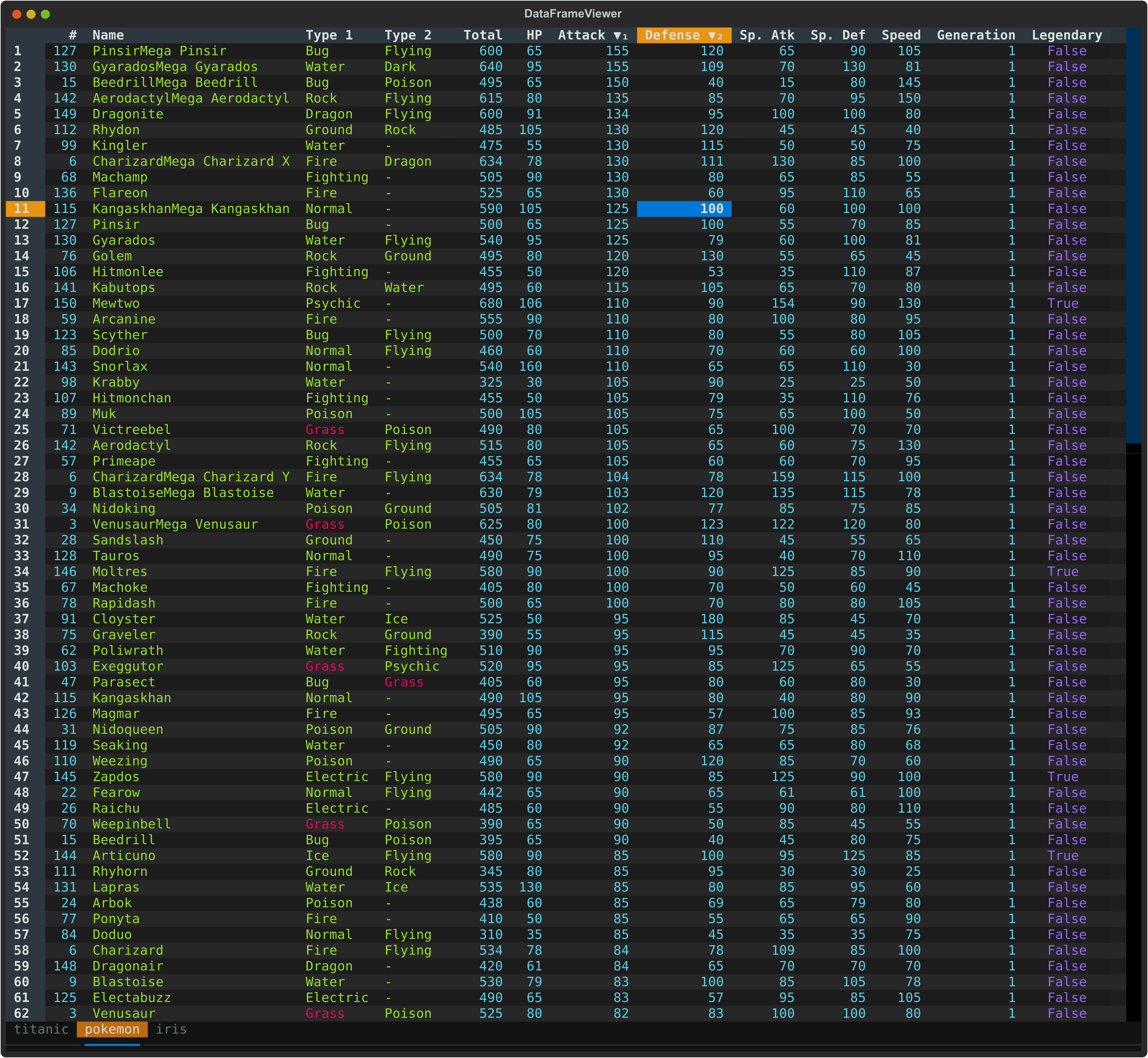
A powerful, interactive terminal-based viewer/editor for CSV/TSV/PSV/Excel/Parquet/JSON/NDJSON built with Python, [Polars](https://pola.rs/), and [Textual](https://textual.textualize.io/). Inspired by [VisiData](https://www.visidata.org/), this tool provides smooth keyboard navigation, data manipulation, and a clean interface for exploring tabular data directly in terminal with multi-tab support for multiple files!
|
|
43
43
|
|
|
44
44
|
|
|
45
45
|
|
|
@@ -167,28 +167,32 @@ When multiple files are opened:
|
|
|
167
167
|
## Command Line Options
|
|
168
168
|
|
|
169
169
|
```
|
|
170
|
-
usage: dv [-h] [-f {csv,
|
|
170
|
+
usage: dv [-h] [-V] [-f {csv,json,xlsx,xls,ndjson,psv,parquet,tsv}] [-H] [-I] [-t] [-E] [-c [COMMENT_PREFIX]] [-q [QUOTE_CHAR]] [-l SKIP_LINES] [-a SKIP_ROWS_AFTER_HEADER] [-n NULL [NULL ...]] [files ...]
|
|
171
171
|
|
|
172
|
-
Interactive terminal based viewer/editor for tabular data (e.g., CSV/
|
|
172
|
+
Interactive terminal based viewer/editor for tabular data (e.g., CSV/Excel).
|
|
173
173
|
|
|
174
174
|
positional arguments:
|
|
175
|
-
files
|
|
175
|
+
files Files to view (or read from stdin)
|
|
176
176
|
|
|
177
177
|
options:
|
|
178
178
|
-h, --help show this help message and exit
|
|
179
|
-
-
|
|
180
|
-
|
|
181
|
-
|
|
182
|
-
-
|
|
179
|
+
-V, --version show program's version number and exit
|
|
180
|
+
-f, --format {csv,json,xlsx,xls,ndjson,psv,parquet,tsv}
|
|
181
|
+
Specify the format of the input files (csv, tsv etc.)
|
|
182
|
+
-H, --no-header Specify that input files have no header row when reading CSV/TSV
|
|
183
|
+
-I, --no-inference Do not infer data types when reading CSV/TSV
|
|
184
|
+
-t, --truncate-ragged-lines
|
|
185
|
+
Truncate ragged lines when reading CSV/TSV
|
|
183
186
|
-E, --ignore-errors Ignore errors when reading CSV/TSV
|
|
184
|
-
-c, --comment-prefix
|
|
185
|
-
Comment lines are skipped when reading CSV/TSV
|
|
186
|
-
-q, --quote-char
|
|
187
|
-
|
|
188
|
-
-
|
|
189
|
-
Skip lines when reading CSV/TSV
|
|
190
|
-
-
|
|
191
|
-
Skip rows after header when reading CSV/TSV
|
|
187
|
+
-c, --comment-prefix [PREFIX]
|
|
188
|
+
Comment lines starting with `PREFIX` are skipped when reading CSV/TSV
|
|
189
|
+
-q, --quote-char [C]
|
|
190
|
+
Use `C` as quote character for reading CSV/TSV
|
|
191
|
+
-L, --skip-lines N
|
|
192
|
+
Skip first N lines when reading CSV/TSV
|
|
193
|
+
-A, --skip-rows-after-header N
|
|
194
|
+
Skip N rows after header when reading CSV/TSV
|
|
195
|
+
-N, --n-rows N Stop after reading N rows from CSV/TSV
|
|
192
196
|
-n, --null NULL [NULL ...]
|
|
193
197
|
Values to interpret as null values when reading CSV/TSV
|
|
194
198
|
```
|
|
@@ -243,11 +247,11 @@ zcat compressed_data.csv.gz | dv -f csv
|
|
|
243
247
|
| `<` | Move to previous tab |
|
|
244
248
|
| `b` | Cycle through tabs |
|
|
245
249
|
| `B` | Toggle tab bar visibility |
|
|
246
|
-
| `q` |
|
|
247
|
-
| `Q` |
|
|
250
|
+
| `q` | Quit current tab (prompts to save unsaved changes) |
|
|
251
|
+
| `Q` | Quit all tabs and app (prompts to save unsaved changes) |
|
|
248
252
|
| `Ctrl+Q` | Force to quit app (regardless of unsaved changes) |
|
|
249
253
|
| `Ctrl+T` | Save current tab to file |
|
|
250
|
-
| `Ctrl+
|
|
254
|
+
| `Ctrl+S` | Save all tabs to file |
|
|
251
255
|
| `w` | Save current tab to file (overwrite without prompt) |
|
|
252
256
|
| `W` | Save all tabs to file (overwrite without prompt) |
|
|
253
257
|
| `Ctrl+D` | Duplicate current tab |
|
|
@@ -304,14 +308,15 @@ zcat compressed_data.csv.gz | dv -f csv
|
|
|
304
308
|
| `,` | Toggle thousand separator for numeric display |
|
|
305
309
|
| `&` | Set current row as the new header row |
|
|
306
310
|
| `h` | Hide current column |
|
|
307
|
-
| `H` | Show all hidden
|
|
311
|
+
| `H` | Show all hidden columns |
|
|
308
312
|
|
|
309
|
-
####
|
|
313
|
+
#### Editing
|
|
310
314
|
|
|
311
315
|
| Key | Action |
|
|
312
316
|
|-----|--------|
|
|
313
317
|
| `Double-click` | Edit cell or rename column header |
|
|
314
|
-
| `
|
|
318
|
+
| `Delete` | Clear current cell (set to NULL) |
|
|
319
|
+
| `Shift+Delete` | Clear current column (set matching cells to NULL) |
|
|
315
320
|
| `e` | Edit current cell (respects data type) |
|
|
316
321
|
| `E` | Edit entire column with value/expression |
|
|
317
322
|
| `a` | Add empty column after current |
|
|
@@ -353,16 +358,10 @@ zcat compressed_data.csv.gz | dv -f csv
|
|
|
353
358
|
| Key | Action |
|
|
354
359
|
|-----|--------|
|
|
355
360
|
| `"` (quote) | Filter selected rows (others removed) |
|
|
361
|
+
| `.` | View rows with non-null values in current column (others hidden) |
|
|
356
362
|
| `v` | View selected rows (others hidden) |
|
|
357
363
|
| `V` | View selected by expression (others hidden) |
|
|
358
364
|
|
|
359
|
-
#### SQL Interface
|
|
360
|
-
|
|
361
|
-
| Key | Action |
|
|
362
|
-
|-----|--------|
|
|
363
|
-
| `l` | Simple SQL interface (select columns & where clause) |
|
|
364
|
-
| `L` | Advanced SQL interface (full SQL query with syntax highlight) |
|
|
365
|
-
|
|
366
365
|
#### Sorting (supporting multiple columns)
|
|
367
366
|
|
|
368
367
|
| Key | Action |
|
|
@@ -388,14 +387,20 @@ zcat compressed_data.csv.gz | dv -f csv
|
|
|
388
387
|
| `!` | Cast current column to boolean |
|
|
389
388
|
| `$` | Cast current column to string |
|
|
390
389
|
|
|
391
|
-
#### Copy
|
|
390
|
+
#### Copy
|
|
392
391
|
|
|
393
392
|
| Key | Action |
|
|
394
393
|
|-----|--------|
|
|
395
394
|
| `c` | Copy current cell to clipboard |
|
|
396
395
|
| `Ctrl+C` | Copy column to clipboard |
|
|
397
396
|
| `Ctrl+R` | Copy row to clipboard (tab-separated) |
|
|
398
|
-
|
|
397
|
+
|
|
398
|
+
#### SQL Interface
|
|
399
|
+
|
|
400
|
+
| Key | Action |
|
|
401
|
+
|-----|--------|
|
|
402
|
+
| `l` | Simple SQL interface (select columns & where clause) |
|
|
403
|
+
| `L` | Advanced SQL interface (full SQL query with syntax highlight) |
|
|
399
404
|
|
|
400
405
|
## Features in Detail
|
|
401
406
|
|
|
@@ -418,6 +423,8 @@ Useful for examining wide datasets where columns don't fit well on screen.
|
|
|
418
423
|
- Press `"` to **filter** all rows containing the selected column value (others removed)
|
|
419
424
|
- Press `{` to move to the previous row
|
|
420
425
|
- Press `}` to move to the next row
|
|
426
|
+
- Press `F` to show the frequency table for the selected column
|
|
427
|
+
- Press `s` to show the statistics table for the selected column
|
|
421
428
|
- Press `q` or `Escape` to close the modal
|
|
422
429
|
|
|
423
430
|
### 3. Row Selection
|
|
@@ -443,7 +450,6 @@ These options work with plain text searches. Use Polars regex patterns in expres
|
|
|
443
450
|
**Quick Tips:**
|
|
444
451
|
- Search results highlight matching rows in **red**
|
|
445
452
|
- Use expression for advanced selection (e.g., $attack > $defense)
|
|
446
|
-
- Multiple searches **accumulate** - each new search adds to the selections or matches
|
|
447
453
|
- Type-aware matching automatically converts values. Resort to string comparison if conversion fails
|
|
448
454
|
- Use `u` to undo any search or filter
|
|
449
455
|
|
|
@@ -493,7 +499,7 @@ Both operations show selected rows but with fundamentally different effects:
|
|
|
493
499
|
**When to use View** (`v` or `V`):
|
|
494
500
|
- Exploring or analyzing data safely
|
|
495
501
|
- Switching between different perspectives
|
|
496
|
-
- Press `
|
|
502
|
+
- Press `q` to return to main table
|
|
497
503
|
|
|
498
504
|
**When to use Filter** (`"`):
|
|
499
505
|
- Cleaning data (removing unwanted rows)
|
|
@@ -583,6 +589,10 @@ View quick metadata about your dataframe and columns to understand their structu
|
|
|
583
589
|
- **Name** - Column name
|
|
584
590
|
- **Type** - Data type (e.g., Int64, String, Float64, Boolean)
|
|
585
591
|
|
|
592
|
+
**In the Column Metadata Table**
|
|
593
|
+
- Press `F` to show the frequency table for the selected column
|
|
594
|
+
- Press `s` to show the statistics table for the selected column
|
|
595
|
+
|
|
586
596
|
**In Metadata Modals**:
|
|
587
597
|
- Press `q` or `Escape` to close
|
|
588
598
|
|
|
@@ -622,7 +632,7 @@ This is useful for:
|
|
|
622
632
|
- Quick statistical summaries without external tools
|
|
623
633
|
- Comparing statistics across columns
|
|
624
634
|
|
|
625
|
-
### 11.
|
|
635
|
+
### 11. Editing
|
|
626
636
|
|
|
627
637
|
**Edit Cell** (`e` or **Double-click**):
|
|
628
638
|
- Opens modal for editing current cell
|
|
@@ -668,7 +678,7 @@ This is useful for:
|
|
|
668
678
|
|
|
669
679
|
**Hide/Show Columns** (`h` / `H`):
|
|
670
680
|
- `h` - Temporarily hide current column (data preserved)
|
|
671
|
-
- `H` - Restore all hidden columns
|
|
681
|
+
- `H` - Restore all hidden columns
|
|
672
682
|
|
|
673
683
|
### 12. Column & Row Reordering
|
|
674
684
|
|
|
@@ -817,7 +827,7 @@ Manage multiple files and dataframes simultaneously with tabs.
|
|
|
817
827
|
- **`Double-click`** - Rename the tab
|
|
818
828
|
- **`Ctrl+D`** - Duplicate current tab (creates a copy with same data and state)
|
|
819
829
|
- **`Ctrl+T`** - Save current tab to file
|
|
820
|
-
- **`Ctrl+
|
|
830
|
+
- **`Ctrl+S`** - Save all tabs to file
|
|
821
831
|
- **`w`** - Save current tab to file (overwrite without prompt)
|
|
822
832
|
- **`W`** - Save all tabs to file (overwrite without prompt)
|
|
823
833
|
- **`q`** - Close current tab (closes tab, prompts to save if unsaved changes)
|
|
@@ -1,6 +1,6 @@
|
|
|
1
1
|
# DataFrame Textual
|
|
2
2
|
|
|
3
|
-
A powerful, interactive terminal-based viewer/editor for CSV/TSV/Excel/Parquet/JSON/NDJSON built with Python, [Polars](https://pola.rs/), and [Textual](https://textual.textualize.io/). Inspired by [VisiData](https://www.visidata.org/), this tool provides smooth keyboard navigation, data manipulation, and a clean interface for exploring tabular data directly in terminal with multi-tab support for multiple files!
|
|
3
|
+
A powerful, interactive terminal-based viewer/editor for CSV/TSV/PSV/Excel/Parquet/JSON/NDJSON built with Python, [Polars](https://pola.rs/), and [Textual](https://textual.textualize.io/). Inspired by [VisiData](https://www.visidata.org/), this tool provides smooth keyboard navigation, data manipulation, and a clean interface for exploring tabular data directly in terminal with multi-tab support for multiple files!
|
|
4
4
|
|
|
5
5
|

|
|
6
6
|
|
|
@@ -128,28 +128,32 @@ When multiple files are opened:
|
|
|
128
128
|
## Command Line Options
|
|
129
129
|
|
|
130
130
|
```
|
|
131
|
-
usage: dv [-h] [-f {csv,
|
|
131
|
+
usage: dv [-h] [-V] [-f {csv,json,xlsx,xls,ndjson,psv,parquet,tsv}] [-H] [-I] [-t] [-E] [-c [COMMENT_PREFIX]] [-q [QUOTE_CHAR]] [-l SKIP_LINES] [-a SKIP_ROWS_AFTER_HEADER] [-n NULL [NULL ...]] [files ...]
|
|
132
132
|
|
|
133
|
-
Interactive terminal based viewer/editor for tabular data (e.g., CSV/
|
|
133
|
+
Interactive terminal based viewer/editor for tabular data (e.g., CSV/Excel).
|
|
134
134
|
|
|
135
135
|
positional arguments:
|
|
136
|
-
files
|
|
136
|
+
files Files to view (or read from stdin)
|
|
137
137
|
|
|
138
138
|
options:
|
|
139
139
|
-h, --help show this help message and exit
|
|
140
|
-
-
|
|
141
|
-
|
|
142
|
-
|
|
143
|
-
-
|
|
140
|
+
-V, --version show program's version number and exit
|
|
141
|
+
-f, --format {csv,json,xlsx,xls,ndjson,psv,parquet,tsv}
|
|
142
|
+
Specify the format of the input files (csv, tsv etc.)
|
|
143
|
+
-H, --no-header Specify that input files have no header row when reading CSV/TSV
|
|
144
|
+
-I, --no-inference Do not infer data types when reading CSV/TSV
|
|
145
|
+
-t, --truncate-ragged-lines
|
|
146
|
+
Truncate ragged lines when reading CSV/TSV
|
|
144
147
|
-E, --ignore-errors Ignore errors when reading CSV/TSV
|
|
145
|
-
-c, --comment-prefix
|
|
146
|
-
Comment lines are skipped when reading CSV/TSV
|
|
147
|
-
-q, --quote-char
|
|
148
|
-
|
|
149
|
-
-
|
|
150
|
-
Skip lines when reading CSV/TSV
|
|
151
|
-
-
|
|
152
|
-
Skip rows after header when reading CSV/TSV
|
|
148
|
+
-c, --comment-prefix [PREFIX]
|
|
149
|
+
Comment lines starting with `PREFIX` are skipped when reading CSV/TSV
|
|
150
|
+
-q, --quote-char [C]
|
|
151
|
+
Use `C` as quote character for reading CSV/TSV
|
|
152
|
+
-L, --skip-lines N
|
|
153
|
+
Skip first N lines when reading CSV/TSV
|
|
154
|
+
-A, --skip-rows-after-header N
|
|
155
|
+
Skip N rows after header when reading CSV/TSV
|
|
156
|
+
-N, --n-rows N Stop after reading N rows from CSV/TSV
|
|
153
157
|
-n, --null NULL [NULL ...]
|
|
154
158
|
Values to interpret as null values when reading CSV/TSV
|
|
155
159
|
```
|
|
@@ -204,11 +208,11 @@ zcat compressed_data.csv.gz | dv -f csv
|
|
|
204
208
|
| `<` | Move to previous tab |
|
|
205
209
|
| `b` | Cycle through tabs |
|
|
206
210
|
| `B` | Toggle tab bar visibility |
|
|
207
|
-
| `q` |
|
|
208
|
-
| `Q` |
|
|
211
|
+
| `q` | Quit current tab (prompts to save unsaved changes) |
|
|
212
|
+
| `Q` | Quit all tabs and app (prompts to save unsaved changes) |
|
|
209
213
|
| `Ctrl+Q` | Force to quit app (regardless of unsaved changes) |
|
|
210
214
|
| `Ctrl+T` | Save current tab to file |
|
|
211
|
-
| `Ctrl+
|
|
215
|
+
| `Ctrl+S` | Save all tabs to file |
|
|
212
216
|
| `w` | Save current tab to file (overwrite without prompt) |
|
|
213
217
|
| `W` | Save all tabs to file (overwrite without prompt) |
|
|
214
218
|
| `Ctrl+D` | Duplicate current tab |
|
|
@@ -265,14 +269,15 @@ zcat compressed_data.csv.gz | dv -f csv
|
|
|
265
269
|
| `,` | Toggle thousand separator for numeric display |
|
|
266
270
|
| `&` | Set current row as the new header row |
|
|
267
271
|
| `h` | Hide current column |
|
|
268
|
-
| `H` | Show all hidden
|
|
272
|
+
| `H` | Show all hidden columns |
|
|
269
273
|
|
|
270
|
-
####
|
|
274
|
+
#### Editing
|
|
271
275
|
|
|
272
276
|
| Key | Action |
|
|
273
277
|
|-----|--------|
|
|
274
278
|
| `Double-click` | Edit cell or rename column header |
|
|
275
|
-
| `
|
|
279
|
+
| `Delete` | Clear current cell (set to NULL) |
|
|
280
|
+
| `Shift+Delete` | Clear current column (set matching cells to NULL) |
|
|
276
281
|
| `e` | Edit current cell (respects data type) |
|
|
277
282
|
| `E` | Edit entire column with value/expression |
|
|
278
283
|
| `a` | Add empty column after current |
|
|
@@ -314,16 +319,10 @@ zcat compressed_data.csv.gz | dv -f csv
|
|
|
314
319
|
| Key | Action |
|
|
315
320
|
|-----|--------|
|
|
316
321
|
| `"` (quote) | Filter selected rows (others removed) |
|
|
322
|
+
| `.` | View rows with non-null values in current column (others hidden) |
|
|
317
323
|
| `v` | View selected rows (others hidden) |
|
|
318
324
|
| `V` | View selected by expression (others hidden) |
|
|
319
325
|
|
|
320
|
-
#### SQL Interface
|
|
321
|
-
|
|
322
|
-
| Key | Action |
|
|
323
|
-
|-----|--------|
|
|
324
|
-
| `l` | Simple SQL interface (select columns & where clause) |
|
|
325
|
-
| `L` | Advanced SQL interface (full SQL query with syntax highlight) |
|
|
326
|
-
|
|
327
326
|
#### Sorting (supporting multiple columns)
|
|
328
327
|
|
|
329
328
|
| Key | Action |
|
|
@@ -349,14 +348,20 @@ zcat compressed_data.csv.gz | dv -f csv
|
|
|
349
348
|
| `!` | Cast current column to boolean |
|
|
350
349
|
| `$` | Cast current column to string |
|
|
351
350
|
|
|
352
|
-
#### Copy
|
|
351
|
+
#### Copy
|
|
353
352
|
|
|
354
353
|
| Key | Action |
|
|
355
354
|
|-----|--------|
|
|
356
355
|
| `c` | Copy current cell to clipboard |
|
|
357
356
|
| `Ctrl+C` | Copy column to clipboard |
|
|
358
357
|
| `Ctrl+R` | Copy row to clipboard (tab-separated) |
|
|
359
|
-
|
|
358
|
+
|
|
359
|
+
#### SQL Interface
|
|
360
|
+
|
|
361
|
+
| Key | Action |
|
|
362
|
+
|-----|--------|
|
|
363
|
+
| `l` | Simple SQL interface (select columns & where clause) |
|
|
364
|
+
| `L` | Advanced SQL interface (full SQL query with syntax highlight) |
|
|
360
365
|
|
|
361
366
|
## Features in Detail
|
|
362
367
|
|
|
@@ -379,6 +384,8 @@ Useful for examining wide datasets where columns don't fit well on screen.
|
|
|
379
384
|
- Press `"` to **filter** all rows containing the selected column value (others removed)
|
|
380
385
|
- Press `{` to move to the previous row
|
|
381
386
|
- Press `}` to move to the next row
|
|
387
|
+
- Press `F` to show the frequency table for the selected column
|
|
388
|
+
- Press `s` to show the statistics table for the selected column
|
|
382
389
|
- Press `q` or `Escape` to close the modal
|
|
383
390
|
|
|
384
391
|
### 3. Row Selection
|
|
@@ -404,7 +411,6 @@ These options work with plain text searches. Use Polars regex patterns in expres
|
|
|
404
411
|
**Quick Tips:**
|
|
405
412
|
- Search results highlight matching rows in **red**
|
|
406
413
|
- Use expression for advanced selection (e.g., $attack > $defense)
|
|
407
|
-
- Multiple searches **accumulate** - each new search adds to the selections or matches
|
|
408
414
|
- Type-aware matching automatically converts values. Resort to string comparison if conversion fails
|
|
409
415
|
- Use `u` to undo any search or filter
|
|
410
416
|
|
|
@@ -454,7 +460,7 @@ Both operations show selected rows but with fundamentally different effects:
|
|
|
454
460
|
**When to use View** (`v` or `V`):
|
|
455
461
|
- Exploring or analyzing data safely
|
|
456
462
|
- Switching between different perspectives
|
|
457
|
-
- Press `
|
|
463
|
+
- Press `q` to return to main table
|
|
458
464
|
|
|
459
465
|
**When to use Filter** (`"`):
|
|
460
466
|
- Cleaning data (removing unwanted rows)
|
|
@@ -544,6 +550,10 @@ View quick metadata about your dataframe and columns to understand their structu
|
|
|
544
550
|
- **Name** - Column name
|
|
545
551
|
- **Type** - Data type (e.g., Int64, String, Float64, Boolean)
|
|
546
552
|
|
|
553
|
+
**In the Column Metadata Table**
|
|
554
|
+
- Press `F` to show the frequency table for the selected column
|
|
555
|
+
- Press `s` to show the statistics table for the selected column
|
|
556
|
+
|
|
547
557
|
**In Metadata Modals**:
|
|
548
558
|
- Press `q` or `Escape` to close
|
|
549
559
|
|
|
@@ -583,7 +593,7 @@ This is useful for:
|
|
|
583
593
|
- Quick statistical summaries without external tools
|
|
584
594
|
- Comparing statistics across columns
|
|
585
595
|
|
|
586
|
-
### 11.
|
|
596
|
+
### 11. Editing
|
|
587
597
|
|
|
588
598
|
**Edit Cell** (`e` or **Double-click**):
|
|
589
599
|
- Opens modal for editing current cell
|
|
@@ -629,7 +639,7 @@ This is useful for:
|
|
|
629
639
|
|
|
630
640
|
**Hide/Show Columns** (`h` / `H`):
|
|
631
641
|
- `h` - Temporarily hide current column (data preserved)
|
|
632
|
-
- `H` - Restore all hidden columns
|
|
642
|
+
- `H` - Restore all hidden columns
|
|
633
643
|
|
|
634
644
|
### 12. Column & Row Reordering
|
|
635
645
|
|
|
@@ -778,7 +788,7 @@ Manage multiple files and dataframes simultaneously with tabs.
|
|
|
778
788
|
- **`Double-click`** - Rename the tab
|
|
779
789
|
- **`Ctrl+D`** - Duplicate current tab (creates a copy with same data and state)
|
|
780
790
|
- **`Ctrl+T`** - Save current tab to file
|
|
781
|
-
- **`Ctrl+
|
|
791
|
+
- **`Ctrl+S`** - Save all tabs to file
|
|
782
792
|
- **`w`** - Save current tab to file (overwrite without prompt)
|
|
783
793
|
- **`W`** - Save all tabs to file (overwrite without prompt)
|
|
784
794
|
- **`q`** - Close current tab (closes tab, prompts to save if unsaved changes)
|
|
@@ -4,7 +4,7 @@ build-backend = "hatchling.build"
|
|
|
4
4
|
|
|
5
5
|
[project]
|
|
6
6
|
name = "dataframe-textual"
|
|
7
|
-
version = "2.
|
|
7
|
+
version = "2.11.0"
|
|
8
8
|
description = "Interactive terminal viewer/editor for tabular data"
|
|
9
9
|
readme = "README.md"
|
|
10
10
|
requires-python = ">=3.11"
|
|
@@ -56,11 +56,13 @@ dev = [
|
|
|
56
56
|
packages = ["src/dataframe_textual"]
|
|
57
57
|
exclude = [
|
|
58
58
|
"*.png",
|
|
59
|
+
"*.gz",
|
|
59
60
|
]
|
|
60
61
|
|
|
61
62
|
[tool.hatch.build.targets.sdist]
|
|
62
63
|
exclude = [
|
|
63
64
|
"*.png",
|
|
65
|
+
"*.gz",
|
|
64
66
|
]
|
|
65
67
|
|
|
66
68
|
[dependency-groups]
|
|
@@ -51,15 +51,34 @@ def cli() -> argparse.Namespace:
|
|
|
51
51
|
)
|
|
52
52
|
parser.add_argument("-E", "--ignore-errors", action="store_true", help="Ignore errors when reading CSV/TSV")
|
|
53
53
|
parser.add_argument(
|
|
54
|
-
"-c",
|
|
54
|
+
"-c",
|
|
55
|
+
"--comment-prefix",
|
|
56
|
+
metavar="PREFIX",
|
|
57
|
+
nargs="?",
|
|
58
|
+
const="#",
|
|
59
|
+
help="Comment lines starting with `PREFIX` are skipped when reading CSV/TSV",
|
|
55
60
|
)
|
|
56
61
|
parser.add_argument(
|
|
57
|
-
"-q",
|
|
62
|
+
"-q",
|
|
63
|
+
"--quote-char",
|
|
64
|
+
metavar="C",
|
|
65
|
+
nargs="?",
|
|
66
|
+
const=None,
|
|
67
|
+
default='"',
|
|
68
|
+
help="Use `C` as quote character for reading CSV/TSV",
|
|
58
69
|
)
|
|
59
|
-
parser.add_argument("-l", "--skip-lines", type=int, default=0, help="Skip lines when reading CSV/TSV")
|
|
60
70
|
parser.add_argument(
|
|
61
|
-
"-
|
|
71
|
+
"-L", "--skip-lines", metavar="N", type=int, default=0, help="Skip first N lines when reading CSV/TSV"
|
|
62
72
|
)
|
|
73
|
+
parser.add_argument(
|
|
74
|
+
"-A",
|
|
75
|
+
"--skip-rows-after-header",
|
|
76
|
+
metavar="N",
|
|
77
|
+
type=int,
|
|
78
|
+
default=0,
|
|
79
|
+
help="Skip N rows after header when reading CSV/TSV",
|
|
80
|
+
)
|
|
81
|
+
parser.add_argument("-N", "--n-rows", metavar="N", type=int, help="Stop after reading N rows from CSV/TSV")
|
|
63
82
|
parser.add_argument("-n", "--null", nargs="+", help="Values to interpret as null values when reading CSV/TSV")
|
|
64
83
|
|
|
65
84
|
args = parser.parse_args()
|
|
@@ -98,6 +117,7 @@ def main() -> None:
|
|
|
98
117
|
null_values=args.null,
|
|
99
118
|
ignore_errors=args.ignore_errors,
|
|
100
119
|
truncate_ragged_lines=args.truncate_ragged_lines,
|
|
120
|
+
n_rows=args.n_rows,
|
|
101
121
|
)
|
|
102
122
|
app = DataFrameViewer(*sources)
|
|
103
123
|
app.run()
|
|
@@ -12,7 +12,7 @@ import polars as pl
|
|
|
12
12
|
from rich.text import Text
|
|
13
13
|
|
|
14
14
|
# Supported file formats
|
|
15
|
-
SUPPORTED_FORMATS =
|
|
15
|
+
SUPPORTED_FORMATS = ["tsv", "csv", "psv", "xlsx", "xls", "parquet", "json", "ndjson"]
|
|
16
16
|
|
|
17
17
|
|
|
18
18
|
# Boolean string mappings
|
|
@@ -485,6 +485,7 @@ def load_dataframe(
|
|
|
485
485
|
null_values: list[str] | None = None,
|
|
486
486
|
ignore_errors: bool = False,
|
|
487
487
|
truncate_ragged_lines: bool = False,
|
|
488
|
+
n_rows: int | None = None,
|
|
488
489
|
) -> list[Source]:
|
|
489
490
|
"""Load DataFrames from file specifications.
|
|
490
491
|
|
|
@@ -502,6 +503,8 @@ def load_dataframe(
|
|
|
502
503
|
skip_rows_after_header: Number of rows to skip after header. Defaults to 0.
|
|
503
504
|
null_values: List of values to interpret as null when reading CSV/TSV files. Defaults to None.
|
|
504
505
|
ignore_errors: Whether to ignore errors when reading CSV/TSV files. Defaults to False.
|
|
506
|
+
truncate_ragged_lines: Whether to truncate ragged lines when reading CSV/TSV files. Defaults to False.
|
|
507
|
+
n_rows: Number of rows to read from CSV/TSV files. Defaults to None (read all rows).
|
|
505
508
|
|
|
506
509
|
Returns:
|
|
507
510
|
List of `Source` objects.
|
|
@@ -529,6 +532,7 @@ def load_dataframe(
|
|
|
529
532
|
ext = Path(filename).suffix.lower()
|
|
530
533
|
if ext == ".gz":
|
|
531
534
|
ext = Path(filename).with_suffix("").suffix.lower()
|
|
535
|
+
|
|
532
536
|
fmt = ext.removeprefix(".")
|
|
533
537
|
|
|
534
538
|
# Default to TSV
|
|
@@ -550,6 +554,7 @@ def load_dataframe(
|
|
|
550
554
|
null_values=null_values,
|
|
551
555
|
ignore_errors=ignore_errors,
|
|
552
556
|
truncate_ragged_lines=truncate_ragged_lines,
|
|
557
|
+
n_rows=n_rows,
|
|
553
558
|
)
|
|
554
559
|
)
|
|
555
560
|
|
|
@@ -634,6 +639,7 @@ def load_file(
|
|
|
634
639
|
null_values: list[str] | None = None,
|
|
635
640
|
ignore_errors: bool = False,
|
|
636
641
|
truncate_ragged_lines: bool = False,
|
|
642
|
+
n_rows: int | None = None,
|
|
637
643
|
) -> list[Source]:
|
|
638
644
|
"""Load a single file.
|
|
639
645
|
|
|
@@ -659,6 +665,8 @@ def load_file(
|
|
|
659
665
|
schema_overrides: Optional dictionary of column name to Polars data type to override inferred schema.
|
|
660
666
|
null_values: List of values to interpret as null when reading CSV/TSV files. Defaults to None.
|
|
661
667
|
ignore_errors: Whether to ignore errors when reading CSV/TSV files.
|
|
668
|
+
truncate_ragged_lines: Whether to truncate ragged lines when reading CSV/TSV files. Defaults to False.
|
|
669
|
+
n_rows: Number of rows to read from CSV/TSV files. Defaults to None (read all rows).
|
|
662
670
|
|
|
663
671
|
Returns:
|
|
664
672
|
List of `Source` objects.
|
|
@@ -668,17 +676,11 @@ def load_file(
|
|
|
668
676
|
filename = f"stdin.{file_format}" if isinstance(source, StringIO) else source
|
|
669
677
|
filepath = Path(filename)
|
|
670
678
|
|
|
671
|
-
if not file_format:
|
|
672
|
-
ext = filepath.suffix.lower()
|
|
673
|
-
if ext == ".gz":
|
|
674
|
-
ext = Path(filename).with_suffix("").suffix.lower()
|
|
675
|
-
file_format = ext.removeprefix(".")
|
|
676
|
-
|
|
677
679
|
# Load based on file format
|
|
678
|
-
if file_format in ("csv", "tsv"):
|
|
680
|
+
if file_format in ("csv", "tsv", "psv"):
|
|
679
681
|
lf = pl.scan_csv(
|
|
680
682
|
source,
|
|
681
|
-
separator="\t" if file_format == "tsv" else ",",
|
|
683
|
+
separator="\t" if file_format == "tsv" else ("|" if file_format == "psv" else ","),
|
|
682
684
|
has_header=has_header,
|
|
683
685
|
infer_schema=infer_schema,
|
|
684
686
|
comment_prefix=comment_prefix,
|
|
@@ -689,9 +691,10 @@ def load_file(
|
|
|
689
691
|
null_values=null_values,
|
|
690
692
|
ignore_errors=ignore_errors,
|
|
691
693
|
truncate_ragged_lines=truncate_ragged_lines,
|
|
694
|
+
n_rows=n_rows,
|
|
692
695
|
)
|
|
693
696
|
data.append(Source(lf, filename, filepath.stem))
|
|
694
|
-
elif file_format in ("xlsx", "xls"
|
|
697
|
+
elif file_format in ("xlsx", "xls"):
|
|
695
698
|
if first_sheet:
|
|
696
699
|
# Read only the first sheet for multiple files
|
|
697
700
|
lf = pl.read_excel(source).lazy()
|
|
@@ -745,6 +748,8 @@ def load_file(
|
|
|
745
748
|
schema_overrides=schema_overrides,
|
|
746
749
|
null_values=null_values,
|
|
747
750
|
ignore_errors=ignore_errors,
|
|
751
|
+
truncate_ragged_lines=truncate_ragged_lines,
|
|
752
|
+
n_rows=n_rows,
|
|
748
753
|
)
|
|
749
754
|
|
|
750
755
|
return data
|