dataframe-textual 2.29.0__tar.gz → 2.31.0__tar.gz
This diff represents the content of publicly available package versions that have been released to one of the supported registries. The information contained in this diff is provided for informational purposes only and reflects changes between package versions as they appear in their respective public registries.
- {dataframe_textual-2.29.0 → dataframe_textual-2.31.0}/PKG-INFO +42 -34
- {dataframe_textual-2.29.0 → dataframe_textual-2.31.0}/README.md +40 -32
- {dataframe_textual-2.29.0 → dataframe_textual-2.31.0}/pyproject.toml +2 -2
- {dataframe_textual-2.29.0 → dataframe_textual-2.31.0}/src/dataframe_textual/__init__.py +0 -2
- {dataframe_textual-2.29.0 → dataframe_textual-2.31.0}/src/dataframe_textual/__main__.py +23 -20
- {dataframe_textual-2.29.0 → dataframe_textual-2.31.0}/src/dataframe_textual/common.py +56 -31
- {dataframe_textual-2.29.0 → dataframe_textual-2.31.0}/src/dataframe_textual/data_frame_viewer.py +90 -73
- dataframe_textual-2.31.0/src/dataframe_textual/file_picker.py +582 -0
- {dataframe_textual-2.29.0 → dataframe_textual-2.31.0}/src/dataframe_textual/table_screen.py +3 -3
- {dataframe_textual-2.29.0 → dataframe_textual-2.31.0}/src/dataframe_textual/yes_no_screen.py +0 -45
- {dataframe_textual-2.29.0 → dataframe_textual-2.31.0}/uv.lock +5 -5
- {dataframe_textual-2.29.0 → dataframe_textual-2.31.0}/.gitignore +0 -0
- {dataframe_textual-2.29.0 → dataframe_textual-2.31.0}/LICENSE +0 -0
- {dataframe_textual-2.29.0 → dataframe_textual-2.31.0}/main.py +0 -0
- {dataframe_textual-2.29.0 → dataframe_textual-2.31.0}/src/dataframe_textual/data_frame_help_panel.py +0 -0
- {dataframe_textual-2.29.0 → dataframe_textual-2.31.0}/src/dataframe_textual/data_frame_table.py +0 -0
- {dataframe_textual-2.29.0 → dataframe_textual-2.31.0}/src/dataframe_textual/theme_screen.py +0 -0
|
@@ -1,6 +1,6 @@
|
|
|
1
1
|
Metadata-Version: 2.4
|
|
2
2
|
Name: dataframe-textual
|
|
3
|
-
Version: 2.
|
|
3
|
+
Version: 2.31.0
|
|
4
4
|
Summary: Interactive terminal viewer/editor for tabular data
|
|
5
5
|
Project-URL: Homepage, https://github.com/need47/dataframe-textual
|
|
6
6
|
Project-URL: Repository, https://github.com/need47/dataframe-textual.git
|
|
@@ -30,7 +30,7 @@ Classifier: Typing :: Typed
|
|
|
30
30
|
Requires-Python: >=3.11
|
|
31
31
|
Requires-Dist: fastexcel>=0.16.0
|
|
32
32
|
Requires-Dist: polars>=1.34.0
|
|
33
|
-
Requires-Dist: textual[syntax]>=
|
|
33
|
+
Requires-Dist: textual[syntax]>=8.0.2
|
|
34
34
|
Requires-Dist: vortex-data>=0.59.4
|
|
35
35
|
Requires-Dist: xlsxwriter>=3.2.9
|
|
36
36
|
Provides-Extra: dev
|
|
@@ -39,7 +39,7 @@ Description-Content-Type: text/markdown
|
|
|
39
39
|
|
|
40
40
|
# DataFrame Textual
|
|
41
41
|
|
|
42
|
-
A powerful, interactive terminal-based viewer/editor for CSV/TSV/
|
|
42
|
+
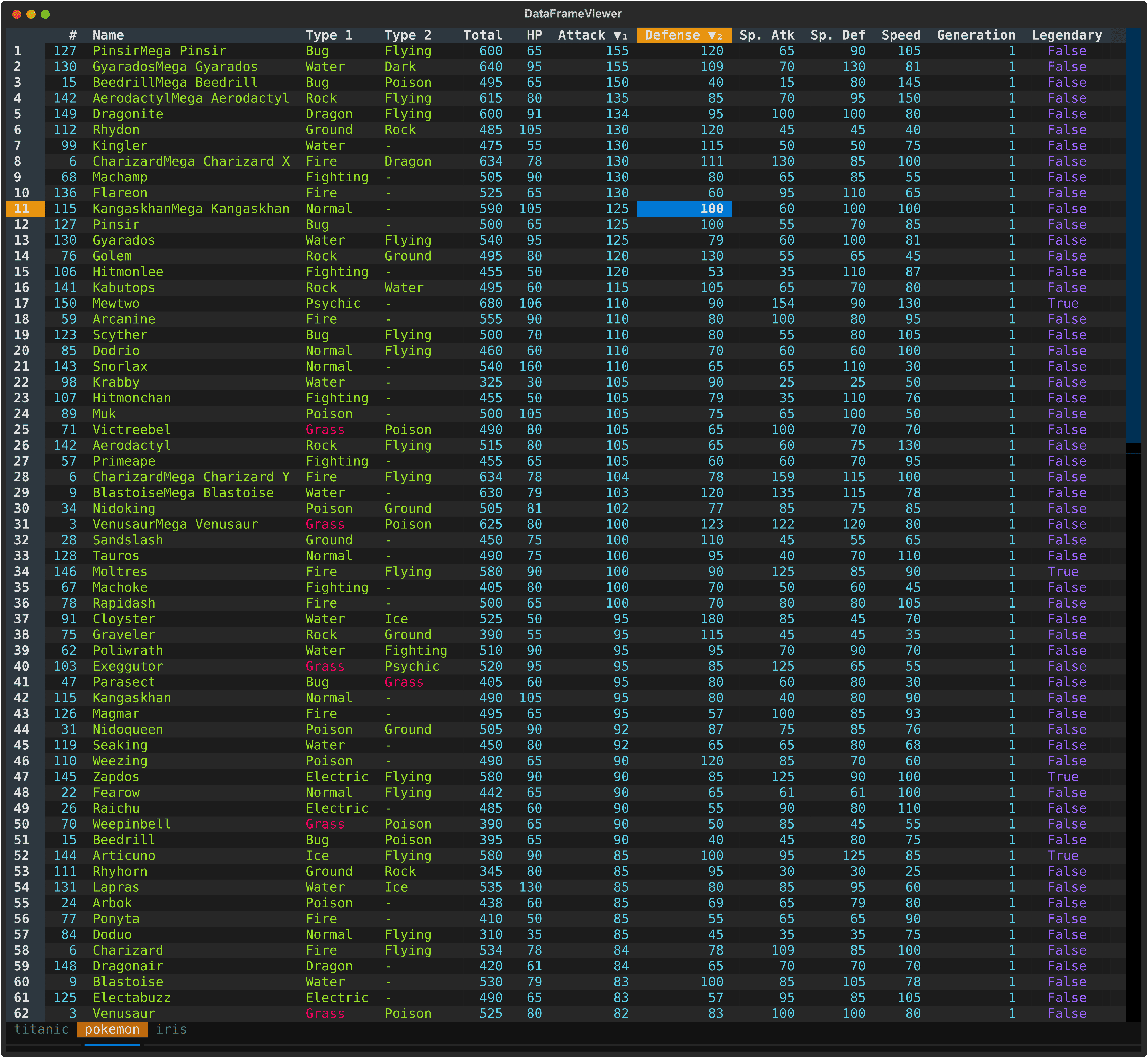
A powerful, interactive terminal-based viewer/editor for CSV/TSV/Excel/[Parquet](https://parquet.apache.org/)/[Vortex](https://vortex.dev/)/JSON/NDJSON built with Python, [Polars](https://pola.rs/), and [Textual](https://textual.textualize.io/). Inspired by [VisiData](https://www.visidata.org/), this tool provides smooth keyboard navigation, data manipulation, and a clean interface for exploring tabular data directly in terminal with multi-tab support for multiple files!
|
|
43
43
|
|
|
44
44
|
|
|
45
45
|
|
|
@@ -132,8 +132,8 @@ uv run python main.py pokemon.csv
|
|
|
132
132
|
cat data.tsv | dv
|
|
133
133
|
dv < data.tsv
|
|
134
134
|
|
|
135
|
-
# Specify
|
|
136
|
-
|
|
135
|
+
# Specify delimiter
|
|
136
|
+
dv data.txt -d '|'
|
|
137
137
|
|
|
138
138
|
# Gzipped files are supported
|
|
139
139
|
dv data.csv.gz
|
|
@@ -164,7 +164,7 @@ When multiple files are opened:
|
|
|
164
164
|
## Command Line Options
|
|
165
165
|
|
|
166
166
|
```
|
|
167
|
-
usage: dv [-h] [-V] [-
|
|
167
|
+
usage: dv [-h] [-V] [-d DELIMITER] [-H [HEADER ...]] [-F [FIELDS ...]] [-I] [-T] [-E] [-C [PREFIX]] [-Q [C]] [-K N] [-A N] [-M N] [-N NULL [NULL ...]] [--theme [THEME]]
|
|
168
168
|
[files ...]
|
|
169
169
|
|
|
170
170
|
Interactive terminal based viewer/editor for tabular data (e.g., CSV/Excel).
|
|
@@ -175,12 +175,12 @@ positional arguments:
|
|
|
175
175
|
options:
|
|
176
176
|
-h, --help show this help message and exit
|
|
177
177
|
-V, --version show program's version number and exit
|
|
178
|
-
-
|
|
179
|
-
Specify the
|
|
178
|
+
-d, --delimiter DELIMITER
|
|
179
|
+
Specify the delimiter of the input files (must be a single character, e.g., `,` or `|`)
|
|
180
|
+
-f, --fields [FIELDS ...]
|
|
181
|
+
When used without values, list available fields. Otherwise, read only specified fields.
|
|
180
182
|
-H, --header [HEADER ...]
|
|
181
183
|
Specify header info. when reading CSV/TSV. If used without values, assumes no header. Otherwise, use provided values as column names (e.g., `-H col1 col2 col3`).
|
|
182
|
-
-F, --fields [FIELDS ...]
|
|
183
|
-
When used without values, list available fields. Otherwise, read only specified fields.
|
|
184
184
|
-I, --no-inference Do not infer data types when reading CSV/TSV
|
|
185
185
|
-T, --truncate-ragged-lines
|
|
186
186
|
Truncate ragged lines when reading CSV/TSV
|
|
@@ -194,49 +194,58 @@ options:
|
|
|
194
194
|
-M, --n-rows N Read maximum rows
|
|
195
195
|
-N, --null NULL [NULL ...]
|
|
196
196
|
Values to interpret as null values when reading CSV/TSV
|
|
197
|
-
--
|
|
197
|
+
--sql SQL Specify a SQL query to execute on the input file (e.g., to select and filter data)
|
|
198
|
+
--theme [THEME] Set the theme for the application. If used without value, show available themes.
|
|
198
199
|
--all-in-one, --aio Read all files (must be of the same structure) into a single table.
|
|
199
200
|
```
|
|
200
201
|
|
|
201
202
|
### CLI Examples
|
|
202
203
|
|
|
203
204
|
```bash
|
|
204
|
-
#
|
|
205
|
-
dv
|
|
205
|
+
# Open a file
|
|
206
|
+
dv data.csv
|
|
206
207
|
|
|
207
|
-
#
|
|
208
|
-
dv
|
|
208
|
+
# Process compressed data
|
|
209
|
+
dv data.csv.gz
|
|
209
210
|
|
|
210
|
-
#
|
|
211
|
-
dv -
|
|
211
|
+
# Read from stdin
|
|
212
|
+
zcat compressed_data.csv.gz | dv -f csv
|
|
213
|
+
|
|
214
|
+
# View headless CSV file
|
|
215
|
+
dv data_no_header.csv -H
|
|
216
|
+
|
|
217
|
+
# View headless CSV file with provided header
|
|
218
|
+
dv data_no_header.csv -H country ip requests
|
|
212
219
|
|
|
213
220
|
# Skip first 3 lines of file (e.g., metadata)
|
|
214
|
-
dv -
|
|
221
|
+
dv data_with_meta.csv -K 3
|
|
215
222
|
|
|
216
223
|
# Skip 1 row after header (e.g., units row)
|
|
217
|
-
dv -
|
|
224
|
+
dv data_with_units.csv -A 1
|
|
218
225
|
|
|
219
|
-
#
|
|
220
|
-
dv -
|
|
226
|
+
# Complex CSV with comments and units row
|
|
227
|
+
dv messy_scientific_data.csv -K 3 -A 1
|
|
228
|
+
|
|
229
|
+
# Skip comment lines (or just -C)
|
|
230
|
+
dv commented_data.csv -C '#'
|
|
231
|
+
|
|
232
|
+
# Disable type inference for faster loading
|
|
233
|
+
dv large_data.csv -I
|
|
234
|
+
|
|
235
|
+
# Ignore parsing errors in malformed CSV
|
|
236
|
+
dv data_with_errors.csv -E
|
|
221
237
|
|
|
222
238
|
# Treat specific values as null/missing (e.g., 'NA', 'N/A', '-')
|
|
223
|
-
dv -
|
|
239
|
+
dv data.csv -N NA N/A
|
|
224
240
|
|
|
225
241
|
# Use different quote character (e.g., single quote for CSV)
|
|
226
|
-
dv -
|
|
242
|
+
dv data.csv -Q "'"
|
|
227
243
|
|
|
228
244
|
# Disable quote character processing for TSV with embedded quotes
|
|
229
|
-
dv
|
|
230
|
-
|
|
231
|
-
# Complex CSV with comments and units row
|
|
232
|
-
dv -l 3 -a 1 -I messy_scientific_data.csv
|
|
233
|
-
|
|
234
|
-
# Process compressed data
|
|
235
|
-
dv data.csv.gz
|
|
236
|
-
zcat compressed_data.csv.gz | dv -f csv
|
|
245
|
+
dv data.tsv -Q
|
|
237
246
|
|
|
238
247
|
# Choose the `monokai` theme
|
|
239
|
-
dv --theme monokai
|
|
248
|
+
dv data.csv --theme monokai
|
|
240
249
|
|
|
241
250
|
# Show column headers
|
|
242
251
|
dv data.csv -F
|
|
@@ -600,8 +609,7 @@ View quick metadata about your dataframe and columns to understand their structu
|
|
|
600
609
|
|
|
601
610
|
**Column Metadata** (`M`):
|
|
602
611
|
- Press `M` to open a modal displaying details for all columns:
|
|
603
|
-
- **
|
|
604
|
-
- **Name** - Column name
|
|
612
|
+
- **Column** - Column name
|
|
605
613
|
- **Type** - Data type (e.g., Int64, String, Float64, Boolean)
|
|
606
614
|
|
|
607
615
|
**In the Column Metadata Table**
|
|
@@ -1,6 +1,6 @@
|
|
|
1
1
|
# DataFrame Textual
|
|
2
2
|
|
|
3
|
-
A powerful, interactive terminal-based viewer/editor for CSV/TSV/
|
|
3
|
+
A powerful, interactive terminal-based viewer/editor for CSV/TSV/Excel/[Parquet](https://parquet.apache.org/)/[Vortex](https://vortex.dev/)/JSON/NDJSON built with Python, [Polars](https://pola.rs/), and [Textual](https://textual.textualize.io/). Inspired by [VisiData](https://www.visidata.org/), this tool provides smooth keyboard navigation, data manipulation, and a clean interface for exploring tabular data directly in terminal with multi-tab support for multiple files!
|
|
4
4
|
|
|
5
5
|

|
|
6
6
|
|
|
@@ -93,8 +93,8 @@ uv run python main.py pokemon.csv
|
|
|
93
93
|
cat data.tsv | dv
|
|
94
94
|
dv < data.tsv
|
|
95
95
|
|
|
96
|
-
# Specify
|
|
97
|
-
|
|
96
|
+
# Specify delimiter
|
|
97
|
+
dv data.txt -d '|'
|
|
98
98
|
|
|
99
99
|
# Gzipped files are supported
|
|
100
100
|
dv data.csv.gz
|
|
@@ -125,7 +125,7 @@ When multiple files are opened:
|
|
|
125
125
|
## Command Line Options
|
|
126
126
|
|
|
127
127
|
```
|
|
128
|
-
usage: dv [-h] [-V] [-
|
|
128
|
+
usage: dv [-h] [-V] [-d DELIMITER] [-H [HEADER ...]] [-F [FIELDS ...]] [-I] [-T] [-E] [-C [PREFIX]] [-Q [C]] [-K N] [-A N] [-M N] [-N NULL [NULL ...]] [--theme [THEME]]
|
|
129
129
|
[files ...]
|
|
130
130
|
|
|
131
131
|
Interactive terminal based viewer/editor for tabular data (e.g., CSV/Excel).
|
|
@@ -136,12 +136,12 @@ positional arguments:
|
|
|
136
136
|
options:
|
|
137
137
|
-h, --help show this help message and exit
|
|
138
138
|
-V, --version show program's version number and exit
|
|
139
|
-
-
|
|
140
|
-
Specify the
|
|
139
|
+
-d, --delimiter DELIMITER
|
|
140
|
+
Specify the delimiter of the input files (must be a single character, e.g., `,` or `|`)
|
|
141
|
+
-f, --fields [FIELDS ...]
|
|
142
|
+
When used without values, list available fields. Otherwise, read only specified fields.
|
|
141
143
|
-H, --header [HEADER ...]
|
|
142
144
|
Specify header info. when reading CSV/TSV. If used without values, assumes no header. Otherwise, use provided values as column names (e.g., `-H col1 col2 col3`).
|
|
143
|
-
-F, --fields [FIELDS ...]
|
|
144
|
-
When used without values, list available fields. Otherwise, read only specified fields.
|
|
145
145
|
-I, --no-inference Do not infer data types when reading CSV/TSV
|
|
146
146
|
-T, --truncate-ragged-lines
|
|
147
147
|
Truncate ragged lines when reading CSV/TSV
|
|
@@ -155,49 +155,58 @@ options:
|
|
|
155
155
|
-M, --n-rows N Read maximum rows
|
|
156
156
|
-N, --null NULL [NULL ...]
|
|
157
157
|
Values to interpret as null values when reading CSV/TSV
|
|
158
|
-
--
|
|
158
|
+
--sql SQL Specify a SQL query to execute on the input file (e.g., to select and filter data)
|
|
159
|
+
--theme [THEME] Set the theme for the application. If used without value, show available themes.
|
|
159
160
|
--all-in-one, --aio Read all files (must be of the same structure) into a single table.
|
|
160
161
|
```
|
|
161
162
|
|
|
162
163
|
### CLI Examples
|
|
163
164
|
|
|
164
165
|
```bash
|
|
165
|
-
#
|
|
166
|
-
dv
|
|
166
|
+
# Open a file
|
|
167
|
+
dv data.csv
|
|
167
168
|
|
|
168
|
-
#
|
|
169
|
-
dv
|
|
169
|
+
# Process compressed data
|
|
170
|
+
dv data.csv.gz
|
|
170
171
|
|
|
171
|
-
#
|
|
172
|
-
dv -
|
|
172
|
+
# Read from stdin
|
|
173
|
+
zcat compressed_data.csv.gz | dv -f csv
|
|
174
|
+
|
|
175
|
+
# View headless CSV file
|
|
176
|
+
dv data_no_header.csv -H
|
|
177
|
+
|
|
178
|
+
# View headless CSV file with provided header
|
|
179
|
+
dv data_no_header.csv -H country ip requests
|
|
173
180
|
|
|
174
181
|
# Skip first 3 lines of file (e.g., metadata)
|
|
175
|
-
dv -
|
|
182
|
+
dv data_with_meta.csv -K 3
|
|
176
183
|
|
|
177
184
|
# Skip 1 row after header (e.g., units row)
|
|
178
|
-
dv -
|
|
185
|
+
dv data_with_units.csv -A 1
|
|
179
186
|
|
|
180
|
-
#
|
|
181
|
-
dv -
|
|
187
|
+
# Complex CSV with comments and units row
|
|
188
|
+
dv messy_scientific_data.csv -K 3 -A 1
|
|
189
|
+
|
|
190
|
+
# Skip comment lines (or just -C)
|
|
191
|
+
dv commented_data.csv -C '#'
|
|
192
|
+
|
|
193
|
+
# Disable type inference for faster loading
|
|
194
|
+
dv large_data.csv -I
|
|
195
|
+
|
|
196
|
+
# Ignore parsing errors in malformed CSV
|
|
197
|
+
dv data_with_errors.csv -E
|
|
182
198
|
|
|
183
199
|
# Treat specific values as null/missing (e.g., 'NA', 'N/A', '-')
|
|
184
|
-
dv -
|
|
200
|
+
dv data.csv -N NA N/A
|
|
185
201
|
|
|
186
202
|
# Use different quote character (e.g., single quote for CSV)
|
|
187
|
-
dv -
|
|
203
|
+
dv data.csv -Q "'"
|
|
188
204
|
|
|
189
205
|
# Disable quote character processing for TSV with embedded quotes
|
|
190
|
-
dv
|
|
191
|
-
|
|
192
|
-
# Complex CSV with comments and units row
|
|
193
|
-
dv -l 3 -a 1 -I messy_scientific_data.csv
|
|
194
|
-
|
|
195
|
-
# Process compressed data
|
|
196
|
-
dv data.csv.gz
|
|
197
|
-
zcat compressed_data.csv.gz | dv -f csv
|
|
206
|
+
dv data.tsv -Q
|
|
198
207
|
|
|
199
208
|
# Choose the `monokai` theme
|
|
200
|
-
dv --theme monokai
|
|
209
|
+
dv data.csv --theme monokai
|
|
201
210
|
|
|
202
211
|
# Show column headers
|
|
203
212
|
dv data.csv -F
|
|
@@ -561,8 +570,7 @@ View quick metadata about your dataframe and columns to understand their structu
|
|
|
561
570
|
|
|
562
571
|
**Column Metadata** (`M`):
|
|
563
572
|
- Press `M` to open a modal displaying details for all columns:
|
|
564
|
-
- **
|
|
565
|
-
- **Name** - Column name
|
|
573
|
+
- **Column** - Column name
|
|
566
574
|
- **Type** - Data type (e.g., Int64, String, Float64, Boolean)
|
|
567
575
|
|
|
568
576
|
**In the Column Metadata Table**
|
|
@@ -4,7 +4,7 @@ build-backend = "hatchling.build"
|
|
|
4
4
|
|
|
5
5
|
[project]
|
|
6
6
|
name = "dataframe-textual"
|
|
7
|
-
version = "2.
|
|
7
|
+
version = "2.31.0"
|
|
8
8
|
description = "Interactive terminal viewer/editor for tabular data"
|
|
9
9
|
readme = "README.md"
|
|
10
10
|
requires-python = ">=3.11"
|
|
@@ -36,7 +36,7 @@ dependencies = [
|
|
|
36
36
|
"polars>=1.34.0",
|
|
37
37
|
"fastexcel>=0.16.0",
|
|
38
38
|
"xlsxwriter>=3.2.9",
|
|
39
|
-
"textual[syntax]>=
|
|
39
|
+
"textual[syntax]>=8.0.2",
|
|
40
40
|
"vortex-data>=0.59.4",
|
|
41
41
|
]
|
|
42
42
|
|
|
@@ -8,7 +8,7 @@ import polars as pl
|
|
|
8
8
|
from textual.theme import BUILTIN_THEMES
|
|
9
9
|
|
|
10
10
|
from . import __version__
|
|
11
|
-
from .common import
|
|
11
|
+
from .common import load_dataframe
|
|
12
12
|
from .data_frame_viewer import DataFrameViewer
|
|
13
13
|
|
|
14
14
|
|
|
@@ -54,8 +54,8 @@ def cli() -> argparse.Namespace:
|
|
|
54
54
|
epilog="Examples:\n"
|
|
55
55
|
" %(prog)s data.csv\n"
|
|
56
56
|
" %(prog)s file1.csv file2.csv file3.csv\n"
|
|
57
|
-
" %(prog)s data.xlsx
|
|
58
|
-
" cat data.
|
|
57
|
+
" %(prog)s data.xlsx (opens each sheet in separate tab)\n"
|
|
58
|
+
" cat data.txt | %(prog)s -d ';'\n",
|
|
59
59
|
)
|
|
60
60
|
parser.add_argument("files", nargs="*", help="Files to view (or read from stdin)")
|
|
61
61
|
parser.add_argument(
|
|
@@ -65,21 +65,12 @@ def cli() -> argparse.Namespace:
|
|
|
65
65
|
version=f"%(prog)s {__version__}",
|
|
66
66
|
)
|
|
67
67
|
parser.add_argument(
|
|
68
|
-
"-
|
|
69
|
-
"--
|
|
70
|
-
|
|
71
|
-
help="Specify the format of the input files (csv, excel, tsv etc.)",
|
|
68
|
+
"-d",
|
|
69
|
+
"--delimiter",
|
|
70
|
+
help="Specify the delimiter of the input files (must be a single character, e.g., `,` or `|`)",
|
|
72
71
|
)
|
|
73
72
|
parser.add_argument(
|
|
74
|
-
"-
|
|
75
|
-
"--header",
|
|
76
|
-
nargs="*",
|
|
77
|
-
action=ConstWithMultiArgs,
|
|
78
|
-
const=False,
|
|
79
|
-
help="Specify header info. when reading CSV/TSV. If used without values, assumes no header. Otherwise, use provided values as column names (e.g., `-H col1 col2 col3`).",
|
|
80
|
-
)
|
|
81
|
-
parser.add_argument(
|
|
82
|
-
"-F",
|
|
73
|
+
"-f",
|
|
83
74
|
"--fields",
|
|
84
75
|
nargs="*",
|
|
85
76
|
action=ConstWithMultiArgs,
|
|
@@ -87,7 +78,12 @@ def cli() -> argparse.Namespace:
|
|
|
87
78
|
help="When used without values, list available fields. Otherwise, read only specified fields.",
|
|
88
79
|
)
|
|
89
80
|
parser.add_argument(
|
|
90
|
-
"
|
|
81
|
+
"-H",
|
|
82
|
+
"--header",
|
|
83
|
+
nargs="*",
|
|
84
|
+
action=ConstWithMultiArgs,
|
|
85
|
+
const=False,
|
|
86
|
+
help="Specify header info. when reading CSV/TSV. If used without values, assumes no header. Otherwise, use provided values as column names (e.g., `-H col1 col2 col3`).",
|
|
91
87
|
)
|
|
92
88
|
parser.add_argument(
|
|
93
89
|
"-I", "--no-inference", action="store_true", help="Do not infer data types when reading CSV/TSV"
|
|
@@ -102,7 +98,7 @@ def cli() -> argparse.Namespace:
|
|
|
102
98
|
metavar="PREFIX",
|
|
103
99
|
nargs="?",
|
|
104
100
|
const="#",
|
|
105
|
-
help="
|
|
101
|
+
help="Skip comment lines starting with `PREFIX` when reading CSV/TSV",
|
|
106
102
|
)
|
|
107
103
|
parser.add_argument(
|
|
108
104
|
"-Q",
|
|
@@ -127,12 +123,15 @@ def cli() -> argparse.Namespace:
|
|
|
127
123
|
parser.add_argument("-M", "--n-rows", metavar="N", type=int, help="Read maximum rows")
|
|
128
124
|
parser.add_argument("-N", "--null", nargs="+", help="Values to interpret as null values when reading CSV/TSV")
|
|
129
125
|
|
|
126
|
+
parser.add_argument(
|
|
127
|
+
"--sql", help="Specify a SQL query to execute on the input file (e.g., to select and filter data)"
|
|
128
|
+
)
|
|
130
129
|
parser.add_argument(
|
|
131
130
|
"--theme",
|
|
132
131
|
nargs="?",
|
|
133
132
|
default="textual-dark",
|
|
134
133
|
const="list",
|
|
135
|
-
help="Set the theme for the application.
|
|
134
|
+
help="Set the theme for the application. If used without value, show available themes.",
|
|
136
135
|
)
|
|
137
136
|
|
|
138
137
|
parser.add_argument(
|
|
@@ -144,6 +143,10 @@ def cli() -> argparse.Namespace:
|
|
|
144
143
|
|
|
145
144
|
args = parser.parse_args()
|
|
146
145
|
|
|
146
|
+
if args.delimiter and len(args.delimiter) != 1:
|
|
147
|
+
print("Delimiter must be a single character.", file=sys.stderr)
|
|
148
|
+
sys.exit(1)
|
|
149
|
+
|
|
147
150
|
# List available themes and exit
|
|
148
151
|
if args.theme == "list":
|
|
149
152
|
print("Available themes:")
|
|
@@ -180,7 +183,7 @@ def main() -> None:
|
|
|
180
183
|
|
|
181
184
|
sources = load_dataframe(
|
|
182
185
|
args.files,
|
|
183
|
-
|
|
186
|
+
delimiter=args.delimiter,
|
|
184
187
|
header=args.header,
|
|
185
188
|
infer_schema=not args.no_inference,
|
|
186
189
|
comment_prefix=args.comment_prefix,
|
|
@@ -12,7 +12,17 @@ import polars as pl
|
|
|
12
12
|
from rich.text import Text
|
|
13
13
|
|
|
14
14
|
# Supported file formats
|
|
15
|
-
SUPPORTED_FORMATS =
|
|
15
|
+
SUPPORTED_FORMATS = {
|
|
16
|
+
"tsv": "\t",
|
|
17
|
+
"csv": ",",
|
|
18
|
+
"psv": "|",
|
|
19
|
+
"xlsx": None,
|
|
20
|
+
"xls": None,
|
|
21
|
+
"parquet": None,
|
|
22
|
+
"vortex": None,
|
|
23
|
+
"json": None,
|
|
24
|
+
"ndjson": None,
|
|
25
|
+
}
|
|
16
26
|
|
|
17
27
|
|
|
18
28
|
# Boolean string mappings
|
|
@@ -630,9 +640,29 @@ def scan_vortex(source: str | list[str], n_rows: int | None = None) -> pl.LazyFr
|
|
|
630
640
|
return lf
|
|
631
641
|
|
|
632
642
|
|
|
643
|
+
def guess_file_format(filename: str | Path) -> str | None:
|
|
644
|
+
"""Guess the file format based on the filename extension.
|
|
645
|
+
|
|
646
|
+
Args:
|
|
647
|
+
filename: The name of the file to guess the format for.
|
|
648
|
+
|
|
649
|
+
Returns:
|
|
650
|
+
The guessed file format as a string (e.g., 'csv', 'excel', etc.) or None if the format cannot be determined or is not supported.
|
|
651
|
+
"""
|
|
652
|
+
if not isinstance(filename, (str, Path)):
|
|
653
|
+
return None
|
|
654
|
+
|
|
655
|
+
ext = Path(filename).suffix.lower()
|
|
656
|
+
if ext == ".gz": # Handle .csv.gz, .tsv.gz, etc.
|
|
657
|
+
ext = Path(filename).with_suffix("").suffix.lower()
|
|
658
|
+
|
|
659
|
+
fmt = ext.removeprefix(".")
|
|
660
|
+
return fmt if fmt in SUPPORTED_FORMATS else None
|
|
661
|
+
|
|
662
|
+
|
|
633
663
|
def load_dataframe(
|
|
634
664
|
filenames: list[str],
|
|
635
|
-
|
|
665
|
+
delimiter: str | None = None,
|
|
636
666
|
header: bool | list[str] = True,
|
|
637
667
|
infer_schema: bool = True,
|
|
638
668
|
comment_prefix: str | None = None,
|
|
@@ -653,7 +683,7 @@ def load_dataframe(
|
|
|
653
683
|
|
|
654
684
|
Args:
|
|
655
685
|
filenames: List of filenames to load. If single filename is "-", read from stdin.
|
|
656
|
-
|
|
686
|
+
delimiter: Optional delimiter specifier for input files (e.g., ';' for SSV).
|
|
657
687
|
header: Specify header info. for CSV/TSV files. Can be True (header in first line), False (no header, auto-generate column names), or list of column names to use. Defaults to True.
|
|
658
688
|
infer_schema: Whether to infer data types for CSV/TSV files. Defaults to True.
|
|
659
689
|
comment_prefix: Character(s) indicating comment lines in CSV/TSV files. Defaults to None.
|
|
@@ -691,7 +721,7 @@ def load_dataframe(
|
|
|
691
721
|
ds = load_file(
|
|
692
722
|
source,
|
|
693
723
|
prefix_sheet=prefix_sheet,
|
|
694
|
-
|
|
724
|
+
delimiter=delimiter,
|
|
695
725
|
header=header,
|
|
696
726
|
infer_schema=infer_schema,
|
|
697
727
|
comment_prefix=comment_prefix,
|
|
@@ -724,7 +754,7 @@ def load_file(
|
|
|
724
754
|
source: str | StringIO,
|
|
725
755
|
first_sheet: bool = False,
|
|
726
756
|
prefix_sheet: bool = False,
|
|
727
|
-
|
|
757
|
+
delimiter: str | None = None,
|
|
728
758
|
header: bool | list[str] = True,
|
|
729
759
|
infer_schema: bool = True,
|
|
730
760
|
comment_prefix: str | None = None,
|
|
@@ -751,8 +781,7 @@ def load_file(
|
|
|
751
781
|
source: Path to file to load or a StringIO object.
|
|
752
782
|
first_sheet: If True, only load first sheet for Excel files. Defaults to False.
|
|
753
783
|
prefix_sheet: If True, prefix filename to sheet name as the tab name for Excel files. Defaults to False.
|
|
754
|
-
|
|
755
|
-
By default, infers from file extension.
|
|
784
|
+
delimiter: Optional delimiter specifier for input files (e.g., ';' for SSV). Defaults to None (infer from file extension).
|
|
756
785
|
header: Specify header info. for the input file. Can be True (header in first line), False (no header, auto-generate column names), or list of column names to use.
|
|
757
786
|
infer_schema: Whether to infer data types for CSV/TSV files. Defaults to True.
|
|
758
787
|
comment_prefix: Character(s) indicating comment lines in CSV/TSV files. Defaults to None.
|
|
@@ -771,38 +800,34 @@ def load_file(
|
|
|
771
800
|
"""
|
|
772
801
|
data: list[Source] = []
|
|
773
802
|
|
|
774
|
-
fmt =
|
|
775
|
-
|
|
776
|
-
|
|
777
|
-
|
|
778
|
-
|
|
779
|
-
|
|
780
|
-
|
|
781
|
-
|
|
782
|
-
fmt = ext.removeprefix(".")
|
|
783
|
-
if not fmt or fmt not in SUPPORTED_FORMATS:
|
|
784
|
-
fmt = "tsv"
|
|
803
|
+
fmt = None if delimiter else guess_file_format(source)
|
|
804
|
+
|
|
805
|
+
if delimiter:
|
|
806
|
+
fmt = None
|
|
807
|
+
else:
|
|
808
|
+
# Default to TSV if format cannot be determined
|
|
809
|
+
fmt = guess_file_format(source) or "tsv"
|
|
810
|
+
delimiter = SUPPORTED_FORMATS.get(fmt)
|
|
785
811
|
|
|
786
812
|
filename = f"stdin.{fmt}" if isinstance(source, StringIO) else source
|
|
787
813
|
filepath = Path(filename)
|
|
788
814
|
|
|
789
815
|
# check header
|
|
790
|
-
if
|
|
791
|
-
|
|
792
|
-
|
|
793
|
-
|
|
794
|
-
|
|
795
|
-
|
|
796
|
-
|
|
797
|
-
|
|
798
|
-
|
|
799
|
-
new_columns = None
|
|
816
|
+
if header is False:
|
|
817
|
+
has_header = False
|
|
818
|
+
new_columns = None
|
|
819
|
+
elif isinstance(header, list):
|
|
820
|
+
has_header = True
|
|
821
|
+
new_columns = header
|
|
822
|
+
else:
|
|
823
|
+
has_header = True
|
|
824
|
+
new_columns = None
|
|
800
825
|
|
|
801
826
|
# Load based on file format
|
|
802
|
-
if
|
|
827
|
+
if delimiter:
|
|
803
828
|
lf = pl.scan_csv(
|
|
804
829
|
source,
|
|
805
|
-
separator=
|
|
830
|
+
separator=delimiter,
|
|
806
831
|
has_header=has_header,
|
|
807
832
|
infer_schema=infer_schema,
|
|
808
833
|
comment_prefix=comment_prefix,
|
|
@@ -895,7 +920,7 @@ def load_file(
|
|
|
895
920
|
|
|
896
921
|
return load_file(
|
|
897
922
|
source,
|
|
898
|
-
|
|
923
|
+
delimiter=delimiter,
|
|
899
924
|
header=header,
|
|
900
925
|
infer_schema=infer_schema,
|
|
901
926
|
comment_prefix=comment_prefix,
|