dataframe-textual 2.2.3__tar.gz → 2.4.0__tar.gz
This diff represents the content of publicly available package versions that have been released to one of the supported registries. The information contained in this diff is provided for informational purposes only and reflects changes between package versions as they appear in their respective public registries.
- {dataframe_textual-2.2.3 → dataframe_textual-2.4.0}/PKG-INFO +20 -16
- {dataframe_textual-2.2.3 → dataframe_textual-2.4.0}/README.md +19 -15
- {dataframe_textual-2.2.3 → dataframe_textual-2.4.0}/pyproject.toml +1 -1
- {dataframe_textual-2.2.3 → dataframe_textual-2.4.0}/src/dataframe_textual/common.py +3 -3
- {dataframe_textual-2.2.3 → dataframe_textual-2.4.0}/src/dataframe_textual/data_frame_table.py +49 -0
- {dataframe_textual-2.2.3 → dataframe_textual-2.4.0}/uv.lock +1 -1
- {dataframe_textual-2.2.3 → dataframe_textual-2.4.0}/.gitignore +0 -0
- {dataframe_textual-2.2.3 → dataframe_textual-2.4.0}/1811.csv.gz +0 -0
- {dataframe_textual-2.2.3 → dataframe_textual-2.4.0}/LICENSE +0 -0
- {dataframe_textual-2.2.3 → dataframe_textual-2.4.0}/large_malformed.tsv.gz +0 -0
- {dataframe_textual-2.2.3 → dataframe_textual-2.4.0}/main.py +0 -0
- {dataframe_textual-2.2.3 → dataframe_textual-2.4.0}/src/dataframe_textual/__init__.py +0 -0
- {dataframe_textual-2.2.3 → dataframe_textual-2.4.0}/src/dataframe_textual/__main__.py +0 -0
- {dataframe_textual-2.2.3 → dataframe_textual-2.4.0}/src/dataframe_textual/data_frame_help_panel.py +0 -0
- {dataframe_textual-2.2.3 → dataframe_textual-2.4.0}/src/dataframe_textual/data_frame_viewer.py +0 -0
- {dataframe_textual-2.2.3 → dataframe_textual-2.4.0}/src/dataframe_textual/sql_screen.py +0 -0
- {dataframe_textual-2.2.3 → dataframe_textual-2.4.0}/src/dataframe_textual/table_screen.py +0 -0
- {dataframe_textual-2.2.3 → dataframe_textual-2.4.0}/src/dataframe_textual/yes_no_screen.py +0 -0
|
@@ -1,6 +1,6 @@
|
|
|
1
1
|
Metadata-Version: 2.4
|
|
2
2
|
Name: dataframe-textual
|
|
3
|
-
Version: 2.
|
|
3
|
+
Version: 2.4.0
|
|
4
4
|
Summary: Interactive terminal viewer/editor for tabular data
|
|
5
5
|
Project-URL: Homepage, https://github.com/need47/dataframe-textual
|
|
6
6
|
Project-URL: Repository, https://github.com/need47/dataframe-textual.git
|
|
@@ -39,7 +39,7 @@ Description-Content-Type: text/markdown
|
|
|
39
39
|
|
|
40
40
|
# DataFrame Textual
|
|
41
41
|
|
|
42
|
-
A powerful, interactive terminal-based viewer/editor for CSV/TSV/Excel/Parquet/JSON/NDJSON built with Python, [Polars](https://pola.rs/), and [Textual](https://textual.textualize.io/). Inspired by [VisiData](https://www.visidata.org/), this tool provides smooth keyboard navigation, data manipulation, and a clean interface for exploring tabular data directly in terminal with multi-tab support for multiple files!
|
|
42
|
+
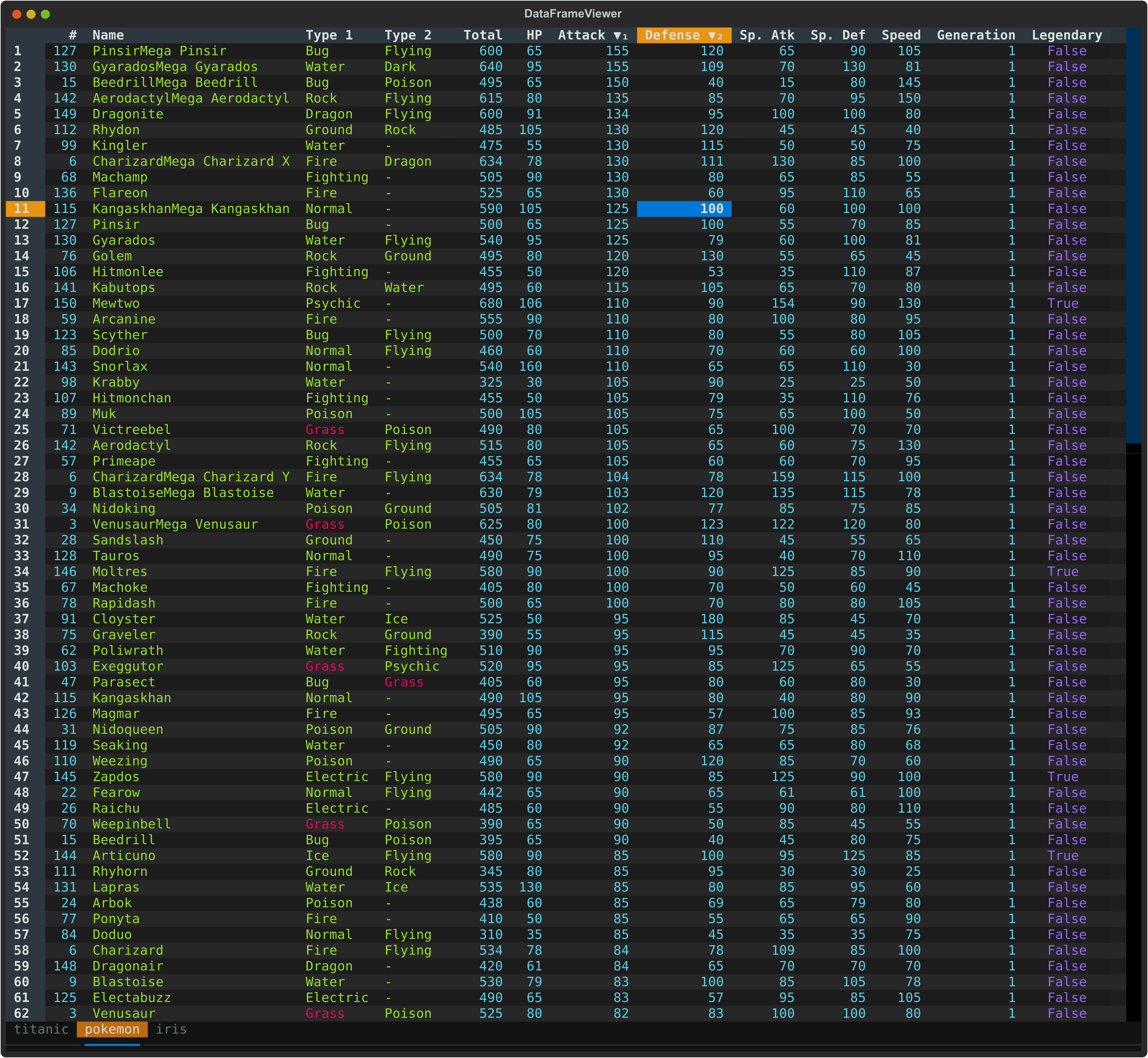
A powerful, interactive terminal-based viewer/editor for CSV/TSV/PSV/Excel/Parquet/JSON/NDJSON built with Python, [Polars](https://pola.rs/), and [Textual](https://textual.textualize.io/). Inspired by [VisiData](https://www.visidata.org/), this tool provides smooth keyboard navigation, data manipulation, and a clean interface for exploring tabular data directly in terminal with multi-tab support for multiple files!
|
|
43
43
|
|
|
44
44
|
|
|
45
45
|
|
|
@@ -167,28 +167,31 @@ When multiple files are opened:
|
|
|
167
167
|
## Command Line Options
|
|
168
168
|
|
|
169
169
|
```
|
|
170
|
-
usage: dv [-h] [-f {csv,excel,
|
|
170
|
+
usage: dv [-h] [-V] [-f {csv,json,excel,ndjson,psv,parquet,tsv}] [-H] [-I] [-t] [-E] [-c [COMMENT_PREFIX]] [-q [QUOTE_CHAR]] [-l SKIP_LINES] [-a SKIP_ROWS_AFTER_HEADER] [-n NULL [NULL ...]] [files ...]
|
|
171
171
|
|
|
172
|
-
Interactive terminal based viewer/editor for tabular data (e.g., CSV/
|
|
172
|
+
Interactive terminal based viewer/editor for tabular data (e.g., CSV/Excel).
|
|
173
173
|
|
|
174
174
|
positional arguments:
|
|
175
|
-
files
|
|
175
|
+
files Files to view (or read from stdin)
|
|
176
176
|
|
|
177
177
|
options:
|
|
178
178
|
-h, --help show this help message and exit
|
|
179
|
-
-
|
|
180
|
-
|
|
181
|
-
|
|
182
|
-
-
|
|
179
|
+
-V, --version show program's version number and exit
|
|
180
|
+
-f, --format {csv,json,excel,ndjson,psv,parquet,tsv}
|
|
181
|
+
Specify the format of the input files (csv, excel, tsv etc.)
|
|
182
|
+
-H, --no-header Specify that input files have no header row when reading CSV/TSV
|
|
183
|
+
-I, --no-inference Do not infer data types when reading CSV/TSV
|
|
184
|
+
-t, --truncate-ragged-lines
|
|
185
|
+
Truncate ragged lines when reading CSV/TSV
|
|
183
186
|
-E, --ignore-errors Ignore errors when reading CSV/TSV
|
|
184
|
-
-c, --comment-prefix COMMENT_PREFIX
|
|
185
|
-
Comment lines are skipped when reading CSV/TSV
|
|
186
|
-
-q, --quote-char QUOTE_CHAR
|
|
187
|
-
Quote character for reading CSV/TSV
|
|
187
|
+
-c, --comment-prefix [COMMENT_PREFIX]
|
|
188
|
+
Comment lines are skipped when reading CSV/TSV
|
|
189
|
+
-q, --quote-char [QUOTE_CHAR]
|
|
190
|
+
Quote character for reading CSV/TSV
|
|
188
191
|
-l, --skip-lines SKIP_LINES
|
|
189
|
-
Skip lines when reading CSV/TSV
|
|
192
|
+
Skip lines when reading CSV/TSV
|
|
190
193
|
-a, --skip-rows-after-header SKIP_ROWS_AFTER_HEADER
|
|
191
|
-
Skip rows after header when reading CSV/TSV
|
|
194
|
+
Skip rows after header when reading CSV/TSV
|
|
192
195
|
-n, --null NULL [NULL ...]
|
|
193
196
|
Values to interpret as null values when reading CSV/TSV
|
|
194
197
|
```
|
|
@@ -302,6 +305,7 @@ zcat compressed_data.csv.gz | dv -f csv
|
|
|
302
305
|
| `_` (underscore) | Toggle column full width |
|
|
303
306
|
| `z` | Freeze rows and columns |
|
|
304
307
|
| `,` | Toggle thousand separator for numeric display |
|
|
308
|
+
| `&` | Set current row as the new header row |
|
|
305
309
|
| `h` | Hide current column |
|
|
306
310
|
| `H` | Show all hidden rows/columns |
|
|
307
311
|
|
|
@@ -696,7 +700,7 @@ Press `,` to toggle thousand separator formatting for numeric data:
|
|
|
696
700
|
|
|
697
701
|
### 15. Save File
|
|
698
702
|
|
|
699
|
-
Press `Ctrl+S` to save filtered, edited, or sorted data back to file
|
|
703
|
+
Press `Ctrl+S` to save filtered, edited, or sorted data back to file. The output format is automatically determined by the file extension, making it easy to convert between different formats (e.g., CSV to TSV).
|
|
700
704
|
|
|
701
705
|
### 16. Undo/Redo/Reset
|
|
702
706
|
|
|
@@ -1,6 +1,6 @@
|
|
|
1
1
|
# DataFrame Textual
|
|
2
2
|
|
|
3
|
-
A powerful, interactive terminal-based viewer/editor for CSV/TSV/Excel/Parquet/JSON/NDJSON built with Python, [Polars](https://pola.rs/), and [Textual](https://textual.textualize.io/). Inspired by [VisiData](https://www.visidata.org/), this tool provides smooth keyboard navigation, data manipulation, and a clean interface for exploring tabular data directly in terminal with multi-tab support for multiple files!
|
|
3
|
+
A powerful, interactive terminal-based viewer/editor for CSV/TSV/PSV/Excel/Parquet/JSON/NDJSON built with Python, [Polars](https://pola.rs/), and [Textual](https://textual.textualize.io/). Inspired by [VisiData](https://www.visidata.org/), this tool provides smooth keyboard navigation, data manipulation, and a clean interface for exploring tabular data directly in terminal with multi-tab support for multiple files!
|
|
4
4
|
|
|
5
5
|

|
|
6
6
|
|
|
@@ -128,28 +128,31 @@ When multiple files are opened:
|
|
|
128
128
|
## Command Line Options
|
|
129
129
|
|
|
130
130
|
```
|
|
131
|
-
usage: dv [-h] [-f {csv,excel,
|
|
131
|
+
usage: dv [-h] [-V] [-f {csv,json,excel,ndjson,psv,parquet,tsv}] [-H] [-I] [-t] [-E] [-c [COMMENT_PREFIX]] [-q [QUOTE_CHAR]] [-l SKIP_LINES] [-a SKIP_ROWS_AFTER_HEADER] [-n NULL [NULL ...]] [files ...]
|
|
132
132
|
|
|
133
|
-
Interactive terminal based viewer/editor for tabular data (e.g., CSV/
|
|
133
|
+
Interactive terminal based viewer/editor for tabular data (e.g., CSV/Excel).
|
|
134
134
|
|
|
135
135
|
positional arguments:
|
|
136
|
-
files
|
|
136
|
+
files Files to view (or read from stdin)
|
|
137
137
|
|
|
138
138
|
options:
|
|
139
139
|
-h, --help show this help message and exit
|
|
140
|
-
-
|
|
141
|
-
|
|
142
|
-
|
|
143
|
-
-
|
|
140
|
+
-V, --version show program's version number and exit
|
|
141
|
+
-f, --format {csv,json,excel,ndjson,psv,parquet,tsv}
|
|
142
|
+
Specify the format of the input files (csv, excel, tsv etc.)
|
|
143
|
+
-H, --no-header Specify that input files have no header row when reading CSV/TSV
|
|
144
|
+
-I, --no-inference Do not infer data types when reading CSV/TSV
|
|
145
|
+
-t, --truncate-ragged-lines
|
|
146
|
+
Truncate ragged lines when reading CSV/TSV
|
|
144
147
|
-E, --ignore-errors Ignore errors when reading CSV/TSV
|
|
145
|
-
-c, --comment-prefix COMMENT_PREFIX
|
|
146
|
-
Comment lines are skipped when reading CSV/TSV
|
|
147
|
-
-q, --quote-char QUOTE_CHAR
|
|
148
|
-
Quote character for reading CSV/TSV
|
|
148
|
+
-c, --comment-prefix [COMMENT_PREFIX]
|
|
149
|
+
Comment lines are skipped when reading CSV/TSV
|
|
150
|
+
-q, --quote-char [QUOTE_CHAR]
|
|
151
|
+
Quote character for reading CSV/TSV
|
|
149
152
|
-l, --skip-lines SKIP_LINES
|
|
150
|
-
Skip lines when reading CSV/TSV
|
|
153
|
+
Skip lines when reading CSV/TSV
|
|
151
154
|
-a, --skip-rows-after-header SKIP_ROWS_AFTER_HEADER
|
|
152
|
-
Skip rows after header when reading CSV/TSV
|
|
155
|
+
Skip rows after header when reading CSV/TSV
|
|
153
156
|
-n, --null NULL [NULL ...]
|
|
154
157
|
Values to interpret as null values when reading CSV/TSV
|
|
155
158
|
```
|
|
@@ -263,6 +266,7 @@ zcat compressed_data.csv.gz | dv -f csv
|
|
|
263
266
|
| `_` (underscore) | Toggle column full width |
|
|
264
267
|
| `z` | Freeze rows and columns |
|
|
265
268
|
| `,` | Toggle thousand separator for numeric display |
|
|
269
|
+
| `&` | Set current row as the new header row |
|
|
266
270
|
| `h` | Hide current column |
|
|
267
271
|
| `H` | Show all hidden rows/columns |
|
|
268
272
|
|
|
@@ -657,7 +661,7 @@ Press `,` to toggle thousand separator formatting for numeric data:
|
|
|
657
661
|
|
|
658
662
|
### 15. Save File
|
|
659
663
|
|
|
660
|
-
Press `Ctrl+S` to save filtered, edited, or sorted data back to file
|
|
664
|
+
Press `Ctrl+S` to save filtered, edited, or sorted data back to file. The output format is automatically determined by the file extension, making it easy to convert between different formats (e.g., CSV to TSV).
|
|
661
665
|
|
|
662
666
|
### 16. Undo/Redo/Reset
|
|
663
667
|
|
|
@@ -12,7 +12,7 @@ import polars as pl
|
|
|
12
12
|
from rich.text import Text
|
|
13
13
|
|
|
14
14
|
# Supported file formats
|
|
15
|
-
SUPPORTED_FORMATS =
|
|
15
|
+
SUPPORTED_FORMATS = ["tsv", "csv", "psv", "excel", "parquet", "json", "ndjson"]
|
|
16
16
|
|
|
17
17
|
|
|
18
18
|
# Boolean string mappings
|
|
@@ -675,10 +675,10 @@ def load_file(
|
|
|
675
675
|
file_format = ext.removeprefix(".")
|
|
676
676
|
|
|
677
677
|
# Load based on file format
|
|
678
|
-
if file_format in ("csv", "tsv"):
|
|
678
|
+
if file_format in ("csv", "tsv", "psv"):
|
|
679
679
|
lf = pl.scan_csv(
|
|
680
680
|
source,
|
|
681
|
-
separator="\t" if file_format == "tsv" else ",",
|
|
681
|
+
separator="\t" if file_format == "tsv" else ("|" if file_format == "psv" else ","),
|
|
682
682
|
has_header=has_header,
|
|
683
683
|
infer_schema=infer_schema,
|
|
684
684
|
comment_prefix=comment_prefix,
|
{dataframe_textual-2.2.3 → dataframe_textual-2.4.0}/src/dataframe_textual/data_frame_table.py
RENAMED
|
@@ -1,5 +1,6 @@
|
|
|
1
1
|
"""DataFrameTable widget for displaying and interacting with Polars DataFrames."""
|
|
2
2
|
|
|
3
|
+
import io
|
|
3
4
|
import sys
|
|
4
5
|
from collections import defaultdict, deque
|
|
5
6
|
from dataclasses import dataclass
|
|
@@ -140,6 +141,7 @@ class DataFrameTable(DataTable):
|
|
|
140
141
|
- **Ctrl+F** - 📜 Page down
|
|
141
142
|
- **Ctrl+B** - 📜 Page up
|
|
142
143
|
- **PgUp/PgDn** - 📜 Page up/down
|
|
144
|
+
- **&** - 📌 Mark current row as header
|
|
143
145
|
|
|
144
146
|
## ♻️ Undo/Redo/Reset
|
|
145
147
|
- **u** - ↩️ Undo last action
|
|
@@ -248,6 +250,7 @@ class DataFrameTable(DataTable):
|
|
|
248
250
|
("comma", "toggle_thousand_separator", "Toggle thousand separator"), # `,`
|
|
249
251
|
("underscore", "expand_column", "Expand column to full width"), # `_`
|
|
250
252
|
("circumflex_accent", "toggle_rid", "Toggle internal row index"), # `^`
|
|
253
|
+
("ampersand", "set_cursor_row_as_header", "Set cursor row as the new header row"), # `&`
|
|
251
254
|
# Copy
|
|
252
255
|
("c", "copy_cell", "Copy cell to clipboard"),
|
|
253
256
|
("ctrl+c", "copy_column", "Copy column to clipboard"),
|
|
@@ -725,6 +728,10 @@ class DataFrameTable(DataTable):
|
|
|
725
728
|
"""Toggle the internal row index column visibility."""
|
|
726
729
|
self.do_toggle_rid()
|
|
727
730
|
|
|
731
|
+
def action_set_cursor_row_as_header(self) -> None:
|
|
732
|
+
"""Set cursor row as the new header row."""
|
|
733
|
+
self.do_set_cursor_row_as_header()
|
|
734
|
+
|
|
728
735
|
def action_show_hidden_rows_columns(self) -> None:
|
|
729
736
|
"""Show all hidden rows/columns."""
|
|
730
737
|
self.do_show_hidden_rows_columns()
|
|
@@ -1791,6 +1798,48 @@ class DataFrameTable(DataTable):
|
|
|
1791
1798
|
# Recreate table for display
|
|
1792
1799
|
self.setup_table()
|
|
1793
1800
|
|
|
1801
|
+
def do_set_cursor_row_as_header(self) -> None:
|
|
1802
|
+
"""Set cursor row as the new header row."""
|
|
1803
|
+
ridx = self.cursor_row_idx
|
|
1804
|
+
|
|
1805
|
+
# Get the new header values
|
|
1806
|
+
new_header = list(self.df.row(ridx))
|
|
1807
|
+
new_header[-1] = RID # Ensure last column remains RID
|
|
1808
|
+
|
|
1809
|
+
# Handle duplicate column names by appending suffixes
|
|
1810
|
+
seen = {}
|
|
1811
|
+
for i, col in enumerate(new_header):
|
|
1812
|
+
if col in seen:
|
|
1813
|
+
seen[col] += 1
|
|
1814
|
+
new_header[i] = f"{col}_{seen[col]}"
|
|
1815
|
+
else:
|
|
1816
|
+
seen[col] = 0
|
|
1817
|
+
|
|
1818
|
+
# Create a mapping of old column names to new column names
|
|
1819
|
+
col_rename_map = {old_col: str(new_col) for old_col, new_col in zip(self.df.columns, new_header)}
|
|
1820
|
+
|
|
1821
|
+
# Add to history
|
|
1822
|
+
self.add_history(f"Set row [$success]{ridx + 1}[/] as header", dirty=False)
|
|
1823
|
+
|
|
1824
|
+
# Rename columns in the dataframe
|
|
1825
|
+
self.df = self.df.slice(ridx + 1).rename(col_rename_map)
|
|
1826
|
+
|
|
1827
|
+
# Write to string buffer
|
|
1828
|
+
buffer = io.StringIO()
|
|
1829
|
+
self.df.write_csv(buffer)
|
|
1830
|
+
|
|
1831
|
+
# Re-read with inferred schema to reset dtypes
|
|
1832
|
+
buffer.seek(0)
|
|
1833
|
+
self.df = pl.read_csv(buffer)
|
|
1834
|
+
|
|
1835
|
+
# Recreate table for display
|
|
1836
|
+
self.setup_table()
|
|
1837
|
+
|
|
1838
|
+
# Move cursor to first column
|
|
1839
|
+
self.move_cursor(row=ridx, column=0)
|
|
1840
|
+
|
|
1841
|
+
# self.notify(f"Set row [$success]{ridx + 1}[/] as header", title="Set Row as Header")
|
|
1842
|
+
|
|
1794
1843
|
def do_show_hidden_rows_columns(self) -> None:
|
|
1795
1844
|
"""Show all hidden rows/columns by recreating the table."""
|
|
1796
1845
|
if not self.hidden_columns and self.df_view is None:
|
|
File without changes
|
|
File without changes
|
|
File without changes
|
|
File without changes
|
|
File without changes
|
|
File without changes
|
|
File without changes
|
{dataframe_textual-2.2.3 → dataframe_textual-2.4.0}/src/dataframe_textual/data_frame_help_panel.py
RENAMED
|
File without changes
|
{dataframe_textual-2.2.3 → dataframe_textual-2.4.0}/src/dataframe_textual/data_frame_viewer.py
RENAMED
|
File without changes
|
|
File without changes
|
|
File without changes
|
|
File without changes
|