dao-modman 0.1.0__tar.gz
This diff represents the content of publicly available package versions that have been released to one of the supported registries. The information contained in this diff is provided for informational purposes only and reflects changes between package versions as they appear in their respective public registries.
- dao_modman-0.1.0/.gitignore +9 -0
- dao_modman-0.1.0/LICENSE +21 -0
- dao_modman-0.1.0/PKG-INFO +161 -0
- dao_modman-0.1.0/README.md +132 -0
- dao_modman-0.1.0/docs/Readme.md +323 -0
- dao_modman-0.1.0/docs/img/ui-screenshot-1.png +0 -0
- dao_modman-0.1.0/pyproject.toml +61 -0
- dao_modman-0.1.0/src/dao_modman/__init__.py +0 -0
- dao_modman-0.1.0/src/dao_modman/__main__.py +252 -0
- dao_modman-0.1.0/src/dao_modman/assets/presets.toml +28 -0
- dao_modman-0.1.0/src/dao_modman/core/__init__.py +0 -0
- dao_modman-0.1.0/src/dao_modman/core/addins.py +120 -0
- dao_modman-0.1.0/src/dao_modman/core/archive.py +129 -0
- dao_modman-0.1.0/src/dao_modman/core/chargen.py +186 -0
- dao_modman-0.1.0/src/dao_modman/core/config.py +100 -0
- dao_modman-0.1.0/src/dao_modman/core/console.py +126 -0
- dao_modman-0.1.0/src/dao_modman/core/dazip.py +75 -0
- dao_modman-0.1.0/src/dao_modman/core/deploy.py +543 -0
- dao_modman-0.1.0/src/dao_modman/core/erf.py +83 -0
- dao_modman-0.1.0/src/dao_modman/core/gff.py +174 -0
- dao_modman-0.1.0/src/dao_modman/core/ignore.py +64 -0
- dao_modman-0.1.0/src/dao_modman/core/install.py +97 -0
- dao_modman-0.1.0/src/dao_modman/core/ipc.py +119 -0
- dao_modman-0.1.0/src/dao_modman/core/itemlists.py +175 -0
- dao_modman-0.1.0/src/dao_modman/core/laa.py +102 -0
- dao_modman-0.1.0/src/dao_modman/core/launch.py +33 -0
- dao_modman-0.1.0/src/dao_modman/core/library.py +338 -0
- dao_modman-0.1.0/src/dao_modman/core/metadata.py +176 -0
- dao_modman-0.1.0/src/dao_modman/core/models.py +112 -0
- dao_modman-0.1.0/src/dao_modman/core/moditems.py +205 -0
- dao_modman-0.1.0/src/dao_modman/core/nexus.py +244 -0
- dao_modman-0.1.0/src/dao_modman/core/overridepkg.py +192 -0
- dao_modman-0.1.0/src/dao_modman/core/pathops.py +151 -0
- dao_modman-0.1.0/src/dao_modman/core/paths.py +151 -0
- dao_modman-0.1.0/src/dao_modman/core/presets.py +109 -0
- dao_modman-0.1.0/src/dao_modman/core/report.py +210 -0
- dao_modman-0.1.0/src/dao_modman/core/resources.py +79 -0
- dao_modman-0.1.0/src/dao_modman/core/revisions.py +69 -0
- dao_modman-0.1.0/src/dao_modman/core/terminal.py +61 -0
- dao_modman-0.1.0/src/dao_modman/core/textures.py +148 -0
- dao_modman-0.1.0/src/dao_modman/tui/__init__.py +0 -0
- dao_modman-0.1.0/src/dao_modman/tui/app.py +1049 -0
- dao_modman-0.1.0/src/dao_modman/tui/app.tcss +126 -0
- dao_modman-0.1.0/src/dao_modman/tui/screens.py +748 -0
- dao_modman-0.1.0/tests/__init__.py +0 -0
- dao_modman-0.1.0/tests/conftest.py +161 -0
- dao_modman-0.1.0/tests/gamefiles.py +116 -0
- dao_modman-0.1.0/tests/test_addins.py +114 -0
- dao_modman-0.1.0/tests/test_archive_library.py +249 -0
- dao_modman-0.1.0/tests/test_chargen_report.py +163 -0
- dao_modman-0.1.0/tests/test_console.py +168 -0
- dao_modman-0.1.0/tests/test_deploy.py +525 -0
- dao_modman-0.1.0/tests/test_ipc.py +129 -0
- dao_modman-0.1.0/tests/test_itemlists.py +132 -0
- dao_modman-0.1.0/tests/test_laa.py +123 -0
- dao_modman-0.1.0/tests/test_metadata.py +85 -0
- dao_modman-0.1.0/tests/test_moditems.py +133 -0
- dao_modman-0.1.0/tests/test_nexus.py +231 -0
- dao_modman-0.1.0/tests/test_overridepkg.py +279 -0
- dao_modman-0.1.0/tests/test_pathops.py +175 -0
- dao_modman-0.1.0/tests/test_paths_config.py +106 -0
- dao_modman-0.1.0/tests/test_presets.py +127 -0
- dao_modman-0.1.0/tests/test_report.py +210 -0
- dao_modman-0.1.0/tests/test_revisions.py +111 -0
- dao_modman-0.1.0/tests/test_terminal.py +57 -0
- dao_modman-0.1.0/tests/test_textures.py +134 -0
- dao_modman-0.1.0/tests/test_tui.py +1371 -0
dao_modman-0.1.0/LICENSE
ADDED
|
@@ -0,0 +1,21 @@
|
|
|
1
|
+
MIT License
|
|
2
|
+
|
|
3
|
+
Copyright (c) 2026 Sebastian Mahr
|
|
4
|
+
|
|
5
|
+
Permission is hereby granted, free of charge, to any person obtaining a copy
|
|
6
|
+
of this software and associated documentation files (the "Software"), to deal
|
|
7
|
+
in the Software without restriction, including without limitation the rights
|
|
8
|
+
to use, copy, modify, merge, publish, distribute, sublicense, and/or sell
|
|
9
|
+
copies of the Software, and to permit persons to whom the Software is
|
|
10
|
+
furnished to do so, subject to the following conditions:
|
|
11
|
+
|
|
12
|
+
The above copyright notice and this permission notice shall be included in all
|
|
13
|
+
copies or substantial portions of the Software.
|
|
14
|
+
|
|
15
|
+
THE SOFTWARE IS PROVIDED "AS IS", WITHOUT WARRANTY OF ANY KIND, EXPRESS OR
|
|
16
|
+
IMPLIED, INCLUDING BUT NOT LIMITED TO THE WARRANTIES OF MERCHANTABILITY,
|
|
17
|
+
FITNESS FOR A PARTICULAR PURPOSE AND NONINFRINGEMENT. IN NO EVENT SHALL THE
|
|
18
|
+
AUTHORS OR COPYRIGHT HOLDERS BE LIABLE FOR ANY CLAIM, DAMAGES OR OTHER
|
|
19
|
+
LIABILITY, WHETHER IN AN ACTION OF CONTRACT, TORT OR OTHERWISE, ARISING FROM,
|
|
20
|
+
OUT OF OR IN CONNECTION WITH THE SOFTWARE OR THE USE OR OTHER DEALINGS IN THE
|
|
21
|
+
SOFTWARE.
|
|
@@ -0,0 +1,161 @@
|
|
|
1
|
+
Metadata-Version: 2.5
|
|
2
|
+
Name: dao-modman
|
|
3
|
+
Version: 0.1.0
|
|
4
|
+
Summary: Terminal mod manager for Dragon Age: Origins
|
|
5
|
+
Project-URL: Homepage, https://github.com/DrHarib0/dao-modman
|
|
6
|
+
Project-URL: Documentation, https://github.com/DrHarib0/dao-modman/blob/main/docs/Readme.md
|
|
7
|
+
Project-URL: Issues, https://github.com/DrHarib0/dao-modman/issues
|
|
8
|
+
Author: Sebastian Mahr
|
|
9
|
+
License-Expression: MIT
|
|
10
|
+
License-File: LICENSE
|
|
11
|
+
Keywords: dragon age,dragon age origins,mod manager,modding,nexus mods,proton,tui
|
|
12
|
+
Classifier: Development Status :: 4 - Beta
|
|
13
|
+
Classifier: Environment :: Console
|
|
14
|
+
Classifier: Intended Audience :: End Users/Desktop
|
|
15
|
+
Classifier: Operating System :: POSIX :: Linux
|
|
16
|
+
Classifier: Programming Language :: Python :: 3 :: Only
|
|
17
|
+
Classifier: Programming Language :: Python :: 3.12
|
|
18
|
+
Classifier: Programming Language :: Python :: 3.13
|
|
19
|
+
Classifier: Programming Language :: Python :: 3.14
|
|
20
|
+
Classifier: Topic :: Games/Entertainment :: Role-Playing
|
|
21
|
+
Requires-Python: >=3.12
|
|
22
|
+
Requires-Dist: httpx2>=2.13
|
|
23
|
+
Requires-Dist: pathspec>=0.12
|
|
24
|
+
Requires-Dist: py7zr>=0.21
|
|
25
|
+
Requires-Dist: python-dotenv>=1.0
|
|
26
|
+
Requires-Dist: textual>=1.0
|
|
27
|
+
Requires-Dist: tomli-w>=1.0
|
|
28
|
+
Description-Content-Type: text/markdown
|
|
29
|
+
|
|
30
|
+
# dao-modman
|
|
31
|
+
|
|
32
|
+
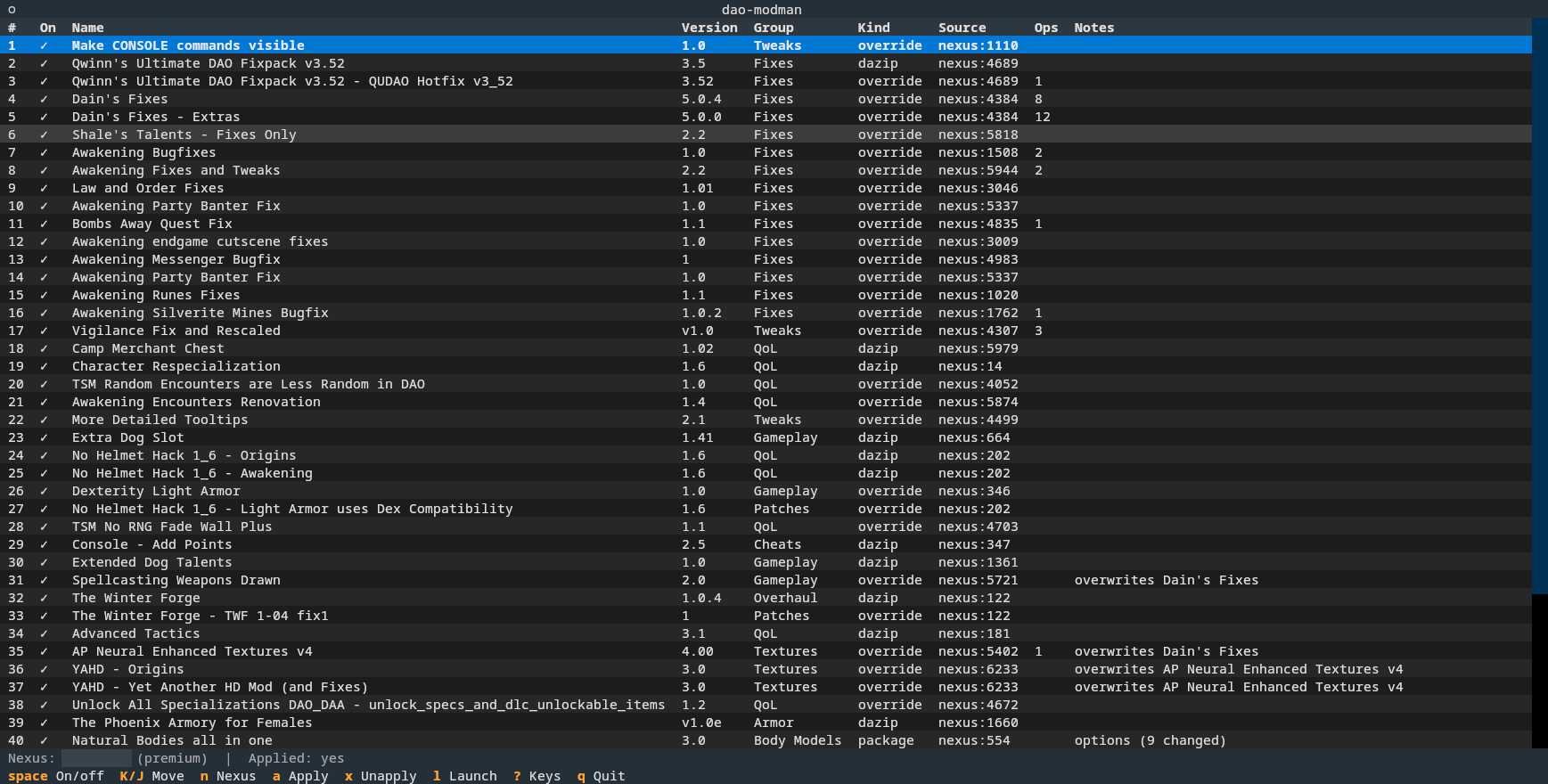
Terminal based mod manager for
|
|
33
|
+
[**Dragon Age: Origins**](https://store.steampowered.com/app/47810/Dragon_Age_Origins__Ultimate_Edition/)
|
|
34
|
+
on Steam/Proton (Linux), heavily inspired by [MO2](https://www.modorganizer.org/).
|
|
35
|
+
|
|
36
|
+
|
|
37
|
+
|
|
38
|
+
## A tribute to a masterpiece
|
|
39
|
+
|
|
40
|
+
DA:O is, in the author's opinion, one of the greatest RPGs ever made. It was released in 2009, more than 15 years ago, and
|
|
41
|
+
is still the best entry of its series. While the writing has aged perfectly, the graphics have not, and the mechanics
|
|
42
|
+
only in part. Combat is still fun, especially at higher difficulty levels.
|
|
43
|
+
|
|
44
|
+
## Motivation
|
|
45
|
+
|
|
46
|
+
The computer you are running this on is probably very different from the one you used when this game came out. If you
|
|
47
|
+
have moved on from Windows to Linux since then like the author did, the goal of this project is to be the only tool you need.
|
|
48
|
+
|
|
49
|
+
## Features
|
|
50
|
+
- Nexus Integration: Download mods from [nexusmods](https://www.nexusmods.com/games/dragonage)
|
|
51
|
+
- Archive formats: `.dazip`, `.override`, `.zip`, `.7z` and `.rar`, also nested
|
|
52
|
+
- Conflict Detection and Resolving
|
|
53
|
+
- Mod Ordering: no more prefixes for mod directories - load order is defined in the manager
|
|
54
|
+
- Mix and Match: pick which parts of a mod you want, in the UI. This selection persists if you disable a mod and reenable it later
|
|
55
|
+
- Setup: to get the game running smoothly, `dao-modman` handles the technical stuff:
|
|
56
|
+
- LAA Patch so the game can use 4GB of RAM instead of its intended 2GB
|
|
57
|
+
- enabling the developer console
|
|
58
|
+
- scaling down (modded) textures on heavily modded games to fit into the 4GB limit
|
|
59
|
+
- `dazip` installation: No need to run `daoupdater` or other tools via wine
|
|
60
|
+
- `chargenmorphcfg.xml` merging: runs automatically if you add/remove a mod containing character morphs
|
|
61
|
+
- Mixed mods with both `addins` and `override` files: these often need manual steps with the Windows-based mod managers.
|
|
62
|
+
Some very popular mods have a lot of posts about this problem, like the [Winter Forge](https://www.nexusmods.com/dragonage/mods/122).
|
|
63
|
+
- Configurable mods: supports the `.override` format introduced by [DAO-Modmanager](https://www.nexusmods.com/dragonage/mods/277)
|
|
64
|
+
- Item Browser: list items added by a mod. Automatically writes the item DB for [Add any item visual deluxe](https://www.nexusmods.com/dragonage/mods/1825)
|
|
65
|
+
when installed, freeing you from yet another windows tool to run manually.
|
|
66
|
+
|
|
67
|
+
## Supported platforms
|
|
68
|
+
|
|
69
|
+
Currently only the Steam release on Linux (Proton). Windows and the GOG/EA releases are not supported
|
|
70
|
+
yet. Porting is not a big deal, but it needs testing on those setups: volunteers are welcome.
|
|
71
|
+
|
|
72
|
+
## Setup
|
|
73
|
+
|
|
74
|
+
Install it from PyPI with [uv](https://docs.astral.sh/uv/getting-started/installation/), or with pipx:
|
|
75
|
+
|
|
76
|
+
uv tool install dao-modman # or: pipx install dao-modman
|
|
77
|
+
|
|
78
|
+
Then store your personal API key from nexusmods.com where dao-modman finds it:
|
|
79
|
+
|
|
80
|
+
mkdir -p ~/.config/dao-modman
|
|
81
|
+
echo 'NEXUS_API_TOKEN=...' > ~/.config/dao-modman/.env
|
|
82
|
+
chmod 600 ~/.config/dao-modman/.env
|
|
83
|
+
|
|
84
|
+
The token is read from the environment, `./.env`, or `~/.config/dao-modman/.env`.
|
|
85
|
+
Go to [Account Settings/API Keys](https://www.nexusmods.com/settings/api-keys) to create a token.
|
|
86
|
+
The usual security recommendations apply. If this gets more than 10 users, the author will apply for an app-specific API key.
|
|
87
|
+
|
|
88
|
+
## Run
|
|
89
|
+
|
|
90
|
+
To run the mod manager in UI mode, use:
|
|
91
|
+
|
|
92
|
+
dao-modman # run the TUI
|
|
93
|
+
|
|
94
|
+
Most functionality is also exposed via a command line interface:
|
|
95
|
+
|
|
96
|
+
dao-modman nxm 'nxm://...' # hand a "Mod Manager Download" link to the TUI
|
|
97
|
+
dao-modman install-nxm-handler # register as nxm:// handler
|
|
98
|
+
dao-modman laa status|restore|patch --exe PATH # Large Address Aware patch
|
|
99
|
+
dao-modman console status|enable|disable # developer console
|
|
100
|
+
dao-modman revisions init # keep a git history of the library's metadata
|
|
101
|
+
dao-modman chargen # check the merged character creator list
|
|
102
|
+
dao-modman conflicts # which mods ship the same files, and who wins
|
|
103
|
+
dao-modman conflicts accept NAME ... | --all # mark conflicts as intended
|
|
104
|
+
|
|
105
|
+
`.rar` archives need `unrar`, `7z` or `bsdtar` on PATH; they are tried in that order, since
|
|
106
|
+
`bsdtar` cannot read solid archives. Some mods on Nexus are only available as `.rar`.
|
|
107
|
+
|
|
108
|
+
|
|
109
|
+
## UI Hotkeys
|
|
110
|
+
|
|
111
|
+
The bar at the bottom shows the everyday keys; `?` lists all of them.
|
|
112
|
+
|
|
113
|
+
| Key | Action |
|
|
114
|
+
| ---------------- | ---------------------------------------- |
|
|
115
|
+
| `space` | enable / disable mod |
|
|
116
|
+
| `K` / `J` | move mod up / down in the load order |
|
|
117
|
+
| `r` | rename mod (display name only) |
|
|
118
|
+
| `g` | set group |
|
|
119
|
+
| `p` | options of an override package |
|
|
120
|
+
| `n` | add mod from Nexus (URL, id or `nxm://`) |
|
|
121
|
+
| `i` | import a local archive |
|
|
122
|
+
| `e` | edit path operations |
|
|
123
|
+
| `o` | open the mod's Nexus page in the browser |
|
|
124
|
+
| `c` | check Nexus for updates |
|
|
125
|
+
| `u` | update the selected mod in place |
|
|
126
|
+
| `v` | conflicts of the selected mod |
|
|
127
|
+
| `L` | items the mod adds, by in-game name |
|
|
128
|
+
| `a` / `x` | apply / unapply |
|
|
129
|
+
| `l` | launch the game through Steam |
|
|
130
|
+
| `h` | hide / show the game's official DLC |
|
|
131
|
+
| `/` | filter by name or group (`esc` clears) |
|
|
132
|
+
| `t` | tools (LAA, textures, all conflicts ...) |
|
|
133
|
+
| `delete` | remove mod from the library |
|
|
134
|
+
|
|
135
|
+
|
|
136
|
+
## Usage
|
|
137
|
+
|
|
138
|
+
See the [user and behind-the-scenes documentation](https://github.com/DrHarib0/dao-modman/blob/main/docs/Readme.md).
|
|
139
|
+
|
|
140
|
+
## License
|
|
141
|
+
|
|
142
|
+
[MIT](https://github.com/DrHarib0/dao-modman/blob/main/LICENSE): free to use, change and pass on, as long as the copyright notice naming the author
|
|
143
|
+
stays with it.
|
|
144
|
+
|
|
145
|
+
## Disclosure
|
|
146
|
+
|
|
147
|
+
Most of the code in this project was co-authored by claude. In-game testing was all done by a human, namely the author of this project.
|
|
148
|
+
|
|
149
|
+
## Contributing
|
|
150
|
+
|
|
151
|
+
Testers on other platforms are very welcome: Windows, and the GOG and EA releases of the game. If you
|
|
152
|
+
have such a setup and want to help, open an issue and say what you run.
|
|
153
|
+
|
|
154
|
+
Pull requests are welcome too. Please run the tests and the linter (see below) before sending one.
|
|
155
|
+
|
|
156
|
+
## Development
|
|
157
|
+
|
|
158
|
+
To work from source, clone this repository and run `uv sync`; then start it with `uv run dao-modman`.
|
|
159
|
+
|
|
160
|
+
uv run pytest # tests
|
|
161
|
+
uv run ruff check . && uv run ruff format . # lint and format
|
|
@@ -0,0 +1,132 @@
|
|
|
1
|
+
# dao-modman
|
|
2
|
+
|
|
3
|
+
Terminal based mod manager for
|
|
4
|
+
[**Dragon Age: Origins**](https://store.steampowered.com/app/47810/Dragon_Age_Origins__Ultimate_Edition/)
|
|
5
|
+
on Steam/Proton (Linux), heavily inspired by [MO2](https://www.modorganizer.org/).
|
|
6
|
+
|
|
7
|
+

|
|
8
|
+
|
|
9
|
+
## A tribute to a masterpiece
|
|
10
|
+
|
|
11
|
+
DA:O is, in the author's opinion, one of the greatest RPGs ever made. It was released in 2009, more than 15 years ago, and
|
|
12
|
+
is still the best entry of its series. While the writing has aged perfectly, the graphics have not, and the mechanics
|
|
13
|
+
only in part. Combat is still fun, especially at higher difficulty levels.
|
|
14
|
+
|
|
15
|
+
## Motivation
|
|
16
|
+
|
|
17
|
+
The computer you are running this on is probably very different from the one you used when this game came out. If you
|
|
18
|
+
have moved on from Windows to Linux since then like the author did, the goal of this project is to be the only tool you need.
|
|
19
|
+
|
|
20
|
+
## Features
|
|
21
|
+
- Nexus Integration: Download mods from [nexusmods](https://www.nexusmods.com/games/dragonage)
|
|
22
|
+
- Archive formats: `.dazip`, `.override`, `.zip`, `.7z` and `.rar`, also nested
|
|
23
|
+
- Conflict Detection and Resolving
|
|
24
|
+
- Mod Ordering: no more prefixes for mod directories - load order is defined in the manager
|
|
25
|
+
- Mix and Match: pick which parts of a mod you want, in the UI. This selection persists if you disable a mod and reenable it later
|
|
26
|
+
- Setup: to get the game running smoothly, `dao-modman` handles the technical stuff:
|
|
27
|
+
- LAA Patch so the game can use 4GB of RAM instead of its intended 2GB
|
|
28
|
+
- enabling the developer console
|
|
29
|
+
- scaling down (modded) textures on heavily modded games to fit into the 4GB limit
|
|
30
|
+
- `dazip` installation: No need to run `daoupdater` or other tools via wine
|
|
31
|
+
- `chargenmorphcfg.xml` merging: runs automatically if you add/remove a mod containing character morphs
|
|
32
|
+
- Mixed mods with both `addins` and `override` files: these often need manual steps with the Windows-based mod managers.
|
|
33
|
+
Some very popular mods have a lot of posts about this problem, like the [Winter Forge](https://www.nexusmods.com/dragonage/mods/122).
|
|
34
|
+
- Configurable mods: supports the `.override` format introduced by [DAO-Modmanager](https://www.nexusmods.com/dragonage/mods/277)
|
|
35
|
+
- Item Browser: list items added by a mod. Automatically writes the item DB for [Add any item visual deluxe](https://www.nexusmods.com/dragonage/mods/1825)
|
|
36
|
+
when installed, freeing you from yet another windows tool to run manually.
|
|
37
|
+
|
|
38
|
+
## Supported platforms
|
|
39
|
+
|
|
40
|
+
Currently only the Steam release on Linux (Proton). Windows and the GOG/EA releases are not supported
|
|
41
|
+
yet. Porting is not a big deal, but it needs testing on those setups: volunteers are welcome.
|
|
42
|
+
|
|
43
|
+
## Setup
|
|
44
|
+
|
|
45
|
+
Install it from PyPI with [uv](https://docs.astral.sh/uv/getting-started/installation/), or with pipx:
|
|
46
|
+
|
|
47
|
+
uv tool install dao-modman # or: pipx install dao-modman
|
|
48
|
+
|
|
49
|
+
Then store your personal API key from nexusmods.com where dao-modman finds it:
|
|
50
|
+
|
|
51
|
+
mkdir -p ~/.config/dao-modman
|
|
52
|
+
echo 'NEXUS_API_TOKEN=...' > ~/.config/dao-modman/.env
|
|
53
|
+
chmod 600 ~/.config/dao-modman/.env
|
|
54
|
+
|
|
55
|
+
The token is read from the environment, `./.env`, or `~/.config/dao-modman/.env`.
|
|
56
|
+
Go to [Account Settings/API Keys](https://www.nexusmods.com/settings/api-keys) to create a token.
|
|
57
|
+
The usual security recommendations apply. If this gets more than 10 users, the author will apply for an app-specific API key.
|
|
58
|
+
|
|
59
|
+
## Run
|
|
60
|
+
|
|
61
|
+
To run the mod manager in UI mode, use:
|
|
62
|
+
|
|
63
|
+
dao-modman # run the TUI
|
|
64
|
+
|
|
65
|
+
Most functionality is also exposed via a command line interface:
|
|
66
|
+
|
|
67
|
+
dao-modman nxm 'nxm://...' # hand a "Mod Manager Download" link to the TUI
|
|
68
|
+
dao-modman install-nxm-handler # register as nxm:// handler
|
|
69
|
+
dao-modman laa status|restore|patch --exe PATH # Large Address Aware patch
|
|
70
|
+
dao-modman console status|enable|disable # developer console
|
|
71
|
+
dao-modman revisions init # keep a git history of the library's metadata
|
|
72
|
+
dao-modman chargen # check the merged character creator list
|
|
73
|
+
dao-modman conflicts # which mods ship the same files, and who wins
|
|
74
|
+
dao-modman conflicts accept NAME ... | --all # mark conflicts as intended
|
|
75
|
+
|
|
76
|
+
`.rar` archives need `unrar`, `7z` or `bsdtar` on PATH; they are tried in that order, since
|
|
77
|
+
`bsdtar` cannot read solid archives. Some mods on Nexus are only available as `.rar`.
|
|
78
|
+
|
|
79
|
+
|
|
80
|
+
## UI Hotkeys
|
|
81
|
+
|
|
82
|
+
The bar at the bottom shows the everyday keys; `?` lists all of them.
|
|
83
|
+
|
|
84
|
+
| Key | Action |
|
|
85
|
+
| ---------------- | ---------------------------------------- |
|
|
86
|
+
| `space` | enable / disable mod |
|
|
87
|
+
| `K` / `J` | move mod up / down in the load order |
|
|
88
|
+
| `r` | rename mod (display name only) |
|
|
89
|
+
| `g` | set group |
|
|
90
|
+
| `p` | options of an override package |
|
|
91
|
+
| `n` | add mod from Nexus (URL, id or `nxm://`) |
|
|
92
|
+
| `i` | import a local archive |
|
|
93
|
+
| `e` | edit path operations |
|
|
94
|
+
| `o` | open the mod's Nexus page in the browser |
|
|
95
|
+
| `c` | check Nexus for updates |
|
|
96
|
+
| `u` | update the selected mod in place |
|
|
97
|
+
| `v` | conflicts of the selected mod |
|
|
98
|
+
| `L` | items the mod adds, by in-game name |
|
|
99
|
+
| `a` / `x` | apply / unapply |
|
|
100
|
+
| `l` | launch the game through Steam |
|
|
101
|
+
| `h` | hide / show the game's official DLC |
|
|
102
|
+
| `/` | filter by name or group (`esc` clears) |
|
|
103
|
+
| `t` | tools (LAA, textures, all conflicts ...) |
|
|
104
|
+
| `delete` | remove mod from the library |
|
|
105
|
+
|
|
106
|
+
|
|
107
|
+
## Usage
|
|
108
|
+
|
|
109
|
+
See the [user and behind-the-scenes documentation](https://github.com/DrHarib0/dao-modman/blob/main/docs/Readme.md).
|
|
110
|
+
|
|
111
|
+
## License
|
|
112
|
+
|
|
113
|
+
[MIT](https://github.com/DrHarib0/dao-modman/blob/main/LICENSE): free to use, change and pass on, as long as the copyright notice naming the author
|
|
114
|
+
stays with it.
|
|
115
|
+
|
|
116
|
+
## Disclosure
|
|
117
|
+
|
|
118
|
+
Most of the code in this project was co-authored by claude. In-game testing was all done by a human, namely the author of this project.
|
|
119
|
+
|
|
120
|
+
## Contributing
|
|
121
|
+
|
|
122
|
+
Testers on other platforms are very welcome: Windows, and the GOG and EA releases of the game. If you
|
|
123
|
+
have such a setup and want to help, open an issue and say what you run.
|
|
124
|
+
|
|
125
|
+
Pull requests are welcome too. Please run the tests and the linter (see below) before sending one.
|
|
126
|
+
|
|
127
|
+
## Development
|
|
128
|
+
|
|
129
|
+
To work from source, clone this repository and run `uv sync`; then start it with `uv run dao-modman`.
|
|
130
|
+
|
|
131
|
+
uv run pytest # tests
|
|
132
|
+
uv run ruff check . && uv run ruff format . # lint and format
|
|
@@ -0,0 +1,323 @@
|
|
|
1
|
+
# dao-modman documentation
|
|
2
|
+
|
|
3
|
+
dao-modman keeps mods in its own library and applies the enabled ones to the game's user dir,
|
|
4
|
+
which on Steam/Proton is
|
|
5
|
+
|
|
6
|
+
steamapps/compatdata/<17450|47810>/pfx/drive_c/users/steamuser/Documents/BioWare/Dragon Age/
|
|
7
|
+
|
|
8
|
+
(17450 is the original release, 47810 the Ultimate Edition). It is found automatically;
|
|
9
|
+
`game_user_dir` in `config.toml` overrides it.
|
|
10
|
+
|
|
11
|
+
## Data
|
|
12
|
+
|
|
13
|
+
~/.local/share/dao-modman/
|
|
14
|
+
downloads/ # original archives, never modified
|
|
15
|
+
mods/<id>/
|
|
16
|
+
mod.toml # metadata: source, version, archive hash, path operations
|
|
17
|
+
files/ # archive extracted as-is
|
|
18
|
+
profile.toml # load order, enabled flags, groups
|
|
19
|
+
deployed.json # what was written to the game dir (path + SHA-256)
|
|
20
|
+
~/.config/dao-modman/config.toml # optional overrides, see below
|
|
21
|
+
~/.config/dao-modman/presets.toml # optional: your own predefined path operations
|
|
22
|
+
|
|
23
|
+
`config.toml` keys (all optional): `game_user_dir`, `game_install_dir`, `game_app_id`,
|
|
24
|
+
`data_dir`, `downloads_dir`, `terminal`, `ignore`, `language`, `max_texture_size`.
|
|
25
|
+
|
|
26
|
+
## Nexus Mods
|
|
27
|
+
|
|
28
|
+
Add a mod by URL or mod id, pick a file, and it is downloaded to `downloads/` and imported.
|
|
29
|
+
Premium accounts download directly. Free accounts must use the "Mod Manager Download" button
|
|
30
|
+
on the website (Nexus API restriction): paste the `nxm://` link into the add dialog or
|
|
31
|
+
register dao-modman as the handler. Mod and file ids are stored in `mod.toml`, which enables
|
|
32
|
+
update checks. A file that supersedes an installed one replaces it in place, so load order and
|
|
33
|
+
path operations carry over. Manually imported archives are looked up on Nexus by MD5.
|
|
34
|
+
|
|
35
|
+
### The nxm:// handler
|
|
36
|
+
|
|
37
|
+
After `dao-modman install-nxm-handler`, clicking "Mod Manager Download" in the browser hands
|
|
38
|
+
the link to the running dao-modman, which shows the download in a panel above the status
|
|
39
|
+
line; several downloads can run side by side. If dao-modman is not running, the handler opens
|
|
40
|
+
it in a new terminal window and starts the download there.
|
|
41
|
+
|
|
42
|
+
The running instance listens on a Unix socket in `$XDG_RUNTIME_DIR`, accessible only to your
|
|
43
|
+
user. The handler runs outside the project directory, so the API token must be in the
|
|
44
|
+
environment or in `~/.config/dao-modman/.env`.
|
|
45
|
+
|
|
46
|
+
Which terminal is opened: `terminal` in `config.toml` (a command, e.g. `terminal = "kitty"`
|
|
47
|
+
or `"kitty --class dao-modman"`), else `$TERMINAL`, else `xdg-terminal-exec`, else KDE's
|
|
48
|
+
configured terminal, else the first one found of konsole, gnome-terminal, kitty, alacritty,
|
|
49
|
+
foot, wezterm, xterm.
|
|
50
|
+
|
|
51
|
+
## Path operations
|
|
52
|
+
|
|
53
|
+
Archives often contain readmes, screenshots or several variants. Before applying, each mod's
|
|
54
|
+
file tree can be edited: **remove** a file/folder or **rename/move** it. The operations are
|
|
55
|
+
stored in order in `mod.toml` and replayed when deploying; the extracted files and the archive
|
|
56
|
+
are never changed, so operations can be undone at any time.
|
|
57
|
+
|
|
58
|
+
[[ops]]
|
|
59
|
+
op = "remove"
|
|
60
|
+
path = "packages/core/override/my-mod/optional" # file, folder or glob
|
|
61
|
+
|
|
62
|
+
[[ops]]
|
|
63
|
+
op = "rename"
|
|
64
|
+
from = "packages/core/override/my-mod/variant-b"
|
|
65
|
+
to = "packages/core/override/my-mod/textures"
|
|
66
|
+
|
|
67
|
+
Paths are relative to the game user dir and matched case-insensitively.
|
|
68
|
+
|
|
69
|
+
In the editor (`e`): `r` removes and `m` renames/moves the selected entry, `u` undoes the last
|
|
70
|
+
operation. `←`/`→` fold and unfold a folder, `c` folds or unfolds everything, and `/` filters
|
|
71
|
+
the tree to entries whose file or folder name contains the typed text (`esc` clears it).
|
|
72
|
+
|
|
73
|
+
### Predefined path operations
|
|
74
|
+
|
|
75
|
+
Some mods only work when installed at a specific place. For those, dao-modman knows the
|
|
76
|
+
needed operations: when such a mod is installed it shows why and what, and asks whether to
|
|
77
|
+
apply them. If you decline, or the mod was installed earlier, the path editor (`e`) shows a
|
|
78
|
+
hint and `p` adds them there.
|
|
79
|
+
|
|
80
|
+
The list is `src/dao_modman/assets/presets.toml`, keyed by Nexus mod id and file id:
|
|
81
|
+
|
|
82
|
+
[[preset]]
|
|
83
|
+
mod_id = 1825
|
|
84
|
+
file_id = 9280
|
|
85
|
+
description = "The bundled exe has hardcoded paths. For the mod to work, the exe needs to be placed in override/siramods_items"
|
|
86
|
+
|
|
87
|
+
[[preset.ops]]
|
|
88
|
+
op = "rename"
|
|
89
|
+
from = "{mod}/ADD_ITEM_DELUXE_1_1/siramods_items"
|
|
90
|
+
to = "packages/core/override/siramods_items"
|
|
91
|
+
|
|
92
|
+
`{mod}` stands for the mod's own override folder, `packages/core/override/<mod-id>`, which
|
|
93
|
+
differs from library to library. A `presets.toml` of the same format in
|
|
94
|
+
`~/.config/dao-modman/` adds your own entries; an entry there replaces the shipped one for
|
|
95
|
+
the same mod and file. Problems in that file are reported at startup and it is then ignored.
|
|
96
|
+
|
|
97
|
+
## Items
|
|
98
|
+
|
|
99
|
+
### Item Browser
|
|
100
|
+
|
|
101
|
+
`L` lists the items the selected mod adds, by the names they have in game (what `getx`
|
|
102
|
+
filters by) with the kind of item, e.g. Longsword or Helmet; `f` shows their file names
|
|
103
|
+
next to them. Items that only replace one of the
|
|
104
|
+
game's own are counted, not listed. Names are read from the talk tables of the language set
|
|
105
|
+
with `language` in `config.toml` (default `"en-us"`): the game's, the enabled mods', and
|
|
106
|
+
the mod's own.
|
|
107
|
+
|
|
108
|
+
### Item tables of "Add Any Item Visual Deluxe"
|
|
109
|
+
|
|
110
|
+
[Nexus mod 1825](https://www.nexusmods.com/dragonage/mods/1825) adds the console scripts
|
|
111
|
+
`get` and `getx`, which read two tables of item files, `itlst_biow.gda` (the game's items)
|
|
112
|
+
and `itlst_user.gda` (those of mods). The mod ships a Windows scanner to fill them, to be
|
|
113
|
+
run again after every change. That is not needed here: when the mod is enabled, every apply
|
|
114
|
+
writes both tables itself, from the game's archives and from the mod files being deployed
|
|
115
|
+
(plus item files installed by hand). The game table starts with exactly the scanner's rows;
|
|
116
|
+
the items of the encrypted DLC archives and of the offers, which the scanner cannot see,
|
|
117
|
+
follow.
|
|
118
|
+
|
|
119
|
+
## Ignored files
|
|
120
|
+
|
|
121
|
+
The game only loads its own resource types. Readmes, pictures, links and similar files that
|
|
122
|
+
mods ship next to them are **ignored**: they stay in the library but are never deployed, do
|
|
123
|
+
not show in the path editor, cannot conflict, and do not make a dazip mod `mixed`.
|
|
124
|
+
|
|
125
|
+
Which files are ignored is set with `ignore` in `config.toml`, a list of patterns in
|
|
126
|
+
`.gitignore` syntax. They are matched against paths inside each mod's files, ignoring case:
|
|
127
|
+
|
|
128
|
+
ignore = [
|
|
129
|
+
"*.txt", # any file with this extension, in any folder
|
|
130
|
+
"*readme*", # any file or folder with "readme" in its name
|
|
131
|
+
"/docs/", # the docs folder at the top of a mod
|
|
132
|
+
"!keep.txt", # ... but not this one
|
|
133
|
+
]
|
|
134
|
+
|
|
135
|
+
Without the key, a built-in list is used: text (`*.txt`, `*.pdf`, `*.rtf`, `*.doc`, `*.docx`,
|
|
136
|
+
`*.odt`, `*.md`, `*.htm`, `*.html`, `*.nfo`, `*.log`), links (`*.url`, `*.lnk`, `*.webloc`),
|
|
137
|
+
pictures (`*.jpg`, `*.jpeg`, `*.png`, `*.gif`, `*.bmp`, `*.webp`), `*readme*`, and packer
|
|
138
|
+
leftovers (`Thumbs.db`, `desktop.ini`, `.DS_Store`, `__MACOSX/`). Setting `ignore` replaces
|
|
139
|
+
that list; `ignore = []` deploys everything. Game formats such as `.dds`, `.tga` and `.xml`
|
|
140
|
+
are not on it.
|
|
141
|
+
|
|
142
|
+
## How deployment works
|
|
143
|
+
|
|
144
|
+
- Target paths are relative to the game user dir: dazip `Contents/` maps 1:1; loose files go
|
|
145
|
+
to `packages/core/override/<mod-id>/`. Path operations are then applied on top.
|
|
146
|
+
- An archive may contain any number of `.dazip` files next to loose files. Each dazip is
|
|
147
|
+
unpacked on import and installed as described by its `Contents/` folder; the rest is treated
|
|
148
|
+
as loose override files. An AddIn is registered as long as at least one file of its dazip is
|
|
149
|
+
still deployed, so removing a module's paths also drops its AddIn.
|
|
150
|
+
- The `Kind` column says what a mod consists of: `dazip`, `package` (override package, see
|
|
151
|
+
below), `override` (loose files only) or `mixed` (more than one of these; ignored files do
|
|
152
|
+
not count).
|
|
153
|
+
- Load order: bottom of the list = highest priority; on identical paths it wins.
|
|
154
|
+
- Below an `override` directory the game finds files by name only, in any subfolder. Two mods
|
|
155
|
+
shipping a file with the same name there conflict even at different paths, so only the copy
|
|
156
|
+
of the higher-priority mod is deployed. No need for `zz_` folder prefixes or `toolsetexport`.
|
|
157
|
+
Copies with identical content are not reported as a conflict, since it makes no difference
|
|
158
|
+
which one is used.
|
|
159
|
+
- `chargenmorphcfg.xml` is the exception: when several enabled mods ship one, their entries
|
|
160
|
+
are merged into a single `packages/core/override/chargenmorphcfg.xml` (what the
|
|
161
|
+
CharGenMorph Compiler does) and the individual copies are not deployed.
|
|
162
|
+
- Every deployed file is recorded with its SHA-256. A file that already exists in the game
|
|
163
|
+
directory is never overwritten; apply reports how many it left untouched.
|
|
164
|
+
- **Apply is all or nothing.** Before copying, it notes what it is about to create. If it
|
|
165
|
+
fails, everything from that run is removed again and nothing is applied; if the process is
|
|
166
|
+
killed, the next start rolls the unfinished run back the same way. (Apply first removes the
|
|
167
|
+
previous deployment, so after a failure that one is gone too.) Apply and unapply show a
|
|
168
|
+
progress dialog and cannot be interrupted from the keyboard.
|
|
169
|
+
- **Unapply** removes the files it applied that are still unchanged. If the mod directories
|
|
170
|
+
(`packages/` and `AddIns/` in the game's user dir) contain anything else, such as files
|
|
171
|
+
changed since, files installed by hand or by another tool, or AddIns those registered, it
|
|
172
|
+
asks: `y` removes everything (cannot be undone), `o` only dao-modman's files, `n` cancels.
|
|
173
|
+
Official DLC stored there is never touched.
|
|
174
|
+
- dazip AddIns are added to / removed from `Settings/AddIns.xml`.
|
|
175
|
+
|
|
176
|
+
### Override packages
|
|
177
|
+
|
|
178
|
+
DAO-Modmanager introduced a third, unofficial format: the override package, a zip with the
|
|
179
|
+
extension `.override`. It holds a `Manifest.xml` (name, version, author) and its files below
|
|
180
|
+
`BioWare/Dragon Age/`, i.e. with their full path under the Documents folder. Packages are
|
|
181
|
+
unpacked on import, also when wrapped in another archive, and installed at the paths they
|
|
182
|
+
name; the manifest is never deployed.
|
|
183
|
+
|
|
184
|
+
A package may offer **options** in an `OverrideConfig.xml`: for one game file, several
|
|
185
|
+
variant files of which one is used. `p` lists them, each with its chosen value and the
|
|
186
|
+
variant file behind it; `enter` picks another value. Choices are stored in `mod.toml`:
|
|
187
|
+
|
|
188
|
+
[options]
|
|
189
|
+
"Human Females/Hand Size" = "NB big"
|
|
190
|
+
|
|
191
|
+
The chosen variant is deployed under the original file's name, and the other variants are
|
|
192
|
+
not deployed at all, so the game dir holds only what is in use. Options are resolved before
|
|
193
|
+
path operations: an operation on the original's path applies to whichever variant is chosen,
|
|
194
|
+
and changing a choice never touches your operations. In the path editor, a file that comes
|
|
195
|
+
from a variant shows it (`hf_glv_nud_0.msh ← (NB100 hand)hf_glv_nud_0.msh`). Mods with
|
|
196
|
+
options show `options` in `Notes`, with the number of choices that differ from the defaults.
|
|
197
|
+
|
|
198
|
+
Not supported: creating packages, and DAO-Modmanager's separate `DA_ini_config.xml` system.
|
|
199
|
+
|
|
200
|
+
### Texture size
|
|
201
|
+
|
|
202
|
+
The game is a 32-bit program and runs out of memory when a texture pack brings very large
|
|
203
|
+
textures: loading a save then crashes. `max_texture_size` in `config.toml` sets the longest
|
|
204
|
+
side, in pixels, a deployed texture may have (default `4096`; `0` for no limit; a power of
|
|
205
|
+
two). The Tools menu (`t`) sets it to no limit, 1K, 2K or 4K. Larger textures are written to the game folder without their largest mipmap levels,
|
|
206
|
+
so nothing is compressed again and the library keeps the originals; change the value and
|
|
207
|
+
apply again to try another. Textures that cannot be reduced this way (no mipmaps, an
|
|
208
|
+
unusual format) are deployed as they are and reported; textures inside `.erf` archives are
|
|
209
|
+
not touched.
|
|
210
|
+
|
|
211
|
+
### Character creator report
|
|
212
|
+
|
|
213
|
+
The merge of `chargenmorphcfg.xml` happens on every apply. `dao-modman chargen`, or Tools in
|
|
214
|
+
the TUI, shows what it amounts to without applying anything: which mods contribute, how many
|
|
215
|
+
entries each section holds and who added them, and any file that could not be read. The game's
|
|
216
|
+
own entries are told apart by reading the unmodded file from the game's archives.
|
|
217
|
+
|
|
218
|
+
It also lists entries that **point at nothing**: a hairstyle, colour or head named in a mod's
|
|
219
|
+
list for which neither the game's archives nor any enabled mod has a file. Those are the
|
|
220
|
+
broken choices in the character creator, typically a typo in a mod or a mod that was switched
|
|
221
|
+
off while another still lists its content. The command exits with status 1 when it finds any.
|
|
222
|
+
|
|
223
|
+
### Conflict report
|
|
224
|
+
|
|
225
|
+
`v` in the TUI shows the conflicts the selected mod takes part in; "Show all conflicts" in
|
|
226
|
+
the Tools menu (`t`), or `dao-modman conflicts`, shows them for the whole library. The
|
|
227
|
+
report lists every contested file grouped by the mods that ship it. Mods are shown in load order with the winner last; under each file is every copy
|
|
228
|
+
with its folder, and the one the game gets is marked:
|
|
229
|
+
|
|
230
|
+
#4 Dain's Fixes < #5 Extras (1 file)
|
|
231
|
+
abi_bloodcontrol.gda
|
|
232
|
+
#4 Dain's Fixes packages/core/override/Dains Fixes/2. Tweaks/Blood Control/
|
|
233
|
+
#5 Extras packages/core/override/Dains Fixes/6. Extras/Blood Control damage on resist/ ← used
|
|
234
|
+
|
|
235
|
+
### Accepted overwrites
|
|
236
|
+
|
|
237
|
+
Some conflicts are intended: one mod is meant to replace files of another. The winning mod
|
|
238
|
+
can declare that in its `mod.toml`:
|
|
239
|
+
|
|
240
|
+
[[overwrites]]
|
|
241
|
+
mod = "dain-s-fixes" # id of the mod whose files may be overwritten
|
|
242
|
+
files = ["abi_coneofcold.gda"] # names or globs, ignoring case; leave out for every file
|
|
243
|
+
|
|
244
|
+
A conflict is **accepted** when the winner covers every other mod that ships the file; it
|
|
245
|
+
then no longer shows as `conflict`. A mod with such rules shows `overwrites <mod>` in the
|
|
246
|
+
`Notes` column (or the number of mods, if several). If the load order changes so that the declaring mod loads
|
|
247
|
+
*before* the other one, the overwrite does not happen: the mods are marked `wrong order` in
|
|
248
|
+
red, the report says so, and `dao-modman conflicts` exits with status 1.
|
|
249
|
+
|
|
250
|
+
To set it:
|
|
251
|
+
|
|
252
|
+
- In the conflict report (`v`, or the Tools menu), `a` on a file line accepts that file; on a mods line it
|
|
253
|
+
accepts everything between those mods, including clashes that appear later. `a` again
|
|
254
|
+
takes it back.
|
|
255
|
+
- `dao-modman conflicts accept NAME ...` takes file names (globs allowed) or mod ids; a mod id
|
|
256
|
+
accepts every open conflict that mod takes part in. `dao-modman conflicts accept --all`
|
|
257
|
+
accepts every open conflict. Entries are written file by file.
|
|
258
|
+
|
|
259
|
+
A rule is kept when the mod it names is removed, since removal is often temporary. It then
|
|
260
|
+
does nothing, and is listed in the report as an unused rule so that it does not come back
|
|
261
|
+
unnoticed when the mod is installed again; `a` on it in the dialog drops it.
|
|
262
|
+
|
|
263
|
+
## Library revisions
|
|
264
|
+
|
|
265
|
+
A debugging aid: `dao-modman revisions init` turns the data directory into a git repository.
|
|
266
|
+
From then on every change to the library's metadata is committed there with the action as
|
|
267
|
+
its message ("disable some-mod", "bodies: set option Humans/Body = Big", "apply: 2862
|
|
268
|
+
files"), so it is possible to see afterwards what changed when:
|
|
269
|
+
|
|
270
|
+
git -C ~/.local/share/dao-modman log --stat
|
|
271
|
+
|
|
272
|
+
Only `mod.toml` files, `profile.toml` and `deployed.json` are tracked, never archives or
|
|
273
|
+
extracted mod files. There is no restore. To stop, delete the `.git` folder there.
|
|
274
|
+
|
|
275
|
+
## Official DLC and other AddIns
|
|
276
|
+
|
|
277
|
+
The game's `Settings/addins.xml` already lists its own DLC, and dazip mods are registered in
|
|
278
|
+
the same file. Entries that do not belong to a mod in the library are shown read-only above
|
|
279
|
+
the mods; `h` hides the official ones. As for mods, `✓` in the `On` column means enabled
|
|
280
|
+
(here: in the game), and disabled rows are dimmed.
|
|
281
|
+
|
|
282
|
+
- **official**: the AddIn ships in the game's install dir (`Addins/<uid>/`), or carries
|
|
283
|
+
`BioWare="1"`. The install dir is the reliable sign; the attribute is self-declared and only
|
|
284
|
+
needed for DLC that was downloaded into the user dir.
|
|
285
|
+
- **external**: anything else, i.e. installed by hand or by another mod manager.
|
|
286
|
+
|
|
287
|
+
An AddIn registered by one of the library's mods is never counted as official, whatever its
|
|
288
|
+
manifest claims.
|
|
289
|
+
|
|
290
|
+
## Large Address Aware (LAA) patch
|
|
291
|
+
|
|
292
|
+
A heavily modded game runs out of memory unless the executable is Large Address Aware. The
|
|
293
|
+
Steam executable cannot simply be flagged in place, and dao-modman does not ship a patched
|
|
294
|
+
one: [this guide](https://steamcommunity.com/sharedfiles/filedetails/?id=233222451) explains
|
|
295
|
+
how to get it. The LAA entry in Tools opens the guide in the browser and asks for the path of
|
|
296
|
+
your patched `DAOrigins.exe`; on the command line it is `dao-modman laa patch --exe PATH`.
|
|
297
|
+
The file is copied over `bin_ship/DAOrigins.exe` in the game's install dir, and the original
|
|
298
|
+
is kept next to it as `DAOrigins.exe.pre-laa`; `laa restore` puts it back. Steam's "verify integrity of game files"
|
|
299
|
+
also restores the original, after which the patch has to be applied again.
|
|
300
|
+
|
|
301
|
+
## Developer console
|
|
302
|
+
|
|
303
|
+
`dao-modman console enable` (or Tools in the TUI) switches the game's developer console on,
|
|
304
|
+
the way the [Dragon Age wiki](https://dragonage.fandom.com/wiki/Console_(Origins)#Steam)
|
|
305
|
+
describes for the Steam release:
|
|
306
|
+
|
|
307
|
+
- `-enabledeveloperconsole` is added to the entry that launches `DAOrigins.exe` in
|
|
308
|
+
`data/DAOriginsLauncher.xml` of the install dir. The original is kept as
|
|
309
|
+
`DAOriginsLauncher.xml.pre-console`; `console disable` removes the switch again.
|
|
310
|
+
- The console opens with the key bound to `OpenConsole_0` in `Settings/KeyBindings.ini`
|
|
311
|
+
(grave by default). If no key is assigned there, grave is bound.
|
|
312
|
+
|
|
313
|
+
What you type is invisible unless the game has a `packages/core/data/fonts.erf`. If it is
|
|
314
|
+
missing, the tool offers to open the Nexus page of
|
|
315
|
+
[Make CONSOLE commands visible](https://www.nexusmods.com/dragonage/mods/1110). When that mod
|
|
316
|
+
is installed through dao-modman, it offers the predefined path operation that routes its
|
|
317
|
+
`fonts.erf` to `packages/core/data/`.
|
|
318
|
+
|
|
319
|
+
## Further reading
|
|
320
|
+
|
|
321
|
+
- [Comprehensive Modding Guide for DA:O (Ultimate Edition)](https://steamcommunity.com/sharedfiles/filedetails/?id=3279785773)
|
|
322
|
+
by psousa: general modding advice (override priority, conflicts, `toolsetexport`,
|
|
323
|
+
`chargenmorphcfg.xml`) and a curated mod list.
|
|
Binary file
|