cycode 3.1.1.dev3__tar.gz → 3.1.1.dev5__tar.gz
This diff represents the content of publicly available package versions that have been released to one of the supported registries. The information contained in this diff is provided for informational purposes only and reflects changes between package versions as they appear in their respective public registries.
- {cycode-3.1.1.dev3 → cycode-3.1.1.dev5}/PKG-INFO +35 -43
- {cycode-3.1.1.dev3 → cycode-3.1.1.dev5}/README.md +34 -42
- cycode-3.1.1.dev5/cycode/__init__.py +1 -0
- {cycode-3.1.1.dev3 → cycode-3.1.1.dev5}/cycode/cli/apps/scan/code_scanner.py +2 -32
- {cycode-3.1.1.dev3 → cycode-3.1.1.dev5}/cycode/cli/apps/scan/commit_range_scanner.py +8 -1
- {cycode-3.1.1.dev3 → cycode-3.1.1.dev5}/cycode/cli/apps/scan/scan_result.py +31 -0
- {cycode-3.1.1.dev3 → cycode-3.1.1.dev5}/cycode/cli/printers/utils/code_snippet_syntax.py +19 -16
- {cycode-3.1.1.dev3 → cycode-3.1.1.dev5}/pyproject.toml +1 -1
- cycode-3.1.1.dev3/cycode/__init__.py +0 -1
- {cycode-3.1.1.dev3 → cycode-3.1.1.dev5}/LICENCE +0 -0
- {cycode-3.1.1.dev3 → cycode-3.1.1.dev5}/cycode/__main__.py +0 -0
- {cycode-3.1.1.dev3 → cycode-3.1.1.dev5}/cycode/cli/__init__.py +0 -0
- {cycode-3.1.1.dev3 → cycode-3.1.1.dev5}/cycode/cli/app.py +0 -0
- {cycode-3.1.1.dev3 → cycode-3.1.1.dev5}/cycode/cli/apps/__init__.py +0 -0
- {cycode-3.1.1.dev3 → cycode-3.1.1.dev5}/cycode/cli/apps/ai_remediation/__init__.py +0 -0
- {cycode-3.1.1.dev3 → cycode-3.1.1.dev5}/cycode/cli/apps/ai_remediation/ai_remediation_command.py +0 -0
- {cycode-3.1.1.dev3 → cycode-3.1.1.dev5}/cycode/cli/apps/ai_remediation/apply_fix.py +0 -0
- {cycode-3.1.1.dev3 → cycode-3.1.1.dev5}/cycode/cli/apps/ai_remediation/print_remediation.py +0 -0
- {cycode-3.1.1.dev3 → cycode-3.1.1.dev5}/cycode/cli/apps/auth/__init__.py +0 -0
- {cycode-3.1.1.dev3 → cycode-3.1.1.dev5}/cycode/cli/apps/auth/auth_command.py +0 -0
- {cycode-3.1.1.dev3 → cycode-3.1.1.dev5}/cycode/cli/apps/auth/auth_common.py +0 -0
- {cycode-3.1.1.dev3 → cycode-3.1.1.dev5}/cycode/cli/apps/auth/auth_manager.py +0 -0
- {cycode-3.1.1.dev3 → cycode-3.1.1.dev5}/cycode/cli/apps/auth/models.py +0 -0
- {cycode-3.1.1.dev3 → cycode-3.1.1.dev5}/cycode/cli/apps/configure/__init__.py +0 -0
- {cycode-3.1.1.dev3 → cycode-3.1.1.dev5}/cycode/cli/apps/configure/configure_command.py +0 -0
- {cycode-3.1.1.dev3 → cycode-3.1.1.dev5}/cycode/cli/apps/configure/consts.py +0 -0
- {cycode-3.1.1.dev3 → cycode-3.1.1.dev5}/cycode/cli/apps/configure/messages.py +0 -0
- {cycode-3.1.1.dev3 → cycode-3.1.1.dev5}/cycode/cli/apps/configure/prompts.py +0 -0
- {cycode-3.1.1.dev3 → cycode-3.1.1.dev5}/cycode/cli/apps/ignore/__init__.py +0 -0
- {cycode-3.1.1.dev3 → cycode-3.1.1.dev5}/cycode/cli/apps/ignore/ignore_command.py +0 -0
- {cycode-3.1.1.dev3 → cycode-3.1.1.dev5}/cycode/cli/apps/report/__init__.py +0 -0
- {cycode-3.1.1.dev3 → cycode-3.1.1.dev5}/cycode/cli/apps/report/report_command.py +0 -0
- {cycode-3.1.1.dev3 → cycode-3.1.1.dev5}/cycode/cli/apps/report/sbom/__init__.py +0 -0
- {cycode-3.1.1.dev3 → cycode-3.1.1.dev5}/cycode/cli/apps/report/sbom/common.py +0 -0
- {cycode-3.1.1.dev3 → cycode-3.1.1.dev5}/cycode/cli/apps/report/sbom/path/__init__.py +0 -0
- {cycode-3.1.1.dev3 → cycode-3.1.1.dev5}/cycode/cli/apps/report/sbom/path/path_command.py +0 -0
- {cycode-3.1.1.dev3 → cycode-3.1.1.dev5}/cycode/cli/apps/report/sbom/repository_url/__init__.py +0 -0
- {cycode-3.1.1.dev3 → cycode-3.1.1.dev5}/cycode/cli/apps/report/sbom/repository_url/repository_url_command.py +0 -0
- {cycode-3.1.1.dev3 → cycode-3.1.1.dev5}/cycode/cli/apps/report/sbom/sbom_command.py +0 -0
- {cycode-3.1.1.dev3 → cycode-3.1.1.dev5}/cycode/cli/apps/report/sbom/sbom_report_file.py +0 -0
- {cycode-3.1.1.dev3 → cycode-3.1.1.dev5}/cycode/cli/apps/scan/__init__.py +0 -0
- {cycode-3.1.1.dev3 → cycode-3.1.1.dev5}/cycode/cli/apps/scan/aggregation_report.py +0 -0
- {cycode-3.1.1.dev3 → cycode-3.1.1.dev5}/cycode/cli/apps/scan/commit_history/__init__.py +0 -0
- {cycode-3.1.1.dev3 → cycode-3.1.1.dev5}/cycode/cli/apps/scan/commit_history/commit_history_command.py +0 -0
- {cycode-3.1.1.dev3 → cycode-3.1.1.dev5}/cycode/cli/apps/scan/detection_excluder.py +0 -0
- {cycode-3.1.1.dev3 → cycode-3.1.1.dev5}/cycode/cli/apps/scan/path/__init__.py +0 -0
- {cycode-3.1.1.dev3 → cycode-3.1.1.dev5}/cycode/cli/apps/scan/path/path_command.py +0 -0
- {cycode-3.1.1.dev3 → cycode-3.1.1.dev5}/cycode/cli/apps/scan/pre_commit/__init__.py +0 -0
- {cycode-3.1.1.dev3 → cycode-3.1.1.dev5}/cycode/cli/apps/scan/pre_commit/pre_commit_command.py +0 -0
- {cycode-3.1.1.dev3 → cycode-3.1.1.dev5}/cycode/cli/apps/scan/pre_receive/__init__.py +0 -0
- {cycode-3.1.1.dev3 → cycode-3.1.1.dev5}/cycode/cli/apps/scan/pre_receive/pre_receive_command.py +0 -0
- {cycode-3.1.1.dev3 → cycode-3.1.1.dev5}/cycode/cli/apps/scan/remote_url_resolver.py +0 -0
- {cycode-3.1.1.dev3 → cycode-3.1.1.dev5}/cycode/cli/apps/scan/repository/__init__.py +0 -0
- {cycode-3.1.1.dev3 → cycode-3.1.1.dev5}/cycode/cli/apps/scan/repository/repository_command.py +0 -0
- {cycode-3.1.1.dev3 → cycode-3.1.1.dev5}/cycode/cli/apps/scan/scan_ci/__init__.py +0 -0
- {cycode-3.1.1.dev3 → cycode-3.1.1.dev5}/cycode/cli/apps/scan/scan_ci/ci_integrations.py +0 -0
- {cycode-3.1.1.dev3 → cycode-3.1.1.dev5}/cycode/cli/apps/scan/scan_ci/scan_ci_command.py +0 -0
- {cycode-3.1.1.dev3 → cycode-3.1.1.dev5}/cycode/cli/apps/scan/scan_command.py +0 -0
- {cycode-3.1.1.dev3 → cycode-3.1.1.dev5}/cycode/cli/apps/scan/scan_parameters.py +0 -0
- {cycode-3.1.1.dev3 → cycode-3.1.1.dev5}/cycode/cli/apps/status/__init__.py +0 -0
- {cycode-3.1.1.dev3 → cycode-3.1.1.dev5}/cycode/cli/apps/status/get_cli_status.py +0 -0
- {cycode-3.1.1.dev3 → cycode-3.1.1.dev5}/cycode/cli/apps/status/models.py +0 -0
- {cycode-3.1.1.dev3 → cycode-3.1.1.dev5}/cycode/cli/apps/status/status_command.py +0 -0
- {cycode-3.1.1.dev3 → cycode-3.1.1.dev5}/cycode/cli/apps/status/version_command.py +0 -0
- {cycode-3.1.1.dev3 → cycode-3.1.1.dev5}/cycode/cli/cli_types.py +0 -0
- {cycode-3.1.1.dev3 → cycode-3.1.1.dev5}/cycode/cli/config.py +0 -0
- {cycode-3.1.1.dev3 → cycode-3.1.1.dev5}/cycode/cli/console.py +0 -0
- {cycode-3.1.1.dev3 → cycode-3.1.1.dev5}/cycode/cli/consts.py +0 -0
- {cycode-3.1.1.dev3 → cycode-3.1.1.dev5}/cycode/cli/exceptions/__init__.py +0 -0
- {cycode-3.1.1.dev3 → cycode-3.1.1.dev5}/cycode/cli/exceptions/custom_exceptions.py +0 -0
- {cycode-3.1.1.dev3 → cycode-3.1.1.dev5}/cycode/cli/exceptions/handle_ai_remediation_errors.py +0 -0
- {cycode-3.1.1.dev3 → cycode-3.1.1.dev5}/cycode/cli/exceptions/handle_auth_errors.py +0 -0
- {cycode-3.1.1.dev3 → cycode-3.1.1.dev5}/cycode/cli/exceptions/handle_errors.py +0 -0
- {cycode-3.1.1.dev3 → cycode-3.1.1.dev5}/cycode/cli/exceptions/handle_report_sbom_errors.py +0 -0
- {cycode-3.1.1.dev3 → cycode-3.1.1.dev5}/cycode/cli/exceptions/handle_scan_errors.py +0 -0
- {cycode-3.1.1.dev3 → cycode-3.1.1.dev5}/cycode/cli/files_collector/__init__.py +0 -0
- {cycode-3.1.1.dev3 → cycode-3.1.1.dev5}/cycode/cli/files_collector/commit_range_documents.py +0 -0
- {cycode-3.1.1.dev3 → cycode-3.1.1.dev5}/cycode/cli/files_collector/file_excluder.py +0 -0
- {cycode-3.1.1.dev3 → cycode-3.1.1.dev5}/cycode/cli/files_collector/iac/__init__.py +0 -0
- {cycode-3.1.1.dev3 → cycode-3.1.1.dev5}/cycode/cli/files_collector/iac/tf_content_generator.py +0 -0
- {cycode-3.1.1.dev3 → cycode-3.1.1.dev5}/cycode/cli/files_collector/models/__init__.py +0 -0
- {cycode-3.1.1.dev3 → cycode-3.1.1.dev5}/cycode/cli/files_collector/models/in_memory_zip.py +0 -0
- {cycode-3.1.1.dev3 → cycode-3.1.1.dev5}/cycode/cli/files_collector/path_documents.py +0 -0
- {cycode-3.1.1.dev3 → cycode-3.1.1.dev5}/cycode/cli/files_collector/repository_documents.py +0 -0
- {cycode-3.1.1.dev3 → cycode-3.1.1.dev5}/cycode/cli/files_collector/sca/__init__.py +0 -0
- {cycode-3.1.1.dev3 → cycode-3.1.1.dev5}/cycode/cli/files_collector/sca/base_restore_dependencies.py +0 -0
- {cycode-3.1.1.dev3 → cycode-3.1.1.dev5}/cycode/cli/files_collector/sca/go/__init__.py +0 -0
- {cycode-3.1.1.dev3 → cycode-3.1.1.dev5}/cycode/cli/files_collector/sca/go/restore_go_dependencies.py +0 -0
- {cycode-3.1.1.dev3 → cycode-3.1.1.dev5}/cycode/cli/files_collector/sca/maven/__init__.py +0 -0
- {cycode-3.1.1.dev3 → cycode-3.1.1.dev5}/cycode/cli/files_collector/sca/maven/restore_gradle_dependencies.py +0 -0
- {cycode-3.1.1.dev3 → cycode-3.1.1.dev5}/cycode/cli/files_collector/sca/maven/restore_maven_dependencies.py +0 -0
- {cycode-3.1.1.dev3 → cycode-3.1.1.dev5}/cycode/cli/files_collector/sca/npm/__init__.py +0 -0
- {cycode-3.1.1.dev3 → cycode-3.1.1.dev5}/cycode/cli/files_collector/sca/npm/restore_npm_dependencies.py +0 -0
- {cycode-3.1.1.dev3 → cycode-3.1.1.dev5}/cycode/cli/files_collector/sca/nuget/__init__.py +0 -0
- {cycode-3.1.1.dev3 → cycode-3.1.1.dev5}/cycode/cli/files_collector/sca/nuget/restore_nuget_dependencies.py +0 -0
- {cycode-3.1.1.dev3 → cycode-3.1.1.dev5}/cycode/cli/files_collector/sca/ruby/__init__.py +0 -0
- {cycode-3.1.1.dev3 → cycode-3.1.1.dev5}/cycode/cli/files_collector/sca/ruby/restore_ruby_dependencies.py +0 -0
- {cycode-3.1.1.dev3 → cycode-3.1.1.dev5}/cycode/cli/files_collector/sca/sbt/__init__.py +0 -0
- {cycode-3.1.1.dev3 → cycode-3.1.1.dev5}/cycode/cli/files_collector/sca/sbt/restore_sbt_dependencies.py +0 -0
- {cycode-3.1.1.dev3 → cycode-3.1.1.dev5}/cycode/cli/files_collector/sca/sca_file_collector.py +0 -0
- {cycode-3.1.1.dev3 → cycode-3.1.1.dev5}/cycode/cli/files_collector/walk_ignore.py +0 -0
- {cycode-3.1.1.dev3 → cycode-3.1.1.dev5}/cycode/cli/files_collector/zip_documents.py +0 -0
- {cycode-3.1.1.dev3 → cycode-3.1.1.dev5}/cycode/cli/logger.py +0 -0
- {cycode-3.1.1.dev3 → cycode-3.1.1.dev5}/cycode/cli/main.py +0 -0
- {cycode-3.1.1.dev3 → cycode-3.1.1.dev5}/cycode/cli/models.py +0 -0
- {cycode-3.1.1.dev3 → cycode-3.1.1.dev5}/cycode/cli/printers/__init__.py +0 -0
- {cycode-3.1.1.dev3 → cycode-3.1.1.dev5}/cycode/cli/printers/console_printer.py +0 -0
- {cycode-3.1.1.dev3 → cycode-3.1.1.dev5}/cycode/cli/printers/json_printer.py +0 -0
- {cycode-3.1.1.dev3 → cycode-3.1.1.dev5}/cycode/cli/printers/printer_base.py +0 -0
- {cycode-3.1.1.dev3 → cycode-3.1.1.dev5}/cycode/cli/printers/rich_printer.py +0 -0
- {cycode-3.1.1.dev3 → cycode-3.1.1.dev5}/cycode/cli/printers/tables/__init__.py +0 -0
- {cycode-3.1.1.dev3 → cycode-3.1.1.dev5}/cycode/cli/printers/tables/sca_table_printer.py +0 -0
- {cycode-3.1.1.dev3 → cycode-3.1.1.dev5}/cycode/cli/printers/tables/table.py +0 -0
- {cycode-3.1.1.dev3 → cycode-3.1.1.dev5}/cycode/cli/printers/tables/table_models.py +0 -0
- {cycode-3.1.1.dev3 → cycode-3.1.1.dev5}/cycode/cli/printers/tables/table_printer.py +0 -0
- {cycode-3.1.1.dev3 → cycode-3.1.1.dev5}/cycode/cli/printers/tables/table_printer_base.py +0 -0
- {cycode-3.1.1.dev3 → cycode-3.1.1.dev5}/cycode/cli/printers/text_printer.py +0 -0
- {cycode-3.1.1.dev3 → cycode-3.1.1.dev5}/cycode/cli/printers/utils/__init__.py +0 -0
- {cycode-3.1.1.dev3 → cycode-3.1.1.dev5}/cycode/cli/printers/utils/detection_data.py +0 -0
- {cycode-3.1.1.dev3 → cycode-3.1.1.dev5}/cycode/cli/printers/utils/detection_ordering/__init__.py +0 -0
- {cycode-3.1.1.dev3 → cycode-3.1.1.dev5}/cycode/cli/printers/utils/detection_ordering/common_ordering.py +0 -0
- {cycode-3.1.1.dev3 → cycode-3.1.1.dev5}/cycode/cli/printers/utils/detection_ordering/sca_ordering.py +0 -0
- {cycode-3.1.1.dev3 → cycode-3.1.1.dev5}/cycode/cli/printers/utils/rich_helpers.py +0 -0
- {cycode-3.1.1.dev3 → cycode-3.1.1.dev5}/cycode/cli/user_settings/__init__.py +0 -0
- {cycode-3.1.1.dev3 → cycode-3.1.1.dev5}/cycode/cli/user_settings/base_file_manager.py +0 -0
- {cycode-3.1.1.dev3 → cycode-3.1.1.dev5}/cycode/cli/user_settings/config_file_manager.py +0 -0
- {cycode-3.1.1.dev3 → cycode-3.1.1.dev5}/cycode/cli/user_settings/configuration_manager.py +0 -0
- {cycode-3.1.1.dev3 → cycode-3.1.1.dev5}/cycode/cli/user_settings/credentials_manager.py +0 -0
- {cycode-3.1.1.dev3 → cycode-3.1.1.dev5}/cycode/cli/user_settings/jwt_creator.py +0 -0
- {cycode-3.1.1.dev3 → cycode-3.1.1.dev5}/cycode/cli/utils/__init__.py +0 -0
- {cycode-3.1.1.dev3 → cycode-3.1.1.dev5}/cycode/cli/utils/enum_utils.py +0 -0
- {cycode-3.1.1.dev3 → cycode-3.1.1.dev5}/cycode/cli/utils/get_api_client.py +0 -0
- {cycode-3.1.1.dev3 → cycode-3.1.1.dev5}/cycode/cli/utils/git_proxy.py +0 -0
- {cycode-3.1.1.dev3 → cycode-3.1.1.dev5}/cycode/cli/utils/ignore_utils.py +0 -0
- {cycode-3.1.1.dev3 → cycode-3.1.1.dev5}/cycode/cli/utils/jwt_utils.py +0 -0
- {cycode-3.1.1.dev3 → cycode-3.1.1.dev5}/cycode/cli/utils/path_utils.py +0 -0
- {cycode-3.1.1.dev3 → cycode-3.1.1.dev5}/cycode/cli/utils/progress_bar.py +0 -0
- {cycode-3.1.1.dev3 → cycode-3.1.1.dev5}/cycode/cli/utils/scan_batch.py +0 -0
- {cycode-3.1.1.dev3 → cycode-3.1.1.dev5}/cycode/cli/utils/scan_utils.py +0 -0
- {cycode-3.1.1.dev3 → cycode-3.1.1.dev5}/cycode/cli/utils/sentry.py +0 -0
- {cycode-3.1.1.dev3 → cycode-3.1.1.dev5}/cycode/cli/utils/shell_executor.py +0 -0
- {cycode-3.1.1.dev3 → cycode-3.1.1.dev5}/cycode/cli/utils/string_utils.py +0 -0
- {cycode-3.1.1.dev3 → cycode-3.1.1.dev5}/cycode/cli/utils/task_timer.py +0 -0
- {cycode-3.1.1.dev3 → cycode-3.1.1.dev5}/cycode/cli/utils/version_checker.py +0 -0
- {cycode-3.1.1.dev3 → cycode-3.1.1.dev5}/cycode/cli/utils/yaml_utils.py +0 -0
- {cycode-3.1.1.dev3 → cycode-3.1.1.dev5}/cycode/config.py +0 -0
- {cycode-3.1.1.dev3 → cycode-3.1.1.dev5}/cycode/cyclient/__init__.py +0 -0
- {cycode-3.1.1.dev3 → cycode-3.1.1.dev5}/cycode/cyclient/auth_client.py +0 -0
- {cycode-3.1.1.dev3 → cycode-3.1.1.dev5}/cycode/cyclient/client_creator.py +0 -0
- {cycode-3.1.1.dev3 → cycode-3.1.1.dev5}/cycode/cyclient/config.py +0 -0
- {cycode-3.1.1.dev3 → cycode-3.1.1.dev5}/cycode/cyclient/config_dev.py +0 -0
- {cycode-3.1.1.dev3 → cycode-3.1.1.dev5}/cycode/cyclient/cycode_client.py +0 -0
- {cycode-3.1.1.dev3 → cycode-3.1.1.dev5}/cycode/cyclient/cycode_client_base.py +0 -0
- {cycode-3.1.1.dev3 → cycode-3.1.1.dev5}/cycode/cyclient/cycode_dev_based_client.py +0 -0
- {cycode-3.1.1.dev3 → cycode-3.1.1.dev5}/cycode/cyclient/cycode_token_based_client.py +0 -0
- {cycode-3.1.1.dev3 → cycode-3.1.1.dev5}/cycode/cyclient/headers.py +0 -0
- {cycode-3.1.1.dev3 → cycode-3.1.1.dev5}/cycode/cyclient/logger.py +0 -0
- {cycode-3.1.1.dev3 → cycode-3.1.1.dev5}/cycode/cyclient/models.py +0 -0
- {cycode-3.1.1.dev3 → cycode-3.1.1.dev5}/cycode/cyclient/report_client.py +0 -0
- {cycode-3.1.1.dev3 → cycode-3.1.1.dev5}/cycode/cyclient/scan_client.py +0 -0
- {cycode-3.1.1.dev3 → cycode-3.1.1.dev5}/cycode/cyclient/scan_config_base.py +0 -0
- {cycode-3.1.1.dev3 → cycode-3.1.1.dev5}/cycode/logger.py +0 -0
|
@@ -1,6 +1,6 @@
|
|
|
1
1
|
Metadata-Version: 2.1
|
|
2
2
|
Name: cycode
|
|
3
|
-
Version: 3.1.1.
|
|
3
|
+
Version: 3.1.1.dev5
|
|
4
4
|
Summary: Boost security in your dev lifecycle via SAST, SCA, Secrets & IaC scanning.
|
|
5
5
|
Home-page: https://github.com/cycodehq/cycode-cli
|
|
6
6
|
License: MIT
|
|
@@ -81,7 +81,7 @@ This guide walks you through both installation and usage.
|
|
|
81
81
|
2. [IaC Result Example](#iac-result-example)
|
|
82
82
|
3. [SCA Result Example](#sca-result-example)
|
|
83
83
|
4. [SAST Result Example](#sast-result-example)
|
|
84
|
-
4. [Company
|
|
84
|
+
4. [Company Custom Remediation Guidelines](#company-custom-remediation-guidelines)
|
|
85
85
|
3. [Ignoring Scan Results](#ignoring-scan-results)
|
|
86
86
|
1. [Ignoring a Secret Value](#ignoring-a-secret-value)
|
|
87
87
|
2. [Ignoring a Secret SHA Value](#ignoring-a-secret-sha-value)
|
|
@@ -135,7 +135,7 @@ To install the Cycode CLI application on your local machine, perform the followi
|
|
|
135
135
|
./cycode
|
|
136
136
|
```
|
|
137
137
|
|
|
138
|
-
3.
|
|
138
|
+
3. Finally authenticate the CLI. There are three methods to set the Cycode client ID and client secret:
|
|
139
139
|
|
|
140
140
|
- [cycode auth](#using-the-auth-command) (**Recommended**)
|
|
141
141
|
- [cycode configure](#using-the-configure-command)
|
|
@@ -210,7 +210,7 @@ To install the Cycode CLI application on your local machine, perform the followi
|
|
|
210
210
|
|
|
211
211
|
`Successfully configured Cycode URLs!`
|
|
212
212
|
|
|
213
|
-
If you go into the `.cycode` folder under your user folder, you'll find these credentials were created and placed in the `credentials.yaml` file in that folder.
|
|
213
|
+
If you go into the `.cycode` folder under your user folder, you'll find these credentials were created and placed in the `credentials.yaml` file in that folder.
|
|
214
214
|
The URLs were placed in the `config.yaml` file in that folder.
|
|
215
215
|
|
|
216
216
|
### Add to Environment Variables
|
|
@@ -334,9 +334,9 @@ The following are the options and commands available with the Cycode CLI applica
|
|
|
334
334
|
|-------------------------------------------|----------------------------------------------------------------------------------------------------------------------------------------------|
|
|
335
335
|
| [auth](#using-the-auth-command) | Authenticate your machine to associate the CLI with your Cycode account. |
|
|
336
336
|
| [configure](#using-the-configure-command) | Initial command to configure your CLI client authentication. |
|
|
337
|
-
| [ignore](#ignoring-scan-results) |
|
|
337
|
+
| [ignore](#ignoring-scan-results) | Ignore a specific value, path or rule ID. |
|
|
338
338
|
| [scan](#running-a-scan) | Scan the content for Secrets/IaC/SCA/SAST violations. You`ll need to specify which scan type to perform: commit-history/path/repository/etc. |
|
|
339
|
-
| [report](#report-command) | Generate report. You
|
|
339
|
+
| [report](#report-command) | Generate report. You will need to specify which report type to perform as SBOM. |
|
|
340
340
|
| status | Show the CLI status and exit. |
|
|
341
341
|
|
|
342
342
|
# Scan Command
|
|
@@ -353,9 +353,9 @@ The Cycode CLI application offers several types of scans so that you can choose
|
|
|
353
353
|
| `--severity-threshold [INFO\|LOW\|MEDIUM\|HIGH\|CRITICAL]` | Show only violations at the specified level or higher. |
|
|
354
354
|
| `--sca-scan` | Specify the SCA scan you wish to execute (`package-vulnerabilities`/`license-compliance`). The default is both. |
|
|
355
355
|
| `--monitor` | When specified, the scan results will be recorded in Cycode. |
|
|
356
|
-
| `--cycode-report` |
|
|
357
|
-
| `--no-restore` | When specified, Cycode will not run restore command.
|
|
358
|
-
| `--gradle-all-sub-projects` |
|
|
356
|
+
| `--cycode-report` | Display a link to the scan report in the Cycode platform in the console output. |
|
|
357
|
+
| `--no-restore` | When specified, Cycode will not run the restore command. This will scan direct dependencies ONLY! |
|
|
358
|
+
| `--gradle-all-sub-projects` | Run gradle restore command for all sub projects. This should be run from the project root directory ONLY! |
|
|
359
359
|
| `--help` | Show options for given command. |
|
|
360
360
|
|
|
361
361
|
| Command | Description |
|
|
@@ -369,9 +369,9 @@ The Cycode CLI application offers several types of scans so that you can choose
|
|
|
369
369
|
|
|
370
370
|
#### Severity Option
|
|
371
371
|
|
|
372
|
-
To limit the results of the scan to a specific severity threshold,
|
|
372
|
+
To limit the results of the scan to a specific severity threshold, the argument `--severity-threshold` can be added to the scan command.
|
|
373
373
|
|
|
374
|
-
|
|
374
|
+
For example, the following command will scan the repository for policy violations that have severity of Medium or higher:
|
|
375
375
|
|
|
376
376
|
`cycode scan --severity-threshold MEDIUM repository ~/home/git/codebase`
|
|
377
377
|
|
|
@@ -382,13 +382,10 @@ The following command will scan the repository for policy violations that have s
|
|
|
382
382
|
|
|
383
383
|
To push scan results tied to the [SCA policies](https://docs.cycode.com/docs/sca-policies) found in an SCA type scan to Cycode, add the argument `--monitor` to the scan command.
|
|
384
384
|
|
|
385
|
-
|
|
385
|
+
For example, the following command will scan the repository for SCA policy violations and push them to Cycode platform:
|
|
386
386
|
|
|
387
387
|
`cycode scan -t sca --monitor repository ~/home/git/codebase`
|
|
388
388
|
|
|
389
|
-
When using this option, the scan results will appear in Cycode.
|
|
390
|
-
|
|
391
|
-
|
|
392
389
|
#### Cycode Report Option
|
|
393
390
|
|
|
394
391
|
For every scan performed using the Cycode CLI, a report is automatically generated and its results are sent to Cycode. These results are tied to the relevant policies (e.g., [SCA policies](https://docs.cycode.com/docs/sca-policies) for Repository scans) within the Cycode platform.
|
|
@@ -400,7 +397,7 @@ To have the direct URL to this Cycode report printed in your CLI output after th
|
|
|
400
397
|
All scan results from the CLI will appear in the CLI Logs section of Cycode. If you included the `--cycode-report` flag in your command, a direct link to the specific report will be displayed in your terminal following the scan results.
|
|
401
398
|
|
|
402
399
|
> [!WARNING]
|
|
403
|
-
> You must
|
|
400
|
+
> You must have the `owner` or `admin` role in Cycode to view this page.
|
|
404
401
|
|
|
405
402
|
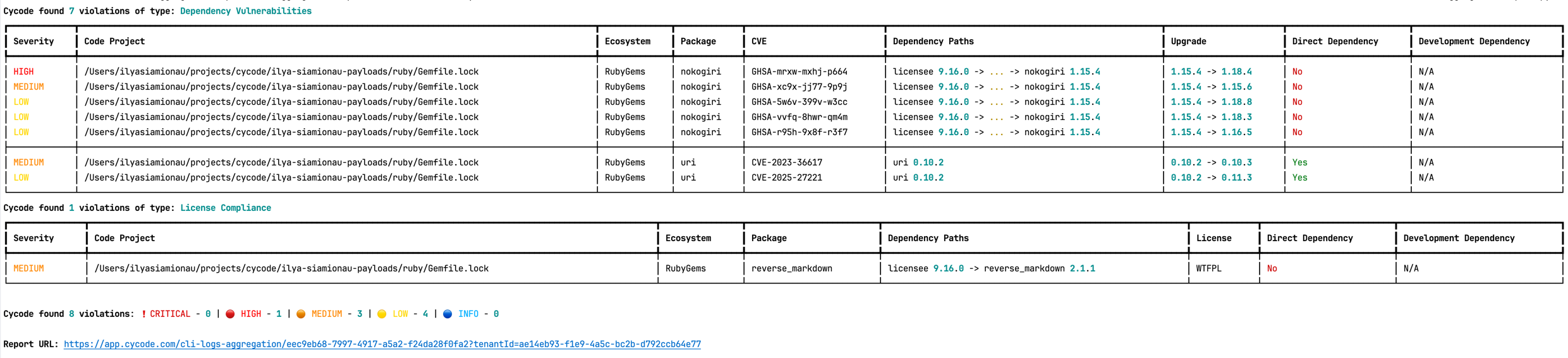
|
|
406
403
|
|
|
@@ -415,7 +412,7 @@ The report page will look something like below:
|
|
|
415
412
|
|
|
416
413
|
To scan a specific package vulnerability of your local repository, add the argument `--sca-scan package-vulnerabilities` following the `-t sca` or `--scan-type sca` option.
|
|
417
414
|
|
|
418
|
-
|
|
415
|
+
In the previous example, if you wanted to only run an SCA scan on package vulnerabilities, you could execute the following:
|
|
419
416
|
|
|
420
417
|
`cycode scan -t sca --sca-scan package-vulnerabilities repository ~/home/git/codebase`
|
|
421
418
|
|
|
@@ -426,7 +423,7 @@ Consider the previous example. If you wanted to only run an SCA scan on package
|
|
|
426
423
|
|
|
427
424
|
To scan a specific branch of your local repository, add the argument `--sca-scan license-compliance` followed by the name of the branch you wish to scan.
|
|
428
425
|
|
|
429
|
-
|
|
426
|
+
In the previous example, if you wanted to only scan a branch named `dev`, you could execute the following:
|
|
430
427
|
|
|
431
428
|
`cycode scan -t sca --sca-scan license-compliance repository ~/home/git/codebase -b dev`
|
|
432
429
|
|
|
@@ -435,7 +432,7 @@ Consider the previous example. If you wanted to only scan a branch named `dev`,
|
|
|
435
432
|
> [!NOTE]
|
|
436
433
|
> This option is only available to SCA scans.
|
|
437
434
|
|
|
438
|
-
We use sbt-dependency-lock plugin to restore the lock file for SBT projects.
|
|
435
|
+
We use the sbt-dependency-lock plugin to restore the lock file for SBT projects.
|
|
439
436
|
To disable lock restore in use `--no-restore` option.
|
|
440
437
|
|
|
441
438
|
Prerequisites:
|
|
@@ -453,7 +450,7 @@ To execute a full repository scan, execute the following:
|
|
|
453
450
|
|
|
454
451
|
`cycode scan repository {{path}}`
|
|
455
452
|
|
|
456
|
-
For example,
|
|
453
|
+
For example, if you wanted to scan a repository stored in `~/home/git/codebase`, you could execute the following:
|
|
457
454
|
|
|
458
455
|
`cycode scan repository ~/home/git/codebase`
|
|
459
456
|
|
|
@@ -467,7 +464,7 @@ The following option is available for use with this command:
|
|
|
467
464
|
|
|
468
465
|
To scan a specific branch of your local repository, add the argument `-b` (alternatively, `--branch`) followed by the name of the branch you wish to scan.
|
|
469
466
|
|
|
470
|
-
|
|
467
|
+
Given the previous example, if you wanted to only scan a branch named `dev`, you could execute the following:
|
|
471
468
|
|
|
472
469
|
`cycode scan repository ~/home/git/codebase -b dev`
|
|
473
470
|
|
|
@@ -489,8 +486,8 @@ Cycode CLI supports Terraform plan scanning (supporting Terraform 0.12 and later
|
|
|
489
486
|
|
|
490
487
|
Terraform plan file must be in JSON format (having `.json` extension)
|
|
491
488
|
|
|
492
|
-
|
|
493
|
-
|
|
489
|
+
If you just have a configuration file, you can generate a plan by doing the following:
|
|
490
|
+
|
|
494
491
|
1. Initialize a working directory that contains Terraform configuration file:
|
|
495
492
|
|
|
496
493
|
`terraform init`
|
|
@@ -509,6 +506,9 @@ _How to generate a Terraform plan from Terraform configuration file?_
|
|
|
509
506
|
|
|
510
507
|
### Commit History Scan
|
|
511
508
|
|
|
509
|
+
> [!NOTE]
|
|
510
|
+
> Secrets scanning analyzes all commits in the repository history because secrets introduced and later removed can still be leaked or exposed. SCA and SAST scanning focus only on the latest code state and the changes between branches or pull requests. Full commit history scanning is not performed for SCA and SAST.
|
|
511
|
+
|
|
512
512
|
A commit history scan is limited to a local repository’s previous commits, focused on finding any secrets within the commit history, instead of examining the repository’s current state.
|
|
513
513
|
|
|
514
514
|
To execute a commit history scan, execute the following:
|
|
@@ -551,15 +551,13 @@ If no issues are found, the scan ends with the following success message:
|
|
|
551
551
|
|
|
552
552
|
`Good job! No issues were found!!! 👏👏👏`
|
|
553
553
|
|
|
554
|
-
If an issue is found, a violation card appears upon completion instead.
|
|
555
|
-
|
|
556
|
-
If an issue is found, review the file in question for the specific line highlighted by the result message. Implement any changes required to resolve the issue, then execute the scan again.
|
|
554
|
+
If an issue is found, a violation card appears upon completion instead. In this case you should review the file in question for the specific line highlighted by the result message. Implement any changes required to resolve the issue, then execute the scan again.
|
|
557
555
|
|
|
558
556
|
### Show/Hide Secrets
|
|
559
557
|
|
|
560
|
-
In the
|
|
558
|
+
In the [examples below](#secrets-result-example), a secret was found in the file `secret_test`, located in the subfolder `cli`. The second part of the message shows the specific line the secret appears in, which in this case is a value assigned to `googleApiKey`.
|
|
561
559
|
|
|
562
|
-
Note how the
|
|
560
|
+
Note how the example obscures the actual secret value, replacing most of the secret with asterisks. Scans obscure secrets by default, but you may optionally disable this feature to view the full secret (assuming the machine you are viewing the scan result on is sufficiently secure from prying eyes).
|
|
563
561
|
|
|
564
562
|
To disable secret obfuscation, add the `--show-secret` argument to any type of scan.
|
|
565
563
|
|
|
@@ -571,12 +569,9 @@ The result would then not be obfuscated.
|
|
|
571
569
|
|
|
572
570
|
### Soft Fail
|
|
573
571
|
|
|
574
|
-
|
|
575
|
-
If an issue occurs during the Cycode scan, using a soft fail feature will automatically execute with success (`0`) to avoid interference.
|
|
572
|
+
In normal operation the CLI will return an exit code of `1` when issues are found in the scan results. Depending on your CI/CD setup this will usually result in an overall failure. If you don't want this to happen, you can use the soft fail feature.
|
|
576
573
|
|
|
577
|
-
|
|
578
|
-
|
|
579
|
-
Scan results are assigned with a value of exit code `1` when issues are found in the scan results; this will result in a failure within the CI/CD tool. Use the option `--soft-fail` to force the results with the exit code `0` to have no impact (i.e., to have a successful result).
|
|
574
|
+
By adding the `--soft-fail` option to any type of scan, the exit code will be forced to `0` regardless of whether any results are found.
|
|
580
575
|
|
|
581
576
|
### Example Scan Results
|
|
582
577
|
|
|
@@ -671,7 +666,7 @@ Scan results are assigned with a value of exit code `1` when issues are found in
|
|
|
671
666
|
╰──────────────────────────────────────────────────────────────────────────────────────────────────────────────────────────────────────────────────────────────────╯
|
|
672
667
|
```
|
|
673
668
|
|
|
674
|
-
### Company
|
|
669
|
+
### Company Custom Remediation Guidelines
|
|
675
670
|
|
|
676
671
|
If your company has set custom remediation guidelines in the relevant policy via the Cycode portal, you'll see a field for “Company Guidelines” that contains the remediation guidelines you added. Note that if you haven't added any company guidelines, this field will not appear in the CLI tool.
|
|
677
672
|
|
|
@@ -820,17 +815,14 @@ For example: `cycode ignore -g --by-value test-value`.
|
|
|
820
815
|
|
|
821
816
|
#### Proper working directory
|
|
822
817
|
|
|
823
|
-
|
|
818
|
+
It is incredibly important to place the `.cycode` folder and run CLI from the same place.
|
|
824
819
|
You should double-check it when working with different environments like CI/CD (GitHub Actions, Jenkins, etc.).
|
|
825
820
|
|
|
826
|
-
You
|
|
827
|
-
In this scenario, you must run CLI scans from the repository root.
|
|
828
|
-
If it doesn't fit your requirements, you could temporarily copy the `.cycode` folder
|
|
829
|
-
wherever you want and perform a CLI scan from this folder.
|
|
821
|
+
You can commit the `.cycode` folder to the root of your repository. In this scenario, you must run CLI scans from the repository root. If that doesn't fit your requirements, you could temporarily copy the `.cycode` folder to wherever you want and perform a CLI scan from this folder.
|
|
830
822
|
|
|
831
823
|
#### Structure ignoring rules in the config
|
|
832
824
|
|
|
833
|
-
It's important to understand how CLI stores
|
|
825
|
+
It's important to understand how CLI stores ignored rules to be able to read these configuration files or even modify them without CLI.
|
|
834
826
|
|
|
835
827
|
The abstract YAML structure:
|
|
836
828
|
```yaml
|
|
@@ -845,7 +837,7 @@ Possible values of `scanTypeName`: `iac`, `sca`, `sast`, `secret`.
|
|
|
845
837
|
|
|
846
838
|
Possible values of `ignoringType`: `paths`, `values`, `rules`, `packages`, `shas`, `cves`.
|
|
847
839
|
|
|
848
|
-
> [!WARNING]
|
|
840
|
+
> [!WARNING]
|
|
849
841
|
> Values for "ignore by value" are not stored as plain text!
|
|
850
842
|
> CLI stores sha256 hashes of the values instead.
|
|
851
843
|
> You should put hashes of the string when modifying the configuration file by hand.
|
|
@@ -882,7 +874,7 @@ The following options are available for use with this command:
|
|
|
882
874
|
|
|
883
875
|
| Option | Description | Required | Default |
|
|
884
876
|
|----------------------------------------------------|--------------------------------|----------|-------------------------------------------------------|
|
|
885
|
-
| `-f, --format [spdx-2.2\|spdx-2.3\|cyclonedx-1.4]` | SBOM format | Yes | |
|
|
877
|
+
| `-f, --format [spdx-2.2\|spdx-2.3\|cyclonedx-1.4]` | SBOM format | Yes | |
|
|
886
878
|
| `-o, --output-format [JSON]` | Specify the output file format | No | json |
|
|
887
879
|
| `--output-file PATH` | Output file | No | autogenerated filename saved to the current directory |
|
|
888
880
|
| `--include-vulnerabilities` | Include vulnerabilities | No | False |
|
|
@@ -913,7 +905,7 @@ For example:\
|
|
|
913
905
|
|
|
914
906
|
# Scan Logs
|
|
915
907
|
|
|
916
|
-
All CLI
|
|
908
|
+
All CLI scans are logged in Cycode. The logs can be found under Settings > CLI Logs.
|
|
917
909
|
|
|
918
910
|
# Syntax Help
|
|
919
911
|
|
|
@@ -40,7 +40,7 @@ This guide walks you through both installation and usage.
|
|
|
40
40
|
2. [IaC Result Example](#iac-result-example)
|
|
41
41
|
3. [SCA Result Example](#sca-result-example)
|
|
42
42
|
4. [SAST Result Example](#sast-result-example)
|
|
43
|
-
4. [Company
|
|
43
|
+
4. [Company Custom Remediation Guidelines](#company-custom-remediation-guidelines)
|
|
44
44
|
3. [Ignoring Scan Results](#ignoring-scan-results)
|
|
45
45
|
1. [Ignoring a Secret Value](#ignoring-a-secret-value)
|
|
46
46
|
2. [Ignoring a Secret SHA Value](#ignoring-a-secret-sha-value)
|
|
@@ -94,7 +94,7 @@ To install the Cycode CLI application on your local machine, perform the followi
|
|
|
94
94
|
./cycode
|
|
95
95
|
```
|
|
96
96
|
|
|
97
|
-
3.
|
|
97
|
+
3. Finally authenticate the CLI. There are three methods to set the Cycode client ID and client secret:
|
|
98
98
|
|
|
99
99
|
- [cycode auth](#using-the-auth-command) (**Recommended**)
|
|
100
100
|
- [cycode configure](#using-the-configure-command)
|
|
@@ -169,7 +169,7 @@ To install the Cycode CLI application on your local machine, perform the followi
|
|
|
169
169
|
|
|
170
170
|
`Successfully configured Cycode URLs!`
|
|
171
171
|
|
|
172
|
-
If you go into the `.cycode` folder under your user folder, you'll find these credentials were created and placed in the `credentials.yaml` file in that folder.
|
|
172
|
+
If you go into the `.cycode` folder under your user folder, you'll find these credentials were created and placed in the `credentials.yaml` file in that folder.
|
|
173
173
|
The URLs were placed in the `config.yaml` file in that folder.
|
|
174
174
|
|
|
175
175
|
### Add to Environment Variables
|
|
@@ -293,9 +293,9 @@ The following are the options and commands available with the Cycode CLI applica
|
|
|
293
293
|
|-------------------------------------------|----------------------------------------------------------------------------------------------------------------------------------------------|
|
|
294
294
|
| [auth](#using-the-auth-command) | Authenticate your machine to associate the CLI with your Cycode account. |
|
|
295
295
|
| [configure](#using-the-configure-command) | Initial command to configure your CLI client authentication. |
|
|
296
|
-
| [ignore](#ignoring-scan-results) |
|
|
296
|
+
| [ignore](#ignoring-scan-results) | Ignore a specific value, path or rule ID. |
|
|
297
297
|
| [scan](#running-a-scan) | Scan the content for Secrets/IaC/SCA/SAST violations. You`ll need to specify which scan type to perform: commit-history/path/repository/etc. |
|
|
298
|
-
| [report](#report-command) | Generate report. You
|
|
298
|
+
| [report](#report-command) | Generate report. You will need to specify which report type to perform as SBOM. |
|
|
299
299
|
| status | Show the CLI status and exit. |
|
|
300
300
|
|
|
301
301
|
# Scan Command
|
|
@@ -312,9 +312,9 @@ The Cycode CLI application offers several types of scans so that you can choose
|
|
|
312
312
|
| `--severity-threshold [INFO\|LOW\|MEDIUM\|HIGH\|CRITICAL]` | Show only violations at the specified level or higher. |
|
|
313
313
|
| `--sca-scan` | Specify the SCA scan you wish to execute (`package-vulnerabilities`/`license-compliance`). The default is both. |
|
|
314
314
|
| `--monitor` | When specified, the scan results will be recorded in Cycode. |
|
|
315
|
-
| `--cycode-report` |
|
|
316
|
-
| `--no-restore` | When specified, Cycode will not run restore command.
|
|
317
|
-
| `--gradle-all-sub-projects` |
|
|
315
|
+
| `--cycode-report` | Display a link to the scan report in the Cycode platform in the console output. |
|
|
316
|
+
| `--no-restore` | When specified, Cycode will not run the restore command. This will scan direct dependencies ONLY! |
|
|
317
|
+
| `--gradle-all-sub-projects` | Run gradle restore command for all sub projects. This should be run from the project root directory ONLY! |
|
|
318
318
|
| `--help` | Show options for given command. |
|
|
319
319
|
|
|
320
320
|
| Command | Description |
|
|
@@ -328,9 +328,9 @@ The Cycode CLI application offers several types of scans so that you can choose
|
|
|
328
328
|
|
|
329
329
|
#### Severity Option
|
|
330
330
|
|
|
331
|
-
To limit the results of the scan to a specific severity threshold,
|
|
331
|
+
To limit the results of the scan to a specific severity threshold, the argument `--severity-threshold` can be added to the scan command.
|
|
332
332
|
|
|
333
|
-
|
|
333
|
+
For example, the following command will scan the repository for policy violations that have severity of Medium or higher:
|
|
334
334
|
|
|
335
335
|
`cycode scan --severity-threshold MEDIUM repository ~/home/git/codebase`
|
|
336
336
|
|
|
@@ -341,13 +341,10 @@ The following command will scan the repository for policy violations that have s
|
|
|
341
341
|
|
|
342
342
|
To push scan results tied to the [SCA policies](https://docs.cycode.com/docs/sca-policies) found in an SCA type scan to Cycode, add the argument `--monitor` to the scan command.
|
|
343
343
|
|
|
344
|
-
|
|
344
|
+
For example, the following command will scan the repository for SCA policy violations and push them to Cycode platform:
|
|
345
345
|
|
|
346
346
|
`cycode scan -t sca --monitor repository ~/home/git/codebase`
|
|
347
347
|
|
|
348
|
-
When using this option, the scan results will appear in Cycode.
|
|
349
|
-
|
|
350
|
-
|
|
351
348
|
#### Cycode Report Option
|
|
352
349
|
|
|
353
350
|
For every scan performed using the Cycode CLI, a report is automatically generated and its results are sent to Cycode. These results are tied to the relevant policies (e.g., [SCA policies](https://docs.cycode.com/docs/sca-policies) for Repository scans) within the Cycode platform.
|
|
@@ -359,7 +356,7 @@ To have the direct URL to this Cycode report printed in your CLI output after th
|
|
|
359
356
|
All scan results from the CLI will appear in the CLI Logs section of Cycode. If you included the `--cycode-report` flag in your command, a direct link to the specific report will be displayed in your terminal following the scan results.
|
|
360
357
|
|
|
361
358
|
> [!WARNING]
|
|
362
|
-
> You must
|
|
359
|
+
> You must have the `owner` or `admin` role in Cycode to view this page.
|
|
363
360
|
|
|
364
361
|

|
|
365
362
|
|
|
@@ -374,7 +371,7 @@ The report page will look something like below:
|
|
|
374
371
|
|
|
375
372
|
To scan a specific package vulnerability of your local repository, add the argument `--sca-scan package-vulnerabilities` following the `-t sca` or `--scan-type sca` option.
|
|
376
373
|
|
|
377
|
-
|
|
374
|
+
In the previous example, if you wanted to only run an SCA scan on package vulnerabilities, you could execute the following:
|
|
378
375
|
|
|
379
376
|
`cycode scan -t sca --sca-scan package-vulnerabilities repository ~/home/git/codebase`
|
|
380
377
|
|
|
@@ -385,7 +382,7 @@ Consider the previous example. If you wanted to only run an SCA scan on package
|
|
|
385
382
|
|
|
386
383
|
To scan a specific branch of your local repository, add the argument `--sca-scan license-compliance` followed by the name of the branch you wish to scan.
|
|
387
384
|
|
|
388
|
-
|
|
385
|
+
In the previous example, if you wanted to only scan a branch named `dev`, you could execute the following:
|
|
389
386
|
|
|
390
387
|
`cycode scan -t sca --sca-scan license-compliance repository ~/home/git/codebase -b dev`
|
|
391
388
|
|
|
@@ -394,7 +391,7 @@ Consider the previous example. If you wanted to only scan a branch named `dev`,
|
|
|
394
391
|
> [!NOTE]
|
|
395
392
|
> This option is only available to SCA scans.
|
|
396
393
|
|
|
397
|
-
We use sbt-dependency-lock plugin to restore the lock file for SBT projects.
|
|
394
|
+
We use the sbt-dependency-lock plugin to restore the lock file for SBT projects.
|
|
398
395
|
To disable lock restore in use `--no-restore` option.
|
|
399
396
|
|
|
400
397
|
Prerequisites:
|
|
@@ -412,7 +409,7 @@ To execute a full repository scan, execute the following:
|
|
|
412
409
|
|
|
413
410
|
`cycode scan repository {{path}}`
|
|
414
411
|
|
|
415
|
-
For example,
|
|
412
|
+
For example, if you wanted to scan a repository stored in `~/home/git/codebase`, you could execute the following:
|
|
416
413
|
|
|
417
414
|
`cycode scan repository ~/home/git/codebase`
|
|
418
415
|
|
|
@@ -426,7 +423,7 @@ The following option is available for use with this command:
|
|
|
426
423
|
|
|
427
424
|
To scan a specific branch of your local repository, add the argument `-b` (alternatively, `--branch`) followed by the name of the branch you wish to scan.
|
|
428
425
|
|
|
429
|
-
|
|
426
|
+
Given the previous example, if you wanted to only scan a branch named `dev`, you could execute the following:
|
|
430
427
|
|
|
431
428
|
`cycode scan repository ~/home/git/codebase -b dev`
|
|
432
429
|
|
|
@@ -448,8 +445,8 @@ Cycode CLI supports Terraform plan scanning (supporting Terraform 0.12 and later
|
|
|
448
445
|
|
|
449
446
|
Terraform plan file must be in JSON format (having `.json` extension)
|
|
450
447
|
|
|
451
|
-
|
|
452
|
-
|
|
448
|
+
If you just have a configuration file, you can generate a plan by doing the following:
|
|
449
|
+
|
|
453
450
|
1. Initialize a working directory that contains Terraform configuration file:
|
|
454
451
|
|
|
455
452
|
`terraform init`
|
|
@@ -468,6 +465,9 @@ _How to generate a Terraform plan from Terraform configuration file?_
|
|
|
468
465
|
|
|
469
466
|
### Commit History Scan
|
|
470
467
|
|
|
468
|
+
> [!NOTE]
|
|
469
|
+
> Secrets scanning analyzes all commits in the repository history because secrets introduced and later removed can still be leaked or exposed. SCA and SAST scanning focus only on the latest code state and the changes between branches or pull requests. Full commit history scanning is not performed for SCA and SAST.
|
|
470
|
+
|
|
471
471
|
A commit history scan is limited to a local repository’s previous commits, focused on finding any secrets within the commit history, instead of examining the repository’s current state.
|
|
472
472
|
|
|
473
473
|
To execute a commit history scan, execute the following:
|
|
@@ -510,15 +510,13 @@ If no issues are found, the scan ends with the following success message:
|
|
|
510
510
|
|
|
511
511
|
`Good job! No issues were found!!! 👏👏👏`
|
|
512
512
|
|
|
513
|
-
If an issue is found, a violation card appears upon completion instead.
|
|
514
|
-
|
|
515
|
-
If an issue is found, review the file in question for the specific line highlighted by the result message. Implement any changes required to resolve the issue, then execute the scan again.
|
|
513
|
+
If an issue is found, a violation card appears upon completion instead. In this case you should review the file in question for the specific line highlighted by the result message. Implement any changes required to resolve the issue, then execute the scan again.
|
|
516
514
|
|
|
517
515
|
### Show/Hide Secrets
|
|
518
516
|
|
|
519
|
-
In the
|
|
517
|
+
In the [examples below](#secrets-result-example), a secret was found in the file `secret_test`, located in the subfolder `cli`. The second part of the message shows the specific line the secret appears in, which in this case is a value assigned to `googleApiKey`.
|
|
520
518
|
|
|
521
|
-
Note how the
|
|
519
|
+
Note how the example obscures the actual secret value, replacing most of the secret with asterisks. Scans obscure secrets by default, but you may optionally disable this feature to view the full secret (assuming the machine you are viewing the scan result on is sufficiently secure from prying eyes).
|
|
522
520
|
|
|
523
521
|
To disable secret obfuscation, add the `--show-secret` argument to any type of scan.
|
|
524
522
|
|
|
@@ -530,12 +528,9 @@ The result would then not be obfuscated.
|
|
|
530
528
|
|
|
531
529
|
### Soft Fail
|
|
532
530
|
|
|
533
|
-
|
|
534
|
-
If an issue occurs during the Cycode scan, using a soft fail feature will automatically execute with success (`0`) to avoid interference.
|
|
531
|
+
In normal operation the CLI will return an exit code of `1` when issues are found in the scan results. Depending on your CI/CD setup this will usually result in an overall failure. If you don't want this to happen, you can use the soft fail feature.
|
|
535
532
|
|
|
536
|
-
|
|
537
|
-
|
|
538
|
-
Scan results are assigned with a value of exit code `1` when issues are found in the scan results; this will result in a failure within the CI/CD tool. Use the option `--soft-fail` to force the results with the exit code `0` to have no impact (i.e., to have a successful result).
|
|
533
|
+
By adding the `--soft-fail` option to any type of scan, the exit code will be forced to `0` regardless of whether any results are found.
|
|
539
534
|
|
|
540
535
|
### Example Scan Results
|
|
541
536
|
|
|
@@ -630,7 +625,7 @@ Scan results are assigned with a value of exit code `1` when issues are found in
|
|
|
630
625
|
╰──────────────────────────────────────────────────────────────────────────────────────────────────────────────────────────────────────────────────────────────────╯
|
|
631
626
|
```
|
|
632
627
|
|
|
633
|
-
### Company
|
|
628
|
+
### Company Custom Remediation Guidelines
|
|
634
629
|
|
|
635
630
|
If your company has set custom remediation guidelines in the relevant policy via the Cycode portal, you'll see a field for “Company Guidelines” that contains the remediation guidelines you added. Note that if you haven't added any company guidelines, this field will not appear in the CLI tool.
|
|
636
631
|
|
|
@@ -779,17 +774,14 @@ For example: `cycode ignore -g --by-value test-value`.
|
|
|
779
774
|
|
|
780
775
|
#### Proper working directory
|
|
781
776
|
|
|
782
|
-
|
|
777
|
+
It is incredibly important to place the `.cycode` folder and run CLI from the same place.
|
|
783
778
|
You should double-check it when working with different environments like CI/CD (GitHub Actions, Jenkins, etc.).
|
|
784
779
|
|
|
785
|
-
You
|
|
786
|
-
In this scenario, you must run CLI scans from the repository root.
|
|
787
|
-
If it doesn't fit your requirements, you could temporarily copy the `.cycode` folder
|
|
788
|
-
wherever you want and perform a CLI scan from this folder.
|
|
780
|
+
You can commit the `.cycode` folder to the root of your repository. In this scenario, you must run CLI scans from the repository root. If that doesn't fit your requirements, you could temporarily copy the `.cycode` folder to wherever you want and perform a CLI scan from this folder.
|
|
789
781
|
|
|
790
782
|
#### Structure ignoring rules in the config
|
|
791
783
|
|
|
792
|
-
It's important to understand how CLI stores
|
|
784
|
+
It's important to understand how CLI stores ignored rules to be able to read these configuration files or even modify them without CLI.
|
|
793
785
|
|
|
794
786
|
The abstract YAML structure:
|
|
795
787
|
```yaml
|
|
@@ -804,7 +796,7 @@ Possible values of `scanTypeName`: `iac`, `sca`, `sast`, `secret`.
|
|
|
804
796
|
|
|
805
797
|
Possible values of `ignoringType`: `paths`, `values`, `rules`, `packages`, `shas`, `cves`.
|
|
806
798
|
|
|
807
|
-
> [!WARNING]
|
|
799
|
+
> [!WARNING]
|
|
808
800
|
> Values for "ignore by value" are not stored as plain text!
|
|
809
801
|
> CLI stores sha256 hashes of the values instead.
|
|
810
802
|
> You should put hashes of the string when modifying the configuration file by hand.
|
|
@@ -841,7 +833,7 @@ The following options are available for use with this command:
|
|
|
841
833
|
|
|
842
834
|
| Option | Description | Required | Default |
|
|
843
835
|
|----------------------------------------------------|--------------------------------|----------|-------------------------------------------------------|
|
|
844
|
-
| `-f, --format [spdx-2.2\|spdx-2.3\|cyclonedx-1.4]` | SBOM format | Yes | |
|
|
836
|
+
| `-f, --format [spdx-2.2\|spdx-2.3\|cyclonedx-1.4]` | SBOM format | Yes | |
|
|
845
837
|
| `-o, --output-format [JSON]` | Specify the output file format | No | json |
|
|
846
838
|
| `--output-file PATH` | Output file | No | autogenerated filename saved to the current directory |
|
|
847
839
|
| `--include-vulnerabilities` | Include vulnerabilities | No | False |
|
|
@@ -872,7 +864,7 @@ For example:\
|
|
|
872
864
|
|
|
873
865
|
# Scan Logs
|
|
874
866
|
|
|
875
|
-
All CLI
|
|
867
|
+
All CLI scans are logged in Cycode. The logs can be found under Settings > CLI Logs.
|
|
876
868
|
|
|
877
869
|
# Syntax Help
|
|
878
870
|
|
|
@@ -0,0 +1 @@
|
|
|
1
|
+
__version__ = '3.1.1.dev5' # DON'T TOUCH. Placeholder. Will be filled automatically on poetry build from Git Tag
|
|
@@ -9,6 +9,7 @@ from cycode.cli.apps.scan.aggregation_report import try_set_aggregation_report_u
|
|
|
9
9
|
from cycode.cli.apps.scan.scan_parameters import get_scan_parameters
|
|
10
10
|
from cycode.cli.apps.scan.scan_result import (
|
|
11
11
|
create_local_scan_result,
|
|
12
|
+
enrich_scan_result_with_data_from_detection_rules,
|
|
12
13
|
get_scan_result,
|
|
13
14
|
get_sync_scan_result,
|
|
14
15
|
print_local_scan_results,
|
|
@@ -77,37 +78,6 @@ def _should_use_sync_flow(command_scan_type: str, scan_type: str, sync_option: b
|
|
|
77
78
|
return True
|
|
78
79
|
|
|
79
80
|
|
|
80
|
-
def _enrich_scan_result_with_data_from_detection_rules(
|
|
81
|
-
cycode_client: 'ScanClient', scan_result: ZippedFileScanResult
|
|
82
|
-
) -> None:
|
|
83
|
-
detection_rule_ids = set()
|
|
84
|
-
for detections_per_file in scan_result.detections_per_file:
|
|
85
|
-
for detection in detections_per_file.detections:
|
|
86
|
-
detection_rule_ids.add(detection.detection_rule_id)
|
|
87
|
-
|
|
88
|
-
detection_rules = cycode_client.get_detection_rules(detection_rule_ids)
|
|
89
|
-
detection_rules_by_id = {detection_rule.detection_rule_id: detection_rule for detection_rule in detection_rules}
|
|
90
|
-
|
|
91
|
-
for detections_per_file in scan_result.detections_per_file:
|
|
92
|
-
for detection in detections_per_file.detections:
|
|
93
|
-
detection_rule = detection_rules_by_id.get(detection.detection_rule_id)
|
|
94
|
-
if not detection_rule:
|
|
95
|
-
# we want to make sure that BE returned it. better to not map data instead of failed scan
|
|
96
|
-
continue
|
|
97
|
-
|
|
98
|
-
if not detection.severity and detection_rule.classification_data:
|
|
99
|
-
# it's fine to take the first one, because:
|
|
100
|
-
# - for "secrets" and "iac" there is only one classification rule per-detection rule
|
|
101
|
-
# - for "sca" and "sast" we get severity from detection service
|
|
102
|
-
detection.severity = detection_rule.classification_data[0].severity
|
|
103
|
-
|
|
104
|
-
# detection_details never was typed properly. so not a problem for now
|
|
105
|
-
detection.detection_details['custom_remediation_guidelines'] = detection_rule.custom_remediation_guidelines
|
|
106
|
-
detection.detection_details['remediation_guidelines'] = detection_rule.remediation_guidelines
|
|
107
|
-
detection.detection_details['description'] = detection_rule.description
|
|
108
|
-
detection.detection_details['policy_display_name'] = detection_rule.display_name
|
|
109
|
-
|
|
110
|
-
|
|
111
81
|
def _get_scan_documents_thread_func(
|
|
112
82
|
ctx: typer.Context, is_git_diff: bool, is_commit_range: bool, scan_parameters: dict
|
|
113
83
|
) -> Callable[[list[Document]], tuple[str, CliError, LocalScanResult]]:
|
|
@@ -140,7 +110,7 @@ def _get_scan_documents_thread_func(
|
|
|
140
110
|
should_use_sync_flow,
|
|
141
111
|
)
|
|
142
112
|
|
|
143
|
-
|
|
113
|
+
enrich_scan_result_with_data_from_detection_rules(cycode_client, scan_result)
|
|
144
114
|
|
|
145
115
|
local_scan_result = create_local_scan_result(
|
|
146
116
|
scan_result, batch, command_scan_type, scan_type, severity_threshold
|
|
@@ -13,6 +13,7 @@ from cycode.cli.apps.scan.code_scanner import (
|
|
|
13
13
|
from cycode.cli.apps.scan.scan_parameters import get_scan_parameters
|
|
14
14
|
from cycode.cli.apps.scan.scan_result import (
|
|
15
15
|
create_local_scan_result,
|
|
16
|
+
enrich_scan_result_with_data_from_detection_rules,
|
|
16
17
|
init_default_scan_result,
|
|
17
18
|
print_local_scan_results,
|
|
18
19
|
)
|
|
@@ -120,12 +121,18 @@ def _scan_commit_range_documents(
|
|
|
120
121
|
scan_parameters,
|
|
121
122
|
timeout,
|
|
122
123
|
)
|
|
124
|
+
enrich_scan_result_with_data_from_detection_rules(cycode_client, scan_result)
|
|
123
125
|
|
|
124
126
|
progress_bar.update(ScanProgressBarSection.SCAN)
|
|
125
127
|
progress_bar.set_section_length(ScanProgressBarSection.GENERATE_REPORT, 1)
|
|
126
128
|
|
|
129
|
+
documents_to_scan = to_documents_to_scan
|
|
130
|
+
if scan_type == consts.SAST_SCAN_TYPE:
|
|
131
|
+
# actually for SAST from_documents_to_scan is full files and to_documents_to_scan is diff files
|
|
132
|
+
documents_to_scan = from_documents_to_scan
|
|
133
|
+
|
|
127
134
|
local_scan_result = create_local_scan_result(
|
|
128
|
-
scan_result,
|
|
135
|
+
scan_result, documents_to_scan, scan_command_type, scan_type, severity_threshold
|
|
129
136
|
)
|
|
130
137
|
set_issue_detected_by_scan_results(ctx, [local_scan_result])
|
|
131
138
|
|
|
@@ -179,3 +179,34 @@ def print_local_scan_results(
|
|
|
179
179
|
printer = ctx.obj.get('console_printer')
|
|
180
180
|
printer.update_ctx(ctx)
|
|
181
181
|
printer.print_scan_results(local_scan_results, errors)
|
|
182
|
+
|
|
183
|
+
|
|
184
|
+
def enrich_scan_result_with_data_from_detection_rules(
|
|
185
|
+
cycode_client: 'ScanClient', scan_result: ZippedFileScanResult
|
|
186
|
+
) -> None:
|
|
187
|
+
detection_rule_ids = set()
|
|
188
|
+
for detections_per_file in scan_result.detections_per_file:
|
|
189
|
+
for detection in detections_per_file.detections:
|
|
190
|
+
detection_rule_ids.add(detection.detection_rule_id)
|
|
191
|
+
|
|
192
|
+
detection_rules = cycode_client.get_detection_rules(detection_rule_ids)
|
|
193
|
+
detection_rules_by_id = {detection_rule.detection_rule_id: detection_rule for detection_rule in detection_rules}
|
|
194
|
+
|
|
195
|
+
for detections_per_file in scan_result.detections_per_file:
|
|
196
|
+
for detection in detections_per_file.detections:
|
|
197
|
+
detection_rule = detection_rules_by_id.get(detection.detection_rule_id)
|
|
198
|
+
if not detection_rule:
|
|
199
|
+
# we want to make sure that BE returned it. better to not map data instead of failed scan
|
|
200
|
+
continue
|
|
201
|
+
|
|
202
|
+
if not detection.severity and detection_rule.classification_data:
|
|
203
|
+
# it's fine to take the first one, because:
|
|
204
|
+
# - for "secrets" and "iac" there is only one classification rule per-detection rule
|
|
205
|
+
# - for "sca" and "sast" we get severity from detection service
|
|
206
|
+
detection.severity = detection_rule.classification_data[0].severity
|
|
207
|
+
|
|
208
|
+
# detection_details never was typed properly. so not a problem for now
|
|
209
|
+
detection.detection_details['custom_remediation_guidelines'] = detection_rule.custom_remediation_guidelines
|
|
210
|
+
detection.detection_details['remediation_guidelines'] = detection_rule.remediation_guidelines
|
|
211
|
+
detection.detection_details['description'] = detection_rule.description
|
|
212
|
+
detection.detection_details['policy_display_name'] = detection_rule.display_name
|