cycode 2.3.1.dev1__tar.gz → 2.3.1.dev3__tar.gz
This diff represents the content of publicly available package versions that have been released to one of the supported registries. The information contained in this diff is provided for informational purposes only and reflects changes between package versions as they appear in their respective public registries.
- {cycode-2.3.1.dev1 → cycode-2.3.1.dev3}/PKG-INFO +164 -183
- {cycode-2.3.1.dev1 → cycode-2.3.1.dev3}/README.md +163 -182
- cycode-2.3.1.dev3/cycode/__init__.py +1 -0
- {cycode-2.3.1.dev1 → cycode-2.3.1.dev3}/cycode/cli/commands/scan/code_scanner.py +1 -1
- {cycode-2.3.1.dev1 → cycode-2.3.1.dev3}/cycode/cli/consts.py +4 -0
- cycode-2.3.1.dev3/cycode/cli/utils/scan_batch.py +138 -0
- {cycode-2.3.1.dev1 → cycode-2.3.1.dev3}/pyproject.toml +1 -1
- cycode-2.3.1.dev1/cycode/__init__.py +0 -1
- cycode-2.3.1.dev1/cycode/cli/utils/scan_batch.py +0 -75
- {cycode-2.3.1.dev1 → cycode-2.3.1.dev3}/LICENCE +0 -0
- {cycode-2.3.1.dev1 → cycode-2.3.1.dev3}/cycode/cli/__init__.py +0 -0
- {cycode-2.3.1.dev1 → cycode-2.3.1.dev3}/cycode/cli/commands/__init__.py +0 -0
- {cycode-2.3.1.dev1 → cycode-2.3.1.dev3}/cycode/cli/commands/ai_remediation/__init__.py +0 -0
- {cycode-2.3.1.dev1 → cycode-2.3.1.dev3}/cycode/cli/commands/ai_remediation/ai_remediation_command.py +0 -0
- {cycode-2.3.1.dev1 → cycode-2.3.1.dev3}/cycode/cli/commands/auth/__init__.py +0 -0
- {cycode-2.3.1.dev1 → cycode-2.3.1.dev3}/cycode/cli/commands/auth/auth_command.py +0 -0
- {cycode-2.3.1.dev1 → cycode-2.3.1.dev3}/cycode/cli/commands/auth/auth_manager.py +0 -0
- {cycode-2.3.1.dev1 → cycode-2.3.1.dev3}/cycode/cli/commands/auth_common.py +0 -0
- {cycode-2.3.1.dev1 → cycode-2.3.1.dev3}/cycode/cli/commands/configure/__init__.py +0 -0
- {cycode-2.3.1.dev1 → cycode-2.3.1.dev3}/cycode/cli/commands/configure/configure_command.py +0 -0
- {cycode-2.3.1.dev1 → cycode-2.3.1.dev3}/cycode/cli/commands/ignore/__init__.py +0 -0
- {cycode-2.3.1.dev1 → cycode-2.3.1.dev3}/cycode/cli/commands/ignore/ignore_command.py +0 -0
- {cycode-2.3.1.dev1 → cycode-2.3.1.dev3}/cycode/cli/commands/main_cli.py +0 -0
- {cycode-2.3.1.dev1 → cycode-2.3.1.dev3}/cycode/cli/commands/report/__init__.py +0 -0
- {cycode-2.3.1.dev1 → cycode-2.3.1.dev3}/cycode/cli/commands/report/report_command.py +0 -0
- {cycode-2.3.1.dev1 → cycode-2.3.1.dev3}/cycode/cli/commands/report/sbom/__init__.py +0 -0
- {cycode-2.3.1.dev1 → cycode-2.3.1.dev3}/cycode/cli/commands/report/sbom/common.py +0 -0
- {cycode-2.3.1.dev1 → cycode-2.3.1.dev3}/cycode/cli/commands/report/sbom/path/__init__.py +0 -0
- {cycode-2.3.1.dev1 → cycode-2.3.1.dev3}/cycode/cli/commands/report/sbom/path/path_command.py +0 -0
- {cycode-2.3.1.dev1 → cycode-2.3.1.dev3}/cycode/cli/commands/report/sbom/repository_url/__init__.py +0 -0
- {cycode-2.3.1.dev1 → cycode-2.3.1.dev3}/cycode/cli/commands/report/sbom/repository_url/repository_url_command.py +0 -0
- {cycode-2.3.1.dev1 → cycode-2.3.1.dev3}/cycode/cli/commands/report/sbom/sbom_command.py +0 -0
- {cycode-2.3.1.dev1 → cycode-2.3.1.dev3}/cycode/cli/commands/report/sbom/sbom_report_file.py +0 -0
- {cycode-2.3.1.dev1 → cycode-2.3.1.dev3}/cycode/cli/commands/scan/__init__.py +0 -0
- {cycode-2.3.1.dev1 → cycode-2.3.1.dev3}/cycode/cli/commands/scan/commit_history/__init__.py +0 -0
- {cycode-2.3.1.dev1 → cycode-2.3.1.dev3}/cycode/cli/commands/scan/commit_history/commit_history_command.py +0 -0
- {cycode-2.3.1.dev1 → cycode-2.3.1.dev3}/cycode/cli/commands/scan/path/__init__.py +0 -0
- {cycode-2.3.1.dev1 → cycode-2.3.1.dev3}/cycode/cli/commands/scan/path/path_command.py +0 -0
- {cycode-2.3.1.dev1 → cycode-2.3.1.dev3}/cycode/cli/commands/scan/pre_commit/__init__.py +0 -0
- {cycode-2.3.1.dev1 → cycode-2.3.1.dev3}/cycode/cli/commands/scan/pre_commit/pre_commit_command.py +0 -0
- {cycode-2.3.1.dev1 → cycode-2.3.1.dev3}/cycode/cli/commands/scan/pre_receive/__init__.py +0 -0
- {cycode-2.3.1.dev1 → cycode-2.3.1.dev3}/cycode/cli/commands/scan/pre_receive/pre_receive_command.py +0 -0
- {cycode-2.3.1.dev1 → cycode-2.3.1.dev3}/cycode/cli/commands/scan/repository/__init__.py +0 -0
- {cycode-2.3.1.dev1 → cycode-2.3.1.dev3}/cycode/cli/commands/scan/repository/repository_command.py +0 -0
- {cycode-2.3.1.dev1 → cycode-2.3.1.dev3}/cycode/cli/commands/scan/scan_ci/__init__.py +0 -0
- {cycode-2.3.1.dev1 → cycode-2.3.1.dev3}/cycode/cli/commands/scan/scan_ci/ci_integrations.py +0 -0
- {cycode-2.3.1.dev1 → cycode-2.3.1.dev3}/cycode/cli/commands/scan/scan_ci/scan_ci_command.py +0 -0
- {cycode-2.3.1.dev1 → cycode-2.3.1.dev3}/cycode/cli/commands/scan/scan_command.py +0 -0
- {cycode-2.3.1.dev1 → cycode-2.3.1.dev3}/cycode/cli/commands/status/__init__.py +0 -0
- {cycode-2.3.1.dev1 → cycode-2.3.1.dev3}/cycode/cli/commands/status/status_command.py +0 -0
- {cycode-2.3.1.dev1 → cycode-2.3.1.dev3}/cycode/cli/commands/version/__init__.py +0 -0
- {cycode-2.3.1.dev1 → cycode-2.3.1.dev3}/cycode/cli/commands/version/version_checker.py +0 -0
- {cycode-2.3.1.dev1 → cycode-2.3.1.dev3}/cycode/cli/commands/version/version_command.py +0 -0
- {cycode-2.3.1.dev1 → cycode-2.3.1.dev3}/cycode/cli/config.py +0 -0
- {cycode-2.3.1.dev1 → cycode-2.3.1.dev3}/cycode/cli/config.yaml +0 -0
- {cycode-2.3.1.dev1 → cycode-2.3.1.dev3}/cycode/cli/exceptions/__init__.py +0 -0
- {cycode-2.3.1.dev1 → cycode-2.3.1.dev3}/cycode/cli/exceptions/common.py +0 -0
- {cycode-2.3.1.dev1 → cycode-2.3.1.dev3}/cycode/cli/exceptions/custom_exceptions.py +0 -0
- {cycode-2.3.1.dev1 → cycode-2.3.1.dev3}/cycode/cli/exceptions/handle_ai_remediation_errors.py +0 -0
- {cycode-2.3.1.dev1 → cycode-2.3.1.dev3}/cycode/cli/exceptions/handle_report_sbom_errors.py +0 -0
- {cycode-2.3.1.dev1 → cycode-2.3.1.dev3}/cycode/cli/exceptions/handle_scan_errors.py +0 -0
- {cycode-2.3.1.dev1 → cycode-2.3.1.dev3}/cycode/cli/files_collector/__init__.py +0 -0
- {cycode-2.3.1.dev1 → cycode-2.3.1.dev3}/cycode/cli/files_collector/excluder.py +0 -0
- {cycode-2.3.1.dev1 → cycode-2.3.1.dev3}/cycode/cli/files_collector/iac/__init__.py +0 -0
- {cycode-2.3.1.dev1 → cycode-2.3.1.dev3}/cycode/cli/files_collector/iac/tf_content_generator.py +0 -0
- {cycode-2.3.1.dev1 → cycode-2.3.1.dev3}/cycode/cli/files_collector/models/__init__.py +0 -0
- {cycode-2.3.1.dev1 → cycode-2.3.1.dev3}/cycode/cli/files_collector/models/in_memory_zip.py +0 -0
- {cycode-2.3.1.dev1 → cycode-2.3.1.dev3}/cycode/cli/files_collector/path_documents.py +0 -0
- {cycode-2.3.1.dev1 → cycode-2.3.1.dev3}/cycode/cli/files_collector/repository_documents.py +0 -0
- {cycode-2.3.1.dev1 → cycode-2.3.1.dev3}/cycode/cli/files_collector/sca/__init__.py +0 -0
- {cycode-2.3.1.dev1 → cycode-2.3.1.dev3}/cycode/cli/files_collector/sca/base_restore_dependencies.py +0 -0
- {cycode-2.3.1.dev1 → cycode-2.3.1.dev3}/cycode/cli/files_collector/sca/go/__init__.py +0 -0
- {cycode-2.3.1.dev1 → cycode-2.3.1.dev3}/cycode/cli/files_collector/sca/go/restore_go_dependencies.py +0 -0
- {cycode-2.3.1.dev1 → cycode-2.3.1.dev3}/cycode/cli/files_collector/sca/maven/__init__.py +0 -0
- {cycode-2.3.1.dev1 → cycode-2.3.1.dev3}/cycode/cli/files_collector/sca/maven/restore_gradle_dependencies.py +0 -0
- {cycode-2.3.1.dev1 → cycode-2.3.1.dev3}/cycode/cli/files_collector/sca/maven/restore_maven_dependencies.py +0 -0
- {cycode-2.3.1.dev1 → cycode-2.3.1.dev3}/cycode/cli/files_collector/sca/npm/__init__.py +0 -0
- {cycode-2.3.1.dev1 → cycode-2.3.1.dev3}/cycode/cli/files_collector/sca/npm/restore_npm_dependencies.py +0 -0
- {cycode-2.3.1.dev1 → cycode-2.3.1.dev3}/cycode/cli/files_collector/sca/nuget/__init__.py +0 -0
- {cycode-2.3.1.dev1 → cycode-2.3.1.dev3}/cycode/cli/files_collector/sca/nuget/restore_nuget_dependencies.py +0 -0
- {cycode-2.3.1.dev1 → cycode-2.3.1.dev3}/cycode/cli/files_collector/sca/ruby/__init__.py +0 -0
- {cycode-2.3.1.dev1 → cycode-2.3.1.dev3}/cycode/cli/files_collector/sca/ruby/restore_ruby_dependencies.py +0 -0
- {cycode-2.3.1.dev1 → cycode-2.3.1.dev3}/cycode/cli/files_collector/sca/sbt/__init__.py +0 -0
- {cycode-2.3.1.dev1 → cycode-2.3.1.dev3}/cycode/cli/files_collector/sca/sbt/restore_sbt_dependencies.py +0 -0
- {cycode-2.3.1.dev1 → cycode-2.3.1.dev3}/cycode/cli/files_collector/sca/sca_code_scanner.py +0 -0
- {cycode-2.3.1.dev1 → cycode-2.3.1.dev3}/cycode/cli/files_collector/walk_ignore.py +0 -0
- {cycode-2.3.1.dev1 → cycode-2.3.1.dev3}/cycode/cli/files_collector/zip_documents.py +0 -0
- {cycode-2.3.1.dev1 → cycode-2.3.1.dev3}/cycode/cli/main.py +0 -0
- {cycode-2.3.1.dev1 → cycode-2.3.1.dev3}/cycode/cli/models.py +0 -0
- {cycode-2.3.1.dev1 → cycode-2.3.1.dev3}/cycode/cli/printers/__init__.py +0 -0
- {cycode-2.3.1.dev1 → cycode-2.3.1.dev3}/cycode/cli/printers/console_printer.py +0 -0
- {cycode-2.3.1.dev1 → cycode-2.3.1.dev3}/cycode/cli/printers/json_printer.py +0 -0
- {cycode-2.3.1.dev1 → cycode-2.3.1.dev3}/cycode/cli/printers/printer_base.py +0 -0
- {cycode-2.3.1.dev1 → cycode-2.3.1.dev3}/cycode/cli/printers/tables/__init__.py +0 -0
- {cycode-2.3.1.dev1 → cycode-2.3.1.dev3}/cycode/cli/printers/tables/sca_table_printer.py +0 -0
- {cycode-2.3.1.dev1 → cycode-2.3.1.dev3}/cycode/cli/printers/tables/table.py +0 -0
- {cycode-2.3.1.dev1 → cycode-2.3.1.dev3}/cycode/cli/printers/tables/table_models.py +0 -0
- {cycode-2.3.1.dev1 → cycode-2.3.1.dev3}/cycode/cli/printers/tables/table_printer.py +0 -0
- {cycode-2.3.1.dev1 → cycode-2.3.1.dev3}/cycode/cli/printers/tables/table_printer_base.py +0 -0
- {cycode-2.3.1.dev1 → cycode-2.3.1.dev3}/cycode/cli/printers/text_printer.py +0 -0
- {cycode-2.3.1.dev1 → cycode-2.3.1.dev3}/cycode/cli/sentry.py +0 -0
- {cycode-2.3.1.dev1 → cycode-2.3.1.dev3}/cycode/cli/user_settings/__init__.py +0 -0
- {cycode-2.3.1.dev1 → cycode-2.3.1.dev3}/cycode/cli/user_settings/base_file_manager.py +0 -0
- {cycode-2.3.1.dev1 → cycode-2.3.1.dev3}/cycode/cli/user_settings/config_file_manager.py +0 -0
- {cycode-2.3.1.dev1 → cycode-2.3.1.dev3}/cycode/cli/user_settings/configuration_manager.py +0 -0
- {cycode-2.3.1.dev1 → cycode-2.3.1.dev3}/cycode/cli/user_settings/credentials_manager.py +0 -0
- {cycode-2.3.1.dev1 → cycode-2.3.1.dev3}/cycode/cli/user_settings/jwt_creator.py +0 -0
- {cycode-2.3.1.dev1 → cycode-2.3.1.dev3}/cycode/cli/utils/__init__.py +0 -0
- {cycode-2.3.1.dev1 → cycode-2.3.1.dev3}/cycode/cli/utils/enum_utils.py +0 -0
- {cycode-2.3.1.dev1 → cycode-2.3.1.dev3}/cycode/cli/utils/get_api_client.py +0 -0
- {cycode-2.3.1.dev1 → cycode-2.3.1.dev3}/cycode/cli/utils/git_proxy.py +0 -0
- {cycode-2.3.1.dev1 → cycode-2.3.1.dev3}/cycode/cli/utils/ignore_utils.py +0 -0
- {cycode-2.3.1.dev1 → cycode-2.3.1.dev3}/cycode/cli/utils/jwt_utils.py +0 -0
- {cycode-2.3.1.dev1 → cycode-2.3.1.dev3}/cycode/cli/utils/path_utils.py +0 -0
- {cycode-2.3.1.dev1 → cycode-2.3.1.dev3}/cycode/cli/utils/progress_bar.py +0 -0
- {cycode-2.3.1.dev1 → cycode-2.3.1.dev3}/cycode/cli/utils/scan_utils.py +0 -0
- {cycode-2.3.1.dev1 → cycode-2.3.1.dev3}/cycode/cli/utils/shell_executor.py +0 -0
- {cycode-2.3.1.dev1 → cycode-2.3.1.dev3}/cycode/cli/utils/string_utils.py +0 -0
- {cycode-2.3.1.dev1 → cycode-2.3.1.dev3}/cycode/cli/utils/task_timer.py +0 -0
- {cycode-2.3.1.dev1 → cycode-2.3.1.dev3}/cycode/cli/utils/yaml_utils.py +0 -0
- {cycode-2.3.1.dev1 → cycode-2.3.1.dev3}/cycode/cyclient/__init__.py +0 -0
- {cycode-2.3.1.dev1 → cycode-2.3.1.dev3}/cycode/cyclient/auth_client.py +0 -0
- {cycode-2.3.1.dev1 → cycode-2.3.1.dev3}/cycode/cyclient/client_creator.py +0 -0
- {cycode-2.3.1.dev1 → cycode-2.3.1.dev3}/cycode/cyclient/config.py +0 -0
- {cycode-2.3.1.dev1 → cycode-2.3.1.dev3}/cycode/cyclient/config.yaml +0 -0
- {cycode-2.3.1.dev1 → cycode-2.3.1.dev3}/cycode/cyclient/config_dev.py +0 -0
- {cycode-2.3.1.dev1 → cycode-2.3.1.dev3}/cycode/cyclient/cycode_client.py +0 -0
- {cycode-2.3.1.dev1 → cycode-2.3.1.dev3}/cycode/cyclient/cycode_client_base.py +0 -0
- {cycode-2.3.1.dev1 → cycode-2.3.1.dev3}/cycode/cyclient/cycode_dev_based_client.py +0 -0
- {cycode-2.3.1.dev1 → cycode-2.3.1.dev3}/cycode/cyclient/cycode_token_based_client.py +0 -0
- {cycode-2.3.1.dev1 → cycode-2.3.1.dev3}/cycode/cyclient/headers.py +0 -0
- {cycode-2.3.1.dev1 → cycode-2.3.1.dev3}/cycode/cyclient/models.py +0 -0
- {cycode-2.3.1.dev1 → cycode-2.3.1.dev3}/cycode/cyclient/report_client.py +0 -0
- {cycode-2.3.1.dev1 → cycode-2.3.1.dev3}/cycode/cyclient/scan_client.py +0 -0
- {cycode-2.3.1.dev1 → cycode-2.3.1.dev3}/cycode/cyclient/scan_config_base.py +0 -0
|
@@ -1,6 +1,6 @@
|
|
|
1
1
|
Metadata-Version: 2.1
|
|
2
2
|
Name: cycode
|
|
3
|
-
Version: 2.3.1.
|
|
3
|
+
Version: 2.3.1.dev3
|
|
4
4
|
Summary: Boost security in your dev lifecycle via SAST, SCA, Secrets & IaC scanning.
|
|
5
5
|
Home-page: https://github.com/cycodehq/cycode-cli
|
|
6
6
|
License: MIT
|
|
@@ -41,9 +41,9 @@ Description-Content-Type: text/markdown
|
|
|
41
41
|
|
|
42
42
|
# Cycode CLI User Guide
|
|
43
43
|
|
|
44
|
-
The Cycode Command Line Interface (CLI) is an application you can install
|
|
44
|
+
The Cycode Command Line Interface (CLI) is an application you can install locally to scan your repositories for secrets, infrastructure as code misconfigurations, software composition analysis vulnerabilities, and static application security testing issues.
|
|
45
45
|
|
|
46
|
-
This guide
|
|
46
|
+
This guide walks you through both installation and usage.
|
|
47
47
|
|
|
48
48
|
# Table of Contents
|
|
49
49
|
|
|
@@ -56,23 +56,23 @@ This guide will guide you through both installation and usage.
|
|
|
56
56
|
1. [On Unix/Linux](#on-unixlinux)
|
|
57
57
|
2. [On Windows](#on-windows)
|
|
58
58
|
2. [Install Pre-Commit Hook](#install-pre-commit-hook)
|
|
59
|
-
3. [Cycode
|
|
59
|
+
3. [Cycode CLI Commands](#cycode-cli-commands)
|
|
60
60
|
4. [Scan Command](#scan-command)
|
|
61
61
|
1. [Running a Scan](#running-a-scan)
|
|
62
|
-
1. [
|
|
62
|
+
1. [Options](#options)
|
|
63
|
+
1. [Severity Threshold](#severity-option)
|
|
64
|
+
2. [Monitor](#monitor-option)
|
|
65
|
+
3. [Report](#report-option)
|
|
66
|
+
4. [Package Vulnerabilities](#package-vulnerabilities-option)
|
|
67
|
+
5. [License Compliance](#license-compliance-option)
|
|
68
|
+
6. [Lock Restore](#lock-restore-option)
|
|
69
|
+
2. [Repository Scan](#repository-scan)
|
|
63
70
|
1. [Branch Option](#branch-option)
|
|
64
|
-
|
|
65
|
-
3. [Report Option](#report-option)
|
|
66
|
-
4. [Package Vulnerabilities Scan](#package-vulnerabilities-option)
|
|
67
|
-
1. [License Compliance Option](#license-compliance-option)
|
|
68
|
-
2. [Severity Threshold](#severity-threshold)
|
|
69
|
-
5. [Path Scan](#path-scan)
|
|
71
|
+
3. [Path Scan](#path-scan)
|
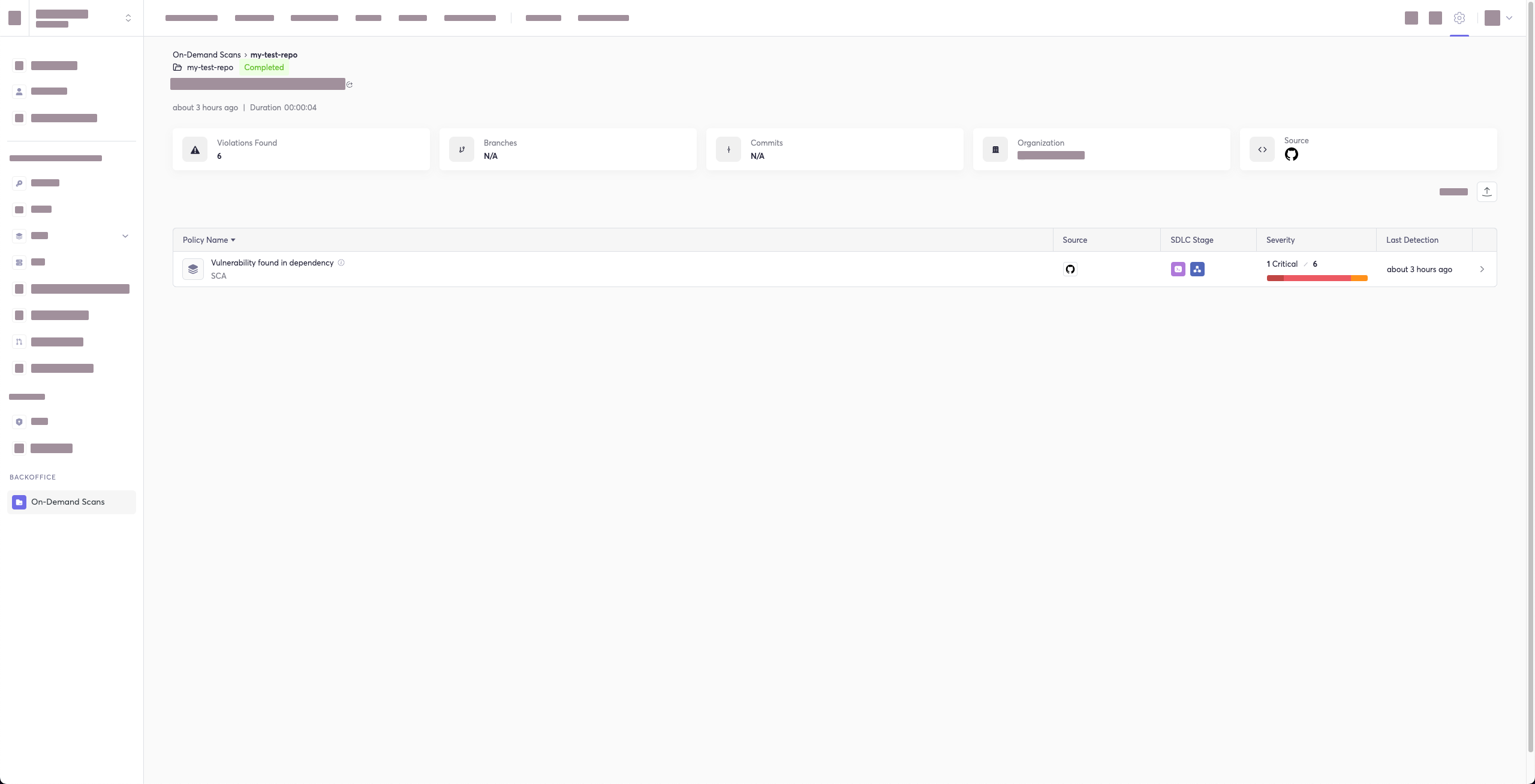
|
70
72
|
1. [Terraform Plan Scan](#terraform-plan-scan)
|
|
71
|
-
|
|
73
|
+
4. [Commit History Scan](#commit-history-scan)
|
|
72
74
|
1. [Commit Range Option](#commit-range-option)
|
|
73
|
-
|
|
74
|
-
8. [Lock Restore Options](#lock-restore-options)
|
|
75
|
-
1. [SBT Scan](#sbt-scan)
|
|
75
|
+
5. [Pre-Commit Scan](#pre-commit-scan)
|
|
76
76
|
2. [Scan Results](#scan-results)
|
|
77
77
|
1. [Show/Hide Secrets](#showhide-secrets)
|
|
78
78
|
2. [Soft Fail](#soft-fail)
|
|
@@ -88,7 +88,7 @@ This guide will guide you through both installation and usage.
|
|
|
88
88
|
3. [Ignoring a Path](#ignoring-a-path)
|
|
89
89
|
4. [Ignoring a Secret, IaC, or SCA Rule](#ignoring-a-secret-iac-sca-or-sast-rule)
|
|
90
90
|
5. [Ignoring a Package](#ignoring-a-package)
|
|
91
|
-
6. [Ignoring
|
|
91
|
+
6. [Ignoring via a config file](#ignoring-via-a-config-file)
|
|
92
92
|
5. [Report command](#report-command)
|
|
93
93
|
1. [Generating SBOM Report](#generating-sbom-report)
|
|
94
94
|
6. [Syntax Help](#syntax-help)
|
|
@@ -97,7 +97,7 @@ This guide will guide you through both installation and usage.
|
|
|
97
97
|
|
|
98
98
|
- The Cycode CLI application requires Python version 3.8 or later.
|
|
99
99
|
- Use the [`cycode auth` command](#using-the-auth-command) to authenticate to Cycode with the CLI
|
|
100
|
-
- Alternatively, you can
|
|
100
|
+
- Alternatively, you can get a Cycode Client ID and Client Secret Key by following the steps detailed in the [Service Account Token](https://docs.cycode.com/docs/en/service-accounts) and [Personal Access Token](https://docs.cycode.com/v1/docs/managing-personal-access-tokens) pages, which contain details on getting these values.
|
|
101
101
|
|
|
102
102
|
# Installation
|
|
103
103
|
|
|
@@ -114,8 +114,17 @@ To install the Cycode CLI application on your local machine, perform the followi
|
|
|
114
114
|
|
|
115
115
|
2. Execute one of the following commands:
|
|
116
116
|
|
|
117
|
-
-
|
|
118
|
-
|
|
117
|
+
- To install from [PyPI](https://pypi.org/project/cycode/):
|
|
118
|
+
|
|
119
|
+
```bash
|
|
120
|
+
pip3 install cycode
|
|
121
|
+
```
|
|
122
|
+
|
|
123
|
+
- To install from [Homebrew](https://formulae.brew.sh/formula/cycode):
|
|
124
|
+
|
|
125
|
+
```bash
|
|
126
|
+
brew install cycode
|
|
127
|
+
```
|
|
119
128
|
|
|
120
129
|
3. Navigate to the top directory of the local repository you wish to scan.
|
|
121
130
|
|
|
@@ -136,30 +145,28 @@ To install the Cycode CLI application on your local machine, perform the followi
|
|
|
136
145
|
|
|
137
146
|
2. A browser window will appear, asking you to log into Cycode (as seen below):
|
|
138
147
|
|
|
139
|
-
|
|
148
|
+
<img alt="Cycode login" height="300" src="https://raw.githubusercontent.com/cycodehq/cycode-cli/main/images/cycode_login.png"/>
|
|
140
149
|
|
|
141
150
|
3. Enter your login credentials on this page and log in.
|
|
142
151
|
|
|
143
152
|
4. You will eventually be taken to the page below, where you'll be asked to choose the business group you want to authorize Cycode with (if applicable):
|
|
144
153
|
|
|
145
|
-
|
|
154
|
+
<img alt="authorize CLI" height="450" src="https://raw.githubusercontent.com/cycodehq/cycode-cli/main/images/authorize_cli.png"/>
|
|
146
155
|
|
|
147
156
|
> [!NOTE]
|
|
148
|
-
|
|
157
|
+
> This will be the default method for authenticating with the Cycode CLI.
|
|
149
158
|
|
|
150
159
|
5. Click the **Allow** button to authorize the Cycode CLI on the selected business group.
|
|
151
160
|
|
|
152
|
-
|
|
161
|
+
<img alt="allow CLI" height="450" src="https://raw.githubusercontent.com/cycodehq/cycode-cli/main/images/allow_cli.png"/>
|
|
153
162
|
|
|
154
|
-
6. Once completed, you'll see the following screen
|
|
163
|
+
6. Once completed, you'll see the following screen if it was selected successfully:
|
|
155
164
|
|
|
156
|
-
|
|
165
|
+
<img alt="successfully auth" height="450" src="https://raw.githubusercontent.com/cycodehq/cycode-cli/main/images/successfully_auth.png"/>
|
|
157
166
|
|
|
158
167
|
7. In the terminal/command line screen, you will see the following when exiting the browser window:
|
|
159
168
|
|
|
160
|
-
|
|
161
|
-
Successfully logged into cycode
|
|
162
|
-
```
|
|
169
|
+
`Successfully logged into cycode`
|
|
163
170
|
|
|
164
171
|
### Using the Configure Command
|
|
165
172
|
|
|
@@ -168,46 +175,36 @@ To install the Cycode CLI application on your local machine, perform the followi
|
|
|
168
175
|
|
|
169
176
|
1. Type the following command into your terminal/command line window:
|
|
170
177
|
|
|
171
|
-
|
|
178
|
+
```bash
|
|
179
|
+
cycode configure
|
|
180
|
+
```
|
|
172
181
|
|
|
173
182
|
2. Enter your Cycode API URL value (you can leave blank to use default value).
|
|
174
183
|
|
|
175
|
-
|
|
176
|
-
Cycode API URL [https://api.cycode.com]: https://api.onpremise.com
|
|
177
|
-
```
|
|
184
|
+
`Cycode API URL [https://api.cycode.com]: https://api.onpremise.com`
|
|
178
185
|
|
|
179
186
|
3. Enter your Cycode APP URL value (you can leave blank to use default value).
|
|
180
187
|
|
|
181
|
-
|
|
182
|
-
Cycode APP URL [https://app.cycode.com]: https://app.onpremise.com
|
|
183
|
-
```
|
|
188
|
+
`Cycode APP URL [https://app.cycode.com]: https://app.onpremise.com`
|
|
184
189
|
|
|
185
190
|
4. Enter your Cycode Client ID value.
|
|
186
191
|
|
|
187
|
-
|
|
188
|
-
Cycode Client ID []: 7fe5346b-xxxx-xxxx-xxxx-55157625c72d
|
|
189
|
-
```
|
|
192
|
+
`Cycode Client ID []: 7fe5346b-xxxx-xxxx-xxxx-55157625c72d`
|
|
190
193
|
|
|
191
194
|
5. Enter your Cycode Client Secret value.
|
|
192
195
|
|
|
193
|
-
|
|
194
|
-
Cycode Client Secret []: c1e24929-xxxx-xxxx-xxxx-8b08c1839a2e
|
|
195
|
-
```
|
|
196
|
+
`Cycode Client Secret []: c1e24929-xxxx-xxxx-xxxx-8b08c1839a2e`
|
|
196
197
|
|
|
197
198
|
6. If the values were entered successfully, you'll see the following message:
|
|
198
199
|
|
|
199
|
-
|
|
200
|
-
Successfully configured CLI credentials!
|
|
201
|
-
```
|
|
200
|
+
`Successfully configured CLI credentials!`
|
|
202
201
|
|
|
203
202
|
or/and
|
|
204
203
|
|
|
205
|
-
|
|
206
|
-
Successfully configured Cycode URLs!
|
|
207
|
-
```
|
|
204
|
+
`Successfully configured Cycode URLs!`
|
|
208
205
|
|
|
209
206
|
If you go into the `.cycode` folder under your user folder, you'll find these credentials were created and placed in the `credentials.yaml` file in that folder.
|
|
210
|
-
|
|
207
|
+
The URLs were placed in the `config.yaml` file in that folder.
|
|
211
208
|
|
|
212
209
|
### Add to Environment Variables
|
|
213
210
|
|
|
@@ -215,6 +212,11 @@ And the URLs were placed in the `config.yaml` file in that folder.
|
|
|
215
212
|
|
|
216
213
|
```bash
|
|
217
214
|
export CYCODE_CLIENT_ID={your Cycode ID}
|
|
215
|
+
```
|
|
216
|
+
|
|
217
|
+
and
|
|
218
|
+
|
|
219
|
+
```bash
|
|
218
220
|
export CYCODE_CLIENT_SECRET={your Cycode Secret Key}
|
|
219
221
|
```
|
|
220
222
|
|
|
@@ -222,22 +224,22 @@ export CYCODE_CLIENT_SECRET={your Cycode Secret Key}
|
|
|
222
224
|
|
|
223
225
|
1. From the Control Panel, navigate to the System menu:
|
|
224
226
|
|
|
225
|
-
|
|
227
|
+
<img height="30" src="https://raw.githubusercontent.com/cycodehq/cycode-cli/main/images/image1.png" alt="system menu"/>
|
|
226
228
|
|
|
227
229
|
2. Next, click Advanced system settings:
|
|
228
230
|
|
|
229
|
-
|
|
231
|
+
<img height="30" src="https://raw.githubusercontent.com/cycodehq/cycode-cli/main/images/image2.png" alt="advanced system setting"/>
|
|
230
232
|
|
|
231
233
|
3. In the System Properties window that opens, click the Environment Variables button:
|
|
232
234
|
|
|
233
|
-
|
|
235
|
+
<img height="30" src="https://raw.githubusercontent.com/cycodehq/cycode-cli/main/images/image3.png" alt="environments variables button"/>
|
|
234
236
|
|
|
235
237
|
4. Create `CYCODE_CLIENT_ID` and `CYCODE_CLIENT_SECRET` variables with values matching your ID and Secret Key, respectively:
|
|
236
238
|
|
|
237
|
-
|
|
239
|
+
<img height="100" src="https://raw.githubusercontent.com/cycodehq/cycode-cli/main/images/image4.png" alt="environment variables window"/>
|
|
240
|
+
|
|
241
|
+
5. Insert the `cycode.exe` into the path to complete the installation.
|
|
238
242
|
|
|
239
|
-
5. Insert the cycode.exe into the path to complete the installation.
|
|
240
|
-
|
|
241
243
|
## Install Pre-Commit Hook
|
|
242
244
|
|
|
243
245
|
Cycode’s pre-commit hook can be set up within your local repository so that the Cycode CLI application will identify any issues with your code automatically before you commit it to your codebase.
|
|
@@ -249,7 +251,9 @@ Perform the following steps to install the pre-commit hook:
|
|
|
249
251
|
|
|
250
252
|
1. Install the pre-commit framework (Python 3.8 or higher must be installed):
|
|
251
253
|
|
|
252
|
-
|
|
254
|
+
```bash
|
|
255
|
+
pip3 install pre-commit
|
|
256
|
+
```
|
|
253
257
|
|
|
254
258
|
2. Navigate to the top directory of the local Git repository you wish to configure.
|
|
255
259
|
|
|
@@ -258,7 +262,7 @@ Perform the following steps to install the pre-commit hook:
|
|
|
258
262
|
```yaml
|
|
259
263
|
repos:
|
|
260
264
|
- repo: https://github.com/cycodehq/cycode-cli
|
|
261
|
-
rev:
|
|
265
|
+
rev: v2.3.0
|
|
262
266
|
hooks:
|
|
263
267
|
- id: cycode
|
|
264
268
|
stages:
|
|
@@ -270,7 +274,7 @@ Perform the following steps to install the pre-commit hook:
|
|
|
270
274
|
```yaml
|
|
271
275
|
repos:
|
|
272
276
|
- repo: https://github.com/cycodehq/cycode-cli
|
|
273
|
-
rev:
|
|
277
|
+
rev: v2.3.0
|
|
274
278
|
hooks:
|
|
275
279
|
- id: cycode
|
|
276
280
|
stages:
|
|
@@ -282,15 +286,19 @@ Perform the following steps to install the pre-commit hook:
|
|
|
282
286
|
|
|
283
287
|
5. Install Cycode’s hook:
|
|
284
288
|
|
|
285
|
-
|
|
289
|
+
```bash
|
|
290
|
+
pre-commit install
|
|
291
|
+
```
|
|
286
292
|
|
|
287
293
|
A successful hook installation will result in the message: `Pre-commit installed at .git/hooks/pre-commit`.
|
|
288
294
|
|
|
289
295
|
6. Keep the pre-commit hook up to date:
|
|
290
296
|
|
|
291
|
-
|
|
297
|
+
```bash
|
|
298
|
+
pre-commit autoupdate
|
|
299
|
+
```
|
|
292
300
|
|
|
293
|
-
It will automatically bump
|
|
301
|
+
It will automatically bump `rev` in `.pre-commit-config.yaml` to the latest available version of Cycode CLI.
|
|
294
302
|
|
|
295
303
|
> [!NOTE]
|
|
296
304
|
> Trigger happens on `git commit` command.
|
|
@@ -300,20 +308,23 @@ Perform the following steps to install the pre-commit hook:
|
|
|
300
308
|
|
|
301
309
|
The following are the options and commands available with the Cycode CLI application:
|
|
302
310
|
|
|
303
|
-
| Option | Description
|
|
304
|
-
|
|
305
|
-
| `-
|
|
306
|
-
|
|
|
307
|
-
| `--
|
|
308
|
-
|
|
309
|
-
|
|
|
310
|
-
|
|
311
|
-
|
|
312
|
-
|
|
|
313
|
-
|
|
314
|
-
| [
|
|
315
|
-
| [
|
|
316
|
-
|
|
|
311
|
+
| Option | Description |
|
|
312
|
+
|--------------------------------------|------------------------------------------------------------------------|
|
|
313
|
+
| `-v`, `--verbose` | Show detailed logs. |
|
|
314
|
+
| `--no-progress-meter` | Do not show the progress meter. |
|
|
315
|
+
| `--no-update-notifier` | Do not check CLI for updates. |
|
|
316
|
+
| `-o`, `--output [text\|json\|table]` | Specify the output (`text`/`json`/`table`). The default is `text`. |
|
|
317
|
+
| `--user-agent TEXT` | Characteristic JSON object that lets servers identify the application. |
|
|
318
|
+
| `--help` | Show options for given command. |
|
|
319
|
+
|
|
320
|
+
| Command | Description |
|
|
321
|
+
|-------------------------------------------|----------------------------------------------------------------------------------------------------------------------------------------------|
|
|
322
|
+
| [auth](#using-the-auth-command) | Authenticate your machine to associate the CLI with your Cycode account. |
|
|
323
|
+
| [configure](#using-the-configure-command) | Initial command to configure your CLI client authentication. |
|
|
324
|
+
| [ignore](#ignoring-scan-results) | Ignores a specific value, path or rule ID. |
|
|
325
|
+
| [scan](#running-a-scan) | Scan the content for Secrets/IaC/SCA/SAST violations. You`ll need to specify which scan type to perform: commit_history/path/repository/etc. |
|
|
326
|
+
| [report](#report-command) | Generate report. You`ll need to specify which report type to perform. |
|
|
327
|
+
| status | Show the CLI status and exit. |
|
|
317
328
|
|
|
318
329
|
# Scan Command
|
|
319
330
|
|
|
@@ -323,16 +334,18 @@ The Cycode CLI application offers several types of scans so that you can choose
|
|
|
323
334
|
|
|
324
335
|
| Option | Description |
|
|
325
336
|
|------------------------------------------------------------|---------------------------------------------------------------------------------------------------------------------------------------------------------------------------------------------------------------------------------------------------------|
|
|
326
|
-
| `-t, --scan-type [secret\|iac\|sca\|sast]` | Specify the scan you wish to execute (`secret`/`iac`/`sca`/`sast`), the default is `secret
|
|
327
|
-
| `--secret TEXT` | Specify a Cycode client secret for this specific scan execution
|
|
328
|
-
| `--client-id TEXT` | Specify a Cycode client ID for this specific scan execution
|
|
337
|
+
| `-t, --scan-type [secret\|iac\|sca\|sast]` | Specify the scan you wish to execute (`secret`/`iac`/`sca`/`sast`), the default is `secret`. |
|
|
338
|
+
| `--secret TEXT` | Specify a Cycode client secret for this specific scan execution. |
|
|
339
|
+
| `--client-id TEXT` | Specify a Cycode client ID for this specific scan execution. |
|
|
329
340
|
| `--show-secret BOOLEAN` | Show secrets in plain text. See [Show/Hide Secrets](#showhide-secrets) section for more details. |
|
|
330
341
|
| `--soft-fail BOOLEAN` | Run scan without failing, always return a non-error status code. See [Soft Fail](#soft-fail) section for more details. |
|
|
331
342
|
| `--severity-threshold [INFO\|LOW\|MEDIUM\|HIGH\|CRITICAL]` | Show only violations at the specified level or higher. |
|
|
332
|
-
| `--sca-scan` | Specify the SCA scan you wish to execute (`package-vulnerabilities`/`license-compliance`). The default is both
|
|
343
|
+
| `--sca-scan` | Specify the SCA scan you wish to execute (`package-vulnerabilities`/`license-compliance`). The default is both. |
|
|
333
344
|
| `--monitor` | When specified, the scan results will be recorded in the knowledge graph. Please note that when working in `monitor` mode, the knowledge graph will not be updated as a result of SCM events (Push, Repo creation). (Supported for SCA scan type only). |
|
|
334
|
-
| `--report` | When specified, a violations report will be generated. A URL link to the report will be printed as an output to the command execution
|
|
345
|
+
| `--report` | When specified, a violations report will be generated. A URL link to the report will be printed as an output to the command execution. |
|
|
335
346
|
| `--no-restore` | When specified, Cycode will not run restore command. Will scan direct dependencies ONLY! |
|
|
347
|
+
| `--sync` | Run scan synchronously (the default is asynchronous). |
|
|
348
|
+
| `--gradle-all-sub-projects` | When specified, Cycode will run gradle restore command for all sub projects. Should run from root project directory ONLY! |
|
|
336
349
|
| `--help` | Show options for given command. |
|
|
337
350
|
|
|
338
351
|
| Command | Description |
|
|
@@ -342,37 +355,17 @@ The Cycode CLI application offers several types of scans so that you can choose
|
|
|
342
355
|
| [pre_commit](#pre-commit-scan) | Use this command to scan the content that was not committed yet |
|
|
343
356
|
| [repository](#repository-scan) | Scan git repository including its history |
|
|
344
357
|
|
|
345
|
-
###
|
|
346
|
-
|
|
347
|
-
A repository scan examines an entire local repository for any exposed secrets or insecure misconfigurations. This more holistic scan type looks at everything: the current state of your repository and its commit history. It will look not only for secrets that are currently exposed within the repository but previously deleted secrets as well.
|
|
348
|
-
|
|
349
|
-
To execute a full repository scan, execute the following:
|
|
350
|
-
|
|
351
|
-
`cycode scan repository {{path}}`
|
|
352
|
-
|
|
353
|
-
For example, consider a scenario in which you want to scan your repository stored in `~/home/git/codebase`. You could then execute the following:
|
|
354
|
-
|
|
355
|
-
`cycode scan repository ~/home/git/codebase`
|
|
356
|
-
|
|
357
|
-
The following option is available for use with this command:
|
|
358
|
-
|
|
359
|
-
| Option | Description |
|
|
360
|
-
|---------------------|--------------------------------------------------------|
|
|
361
|
-
| `-b, --branch TEXT` | Branch to scan, if not set scanning the default branch |
|
|
362
|
-
|
|
363
|
-
#### Branch Option
|
|
364
|
-
|
|
365
|
-
To scan a specific branch of your local repository, add the argument `-b` (alternatively, `--branch`) followed by the name of the branch you wish to scan.
|
|
358
|
+
### Options
|
|
366
359
|
|
|
367
|
-
|
|
360
|
+
#### Severity Option
|
|
368
361
|
|
|
369
|
-
|
|
362
|
+
To limit the results of the scan to a specific severity threshold, add the argument `--severity-threshold` to the scan command.
|
|
370
363
|
|
|
371
|
-
or:
|
|
364
|
+
The following command will scan the repository for policy violations that have severity of Medium or higher:
|
|
372
365
|
|
|
373
|
-
`cycode scan repository ~/home/git/codebase
|
|
366
|
+
`cycode scan --severity-threshold MEDIUM repository ~/home/git/codebase`
|
|
374
367
|
|
|
375
|
-
|
|
368
|
+
#### Monitor Option
|
|
376
369
|
|
|
377
370
|
> [!NOTE]
|
|
378
371
|
> This option is only available to SCA scans.
|
|
@@ -383,16 +376,12 @@ Consider the following example. The following command will scan the repository f
|
|
|
383
376
|
|
|
384
377
|
`cycode scan -t sca --monitor repository ~/home/git/codebase`
|
|
385
378
|
|
|
386
|
-
or:
|
|
387
|
-
|
|
388
|
-
`cycode scan --scan-type sca --monitor repository ~/home/git/codebase`
|
|
389
|
-
|
|
390
379
|
When using this option, the scan results from this scan will appear in the knowledge graph, which can be found [here](https://app.cycode.com/query-builder).
|
|
391
380
|
|
|
392
381
|
> [!WARNING]
|
|
393
382
|
> You must be an `owner` or an `admin` in Cycode to view the knowledge graph page.
|
|
394
383
|
|
|
395
|
-
|
|
384
|
+
#### Report Option
|
|
396
385
|
|
|
397
386
|
> [!NOTE]
|
|
398
387
|
> This option is not available to IaC scans.
|
|
@@ -400,26 +389,21 @@ When using this option, the scan results from this scan will appear in the knowl
|
|
|
400
389
|
To push scan results tied to the [SCA policies](https://docs.cycode.com/docs/sca-policies) found in the Repository scan to Cycode, add the argument `--report` to the scan command.
|
|
401
390
|
|
|
402
391
|
`cycode scan -t sca --report repository ~/home/git/codebase`
|
|
403
|
-
`cycode scan -t secret --report repository ~/home/git/codebase`
|
|
404
|
-
|
|
405
|
-
or:
|
|
406
392
|
|
|
407
|
-
|
|
408
|
-
`cycode scan --scan-type secret --report repository ~/home/git/codebase`
|
|
393
|
+
In the same way, you can push scan results of Secrets and SAST scans to Cycode by adding the `--report` option to the scan command.
|
|
409
394
|
|
|
410
395
|
When using this option, the scan results from this scan will appear in the On-Demand Scans section of Cycode. To get to this page, click the link that appears after the printed results:
|
|
411
396
|
|
|
412
|
-
>
|
|
397
|
+
> [!WARNING]
|
|
413
398
|
> You must be an `owner` or an `admin` in Cycode to view this page.
|
|
414
399
|
|
|
415
400
|
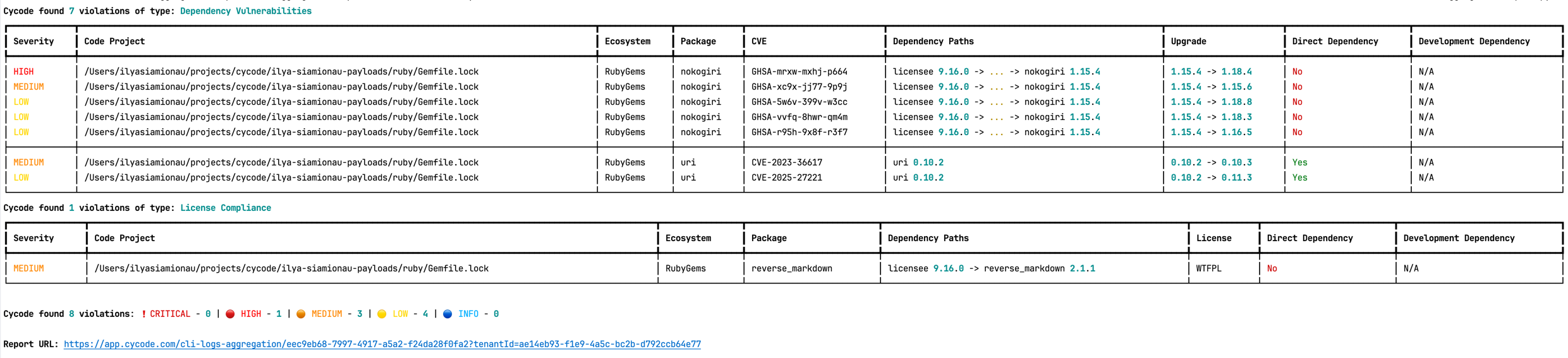
|
|
416
401
|
|
|
417
|
-
|
|
418
402
|
The report page will look something like below:
|
|
419
403
|
|
|
420
404
|
|
|
421
405
|
|
|
422
|
-
|
|
406
|
+
#### Package Vulnerabilities Option
|
|
423
407
|
|
|
424
408
|
> [!NOTE]
|
|
425
409
|
> This option is only available to SCA scans.
|
|
@@ -430,10 +414,6 @@ Consider the previous example. If you wanted to only run an SCA scan on package
|
|
|
430
414
|
|
|
431
415
|
`cycode scan -t sca --sca-scan package-vulnerabilities repository ~/home/git/codebase`
|
|
432
416
|
|
|
433
|
-
or:
|
|
434
|
-
|
|
435
|
-
`cycode scan --scan-type sca --sca-scan package-vulnerabilities repository ~/home/git/codebase`
|
|
436
|
-
|
|
437
417
|
#### License Compliance Option
|
|
438
418
|
|
|
439
419
|
> [!NOTE]
|
|
@@ -445,24 +425,46 @@ Consider the previous example. If you wanted to only scan a branch named `dev`,
|
|
|
445
425
|
|
|
446
426
|
`cycode scan -t sca --sca-scan license-compliance repository ~/home/git/codebase -b dev`
|
|
447
427
|
|
|
448
|
-
|
|
449
|
-
|
|
450
|
-
`cycode scan --scan-type sca --sca-scan license-compliance repository ~/home/git/codebase`
|
|
451
|
-
|
|
452
|
-
#### Severity Threshold
|
|
428
|
+
#### Lock Restore Option
|
|
453
429
|
|
|
454
430
|
> [!NOTE]
|
|
455
431
|
> This option is only available to SCA scans.
|
|
456
432
|
|
|
457
|
-
|
|
433
|
+
We use sbt-dependency-lock plugin to restore the lock file for SBT projects.
|
|
434
|
+
To disable lock restore in use `--no-restore` option.
|
|
435
|
+
|
|
436
|
+
Prerequisites:
|
|
437
|
+
* `sbt-dependency-lock` plugin: Install the plugin by adding the following line to `project/plugins.sbt`:
|
|
438
|
+
|
|
439
|
+
```text
|
|
440
|
+
addSbtPlugin("software.purpledragon" % "sbt-dependency-lock" % "1.5.1")
|
|
441
|
+
```
|
|
442
|
+
|
|
443
|
+
### Repository Scan
|
|
444
|
+
|
|
445
|
+
A repository scan examines an entire local repository for any exposed secrets or insecure misconfigurations. This more holistic scan type looks at everything: the current state of your repository and its commit history. It will look not only for secrets that are currently exposed within the repository but previously deleted secrets as well.
|
|
446
|
+
|
|
447
|
+
To execute a full repository scan, execute the following:
|
|
448
|
+
|
|
449
|
+
`cycode scan repository {{path}}`
|
|
458
450
|
|
|
459
|
-
|
|
451
|
+
For example, consider a scenario in which you want to scan your repository stored in `~/home/git/codebase`. You could then execute the following:
|
|
452
|
+
|
|
453
|
+
`cycode scan repository ~/home/git/codebase`
|
|
454
|
+
|
|
455
|
+
The following option is available for use with this command:
|
|
456
|
+
|
|
457
|
+
| Option | Description |
|
|
458
|
+
|---------------------|--------------------------------------------------------|
|
|
459
|
+
| `-b, --branch TEXT` | Branch to scan, if not set scanning the default branch |
|
|
460
460
|
|
|
461
|
-
|
|
461
|
+
#### Branch Option
|
|
462
462
|
|
|
463
|
-
|
|
463
|
+
To scan a specific branch of your local repository, add the argument `-b` (alternatively, `--branch`) followed by the name of the branch you wish to scan.
|
|
464
464
|
|
|
465
|
-
|
|
465
|
+
Consider the previous example. If you wanted to only scan a branch named `dev`, you could execute the following:
|
|
466
|
+
|
|
467
|
+
`cycode scan repository ~/home/git/codebase -b dev`
|
|
466
468
|
|
|
467
469
|
### Path Scan
|
|
468
470
|
|
|
@@ -476,7 +478,6 @@ For example, consider a scenario in which you want to scan the directory located
|
|
|
476
478
|
|
|
477
479
|
`cycode scan path ~/home/git/codebase`
|
|
478
480
|
|
|
479
|
-
|
|
480
481
|
#### Terraform Plan Scan
|
|
481
482
|
|
|
482
483
|
Cycode CLI supports Terraform plan scanning (supporting Terraform 0.12 and later)
|
|
@@ -521,34 +522,21 @@ The following options are available for use with this command:
|
|
|
521
522
|
|
|
522
523
|
#### Commit Range Option
|
|
523
524
|
|
|
524
|
-
The commit history scan, by default, examines the repository’s entire commit history, all the way back to the initial commit. You can instead limit the scan to a specific commit range by adding the argument `--commit_range` followed by the name you specify.
|
|
525
|
+
The commit history scan, by default, examines the repository’s entire commit history, all the way back to the initial commit. You can instead limit the scan to a specific commit range by adding the argument `--commit_range` (`-r`) followed by the name you specify.
|
|
525
526
|
|
|
526
|
-
Consider the previous example. If you wanted to scan only specific commits
|
|
527
|
+
Consider the previous example. If you wanted to scan only specific commits in your repository, you could execute the following:
|
|
527
528
|
|
|
528
529
|
`cycode scan commit_history -r {{from-commit-id}}...{{to-commit-id}} ~/home/git/codebase`
|
|
529
530
|
|
|
530
|
-
OR
|
|
531
|
-
|
|
532
|
-
`cycode scan commit_history --commit_range {{from-commit-id}}...{{to-commit-id}} ~/home/git/codebase`
|
|
533
|
-
|
|
534
531
|
### Pre-Commit Scan
|
|
535
532
|
|
|
536
|
-
A pre-commit scan automatically identifies any issues before you commit changes to your repository. There is no need to manually execute this scan;
|
|
533
|
+
A pre-commit scan automatically identifies any issues before you commit changes to your repository. There is no need to manually execute this scan; configure the pre-commit hook as detailed under the Installation section of this guide.
|
|
537
534
|
|
|
538
|
-
After
|
|
539
|
-
|
|
540
|
-
`SKIP=cycode git commit -m <your commit message>`
|
|
541
|
-
|
|
542
|
-
### Lock Restore Options
|
|
543
|
-
|
|
544
|
-
#### SBT Scan
|
|
545
|
-
|
|
546
|
-
We use sbt-dependency-lock plugin to restore the lock file for SBT projects.
|
|
547
|
-
To disable lock restore in use `--no-restore` option.
|
|
535
|
+
After installing the pre-commit hook, you may occasionally wish to skip scanning during a specific commit. To do this, add the following to your `git` command to skip scanning for a single commit:
|
|
548
536
|
|
|
549
|
-
|
|
550
|
-
|
|
551
|
-
|
|
537
|
+
```bash
|
|
538
|
+
SKIP=cycode git commit -m <your commit message>`
|
|
539
|
+
```
|
|
552
540
|
|
|
553
541
|
## Scan Results
|
|
554
542
|
|
|
@@ -568,19 +556,19 @@ Secret SHA: a44081db3296c84b82d12a35c446a3cba19411dddfa0380134c75f7b3973bff0
|
|
|
568
556
|
2 |
|
|
569
557
|
```
|
|
570
558
|
|
|
571
|
-
|
|
559
|
+
If an issue is found, review the file in question for the specific line highlighted by the result message. Implement any changes required to resolve the issue, then execute the scan again.
|
|
572
560
|
|
|
573
561
|
### Show/Hide Secrets
|
|
574
562
|
|
|
575
563
|
In the above example, a secret was found in the file `secret_test`, located in the subfolder `cli`. The second part of the message shows the specific line the secret appears in, which in this case is a value assigned to `googleApiKey`.
|
|
576
564
|
|
|
577
|
-
Note how the above example obscures the actual secret value, replacing most of the secret with asterisks. Scans obscure secrets by default, but you may optionally disable this feature
|
|
565
|
+
Note how the above example obscures the actual secret value, replacing most of the secret with asterisks. Scans obscure secrets by default, but you may optionally disable this feature to view the full secret (assuming the machine you are viewing the scan result on is sufficiently secure from prying eyes).
|
|
578
566
|
|
|
579
|
-
To disable secret obfuscation, add the `--show-secret` argument to any type of scan
|
|
567
|
+
To disable secret obfuscation, add the `--show-secret` argument to any type of scan.
|
|
580
568
|
|
|
581
569
|
In the following example, a Path Scan is executed against the `cli` subdirectory with the option enabled to display any secrets found in full:
|
|
582
570
|
|
|
583
|
-
`cycode scan --show-secret
|
|
571
|
+
`cycode scan --show-secret path ./cli`
|
|
584
572
|
|
|
585
573
|
The result would then not be obfuscated:
|
|
586
574
|
|
|
@@ -645,13 +633,13 @@ Secret SHA: a44081db3296c84b82d12a35c446a3cba19411dddfa0380134c75f7b3973bff0
|
|
|
645
633
|
|
|
646
634
|
### Company’s Custom Remediation Guidelines
|
|
647
635
|
|
|
648
|
-
If your company has set custom remediation guidelines in the relevant policy via the Cycode portal, you'll see a field for “Company Guidelines” that contains the remediation guidelines you added. Note that if you haven't added any company
|
|
636
|
+
If your company has set custom remediation guidelines in the relevant policy via the Cycode portal, you'll see a field for “Company Guidelines” that contains the remediation guidelines you added. Note that if you haven't added any company guidelines, this field will not appear in the CLI tool.
|
|
649
637
|
|
|
650
638
|
## Ignoring Scan Results
|
|
651
639
|
|
|
652
|
-
Ignore rules can be added to ignore specific secret values, specific SHA512 values, specific paths, and specific Cycode secret and IaC rule IDs. This will cause the scan to not alert these values. The
|
|
640
|
+
Ignore rules can be added to ignore specific secret values, specific SHA512 values, specific paths, and specific Cycode secret and IaC rule IDs. This will cause the scan to not alert these values. The ignoring rules are written and saved locally in the `./.cycode/config.yaml` file.
|
|
653
641
|
|
|
654
|
-
>
|
|
642
|
+
> [!WARNING]
|
|
655
643
|
> Adding values to be ignored should be done with careful consideration of the values, paths, and policies to ensure that the scans will pick up true positives.
|
|
656
644
|
|
|
657
645
|
The following are the options available for the `cycode ignore` command:
|
|
@@ -663,8 +651,9 @@ The following are the options available for the `cycode ignore` command:
|
|
|
663
651
|
| `--by-path TEXT` | Avoid scanning a specific path. Need to specify scan type. See [Ignoring a Path](#ignoring-a-path) for more details. |
|
|
664
652
|
| `--by-rule TEXT` | Ignore scanning a specific secret rule ID/IaC rule ID/SCA rule ID. See [Ignoring a Secret or Iac Rule](#ignoring-a-secret-iac-sca-or-sast-rule) for more details. |
|
|
665
653
|
| `--by-package TEXT` | Ignore scanning a specific package version while running an SCA scan. Expected pattern - `name@version`. See [Ignoring a Package](#ignoring-a-package) for more details. |
|
|
666
|
-
|
|
|
667
|
-
| `-
|
|
654
|
+
| `--by-cve TEXT` | Ignore scanning a specific CVE while running an SCA scan. Expected pattern: CVE-YYYY-NNN. |
|
|
655
|
+
| `-t, --scan-type [secret\|iac\|sca\|sast]` | Specify the scan you wish to execute (`secret`/`iac`/`sca`/`sast`). The default value is `secret`. |
|
|
656
|
+
| `-g, --global` | Add an ignore rule and update it in the global `.cycode` config file. |
|
|
668
657
|
|
|
669
658
|
In the following example, a pre-commit scan runs and finds the following:
|
|
670
659
|
|
|
@@ -708,10 +697,6 @@ To ignore a specific path for either secret, IaC, or SCA scans, you will need to
|
|
|
708
697
|
|
|
709
698
|
`cycode ignore -t {{scan-type}} --by-path {{path}}`
|
|
710
699
|
|
|
711
|
-
OR
|
|
712
|
-
|
|
713
|
-
`cycode ignore --scan-type {{scan-type}} --by-path {{path}}`
|
|
714
|
-
|
|
715
700
|
In the example at the top of this section, the command to ignore a specific path for a secret is as follows:
|
|
716
701
|
|
|
717
702
|
`cycode ignore -t secret --by-path ~/home/my-repo/config`
|
|
@@ -736,25 +721,21 @@ To ignore a specific secret, IaC, SCA, or SAST rule, you will need to use the `-
|
|
|
736
721
|
|
|
737
722
|
`cycode ignore -t {{scan-type}} --by-rule {{rule-ID}}`
|
|
738
723
|
|
|
739
|
-
OR
|
|
740
|
-
|
|
741
|
-
`cycode ignore --scan-type {{scan-type}} --by-rule {{rule-ID}}`
|
|
742
|
-
|
|
743
724
|
In the example at the top of this section, the command to ignore the specific secret rule ID is as follows:
|
|
744
725
|
|
|
745
|
-
`cycode ignore
|
|
726
|
+
`cycode ignore -t secret --by-rule ce3a4de0-9dfc-448b-a004-c538cf8b4710`
|
|
746
727
|
|
|
747
728
|
In the example above, replace the `ce3a4de0-9dfc-448b-a004-c538cf8b4710` value with the rule ID you want to ignore.
|
|
748
729
|
|
|
749
730
|
In the example at the top of this section, the command to ignore the specific IaC rule ID is as follows:
|
|
750
731
|
|
|
751
|
-
`cycode ignore
|
|
732
|
+
`cycode ignore -t iac --by-rule bdaa88e2-5e7c-46ff-ac2a-29721418c59c`
|
|
752
733
|
|
|
753
734
|
In the example above, replace the `bdaa88e2-5e7c-46ff-ac2a-29721418c59c` value with the rule ID you want to ignore.
|
|
754
735
|
|
|
755
736
|
In the example at the top of this section, the command to ignore the specific SCA rule ID is as follows:
|
|
756
737
|
|
|
757
|
-
`cycode ignore
|
|
738
|
+
`cycode ignore -t sca --by-rule dc21bc6b-9f4f-46fb-9f92-e4327ea03f6b`
|
|
758
739
|
|
|
759
740
|
In the example above, replace the `dc21bc6b-9f4f-46fb-9f92-e4327ea03f6b` value with the rule ID you want to ignore.
|
|
760
741
|
|
|
@@ -777,7 +758,7 @@ In the example below, the command to ignore a specific SCA package is as follows
|
|
|
777
758
|
|
|
778
759
|
In the example above, replace `pyyaml` with package name and `5.3.1` with the package version you want to ignore.
|
|
779
760
|
|
|
780
|
-
### Ignoring
|
|
761
|
+
### Ignoring via a config file
|
|
781
762
|
|
|
782
763
|
The applied ignoring rules are stored in the configuration file called `config.yaml`.
|
|
783
764
|
This file could be easily shared between developers or even committed to remote Git.
|
|
@@ -826,14 +807,15 @@ It's important to understand how CLI stores ignore rules to be able to read thes
|
|
|
826
807
|
The abstract YAML structure:
|
|
827
808
|
```yaml
|
|
828
809
|
exclusions:
|
|
829
|
-
|
|
830
|
-
|
|
831
|
-
-
|
|
832
|
-
-
|
|
810
|
+
{scanTypeName}:
|
|
811
|
+
{ignoringType}:
|
|
812
|
+
- someIgnoringValue1
|
|
813
|
+
- someIgnoringValue2
|
|
833
814
|
```
|
|
834
815
|
|
|
835
816
|
Possible values of `scanTypeName`: `iac`, `sca`, `sast`, `secret`.
|
|
836
|
-
|
|
817
|
+
|
|
818
|
+
Possible values of `ignoringType`: `paths`, `values`, `rules`, `packages`, `shas`, `cves`.
|
|
837
819
|
|
|
838
820
|
> [!WARNING]
|
|
839
821
|
> Values for "ignore by value" are not stored as plain text!
|
|
@@ -866,7 +848,7 @@ exclusions:
|
|
|
866
848
|
## Generating SBOM Report
|
|
867
849
|
|
|
868
850
|
A software bill of materials (SBOM) is an inventory of all constituent components and software dependencies involved in the development and delivery of an application.
|
|
869
|
-
Using this command you can create an SBOM report for your local project or for your repository URI.
|
|
851
|
+
Using this command, you can create an SBOM report for your local project or for your repository URI.
|
|
870
852
|
|
|
871
853
|
The following options are available for use with this command:
|
|
872
854
|
|
|
@@ -917,7 +899,7 @@ To see the options available for a specific type of scan, enter:
|
|
|
917
899
|
|
|
918
900
|
`cycode scan {{option}} --help`
|
|
919
901
|
|
|
920
|
-
For example, to see options available for a Path Scan, you would
|
|
902
|
+
For example, to see options available for a Path Scan, you would enter:
|
|
921
903
|
|
|
922
904
|
`cycode scan path --help`
|
|
923
905
|
|
|
@@ -925,11 +907,10 @@ To see the options available for the ignore scan function, use this command:
|
|
|
925
907
|
|
|
926
908
|
`cycode ignore --help`
|
|
927
909
|
|
|
928
|
-
To see the options available for report, use this command:
|
|
910
|
+
To see the options available for a report, use this command:
|
|
929
911
|
|
|
930
912
|
`cycode report --help`
|
|
931
913
|
|
|
932
|
-
|
|
933
914
|
To see the options available for a specific type of report, enter:
|
|
934
915
|
|
|
935
916
|
`cycode scan {{option}} --help`
|