cycode 1.4.1.dev8__tar.gz → 1.4.1.dev10__tar.gz
This diff represents the content of publicly available package versions that have been released to one of the supported registries. The information contained in this diff is provided for informational purposes only and reflects changes between package versions as they appear in their respective public registries.
- {cycode-1.4.1.dev8 → cycode-1.4.1.dev10}/PKG-INFO +160 -79
- {cycode-1.4.1.dev8 → cycode-1.4.1.dev10}/README.md +159 -78
- cycode-1.4.1.dev10/cycode/__init__.py +1 -0
- {cycode-1.4.1.dev8 → cycode-1.4.1.dev10}/cycode/cli/consts.py +3 -0
- {cycode-1.4.1.dev8 → cycode-1.4.1.dev10}/pyproject.toml +1 -1
- cycode-1.4.1.dev8/cycode/__init__.py +0 -1
- {cycode-1.4.1.dev8 → cycode-1.4.1.dev10}/cycode/cli/__init__.py +0 -0
- {cycode-1.4.1.dev8 → cycode-1.4.1.dev10}/cycode/cli/auth/__init__.py +0 -0
- {cycode-1.4.1.dev8 → cycode-1.4.1.dev10}/cycode/cli/auth/auth_command.py +0 -0
- {cycode-1.4.1.dev8 → cycode-1.4.1.dev10}/cycode/cli/auth/auth_manager.py +0 -0
- {cycode-1.4.1.dev8 → cycode-1.4.1.dev10}/cycode/cli/ci_integrations.py +0 -0
- {cycode-1.4.1.dev8 → cycode-1.4.1.dev10}/cycode/cli/code_scanner.py +0 -0
- {cycode-1.4.1.dev8 → cycode-1.4.1.dev10}/cycode/cli/commands/configure/__init__.py +0 -0
- {cycode-1.4.1.dev8 → cycode-1.4.1.dev10}/cycode/cli/commands/configure/configure_command.py +0 -0
- {cycode-1.4.1.dev8 → cycode-1.4.1.dev10}/cycode/cli/commands/ignore/__init__.py +0 -0
- {cycode-1.4.1.dev8 → cycode-1.4.1.dev10}/cycode/cli/commands/ignore/ignore_command.py +0 -0
- {cycode-1.4.1.dev8 → cycode-1.4.1.dev10}/cycode/cli/commands/report/__init__.py +0 -0
- {cycode-1.4.1.dev8 → cycode-1.4.1.dev10}/cycode/cli/commands/report/report_command.py +0 -0
- {cycode-1.4.1.dev8 → cycode-1.4.1.dev10}/cycode/cli/commands/report/sbom/__init__.py +0 -0
- {cycode-1.4.1.dev8 → cycode-1.4.1.dev10}/cycode/cli/commands/report/sbom/common.py +0 -0
- {cycode-1.4.1.dev8 → cycode-1.4.1.dev10}/cycode/cli/commands/report/sbom/handle_errors.py +0 -0
- {cycode-1.4.1.dev8 → cycode-1.4.1.dev10}/cycode/cli/commands/report/sbom/sbom_command.py +0 -0
- {cycode-1.4.1.dev8 → cycode-1.4.1.dev10}/cycode/cli/commands/report/sbom/sbom_path_command.py +0 -0
- {cycode-1.4.1.dev8 → cycode-1.4.1.dev10}/cycode/cli/commands/report/sbom/sbom_report_file.py +0 -0
- {cycode-1.4.1.dev8 → cycode-1.4.1.dev10}/cycode/cli/commands/report/sbom/sbom_repository_url_command.py +0 -0
- {cycode-1.4.1.dev8 → cycode-1.4.1.dev10}/cycode/cli/config.py +0 -0
- {cycode-1.4.1.dev8 → cycode-1.4.1.dev10}/cycode/cli/config.yaml +0 -0
- {cycode-1.4.1.dev8 → cycode-1.4.1.dev10}/cycode/cli/exceptions/__init__.py +0 -0
- {cycode-1.4.1.dev8 → cycode-1.4.1.dev10}/cycode/cli/exceptions/custom_exceptions.py +0 -0
- {cycode-1.4.1.dev8 → cycode-1.4.1.dev10}/cycode/cli/files_collector/__init__.py +0 -0
- {cycode-1.4.1.dev8 → cycode-1.4.1.dev10}/cycode/cli/files_collector/excluder.py +0 -0
- {cycode-1.4.1.dev8 → cycode-1.4.1.dev10}/cycode/cli/files_collector/iac/__init__.py +0 -0
- {cycode-1.4.1.dev8 → cycode-1.4.1.dev10}/cycode/cli/files_collector/iac/tf_content_generator.py +0 -0
- {cycode-1.4.1.dev8 → cycode-1.4.1.dev10}/cycode/cli/files_collector/models/__init__.py +0 -0
- {cycode-1.4.1.dev8 → cycode-1.4.1.dev10}/cycode/cli/files_collector/models/in_memory_zip.py +0 -0
- {cycode-1.4.1.dev8 → cycode-1.4.1.dev10}/cycode/cli/files_collector/path_documents.py +0 -0
- {cycode-1.4.1.dev8 → cycode-1.4.1.dev10}/cycode/cli/files_collector/repository_documents.py +0 -0
- {cycode-1.4.1.dev8 → cycode-1.4.1.dev10}/cycode/cli/files_collector/sca/__init__.py +0 -0
- {cycode-1.4.1.dev8 → cycode-1.4.1.dev10}/cycode/cli/files_collector/sca/maven/__init__.py +0 -0
- {cycode-1.4.1.dev8 → cycode-1.4.1.dev10}/cycode/cli/files_collector/sca/maven/base_restore_maven_dependencies.py +0 -0
- {cycode-1.4.1.dev8 → cycode-1.4.1.dev10}/cycode/cli/files_collector/sca/maven/restore_gradle_dependencies.py +0 -0
- {cycode-1.4.1.dev8 → cycode-1.4.1.dev10}/cycode/cli/files_collector/sca/maven/restore_maven_dependencies.py +0 -0
- {cycode-1.4.1.dev8 → cycode-1.4.1.dev10}/cycode/cli/files_collector/sca/sca_code_scanner.py +0 -0
- {cycode-1.4.1.dev8 → cycode-1.4.1.dev10}/cycode/cli/files_collector/zip_documents.py +0 -0
- {cycode-1.4.1.dev8 → cycode-1.4.1.dev10}/cycode/cli/main.py +0 -0
- {cycode-1.4.1.dev8 → cycode-1.4.1.dev10}/cycode/cli/models.py +0 -0
- {cycode-1.4.1.dev8 → cycode-1.4.1.dev10}/cycode/cli/printers/__init__.py +0 -0
- {cycode-1.4.1.dev8 → cycode-1.4.1.dev10}/cycode/cli/printers/console_printer.py +0 -0
- {cycode-1.4.1.dev8 → cycode-1.4.1.dev10}/cycode/cli/printers/json_printer.py +0 -0
- {cycode-1.4.1.dev8 → cycode-1.4.1.dev10}/cycode/cli/printers/printer_base.py +0 -0
- {cycode-1.4.1.dev8 → cycode-1.4.1.dev10}/cycode/cli/printers/tables/__init__.py +0 -0
- {cycode-1.4.1.dev8 → cycode-1.4.1.dev10}/cycode/cli/printers/tables/sca_table_printer.py +0 -0
- {cycode-1.4.1.dev8 → cycode-1.4.1.dev10}/cycode/cli/printers/tables/table.py +0 -0
- {cycode-1.4.1.dev8 → cycode-1.4.1.dev10}/cycode/cli/printers/tables/table_models.py +0 -0
- {cycode-1.4.1.dev8 → cycode-1.4.1.dev10}/cycode/cli/printers/tables/table_printer.py +0 -0
- {cycode-1.4.1.dev8 → cycode-1.4.1.dev10}/cycode/cli/printers/tables/table_printer_base.py +0 -0
- {cycode-1.4.1.dev8 → cycode-1.4.1.dev10}/cycode/cli/printers/text_printer.py +0 -0
- {cycode-1.4.1.dev8 → cycode-1.4.1.dev10}/cycode/cli/user_settings/__init__.py +0 -0
- {cycode-1.4.1.dev8 → cycode-1.4.1.dev10}/cycode/cli/user_settings/base_file_manager.py +0 -0
- {cycode-1.4.1.dev8 → cycode-1.4.1.dev10}/cycode/cli/user_settings/config_file_manager.py +0 -0
- {cycode-1.4.1.dev8 → cycode-1.4.1.dev10}/cycode/cli/user_settings/configuration_manager.py +0 -0
- {cycode-1.4.1.dev8 → cycode-1.4.1.dev10}/cycode/cli/user_settings/credentials_manager.py +0 -0
- {cycode-1.4.1.dev8 → cycode-1.4.1.dev10}/cycode/cli/utils/__init__.py +0 -0
- {cycode-1.4.1.dev8 → cycode-1.4.1.dev10}/cycode/cli/utils/enum_utils.py +0 -0
- {cycode-1.4.1.dev8 → cycode-1.4.1.dev10}/cycode/cli/utils/get_api_client.py +0 -0
- {cycode-1.4.1.dev8 → cycode-1.4.1.dev10}/cycode/cli/utils/path_utils.py +0 -0
- {cycode-1.4.1.dev8 → cycode-1.4.1.dev10}/cycode/cli/utils/progress_bar.py +0 -0
- {cycode-1.4.1.dev8 → cycode-1.4.1.dev10}/cycode/cli/utils/scan_batch.py +0 -0
- {cycode-1.4.1.dev8 → cycode-1.4.1.dev10}/cycode/cli/utils/scan_utils.py +0 -0
- {cycode-1.4.1.dev8 → cycode-1.4.1.dev10}/cycode/cli/utils/shell_executor.py +0 -0
- {cycode-1.4.1.dev8 → cycode-1.4.1.dev10}/cycode/cli/utils/string_utils.py +0 -0
- {cycode-1.4.1.dev8 → cycode-1.4.1.dev10}/cycode/cli/utils/task_timer.py +0 -0
- {cycode-1.4.1.dev8 → cycode-1.4.1.dev10}/cycode/cli/utils/yaml_utils.py +0 -0
- {cycode-1.4.1.dev8 → cycode-1.4.1.dev10}/cycode/cyclient/__init__.py +0 -0
- {cycode-1.4.1.dev8 → cycode-1.4.1.dev10}/cycode/cyclient/auth_client.py +0 -0
- {cycode-1.4.1.dev8 → cycode-1.4.1.dev10}/cycode/cyclient/client_creator.py +0 -0
- {cycode-1.4.1.dev8 → cycode-1.4.1.dev10}/cycode/cyclient/config.py +0 -0
- {cycode-1.4.1.dev8 → cycode-1.4.1.dev10}/cycode/cyclient/config.yaml +0 -0
- {cycode-1.4.1.dev8 → cycode-1.4.1.dev10}/cycode/cyclient/config_dev.py +0 -0
- {cycode-1.4.1.dev8 → cycode-1.4.1.dev10}/cycode/cyclient/cycode_client.py +0 -0
- {cycode-1.4.1.dev8 → cycode-1.4.1.dev10}/cycode/cyclient/cycode_client_base.py +0 -0
- {cycode-1.4.1.dev8 → cycode-1.4.1.dev10}/cycode/cyclient/cycode_dev_based_client.py +0 -0
- {cycode-1.4.1.dev8 → cycode-1.4.1.dev10}/cycode/cyclient/cycode_token_based_client.py +0 -0
- {cycode-1.4.1.dev8 → cycode-1.4.1.dev10}/cycode/cyclient/models.py +0 -0
- {cycode-1.4.1.dev8 → cycode-1.4.1.dev10}/cycode/cyclient/report_client.py +0 -0
- {cycode-1.4.1.dev8 → cycode-1.4.1.dev10}/cycode/cyclient/scan_client.py +0 -0
- {cycode-1.4.1.dev8 → cycode-1.4.1.dev10}/cycode/cyclient/scan_config_base.py +0 -0
|
@@ -1,6 +1,6 @@
|
|
|
1
1
|
Metadata-Version: 2.1
|
|
2
2
|
Name: cycode
|
|
3
|
-
Version: 1.4.1.
|
|
3
|
+
Version: 1.4.1.dev10
|
|
4
4
|
Summary: Boost security in your dev lifecycle via SAST, SCA, Secrets & IaC scanning.
|
|
5
5
|
Home-page: https://github.com/cycodehq/cycode-cli
|
|
6
6
|
License: MIT
|
|
@@ -47,8 +47,8 @@ This guide will guide you through both installation and usage.
|
|
|
47
47
|
1. [Prerequisites](#prerequisites)
|
|
48
48
|
2. [Installation](#installation)
|
|
49
49
|
1. [Install Cycode CLI](#install-cycode-cli)
|
|
50
|
-
1. [
|
|
51
|
-
2. [
|
|
50
|
+
1. [Using the Auth Command](#using-the-auth-command)
|
|
51
|
+
2. [Using the Configure Command](#using-the-configure-command)
|
|
52
52
|
3. [Add to Environment Variables](#add-to-environment-variables)
|
|
53
53
|
1. [On Unix/Linux](#on-unixlinux)
|
|
54
54
|
2. [On Windows](#on-windows)
|
|
@@ -82,22 +82,22 @@ This guide will guide you through both installation and usage.
|
|
|
82
82
|
3. [Ignoring a Path](#ignoring-a-path)
|
|
83
83
|
4. [Ignoring a Secret, IaC, or SCA Rule](#ignoring-a-secret-iac-sca-or-sast-rule)
|
|
84
84
|
5. [Ignoring a Package](#ignoring-a-package)
|
|
85
|
+
6. [Ignoring using config file](#ignoring-using-config-file)
|
|
85
86
|
5. [Report command](#report-command)
|
|
86
|
-
1. [Generating Report](#generating-report)
|
|
87
|
-
2. [Report Result](#report-results)
|
|
87
|
+
1. [Generating SBOM Report](#generating-sbom-report)
|
|
88
88
|
6. [Syntax Help](#syntax-help)
|
|
89
89
|
|
|
90
90
|
# Prerequisites
|
|
91
91
|
|
|
92
92
|
- The Cycode CLI application requires Python version 3.7 or later.
|
|
93
|
-
- Use the [`cycode auth` command](#
|
|
93
|
+
- Use the [`cycode auth` command](#using-the-auth-command) to authenticate to Cycode with the CLI
|
|
94
94
|
- Alternatively, you can obtain a Cycode Client ID and Client Secret Key by following the steps detailed in the [Service Account Token](https://docs.cycode.com/reference/creating-a-service-account-access-token) and [Personal Access Token](https://docs.cycode.com/reference/creating-a-personal-access-token-1) pages, which contain details on obtaining these values.
|
|
95
95
|
|
|
96
96
|
# Installation
|
|
97
97
|
|
|
98
98
|
The following installation steps are applicable to both Windows and UNIX / Linux operating systems.
|
|
99
99
|
|
|
100
|
-
>
|
|
100
|
+
> [!NOTE]
|
|
101
101
|
> The following steps assume the use of `python3` and `pip3` for Python-related commands; however, some systems may instead use the `python` and `pip` commands, depending on your Python environment’s configuration.
|
|
102
102
|
|
|
103
103
|
## Install Cycode CLI
|
|
@@ -114,13 +114,13 @@ To install the Cycode CLI application on your local machine, perform the followi
|
|
|
114
114
|
|
|
115
115
|
4. There are three methods to set the Cycode client ID and client secret:
|
|
116
116
|
|
|
117
|
-
- [cycode auth](#
|
|
118
|
-
- [cycode configure](#
|
|
117
|
+
- [cycode auth](#using-the-auth-command) (**Recommended**)
|
|
118
|
+
- [cycode configure](#using-the-configure-command)
|
|
119
119
|
- Add them to your [environment variables](#add-to-environment-variables)
|
|
120
120
|
|
|
121
|
-
###
|
|
121
|
+
### Using the Auth Command
|
|
122
122
|
|
|
123
|
-
>
|
|
123
|
+
> [!NOTE]
|
|
124
124
|
> This is the **recommended** method for setting up your local machine to authenticate with Cycode CLI.
|
|
125
125
|
|
|
126
126
|
1. Type the following command into your terminal/command line window:
|
|
@@ -129,24 +129,24 @@ To install the Cycode CLI application on your local machine, perform the followi
|
|
|
129
129
|
|
|
130
130
|
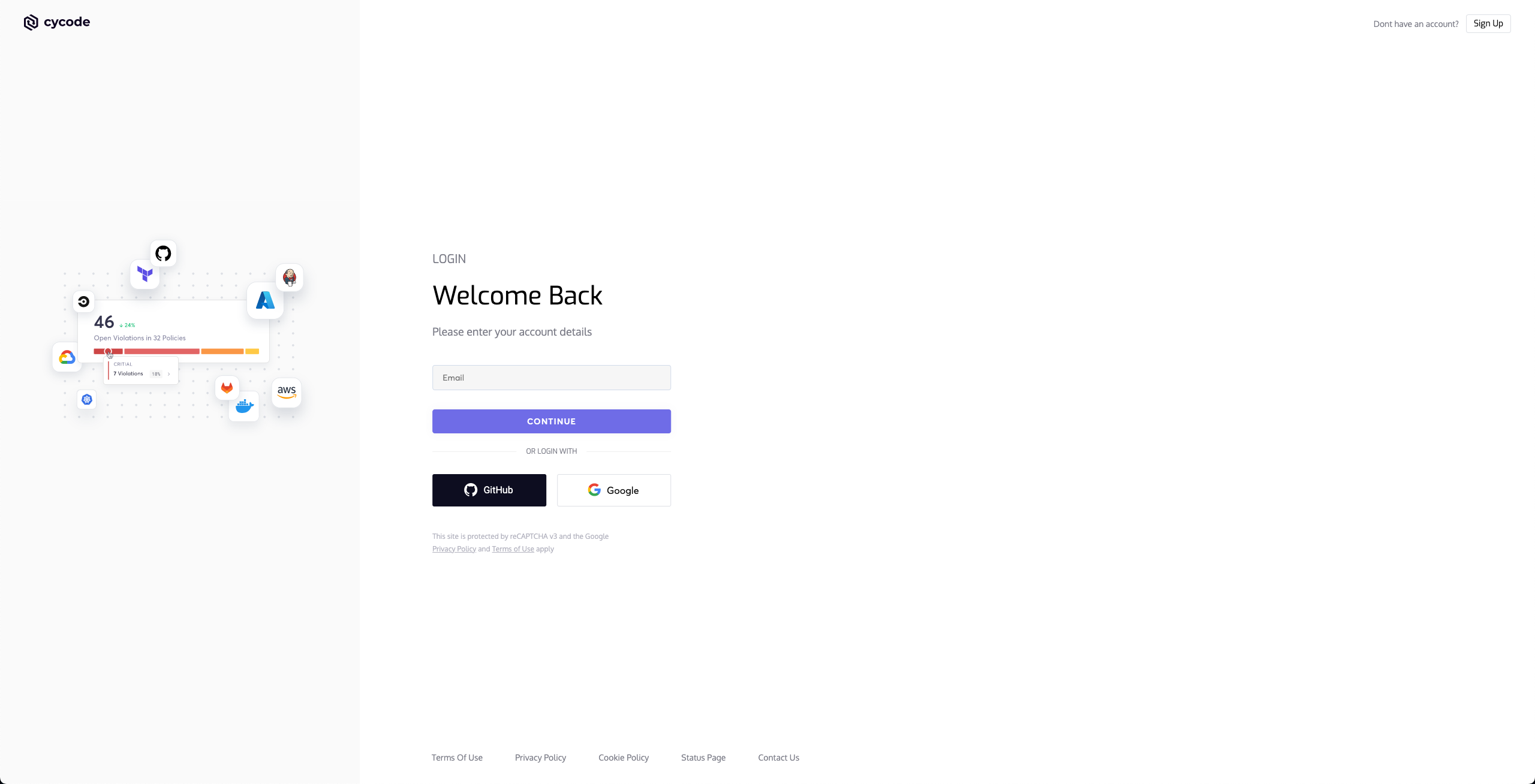
2. A browser window will appear, asking you to log into Cycode (as seen below):
|
|
131
131
|
|
|
132
|
-
|
|
132
|
+

|
|
133
133
|
|
|
134
134
|
3. Enter your login credentials on this page and log in.
|
|
135
135
|
|
|
136
136
|
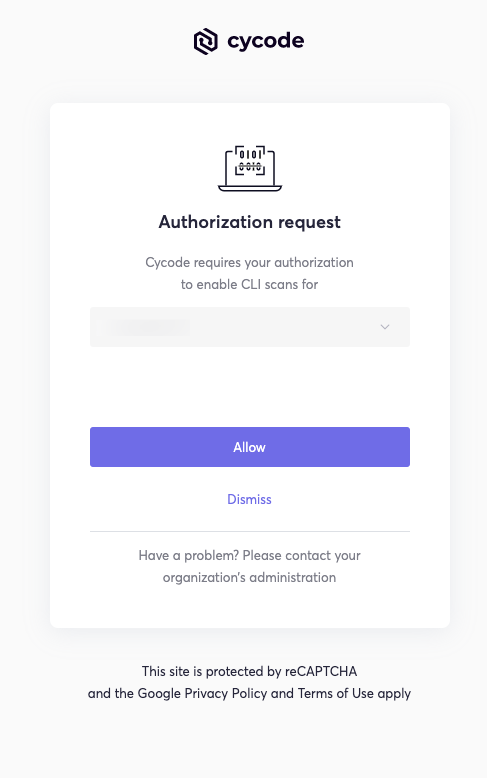
4. You will eventually be taken to the page below, where you'll be asked to choose the business group you want to authorize Cycode with (if applicable):
|
|
137
137
|
|
|
138
|
-
|
|
138
|
+

|
|
139
139
|
|
|
140
|
-
>
|
|
141
|
-
> This will be the default method for authenticating with the Cycode CLI.
|
|
140
|
+
> [!NOTE]
|
|
141
|
+
> This will be the default method for authenticating with the Cycode CLI.
|
|
142
142
|
|
|
143
143
|
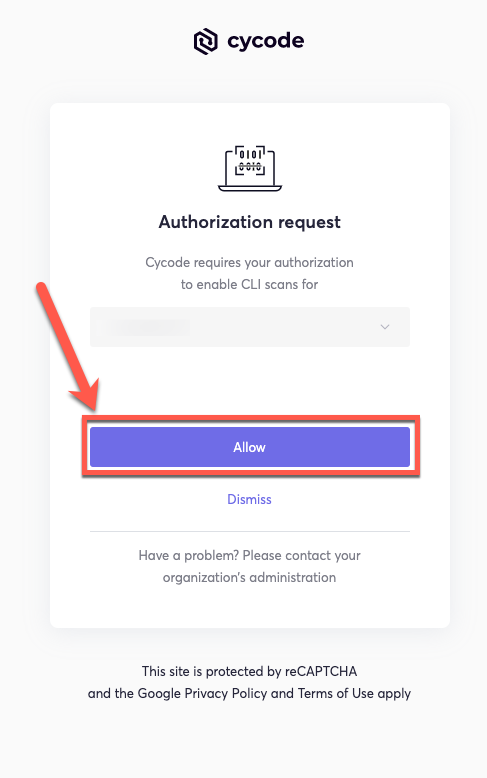
5. Click the **Allow** button to authorize the Cycode CLI on the selected business group.
|
|
144
144
|
|
|
145
|
-
|
|
145
|
+

|
|
146
146
|
|
|
147
147
|
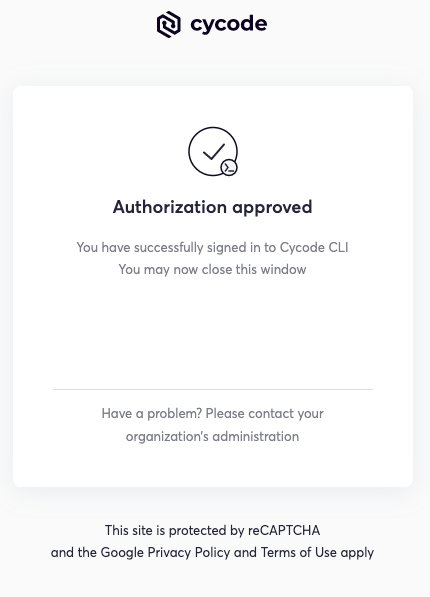
6. Once completed, you'll see the following screen, if it was selected successfully:
|
|
148
148
|
|
|
149
|
-
|
|
149
|
+

|
|
150
150
|
|
|
151
151
|
7. In the terminal/command line screen, you will see the following when exiting the browser window:
|
|
152
152
|
|
|
@@ -156,7 +156,7 @@ To install the Cycode CLI application on your local machine, perform the followi
|
|
|
156
156
|
|
|
157
157
|
### Using the Configure Command
|
|
158
158
|
|
|
159
|
-
>
|
|
159
|
+
> [!NOTE]
|
|
160
160
|
> If you already set up your Cycode Client ID and Client Secret through the Linux or Windows environment variables, those credentials will take precedent over this method.
|
|
161
161
|
|
|
162
162
|
1. Type the following command into your terminal/command line window:
|
|
@@ -215,19 +215,19 @@ export CYCODE_CLIENT_SECRET={your Cycode Secret Key}
|
|
|
215
215
|
|
|
216
216
|
1. From the Control Panel, navigate to the System menu:
|
|
217
217
|
|
|
218
|
-
|
|
218
|
+

|
|
219
219
|
|
|
220
220
|
2. Next, click Advanced system settings:
|
|
221
221
|
|
|
222
|
-

|
|
222
|
+

|
|
223
223
|
|
|
224
224
|
3. In the System Properties window that opens, click the Environment Variables button:
|
|
225
225
|
|
|
226
|
-
|
|
226
|
+

|
|
227
227
|
|
|
228
228
|
4. Create `CYCODE_CLIENT_ID` and `CYCODE_CLIENT_SECRET` variables with values matching your ID and Secret Key, respectively:
|
|
229
229
|
|
|
230
|
-
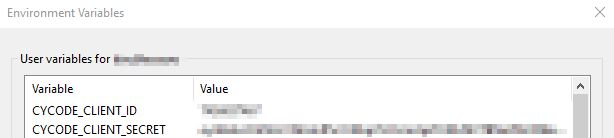
|
|
230
|
+

|
|
231
231
|
|
|
232
232
|
5. Insert the cycode.exe into the path to complete the installation.
|
|
233
233
|
|
|
@@ -245,21 +245,21 @@ Perform the following steps to install the pre-commit hook:
|
|
|
245
245
|
|
|
246
246
|
3. Create a new YAML file named `.pre-commit-config.yaml` (include the beginning `.`) in the repository’s top directory that contains the following:
|
|
247
247
|
|
|
248
|
-
```yaml
|
|
249
|
-
repos:
|
|
250
|
-
|
|
251
|
-
|
|
252
|
-
|
|
253
|
-
|
|
254
|
-
|
|
255
|
-
|
|
256
|
-
```
|
|
248
|
+
```yaml
|
|
249
|
+
repos:
|
|
250
|
+
- repo: https://github.com/cycodehq/cycode-cli
|
|
251
|
+
rev: v1.4.0
|
|
252
|
+
hooks:
|
|
253
|
+
- id: cycode
|
|
254
|
+
stages:
|
|
255
|
+
- commit
|
|
256
|
+
```
|
|
257
257
|
|
|
258
258
|
4. Install Cycode’s hook:
|
|
259
259
|
|
|
260
260
|
`pre-commit install`
|
|
261
261
|
|
|
262
|
-
>
|
|
262
|
+
> [!NOTE]
|
|
263
263
|
> A successful hook installation will result in the message:<br/>
|
|
264
264
|
`Pre-commit installed at .git/hooks/pre-commit`
|
|
265
265
|
|
|
@@ -273,14 +273,14 @@ The following are the options and commands available with the Cycode CLI applica
|
|
|
273
273
|
| `-v`, `--verbose` | Show detailed logs. |
|
|
274
274
|
| `--help` | Show options for given command. |
|
|
275
275
|
|
|
276
|
-
| Command
|
|
277
|
-
|
|
278
|
-
| [auth](#
|
|
279
|
-
| [configure](#
|
|
280
|
-
| [ignore](#
|
|
281
|
-
| [scan](#running-a-scan)
|
|
282
|
-
| [report](#
|
|
283
|
-
| version
|
|
276
|
+
| Command | Description |
|
|
277
|
+
|-------------------------------------------|---------------------------------------------------------------------------------------------------------------------------------------|
|
|
278
|
+
| [auth](#using-the-auth-command) | Authenticates your machine to associate CLI with your Cycode account. |
|
|
279
|
+
| [configure](#using-the-configure-command) | Initial command to authenticate your CLI client with Cycode using client ID and client secret. |
|
|
280
|
+
| [ignore](#ignoring-scan-results) | Ignore a specific value, path or rule ID. |
|
|
281
|
+
| [scan](#running-a-scan) | Scan content for secrets/IaC/SCA/SAST violations. You need to specify which scan type: `ci`/`commit_history`/`path`/`repository`/etc. |
|
|
282
|
+
| [report](#report-command) | Generate report for SCA SBOM. |
|
|
283
|
+
| version | Show the version and exit. |
|
|
284
284
|
|
|
285
285
|
# Scan Command
|
|
286
286
|
|
|
@@ -323,8 +323,8 @@ For example, consider a scenario in which you want to scan your repository store
|
|
|
323
323
|
|
|
324
324
|
The following option is available for use with this command:
|
|
325
325
|
|
|
326
|
-
| Option | Description
|
|
327
|
-
|
|
326
|
+
| Option | Description |
|
|
327
|
+
|---------------------|--------------------------------------------------------|
|
|
328
328
|
| `-b, --branch TEXT` | Branch to scan, if not set scanning the default branch |
|
|
329
329
|
|
|
330
330
|
#### Branch Option
|
|
@@ -341,7 +341,7 @@ or:
|
|
|
341
341
|
|
|
342
342
|
### Monitor Option
|
|
343
343
|
|
|
344
|
-
>
|
|
344
|
+
> [!NOTE]
|
|
345
345
|
> This option is only available to SCA scans.
|
|
346
346
|
|
|
347
347
|
To push scan results tied to the [SCA policies](https://docs.cycode.com/docs/sca-policies) found in an SCA type scan to Cycode's knowledge graph, add the argument `--monitor` to the scan command.
|
|
@@ -356,12 +356,12 @@ or:
|
|
|
356
356
|
|
|
357
357
|
When using this option, the scan results from this scan will appear in the knowledge graph, which can be found [here](https://app.cycode.com/query-builder).
|
|
358
358
|
|
|
359
|
-
>
|
|
359
|
+
> [!WARNING]
|
|
360
360
|
> You must be an `owner` or an `admin` in Cycode to view the knowledge graph page.
|
|
361
361
|
|
|
362
362
|
### Report Option
|
|
363
363
|
|
|
364
|
-
>
|
|
364
|
+
> [!NOTE]
|
|
365
365
|
> This option is only available to SCA scans.
|
|
366
366
|
|
|
367
367
|
To push scan results tied to the [SCA policies](https://docs.cycode.com/docs/sca-policies) found in the Repository scan to Cycode, add the argument `--report` to the scan command.
|
|
@@ -424,7 +424,7 @@ The report page will look something like below:
|
|
|
424
424
|
|
|
425
425
|
### Package Vulnerabilities Option
|
|
426
426
|
|
|
427
|
-
>
|
|
427
|
+
> [!NOTE]
|
|
428
428
|
> This option is only available to SCA scans.
|
|
429
429
|
|
|
430
430
|
To scan a specific package vulnerability of your local repository, add the argument `--sca-scan package-vulnerabilities` following the `-t sca` or `--scan-type sca` option.
|
|
@@ -439,7 +439,7 @@ or:
|
|
|
439
439
|
|
|
440
440
|
#### License Compliance Option
|
|
441
441
|
|
|
442
|
-
>
|
|
442
|
+
> [!NOTE]
|
|
443
443
|
> This option is only available to SCA scans.
|
|
444
444
|
|
|
445
445
|
To scan a specific branch of your local repository, add the argument `--sca-scan license-compliance` followed by the name of the branch you wish to scan.
|
|
@@ -454,7 +454,7 @@ or:
|
|
|
454
454
|
|
|
455
455
|
#### Severity Threshold
|
|
456
456
|
|
|
457
|
-
>
|
|
457
|
+
> [!NOTE]
|
|
458
458
|
> This option is only available to SCA scans.
|
|
459
459
|
|
|
460
460
|
To limit the results of the `sca` scan to a specific severity threshold, add the argument `--severity-threshold` to the scan command.
|
|
@@ -486,29 +486,24 @@ Cycode CLI supports Terraform plan scanning (supporting Terraform 0.12 and later
|
|
|
486
486
|
|
|
487
487
|
Terraform plan file must be in JSON format (having `.json` extension)
|
|
488
488
|
|
|
489
|
-
|
|
490
489
|
_How to generate a Terraform plan from Terraform configuration file?_
|
|
491
490
|
|
|
492
491
|
1. Initialize a working directory that contains Terraform configuration file:
|
|
493
492
|
|
|
494
493
|
`terraform init`
|
|
495
494
|
|
|
496
|
-
|
|
497
495
|
2. Create Terraform execution plan and save the binary output:
|
|
498
496
|
|
|
499
497
|
`terraform plan -out={tfplan_output}`
|
|
500
498
|
|
|
501
|
-
|
|
502
499
|
3. Convert the binary output file into readable JSON:
|
|
503
500
|
|
|
504
501
|
`terraform show -json {tfplan_output} > {tfplan}.json`
|
|
505
502
|
|
|
506
|
-
|
|
507
503
|
4. Scan your `{tfplan}.json` with Cycode CLI:
|
|
508
504
|
|
|
509
505
|
`cycode scan -t iac path ~/PATH/TO/YOUR/{tfplan}.json`
|
|
510
506
|
|
|
511
|
-
|
|
512
507
|
### Commit History Scan
|
|
513
508
|
|
|
514
509
|
A commit history scan is limited to a local repository’s previous commits, focused on finding any secrets within the commit history, instead of examining the repository’s current state.
|
|
@@ -523,8 +518,8 @@ For example, consider a scenario in which you want to scan the commit history fo
|
|
|
523
518
|
|
|
524
519
|
The following options are available for use with this command:
|
|
525
520
|
|
|
526
|
-
| Option | Description
|
|
527
|
-
|
|
521
|
+
| Option | Description |
|
|
522
|
+
|---------------------------|----------------------------------------------------------------------------------------------------------|
|
|
528
523
|
| `-r, --commit_range TEXT` | Scan a commit range in this git repository, by default cycode scans all commit history (example: HEAD~1) |
|
|
529
524
|
|
|
530
525
|
#### Commit Range Option
|
|
@@ -646,15 +641,15 @@ Ignore rules can be added to ignore specific secret values, specific SHA512 valu
|
|
|
646
641
|
|
|
647
642
|
The following are the options available for the `cycode ignore` command:
|
|
648
643
|
|
|
649
|
-
| Option
|
|
650
|
-
|
|
651
|
-
| `--by-value TEXT`
|
|
652
|
-
| `--by-sha TEXT`
|
|
653
|
-
| `--by-path TEXT`
|
|
654
|
-
| `--by-rule TEXT`
|
|
655
|
-
| `--by-package TEXT`
|
|
656
|
-
| `-t, --scan-type [secret\|iac\|sca\|sast]` | Specify the scan you wish to execute (`secret`/`iac`/`sca`/`sast`), The default value is `secret`
|
|
657
|
-
| `-g, --global`
|
|
644
|
+
| Option | Description |
|
|
645
|
+
|--------------------------------------------|--------------------------------------------------------------------------------------------------------------------------------------------------------------------------|
|
|
646
|
+
| `--by-value TEXT` | Ignore a specific value while scanning for secrets. See [Ignoring a Secret Value](#ignoring-a-secret-value) for more details. |
|
|
647
|
+
| `--by-sha TEXT` | Ignore a specific SHA512 representation of a string while scanning for secrets. See [Ignoring a Secret SHA Value](#ignoring-a-secret-sha-value) for more details. |
|
|
648
|
+
| `--by-path TEXT` | Avoid scanning a specific path. Need to specify scan type. See [Ignoring a Path](#ignoring-a-path) for more details. |
|
|
649
|
+
| `--by-rule TEXT` | Ignore scanning a specific secret rule ID/IaC rule ID/SCA rule ID. See [Ignoring a Secret or Iac Rule](#ignoring-a-secret-iac-sca-or-sast-rule) for more details. |
|
|
650
|
+
| `--by-package TEXT` | Ignore scanning a specific package version while running an SCA scan. Expected pattern - `name@version`. See [Ignoring a Package](#ignoring-a-package) for more details. |
|
|
651
|
+
| `-t, --scan-type [secret\|iac\|sca\|sast]` | Specify the scan you wish to execute (`secret`/`iac`/`sca`/`sast`), The default value is `secret` |
|
|
652
|
+
| `-g, --global` | Add an ignore rule and update it in the global `.cycode` config file |
|
|
658
653
|
|
|
659
654
|
In the following example, a pre-commit scan runs and finds the following:
|
|
660
655
|
|
|
@@ -666,7 +661,7 @@ Secret SHA: a44081db3296c84b82d12a35c446a3cba19411dddfa0380134c75f7b3973bff0
|
|
|
666
661
|
2 |
|
|
667
662
|
```
|
|
668
663
|
|
|
669
|
-
If this is a value that is not a valid secret, then use the
|
|
664
|
+
If this is a value that is not a valid secret, then use the `cycode ignore` command to ignore the secret by its value, SHA value, specific path, or rule ID. If this is an IaC scan, then you can ignore that result by its path or rule ID.
|
|
670
665
|
|
|
671
666
|
### Ignoring a Secret Value
|
|
672
667
|
|
|
@@ -750,7 +745,7 @@ In the example above, replace the `dc21bc6b-9f4f-46fb-9f92-e4327ea03f6b` value w
|
|
|
750
745
|
|
|
751
746
|
### Ignoring a Package
|
|
752
747
|
|
|
753
|
-
>
|
|
748
|
+
> [!NOTE]
|
|
754
749
|
> This option is only available to the SCA scans.
|
|
755
750
|
|
|
756
751
|
To ignore a specific package in the SCA scans, you will need to use the `--by-package` flag in conjunction with the `-t, --scan-type` flag (you must specify the `sca` scan type). This will ignore the given package, using the `{{package_name}}@{{package_version}}` formatting, from all future scans. Use the following command to add a package and version to be ignored:
|
|
@@ -767,6 +762,90 @@ In the example below, the command to ignore a specific SCA package is as follows
|
|
|
767
762
|
|
|
768
763
|
In the example above, replace `pyyaml` with package name and `5.3.1` with the package version you want to ignore.
|
|
769
764
|
|
|
765
|
+
### Ignoring using config file
|
|
766
|
+
|
|
767
|
+
The applied ignoring rules are stored in the configuration file called `config.yaml`.
|
|
768
|
+
This file could be easily shared between developers or even committed to remote Git.
|
|
769
|
+
These files are always located in the `.cycode` folder.
|
|
770
|
+
The folder starts with a dot (.), and you should enable the displaying of hidden files to see it.
|
|
771
|
+
|
|
772
|
+
#### Path of the config files
|
|
773
|
+
|
|
774
|
+
By default, all `cycode ignore` commands save the ignoring rule to the current directory from which CLI has been run.
|
|
775
|
+
|
|
776
|
+
Example: running ignoring CLI command from `/Users/name/projects/backend` will create `config.yaml` in `/Users/name/projects/backend/.cycode`
|
|
777
|
+
|
|
778
|
+
```shell
|
|
779
|
+
➜ backend pwd
|
|
780
|
+
/Users/name/projects/backend
|
|
781
|
+
➜ backend cycode ignore --by-value test-value
|
|
782
|
+
➜ backend tree -a
|
|
783
|
+
.
|
|
784
|
+
└── .cycode
|
|
785
|
+
└── config.yaml
|
|
786
|
+
|
|
787
|
+
2 directories, 1 file
|
|
788
|
+
```
|
|
789
|
+
|
|
790
|
+
The second option is to save ignoring rules to the global configuration files.
|
|
791
|
+
The path of the global config is `~/.cycode/config.yaml`,
|
|
792
|
+
where `~` means user\`s home directory, for example, `/Users/name` on macOS.
|
|
793
|
+
|
|
794
|
+
Saving to the global space could be performed with the `-g` flag of the `cycode ignore` command.
|
|
795
|
+
For example: `cycode ignore -g --by-value test-value`.
|
|
796
|
+
|
|
797
|
+
#### Proper working directory
|
|
798
|
+
|
|
799
|
+
This is incredibly important to place the `.cycode` folder and run CLI from the same place.
|
|
800
|
+
You should double-check it when working with different environments like CI/CD (GitHub Actions, Jenkins, etc.).
|
|
801
|
+
|
|
802
|
+
You could commit the `.cycode` folder to the root of your repository.
|
|
803
|
+
In this scenario, you must run CLI scans from the repository root.
|
|
804
|
+
If it doesn't fit your requirements, you could temporarily copy the `.cycode` folder
|
|
805
|
+
wherever you want and perform a CLI scan from this folder.
|
|
806
|
+
|
|
807
|
+
#### Structure ignoring rules in the config
|
|
808
|
+
|
|
809
|
+
It's important to understand how CLI stores ignore rules to be able to read these configuration files or even modify them without CLI.
|
|
810
|
+
|
|
811
|
+
The abstract YAML structure:
|
|
812
|
+
```yaml
|
|
813
|
+
exclusions:
|
|
814
|
+
*scanTypeName*:
|
|
815
|
+
*ignoringType:
|
|
816
|
+
- *ignoringValue1*
|
|
817
|
+
- *ignoringValue2*
|
|
818
|
+
```
|
|
819
|
+
|
|
820
|
+
Possible values of `scanTypeName`: `iac`, `sca`, `sast`, `secret`.
|
|
821
|
+
Possible values of `ignoringType`: `paths`, `values`, `rules`, `packages`, `shas`.
|
|
822
|
+
|
|
823
|
+
> [!WARNING]
|
|
824
|
+
> Values for "ignore by value" are not stored as plain text!
|
|
825
|
+
> CLI stores sha256 hashes of the values instead.
|
|
826
|
+
> You should put hashes of the string when modifying the configuration file by hand.
|
|
827
|
+
|
|
828
|
+
Example of real `config.yaml`:
|
|
829
|
+
```yaml
|
|
830
|
+
exclusions:
|
|
831
|
+
iac:
|
|
832
|
+
rules:
|
|
833
|
+
- bdaa88e2-5e7c-46ff-ac2a-29721418c59c
|
|
834
|
+
sca:
|
|
835
|
+
packages:
|
|
836
|
+
- pyyaml@5.3.1
|
|
837
|
+
secret:
|
|
838
|
+
paths:
|
|
839
|
+
- /Users/name/projects/build
|
|
840
|
+
rules:
|
|
841
|
+
- ce3a4de0-9dfc-448b-a004-c538cf8b4710
|
|
842
|
+
shas:
|
|
843
|
+
- a44081db3296c84b82d12a35c446a3cba19411dddfa0380134c75f7b3973bff0
|
|
844
|
+
values:
|
|
845
|
+
- a665a45920422f9d417e4867efdc4fb8a04a1f3fff1fa07e998e86f7f7a27ae3
|
|
846
|
+
- 60303ae22b998861bce3b28f33eec1be758a213c86c93c076dbe9f558c11c752
|
|
847
|
+
```
|
|
848
|
+
|
|
770
849
|
# Report Command
|
|
771
850
|
|
|
772
851
|
## Generating SBOM Report
|
|
@@ -775,19 +854,21 @@ A software bill of materials (SBOM) is an inventory of all constituent component
|
|
|
775
854
|
Using this command you can create an SBOM report for your local project or for your repository URI.
|
|
776
855
|
|
|
777
856
|
The following options are available for use with this command:
|
|
778
|
-
|
|
779
|
-
|
|
780
|
-
|
|
781
|
-
| `-
|
|
782
|
-
|
|
|
783
|
-
| `--
|
|
784
|
-
| `--include-
|
|
785
|
-
|
|
786
|
-
|
|
787
|
-
|
|
788
|
-
|
|
789
|
-
|
|
|
790
|
-
|
|
857
|
+
|
|
858
|
+
| Option | Description | Required | Default |
|
|
859
|
+
|----------------------------------------------------|--------------------------------|----------|-------------------------------------------------------|
|
|
860
|
+
| `-f, --format [spdx-2.2\|spdx-2.3\|cyclonedx-1.4]` | SBOM format | Yes | |
|
|
861
|
+
| `-o, --output-format [JSON]` | Specify the output file format | No | json |
|
|
862
|
+
| `--output-file PATH` | Output file | No | autogenerated filename saved to the current directory |
|
|
863
|
+
| `--include-vulnerabilities` | Include vulnerabilities | No | False |
|
|
864
|
+
| `--include-dev-dependencies` | Include dev dependencies | No | False |
|
|
865
|
+
|
|
866
|
+
The following commands are available for use with this command:
|
|
867
|
+
|
|
868
|
+
| Command | Description |
|
|
869
|
+
|------------------|-----------------------------------------------------------------|
|
|
870
|
+
| `path` | Generate SBOM report for provided path in the command |
|
|
871
|
+
| `repository_url` | Generate SBOM report for provided repository URI in the command |
|
|
791
872
|
|
|
792
873
|
### Repository
|
|
793
874
|
|