cycode 0.2.2__tar.gz → 0.2.4__tar.gz
This diff represents the content of publicly available package versions that have been released to one of the supported registries. The information contained in this diff is provided for informational purposes only and reflects changes between package versions as they appear in their respective public registries.
- {cycode-0.2.2/cycode.egg-info → cycode-0.2.4}/PKG-INFO +313 -107
- cycode-0.2.2/PKG-INFO → cycode-0.2.4/README.md +288 -120
- cycode-0.2.4/cycode/__init__.py +1 -0
- cycode-0.2.4/cycode/cli/auth/auth_command.py +78 -0
- {cycode-0.2.2 → cycode-0.2.4/cycode}/cli/auth/auth_manager.py +9 -7
- {cycode-0.2.2 → cycode-0.2.4/cycode}/cli/code_scanner.py +140 -74
- {cycode-0.2.2 → cycode-0.2.4/cycode}/cli/config.py +3 -2
- {cycode-0.2.2 → cycode-0.2.4/cycode}/cli/config.yaml +3 -0
- {cycode-0.2.2 → cycode-0.2.4/cycode}/cli/consts.py +4 -2
- {cycode-0.2.2 → cycode-0.2.4/cycode}/cli/exceptions/custom_exceptions.py +15 -6
- cycode-0.2.4/cycode/cli/helpers/maven/base_restore_maven_dependencies.py +61 -0
- cycode-0.2.4/cycode/cli/helpers/maven/restore_gradle_dependencies.py +25 -0
- cycode-0.2.4/cycode/cli/helpers/maven/restore_maven_dependencies.py +61 -0
- {cycode-0.2.2 → cycode-0.2.4/cycode}/cli/helpers/sca_code_scanner.py +46 -41
- cycode-0.2.2/cli/cycode.py → cycode-0.2.4/cycode/cli/main.py +57 -16
- {cycode-0.2.2 → cycode-0.2.4/cycode}/cli/models.py +17 -2
- cycode-0.2.4/cycode/cli/printers/__init__.py +3 -0
- cycode-0.2.4/cycode/cli/printers/base_printer.py +25 -0
- cycode-0.2.4/cycode/cli/printers/console_printer.py +47 -0
- cycode-0.2.4/cycode/cli/printers/json_printer.py +52 -0
- cycode-0.2.4/cycode/cli/printers/table_printer.py +162 -0
- {cycode-0.2.2 → cycode-0.2.4/cycode}/cli/printers/text_printer.py +49 -30
- {cycode-0.2.2 → cycode-0.2.4/cycode}/cli/user_settings/base_file_manager.py +1 -1
- {cycode-0.2.2 → cycode-0.2.4/cycode}/cli/user_settings/config_file_manager.py +3 -2
- {cycode-0.2.2 → cycode-0.2.4/cycode}/cli/user_settings/configuration_manager.py +3 -2
- {cycode-0.2.2 → cycode-0.2.4/cycode}/cli/user_settings/credentials_manager.py +4 -3
- {cycode-0.2.2 → cycode-0.2.4/cycode}/cli/user_settings/user_settings_commands.py +9 -8
- {cycode-0.2.2 → cycode-0.2.4/cycode}/cli/utils/path_utils.py +6 -2
- {cycode-0.2.2 → cycode-0.2.4/cycode}/cli/utils/shell_executor.py +1 -1
- {cycode-0.2.2 → cycode-0.2.4/cycode}/cli/utils/string_utils.py +3 -4
- {cycode-0.2.2 → cycode-0.2.4/cycode}/cli/zip_file.py +8 -2
- {cycode-0.2.2 → cycode-0.2.4/cycode}/cyclient/__init__.py +0 -3
- {cycode-0.2.2 → cycode-0.2.4/cycode}/cyclient/auth_client.py +12 -16
- {cycode-0.2.2 → cycode-0.2.4/cycode}/cyclient/config.py +5 -2
- cycode-0.2.4/cycode/cyclient/config_dev.py +3 -0
- cycode-0.2.4/cycode/cyclient/cycode_client.py +8 -0
- cycode-0.2.4/cycode/cyclient/cycode_client_base.py +86 -0
- cycode-0.2.4/cycode/cyclient/cycode_dev_based_client.py +21 -0
- {cycode-0.2.2 → cycode-0.2.4/cycode}/cyclient/cycode_token_based_client.py +19 -18
- {cycode-0.2.2 → cycode-0.2.4/cycode}/cyclient/models.py +18 -10
- cycode-0.2.4/cycode/cyclient/scan_client.py +122 -0
- cycode-0.2.4/cycode/cyclient/scan_config/scan_config_base.py +50 -0
- cycode-0.2.4/cycode/cyclient/scan_config/scan_config_creator.py +28 -0
- cycode-0.2.4/pyproject.toml +64 -0
- cycode-0.2.2/LICENCE +0 -21
- cycode-0.2.2/README.md +0 -516
- cycode-0.2.2/VERSION.txt +0 -1
- cycode-0.2.2/cli/__init__.py +0 -1
- cycode-0.2.2/cli/auth/auth_command.py +0 -34
- cycode-0.2.2/cli/printers/__init__.py +0 -10
- cycode-0.2.2/cli/printers/base_printer.py +0 -16
- cycode-0.2.2/cli/printers/json_printer.py +0 -30
- cycode-0.2.2/cli/printers/results_printer.py +0 -24
- cycode-0.2.2/cyclient/cycode_client.py +0 -63
- cycode-0.2.2/cyclient/scan_client.py +0 -159
- cycode-0.2.2/cycode.egg-info/SOURCES.txt +0 -65
- cycode-0.2.2/cycode.egg-info/dependency_links.txt +0 -1
- cycode-0.2.2/cycode.egg-info/entry_points.txt +0 -2
- cycode-0.2.2/cycode.egg-info/requires.txt +0 -10
- cycode-0.2.2/cycode.egg-info/top_level.txt +0 -3
- cycode-0.2.2/cycode.egg-info/zip-safe +0 -1
- cycode-0.2.2/setup.cfg +0 -4
- cycode-0.2.2/setup.py +0 -48
- cycode-0.2.2/tests/__init__.py +0 -34
- cycode-0.2.2/tests/cyclient/test_scan_client.py +0 -8
- cycode-0.2.2/tests/test_code_scanner.py +0 -10
- cycode-0.2.2/tests/test_models.py +0 -25
- cycode-0.2.2/tests/test_zip_file.py +0 -9
- cycode-0.2.2/tests/user_settings/test_configuration_manager.py +0 -74
- cycode-0.2.2/tests/user_settings/test_user_settings_commands.py +0 -103
- cycode-0.2.2/tests/utils/test_path_utils.py +0 -36
- {cycode-0.2.2/cli/auth → cycode-0.2.4/cycode/cli}/__init__.py +0 -0
- {cycode-0.2.2/cli/exceptions → cycode-0.2.4/cycode/cli/auth}/__init__.py +0 -0
- {cycode-0.2.2 → cycode-0.2.4/cycode}/cli/ci_integrations.py +0 -0
- {cycode-0.2.2/cli/helpers → cycode-0.2.4/cycode/cli/exceptions}/__init__.py +0 -0
- {cycode-0.2.2/cli/user_settings → cycode-0.2.4/cycode/cli/helpers}/__init__.py +0 -0
- {cycode-0.2.2/cli/utils → cycode-0.2.4/cycode/cli/helpers/maven}/__init__.py +0 -0
- {cycode-0.2.2/tests/cyclient → cycode-0.2.4/cycode/cli/user_settings}/__init__.py +0 -0
- {cycode-0.2.2/tests/user_settings → cycode-0.2.4/cycode/cli/utils}/__init__.py +0 -0
- {cycode-0.2.2 → cycode-0.2.4/cycode}/cli/utils/scan_utils.py +0 -0
- {cycode-0.2.2 → cycode-0.2.4/cycode}/cli/utils/task_timer.py +0 -0
- {cycode-0.2.2 → cycode-0.2.4/cycode}/cli/utils/yaml_utils.py +0 -0
- {cycode-0.2.2 → cycode-0.2.4/cycode}/cyclient/config.yaml +0 -0
- {cycode-0.2.2/tests/utils → cycode-0.2.4/cycode/cyclient/scan_config}/__init__.py +0 -0
- {cycode-0.2.2 → cycode-0.2.4/cycode}/cyclient/utils.py +0 -0
|
@@ -1,19 +1,39 @@
|
|
|
1
1
|
Metadata-Version: 2.1
|
|
2
2
|
Name: cycode
|
|
3
|
-
Version: 0.2.
|
|
3
|
+
Version: 0.2.4
|
|
4
4
|
Summary: Perform secrets/iac scans for your sources using Cycode's engine
|
|
5
5
|
Home-page: https://github.com/cycodehq-public/cycode-cli
|
|
6
|
+
License: MIT
|
|
7
|
+
Keywords: secret-scan,cycode,devops,token,secret,security,cycode,code
|
|
6
8
|
Author: Cycode
|
|
7
9
|
Author-email: support@cycode.com
|
|
8
|
-
|
|
9
|
-
|
|
10
|
+
Requires-Python: >=3.7,<3.12
|
|
11
|
+
Classifier: Development Status :: 5 - Production/Stable
|
|
10
12
|
Classifier: Environment :: Console
|
|
13
|
+
Classifier: License :: OSI Approved :: MIT License
|
|
14
|
+
Classifier: Natural Language :: English
|
|
15
|
+
Classifier: Operating System :: OS Independent
|
|
11
16
|
Classifier: Programming Language :: Python
|
|
17
|
+
Classifier: Programming Language :: Python :: 3
|
|
12
18
|
Classifier: Programming Language :: Python :: 3.7
|
|
13
19
|
Classifier: Programming Language :: Python :: 3.8
|
|
14
20
|
Classifier: Programming Language :: Python :: 3.9
|
|
21
|
+
Classifier: Programming Language :: Python :: 3.10
|
|
22
|
+
Classifier: Programming Language :: Python :: 3.11
|
|
23
|
+
Classifier: Programming Language :: Python :: 3 :: Only
|
|
24
|
+
Requires-Dist: arrow (>=0.17.0,<0.18.0)
|
|
25
|
+
Requires-Dist: binaryornot (>=0.4.4,<0.5.0)
|
|
26
|
+
Requires-Dist: click (>=8.1.0,<8.2.0)
|
|
27
|
+
Requires-Dist: colorama (>=0.4.3,<0.5.0)
|
|
28
|
+
Requires-Dist: gitpython (>=3.1.30,<3.2.0)
|
|
29
|
+
Requires-Dist: halo (==0.0.31)
|
|
30
|
+
Requires-Dist: marshmallow (>=3.8.0,<3.9.0)
|
|
31
|
+
Requires-Dist: pathspec (>=0.8.0,<0.9.0)
|
|
32
|
+
Requires-Dist: pyyaml (>=6.0,<7.0)
|
|
33
|
+
Requires-Dist: requests (>=2.24,<3.0)
|
|
34
|
+
Requires-Dist: texttable (>=1.6.7,<1.7.0)
|
|
35
|
+
Project-URL: Repository, https://github.com/cycodehq-public/cycode-cli
|
|
15
36
|
Description-Content-Type: text/markdown
|
|
16
|
-
License-File: LICENCE
|
|
17
37
|
|
|
18
38
|
# Cycode CLI User Guide
|
|
19
39
|
|
|
@@ -21,11 +41,51 @@ The Cycode Command Line Interface (CLI) is an application you can install on you
|
|
|
21
41
|
|
|
22
42
|
This guide will guide you through both installation and usage.
|
|
23
43
|
|
|
44
|
+
# Table of Contents
|
|
45
|
+
|
|
46
|
+
1. [Prerequisites](#prerequisites)
|
|
47
|
+
2. [Installation](#installation)
|
|
48
|
+
1. [Install Cycode CLI](#install-cycode-cli)
|
|
49
|
+
1. [Use `auth` command](#use-auth-command)
|
|
50
|
+
2. [Use `configure` command](#use-configure-command)
|
|
51
|
+
3. [Add to Environment Variables](#add-to-environment-variables)
|
|
52
|
+
1. [On Unix/Linux](#on-unixlinux)
|
|
53
|
+
2. [On Windows](#on-windows)
|
|
54
|
+
2. [Install Pre-Commit Hook](#install-pre-commit-hook)
|
|
55
|
+
3. [Cycode Command](#cycode-command)
|
|
56
|
+
4. [Running a Scan](#running-a-scan)
|
|
57
|
+
1. [Repository Scan](#repository-scan)
|
|
58
|
+
1. [Branch Option](#branch-option)
|
|
59
|
+
2. [Monitor Option](#monitor-option)
|
|
60
|
+
3. [Report Option](#report-option)
|
|
61
|
+
4. [Package Vulnerabilities Scan](#package-vulnerabilities-option)
|
|
62
|
+
1. [License Compliance Option](#license-compliance-option)
|
|
63
|
+
2. [Severity Threshold](#severity-threshold)
|
|
64
|
+
5. [Path Scan](#path-scan)
|
|
65
|
+
6. [Commit History Scan](#commit-history-scan)
|
|
66
|
+
1. [Commit Range Option](#commit-range-option)
|
|
67
|
+
7. [Pre-Commit Scan](#pre-commit-scan)
|
|
68
|
+
5. [Scan Results](#scan-results)
|
|
69
|
+
1. [Show/Hide Secrets](#showhide-secrets)
|
|
70
|
+
2. [Soft Fail](#soft-fail)
|
|
71
|
+
3. [Example Scan Results](#example-scan-results)
|
|
72
|
+
1. [Secrets Result Example](#secrets-result-example)
|
|
73
|
+
2. [IaC Result Example](#iac-result-example)
|
|
74
|
+
3. [SCA Result Example](#sca-result-example)
|
|
75
|
+
4. [SAST Result Example](#sast-result-example)
|
|
76
|
+
6. [Ignoring Scan Results](#ignoring-scan-results)
|
|
77
|
+
1. [Ignoring a Secret Value](#ignoring-a-secret-value)
|
|
78
|
+
2. [Ignoring a Secret SHA Value](#ignoring-a-secret-sha-value)
|
|
79
|
+
3. [Ignoring a Path](#ignoring-a-path)
|
|
80
|
+
4. [Ignoring a Secret, IaC, or SCA Rule](#ignoring-a-secret-iac-sca-or-sast-rule)
|
|
81
|
+
5. [Ignoring a Package](#ignoring-a-package)
|
|
82
|
+
7. [Syntax Help](#syntax-help)
|
|
83
|
+
|
|
24
84
|
# Prerequisites
|
|
25
85
|
|
|
26
|
-
- The Cycode CLI application requires Python version 3.
|
|
86
|
+
- The Cycode CLI application requires Python version 3.7 or later.
|
|
27
87
|
- Use the [`cycode auth` command](#use-auth-command) to authenticate to Cycode with the CLI
|
|
28
|
-
|
|
88
|
+
- Alternatively, a Cycode Client ID and Client Secret Key can be acquired using the steps from the [Service Account Token](https://docs.cycode.com/reference/creating-a-service-account-access-token) and [Personal Access Token](https://docs.cycode.com/reference/creating-a-personal-access-token-1) pages for details on obtaining these values.
|
|
29
89
|
|
|
30
90
|
# Installation
|
|
31
91
|
|
|
@@ -51,6 +111,7 @@ To install the Cycode CLI application on your local machine, perform the followi
|
|
|
51
111
|
- [cycode auth](#use-auth-command) (**Recommended**)
|
|
52
112
|
- [cycode configure](#use-configure-command)
|
|
53
113
|
- Add them to your [environment variables](#add-to-environment-variables)
|
|
114
|
+
|
|
54
115
|
### Use auth Command
|
|
55
116
|
|
|
56
117
|
> :memo: **Note**<br/>
|
|
@@ -62,24 +123,24 @@ To install the Cycode CLI application on your local machine, perform the followi
|
|
|
62
123
|
|
|
63
124
|
2. A browser window will appear, asking you to log into Cycode (as seen below):
|
|
64
125
|
|
|
65
|
-

|
|
66
127
|
|
|
67
128
|
3. Enter you login credentials on this page and log in.
|
|
68
129
|
|
|
69
130
|
4. You will eventually be taken to this page, where you will be asked to choose the business group you want to authorize Cycode with (if applicable):
|
|
70
131
|
|
|
71
|
-

|
|
72
133
|
|
|
73
134
|
> :memo: **Note**<br/>
|
|
74
135
|
> This will be the default method for authenticating with the Cycode CLI.
|
|
75
136
|
|
|
76
137
|
5. Click the **Allow** button to authorize the Cycode CLI on the chosen business group.
|
|
77
138
|
|
|
78
|
-

|
|
79
140
|
|
|
80
141
|
6. Once done, you will see the following screen, if it was successfully selected:
|
|
81
142
|
|
|
82
|
-

|
|
83
144
|
|
|
84
145
|
7. In the terminal/command line screen, you will see the following when exiting the browser window:
|
|
85
146
|
|
|
@@ -136,19 +197,19 @@ export CYCODE_CLIENT_SECRET={your Cycode Secret Key}
|
|
|
136
197
|
|
|
137
198
|
1. From the Control Panel, navigate to the System menu:
|
|
138
199
|
|
|
139
|
-

|
|
140
201
|
|
|
141
202
|
2. Next, click Advanced system settings:
|
|
142
203
|
|
|
143
|
-

|
|
144
205
|
|
|
145
206
|
3. In the System Properties window that opens, click the Environment Variables button:
|
|
146
207
|
|
|
147
|
-

|
|
148
209
|
|
|
149
210
|
4. Create `CYCODE_CLIENT_ID` and `CYCODE_CLIENT_SECRET` variables with values matching your ID and Secret Key, respectively:
|
|
150
211
|
|
|
151
|
-

|
|
152
213
|
|
|
153
214
|
## Install Pre-Commit Hook
|
|
154
215
|
|
|
@@ -167,7 +228,7 @@ Perform the following steps to install the pre-commit hook:
|
|
|
167
228
|
```yaml
|
|
168
229
|
repos:
|
|
169
230
|
- repo: https://github.com/cycodehq-public/cycode-cli
|
|
170
|
-
rev:
|
|
231
|
+
rev: stable
|
|
171
232
|
hooks:
|
|
172
233
|
- id: cycode
|
|
173
234
|
language_version: python3
|
|
@@ -183,101 +244,43 @@ repos:
|
|
|
183
244
|
> Successful hook installation will result in the message:<br/>
|
|
184
245
|
`Pre-commit installed at .git/hooks/pre-commit`
|
|
185
246
|
|
|
186
|
-
## Pre-receive Hook
|
|
187
|
-
|
|
188
|
-
### Prerequisites
|
|
189
|
-
|
|
190
|
-
1. Install Cycode CLI on your Git server - Install the Cycode CLI by running `pip3 install cycode --user`. Check that the CLI installed successfully by running `cycode`. If you get `cycode: command not found`, you need to add the installation path to the `PATH` environment variable.
|
|
191
|
-
3. Cycode service account
|
|
192
|
-
|
|
193
|
-
### Instructions
|
|
194
|
-
|
|
195
|
-
#### Install for a specific repository
|
|
196
|
-
|
|
197
|
-
1. Find the repository location in the Git server instance.
|
|
198
|
-
- For GitLab Enterprise: [Git server hooks | GitLab](https://docs.gitlab.com/ee/administration/server_hooks.html)
|
|
199
|
-
|
|
200
|
-
2. Create the pre-receive hook.
|
|
201
|
-
- Create a new file in the repository's Git hook location under the repository location you found in step 1, and name it `pre-receive`.
|
|
202
|
-
- Copy the following script to the `pre-recive` file:
|
|
203
|
-
|
|
204
|
-
```sh
|
|
205
|
-
#!/bin/sh
|
|
206
|
-
|
|
207
|
-
# optional
|
|
208
|
-
# Update the server URL only if you have Cycode self managed
|
|
209
|
-
# export CYCODE_API_URL = "<cycode server url>"
|
|
210
|
-
export CYCODE_CLIENT_ID="<client_id>"
|
|
211
|
-
export CYCODE_CLIENT_SECRET="<client_secret>"
|
|
212
|
-
|
|
213
|
-
set -e
|
|
214
|
-
cycode scan pre_receive
|
|
215
|
-
```
|
|
216
|
-
|
|
217
|
-
- Make the file executable by running `chmod +x pre-receive`.
|
|
218
|
-
- Change the file owner and owner group to `git` user:
|
|
219
|
-
- `chown git pre-receive` (change file owner).
|
|
220
|
-
- `chgrp git pre-receive` (change file group owner).
|
|
221
|
-
- Verify it by running `ls -l`. The output should be `-rwxr-xr-x 1 git git 662 Mar 2 09:15 pre-receive` (first `git` is the file's owner, second `git` is the file's group owner).
|
|
222
|
-
|
|
223
|
-
3. Configure the Cycode token.
|
|
224
|
-
- There are two methods to set it:
|
|
225
|
-
- In the script above, fill in the client ID and secret.
|
|
226
|
-
- Set environment variables on the instance.
|
|
227
|
-
|
|
228
|
-
4. [Optional] Update Cycode API url (relevant only for on-prem customers) - Update `CYCODE_API_URL` in the pre-receive file.
|
|
229
|
-
|
|
230
|
-
#### Install pre-recive hook globaly (For all the repositories)
|
|
231
|
-
|
|
232
|
-
1. Set the global hooks directory in the Git server instance.
|
|
233
|
-
- For GitLab Enterprise (https://docs.gitlab.com/ee/administration/server_hooks.html#create-global-server-hooks-for-all-repositories) :
|
|
234
|
-
- Set in `/etc/gitlab/gitlab.rb` the `gitaly['custom_hooks_dir']` value or just use the default location by uncommenting it.
|
|
235
|
-
- Run `gitlab-ctl reconfigure`.
|
|
236
|
-
- Follow the steps [here](#install-for-a-specific-repository)
|
|
237
|
-
|
|
238
|
-
2. Add the pre-receive hook according to the Git server requirements.
|
|
239
|
-
- For GitLab Enterprise:
|
|
240
|
-
- Go to the directory and create a directory named `pre-receive.d`.
|
|
241
|
-
- Inside the directory, follow the steps of "Install for a specific repository" above.
|
|
242
|
-
|
|
243
|
-
#### Skipping the pre-receive hook
|
|
244
|
-
|
|
245
|
-
Cycode's pre-receive hook can be skipped easily by adding `-o skip-cycode-scan` to the `git push` command.
|
|
246
|
-
|
|
247
|
-
> **Notice:** Verify that the option `receive.advertisePushOptions` is enabled in the instance Git configuration. For enabling it, run `git config receive.advertisePushOptions true`. It seems that in GitLab, it's enabled by default.
|
|
248
|
-
|
|
249
247
|
# Cycode Command
|
|
250
248
|
|
|
251
249
|
The following are the options and commands available with the Cycode CLI application:
|
|
252
250
|
|
|
253
|
-
| Option
|
|
254
|
-
|
|
255
|
-
|
|
|
256
|
-
| `--
|
|
257
|
-
| `--
|
|
251
|
+
| Option | Description |
|
|
252
|
+
|-------------------------|-----------------------------------------------------------|
|
|
253
|
+
| `--output [text\|json]` | Specify the output (`text`/`json`). The default is `text` |
|
|
254
|
+
| `-v`, `--verbose` | Show detailed logs |
|
|
255
|
+
| `--version` | Show the version and exit. |
|
|
256
|
+
| `--help` | Show options for given command. |
|
|
258
257
|
|
|
259
258
|
| Command | Description |
|
|
260
259
|
|-------------------------------------|-------------|
|
|
261
|
-
| [auth](#use-auth-command) | Authenticates your machine to associate CLI with your
|
|
260
|
+
| [auth](#use-auth-command) | Authenticates your machine to associate CLI with your Cycode account. |
|
|
262
261
|
| [configure](#use-configure-command) | Initial command to authenticate your CLI client with Cycode using client ID and client secret. |
|
|
263
262
|
| [ignore](#ingoring-scan-results) | Ignore a specific value, path or rule ID |
|
|
264
|
-
| [scan](#running-a-scan) | Scan content for secrets/IaC violations
|
|
263
|
+
| [scan](#running-a-scan) | Scan content for secrets/IaC/SCA/SAST violations. You need to specify which scan type: `ci`/`commit_history`/`path`/`repository`/etc |
|
|
265
264
|
|
|
266
265
|
# Running a Scan
|
|
267
266
|
|
|
268
267
|
The Cycode CLI application offers several types of scans so that you can choose the option that best fits your case. The following are the current options and commands available:
|
|
269
268
|
|
|
270
|
-
| Option
|
|
271
|
-
|
|
272
|
-
| `-t, --scan-type [secret\|iac]` | Specify the scan you wish to execute (`secret`/`iac`), the default is secret |
|
|
273
|
-
| `--secret TEXT`
|
|
274
|
-
| `--client-id TEXT`
|
|
275
|
-
| `--show-secret BOOLEAN`
|
|
276
|
-
| `--soft-fail BOOLEAN`
|
|
277
|
-
| `--
|
|
278
|
-
|
|
279
|
-
|
|
|
280
|
-
|
|
269
|
+
| Option | Description |
|
|
270
|
+
|--------------------------------------|----------------------------------------------------------------------------|
|
|
271
|
+
| `-t, --scan-type [secret\|iac\|sca\|sast]` | Specify the scan you wish to execute (`secret`/`iac`/`sca`/`sast`), the default is `secret` |
|
|
272
|
+
| `--secret TEXT` | Specify a Cycode client secret for this specific scan execution |
|
|
273
|
+
| `--client-id TEXT` | Specify a Cycode client ID for this specific scan execution |
|
|
274
|
+
| `--show-secret BOOLEAN` | Show secrets in plain text. See [Show/Hide Secrets](#showhide-secrets) section for more details. |
|
|
275
|
+
| `--soft-fail BOOLEAN` | Run scan without failing, always return a non-error status code. See [Soft Fail](#soft-fail) section for more details. |
|
|
276
|
+
| `--severity-threshold [INFO\|LOW\|MEDIUM\|HIGH\|CRITICAL]` | Show only violations at the specified level or higher (supported for the SCA scan type only). |
|
|
277
|
+
| `--sca-scan` | Specify the SCA scan you wish to execute (`package-vulnerabilities`/`license-compliance`). The default is both |
|
|
278
|
+
| `--monitor` | When specified, the scan results will be recorded in the knowledge graph. Please note that when working in `monitor` mode, the knowledge graph will not be updated as a result of SCM events (Push, Repo creation). (Supported for SCA scan type only). |
|
|
279
|
+
| `--report` | When specified, a violations report will be generated. A URL link to the report will be printed as an output to the command execution |
|
|
280
|
+
| `--help` | Show options for given command. |
|
|
281
|
+
|
|
282
|
+
| Command | Description |
|
|
283
|
+
|----------------------------------------|-----------------------------------------------------------------|
|
|
281
284
|
| [commit_history](#commit-history-scan) | Scan all the commits history in this git repository |
|
|
282
285
|
| [path](#path-scan) | Scan the files in the path supplied in the command |
|
|
283
286
|
| [pre_commit](#pre-commit-scan) | Use this command to scan the content that was not committed yet |
|
|
@@ -313,6 +316,134 @@ or:
|
|
|
313
316
|
|
|
314
317
|
`cycode scan repository ~/home/git/codebase --branch dev`
|
|
315
318
|
|
|
319
|
+
## Monitor Option
|
|
320
|
+
|
|
321
|
+
> :memo: **Note**<br/>
|
|
322
|
+
> This option is only available to SCA scans.
|
|
323
|
+
|
|
324
|
+
To push scan results tied to the [SCA policies](https://docs.cycode.com/docs/sca-policies) found in an SCA type scan to Cycode's knowledge graph, add the argument `--monitor` to the scan command.
|
|
325
|
+
|
|
326
|
+
Consider the following example. The following command will scan the repository for SCA policy violations and push them to Cycode:
|
|
327
|
+
|
|
328
|
+
`cycode scan -t sca --monitor repository ~/home/git/codebase`
|
|
329
|
+
|
|
330
|
+
or:
|
|
331
|
+
|
|
332
|
+
`cycode scan --scan-type sca --monitor repository ~/home/git/codebase`
|
|
333
|
+
|
|
334
|
+
When using this option, the scan results from this scan will appear in the knowledge graph, which can be found [here](https://app.cycode.com/query-builder).
|
|
335
|
+
|
|
336
|
+
> :warning: **NOTE**<br/>
|
|
337
|
+
> You must be an `owner` or an `admin` in Cycode to view the knowledge graph page.
|
|
338
|
+
|
|
339
|
+
## Report Option
|
|
340
|
+
|
|
341
|
+
> :memo: **Note**<br/>
|
|
342
|
+
> This option is only available to SCA scans.
|
|
343
|
+
|
|
344
|
+
To push scan results tied to the [SCA policies](https://docs.cycode.com/docs/sca-policies) found in the Repository scan to Cycode, add the argument `--report` to the scan command.
|
|
345
|
+
|
|
346
|
+
`cycode scan -t sca --report repository ~/home/git/codebase`
|
|
347
|
+
|
|
348
|
+
or:
|
|
349
|
+
|
|
350
|
+
`cycode scan --scan-type sca --report repository ~/home/git/codebase`
|
|
351
|
+
|
|
352
|
+
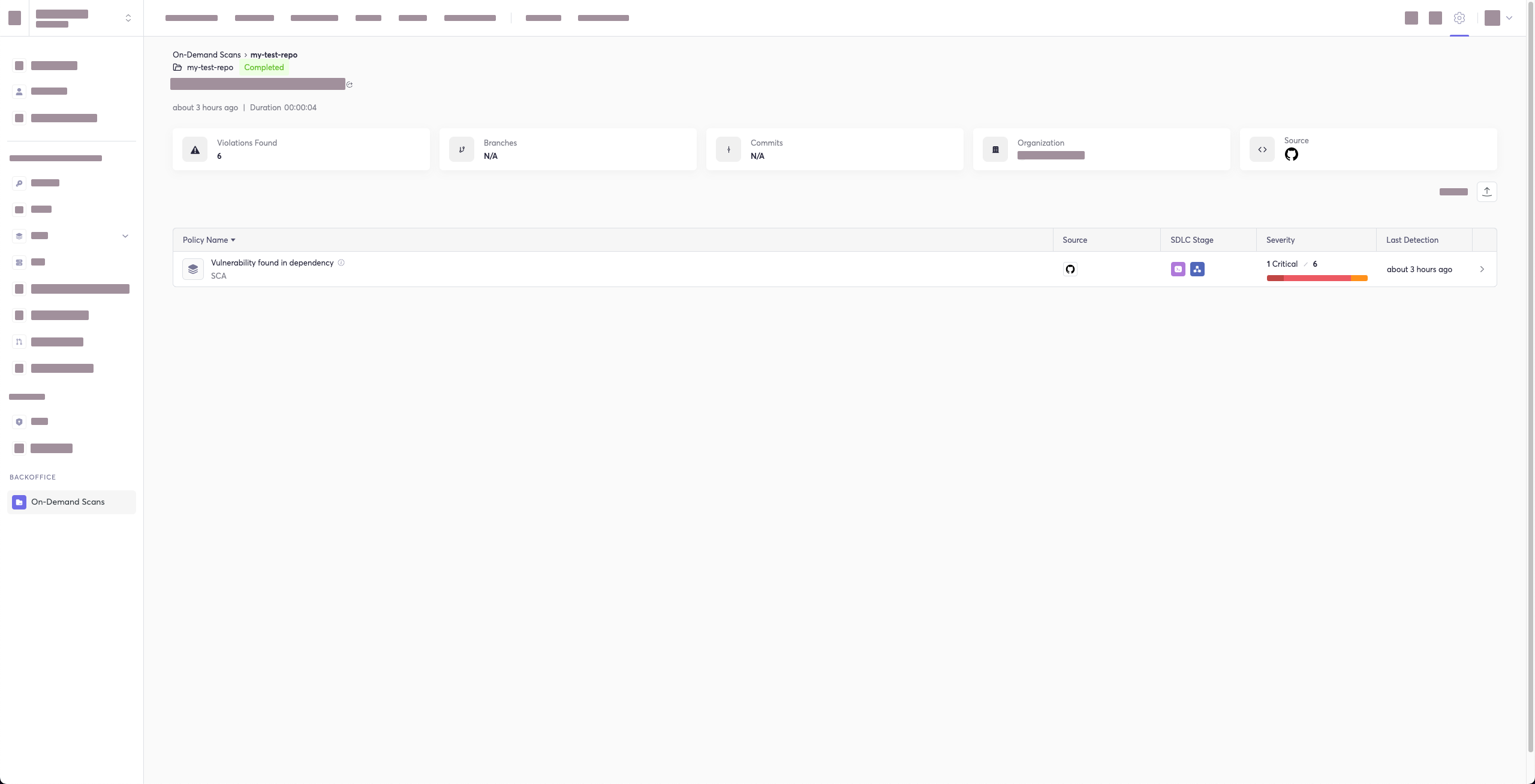
When using this option, the scan results from this scan will appear in the On-Demand Scans section of Cycode. To get to this page, click the link that appears after the printed results:
|
|
353
|
+
|
|
354
|
+
> :warning: **NOTE**<br/>
|
|
355
|
+
> You must be an `owner` or an `admin` in Cycode to view this page.
|
|
356
|
+
|
|
357
|
+
```bash
|
|
358
|
+
Scan Results: (scan_id: e04e06e5-6dd8-474f-b409-33bbee67270b)
|
|
359
|
+
⛔ Found issue of type: Security vulnerability in package 'vyper' referenced in project '': Multiple evaluation of contract address in call in vyper (rule ID: d003b23a-a2eb-42f3-83c9-7a84505603e5) in file: ./requirements.txt ⛔
|
|
360
|
+
|
|
361
|
+
1 | PyYAML~=5.3.1
|
|
362
|
+
2 | vyper==0.3.1
|
|
363
|
+
3 | cleo==1.0.0a5
|
|
364
|
+
|
|
365
|
+
⛔ Found issue of type: Security vulnerability in package 'vyper' referenced in project '': Integer bounds error in Vyper (rule ID: d003b23a-a2eb-42f3-83c9-7a84505603e5) in file: ./requirements.txt ⛔
|
|
366
|
+
|
|
367
|
+
1 | PyYAML~=5.3.1
|
|
368
|
+
2 | vyper==0.3.1
|
|
369
|
+
3 | cleo==1.0.0a5
|
|
370
|
+
|
|
371
|
+
⛔ Found issue of type: Security vulnerability in package 'pyyaml' referenced in project '': Improper Input Validation in PyYAML (rule ID: d003b23a-a2eb-42f3-83c9-7a84505603e5) in file: ./requirements.txt ⛔
|
|
372
|
+
|
|
373
|
+
1 | PyYAML~=5.3.1
|
|
374
|
+
2 | vyper==0.3.1
|
|
375
|
+
3 | cleo==1.0.0a5
|
|
376
|
+
|
|
377
|
+
⛔ Found issue of type: Security vulnerability in package 'cleo' referenced in project '': cleo is vulnerable to Regular Expression Denial of Service (ReDoS) (rule ID: d003b23a-a2eb-42f3-83c9-7a84505603e5) in file: ./requirements.txt ⛔
|
|
378
|
+
|
|
379
|
+
2 | vyper==0.3.1
|
|
380
|
+
3 | cleo==1.0.0a5
|
|
381
|
+
4 |
|
|
382
|
+
|
|
383
|
+
⛔ Found issue of type: Security vulnerability in package 'vyper' referenced in project '': Incorrect Comparison in Vyper (rule ID: d003b23a-a2eb-42f3-83c9-7a84505603e5) in file: ./requirements.txt ⛔
|
|
384
|
+
|
|
385
|
+
1 | PyYAML~=5.3.1
|
|
386
|
+
2 | vyper==0.3.1
|
|
387
|
+
3 | cleo==1.0.0a5
|
|
388
|
+
|
|
389
|
+
⛔ Found issue of type: Security vulnerability in package 'vyper' referenced in project '': Buffer Overflow in vyper (rule ID: d003b23a-a2eb-42f3-83c9-7a84505603e5) in file: ./requirements.txt ⛔
|
|
390
|
+
|
|
391
|
+
1 | PyYAML~=5.3.1
|
|
392
|
+
2 | vyper==0.3.1
|
|
393
|
+
3 | cleo==1.0.0a5
|
|
394
|
+
|
|
395
|
+
Report URL: https://app.cycode.com/on-demand-scans/617ecc3d-9ff2-493e-8be8-2c1fecaf6939
|
|
396
|
+
```
|
|
397
|
+
|
|
398
|
+
The report page will look something like below:
|
|
399
|
+
|
|
400
|
+
|
|
401
|
+
|
|
402
|
+
## Package Vulnerabilities Option
|
|
403
|
+
|
|
404
|
+
> :memo: **Note**<br/>
|
|
405
|
+
> This option is only available to SCA scans.
|
|
406
|
+
|
|
407
|
+
To scan a specific package vulnerability of your local repository, add the argument `--sca-scan package-vulnerabilities` following the `-t sca` or `--scan-type sca` option.
|
|
408
|
+
|
|
409
|
+
Consider the previous example. If you wanted to only run an SCA scan on package vulnerabilities, you could execute the following:
|
|
410
|
+
|
|
411
|
+
`cycode scan -t sca --sca-scan package-vulnerabilities repository ~/home/git/codebase`
|
|
412
|
+
|
|
413
|
+
or:
|
|
414
|
+
|
|
415
|
+
`cycode scan --scan-type sca --sca-scan package-vulnerabilities repository ~/home/git/codebase`
|
|
416
|
+
|
|
417
|
+
### License Compliance Option
|
|
418
|
+
|
|
419
|
+
> :memo: **Note**<br/>
|
|
420
|
+
> This option is only available to SCA scans.
|
|
421
|
+
|
|
422
|
+
To scan a specific branch of your local repository, add the argument `--sca-scan license-compliance` followed by the name of the branch you wish to scan.
|
|
423
|
+
|
|
424
|
+
Consider the previous example. If you wanted to only scan a branch named `dev`, you could execute the following:
|
|
425
|
+
|
|
426
|
+
`cycode scan -t sca --sca-scan license-compliance repository ~/home/git/codebase -b dev`
|
|
427
|
+
|
|
428
|
+
or:
|
|
429
|
+
|
|
430
|
+
`cycode scan --scan-type sca --sca-scan license-compliance repository ~/home/git/codebase`
|
|
431
|
+
|
|
432
|
+
### Severity Threshold
|
|
433
|
+
|
|
434
|
+
> :memo: **Note**<br/>
|
|
435
|
+
> This option is only available to SCA scans.
|
|
436
|
+
|
|
437
|
+
To limit the results of the `sca` scan to a specific severity threshold, add the argument `--severity-threshold` to the scan command.
|
|
438
|
+
|
|
439
|
+
Consider the following example. The following command will scan the repository for SCA policy violations that have a severity of Medium or higher:
|
|
440
|
+
|
|
441
|
+
`cycode scan -t sca --security-threshold MEDIUM repository ~/home/git/codebase`
|
|
442
|
+
|
|
443
|
+
or:
|
|
444
|
+
|
|
445
|
+
`cycode scan --scan-type sca --security-threshold MEDIUM repository ~/home/git/codebase`
|
|
446
|
+
|
|
316
447
|
## Path Scan
|
|
317
448
|
|
|
318
449
|
A path scan examines a specific local directory and all the contents within it, instead of focusing solely on a GIT repository.
|
|
@@ -337,7 +468,7 @@ For example, consider a scenario in which you want to scan the commit history fo
|
|
|
337
468
|
|
|
338
469
|
`cycode scan commit_history ~/home/git/codebase`
|
|
339
470
|
|
|
340
|
-
The following
|
|
471
|
+
The following options are available for use with this command:
|
|
341
472
|
|
|
342
473
|
| Option | Description |
|
|
343
474
|
|---------------------------|-------------|
|
|
@@ -367,11 +498,11 @@ After your install the pre-commit hook and, you may, on occasion, wish to skip s
|
|
|
367
498
|
|
|
368
499
|
Each scan will complete with a message stating if any issues were found or not.
|
|
369
500
|
|
|
370
|
-
If no
|
|
501
|
+
If no issues are found, the scan ends with the following success message:
|
|
371
502
|
|
|
372
503
|
`Good job! No issues were found!!! 👏👏👏`
|
|
373
504
|
|
|
374
|
-
If
|
|
505
|
+
If an issue is found, a `Found issue of type:` message appears upon completion instead:
|
|
375
506
|
|
|
376
507
|
```bash
|
|
377
508
|
⛔ Found issue of type: generic-password (rule ID: ce3a4de0-9dfc-448b-a004-c538cf8b4710) in file: config/my_config.py
|
|
@@ -411,6 +542,48 @@ Utilizing the soft fail feature will not fail the CI/CD step within the pipeline
|
|
|
411
542
|
|
|
412
543
|
Add the `--soft-fail` argument to any type of scan to configure this feature, then assign a value of `1` if you want found issues to result in a failure within the CI/CD tool or `0` for scan results to have no impact (result in a `success` result).
|
|
413
544
|
|
|
545
|
+
## Example Scan Results
|
|
546
|
+
|
|
547
|
+
### Secrets Result Example
|
|
548
|
+
|
|
549
|
+
```bash
|
|
550
|
+
⛔ Found issue of type: generic-password (rule ID: ce3a4de0-9dfc-448b-a004-c538cf8b4710) in file: config/my_config.py
|
|
551
|
+
Secret SHA: a44081db3296c84b82d12a35c446a3cba19411dddfa0380134c75f7b3973bff0 ⛔
|
|
552
|
+
0 | @@ -0,0 +1 @@
|
|
553
|
+
1 | +my_password = 'h3l***********350'
|
|
554
|
+
2 |
|
|
555
|
+
```
|
|
556
|
+
|
|
557
|
+
### IaC Result Example
|
|
558
|
+
|
|
559
|
+
```bash
|
|
560
|
+
⛔ Found issue of type: Resource should use non-default namespace (rule ID: bdaa88e2-5e7c-46ff-ac2a-29721418c59c) in file: ./k8s/k8s.yaml ⛔
|
|
561
|
+
|
|
562
|
+
7 | name: secrets-file
|
|
563
|
+
8 | namespace: default
|
|
564
|
+
9 | resourceVersion: "4228"
|
|
565
|
+
```
|
|
566
|
+
|
|
567
|
+
### SCA Result Example
|
|
568
|
+
|
|
569
|
+
```bash
|
|
570
|
+
⛔ Found issue of type: Security vulnerability in package 'pyyaml' referenced in project 'Users/myuser/my-test-repo': Improper Input Validation in PyYAML (rule ID: d003b23a-a2eb-42f3-83c9-7a84505603e5) in file: Users/myuser/my-test-repo/requirements.txt ⛔
|
|
571
|
+
|
|
572
|
+
1 | PyYAML~=5.3.1
|
|
573
|
+
2 | vyper==0.3.1
|
|
574
|
+
3 | cleo==1.0.0a5
|
|
575
|
+
```
|
|
576
|
+
|
|
577
|
+
### SAST Result Example
|
|
578
|
+
|
|
579
|
+
```bash
|
|
580
|
+
⛔ Found issue of type: Detected a request using 'http://'. This request will be unencrypted, and attackers could listen into traffic on the network and be able to obtain sensitive information. Use 'https://' instead. (rule ID: 3fbbd34b-b00d-4415-b9d9-f861c076b9f2) in file: ./requests.py ⛔
|
|
581
|
+
|
|
582
|
+
2 |
|
|
583
|
+
3 | res = requests.get('http://example.com', timeout=1)
|
|
584
|
+
4 | print(res.content)
|
|
585
|
+
```
|
|
586
|
+
|
|
414
587
|
# Ignoring Scan Results
|
|
415
588
|
|
|
416
589
|
Ignore rules can be added to ignore specific secret values, specific SHA512 values, specific paths, and specific Cycode secret and IaC rule IDs. This will cause the scan to not alert these values. The ignore rules are written and saved locally in the `./.cycode/config.yaml` file.
|
|
@@ -424,9 +597,10 @@ The following are the options available for the `cycode ignore` command:
|
|
|
424
597
|
| `--by-value TEXT` | Ignore a specific value while scanning for secrets. See [Ignoring a Secret Value](#ignoring-a-secret-value) for more details. |
|
|
425
598
|
| `--by-sha TEXT` | Ignore a specific SHA512 representation of a string while scanning for secrets. See [Ignoring a Secret SHA Value](#ignoring-a-secret-sha-value) for more details. |
|
|
426
599
|
| `--by-path TEXT` | Avoid scanning a specific path. Need to specify scan type. See [Ignoring a Path](#ignoring-a-path) for more details. |
|
|
427
|
-
| `--by-rule TEXT` | Ignore scanning a specific secret rule ID/IaC rule ID. See [Ignoring a Secret or Iac Rule](#ignoring-a-secret-or-iac-rule) for more details. |
|
|
428
|
-
|
|
|
429
|
-
| `-
|
|
600
|
+
| `--by-rule TEXT` | Ignore scanning a specific secret rule ID/IaC rule ID/SCA rule ID. See [Ignoring a Secret or Iac Rule](#ignoring-a-secret-or-iac-rule) for more details. |
|
|
601
|
+
| `--by-package TEXT` | Ignore scanning a specific package version while running an SCA scan. Expected pattern - `name@version`. See [Ignoring a Package](#ignoring-a-package) for more details. |
|
|
602
|
+
| `-t, --scan-type [secret\|iac\|sca\|sast]` | Specify the scan you wish to execute (`secret`/`iac`/`sca`/`sast`), The default value is `secret` |
|
|
603
|
+
| `-g, --global` | Add an ignore rule and update it in the global `.cycode` config file |
|
|
430
604
|
|
|
431
605
|
In the following example, a pre-commit scan runs and finds the following:
|
|
432
606
|
|
|
@@ -438,7 +612,7 @@ Secret SHA: a44081db3296c84b82d12a35c446a3cba19411dddfa0380134c75f7b3973bff0
|
|
|
438
612
|
2 |
|
|
439
613
|
```
|
|
440
614
|
|
|
441
|
-
If this is a value that is not a valid secret, then use the the `cycode ignore` command to ignore the secret by its value,
|
|
615
|
+
If this is a value that is not a valid secret, then use the the `cycode ignore` command to ignore the secret by its value, SHA value, specific path, or rule ID. If this is an IaC scan, then you can ignore that result by its path or rule ID.
|
|
442
616
|
|
|
443
617
|
## Ignoring a Secret Value
|
|
444
618
|
|
|
@@ -466,7 +640,7 @@ In the example above, replace the `a44081db3296c84b82d12a35c446a3cba19411dddfa03
|
|
|
466
640
|
|
|
467
641
|
## Ignoring a Path
|
|
468
642
|
|
|
469
|
-
To ignore a specific path for either secret or
|
|
643
|
+
To ignore a specific path for either secret, IaC, or SCA scans, you will need to use the `--by-path` flag in conjunction with the `-t, --scan-type` flag (you must specify the scan type). This will ignore the given path from all future scans for the given scan type. Use the following command to add a path to be ignored:
|
|
470
644
|
|
|
471
645
|
`cycode ignore -t {{scan-type}} --by-path {{path}}`
|
|
472
646
|
|
|
@@ -486,9 +660,15 @@ In the example at the top of this section, the command to ignore a specific path
|
|
|
486
660
|
|
|
487
661
|
In the example above, replace the `~/home/my-repo/config` value with your path value.
|
|
488
662
|
|
|
489
|
-
|
|
663
|
+
In the example at the top of this section, the command to ignore a specific path from SCA scans is as follows:
|
|
664
|
+
|
|
665
|
+
`cycode ignore -t sca --by-path ~/home/my-repo/config`
|
|
666
|
+
|
|
667
|
+
In the example above, replace the `~/home/my-repo/config` value with your path value.
|
|
668
|
+
|
|
669
|
+
## Ignoring a Secret, IaC, SCA, or SAST Rule
|
|
490
670
|
|
|
491
|
-
To ignore a specific secret or
|
|
671
|
+
To ignore a specific secret, IaC, SCA, or SAST rule, you will need to use the `--by-rule` flag in conjunction with the `-t, --scan-type` flag (you must specify the scan type). This will ignore the given rule ID value from all future scans. Use the following command to add a rule ID value to be ignored:
|
|
492
672
|
|
|
493
673
|
`cycode ignore -t {{scan-type}} --by-rule {{rule-ID}}`
|
|
494
674
|
|
|
@@ -502,12 +682,37 @@ In the example at the top of this section, the command to ignore the specific se
|
|
|
502
682
|
|
|
503
683
|
In the example above, replace the `ce3a4de0-9dfc-448b-a004-c538cf8b4710` value with the rule ID you want to ignore.
|
|
504
684
|
|
|
505
|
-
In the example at the top of this section, the command to ignore the specific
|
|
685
|
+
In the example at the top of this section, the command to ignore the specific IaC rule ID is as follows:
|
|
506
686
|
|
|
507
687
|
`cycode ignore --scan-type iac --by-rule bdaa88e2-5e7c-46ff-ac2a-29721418c59c`
|
|
508
688
|
|
|
509
689
|
In the example above, replace the `bdaa88e2-5e7c-46ff-ac2a-29721418c59c` value with the rule ID you want to ignore.
|
|
510
690
|
|
|
691
|
+
In the example at the top of this section, the command to ignore the specific SCA rule ID is as follows:
|
|
692
|
+
|
|
693
|
+
`cycode ignore --scan-type sca --by-rule dc21bc6b-9f4f-46fb-9f92-e4327ea03f6b`
|
|
694
|
+
|
|
695
|
+
In the example above, replace the `dc21bc6b-9f4f-46fb-9f92-e4327ea03f6b` value with the rule ID you want to ignore.
|
|
696
|
+
|
|
697
|
+
## Ignoring a Package
|
|
698
|
+
|
|
699
|
+
> :memo: **Note**<br/>
|
|
700
|
+
> This option is only available to the SCA scans.
|
|
701
|
+
|
|
702
|
+
To ignore a specific package in the SCA scans, you will need to use the `--by-package` flag in conjunction with the `-t, --scan-type` flag (you must specify the `sca` scan type). This will ignore the given package, using the `{{package_name}}@{{package_version}}` formatting, from all future scans. Use the following command to add a package and version to be ignored:
|
|
703
|
+
|
|
704
|
+
`cycode ignore --scan-type sca --by-package {{package_name}}@{{package_version}}`
|
|
705
|
+
|
|
706
|
+
OR
|
|
707
|
+
|
|
708
|
+
`cycode ignore -t sca --by-package {{package_name}}@{{package_version}}`
|
|
709
|
+
|
|
710
|
+
In the example below, the command to ignore a specific SCA package is as follows:
|
|
711
|
+
|
|
712
|
+
`cycode ignore --scan-type sca --by-package pyyaml@5.3.1`
|
|
713
|
+
|
|
714
|
+
In the example above, replace `pyyaml` with package name and `5.3.1` with the package version you want to ignore.
|
|
715
|
+
|
|
511
716
|
# Syntax Help
|
|
512
717
|
|
|
513
718
|
You may add the `--help` argument to any command at any time to see a help message that will display available options and their syntax.
|
|
@@ -531,3 +736,4 @@ For example, to see options available for a Path Scan, you would simply enter:
|
|
|
531
736
|
To see the options available for the ignore scan function, use this command:
|
|
532
737
|
|
|
533
738
|
`cycode ignore --help`
|
|
739
|
+
|