cybertqdm 0.2.1__tar.gz
This diff represents the content of publicly available package versions that have been released to one of the supported registries. The information contained in this diff is provided for informational purposes only and reflects changes between package versions as they appear in their respective public registries.
- cybertqdm-0.2.1/LICENSE +15 -0
- cybertqdm-0.2.1/PKG-INFO +118 -0
- cybertqdm-0.2.1/README.md +103 -0
- cybertqdm-0.2.1/pyproject.toml +41 -0
- cybertqdm-0.2.1/pyproject.toml.orig +30 -0
- cybertqdm-0.2.1/src/cybertqdm/.DS_Store +0 -0
- cybertqdm-0.2.1/src/cybertqdm/__init__.py +5 -0
- cybertqdm-0.2.1/src/cybertqdm/cybertqdm.py +120 -0
- cybertqdm-0.2.1/src/cybertqdm/device/epd.py +993 -0
- cybertqdm-0.2.1/src/cybertqdm/device/main.py +57 -0
- cybertqdm-0.2.1/src/cybertqdm/diagnostics.py +110 -0
- cybertqdm-0.2.1/src/cybertqdm/py.typed +0 -0
cybertqdm-0.2.1/LICENSE
ADDED
|
@@ -0,0 +1,15 @@
|
|
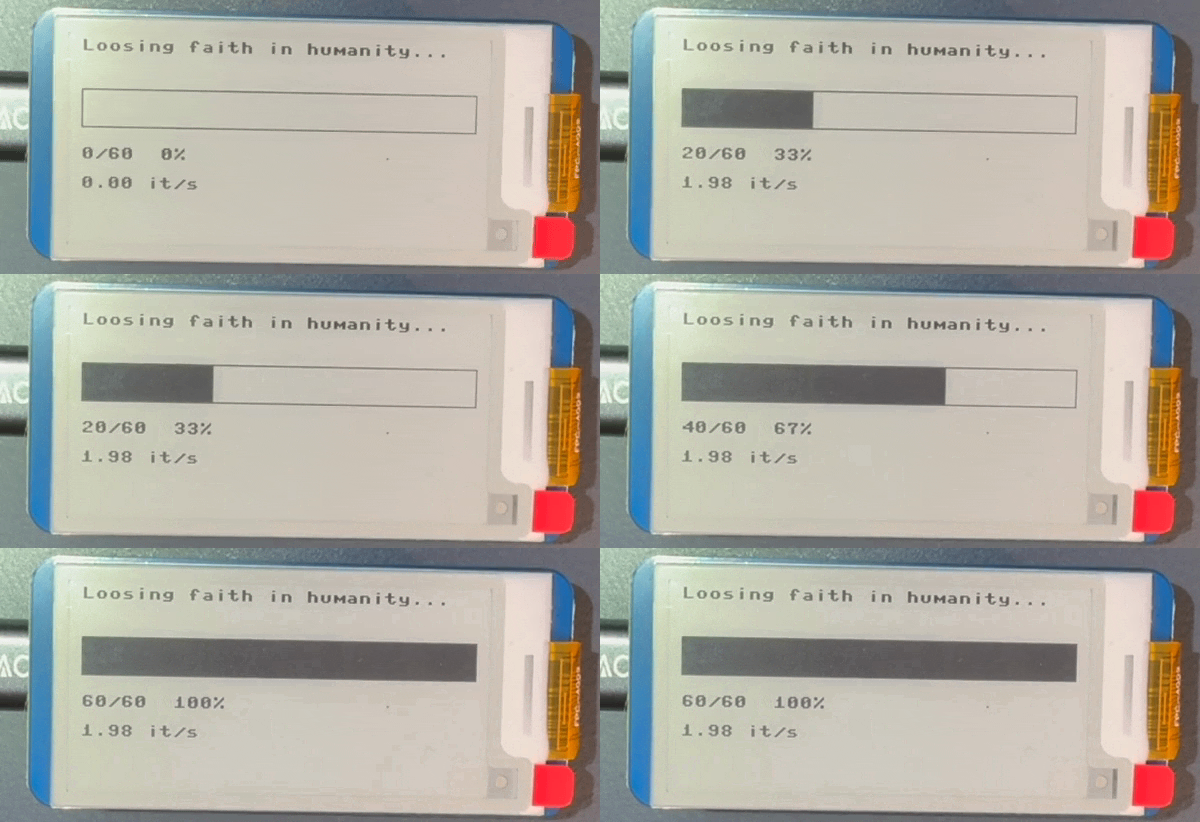
|
1
|
+
The MIT License (MIT)
|
|
2
|
+
Copyright © 2026 David Zellhöfer
|
|
3
|
+
|
|
4
|
+
Permission is hereby granted, free of charge, to any person obtaining a copy of this software
|
|
5
|
+
and associated documentation files (the “Software”), to deal in the Software without restriction,
|
|
6
|
+
including without limitation the rights to use, copy, modify, merge, publish, distribute, sublicense,
|
|
7
|
+
and/or sell copies of the Software, and to permit persons to whom the Software is furnished to do so, subject to the following conditions:
|
|
8
|
+
|
|
9
|
+
The above copyright notice and this permission notice shall be included in all copies or substantial portions of the Software.
|
|
10
|
+
|
|
11
|
+
THE SOFTWARE IS PROVIDED “AS IS”, WITHOUT WARRANTY OF ANY KIND, EXPRESS OR IMPLIED, INCLUDING
|
|
12
|
+
BUT NOT LIMITED TO THE WARRANTIES OF MERCHANTABILITY, FITNESS FOR A PARTICULAR PURPOSE AND NONINFRINGEMENT.
|
|
13
|
+
IN NO EVENT SHALL THE AUTHORS OR COPYRIGHT HOLDERS BE LIABLE FOR ANY CLAIM, DAMAGES OR OTHER LIABILITY,
|
|
14
|
+
WHETHER IN AN ACTION OF CONTRACT, TORT OR OTHERWISE, ARISING FROM, OUT OF OR IN CONNECTION WITH THE SOFTWARE
|
|
15
|
+
OR THE USE OR OTHER DEALINGS IN THE SOFTWARE.
|
cybertqdm-0.2.1/PKG-INFO
ADDED
|
@@ -0,0 +1,118 @@
|
|
|
1
|
+
Metadata-Version: 2.4
|
|
2
|
+
Name: cybertqdm
|
|
3
|
+
Version: 0.2.1
|
|
4
|
+
Summary: A wrapper around tqdm that displays progress on an e-ink display connected over USB
|
|
5
|
+
Keywords: tqdm,progress bar,e-ink,e-paper,raspberry pi pico,micropython
|
|
6
|
+
Author: David Zellhöfer
|
|
7
|
+
Author-email: David Zellhöfer <david.zellhoefer@hwr-berlin.de>
|
|
8
|
+
License-Expression: MIT
|
|
9
|
+
License-File: LICENSE
|
|
10
|
+
Requires-Dist: mpremote>=1.29.0
|
|
11
|
+
Requires-Dist: pyserial>=3.5
|
|
12
|
+
Requires-Dist: tqdm>=4.70.1
|
|
13
|
+
Requires-Python: >=3.14
|
|
14
|
+
Description-Content-Type: text/markdown
|
|
15
|
+
|
|
16
|
+
# cybertqdm
|
|
17
|
+
|
|
18
|
+
`cybertqdm` is a wrapper around [`tqdm`](https://pypi.org/project/tqdm/) that will also display on an external e-ink display connected via USB.
|
|
19
|
+
|
|
20
|
+
It is called `cybertqdm` because it turns `tqdm` into a _cyber-physical system_ (Yes, that's an existing term, see the [Wikipedia](https://en.wikipedia.org/wiki/Cyber-physical_system)). It will show a process bar as illustrated below.
|
|
21
|
+
|
|
22
|
+
)
|
|
23
|
+
|
|
24
|
+
## Using `cybertqdm`
|
|
25
|
+
|
|
26
|
+
As `cybertqdm` wraps [`tqdm`](https://pypi.org/project/tqdm/) it works exactly the same. As a result, normal `tqdm` output will be printed to the console accompanied by a progess bar on an external e-ink display.
|
|
27
|
+
|
|
28
|
+
```python
|
|
29
|
+
from cybertqdm import cybertqdm
|
|
30
|
+
import time
|
|
31
|
+
|
|
32
|
+
for _ in cybertqdm(60, desc="Loosing faith in humanity...", epaper_interval=10):
|
|
33
|
+
time.sleep(0.5)
|
|
34
|
+
```
|
|
35
|
+
|
|
36
|
+
Please note that the e-ink display will not update as fast as the `tqdm` console output. The refresh interval is controlled by `epaper_interval` (in seconds).
|
|
37
|
+
|
|
38
|
+
If no e-ink display is available while using `cybertqdm`, a warning is displayed and normal `tqdm` operation is unaffected.
|
|
39
|
+
|
|
40
|
+
## Installation
|
|
41
|
+
|
|
42
|
+
In contrast to most other PyPi packages, `cybertqdm` is a _cyber-physical system_. Thus, you will have to satisfy certain hardware requirements and software requirements on your embedded device.
|
|
43
|
+
|
|
44
|
+
### Operating System Requirements
|
|
45
|
+
|
|
46
|
+
`cybertqdm` has been tested with the following operating systems (OS):
|
|
47
|
+
|
|
48
|
+
| OS | Supported |
|
|
49
|
+
|-------|-----|
|
|
50
|
+
| Linux (Ubuntu) | ✔ |
|
|
51
|
+
| macOS (27.2.x) | ✔ |
|
|
52
|
+
| Windows (11) | ✔ |
|
|
53
|
+
|
|
54
|
+
The package might work on other OS as well because it is implemented in pure Python.
|
|
55
|
+
|
|
56
|
+
When using Linux, access to `/dev/ttyACM*` is often prohibited. Therefore, you must grant the appropriate permissions to the user running `cybertqm`:
|
|
57
|
+
|
|
58
|
+
```
|
|
59
|
+
sudo usermod -aG dialout $USER # Debian/Ubuntu/Fedora
|
|
60
|
+
```
|
|
61
|
+
|
|
62
|
+
After a logout, `cybertqdm` should work as expected.
|
|
63
|
+
|
|
64
|
+
### Hardware Requirements
|
|
65
|
+
|
|
66
|
+
The current version of `cybertqdm` requires the following components:
|
|
67
|
+
|
|
68
|
+
1. One [Raspberry Pi Pico 2](https://www.raspberrypi.com/products/raspberry-pi-pico-2/) with a (pre-)soldered header. A Pi Pico might also work but `cybertqdm` is only tested on a Pi Pico 2.
|
|
69
|
+
2. One [Waveshare e-paper 2.13 inch display module](https://www.waveshare.com/wiki/Pico-ePaper-2.13) (250×122 pixels, black and white)
|
|
70
|
+
3. One USB-Micro to whatever-you-need-USB __data__ cable
|
|
71
|
+
|
|
72
|
+
### Hardware Setup
|
|
73
|
+
|
|
74
|
+
You only have to follow these steps once if you don't change your Pico 2 setup afterwards. If you reconnect your Pico 2 it will work directly – on every computer that has `cybertqdm` installed.
|
|
75
|
+
|
|
76
|
+
1. Install MicroPython on your Raspberry Pico 2 following the [official instructions](https://www.raspberrypi.com/documentation/microcontrollers/micropython.html).
|
|
77
|
+
2. Copy the necessary files to your Raspberry Pico 2:
|
|
78
|
+
- All necessary files come bundled with the PyPi package. In order to retrieve them, run the following Python script:
|
|
79
|
+
|
|
80
|
+
```python
|
|
81
|
+
import cybertqdm as ctqdm
|
|
82
|
+
from cybertqdm.diagnostics import show_device_files
|
|
83
|
+
from importlib.resources import files
|
|
84
|
+
|
|
85
|
+
print("cybertqdm version: "+ ctqdm.__version__)
|
|
86
|
+
show_device_files()
|
|
87
|
+
```
|
|
88
|
+
- The result should look similar to this sample output (assuming you are using [uv](https://github.com/astral-sh/uv) as a package manager):
|
|
89
|
+
```python
|
|
90
|
+
cybertqdm version: 0.1.x
|
|
91
|
+
The following files need to be copied to the device:
|
|
92
|
+
.../.cache/uv/archive-v0/xQJrc_fVJrWXacY9/lib/python3.15/site-packages/cybertqdm/device/epd.py
|
|
93
|
+
.../.cache/uv/archive-v0/xQJrc_fVJrWXacY9/lib/python3.15/site-packages/cybertqdm/device/main.py
|
|
94
|
+
```
|
|
95
|
+
- Now copy the files to your Pico 2 using `mpremote` using the paths shown above:
|
|
96
|
+
```
|
|
97
|
+
mpremote cp <your_path>main.py :main.py
|
|
98
|
+
mpremote cp <your_path>epd.py :epd.py
|
|
99
|
+
```
|
|
100
|
+
- Then test the installation: `mpremote exec "import main"` which should print `init` etc. if everything worked correctly. You can close the running script by pressing Ctrl-C.
|
|
101
|
+
- Reset your Pico 2 using `mpremote reset` which also starts `main.py` automatically.
|
|
102
|
+
- To check wheter the communication with the Pico 2 works, run the following diagnosis which provides help to fix common issues:
|
|
103
|
+
```python
|
|
104
|
+
from cybertqdm.diagnostics import run_checks
|
|
105
|
+
|
|
106
|
+
run_checks()
|
|
107
|
+
```
|
|
108
|
+
- If everthing works as expected, the result will look like as shown below. Please note that the actual `/dev/` path depends on your operating system. Otherwise, diagnostics and tips to fix your problem will be output.
|
|
109
|
+
```
|
|
110
|
+
Pico 2 detected at port: /dev/cu.usbmodem11101
|
|
111
|
+
Port opened.
|
|
112
|
+
|
|
113
|
+
Sending: 0/10 ... OK
|
|
114
|
+
Sending: 5/10 ... OK
|
|
115
|
+
Sending: 10/10 ... OK
|
|
116
|
+
|
|
117
|
+
Pico 2 works as expected.
|
|
118
|
+
```
|
|
@@ -0,0 +1,103 @@
|
|
|
1
|
+
# cybertqdm
|
|
2
|
+
|
|
3
|
+
`cybertqdm` is a wrapper around [`tqdm`](https://pypi.org/project/tqdm/) that will also display on an external e-ink display connected via USB.
|
|
4
|
+
|
|
5
|
+
It is called `cybertqdm` because it turns `tqdm` into a _cyber-physical system_ (Yes, that's an existing term, see the [Wikipedia](https://en.wikipedia.org/wiki/Cyber-physical_system)). It will show a process bar as illustrated below.
|
|
6
|
+
|
|
7
|
+
)
|
|
8
|
+
|
|
9
|
+
## Using `cybertqdm`
|
|
10
|
+
|
|
11
|
+
As `cybertqdm` wraps [`tqdm`](https://pypi.org/project/tqdm/) it works exactly the same. As a result, normal `tqdm` output will be printed to the console accompanied by a progess bar on an external e-ink display.
|
|
12
|
+
|
|
13
|
+
```python
|
|
14
|
+
from cybertqdm import cybertqdm
|
|
15
|
+
import time
|
|
16
|
+
|
|
17
|
+
for _ in cybertqdm(60, desc="Loosing faith in humanity...", epaper_interval=10):
|
|
18
|
+
time.sleep(0.5)
|
|
19
|
+
```
|
|
20
|
+
|
|
21
|
+
Please note that the e-ink display will not update as fast as the `tqdm` console output. The refresh interval is controlled by `epaper_interval` (in seconds).
|
|
22
|
+
|
|
23
|
+
If no e-ink display is available while using `cybertqdm`, a warning is displayed and normal `tqdm` operation is unaffected.
|
|
24
|
+
|
|
25
|
+
## Installation
|
|
26
|
+
|
|
27
|
+
In contrast to most other PyPi packages, `cybertqdm` is a _cyber-physical system_. Thus, you will have to satisfy certain hardware requirements and software requirements on your embedded device.
|
|
28
|
+
|
|
29
|
+
### Operating System Requirements
|
|
30
|
+
|
|
31
|
+
`cybertqdm` has been tested with the following operating systems (OS):
|
|
32
|
+
|
|
33
|
+
| OS | Supported |
|
|
34
|
+
|-------|-----|
|
|
35
|
+
| Linux (Ubuntu) | ✔ |
|
|
36
|
+
| macOS (27.2.x) | ✔ |
|
|
37
|
+
| Windows (11) | ✔ |
|
|
38
|
+
|
|
39
|
+
The package might work on other OS as well because it is implemented in pure Python.
|
|
40
|
+
|
|
41
|
+
When using Linux, access to `/dev/ttyACM*` is often prohibited. Therefore, you must grant the appropriate permissions to the user running `cybertqm`:
|
|
42
|
+
|
|
43
|
+
```
|
|
44
|
+
sudo usermod -aG dialout $USER # Debian/Ubuntu/Fedora
|
|
45
|
+
```
|
|
46
|
+
|
|
47
|
+
After a logout, `cybertqdm` should work as expected.
|
|
48
|
+
|
|
49
|
+
### Hardware Requirements
|
|
50
|
+
|
|
51
|
+
The current version of `cybertqdm` requires the following components:
|
|
52
|
+
|
|
53
|
+
1. One [Raspberry Pi Pico 2](https://www.raspberrypi.com/products/raspberry-pi-pico-2/) with a (pre-)soldered header. A Pi Pico might also work but `cybertqdm` is only tested on a Pi Pico 2.
|
|
54
|
+
2. One [Waveshare e-paper 2.13 inch display module](https://www.waveshare.com/wiki/Pico-ePaper-2.13) (250×122 pixels, black and white)
|
|
55
|
+
3. One USB-Micro to whatever-you-need-USB __data__ cable
|
|
56
|
+
|
|
57
|
+
### Hardware Setup
|
|
58
|
+
|
|
59
|
+
You only have to follow these steps once if you don't change your Pico 2 setup afterwards. If you reconnect your Pico 2 it will work directly – on every computer that has `cybertqdm` installed.
|
|
60
|
+
|
|
61
|
+
1. Install MicroPython on your Raspberry Pico 2 following the [official instructions](https://www.raspberrypi.com/documentation/microcontrollers/micropython.html).
|
|
62
|
+
2. Copy the necessary files to your Raspberry Pico 2:
|
|
63
|
+
- All necessary files come bundled with the PyPi package. In order to retrieve them, run the following Python script:
|
|
64
|
+
|
|
65
|
+
```python
|
|
66
|
+
import cybertqdm as ctqdm
|
|
67
|
+
from cybertqdm.diagnostics import show_device_files
|
|
68
|
+
from importlib.resources import files
|
|
69
|
+
|
|
70
|
+
print("cybertqdm version: "+ ctqdm.__version__)
|
|
71
|
+
show_device_files()
|
|
72
|
+
```
|
|
73
|
+
- The result should look similar to this sample output (assuming you are using [uv](https://github.com/astral-sh/uv) as a package manager):
|
|
74
|
+
```python
|
|
75
|
+
cybertqdm version: 0.1.x
|
|
76
|
+
The following files need to be copied to the device:
|
|
77
|
+
.../.cache/uv/archive-v0/xQJrc_fVJrWXacY9/lib/python3.15/site-packages/cybertqdm/device/epd.py
|
|
78
|
+
.../.cache/uv/archive-v0/xQJrc_fVJrWXacY9/lib/python3.15/site-packages/cybertqdm/device/main.py
|
|
79
|
+
```
|
|
80
|
+
- Now copy the files to your Pico 2 using `mpremote` using the paths shown above:
|
|
81
|
+
```
|
|
82
|
+
mpremote cp <your_path>main.py :main.py
|
|
83
|
+
mpremote cp <your_path>epd.py :epd.py
|
|
84
|
+
```
|
|
85
|
+
- Then test the installation: `mpremote exec "import main"` which should print `init` etc. if everything worked correctly. You can close the running script by pressing Ctrl-C.
|
|
86
|
+
- Reset your Pico 2 using `mpremote reset` which also starts `main.py` automatically.
|
|
87
|
+
- To check wheter the communication with the Pico 2 works, run the following diagnosis which provides help to fix common issues:
|
|
88
|
+
```python
|
|
89
|
+
from cybertqdm.diagnostics import run_checks
|
|
90
|
+
|
|
91
|
+
run_checks()
|
|
92
|
+
```
|
|
93
|
+
- If everthing works as expected, the result will look like as shown below. Please note that the actual `/dev/` path depends on your operating system. Otherwise, diagnostics and tips to fix your problem will be output.
|
|
94
|
+
```
|
|
95
|
+
Pico 2 detected at port: /dev/cu.usbmodem11101
|
|
96
|
+
Port opened.
|
|
97
|
+
|
|
98
|
+
Sending: 0/10 ... OK
|
|
99
|
+
Sending: 5/10 ... OK
|
|
100
|
+
Sending: 10/10 ... OK
|
|
101
|
+
|
|
102
|
+
Pico 2 works as expected.
|
|
103
|
+
```
|
|
@@ -0,0 +1,41 @@
|
|
|
1
|
+
[project]
|
|
2
|
+
name = "cybertqdm"
|
|
3
|
+
version = "0.2.1"
|
|
4
|
+
description = "A wrapper around tqdm that displays progress on an e-ink display connected over USB"
|
|
5
|
+
keywords = [
|
|
6
|
+
"tqdm",
|
|
7
|
+
"progress bar",
|
|
8
|
+
"e-ink",
|
|
9
|
+
"e-paper",
|
|
10
|
+
"raspberry pi pico",
|
|
11
|
+
"micropython",
|
|
12
|
+
]
|
|
13
|
+
readme = "README.md"
|
|
14
|
+
license = "MIT"
|
|
15
|
+
license-files = ["LICENSE"]
|
|
16
|
+
requires-python = ">=3.14"
|
|
17
|
+
dependencies = [
|
|
18
|
+
"mpremote>=1.29.0",
|
|
19
|
+
"pyserial>=3.5",
|
|
20
|
+
"tqdm>=4.70.1",
|
|
21
|
+
]
|
|
22
|
+
|
|
23
|
+
[[project.authors]]
|
|
24
|
+
name = "David Zellhöfer"
|
|
25
|
+
email = "david.zellhoefer@hwr-berlin.de"
|
|
26
|
+
|
|
27
|
+
[build-system]
|
|
28
|
+
requires = ["uv_build>=0.13.6,<0.14.0"]
|
|
29
|
+
build-backend = "uv_build"
|
|
30
|
+
|
|
31
|
+
[tool.uv.build-backend]
|
|
32
|
+
source-exclude = [
|
|
33
|
+
"patch_publish.sh",
|
|
34
|
+
"test_release.sh",
|
|
35
|
+
]
|
|
36
|
+
|
|
37
|
+
[[tool.uv.index]]
|
|
38
|
+
name = "cybertqdm"
|
|
39
|
+
url = "https://test.pypi.org/simple/"
|
|
40
|
+
publish-url = "https://test.pypi.org/legacy/"
|
|
41
|
+
explicit = true
|
|
@@ -0,0 +1,30 @@
|
|
|
1
|
+
[project]
|
|
2
|
+
name = "cybertqdm"
|
|
3
|
+
version = "0.2.1"
|
|
4
|
+
description = "A wrapper around tqdm that displays progress on an e-ink display connected over USB"
|
|
5
|
+
keywords = ["tqdm", "progress bar", "e-ink", "e-paper", "raspberry pi pico", "micropython"]
|
|
6
|
+
readme = "README.md"
|
|
7
|
+
license = "MIT"
|
|
8
|
+
license-files = ["LICENSE"]
|
|
9
|
+
authors = [
|
|
10
|
+
{ name = "David Zellhöfer", email = "david.zellhoefer@hwr-berlin.de" }
|
|
11
|
+
]
|
|
12
|
+
requires-python = ">=3.14"
|
|
13
|
+
dependencies = [
|
|
14
|
+
"mpremote>=1.29.0",
|
|
15
|
+
"pyserial>=3.5",
|
|
16
|
+
"tqdm>=4.70.1",
|
|
17
|
+
]
|
|
18
|
+
|
|
19
|
+
[build-system]
|
|
20
|
+
requires = ["uv_build>=0.13.6,<0.14.0"]
|
|
21
|
+
build-backend = "uv_build"
|
|
22
|
+
|
|
23
|
+
[tool.uv.build-backend]
|
|
24
|
+
source-exclude = ["patch_publish.sh","test_release.sh"] # the build script shouldn't be included but we exclude it explicitly
|
|
25
|
+
|
|
26
|
+
[[tool.uv.index]]
|
|
27
|
+
name = "cybertqdm"
|
|
28
|
+
url = "https://test.pypi.org/simple/"
|
|
29
|
+
publish-url = "https://test.pypi.org/legacy/"
|
|
30
|
+
explicit = true
|
|
Binary file
|
|
@@ -0,0 +1,120 @@
|
|
|
1
|
+
import glob
|
|
2
|
+
import time
|
|
3
|
+
import warnings
|
|
4
|
+
|
|
5
|
+
import serial
|
|
6
|
+
from serial.tools import list_ports
|
|
7
|
+
from tqdm import tqdm
|
|
8
|
+
|
|
9
|
+
__all__ = ["CyberTqdm", "cybertqdm"]
|
|
10
|
+
|
|
11
|
+
PICO_VID = (
|
|
12
|
+
0x2E8A # Raspberry Pi vendor ID; used to detect the device in macOS and Linux
|
|
13
|
+
)
|
|
14
|
+
|
|
15
|
+
|
|
16
|
+
def find_pico_ports():
|
|
17
|
+
"""Check serial ports of connected Pico devices, should work on any OS."""
|
|
18
|
+
return sorted(p.device for p in list_ports.comports() if p.vid == PICO_VID)
|
|
19
|
+
|
|
20
|
+
|
|
21
|
+
class CyberTqdm(tqdm):
|
|
22
|
+
"""A tqdm wrapper that also prints a progres bar onto a e-ink display.
|
|
23
|
+
|
|
24
|
+
To prevent wearing down the e-ink display too fast, console and e-ink update interval differs.
|
|
25
|
+
|
|
26
|
+
- console: normal tqdm update interval
|
|
27
|
+
- e-ink display: updates at start, then every `epaper_interval` seconds with a final update when the observed task ends.
|
|
28
|
+
- If no Pico 2 is detected or the connection is lost, a warning is output. Console operation remains unaffected.
|
|
29
|
+
"""
|
|
30
|
+
|
|
31
|
+
_ser = None # common connection for progress bars
|
|
32
|
+
_unavailable = False # in case of errors do not try to reconnect again and again...
|
|
33
|
+
|
|
34
|
+
def __init__(self, *args, port=None, epaper_interval=30, **kwargs):
|
|
35
|
+
self._epaper_interval = epaper_interval
|
|
36
|
+
self._last_send = 0.0
|
|
37
|
+
self._epaper_done = False
|
|
38
|
+
self._open_port(port)
|
|
39
|
+
super().__init__(*args, **kwargs)
|
|
40
|
+
|
|
41
|
+
# --- connection ---------------------------------------------------------
|
|
42
|
+
@staticmethod
|
|
43
|
+
def _open_port(port):
|
|
44
|
+
cls = CyberTqdm
|
|
45
|
+
if (cls._ser is not None and cls._ser.is_open) or cls._unavailable:
|
|
46
|
+
return
|
|
47
|
+
if port is None:
|
|
48
|
+
# ports = sorted(glob.glob("/dev/cu.usbmodem*")) # works only on macOS
|
|
49
|
+
ports = find_pico_ports()
|
|
50
|
+
if not ports:
|
|
51
|
+
cls._unavailable = True
|
|
52
|
+
warnings.warn(
|
|
53
|
+
"E-ink display unavailable – falling back to console output."
|
|
54
|
+
)
|
|
55
|
+
return
|
|
56
|
+
port = ports[0]
|
|
57
|
+
try:
|
|
58
|
+
cls._ser = serial.Serial(port, 115200, timeout=0, write_timeout=2)
|
|
59
|
+
except (serial.SerialException, OSError) as e:
|
|
60
|
+
cls._unavailable = True
|
|
61
|
+
warnings.warn(
|
|
62
|
+
f"E-ink display unavailable ({e}) – falling back to console output."
|
|
63
|
+
)
|
|
64
|
+
|
|
65
|
+
@staticmethod
|
|
66
|
+
def _drop_port(err):
|
|
67
|
+
cls = CyberTqdm
|
|
68
|
+
warnings.warn(
|
|
69
|
+
f"Lost connection to e-ink display ({err}) – falling back to console output."
|
|
70
|
+
)
|
|
71
|
+
try:
|
|
72
|
+
cls._ser.close()
|
|
73
|
+
except Exception:
|
|
74
|
+
pass
|
|
75
|
+
cls._ser = None
|
|
76
|
+
cls._unavailable = True
|
|
77
|
+
|
|
78
|
+
# --- send data -------------------------------------------------------------
|
|
79
|
+
def _send(self):
|
|
80
|
+
ser = CyberTqdm._ser
|
|
81
|
+
if ser is None or self.disable:
|
|
82
|
+
return
|
|
83
|
+
try:
|
|
84
|
+
if ser.in_waiting: # drop OK/busy messages from the Pico 2
|
|
85
|
+
ser.read(ser.in_waiting)
|
|
86
|
+
d = self.format_dict
|
|
87
|
+
desc = (
|
|
88
|
+
(self.desc or "").replace("|", "/").replace("\n", " ").strip(": ")[:30]
|
|
89
|
+
)
|
|
90
|
+
n = int(d["n"])
|
|
91
|
+
total = int(d["total"] or 0)
|
|
92
|
+
rate = d["rate"] or 0.0
|
|
93
|
+
ser.write(f"{desc}|{n}|{total}|{rate:.2f}\n".encode())
|
|
94
|
+
ser.flush()
|
|
95
|
+
except (serial.SerialException, OSError) as e:
|
|
96
|
+
self._drop_port(e)
|
|
97
|
+
self._last_send = time.time()
|
|
98
|
+
|
|
99
|
+
# --- tqdm hooks ---------------------------------------------------------
|
|
100
|
+
def display(self, msg=None, pos=None):
|
|
101
|
+
if time.time() - self._last_send >= self._epaper_interval:
|
|
102
|
+
self._send()
|
|
103
|
+
return super().display(msg, pos)
|
|
104
|
+
|
|
105
|
+
def close(self):
|
|
106
|
+
if not getattr(self, "_epaper_done", True):
|
|
107
|
+
self._epaper_done = True
|
|
108
|
+
self._send() # always display final state of the progress bar
|
|
109
|
+
super().close()
|
|
110
|
+
|
|
111
|
+
|
|
112
|
+
def cybertqdm(*args, **kwargs):
|
|
113
|
+
"""Shortcut for CyberTqdm(range(*args), **kwargs)."""
|
|
114
|
+
return CyberTqdm(range(*args), **kwargs)
|
|
115
|
+
|
|
116
|
+
|
|
117
|
+
if __name__ == "__main__":
|
|
118
|
+
# quick test: 60 steps, each sleeping for 0.5 seconds, e-ink display update every 10 seconds
|
|
119
|
+
for _ in cybertqdm(60, desc="Loosing faith in humanity...", epaper_interval=10):
|
|
120
|
+
time.sleep(0.5)
|