cutmap 0.1.0__tar.gz → 0.2.0__tar.gz
This diff represents the content of publicly available package versions that have been released to one of the supported registries. The information contained in this diff is provided for informational purposes only and reflects changes between package versions as they appear in their respective public registries.
- cutmap-0.2.0/PKG-INFO +367 -0
- cutmap-0.2.0/README.md +317 -0
- {cutmap-0.1.0 → cutmap-0.2.0}/pyproject.toml +2 -2
- {cutmap-0.1.0 → cutmap-0.2.0}/src/cutmap/__init__.py +1 -1
- {cutmap-0.1.0 → cutmap-0.2.0}/src/cutmap/cli.py +2 -2
- {cutmap-0.1.0 → cutmap-0.2.0}/src/cutmap/render.py +2 -2
- cutmap-0.1.0/PKG-INFO +0 -343
- cutmap-0.1.0/README.en.md +0 -293
- {cutmap-0.1.0 → cutmap-0.2.0}/.gitignore +0 -0
- {cutmap-0.1.0 → cutmap-0.2.0}/LICENSE +0 -0
- {cutmap-0.1.0 → cutmap-0.2.0}/src/cutmap/_assets.py +0 -0
- {cutmap-0.1.0 → cutmap-0.2.0}/src/cutmap/broll.py +0 -0
- {cutmap-0.1.0 → cutmap-0.2.0}/src/cutmap/frames.py +0 -0
- {cutmap-0.1.0 → cutmap-0.2.0}/src/cutmap/subclean.py +0 -0
- {cutmap-0.1.0 → cutmap-0.2.0}/src/cutmap/terms.txt +0 -0
- {cutmap-0.1.0 → cutmap-0.2.0}/src/cutmap/util.py +0 -0
cutmap-0.2.0/PKG-INFO
ADDED
|
@@ -0,0 +1,367 @@
|
|
|
1
|
+
Metadata-Version: 2.4
|
|
2
|
+
Name: cutmap
|
|
3
|
+
Version: 0.2.0
|
|
4
|
+
Summary: Turn any video into a browsable, searchable storyboard — and auto-extract its B-roll. Local ffmpeg + perceptual hashing, no LLM.
|
|
5
|
+
Project-URL: Homepage, https://github.com/xykong36/cutmap
|
|
6
|
+
Project-URL: Issues, https://github.com/xykong36/cutmap/issues
|
|
7
|
+
Author: Xiangyu Kong
|
|
8
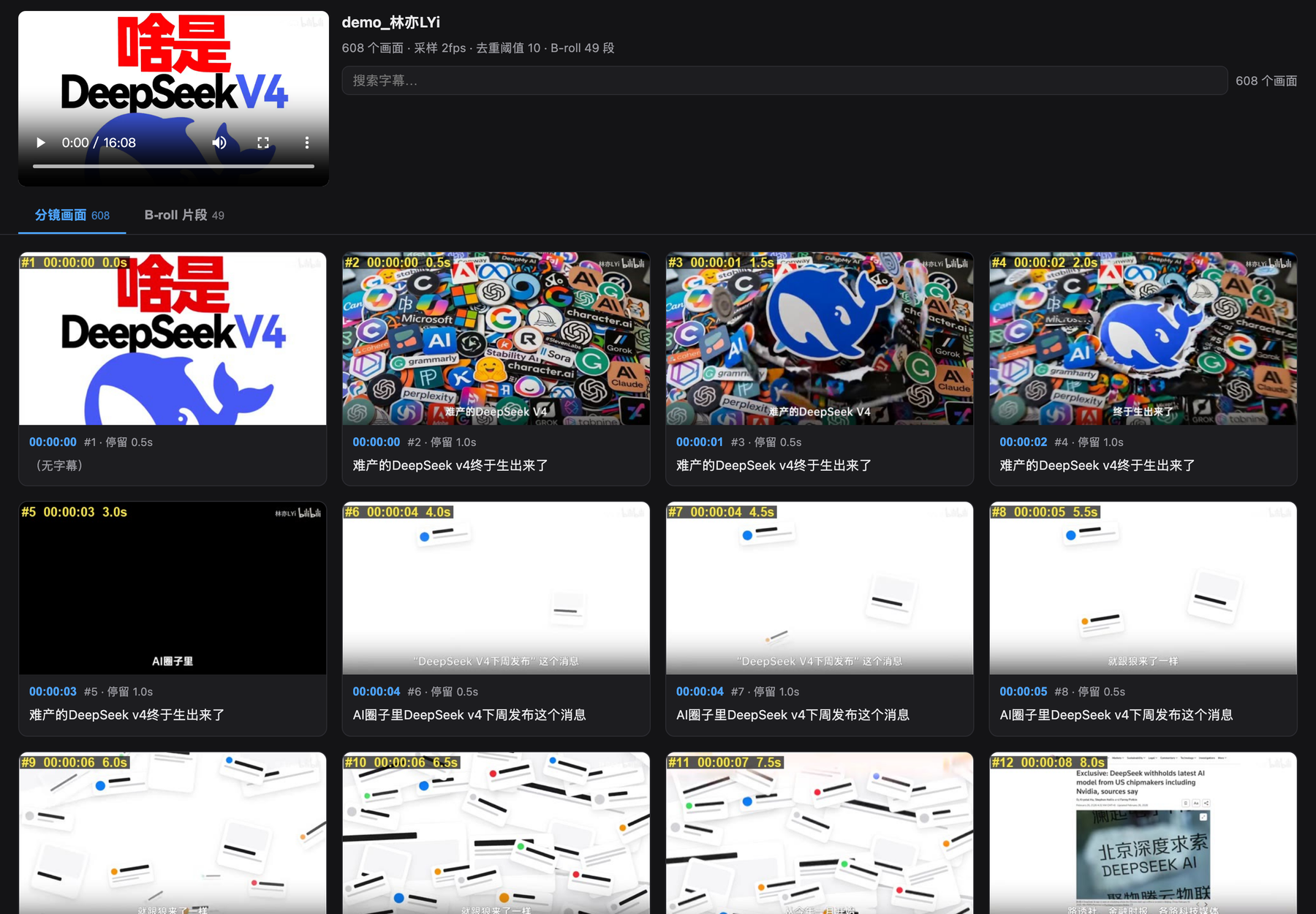
|
+
License: MIT License
|
|
9
|
+
|
|
10
|
+
Copyright (c) 2026 Xiangyu Kong
|
|
11
|
+
|
|
12
|
+
Permission is hereby granted, free of charge, to any person obtaining a copy
|
|
13
|
+
of this software and associated documentation files (the "Software"), to deal
|
|
14
|
+
in the Software without restriction, including without limitation the rights
|
|
15
|
+
to use, copy, modify, merge, publish, distribute, sublicense, and/or sell
|
|
16
|
+
copies of the Software, and to permit persons to whom the Software is
|
|
17
|
+
furnished to do so, subject to the following conditions:
|
|
18
|
+
|
|
19
|
+
The above copyright notice and this permission notice shall be included in all
|
|
20
|
+
copies or substantial portions of the Software.
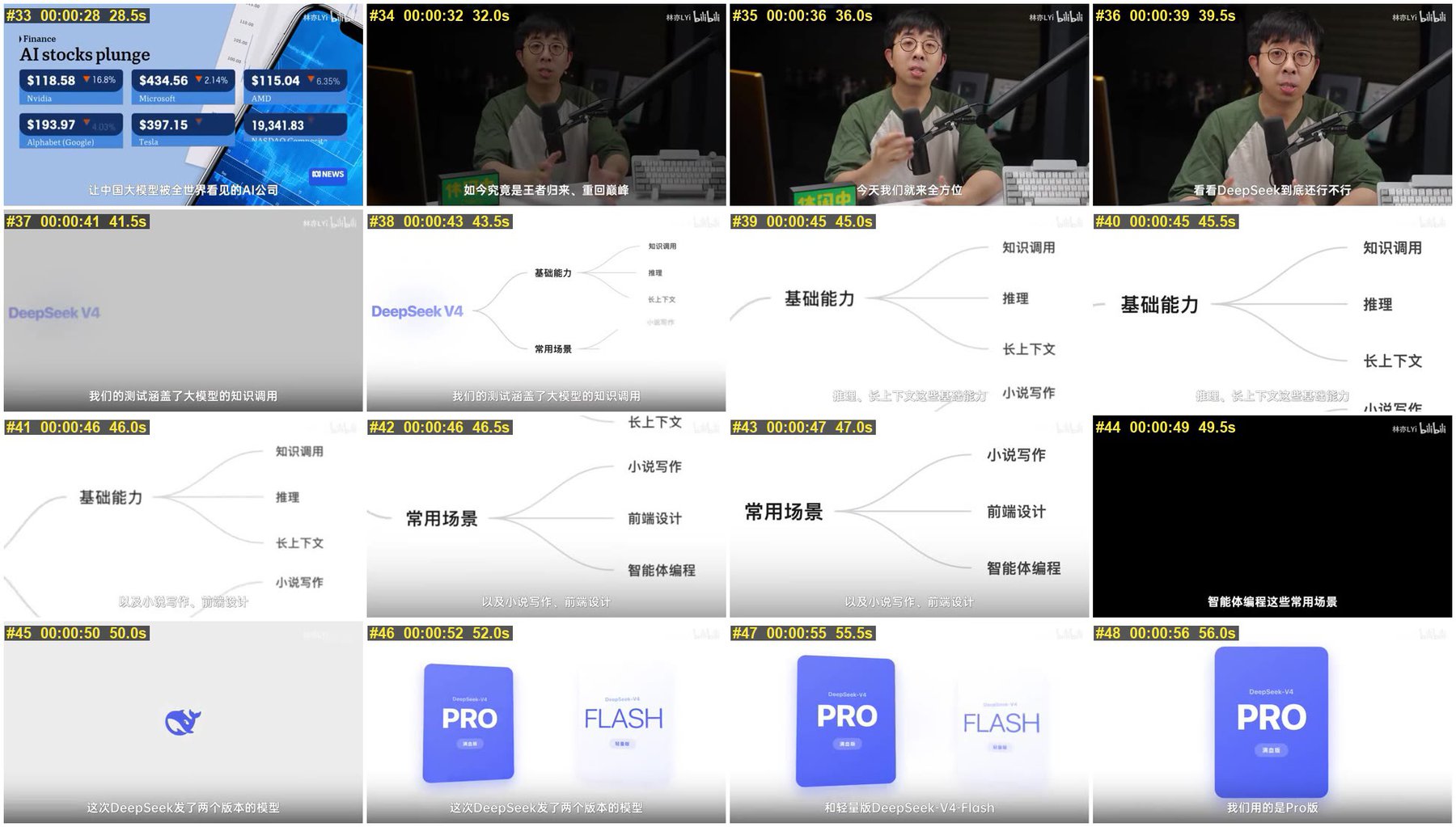
|
|
21
|
+
|
|
22
|
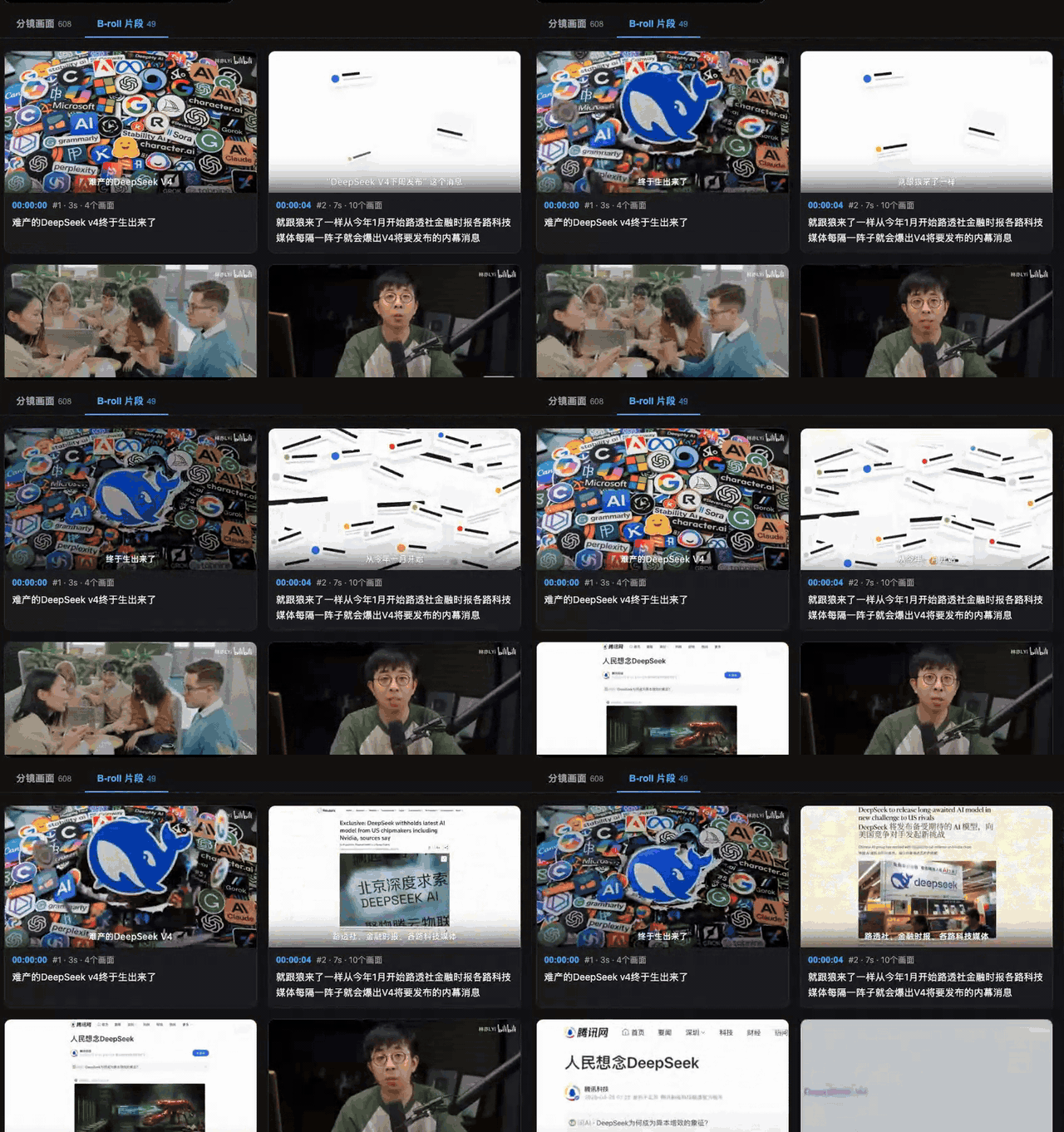
+
THE SOFTWARE IS PROVIDED "AS IS", WITHOUT WARRANTY OF ANY KIND, EXPRESS OR
|
|
23
|
+
IMPLIED, INCLUDING BUT NOT LIMITED TO THE WARRANTIES OF MERCHANTABILITY,
|
|
24
|
+
FITNESS FOR A PARTICULAR PURPOSE AND NONINFRINGEMENT. IN NO EVENT SHALL THE
|
|
25
|
+
AUTHORS OR COPYRIGHT HOLDERS BE LIABLE FOR ANY CLAIM, DAMAGES OR OTHER
|
|
26
|
+
LIABILITY, WHETHER IN AN ACTION OF CONTRACT, TORT OR OTHERWISE, ARISING FROM,
|
|
27
|
+
OUT OF OR IN CONNECTION WITH THE SOFTWARE OR THE USE OR OTHER DEALINGS IN THE
|
|
28
|
+
SOFTWARE.
|
|
29
|
+
License-File: LICENSE
|
|
30
|
+
Keywords: b-roll,ffmpeg,perceptual-hash,storyboard,subtitle,video,分镜
|
|
31
|
+
Classifier: Development Status :: 4 - Beta
|
|
32
|
+
Classifier: Environment :: Console
|
|
33
|
+
Classifier: Intended Audience :: End Users/Desktop
|
|
34
|
+
Classifier: License :: OSI Approved :: MIT License
|
|
35
|
+
Classifier: Operating System :: OS Independent
|
|
36
|
+
Classifier: Programming Language :: Python :: 3
|
|
37
|
+
Classifier: Programming Language :: Python :: 3.9
|
|
38
|
+
Classifier: Programming Language :: Python :: 3.10
|
|
39
|
+
Classifier: Programming Language :: Python :: 3.11
|
|
40
|
+
Classifier: Programming Language :: Python :: 3.12
|
|
41
|
+
Classifier: Programming Language :: Python :: 3.13
|
|
42
|
+
Classifier: Topic :: Multimedia :: Video
|
|
43
|
+
Classifier: Topic :: Multimedia :: Video :: Non-Linear Editor
|
|
44
|
+
Requires-Python: >=3.9
|
|
45
|
+
Requires-Dist: pillow>=9.0
|
|
46
|
+
Provides-Extra: dev
|
|
47
|
+
Requires-Dist: pytest>=7; extra == 'dev'
|
|
48
|
+
Requires-Dist: ruff>=0.4; extra == 'dev'
|
|
49
|
+
Description-Content-Type: text/markdown
|
|
50
|
+
|
|
51
|
+
<div align="center">
|
|
52
|
+
|
|
53
|
+
# cutmap
|
|
54
|
+
|
|
55
|
+
**Read a video like a document.**
|
|
56
|
+
Skim a long video in minutes to learn fast — or study it frame-by-frame to see exactly how it's cut.
|
|
57
|
+
|
|
58
|
+
[](https://github.com/xykong36/cutmap/blob/main/README.md)
|
|
59
|
+
[](https://github.com/xykong36/cutmap/blob/main/README.zh-CN.md)
|
|
60
|
+
[](https://pypi.org/project/cutmap/)
|
|
61
|
+
[](https://github.com/xykong36/cutmap/actions/workflows/ci.yml)
|
|
62
|
+
[](https://github.com/xykong36/cutmap/blob/main/LICENSE)
|
|
63
|
+
[](https://www.python.org)
|
|
64
|
+
[](#)
|
|
65
|
+
|
|
66
|
+
</div>
|
|
67
|
+
|
|
68
|
+
Watching a video is slow and linear — you can't skim it the way you skim an article,
|
|
69
|
+
and you can't Ctrl-F a moment. cutmap fixes that. Give it a video (and subtitles if you
|
|
70
|
+
have them) and it builds a single HTML page you can actually **read**: every visually
|
|
71
|
+
distinct frame laid out in order, each captioned with what was being said. Click a frame
|
|
72
|
+
to jump the player there; search the subtitles to find a moment.
|
|
73
|
+
|
|
74
|
+
|
|
75
|
+
|
|
76
|
+
<sub>Demo footage: [@林亦LYi](https://www.youtube.com/@lyi) — [《一个视频搞懂 DeepSeek V4!》](https://www.youtube.com/watch?v=WDQjRzVcX-A), all rights reserved by the creator</sub>
|
|
77
|
+
|
|
78
|
+
Two things people use it for:
|
|
79
|
+
|
|
80
|
+
- 📖 **Learn faster.** Turn a one-hour talk or tutorial into a page you scroll in a few
|
|
81
|
+
minutes. See the whole structure at a glance, search the transcript, and only play the
|
|
82
|
+
parts you actually need.
|
|
83
|
+
- 🎬 **Study the edit ("拉片").** If you make videos, see exactly how someone cut theirs —
|
|
84
|
+
every shot change, every B-roll insert, every on-screen graphic — laid out as one storyboard.
|
|
85
|
+
|
|
86
|
+
It runs entirely on your machine. **No LLM, no API key, no network.**
|
|
87
|
+
|
|
88
|
+
---
|
|
89
|
+
|
|
90
|
+
## Quick start
|
|
91
|
+
|
|
92
|
+
### The easy way — just ask your AI agent
|
|
93
|
+
|
|
94
|
+
cutmap ships with a [Claude Code](https://claude.com/claude-code) skill. Install it once,
|
|
95
|
+
then talk in plain language — the agent downloads the video, runs cutmap, reads the
|
|
96
|
+
result, and answers you:
|
|
97
|
+
|
|
98
|
+
```bash
|
|
99
|
+
pip install cutmap yt-dlp # cutmap + video downloader
|
|
100
|
+
brew install ffmpeg # the video engine (Linux: apt install ffmpeg)
|
|
101
|
+
|
|
102
|
+
# install the bundled skill for Claude Code
|
|
103
|
+
git clone https://github.com/xykong36/cutmap
|
|
104
|
+
cp -r cutmap/skills/cutmap ~/.claude/skills/
|
|
105
|
+
```
|
|
106
|
+
|
|
107
|
+
Then just say things like:
|
|
108
|
+
|
|
109
|
+
> **Download** `https://youtu.be/…` **and use cutmap to summarize what it covers**
|
|
110
|
+
>
|
|
111
|
+
> **Use cutmap on** `lecture.mp4` **and give me the section-by-section breakdown**
|
|
112
|
+
>
|
|
113
|
+
> **What's on screen around 3:41 in that video?** (process it with cutmap first)
|
|
114
|
+
|
|
115
|
+
The agent handles the download, the flags, and reading the frames for you — you never
|
|
116
|
+
touch the command line.
|
|
117
|
+
|
|
118
|
+
### The manual way — command line
|
|
119
|
+
|
|
120
|
+
```bash
|
|
121
|
+
pip install cutmap
|
|
122
|
+
brew install ffmpeg # macOS (Linux: apt install ffmpeg)
|
|
123
|
+
|
|
124
|
+
cutmap video.mp4 --srt video.srt # or just: cutmap video.mp4 (finds video.srt)
|
|
125
|
+
open video/browse.html # ← open this in your browser
|
|
126
|
+
```
|
|
127
|
+
|
|
128
|
+
That's it. Everything you need is in the `video/` folder next to your file.
|
|
129
|
+
|
|
130
|
+
---
|
|
131
|
+
|
|
132
|
+
## What you get
|
|
133
|
+
|
|
134
|
+
Output lands in a directory named after the video:
|
|
135
|
+
|
|
136
|
+
```
|
|
137
|
+
video/
|
|
138
|
+
├── browse.html ← open this: the interactive storyboard
|
|
139
|
+
├── frames/ every distinct frame, labelled #index timecode seconds
|
|
140
|
+
├── sheet_01..NN.jpg 4×4 contact sheets for scanning at a glance
|
|
141
|
+
├── index.json frame timestamps + aligned subtitles (machine readable)
|
|
142
|
+
└── broll/ extracted B-roll clips + broll.json
|
|
143
|
+
```
|
|
144
|
+
|
|
145
|
+
### The browse page
|
|
146
|
+
|
|
147
|
+
One self-contained HTML file — all CSS and JS inlined. Two tabs:
|
|
148
|
+
|
|
149
|
+
**Storyboard** — every distinct frame with its caption
|
|
150
|
+
**B-roll** — auto-looping clips (reads like a GIF wall)
|
|
151
|
+
|
|
152
|
+
|
|
153
|
+
|
|
154
|
+
<sub>The B-roll tab in motion: clips auto-loop like a GIF wall, but they are MP4 under the hood — 1/24 the size of actual GIFs</sub>
|
|
155
|
+
|
|
156
|
+
What you can do on it:
|
|
157
|
+
|
|
158
|
+
- **Click any frame or timecode** to seek the embedded player there (local file, no network)
|
|
159
|
+
- **Search the subtitles** — matches the *normalised* text, so searching `DeepSeek` also
|
|
160
|
+
finds frames where the auto-transcription wrote `deep sick`
|
|
161
|
+
- Long captions collapse behind `…expand`
|
|
162
|
+
- Follows your system light / dark mode
|
|
163
|
+
|
|
164
|
+
Contact sheets are also written on their own, for scanning a whole video in a few images:
|
|
165
|
+
|
|
166
|
+
|
|
167
|
+
|
|
168
|
+
---
|
|
169
|
+
|
|
170
|
+
## How it works
|
|
171
|
+
|
|
172
|
+
The interesting part is *which* frames it keeps. Sampling every N seconds is both
|
|
173
|
+
redundant and lossy: a 30-second talking-head passage gives you ten identical stills;
|
|
174
|
+
a fast montage cutting five shots in three seconds gives you one.
|
|
175
|
+
|
|
176
|
+
cutmap asks a different question — not *"how often should I sample"* but
|
|
177
|
+
**"which frames actually differ"**:
|
|
178
|
+
|
|
179
|
+
```
|
|
180
|
+
dense sample → perceptual hash each frame → compare against last kept frame
|
|
181
|
+
→ keep only if different enough
|
|
182
|
+
```
|
|
183
|
+
|
|
184
|
+
Static passages collapse to a single frame. Every visual change gets one.
|
|
185
|
+
|
|
186
|
+
<details>
|
|
187
|
+
<summary><b>Why not ffmpeg's built-in scene detection?</b></summary>
|
|
188
|
+
|
|
189
|
+
<br>
|
|
190
|
+
|
|
191
|
+
`select='gt(scene,0.3)'` only catches **hard cuts**. Two things slip past it:
|
|
192
|
+
|
|
193
|
+
1. **Low-contrast transitions** — white slide to white webpage. Similar overall
|
|
194
|
+
luminance structure, so the difference score never crosses the threshold.
|
|
195
|
+
2. **Intra-shot evolution** — text appearing line by line, charts animating,
|
|
196
|
+
table rows highlighting. Not a "cut" by any definition, but visually distinct.
|
|
197
|
+
|
|
198
|
+
Measured on one 16-minute video: scene detection found **104** frames,
|
|
199
|
+
perceptual dedup found **608**. One 25-second stretch that scene detection called
|
|
200
|
+
a single shot actually contained three completely different pages.
|
|
201
|
+
|
|
202
|
+
</details>
|
|
203
|
+
|
|
204
|
+
<details>
|
|
205
|
+
<summary><b>The algorithm's blind spot</b></summary>
|
|
206
|
+
|
|
207
|
+
<br>
|
|
208
|
+
|
|
209
|
+
dHash compares **relative brightness between adjacent pixels**, so it measures spatial
|
|
210
|
+
structure, not colour. Two different flat colours produce an identical (all-zero)
|
|
211
|
+
fingerprint and cannot be told apart. Footage that is largely flat-coloured or
|
|
212
|
+
near-black will therefore dedup more aggressively than you might expect. (This is also
|
|
213
|
+
why transition cards are detected by mean luminance rather than by hash.)
|
|
214
|
+
|
|
215
|
+
</details>
|
|
216
|
+
|
|
217
|
+
---
|
|
218
|
+
|
|
219
|
+
## Options
|
|
220
|
+
|
|
221
|
+
Most people never need these — the defaults are tuned for slides, screencasts, and
|
|
222
|
+
talks. Reach for them when the frame count comes out too dense or too sparse.
|
|
223
|
+
|
|
224
|
+
| Flag | Meaning |
|
|
225
|
+
|---|---|
|
|
226
|
+
| `--threshold N` | Frame density. **Lower = more frames.** `6` dense / `10` default / `14` sparse / `24` structure-only |
|
|
227
|
+
| `--fps N` | Dense sampling rate (default 2 — finest resolvable gap is 0.5s) |
|
|
228
|
+
| `--seg-max N` | Max seconds per B-roll segment (default 45) |
|
|
229
|
+
| `--clip-format` | `mp4` (default) / `gif` / `webp` |
|
|
230
|
+
| `--no-broll` | Skip B-roll extraction (much faster) |
|
|
231
|
+
| `--no-frames` | Keep only contact sheets, drop individual frames |
|
|
232
|
+
| `--cols/--rows` | Contact sheet grid (default 4×4) |
|
|
233
|
+
| `--thumb-width` | Thumbnail width in px (default 480) |
|
|
234
|
+
| `--terms FILE` | Custom subtitle term-normalisation table |
|
|
235
|
+
|
|
236
|
+
**Rule of thumb for density:** screencasts and slides → keep the default `10`. Real
|
|
237
|
+
handheld / vlog / interview footage → start at `--threshold 20` (camera shake makes
|
|
238
|
+
every frame look "different" otherwise).
|
|
239
|
+
|
|
240
|
+
<details>
|
|
241
|
+
<summary><b>Density, measured</b></summary>
|
|
242
|
+
|
|
243
|
+
<br>
|
|
244
|
+
|
|
245
|
+
On a 969-second video (2 fps sampling → 1936 raw frames):
|
|
246
|
+
|
|
247
|
+
| Threshold | Kept | Avg gap | Good for |
|
|
248
|
+
|---|---|---|---|
|
|
249
|
+
| 6 | 892 | 1.1s | Reconstructing every visual step (tutorial walkthroughs) |
|
|
250
|
+
| **10** | **597** | **1.6s** | **Default** — balances coverage and readability |
|
|
251
|
+
| 14 | 463 | 2.1s | Style study, quick scanning |
|
|
252
|
+
| 24 | 241 | 4.0s | Structure only, close to a traditional shot list |
|
|
253
|
+
|
|
254
|
+
The curve is smooth — there is no natural breakpoint. This is an aesthetic choice,
|
|
255
|
+
not a parameter with a computable optimum.
|
|
256
|
+
|
|
257
|
+
</details>
|
|
258
|
+
|
|
259
|
+
---
|
|
260
|
+
|
|
261
|
+
## B-roll detection
|
|
262
|
+
|
|
263
|
+
Frames are sorted into three buckets by three plain rules — no model involved:
|
|
264
|
+
|
|
265
|
+
| Bucket | Rule |
|
|
266
|
+
|---|---|
|
|
267
|
+
| **Main shot** | A cluster of near-identical frames recurring across >50% of the runtime — i.e. a locked-off camera |
|
|
268
|
+
| **Transition card** | Mean luminance below 8 (black) or above 245 (white) |
|
|
269
|
+
| **B-roll** | Everything else |
|
|
270
|
+
|
|
271
|
+
Screencast-style videos with no talking head degrade gracefully — no main shot is
|
|
272
|
+
found, everything becomes B-roll, and `--seg-max` keeps it segmented.
|
|
273
|
+
|
|
274
|
+
Clips default to **MP4** (`loop muted`), which looks identical to a GIF in the page but
|
|
275
|
+
is ~24× smaller (0.08 MB vs 1.96 MB for a 9-second segment). Use `--clip-format gif`
|
|
276
|
+
only when pasting into chat apps or note tools.
|
|
277
|
+
|
|
278
|
+
---
|
|
279
|
+
|
|
280
|
+
## Subtitle term normalisation
|
|
281
|
+
|
|
282
|
+
Auto-transcription mangles proper nouns. A built-in table normalises them:
|
|
283
|
+
|
|
284
|
+
```
|
|
285
|
+
大家对deep sick新模型的期待值 → 大家对DeepSeek新模型的期待值
|
|
286
|
+
用grock测试 → 用Grok测试
|
|
287
|
+
```
|
|
288
|
+
|
|
289
|
+
The real payoff is **search**: querying `DeepSeek` finds every frame whose subtitle
|
|
290
|
+
was transcribed as `deep sick`. The default table targets AI / tech content; bring your
|
|
291
|
+
own with `--terms my_terms.txt` (one `regex => replacement` per line, see
|
|
292
|
+
[`src/cutmap/terms.txt`](https://github.com/xykong36/cutmap/blob/main/src/cutmap/terms.txt)).
|
|
293
|
+
|
|
294
|
+
This is term normalisation, not proofreading — it will not fix grammar or one-off errors.
|
|
295
|
+
|
|
296
|
+
---
|
|
297
|
+
|
|
298
|
+
## Getting footage manually
|
|
299
|
+
|
|
300
|
+
If you're not using the agent skill, cutmap itself doesn't download anything — it works
|
|
301
|
+
on local files. For YouTube / Bilibili, grab the video and subtitles with
|
|
302
|
+
[yt-dlp](https://github.com/yt-dlp/yt-dlp):
|
|
303
|
+
|
|
304
|
+
```bash
|
|
305
|
+
yt-dlp --write-auto-subs --sub-langs "en,zh-Hans" --convert-subs srt \
|
|
306
|
+
-f "bv*[height<=720]+ba/b" -o "%(id)s.%(ext)s" "<URL>"
|
|
307
|
+
cutmap <id>.mp4
|
|
308
|
+
```
|
|
309
|
+
|
|
310
|
+
Respect the terms of service and copyright of wherever your footage comes from; use
|
|
311
|
+
downloaded material for personal study and research only.
|
|
312
|
+
|
|
313
|
+
---
|
|
314
|
+
|
|
315
|
+
<details>
|
|
316
|
+
<summary><b>Troubleshooting — bugs I hit building this</b></summary>
|
|
317
|
+
|
|
318
|
+
<br>
|
|
319
|
+
|
|
320
|
+
Most of these **never raised an error** — they just quietly produced wrong output:
|
|
321
|
+
|
|
322
|
+
**`\b` word boundaries fail in mixed CJK/Latin text.** CJK characters are `\w` in Python,
|
|
323
|
+
so in `用grock测试` there is no boundary between `用` and `g`. `\bgrock\b` never matches.
|
|
324
|
+
The term table uses `(?<![A-Za-z0-9])…(?![A-Za-z0-9])` instead.
|
|
325
|
+
|
|
326
|
+
**Flat frames can't be detected by standard deviation.** Black transition cards usually
|
|
327
|
+
have burned-in white subtitles, pushing stddev to 23–33. Use mean luminance, kept tight
|
|
328
|
+
(`<8`): loosening to `<25` misclassifies merely-dark footage as transitions.
|
|
329
|
+
|
|
330
|
+
**Subtitle time windows must not overlap.** A look-back to avoid empty captions makes
|
|
331
|
+
adjacent frames claim the same cue. Hence two fields: `subtitle` (display, may repeat)
|
|
332
|
+
and `subtitle_own` (concatenation, strict half-open).
|
|
333
|
+
|
|
334
|
+
**ffmpeg concat resolves relative paths against the list file's directory** — contact
|
|
335
|
+
sheet file lists must contain absolute paths.
|
|
336
|
+
|
|
337
|
+
**`-v error` suppresses `showinfo` output** — any ffmpeg statistics gathered with it
|
|
338
|
+
silently come back as zero.
|
|
339
|
+
|
|
340
|
+
**Multi-threaded downloads corrupt files on exFAT.** Pre-allocating and writing at
|
|
341
|
+
multiple offsets over exFAT-on-USB yields files with the right size and wrong contents
|
|
342
|
+
(`moov atom not found`). Download to local disk, then move.
|
|
343
|
+
|
|
344
|
+
</details>
|
|
345
|
+
|
|
346
|
+
---
|
|
347
|
+
|
|
348
|
+
## Credits
|
|
349
|
+
|
|
350
|
+
Built on [ffmpeg](https://ffmpeg.org) and [Pillow](https://python-pillow.org).
|
|
351
|
+
|
|
352
|
+
Special thanks to **[@林亦LYi](https://www.youtube.com/@lyi)**. This project started as an
|
|
353
|
+
attempt to study the editing in his videos — dense cutting, interleaved infographics and
|
|
354
|
+
animated demos — exactly the material naive interval-screenshotting handles worst. The
|
|
355
|
+
screenshots in this README are from
|
|
356
|
+
**[《一个视频搞懂 DeepSeek V4!》](https://www.youtube.com/watch?v=WDQjRzVcX-A)**, used solely
|
|
357
|
+
to demonstrate this tool's output; all rights remain with the original creator. If he
|
|
358
|
+
would prefer them removed, please open an issue and they will be replaced immediately.
|
|
359
|
+
|
|
360
|
+
| | |
|
|
361
|
+
|---|---|
|
|
362
|
+
| Source video | <https://www.youtube.com/watch?v=WDQjRzVcX-A> |
|
|
363
|
+
| Creator | YouTube <https://www.youtube.com/@lyi> · Bilibili <https://space.bilibili.com/4401694> |
|
|
364
|
+
|
|
365
|
+
## License
|
|
366
|
+
|
|
367
|
+
MIT
|
cutmap-0.2.0/README.md
ADDED
|
@@ -0,0 +1,317 @@
|
|
|
1
|
+
<div align="center">
|
|
2
|
+
|
|
3
|
+
# cutmap
|
|
4
|
+
|
|
5
|
+
**Read a video like a document.**
|
|
6
|
+
Skim a long video in minutes to learn fast — or study it frame-by-frame to see exactly how it's cut.
|
|
7
|
+
|
|
8
|
+
[](https://github.com/xykong36/cutmap/blob/main/README.md)
|
|
9
|
+
[](https://github.com/xykong36/cutmap/blob/main/README.zh-CN.md)
|
|
10
|
+
[](https://pypi.org/project/cutmap/)
|
|
11
|
+
[](https://github.com/xykong36/cutmap/actions/workflows/ci.yml)
|
|
12
|
+
[](https://github.com/xykong36/cutmap/blob/main/LICENSE)
|
|
13
|
+
[](https://www.python.org)
|
|
14
|
+
[](#)
|
|
15
|
+
|
|
16
|
+
</div>
|
|
17
|
+
|
|
18
|
+
Watching a video is slow and linear — you can't skim it the way you skim an article,
|
|
19
|
+
and you can't Ctrl-F a moment. cutmap fixes that. Give it a video (and subtitles if you
|
|
20
|
+
have them) and it builds a single HTML page you can actually **read**: every visually
|
|
21
|
+
distinct frame laid out in order, each captioned with what was being said. Click a frame
|
|
22
|
+
to jump the player there; search the subtitles to find a moment.
|
|
23
|
+
|
|
24
|
+

|
|
25
|
+
|
|
26
|
+
<sub>Demo footage: [@林亦LYi](https://www.youtube.com/@lyi) — [《一个视频搞懂 DeepSeek V4!》](https://www.youtube.com/watch?v=WDQjRzVcX-A), all rights reserved by the creator</sub>
|
|
27
|
+
|
|
28
|
+
Two things people use it for:
|
|
29
|
+
|
|
30
|
+
- 📖 **Learn faster.** Turn a one-hour talk or tutorial into a page you scroll in a few
|
|
31
|
+
minutes. See the whole structure at a glance, search the transcript, and only play the
|
|
32
|
+
parts you actually need.
|
|
33
|
+
- 🎬 **Study the edit ("拉片").** If you make videos, see exactly how someone cut theirs —
|
|
34
|
+
every shot change, every B-roll insert, every on-screen graphic — laid out as one storyboard.
|
|
35
|
+
|
|
36
|
+
It runs entirely on your machine. **No LLM, no API key, no network.**
|
|
37
|
+
|
|
38
|
+
---
|
|
39
|
+
|
|
40
|
+
## Quick start
|
|
41
|
+
|
|
42
|
+
### The easy way — just ask your AI agent
|
|
43
|
+
|
|
44
|
+
cutmap ships with a [Claude Code](https://claude.com/claude-code) skill. Install it once,
|
|
45
|
+
then talk in plain language — the agent downloads the video, runs cutmap, reads the
|
|
46
|
+
result, and answers you:
|
|
47
|
+
|
|
48
|
+
```bash
|
|
49
|
+
pip install cutmap yt-dlp # cutmap + video downloader
|
|
50
|
+
brew install ffmpeg # the video engine (Linux: apt install ffmpeg)
|
|
51
|
+
|
|
52
|
+
# install the bundled skill for Claude Code
|
|
53
|
+
git clone https://github.com/xykong36/cutmap
|
|
54
|
+
cp -r cutmap/skills/cutmap ~/.claude/skills/
|
|
55
|
+
```
|
|
56
|
+
|
|
57
|
+
Then just say things like:
|
|
58
|
+
|
|
59
|
+
> **Download** `https://youtu.be/…` **and use cutmap to summarize what it covers**
|
|
60
|
+
>
|
|
61
|
+
> **Use cutmap on** `lecture.mp4` **and give me the section-by-section breakdown**
|
|
62
|
+
>
|
|
63
|
+
> **What's on screen around 3:41 in that video?** (process it with cutmap first)
|
|
64
|
+
|
|
65
|
+
The agent handles the download, the flags, and reading the frames for you — you never
|
|
66
|
+
touch the command line.
|
|
67
|
+
|
|
68
|
+
### The manual way — command line
|
|
69
|
+
|
|
70
|
+
```bash
|
|
71
|
+
pip install cutmap
|
|
72
|
+
brew install ffmpeg # macOS (Linux: apt install ffmpeg)
|
|
73
|
+
|
|
74
|
+
cutmap video.mp4 --srt video.srt # or just: cutmap video.mp4 (finds video.srt)
|
|
75
|
+
open video/browse.html # ← open this in your browser
|
|
76
|
+
```
|
|
77
|
+
|
|
78
|
+
That's it. Everything you need is in the `video/` folder next to your file.
|
|
79
|
+
|
|
80
|
+
---
|
|
81
|
+
|
|
82
|
+
## What you get
|
|
83
|
+
|
|
84
|
+
Output lands in a directory named after the video:
|
|
85
|
+
|
|
86
|
+
```
|
|
87
|
+
video/
|
|
88
|
+
├── browse.html ← open this: the interactive storyboard
|
|
89
|
+
├── frames/ every distinct frame, labelled #index timecode seconds
|
|
90
|
+
├── sheet_01..NN.jpg 4×4 contact sheets for scanning at a glance
|
|
91
|
+
├── index.json frame timestamps + aligned subtitles (machine readable)
|
|
92
|
+
└── broll/ extracted B-roll clips + broll.json
|
|
93
|
+
```
|
|
94
|
+
|
|
95
|
+
### The browse page
|
|
96
|
+
|
|
97
|
+
One self-contained HTML file — all CSS and JS inlined. Two tabs:
|
|
98
|
+
|
|
99
|
+
**Storyboard** — every distinct frame with its caption
|
|
100
|
+
**B-roll** — auto-looping clips (reads like a GIF wall)
|
|
101
|
+
|
|
102
|
+

|
|
103
|
+
|
|
104
|
+
<sub>The B-roll tab in motion: clips auto-loop like a GIF wall, but they are MP4 under the hood — 1/24 the size of actual GIFs</sub>
|
|
105
|
+
|
|
106
|
+
What you can do on it:
|
|
107
|
+
|
|
108
|
+
- **Click any frame or timecode** to seek the embedded player there (local file, no network)
|
|
109
|
+
- **Search the subtitles** — matches the *normalised* text, so searching `DeepSeek` also
|
|
110
|
+
finds frames where the auto-transcription wrote `deep sick`
|
|
111
|
+
- Long captions collapse behind `…expand`
|
|
112
|
+
- Follows your system light / dark mode
|
|
113
|
+
|
|
114
|
+
Contact sheets are also written on their own, for scanning a whole video in a few images:
|
|
115
|
+
|
|
116
|
+

|
|
117
|
+
|
|
118
|
+
---
|
|
119
|
+
|
|
120
|
+
## How it works
|
|
121
|
+
|
|
122
|
+
The interesting part is *which* frames it keeps. Sampling every N seconds is both
|
|
123
|
+
redundant and lossy: a 30-second talking-head passage gives you ten identical stills;
|
|
124
|
+
a fast montage cutting five shots in three seconds gives you one.
|
|
125
|
+
|
|
126
|
+
cutmap asks a different question — not *"how often should I sample"* but
|
|
127
|
+
**"which frames actually differ"**:
|
|
128
|
+
|
|
129
|
+
```
|
|
130
|
+
dense sample → perceptual hash each frame → compare against last kept frame
|
|
131
|
+
→ keep only if different enough
|
|
132
|
+
```
|
|
133
|
+
|
|
134
|
+
Static passages collapse to a single frame. Every visual change gets one.
|
|
135
|
+
|
|
136
|
+
<details>
|
|
137
|
+
<summary><b>Why not ffmpeg's built-in scene detection?</b></summary>
|
|
138
|
+
|
|
139
|
+
<br>
|
|
140
|
+
|
|
141
|
+
`select='gt(scene,0.3)'` only catches **hard cuts**. Two things slip past it:
|
|
142
|
+
|
|
143
|
+
1. **Low-contrast transitions** — white slide to white webpage. Similar overall
|
|
144
|
+
luminance structure, so the difference score never crosses the threshold.
|
|
145
|
+
2. **Intra-shot evolution** — text appearing line by line, charts animating,
|
|
146
|
+
table rows highlighting. Not a "cut" by any definition, but visually distinct.
|
|
147
|
+
|
|
148
|
+
Measured on one 16-minute video: scene detection found **104** frames,
|
|
149
|
+
perceptual dedup found **608**. One 25-second stretch that scene detection called
|
|
150
|
+
a single shot actually contained three completely different pages.
|
|
151
|
+
|
|
152
|
+
</details>
|
|
153
|
+
|
|
154
|
+
<details>
|
|
155
|
+
<summary><b>The algorithm's blind spot</b></summary>
|
|
156
|
+
|
|
157
|
+
<br>
|
|
158
|
+
|
|
159
|
+
dHash compares **relative brightness between adjacent pixels**, so it measures spatial
|
|
160
|
+
structure, not colour. Two different flat colours produce an identical (all-zero)
|
|
161
|
+
fingerprint and cannot be told apart. Footage that is largely flat-coloured or
|
|
162
|
+
near-black will therefore dedup more aggressively than you might expect. (This is also
|
|
163
|
+
why transition cards are detected by mean luminance rather than by hash.)
|
|
164
|
+
|
|
165
|
+
</details>
|
|
166
|
+
|
|
167
|
+
---
|
|
168
|
+
|
|
169
|
+
## Options
|
|
170
|
+
|
|
171
|
+
Most people never need these — the defaults are tuned for slides, screencasts, and
|
|
172
|
+
talks. Reach for them when the frame count comes out too dense or too sparse.
|
|
173
|
+
|
|
174
|
+
| Flag | Meaning |
|
|
175
|
+
|---|---|
|
|
176
|
+
| `--threshold N` | Frame density. **Lower = more frames.** `6` dense / `10` default / `14` sparse / `24` structure-only |
|
|
177
|
+
| `--fps N` | Dense sampling rate (default 2 — finest resolvable gap is 0.5s) |
|
|
178
|
+
| `--seg-max N` | Max seconds per B-roll segment (default 45) |
|
|
179
|
+
| `--clip-format` | `mp4` (default) / `gif` / `webp` |
|
|
180
|
+
| `--no-broll` | Skip B-roll extraction (much faster) |
|
|
181
|
+
| `--no-frames` | Keep only contact sheets, drop individual frames |
|
|
182
|
+
| `--cols/--rows` | Contact sheet grid (default 4×4) |
|
|
183
|
+
| `--thumb-width` | Thumbnail width in px (default 480) |
|
|
184
|
+
| `--terms FILE` | Custom subtitle term-normalisation table |
|
|
185
|
+
|
|
186
|
+
**Rule of thumb for density:** screencasts and slides → keep the default `10`. Real
|
|
187
|
+
handheld / vlog / interview footage → start at `--threshold 20` (camera shake makes
|
|
188
|
+
every frame look "different" otherwise).
|
|
189
|
+
|
|
190
|
+
<details>
|
|
191
|
+
<summary><b>Density, measured</b></summary>
|
|
192
|
+
|
|
193
|
+
<br>
|
|
194
|
+
|
|
195
|
+
On a 969-second video (2 fps sampling → 1936 raw frames):
|
|
196
|
+
|
|
197
|
+
| Threshold | Kept | Avg gap | Good for |
|
|
198
|
+
|---|---|---|---|
|
|
199
|
+
| 6 | 892 | 1.1s | Reconstructing every visual step (tutorial walkthroughs) |
|
|
200
|
+
| **10** | **597** | **1.6s** | **Default** — balances coverage and readability |
|
|
201
|
+
| 14 | 463 | 2.1s | Style study, quick scanning |
|
|
202
|
+
| 24 | 241 | 4.0s | Structure only, close to a traditional shot list |
|
|
203
|
+
|
|
204
|
+
The curve is smooth — there is no natural breakpoint. This is an aesthetic choice,
|
|
205
|
+
not a parameter with a computable optimum.
|
|
206
|
+
|
|
207
|
+
</details>
|
|
208
|
+
|
|
209
|
+
---
|
|
210
|
+
|
|
211
|
+
## B-roll detection
|
|
212
|
+
|
|
213
|
+
Frames are sorted into three buckets by three plain rules — no model involved:
|
|
214
|
+
|
|
215
|
+
| Bucket | Rule |
|
|
216
|
+
|---|---|
|
|
217
|
+
| **Main shot** | A cluster of near-identical frames recurring across >50% of the runtime — i.e. a locked-off camera |
|
|
218
|
+
| **Transition card** | Mean luminance below 8 (black) or above 245 (white) |
|
|
219
|
+
| **B-roll** | Everything else |
|
|
220
|
+
|
|
221
|
+
Screencast-style videos with no talking head degrade gracefully — no main shot is
|
|
222
|
+
found, everything becomes B-roll, and `--seg-max` keeps it segmented.
|
|
223
|
+
|
|
224
|
+
Clips default to **MP4** (`loop muted`), which looks identical to a GIF in the page but
|
|
225
|
+
is ~24× smaller (0.08 MB vs 1.96 MB for a 9-second segment). Use `--clip-format gif`
|
|
226
|
+
only when pasting into chat apps or note tools.
|
|
227
|
+
|
|
228
|
+
---
|
|
229
|
+
|
|
230
|
+
## Subtitle term normalisation
|
|
231
|
+
|
|
232
|
+
Auto-transcription mangles proper nouns. A built-in table normalises them:
|
|
233
|
+
|
|
234
|
+
```
|
|
235
|
+
大家对deep sick新模型的期待值 → 大家对DeepSeek新模型的期待值
|
|
236
|
+
用grock测试 → 用Grok测试
|
|
237
|
+
```
|
|
238
|
+
|
|
239
|
+
The real payoff is **search**: querying `DeepSeek` finds every frame whose subtitle
|
|
240
|
+
was transcribed as `deep sick`. The default table targets AI / tech content; bring your
|
|
241
|
+
own with `--terms my_terms.txt` (one `regex => replacement` per line, see
|
|
242
|
+
[`src/cutmap/terms.txt`](https://github.com/xykong36/cutmap/blob/main/src/cutmap/terms.txt)).
|
|
243
|
+
|
|
244
|
+
This is term normalisation, not proofreading — it will not fix grammar or one-off errors.
|
|
245
|
+
|
|
246
|
+
---
|
|
247
|
+
|
|
248
|
+
## Getting footage manually
|
|
249
|
+
|
|
250
|
+
If you're not using the agent skill, cutmap itself doesn't download anything — it works
|
|
251
|
+
on local files. For YouTube / Bilibili, grab the video and subtitles with
|
|
252
|
+
[yt-dlp](https://github.com/yt-dlp/yt-dlp):
|
|
253
|
+
|
|
254
|
+
```bash
|
|
255
|
+
yt-dlp --write-auto-subs --sub-langs "en,zh-Hans" --convert-subs srt \
|
|
256
|
+
-f "bv*[height<=720]+ba/b" -o "%(id)s.%(ext)s" "<URL>"
|
|
257
|
+
cutmap <id>.mp4
|
|
258
|
+
```
|
|
259
|
+
|
|
260
|
+
Respect the terms of service and copyright of wherever your footage comes from; use
|
|
261
|
+
downloaded material for personal study and research only.
|
|
262
|
+
|
|
263
|
+
---
|
|
264
|
+
|
|
265
|
+
<details>
|
|
266
|
+
<summary><b>Troubleshooting — bugs I hit building this</b></summary>
|
|
267
|
+
|
|
268
|
+
<br>
|
|
269
|
+
|
|
270
|
+
Most of these **never raised an error** — they just quietly produced wrong output:
|
|
271
|
+
|
|
272
|
+
**`\b` word boundaries fail in mixed CJK/Latin text.** CJK characters are `\w` in Python,
|
|
273
|
+
so in `用grock测试` there is no boundary between `用` and `g`. `\bgrock\b` never matches.
|
|
274
|
+
The term table uses `(?<![A-Za-z0-9])…(?![A-Za-z0-9])` instead.
|
|
275
|
+
|
|
276
|
+
**Flat frames can't be detected by standard deviation.** Black transition cards usually
|
|
277
|
+
have burned-in white subtitles, pushing stddev to 23–33. Use mean luminance, kept tight
|
|
278
|
+
(`<8`): loosening to `<25` misclassifies merely-dark footage as transitions.
|
|
279
|
+
|
|
280
|
+
**Subtitle time windows must not overlap.** A look-back to avoid empty captions makes
|
|
281
|
+
adjacent frames claim the same cue. Hence two fields: `subtitle` (display, may repeat)
|
|
282
|
+
and `subtitle_own` (concatenation, strict half-open).
|
|
283
|
+
|
|
284
|
+
**ffmpeg concat resolves relative paths against the list file's directory** — contact
|
|
285
|
+
sheet file lists must contain absolute paths.
|
|
286
|
+
|
|
287
|
+
**`-v error` suppresses `showinfo` output** — any ffmpeg statistics gathered with it
|
|
288
|
+
silently come back as zero.
|
|
289
|
+
|
|
290
|
+
**Multi-threaded downloads corrupt files on exFAT.** Pre-allocating and writing at
|
|
291
|
+
multiple offsets over exFAT-on-USB yields files with the right size and wrong contents
|
|
292
|
+
(`moov atom not found`). Download to local disk, then move.
|
|
293
|
+
|
|
294
|
+
</details>
|
|
295
|
+
|
|
296
|
+
---
|
|
297
|
+
|
|
298
|
+
## Credits
|
|
299
|
+
|
|
300
|
+
Built on [ffmpeg](https://ffmpeg.org) and [Pillow](https://python-pillow.org).
|
|
301
|
+
|
|
302
|
+
Special thanks to **[@林亦LYi](https://www.youtube.com/@lyi)**. This project started as an
|
|
303
|
+
attempt to study the editing in his videos — dense cutting, interleaved infographics and
|
|
304
|
+
animated demos — exactly the material naive interval-screenshotting handles worst. The
|
|
305
|
+
screenshots in this README are from
|
|
306
|
+
**[《一个视频搞懂 DeepSeek V4!》](https://www.youtube.com/watch?v=WDQjRzVcX-A)**, used solely
|
|
307
|
+
to demonstrate this tool's output; all rights remain with the original creator. If he
|
|
308
|
+
would prefer them removed, please open an issue and they will be replaced immediately.
|
|
309
|
+
|
|
310
|
+
| | |
|
|
311
|
+
|---|---|
|
|
312
|
+
| Source video | <https://www.youtube.com/watch?v=WDQjRzVcX-A> |
|
|
313
|
+
| Creator | YouTube <https://www.youtube.com/@lyi> · Bilibili <https://space.bilibili.com/4401694> |
|
|
314
|
+
|
|
315
|
+
## License
|
|
316
|
+
|
|
317
|
+
MIT
|