ctk-split-pane 0.1.0__tar.gz
This diff represents the content of publicly available package versions that have been released to one of the supported registries. The information contained in this diff is provided for informational purposes only and reflects changes between package versions as they appear in their respective public registries.
- ctk_split_pane-0.1.0/LICENSE +21 -0
- ctk_split_pane-0.1.0/PKG-INFO +184 -0
- ctk_split_pane-0.1.0/README.md +156 -0
- ctk_split_pane-0.1.0/ctk_split_pane/__init__.py +6 -0
- ctk_split_pane-0.1.0/ctk_split_pane/py.typed +0 -0
- ctk_split_pane-0.1.0/ctk_split_pane/split_pane.py +437 -0
- ctk_split_pane-0.1.0/ctk_split_pane.egg-info/PKG-INFO +184 -0
- ctk_split_pane-0.1.0/ctk_split_pane.egg-info/SOURCES.txt +12 -0
- ctk_split_pane-0.1.0/ctk_split_pane.egg-info/dependency_links.txt +1 -0
- ctk_split_pane-0.1.0/ctk_split_pane.egg-info/requires.txt +1 -0
- ctk_split_pane-0.1.0/ctk_split_pane.egg-info/top_level.txt +1 -0
- ctk_split_pane-0.1.0/pyproject.toml +44 -0
- ctk_split_pane-0.1.0/setup.cfg +4 -0
- ctk_split_pane-0.1.0/tests/test_split_pane.py +133 -0
|
@@ -0,0 +1,21 @@
|
|
|
1
|
+
MIT License
|
|
2
|
+
|
|
3
|
+
Copyright (c) 2026 Mikael Gois
|
|
4
|
+
|
|
5
|
+
Permission is hereby granted, free of charge, to any person obtaining a copy
|
|
6
|
+
of this software and associated documentation files (the "Software"), to deal
|
|
7
|
+
in the Software without restriction, including without limitation the rights
|
|
8
|
+
to use, copy, modify, merge, publish, distribute, sublicense, and/or sell
|
|
9
|
+
copies of the Software, and to permit persons to whom the Software is
|
|
10
|
+
furnished to do so, subject to the following conditions:
|
|
11
|
+
|
|
12
|
+
The above copyright notice and this permission notice shall be included in all
|
|
13
|
+
copies or substantial portions of the Software.
|
|
14
|
+
|
|
15
|
+
THE SOFTWARE IS PROVIDED "AS IS", WITHOUT WARRANTY OF ANY KIND, EXPRESS OR
|
|
16
|
+
IMPLIED, INCLUDING BUT NOT LIMITED TO THE WARRANTIES OF MERCHANTABILITY,
|
|
17
|
+
FITNESS FOR A PARTICULAR PURPOSE AND NONINFRINGEMENT. IN NO EVENT SHALL THE
|
|
18
|
+
AUTHORS OR COPYRIGHT HOLDERS BE LIABLE FOR ANY CLAIM, DAMAGES OR OTHER
|
|
19
|
+
LIABILITY, WHETHER IN AN ACTION OF CONTRACT, TORT OR OTHERWISE, ARISING FROM,
|
|
20
|
+
OUT OF OR IN CONNECTION WITH THE SOFTWARE OR THE USE OR OTHER DEALINGS IN THE
|
|
21
|
+
SOFTWARE.
|
|
@@ -0,0 +1,184 @@
|
|
|
1
|
+
Metadata-Version: 2.4
|
|
2
|
+
Name: ctk-split-pane
|
|
3
|
+
Version: 0.1.0
|
|
4
|
+
Summary: A resizable split-pane widget for CustomTkinter.
|
|
5
|
+
Author: Mikael Gois
|
|
6
|
+
License-Expression: MIT
|
|
7
|
+
Project-URL: Homepage, https://github.com/MikaelGois/ctk-split-pane
|
|
8
|
+
Project-URL: Repository, https://github.com/MikaelGois/ctk-split-pane
|
|
9
|
+
Project-URL: Issues, https://github.com/MikaelGois/ctk-split-pane/issues
|
|
10
|
+
Keywords: customtkinter,tkinter,widget,split-pane,splitter
|
|
11
|
+
Classifier: Development Status :: 3 - Alpha
|
|
12
|
+
Classifier: Environment :: X11 Applications
|
|
13
|
+
Classifier: Intended Audience :: Developers
|
|
14
|
+
Classifier: Operating System :: OS Independent
|
|
15
|
+
Classifier: Programming Language :: Python :: 3
|
|
16
|
+
Classifier: Programming Language :: Python :: 3.9
|
|
17
|
+
Classifier: Programming Language :: Python :: 3.10
|
|
18
|
+
Classifier: Programming Language :: Python :: 3.11
|
|
19
|
+
Classifier: Programming Language :: Python :: 3.12
|
|
20
|
+
Classifier: Programming Language :: Python :: 3.13
|
|
21
|
+
Classifier: Topic :: Software Development :: User Interfaces
|
|
22
|
+
Classifier: Topic :: Software Development :: Widget Sets
|
|
23
|
+
Requires-Python: >=3.9
|
|
24
|
+
Description-Content-Type: text/markdown
|
|
25
|
+
License-File: LICENSE
|
|
26
|
+
Requires-Dist: customtkinter>=5.2.0
|
|
27
|
+
Dynamic: license-file
|
|
28
|
+
|
|
29
|
+
# ctk-split-pane
|
|
30
|
+
|
|
31
|
+
A resizable two-pane widget for [CustomTkinter](https://github.com/TomSchimansky/CustomTkinter).
|
|
32
|
+
|
|
33
|
+
It provides a draggable divider with three grip dots, double-click reset,
|
|
34
|
+
minimum pane sizes and Dark/Light appearance support.
|
|
35
|
+
|
|
36
|
+
[Português](https://github.com/MikaelGois/ctk-split-pane/blob/main/README.pt-BR.md) | **English**
|
|
37
|
+
|
|
38
|
+
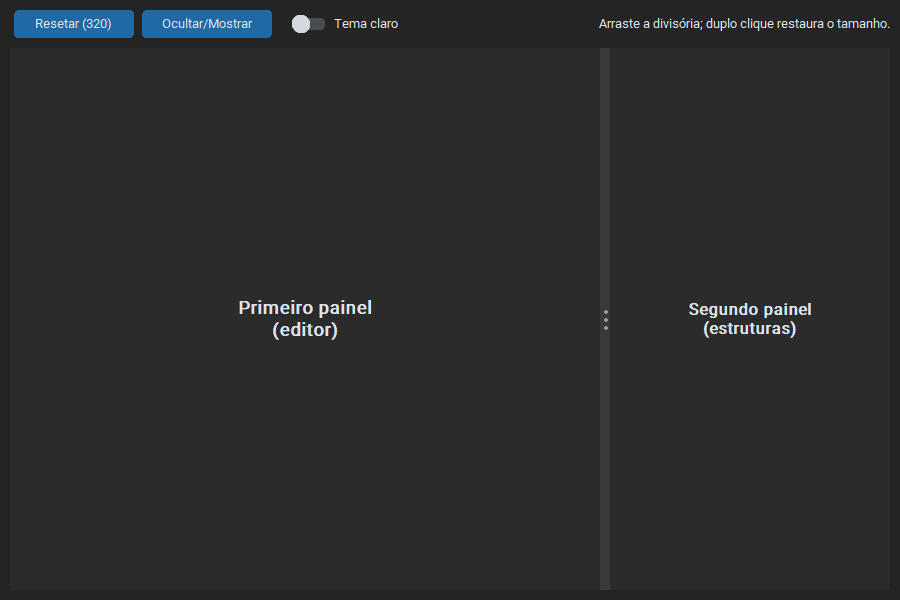
|
|
39
|
+
|
|
40
|
+
```text
|
|
41
|
+
┌──────────────────────┬───────────────┐
|
|
42
|
+
│ │ │
|
|
43
|
+
│ First pane ║ Second pane │
|
|
44
|
+
│ │ │
|
|
45
|
+
└──────────────────────┴───────────────┘
|
|
46
|
+
↑
|
|
47
|
+
drag to resize
|
|
48
|
+
```
|
|
49
|
+
|
|
50
|
+
## Installation
|
|
51
|
+
|
|
52
|
+
```bash
|
|
53
|
+
pip install ctk-split-pane
|
|
54
|
+
```
|
|
55
|
+
|
|
56
|
+
## Usage
|
|
57
|
+
|
|
58
|
+
```python
|
|
59
|
+
import customtkinter as ctk
|
|
60
|
+
from ctk_split_pane import CTkSplitPane
|
|
61
|
+
|
|
62
|
+
ctk.set_appearance_mode("dark")
|
|
63
|
+
|
|
64
|
+
app = ctk.CTk()
|
|
65
|
+
app.geometry("900x600")
|
|
66
|
+
|
|
67
|
+
split = CTkSplitPane(
|
|
68
|
+
app,
|
|
69
|
+
orientation="horizontal", # or "vertical"
|
|
70
|
+
initial=280, # initial size of the second pane
|
|
71
|
+
default=280, # size restored by double-click
|
|
72
|
+
min_first=400, # minimum size of the first pane
|
|
73
|
+
min_second=220, # minimum size of the second pane
|
|
74
|
+
)
|
|
75
|
+
split.pack(fill="both", expand=True, padx=10, pady=10)
|
|
76
|
+
|
|
77
|
+
left = ctk.CTkFrame(split.first)
|
|
78
|
+
left.pack(fill="both", expand=True)
|
|
79
|
+
|
|
80
|
+
right = ctk.CTkFrame(split.second)
|
|
81
|
+
right.pack(fill="both", expand=True)
|
|
82
|
+
|
|
83
|
+
app.mainloop()
|
|
84
|
+
```
|
|
85
|
+
|
|
86
|
+
The content of each pane must be created inside `split.first` / `split.second`
|
|
87
|
+
(or the aliases `split.pane_a` / `split.pane_b`).
|
|
88
|
+
|
|
89
|
+
## Features
|
|
90
|
+
|
|
91
|
+
- Horizontal and vertical orientation.
|
|
92
|
+
- Draggable divider.
|
|
93
|
+
- Three vertical (or horizontal) grip dots as a visual indicator.
|
|
94
|
+
- Resize cursor.
|
|
95
|
+
- Double-click restores the default size.
|
|
96
|
+
- Minimum size for each pane.
|
|
97
|
+
- The second pane is never smaller than `min_second`.
|
|
98
|
+
- The first pane keeps `min_first`; the second is limited to the available space.
|
|
99
|
+
- Hide/show the second pane while preserving its current size.
|
|
100
|
+
- Colors and theme integrated with CustomTkinter; accepts fixed colors or
|
|
101
|
+
`(light, dark)` tuples.
|
|
102
|
+
- `on_resize` and `on_reset` callbacks.
|
|
103
|
+
- Keyboard navigation on the divider: arrow keys and `Home` (when focused).
|
|
104
|
+
- No dependencies other than `customtkinter`.
|
|
105
|
+
|
|
106
|
+
## API
|
|
107
|
+
|
|
108
|
+
### `CTkSplitPane(master, **options)`
|
|
109
|
+
|
|
110
|
+
| Option | Default | Description |
|
|
111
|
+
|---|---|---|
|
|
112
|
+
| `orientation` | `"horizontal"` | `"horizontal"` or `"vertical"`. |
|
|
113
|
+
| `initial` | `default` | Initial size of the second pane. |
|
|
114
|
+
| `default` | `250` | Size restored by `reset()`/double-click. |
|
|
115
|
+
| `min_first` | `120` | Minimum size of the first pane. |
|
|
116
|
+
| `min_second` | `120` | Minimum size of the second pane. |
|
|
117
|
+
| `divider_width` | `10` | Divider thickness. |
|
|
118
|
+
| `grip` | `"dots"` | `"dots"`, `"line"` or `"none"`. |
|
|
119
|
+
| `divider_color` | `("#d9d9d9", "#3a3a3a")` | Divider color (str or `(light, dark)`). |
|
|
120
|
+
| `grip_color` | `("#8a8a8a", "#9a9a9a")` | Grip color. |
|
|
121
|
+
| `hover_color` | `("#c8c8c8", "#4a4a4a")` | Divider color on hover. |
|
|
122
|
+
| `cursor` | automatic | Divider cursor. |
|
|
123
|
+
| `on_resize` | `None` | Called with the new second-pane size. |
|
|
124
|
+
| `on_reset` | `None` | Called after a reset. |
|
|
125
|
+
| `first_pane_kwargs` | `None` | Extra options for the first pane `CTkFrame`. |
|
|
126
|
+
| `second_pane_kwargs` | `None` | Extra options for the second pane `CTkFrame`. |
|
|
127
|
+
|
|
128
|
+
### Methods
|
|
129
|
+
|
|
130
|
+
| Method | Description |
|
|
131
|
+
|---|---|
|
|
132
|
+
| `set_second_size(size)` | Sets the second-pane size (within limits). |
|
|
133
|
+
| `get_second_size()` | Returns the current second-pane size. |
|
|
134
|
+
| `reset()` | Restores the default size. |
|
|
135
|
+
| `hide_second()` | Hides the second pane and divider. |
|
|
136
|
+
| `show_second()` | Shows the second pane at its previous position. |
|
|
137
|
+
| `toggle_second()` | Toggles hidden/visible. |
|
|
138
|
+
| `set_default_size(size)` | Changes the default size. |
|
|
139
|
+
| `set_min_second(size)` | Changes the second-pane minimum. |
|
|
140
|
+
| `set_min_first(size)` | Changes the first-pane minimum. |
|
|
141
|
+
| `is_second_visible` | Boolean property. |
|
|
142
|
+
| `first` / `second` | Internal frames where content should be created. |
|
|
143
|
+
| `pane_a` / `pane_b` | Aliases for `first` / `second`. |
|
|
144
|
+
|
|
145
|
+
## Theming
|
|
146
|
+
|
|
147
|
+
Colors can be strings or `(light, dark)` tuples:
|
|
148
|
+
|
|
149
|
+
```python
|
|
150
|
+
CTkSplitPane(
|
|
151
|
+
app,
|
|
152
|
+
divider_color=("#e5e5e5", "#2b2b2b"),
|
|
153
|
+
grip_color=("#808080", "#a0a0a0"),
|
|
154
|
+
hover_color=("#cccccc", "#444444"),
|
|
155
|
+
)
|
|
156
|
+
```
|
|
157
|
+
|
|
158
|
+
The widget follows `ctk.set_appearance_mode("light"/"dark")` automatically.
|
|
159
|
+
Default colors are neutral; consumers can pass their own palette.
|
|
160
|
+
|
|
161
|
+
## Development
|
|
162
|
+
|
|
163
|
+
```bash
|
|
164
|
+
git clone https://github.com/MikaelGois/ctk-split-pane.git
|
|
165
|
+
cd ctk-split-pane
|
|
166
|
+
python -m venv .venv
|
|
167
|
+
.venv\Scripts\activate # Windows
|
|
168
|
+
# source .venv/bin/activate # Linux/macOS
|
|
169
|
+
pip install customtkinter
|
|
170
|
+
python examples/demo.py
|
|
171
|
+
python -m unittest discover -s tests -v
|
|
172
|
+
```
|
|
173
|
+
|
|
174
|
+
On Linux, the graphical tests need a virtual display:
|
|
175
|
+
|
|
176
|
+
```bash
|
|
177
|
+
xvfb-run -a python -m unittest discover -s tests -v
|
|
178
|
+
```
|
|
179
|
+
|
|
180
|
+
Release process: see [PUBLISHING.md](PUBLISHING.md) (Portuguese).
|
|
181
|
+
|
|
182
|
+
## License
|
|
183
|
+
|
|
184
|
+
MIT. See [LICENSE](LICENSE).
|
|
@@ -0,0 +1,156 @@
|
|
|
1
|
+
# ctk-split-pane
|
|
2
|
+
|
|
3
|
+
A resizable two-pane widget for [CustomTkinter](https://github.com/TomSchimansky/CustomTkinter).
|
|
4
|
+
|
|
5
|
+
It provides a draggable divider with three grip dots, double-click reset,
|
|
6
|
+
minimum pane sizes and Dark/Light appearance support.
|
|
7
|
+
|
|
8
|
+
[Português](https://github.com/MikaelGois/ctk-split-pane/blob/main/README.pt-BR.md) | **English**
|
|
9
|
+
|
|
10
|
+

|
|
11
|
+
|
|
12
|
+
```text
|
|
13
|
+
┌──────────────────────┬───────────────┐
|
|
14
|
+
│ │ │
|
|
15
|
+
│ First pane ║ Second pane │
|
|
16
|
+
│ │ │
|
|
17
|
+
└──────────────────────┴───────────────┘
|
|
18
|
+
↑
|
|
19
|
+
drag to resize
|
|
20
|
+
```
|
|
21
|
+
|
|
22
|
+
## Installation
|
|
23
|
+
|
|
24
|
+
```bash
|
|
25
|
+
pip install ctk-split-pane
|
|
26
|
+
```
|
|
27
|
+
|
|
28
|
+
## Usage
|
|
29
|
+
|
|
30
|
+
```python
|
|
31
|
+
import customtkinter as ctk
|
|
32
|
+
from ctk_split_pane import CTkSplitPane
|
|
33
|
+
|
|
34
|
+
ctk.set_appearance_mode("dark")
|
|
35
|
+
|
|
36
|
+
app = ctk.CTk()
|
|
37
|
+
app.geometry("900x600")
|
|
38
|
+
|
|
39
|
+
split = CTkSplitPane(
|
|
40
|
+
app,
|
|
41
|
+
orientation="horizontal", # or "vertical"
|
|
42
|
+
initial=280, # initial size of the second pane
|
|
43
|
+
default=280, # size restored by double-click
|
|
44
|
+
min_first=400, # minimum size of the first pane
|
|
45
|
+
min_second=220, # minimum size of the second pane
|
|
46
|
+
)
|
|
47
|
+
split.pack(fill="both", expand=True, padx=10, pady=10)
|
|
48
|
+
|
|
49
|
+
left = ctk.CTkFrame(split.first)
|
|
50
|
+
left.pack(fill="both", expand=True)
|
|
51
|
+
|
|
52
|
+
right = ctk.CTkFrame(split.second)
|
|
53
|
+
right.pack(fill="both", expand=True)
|
|
54
|
+
|
|
55
|
+
app.mainloop()
|
|
56
|
+
```
|
|
57
|
+
|
|
58
|
+
The content of each pane must be created inside `split.first` / `split.second`
|
|
59
|
+
(or the aliases `split.pane_a` / `split.pane_b`).
|
|
60
|
+
|
|
61
|
+
## Features
|
|
62
|
+
|
|
63
|
+
- Horizontal and vertical orientation.
|
|
64
|
+
- Draggable divider.
|
|
65
|
+
- Three vertical (or horizontal) grip dots as a visual indicator.
|
|
66
|
+
- Resize cursor.
|
|
67
|
+
- Double-click restores the default size.
|
|
68
|
+
- Minimum size for each pane.
|
|
69
|
+
- The second pane is never smaller than `min_second`.
|
|
70
|
+
- The first pane keeps `min_first`; the second is limited to the available space.
|
|
71
|
+
- Hide/show the second pane while preserving its current size.
|
|
72
|
+
- Colors and theme integrated with CustomTkinter; accepts fixed colors or
|
|
73
|
+
`(light, dark)` tuples.
|
|
74
|
+
- `on_resize` and `on_reset` callbacks.
|
|
75
|
+
- Keyboard navigation on the divider: arrow keys and `Home` (when focused).
|
|
76
|
+
- No dependencies other than `customtkinter`.
|
|
77
|
+
|
|
78
|
+
## API
|
|
79
|
+
|
|
80
|
+
### `CTkSplitPane(master, **options)`
|
|
81
|
+
|
|
82
|
+
| Option | Default | Description |
|
|
83
|
+
|---|---|---|
|
|
84
|
+
| `orientation` | `"horizontal"` | `"horizontal"` or `"vertical"`. |
|
|
85
|
+
| `initial` | `default` | Initial size of the second pane. |
|
|
86
|
+
| `default` | `250` | Size restored by `reset()`/double-click. |
|
|
87
|
+
| `min_first` | `120` | Minimum size of the first pane. |
|
|
88
|
+
| `min_second` | `120` | Minimum size of the second pane. |
|
|
89
|
+
| `divider_width` | `10` | Divider thickness. |
|
|
90
|
+
| `grip` | `"dots"` | `"dots"`, `"line"` or `"none"`. |
|
|
91
|
+
| `divider_color` | `("#d9d9d9", "#3a3a3a")` | Divider color (str or `(light, dark)`). |
|
|
92
|
+
| `grip_color` | `("#8a8a8a", "#9a9a9a")` | Grip color. |
|
|
93
|
+
| `hover_color` | `("#c8c8c8", "#4a4a4a")` | Divider color on hover. |
|
|
94
|
+
| `cursor` | automatic | Divider cursor. |
|
|
95
|
+
| `on_resize` | `None` | Called with the new second-pane size. |
|
|
96
|
+
| `on_reset` | `None` | Called after a reset. |
|
|
97
|
+
| `first_pane_kwargs` | `None` | Extra options for the first pane `CTkFrame`. |
|
|
98
|
+
| `second_pane_kwargs` | `None` | Extra options for the second pane `CTkFrame`. |
|
|
99
|
+
|
|
100
|
+
### Methods
|
|
101
|
+
|
|
102
|
+
| Method | Description |
|
|
103
|
+
|---|---|
|
|
104
|
+
| `set_second_size(size)` | Sets the second-pane size (within limits). |
|
|
105
|
+
| `get_second_size()` | Returns the current second-pane size. |
|
|
106
|
+
| `reset()` | Restores the default size. |
|
|
107
|
+
| `hide_second()` | Hides the second pane and divider. |
|
|
108
|
+
| `show_second()` | Shows the second pane at its previous position. |
|
|
109
|
+
| `toggle_second()` | Toggles hidden/visible. |
|
|
110
|
+
| `set_default_size(size)` | Changes the default size. |
|
|
111
|
+
| `set_min_second(size)` | Changes the second-pane minimum. |
|
|
112
|
+
| `set_min_first(size)` | Changes the first-pane minimum. |
|
|
113
|
+
| `is_second_visible` | Boolean property. |
|
|
114
|
+
| `first` / `second` | Internal frames where content should be created. |
|
|
115
|
+
| `pane_a` / `pane_b` | Aliases for `first` / `second`. |
|
|
116
|
+
|
|
117
|
+
## Theming
|
|
118
|
+
|
|
119
|
+
Colors can be strings or `(light, dark)` tuples:
|
|
120
|
+
|
|
121
|
+
```python
|
|
122
|
+
CTkSplitPane(
|
|
123
|
+
app,
|
|
124
|
+
divider_color=("#e5e5e5", "#2b2b2b"),
|
|
125
|
+
grip_color=("#808080", "#a0a0a0"),
|
|
126
|
+
hover_color=("#cccccc", "#444444"),
|
|
127
|
+
)
|
|
128
|
+
```
|
|
129
|
+
|
|
130
|
+
The widget follows `ctk.set_appearance_mode("light"/"dark")` automatically.
|
|
131
|
+
Default colors are neutral; consumers can pass their own palette.
|
|
132
|
+
|
|
133
|
+
## Development
|
|
134
|
+
|
|
135
|
+
```bash
|
|
136
|
+
git clone https://github.com/MikaelGois/ctk-split-pane.git
|
|
137
|
+
cd ctk-split-pane
|
|
138
|
+
python -m venv .venv
|
|
139
|
+
.venv\Scripts\activate # Windows
|
|
140
|
+
# source .venv/bin/activate # Linux/macOS
|
|
141
|
+
pip install customtkinter
|
|
142
|
+
python examples/demo.py
|
|
143
|
+
python -m unittest discover -s tests -v
|
|
144
|
+
```
|
|
145
|
+
|
|
146
|
+
On Linux, the graphical tests need a virtual display:
|
|
147
|
+
|
|
148
|
+
```bash
|
|
149
|
+
xvfb-run -a python -m unittest discover -s tests -v
|
|
150
|
+
```
|
|
151
|
+
|
|
152
|
+
Release process: see [PUBLISHING.md](PUBLISHING.md) (Portuguese).
|
|
153
|
+
|
|
154
|
+
## License
|
|
155
|
+
|
|
156
|
+
MIT. See [LICENSE](LICENSE).
|
|
File without changes
|
|
@@ -0,0 +1,437 @@
|
|
|
1
|
+
"""A resizable split-pane widget for CustomTkinter.
|
|
2
|
+
|
|
3
|
+
The widget manages two panes and a draggable divider with three grip dots,
|
|
4
|
+
double-click reset, minimum sizes and dark/light appearance support.
|
|
5
|
+
"""
|
|
6
|
+
|
|
7
|
+
from __future__ import annotations
|
|
8
|
+
|
|
9
|
+
import tkinter as tk
|
|
10
|
+
from typing import Callable, Literal, Union
|
|
11
|
+
|
|
12
|
+
import customtkinter as ctk
|
|
13
|
+
|
|
14
|
+
Color = Union[str, tuple[str, str]]
|
|
15
|
+
Orientation = Literal["horizontal", "vertical"]
|
|
16
|
+
Grip = Literal["dots", "line", "none"]
|
|
17
|
+
|
|
18
|
+
|
|
19
|
+
class CTkSplitPane(ctk.CTkFrame):
|
|
20
|
+
"""Two resizable panes separated by a draggable divider.
|
|
21
|
+
|
|
22
|
+
The content of each pane must be created inside ``split.first`` or
|
|
23
|
+
``split.second``::
|
|
24
|
+
|
|
25
|
+
split = CTkSplitPane(parent, initial=280, min_second=280)
|
|
26
|
+
split.pack(fill="both", expand=True)
|
|
27
|
+
|
|
28
|
+
left = ctk.CTkFrame(split.first)
|
|
29
|
+
left.pack(fill="both", expand=True)
|
|
30
|
+
right = ctk.CTkFrame(split.second)
|
|
31
|
+
right.pack(fill="both", expand=True)
|
|
32
|
+
|
|
33
|
+
Args:
|
|
34
|
+
master: Parent widget.
|
|
35
|
+
orientation: ``"horizontal"`` (panes side by side) or ``"vertical"``.
|
|
36
|
+
initial: Initial size of the second pane. Defaults to ``default``.
|
|
37
|
+
default: Size restored by double-click/reset.
|
|
38
|
+
min_first: Minimum size of the first pane.
|
|
39
|
+
min_second: Minimum size of the second pane. The divider never goes
|
|
40
|
+
below this value.
|
|
41
|
+
divider_width: Thickness of the divider in pixels.
|
|
42
|
+
grip: ``"dots"``, ``"line"`` or ``"none"``.
|
|
43
|
+
divider_color: Divider color or ``(light, dark)`` tuple.
|
|
44
|
+
grip_color: Grip color or ``(light, dark)`` tuple.
|
|
45
|
+
hover_color: Divider color while the mouse is over it.
|
|
46
|
+
cursor: Divider cursor; defaults to the appropriate resize cursor.
|
|
47
|
+
on_resize: Called with the new second-pane size after a resize.
|
|
48
|
+
on_reset: Called after a reset.
|
|
49
|
+
first_pane_kwargs: Extra options for the first internal CTkFrame.
|
|
50
|
+
second_pane_kwargs: Extra options for the second internal CTkFrame.
|
|
51
|
+
**kwargs: Passed to ``customtkinter.CTkFrame``.
|
|
52
|
+
"""
|
|
53
|
+
|
|
54
|
+
def __init__(
|
|
55
|
+
self,
|
|
56
|
+
master,
|
|
57
|
+
*,
|
|
58
|
+
orientation: Orientation = "horizontal",
|
|
59
|
+
initial: int | None = None,
|
|
60
|
+
default: int | None = None,
|
|
61
|
+
min_first: int = 120,
|
|
62
|
+
min_second: int = 120,
|
|
63
|
+
divider_width: int = 10,
|
|
64
|
+
grip: Grip = "dots",
|
|
65
|
+
divider_color: Color = ("#d9d9d9", "#3a3a3a"),
|
|
66
|
+
grip_color: Color = ("#8a8a8a", "#9a9a9a"),
|
|
67
|
+
hover_color: Color = ("#c8c8c8", "#4a4a4a"),
|
|
68
|
+
cursor: str | None = None,
|
|
69
|
+
on_resize: Callable[[int], None] | None = None,
|
|
70
|
+
on_reset: Callable[[], None] | None = None,
|
|
71
|
+
first_pane_kwargs: dict | None = None,
|
|
72
|
+
second_pane_kwargs: dict | None = None,
|
|
73
|
+
**kwargs,
|
|
74
|
+
) -> None:
|
|
75
|
+
self._orientation: Orientation = (
|
|
76
|
+
"vertical" if orientation == "vertical" else "horizontal"
|
|
77
|
+
)
|
|
78
|
+
self._divider_width = max(4, int(divider_width))
|
|
79
|
+
self._min_first = max(0, int(min_first))
|
|
80
|
+
self._min_second = max(0, int(min_second))
|
|
81
|
+
self._grip: Grip = grip if grip in ("dots", "line", "none") else "dots"
|
|
82
|
+
|
|
83
|
+
default_size = int(default if default is not None else (initial if initial is not None else 250))
|
|
84
|
+
self._default = max(self._min_second, default_size)
|
|
85
|
+
initial_size = int(initial) if initial is not None else self._default
|
|
86
|
+
self._size_second = max(self._min_second, initial_size)
|
|
87
|
+
|
|
88
|
+
self._divider_color = divider_color
|
|
89
|
+
self._grip_color = grip_color
|
|
90
|
+
self._hover_color = hover_color
|
|
91
|
+
self._cursor = cursor or (
|
|
92
|
+
"sb_h_double_arrow"
|
|
93
|
+
if self._orientation == "horizontal"
|
|
94
|
+
else "sb_v_double_arrow"
|
|
95
|
+
)
|
|
96
|
+
|
|
97
|
+
self._on_resize = on_resize
|
|
98
|
+
self._on_reset = on_reset
|
|
99
|
+
self._second_visible = True
|
|
100
|
+
self._hover = False
|
|
101
|
+
self._drag_start: int | None = None
|
|
102
|
+
self._drag_size: int | None = None
|
|
103
|
+
self._atualizando = False
|
|
104
|
+
|
|
105
|
+
super().__init__(master, **kwargs)
|
|
106
|
+
|
|
107
|
+
first_kwargs = {"corner_radius": 0, "fg_color": "transparent"}
|
|
108
|
+
if first_pane_kwargs:
|
|
109
|
+
first_kwargs.update(first_pane_kwargs)
|
|
110
|
+
second_kwargs = {"corner_radius": 0, "fg_color": "transparent"}
|
|
111
|
+
if second_pane_kwargs:
|
|
112
|
+
second_kwargs.update(second_pane_kwargs)
|
|
113
|
+
|
|
114
|
+
self.first = ctk.CTkFrame(self, **first_kwargs)
|
|
115
|
+
self.second = ctk.CTkFrame(self, **second_kwargs)
|
|
116
|
+
|
|
117
|
+
# The internal panes must not grow according to their content;
|
|
118
|
+
# the pane size is controlled by the split grid.
|
|
119
|
+
for pane in (self.first, self.second):
|
|
120
|
+
pane.grid_propagate(False)
|
|
121
|
+
pane.configure(width=1, height=1)
|
|
122
|
+
|
|
123
|
+
self._divider = tk.Canvas(
|
|
124
|
+
self,
|
|
125
|
+
width=self._divider_width if self._is_horizontal else 1,
|
|
126
|
+
height=1 if self._is_horizontal else self._divider_width,
|
|
127
|
+
bg=self._apply_appearance_mode(self._divider_color),
|
|
128
|
+
highlightthickness=0,
|
|
129
|
+
bd=0,
|
|
130
|
+
relief="flat",
|
|
131
|
+
cursor=self._cursor,
|
|
132
|
+
takefocus=True,
|
|
133
|
+
)
|
|
134
|
+
|
|
135
|
+
self._montar_grid()
|
|
136
|
+
self._configurar_eventos()
|
|
137
|
+
self._aplicar_tamanho()
|
|
138
|
+
self._desenhar()
|
|
139
|
+
|
|
140
|
+
# ------------------------------------------------------------------
|
|
141
|
+
# Propriedades
|
|
142
|
+
# ------------------------------------------------------------------
|
|
143
|
+
@property
|
|
144
|
+
def _is_horizontal(self) -> bool:
|
|
145
|
+
return self._orientation == "horizontal"
|
|
146
|
+
|
|
147
|
+
@property
|
|
148
|
+
def pane_a(self):
|
|
149
|
+
"""Alias for the first internal pane."""
|
|
150
|
+
return self.first
|
|
151
|
+
|
|
152
|
+
@property
|
|
153
|
+
def pane_b(self):
|
|
154
|
+
"""Alias for the second internal pane."""
|
|
155
|
+
return self.second
|
|
156
|
+
|
|
157
|
+
@property
|
|
158
|
+
def is_second_visible(self) -> bool:
|
|
159
|
+
return self._second_visible
|
|
160
|
+
|
|
161
|
+
def get_second_size(self) -> int:
|
|
162
|
+
return self._size_second
|
|
163
|
+
|
|
164
|
+
def get_default_size(self) -> int:
|
|
165
|
+
return self._default
|
|
166
|
+
|
|
167
|
+
# ------------------------------------------------------------------
|
|
168
|
+
# Grid
|
|
169
|
+
# ------------------------------------------------------------------
|
|
170
|
+
def _montar_grid(self) -> None:
|
|
171
|
+
if self._is_horizontal:
|
|
172
|
+
self.grid_rowconfigure(0, weight=1)
|
|
173
|
+
self.grid_columnconfigure(0, weight=1)
|
|
174
|
+
self.grid_columnconfigure(
|
|
175
|
+
1, weight=0, minsize=self._divider_width
|
|
176
|
+
)
|
|
177
|
+
self.grid_columnconfigure(
|
|
178
|
+
2, weight=0, minsize=self._size_second
|
|
179
|
+
)
|
|
180
|
+
self.first.grid(row=0, column=0, sticky="nsew")
|
|
181
|
+
self._divider.grid(row=0, column=1, sticky="ns")
|
|
182
|
+
self.second.grid(row=0, column=2, sticky="nsew")
|
|
183
|
+
else:
|
|
184
|
+
self.grid_rowconfigure(0, weight=1)
|
|
185
|
+
self.grid_rowconfigure(
|
|
186
|
+
1, weight=0, minsize=self._divider_width
|
|
187
|
+
)
|
|
188
|
+
self.grid_rowconfigure(
|
|
189
|
+
2, weight=0, minsize=self._size_second
|
|
190
|
+
)
|
|
191
|
+
self.grid_columnconfigure(0, weight=1)
|
|
192
|
+
self.first.grid(row=0, column=0, sticky="nsew")
|
|
193
|
+
self._divider.grid(row=1, column=0, sticky="ew")
|
|
194
|
+
self.second.grid(row=2, column=0, sticky="nsew")
|
|
195
|
+
|
|
196
|
+
def _configurar_eventos(self) -> None:
|
|
197
|
+
self.bind("<Configure>", self._ao_redimensionar, add="+")
|
|
198
|
+
self._divider.bind("<Configure>", self._ao_configurar_divisor, add="+")
|
|
199
|
+
self._divider.bind("<ButtonPress-1>", self._iniciar_arraste)
|
|
200
|
+
self._divider.bind("<B1-Motion>", self._arrastar)
|
|
201
|
+
self._divider.bind("<ButtonRelease-1>", self._finalizar_arraste)
|
|
202
|
+
self._divider.bind("<Double-Button-1>", self._resetar_evento)
|
|
203
|
+
self._divider.bind("<Enter>", self._entrar)
|
|
204
|
+
self._divider.bind("<Leave>", self._sair)
|
|
205
|
+
self._divider.bind("<Left>", lambda _e: self._tecla(1))
|
|
206
|
+
self._divider.bind("<Right>", lambda _e: self._tecla(-1))
|
|
207
|
+
self._divider.bind("<Up>", lambda _e: self._tecla(1))
|
|
208
|
+
self._divider.bind("<Down>", lambda _e: self._tecla(-1))
|
|
209
|
+
self._divider.bind("<Home>", lambda _e: self.reset())
|
|
210
|
+
|
|
211
|
+
def _aplicar_tamanho(self) -> None:
|
|
212
|
+
self._atualizando = True
|
|
213
|
+
try:
|
|
214
|
+
if not self._second_visible:
|
|
215
|
+
if self._is_horizontal:
|
|
216
|
+
self.grid_columnconfigure(1, minsize=0)
|
|
217
|
+
self.grid_columnconfigure(2, minsize=0)
|
|
218
|
+
else:
|
|
219
|
+
self.grid_rowconfigure(1, minsize=0)
|
|
220
|
+
self.grid_rowconfigure(2, minsize=0)
|
|
221
|
+
return
|
|
222
|
+
|
|
223
|
+
if self._is_horizontal:
|
|
224
|
+
self.grid_columnconfigure(2, minsize=self._size_second)
|
|
225
|
+
else:
|
|
226
|
+
self.grid_rowconfigure(2, minsize=self._size_second)
|
|
227
|
+
finally:
|
|
228
|
+
self._atualizando = False
|
|
229
|
+
|
|
230
|
+
def _max_second(self) -> int:
|
|
231
|
+
total = self.winfo_width() if self._is_horizontal else self.winfo_height()
|
|
232
|
+
if total <= 1:
|
|
233
|
+
return max(self._min_second, self._default)
|
|
234
|
+
return max(
|
|
235
|
+
self._min_second,
|
|
236
|
+
total - self._divider_width - self._min_first,
|
|
237
|
+
)
|
|
238
|
+
|
|
239
|
+
def _set_size(self, size: int, notificar: bool = True) -> None:
|
|
240
|
+
novo = max(self._min_second, min(int(size), self._max_second()))
|
|
241
|
+
alterou = novo != self._size_second
|
|
242
|
+
self._size_second = novo
|
|
243
|
+
self._aplicar_tamanho()
|
|
244
|
+
if alterou and notificar and self._on_resize is not None:
|
|
245
|
+
self._on_resize(novo)
|
|
246
|
+
|
|
247
|
+
# ------------------------------------------------------------------
|
|
248
|
+
# API pública
|
|
249
|
+
# ------------------------------------------------------------------
|
|
250
|
+
def set_second_size(self, size: int) -> None:
|
|
251
|
+
self._set_size(size)
|
|
252
|
+
|
|
253
|
+
def reset(self) -> None:
|
|
254
|
+
self._set_size(self._default)
|
|
255
|
+
if self._on_reset is not None:
|
|
256
|
+
self._on_reset()
|
|
257
|
+
return "break"
|
|
258
|
+
|
|
259
|
+
def set_default_size(self, size: int) -> None:
|
|
260
|
+
self._default = max(self._min_second, int(size))
|
|
261
|
+
|
|
262
|
+
def set_min_second(self, size: int) -> None:
|
|
263
|
+
self._min_second = max(0, int(size))
|
|
264
|
+
if self._default < self._min_second:
|
|
265
|
+
self._default = self._min_second
|
|
266
|
+
self._set_size(max(self._size_second, self._min_second))
|
|
267
|
+
|
|
268
|
+
def set_min_first(self, size: int) -> None:
|
|
269
|
+
self._min_first = max(0, int(size))
|
|
270
|
+
self._set_size(self._size_second)
|
|
271
|
+
|
|
272
|
+
def hide_second(self) -> None:
|
|
273
|
+
if not self._second_visible:
|
|
274
|
+
return
|
|
275
|
+
self._second_visible = False
|
|
276
|
+
self.second.grid_remove()
|
|
277
|
+
self._divider.grid_remove()
|
|
278
|
+
self._atualizando = True
|
|
279
|
+
try:
|
|
280
|
+
if self._is_horizontal:
|
|
281
|
+
self.grid_columnconfigure(1, minsize=0)
|
|
282
|
+
self.grid_columnconfigure(2, minsize=0)
|
|
283
|
+
else:
|
|
284
|
+
self.grid_rowconfigure(1, minsize=0)
|
|
285
|
+
self.grid_rowconfigure(2, minsize=0)
|
|
286
|
+
finally:
|
|
287
|
+
self._atualizando = False
|
|
288
|
+
|
|
289
|
+
def show_second(self) -> None:
|
|
290
|
+
if self._second_visible:
|
|
291
|
+
return
|
|
292
|
+
self._second_visible = True
|
|
293
|
+
self._atualizando = True
|
|
294
|
+
try:
|
|
295
|
+
if self._is_horizontal:
|
|
296
|
+
self.grid_columnconfigure(1, minsize=self._divider_width)
|
|
297
|
+
self.grid_columnconfigure(2, minsize=self._size_second)
|
|
298
|
+
self._divider.grid(row=0, column=1, sticky="ns")
|
|
299
|
+
self.second.grid(row=0, column=2, sticky="nsew")
|
|
300
|
+
else:
|
|
301
|
+
self.grid_rowconfigure(1, minsize=self._divider_width)
|
|
302
|
+
self.grid_rowconfigure(2, minsize=self._size_second)
|
|
303
|
+
self._divider.grid(row=1, column=0, sticky="ew")
|
|
304
|
+
self.second.grid(row=2, column=0, sticky="nsew")
|
|
305
|
+
finally:
|
|
306
|
+
self._atualizando = False
|
|
307
|
+
self._desenhar()
|
|
308
|
+
|
|
309
|
+
def toggle_second(self) -> None:
|
|
310
|
+
if self._second_visible:
|
|
311
|
+
self.hide_second()
|
|
312
|
+
else:
|
|
313
|
+
self.show_second()
|
|
314
|
+
|
|
315
|
+
# ------------------------------------------------------------------
|
|
316
|
+
# Eventos
|
|
317
|
+
# ------------------------------------------------------------------
|
|
318
|
+
def _ao_redimensionar(self, event=None) -> None:
|
|
319
|
+
if self._atualizando or not self._second_visible:
|
|
320
|
+
return
|
|
321
|
+
maximo = self._max_second()
|
|
322
|
+
if self._size_second > maximo:
|
|
323
|
+
self._size_second = maximo
|
|
324
|
+
self._aplicar_tamanho()
|
|
325
|
+
|
|
326
|
+
def _ao_configurar_divisor(self, event=None) -> None:
|
|
327
|
+
self._desenhar()
|
|
328
|
+
|
|
329
|
+
def _iniciar_arraste(self, event) -> str:
|
|
330
|
+
self._divider.focus_set()
|
|
331
|
+
self._drag_start = (
|
|
332
|
+
event.x_root if self._is_horizontal else event.y_root
|
|
333
|
+
)
|
|
334
|
+
self._drag_size = self._size_second
|
|
335
|
+
return "break"
|
|
336
|
+
|
|
337
|
+
def _arrastar(self, event) -> str:
|
|
338
|
+
if self._drag_start is None or self._drag_size is None:
|
|
339
|
+
return "break"
|
|
340
|
+
posicao = event.x_root if self._is_horizontal else event.y_root
|
|
341
|
+
delta = posicao - self._drag_start
|
|
342
|
+
self._set_size(self._drag_size - delta)
|
|
343
|
+
return "break"
|
|
344
|
+
|
|
345
|
+
def _finalizar_arraste(self, event=None) -> str:
|
|
346
|
+
self._drag_start = None
|
|
347
|
+
self._drag_size = None
|
|
348
|
+
return "break"
|
|
349
|
+
|
|
350
|
+
def _resetar_evento(self, event=None) -> str:
|
|
351
|
+
self.reset()
|
|
352
|
+
return "break"
|
|
353
|
+
|
|
354
|
+
def _tecla(self, direcao: int) -> str:
|
|
355
|
+
passo = 10 if self._is_horizontal else 10
|
|
356
|
+
self._set_size(self._size_second + direcao * passo)
|
|
357
|
+
return "break"
|
|
358
|
+
|
|
359
|
+
def _entrar(self, event=None) -> None:
|
|
360
|
+
self._hover = True
|
|
361
|
+
self._atualizar_cor_divisor()
|
|
362
|
+
|
|
363
|
+
def _sair(self, event=None) -> None:
|
|
364
|
+
self._hover = False
|
|
365
|
+
self._atualizar_cor_divisor()
|
|
366
|
+
|
|
367
|
+
# ------------------------------------------------------------------
|
|
368
|
+
# Aparência
|
|
369
|
+
# ------------------------------------------------------------------
|
|
370
|
+
def _set_appearance_mode(self, mode_string: str) -> None:
|
|
371
|
+
super()._set_appearance_mode(mode_string)
|
|
372
|
+
if hasattr(self, "_divider"):
|
|
373
|
+
self._atualizar_cor_divisor()
|
|
374
|
+
self._desenhar()
|
|
375
|
+
|
|
376
|
+
def _atualizar_cor_divisor(self) -> None:
|
|
377
|
+
if not hasattr(self, "_divider"):
|
|
378
|
+
return
|
|
379
|
+
cor = (
|
|
380
|
+
self._hover_color
|
|
381
|
+
if self._hover and self._hover_color is not None
|
|
382
|
+
else self._divider_color
|
|
383
|
+
)
|
|
384
|
+
try:
|
|
385
|
+
self._divider.configure(
|
|
386
|
+
bg=self._apply_appearance_mode(cor)
|
|
387
|
+
)
|
|
388
|
+
except Exception:
|
|
389
|
+
pass
|
|
390
|
+
|
|
391
|
+
def _desenhar(self) -> None:
|
|
392
|
+
if not hasattr(self, "_divider"):
|
|
393
|
+
return
|
|
394
|
+
self._divider.delete("all")
|
|
395
|
+
if self._grip == "none":
|
|
396
|
+
return
|
|
397
|
+
|
|
398
|
+
largura = self._divider.winfo_width()
|
|
399
|
+
altura = self._divider.winfo_height()
|
|
400
|
+
if largura <= 1 or altura <= 1:
|
|
401
|
+
return
|
|
402
|
+
|
|
403
|
+
cor = self._apply_appearance_mode(self._grip_color)
|
|
404
|
+
if self._is_horizontal:
|
|
405
|
+
x = largura / 2
|
|
406
|
+
y = altura / 2
|
|
407
|
+
if self._grip == "line":
|
|
408
|
+
self._divider.create_line(
|
|
409
|
+
x, y - 12, x, y + 12, fill=cor, width=2
|
|
410
|
+
)
|
|
411
|
+
else:
|
|
412
|
+
for dy in (-8, 0, 8):
|
|
413
|
+
self._divider.create_oval(
|
|
414
|
+
x - 1.5,
|
|
415
|
+
y + dy - 1.5,
|
|
416
|
+
x + 1.5,
|
|
417
|
+
y + dy + 1.5,
|
|
418
|
+
fill=cor,
|
|
419
|
+
outline="",
|
|
420
|
+
)
|
|
421
|
+
else:
|
|
422
|
+
x = largura / 2
|
|
423
|
+
y = altura / 2
|
|
424
|
+
if self._grip == "line":
|
|
425
|
+
self._divider.create_line(
|
|
426
|
+
x - 12, y, x + 12, y, fill=cor, width=2
|
|
427
|
+
)
|
|
428
|
+
else:
|
|
429
|
+
for dx in (-8, 0, 8):
|
|
430
|
+
self._divider.create_oval(
|
|
431
|
+
x + dx - 1.5,
|
|
432
|
+
y - 1.5,
|
|
433
|
+
x + dx + 1.5,
|
|
434
|
+
y + 1.5,
|
|
435
|
+
fill=cor,
|
|
436
|
+
outline="",
|
|
437
|
+
)
|
|
@@ -0,0 +1,184 @@
|
|
|
1
|
+
Metadata-Version: 2.4
|
|
2
|
+
Name: ctk-split-pane
|
|
3
|
+
Version: 0.1.0
|
|
4
|
+
Summary: A resizable split-pane widget for CustomTkinter.
|
|
5
|
+
Author: Mikael Gois
|
|
6
|
+
License-Expression: MIT
|
|
7
|
+
Project-URL: Homepage, https://github.com/MikaelGois/ctk-split-pane
|
|
8
|
+
Project-URL: Repository, https://github.com/MikaelGois/ctk-split-pane
|
|
9
|
+
Project-URL: Issues, https://github.com/MikaelGois/ctk-split-pane/issues
|
|
10
|
+
Keywords: customtkinter,tkinter,widget,split-pane,splitter
|
|
11
|
+
Classifier: Development Status :: 3 - Alpha
|
|
12
|
+
Classifier: Environment :: X11 Applications
|
|
13
|
+
Classifier: Intended Audience :: Developers
|
|
14
|
+
Classifier: Operating System :: OS Independent
|
|
15
|
+
Classifier: Programming Language :: Python :: 3
|
|
16
|
+
Classifier: Programming Language :: Python :: 3.9
|
|
17
|
+
Classifier: Programming Language :: Python :: 3.10
|
|
18
|
+
Classifier: Programming Language :: Python :: 3.11
|
|
19
|
+
Classifier: Programming Language :: Python :: 3.12
|
|
20
|
+
Classifier: Programming Language :: Python :: 3.13
|
|
21
|
+
Classifier: Topic :: Software Development :: User Interfaces
|
|
22
|
+
Classifier: Topic :: Software Development :: Widget Sets
|
|
23
|
+
Requires-Python: >=3.9
|
|
24
|
+
Description-Content-Type: text/markdown
|
|
25
|
+
License-File: LICENSE
|
|
26
|
+
Requires-Dist: customtkinter>=5.2.0
|
|
27
|
+
Dynamic: license-file
|
|
28
|
+
|
|
29
|
+
# ctk-split-pane
|
|
30
|
+
|
|
31
|
+
A resizable two-pane widget for [CustomTkinter](https://github.com/TomSchimansky/CustomTkinter).
|
|
32
|
+
|
|
33
|
+
It provides a draggable divider with three grip dots, double-click reset,
|
|
34
|
+
minimum pane sizes and Dark/Light appearance support.
|
|
35
|
+
|
|
36
|
+
[Português](https://github.com/MikaelGois/ctk-split-pane/blob/main/README.pt-BR.md) | **English**
|
|
37
|
+
|
|
38
|
+

|
|
39
|
+
|
|
40
|
+
```text
|
|
41
|
+
┌──────────────────────┬───────────────┐
|
|
42
|
+
│ │ │
|
|
43
|
+
│ First pane ║ Second pane │
|
|
44
|
+
│ │ │
|
|
45
|
+
└──────────────────────┴───────────────┘
|
|
46
|
+
↑
|
|
47
|
+
drag to resize
|
|
48
|
+
```
|
|
49
|
+
|
|
50
|
+
## Installation
|
|
51
|
+
|
|
52
|
+
```bash
|
|
53
|
+
pip install ctk-split-pane
|
|
54
|
+
```
|
|
55
|
+
|
|
56
|
+
## Usage
|
|
57
|
+
|
|
58
|
+
```python
|
|
59
|
+
import customtkinter as ctk
|
|
60
|
+
from ctk_split_pane import CTkSplitPane
|
|
61
|
+
|
|
62
|
+
ctk.set_appearance_mode("dark")
|
|
63
|
+
|
|
64
|
+
app = ctk.CTk()
|
|
65
|
+
app.geometry("900x600")
|
|
66
|
+
|
|
67
|
+
split = CTkSplitPane(
|
|
68
|
+
app,
|
|
69
|
+
orientation="horizontal", # or "vertical"
|
|
70
|
+
initial=280, # initial size of the second pane
|
|
71
|
+
default=280, # size restored by double-click
|
|
72
|
+
min_first=400, # minimum size of the first pane
|
|
73
|
+
min_second=220, # minimum size of the second pane
|
|
74
|
+
)
|
|
75
|
+
split.pack(fill="both", expand=True, padx=10, pady=10)
|
|
76
|
+
|
|
77
|
+
left = ctk.CTkFrame(split.first)
|
|
78
|
+
left.pack(fill="both", expand=True)
|
|
79
|
+
|
|
80
|
+
right = ctk.CTkFrame(split.second)
|
|
81
|
+
right.pack(fill="both", expand=True)
|
|
82
|
+
|
|
83
|
+
app.mainloop()
|
|
84
|
+
```
|
|
85
|
+
|
|
86
|
+
The content of each pane must be created inside `split.first` / `split.second`
|
|
87
|
+
(or the aliases `split.pane_a` / `split.pane_b`).
|
|
88
|
+
|
|
89
|
+
## Features
|
|
90
|
+
|
|
91
|
+
- Horizontal and vertical orientation.
|
|
92
|
+
- Draggable divider.
|
|
93
|
+
- Three vertical (or horizontal) grip dots as a visual indicator.
|
|
94
|
+
- Resize cursor.
|
|
95
|
+
- Double-click restores the default size.
|
|
96
|
+
- Minimum size for each pane.
|
|
97
|
+
- The second pane is never smaller than `min_second`.
|
|
98
|
+
- The first pane keeps `min_first`; the second is limited to the available space.
|
|
99
|
+
- Hide/show the second pane while preserving its current size.
|
|
100
|
+
- Colors and theme integrated with CustomTkinter; accepts fixed colors or
|
|
101
|
+
`(light, dark)` tuples.
|
|
102
|
+
- `on_resize` and `on_reset` callbacks.
|
|
103
|
+
- Keyboard navigation on the divider: arrow keys and `Home` (when focused).
|
|
104
|
+
- No dependencies other than `customtkinter`.
|
|
105
|
+
|
|
106
|
+
## API
|
|
107
|
+
|
|
108
|
+
### `CTkSplitPane(master, **options)`
|
|
109
|
+
|
|
110
|
+
| Option | Default | Description |
|
|
111
|
+
|---|---|---|
|
|
112
|
+
| `orientation` | `"horizontal"` | `"horizontal"` or `"vertical"`. |
|
|
113
|
+
| `initial` | `default` | Initial size of the second pane. |
|
|
114
|
+
| `default` | `250` | Size restored by `reset()`/double-click. |
|
|
115
|
+
| `min_first` | `120` | Minimum size of the first pane. |
|
|
116
|
+
| `min_second` | `120` | Minimum size of the second pane. |
|
|
117
|
+
| `divider_width` | `10` | Divider thickness. |
|
|
118
|
+
| `grip` | `"dots"` | `"dots"`, `"line"` or `"none"`. |
|
|
119
|
+
| `divider_color` | `("#d9d9d9", "#3a3a3a")` | Divider color (str or `(light, dark)`). |
|
|
120
|
+
| `grip_color` | `("#8a8a8a", "#9a9a9a")` | Grip color. |
|
|
121
|
+
| `hover_color` | `("#c8c8c8", "#4a4a4a")` | Divider color on hover. |
|
|
122
|
+
| `cursor` | automatic | Divider cursor. |
|
|
123
|
+
| `on_resize` | `None` | Called with the new second-pane size. |
|
|
124
|
+
| `on_reset` | `None` | Called after a reset. |
|
|
125
|
+
| `first_pane_kwargs` | `None` | Extra options for the first pane `CTkFrame`. |
|
|
126
|
+
| `second_pane_kwargs` | `None` | Extra options for the second pane `CTkFrame`. |
|
|
127
|
+
|
|
128
|
+
### Methods
|
|
129
|
+
|
|
130
|
+
| Method | Description |
|
|
131
|
+
|---|---|
|
|
132
|
+
| `set_second_size(size)` | Sets the second-pane size (within limits). |
|
|
133
|
+
| `get_second_size()` | Returns the current second-pane size. |
|
|
134
|
+
| `reset()` | Restores the default size. |
|
|
135
|
+
| `hide_second()` | Hides the second pane and divider. |
|
|
136
|
+
| `show_second()` | Shows the second pane at its previous position. |
|
|
137
|
+
| `toggle_second()` | Toggles hidden/visible. |
|
|
138
|
+
| `set_default_size(size)` | Changes the default size. |
|
|
139
|
+
| `set_min_second(size)` | Changes the second-pane minimum. |
|
|
140
|
+
| `set_min_first(size)` | Changes the first-pane minimum. |
|
|
141
|
+
| `is_second_visible` | Boolean property. |
|
|
142
|
+
| `first` / `second` | Internal frames where content should be created. |
|
|
143
|
+
| `pane_a` / `pane_b` | Aliases for `first` / `second`. |
|
|
144
|
+
|
|
145
|
+
## Theming
|
|
146
|
+
|
|
147
|
+
Colors can be strings or `(light, dark)` tuples:
|
|
148
|
+
|
|
149
|
+
```python
|
|
150
|
+
CTkSplitPane(
|
|
151
|
+
app,
|
|
152
|
+
divider_color=("#e5e5e5", "#2b2b2b"),
|
|
153
|
+
grip_color=("#808080", "#a0a0a0"),
|
|
154
|
+
hover_color=("#cccccc", "#444444"),
|
|
155
|
+
)
|
|
156
|
+
```
|
|
157
|
+
|
|
158
|
+
The widget follows `ctk.set_appearance_mode("light"/"dark")` automatically.
|
|
159
|
+
Default colors are neutral; consumers can pass their own palette.
|
|
160
|
+
|
|
161
|
+
## Development
|
|
162
|
+
|
|
163
|
+
```bash
|
|
164
|
+
git clone https://github.com/MikaelGois/ctk-split-pane.git
|
|
165
|
+
cd ctk-split-pane
|
|
166
|
+
python -m venv .venv
|
|
167
|
+
.venv\Scripts\activate # Windows
|
|
168
|
+
# source .venv/bin/activate # Linux/macOS
|
|
169
|
+
pip install customtkinter
|
|
170
|
+
python examples/demo.py
|
|
171
|
+
python -m unittest discover -s tests -v
|
|
172
|
+
```
|
|
173
|
+
|
|
174
|
+
On Linux, the graphical tests need a virtual display:
|
|
175
|
+
|
|
176
|
+
```bash
|
|
177
|
+
xvfb-run -a python -m unittest discover -s tests -v
|
|
178
|
+
```
|
|
179
|
+
|
|
180
|
+
Release process: see [PUBLISHING.md](PUBLISHING.md) (Portuguese).
|
|
181
|
+
|
|
182
|
+
## License
|
|
183
|
+
|
|
184
|
+
MIT. See [LICENSE](LICENSE).
|
|
@@ -0,0 +1,12 @@
|
|
|
1
|
+
LICENSE
|
|
2
|
+
README.md
|
|
3
|
+
pyproject.toml
|
|
4
|
+
ctk_split_pane/__init__.py
|
|
5
|
+
ctk_split_pane/py.typed
|
|
6
|
+
ctk_split_pane/split_pane.py
|
|
7
|
+
ctk_split_pane.egg-info/PKG-INFO
|
|
8
|
+
ctk_split_pane.egg-info/SOURCES.txt
|
|
9
|
+
ctk_split_pane.egg-info/dependency_links.txt
|
|
10
|
+
ctk_split_pane.egg-info/requires.txt
|
|
11
|
+
ctk_split_pane.egg-info/top_level.txt
|
|
12
|
+
tests/test_split_pane.py
|
|
@@ -0,0 +1 @@
|
|
|
1
|
+
|
|
@@ -0,0 +1 @@
|
|
|
1
|
+
customtkinter>=5.2.0
|
|
@@ -0,0 +1 @@
|
|
|
1
|
+
ctk_split_pane
|
|
@@ -0,0 +1,44 @@
|
|
|
1
|
+
[build-system]
|
|
2
|
+
requires = ["setuptools>=68", "wheel"]
|
|
3
|
+
build-backend = "setuptools.build_meta"
|
|
4
|
+
|
|
5
|
+
[project]
|
|
6
|
+
name = "ctk-split-pane"
|
|
7
|
+
version = "0.1.0"
|
|
8
|
+
description = "A resizable split-pane widget for CustomTkinter."
|
|
9
|
+
readme = "README.md"
|
|
10
|
+
requires-python = ">=3.9"
|
|
11
|
+
license = "MIT"
|
|
12
|
+
license-files = ["LICENSE"]
|
|
13
|
+
authors = [
|
|
14
|
+
{name = "Mikael Gois"}
|
|
15
|
+
]
|
|
16
|
+
keywords = ["customtkinter", "tkinter", "widget", "split-pane", "splitter"]
|
|
17
|
+
classifiers = [
|
|
18
|
+
"Development Status :: 3 - Alpha",
|
|
19
|
+
"Environment :: X11 Applications",
|
|
20
|
+
"Intended Audience :: Developers",
|
|
21
|
+
"Operating System :: OS Independent",
|
|
22
|
+
"Programming Language :: Python :: 3",
|
|
23
|
+
"Programming Language :: Python :: 3.9",
|
|
24
|
+
"Programming Language :: Python :: 3.10",
|
|
25
|
+
"Programming Language :: Python :: 3.11",
|
|
26
|
+
"Programming Language :: Python :: 3.12",
|
|
27
|
+
"Programming Language :: Python :: 3.13",
|
|
28
|
+
"Topic :: Software Development :: User Interfaces",
|
|
29
|
+
"Topic :: Software Development :: Widget Sets",
|
|
30
|
+
]
|
|
31
|
+
dependencies = [
|
|
32
|
+
"customtkinter>=5.2.0",
|
|
33
|
+
]
|
|
34
|
+
|
|
35
|
+
[project.urls]
|
|
36
|
+
Homepage = "https://github.com/MikaelGois/ctk-split-pane"
|
|
37
|
+
Repository = "https://github.com/MikaelGois/ctk-split-pane"
|
|
38
|
+
Issues = "https://github.com/MikaelGois/ctk-split-pane/issues"
|
|
39
|
+
|
|
40
|
+
[tool.setuptools]
|
|
41
|
+
packages = ["ctk_split_pane"]
|
|
42
|
+
|
|
43
|
+
[tool.setuptools.package-data]
|
|
44
|
+
ctk_split_pane = ["py.typed"]
|
|
@@ -0,0 +1,133 @@
|
|
|
1
|
+
import unittest
|
|
2
|
+
from types import SimpleNamespace
|
|
3
|
+
|
|
4
|
+
import customtkinter as ctk
|
|
5
|
+
|
|
6
|
+
from ctk_split_pane import CTkSplitPane
|
|
7
|
+
|
|
8
|
+
|
|
9
|
+
class TestCTkSplitPane(unittest.TestCase):
|
|
10
|
+
def setUp(self):
|
|
11
|
+
ctk.set_appearance_mode("dark")
|
|
12
|
+
self.app = ctk.CTk()
|
|
13
|
+
self.app.geometry("1000x600")
|
|
14
|
+
self.split = CTkSplitPane(
|
|
15
|
+
self.app,
|
|
16
|
+
orientation="horizontal",
|
|
17
|
+
initial=320,
|
|
18
|
+
default=320,
|
|
19
|
+
min_first=500,
|
|
20
|
+
min_second=320,
|
|
21
|
+
divider_width=10,
|
|
22
|
+
grip="dots",
|
|
23
|
+
)
|
|
24
|
+
self.split.pack(fill="both", expand=True)
|
|
25
|
+
self.app.update()
|
|
26
|
+
|
|
27
|
+
def tearDown(self):
|
|
28
|
+
_destruir_app(self.app)
|
|
29
|
+
|
|
30
|
+
def test_tamanho_inicial(self):
|
|
31
|
+
self.assertEqual(self.split.get_second_size(), 320)
|
|
32
|
+
self.assertEqual(self.split.get_default_size(), 320)
|
|
33
|
+
|
|
34
|
+
def test_minimo_do_segundo(self):
|
|
35
|
+
self.split.set_second_size(100)
|
|
36
|
+
self.assertEqual(self.split.get_second_size(), 320)
|
|
37
|
+
|
|
38
|
+
def test_maximo_respeita_primeiro(self):
|
|
39
|
+
self.split.set_second_size(800)
|
|
40
|
+
self.assertEqual(self.split.get_second_size(), 490)
|
|
41
|
+
|
|
42
|
+
def test_reset(self):
|
|
43
|
+
self.split.set_second_size(400)
|
|
44
|
+
self.assertEqual(self.split.get_second_size(), 400)
|
|
45
|
+
self.split.reset()
|
|
46
|
+
self.assertEqual(self.split.get_second_size(), 320)
|
|
47
|
+
|
|
48
|
+
def test_ocultar_mostrar_preserva_tamanho(self):
|
|
49
|
+
self.split.set_second_size(400)
|
|
50
|
+
self.split.hide_second()
|
|
51
|
+
self.app.update()
|
|
52
|
+
self.assertFalse(self.split.is_second_visible)
|
|
53
|
+
self.split.set_second_size(450)
|
|
54
|
+
self.split.show_second()
|
|
55
|
+
self.app.update()
|
|
56
|
+
self.assertTrue(self.split.is_second_visible)
|
|
57
|
+
self.assertEqual(self.split.get_second_size(), 450)
|
|
58
|
+
self.split.reset()
|
|
59
|
+
self.assertEqual(self.split.get_second_size(), 320)
|
|
60
|
+
|
|
61
|
+
def test_tres_pontinhos(self):
|
|
62
|
+
self.app.update()
|
|
63
|
+
self.assertEqual(len(self.split._divider.find_all()), 3)
|
|
64
|
+
|
|
65
|
+
def test_arraste_e_limite(self):
|
|
66
|
+
# Arrastar para a esquerda aumenta o segundo painel.
|
|
67
|
+
self.split._iniciar_arraste(SimpleNamespace(x_root=500))
|
|
68
|
+
self.split._arrastar(SimpleNamespace(x_root=400))
|
|
69
|
+
self.assertEqual(self.split.get_second_size(), 420)
|
|
70
|
+
# Arrastar para a direita não reduz abaixo do mínimo (320).
|
|
71
|
+
self.split._arrastar(SimpleNamespace(x_root=900))
|
|
72
|
+
self.assertEqual(self.split.get_second_size(), 320)
|
|
73
|
+
self.split._finalizar_arraste()
|
|
74
|
+
|
|
75
|
+
def test_tema(self):
|
|
76
|
+
ctk.set_appearance_mode("light")
|
|
77
|
+
self.app.update()
|
|
78
|
+
cor_clara = self.split._divider.cget("bg")
|
|
79
|
+
ctk.set_appearance_mode("dark")
|
|
80
|
+
self.app.update()
|
|
81
|
+
cor_escura = self.split._divider.cget("bg")
|
|
82
|
+
self.assertTrue(cor_clara)
|
|
83
|
+
self.assertTrue(cor_escura)
|
|
84
|
+
self.assertNotEqual(cor_clara, cor_escura)
|
|
85
|
+
|
|
86
|
+
|
|
87
|
+
class TestVertical(unittest.TestCase):
|
|
88
|
+
def setUp(self):
|
|
89
|
+
ctk.set_appearance_mode("dark")
|
|
90
|
+
self.app = ctk.CTk()
|
|
91
|
+
self.app.geometry("600x600")
|
|
92
|
+
self.split = CTkSplitPane(
|
|
93
|
+
self.app,
|
|
94
|
+
orientation="vertical",
|
|
95
|
+
initial=200,
|
|
96
|
+
default=180,
|
|
97
|
+
min_first=200,
|
|
98
|
+
min_second=150,
|
|
99
|
+
divider_width=10,
|
|
100
|
+
grip="dots",
|
|
101
|
+
)
|
|
102
|
+
self.split.pack(fill="both", expand=True)
|
|
103
|
+
self.app.update()
|
|
104
|
+
|
|
105
|
+
def tearDown(self):
|
|
106
|
+
_destruir_app(self.app)
|
|
107
|
+
|
|
108
|
+
def test_tamanho_e_reset(self):
|
|
109
|
+
self.assertEqual(self.split.get_second_size(), 200)
|
|
110
|
+
self.split.reset()
|
|
111
|
+
self.assertEqual(self.split.get_second_size(), 180)
|
|
112
|
+
self.assertEqual(len(self.split._divider.find_all()), 3)
|
|
113
|
+
|
|
114
|
+
def test_minimo(self):
|
|
115
|
+
self.split.set_second_size(50)
|
|
116
|
+
self.assertEqual(self.split.get_second_size(), 150)
|
|
117
|
+
|
|
118
|
+
|
|
119
|
+
def _destruir_app(app) -> None:
|
|
120
|
+
"""Cancela callbacks pendentes do Tk antes de destruir a janela."""
|
|
121
|
+
try:
|
|
122
|
+
for after_id in app.tk.call("after", "info"):
|
|
123
|
+
try:
|
|
124
|
+
app.after_cancel(after_id)
|
|
125
|
+
except Exception:
|
|
126
|
+
pass
|
|
127
|
+
except Exception:
|
|
128
|
+
pass
|
|
129
|
+
app.destroy()
|
|
130
|
+
|
|
131
|
+
|
|
132
|
+
if __name__ == "__main__":
|
|
133
|
+
unittest.main()
|