ctally 0.2.0__tar.gz
This diff represents the content of publicly available package versions that have been released to one of the supported registries. The information contained in this diff is provided for informational purposes only and reflects changes between package versions as they appear in their respective public registries.
- ctally-0.2.0/LICENSE +21 -0
- ctally-0.2.0/PKG-INFO +322 -0
- ctally-0.2.0/README.md +303 -0
- ctally-0.2.0/pyproject.toml +39 -0
- ctally-0.2.0/setup.cfg +4 -0
- ctally-0.2.0/src/ctally/__init__.py +3 -0
- ctally-0.2.0/src/ctally/__main__.py +5 -0
- ctally-0.2.0/src/ctally/claude_hooks.py +143 -0
- ctally-0.2.0/src/ctally/cli.py +180 -0
- ctally-0.2.0/src/ctally/focus.py +144 -0
- ctally-0.2.0/src/ctally/gui/__init__.py +0 -0
- ctally-0.2.0/src/ctally/gui/app.py +399 -0
- ctally-0.2.0/src/ctally/gui/mac.py +108 -0
- ctally-0.2.0/src/ctally/gui/settings.py +253 -0
- ctally-0.2.0/src/ctally/gui/view.py +858 -0
- ctally-0.2.0/src/ctally/hooks/ctally.sh +111 -0
- ctally-0.2.0/src/ctally/install.py +198 -0
- ctally-0.2.0/src/ctally/prefs.py +81 -0
- ctally-0.2.0/src/ctally/sessions.py +501 -0
- ctally-0.2.0/src/ctally/system.py +157 -0
- ctally-0.2.0/src/ctally/tmux_conf.py +100 -0
- ctally-0.2.0/src/ctally.egg-info/PKG-INFO +322 -0
- ctally-0.2.0/src/ctally.egg-info/SOURCES.txt +32 -0
- ctally-0.2.0/src/ctally.egg-info/dependency_links.txt +1 -0
- ctally-0.2.0/src/ctally.egg-info/entry_points.txt +2 -0
- ctally-0.2.0/src/ctally.egg-info/requires.txt +4 -0
- ctally-0.2.0/src/ctally.egg-info/top_level.txt +1 -0
- ctally-0.2.0/tests/test_claude_hooks.py +168 -0
- ctally-0.2.0/tests/test_cli.py +176 -0
- ctally-0.2.0/tests/test_hook_script.py +232 -0
- ctally-0.2.0/tests/test_sessions.py +317 -0
- ctally-0.2.0/tests/test_snapshot.py +30 -0
- ctally-0.2.0/tests/test_system.py +72 -0
- ctally-0.2.0/tests/test_tmux_conf.py +152 -0
ctally-0.2.0/LICENSE
ADDED
|
@@ -0,0 +1,21 @@
|
|
|
1
|
+
MIT License
|
|
2
|
+
|
|
3
|
+
Copyright (c) 2026 JinyuJinyuJinyu
|
|
4
|
+
|
|
5
|
+
Permission is hereby granted, free of charge, to any person obtaining a copy
|
|
6
|
+
of this software and associated documentation files (the "Software"), to deal
|
|
7
|
+
in the Software without restriction, including without limitation the rights
|
|
8
|
+
to use, copy, modify, merge, publish, distribute, sublicense, and/or sell
|
|
9
|
+
copies of the Software, and to permit persons to whom the Software is
|
|
10
|
+
furnished to do so, subject to the following conditions:
|
|
11
|
+
|
|
12
|
+
The above copyright notice and this permission notice shall be included in all
|
|
13
|
+
copies or substantial portions of the Software.
|
|
14
|
+
|
|
15
|
+
THE SOFTWARE IS PROVIDED "AS IS", WITHOUT WARRANTY OF ANY KIND, EXPRESS OR
|
|
16
|
+
IMPLIED, INCLUDING BUT NOT LIMITED TO THE WARRANTIES OF MERCHANTABILITY,
|
|
17
|
+
FITNESS FOR A PARTICULAR PURPOSE AND NONINFRINGEMENT. IN NO EVENT SHALL THE
|
|
18
|
+
AUTHORS OR COPYRIGHT HOLDERS BE LIABLE FOR ANY CLAIM, DAMAGES OR OTHER
|
|
19
|
+
LIABILITY, WHETHER IN AN ACTION OF CONTRACT, TORT OR OTHERWISE, ARISING FROM,
|
|
20
|
+
OUT OF OR IN CONNECTION WITH THE SOFTWARE OR THE USE OR OTHER DEALINGS IN THE
|
|
21
|
+
SOFTWARE.
|
ctally-0.2.0/PKG-INFO
ADDED
|
@@ -0,0 +1,322 @@
|
|
|
1
|
+
Metadata-Version: 2.4
|
|
2
|
+
Name: ctally
|
|
3
|
+
Version: 0.2.0
|
|
4
|
+
Summary: A floating status light for your Claude Code sessions: whose turn is it?
|
|
5
|
+
Author: JinyuJinyuJinyu
|
|
6
|
+
License-Expression: MIT
|
|
7
|
+
Project-URL: Homepage, https://github.com/JinyuJinyuJinyu/ctally
|
|
8
|
+
Classifier: Environment :: MacOS X
|
|
9
|
+
Classifier: Environment :: X11 Applications :: Qt
|
|
10
|
+
Classifier: Operating System :: MacOS
|
|
11
|
+
Classifier: Operating System :: POSIX :: Linux
|
|
12
|
+
Classifier: Programming Language :: Python :: 3
|
|
13
|
+
Requires-Python: >=3.9
|
|
14
|
+
Description-Content-Type: text/markdown
|
|
15
|
+
License-File: LICENSE
|
|
16
|
+
Requires-Dist: PySide6-Essentials>=6.5
|
|
17
|
+
Requires-Dist: pyobjc-framework-Cocoa>=9; sys_platform == "darwin"
|
|
18
|
+
Dynamic: license-file
|
|
19
|
+
|
|
20
|
+
# CTally
|
|
21
|
+
|
|
22
|
+
A floating status light for your Claude Code sessions on **macOS and Ubuntu**: **whose turn is it?**
|
|
23
|
+
Glance over instead of tabbing back to the terminal.
|
|
24
|
+
|
|
25
|
+
```sh
|
|
26
|
+
pipx install git+https://github.com/JinyuJinyuJinyu/ctally.git
|
|
27
|
+
ctally setup --tmux
|
|
28
|
+
```
|
|
29
|
+
|
|
30
|
+
The name comes from the *tally light*, the lamp on a broadcast camera that shows it's live, and from tallying
|
|
31
|
+
up your sessions.
|
|
32
|
+
|
|
33
|
+
|
|
34
|
+
|
|
35
|
+
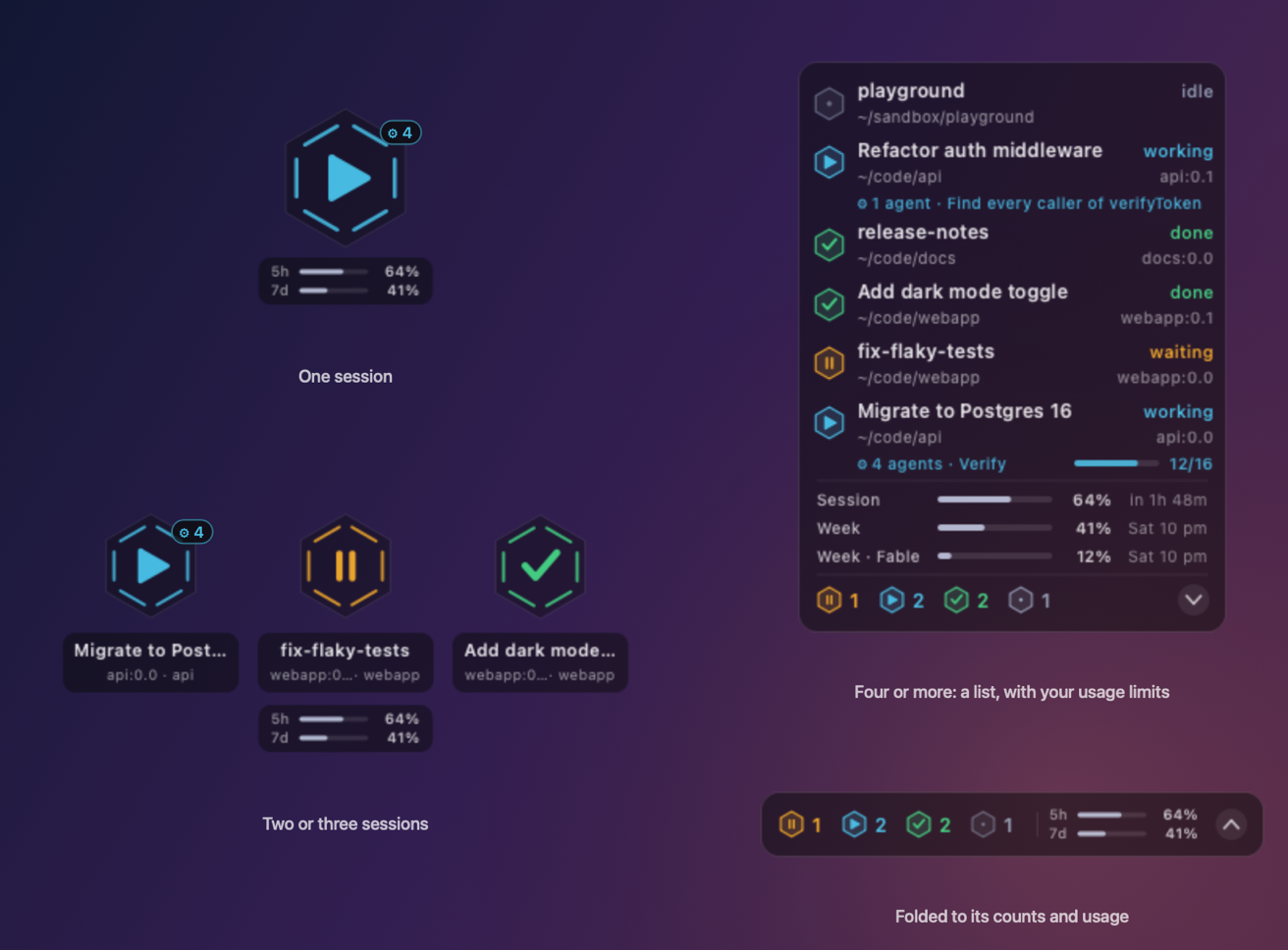
Every session gets a hexagon whose glyph and color say what it's doing:
|
|
36
|
+
|
|
37
|
+
| | State | Meaning |
|
|
38
|
+
|---|---|---|
|
|
39
|
+
| ▶ cyan | **working** | Claude's turn: it's working, or its subagents or a workflow still are |
|
|
40
|
+
| ⏸ amber | **waiting** | your turn: a permission prompt, or it's waiting for input |
|
|
41
|
+
| ✓ green | **done** | your turn: the turn finished, and it stays here until your next prompt |
|
|
42
|
+
| • slate | **idle** | nothing running |
|
|
43
|
+
|
|
44
|
+
## Features
|
|
45
|
+
|
|
46
|
+
- **Floats above everything** without ever taking keyboard focus; on macOS on every Space and beside
|
|
47
|
+
full-screen apps too.
|
|
48
|
+
- **One to three sessions show as big badges**; four or more become a compact list with each session's
|
|
49
|
+
name and directory, up to 16 rows. Session names come from `/rename`, or else the title Claude gave the session.
|
|
50
|
+
- **Sees subagents and workflows**: while a session's agents run, its row says how many and what they're up
|
|
51
|
+
to (`4 agents · Verify`), with a progress bar for a workflow, and its badge carries the count.
|
|
52
|
+
[More below.](#subagents-and-workflows)
|
|
53
|
+
- **Built for tmux**: every row shows its pane, a click switches to it, **prefix + J** jumps to the session
|
|
54
|
+
that needs you, and the counts can sit in tmux's status line. [More below.](#built-for-tmux)
|
|
55
|
+
- **Click a row to bring that session's terminal forward**: the exact tmux pane, and on macOS the exact
|
|
56
|
+
Terminal tab.
|
|
57
|
+
- **Fold the list** down to a bar of counts with the chevron.
|
|
58
|
+
- **When a turn finishes**, its row washes green and its mark bounces once; then everything holds still.
|
|
59
|
+
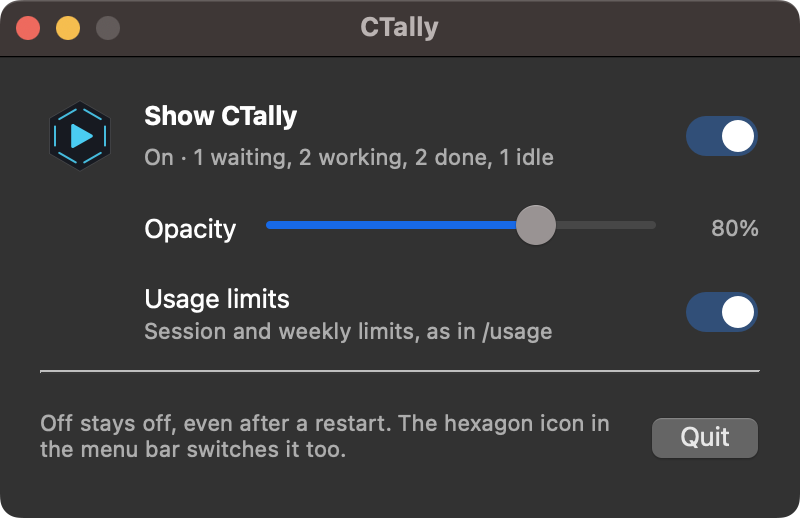
- **Menu bar (or top bar) icon** to show or hide CTally. Off stays off across restarts, and the app sits idle
|
|
60
|
+
with no timers.
|
|
61
|
+
- **Settings window** with an on/off switch and an opacity slider (80% by default).
|
|
62
|
+
- **Silent**: no sounds, no notifications, no Dock icon.
|
|
63
|
+
- **One Python package**, installed with pipx: the same Qt app on macOS and Linux, and a `ctally` command for
|
|
64
|
+
the terminal and tmux.
|
|
65
|
+
|
|
66
|
+
|
|
67
|
+
|
|
68
|
+
## Subagents and workflows
|
|
69
|
+
|
|
70
|
+
When a session hands work to subagents, or runs a whole workflow of them, CTally follows along:
|
|
71
|
+
|
|
72
|
+
- **The row grows a line about its agents**: how many are running, and what they're doing. For a workflow
|
|
73
|
+
that's the phase it has reached (`4 agents · Verify`), with a progress bar of its agents finished out of
|
|
74
|
+
those started so far (`12/16`; the total grows as each phase sets off more). For a single agent it's the
|
|
75
|
+
task it was given (`1 agent · Find callers of parseConfig`).
|
|
76
|
+
- **The badge carries the count** (`⚙ 4`) on its shoulder.
|
|
77
|
+
- **The session stays working until its agents are back.** A session that sends agents off in the background
|
|
78
|
+
finishes its own turn at once, and would otherwise look done for as long as they run, sometimes hours. CTally
|
|
79
|
+
keeps it cyan until they return and Claude has taken in their results, and prefix + J leaves it alone till
|
|
80
|
+
then.
|
|
81
|
+
|
|
82
|
+
`ctally list` shows the count too. This needs the subagent hooks that `ctally setup` adds; if you set up
|
|
83
|
+
CTally before they existed, run `ctally setup` again and restart your sessions.
|
|
84
|
+
|
|
85
|
+
## Built for tmux
|
|
86
|
+
|
|
87
|
+
Running a dozen Claude Code sessions across tmux sessions and split panes is exactly what CTally is for.
|
|
88
|
+
It knows where each one lives, because tmux leaves `TMUX` and `TMUX_PANE` in the environment of everything
|
|
89
|
+
started inside it.
|
|
90
|
+
|
|
91
|
+
- **Every row shows its pane.** `webapp:0.1` is tmux session `webapp`, window 0, pane 1, and it sits next to
|
|
92
|
+
the directory, so two sessions in the same folder are easy to tell apart.
|
|
93
|
+
- **Click a row** and tmux switches to that exact pane. Then the Terminal tab attached to that tmux session
|
|
94
|
+
comes forward, or a new Terminal window attaches to it if no tab shows it.
|
|
95
|
+
- **prefix + J jumps to the session that needs you**, without touching the mouse: waiting sessions first,
|
|
96
|
+
then finished ones, longest-waiting first. Press it again for the next one.
|
|
97
|
+
- **The counts sit in tmux's status line** (`!1 ▶2 ✓5`: waiting, working, done), and they change the moment a
|
|
98
|
+
session does.
|
|
99
|
+
|
|
100
|
+
Turn on the key and the status line with:
|
|
101
|
+
|
|
102
|
+
```sh
|
|
103
|
+
ctally setup --tmux
|
|
104
|
+
```
|
|
105
|
+
|
|
106
|
+
This adds a marked block to `~/.tmux.conf` and applies it to your running tmux at once. The file is backed
|
|
107
|
+
up first, and `ctally uninstall` takes the block out again. To set it up by hand instead:
|
|
108
|
+
|
|
109
|
+
```tmux
|
|
110
|
+
bind-key J run-shell -b "'$HOME/.local/bin/ctally' jump '#{pane_id}' '#{client_name}' '#{socket_path}'"
|
|
111
|
+
set -ag status-right ' #($HOME/.local/bin/ctally status --tmux)'
|
|
112
|
+
set -g status-right-length 80
|
|
113
|
+
```
|
|
114
|
+
|
|
115
|
+
The same `ctally` command works in any shell (it's installed to `~/.local/bin`):
|
|
116
|
+
|
|
117
|
+
```console
|
|
118
|
+
$ ctally list
|
|
119
|
+
waiting webapp:0.0 - webapp 5f3c…
|
|
120
|
+
done webapp:0.1 - webapp 9a1e…
|
|
121
|
+
working api:0.0 4 agents api c27d…
|
|
122
|
+
$ ctally status
|
|
123
|
+
!1 ▶1 ✓1
|
|
124
|
+
$ ctally jump # inside tmux: go to the session that needs you
|
|
125
|
+
```
|
|
126
|
+
|
|
127
|
+
## Requirements
|
|
128
|
+
|
|
129
|
+
- macOS 12 or later, or Ubuntu 22.04 or later (other Linux desktops should work too; see [Ubuntu](#ubuntu))
|
|
130
|
+
- Python 3.9 or later and [pipx](https://pipx.pypa.io)
|
|
131
|
+
- Claude Code
|
|
132
|
+
|
|
133
|
+
## Install
|
|
134
|
+
|
|
135
|
+
```sh
|
|
136
|
+
pipx install git+https://github.com/JinyuJinyuJinyu/ctally.git
|
|
137
|
+
ctally setup # or: ctally setup --tmux
|
|
138
|
+
```
|
|
139
|
+
|
|
140
|
+
pipx puts CTally in an environment of its own, with Qt (PySide6, about 100–400 MB depending on the platform),
|
|
141
|
+
and the `ctally` command in `~/.local/bin`. Then `ctally setup` does four things:
|
|
142
|
+
|
|
143
|
+
1. Copies the hook script to `~/.claude/hooks/ctally.sh`.
|
|
144
|
+
2. Adds the hooks to `~/.claude/settings.json`. It merges with your existing settings and backs the file up first.
|
|
145
|
+
3. Starts CTally at login: a LaunchAgent on macOS, an autostart entry (`~/.config/autostart`) on Linux.
|
|
146
|
+
4. Starts CTally now.
|
|
147
|
+
|
|
148
|
+
Restart any Claude Code sessions that were already running so they pick up the hooks.
|
|
149
|
+
|
|
150
|
+
| Option | Effect |
|
|
151
|
+
|---|---|
|
|
152
|
+
| `--tmux` | also set up tmux: the prefix + J jump key and status-line counts ([details](#built-for-tmux)) |
|
|
153
|
+
| `--no-hooks` | leave `~/.claude/settings.json` alone (add the hooks yourself; see below) |
|
|
154
|
+
| `--no-autostart` | don't start CTally at login |
|
|
155
|
+
| `--no-launch` | set up without starting CTally now |
|
|
156
|
+
|
|
157
|
+
To upgrade: `pipx upgrade ctally` (or `pipx install --force git+…` for the latest commit), then `ctally setup`
|
|
158
|
+
again. It restarts CTally and keeps your preferences.
|
|
159
|
+
|
|
160
|
+
**Upgrading from the Swift version** (CTally.app, installed with `./install.sh`): remove the old `ctally`
|
|
161
|
+
script first, since pipx won't replace a file it didn't put there: `rm ~/.local/bin/ctally`. Then install as
|
|
162
|
+
above. `ctally setup` quits and removes `~/Applications/CTally.app` and its login item, and keeps your opacity,
|
|
163
|
+
fold setting and position.
|
|
164
|
+
|
|
165
|
+
### Ubuntu
|
|
166
|
+
|
|
167
|
+
```sh
|
|
168
|
+
sudo apt install pipx libxcb-cursor0
|
|
169
|
+
pipx ensurepath # then open a new terminal
|
|
170
|
+
pipx install git+https://github.com/JinyuJinyuJinyu/ctally.git
|
|
171
|
+
ctally setup --tmux
|
|
172
|
+
```
|
|
173
|
+
|
|
174
|
+
`libxcb-cursor0` is the one library Qt needs that a desktop install of Ubuntu lacks.
|
|
175
|
+
|
|
176
|
+
- **Wayland** (Ubuntu's default) lets no app keep itself on top or choose where its window goes, so CTally
|
|
177
|
+
runs through XWayland, which allows both. That happens on its own; you don't need to switch sessions.
|
|
178
|
+
- **The top-bar icon** uses Ubuntu's AppIndicator support, which is on by default. On a desktop without a
|
|
179
|
+
tray, right-click the indicator itself for the menu.
|
|
180
|
+
- **Clicking a session** switches tmux to its pane, and opens a terminal on that tmux session if none shows
|
|
181
|
+
it. Raising the terminal's window works on X11 with `xdotool` installed (`sudo apt install xdotool`);
|
|
182
|
+
under Wayland no app may raise another's window, so bring the terminal up yourself. prefix + J needs
|
|
183
|
+
neither.
|
|
184
|
+
|
|
185
|
+
## Using it
|
|
186
|
+
|
|
187
|
+
| To | Do this |
|
|
188
|
+
|---|---|
|
|
189
|
+
| Move it | Drag it anywhere. It remembers the spot and grows up and left from its bottom-right corner. |
|
|
190
|
+
| Go to a session | Click its row (or its badge). |
|
|
191
|
+
| Jump to the session that needs you | In tmux, press prefix + J (set up by `ctally setup --tmux`). Again for the next one. |
|
|
192
|
+
| Fold or unfold the list | Click the chevron on the count bar, or right-click → Fold List. |
|
|
193
|
+
| Hide or show it | Use the hexagon in the menu bar (top bar on Ubuntu), or right-click → Hide CTally. |
|
|
194
|
+
| Change opacity | Menu bar → Settings…, or right-click → Settings… |
|
|
195
|
+
| Start or stop it | `ctally run` starts it; Quit in its menu stops it. |
|
|
196
|
+
| Name a session | Run `/rename my-name` in Claude Code. CTally picks the name up within seconds. |
|
|
197
|
+
|
|
198
|
+
**The first time you click a session** on macOS, macOS asks whether CTally (shown as Python, which runs it) may
|
|
199
|
+
control Terminal. Allow it so CTally can bring the right tab forward. You can change this later in
|
|
200
|
+
**System Settings → Privacy & Security → Automation**.
|
|
201
|
+
|
|
202
|
+
## How it works
|
|
203
|
+
|
|
204
|
+
```
|
|
205
|
+
Claude Code ──hooks──▶ ~/.claude/ctally.d/<session id> ──read 5×/s──▶ ctally run
|
|
206
|
+
```
|
|
207
|
+
|
|
208
|
+
Two pieces, connected by a folder:
|
|
209
|
+
|
|
210
|
+
1. **Hooks.** `ctally.sh` (in `src/ctally/hooks/`) runs on Claude Code events and writes one small file per session:
|
|
211
|
+
`working <pid> <project>`.
|
|
212
|
+
|
|
213
|
+
| Event | State written |
|
|
214
|
+
|---|---|
|
|
215
|
+
| `UserPromptSubmit` | `working` |
|
|
216
|
+
| `PreToolUse` | `working` (a tool is about to run) |
|
|
217
|
+
| `PostToolUse` | `working` (back to work after a permission prompt) |
|
|
218
|
+
| `Stop` | `done`, or still `working` if subagents or a workflow run on in the background |
|
|
219
|
+
| `Notification` | `waiting` (a permission prompt, or idle input) |
|
|
220
|
+
| `SessionEnd` | removes the file |
|
|
221
|
+
| `SubagentStart` / `SubagentStop` | adds / removes a file per agent in `~/.claude/ctally.d/.agents/<session id>/` |
|
|
222
|
+
|
|
223
|
+
A `waiting` never overwrites `done`: Claude Code also sends its idle notification after a turn ends. Nor
|
|
224
|
+
does the idle notification count while the session's agents are still out.
|
|
225
|
+
Inside tmux, a change of state also redraws tmux's status lines, so the counts there update at once.
|
|
226
|
+
|
|
227
|
+
2. **The app.** It polls the folder five times a second, checking modification times first so unchanged files
|
|
228
|
+
aren't re-read. Sessions whose process has exited drop off the display. The exception is when nothing else
|
|
229
|
+
is running: a finished one stays so you can still see it. Leftover files are cleaned up after a day.
|
|
230
|
+
|
|
231
|
+
To add the hooks by hand, copy `src/ctally/hooks/ctally.sh` to `~/.claude/hooks/` and merge this into
|
|
232
|
+
`~/.claude/settings.json`:
|
|
233
|
+
|
|
234
|
+
```json
|
|
235
|
+
{
|
|
236
|
+
"hooks": {
|
|
237
|
+
"UserPromptSubmit": [{ "hooks": [{ "type": "command", "command": "\"$HOME/.claude/hooks/ctally.sh\" working" }] }],
|
|
238
|
+
"PreToolUse": [{ "hooks": [{ "type": "command", "command": "\"$HOME/.claude/hooks/ctally.sh\" working" }] }],
|
|
239
|
+
"PostToolUse": [{ "hooks": [{ "type": "command", "command": "\"$HOME/.claude/hooks/ctally.sh\" working" }] }],
|
|
240
|
+
"Stop": [{ "hooks": [{ "type": "command", "command": "\"$HOME/.claude/hooks/ctally.sh\" done" }] }],
|
|
241
|
+
"Notification": [{ "hooks": [{ "type": "command", "command": "\"$HOME/.claude/hooks/ctally.sh\" waiting" }] }],
|
|
242
|
+
"SessionEnd": [{ "hooks": [{ "type": "command", "command": "\"$HOME/.claude/hooks/ctally.sh\" end" }] }],
|
|
243
|
+
"SubagentStart": [{ "hooks": [{ "type": "command", "command": "\"$HOME/.claude/hooks/ctally.sh\" agent-start" }] }],
|
|
244
|
+
"SubagentStop": [{ "hooks": [{ "type": "command", "command": "\"$HOME/.claude/hooks/ctally.sh\" agent-stop" }] }]
|
|
245
|
+
}
|
|
246
|
+
}
|
|
247
|
+
```
|
|
248
|
+
|
|
249
|
+
### Privacy
|
|
250
|
+
|
|
251
|
+
Everything stays on your machine. The app makes no network requests. To show session names it reads each
|
|
252
|
+
transcript in `~/.claude/projects/`, but only two parts:
|
|
253
|
+
|
|
254
|
+
- the last 256 KB, for the `/rename` name or the generated title
|
|
255
|
+
- the first 256 KB, once, for the directory the session started in
|
|
256
|
+
|
|
257
|
+
While agents run it also reads, beside the transcript, a running workflow's progress journal (for its phase
|
|
258
|
+
and how many agents are done) and a lone subagent's one-line task description. It never reads your
|
|
259
|
+
conversations otherwise.
|
|
260
|
+
|
|
261
|
+
### Terminal support
|
|
262
|
+
|
|
263
|
+
On macOS, clicking a session works best in **Terminal.app**, with or without tmux: CTally finds the exact tab, or the
|
|
264
|
+
exact tmux pane and the tab attached to it. In other terminals (iTerm2, VS Code, …) and for sessions in the
|
|
265
|
+
Claude desktop app, it still switches tmux to the right pane and brings the app forward, but can't pick the
|
|
266
|
+
tab. On Linux, see [Ubuntu](#ubuntu). The prefix + J jump key works in any terminal.
|
|
267
|
+
|
|
268
|
+
## Uninstall
|
|
269
|
+
|
|
270
|
+
```sh
|
|
271
|
+
ctally uninstall
|
|
272
|
+
pipx uninstall ctally
|
|
273
|
+
```
|
|
274
|
+
|
|
275
|
+
The first removes the hooks in `~/.claude/settings.json` and the block in your tmux config (both after a
|
|
276
|
+
backup), the hook script, starting at login, the state files and the preferences. Your other Claude Code and
|
|
277
|
+
tmux settings are left as they are. The second removes the command and its Qt.
|
|
278
|
+
|
|
279
|
+
## Troubleshooting
|
|
280
|
+
|
|
281
|
+
- **CTally doesn't change state.** Restart your Claude Code sessions after installing. Then check that
|
|
282
|
+
`~/.claude/ctally.d/` gets a file when you send a prompt.
|
|
283
|
+
- **Clicking a session does nothing.** On macOS, allow Python (which runs CTally) to control Terminal under
|
|
284
|
+
**System Settings → Privacy & Security → Automation**.
|
|
285
|
+
- **prefix + J says "nothing needs you".** That means no session is waiting or done; `ctally list` shows what
|
|
286
|
+
CTally sees. A session started outside tmux can't be jumped to.
|
|
287
|
+
- **CTally is gone.** Use the hexagon icon in the menu bar → Show CTally. If the icon is gone too, it isn't
|
|
288
|
+
running: run `ctally run`. Its log is `~/Library/Logs/ctally.log` on macOS and
|
|
289
|
+
`~/.local/state/ctally/ctally.log` on Linux.
|
|
290
|
+
- **Ubuntu: "Could not load the Qt platform plugin xcb".** Install the library it names, usually
|
|
291
|
+
`sudo apt install libxcb-cursor0`.
|
|
292
|
+
|
|
293
|
+
## Developing
|
|
294
|
+
|
|
295
|
+
```sh
|
|
296
|
+
python3 -m venv .venv && .venv/bin/pip install -e . pytest
|
|
297
|
+
.venv/bin/ctally run # the indicator, from your checkout
|
|
298
|
+
.venv/bin/python -m pytest tests # the tests
|
|
299
|
+
.venv/bin/python tools/snapshot.py # the README's screenshots, from demo data
|
|
300
|
+
```
|
|
301
|
+
|
|
302
|
+
Set `CTALLY_STATE_DIR`, `CTALLY_PROJECTS_DIR` and `CTALLY_CONFIG_DIR` to run it against other folders than
|
|
303
|
+
`~/.claude/ctally.d`, `~/.claude/projects` and its own settings.
|
|
304
|
+
|
|
305
|
+
## Releasing
|
|
306
|
+
|
|
307
|
+
Releases go to PyPI from GitHub, by `.github/workflows/publish.yml`, using PyPI's Trusted Publishing: PyPI
|
|
308
|
+
trusts that workflow in this repository, so no token is stored anywhere.
|
|
309
|
+
|
|
310
|
+
1. Bump `__version__` in `src/ctally/__init__.py`, then commit and push.
|
|
311
|
+
2. Create a release whose tag matches it: `gh release create v0.2.1 --generate-notes`, or on GitHub.
|
|
312
|
+
3. The workflow builds the package, checks it and uploads it. `pipx upgrade ctally` then picks it up.
|
|
313
|
+
|
|
314
|
+
Once, before the first release: on [pypi.org](https://pypi.org) → your account → **Publishing**, add a pending
|
|
315
|
+
publisher with PyPI project `ctally`, owner `JinyuJinyuJinyu`, repository `ctally`, workflow `publish.yml`
|
|
316
|
+
and environment `pypi`.
|
|
317
|
+
|
|
318
|
+
## License
|
|
319
|
+
|
|
320
|
+
[MIT](LICENSE)
|
|
321
|
+
|
|
322
|
+
CTally is an independent community project. It is not affiliated with or endorsed by Anthropic.
|
ctally-0.2.0/README.md
ADDED
|
@@ -0,0 +1,303 @@
|
|
|
1
|
+
# CTally
|
|
2
|
+
|
|
3
|
+
A floating status light for your Claude Code sessions on **macOS and Ubuntu**: **whose turn is it?**
|
|
4
|
+
Glance over instead of tabbing back to the terminal.
|
|
5
|
+
|
|
6
|
+
```sh
|
|
7
|
+
pipx install git+https://github.com/JinyuJinyuJinyu/ctally.git
|
|
8
|
+
ctally setup --tmux
|
|
9
|
+
```
|
|
10
|
+
|
|
11
|
+
The name comes from the *tally light*, the lamp on a broadcast camera that shows it's live, and from tallying
|
|
12
|
+
up your sessions.
|
|
13
|
+
|
|
14
|
+

|
|
15
|
+
|
|
16
|
+
Every session gets a hexagon whose glyph and color say what it's doing:
|
|
17
|
+
|
|
18
|
+
| | State | Meaning |
|
|
19
|
+
|---|---|---|
|
|
20
|
+
| ▶ cyan | **working** | Claude's turn: it's working, or its subagents or a workflow still are |
|
|
21
|
+
| ⏸ amber | **waiting** | your turn: a permission prompt, or it's waiting for input |
|
|
22
|
+
| ✓ green | **done** | your turn: the turn finished, and it stays here until your next prompt |
|
|
23
|
+
| • slate | **idle** | nothing running |
|
|
24
|
+
|
|
25
|
+
## Features
|
|
26
|
+
|
|
27
|
+
- **Floats above everything** without ever taking keyboard focus; on macOS on every Space and beside
|
|
28
|
+
full-screen apps too.
|
|
29
|
+
- **One to three sessions show as big badges**; four or more become a compact list with each session's
|
|
30
|
+
name and directory, up to 16 rows. Session names come from `/rename`, or else the title Claude gave the session.
|
|
31
|
+
- **Sees subagents and workflows**: while a session's agents run, its row says how many and what they're up
|
|
32
|
+
to (`4 agents · Verify`), with a progress bar for a workflow, and its badge carries the count.
|
|
33
|
+
[More below.](#subagents-and-workflows)
|
|
34
|
+
- **Built for tmux**: every row shows its pane, a click switches to it, **prefix + J** jumps to the session
|
|
35
|
+
that needs you, and the counts can sit in tmux's status line. [More below.](#built-for-tmux)
|
|
36
|
+
- **Click a row to bring that session's terminal forward**: the exact tmux pane, and on macOS the exact
|
|
37
|
+
Terminal tab.
|
|
38
|
+
- **Fold the list** down to a bar of counts with the chevron.
|
|
39
|
+
- **When a turn finishes**, its row washes green and its mark bounces once; then everything holds still.
|
|
40
|
+
- **Menu bar (or top bar) icon** to show or hide CTally. Off stays off across restarts, and the app sits idle
|
|
41
|
+
with no timers.
|
|
42
|
+
- **Settings window** with an on/off switch and an opacity slider (80% by default).
|
|
43
|
+
- **Silent**: no sounds, no notifications, no Dock icon.
|
|
44
|
+
- **One Python package**, installed with pipx: the same Qt app on macOS and Linux, and a `ctally` command for
|
|
45
|
+
the terminal and tmux.
|
|
46
|
+
|
|
47
|
+

|
|
48
|
+
|
|
49
|
+
## Subagents and workflows
|
|
50
|
+
|
|
51
|
+
When a session hands work to subagents, or runs a whole workflow of them, CTally follows along:
|
|
52
|
+
|
|
53
|
+
- **The row grows a line about its agents**: how many are running, and what they're doing. For a workflow
|
|
54
|
+
that's the phase it has reached (`4 agents · Verify`), with a progress bar of its agents finished out of
|
|
55
|
+
those started so far (`12/16`; the total grows as each phase sets off more). For a single agent it's the
|
|
56
|
+
task it was given (`1 agent · Find callers of parseConfig`).
|
|
57
|
+
- **The badge carries the count** (`⚙ 4`) on its shoulder.
|
|
58
|
+
- **The session stays working until its agents are back.** A session that sends agents off in the background
|
|
59
|
+
finishes its own turn at once, and would otherwise look done for as long as they run, sometimes hours. CTally
|
|
60
|
+
keeps it cyan until they return and Claude has taken in their results, and prefix + J leaves it alone till
|
|
61
|
+
then.
|
|
62
|
+
|
|
63
|
+
`ctally list` shows the count too. This needs the subagent hooks that `ctally setup` adds; if you set up
|
|
64
|
+
CTally before they existed, run `ctally setup` again and restart your sessions.
|
|
65
|
+
|
|
66
|
+
## Built for tmux
|
|
67
|
+
|
|
68
|
+
Running a dozen Claude Code sessions across tmux sessions and split panes is exactly what CTally is for.
|
|
69
|
+
It knows where each one lives, because tmux leaves `TMUX` and `TMUX_PANE` in the environment of everything
|
|
70
|
+
started inside it.
|
|
71
|
+
|
|
72
|
+
- **Every row shows its pane.** `webapp:0.1` is tmux session `webapp`, window 0, pane 1, and it sits next to
|
|
73
|
+
the directory, so two sessions in the same folder are easy to tell apart.
|
|
74
|
+
- **Click a row** and tmux switches to that exact pane. Then the Terminal tab attached to that tmux session
|
|
75
|
+
comes forward, or a new Terminal window attaches to it if no tab shows it.
|
|
76
|
+
- **prefix + J jumps to the session that needs you**, without touching the mouse: waiting sessions first,
|
|
77
|
+
then finished ones, longest-waiting first. Press it again for the next one.
|
|
78
|
+
- **The counts sit in tmux's status line** (`!1 ▶2 ✓5`: waiting, working, done), and they change the moment a
|
|
79
|
+
session does.
|
|
80
|
+
|
|
81
|
+
Turn on the key and the status line with:
|
|
82
|
+
|
|
83
|
+
```sh
|
|
84
|
+
ctally setup --tmux
|
|
85
|
+
```
|
|
86
|
+
|
|
87
|
+
This adds a marked block to `~/.tmux.conf` and applies it to your running tmux at once. The file is backed
|
|
88
|
+
up first, and `ctally uninstall` takes the block out again. To set it up by hand instead:
|
|
89
|
+
|
|
90
|
+
```tmux
|
|
91
|
+
bind-key J run-shell -b "'$HOME/.local/bin/ctally' jump '#{pane_id}' '#{client_name}' '#{socket_path}'"
|
|
92
|
+
set -ag status-right ' #($HOME/.local/bin/ctally status --tmux)'
|
|
93
|
+
set -g status-right-length 80
|
|
94
|
+
```
|
|
95
|
+
|
|
96
|
+
The same `ctally` command works in any shell (it's installed to `~/.local/bin`):
|
|
97
|
+
|
|
98
|
+
```console
|
|
99
|
+
$ ctally list
|
|
100
|
+
waiting webapp:0.0 - webapp 5f3c…
|
|
101
|
+
done webapp:0.1 - webapp 9a1e…
|
|
102
|
+
working api:0.0 4 agents api c27d…
|
|
103
|
+
$ ctally status
|
|
104
|
+
!1 ▶1 ✓1
|
|
105
|
+
$ ctally jump # inside tmux: go to the session that needs you
|
|
106
|
+
```
|
|
107
|
+
|
|
108
|
+
## Requirements
|
|
109
|
+
|
|
110
|
+
- macOS 12 or later, or Ubuntu 22.04 or later (other Linux desktops should work too; see [Ubuntu](#ubuntu))
|
|
111
|
+
- Python 3.9 or later and [pipx](https://pipx.pypa.io)
|
|
112
|
+
- Claude Code
|
|
113
|
+
|
|
114
|
+
## Install
|
|
115
|
+
|
|
116
|
+
```sh
|
|
117
|
+
pipx install git+https://github.com/JinyuJinyuJinyu/ctally.git
|
|
118
|
+
ctally setup # or: ctally setup --tmux
|
|
119
|
+
```
|
|
120
|
+
|
|
121
|
+
pipx puts CTally in an environment of its own, with Qt (PySide6, about 100–400 MB depending on the platform),
|
|
122
|
+
and the `ctally` command in `~/.local/bin`. Then `ctally setup` does four things:
|
|
123
|
+
|
|
124
|
+
1. Copies the hook script to `~/.claude/hooks/ctally.sh`.
|
|
125
|
+
2. Adds the hooks to `~/.claude/settings.json`. It merges with your existing settings and backs the file up first.
|
|
126
|
+
3. Starts CTally at login: a LaunchAgent on macOS, an autostart entry (`~/.config/autostart`) on Linux.
|
|
127
|
+
4. Starts CTally now.
|
|
128
|
+
|
|
129
|
+
Restart any Claude Code sessions that were already running so they pick up the hooks.
|
|
130
|
+
|
|
131
|
+
| Option | Effect |
|
|
132
|
+
|---|---|
|
|
133
|
+
| `--tmux` | also set up tmux: the prefix + J jump key and status-line counts ([details](#built-for-tmux)) |
|
|
134
|
+
| `--no-hooks` | leave `~/.claude/settings.json` alone (add the hooks yourself; see below) |
|
|
135
|
+
| `--no-autostart` | don't start CTally at login |
|
|
136
|
+
| `--no-launch` | set up without starting CTally now |
|
|
137
|
+
|
|
138
|
+
To upgrade: `pipx upgrade ctally` (or `pipx install --force git+…` for the latest commit), then `ctally setup`
|
|
139
|
+
again. It restarts CTally and keeps your preferences.
|
|
140
|
+
|
|
141
|
+
**Upgrading from the Swift version** (CTally.app, installed with `./install.sh`): remove the old `ctally`
|
|
142
|
+
script first, since pipx won't replace a file it didn't put there: `rm ~/.local/bin/ctally`. Then install as
|
|
143
|
+
above. `ctally setup` quits and removes `~/Applications/CTally.app` and its login item, and keeps your opacity,
|
|
144
|
+
fold setting and position.
|
|
145
|
+
|
|
146
|
+
### Ubuntu
|
|
147
|
+
|
|
148
|
+
```sh
|
|
149
|
+
sudo apt install pipx libxcb-cursor0
|
|
150
|
+
pipx ensurepath # then open a new terminal
|
|
151
|
+
pipx install git+https://github.com/JinyuJinyuJinyu/ctally.git
|
|
152
|
+
ctally setup --tmux
|
|
153
|
+
```
|
|
154
|
+
|
|
155
|
+
`libxcb-cursor0` is the one library Qt needs that a desktop install of Ubuntu lacks.
|
|
156
|
+
|
|
157
|
+
- **Wayland** (Ubuntu's default) lets no app keep itself on top or choose where its window goes, so CTally
|
|
158
|
+
runs through XWayland, which allows both. That happens on its own; you don't need to switch sessions.
|
|
159
|
+
- **The top-bar icon** uses Ubuntu's AppIndicator support, which is on by default. On a desktop without a
|
|
160
|
+
tray, right-click the indicator itself for the menu.
|
|
161
|
+
- **Clicking a session** switches tmux to its pane, and opens a terminal on that tmux session if none shows
|
|
162
|
+
it. Raising the terminal's window works on X11 with `xdotool` installed (`sudo apt install xdotool`);
|
|
163
|
+
under Wayland no app may raise another's window, so bring the terminal up yourself. prefix + J needs
|
|
164
|
+
neither.
|
|
165
|
+
|
|
166
|
+
## Using it
|
|
167
|
+
|
|
168
|
+
| To | Do this |
|
|
169
|
+
|---|---|
|
|
170
|
+
| Move it | Drag it anywhere. It remembers the spot and grows up and left from its bottom-right corner. |
|
|
171
|
+
| Go to a session | Click its row (or its badge). |
|
|
172
|
+
| Jump to the session that needs you | In tmux, press prefix + J (set up by `ctally setup --tmux`). Again for the next one. |
|
|
173
|
+
| Fold or unfold the list | Click the chevron on the count bar, or right-click → Fold List. |
|
|
174
|
+
| Hide or show it | Use the hexagon in the menu bar (top bar on Ubuntu), or right-click → Hide CTally. |
|
|
175
|
+
| Change opacity | Menu bar → Settings…, or right-click → Settings… |
|
|
176
|
+
| Start or stop it | `ctally run` starts it; Quit in its menu stops it. |
|
|
177
|
+
| Name a session | Run `/rename my-name` in Claude Code. CTally picks the name up within seconds. |
|
|
178
|
+
|
|
179
|
+
**The first time you click a session** on macOS, macOS asks whether CTally (shown as Python, which runs it) may
|
|
180
|
+
control Terminal. Allow it so CTally can bring the right tab forward. You can change this later in
|
|
181
|
+
**System Settings → Privacy & Security → Automation**.
|
|
182
|
+
|
|
183
|
+
## How it works
|
|
184
|
+
|
|
185
|
+
```
|
|
186
|
+
Claude Code ──hooks──▶ ~/.claude/ctally.d/<session id> ──read 5×/s──▶ ctally run
|
|
187
|
+
```
|
|
188
|
+
|
|
189
|
+
Two pieces, connected by a folder:
|
|
190
|
+
|
|
191
|
+
1. **Hooks.** `ctally.sh` (in `src/ctally/hooks/`) runs on Claude Code events and writes one small file per session:
|
|
192
|
+
`working <pid> <project>`.
|
|
193
|
+
|
|
194
|
+
| Event | State written |
|
|
195
|
+
|---|---|
|
|
196
|
+
| `UserPromptSubmit` | `working` |
|
|
197
|
+
| `PreToolUse` | `working` (a tool is about to run) |
|
|
198
|
+
| `PostToolUse` | `working` (back to work after a permission prompt) |
|
|
199
|
+
| `Stop` | `done`, or still `working` if subagents or a workflow run on in the background |
|
|
200
|
+
| `Notification` | `waiting` (a permission prompt, or idle input) |
|
|
201
|
+
| `SessionEnd` | removes the file |
|
|
202
|
+
| `SubagentStart` / `SubagentStop` | adds / removes a file per agent in `~/.claude/ctally.d/.agents/<session id>/` |
|
|
203
|
+
|
|
204
|
+
A `waiting` never overwrites `done`: Claude Code also sends its idle notification after a turn ends. Nor
|
|
205
|
+
does the idle notification count while the session's agents are still out.
|
|
206
|
+
Inside tmux, a change of state also redraws tmux's status lines, so the counts there update at once.
|
|
207
|
+
|
|
208
|
+
2. **The app.** It polls the folder five times a second, checking modification times first so unchanged files
|
|
209
|
+
aren't re-read. Sessions whose process has exited drop off the display. The exception is when nothing else
|
|
210
|
+
is running: a finished one stays so you can still see it. Leftover files are cleaned up after a day.
|
|
211
|
+
|
|
212
|
+
To add the hooks by hand, copy `src/ctally/hooks/ctally.sh` to `~/.claude/hooks/` and merge this into
|
|
213
|
+
`~/.claude/settings.json`:
|
|
214
|
+
|
|
215
|
+
```json
|
|
216
|
+
{
|
|
217
|
+
"hooks": {
|
|
218
|
+
"UserPromptSubmit": [{ "hooks": [{ "type": "command", "command": "\"$HOME/.claude/hooks/ctally.sh\" working" }] }],
|
|
219
|
+
"PreToolUse": [{ "hooks": [{ "type": "command", "command": "\"$HOME/.claude/hooks/ctally.sh\" working" }] }],
|
|
220
|
+
"PostToolUse": [{ "hooks": [{ "type": "command", "command": "\"$HOME/.claude/hooks/ctally.sh\" working" }] }],
|
|
221
|
+
"Stop": [{ "hooks": [{ "type": "command", "command": "\"$HOME/.claude/hooks/ctally.sh\" done" }] }],
|
|
222
|
+
"Notification": [{ "hooks": [{ "type": "command", "command": "\"$HOME/.claude/hooks/ctally.sh\" waiting" }] }],
|
|
223
|
+
"SessionEnd": [{ "hooks": [{ "type": "command", "command": "\"$HOME/.claude/hooks/ctally.sh\" end" }] }],
|
|
224
|
+
"SubagentStart": [{ "hooks": [{ "type": "command", "command": "\"$HOME/.claude/hooks/ctally.sh\" agent-start" }] }],
|
|
225
|
+
"SubagentStop": [{ "hooks": [{ "type": "command", "command": "\"$HOME/.claude/hooks/ctally.sh\" agent-stop" }] }]
|
|
226
|
+
}
|
|
227
|
+
}
|
|
228
|
+
```
|
|
229
|
+
|
|
230
|
+
### Privacy
|
|
231
|
+
|
|
232
|
+
Everything stays on your machine. The app makes no network requests. To show session names it reads each
|
|
233
|
+
transcript in `~/.claude/projects/`, but only two parts:
|
|
234
|
+
|
|
235
|
+
- the last 256 KB, for the `/rename` name or the generated title
|
|
236
|
+
- the first 256 KB, once, for the directory the session started in
|
|
237
|
+
|
|
238
|
+
While agents run it also reads, beside the transcript, a running workflow's progress journal (for its phase
|
|
239
|
+
and how many agents are done) and a lone subagent's one-line task description. It never reads your
|
|
240
|
+
conversations otherwise.
|
|
241
|
+
|
|
242
|
+
### Terminal support
|
|
243
|
+
|
|
244
|
+
On macOS, clicking a session works best in **Terminal.app**, with or without tmux: CTally finds the exact tab, or the
|
|
245
|
+
exact tmux pane and the tab attached to it. In other terminals (iTerm2, VS Code, …) and for sessions in the
|
|
246
|
+
Claude desktop app, it still switches tmux to the right pane and brings the app forward, but can't pick the
|
|
247
|
+
tab. On Linux, see [Ubuntu](#ubuntu). The prefix + J jump key works in any terminal.
|
|
248
|
+
|
|
249
|
+
## Uninstall
|
|
250
|
+
|
|
251
|
+
```sh
|
|
252
|
+
ctally uninstall
|
|
253
|
+
pipx uninstall ctally
|
|
254
|
+
```
|
|
255
|
+
|
|
256
|
+
The first removes the hooks in `~/.claude/settings.json` and the block in your tmux config (both after a
|
|
257
|
+
backup), the hook script, starting at login, the state files and the preferences. Your other Claude Code and
|
|
258
|
+
tmux settings are left as they are. The second removes the command and its Qt.
|
|
259
|
+
|
|
260
|
+
## Troubleshooting
|
|
261
|
+
|
|
262
|
+
- **CTally doesn't change state.** Restart your Claude Code sessions after installing. Then check that
|
|
263
|
+
`~/.claude/ctally.d/` gets a file when you send a prompt.
|
|
264
|
+
- **Clicking a session does nothing.** On macOS, allow Python (which runs CTally) to control Terminal under
|
|
265
|
+
**System Settings → Privacy & Security → Automation**.
|
|
266
|
+
- **prefix + J says "nothing needs you".** That means no session is waiting or done; `ctally list` shows what
|
|
267
|
+
CTally sees. A session started outside tmux can't be jumped to.
|
|
268
|
+
- **CTally is gone.** Use the hexagon icon in the menu bar → Show CTally. If the icon is gone too, it isn't
|
|
269
|
+
running: run `ctally run`. Its log is `~/Library/Logs/ctally.log` on macOS and
|
|
270
|
+
`~/.local/state/ctally/ctally.log` on Linux.
|
|
271
|
+
- **Ubuntu: "Could not load the Qt platform plugin xcb".** Install the library it names, usually
|
|
272
|
+
`sudo apt install libxcb-cursor0`.
|
|
273
|
+
|
|
274
|
+
## Developing
|
|
275
|
+
|
|
276
|
+
```sh
|
|
277
|
+
python3 -m venv .venv && .venv/bin/pip install -e . pytest
|
|
278
|
+
.venv/bin/ctally run # the indicator, from your checkout
|
|
279
|
+
.venv/bin/python -m pytest tests # the tests
|
|
280
|
+
.venv/bin/python tools/snapshot.py # the README's screenshots, from demo data
|
|
281
|
+
```
|
|
282
|
+
|
|
283
|
+
Set `CTALLY_STATE_DIR`, `CTALLY_PROJECTS_DIR` and `CTALLY_CONFIG_DIR` to run it against other folders than
|
|
284
|
+
`~/.claude/ctally.d`, `~/.claude/projects` and its own settings.
|
|
285
|
+
|
|
286
|
+
## Releasing
|
|
287
|
+
|
|
288
|
+
Releases go to PyPI from GitHub, by `.github/workflows/publish.yml`, using PyPI's Trusted Publishing: PyPI
|
|
289
|
+
trusts that workflow in this repository, so no token is stored anywhere.
|
|
290
|
+
|
|
291
|
+
1. Bump `__version__` in `src/ctally/__init__.py`, then commit and push.
|
|
292
|
+
2. Create a release whose tag matches it: `gh release create v0.2.1 --generate-notes`, or on GitHub.
|
|
293
|
+
3. The workflow builds the package, checks it and uploads it. `pipx upgrade ctally` then picks it up.
|
|
294
|
+
|
|
295
|
+
Once, before the first release: on [pypi.org](https://pypi.org) → your account → **Publishing**, add a pending
|
|
296
|
+
publisher with PyPI project `ctally`, owner `JinyuJinyuJinyu`, repository `ctally`, workflow `publish.yml`
|
|
297
|
+
and environment `pypi`.
|
|
298
|
+
|
|
299
|
+
## License
|
|
300
|
+
|
|
301
|
+
[MIT](LICENSE)
|
|
302
|
+
|
|
303
|
+
CTally is an independent community project. It is not affiliated with or endorsed by Anthropic.
|