cpiextract 0.1.0__tar.gz
This diff represents the content of publicly available package versions that have been released to one of the supported registries. The information contained in this diff is provided for informational purposes only and reflects changes between package versions as they appear in their respective public registries.
- cpiextract-0.1.0/LICENSE.txt +21 -0
- cpiextract-0.1.0/PKG-INFO +441 -0
- cpiextract-0.1.0/README.md +418 -0
- cpiextract-0.1.0/cpiextract/__init__.py +17 -0
- cpiextract-0.1.0/cpiextract/data_manager/APIManager.py +10 -0
- cpiextract-0.1.0/cpiextract/data_manager/DataManager.py +11 -0
- cpiextract-0.1.0/cpiextract/data_manager/LocalManager.py +18 -0
- cpiextract-0.1.0/cpiextract/data_manager/SQLManager.py +34 -0
- cpiextract-0.1.0/cpiextract/data_manager/__init__.py +6 -0
- cpiextract-0.1.0/cpiextract/databases/BindingDB.py +300 -0
- cpiextract-0.1.0/cpiextract/databases/CTD.py +194 -0
- cpiextract-0.1.0/cpiextract/databases/ChEMBL.py +306 -0
- cpiextract-0.1.0/cpiextract/databases/DTC.py +438 -0
- cpiextract-0.1.0/cpiextract/databases/Database.py +96 -0
- cpiextract-0.1.0/cpiextract/databases/DrugBank.py +308 -0
- cpiextract-0.1.0/cpiextract/databases/DrugCentral.py +241 -0
- cpiextract-0.1.0/cpiextract/databases/OTP.py +363 -0
- cpiextract-0.1.0/cpiextract/databases/PubChem.py +317 -0
- cpiextract-0.1.0/cpiextract/databases/Stitch.py +288 -0
- cpiextract-0.1.0/cpiextract/databases/__init__.py +12 -0
- cpiextract-0.1.0/cpiextract/pipelines/Comp2Prot.py +140 -0
- cpiextract-0.1.0/cpiextract/pipelines/Pipeline.py +83 -0
- cpiextract-0.1.0/cpiextract/pipelines/Prot2Comp.py +146 -0
- cpiextract-0.1.0/cpiextract/pipelines/__init__.py +5 -0
- cpiextract-0.1.0/cpiextract/servers/BiomartServer.py +53 -0
- cpiextract-0.1.0/cpiextract/servers/ChEMBLServer.py +101 -0
- cpiextract-0.1.0/cpiextract/servers/PubchemServer.py +61 -0
- cpiextract-0.1.0/cpiextract/servers/__init__.py +6 -0
- cpiextract-0.1.0/cpiextract/sql_connection/__init__.py +3 -0
- cpiextract-0.1.0/cpiextract/sql_connection/sql_connection.py +22 -0
- cpiextract-0.1.0/cpiextract/utils/__init__.py +4 -0
- cpiextract-0.1.0/cpiextract/utils/helper.py +34 -0
- cpiextract-0.1.0/cpiextract/utils/identifiers.py +126 -0
- cpiextract-0.1.0/cpiextract.egg-info/PKG-INFO +441 -0
- cpiextract-0.1.0/cpiextract.egg-info/SOURCES.txt +38 -0
- cpiextract-0.1.0/cpiextract.egg-info/dependency_links.txt +1 -0
- cpiextract-0.1.0/cpiextract.egg-info/requires.txt +10 -0
- cpiextract-0.1.0/cpiextract.egg-info/top_level.txt +1 -0
- cpiextract-0.1.0/pyproject.toml +41 -0
- cpiextract-0.1.0/setup.cfg +4 -0
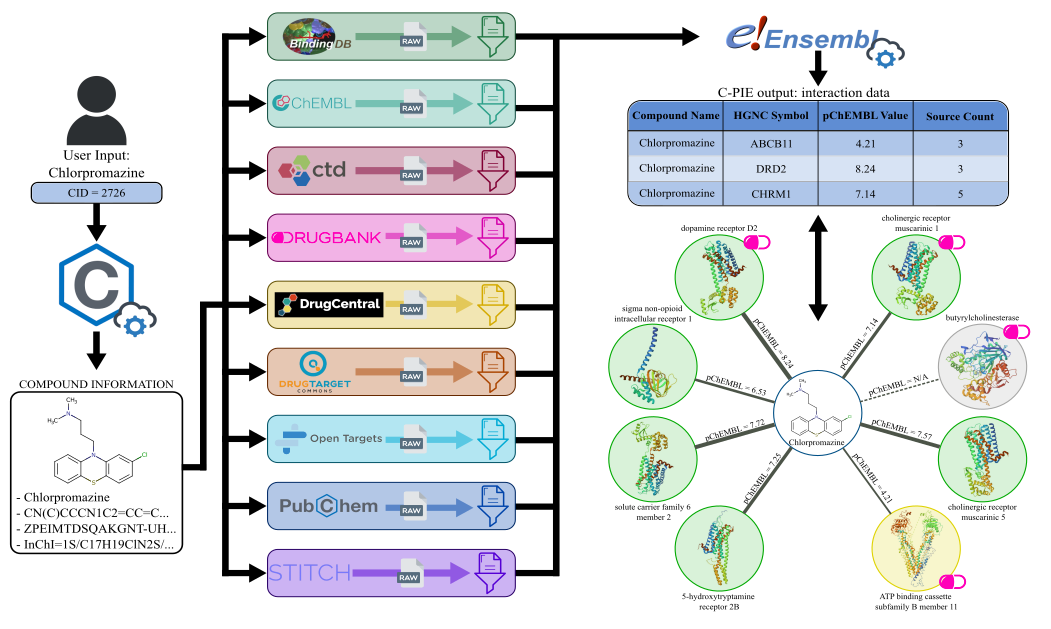
|
@@ -0,0 +1,21 @@
|
|
|
1
|
+
MIT License
|
|
2
|
+
|
|
3
|
+
Copyright (c) [2024] [Andrea Piras, Shi Chenghao, Michael Sebek, Giulia Menichetti]
|
|
4
|
+
|
|
5
|
+
Permission is hereby granted, free of charge, to any person obtaining a copy
|
|
6
|
+
of this software and associated documentation files (the "Software"), to deal
|
|
7
|
+
in the Software without restriction, including without limitation the rights
|
|
8
|
+
to use, copy, modify, merge, publish, distribute, sublicense, and/or sell
|
|
9
|
+
copies of the Software, and to permit persons to whom the Software is
|
|
10
|
+
furnished to do so, subject to the following conditions:
|
|
11
|
+
|
|
12
|
+
The above copyright notice and this permission notice shall be included in all
|
|
13
|
+
copies or substantial portions of the Software.
|
|
14
|
+
|
|
15
|
+
THE SOFTWARE IS PROVIDED "AS IS", WITHOUT WARRANTY OF ANY KIND, EXPRESS OR
|
|
16
|
+
IMPLIED, INCLUDING BUT NOT LIMITED TO THE WARRANTIES OF MERCHANTABILITY,
|
|
17
|
+
FITNESS FOR A PARTICULAR PURPOSE AND NONINFRINGEMENT. IN NO EVENT SHALL THE
|
|
18
|
+
AUTHORS OR COPYRIGHT HOLDERS BE LIABLE FOR ANY CLAIM, DAMAGES OR OTHER
|
|
19
|
+
LIABILITY, WHETHER IN AN ACTION OF CONTRACT, TORT OR OTHERWISE, ARISING FROM,
|
|
20
|
+
OUT OF OR IN CONNECTION WITH THE SOFTWARE OR THE USE OR OTHER DEALINGS IN THE
|
|
21
|
+
SOFTWARE.
|
|
@@ -0,0 +1,441 @@
|
|
|
1
|
+
Metadata-Version: 2.1
|
|
2
|
+
Name: cpiextract
|
|
3
|
+
Version: 0.1.0
|
|
4
|
+
Summary: CPIExtract is a software package to collect and harmonize small molecule and protein interactions.
|
|
5
|
+
Author: Shi Chenghao, Michael Sebek, Gordana Ispirova, Giulia Menichetti
|
|
6
|
+
Author-email: Andrea Piras <giulia.menichetti@channing.harvard.edu>
|
|
7
|
+
License: MIT
|
|
8
|
+
Keywords: data-science,bioinformatics,cheminformatics,proteins,network-science,data-harmonization,binding-affinity,chemical-compounds
|
|
9
|
+
Classifier: Programming Language :: Python :: 3
|
|
10
|
+
Classifier: License :: OSI Approved :: MIT License
|
|
11
|
+
Classifier: Operating System :: OS Independent
|
|
12
|
+
Description-Content-Type: text/markdown
|
|
13
|
+
License-File: LICENSE.txt
|
|
14
|
+
Requires-Dist: pandas
|
|
15
|
+
Requires-Dist: numpy
|
|
16
|
+
Requires-Dist: mysql-connector-python
|
|
17
|
+
Requires-Dist: biomart>=0.9.1
|
|
18
|
+
Requires-Dist: chembl_webresource_client>=0.10.8
|
|
19
|
+
Requires-Dist: pubchempy==1.0.4
|
|
20
|
+
Requires-Dist: tqdm
|
|
21
|
+
Provides-Extra: interactive
|
|
22
|
+
Requires-Dist: jupyter; extra == "interactive"
|
|
23
|
+
|
|
24
|
+
# CPIExtract (Compound-Protein Interaction Extract)
|
|
25
|
+
## A software package to collect and harmonize small molecule and protein interactions
|
|
26
|
+
#### Authors: Andrea Piras, Shi Chenghao, Michael Sebek, Gordana Ispirova, Giulia Menichetti (giulia.menichetti@channing.harvard.edu)
|
|
27
|
+
|
|
28
|
+
## Introduction
|
|
29
|
+
|
|
30
|
+
The binding interactions between small molecules and proteins are the basis of cellular functions.
|
|
31
|
+
Yet, experimental data available regarding compound-protein interaction (CPI) is not harmonized into a single
|
|
32
|
+
entity but rather scattered across multiple institutions, each maintaining databases with different formats.
|
|
33
|
+
Extracting information from these multiple sources remains challenging due to data heterogeneity.
|
|
34
|
+
|
|
35
|
+
CPIExtract interactively extracts, filters and harmonizes CPI data from 9 databases, providing the output in tabular format (csv).\
|
|
36
|
+
The package provides two separate pipelines:
|
|
37
|
+
- Comp2Prot: Extract protein target interactions for compounds provided as input
|
|
38
|
+
- Prot2Comp: Extract compound interactions for proteins provided as input
|
|
39
|
+
|
|
40
|
+
### Comp2Prot
|
|
41
|
+
|
|
42
|
+
The pipeline extracts compound information from an input identifier using the [PubChem REST API](https://pubchempy.readthedocs.io/en/latest/), accessed with the [`PubChemPy`](https://github.com/mcs07/PubChemPy) Python package. Then, it uses the information to perform compound matching for each database, extracting raw interaction data. This data is then filtered for each database with a custom filter, ensuring only high-quality interactions are returned in the output. Finally, protein data are extracted using the [`Biomart`](https://github.com/sebriois/biomart) Python package, harmonizing the information from the 9 databases. The collected output is finally returned to the user in a `.csv` file. \
|
|
43
|
+
An exemplary pipeline workflow is depicted in the figure below. An equivalent output network is also shown.
|
|
44
|
+
|
|
45
|
+
|
|
46
|
+
|
|
47
|
+
|
|
48
|
+
### Prot2Comp
|
|
49
|
+
|
|
50
|
+
The pipeline follows a workflow similar to the other pipeline. It extracts protein information from an input identifier using the Biomart Python package. It performs the same database matching and filtering and then harmonizes the interaction data extracting compounds information with the PubChemPy Python package. The output is finally returned to the user in a `.csv` file.
|
|
51
|
+
|
|
52
|
+
## Getting started
|
|
53
|
+
|
|
54
|
+
### Setting up a work environment
|
|
55
|
+
|
|
56
|
+
#### I. With installing the package
|
|
57
|
+
|
|
58
|
+
1. Installing the necessary dependencies:
|
|
59
|
+
|
|
60
|
+
|
|
61
|
+
##### Option A: working with Conda
|
|
62
|
+
|
|
63
|
+
Working with Conda is recommended, but it is not essential. If you choose to work with Conda, these are the steps you need to take:
|
|
64
|
+
|
|
65
|
+
- Ensure you have Conda installed.
|
|
66
|
+
|
|
67
|
+
- Download the `environment.yml` and navigate to the directory of your local/remote machine where the file is located.
|
|
68
|
+
|
|
69
|
+
- Create a new conda environment with the `environment.yml` file:
|
|
70
|
+
|
|
71
|
+
```bash
|
|
72
|
+
conda env create -f environment.yml
|
|
73
|
+
```
|
|
74
|
+
|
|
75
|
+
- Activate your new conda environment:
|
|
76
|
+
|
|
77
|
+
```bash
|
|
78
|
+
conda activate CPIExtract
|
|
79
|
+
```
|
|
80
|
+
|
|
81
|
+
##### Option B: working without Conda
|
|
82
|
+
|
|
83
|
+
- Ensure the following dependencies are installed before proceeding:
|
|
84
|
+
|
|
85
|
+
```bash
|
|
86
|
+
pip install numpy pandas mysql-connector-python biomart pubchempy chembl-webresource-client
|
|
87
|
+
```
|
|
88
|
+
|
|
89
|
+
2. Install the package:
|
|
90
|
+
|
|
91
|
+
```bash
|
|
92
|
+
pip install cpiextract
|
|
93
|
+
```
|
|
94
|
+
|
|
95
|
+
#### II. Without installing the package
|
|
96
|
+
|
|
97
|
+
1. Ensure you have Python installed.
|
|
98
|
+
|
|
99
|
+
2. Copy the project to your local or remote machine:
|
|
100
|
+
|
|
101
|
+
```bash
|
|
102
|
+
git clone https://github.com/menicgiulia/CPIExtract.git
|
|
103
|
+
```
|
|
104
|
+
3. Navigate to the project directory:
|
|
105
|
+
|
|
106
|
+
```bash
|
|
107
|
+
cd CPIExtract-main
|
|
108
|
+
```
|
|
109
|
+
|
|
110
|
+
4. Installing the necessary dependencies:
|
|
111
|
+
|
|
112
|
+
|
|
113
|
+
##### Option A: working with Conda
|
|
114
|
+
|
|
115
|
+
Working with Conda is recommended, but it is not essential. If you choose to work with Conda, these are the steps you need to take:
|
|
116
|
+
|
|
117
|
+
- Ensure you have Conda installed.
|
|
118
|
+
|
|
119
|
+
- Create a new conda environment with the `environment.yml` file:
|
|
120
|
+
|
|
121
|
+
```bash
|
|
122
|
+
conda env create -f environment.yml
|
|
123
|
+
```
|
|
124
|
+
|
|
125
|
+
- Activate your new conda environment:
|
|
126
|
+
|
|
127
|
+
```bash
|
|
128
|
+
conda activate CPIExtract
|
|
129
|
+
```
|
|
130
|
+
|
|
131
|
+
##### Option B: working without Conda
|
|
132
|
+
|
|
133
|
+
- Ensure the following dependencies are installed before proceeding:
|
|
134
|
+
|
|
135
|
+
```bash
|
|
136
|
+
pip install numpy pandas mysql-connector-python biomart pubchempy chembl-webresource-client
|
|
137
|
+
```
|
|
138
|
+
|
|
139
|
+
5. Set up your PYTHONPATH (Replace `/user_path_to/CPIExtract-main/cpiextract` with the appropriate path of the package in your local/remote machine.):
|
|
140
|
+
|
|
141
|
+
_On Linux/Mac_:
|
|
142
|
+
|
|
143
|
+
```bash
|
|
144
|
+
export PYTHONPATH="/user_path_to/CPIExtract-main/cpiextract":$PYTHONPATH
|
|
145
|
+
```
|
|
146
|
+
|
|
147
|
+
_On Windows shell_:
|
|
148
|
+
|
|
149
|
+
```bash
|
|
150
|
+
set PYTHONPATH="C:\\user_path_to\\CPIExtract-main\\cpiextract";%PYTHONPATH%
|
|
151
|
+
```
|
|
152
|
+
|
|
153
|
+
_On Powershell_:
|
|
154
|
+
|
|
155
|
+
```bash
|
|
156
|
+
$env:PYTHONPATH = "C:\\user_path_to\\CPIExtract-main\\cpiextract;" + $env:PYTHONPATH
|
|
157
|
+
```
|
|
158
|
+
|
|
159
|
+
#### Using Jupyter Notebooks
|
|
160
|
+
|
|
161
|
+
We provide several Jupyer Notebooks to simplify the databases' download and maintenance. To use these notebooks, follow these steps:
|
|
162
|
+
|
|
163
|
+
- Make sure you have the `jupyter` package installed.
|
|
164
|
+
|
|
165
|
+
```bash
|
|
166
|
+
pip install jupyter
|
|
167
|
+
```
|
|
168
|
+
|
|
169
|
+
- Start the Jupyter Kernel
|
|
170
|
+
|
|
171
|
+
a) If you are working on a local machine:
|
|
172
|
+
|
|
173
|
+
```bash
|
|
174
|
+
jupyter notebook --browser="browser_of_choice"
|
|
175
|
+
```
|
|
176
|
+
|
|
177
|
+
Or:
|
|
178
|
+
|
|
179
|
+
```bash
|
|
180
|
+
jupyter lab --browser="browser_of_choice"
|
|
181
|
+
```
|
|
182
|
+
|
|
183
|
+
Replace browser_of_choice with your preferred browser (e.g., chrome, firefox). The browser window should pop up automatically. If it doesn't, copy and paste the link provided in the terminal into your browser. The link should look something like this:
|
|
184
|
+
|
|
185
|
+
|
|
186
|
+
* http://localhost:8889/tree?token=5d4ebdddaf6cb1be76fd95c4dde891f24fd941da909129e6
|
|
187
|
+
|
|
188
|
+
|
|
189
|
+
b) If you are working on a remote machine:
|
|
190
|
+
|
|
191
|
+
```bash
|
|
192
|
+
jupyter notebook --no-browser
|
|
193
|
+
```
|
|
194
|
+
|
|
195
|
+
Then copy and paste the link provided in the terminal in your local browser of choice, it should look something like this:
|
|
196
|
+
|
|
197
|
+
|
|
198
|
+
* http://localhost:8888/?token=9feac8ff1d5ba3a86cf8c4309f4988e7db95f42d28fd7772
|
|
199
|
+
|
|
200
|
+
|
|
201
|
+
- Navigate to the selected notebook in the Jupyter Notebook interface and start executing the cells.
|
|
202
|
+
|
|
203
|
+
### Data Download
|
|
204
|
+
|
|
205
|
+
To operate the package, and try the examples it is necessary to have downloaded databases `.csv` and `.tsv` files either in a local directory or stored in a mySQL server as tables. The compressed preprocessed data necessary to reproduce the results in the manuscript are provided in subdirectory `data` - `Databases.zip`. This data is intended for use with the [Local Execution mode](#local-execution).
|
|
206
|
+
|
|
207
|
+
Create a local folder, name it `data` and extract the files with the following code, which will save the databases in `data/Databases` subdirectory(Replace `/user_path_to/data/` with the appropriate path of the package in your local/remote machine):
|
|
208
|
+
|
|
209
|
+
_On Linux/Mac_:
|
|
210
|
+
|
|
211
|
+
```bash
|
|
212
|
+
cd /user_path_to/data/
|
|
213
|
+
mkdir -p Databases
|
|
214
|
+
unzip Databases.zip -d Databases/
|
|
215
|
+
```
|
|
216
|
+
|
|
217
|
+
_On Windows shell/Powershell_:
|
|
218
|
+
|
|
219
|
+
```bash
|
|
220
|
+
cd user_path_to\\data
|
|
221
|
+
mkdir Databases
|
|
222
|
+
tar -xf Databases.zip -C Databases\\
|
|
223
|
+
```
|
|
224
|
+
|
|
225
|
+
#### Data Update
|
|
226
|
+
|
|
227
|
+
Although the data used is up to date, each database periodically releases updated versions that will make the zipped data obsolete.
|
|
228
|
+
For this reason, we suggest periodically redownloading the databases to have the latest CPI information available.
|
|
229
|
+
We also strongly recommend preprocessing the databases to obtain significantly faster execution times. \
|
|
230
|
+
To ease this process, we provide two notebooks to download ([db_download.ipynb](db_download.ipynb)) and preprocess ([db_preprocessing.ipynb](db_preprocessing.ipynb)) the databases.
|
|
231
|
+
|
|
232
|
+
### SQL Server
|
|
233
|
+
|
|
234
|
+
Users can also load the databases into a mySQL server.
|
|
235
|
+
|
|
236
|
+
1. We suggest using [mySQL Workbench CE](https://dev.mysql.com/downloads/workbench/). Once set up, create a database schema named `cpie`.
|
|
237
|
+
2. (If the package has been installed with pip) \
|
|
238
|
+
Download the [`dbs_config.json`](data/dbs_config.json) and save it into the data folder.
|
|
239
|
+
3. Load the **downloaded and preprocessed** databases as tables into the SQL database, which can be done using the provided [SQL_load.ipynb](SQL_load.ipynb) notebook.
|
|
240
|
+
|
|
241
|
+
## Example execution
|
|
242
|
+
|
|
243
|
+
### Pipelines instantiation
|
|
244
|
+
|
|
245
|
+
The package allows the user to execute two pipelines, Compound-Proteins-Extraction (Comp2Prot) and the Protein-Compounds-Extraction (Prot2Comp). The Comp2Prot pipeline retrieves proteins interacting with the small molecule passed as input, while Prot2Comp returns compounds interacting with the input protein. Both pipelines comprise three phases: input data extraction, data filtering, and harmonization.
|
|
246
|
+
The package is designed to support multiple user scenarios based on different storage and software availability.
|
|
247
|
+
|
|
248
|
+
##### Option A: Local execution
|
|
249
|
+
|
|
250
|
+
When running the pipeline locally, it is essential to load the databases first. To do this, please refer to the example jupyter notebook `Comp2Prot_example.ipynb` and follow the instructions in cell `[2]: Load in Required Datasets`.
|
|
251
|
+
Before loading the data make sure you are in the parent directory of `data` or adjust `data_path` according to your setup.
|
|
252
|
+
|
|
253
|
+
```python
|
|
254
|
+
from cpiextract import Comp2Prot, Prot2Comp
|
|
255
|
+
import pandas as pd
|
|
256
|
+
import os
|
|
257
|
+
|
|
258
|
+
# Root data path
|
|
259
|
+
data_path = 'data/Databases/'
|
|
260
|
+
|
|
261
|
+
#Downloaded from BindingDB on 3/30/2023
|
|
262
|
+
file_path=os.path.join(data_path, 'BindingDB.csv')
|
|
263
|
+
BDB_data=pd.read_csv(file_path,sep=',',usecols=['CID', 'Ligand SMILES','Ligand InChI','BindingDB MonomerID','Ligand InChI Key','BindingDB Ligand Name','Target Name Assigned by Curator or DataSource','Target Source Organism According to Curator or DataSource','Ki (nM)','IC50 (nM)','Kd (nM)','EC50 (nM)','pH','Temp (C)','Curation/DataSource','UniProt (SwissProt) Entry Name of Target Chain','UniProt (SwissProt) Primary ID of Target Chain'],on_bad_lines='skip')
|
|
264
|
+
|
|
265
|
+
#Downloaded from STITCH on 2/22/2023
|
|
266
|
+
file_path=os.path.join(data_path, 'STITCH.tsv')
|
|
267
|
+
sttch_data=pd.read_csv(file_path,sep='\t')
|
|
268
|
+
|
|
269
|
+
#Downloaded from ChEMBL on 2/01/2024
|
|
270
|
+
file_path=os.path.join(data_path, 'ChEMBL.csv')
|
|
271
|
+
chembl_data=pd.read_csv(file_path,sep=',')
|
|
272
|
+
|
|
273
|
+
file_path=os.path.join(data_path, 'CTD.csv')
|
|
274
|
+
CTD_data=pd.read_csv(file_path,sep=',')
|
|
275
|
+
|
|
276
|
+
#Downloaded from DTC on 2/24/2023
|
|
277
|
+
file_path=os.path.join(data_path, 'DTC.csv')
|
|
278
|
+
DTC_data=pd.read_csv(file_path,sep=',',usecols=['CID', 'compound_id','standard_inchi_key','target_id','gene_names','wildtype_or_mutant','mutation_info','standard_type','standard_relation','standard_value','standard_units','activity_comment','pubmed_id','doc_type'])
|
|
279
|
+
|
|
280
|
+
#Downloaded from DrugBank on 3/2/2022
|
|
281
|
+
file_path=os.path.join(data_path, 'DB.csv')
|
|
282
|
+
DB_data=pd.read_csv(file_path, sep=',')
|
|
283
|
+
|
|
284
|
+
#Downloaded from DrugCentral on 2/25/2024
|
|
285
|
+
file_path=os.path.join(data_path, 'DrugCentral.csv')
|
|
286
|
+
DC_data=pd.read_csv(file_path, sep=',')
|
|
287
|
+
|
|
288
|
+
# Data stored in pandas dataframes
|
|
289
|
+
data = {
|
|
290
|
+
'chembl': chembl_data,
|
|
291
|
+
'bdb': BDB_data,
|
|
292
|
+
'stitch': sttch_data,
|
|
293
|
+
'ctd': CTD_data,
|
|
294
|
+
'dtc': DTC_data,
|
|
295
|
+
'db': DB_data,
|
|
296
|
+
'dc': DC_data
|
|
297
|
+
}
|
|
298
|
+
|
|
299
|
+
C2P = Comp2Prot(execution_mode='local', dbs=data)
|
|
300
|
+
P2C = Prot2Comp(execution_mode='local', dbs=data)
|
|
301
|
+
```
|
|
302
|
+
|
|
303
|
+
##### Option B: Server execution
|
|
304
|
+
|
|
305
|
+
The databases are stored on the mySQL server.
|
|
306
|
+
|
|
307
|
+
```python
|
|
308
|
+
from cpiextract import Comp2Prot, Prot2Comp
|
|
309
|
+
|
|
310
|
+
# Exmeplative dictionary containing the configuration info to connect to the mySQL server
|
|
311
|
+
info = {
|
|
312
|
+
"host": "XXX.XX.XX.XXX",
|
|
313
|
+
"user": "user",
|
|
314
|
+
"password": "password",
|
|
315
|
+
"database": "cpie",
|
|
316
|
+
}
|
|
317
|
+
|
|
318
|
+
C2P = Comp2Prot(execution_mode='server', server_info=info)
|
|
319
|
+
P2C = Prot2Comp(execution_mode='server', server_info=info)
|
|
320
|
+
```
|
|
321
|
+
### How to run the pipelines
|
|
322
|
+
|
|
323
|
+
Once instantiated, the user can choose between the functions `comp_interactions` or `comp_interactions_select` for Comp2Prot, and the functions `prot_interactions` or `prot_interactions_select` for Prot2Comp.
|
|
324
|
+
|
|
325
|
+
#### Comp2Prot
|
|
326
|
+
|
|
327
|
+
The function `comp_interactions` from Comp2Prot accepts the following parameters:
|
|
328
|
+
|
|
329
|
+
- `input_id` - the compound id
|
|
330
|
+
- `pChEMBL_thresh` - the minimum interaction pChEMBL value required to be added to the output file
|
|
331
|
+
- `stitch_stereo` - to select whether to consider the specific compound stereochemistry or group all stereoisomers interactions from STITCH
|
|
332
|
+
- `otp_biblio` - to select whether to include the *bibliography* data from OTP. This parameter is only available for Comp2Prot as OTP provides only known drug interactions for proteins
|
|
333
|
+
- `dtc_mutated` - to select whether also to consider interactions with mutated target proteins from DTC
|
|
334
|
+
- `dc_extra` - to select whether to include possibly non-Homo sapiens interactions
|
|
335
|
+
|
|
336
|
+
The output will include all the interactions found and a data frame containing the statements for all the datasets for the specific input compound.
|
|
337
|
+
|
|
338
|
+
```python
|
|
339
|
+
# Chlorpromazine InChIKey
|
|
340
|
+
comp_id = 'ZPEIMTDSQAKGNT-UHFFFAOYSA-N'
|
|
341
|
+
|
|
342
|
+
interactions, db_states = C2P.comp_interactions(input_id=comp_id, pChEMBL_thres=0, stitch_stereo=True, otp_biblio=False, dtc_mutated=False, dc_extra=False)
|
|
343
|
+
```
|
|
344
|
+
|
|
345
|
+
To extract interactions only from selected databases, use the alternate function specifying which databases to use in an underscore-separated string (to include all databases, which equates to using the previous function, use `'pc_chembl_bdb_stitch_ctd_dtc_otp_dc_db'`). In the following example, only four databases are used to limit the output size.
|
|
346
|
+
|
|
347
|
+
```python
|
|
348
|
+
# Chlorpromazine InChIKey
|
|
349
|
+
comp_id = 'ZPEIMTDSQAKGNT-UHFFFAOYSA-N'
|
|
350
|
+
|
|
351
|
+
# Interactions extracted from PubChem, ChEMBL, DB and DTC only.
|
|
352
|
+
interactions, db_states = C2P.comp_interactions_select(input_id=comp_id, selected_dbs='pc_chembl_db_dtc', pChEMBL_thres=0, stitch_stereo=True, otp_biblio=False, dtc_mutated=False, dc_extra=False)
|
|
353
|
+
```
|
|
354
|
+
|
|
355
|
+
#### Prot2Comp
|
|
356
|
+
|
|
357
|
+
Prot2Comp works similarly, with the exception that both functions only have the following additional parameters, as OTP will retrieve only known compounds interacting with the input protein:
|
|
358
|
+
|
|
359
|
+
- `pChEMBL_thresh` - the minimum interaction pChEMBL value required to be added to the output file
|
|
360
|
+
- `stitch_stereo` - to select whether to consider the specific compound stereochemistry or group all stereoisomers interactions from STITCH
|
|
361
|
+
- `dtc_mutated` - to select whether also to consider interactions with mutated target proteins from DTC
|
|
362
|
+
- `dc_extra` - to select whether to include possibly non-Homo sapiens interactions
|
|
363
|
+
|
|
364
|
+
Here are two examples demonstrating the use of the two functions from Prot2Comp:
|
|
365
|
+
|
|
366
|
+
```python
|
|
367
|
+
# HGNC symbol for Kallikrein-1
|
|
368
|
+
prot_id = 'KLK1'
|
|
369
|
+
|
|
370
|
+
interactions, db_states = P2C.prot_interactions(input_id=prot_id, pChEMBL_thres=0, stitch_stereo=True, dtc_mutated=False, dc_extra=False)
|
|
371
|
+
|
|
372
|
+
# Interactions extracted from PubChem, ChEMBL, DB and DTC only.
|
|
373
|
+
interactions, db_states = P2C.prot_interactions_select(input_id=prot_id, selected_dbs='pc_chembl_db_dtc', pChEMBL_thres=0, stitch_stereo=True, dtc_mutated=False, dc_extra=False)
|
|
374
|
+
```
|
|
375
|
+
|
|
376
|
+
## Package Structure
|
|
377
|
+
|
|
378
|
+
Root folder organization (```__init__.py``` files removed for simplicity):
|
|
379
|
+
|
|
380
|
+
```plaintext
|
|
381
|
+
│ .gitignore
|
|
382
|
+
│ environment.yml // current conda env settings used
|
|
383
|
+
│ README.md
|
|
384
|
+
│ Comp2Prot_example.ipynb // Comp2Prot pipeline testing notebook
|
|
385
|
+
│ Prot2Comp_example.ipynb // Prot2Comp pipeline testing notebook
|
|
386
|
+
│
|
|
387
|
+
├───data // data storage location
|
|
388
|
+
│ ├───dbs_config.json // file with databases configuration for the mySQL server
|
|
389
|
+
│ ├───input // pipeline input data location
|
|
390
|
+
│ │ ├───db_compounds.csv // DrugBank compounds example dataset
|
|
391
|
+
│ │ └───db_proteins.csv // DrugBank protein example dataset
|
|
392
|
+
│ └───output // pipeline output data location
|
|
393
|
+
│ ├───C2P.csv // Comp2Prot output file for db_compounds.csv
|
|
394
|
+
│ └───P2C.csv // Prot2Comp output file for db_proteins.csv
|
|
395
|
+
│
|
|
396
|
+
└───cpiextract
|
|
397
|
+
│
|
|
398
|
+
├───data_manager
|
|
399
|
+
│ ├───APIManager.py // to extract raw data from databases' APIs
|
|
400
|
+
│ ├───DataManager.py // Abstract data manager class
|
|
401
|
+
│ ├───LocalManager.py // to extract raw data from downloaded databases
|
|
402
|
+
│ └───SQLManager.py // to extract raw data from SQL server
|
|
403
|
+
│
|
|
404
|
+
├───databases
|
|
405
|
+
│ ├───BindingDB.py // BDB database class
|
|
406
|
+
│ ├───ChEMBL.py // ChEMBLB database class
|
|
407
|
+
│ ├───CTD.py // CTD database class
|
|
408
|
+
│ ├───Database.py // Abstract database class
|
|
409
|
+
│ ├───DrugBank.py // DB database class
|
|
410
|
+
│ ├───DrugCentral.py // DC database class
|
|
411
|
+
│ ├───DTC.py // DTC database class
|
|
412
|
+
│ ├───OTP.py // OTP database class
|
|
413
|
+
│ ├───PubChem.py // PubChem database class
|
|
414
|
+
│ └───Stitch.py // STITCH database class
|
|
415
|
+
│
|
|
416
|
+
├───pipelines
|
|
417
|
+
│ ├───Comp2Prot.py // Comp2Prot pipeline class
|
|
418
|
+
│ ├───Pipeline // Abstract pipeline class
|
|
419
|
+
│ └───Prot2Comp.py // Prot2Comp pipeline class
|
|
420
|
+
│
|
|
421
|
+
├───servers
|
|
422
|
+
│ ├───BiomartServer.py // to connect to Biomart API
|
|
423
|
+
│ ├───ChEMBLServer.py // to connect to ChEMBL API
|
|
424
|
+
│ └───PubChemServer.py // to connect to PubChem API
|
|
425
|
+
│
|
|
426
|
+
├───sql_server
|
|
427
|
+
│ └───sql_connection.py // to connect to the SQL server
|
|
428
|
+
│
|
|
429
|
+
└───utils
|
|
430
|
+
├───helper.py // helper functions and classes
|
|
431
|
+
└───identifiers.py // functions to extract identifiers for compounds and proteins
|
|
432
|
+
```
|
|
433
|
+
|
|
434
|
+
## Further information
|
|
435
|
+
|
|
436
|
+
- Details about each function (what is it used for, what are the input parameters, the possible values of the input parameters, what is the output) from the pipeline are available in the `cpiextract` folder, in the comments before each class function.
|
|
437
|
+
- An example of the use of the implemented functions is available in the jupyter notebooks [Comp2Prot_example.ipynb](Comp2Prot_example.ipynb) and [Prot2Comp_example.ipynb](Prot2Comp_example.ipynb), which can be executed to test the proper installation of the package and it's functionalities.
|
|
438
|
+
|
|
439
|
+
## License
|
|
440
|
+
|
|
441
|
+
This project is licensed under the terms of the MIT license.
|