coursera-transcripts 0.1.2__tar.gz → 0.1.4__tar.gz
This diff represents the content of publicly available package versions that have been released to one of the supported registries. The information contained in this diff is provided for informational purposes only and reflects changes between package versions as they appear in their respective public registries.
- {coursera_transcripts-0.1.2/src/coursera_transcripts.egg-info → coursera_transcripts-0.1.4}/PKG-INFO +151 -150
- {coursera_transcripts-0.1.2 → coursera_transcripts-0.1.4}/README.md +1 -0
- {coursera_transcripts-0.1.2 → coursera_transcripts-0.1.4}/pyproject.toml +4 -1
- {coursera_transcripts-0.1.2 → coursera_transcripts-0.1.4}/setup.cfg +4 -4
- coursera_transcripts-0.1.4/src/coursera_transcripts/__init__.py +1 -0
- {coursera_transcripts-0.1.2 → coursera_transcripts-0.1.4}/src/coursera_transcripts/cli.py +2 -1
- {coursera_transcripts-0.1.2 → coursera_transcripts-0.1.4/src/coursera_transcripts.egg-info}/PKG-INFO +151 -150
- coursera_transcripts-0.1.2/src/coursera_transcripts/__init__.py +0 -0
- {coursera_transcripts-0.1.2 → coursera_transcripts-0.1.4}/LICENSE +0 -0
- {coursera_transcripts-0.1.2 → coursera_transcripts-0.1.4}/src/coursera_transcripts/api.py +0 -0
- {coursera_transcripts-0.1.2 → coursera_transcripts-0.1.4}/src/coursera_transcripts/downloader.py +0 -0
- {coursera_transcripts-0.1.2 → coursera_transcripts-0.1.4}/src/coursera_transcripts.egg-info/SOURCES.txt +0 -0
- {coursera_transcripts-0.1.2 → coursera_transcripts-0.1.4}/src/coursera_transcripts.egg-info/dependency_links.txt +0 -0
- {coursera_transcripts-0.1.2 → coursera_transcripts-0.1.4}/src/coursera_transcripts.egg-info/entry_points.txt +0 -0
- {coursera_transcripts-0.1.2 → coursera_transcripts-0.1.4}/src/coursera_transcripts.egg-info/requires.txt +0 -0
- {coursera_transcripts-0.1.2 → coursera_transcripts-0.1.4}/src/coursera_transcripts.egg-info/top_level.txt +0 -0
{coursera_transcripts-0.1.2/src/coursera_transcripts.egg-info → coursera_transcripts-0.1.4}/PKG-INFO
RENAMED
|
@@ -1,150 +1,151 @@
|
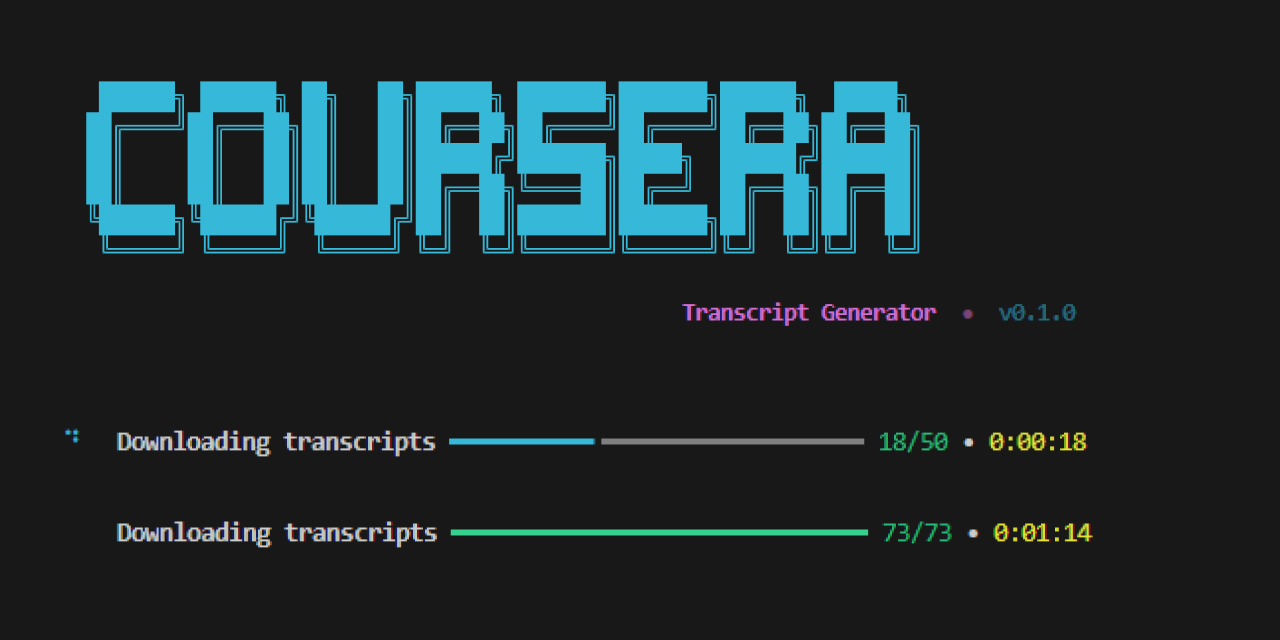
|
|
1
|
-
Metadata-Version: 2.4
|
|
2
|
-
Name: coursera-transcripts
|
|
3
|
-
Version: 0.1.
|
|
4
|
-
Summary: CLI tool to extract Coursera course transcripts/subtitles
|
|
5
|
-
Author-email: Kavin <your-email@example.com>
|
|
6
|
-
License: MIT
|
|
7
|
-
Classifier: Programming Language :: Python :: 3
|
|
8
|
-
Classifier: Programming Language :: Python :: 3.10
|
|
9
|
-
Classifier: Programming Language :: Python :: 3.11
|
|
10
|
-
Classifier: Programming Language :: Python :: 3.12
|
|
11
|
-
Classifier: License :: OSI Approved :: MIT License
|
|
12
|
-
Classifier: Operating System :: OS Independent
|
|
13
|
-
Classifier: Environment :: Console
|
|
14
|
-
Requires-Python: >=3.10
|
|
15
|
-
Description-Content-Type: text/markdown
|
|
16
|
-
License-File: LICENSE
|
|
17
|
-
Requires-Dist: requests>=2.31.0
|
|
18
|
-
Requires-Dist: rich>=13.0.0
|
|
19
|
-
Dynamic: license-file
|
|
20
|
-
|
|
21
|
-
# 📚 Coursera Transcript Generator
|
|
22
|
-
|
|
23
|
-
A beautiful CLI tool to bulk-download transcripts and subtitles from any Coursera course you're enrolled in.
|
|
24
|
-
|
|
25
|
-
|
|
26
|
-
|
|
27
|
-

|
|
28
|
-

|
|
29
|
-
|
|
30
|
-
|
|
31
|
-
|
|
32
|
-
|
|
33
|
-
|
|
34
|
-
|
|
35
|
-
- **
|
|
36
|
-
- **
|
|
37
|
-
- **
|
|
38
|
-
- **
|
|
39
|
-
- **
|
|
40
|
-
- **
|
|
41
|
-
|
|
42
|
-
|
|
43
|
-
|
|
44
|
-
|
|
45
|
-
|
|
46
|
-
|
|
47
|
-
|
|
48
|
-
|
|
49
|
-
|
|
50
|
-
|
|
51
|
-
|
|
52
|
-
|
|
53
|
-
|
|
54
|
-
|
|
55
|
-
|
|
56
|
-
|
|
57
|
-
|
|
58
|
-
|
|
59
|
-
|
|
60
|
-
|
|
61
|
-
|
|
62
|
-
|
|
63
|
-
|
|
64
|
-
|
|
65
|
-
|
|
66
|
-
|
|
67
|
-
|
|
68
|
-
|
|
69
|
-
|
|
70
|
-
|
|
71
|
-
|
|
72
|
-
|
|
73
|
-
|
|
74
|
-
|
|
75
|
-
|
|
76
|
-
|
|
77
|
-
|
|
78
|
-
|
|
79
|
-
|
|
80
|
-
--
|
|
81
|
-
--
|
|
82
|
-
--
|
|
83
|
-
--
|
|
84
|
-
|
|
85
|
-
|
|
86
|
-
|
|
87
|
-
|
|
88
|
-
|
|
89
|
-
|
|
|
90
|
-
|
|
|
91
|
-
| `--
|
|
92
|
-
| `--
|
|
93
|
-
| `--
|
|
94
|
-
| `--
|
|
95
|
-
|
|
96
|
-
|
|
97
|
-
|
|
98
|
-
|
|
99
|
-
|
|
100
|
-
|
|
101
|
-
|
|
102
|
-
|
|
103
|
-
|
|
104
|
-
|
|
105
|
-
|
|
106
|
-
|
|
107
|
-
>
|
|
108
|
-
|
|
109
|
-
|
|
110
|
-
|
|
111
|
-
|
|
112
|
-
|
|
113
|
-
|
|
114
|
-
|
|
115
|
-
|
|
116
|
-
|
|
117
|
-
|
|
118
|
-
|
|
119
|
-
|
|
120
|
-
│ ├──
|
|
121
|
-
│
|
|
122
|
-
|
|
123
|
-
|
|
124
|
-
│
|
|
125
|
-
└──
|
|
126
|
-
|
|
127
|
-
|
|
128
|
-
|
|
129
|
-
|
|
130
|
-
|
|
131
|
-
|
|
132
|
-
|
|
133
|
-
|
|
134
|
-
|
|
135
|
-
|
|
136
|
-
|
|
137
|
-
|
|
138
|
-
|
|
139
|
-
|
|
140
|
-
|
|
141
|
-
|
|
142
|
-
|
|
143
|
-
|
|
144
|
-
-
|
|
145
|
-
|
|
146
|
-
|
|
147
|
-
|
|
148
|
-
|
|
149
|
-
|
|
150
|
-
|
|
1
|
+
Metadata-Version: 2.4
|
|
2
|
+
Name: coursera-transcripts
|
|
3
|
+
Version: 0.1.4
|
|
4
|
+
Summary: CLI tool to extract Coursera course transcripts/subtitles
|
|
5
|
+
Author-email: Kavin <your-email@example.com>
|
|
6
|
+
License: MIT
|
|
7
|
+
Classifier: Programming Language :: Python :: 3
|
|
8
|
+
Classifier: Programming Language :: Python :: 3.10
|
|
9
|
+
Classifier: Programming Language :: Python :: 3.11
|
|
10
|
+
Classifier: Programming Language :: Python :: 3.12
|
|
11
|
+
Classifier: License :: OSI Approved :: MIT License
|
|
12
|
+
Classifier: Operating System :: OS Independent
|
|
13
|
+
Classifier: Environment :: Console
|
|
14
|
+
Requires-Python: >=3.10
|
|
15
|
+
Description-Content-Type: text/markdown
|
|
16
|
+
License-File: LICENSE
|
|
17
|
+
Requires-Dist: requests>=2.31.0
|
|
18
|
+
Requires-Dist: rich>=13.0.0
|
|
19
|
+
Dynamic: license-file
|
|
20
|
+
|
|
21
|
+
# 📚 Coursera Transcript Generator
|
|
22
|
+
|
|
23
|
+
A beautiful CLI tool to bulk-download transcripts and subtitles from any Coursera course you're enrolled in.
|
|
24
|
+
|
|
25
|
+

|
|
26
|
+
|
|
27
|
+

|
|
28
|
+

|
|
29
|
+
[](https://pepy.tech/projects/coursera-transcripts)
|
|
30
|
+
|
|
31
|
+
---
|
|
32
|
+
|
|
33
|
+
## ✨ Features
|
|
34
|
+
|
|
35
|
+
- **Interactive prompts** — guided step-by-step experience, no need to memorize flags
|
|
36
|
+
- **Bulk download** — grabs every lecture transcript in a course at once
|
|
37
|
+
- **Organized output** — files are neatly sorted into module folders
|
|
38
|
+
- **Progress tracking** — real-time progress bar with download status
|
|
39
|
+
- **Retry logic** — automatic retries with exponential backoff on failures
|
|
40
|
+
- **Multiple formats** — supports both `.txt` (plain text) and `.srt` (subtitle) formats
|
|
41
|
+
- **Multi-language** — download transcripts in any available language
|
|
42
|
+
|
|
43
|
+
---
|
|
44
|
+
|
|
45
|
+
## 📦 Installation
|
|
46
|
+
|
|
47
|
+
```bash
|
|
48
|
+
# Clone the repo
|
|
49
|
+
git clone https://github.com/your-username/coursera-transcript-generator.git
|
|
50
|
+
cd coursera-transcript-generator
|
|
51
|
+
|
|
52
|
+
# Install in editable mode
|
|
53
|
+
pip install -e .
|
|
54
|
+
```
|
|
55
|
+
|
|
56
|
+
---
|
|
57
|
+
|
|
58
|
+
## 🚀 Usage
|
|
59
|
+
|
|
60
|
+
### Interactive Mode (recommended)
|
|
61
|
+
|
|
62
|
+
Just run the command with no arguments — it will guide you through everything:
|
|
63
|
+
|
|
64
|
+
```bash
|
|
65
|
+
coursera-transcripts
|
|
66
|
+
```
|
|
67
|
+
|
|
68
|
+
You'll be prompted for:
|
|
69
|
+
|
|
70
|
+
1. **CAUTH cookie** — your Coursera authentication token
|
|
71
|
+
2. **Course slug** — the identifier from the course URL
|
|
72
|
+
3. **Options** — language, format, and output directory
|
|
73
|
+
|
|
74
|
+
### CLI Mode
|
|
75
|
+
|
|
76
|
+
Pass everything as flags for scripting / automation:
|
|
77
|
+
|
|
78
|
+
```bash
|
|
79
|
+
coursera-transcripts \
|
|
80
|
+
--cookie "YOUR_CAUTH_VALUE" \
|
|
81
|
+
--slug "machine-learning" \
|
|
82
|
+
--language en \
|
|
83
|
+
--format txt \
|
|
84
|
+
--output ./transcripts
|
|
85
|
+
```
|
|
86
|
+
|
|
87
|
+
### All Options
|
|
88
|
+
|
|
89
|
+
| Flag | Short | Default | Description |
|
|
90
|
+
| ------------ | ----- | ------------ | ------------------------------ |
|
|
91
|
+
| `--cookie` | `-c` | _(prompted)_ | CAUTH cookie value |
|
|
92
|
+
| `--slug` | `-s` | _(prompted)_ | Course slug from URL |
|
|
93
|
+
| `--language` | `-l` | `en` | Subtitle language code |
|
|
94
|
+
| `--format` | | `txt` | Output format (`txt` or `srt`) |
|
|
95
|
+
| `--output` | `-o` | `./output` | Parent output directory |
|
|
96
|
+
|
|
97
|
+
---
|
|
98
|
+
|
|
99
|
+
## 🔑 Getting Your CAUTH Cookie
|
|
100
|
+
|
|
101
|
+
1. Open [coursera.org](https://www.coursera.org) and **log in**
|
|
102
|
+
2. Open **DevTools** (`F12` or `Ctrl+Shift+I`)
|
|
103
|
+
3. Go to **Application** → **Cookies** → `https://www.coursera.org`
|
|
104
|
+
4. Find the cookie named **`CAUTH`**
|
|
105
|
+
5. Copy its **Value**
|
|
106
|
+
|
|
107
|
+
> [!IMPORTANT]
|
|
108
|
+
> You must be **enrolled** in the course to download its transcripts.
|
|
109
|
+
|
|
110
|
+
---
|
|
111
|
+
|
|
112
|
+
## 📁 Output Structure
|
|
113
|
+
|
|
114
|
+
Transcripts are organized by module:
|
|
115
|
+
|
|
116
|
+
```
|
|
117
|
+
output/
|
|
118
|
+
└── machine-learning/
|
|
119
|
+
├── introduction-to-ml/
|
|
120
|
+
│ ├── Welcome to Machine Learning.txt
|
|
121
|
+
│ ├── What is Machine Learning.txt
|
|
122
|
+
│ └── Supervised Learning.txt
|
|
123
|
+
├── linear-regression/
|
|
124
|
+
│ ├── Model Representation.txt
|
|
125
|
+
│ └── Cost Function.txt
|
|
126
|
+
└── ...
|
|
127
|
+
```
|
|
128
|
+
|
|
129
|
+
---
|
|
130
|
+
|
|
131
|
+
## 🔧 Finding the Course Slug
|
|
132
|
+
|
|
133
|
+
The slug is the part of the URL after `/learn/`:
|
|
134
|
+
|
|
135
|
+
```
|
|
136
|
+
https://www.coursera.org/learn/machine-learning
|
|
137
|
+
└── this is the slug
|
|
138
|
+
```
|
|
139
|
+
|
|
140
|
+
---
|
|
141
|
+
|
|
142
|
+
## 📋 Requirements
|
|
143
|
+
|
|
144
|
+
- Python **3.10+**
|
|
145
|
+
- A Coursera account with enrollment in the target course
|
|
146
|
+
|
|
147
|
+
---
|
|
148
|
+
|
|
149
|
+
## 📄 License
|
|
150
|
+
|
|
151
|
+
MIT
|
|
@@ -6,6 +6,7 @@ A beautiful CLI tool to bulk-download transcripts and subtitles from any Courser
|
|
|
6
6
|
|
|
7
7
|

|
|
8
8
|

|
|
9
|
+
[](https://pepy.tech/projects/coursera-transcripts)
|
|
9
10
|
|
|
10
11
|
---
|
|
11
12
|
|
|
@@ -1,6 +1,6 @@
|
|
|
1
1
|
[project]
|
|
2
2
|
name = "coursera-transcripts"
|
|
3
|
-
|
|
3
|
+
dynamic = ["version"]
|
|
4
4
|
description = "CLI tool to extract Coursera course transcripts/subtitles"
|
|
5
5
|
readme = "README.md"
|
|
6
6
|
authors = [
|
|
@@ -28,3 +28,6 @@ coursera-transcripts = "coursera_transcripts.cli:main"
|
|
|
28
28
|
[build-system]
|
|
29
29
|
requires = ["setuptools>=68.0"]
|
|
30
30
|
build-backend = "setuptools.build_meta"
|
|
31
|
+
|
|
32
|
+
[tool.setuptools.dynamic]
|
|
33
|
+
version = {attr = "coursera_transcripts.__version__"}
|
|
@@ -1,4 +1,4 @@
|
|
|
1
|
-
[egg_info]
|
|
2
|
-
tag_build =
|
|
3
|
-
tag_date = 0
|
|
4
|
-
|
|
1
|
+
[egg_info]
|
|
2
|
+
tag_build =
|
|
3
|
+
tag_date = 0
|
|
4
|
+
|
|
@@ -0,0 +1 @@
|
|
|
1
|
+
__version__ = "0.1.4"
|
|
@@ -10,6 +10,7 @@ from rich.theme import Theme
|
|
|
10
10
|
|
|
11
11
|
from .api import CourseAPI
|
|
12
12
|
from .downloader import TranscriptDownloader
|
|
13
|
+
from . import __version__
|
|
13
14
|
|
|
14
15
|
# ── Custom theme ──────────────────────────────────────────────────────
|
|
15
16
|
custom_theme = Theme({
|
|
@@ -38,7 +39,7 @@ def _show_banner() -> None:
|
|
|
38
39
|
console.print(BANNER)
|
|
39
40
|
subtitle = Text("Transcript Generator", style="bold bright_magenta")
|
|
40
41
|
subtitle.append(" • ", style="dim")
|
|
41
|
-
subtitle.append("
|
|
42
|
+
subtitle.append(f"v{__version__}", style="dim bright_cyan")
|
|
42
43
|
console.print(subtitle, justify="center")
|
|
43
44
|
console.print()
|
|
44
45
|
|
{coursera_transcripts-0.1.2 → coursera_transcripts-0.1.4/src/coursera_transcripts.egg-info}/PKG-INFO
RENAMED
|
@@ -1,150 +1,151 @@
|
|
|
1
|
-
Metadata-Version: 2.4
|
|
2
|
-
Name: coursera-transcripts
|
|
3
|
-
Version: 0.1.
|
|
4
|
-
Summary: CLI tool to extract Coursera course transcripts/subtitles
|
|
5
|
-
Author-email: Kavin <your-email@example.com>
|
|
6
|
-
License: MIT
|
|
7
|
-
Classifier: Programming Language :: Python :: 3
|
|
8
|
-
Classifier: Programming Language :: Python :: 3.10
|
|
9
|
-
Classifier: Programming Language :: Python :: 3.11
|
|
10
|
-
Classifier: Programming Language :: Python :: 3.12
|
|
11
|
-
Classifier: License :: OSI Approved :: MIT License
|
|
12
|
-
Classifier: Operating System :: OS Independent
|
|
13
|
-
Classifier: Environment :: Console
|
|
14
|
-
Requires-Python: >=3.10
|
|
15
|
-
Description-Content-Type: text/markdown
|
|
16
|
-
License-File: LICENSE
|
|
17
|
-
Requires-Dist: requests>=2.31.0
|
|
18
|
-
Requires-Dist: rich>=13.0.0
|
|
19
|
-
Dynamic: license-file
|
|
20
|
-
|
|
21
|
-
# 📚 Coursera Transcript Generator
|
|
22
|
-
|
|
23
|
-
A beautiful CLI tool to bulk-download transcripts and subtitles from any Coursera course you're enrolled in.
|
|
24
|
-
|
|
25
|
-

|
|
26
|
-
|
|
27
|
-

|
|
28
|
-

|
|
29
|
-
|
|
30
|
-
|
|
31
|
-
|
|
32
|
-
|
|
33
|
-
|
|
34
|
-
|
|
35
|
-
- **
|
|
36
|
-
- **
|
|
37
|
-
- **
|
|
38
|
-
- **
|
|
39
|
-
- **
|
|
40
|
-
- **
|
|
41
|
-
|
|
42
|
-
|
|
43
|
-
|
|
44
|
-
|
|
45
|
-
|
|
46
|
-
|
|
47
|
-
|
|
48
|
-
|
|
49
|
-
|
|
50
|
-
|
|
51
|
-
|
|
52
|
-
|
|
53
|
-
|
|
54
|
-
|
|
55
|
-
|
|
56
|
-
|
|
57
|
-
|
|
58
|
-
|
|
59
|
-
|
|
60
|
-
|
|
61
|
-
|
|
62
|
-
|
|
63
|
-
|
|
64
|
-
|
|
65
|
-
|
|
66
|
-
|
|
67
|
-
|
|
68
|
-
|
|
69
|
-
|
|
70
|
-
|
|
71
|
-
|
|
72
|
-
|
|
73
|
-
|
|
74
|
-
|
|
75
|
-
|
|
76
|
-
|
|
77
|
-
|
|
78
|
-
|
|
79
|
-
|
|
80
|
-
--
|
|
81
|
-
--
|
|
82
|
-
--
|
|
83
|
-
--
|
|
84
|
-
|
|
85
|
-
|
|
86
|
-
|
|
87
|
-
|
|
88
|
-
|
|
89
|
-
|
|
|
90
|
-
|
|
|
91
|
-
| `--
|
|
92
|
-
| `--
|
|
93
|
-
| `--
|
|
94
|
-
| `--
|
|
95
|
-
|
|
96
|
-
|
|
97
|
-
|
|
98
|
-
|
|
99
|
-
|
|
100
|
-
|
|
101
|
-
|
|
102
|
-
|
|
103
|
-
|
|
104
|
-
|
|
105
|
-
|
|
106
|
-
|
|
107
|
-
>
|
|
108
|
-
|
|
109
|
-
|
|
110
|
-
|
|
111
|
-
|
|
112
|
-
|
|
113
|
-
|
|
114
|
-
|
|
115
|
-
|
|
116
|
-
|
|
117
|
-
|
|
118
|
-
|
|
119
|
-
|
|
120
|
-
│ ├──
|
|
121
|
-
│
|
|
122
|
-
|
|
123
|
-
|
|
124
|
-
│
|
|
125
|
-
└──
|
|
126
|
-
|
|
127
|
-
|
|
128
|
-
|
|
129
|
-
|
|
130
|
-
|
|
131
|
-
|
|
132
|
-
|
|
133
|
-
|
|
134
|
-
|
|
135
|
-
|
|
136
|
-
|
|
137
|
-
|
|
138
|
-
|
|
139
|
-
|
|
140
|
-
|
|
141
|
-
|
|
142
|
-
|
|
143
|
-
|
|
144
|
-
-
|
|
145
|
-
|
|
146
|
-
|
|
147
|
-
|
|
148
|
-
|
|
149
|
-
|
|
150
|
-
|
|
1
|
+
Metadata-Version: 2.4
|
|
2
|
+
Name: coursera-transcripts
|
|
3
|
+
Version: 0.1.4
|
|
4
|
+
Summary: CLI tool to extract Coursera course transcripts/subtitles
|
|
5
|
+
Author-email: Kavin <your-email@example.com>
|
|
6
|
+
License: MIT
|
|
7
|
+
Classifier: Programming Language :: Python :: 3
|
|
8
|
+
Classifier: Programming Language :: Python :: 3.10
|
|
9
|
+
Classifier: Programming Language :: Python :: 3.11
|
|
10
|
+
Classifier: Programming Language :: Python :: 3.12
|
|
11
|
+
Classifier: License :: OSI Approved :: MIT License
|
|
12
|
+
Classifier: Operating System :: OS Independent
|
|
13
|
+
Classifier: Environment :: Console
|
|
14
|
+
Requires-Python: >=3.10
|
|
15
|
+
Description-Content-Type: text/markdown
|
|
16
|
+
License-File: LICENSE
|
|
17
|
+
Requires-Dist: requests>=2.31.0
|
|
18
|
+
Requires-Dist: rich>=13.0.0
|
|
19
|
+
Dynamic: license-file
|
|
20
|
+
|
|
21
|
+
# 📚 Coursera Transcript Generator
|
|
22
|
+
|
|
23
|
+
A beautiful CLI tool to bulk-download transcripts and subtitles from any Coursera course you're enrolled in.
|
|
24
|
+
|
|
25
|
+

|
|
26
|
+
|
|
27
|
+

|
|
28
|
+

|
|
29
|
+
[](https://pepy.tech/projects/coursera-transcripts)
|
|
30
|
+
|
|
31
|
+
---
|
|
32
|
+
|
|
33
|
+
## ✨ Features
|
|
34
|
+
|
|
35
|
+
- **Interactive prompts** — guided step-by-step experience, no need to memorize flags
|
|
36
|
+
- **Bulk download** — grabs every lecture transcript in a course at once
|
|
37
|
+
- **Organized output** — files are neatly sorted into module folders
|
|
38
|
+
- **Progress tracking** — real-time progress bar with download status
|
|
39
|
+
- **Retry logic** — automatic retries with exponential backoff on failures
|
|
40
|
+
- **Multiple formats** — supports both `.txt` (plain text) and `.srt` (subtitle) formats
|
|
41
|
+
- **Multi-language** — download transcripts in any available language
|
|
42
|
+
|
|
43
|
+
---
|
|
44
|
+
|
|
45
|
+
## 📦 Installation
|
|
46
|
+
|
|
47
|
+
```bash
|
|
48
|
+
# Clone the repo
|
|
49
|
+
git clone https://github.com/your-username/coursera-transcript-generator.git
|
|
50
|
+
cd coursera-transcript-generator
|
|
51
|
+
|
|
52
|
+
# Install in editable mode
|
|
53
|
+
pip install -e .
|
|
54
|
+
```
|
|
55
|
+
|
|
56
|
+
---
|
|
57
|
+
|
|
58
|
+
## 🚀 Usage
|
|
59
|
+
|
|
60
|
+
### Interactive Mode (recommended)
|
|
61
|
+
|
|
62
|
+
Just run the command with no arguments — it will guide you through everything:
|
|
63
|
+
|
|
64
|
+
```bash
|
|
65
|
+
coursera-transcripts
|
|
66
|
+
```
|
|
67
|
+
|
|
68
|
+
You'll be prompted for:
|
|
69
|
+
|
|
70
|
+
1. **CAUTH cookie** — your Coursera authentication token
|
|
71
|
+
2. **Course slug** — the identifier from the course URL
|
|
72
|
+
3. **Options** — language, format, and output directory
|
|
73
|
+
|
|
74
|
+
### CLI Mode
|
|
75
|
+
|
|
76
|
+
Pass everything as flags for scripting / automation:
|
|
77
|
+
|
|
78
|
+
```bash
|
|
79
|
+
coursera-transcripts \
|
|
80
|
+
--cookie "YOUR_CAUTH_VALUE" \
|
|
81
|
+
--slug "machine-learning" \
|
|
82
|
+
--language en \
|
|
83
|
+
--format txt \
|
|
84
|
+
--output ./transcripts
|
|
85
|
+
```
|
|
86
|
+
|
|
87
|
+
### All Options
|
|
88
|
+
|
|
89
|
+
| Flag | Short | Default | Description |
|
|
90
|
+
| ------------ | ----- | ------------ | ------------------------------ |
|
|
91
|
+
| `--cookie` | `-c` | _(prompted)_ | CAUTH cookie value |
|
|
92
|
+
| `--slug` | `-s` | _(prompted)_ | Course slug from URL |
|
|
93
|
+
| `--language` | `-l` | `en` | Subtitle language code |
|
|
94
|
+
| `--format` | | `txt` | Output format (`txt` or `srt`) |
|
|
95
|
+
| `--output` | `-o` | `./output` | Parent output directory |
|
|
96
|
+
|
|
97
|
+
---
|
|
98
|
+
|
|
99
|
+
## 🔑 Getting Your CAUTH Cookie
|
|
100
|
+
|
|
101
|
+
1. Open [coursera.org](https://www.coursera.org) and **log in**
|
|
102
|
+
2. Open **DevTools** (`F12` or `Ctrl+Shift+I`)
|
|
103
|
+
3. Go to **Application** → **Cookies** → `https://www.coursera.org`
|
|
104
|
+
4. Find the cookie named **`CAUTH`**
|
|
105
|
+
5. Copy its **Value**
|
|
106
|
+
|
|
107
|
+
> [!IMPORTANT]
|
|
108
|
+
> You must be **enrolled** in the course to download its transcripts.
|
|
109
|
+
|
|
110
|
+
---
|
|
111
|
+
|
|
112
|
+
## 📁 Output Structure
|
|
113
|
+
|
|
114
|
+
Transcripts are organized by module:
|
|
115
|
+
|
|
116
|
+
```
|
|
117
|
+
output/
|
|
118
|
+
└── machine-learning/
|
|
119
|
+
├── introduction-to-ml/
|
|
120
|
+
│ ├── Welcome to Machine Learning.txt
|
|
121
|
+
│ ├── What is Machine Learning.txt
|
|
122
|
+
│ └── Supervised Learning.txt
|
|
123
|
+
├── linear-regression/
|
|
124
|
+
│ ├── Model Representation.txt
|
|
125
|
+
│ └── Cost Function.txt
|
|
126
|
+
└── ...
|
|
127
|
+
```
|
|
128
|
+
|
|
129
|
+
---
|
|
130
|
+
|
|
131
|
+
## 🔧 Finding the Course Slug
|
|
132
|
+
|
|
133
|
+
The slug is the part of the URL after `/learn/`:
|
|
134
|
+
|
|
135
|
+
```
|
|
136
|
+
https://www.coursera.org/learn/machine-learning
|
|
137
|
+
└── this is the slug
|
|
138
|
+
```
|
|
139
|
+
|
|
140
|
+
---
|
|
141
|
+
|
|
142
|
+
## 📋 Requirements
|
|
143
|
+
|
|
144
|
+
- Python **3.10+**
|
|
145
|
+
- A Coursera account with enrollment in the target course
|
|
146
|
+
|
|
147
|
+
---
|
|
148
|
+
|
|
149
|
+
## 📄 License
|
|
150
|
+
|
|
151
|
+
MIT
|
|
File without changes
|
|
File without changes
|
|
File without changes
|
{coursera_transcripts-0.1.2 → coursera_transcripts-0.1.4}/src/coursera_transcripts/downloader.py
RENAMED
|
File without changes
|
|
File without changes
|
|
File without changes
|
|
File without changes
|
|
File without changes
|
|
File without changes
|