copyparty 1.14.0__tar.gz → 1.19.22__tar.gz
This diff represents the content of publicly available package versions that have been released to one of the supported registries. The information contained in this diff is provided for informational purposes only and reflects changes between package versions as they appear in their respective public registries.
- {copyparty-1.14.0 → copyparty-1.19.22}/PKG-INFO +1055 -104
- {copyparty-1.14.0 → copyparty-1.19.22}/README.md +1042 -102
- {copyparty-1.14.0 → copyparty-1.19.22}/copyparty/__init__.py +83 -1
- {copyparty-1.14.0 → copyparty-1.19.22}/copyparty/__main__.py +679 -259
- {copyparty-1.14.0 → copyparty-1.19.22}/copyparty/__version__.py +3 -3
- {copyparty-1.14.0 → copyparty-1.19.22}/copyparty/authsrv.py +1319 -193
- copyparty-1.19.22/copyparty/bos/bos.py +145 -0
- {copyparty-1.14.0 → copyparty-1.19.22}/copyparty/broker_mp.py +46 -7
- {copyparty-1.14.0 → copyparty-1.19.22}/copyparty/broker_mpw.py +27 -19
- {copyparty-1.14.0 → copyparty-1.19.22}/copyparty/broker_thr.py +7 -11
- {copyparty-1.14.0 → copyparty-1.19.22}/copyparty/broker_util.py +13 -2
- {copyparty-1.14.0 → copyparty-1.19.22}/copyparty/cert.py +40 -15
- copyparty-1.19.22/copyparty/cfg.py +433 -0
- {copyparty-1.14.0 → copyparty-1.19.22}/copyparty/dxml.py +51 -3
- copyparty-1.19.22/copyparty/fsutil.py +256 -0
- {copyparty-1.14.0 → copyparty-1.19.22}/copyparty/ftpd.py +86 -54
- {copyparty-1.14.0 → copyparty-1.19.22}/copyparty/httpcli.py +2835 -825
- {copyparty-1.14.0 → copyparty-1.19.22}/copyparty/httpconn.py +5 -4
- {copyparty-1.14.0 → copyparty-1.19.22}/copyparty/httpsrv.py +94 -32
- {copyparty-1.14.0 → copyparty-1.19.22}/copyparty/ico.py +13 -2
- {copyparty-1.14.0 → copyparty-1.19.22}/copyparty/mdns.py +73 -23
- {copyparty-1.14.0 → copyparty-1.19.22}/copyparty/metrics.py +8 -5
- {copyparty-1.14.0 → copyparty-1.19.22}/copyparty/mtag.py +143 -16
- {copyparty-1.14.0 → copyparty-1.19.22}/copyparty/multicast.py +8 -8
- {copyparty-1.14.0 → copyparty-1.19.22}/copyparty/pwhash.py +16 -9
- copyparty-1.19.22/copyparty/qrkode.py +107 -0
- copyparty-1.19.22/copyparty/res/COPYING.txt +223 -0
- {copyparty-1.14.0 → copyparty-1.19.22}/copyparty/smbd.py +33 -25
- {copyparty-1.14.0 → copyparty-1.19.22}/copyparty/ssdp.py +1 -1
- {copyparty-1.14.0 → copyparty-1.19.22}/copyparty/stolen/dnslib/dns.py +2 -2
- {copyparty-1.14.0 → copyparty-1.19.22}/copyparty/stolen/dnslib/label.py +21 -1
- {copyparty-1.14.0 → copyparty-1.19.22}/copyparty/stolen/qrcodegen.py +1 -28
- {copyparty-1.14.0 → copyparty-1.19.22}/copyparty/sutil.py +5 -4
- {copyparty-1.14.0 → copyparty-1.19.22}/copyparty/svchub.py +606 -131
- {copyparty-1.14.0 → copyparty-1.19.22}/copyparty/szip.py +13 -10
- {copyparty-1.14.0 → copyparty-1.19.22}/copyparty/tcpsrv.py +100 -25
- {copyparty-1.14.0 → copyparty-1.19.22}/copyparty/tftpd.py +67 -32
- {copyparty-1.14.0 → copyparty-1.19.22}/copyparty/th_cli.py +38 -11
- {copyparty-1.14.0 → copyparty-1.19.22}/copyparty/th_srv.py +570 -128
- {copyparty-1.14.0 → copyparty-1.19.22}/copyparty/u2idx.py +88 -36
- {copyparty-1.14.0 → copyparty-1.19.22}/copyparty/up2k.py +1389 -464
- {copyparty-1.14.0 → copyparty-1.19.22}/copyparty/util.py +1140 -286
- {copyparty-1.14.0 → copyparty-1.19.22}/copyparty/web/a/partyfuse.py +250 -365
- {copyparty-1.14.0 → copyparty-1.19.22}/copyparty/web/a/u2c.py +601 -217
- copyparty-1.19.22/copyparty/web/a/webdav-cfg.txt.gz +0 -0
- copyparty-1.19.22/copyparty/web/baguettebox.js.gz +0 -0
- copyparty-1.19.22/copyparty/web/browser.css.gz +0 -0
- {copyparty-1.14.0 → copyparty-1.19.22}/copyparty/web/browser.html +11 -15
- copyparty-1.19.22/copyparty/web/browser.js.gz +0 -0
- {copyparty-1.14.0 → copyparty-1.19.22}/copyparty/web/dbg-audio.js.gz +0 -0
- copyparty-1.19.22/copyparty/web/deps/busy.mp3.gz +0 -0
- copyparty-1.19.22/copyparty/web/deps/easymde.css.gz +0 -0
- copyparty-1.19.22/copyparty/web/deps/easymde.js.gz +0 -0
- copyparty-1.19.22/copyparty/web/deps/fuse.py +1064 -0
- copyparty-1.19.22/copyparty/web/deps/marked.js.gz +0 -0
- {copyparty-1.14.0 → copyparty-1.19.22}/copyparty/web/deps/mini-fa.css.gz +0 -0
- {copyparty-1.14.0 → copyparty-1.19.22}/copyparty/web/deps/prism.css.gz +0 -0
- copyparty-1.19.22/copyparty/web/deps/prism.js.gz +0 -0
- {copyparty-1.14.0 → copyparty-1.19.22}/copyparty/web/deps/prismd.css.gz +0 -0
- copyparty-1.19.22/copyparty/web/deps/scp.woff2 +0 -0
- {copyparty-1.14.0 → copyparty-1.19.22}/copyparty/web/deps/sha512.ac.js.gz +0 -0
- copyparty-1.19.22/copyparty/web/deps/sha512.hw.js.gz +0 -0
- copyparty-1.19.22/copyparty/web/idp.html +55 -0
- {copyparty-1.14.0 → copyparty-1.19.22}/copyparty/web/md.css.gz +0 -0
- {copyparty-1.14.0 → copyparty-1.19.22}/copyparty/web/md.html +5 -3
- copyparty-1.19.22/copyparty/web/md.js.gz +0 -0
- copyparty-1.19.22/copyparty/web/md2.css.gz +0 -0
- copyparty-1.19.22/copyparty/web/md2.js.gz +0 -0
- {copyparty-1.14.0 → copyparty-1.19.22}/copyparty/web/mde.css.gz +0 -0
- {copyparty-1.14.0 → copyparty-1.19.22}/copyparty/web/mde.html +3 -2
- copyparty-1.19.22/copyparty/web/mde.js.gz +0 -0
- {copyparty-1.14.0 → copyparty-1.19.22}/copyparty/web/msg.html +7 -2
- copyparty-1.19.22/copyparty/web/opds.xml +31 -0
- copyparty-1.19.22/copyparty/web/rups.css.gz +0 -0
- copyparty-1.19.22/copyparty/web/rups.html +44 -0
- copyparty-1.19.22/copyparty/web/rups.js.gz +0 -0
- copyparty-1.19.22/copyparty/web/shares.css.gz +0 -0
- {copyparty-1.14.0 → copyparty-1.19.22}/copyparty/web/shares.html +30 -20
- copyparty-1.19.22/copyparty/web/shares.js.gz +0 -0
- copyparty-1.19.22/copyparty/web/splash.css.gz +0 -0
- copyparty-1.19.22/copyparty/web/splash.html +229 -0
- copyparty-1.19.22/copyparty/web/splash.js.gz +0 -0
- {copyparty-1.14.0 → copyparty-1.19.22}/copyparty/web/svcs.html +153 -39
- copyparty-1.19.22/copyparty/web/svcs.js.gz +0 -0
- copyparty-1.19.22/copyparty/web/tl/chi.js.gz +0 -0
- copyparty-1.19.22/copyparty/web/tl/cze.js.gz +0 -0
- copyparty-1.19.22/copyparty/web/tl/deu.js.gz +0 -0
- copyparty-1.19.22/copyparty/web/tl/epo.js.gz +0 -0
- copyparty-1.19.22/copyparty/web/tl/fin.js.gz +0 -0
- copyparty-1.19.22/copyparty/web/tl/fra.js.gz +0 -0
- copyparty-1.19.22/copyparty/web/tl/grc.js.gz +0 -0
- copyparty-1.19.22/copyparty/web/tl/ita.js.gz +0 -0
- copyparty-1.19.22/copyparty/web/tl/kor.js.gz +0 -0
- copyparty-1.19.22/copyparty/web/tl/nld.js.gz +0 -0
- copyparty-1.19.22/copyparty/web/tl/nno.js.gz +0 -0
- copyparty-1.19.22/copyparty/web/tl/nor.js.gz +0 -0
- copyparty-1.19.22/copyparty/web/tl/pol.js.gz +0 -0
- copyparty-1.19.22/copyparty/web/tl/por.js.gz +0 -0
- copyparty-1.19.22/copyparty/web/tl/rus.js.gz +0 -0
- copyparty-1.19.22/copyparty/web/tl/spa.js.gz +0 -0
- copyparty-1.19.22/copyparty/web/tl/swe.js.gz +0 -0
- copyparty-1.19.22/copyparty/web/tl/tur.js.gz +0 -0
- copyparty-1.19.22/copyparty/web/tl/ukr.js.gz +0 -0
- copyparty-1.19.22/copyparty/web/ui.css.gz +0 -0
- copyparty-1.19.22/copyparty/web/up2k.js.gz +0 -0
- copyparty-1.19.22/copyparty/web/util.js.gz +0 -0
- copyparty-1.19.22/copyparty/web/w.hash.js.gz +0 -0
- {copyparty-1.14.0 → copyparty-1.19.22}/copyparty.egg-info/PKG-INFO +1055 -104
- {copyparty-1.14.0 → copyparty-1.19.22}/copyparty.egg-info/SOURCES.txt +28 -8
- {copyparty-1.14.0 → copyparty-1.19.22}/copyparty.egg-info/requires.txt +11 -0
- {copyparty-1.14.0 → copyparty-1.19.22}/pyproject.toml +23 -2
- copyparty-1.14.0/copyparty/bos/bos.py +0 -82
- copyparty-1.14.0/copyparty/cfg.py +0 -244
- copyparty-1.14.0/copyparty/fsutil.py +0 -166
- copyparty-1.14.0/copyparty/res/COPYING.txt +0 -159
- copyparty-1.14.0/copyparty/web/a/webdav-cfg.bat +0 -45
- copyparty-1.14.0/copyparty/web/baguettebox.js.gz +0 -0
- copyparty-1.14.0/copyparty/web/browser.css.gz +0 -0
- copyparty-1.14.0/copyparty/web/browser.js.gz +0 -0
- copyparty-1.14.0/copyparty/web/dd/2.png +0 -0
- copyparty-1.14.0/copyparty/web/dd/3.png +0 -0
- copyparty-1.14.0/copyparty/web/dd/4.png +0 -0
- copyparty-1.14.0/copyparty/web/dd/5.png +0 -0
- copyparty-1.14.0/copyparty/web/deps/__init__.py +0 -0
- copyparty-1.14.0/copyparty/web/deps/busy.mp3.gz +0 -0
- copyparty-1.14.0/copyparty/web/deps/easymde.css.gz +0 -0
- copyparty-1.14.0/copyparty/web/deps/easymde.js.gz +0 -0
- copyparty-1.14.0/copyparty/web/deps/marked.js.gz +0 -0
- copyparty-1.14.0/copyparty/web/deps/prism.js.gz +0 -0
- copyparty-1.14.0/copyparty/web/deps/scp.woff2 +0 -0
- copyparty-1.14.0/copyparty/web/deps/sha512.hw.js.gz +0 -0
- copyparty-1.14.0/copyparty/web/md.js.gz +0 -0
- copyparty-1.14.0/copyparty/web/md2.css.gz +0 -0
- copyparty-1.14.0/copyparty/web/md2.js.gz +0 -0
- copyparty-1.14.0/copyparty/web/mde.js.gz +0 -0
- copyparty-1.14.0/copyparty/web/msg.css.gz +0 -0
- copyparty-1.14.0/copyparty/web/shares.css.gz +0 -0
- copyparty-1.14.0/copyparty/web/shares.js.gz +0 -0
- copyparty-1.14.0/copyparty/web/splash.css.gz +0 -0
- copyparty-1.14.0/copyparty/web/splash.html +0 -134
- copyparty-1.14.0/copyparty/web/splash.js.gz +0 -0
- copyparty-1.14.0/copyparty/web/svcs.js.gz +0 -0
- copyparty-1.14.0/copyparty/web/ui.css.gz +0 -0
- copyparty-1.14.0/copyparty/web/up2k.js.gz +0 -0
- copyparty-1.14.0/copyparty/web/util.js.gz +0 -0
- copyparty-1.14.0/copyparty/web/w.hash.js.gz +0 -0
- {copyparty-1.14.0 → copyparty-1.19.22}/LICENSE +0 -0
- {copyparty-1.14.0 → copyparty-1.19.22}/copyparty/bos/__init__.py +0 -0
- {copyparty-1.14.0 → copyparty-1.19.22}/copyparty/bos/path.py +0 -0
- {copyparty-1.14.0 → copyparty-1.19.22}/copyparty/res/__init__.py +0 -0
- {copyparty-1.14.0 → copyparty-1.19.22}/copyparty/res/insecure.pem +0 -0
- {copyparty-1.14.0 → copyparty-1.19.22}/copyparty/star.py +0 -0
- {copyparty-1.14.0 → copyparty-1.19.22}/copyparty/stolen/__init__.py +0 -0
- {copyparty-1.14.0 → copyparty-1.19.22}/copyparty/stolen/dnslib/__init__.py +0 -0
- {copyparty-1.14.0 → copyparty-1.19.22}/copyparty/stolen/dnslib/bimap.py +0 -0
- {copyparty-1.14.0 → copyparty-1.19.22}/copyparty/stolen/dnslib/bit.py +0 -0
- {copyparty-1.14.0 → copyparty-1.19.22}/copyparty/stolen/dnslib/buffer.py +0 -0
- {copyparty-1.14.0 → copyparty-1.19.22}/copyparty/stolen/dnslib/lex.py +0 -0
- {copyparty-1.14.0 → copyparty-1.19.22}/copyparty/stolen/dnslib/ranges.py +0 -0
- {copyparty-1.14.0 → copyparty-1.19.22}/copyparty/stolen/ifaddr/__init__.py +0 -0
- {copyparty-1.14.0 → copyparty-1.19.22}/copyparty/stolen/ifaddr/_posix.py +0 -0
- {copyparty-1.14.0 → copyparty-1.19.22}/copyparty/stolen/ifaddr/_shared.py +0 -0
- {copyparty-1.14.0 → copyparty-1.19.22}/copyparty/stolen/ifaddr/_win32.py +0 -0
- {copyparty-1.14.0 → copyparty-1.19.22}/copyparty/stolen/surrogateescape.py +0 -0
- {copyparty-1.14.0 → copyparty-1.19.22}/copyparty/web/a/__init__.py +0 -0
- {copyparty-1.14.0 → copyparty-1.19.22}/copyparty/web/browser2.html +0 -0
- {copyparty-1.14.0 → copyparty-1.19.22}/copyparty/web/cf.html +0 -0
- {copyparty-1.14.0/copyparty/web/dd → copyparty-1.19.22/copyparty/web/deps}/__init__.py +0 -0
- {copyparty-1.14.0 → copyparty-1.19.22}/copyparty/web/deps/mini-fa.woff +0 -0
- {copyparty-1.14.0 → copyparty-1.19.22}/copyparty.egg-info/dependency_links.txt +0 -0
- {copyparty-1.14.0 → copyparty-1.19.22}/copyparty.egg-info/entry_points.txt +0 -0
- {copyparty-1.14.0 → copyparty-1.19.22}/copyparty.egg-info/top_level.txt +0 -0
- {copyparty-1.14.0 → copyparty-1.19.22}/setup.cfg +0 -0
|
@@ -1,6 +1,6 @@
|
|
|
1
|
-
Metadata-Version: 2.
|
|
1
|
+
Metadata-Version: 2.4
|
|
2
2
|
Name: copyparty
|
|
3
|
-
Version: 1.
|
|
3
|
+
Version: 1.19.22
|
|
4
4
|
Summary: Portable file server with accelerated resumable uploads, deduplication, WebDAV, FTP, zeroconf, media indexer, video thumbnails, audio transcoding, and write-only folders
|
|
5
5
|
Author-email: ed <copyparty@ocv.me>
|
|
6
6
|
License: MIT
|
|
@@ -21,6 +21,7 @@ Classifier: Programming Language :: Python :: 3.9
|
|
|
21
21
|
Classifier: Programming Language :: Python :: 3.10
|
|
22
22
|
Classifier: Programming Language :: Python :: 3.11
|
|
23
23
|
Classifier: Programming Language :: Python :: 3.12
|
|
24
|
+
Classifier: Programming Language :: Python :: 3.13
|
|
24
25
|
Classifier: Programming Language :: Python :: Implementation :: CPython
|
|
25
26
|
Classifier: Programming Language :: Python :: Implementation :: Jython
|
|
26
27
|
Classifier: Programming Language :: Python :: Implementation :: PyPy
|
|
@@ -36,6 +37,13 @@ Requires-Python: >=3.3
|
|
|
36
37
|
Description-Content-Type: text/markdown
|
|
37
38
|
License-File: LICENSE
|
|
38
39
|
Requires-Dist: Jinja2
|
|
40
|
+
Provides-Extra: all
|
|
41
|
+
Requires-Dist: argon2-cffi; extra == "all"
|
|
42
|
+
Requires-Dist: partftpy>=0.4.0; extra == "all"
|
|
43
|
+
Requires-Dist: Pillow; extra == "all"
|
|
44
|
+
Requires-Dist: pyftpdlib; extra == "all"
|
|
45
|
+
Requires-Dist: pyopenssl; extra == "all"
|
|
46
|
+
Requires-Dist: pyzmq; extra == "all"
|
|
39
47
|
Provides-Extra: thumbnails
|
|
40
48
|
Requires-Dist: Pillow; extra == "thumbnails"
|
|
41
49
|
Provides-Extra: thumbnails2
|
|
@@ -51,8 +59,13 @@ Provides-Extra: tftpd
|
|
|
51
59
|
Requires-Dist: partftpy>=0.4.0; extra == "tftpd"
|
|
52
60
|
Provides-Extra: pwhash
|
|
53
61
|
Requires-Dist: argon2-cffi; extra == "pwhash"
|
|
62
|
+
Provides-Extra: zeromq
|
|
63
|
+
Requires-Dist: pyzmq; extra == "zeromq"
|
|
64
|
+
Dynamic: license-file
|
|
54
65
|
|
|
55
|
-
|
|
66
|
+
<img src="https://github.com/9001/copyparty/raw/hovudstraum/docs/logo.svg" width="250" align="right"/>
|
|
67
|
+
|
|
68
|
+
### 💾🎉 copyparty
|
|
56
69
|
|
|
57
70
|
turn almost any device into a file server with resumable uploads/downloads using [*any*](#browser-support) web browser
|
|
58
71
|
|
|
@@ -60,17 +73,20 @@ turn almost any device into a file server with resumable uploads/downloads using
|
|
|
60
73
|
* 🔌 protocols: [http](#the-browser) // [webdav](#webdav-server) // [ftp](#ftp-server) // [tftp](#tftp-server) // [smb/cifs](#smb-server)
|
|
61
74
|
* 📱 [android app](#android-app) // [iPhone shortcuts](#ios-shortcuts)
|
|
62
75
|
|
|
63
|
-
👉 **[Get started](#quickstart)!** or visit the **[read-only demo server](https://a.ocv.me/pub/demo/)** 👀 running
|
|
76
|
+
👉 **[Get started](#quickstart)!** or visit the **[read-only demo server](https://a.ocv.me/pub/demo/)** 👀 running on a nuc in my basement
|
|
64
77
|
|
|
65
78
|
📷 **screenshots:** [browser](#the-browser) // [upload](#uploading) // [unpost](#unpost) // [thumbnails](#thumbnails) // [search](#searching) // [fsearch](#file-search) // [zip-DL](#zip-downloads) // [md-viewer](#markdown-viewer)
|
|
66
79
|
|
|
67
|
-
🎬 **videos:** [upload](https://a.ocv.me/pub/demo/pics-vids/up2k.webm) // [cli-upload](https://a.ocv.me/pub/demo/pics-vids/u2cli.webm) // [race-the-beam](https://a.ocv.me/pub/g/nerd-stuff/cpp/2024-0418-race-the-beam.webm)
|
|
80
|
+
🎬 **videos:** [upload](https://a.ocv.me/pub/demo/pics-vids/up2k.webm) // [cli-upload](https://a.ocv.me/pub/demo/pics-vids/u2cli.webm) // [race-the-beam](https://a.ocv.me/pub/g/nerd-stuff/cpp/2024-0418-race-the-beam.webm) // 👉 **[feature-showcase](https://a.ocv.me/pub/demo/showcase-hq.webm)** ([youtube](https://www.youtube.com/watch?v=15_-hgsX2V0))
|
|
81
|
+
|
|
82
|
+
made in Norway 🇳🇴
|
|
68
83
|
|
|
69
84
|
|
|
70
85
|
## readme toc
|
|
71
86
|
|
|
72
87
|
* top
|
|
73
88
|
* [quickstart](#quickstart) - just run **[copyparty-sfx.py](https://github.com/9001/copyparty/releases/latest/download/copyparty-sfx.py)** -- that's it! 🎉
|
|
89
|
+
* [mirrors](#mirrors) - other places to download copyparty from
|
|
74
90
|
* [at home](#at-home) - make it accessible over the internet
|
|
75
91
|
* [on servers](#on-servers) - you may also want these, especially on servers
|
|
76
92
|
* [features](#features) - also see [comparison to similar software](./docs/versus.md)
|
|
@@ -95,12 +111,19 @@ turn almost any device into a file server with resumable uploads/downloads using
|
|
|
95
111
|
* [unpost](#unpost) - undo/delete accidental uploads
|
|
96
112
|
* [self-destruct](#self-destruct) - uploads can be given a lifetime
|
|
97
113
|
* [race the beam](#race-the-beam) - download files while they're still uploading ([demo video](http://a.ocv.me/pub/g/nerd-stuff/cpp/2024-0418-race-the-beam.webm))
|
|
114
|
+
* [incoming files](#incoming-files) - the control-panel shows the ETA for all incoming files
|
|
98
115
|
* [file manager](#file-manager) - cut/paste, rename, and delete files/folders (if you have permission)
|
|
99
116
|
* [shares](#shares) - share a file or folder by creating a temporary link
|
|
100
117
|
* [batch rename](#batch-rename) - select some files and press `F2` to bring up the rename UI
|
|
118
|
+
* [rss feeds](#rss-feeds) - monitor a folder with your RSS reader
|
|
119
|
+
* [opds feeds](#opds-feeds) - browse and download files from your e-book reader
|
|
120
|
+
* [recent uploads](#recent-uploads) - list all recent uploads
|
|
101
121
|
* [media player](#media-player) - plays almost every audio format there is
|
|
122
|
+
* [playlists](#playlists) - create and play [m3u8](https://en.wikipedia.org/wiki/M3U) playlists
|
|
123
|
+
* [creating a playlist](#creating-a-playlist) - with a standalone mediaplayer or copyparty
|
|
102
124
|
* [audio equalizer](#audio-equalizer) - and [dynamic range compressor](https://en.wikipedia.org/wiki/Dynamic_range_compression)
|
|
103
125
|
* [fix unreliable playback on android](#fix-unreliable-playback-on-android) - due to phone / app settings
|
|
126
|
+
* [textfile viewer](#textfile-viewer) - with realtime streaming of logfiles and such ([demo](https://a.ocv.me/pub/demo/logtail/))
|
|
104
127
|
* [markdown viewer](#markdown-viewer) - and there are *two* editors
|
|
105
128
|
* [markdown vars](#markdown-vars) - dynamic docs with serverside variable expansion
|
|
106
129
|
* [other tricks](#other-tricks)
|
|
@@ -117,37 +140,50 @@ turn almost any device into a file server with resumable uploads/downloads using
|
|
|
117
140
|
* [smb server](#smb-server) - unsafe, slow, not recommended for wan
|
|
118
141
|
* [browser ux](#browser-ux) - tweaking the ui
|
|
119
142
|
* [opengraph](#opengraph) - discord and social-media embeds
|
|
120
|
-
* [file
|
|
143
|
+
* [file deduplication](#file-deduplication) - enable symlink-based upload deduplication
|
|
144
|
+
* [file indexing](#file-indexing) - enable music search, upload-undo, and better dedup
|
|
121
145
|
* [exclude-patterns](#exclude-patterns) - to save some time
|
|
122
146
|
* [filesystem guards](#filesystem-guards) - avoid traversing into other filesystems
|
|
123
147
|
* [periodic rescan](#periodic-rescan) - filesystem monitoring
|
|
124
148
|
* [upload rules](#upload-rules) - set upload rules using volflags
|
|
125
149
|
* [compress uploads](#compress-uploads) - files can be autocompressed on upload
|
|
150
|
+
* [chmod and chown](#chmod-and-chown) - per-volume filesystem-permissions and ownership
|
|
126
151
|
* [other flags](#other-flags)
|
|
127
152
|
* [database location](#database-location) - in-volume (`.hist/up2k.db`, default) or somewhere else
|
|
128
153
|
* [metadata from audio files](#metadata-from-audio-files) - set `-e2t` to index tags on upload
|
|
129
154
|
* [file parser plugins](#file-parser-plugins) - provide custom parsers to index additional tags
|
|
130
155
|
* [event hooks](#event-hooks) - trigger a program on uploads, renames etc ([examples](./bin/hooks/))
|
|
156
|
+
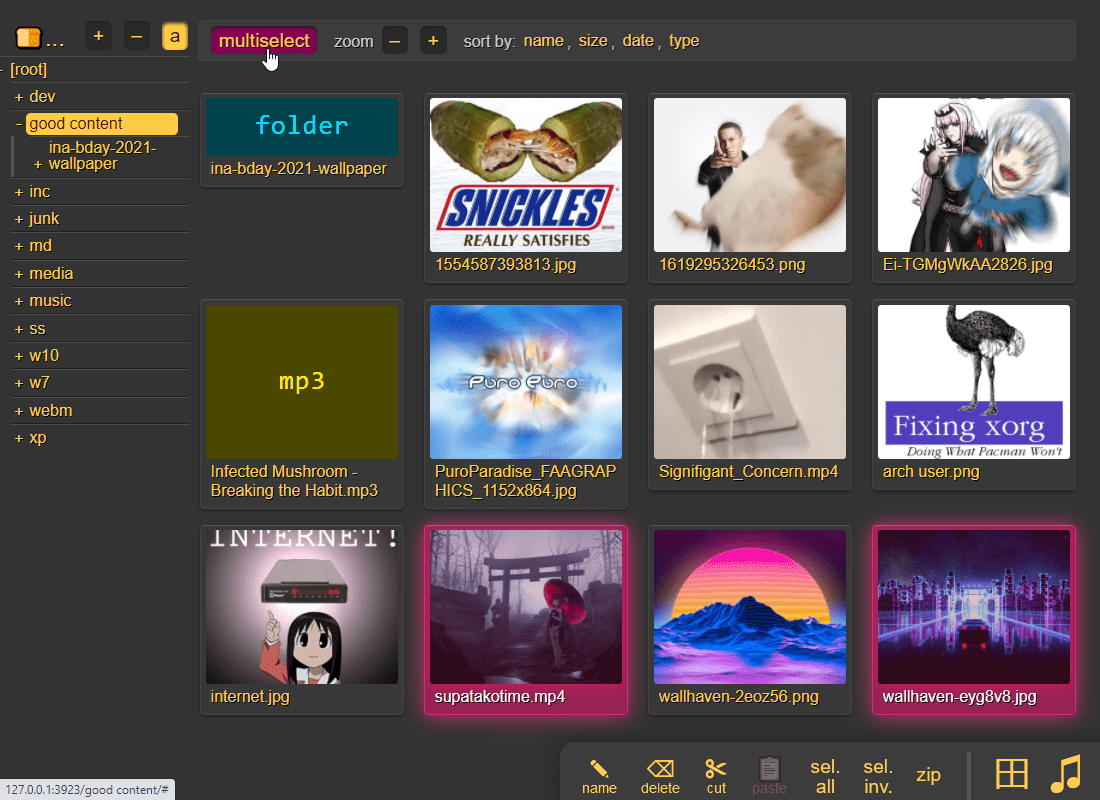
* [zeromq](#zeromq) - event-hooks can send zeromq messages
|
|
131
157
|
* [upload events](#upload-events) - the older, more powerful approach ([examples](./bin/mtag/))
|
|
132
158
|
* [handlers](#handlers) - redefine behavior with plugins ([examples](./bin/handlers/))
|
|
159
|
+
* [ip auth](#ip-auth) - autologin based on IP range (CIDR)
|
|
160
|
+
* [restrict to ip](#restrict-to-ip) - limit a user to certain IP ranges (CIDR)
|
|
133
161
|
* [identity providers](#identity-providers) - replace copyparty passwords with oauth and such
|
|
162
|
+
* [generic header auth](#generic-header-auth) - other ways to auth by header
|
|
134
163
|
* [user-changeable passwords](#user-changeable-passwords) - if permitted, users can change their own passwords
|
|
135
164
|
* [using the cloud as storage](#using-the-cloud-as-storage) - connecting to an aws s3 bucket and similar
|
|
136
|
-
* [hiding from google](#hiding-from-google) - tell search engines you
|
|
165
|
+
* [hiding from google](#hiding-from-google) - tell search engines you don't wanna be indexed
|
|
137
166
|
* [themes](#themes)
|
|
138
167
|
* [complete examples](#complete-examples)
|
|
168
|
+
* [listen on port 80 and 443](#listen-on-port-80-and-443) - become a *real* webserver
|
|
139
169
|
* [reverse-proxy](#reverse-proxy) - running copyparty next to other websites
|
|
140
170
|
* [real-ip](#real-ip) - teaching copyparty how to see client IPs
|
|
171
|
+
* [reverse-proxy performance](#reverse-proxy-performance)
|
|
172
|
+
* [permanent cloudflare tunnel](#permanent-cloudflare-tunnel) - if you have a domain and want to get your copyparty online real quick
|
|
141
173
|
* [prometheus](#prometheus) - metrics/stats can be enabled
|
|
142
174
|
* [other extremely specific features](#other-extremely-specific-features) - you'll never find a use for these
|
|
143
175
|
* [custom mimetypes](#custom-mimetypes) - change the association of a file extension
|
|
176
|
+
* [GDPR compliance](#GDPR-compliance) - imagine using copyparty professionally...
|
|
144
177
|
* [feature chickenbits](#feature-chickenbits) - buggy feature? rip it out
|
|
178
|
+
* [feature beefybits](#feature-beefybits) - force-enable features with known issues on your OS/env
|
|
145
179
|
* [packages](#packages) - the party might be closer than you think
|
|
146
|
-
* [arch package](#arch-package) -
|
|
180
|
+
* [arch package](#arch-package) - `pacman -S copyparty` (in [arch linux extra](https://archlinux.org/packages/extra/any/copyparty/))
|
|
147
181
|
* [fedora package](#fedora-package) - does not exist yet
|
|
182
|
+
* [homebrew formulae](#homebrew-formulae) - `brew install copyparty ffmpeg`
|
|
148
183
|
* [nix package](#nix-package) - `nix profile install github:9001/copyparty`
|
|
149
184
|
* [nixos module](#nixos-module)
|
|
150
185
|
* [browser support](#browser-support) - TLDR: yes
|
|
186
|
+
* [server hall of fame](#server-hall-of-fame) - unexpected things that run copyparty
|
|
151
187
|
* [client examples](#client-examples) - interact with copyparty using non-browser clients
|
|
152
188
|
* [folder sync](#folder-sync) - sync folders to/from copyparty
|
|
153
189
|
* [mount as drive](#mount-as-drive) - a remote copyparty server as a local filesystem
|
|
@@ -164,16 +200,18 @@ turn almost any device into a file server with resumable uploads/downloads using
|
|
|
164
200
|
* [https](#https) - both HTTP and HTTPS are accepted
|
|
165
201
|
* [recovering from crashes](#recovering-from-crashes)
|
|
166
202
|
* [client crashes](#client-crashes)
|
|
167
|
-
* [
|
|
203
|
+
* [firefox wsod](#firefox-wsod) - firefox 87 can crash during uploads
|
|
168
204
|
* [HTTP API](#HTTP-API) - see [devnotes](./docs/devnotes.md#http-api)
|
|
169
205
|
* [dependencies](#dependencies) - mandatory deps
|
|
170
206
|
* [optional dependencies](#optional-dependencies) - install these to enable bonus features
|
|
171
207
|
* [dependency chickenbits](#dependency-chickenbits) - prevent loading an optional dependency
|
|
208
|
+
* [dependency unvendoring](#dependency-unvendoring) - force use of system modules
|
|
172
209
|
* [optional gpl stuff](#optional-gpl-stuff)
|
|
173
210
|
* [sfx](#sfx) - the self-contained "binary" (recommended!)
|
|
174
211
|
* [copyparty.exe](#copypartyexe) - download [copyparty.exe](https://github.com/9001/copyparty/releases/latest/download/copyparty.exe) (win8+) or [copyparty32.exe](https://github.com/9001/copyparty/releases/latest/download/copyparty32.exe) (win7+)
|
|
175
212
|
* [zipapp](#zipapp) - another emergency alternative, [copyparty.pyz](https://github.com/9001/copyparty/releases/latest/download/copyparty.pyz)
|
|
176
213
|
* [install on android](#install-on-android)
|
|
214
|
+
* [install on iOS](#install-on-iOS)
|
|
177
215
|
* [reporting bugs](#reporting-bugs) - ideas for context to include, and where to submit them
|
|
178
216
|
* [devnotes](#devnotes) - for build instructions etc, see [./docs/devnotes.md](./docs/devnotes.md)
|
|
179
217
|
|
|
@@ -182,11 +220,20 @@ turn almost any device into a file server with resumable uploads/downloads using
|
|
|
182
220
|
|
|
183
221
|
just run **[copyparty-sfx.py](https://github.com/9001/copyparty/releases/latest/download/copyparty-sfx.py)** -- that's it! 🎉
|
|
184
222
|
|
|
223
|
+
> ℹ️ the sfx is a [self-extractor](https://github.com/9001/copyparty/issues/270) which unpacks an embedded `tar.gz` into `$TEMP` -- if this looks too scary, you can use the [zipapp](#zipapp) which has slightly worse performance
|
|
224
|
+
|
|
185
225
|
* or install through [pypi](https://pypi.org/project/copyparty/): `python3 -m pip install --user -U copyparty`
|
|
186
226
|
* or if you cannot install python, you can use [copyparty.exe](#copypartyexe) instead
|
|
187
|
-
* or install [on arch](#arch-package) ╱ [on NixOS](#nixos-module) ╱ [through nix](#nix-package)
|
|
227
|
+
* or install [on arch](#arch-package) / [homebrew](#homebrew-formulae) ╱ [on NixOS](#nixos-module) ╱ [through nix](#nix-package)
|
|
188
228
|
* or if you are on android, [install copyparty in termux](#install-on-android)
|
|
229
|
+
* or maybe an iPhone or iPad? [install in a-Shell on iOS](#install-on-iOS)
|
|
230
|
+
* or maybe you have a [synology nas / dsm](./docs/synology-dsm.md)
|
|
231
|
+
* or if you have [uv](https://docs.astral.sh/uv/) installed, run `uv tool run copyparty`
|
|
189
232
|
* or if your computer is messed up and nothing else works, [try the pyz](#zipapp)
|
|
233
|
+
* or if your OS is dead, give the [bootable flashdrive / cd-rom](https://a.ocv.me/pub/stuff/edcd001/enterprise-edition/) a spin
|
|
234
|
+
* or if you don't trust copyparty yet and want to isolate it a little, then...
|
|
235
|
+
* ...maybe [prisonparty](./bin/prisonparty.sh) to create a tiny [chroot](https://wiki.archlinux.org/title/Chroot) (very portable),
|
|
236
|
+
* ...or [bubbleparty](./bin/bubbleparty.sh) to wrap it in [bubblewrap](https://github.com/containers/bubblewrap) (much better)
|
|
190
237
|
* or if you prefer to [use docker](./scripts/docker/) 🐋 you can do that too
|
|
191
238
|
* docker has all deps built-in, so skip this step:
|
|
192
239
|
|
|
@@ -199,8 +246,8 @@ enable thumbnails (images/audio/video), media indexing, and audio transcoding by
|
|
|
199
246
|
* **MacOS:** `port install py-Pillow ffmpeg`
|
|
200
247
|
* **MacOS** (alternative): `brew install pillow ffmpeg`
|
|
201
248
|
* **Windows:** `python -m pip install --user -U Pillow`
|
|
202
|
-
* install python and ffmpeg manually; do not use `winget` or `Microsoft Store` (it breaks $PATH)
|
|
203
|
-
* copyparty.exe comes with `Pillow` and only needs
|
|
249
|
+
* install [python](https://www.python.org/downloads/windows/) and [ffmpeg](#optional-dependencies) manually; do not use `winget` or `Microsoft Store` (it breaks $PATH)
|
|
250
|
+
* copyparty.exe comes with `Pillow` and only needs [ffmpeg](#optional-dependencies) for mediatags/videothumbs
|
|
204
251
|
* see [optional dependencies](#optional-dependencies) to enable even more features
|
|
205
252
|
|
|
206
253
|
running copyparty without arguments (for example doubleclicking it on Windows) will give everyone read/write access to the current folder; you may want [accounts and volumes](#accounts-and-volumes)
|
|
@@ -212,7 +259,19 @@ some recommended options:
|
|
|
212
259
|
* `-e2ts` enables audio metadata indexing (needs either FFprobe or Mutagen)
|
|
213
260
|
* `-v /mnt/music:/music:r:rw,foo -a foo:bar` shares `/mnt/music` as `/music`, `r`eadable by anyone, and read-write for user `foo`, password `bar`
|
|
214
261
|
* replace `:r:rw,foo` with `:r,foo` to only make the folder readable by `foo` and nobody else
|
|
215
|
-
* see [accounts and volumes](#accounts-and-volumes) (or `--help-accounts`) for the syntax and other permissions
|
|
262
|
+
* see [accounts and volumes](#accounts-and-volumes) (or [`--help-accounts`](https://copyparty.eu/cli/#accounts-help-page)) for the syntax and other permissions
|
|
263
|
+
|
|
264
|
+
|
|
265
|
+
### mirrors
|
|
266
|
+
|
|
267
|
+
other places to download copyparty from (non-github links):
|
|
268
|
+
|
|
269
|
+
* https://copyparty.eu/ (hetzner, finland, official mirror):
|
|
270
|
+
* https://copyparty.eu/py = https://copyparty.eu/copyparty-sfx.py = the sfx
|
|
271
|
+
* https://copyparty.eu/en = https://copyparty.eu/copyparty-en.py = the english-only sfx
|
|
272
|
+
* https://copyparty.eu/pyz = https://copyparty.eu/copyparty.pyz = the zipapp
|
|
273
|
+
* https://copyparty.eu/enz = https://copyparty.eu/copyparty-en.pyz = the enterprise pyz
|
|
274
|
+
* https://copyparty.eu/cli = online cli helptext
|
|
216
275
|
|
|
217
276
|
|
|
218
277
|
### at home
|
|
@@ -223,6 +282,8 @@ first download [cloudflared](https://developers.cloudflare.com/cloudflare-one/co
|
|
|
223
282
|
|
|
224
283
|
as the tunnel starts, it will show a URL which you can share to let anyone browse your stash or upload files to you
|
|
225
284
|
|
|
285
|
+
but if you have a domain, then you probably want to skip the random autogenerated URL and instead make a [permanent cloudflare tunnel](#permanent-cloudflare-tunnel)
|
|
286
|
+
|
|
226
287
|
since people will be connecting through cloudflare, run copyparty with `--xff-hdr cf-connecting-ip` to detect client IPs correctly
|
|
227
288
|
|
|
228
289
|
|
|
@@ -232,6 +293,7 @@ you may also want these, especially on servers:
|
|
|
232
293
|
|
|
233
294
|
* [contrib/systemd/copyparty.service](contrib/systemd/copyparty.service) to run copyparty as a systemd service (see guide inside)
|
|
234
295
|
* [contrib/systemd/prisonparty.service](contrib/systemd/prisonparty.service) to run it in a chroot (for extra security)
|
|
296
|
+
* [contrib/podman-systemd/](contrib/podman-systemd/) to run copyparty in a Podman container as a systemd service (see guide inside)
|
|
235
297
|
* [contrib/openrc/copyparty](contrib/openrc/copyparty) to run copyparty on Alpine / Gentoo
|
|
236
298
|
* [contrib/rc/copyparty](contrib/rc/copyparty) to run copyparty on FreeBSD
|
|
237
299
|
* [nixos module](#nixos-module) to run copyparty on NixOS hosts
|
|
@@ -264,10 +326,11 @@ also see [comparison to similar software](./docs/versus.md)
|
|
|
264
326
|
* ☑ [upnp / zeroconf / mdns / ssdp](#zeroconf)
|
|
265
327
|
* ☑ [event hooks](#event-hooks) / script runner
|
|
266
328
|
* ☑ [reverse-proxy support](https://github.com/9001/copyparty#reverse-proxy)
|
|
329
|
+
* ☑ cross-platform (Windows, Linux, Macos, Android, iOS, FreeBSD, arm32/arm64, ppc64le, s390x, risc-v/riscv64)
|
|
267
330
|
* upload
|
|
268
331
|
* ☑ basic: plain multipart, ie6 support
|
|
269
332
|
* ☑ [up2k](#uploading): js, resumable, multithreaded
|
|
270
|
-
* **no filesize limit!**
|
|
333
|
+
* **no filesize limit!** even on Cloudflare
|
|
271
334
|
* ☑ stash: simple PUT filedropper
|
|
272
335
|
* ☑ filename randomizer
|
|
273
336
|
* ☑ write-only folders
|
|
@@ -284,21 +347,24 @@ also see [comparison to similar software](./docs/versus.md)
|
|
|
284
347
|
* ☑ file manager (cut/paste, delete, [batch-rename](#batch-rename))
|
|
285
348
|
* ☑ audio player (with [OS media controls](https://user-images.githubusercontent.com/241032/215347492-b4250797-6c90-4e09-9a4c-721edf2fb15c.png) and opus/mp3 transcoding)
|
|
286
349
|
* ☑ play video files as audio (converted on server)
|
|
350
|
+
* ☑ create and play [m3u8 playlists](#playlists)
|
|
287
351
|
* ☑ image gallery with webm player
|
|
288
|
-
* ☑ textfile browser with syntax
|
|
352
|
+
* ☑ [textfile browser](#textfile-viewer) with syntax highlighting
|
|
353
|
+
* ☑ realtime streaming of growing files (logfiles and such)
|
|
289
354
|
* ☑ [thumbnails](#thumbnails)
|
|
290
355
|
* ☑ ...of images using Pillow, pyvips, or FFmpeg
|
|
356
|
+
* ☑ ...of RAW images using rawpy
|
|
291
357
|
* ☑ ...of videos using FFmpeg
|
|
292
358
|
* ☑ ...of audio (spectrograms) using FFmpeg
|
|
293
359
|
* ☑ cache eviction (max-age; maybe max-size eventually)
|
|
294
|
-
* ☑ multilingual UI (english, norwegian, [add your own](./docs/rice/#translations)))
|
|
360
|
+
* ☑ multilingual UI (english, norwegian, chinese, [add your own](./docs/rice/#translations)))
|
|
295
361
|
* ☑ SPA (browse while uploading)
|
|
296
362
|
* server indexing
|
|
297
363
|
* ☑ [locate files by contents](#file-search)
|
|
298
364
|
* ☑ search by name/path/date/size
|
|
299
365
|
* ☑ [search by ID3-tags etc.](#searching)
|
|
300
366
|
* client support
|
|
301
|
-
* ☑ [folder sync](#folder-sync)
|
|
367
|
+
* ☑ [folder sync](#folder-sync) (one-way only; full sync will never be supported)
|
|
302
368
|
* ☑ [curl-friendly](https://user-images.githubusercontent.com/241032/215322619-ea5fd606-3654-40ad-94ee-2bc058647bb2.png)
|
|
303
369
|
* ☑ [opengraph](#opengraph) (discord embeds)
|
|
304
370
|
* markdown
|
|
@@ -315,12 +381,14 @@ small collection of user feedback
|
|
|
315
381
|
|
|
316
382
|
`good enough`, `surprisingly correct`, `certified good software`, `just works`, `why`, `wow this is better than nextcloud`
|
|
317
383
|
|
|
384
|
+
* UI просто ужасно. Если буду описывать детально не смогу удержаться в рамках приличий
|
|
385
|
+
|
|
318
386
|
|
|
319
387
|
# motivations
|
|
320
388
|
|
|
321
389
|
project goals / philosophy
|
|
322
390
|
|
|
323
|
-
* inverse
|
|
391
|
+
* inverse unix philosophy -- do all the things, and do an *okay* job
|
|
324
392
|
* quick drop-in service to get a lot of features in a pinch
|
|
325
393
|
* some of [the alternatives](./docs/versus.md) might be a better fit for you
|
|
326
394
|
* run anywhere, support everything
|
|
@@ -334,6 +402,8 @@ project goals / philosophy
|
|
|
334
402
|
* adaptable, malleable, hackable
|
|
335
403
|
* no build steps; modify the js/python without needing node.js or anything like that
|
|
336
404
|
|
|
405
|
+
becoming rich is specifically *not* a motivation, but if you wanna donate then see my [github profile](https://github.com/9001) regarding donations for my FOSS stuff in general (also THANKS!)
|
|
406
|
+
|
|
337
407
|
|
|
338
408
|
## notes
|
|
339
409
|
|
|
@@ -363,7 +433,8 @@ roughly sorted by chance of encounter
|
|
|
363
433
|
* `--th-ff-jpg` may fix video thumbnails on some FFmpeg versions (macos, some linux)
|
|
364
434
|
* `--th-ff-swr` may fix audio thumbnails on some FFmpeg versions
|
|
365
435
|
* if the `up2k.db` (filesystem index) is on a samba-share or network disk, you'll get unpredictable behavior if the share is disconnected for a bit
|
|
366
|
-
* use `--hist` or the `hist` volflag (`-v [...]:c,hist=/tmp/foo`) to place the db on a local disk instead
|
|
436
|
+
* use `--hist` or the `hist` volflag (`-v [...]:c,hist=/tmp/foo`) to place the db and thumbnails on a local disk instead
|
|
437
|
+
* or, if you only want to move the db (and not the thumbnails), then use `--dbpath` or the `dbpath` volflag
|
|
367
438
|
* all volumes must exist / be available on startup; up2k (mtp especially) gets funky otherwise
|
|
368
439
|
* probably more, pls let me know
|
|
369
440
|
|
|
@@ -386,6 +457,9 @@ same order here too
|
|
|
386
457
|
|
|
387
458
|
* [Chrome issue 1352210](https://bugs.chromium.org/p/chromium/issues/detail?id=1352210) -- plaintext http may be faster at filehashing than https (but also extremely CPU-intensive)
|
|
388
459
|
|
|
460
|
+
* [Chrome issue 383568268](https://issues.chromium.org/issues/383568268) -- filereaders in webworkers can OOM / crash the browser-tab
|
|
461
|
+
* copyparty has a workaround which seems to work well enough
|
|
462
|
+
|
|
389
463
|
* [Firefox issue 1790500](https://bugzilla.mozilla.org/show_bug.cgi?id=1790500) -- entire browser can crash after uploading ~4000 small files
|
|
390
464
|
|
|
391
465
|
* Android: music playback randomly stops due to [battery usage settings](#fix-unreliable-playback-on-android)
|
|
@@ -393,10 +467,19 @@ same order here too
|
|
|
393
467
|
* iPhones: the volume control doesn't work because [apple doesn't want it to](https://developer.apple.com/library/archive/documentation/AudioVideo/Conceptual/Using_HTML5_Audio_Video/Device-SpecificConsiderations/Device-SpecificConsiderations.html#//apple_ref/doc/uid/TP40009523-CH5-SW11)
|
|
394
468
|
* `AudioContext` will probably never be a viable workaround as apple introduces new issues faster than they fix current ones
|
|
395
469
|
|
|
470
|
+
* iPhones: music volume goes on a rollercoaster during song changes
|
|
471
|
+
* nothing I can do about it because `AudioContext` is still broken in safari
|
|
472
|
+
|
|
396
473
|
* iPhones: the preload feature (in the media-player-options tab) can cause a tiny audio glitch 20sec before the end of each song, but disabling it may cause worse iOS bugs to appear instead
|
|
397
474
|
* just a hunch, but disabling preloading may cause playback to stop entirely, or possibly mess with bluetooth speakers
|
|
398
475
|
* tried to add a tooltip regarding this but looks like apple broke my tooltips
|
|
399
476
|
|
|
477
|
+
* iPhones: preloaded awo files make safari log MEDIA_ERR_NETWORK errors as playback starts, but the song plays just fine so eh whatever
|
|
478
|
+
* awo, opus-weba, is apple's new take on opus support, replacing opus-caf which was technically limited to cbr opus
|
|
479
|
+
|
|
480
|
+
* iPhones: preloading another awo file may cause playback to stop
|
|
481
|
+
* can be somewhat mitigated with `mp.au.play()` in `mp.onpreload` but that can hit a race condition in safari that starts playing the same audio object twice in parallel...
|
|
482
|
+
|
|
400
483
|
* Windows: folders cannot be accessed if the name ends with `.`
|
|
401
484
|
* python or windows bug
|
|
402
485
|
|
|
@@ -404,7 +487,8 @@ same order here too
|
|
|
404
487
|
* this is an msys2 bug, the regular windows edition of python is fine
|
|
405
488
|
|
|
406
489
|
* VirtualBox: sqlite throws `Disk I/O Error` when running in a VM and the up2k database is in a vboxsf
|
|
407
|
-
* use `--hist` or the `hist` volflag (`-v [...]:c,hist=/tmp/foo`) to place the db inside the vm instead
|
|
490
|
+
* use `--hist` or the `hist` volflag (`-v [...]:c,hist=/tmp/foo`) to place the db and thumbnails inside the vm instead
|
|
491
|
+
* or, if you only want to move the db (and not the thumbnails), then use `--dbpath` or the `dbpath` volflag
|
|
408
492
|
* also happens on mergerfs, so put the db elsewhere
|
|
409
493
|
|
|
410
494
|
* Ubuntu: dragging files from certain folders into firefox or chrome is impossible
|
|
@@ -429,12 +513,25 @@ upgrade notes
|
|
|
429
513
|
|
|
430
514
|
"frequently" asked questions
|
|
431
515
|
|
|
516
|
+
* CopyParty?
|
|
517
|
+
* nope! the name is either copyparty (all-lowercase) or Copyparty -- it's [one word](https://en.wiktionary.org/wiki/copyparty) after all :>
|
|
518
|
+
|
|
519
|
+
* what is a volflag?
|
|
520
|
+
* per-volume configuration; many (not all) global-options can be set as volflags, and most (not all) volflags can be set as global-options; [complete list of volflags](https://copyparty.eu/cli/#flags-help-page)
|
|
521
|
+
|
|
522
|
+
* what is a volume?
|
|
523
|
+
* a mapping from a URL (`/music/`) to a folder on your server's local filesystem (`C:\Users\ed\Music`) which can then be accessed through copyparty, depending on the permissions and options you set on it -- see [accounts and volumes](#accounts-and-volumes)
|
|
524
|
+
|
|
525
|
+
* can I change the 🌲 spinning pine-tree loading animation?
|
|
526
|
+
* [yeah...](https://github.com/9001/copyparty/tree/hovudstraum/docs/rice#boring-loader-spinner) :-(
|
|
527
|
+
|
|
432
528
|
* is it possible to block read-access to folders unless you know the exact URL for a particular file inside?
|
|
433
529
|
* yes, using the [`g` permission](#accounts-and-volumes), see the examples there
|
|
434
530
|
* you can also do this with linux filesystem permissions; `chmod 111 music` will make it possible to access files and folders inside the `music` folder but not list the immediate contents -- also works with other software, not just copyparty
|
|
435
531
|
|
|
436
532
|
* can I link someone to a password-protected volume/file by including the password in the URL?
|
|
437
533
|
* yes, by adding `?pw=hunter2` to the end; replace `?` with `&` if there are parameters in the URL already, meaning it contains a `?` near the end
|
|
534
|
+
* if you have enabled `--usernames` then do `?pw=username:password` instead
|
|
438
535
|
|
|
439
536
|
* how do I stop `.hist` folders from appearing everywhere on my HDD?
|
|
440
537
|
* by default, a `.hist` folder is created inside each volume for the filesystem index, thumbnails, audio transcodes, and markdown document history. Use the `--hist` global-option or the `hist` volflag to move it somewhere else; see [database location](#database-location)
|
|
@@ -451,6 +548,14 @@ upgrade notes
|
|
|
451
548
|
* copyparty seems to think I am using http, even though the URL is https
|
|
452
549
|
* your reverse-proxy is not sending the `X-Forwarded-Proto: https` header; this could be because your reverse-proxy itself is confused. Ensure that none of the intermediates (such as cloudflare) are terminating https before the traffic hits your entrypoint
|
|
453
550
|
|
|
551
|
+
* thumbnails are broken (you get a colorful square which says the filetype instead)
|
|
552
|
+
* you need to install `FFmpeg` or `Pillow`; see [thumbnails](#thumbnails)
|
|
553
|
+
|
|
554
|
+
* thumbnails are broken (some images appear, but other files just get a blank box, and/or the broken-image placeholder)
|
|
555
|
+
* probably due to a reverse-proxy messing with the request URLs and stripping the query parameters (`?th=w`), so check your URL rewrite rules
|
|
556
|
+
* could also be due to incorrect caching settings in reverse-proxies and/or CDNs, so make sure that nothing is set to ignore the query string
|
|
557
|
+
* could also be due to misbehaving privacy-related browser extensions, so try to disable those
|
|
558
|
+
|
|
454
559
|
* i want to learn python and/or programming and am considering looking at the copyparty source code in that occasion
|
|
455
560
|
* ```bash
|
|
456
561
|
_| _ __ _ _|_
|
|
@@ -464,7 +569,7 @@ per-folder, per-user permissions - if your setup is getting complex, consider m
|
|
|
464
569
|
* much easier to manage, and you can modify the config at runtime with `systemctl reload copyparty` or more conveniently using the `[reload cfg]` button in the control-panel (if the user has `a`/admin in any volume)
|
|
465
570
|
* changes to the `[global]` config section requires a restart to take effect
|
|
466
571
|
|
|
467
|
-
a quick summary can be seen using `--help-accounts`
|
|
572
|
+
a quick summary can be seen using [`--help-accounts`](https://copyparty.eu/cli/#accounts-help-page)
|
|
468
573
|
|
|
469
574
|
configuring accounts/volumes with arguments:
|
|
470
575
|
* `-a usr:pwd` adds account `usr` with password `pwd`
|
|
@@ -475,7 +580,7 @@ configuring accounts/volumes with arguments:
|
|
|
475
580
|
|
|
476
581
|
permissions:
|
|
477
582
|
* `r` (read): browse folder contents, download files, download as zip/tar, see filekeys/dirkeys
|
|
478
|
-
* `w` (write): upload files, move files *into* this folder
|
|
583
|
+
* `w` (write): upload files, move/copy files *into* this folder
|
|
479
584
|
* `m` (move): move files/folders *from* this folder
|
|
480
585
|
* `d` (delete): delete files/folders
|
|
481
586
|
* `.` (dots): user can ask to show dotfiles in directory listings
|
|
@@ -501,8 +606,54 @@ examples:
|
|
|
501
606
|
* replacing the `g` permission with `wg` would let anonymous users upload files, but not see the required filekey to access it
|
|
502
607
|
* replacing the `g` permission with `wG` would let anonymous users upload files, receiving a working direct link in return
|
|
503
608
|
|
|
609
|
+
if you want to grant access to all users who are logged in, the group `acct` will always contain all known users, so for example `-v /mnt/music:music:r,@acct`
|
|
610
|
+
|
|
611
|
+
* to do the opposite, granting access to everyone who is NOT logged in. `*,-@acct` does the trick, for example `-v /srv/welcome:welcome:r,*,-@acct`
|
|
612
|
+
* single users can also be subtracted from a group: `@admins,-james`
|
|
613
|
+
|
|
504
614
|
anyone trying to bruteforce a password gets banned according to `--ban-pw`; default is 24h ban for 9 failed attempts in 1 hour
|
|
505
615
|
|
|
616
|
+
and if you want to use config files instead of commandline args (good!) then here's the same examples as a configfile; save it as `foobar.conf` and use it like this: `python copyparty-sfx.py -c foobar.conf`
|
|
617
|
+
|
|
618
|
+
* you can also `PRTY_CONFIG=foobar.conf python copyparty-sfx.py` (convenient in docker etc)
|
|
619
|
+
|
|
620
|
+
```yaml
|
|
621
|
+
[accounts]
|
|
622
|
+
u1: p1 # create account "u1" with password "p1"
|
|
623
|
+
u2: p2 # (note that comments must have
|
|
624
|
+
u3: p3 # two spaces before the # sign)
|
|
625
|
+
|
|
626
|
+
[groups]
|
|
627
|
+
g1: u1, u2 # create a group
|
|
628
|
+
|
|
629
|
+
[/] # this URL will be mapped to...
|
|
630
|
+
/srv # ...this folder on the server filesystem
|
|
631
|
+
accs:
|
|
632
|
+
r: * # read-only for everyone, no account necessary
|
|
633
|
+
|
|
634
|
+
[/music] # create another volume at this URL,
|
|
635
|
+
/mnt/music # which is mapped to this folder
|
|
636
|
+
accs:
|
|
637
|
+
r: u1, u2 # only these accounts can read,
|
|
638
|
+
r: @g1 # (exactly the same, just with a group instead)
|
|
639
|
+
r: @acct # (alternatively, ALL users who are logged in)
|
|
640
|
+
rw: u3 # and only u3 can read-write
|
|
641
|
+
|
|
642
|
+
[/inc]
|
|
643
|
+
/mnt/incoming
|
|
644
|
+
accs:
|
|
645
|
+
w: u1 # u1 can upload but not see/download any files,
|
|
646
|
+
rm: u2 # u2 can browse + move files out of this volume
|
|
647
|
+
|
|
648
|
+
[/i]
|
|
649
|
+
/mnt/ss
|
|
650
|
+
accs:
|
|
651
|
+
rw: u1 # u1 can read-write,
|
|
652
|
+
g: * # everyone can access files if they know the URL
|
|
653
|
+
flags:
|
|
654
|
+
fk: 4 # each file URL will have a 4-character password
|
|
655
|
+
```
|
|
656
|
+
|
|
506
657
|
|
|
507
658
|
## shadowing
|
|
508
659
|
|
|
@@ -510,6 +661,10 @@ hiding specific subfolders by mounting another volume on top of them
|
|
|
510
661
|
|
|
511
662
|
for example `-v /mnt::r -v /var/empty:web/certs:r` mounts the server folder `/mnt` as the webroot, but another volume is mounted at `/web/certs` -- so visitors can only see the contents of `/mnt` and `/mnt/web` (at URLs `/` and `/web`), but not `/mnt/web/certs` because URL `/web/certs` is mapped to `/var/empty`
|
|
512
663
|
|
|
664
|
+
the example config file right above this section may explain this better; the first volume `/` is mapped to `/srv` which means http://127.0.0.1:3923/music would try to read `/srv/music` on the server filesystem, but since there's another volume at `/music` mapped to `/mnt/music` then it'll go to `/mnt/music` instead
|
|
665
|
+
|
|
666
|
+
> ℹ️ this also works for single files, because files can also be volumes
|
|
667
|
+
|
|
513
668
|
|
|
514
669
|
## dotfiles
|
|
515
670
|
|
|
@@ -521,6 +676,21 @@ a client can request to see dotfiles in directory listings if global option `-ed
|
|
|
521
676
|
|
|
522
677
|
dotfiles do not appear in search results unless one of the above is true, **and** the global option / volflag `dotsrch` is set
|
|
523
678
|
|
|
679
|
+
> even if user has permission to see dotfiles, they are default-hidden unless `--see-dots` is set, and/or user has enabled the `dotfiles` option in the settings tab
|
|
680
|
+
|
|
681
|
+
config file example, where the same permission to see dotfiles is given in two different ways just for reference:
|
|
682
|
+
|
|
683
|
+
```yaml
|
|
684
|
+
[/foo]
|
|
685
|
+
/srv/foo
|
|
686
|
+
accs:
|
|
687
|
+
r.: ed # user "ed" has read-access + dot-access in this volume;
|
|
688
|
+
# dotfiles are visible in listings, but not in searches
|
|
689
|
+
flags:
|
|
690
|
+
dotsrch # dotfiles will now appear in search results too
|
|
691
|
+
dots # another way to let everyone see dotfiles in this vol
|
|
692
|
+
```
|
|
693
|
+
|
|
524
694
|
|
|
525
695
|
# the browser
|
|
526
696
|
|
|
@@ -536,7 +706,7 @@ the main tabs in the ui
|
|
|
536
706
|
* `[🧯]` [unpost](#unpost): undo/delete accidental uploads
|
|
537
707
|
* `[🚀]` and `[🎈]` are the [uploaders](#uploading)
|
|
538
708
|
* `[📂]` mkdir: create directories
|
|
539
|
-
* `[📝]` new-
|
|
709
|
+
* `[📝]` new-file: create a new textfile
|
|
540
710
|
* `[📟]` send-msg: either to server-log or into textfiles if `--urlform save`
|
|
541
711
|
* `[🎺]` audio-player config options
|
|
542
712
|
* `[⚙️]` general client config options
|
|
@@ -555,7 +725,8 @@ the browser has the following hotkeys (always qwerty)
|
|
|
555
725
|
* `ESC` close various things
|
|
556
726
|
* `ctrl-K` delete selected files/folders
|
|
557
727
|
* `ctrl-X` cut selected files/folders
|
|
558
|
-
* `ctrl-
|
|
728
|
+
* `ctrl-C` copy selected files/folders to clipboard
|
|
729
|
+
* `ctrl-V` paste (move/copy)
|
|
559
730
|
* `Y` download selected files
|
|
560
731
|
* `F2` [rename](#batch-rename) selected file/folder
|
|
561
732
|
* when a file/folder is selected (in not-grid-view):
|
|
@@ -624,14 +795,16 @@ click the `🌲` or pressing the `B` hotkey to toggle between breadcrumbs path (
|
|
|
624
795
|
|
|
625
796
|
press `g` or `田` to toggle grid-view instead of the file listing and `t` toggles icons / thumbnails
|
|
626
797
|
* can be made default globally with `--grid` or per-volume with volflag `grid`
|
|
798
|
+
* enable by adding `?imgs` to a link, or disable with `?imgs=0`
|
|
627
799
|
|
|
628
800
|
|
|
629
801
|
|
|
630
802
|
it does static images with Pillow / pyvips / FFmpeg, and uses FFmpeg for video files, so you may want to `--no-thumb` or maybe just `--no-vthumb` depending on how dangerous your users are
|
|
631
803
|
* pyvips is 3x faster than Pillow, Pillow is 3x faster than FFmpeg
|
|
632
804
|
* disable thumbnails for specific volumes with volflag `dthumb` for all, or `dvthumb` / `dathumb` / `dithumb` for video/audio/images only
|
|
805
|
+
* for installing FFmpeg on windows, see [optional dependencies](#optional-dependencies)
|
|
633
806
|
|
|
634
|
-
audio files are
|
|
807
|
+
audio files are converted into spectrograms using FFmpeg unless you `--no-athumb` (and some FFmpeg builds may need `--th-ff-swr`)
|
|
635
808
|
|
|
636
809
|
images with the following names (see `--th-covers`) become the thumbnail of the folder they're in: `folder.png`, `folder.jpg`, `cover.png`, `cover.jpg`
|
|
637
810
|
* the order is significant, so if both `cover.png` and `folder.jpg` exist in a folder, it will pick the first matching `--th-covers` entry (`folder.jpg`)
|
|
@@ -641,6 +814,34 @@ enabling `multiselect` lets you click files to select them, and then shift-click
|
|
|
641
814
|
* `multiselect` is mostly intended for phones/tablets, but the `sel` option in the `[⚙️] settings` tab is better suited for desktop use, allowing selection by CTRL-clicking and range-selection with SHIFT-click, all without affecting regular clicking
|
|
642
815
|
* the `sel` option can be made default globally with `--gsel` or per-volume with volflag `gsel`
|
|
643
816
|
|
|
817
|
+
to show `/icons/exe.png` and `/icons/elf.gif` as the thumbnail for all `.exe` and `.elf` files respectively, do this: `--ext-th=exe=/icons/exe.png --ext-th=elf=/icons/elf.gif`
|
|
818
|
+
* optionally as separate volflags for each mapping; see config file example below
|
|
819
|
+
* the supported image formats are [jpg, png, gif, webp, ico](https://developer.mozilla.org/en-US/docs/Web/Media/Guides/Formats/Image_types)
|
|
820
|
+
* be careful with svg; chrome will crash if you have too many unique svg files showing on the same page (the limit is 250 or so) -- showing the same handful of svg files thousands of times is ok however
|
|
821
|
+
|
|
822
|
+
note:
|
|
823
|
+
* heif/heifs/heic/heics images usually require the `libvips` [optional dependency](#optional-dependencies) (available in the `iv` docker image, `withFastThumbnails` in nixos)
|
|
824
|
+
* technical trivia: FFmpeg has basic support for tiled heic as of v7.0; need `-show_stream_groups` for correct resolution
|
|
825
|
+
|
|
826
|
+
config file example:
|
|
827
|
+
|
|
828
|
+
```yaml
|
|
829
|
+
[global]
|
|
830
|
+
no-thumb # disable ALL thumbnails and audio transcoding
|
|
831
|
+
no-vthumb # only disable video thumbnails
|
|
832
|
+
|
|
833
|
+
[/music]
|
|
834
|
+
/mnt/nas/music
|
|
835
|
+
accs:
|
|
836
|
+
r: * # everyone can read
|
|
837
|
+
flags:
|
|
838
|
+
dthumb # disable ALL thumbnails and audio transcoding
|
|
839
|
+
dvthumb # only disable video thumbnails
|
|
840
|
+
ext-th: exe=/ico/exe.png # /ico/exe.png is the thumbnail of *.exe
|
|
841
|
+
ext-th: elf=/ico/elf.gif # ...and /ico/elf.gif is used for *.elf
|
|
842
|
+
th-covers: folder.png,folder.jpg,cover.png,cover.jpg # the default
|
|
843
|
+
```
|
|
844
|
+
|
|
644
845
|
|
|
645
846
|
## zip downloads
|
|
646
847
|
|
|
@@ -654,8 +855,8 @@ select which type of archive you want in the `[⚙️] config` tab:
|
|
|
654
855
|
| `pax` | `?tar=pax` | pax-format tar, futureproof, not as fast |
|
|
655
856
|
| `tgz` | `?tar=gz` | gzip compressed gnu-tar (slow), for `curl \| tar -xvz` |
|
|
656
857
|
| `txz` | `?tar=xz` | gnu-tar with xz / lzma compression (v.slow) |
|
|
657
|
-
| `zip` | `?zip
|
|
658
|
-
| `zip_dos` | `?zip` | traditional cp437 (no unicode) to fix glitchy filenames |
|
|
858
|
+
| `zip` | `?zip` | works everywhere, glitchy filenames on win7 and older |
|
|
859
|
+
| `zip_dos` | `?zip=dos` | traditional cp437 (no unicode) to fix glitchy filenames |
|
|
659
860
|
| `zip_crc` | `?zip=crc` | cp437 with crc32 computed early for truly ancient software |
|
|
660
861
|
|
|
661
862
|
* gzip default level is `3` (0=fast, 9=best), change with `?tar=gz:9`
|
|
@@ -663,8 +864,9 @@ select which type of archive you want in the `[⚙️] config` tab:
|
|
|
663
864
|
* bz2 default level is `2` (1=fast, 9=best), change with `?tar=bz2:9`
|
|
664
865
|
* hidden files ([dotfiles](#dotfiles)) are excluded unless account is allowed to list them
|
|
665
866
|
* `up2k.db` and `dir.txt` is always excluded
|
|
666
|
-
* bsdtar supports streaming unzipping: `curl foo?zip
|
|
867
|
+
* bsdtar supports streaming unzipping: `curl foo?zip | bsdtar -xv`
|
|
667
868
|
* good, because copyparty's zip is faster than tar on small files
|
|
869
|
+
* but `?tar` is better for large files, especially if the total exceeds 4 GiB
|
|
668
870
|
* `zip_crc` will take longer to download since the server has to read each file twice
|
|
669
871
|
* this is only to support MS-DOS PKZIP v2.04g (october 1993) and older
|
|
670
872
|
* how are you accessing copyparty actually
|
|
@@ -687,7 +889,7 @@ dragdrop is the recommended way, but you may also:
|
|
|
687
889
|
|
|
688
890
|
* select some files (not folders) in your file explorer and press CTRL-V inside the browser window
|
|
689
891
|
* use the [command-line uploader](https://github.com/9001/copyparty/tree/hovudstraum/bin#u2cpy)
|
|
690
|
-
* upload using [curl
|
|
892
|
+
* upload using [curl, sharex, ishare, ...](#client-examples)
|
|
691
893
|
|
|
692
894
|
when uploading files through dragdrop or CTRL-V, this initiates an upload using `up2k`; there are two browser-based uploaders available:
|
|
693
895
|
* `[🎈] bup`, the basic uploader, supports almost every browser since netscape 4.0
|
|
@@ -702,7 +904,7 @@ up2k has several advantages:
|
|
|
702
904
|
* uploads resume if you reboot your browser or pc, just upload the same files again
|
|
703
905
|
* server detects any corruption; the client reuploads affected chunks
|
|
704
906
|
* the client doesn't upload anything that already exists on the server
|
|
705
|
-
* no filesize limit
|
|
907
|
+
* no filesize limit, even when a proxy limits the request size (for example Cloudflare)
|
|
706
908
|
* much higher speeds than ftp/scp/tarpipe on some internet connections (mainly american ones) thanks to parallel connections
|
|
707
909
|
* the last-modified timestamp of the file is preserved
|
|
708
910
|
|
|
@@ -717,16 +919,19 @@ see [up2k](./docs/devnotes.md#up2k) for details on how it works, or watch a [dem
|
|
|
717
919
|
|
|
718
920
|
**protip:** if you enable `favicon` in the `[⚙️] settings` tab (by typing something into the textbox), the icon in the browser tab will indicate upload progress -- also, the `[🔔]` and/or `[🔊]` switches enable visible and/or audible notifications on upload completion
|
|
719
921
|
|
|
720
|
-
the up2k UI is the epitome of polished
|
|
922
|
+
the up2k UI is the epitome of polished intuitive experiences:
|
|
721
923
|
* "parallel uploads" specifies how many chunks to upload at the same time
|
|
722
924
|
* `[🏃]` analysis of other files should continue while one is uploading
|
|
723
925
|
* `[🥔]` shows a simpler UI for faster uploads from slow devices
|
|
926
|
+
* `[🛡️]` decides when to overwrite existing files on the server
|
|
927
|
+
* `🛡️` = never (generate a new filename instead)
|
|
928
|
+
* `🕒` = overwrite if the server-file is older
|
|
929
|
+
* `♻️` = always overwrite if the files are different
|
|
724
930
|
* `[🎲]` generate random filenames during upload
|
|
725
|
-
* `[📅]` preserve last-modified timestamps; server times will match yours
|
|
726
931
|
* `[🔎]` switch between upload and [file-search](#file-search) mode
|
|
727
932
|
* ignore `[🔎]` if you add files by dragging them into the browser
|
|
728
933
|
|
|
729
|
-
and then
|
|
934
|
+
and then there's the tabs below it,
|
|
730
935
|
* `[ok]` is the files which completed successfully
|
|
731
936
|
* `[ng]` is the ones that failed / got rejected (already exists, ...)
|
|
732
937
|
* `[done]` shows a combined list of `[ok]` and `[ng]`, chronological order
|
|
@@ -738,6 +943,10 @@ note that since up2k has to read each file twice, `[🎈] bup` can *theoreticall
|
|
|
738
943
|
|
|
739
944
|
if you are resuming a massive upload and want to skip hashing the files which already finished, you can enable `turbo` in the `[⚙️] config` tab, but please read the tooltip on that button
|
|
740
945
|
|
|
946
|
+
if the server is behind a proxy which imposes a request-size limit, you can configure up2k to sneak below the limit with server-option `--u2sz` (the default is 96 MiB to support Cloudflare)
|
|
947
|
+
|
|
948
|
+
if you want to replace existing files on the server with new uploads by default, run with `--u2ow 2` (only works if users have the delete-permission, and can still be disabled with `🛡️` in the UI)
|
|
949
|
+
|
|
741
950
|
|
|
742
951
|
### file-search
|
|
743
952
|
|
|
@@ -754,19 +963,29 @@ the files will be hashed on the client-side, and each hash is sent to the server
|
|
|
754
963
|
files go into `[ok]` if they exist (and you get a link to where it is), otherwise they land in `[ng]`
|
|
755
964
|
* the main reason filesearch is combined with the uploader is cause the code was too spaghetti to separate it out somewhere else, this is no longer the case but now i've warmed up to the idea too much
|
|
756
965
|
|
|
966
|
+
if you have a "wark" (file-identifier/checksum) then you can also search for that in the [🔎] tab by putting `w = kFpDiztbZc8Z1Lzi` in the `raw` field
|
|
967
|
+
|
|
757
968
|
|
|
758
969
|
### unpost
|
|
759
970
|
|
|
760
|
-
undo/delete accidental uploads
|
|
971
|
+
undo/delete accidental uploads using the `[🧯]` tab in the UI
|
|
761
972
|
|
|
762
973
|

|
|
763
974
|
|
|
764
975
|
you can unpost even if you don't have regular move/delete access, however only for files uploaded within the past `--unpost` seconds (default 12 hours) and the server must be running with `-e2d`
|
|
765
976
|
|
|
977
|
+
config file example:
|
|
978
|
+
|
|
979
|
+
```yaml
|
|
980
|
+
[global]
|
|
981
|
+
e2d # enable up2k database (remember uploads)
|
|
982
|
+
unpost: 43200 # 12 hours (default)
|
|
983
|
+
```
|
|
984
|
+
|
|
766
985
|
|
|
767
986
|
### self-destruct
|
|
768
987
|
|
|
769
|
-
uploads can be given a lifetime,
|
|
988
|
+
uploads can be given a lifetime, after which they expire / self-destruct
|
|
770
989
|
|
|
771
990
|
the feature must be enabled per-volume with the `lifetime` [upload rule](#upload-rules) which sets the upper limit for how long a file gets to stay on the server
|
|
772
991
|
|
|
@@ -782,11 +1001,18 @@ download files while they're still uploading ([demo video](http://a.ocv.me/pub/g
|
|
|
782
1001
|
requires the file to be uploaded using up2k (which is the default drag-and-drop uploader), alternatively the command-line program
|
|
783
1002
|
|
|
784
1003
|
|
|
1004
|
+
### incoming files
|
|
1005
|
+
|
|
1006
|
+
the control-panel shows the ETA for all incoming files , but only for files being uploaded into volumes where you have read-access
|
|
1007
|
+
|
|
1008
|
+

|
|
1009
|
+
|
|
1010
|
+
|
|
785
1011
|
## file manager
|
|
786
1012
|
|
|
787
1013
|
cut/paste, rename, and delete files/folders (if you have permission)
|
|
788
1014
|
|
|
789
|
-
file selection: click somewhere on the line (not the link
|
|
1015
|
+
file selection: click somewhere on the line (not the link itself), then:
|
|
790
1016
|
* `space` to toggle
|
|
791
1017
|
* `up/down` to move
|
|
792
1018
|
* `shift-up/down` to move-and-select
|
|
@@ -794,38 +1020,50 @@ file selection: click somewhere on the line (not the link itsef), then:
|
|
|
794
1020
|
* shift-click another line for range-select
|
|
795
1021
|
|
|
796
1022
|
* cut: select some files and `ctrl-x`
|
|
1023
|
+
* copy: select some files and `ctrl-c`
|
|
797
1024
|
* paste: `ctrl-v` in another folder
|
|
798
1025
|
* rename: `F2`
|
|
799
1026
|
|
|
800
|
-
you can move files across browser tabs (cut in one tab, paste in another)
|
|
1027
|
+
you can copy/move files across browser tabs (cut/copy in one tab, paste in another)
|
|
801
1028
|
|
|
802
1029
|
|
|
803
1030
|
## shares
|
|
804
1031
|
|
|
805
1032
|
share a file or folder by creating a temporary link
|
|
806
1033
|
|
|
807
|
-
when enabled in the server settings (`--shr`), click the bottom-right `share` button to share the folder you're currently in, or
|
|
1034
|
+
when enabled in the server settings (`--shr`), click the bottom-right `share` button to share the folder you're currently in, or alternatively:
|
|
1035
|
+
* select a folder first to share that folder instead
|
|
1036
|
+
* select one or more files to share only those files
|
|
808
1037
|
|
|
809
1038
|
this feature was made with [identity providers](#identity-providers) in mind -- configure your reverseproxy to skip the IdP's access-control for a given URL prefix and use that to safely share specific files/folders sans the usual auth checks
|
|
810
1039
|
|
|
811
1040
|
when creating a share, the creator can choose any of the following options:
|
|
812
1041
|
|
|
813
1042
|
* password-protection
|
|
814
|
-
* expire after a certain time
|
|
1043
|
+
* expire after a certain time; `0` or blank means infinite
|
|
815
1044
|
* allow visitors to upload (if the user who creates the share has write-access)
|
|
816
1045
|
|
|
817
1046
|
semi-intentional limitations:
|
|
818
1047
|
|
|
819
1048
|
* cleanup of expired shares only works when global option `e2d` is set, and/or at least one volume on the server has volflag `e2d`
|
|
820
1049
|
* only folders from the same volume are shared; if you are sharing a folder which contains other volumes, then the contents of those volumes will not be available
|
|
1050
|
+
* if you change [password hashing](#password-hashing) settings after creating a password-protected share, then that share will stop working
|
|
1051
|
+
* related to [IdP volumes being forgotten on shutdown](https://github.com/9001/copyparty/blob/hovudstraum/docs/idp.md#idp-volumes-are-forgotten-on-shutdown), any shares pointing into a user's IdP volume will be unavailable until that user makes their first request after a restart
|
|
821
1052
|
* no option to "delete after first access" because tricky
|
|
822
1053
|
* when linking something to discord (for example) it'll get accessed by their scraper and that would count as a hit
|
|
823
1054
|
* browsers wouldn't be able to resume a broken download unless the requester's IP gets allowlisted for X minutes (ref. tricky)
|
|
824
1055
|
|
|
825
|
-
|
|
1056
|
+
specify `--shr /foobar` to enable this feature; a toplevel virtual folder named `foobar` is then created, and that's where all the shares will be served from
|
|
1057
|
+
|
|
1058
|
+
* you can name it whatever, `foobar` is just an example
|
|
1059
|
+
* if you're using config files, put `shr: /foobar` inside the `[global]` section instead
|
|
826
1060
|
|
|
827
1061
|
users can delete their own shares in the controlpanel, and a list of privileged users (`--shr-adm`) are allowed to see and/or delet any share on the server
|
|
828
1062
|
|
|
1063
|
+
after a share has expired, it remains visible in the controlpanel for `--shr-rt` minutes (default is 1 day), and the owner can revive it by extending the expiration time there
|
|
1064
|
+
|
|
1065
|
+
**security note:** using this feature does not mean that you can skip the [accounts and volumes](#accounts-and-volumes) section -- you still need to restrict access to volumes that you do not intend to share with unauthenticated users! it is not sufficient to use rules in the reverseproxy to restrict access to just the `/share` folder.
|
|
1066
|
+
|
|
829
1067
|
|
|
830
1068
|
## batch rename
|
|
831
1069
|
|
|
@@ -853,6 +1091,8 @@ available functions:
|
|
|
853
1091
|
* `$lpad(text, length, pad_char)`
|
|
854
1092
|
* `$rpad(text, length, pad_char)`
|
|
855
1093
|
|
|
1094
|
+
two counters are available; `.n.s` is the nth file in the selection, and `.n.d` the nth file in the folder, for example rename-output `file(.n.d).(ext)` gives `file5.bin`, and `beach-$lpad((.n.s),3,0).(ext)` is `beach-017.jpg` and the initial value of each counter can be set in the textboxes underneath the preset dropdown
|
|
1095
|
+
|
|
856
1096
|
so,
|
|
857
1097
|
|
|
858
1098
|
say you have a file named [`meganeko - Eclipse - 07 Sirius A.mp3`](https://www.youtube.com/watch?v=-dtb0vDPruI) (absolutely fantastic album btw) and the tags are: `Album:Eclipse`, `Artist:meganeko`, `Title:Sirius A`, `tn:7`
|
|
@@ -874,27 +1114,101 @@ or a mix of both:
|
|
|
874
1114
|
the metadata keys you can use in the format field are the ones in the file-browser table header (whatever is collected with `-mte` and `-mtp`)
|
|
875
1115
|
|
|
876
1116
|
|
|
1117
|
+
## rss feeds
|
|
1118
|
+
|
|
1119
|
+
monitor a folder with your RSS reader , optionally recursive
|
|
1120
|
+
|
|
1121
|
+
must be enabled per-volume with volflag `rss` or globally with `--rss`
|
|
1122
|
+
|
|
1123
|
+
the feed includes itunes metadata for use with podcast readers such as [AntennaPod](https://antennapod.org/)
|
|
1124
|
+
|
|
1125
|
+
a feed example: https://cd.ocv.me/a/d2/d22/?rss&fext=mp3
|
|
1126
|
+
|
|
1127
|
+
url parameters:
|
|
1128
|
+
|
|
1129
|
+
* `pw=hunter2` for password auth
|
|
1130
|
+
* if you enabled `--usernames` then do `pw=username:password` instead
|
|
1131
|
+
* `nopw` disables embedding the password (if provided) into item-URLs in the feed
|
|
1132
|
+
* `nopw=a` disables mentioning the password anywhere at all in the feed; may break some readers
|
|
1133
|
+
* `recursive` to also include subfolders
|
|
1134
|
+
* `title=foo` changes the feed title (default: folder name)
|
|
1135
|
+
* `fext=mp3,opus` only include mp3 and opus files (default: all)
|
|
1136
|
+
* `nf=30` only show the first 30 results (default: 250)
|
|
1137
|
+
* `sort=m` sort by mtime (file last-modified), newest first (default)
|
|
1138
|
+
* `u` = upload-time; NOTE: non-uploaded files have upload-time `0`
|
|
1139
|
+
* `n` = filename
|
|
1140
|
+
* `a` = filesize
|
|
1141
|
+
* uppercase = reverse-sort; `M` = oldest file first
|
|
1142
|
+
|
|
1143
|
+
|
|
1144
|
+
## opds feeds
|
|
1145
|
+
|
|
1146
|
+
browse and download files from your e-book reader
|
|
1147
|
+
|
|
1148
|
+
enabled with the `opds` volflag or `--opds` global option
|
|
1149
|
+
|
|
1150
|
+
add `?opds` to the end of the url you would like to browse, then input that in your opds client.
|
|
1151
|
+
for example: `https://copyparty.example/books/?opds`.
|
|
1152
|
+
|
|
1153
|
+
to log in with a password, enter it into either of the username or password fields in your client.
|
|
1154
|
+
|
|
1155
|
+
- if you've enabled `--usernames`, then you need to enter both username and password .
|
|
1156
|
+
|
|
1157
|
+
note: some clients (e.g. Moon+ Reader) will not send the password when downloading cover images, which will
|
|
1158
|
+
cause your ip to be banned by copyparty. to work around this, you can grant the [`g` permission](#accounts-and-volumes)
|
|
1159
|
+
to unauthenticated requests and enable [filekeys](#filekeys) to prevent guessing filenames. for example:
|
|
1160
|
+
`-vbooks:books:r,ed:g:c,fk,opds`
|
|
1161
|
+
|
|
1162
|
+
by default, not all file types will be listed in opds feeds. to change this, add the extension to
|
|
1163
|
+
`--opds-exts` (volflag: `opds_exts`), or empty the list to list everything
|
|
1164
|
+
|
|
1165
|
+
|
|
1166
|
+
## recent uploads
|
|
1167
|
+
|
|
1168
|
+
list all recent uploads by clicking "show recent uploads" in the controlpanel
|
|
1169
|
+
|
|
1170
|
+
will show uploader IP and upload-time if the visitor has the admin permission
|
|
1171
|
+
|
|
1172
|
+
* global-option `--ups-when` makes upload-time visible to all users, and not just admins
|
|
1173
|
+
|
|
1174
|
+
* global-option `--ups-who` (volflag `ups_who`) specifies who gets access (0=nobody, 1=admins, 2=everyone), default=2
|
|
1175
|
+
|
|
1176
|
+
note that the [🧯 unpost](#unpost) feature is better suited for viewing *your own* recent uploads, as it includes the option to undo/delete them
|
|
1177
|
+
|
|
1178
|
+
config file example:
|
|
1179
|
+
|
|
1180
|
+
```yaml
|
|
1181
|
+
[global]
|
|
1182
|
+
ups-when # everyone can see upload times
|
|
1183
|
+
ups-who: 1 # but only admins can see the list,
|
|
1184
|
+
# so ups-when doesn't take effect
|
|
1185
|
+
```
|
|
1186
|
+
|
|
1187
|
+
|
|
877
1188
|
## media player
|
|
878
1189
|
|
|
879
1190
|
plays almost every audio format there is (if the server has FFmpeg installed for on-demand transcoding)
|
|
880
1191
|
|
|
881
1192
|
the following audio formats are usually always playable, even without FFmpeg: `aac|flac|m4a|mp3|ogg|opus|wav`
|
|
882
1193
|
|
|
883
|
-
some
|
|
1194
|
+
some highlights:
|
|
884
1195
|
* OS integration; control playback from your phone's lockscreen ([windows](https://user-images.githubusercontent.com/241032/233213022-298a98ba-721a-4cf1-a3d4-f62634bc53d5.png) // [iOS](https://user-images.githubusercontent.com/241032/142711926-0700be6c-3e31-47b3-9928-53722221f722.png) // [android](https://user-images.githubusercontent.com/241032/233212311-a7368590-08c7-4f9f-a1af-48ccf3f36fad.png))
|
|
885
1196
|
* shows the audio waveform in the seekbar
|
|
886
1197
|
* not perfectly gapless but can get really close (see settings + eq below); good enough to enjoy gapless albums as intended
|
|
887
1198
|
* videos can be played as audio, without wasting bandwidth on the video
|
|
1199
|
+
* adding `?v` to the end of an audio/video/image link will make it open in the mediaplayer
|
|
888
1200
|
|
|
889
1201
|
click the `play` link next to an audio file, or copy the link target to [share it](https://a.ocv.me/pub/demo/music/Ubiktune%20-%20SOUNDSHOCK%202%20-%20FM%20FUNK%20TERRROR!!/#af-1fbfba61&t=18) (optionally with a timestamp to start playing from, like that example does)
|
|
890
1202
|
|
|
891
1203
|
open the `[🎺]` media-player-settings tab to configure it,
|
|
892
1204
|
* "switches":
|
|
1205
|
+
* `[🔁]` repeats one single song forever
|
|
893
1206
|
* `[🔀]` shuffles the files inside each folder
|
|
894
1207
|
* `[preload]` starts loading the next track when it's about to end, reduces the silence between songs
|
|
895
1208
|
* `[full]` does a full preload by downloading the entire next file; good for unreliable connections, bad for slow connections
|
|
896
1209
|
* `[~s]` toggles the seekbar waveform display
|
|
897
1210
|
* `[/np]` enables buttons to copy the now-playing info as an irc message
|
|
1211
|
+
* `[📻]` enables buttons to create an [m3u playlist](#playlists) with the selected songs
|
|
898
1212
|
* `[os-ctl]` makes it possible to control audio playback from the lockscreen of your device (enables [mediasession](https://developer.mozilla.org/en-US/docs/Web/API/MediaSession))
|
|
899
1213
|
* `[seek]` allows seeking with lockscreen controls (buggy on some devices)
|
|
900
1214
|
* `[art]` shows album art on the lockscreen
|
|
@@ -910,9 +1224,45 @@ open the `[🎺]` media-player-settings tab to configure it,
|
|
|
910
1224
|
* `[aac]` converts `aac` and `m4a` files into opus (if supported by browser) or mp3
|
|
911
1225
|
* `[oth]` converts all other known formats into opus (if supported by browser) or mp3
|
|
912
1226
|
* `aac|ac3|aif|aiff|alac|alaw|amr|ape|au|dfpwm|dts|flac|gsm|it|m4a|mo3|mod|mp2|mp3|mpc|mptm|mt2|mulaw|ogg|okt|opus|ra|s3m|tak|tta|ulaw|wav|wma|wv|xm|xpk`
|
|
1227
|
+
* "transcode to":
|
|
1228
|
+
* `[opus]` produces an `opus` whenever transcoding is necessary (the best choice on Android and PCs)
|
|
1229
|
+
* `[awo]` is `opus` in a `weba` file, good for iPhones (iOS 17.5 and newer) but Apple is still fixing some state-confusion bugs as of iOS 18.2.1
|
|
1230
|
+
* `[caf]` is `opus` in a `caf` file, good for iPhones (iOS 11 through 17), technically unsupported by Apple but works for the most part
|
|
1231
|
+
* `[mp3]` -- the myth, the legend, the undying master of mediocre sound quality that definitely works everywhere
|
|
1232
|
+
* `[flac]` -- lossless but compressed, for LAN and/or fiber playback on electrostatic headphones
|
|
1233
|
+
* `[wav]` -- lossless and uncompressed, for LAN and/or fiber playback on electrostatic headphones connected to very old equipment
|
|
1234
|
+
* `flac` and `wav` must be enabled with `--allow-flac` / `--allow-wav` to allow spending the disk space
|
|
913
1235
|
* "tint" reduces the contrast of the playback bar
|
|
914
1236
|
|
|
915
1237
|
|
|
1238
|
+
### playlists
|
|
1239
|
+
|
|
1240
|
+
create and play [m3u8](https://en.wikipedia.org/wiki/M3U) playlists -- see example [text](https://a.ocv.me/pub/demo/music/?doc=example-playlist.m3u) and [player](https://a.ocv.me/pub/demo/music/#m3u=example-playlist.m3u)
|
|
1241
|
+
|
|
1242
|
+
click a file with the extension `m3u` or `m3u8` (for example `mixtape.m3u` or `touhou.m3u8` ) and you get two choices: Play / Edit
|
|
1243
|
+
|
|
1244
|
+
playlists can include songs across folders anywhere on the server, but filekeys/dirkeys are NOT supported, so the listener must have read-access or get-access to the files
|
|
1245
|
+
|
|
1246
|
+
|
|
1247
|
+
### creating a playlist
|
|
1248
|
+
|
|
1249
|
+
with a standalone mediaplayer or copyparty
|
|
1250
|
+
|
|
1251
|
+
you can use foobar2000, deadbeef, just about any standalone player should work -- but you might need to edit the filepaths in the playlist so they fit with the server-URLs
|
|
1252
|
+
|
|
1253
|
+
alternatively, you can create the playlist using copyparty itself:
|
|
1254
|
+
|
|
1255
|
+
* open the `[🎺]` media-player-settings tab and enable the `[📻]` create-playlist feature -- this adds two new buttons in the bottom-right tray, `[📻add]` and `[📻copy]` which appear when you listen to music, or when you select a few audiofiles
|
|
1256
|
+
|
|
1257
|
+
* click the `📻add` button while a song is playing (or when you've selected some songs) and they'll be added to "the list" (you can't see it yet)
|
|
1258
|
+
|
|
1259
|
+
* at any time, click `📻copy` to send the playlist to your clipboard
|
|
1260
|
+
* you can then continue adding more songs if you'd like
|
|
1261
|
+
* if you want to wipe the playlist and start from scratch, just refresh the page
|
|
1262
|
+
|
|
1263
|
+
* create a new textfile, name it `something.m3u` and paste the playlist there
|
|
1264
|
+
|
|
1265
|
+
|
|
916
1266
|
### audio equalizer
|
|
917
1267
|
|
|
918
1268
|
and [dynamic range compressor](https://en.wikipedia.org/wiki/Dynamic_range_compression)
|
|
@@ -929,6 +1279,18 @@ not available on iPhones / iPads because AudioContext currently breaks backgroun
|
|
|
929
1279
|
due to phone / app settings, android phones may randomly stop playing music when the power saver kicks in, especially at the end of an album -- you can fix it by [disabling power saving](https://user-images.githubusercontent.com/241032/235262123-c328cca9-3930-4948-bd18-3949b9fd3fcf.png) in the [app settings](https://user-images.githubusercontent.com/241032/235262121-2ffc51ae-7821-4310-a322-c3b7a507890c.png) of the browser you use for music streaming (preferably a dedicated one)
|
|
930
1280
|
|
|
931
1281
|
|
|
1282
|
+
## textfile viewer
|
|
1283
|
+
|
|
1284
|
+
with realtime streaming of logfiles and such ([demo](https://a.ocv.me/pub/demo/logtail/)) , and terminal colors work too
|
|
1285
|
+
|
|
1286
|
+
click `-txt-` next to a textfile to open the viewer, which has the following toolbar buttons:
|
|
1287
|
+
|
|
1288
|
+
* `✏️ edit` opens the textfile editor
|
|
1289
|
+
* `📡 follow` starts monitoring the file for changes, streaming new lines in realtime
|
|
1290
|
+
* similar to `tail -f`
|
|
1291
|
+
* [link directly](https://a.ocv.me/pub/demo/logtail/?doc=lipsum.txt&tail) to a file with tailing enabled by adding `&tail` to the textviewer URL
|
|
1292
|
+
|
|
1293
|
+
|
|
932
1294
|
## markdown viewer
|
|
933
1295
|
|
|
934
1296
|
and there are *two* editors
|
|
@@ -970,7 +1332,9 @@ see [./srv/expand/](./srv/expand/) for usage and examples
|
|
|
970
1332
|
|
|
971
1333
|
* files named `README.md` / `readme.md` will be rendered after directory listings unless `--no-readme` (but `.epilogue.html` takes precedence)
|
|
972
1334
|
|
|
973
|
-
* `
|
|
1335
|
+
* and `PREADME.md` / `preadme.md` is shown above directory listings unless `--no-readme` or `.prologue.html`
|
|
1336
|
+
|
|
1337
|
+
* `README.md` and `*logue.html` can contain placeholder values which are replaced server-side before embedding into directory listings; see [`--help-exp`](https://copyparty.eu/cli/#exp-help-page)
|
|
974
1338
|
|
|
975
1339
|
|
|
976
1340
|
## searching
|
|
@@ -1000,17 +1364,25 @@ using arguments or config files, or a mix of both:
|
|
|
1000
1364
|
* or click the `[reload cfg]` button in the control-panel if the user has `a`/admin in any volume
|
|
1001
1365
|
* changes to the `[global]` config section requires a restart to take effect
|
|
1002
1366
|
|
|
1003
|
-
**NB:** as humongous as this readme is, there is also a lot of undocumented features. Run copyparty with `--help` to see all available global options; all of those can be used in the `[global]` section of config files, and everything listed in `--help-flags` can be used in volumes as volflags.
|
|
1367
|
+
**NB:** as humongous as this readme is, there is also a lot of undocumented features. Run copyparty with [`--help`](https://copyparty.eu/cli/) (or click that link) to see all available global options; all of those can be used in the `[global]` section of config files, and everything listed in [`--help-flags`](https://copyparty.eu/cli/#flags-help-page) can be used in volumes as volflags (per-volume configuration).
|
|
1004
1368
|
* if running in docker/podman, try this: `docker run --rm -it copyparty/ac --help`
|
|
1005
|
-
* or
|
|
1006
|
-
* or if you prefer plaintext, https://ocv.me/copyparty/helptext.txt
|
|
1369
|
+
* or if you prefer plaintext, https://copyparty.eu/helptext.txt
|
|
1007
1370
|
|
|
1008
1371
|
|
|
1009
1372
|
## zeroconf
|
|
1010
1373
|
|
|
1011
1374
|
announce enabled services on the LAN ([pic](https://user-images.githubusercontent.com/241032/215344737-0eae8d98-9496-4256-9aa8-cd2f6971810d.png)) -- `-z` enables both [mdns](#mdns) and [ssdp](#ssdp)
|
|
1012
1375
|
|
|
1013
|
-
* `--z-on` / `--z-off`
|
|
1376
|
+
* `--z-on` / `--z-off` limits the feature to certain networks
|
|
1377
|
+
|
|
1378
|
+
config file example:
|
|
1379
|
+
|
|
1380
|
+
```yaml
|
|
1381
|
+
[global]
|
|
1382
|
+
z # enable all zeroconf features (mdns, ssdp)
|
|
1383
|
+
zm # only enables mdns (does nothing since we already have z)
|
|
1384
|
+
z-on: 192.168.0.0/16, 10.1.2.0/24 # restrict to certain subnets
|
|
1385
|
+
```
|
|
1014
1386
|
|
|
1015
1387
|
|
|
1016
1388
|
### mdns
|
|
@@ -1021,7 +1393,11 @@ uses [multicast dns](https://en.wikipedia.org/wiki/Multicast_DNS) to give copypa
|
|
|
1021
1393
|
|
|
1022
1394
|
all enabled services ([webdav](#webdav-server), [ftp](#ftp-server), [smb](#smb-server)) will appear in mDNS-aware file managers (KDE, gnome, macOS, ...)
|
|
1023
1395
|
|
|
1024
|
-
the domain will be
|
|
1396
|
+
the domain will be `partybox.local` if the machine's hostname is `partybox` unless `--name` specifies something else
|
|
1397
|
+
|
|
1398
|
+
and the web-UI will be available at http://partybox.local:3923/
|
|
1399
|
+
|
|
1400
|
+
* if you want to get rid of the `:3923` so you can use http://partybox.local/ instead then see [listen on port 80 and 443](#listen-on-port-80-and-443)
|
|
1025
1401
|
|
|
1026
1402
|
|
|
1027
1403
|
### ssdp
|
|
@@ -1046,8 +1422,14 @@ print a qr-code [(screenshot)](https://user-images.githubusercontent.com/241032/
|
|
|
1046
1422
|
* `--qrl lootbox/?pw=hunter2` appends to the url, linking to the `lootbox` folder with password `hunter2`
|
|
1047
1423
|
* `--qrz 1` forces 1x zoom instead of autoscaling to fit the terminal size
|
|
1048
1424
|
* 1x may render incorrectly on some terminals/fonts, but 2x should always work
|
|
1425
|
+
* `--qr-pin 1` makes the qr-code stick to the bottom of the console (never scrolls away)
|
|
1426
|
+
* `--qr-file qr.txt:1:2` writes a small qr-code to `qr.txt`
|
|
1427
|
+
* `--qr-file qr.txt:2:2` writes a big qr-code to `qr.txt`
|
|
1428
|
+
* `--qr-file qr.svg:1:2` writes a vector-graphics qr-code to `qr.svg`
|
|
1429
|
+
* `--qr-file qr.png:8:4:333333:ffcc55` writes an 8x-magnified yellow-on-gray `qr.png`
|
|
1430
|
+
* `--qr-file qr.png:8:4::ffffff` writes an 8x-magnified white-on-transparent `qr.png`
|
|
1049
1431
|
|
|
1050
|
-
it uses the server hostname if [mdns](#mdns) is
|
|
1432
|
+
it uses the server hostname if [mdns](#mdns) is enabled, otherwise it'll use your external ip (default route) unless `--qri` specifies a specific ip-prefix or domain
|
|
1051
1433
|
|
|
1052
1434
|
|
|
1053
1435
|
## ftp server
|
|
@@ -1061,6 +1443,7 @@ an FTP server can be started using `--ftp 3921`, and/or `--ftps` for explicit T
|
|
|
1061
1443
|
* if you enable both `ftp` and `ftps`, the port-range will be divided in half
|
|
1062
1444
|
* some older software (filezilla on debian-stable) cannot passive-mode with TLS
|
|
1063
1445
|
* login with any username + your password, or put your password in the username field
|
|
1446
|
+
* unless you enabled `--usernames`
|
|
1064
1447
|
|
|
1065
1448
|
some recommended FTP / FTPS clients; `wark` = example password:
|
|
1066
1449
|
* https://winscp.net/eng/download.php
|
|
@@ -1068,21 +1451,34 @@ some recommended FTP / FTPS clients; `wark` = example password:
|
|
|
1068
1451
|
* https://rclone.org/ does FTPS with `tls=false explicit_tls=true`
|
|
1069
1452
|
* `lftp -u k,wark -p 3921 127.0.0.1 -e ls`
|
|
1070
1453
|
* `lftp -u k,wark -p 3990 127.0.0.1 -e 'set ssl:verify-certificate no; ls'`
|
|
1454
|
+
* `curl ftp://127.0.0.1:3921/` (plaintext ftp)
|
|
1455
|
+
* `curl --ssl-reqd ftp://127.0.0.1:3990/` (encrypted ftps)
|
|
1456
|
+
|
|
1457
|
+
config file example, which restricts FTP to only use ports 3921 and 12000-12099 so all of those ports must be opened in your firewall:
|
|
1458
|
+
|
|
1459
|
+
```yaml
|
|
1460
|
+
[global]
|
|
1461
|
+
ftp: 3921
|
|
1462
|
+
ftp-pr: 12000-12099
|
|
1463
|
+
```
|
|
1071
1464
|
|
|
1072
1465
|
|
|
1073
1466
|
## webdav server
|
|
1074
1467
|
|
|
1075
|
-
with read-write support, supports winXP and later, macos, nautilus/gvfs ... a
|
|
1468
|
+
with read-write support, supports winXP and later, macos, nautilus/gvfs ... a great way to [access copyparty straight from the file explorer in your OS](#mount-as-drive)
|
|
1076
1469
|
|
|
1077
1470
|
click the [connect](http://127.0.0.1:3923/?hc) button in the control-panel to see connection instructions for windows, linux, macos
|
|
1078
1471
|
|
|
1079
1472
|
general usage:
|
|
1080
1473
|
* login with any username + your password, or put your password in the username field (password field can be empty/whatever)
|
|
1474
|
+
* unless you enabled `--usernames`
|
|
1081
1475
|
|
|
1082
1476
|
on macos, connect from finder:
|
|
1083
1477
|
* [Go] -> [Connect to Server...] -> http://192.168.123.1:3923/
|
|
1084
1478
|
|
|
1085
|
-
|
|
1479
|
+
to upload or edit files with WebDAV clients, enable the `daw` volflag (because most WebDAV clients expect this) and give your account the delete-permission. This avoids getting several copies of the same file on the server. HOWEVER: This will also make all PUT-uploads overwrite existing files if the user has delete-access, so use with caution.
|
|
1480
|
+
|
|
1481
|
+
> note: if you have enabled [IdP authentication](#identity-providers) then that may cause issues for some/most webdav clients; see [the webdav section in the IdP docs](https://github.com/9001/copyparty/blob/hovudstraum/docs/idp.md#connecting-webdav-clients)
|
|
1086
1482
|
|
|
1087
1483
|
|
|
1088
1484
|
### connecting to webdav from windows
|
|
@@ -1091,12 +1487,14 @@ using the GUI (winXP or later):
|
|
|
1091
1487
|
* rightclick [my computer] -> [map network drive] -> Folder: `http://192.168.123.1:3923/`
|
|
1092
1488
|
* on winXP only, click the `Sign up for online storage` hyperlink instead and put the URL there
|
|
1093
1489
|
* providing your password as the username is recommended; the password field can be anything or empty
|
|
1490
|
+
* unless you enabled `--usernames`
|
|
1094
1491
|
|
|
1095
|
-
|
|
1492
|
+
the webdav client that's built into windows has the following list of bugs; you can avoid all of these by connecting with rclone instead:
|
|
1096
1493
|
* win7+ doesn't actually send the password to the server when reauthenticating after a reboot unless you first try to login with an incorrect password and then switch to the correct password
|
|
1097
1494
|
* or just type your password into the username field instead to get around it entirely
|
|
1098
1495
|
* connecting to a folder which allows anonymous read will make writing impossible, as windows has decided it doesn't need to login
|
|
1099
1496
|
* workaround: connect twice; first to a folder which requires auth, then to the folder you actually want, and leave both of those mounted
|
|
1497
|
+
* or set the server-option `--dav-auth` to force password-auth for all webdav clients
|
|
1100
1498
|
* win7+ may open a new tcp connection for every file and sometimes forgets to close them, eventually needing a reboot
|
|
1101
1499
|
* maybe NIC-related (??), happens with win10-ltsc on e1000e but not virtio
|
|
1102
1500
|
* windows cannot access folders which contain filenames with invalid unicode or forbidden characters (`<>:"/\|?*`), or names ending with `.`
|
|
@@ -1144,19 +1542,21 @@ dependencies: `python3 -m pip install --user -U impacket==0.11.0`
|
|
|
1144
1542
|
|
|
1145
1543
|
some **BIG WARNINGS** specific to SMB/CIFS, in decreasing importance:
|
|
1146
1544
|
* not entirely confident that read-only is read-only
|
|
1147
|
-
* the smb backend is not fully integrated with vfs, meaning there could be security issues (path traversal). Please use `--smb-port` (see below) and [prisonparty](./bin/prisonparty.sh)
|
|
1545
|
+
* the smb backend is not fully integrated with vfs, meaning there could be security issues (path traversal). Please use `--smb-port` (see below) and [prisonparty](./bin/prisonparty.sh) or [bubbleparty](./bin/bubbleparty.sh)
|
|
1148
1546
|
* account passwords work per-volume as expected, and so does account permissions (read/write/move/delete), but `--smbw` must be given to allow write-access from smb
|
|
1149
1547
|
* [shadowing](#shadowing) probably works as expected but no guarantees
|
|
1548
|
+
* not compatible with pw-hashing or `--usernames`
|
|
1150
1549
|
|
|
1151
1550
|
and some minor issues,
|
|
1152
|
-
* clients only see the first ~400 files in big folders;
|
|
1551
|
+
* clients only see the first ~400 files in big folders;
|
|
1552
|
+
* this was originally due to [impacket#1433](https://github.com/SecureAuthCorp/impacket/issues/1433) which was fixed in impacket-0.12, so you can disable the workaround with `--smb-nwa-1` but then you get unacceptably poor performance instead
|
|
1153
1553
|
* hot-reload of server config (`/?reload=cfg`) does not include the `[global]` section (commandline args)
|
|
1154
1554
|
* listens on the first IPv4 `-i` interface only (default = :: = 0.0.0.0 = all)
|
|
1155
1555
|
* login doesn't work on winxp, but anonymous access is ok -- remove all accounts from copyparty config for that to work
|
|
1156
1556
|
* win10 onwards does not allow connecting anonymously / without accounts
|
|
1157
|
-
* on windows, creating a new file through rightclick --> new --> textfile throws an error due to impacket limitations -- hit OK and F5 to get your file
|
|
1158
1557
|
* python3 only
|
|
1159
1558
|
* slow (the builtin webdav support in windows is 5x faster, and rclone-webdav is 30x faster)
|
|
1559
|
+
* those numbers are specifically for copyparty's smb-server (because it sucks); other smb-servers should be similar to webdav
|
|
1160
1560
|
|
|
1161
1561
|
known client bugs:
|
|
1162
1562
|
* on win7 only, `--smb1` is much faster than smb2 (default) because it keeps rescanning folders on smb2
|
|
@@ -1176,11 +1576,16 @@ authenticate with one of the following:
|
|
|
1176
1576
|
tweaking the ui
|
|
1177
1577
|
|
|
1178
1578
|
* set default sort order globally with `--sort` or per-volume with the `sort` volflag; specify one or more comma-separated columns to sort by, and prefix the column name with `-` for reverse sort
|
|
1179
|
-
* the column names you can use are visible as tooltips when hovering over the column headers in the directory listing, for example `href ext sz ts tags/.up_at tags/
|
|
1180
|
-
* to sort in music order (album, track, artist, title) with filename as fallback, you could `--sort tags/
|
|
1579
|
+
* the column names you can use are visible as tooltips when hovering over the column headers in the directory listing, for example `href ext sz ts tags/.up_at tags/Circle tags/.tn tags/Artist tags/Title`
|
|
1580
|
+
* to sort in music order (album, track, artist, title) with filename as fallback, you could `--sort tags/Circle,tags/.tn,tags/Artist,tags/Title,href`
|
|
1181
1581
|
* to sort by upload date, first enable showing the upload date in the listing with `-e2d -mte +.up_at` and then `--sort tags/.up_at`
|
|
1182
1582
|
|
|
1183
|
-
see [./docs/rice](./docs/rice) for more, including
|
|
1583
|
+
see [./docs/rice](./docs/rice) for more, including:
|
|
1584
|
+
* how to [hide ui-elements](./docs/rice/README.md#hide-ui-elements)
|
|
1585
|
+
* [custom fonts](./docs/rice/README.md#custom-fonts)
|
|
1586
|
+
* [custom loading-spinner](./docs/rice/README.md#boring-loader-spinner)
|
|
1587
|
+
* adding stuff (css/`<meta>`/...) [to the html `<head>` tag](./docs/rice/README.md#head)
|
|
1588
|
+
* [adding your own translation](./docs/rice/README.md#translations)
|
|
1184
1589
|
|
|
1185
1590
|
|
|
1186
1591
|
## opengraph
|
|
@@ -1193,14 +1598,67 @@ note that this disables hotlinking because the opengraph spec demands it; to sne
|
|
|
1193
1598
|
|
|
1194
1599
|
you can also hotlink files regardless by appending `?raw` to the url
|
|
1195
1600
|
|
|
1196
|
-
|
|
1601
|
+
> WARNING: if you plan to use WebDAV, then `--og-ua` / `og_ua` must be configured
|
|
1197
1602
|
|
|
1198
1603
|
if you want to entirely replace the copyparty response with your own jinja2 template, give the template filepath to `--og-tpl` or volflag `og_tpl` (all members of `HttpCli` are available through the `this` object)
|
|
1199
1604
|
|
|
1200
1605
|
|
|
1606
|
+
## file deduplication
|
|
1607
|
+
|
|
1608
|
+
enable symlink-based upload deduplication globally with `--dedup` or per-volume with volflag `dedup`
|
|
1609
|
+
|
|
1610
|
+
by default, when someone tries to upload a file that already exists on the server, the upload will be politely declined, and the server will copy the existing file over to where the upload would have gone
|
|
1611
|
+
|
|
1612
|
+
if you enable deduplication with `--dedup` then it'll create a symlink instead of a full copy, thus reducing disk space usage
|
|
1613
|
+
|
|
1614
|
+
* on the contrary, if your server is hooked up to s3-glacier or similar storage where reading is expensive, and you cannot use `--safe-dedup=1` because you have other software tampering with your files, so you want to entirely disable detection of duplicate data instead, then you can specify `--no-clone` globally or `noclone` as a volflag
|
|
1615
|
+
|
|
1616
|
+
**warning:** when enabling dedup, you should also:
|
|
1617
|
+
* enable indexing with `-e2dsa` or volflag `e2dsa` (see [file indexing](#file-indexing) section below); strongly recommended
|
|
1618
|
+
* ...and/or `--hardlink-only` to use hardlink-based deduplication instead of symlinks; see explanation below
|
|
1619
|
+
* ...and/or `--reflink` to use CoW/reflink-based dedup (much safer than hardlink, but OS/FS-dependent)
|
|
1620
|
+
|
|
1621
|
+
it will not be safe to rename/delete files if you only enable dedup and none of the above; if you enable indexing then it is not *necessary* to also do hardlinks (but you may still want to)
|
|
1622
|
+
|
|
1623
|
+
by default, deduplication is done based on symlinks (symbolic links); these are tiny files which are pointers to the nearest full copy of the file
|
|
1624
|
+
|
|
1625
|
+
you can choose to use hardlinks instead of softlinks, globally with `--hardlink-only` or volflag `hardlinkonly`, and you can choose to use reflinks with `--reflink` or volflag `reflink`
|
|
1626
|
+
|
|
1627
|
+
advantages of using reflinks (CoW, copy-on-write):
|
|
1628
|
+
* entirely safe (when your filesystem supports it correctly); either file can be edited or deleted without affecting other copies
|
|
1629
|
+
* only linux 5.3 or newer, only python 3.14 or newer, only some filesystems (btrfs probably ok, maybe xfs too, but zfs had bugs)
|
|
1630
|
+
|
|
1631
|
+
advantages of using hardlinks:
|
|
1632
|
+
* hardlinks are more compatible with other software; they behave entirely like regular files
|
|
1633
|
+
* you can safely move and rename files using other file managers
|
|
1634
|
+
* symlinks need to be managed by copyparty to ensure the destinations remain correct
|
|
1635
|
+
|
|
1636
|
+
advantages of using symlinks (default):
|
|
1637
|
+
* each symlink can have its own last-modified timestamp, but a single timestamp is shared by all hardlinks
|
|
1638
|
+
* symlinks make it more obvious to other software that the file is not a regular file, so this can be less dangerous
|
|
1639
|
+
* hardlinks look like regular files, so other software may assume they are safe to edit without affecting the other copies
|
|
1640
|
+
|
|
1641
|
+
**warning:** if you edit the contents of a deduplicated file, then you will also edit all other copies of that file! This is especially surprising with hardlinks, because they look like regular files, but that same file exists in multiple locations
|
|
1642
|
+
|
|
1643
|
+
global-option `--xlink` / volflag `xlink` additionally enables deduplication across volumes, but this is probably buggy and not recommended
|
|
1644
|
+
|
|
1645
|
+
config file example:
|
|
1646
|
+
|
|
1647
|
+
```yaml
|
|
1648
|
+
[global]
|
|
1649
|
+
e2dsa # scan and index filesystem on startup
|
|
1650
|
+
dedup # symlink-based deduplication for all volumes
|
|
1651
|
+
|
|
1652
|
+
[/media]
|
|
1653
|
+
/mnt/nas/media
|
|
1654
|
+
flags:
|
|
1655
|
+
hardlinkonly # this vol does hardlinks instead of symlinks
|
|
1656
|
+
```
|
|
1657
|
+
|
|
1658
|
+
|
|
1201
1659
|
## file indexing
|
|
1202
1660
|
|
|
1203
|
-
|
|
1661
|
+
enable music search, upload-undo, and better dedup
|
|
1204
1662
|
|
|
1205
1663
|
file indexing relies on two database tables, the up2k filetree (`-e2d`) and the metadata tags (`-e2t`), stored in `.hist/up2k.db`. Configuration can be done through arguments, volflags, or a mix of both.
|
|
1206
1664
|
|
|
@@ -1211,10 +1669,9 @@ through arguments:
|
|
|
1211
1669
|
* `-e2t` enables metadata indexing on upload
|
|
1212
1670
|
* `-e2ts` also scans for tags in all files that don't have tags yet
|
|
1213
1671
|
* `-e2tsr` also deletes all existing tags, doing a full reindex
|
|
1214
|
-
* `-e2v`
|
|
1672
|
+
* `-e2v` verifies file integrity at startup, comparing hashes from the db
|
|
1215
1673
|
* `-e2vu` patches the database with the new hashes from the filesystem
|
|
1216
1674
|
* `-e2vp` panics and kills copyparty instead
|
|
1217
|
-
* `--xlink` enables deduplication across volumes
|
|
1218
1675
|
|
|
1219
1676
|
the same arguments can be set as volflags, in addition to `d2d`, `d2ds`, `d2t`, `d2ts`, `d2v` for disabling:
|
|
1220
1677
|
* `-v ~/music::r:c,e2ds,e2tsr` does a full reindex of everything on startup
|
|
@@ -1225,23 +1682,44 @@ the same arguments can be set as volflags, in addition to `d2d`, `d2ds`, `d2t`,
|
|
|
1225
1682
|
|
|
1226
1683
|
note:
|
|
1227
1684
|
* upload-times can be displayed in the file listing by enabling the `.up_at` metadata key, either globally with `-e2d -mte +.up_at` or per-volume with volflags `e2d,mte=+.up_at` (will have a ~17% performance impact on directory listings)
|
|
1685
|
+
* and file checksums can be shown with global-option `-e2d -mte +w` or volflag `e2d,mte=+w` (always active for users with permission `a`)
|
|
1228
1686
|
* `e2tsr` is probably always overkill, since `e2ds`/`e2dsa` would pick up any file modifications and `e2ts` would then reindex those, unless there is a new copyparty version with new parsers and the release note says otherwise
|
|
1229
|
-
|
|
1230
|
-
|
|
1687
|
+
|
|
1688
|
+
config file example (these options are recommended btw):
|
|
1689
|
+
|
|
1690
|
+
```yaml
|
|
1691
|
+
[global]
|
|
1692
|
+
e2dsa # scan and index all files in all volumes on startup
|
|
1693
|
+
e2ts # check newly-discovered or uploaded files for media tags
|
|
1694
|
+
```
|
|
1231
1695
|
|
|
1232
1696
|
### exclude-patterns
|
|
1233
1697
|
|
|
1234
|
-
to save some time, you can provide a regex pattern for filepaths to only index by filename/path/size/last-modified (and not the hash of the file contents) by setting `--no-hash \.iso
|
|
1698
|
+
to save some time, you can provide a regex pattern for filepaths to only index by filename/path/size/last-modified (and not the hash of the file contents) by setting `--no-hash '\.iso$'` or the volflag `:c,nohash=\.iso$`, this has the following consequences:
|
|
1235
1699
|
* initial indexing is way faster, especially when the volume is on a network disk
|
|
1236
1700
|
* makes it impossible to [file-search](#file-search)
|
|
1237
1701
|
* if someone uploads the same file contents, the upload will not be detected as a dupe, so it will not get symlinked or rejected
|
|
1238
1702
|
|
|
1239
1703
|
similarly, you can fully ignore files/folders using `--no-idx [...]` and `:c,noidx=\.iso$`
|
|
1240
1704
|
|
|
1705
|
+
NOTE: `no-idx` and/or `no-hash` prevents deduplication of those files
|
|
1706
|
+
|
|
1241
1707
|
* when running on macos, all the usual apple metadata files are excluded by default
|
|
1242
1708
|
|
|
1243
1709
|
if you set `--no-hash [...]` globally, you can enable hashing for specific volumes using flag `:c,nohash=`
|
|
1244
1710
|
|
|
1711
|
+
to exclude certain filepaths from search-results, use `--srch-excl` or volflag `srch_excl` instead of `--no-idx`, for example `--srch-excl 'password|logs/[0-9]'`
|
|
1712
|
+
|
|
1713
|
+
config file example:
|
|
1714
|
+
|
|
1715
|
+
```yaml
|
|
1716
|
+
[/games]
|
|
1717
|
+
/mnt/nas/games
|
|
1718
|
+
flags:
|
|
1719
|
+
noidx: \.iso$ # skip indexing iso-files
|
|
1720
|
+
srch_excl: password|logs/[0-9] # filter search results
|
|
1721
|
+
```
|
|
1722
|
+
|
|
1245
1723
|
### filesystem guards
|
|
1246
1724
|
|
|
1247
1725
|
avoid traversing into other filesystems using `--xdev` / volflag `:c,xdev`, skipping any symlinks or bind-mounts to another HDD for example
|
|
@@ -1262,6 +1740,20 @@ argument `--re-maxage 60` will rescan all volumes every 60 sec, same as volflag
|
|
|
1262
1740
|
|
|
1263
1741
|
uploads are disabled while a rescan is happening, so rescans will be delayed by `--db-act` (default 10 sec) when there is write-activity going on (uploads, renames, ...)
|
|
1264
1742
|
|
|
1743
|
+
note: folder-thumbnails are selected during filesystem indexing, so periodic rescans can be used to keep them accurate as images are uploaded/deleted (or manually do a rescan with the `reload` button in the controlpanel)
|
|
1744
|
+
|
|
1745
|
+
config file example:
|
|
1746
|
+
|
|
1747
|
+
```yaml
|
|
1748
|
+
[global]
|
|
1749
|
+
re-maxage: 3600
|
|
1750
|
+
|
|
1751
|
+
[/pics]
|
|
1752
|
+
/mnt/nas/pics
|
|
1753
|
+
flags:
|
|
1754
|
+
scan: 900
|
|
1755
|
+
```
|
|
1756
|
+
|
|
1265
1757
|
|
|
1266
1758
|
## upload rules
|
|
1267
1759
|
|
|
@@ -1274,6 +1766,7 @@ set upload rules using volflags, some examples:
|
|
|
1274
1766
|
* `:c,nosub` disallow uploading into subdirectories; goes well with `rotn` and `rotf`:
|
|
1275
1767
|
* `:c,rotn=1000,2` moves uploads into subfolders, up to 1000 files in each folder before making a new one, two levels deep (must be at least 1)
|
|
1276
1768
|
* `:c,rotf=%Y/%m/%d/%H` enforces files to be uploaded into a structure of subfolders according to that date format
|
|
1769
|
+
* `:c,rotf_tz=Europe/Oslo` sets the timezone (default is UTC unless global-option `rotf-tz` is changed)
|
|
1277
1770
|
* if someone uploads to `/foo/bar` the path would be rewritten to `/foo/bar/2021/08/06/23` for example
|
|
1278
1771
|
* but the actual value is not verified, just the structure, so the uploader can choose any values which conform to the format string
|
|
1279
1772
|
* just to avoid additional complexity in up2k which is enough of a mess already
|
|
@@ -1287,6 +1780,26 @@ you can also set transaction limits which apply per-IP and per-volume, but these
|
|
|
1287
1780
|
notes:
|
|
1288
1781
|
* `vmaxb` and `vmaxn` requires either the `e2ds` volflag or `-e2dsa` global-option
|
|
1289
1782
|
|
|
1783
|
+
config file example:
|
|
1784
|
+
|
|
1785
|
+
```yaml
|
|
1786
|
+
[/inc]
|
|
1787
|
+
/mnt/nas/uploads
|
|
1788
|
+
accs:
|
|
1789
|
+
w: * # anyone can upload here
|
|
1790
|
+
rw: ed # only user "ed" can read-write
|
|
1791
|
+
flags:
|
|
1792
|
+
e2ds # filesystem indexing is required for many of these:
|
|
1793
|
+
sz: 1k-3m # accept upload only if filesize in this range
|
|
1794
|
+
df: 4g # free disk space cannot go lower than this
|
|
1795
|
+
vmaxb: 1g # volume can never exceed 1 GiB
|
|
1796
|
+
vmaxn: 4k # ...or 4000 files, whichever comes first
|
|
1797
|
+
nosub # must upload to toplevel folder
|
|
1798
|
+
lifetime: 300 # uploads are deleted after 5min
|
|
1799
|
+
maxn: 250,3600 # each IP can upload 250 files in 1 hour
|
|
1800
|
+
maxb: 1g,300 # each IP can upload 1 GiB over 5 minutes
|
|
1801
|
+
```
|
|
1802
|
+
|
|
1290
1803
|
|
|
1291
1804
|
## compress uploads
|
|
1292
1805
|
|
|
@@ -1315,11 +1828,33 @@ some examples,
|
|
|
1315
1828
|
allows (but does not force) gz compression if client uploads to `/inc?pk` or `/inc?gz` or `/inc?gz=4`
|
|
1316
1829
|
|
|
1317
1830
|
|
|
1831
|
+
## chmod and chown
|
|
1832
|
+
|
|
1833
|
+
per-volume filesystem-permissions and ownership
|
|
1834
|
+
|
|
1835
|
+
by default:
|
|
1836
|
+
* all folders are chmod 755
|
|
1837
|
+
* files are usually chmod 644 (umask-defined)
|
|
1838
|
+
* user/group is whatever copyparty is running as
|
|
1839
|
+
|
|
1840
|
+
this can be configured per-volume:
|
|
1841
|
+
* volflag `chmod_f` sets file permissions; default=`644` (usually)
|
|
1842
|
+
* volflag `chmod_d` sets directory permissions; default=`755`
|
|
1843
|
+
* volflag `uid` sets the owner user-id
|
|
1844
|
+
* volflag `gid` sets the owner group-id
|
|
1845
|
+
|
|
1846
|
+
notes:
|
|
1847
|
+
* `gid` can only be set to one of the groups which the copyparty process is a member of
|
|
1848
|
+
* `uid` can only be set if copyparty is running as root (i appreciate your faith)
|
|
1849
|
+
|
|
1850
|
+
|
|
1318
1851
|
## other flags
|
|
1319
1852
|
|
|
1320
1853
|
* `:c,magic` enables filetype detection for nameless uploads, same as `--magic`
|
|
1321
1854
|
* needs https://pypi.org/project/python-magic/ `python3 -m pip install --user -U python-magic`
|
|
1322
1855
|
* on windows grab this instead `python3 -m pip install --user -U python-magic-bin`
|
|
1856
|
+
* `cachectl` changes how webbrowser will cache responses (the `Cache-Control` response-header); default is `no-cache` which will prevent repeated downloading of the same file unless necessary (browser will ask copyparty if the file has changed)
|
|
1857
|
+
* adding `?cache` to a link will override this with "fully cache this for 69 seconds"; `?cache=321` is 321 seconds, and `?cache=i` is 7 days
|
|
1323
1858
|
|
|
1324
1859
|
|
|
1325
1860
|
## database location
|
|
@@ -1331,11 +1866,31 @@ copyparty creates a subfolder named `.hist` inside each volume where it stores t
|
|
|
1331
1866
|
this can instead be kept in a single place using the `--hist` argument, or the `hist=` volflag, or a mix of both:
|
|
1332
1867
|
* `--hist ~/.cache/copyparty -v ~/music::r:c,hist=-` sets `~/.cache/copyparty` as the default place to put volume info, but `~/music` gets the regular `.hist` subfolder (`-` restores default behavior)
|
|
1333
1868
|
|
|
1869
|
+
by default, the per-volume `up2k.db` sqlite3-database for `-e2d` and `-e2t` is stored next to the thumbnails according to the `--hist` option, but the global-option `--dbpath` and/or volflag `dbpath` can be used to put the database somewhere else
|
|
1870
|
+
|
|
1871
|
+
if your storage backend is unreliable (NFS or bad HDDs), you can specify one or more "landmarks" to look for before doing anything database-related. A landmark is a file which is always expected to exist inside the volume. This avoids spurious filesystem rescans in the event of an outage. One line per landmark (see example below)
|
|
1872
|
+
|
|
1334
1873
|
note:
|
|
1874
|
+
* putting the hist-folders on an SSD is strongly recommended for performance
|
|
1335
1875
|
* markdown edits are always stored in a local `.hist` subdirectory
|
|
1336
1876
|
* on windows the volflag path is cyglike, so `/c/temp` means `C:\temp` but use regular paths for `--hist`
|
|
1337
1877
|
* you can use cygpaths for volumes too, `-v C:\Users::r` and `-v /c/users::r` both work
|
|
1338
1878
|
|
|
1879
|
+
config file example:
|
|
1880
|
+
|
|
1881
|
+
```yaml
|
|
1882
|
+
[global]
|
|
1883
|
+
hist: ~/.cache/copyparty # put db/thumbs/etc. here by default
|
|
1884
|
+
|
|
1885
|
+
[/pics]
|
|
1886
|
+
/mnt/nas/pics
|
|
1887
|
+
flags:
|
|
1888
|
+
hist: - # restore the default (/mnt/nas/pics/.hist/)
|
|
1889
|
+
hist: /mnt/nas/cache/pics/ # can be absolute path
|
|
1890
|
+
landmark: me.jpg # /mnt/nas/pics/me.jpg must be readable to enable db
|
|
1891
|
+
landmark: info/a.txt^=ok # and this textfile must start with "ok"
|
|
1892
|
+
```
|
|
1893
|
+
|
|
1339
1894
|
|
|
1340
1895
|
## metadata from audio files
|
|
1341
1896
|
|
|
@@ -1387,6 +1942,18 @@ copyparty can invoke external programs to collect additional metadata for files
|
|
|
1387
1942
|
|
|
1388
1943
|
if something doesn't work, try `--mtag-v` for verbose error messages
|
|
1389
1944
|
|
|
1945
|
+
config file example; note that `mtp` is an additive option so all of the mtp options will take effect:
|
|
1946
|
+
|
|
1947
|
+
```yaml
|
|
1948
|
+
[/music]
|
|
1949
|
+
/mnt/nas/music
|
|
1950
|
+
flags:
|
|
1951
|
+
mtp: .bpm=~/bin/audio-bpm.py # assign ".bpm" (numeric) with script
|
|
1952
|
+
mtp: key=f,t5,~/bin/audio-key.py # force/overwrite, 5sec timeout
|
|
1953
|
+
mtp: ext=an,~/bin/file-ext.py # will only run on non-audio files
|
|
1954
|
+
mtp: arch,built,ver,orig=an,eexe,edll,~/bin/exe.py # only exe/dll
|
|
1955
|
+
```
|
|
1956
|
+
|
|
1390
1957
|
|
|
1391
1958
|
## event hooks
|
|
1392
1959
|
|
|
@@ -1394,17 +1961,56 @@ trigger a program on uploads, renames etc ([examples](./bin/hooks/))
|
|
|
1394
1961
|
|
|
1395
1962
|
you can set hooks before and/or after an event happens, and currently you can hook uploads, moves/renames, and deletes
|
|
1396
1963
|
|
|
1397
|
-
there's a bunch of flags and stuff, see `--help-hooks`
|
|
1964
|
+
there's a bunch of flags and stuff, see [`--help-hooks`](https://copyparty.eu/cli/#hooks-help-page)
|
|
1398
1965
|
|
|
1399
1966
|
if you want to write your own hooks, see [devnotes](./docs/devnotes.md#event-hooks)
|
|
1400
1967
|
|
|
1401
1968
|
|
|
1969
|
+
### zeromq
|
|
1970
|
+
|
|
1971
|
+
event-hooks can send zeromq messages instead of running programs
|
|
1972
|
+
|
|
1973
|
+
to send a 0mq message every time a file is uploaded,
|
|
1974
|
+
|
|
1975
|
+
* `--xau zmq:pub:tcp://*:5556` sends a PUB to any/all connected SUB clients
|
|
1976
|
+
* `--xau t3,zmq:push:tcp://*:5557` sends a PUSH to exactly one connected PULL client
|
|
1977
|
+
* `--xau t3,j,zmq:req:tcp://localhost:5555` sends a REQ to the connected REP client
|
|
1978
|
+
|
|
1979
|
+
the PUSH and REQ examples have `t3` (timeout after 3 seconds) because they block if there's no clients to talk to
|
|
1980
|
+
|
|
1981
|
+
* the REQ example does `t3,j` to send extended upload-info as json instead of just the filesystem-path
|
|
1982
|
+
|
|
1983
|
+
see [zmq-recv.py](https://github.com/9001/copyparty/blob/hovudstraum/bin/zmq-recv.py) if you need something to receive the messages with
|
|
1984
|
+
|
|
1985
|
+
config file example; note that the hooks are additive options, so all of the xau options will take effect:
|
|
1986
|
+
|
|
1987
|
+
```yaml
|
|
1988
|
+
[global]
|
|
1989
|
+
xau: zmq:pub:tcp://*:5556` # send a PUB to any/all connected SUB clients
|
|
1990
|
+
xau: t3,zmq:push:tcp://*:5557` # send PUSH to exactly one connected PULL cli
|
|
1991
|
+
xau: t3,j,zmq:req:tcp://localhost:5555` # send REQ to the connected REP cli
|
|
1992
|
+
```
|
|
1993
|
+
|
|
1994
|
+
|
|
1402
1995
|
### upload events
|
|
1403
1996
|
|
|
1404
1997
|
the older, more powerful approach ([examples](./bin/mtag/)):
|
|
1405
1998
|
|
|
1406
1999
|
```
|
|
1407
|
-
-v /mnt/inc:inc:w:c,mte=+x1:c,mtp=x1=ad,kn,/usr/bin/notify-send
|
|
2000
|
+
-v /mnt/inc:inc:w:c,e2d,e2t,mte=+x1:c,mtp=x1=ad,kn,/usr/bin/notify-send
|
|
2001
|
+
```
|
|
2002
|
+
|
|
2003
|
+
that was the commandline example; here's the config file example:
|
|
2004
|
+
|
|
2005
|
+
```yaml
|
|
2006
|
+
[/inc]
|
|
2007
|
+
/mnt/inc
|
|
2008
|
+
accs:
|
|
2009
|
+
w: *
|
|
2010
|
+
flags:
|
|
2011
|
+
e2d, e2t # enable indexing of uploaded files and their tags
|
|
2012
|
+
mte: +x1
|
|
2013
|
+
mtp: x1=ad,kn,/usr/bin/notify-send
|
|
1408
2014
|
```
|
|
1409
2015
|
|
|
1410
2016
|
so filesystem location `/mnt/inc` shared at `/inc`, write-only for everyone, appending `x1` to the list of tags to index (`mte`), and using `/usr/bin/notify-send` to "provide" tag `x1` for any filetype (`ad`) with kill-on-timeout disabled (`kn`)
|
|
@@ -1418,6 +2024,8 @@ note that this is way more complicated than the new [event hooks](#event-hooks)
|
|
|
1418
2024
|
|
|
1419
2025
|
note that it will occupy the parsing threads, so fork anything expensive (or set `kn` to have copyparty fork it for you) -- otoh if you want to intentionally queue/singlethread you can combine it with `--mtag-mt 1`
|
|
1420
2026
|
|
|
2027
|
+
for reference, if you were to do this using event hooks instead, it would be like this: `-e2d --xau notify-send,hello,--`
|
|
2028
|
+
|
|
1421
2029
|
|
|
1422
2030
|
## handlers
|
|
1423
2031
|
|
|
@@ -1425,14 +2033,54 @@ redefine behavior with plugins ([examples](./bin/handlers/))
|
|
|
1425
2033
|
|
|
1426
2034
|
replace 404 and 403 errors with something completely different (that's it for now)
|
|
1427
2035
|
|
|
2036
|
+
as for client-side stuff, there is [plugins for modifying UI/UX](./contrib/plugins/)
|
|
2037
|
+
|
|
2038
|
+
|
|
2039
|
+
## ip auth
|
|
2040
|
+
|
|
2041
|
+
autologin based on IP range (CIDR) , using the global-option `--ipu`
|
|
2042
|
+
|
|
2043
|
+
for example, if everyone with an IP that starts with `192.168.123` should automatically log in as the user `spartacus`, then you can either specify `--ipu=192.168.123.0/24=spartacus` as a commandline option, or put this in a config file:
|
|
2044
|
+
|
|
2045
|
+
```yaml
|
|
2046
|
+
[global]
|
|
2047
|
+
ipu: 192.168.123.0/24=spartacus
|
|
2048
|
+
```
|
|
2049
|
+
|
|
2050
|
+
repeat the option to map additional subnets
|
|
2051
|
+
|
|
2052
|
+
**be careful with this one!** if you have a reverseproxy, then you definitely want to make sure you have [real-ip](#real-ip) configured correctly, and it's probably a good idea to nullmap the reverseproxy's IP just in case; so if your reverseproxy is sending requests from `172.24.27.9` then that would be `--ipu=172.24.27.9/32=`
|
|
2053
|
+
|
|
2054
|
+
|
|
2055
|
+
### restrict to ip
|
|
2056
|
+
|
|
2057
|
+
limit a user to certain IP ranges (CIDR) , using the global-option `--ipr`
|
|
2058
|
+
|
|
2059
|
+
for example, if the user `spartacus` should get rejected if they're not connecting from an IP that starts with `192.168.123` or `172.16`, then you can either specify `--ipr=192.168.123.0/24,172.16.0.0/16=spartacus` as a commandline option, or put this in a config file:
|
|
2060
|
+
|
|
2061
|
+
```yaml
|
|
2062
|
+
[global]
|
|
2063
|
+
ipr: 192.168.123.0/24,172.16.0.0/16=spartacus
|
|
2064
|
+
```
|
|
2065
|
+
|
|
2066
|
+
repeat the option to map additional users
|
|
2067
|
+
|
|
1428
2068
|
|
|
1429
2069
|
## identity providers
|
|
1430
2070
|
|
|
1431
2071
|
replace copyparty passwords with oauth and such
|
|
1432
2072
|
|
|
1433
|
-
you can disable the built-in password-based login
|
|
2073
|
+
you can disable the built-in password-based login system, and instead replace it with a separate piece of software (an identity provider) which will then handle authenticating / authorizing of users; this makes it possible to login with passkeys / fido2 / webauthn / yubikey / ldap / active directory / oauth / many other single-sign-on contraptions
|
|
2074
|
+
|
|
2075
|
+
* the regular config-defined users will be used as a fallback for requests which don't include a valid (trusted) IdP username header
|
|
2076
|
+
|
|
2077
|
+
* `--auth-ord` configured auth precedence, for example to allow overriding the IdP with a copyparty password
|
|
2078
|
+
|
|
2079
|
+
* the login/logout links/buttons can be replaced with links to your IdP with `--idp-login` and `--idp-logout` , for example `--idp-login /idp/login/?redir={dst}` will expand `{dst}` to the page the user was on when clicking Login
|
|
1434
2080
|
|
|
1435
|
-
|
|
2081
|
+
* if your IdP-server is slow, consider `--idp-cookie` and let requests with the cookie `cppws` bypass the IdP; experimental sessions-based feature added for a party
|
|
2082
|
+
|
|
2083
|
+
some popular identity providers are [Authelia](https://www.authelia.com/) (config-file based) and [authentik](https://goauthentik.io/) (GUI-based, more complex)
|
|
1436
2084
|
|
|
1437
2085
|
there is a [docker-compose example](./docs/examples/docker/idp-authelia-traefik) which is hopefully a good starting point (alternatively see [./docs/idp.md](./docs/idp.md) if you're the DIY type)
|
|
1438
2086
|
|
|
@@ -1441,6 +2089,20 @@ a more complete example of the copyparty configuration options [look like this](
|
|
|
1441
2089
|
but if you just want to let users change their own passwords, then you probably want [user-changeable passwords](#user-changeable-passwords) instead
|
|
1442
2090
|
|
|
1443
2091
|
|
|
2092
|
+
### generic header auth
|
|
2093
|
+
|
|
2094
|
+
other ways to auth by header
|
|
2095
|
+
|
|
2096
|
+
if you have a middleware which adds a header with a user identifier, for example tailscale's `Tailscale-User-Login: alice.m@forest.net` then you can automatically auth as `alice` by defining that mapping with `--idp-hm-usr '^Tailscale-User-Login^alice.m@forest.net^alice'` or the following config file:
|
|
2097
|
+
|
|
2098
|
+
```yaml
|
|
2099
|
+
[global]
|
|
2100
|
+
idp-hm-usr: ^Tailscale-User-Login^alice.m@forest.net^alice
|
|
2101
|
+
```
|
|
2102
|
+
|
|
2103
|
+
repeat the whole `idp-hm-usr` option to add more mappings
|
|
2104
|
+
|
|
2105
|
+
|
|
1444
2106
|
## user-changeable passwords
|
|
1445
2107
|
|
|
1446
2108
|
if permitted, users can change their own passwords in the control-panel
|
|
@@ -1457,7 +2119,7 @@ if permitted, users can change their own passwords in the control-panel
|
|
|
1457
2119
|
|
|
1458
2120
|
* if you run multiple copyparty instances with different users you *almost definitely* want to specify separate DBs for each instance
|
|
1459
2121
|
|
|
1460
|
-
* if [password hashing](#password-hashing) is
|
|
2122
|
+
* if [password hashing](#password-hashing) is enabled, the passwords in the db are also hashed
|
|
1461
2123
|
|
|
1462
2124
|
* ...which means that all user-defined passwords will be forgotten if you change password-hashing settings
|
|
1463
2125
|
|
|
@@ -1468,22 +2130,28 @@ connecting to an aws s3 bucket and similar
|
|
|
1468
2130
|
|
|
1469
2131
|
there is no built-in support for this, but you can use FUSE-software such as [rclone](https://rclone.org/) / [geesefs](https://github.com/yandex-cloud/geesefs) / [JuiceFS](https://juicefs.com/en/) to first mount your cloud storage as a local disk, and then let copyparty use (a folder in) that disk as a volume
|
|
1470
2132
|
|
|
1471
|
-
|
|
2133
|
+
if copyparty is unable to access the local folder that rclone/geesefs/JuiceFS provides (for example if it looks invisible) then you may need to run rclone with `--allow-other` and/or enable `user_allow_other` in `/etc/fuse.conf`
|
|
2134
|
+
|
|
2135
|
+
you will probably get decent speeds with the default config, however most likely restricted to using one TCP connection per file, so the upload-client won't be able to send multiple chunks in parallel
|
|
2136
|
+
|
|
2137
|
+
> before [v1.13.5](https://github.com/9001/copyparty/releases/tag/v1.13.5) it was recommended to use the volflag `sparse` to force-allow multiple chunks in parallel; this would improve the upload-speed from `1.5 MiB/s` to over `80 MiB/s` at the risk of provoking latent bugs in S3 or JuiceFS. But v1.13.5 added chunk-stitching, so this is now probably much less important. On the contrary, `nosparse` *may* now increase performance in some cases. Please try all three options (default, `sparse`, `nosparse`) as the optimal choice depends on your network conditions and software stack (both the FUSE-driver and cloud-server)
|
|
1472
2138
|
|
|
1473
2139
|
someone has also tested geesefs in combination with [gocryptfs](https://nuetzlich.net/gocryptfs/) with surprisingly good results, getting 60 MiB/s upload speeds on a gbit line, but JuiceFS won with 80 MiB/s using its built-in encryption
|
|
1474
2140
|
|
|
1475
2141
|
you may improve performance by specifying larger values for `--iobuf` / `--s-rd-sz` / `--s-wr-sz`
|
|
1476
2142
|
|
|
2143
|
+
> if you've experimented with this and made interesting observations, please share your findings so we can add a section with specific recommendations :-)
|
|
2144
|
+
|
|
1477
2145
|
|
|
1478
2146
|
## hiding from google
|
|
1479
2147
|
|
|
1480
|
-
tell search engines you
|
|
2148
|
+
tell search engines you don't wanna be indexed, either using the good old [robots.txt](https://www.robotstxt.org/robotstxt.html) or through copyparty settings:
|
|
1481
2149
|
|
|
1482
2150
|
* `--no-robots` adds HTTP (`X-Robots-Tag`) and HTML (`<meta>`) headers with `noindex, nofollow` globally
|
|
1483
2151
|
* volflag `[...]:c,norobots` does the same thing for that single volume
|
|
1484
2152
|
* volflag `[...]:c,robots` ALLOWS search-engine crawling for that volume, even if `--no-robots` is set globally
|
|
1485
2153
|
|
|
1486
|
-
also, `--force-js` disables the plain HTML folder listing, making things harder to parse for search engines
|
|
2154
|
+
also, `--force-js` disables the plain HTML folder listing, making things harder to parse for *some* search engines -- note that crawlers which understand javascript (such as google) will not be affected
|
|
1487
2155
|
|
|
1488
2156
|
|
|
1489
2157
|
## themes
|
|
@@ -1552,6 +2220,33 @@ if you want to change the fonts, see [./docs/rice/](./docs/rice/)
|
|
|
1552
2220
|
`-lo log/cpp-%Y-%m%d-%H%M%S.txt.xz`
|
|
1553
2221
|
|
|
1554
2222
|
|
|
2223
|
+
## listen on port 80 and 443
|
|
2224
|
+
|
|
2225
|
+
become a *real* webserver which people can access by just going to your IP or domain without specifying a port
|
|
2226
|
+
|
|
2227
|
+
**if you're on windows,** then you just need to add the commandline argument `-p 80,443` and you're done! nice
|
|
2228
|
+
|
|
2229
|
+
**if you're on macos,** sorry, I don't know
|
|
2230
|
+
|
|
2231
|
+
**if you're on Linux,** you have the following 4 options:
|
|
2232
|
+
|
|
2233
|
+
* **option 1:** set up a [reverse-proxy](#reverse-proxy) -- this one makes a lot of sense if you're running on a proper headless server, because that way you get real HTTPS too
|
|
2234
|
+
|
|
2235
|
+
* **option 2:** NAT to port 3923 -- this is cumbersome since you'll need to do it every time you reboot, and the exact command may depend on your linux distribution:
|
|
2236
|
+
```bash
|
|
2237
|
+
iptables -t nat -A PREROUTING -p tcp --dport 80 -j REDIRECT --to-port 3923
|
|
2238
|
+
iptables -t nat -A PREROUTING -p tcp --dport 443 -j REDIRECT --to-port 3923
|
|
2239
|
+
```
|
|
2240
|
+
|
|
2241
|
+
* **option 3:** disable the [security policy](https://www.w3.org/Daemon/User/Installation/PrivilegedPorts.html) which prevents the use of 80 and 443; this is *probably* fine:
|
|
2242
|
+
```
|
|
2243
|
+
setcap CAP_NET_BIND_SERVICE=+eip $(realpath $(which python))
|
|
2244
|
+
python copyparty-sfx.py -p 80,443
|
|
2245
|
+
```
|
|
2246
|
+
|
|
2247
|
+
* **option 4:** run copyparty as root (please don't)
|
|
2248
|
+
|
|
2249
|
+
|
|
1555
2250
|
## reverse-proxy
|
|
1556
2251
|
|
|
1557
2252
|
running copyparty next to other websites hosted on an existing webserver such as nginx, caddy, or apache
|
|
@@ -1561,16 +2256,28 @@ you can either:
|
|
|
1561
2256
|
* or do location-based proxying, using `--rp-loc=/stuff` to tell copyparty where it is mounted -- has a slight performance cost and higher chance of bugs
|
|
1562
2257
|
* if copyparty says `incorrect --rp-loc or webserver config; expected vpath starting with [...]` it's likely because the webserver is stripping away the proxy location from the request URLs -- see the `ProxyPass` in the apache example below
|
|
1563
2258
|
|
|
2259
|
+
when running behind a reverse-proxy (this includes services like cloudflare), it is important to configure real-ip correctly, as many features rely on knowing the client's IP. The best/safest approach is to configure your reverse-proxy so it gives copyparty a header which only contains the client's true/real IP-address, and then setting `--xff-hdr theHeaderName --rproxy 1` but alternatively, if you want/need to let copyparty handle this, look out for red and yellow log messages which explain how to do that. Basically, the log will say this:
|
|
2260
|
+
|
|
2261
|
+
> set `--xff-hdr` to the name of the http-header to read the IP from (usually `x-forwarded-for`, but cloudflare uses `cf-connecting-ip`), and then `--xff-src` to the IP of the reverse-proxy so copyparty will trust the xff-hdr. You will also need to configure `--rproxy` to `1` if the header only contains one IP (the correct one) or to a *negative value* if it contains multiple; `-1` being the rightmost and most trusted IP (the nearest proxy, so usually not the correct one), `-2` being the second-closest hop, and so on
|
|
2262
|
+
|
|
2263
|
+
Note that `--rp-loc` in particular will not work at all unless you configure the above correctly
|
|
2264
|
+
|
|
1564
2265
|
some reverse proxies (such as [Caddy](https://caddyserver.com/)) can automatically obtain a valid https/tls certificate for you, and some support HTTP/2 and QUIC which *could* be a nice speed boost, depending on a lot of factors
|
|
1565
2266
|
* **warning:** nginx-QUIC (HTTP/3) is still experimental and can make uploads much slower, so HTTP/1.1 is recommended for now
|
|
1566
2267
|
* depending on server/client, HTTP/1.1 can also be 5x faster than HTTP/2
|
|
1567
2268
|
|
|
1568
|
-
for improved security (and a 10% performance boost) consider listening on a unix-socket with `-i unix:770:www:/
|
|
2269
|
+
for improved security (and a 10% performance boost) consider listening on a unix-socket with `-i unix:770:www:/dev/shm/party.sock` (permission `770` means only members of group `www` can access it)
|
|
1569
2270
|
|
|
1570
|
-
example webserver configs:
|
|
2271
|
+
example webserver / reverse-proxy configs:
|
|
1571
2272
|
|
|
1572
|
-
* [
|
|
1573
|
-
*
|
|
2273
|
+
* [apache config](contrib/apache/copyparty.conf)
|
|
2274
|
+
* caddy uds: `caddy reverse-proxy --from :8080 --to unix///dev/shm/party.sock`
|
|
2275
|
+
* caddy tcp: `caddy reverse-proxy --from :8081 --to http://127.0.0.1:3923`
|
|
2276
|
+
* [haproxy config](contrib/haproxy/copyparty.conf)
|
|
2277
|
+
* [lighttpd subdomain](contrib/lighttpd/subdomain.conf) -- entire domain/subdomain
|
|
2278
|
+
* [lighttpd subpath](contrib/lighttpd/subpath.conf) -- location-based (not optimal, but in case you need it)
|
|
2279
|
+
* [nginx config](contrib/nginx/copyparty.conf) -- recommended
|
|
2280
|
+
* [traefik config](contrib/traefik/copyparty.yaml)
|
|
1574
2281
|
|
|
1575
2282
|
|
|
1576
2283
|
### real-ip
|
|
@@ -1582,6 +2289,58 @@ if you (and maybe everybody else) keep getting a message that says `thank you fo
|
|
|
1582
2289
|
for most common setups, there should be a helpful message in the server-log explaining what to do, but see [docs/xff.md](docs/xff.md) if you want to learn more, including a quick hack to **just make it work** (which is **not** recommended, but hey...)
|
|
1583
2290
|
|
|
1584
2291
|
|
|
2292
|
+
### reverse-proxy performance
|
|
2293
|
+
|
|
2294
|
+
most reverse-proxies support connecting to copyparty either using uds/unix-sockets (`/dev/shm/party.sock`, faster/recommended) or using tcp (`127.0.0.1`)
|
|
2295
|
+
|
|
2296
|
+
with copyparty listening on a uds / unix-socket / unix-domain-socket and the reverse-proxy connecting to that:
|
|
2297
|
+
|
|
2298
|
+
| index.html | upload | download | software |
|
|
2299
|
+
| ------------ | ----------- | ----------- | -------- |
|
|
2300
|
+
| 28'900 req/s | 6'900 MiB/s | 7'400 MiB/s | no-proxy |
|
|
2301
|
+
| 18'750 req/s | 3'500 MiB/s | 2'370 MiB/s | haproxy |
|
|
2302
|
+
| 9'900 req/s | 3'750 MiB/s | 2'200 MiB/s | caddy |
|
|
2303
|
+
| 18'700 req/s | 2'200 MiB/s | 1'570 MiB/s | nginx |
|
|
2304
|
+
| 9'700 req/s | 1'750 MiB/s | 1'830 MiB/s | apache |
|
|
2305
|
+
| 9'900 req/s | 1'300 MiB/s | 1'470 MiB/s | lighttpd |
|
|
2306
|
+
|
|
2307
|
+
when connecting the reverse-proxy to `127.0.0.1` instead (the basic and/or old-fasioned way), speeds are a bit worse:
|
|
2308
|
+
|
|
2309
|
+
| index.html | upload | download | software |
|
|
2310
|
+
| ------------ | ----------- | ----------- | -------- |
|
|
2311
|
+
| 21'200 req/s | 5'700 MiB/s | 6'700 MiB/s | no-proxy |
|
|
2312
|
+
| 14'500 req/s | 1'700 MiB/s | 2'170 MiB/s | haproxy |
|
|
2313
|
+
| 11'100 req/s | 2'750 MiB/s | 2'000 MiB/s | traefik |
|
|
2314
|
+
| 8'400 req/s | 2'300 MiB/s | 1'950 MiB/s | caddy |
|
|
2315
|
+
| 13'400 req/s | 1'100 MiB/s | 1'480 MiB/s | nginx |
|
|
2316
|
+
| 8'400 req/s | 1'000 MiB/s | 1'000 MiB/s | apache |
|
|
2317
|
+
| 6'500 req/s | 1'270 MiB/s | 1'500 MiB/s | lighttpd |
|
|
2318
|
+
|
|
2319
|
+
in summary, `haproxy > caddy > traefik > nginx > apache > lighttpd`, and use uds when possible (traefik does not support it yet)
|
|
2320
|
+
|
|
2321
|
+
* if these results are bullshit because my config examples are bad, please submit corrections!
|
|
2322
|
+
|
|
2323
|
+
|
|
2324
|
+
## permanent cloudflare tunnel
|
|
2325
|
+
|
|
2326
|
+
if you have a domain and want to get your copyparty online real quick, either from your home-PC behind a CGNAT or from a server without an existing [reverse-proxy](#reverse-proxy) setup, one approach is to create a [Cloudflare Tunnel](https://developers.cloudflare.com/cloudflare-one/connections/connect-networks/get-started/) (formerly "Argo Tunnel")
|
|
2327
|
+
|
|
2328
|
+
I'd recommend making a `Locally-managed tunnel` for more control, but if you prefer to make a `Remotely-managed tunnel` then this is currently how:
|
|
2329
|
+
|
|
2330
|
+
* `cloudflare dashboard` » `zero trust` » `networks` » `tunnels` » `create a tunnel` » `cloudflared` » choose a cool `subdomain` and leave the `path` blank, and use `service type` = `http` and `URL` = `127.0.0.1:3923`
|
|
2331
|
+
|
|
2332
|
+
* and if you want to just run the tunnel without installing it, skip the `cloudflared service install BASE64` step and instead do `cloudflared --no-autoupdate tunnel run --token BASE64`
|
|
2333
|
+
|
|
2334
|
+
NOTE: since people will be connecting through cloudflare, as mentioned in [real-ip](#real-ip) you should run copyparty with `--xff-hdr cf-connecting-ip` to detect client IPs correctly
|
|
2335
|
+
|
|
2336
|
+
config file example:
|
|
2337
|
+
|
|
2338
|
+
```yaml
|
|
2339
|
+
[global]
|
|
2340
|
+
xff-hdr: cf-connecting-ip
|
|
2341
|
+
```
|
|
2342
|
+
|
|
2343
|
+
|
|
1585
2344
|
## prometheus
|
|
1586
2345
|
|
|
1587
2346
|
metrics/stats can be enabled at URL `/.cpr/metrics` for grafana / prometheus / etc (openmetrics 1.0.0)
|
|
@@ -1605,6 +2364,7 @@ scrape_configs:
|
|
|
1605
2364
|
currently the following metrics are available,
|
|
1606
2365
|
* `cpp_uptime_seconds` time since last copyparty restart
|
|
1607
2366
|
* `cpp_boot_unixtime_seconds` same but as an absolute timestamp
|
|
2367
|
+
* `cpp_active_dl` number of active downloads
|
|
1608
2368
|
* `cpp_http_conns` number of open http(s) connections
|
|
1609
2369
|
* `cpp_http_reqs` number of http(s) requests handled
|
|
1610
2370
|
* `cpp_sus_reqs` number of 403/422/malicious requests
|
|
@@ -1656,7 +2416,7 @@ change the association of a file extension
|
|
|
1656
2416
|
|
|
1657
2417
|
using commandline args, you can do something like `--mime gif=image/jif` and `--mime ts=text/x.typescript` (can be specified multiple times)
|
|
1658
2418
|
|
|
1659
|
-
in a config
|
|
2419
|
+
in a config file, this is the same as:
|
|
1660
2420
|
|
|
1661
2421
|
```yaml
|
|
1662
2422
|
[global]
|
|
@@ -1667,23 +2427,48 @@ in a config-file, this is the same as:
|
|
|
1667
2427
|
run copyparty with `--mimes` to list all the default mappings
|
|
1668
2428
|
|
|
1669
2429
|
|
|
2430
|
+
### GDPR compliance
|
|
2431
|
+
|
|
2432
|
+
imagine using copyparty professionally... **TINLA/IANAL; EU laws are hella confusing**
|
|
2433
|
+
|
|
2434
|
+
* remember to disable logging, or configure logrotation to an acceptable timeframe with `-lo cpp-%Y-%m%d.txt.xz` or similar
|
|
2435
|
+
|
|
2436
|
+
* if running with the database enabled (recommended), then have it forget uploader-IPs after some time using `--forget-ip 43200`
|
|
2437
|
+
* don't set it too low; [unposting](#unpost) a file is no longer possible after this takes effect
|
|
2438
|
+
|
|
2439
|
+
* if you actually *are* a lawyer then I'm open for feedback, would be fun
|
|
2440
|
+
|
|
2441
|
+
|
|
1670
2442
|
### feature chickenbits
|
|
1671
2443
|
|
|
1672
2444
|
buggy feature? rip it out by setting any of the following environment variables to disable its associated bell or whistle,
|
|
1673
2445
|
|
|
1674
2446
|
| env-var | what it does |
|
|
1675
2447
|
| -------------------- | ------------ |
|
|
2448
|
+
| `PRTY_NO_DB_LOCK` | do not lock session/shares-databases for exclusive access |
|
|
1676
2449
|
| `PRTY_NO_IFADDR` | disable ip/nic discovery by poking into your OS with ctypes |
|
|
2450
|
+
| `PRTY_NO_IMPRESO` | do not try to load js/css files using `importlib.resources` |
|
|
1677
2451
|
| `PRTY_NO_IPV6` | disable some ipv6 support (should not be necessary since windows 2000) |
|
|
1678
2452
|
| `PRTY_NO_LZMA` | disable streaming xz compression of incoming uploads |
|
|
1679
2453
|
| `PRTY_NO_MP` | disable all use of the python `multiprocessing` module (actual multithreading, cpu-count for parsers/thumbnailers) |
|
|
1680
2454
|
| `PRTY_NO_SQLITE` | disable all database-related functionality (file indexing, metadata indexing, most file deduplication logic) |
|
|
1681
2455
|
| `PRTY_NO_TLS` | disable native HTTPS support; if you still want to accept HTTPS connections then TLS must now be terminated by a reverse-proxy |
|
|
1682
2456
|
| `PRTY_NO_TPOKE` | disable systemd-tmpfilesd avoider |
|
|
2457
|
+
| `PRTY_UNSAFE_STATE` | allow storing secrets into emergency-fallback locations |
|
|
1683
2458
|
|
|
1684
2459
|
example: `PRTY_NO_IFADDR=1 python3 copyparty-sfx.py`
|
|
1685
2460
|
|
|
1686
2461
|
|
|
2462
|
+
### feature beefybits
|
|
2463
|
+
|
|
2464
|
+
force-enable features with known issues on your OS/env by setting any of the following environment variables, also affectionately known as `fuckitbits` or `hail-mary-bits`
|
|
2465
|
+
|
|
2466
|
+
| env-var | what it does |
|
|
2467
|
+
| ------------------------ | ------------ |
|
|
2468
|
+
| `PRTY_FORCE_MP` | force-enable multiprocessing (real multithreading) on MacOS and other broken platforms |
|
|
2469
|
+
| `PRTY_FORCE_MAGIC` | use [magic](https://pypi.org/project/python-magic/) on Windows (you will segfault) |
|
|
2470
|
+
|
|
2471
|
+
|
|
1687
2472
|
# packages
|
|
1688
2473
|
|
|
1689
2474
|
the party might be closer than you think
|
|
@@ -1693,14 +2478,27 @@ if your distro/OS is not mentioned below, there might be some hints in the [«on
|
|
|
1693
2478
|
|
|
1694
2479
|
## arch package
|
|
1695
2480
|
|
|
1696
|
-
|
|
2481
|
+
`pacman -S copyparty` (in [arch linux extra](https://archlinux.org/packages/extra/any/copyparty/))
|
|
2482
|
+
|
|
2483
|
+
it comes with a [systemd service](./contrib/systemd/copyparty@.service) as well as a [user service](./contrib/systemd/copyparty-user.service), and expects to find a [config file](./contrib/systemd/copyparty.example.conf) in `/etc/copyparty/copyparty.conf` or `~/.config/copyparty/copyparty.conf`
|
|
1697
2484
|
|
|
1698
|
-
|
|
2485
|
+
after installing, start either the system service or the user service and navigate to http://127.0.0.1:3923 for further instructions (unless you already edited the config files, in which case you are good to go, probably)
|
|
2486
|
+
|
|
2487
|
+
> to start the systemd service, either do `systemctl start --user copyparty` to start it as your own user, or `systemctl start copyparty@bob` to use unix-user `bob`
|
|
1699
2488
|
|
|
1700
2489
|
|
|
1701
2490
|
## fedora package
|
|
1702
2491
|
|
|
1703
|
-
does not exist yet;
|
|
2492
|
+
does not exist yet; there are rumours that it is being packaged! keep an eye on this space...
|
|
2493
|
+
|
|
2494
|
+
|
|
2495
|
+
## homebrew formulae
|
|
2496
|
+
|
|
2497
|
+
`brew install copyparty ffmpeg` -- https://formulae.brew.sh/formula/copyparty
|
|
2498
|
+
|
|
2499
|
+
should work on all macs (both intel and apple silicon) and all relevant macos versions
|
|
2500
|
+
|
|
2501
|
+
the homebrew package is maintained by the homebrew team (thanks!)
|
|
1704
2502
|
|
|
1705
2503
|
|
|
1706
2504
|
## nix package
|
|
@@ -1716,7 +2514,7 @@ some recommended dependencies are enabled by default; [override the package](htt
|
|
|
1716
2514
|
|
|
1717
2515
|
## nixos module
|
|
1718
2516
|
|
|
1719
|
-
for
|
|
2517
|
+
for [flake-enabled](https://nixos.wiki/wiki/Flakes) installations of NixOS:
|
|
1720
2518
|
|
|
1721
2519
|
```nix
|
|
1722
2520
|
{
|
|
@@ -1743,10 +2541,41 @@ for this setup, you will need a [flake-enabled](https://nixos.wiki/wiki/Flakes)
|
|
|
1743
2541
|
}
|
|
1744
2542
|
```
|
|
1745
2543
|
|
|
2544
|
+
if you don't use a flake in your configuration, you can use other dependency management tools like [npins](https://github.com/andir/npins), [niv](https://github.com/nmattia/niv), or even plain [`fetchTarball`](https://nix.dev/manual/nix/stable/language/builtins#builtins-fetchTarball), like so:
|
|
2545
|
+
|
|
2546
|
+
```nix
|
|
2547
|
+
{ pkgs, ... }:
|
|
2548
|
+
|
|
2549
|
+
let
|
|
2550
|
+
# npins example, adjust for your setup. copyparty should be a path to the downloaded repo
|
|
2551
|
+
# for niv, just replace the npins folder import with the sources.nix file
|
|
2552
|
+
copyparty = (import ./npins).copyparty;
|
|
2553
|
+
|
|
2554
|
+
# or with fetchTarball:
|
|
2555
|
+
copyparty = fetchTarball "https://github.com/9001/copyparty/archive/hovudstraum.tar.gz";
|
|
2556
|
+
in
|
|
2557
|
+
|
|
2558
|
+
{
|
|
2559
|
+
# load the copyparty NixOS module
|
|
2560
|
+
imports = [ "${copyparty}/contrib/nixos/modules/copyparty.nix" ];
|
|
2561
|
+
|
|
2562
|
+
# add the copyparty overlay to expose the package to the module
|
|
2563
|
+
nixpkgs.overlays = [ (import "${copyparty}/contrib/package/nix/overlay.nix") ];
|
|
2564
|
+
# (optional) install the package globally
|
|
2565
|
+
environment.systemPackages = [ pkgs.copyparty ];
|
|
2566
|
+
# configure the copyparty module
|
|
2567
|
+
services.copyparty.enable = true;
|
|
2568
|
+
}
|
|
2569
|
+
```
|
|
2570
|
+
|
|
1746
2571
|
copyparty on NixOS is configured via `services.copyparty` options, for example:
|
|
1747
2572
|
```nix
|
|
1748
2573
|
services.copyparty = {
|
|
1749
2574
|
enable = true;
|
|
2575
|
+
# the user to run the service as
|
|
2576
|
+
user = "copyparty";
|
|
2577
|
+
# the group to run the service as
|
|
2578
|
+
group = "copyparty";
|
|
1750
2579
|
# directly maps to values in the [global] section of the copyparty config.
|
|
1751
2580
|
# see `copyparty --help` for available options
|
|
1752
2581
|
settings = {
|
|
@@ -1771,6 +2600,12 @@ services.copyparty = {
|
|
|
1771
2600
|
k.passwordFile = "/run/keys/copyparty/k_password";
|
|
1772
2601
|
};
|
|
1773
2602
|
|
|
2603
|
+
# create a group
|
|
2604
|
+
groups = {
|
|
2605
|
+
# users "ed" and "k" are part of the group g1
|
|
2606
|
+
g1 = [ "ed" "k" ];
|
|
2607
|
+
};
|
|
2608
|
+
|
|
1774
2609
|
# create a volume
|
|
1775
2610
|
volumes = {
|
|
1776
2611
|
# create a volume at "/" (the webroot), which will
|
|
@@ -1825,8 +2660,10 @@ TLDR: yes
|
|
|
1825
2660
|
| send message | yep | yep | yep | yep | yep | yep | yep | yep |
|
|
1826
2661
|
| set sort order | - | yep | yep | yep | yep | yep | yep | yep |
|
|
1827
2662
|
| zip selection | - | yep | yep | yep | yep | yep | yep | yep |
|
|
2663
|
+
| file search | - | yep | yep | yep | yep | yep | yep | yep |
|
|
1828
2664
|
| file rename | - | yep | yep | yep | yep | yep | yep | yep |
|
|
1829
2665
|
| file cut/paste | - | yep | yep | yep | yep | yep | yep | yep |
|
|
2666
|
+
| unpost uploads | - | - | yep | yep | yep | yep | yep | yep |
|
|
1830
2667
|
| navpane | - | yep | yep | yep | yep | yep | yep | yep |
|
|
1831
2668
|
| image viewer | - | yep | yep | yep | yep | yep | yep | yep |
|
|
1832
2669
|
| video player | - | yep | yep | yep | yep | yep | yep | yep |
|
|
@@ -1854,6 +2691,20 @@ quick summary of more eccentric web-browsers trying to view a directory index:
|
|
|
1854
2691
|
| **ie4** and **netscape** 4.0 | can browse, upload with `?b=u`, auth with `&pw=wark` |
|
|
1855
2692
|
| **ncsa mosaic** 2.7 | does not get a pass, [pic1](https://user-images.githubusercontent.com/241032/174189227-ae816026-cf6f-4be5-a26e-1b3b072c1b2f.png) - [pic2](https://user-images.githubusercontent.com/241032/174189225-5651c059-5152-46e9-ac26-7e98e497901b.png) |
|
|
1856
2693
|
| **SerenityOS** (7e98457) | hits a page fault, works with `?b=u`, file upload not-impl |
|
|
2694
|
+
| **sony psp** 5.50 | can browse, upload/mkdir/msg (thx dwarf) [screenshot](https://github.com/user-attachments/assets/9d21f020-1110-4652-abeb-6fc09c533d4f) |
|
|
2695
|
+
| **nintendo 3ds** | can browse, upload, view thumbnails (thx bnjmn) |
|
|
2696
|
+
| **Nintendo Wii (Opera 9.0 "Internet Channel")** | can browse, can't upload or download (no local storage), can view images - works best with `?b=u`, default view broken |
|
|
2697
|
+
|
|
2698
|
+
<p align="center"><img src="https://github.com/user-attachments/assets/88deab3d-6cad-4017-8841-2f041472b853" /></p>
|
|
2699
|
+
|
|
2700
|
+
|
|
2701
|
+
# server hall of fame
|
|
2702
|
+
|
|
2703
|
+
unexpected things that run copyparty:
|
|
2704
|
+
|
|
2705
|
+
* an old [allwinner](https://a.ocv.me/pub/g/nerd-stuff/cpp/servers/aallwinner.jpg) android tv-box (ziptie-strapped to an HDD) running a firmware which flips the CPU into Big-Endian mode early during boot
|
|
2706
|
+
* copyparty is [certified BE ready](https://a.ocv.me/pub/g/nerd-stuff/cpp/servers/be-ready.png)
|
|
2707
|
+
* a [wristwatch](https://a.ocv.me/pub/g/nerd-stuff/cpp/servers/clockyparty.jpg)
|
|
1857
2708
|
|
|
1858
2709
|
|
|
1859
2710
|
# client examples
|
|
@@ -1887,22 +2738,32 @@ interact with copyparty using non-browser clients
|
|
|
1887
2738
|
|
|
1888
2739
|
* FUSE: mount a copyparty server as a local filesystem
|
|
1889
2740
|
* cross-platform python client available in [./bin/](bin/)
|
|
2741
|
+
* able to mount nginx and iis directory listings too, not just copyparty
|
|
1890
2742
|
* can be downloaded from copyparty: controlpanel -> connect -> [partyfuse.py](http://127.0.0.1:3923/.cpr/a/partyfuse.py)
|
|
1891
2743
|
* [rclone](https://rclone.org/) as client can give ~5x performance, see [./docs/rclone.md](docs/rclone.md)
|
|
1892
2744
|
|
|
1893
|
-
* sharex (screenshot utility): see [./contrib/sharex.sxcu](contrib/#sharexsxcu)
|
|
2745
|
+
* sharex (screenshot utility): see [./contrib/sharex.sxcu](./contrib/#sharexsxcu)
|
|
2746
|
+
* and for screenshots on macos, see [./contrib/ishare.iscu](./contrib/#ishareiscu)
|
|
2747
|
+
* and for screenshots on linux, see [./contrib/flameshot.sh](./contrib/flameshot.sh)
|
|
2748
|
+
|
|
2749
|
+
* [Custom Uploader](https://f-droid.org/en/packages/com.nyx.custom_uploader/) (an Android app) as an alternative to copyparty's own [PartyUP!](#android-app)
|
|
2750
|
+
* works if you set UploadURL to `https://your.com/foo/?want=url&pw=hunter2` and FormDataName `f`
|
|
1894
2751
|
|
|
1895
2752
|
* contextlet (web browser integration); see [contrib contextlet](contrib/#send-to-cppcontextletjson)
|
|
1896
2753
|
|
|
1897
2754
|
* [igloo irc](https://iglooirc.com/): Method: `post` Host: `https://you.com/up/?want=url&pw=hunter2` Multipart: `yes` File parameter: `f`
|
|
1898
2755
|
|
|
1899
|
-
copyparty returns a truncated sha512sum of your PUT/POST as base64; you can generate the same checksum locally to verify
|
|
2756
|
+
copyparty returns a truncated sha512sum of your PUT/POST as base64; you can generate the same checksum locally to verify uploads:
|
|
1900
2757
|
|
|
1901
2758
|
b512(){ printf "$((sha512sum||shasum -a512)|sed -E 's/ .*//;s/(..)/\\x\1/g')"|base64|tr '+/' '-_'|head -c44;}
|
|
1902
2759
|
b512 <movie.mkv
|
|
1903
2760
|
|
|
1904
2761
|
you can provide passwords using header `PW: hunter2`, cookie `cppwd=hunter2`, url-param `?pw=hunter2`, or with basic-authentication (either as the username or password)
|
|
1905
2762
|
|
|
2763
|
+
> for basic-authentication, all of the following are accepted: `password` / `whatever:password` / `password:whatever` (the username is ignored)
|
|
2764
|
+
|
|
2765
|
+
* unless you've enabled `--usernames`, then it's `PW: usr:pwd`, cookie `cppwd=usr:pwd`, url-param `?pw=usr:pwd`
|
|
2766
|
+
|
|
1906
2767
|
NOTE: curl will not send the original filename if you use `-T` combined with url-params! Also, make sure to always leave a trailing slash in URLs unless you want to override the filename
|
|
1907
2768
|
|
|
1908
2769
|
|
|
@@ -1910,11 +2771,22 @@ NOTE: curl will not send the original filename if you use `-T` combined with url
|
|
|
1910
2771
|
|
|
1911
2772
|
sync folders to/from copyparty
|
|
1912
2773
|
|
|
2774
|
+
NOTE: full bidirectional sync, like what [nextcloud](https://docs.nextcloud.com/server/latest/user_manual/sv/files/desktop_mobile_sync.html) and [syncthing](https://syncthing.net/) does, will never be supported! Only single-direction sync (server-to-client, or client-to-server) is possible with copyparty
|
|
2775
|
+
|
|
2776
|
+
* if you want bidirectional sync, then copyparty and syncthing *should* be entirely safe to combine; they should be able to collaborate on the same folders without causing any trouble for eachother. Many people do this, and there have been no issues so far. But, if you *do* encounter any problems, please [file a copyparty bug](https://github.com/9001/copyparty/issues/new/choose) and I'll try to help -- just keep in mind I've never used syncthing before :-)
|
|
2777
|
+
|
|
1913
2778
|
the commandline uploader [u2c.py](https://github.com/9001/copyparty/tree/hovudstraum/bin#u2cpy) with `--dr` is the best way to sync a folder to copyparty; verifies checksums and does files in parallel, and deletes unexpected files on the server after upload has finished which makes file-renames really cheap (it'll rename serverside and skip uploading)
|
|
1914
2779
|
|
|
2780
|
+
if you want to sync with `u2c.py` then:
|
|
2781
|
+
* the `e2dsa` option (either globally or volflag) must be enabled on the server for the volumes you're syncing into
|
|
2782
|
+
* ...but DON'T enable global-options `no-hash` or `no-idx` (or volflags `nohash` / `noidx`), or at least make sure they are configured so they do not affect anything you are syncing into
|
|
2783
|
+
* ...and u2c needs the delete-permission, so either `rwd` at minimum, or just `A` which is the same as `rwmd.a`
|
|
2784
|
+
* quick reminder that `a` and `A` are different permissions, and `.` is very useful for sync
|
|
2785
|
+
|
|
1915
2786
|
alternatively there is [rclone](./docs/rclone.md) which allows for bidirectional sync and is *way* more flexible (stream files straight from sftp/s3/gcs to copyparty, ...), although there is no integrity check and it won't work with files over 100 MiB if copyparty is behind cloudflare
|
|
1916
2787
|
|
|
1917
2788
|
* starting from rclone v1.63, rclone is faster than u2c.py on low-latency connections
|
|
2789
|
+
* but this is only true for the initial upload; u2c will be faster for periodic syncing
|
|
1918
2790
|
|
|
1919
2791
|
|
|
1920
2792
|
## mount as drive
|
|
@@ -1925,7 +2797,7 @@ alternatively, some alternatives roughly sorted by speed (unreproducible benchma
|
|
|
1925
2797
|
|
|
1926
2798
|
* [rclone-webdav](./docs/rclone.md) (25s), read/WRITE (rclone v1.63 or later)
|
|
1927
2799
|
* [rclone-http](./docs/rclone.md) (26s), read-only
|
|
1928
|
-
* [partyfuse.py](./bin/#partyfusepy) (
|
|
2800
|
+
* [partyfuse.py](./bin/#partyfusepy) (26s), read-only
|
|
1929
2801
|
* [rclone-ftp](./docs/rclone.md) (47s), read/WRITE
|
|
1930
2802
|
* davfs2 (103s), read/WRITE
|
|
1931
2803
|
* [win10-webdav](#webdav-server) (138s), read/WRITE
|
|
@@ -1956,6 +2828,8 @@ there is no iPhone app, but the following shortcuts are almost as good:
|
|
|
1956
2828
|
* can download links and rehost the target file on copyparty (see first comment inside the shortcut)
|
|
1957
2829
|
* pics become lowres if you share from gallery to shortcut, so better to launch the shortcut and pick stuff from there
|
|
1958
2830
|
|
|
2831
|
+
if you want to run the copyparty server on your iPhone or iPad, see [install on iOS](#install-on-iOS)
|
|
2832
|
+
|
|
1959
2833
|
|
|
1960
2834
|
# performance
|
|
1961
2835
|
|
|
@@ -1967,9 +2841,14 @@ below are some tweaks roughly ordered by usefulness:
|
|
|
1967
2841
|
* `-q` disables logging and can help a bunch, even when combined with `-lo` to redirect logs to file
|
|
1968
2842
|
* `--hist` pointing to a fast location (ssd) will make directory listings and searches faster when `-e2d` or `-e2t` is set
|
|
1969
2843
|
* and also makes thumbnails load faster, regardless of e2d/e2t
|
|
2844
|
+
* `--dedup` enables deduplication and thus avoids writing to the HDD if someone uploads a dupe
|
|
2845
|
+
* `--safe-dedup 1` makes deduplication much faster during upload by skipping verification of file contents; safe if there is no other software editing/moving the files in the volumes
|
|
2846
|
+
* `--no-dirsz` shows the size of folder inodes instead of the total size of the contents, giving about 30% faster folder listings
|
|
1970
2847
|
* `--no-hash .` when indexing a network-disk if you don't care about the actual filehashes and only want the names/tags searchable
|
|
1971
2848
|
* if your volumes are on a network-disk such as NFS / SMB / s3, specifying larger values for `--iobuf` and/or `--s-rd-sz` and/or `--s-wr-sz` may help; try setting all of them to `524288` or `1048576` or `4194304`
|
|
1972
2849
|
* `--no-htp --hash-mt=0 --mtag-mt=1 --th-mt=1` minimizes the number of threads; can help in some eccentric environments (like the vscode debugger)
|
|
2850
|
+
* when running on AlpineLinux or other musl-based distro, try mimalloc for higher performance (and twice as much RAM usage); `apk add mimalloc2` and run copyparty with env-var `LD_PRELOAD=/usr/lib/libmimalloc-secure.so.2`
|
|
2851
|
+
* note that mimalloc requires special care when combined with prisonparty and/or bubbleparty/bubblewrap; you must give it access to `/proc` and `/sys` otherwise you'll encounter issues with FFmpeg (audio transcoding, thumbnails)
|
|
1973
2852
|
* `-j0` enables multiprocessing (actual multithreading), can reduce latency to `20+80/numCores` percent and generally improve performance in cpu-intensive workloads, for example:
|
|
1974
2853
|
* lots of connections (many users or heavy clients)
|
|
1975
2854
|
* simultaneous downloads and uploads saturating a 20gbps connection
|
|
@@ -1979,11 +2858,20 @@ below are some tweaks roughly ordered by usefulness:
|
|
|
1979
2858
|
* using [pypy](https://www.pypy.org/) instead of [cpython](https://www.python.org/) *can* be 70% faster for some workloads, but slower for many others
|
|
1980
2859
|
* and pypy can sometimes crash on startup with `-j0` (TODO make issue)
|
|
1981
2860
|
|
|
2861
|
+
* if you are running the copyparty server **on Windows or Macos:**
|
|
2862
|
+
* `--casechk=n` makes it much faster, but also awakens [the usual surprises](https://github.com/9001/copyparty/issues/781) you expect from a case-insensitive filesystem
|
|
2863
|
+
* this is the same as `casechk: n` in a config-file
|
|
2864
|
+
|
|
1982
2865
|
|
|
1983
2866
|
## client-side
|
|
1984
2867
|
|
|
1985
2868
|
when uploading files,
|
|
1986
2869
|
|
|
2870
|
+
* when uploading from very fast storage (NVMe SSD) with chrome/firefox, enable `[wasm]` in the `[⚙️] settings` tab to more effectively use all CPU-cores for hashing
|
|
2871
|
+
* don't do this on Safari (runs faster without)
|
|
2872
|
+
* don't do this on older browsers; likely to provoke browser-bugs (browser eats all RAM and crashes)
|
|
2873
|
+
* can be made default-enabled serverside with `--nosubtle 137` (chrome v137+) or `--nosubtle 2` (chrome+firefox)
|
|
2874
|
+
|
|
1987
2875
|
* chrome is recommended (unfortunately), at least compared to firefox:
|
|
1988
2876
|
* up to 90% faster when hashing, especially on SSDs
|
|
1989
2877
|
* up to 40% faster when uploading over extremely fast internets
|
|
@@ -1993,7 +2881,7 @@ when uploading files,
|
|
|
1993
2881
|
* up to 30% faster uploads if you hide the upload status list by switching away from the `[🚀]` up2k ui-tab (or closing it)
|
|
1994
2882
|
* optionally you can switch to the lightweight potato ui by clicking the `[🥔]`
|
|
1995
2883
|
* switching to another browser-tab also works, the favicon will update every 10 seconds in that case
|
|
1996
|
-
* unlikely to be a problem, but can happen when
|
|
2884
|
+
* unlikely to be a problem, but can happen when uploading many small files, or your internet is too fast, or PC too slow
|
|
1997
2885
|
|
|
1998
2886
|
|
|
1999
2887
|
# security
|
|
@@ -2002,11 +2890,11 @@ there is a [discord server](https://discord.gg/25J8CdTT6G) with an `@everyone`
|
|
|
2002
2890
|
|
|
2003
2891
|
some notes on hardening
|
|
2004
2892
|
|
|
2005
|
-
* set `--rproxy 0` if your copyparty is directly facing the internet (not through a reverse-proxy)
|
|
2893
|
+
* set `--rproxy 0` *if and only if* your copyparty is directly facing the internet (not through a reverse-proxy)
|
|
2006
2894
|
* cors doesn't work right otherwise
|
|
2007
2895
|
* if you allow anonymous uploads or otherwise don't trust the contents of a volume, you can prevent XSS with volflag `nohtml`
|
|
2008
2896
|
* this returns html documents as plaintext, and also disables markdown rendering
|
|
2009
|
-
* when running behind a reverse-proxy, listen on a unix-socket for tighter access control (and more performance); see [reverse-proxy](#reverse-proxy) or `--help-bind`
|
|
2897
|
+
* when running behind a reverse-proxy, listen on a unix-socket for tighter access control (and more performance); see [reverse-proxy](#reverse-proxy) or [`--help-bind`](https://copyparty.eu/cli/#bind-help-page)
|
|
2010
2898
|
|
|
2011
2899
|
safety profiles:
|
|
2012
2900
|
|
|
@@ -2021,7 +2909,7 @@ safety profiles:
|
|
|
2021
2909
|
* `--hardlink` creates hardlinks instead of symlinks when deduplicating uploads, which is less maintenance
|
|
2022
2910
|
* however note if you edit one file it will also affect the other copies
|
|
2023
2911
|
* `--vague-403` returns a "404 not found" instead of "401 unauthorized" which is a common enterprise meme
|
|
2024
|
-
*
|
|
2912
|
+
* `-nih` removes the server hostname from directory listings
|
|
2025
2913
|
|
|
2026
2914
|
* option `-sss` is a shortcut for the above plus:
|
|
2027
2915
|
* `--no-dav` disables webdav support
|
|
@@ -2041,7 +2929,7 @@ other misc notes:
|
|
|
2041
2929
|
|
|
2042
2930
|
behavior that might be unexpected
|
|
2043
2931
|
|
|
2044
|
-
* users without read-access to a folder can still see the `.prologue.html` / `.epilogue.html` / `README.md` contents, for the purpose of showing a description on how to use the uploader for example
|
|
2932
|
+
* users without read-access to a folder can still see the `.prologue.html` / `.epilogue.html` / `PREADME.md` / `README.md` contents, for the purpose of showing a description on how to use the uploader for example
|
|
2045
2933
|
* users can submit `<script>`s which autorun (in a sandbox) for other visitors in a few ways;
|
|
2046
2934
|
* uploading a `README.md` -- avoid with `--no-readme`
|
|
2047
2935
|
* renaming `some.html` to `.epilogue.html` -- avoid with either `--no-logues` or `--no-dot-ren`
|
|
@@ -2084,6 +2972,8 @@ volflag `dky` disables the actual key-check, meaning anyone can see the contents
|
|
|
2084
2972
|
|
|
2085
2973
|
volflag `dks` lets people enter subfolders as well, and also enables download-as-zip/tar
|
|
2086
2974
|
|
|
2975
|
+
if you enable dirkeys, it is probably a good idea to enable filekeys too, otherwise it will be impossible to hotlink files from a folder which was accessed using a dirkey
|
|
2976
|
+
|
|
2087
2977
|
dirkeys are generated based on another salt (`--dk-salt`) + filesystem-path and have a few limitations:
|
|
2088
2978
|
* the key does not change if the contents of the folder is modified
|
|
2089
2979
|
* if you need a new dirkey, either change the salt or rename the folder
|
|
@@ -2092,7 +2982,7 @@ dirkeys are generated based on another salt (`--dk-salt`) + filesystem-path and
|
|
|
2092
2982
|
|
|
2093
2983
|
## password hashing
|
|
2094
2984
|
|
|
2095
|
-
you can hash passwords before putting them into config files / providing them as arguments; see `--help-pwhash` for all the details
|
|
2985
|
+
you can hash passwords before putting them into config files / providing them as arguments; see [`--help-pwhash`](https://copyparty.eu/cli/#pwhash-help-page) for all the details
|
|
2096
2986
|
|
|
2097
2987
|
`--ah-alg argon2` enables it, and if you have any plaintext passwords then it'll print the hashed versions on startup so you can replace them
|
|
2098
2988
|
|
|
@@ -2100,6 +2990,12 @@ optionally also specify `--ah-cli` to enter an interactive mode where it will ha
|
|
|
2100
2990
|
|
|
2101
2991
|
the default configs take about 0.4 sec and 256 MiB RAM to process a new password on a decent laptop
|
|
2102
2992
|
|
|
2993
|
+
when generating hashes using `--ah-cli` for docker or systemd services, make sure it is using the same `--ah-salt` by:
|
|
2994
|
+
* inspecting the generated salt using `--show-ah-salt` in copyparty service configuration
|
|
2995
|
+
* setting the same `--ah-salt` in both environments
|
|
2996
|
+
|
|
2997
|
+
> ⚠️ if you have enabled `--usernames` then provide the password as `username:password` when hashing it, for example `ed:hunter2`
|
|
2998
|
+
|
|
2103
2999
|
|
|
2104
3000
|
## https
|
|
2105
3001
|
|
|
@@ -2112,18 +3008,23 @@ if [cfssl](https://github.com/cloudflare/cfssl/releases/latest) is installed, co
|
|
|
2112
3008
|
* this will be a self-signed certificate so you must install your `ca.pem` into all your browsers/devices
|
|
2113
3009
|
* if you want to avoid the hassle of distributing certs manually, please consider using a reverse proxy
|
|
2114
3010
|
|
|
3011
|
+
to install cfssl on windows:
|
|
3012
|
+
* [download](https://github.com/cloudflare/cfssl/releases/latest) `cfssl_windows_amd64.exe`, `cfssljson_windows_amd64.exe`, `cfssl-certinfo_windows_amd64.exe`
|
|
3013
|
+
* rename them to `cfssl.exe`, `cfssljson.exe`, `cfssl-certinfo.exe`
|
|
3014
|
+
* put them in PATH, for example inside `c:\windows\system32`
|
|
3015
|
+
|
|
2115
3016
|
|
|
2116
3017
|
# recovering from crashes
|
|
2117
3018
|
|
|
2118
3019
|
## client crashes
|
|
2119
3020
|
|
|
2120
|
-
###
|
|
3021
|
+
### firefox wsod
|
|
2121
3022
|
|
|
2122
3023
|
firefox 87 can crash during uploads -- the entire browser goes, including all other browser tabs, everything turns white
|
|
2123
3024
|
|
|
2124
3025
|
however you can hit `F12` in the up2k tab and use the devtools to see how far you got in the uploads:
|
|
2125
3026
|
|
|
2126
|
-
* get a complete list of all uploads, organized by
|
|
3027
|
+
* get a complete list of all uploads, organized by status (ok / no-good / busy / queued):
|
|
2127
3028
|
`var tabs = { ok:[], ng:[], bz:[], q:[] }; for (var a of up2k.ui.tab) tabs[a.in].push(a); tabs`
|
|
2128
3029
|
|
|
2129
3030
|
* list of filenames which failed:
|
|
@@ -2148,27 +3049,33 @@ mandatory deps:
|
|
|
2148
3049
|
|
|
2149
3050
|
install these to enable bonus features
|
|
2150
3051
|
|
|
2151
|
-
enable hashed passwords in config: `argon2-cffi`
|
|
3052
|
+
enable [hashed passwords](#password-hashing) in config: `argon2-cffi`
|
|
2152
3053
|
|
|
2153
|
-
enable ftp-server:
|
|
3054
|
+
enable [ftp-server](#ftp-server):
|
|
2154
3055
|
* for just plaintext FTP, `pyftpdlib` (is built into the SFX)
|
|
2155
3056
|
* with TLS encryption, `pyftpdlib pyopenssl`
|
|
2156
3057
|
|
|
2157
|
-
enable music tags:
|
|
3058
|
+
enable [music tags](#metadata-from-audio-files):
|
|
2158
3059
|
* either `mutagen` (fast, pure-python, skips a few tags, makes copyparty GPL? idk)
|
|
2159
3060
|
* or `ffprobe` (20x slower, more accurate, possibly dangerous depending on your distro and users)
|
|
2160
3061
|
|
|
2161
3062
|
enable [thumbnails](#thumbnails) of...
|
|
2162
3063
|
* **images:** `Pillow` and/or `pyvips` and/or `ffmpeg` (requires py2.7 or py3.5+)
|
|
2163
3064
|
* **videos/audio:** `ffmpeg` and `ffprobe` somewhere in `$PATH`
|
|
2164
|
-
* **HEIF pictures:** `pyvips` or `ffmpeg` or `
|
|
2165
|
-
* **AVIF pictures:** `pyvips` or `ffmpeg` or `pillow-avif-plugin`
|
|
3065
|
+
* **HEIF pictures:** `pyvips` or `ffmpeg` or `pillow-heif`
|
|
3066
|
+
* **AVIF pictures:** `pyvips` or `ffmpeg` or `pillow-avif-plugin` or pillow v11.3+
|
|
2166
3067
|
* **JPEG XL pictures:** `pyvips` or `ffmpeg`
|
|
3068
|
+
* **RAW images:** `rawpy`, plus one of `pyvips` or `Pillow` (for some formats)
|
|
3069
|
+
|
|
3070
|
+
enable sending [zeromq messages](#zeromq) from event-hooks: `pyzmq`
|
|
2167
3071
|
|
|
2168
|
-
enable [smb](#smb-server) support (**not** recommended):
|
|
2169
|
-
* `impacket==0.11.0`
|
|
3072
|
+
enable [smb](#smb-server) support (**not** recommended): `impacket==0.12.0`
|
|
2170
3073
|
|
|
2171
|
-
`pyvips` gives higher quality thumbnails than `Pillow` and is 320% faster, using 270% more ram
|
|
3074
|
+
`pyvips` gives higher quality thumbnails than `Pillow` and is 320% faster, using 270% more ram
|
|
3075
|
+
* to install `pyvips` on Linux: `sudo apt install libvips42 && python3 -m pip install --user -U pyvips`
|
|
3076
|
+
* to install `pyvips` on windows: `pip install --user -U "pyvips[binary]"`
|
|
3077
|
+
|
|
3078
|
+
to install FFmpeg on Windows, grab [a recent build](https://www.gyan.dev/ffmpeg/builds/ffmpeg-git-full.7z) -- you need `ffmpeg.exe` and `ffprobe.exe` from inside the `bin` folder; copy them into `C:\Windows\System32` or any other folder that's in your `%PATH%`
|
|
2172
3079
|
|
|
2173
3080
|
|
|
2174
3081
|
### dependency chickenbits
|
|
@@ -2186,13 +3093,15 @@ set any of the following environment variables to disable its associated optiona
|
|
|
2186
3093
|
| `PRTY_NO_CFSSL` | never attempt to generate self-signed certificates using [cfssl](https://github.com/cloudflare/cfssl) |
|
|
2187
3094
|
| `PRTY_NO_FFMPEG` | **audio transcoding** goes byebye, **thumbnailing** must be handled by Pillow/libvips |
|
|
2188
3095
|
| `PRTY_NO_FFPROBE` | **audio transcoding** goes byebye, **thumbnailing** must be handled by Pillow/libvips, **metadata-scanning** must be handled by mutagen |
|
|
3096
|
+
| `PRTY_NO_MAGIC` | do not use [magic](https://pypi.org/project/python-magic/) for filetype detection |
|
|
2189
3097
|
| `PRTY_NO_MUTAGEN` | do not use [mutagen](https://pypi.org/project/mutagen/) for reading metadata from media files; will fallback to ffprobe |
|
|
2190
3098
|
| `PRTY_NO_PIL` | disable all [Pillow](https://pypi.org/project/pillow/)-based thumbnail support; will fallback to libvips or ffmpeg |
|
|
2191
3099
|
| `PRTY_NO_PILF` | disable Pillow `ImageFont` text rendering, used for folder thumbnails |
|
|
2192
|
-
| `PRTY_NO_PIL_AVIF` | disable
|
|
2193
|
-
| `PRTY_NO_PIL_HEIF` | disable 3rd-party Pillow plugin for [HEIF support](https://pypi.org/project/
|
|
3100
|
+
| `PRTY_NO_PIL_AVIF` | disable Pillow avif support (internal and/or [plugin](https://pypi.org/project/pillow-avif-plugin/)) |
|
|
3101
|
+
| `PRTY_NO_PIL_HEIF` | disable 3rd-party Pillow plugin for [HEIF support](https://pypi.org/project/pillow-heif/) |
|
|
2194
3102
|
| `PRTY_NO_PIL_WEBP` | disable use of native webp support in Pillow |
|
|
2195
3103
|
| `PRTY_NO_PSUTIL` | do not use [psutil](https://pypi.org/project/psutil/) for reaping stuck hooks and plugins on Windows |
|
|
3104
|
+
| `PRTY_NO_RAW` | disable all [rawpy](https://pypi.org/project/rawpy/)-based thumbnail support for RAW images |
|
|
2196
3105
|
| `PRTY_NO_VIPS` | disable all [libvips](https://pypi.org/project/pyvips/)-based thumbnail support; will fallback to Pillow or ffmpeg |
|
|
2197
3106
|
|
|
2198
3107
|
example: `PRTY_NO_PIL=1 python3 copyparty-sfx.py`
|
|
@@ -2202,6 +3111,20 @@ example: `PRTY_NO_PIL=1 python3 copyparty-sfx.py`
|
|
|
2202
3111
|
* python2.7 on windows: `PRTY_NO_FFMPEG` + `PRTY_NO_FFPROBE` saves startup time
|
|
2203
3112
|
|
|
2204
3113
|
|
|
3114
|
+
### dependency unvendoring
|
|
3115
|
+
|
|
3116
|
+
force use of system modules instead of the vendored versions:
|
|
3117
|
+
|
|
3118
|
+
| env-var | what it does |
|
|
3119
|
+
| -------------------- | ------------ |
|
|
3120
|
+
| `PRTY_SYS_ALL` | all of the below |
|
|
3121
|
+
| `PRTY_SYS_DNSLIB` | replace [stolen/dnslib](./copyparty/stolen/dnslib) with [upstream](https://pypi.org/project/dnslib/) |
|
|
3122
|
+
| `PRTY_SYS_IFADDR` | replace [stolen/ifaddr](./copyparty/stolen/ifaddr) with [upstream](https://pypi.org/project/ifaddr/) |
|
|
3123
|
+
| `PRTY_SYS_QRCG` | replace [stolen/qrcodegen.py](./copyparty/stolen/qrcodegen.py) with [upstream](https://github.com/nayuki/QR-Code-generator/blob/master/python/qrcodegen.py) |
|
|
3124
|
+
|
|
3125
|
+
to debug, run copyparty with `PRTY_MODSPEC=1` to see where it's getting each module from
|
|
3126
|
+
|
|
3127
|
+
|
|
2205
3128
|
## optional gpl stuff
|
|
2206
3129
|
|
|
2207
3130
|
some bundled tools have copyleft dependencies, see [./bin/#mtag](bin/#mtag)
|
|
@@ -2213,6 +3136,8 @@ these are standalone programs and will never be imported / evaluated by copypart
|
|
|
2213
3136
|
|
|
2214
3137
|
the self-contained "binary" (recommended!) [copyparty-sfx.py](https://github.com/9001/copyparty/releases/latest/download/copyparty-sfx.py) will unpack itself and run copyparty, assuming you have python installed of course
|
|
2215
3138
|
|
|
3139
|
+
if you only need english, [copyparty-en.py](https://github.com/9001/copyparty/releases/latest/download/copyparty-en.py) is the same thing but smaller
|
|
3140
|
+
|
|
2216
3141
|
you can reduce the sfx size by repacking it; see [./docs/devnotes.md#sfx-repack](./docs/devnotes.md#sfx-repack)
|
|
2217
3142
|
|
|
2218
3143
|
|
|
@@ -2240,12 +3165,13 @@ then again, if you are already into downloading shady binaries from the internet
|
|
|
2240
3165
|
|
|
2241
3166
|
## zipapp
|
|
2242
3167
|
|
|
2243
|
-
another emergency alternative, [copyparty.pyz](https://github.com/9001/copyparty/releases/latest/download/copyparty.pyz) has less features, requires python 3.7 or newer, worse compression, and more importantly is unable to benefit from more recent versions of jinja2 and such (which makes it less secure)... lots of drawbacks with this one really -- but it *may* just work if the regular sfx fails to start because the computer is messed up in certain funky ways, so it's worth a shot if all else fails
|
|
3168
|
+
another emergency alternative, [copyparty.pyz](https://github.com/9001/copyparty/releases/latest/download/copyparty.pyz) has less features, is slow, requires python 3.7 or newer, worse compression, and more importantly is unable to benefit from more recent versions of jinja2 and such (which makes it less secure)... lots of drawbacks with this one really -- but, unlike the sfx, it is a completely normal zipfile which does not unpack any temporary files to disk, so it *may* just work if the regular sfx fails to start because the computer is messed up in certain funky ways, so it's worth a shot if all else fails
|
|
2244
3169
|
|
|
2245
3170
|
run it by doubleclicking it, or try typing `python copyparty.pyz` in your terminal/console/commandline/telex if that fails
|
|
2246
3171
|
|
|
2247
3172
|
it is a python [zipapp](https://docs.python.org/3/library/zipapp.html) meaning it doesn't have to unpack its own python code anywhere to run, so if the filesystem is busted it has a better chance of getting somewhere
|
|
2248
|
-
|
|
3173
|
+
|
|
3174
|
+
> there is also [copyparty-en.pyz](https://github.com/9001/copyparty/releases/latest/download/copyparty-en.pyz), english-only and without smb support (enterprise-friendly)
|
|
2249
3175
|
|
|
2250
3176
|
|
|
2251
3177
|
# install on android
|
|
@@ -2262,6 +3188,29 @@ if you want thumbnails (photos+videos) and you're okay with spending another 132
|
|
|
2262
3188
|
|
|
2263
3189
|
* or if you want to use `vips` for photo-thumbs instead, `pkg install libvips && python -m pip install --user -U wheel && python -m pip install --user -U pyvips && (cd /data/data/com.termux/files/usr/lib/; ln -s libgobject-2.0.so{,.0}; ln -s libvips.so{,.42})`
|
|
2264
3190
|
|
|
3191
|
+
if you are suddenly unable to access storage (permission issues), try forcequitting termux, revoke all of its permissions in android settings, and run the command `termux-setup-storage`
|
|
3192
|
+
|
|
3193
|
+
|
|
3194
|
+
# install on iOS
|
|
3195
|
+
|
|
3196
|
+
first install one of the following:
|
|
3197
|
+
* [a-Shell mini](https://apps.apple.com/us/app/a-shell-mini/id1543537943) gives you the essential features
|
|
3198
|
+
* [a-Shell](https://apps.apple.com/us/app/a-shell/id1473805438) also enables audio transcoding and better thubmnails
|
|
3199
|
+
|
|
3200
|
+
and then copypaste the following command into `a-Shell`:
|
|
3201
|
+
|
|
3202
|
+
```sh
|
|
3203
|
+
curl -L https://github.com/9001/copyparty/raw/refs/heads/hovudstraum/contrib/setup-ashell.sh | sh
|
|
3204
|
+
```
|
|
3205
|
+
|
|
3206
|
+
what this does:
|
|
3207
|
+
* creates a basic [config file](#accounts-and-volumes) named `cpc` which you can edit with `vim cpc`
|
|
3208
|
+
* adds the command `cpp` to launch copyparty with that config file
|
|
3209
|
+
|
|
3210
|
+
known issues:
|
|
3211
|
+
* cannot run in the background; it needs to be on-screen to accept connections / uploads / downloads
|
|
3212
|
+
* the best way to exit copyparty is to swipe away the app
|
|
3213
|
+
|
|
2265
3214
|
|
|
2266
3215
|
# reporting bugs
|
|
2267
3216
|
|
|
@@ -2286,5 +3235,7 @@ if there's a wall of base64 in the log (thread stacks) then please include that,
|
|
|
2286
3235
|
|
|
2287
3236
|
for build instructions etc, see [./docs/devnotes.md](./docs/devnotes.md)
|
|
2288
3237
|
|
|
3238
|
+
specifically you may want to [build the sfx](https://github.com/9001/copyparty/blob/hovudstraum/docs/devnotes.md#just-the-sfx) or [build from scratch](https://github.com/9001/copyparty/blob/hovudstraum/docs/devnotes.md#build-from-scratch)
|
|
3239
|
+
|
|
2289
3240
|
see [./docs/TODO.md](./docs/TODO.md) for planned features / fixes / changes
|
|
2290
3241
|
|