coordshift 0.1.2__tar.gz → 0.2.0__tar.gz
This diff represents the content of publicly available package versions that have been released to one of the supported registries. The information contained in this diff is provided for informational purposes only and reflects changes between package versions as they appear in their respective public registries.
- coordshift-0.2.0/CHANGELOG.md +148 -0
- {coordshift-0.1.2 → coordshift-0.2.0}/MANIFEST.in +1 -0
- {coordshift-0.1.2 → coordshift-0.2.0}/PKG-INFO +49 -18
- {coordshift-0.1.2 → coordshift-0.2.0}/README.md +48 -17
- {coordshift-0.1.2 → coordshift-0.2.0}/coordshift/__init__.py +1 -1
- {coordshift-0.1.2 → coordshift-0.2.0}/coordshift/cli.py +18 -33
- {coordshift-0.1.2 → coordshift-0.2.0}/coordshift/core.py +4 -4
- coordshift-0.2.0/coordshift/crs.py +105 -0
- {coordshift-0.1.2 → coordshift-0.2.0}/coordshift.egg-info/SOURCES.txt +2 -1
- coordshift-0.2.0/docs/examples.md +285 -0
- coordshift-0.2.0/docs/images/coordshift_howto_html.png +0 -0
- coordshift-0.2.0/docs/images/coordshift_html_example.png +0 -0
- {coordshift-0.1.2 → coordshift-0.2.0}/pyproject.toml +1 -1
- {coordshift-0.1.2 → coordshift-0.2.0}/tests/test_cli.py +8 -26
- {coordshift-0.1.2 → coordshift-0.2.0}/tests/test_core.py +6 -6
- coordshift-0.1.2/CHANGELOG.md +0 -95
- coordshift-0.1.2/coordshift/crs.py +0 -95
- coordshift-0.1.2/coordshift/presets.py +0 -69
- coordshift-0.1.2/docs/examples.md +0 -191
- {coordshift-0.1.2 → coordshift-0.2.0}/LICENSE +0 -0
- {coordshift-0.1.2 → coordshift-0.2.0}/coordshift/io.py +0 -0
- {coordshift-0.1.2 → coordshift-0.2.0}/setup.cfg +0 -0
- {coordshift-0.1.2 → coordshift-0.2.0}/tests/fixtures/wgs84_points.csv +0 -0
- {coordshift-0.1.2 → coordshift-0.2.0}/tests/test_io.py +0 -0
|
@@ -0,0 +1,148 @@
|
|
|
1
|
+
# Changelog
|
|
2
|
+
|
|
3
|
+
All notable changes to this project will be documented in this file.
|
|
4
|
+
|
|
5
|
+
The format follows [Keep a Changelog](https://keepachangelog.com/en/1.0.0/).
|
|
6
|
+
This project follows [Semantic Versioning](https://semver.org/).
|
|
7
|
+
|
|
8
|
+
---
|
|
9
|
+
|
|
10
|
+
## [Unreleased]
|
|
11
|
+
|
|
12
|
+
## [0.2.0] - 2026-03-29
|
|
13
|
+
|
|
14
|
+
**Breaking (Python / CLI):** Preset aliases (`wgs84`, `nad83`, `indiana-east`, etc.), the
|
|
15
|
+
`coordshift list-crs` command, and the `coordshift.presets` module are removed. Use EPSG codes,
|
|
16
|
+
PROJ strings, and `coordshift search` / `search_crs()` instead. The browser app (`coordshift.html`)
|
|
17
|
+
still ships an embedded CRS catalog. This release also includes the browser improvements and fixes
|
|
18
|
+
listed below.
|
|
19
|
+
|
|
20
|
+
### Removed
|
|
21
|
+
|
|
22
|
+
- **Python / CLI:** Built-in CRS name presets (`wgs84`, `nad83`, `indiana-east`, etc.), the
|
|
23
|
+
**`coordshift.presets`** module, and the **`coordshift list-crs`** command. Pass **EPSG
|
|
24
|
+
codes**, **PROJ strings**, or other PROJ-resolvable text; use **`coordshift search`** /
|
|
25
|
+
**`search_crs()`** to look up USA EPSG entries by keyword. The **`coordshift.html`** browser
|
|
26
|
+
app still embeds a full client-side catalog.
|
|
27
|
+
|
|
28
|
+
### Added
|
|
29
|
+
|
|
30
|
+
- `coordshift.html`: **NAD83(2011) geographic lat/lon (EPSG:6318)** added to the global CRS
|
|
31
|
+
catalog. This is the reference frame reported by RTK GNSS receivers observing against U.S.
|
|
32
|
+
CORS networks — the correct source CRS for most professional survey fieldwork in the USA.
|
|
33
|
+
Previously users had to substitute WGS 84 (EPSG:4326), which introduces an unmodeled ~1 m
|
|
34
|
+
datum shift.
|
|
35
|
+
|
|
36
|
+
- `coordshift.html`: **Datum-accuracy warnings** now appear in amber below the CRS selectors
|
|
37
|
+
whenever a conversion pair involves frames that differ by more than a few centimetres but
|
|
38
|
+
cannot be rigorously transformed by proj4.js:
|
|
39
|
+
- *NAD83(2011) ↔ ITRF2014* — warns of the ~1 m (~4 ft) CONUS offset caused by 30+ years
|
|
40
|
+
of North American tectonic plate motion since the 1992 NAD83 adjustment epoch (requires
|
|
41
|
+
NADCON5 or a 14-parameter Helmert transformation).
|
|
42
|
+
- *WGS 84 ↔ ITRF2014* — warns that the shift is <2 cm for current WGS 84 (G2139) but
|
|
43
|
+
still cannot be modelled; directs users to EPSG:6318 if they actually need NAD83↔ITRF.
|
|
44
|
+
|
|
45
|
+
### Fixed
|
|
46
|
+
|
|
47
|
+
- `coordshift.html`: **Output sample rings now appear on the map preview for projected target
|
|
48
|
+
CRS** (State Plane, UTM, Web Mercator, etc.). Previously, the preview only plotted rings
|
|
49
|
+
when the converted output coordinates fell inside the lat/lon bounding box (±90°/±180°);
|
|
50
|
+
projected metre/foot values always failed that check and no rings appeared. The preview now
|
|
51
|
+
uses `toLeafletLatLng()` (the same back-projection path the full Convert handler uses),
|
|
52
|
+
which reprojects converted output back to WGS 84 before plotting. Rings now land on the blue
|
|
53
|
+
input dots for any CRS when the conversion is correct, and drift visibly when the wrong CRS
|
|
54
|
+
is chosen.
|
|
55
|
+
|
|
56
|
+
- `coordshift.html`: **Projected coordinate sample values shown in status bar** alongside the
|
|
57
|
+
ring count when the target CRS is a projected system, so users can verify numeric output
|
|
58
|
+
(e.g. `Projected: 192222.47 m, 501034.12 m`) without having to click an individual ring.
|
|
59
|
+
|
|
60
|
+
- `coordshift.html`: `toLeafletLatLng()` now treats NAD83(2011) (EPSG:6318) and ITRF2014
|
|
61
|
+
(EPSG:9000) as directly-plottable geographic CRS alongside WGS 84, avoiding an unnecessary
|
|
62
|
+
proj4 round-trip that could fail if the EPSG definition had not yet been fetched from
|
|
63
|
+
epsg.io.
|
|
64
|
+
|
|
65
|
+
---
|
|
66
|
+
|
|
67
|
+
## [0.1.2] - 2026-03-29
|
|
68
|
+
|
|
69
|
+
Browser app improvements only; Python library and CLI unchanged.
|
|
70
|
+
|
|
71
|
+
### Added
|
|
72
|
+
|
|
73
|
+
- `coordshift.html`: **State Plane zones** help callout in the sidebar with a direct link to the
|
|
74
|
+
[USA State Plane Zones NAD83](https://hub.arcgis.com/datasets/esri::usa-state-plane-zones-nad83/)
|
|
75
|
+
Esri Hub map so users can look up SPCS zone names (e.g. Indiana East) and confirm the correct
|
|
76
|
+
zone for their project location. Link opens in a new tab (`target="_blank"`) so the app page is
|
|
77
|
+
not lost.
|
|
78
|
+
|
|
79
|
+
### Changed
|
|
80
|
+
|
|
81
|
+
- `coordshift.html`: default map view now centers on the geographic center of the contiguous U.S.
|
|
82
|
+
(39.83°N, 98.58°W, zoom 4 / full lower-48 view) instead of Indiana. After a conversion the map
|
|
83
|
+
still auto-fits to the plotted points.
|
|
84
|
+
|
|
85
|
+
---
|
|
86
|
+
|
|
87
|
+
## [0.1.1] - 2026-03-28
|
|
88
|
+
|
|
89
|
+
Documentation and packaging metadata only; runtime code unchanged.
|
|
90
|
+
|
|
91
|
+
### Changed
|
|
92
|
+
|
|
93
|
+
- README and `docs/examples.md`: PyPI as the primary install path.
|
|
94
|
+
- `pyproject.toml`: `[project.urls]` for PyPI project page links.
|
|
95
|
+
|
|
96
|
+
---
|
|
97
|
+
|
|
98
|
+
## [0.1.0] - 2026-03-28
|
|
99
|
+
|
|
100
|
+
Initial alpha release.
|
|
101
|
+
|
|
102
|
+
> **Alpha software.** Always verify converted coordinates against a trusted independent source.
|
|
103
|
+
> The authors provide no warranty and accept no liability for errors in conversion results.
|
|
104
|
+
|
|
105
|
+
### Added
|
|
106
|
+
|
|
107
|
+
**Python library**
|
|
108
|
+
|
|
109
|
+
- `coordshift.core.convert()` — reads a CSV, reprojects coordinate columns, and returns a pandas DataFrame. Supports in-place replacement or new columns via `suffix`.
|
|
110
|
+
- `coordshift.core.transform_points()` — low-level list-to-list coordinate transform using `pyproj.Transformer` with `always_xy=True`.
|
|
111
|
+
- `coordshift.crs.resolve_crs()` — resolves EPSG codes, PROJ strings, and (in early releases) preset names to a canonical CRS string.
|
|
112
|
+
- `coordshift.crs.search_crs()` — searches the EPSG database by keyword (USA-filtered).
|
|
113
|
+
- `coordshift.crs.CRSError` — custom exception for unresolvable CRS inputs.
|
|
114
|
+
- `coordshift.io.read_csv()` / `write_csv()` — thin wrappers around pandas CSV I/O.
|
|
115
|
+
- `coordshift.io.detect_columns()` — auto-detects X/Y columns from common name patterns (lon, lat, easting, northing, x, y, etc.).
|
|
116
|
+
- `coordshift.presets` / `PRESETS` — built-in friendly name → EPSG mappings *(module removed in a later release)*.
|
|
117
|
+
|
|
118
|
+
**CLI** (`coordshift` entry point)
|
|
119
|
+
|
|
120
|
+
- `coordshift convert` — convert a CSV file from one CRS to another.
|
|
121
|
+
- `coordshift search` — search EPSG entries by keyword.
|
|
122
|
+
- `coordshift list-crs` — list built-in preset aliases *(removed in a later release)*.
|
|
123
|
+
- UTF-8 console output on Windows.
|
|
124
|
+
- Progress indication for large files (>10k rows).
|
|
125
|
+
|
|
126
|
+
**Browser app**
|
|
127
|
+
|
|
128
|
+
- `coordshift.html` — standalone single-file browser-based converter.
|
|
129
|
+
- CSV upload with automatic column detection.
|
|
130
|
+
- CRS search across a full NAD83(2011) State Plane, UTM, and geographic catalog.
|
|
131
|
+
- In-browser reprojection via proj4js (no server required, works offline).
|
|
132
|
+
- Leaflet map preview of converted points.
|
|
133
|
+
- CSV download.
|
|
134
|
+
|
|
135
|
+
**Developer tooling**
|
|
136
|
+
|
|
137
|
+
- `scripts/gen_nad83_2011_spcs_js.py` — fetches and formats the NAD83(2011) SPCS catalog as JSON.
|
|
138
|
+
- `scripts/merge_spcs_into_index.py` — embeds the generated JSON catalog into `coordshift.html`.
|
|
139
|
+
|
|
140
|
+
### Distribution
|
|
141
|
+
|
|
142
|
+
- Published on PyPI as [`coordshift`](https://pypi.org/project/coordshift/) (`pip install coordshift`).
|
|
143
|
+
|
|
144
|
+
### Design notes
|
|
145
|
+
|
|
146
|
+
- Original X/Y columns are always preserved in output. Converted values are written to new columns placed immediately after the originals (e.g. `lon` → `lon_converted`, `lat` → `lat_converted`).
|
|
147
|
+
- `--suffix` / `suffix=` controls the appended column name suffix; default is `_converted`.
|
|
148
|
+
- Same behaviour applies in `coordshift.html`: converted columns appear right after the originals in the downloaded CSV.
|
|
@@ -1,6 +1,6 @@
|
|
|
1
1
|
Metadata-Version: 2.4
|
|
2
2
|
Name: coordshift
|
|
3
|
-
Version: 0.
|
|
3
|
+
Version: 0.2.0
|
|
4
4
|
Summary: Universal coordinate system conversion for CSV and tabular data
|
|
5
5
|
Author: Nick Fulton
|
|
6
6
|
License-Expression: MIT
|
|
@@ -45,7 +45,7 @@ Universal coordinate system conversion for CSV and tabular data — built for GI
|
|
|
45
45
|
**CLI**
|
|
46
46
|
|
|
47
47
|
```bash
|
|
48
|
-
coordshift convert input.csv --from EPSG:4326 --to EPSG:
|
|
48
|
+
coordshift convert input.csv --from EPSG:4326 --to EPSG:6458 --x lon --y lat
|
|
49
49
|
```
|
|
50
50
|
|
|
51
51
|
**Python**
|
|
@@ -53,7 +53,7 @@ coordshift convert input.csv --from EPSG:4326 --to EPSG:2965 --x lon --y lat
|
|
|
53
53
|
```python
|
|
54
54
|
from coordshift import convert
|
|
55
55
|
|
|
56
|
-
df = convert("input.csv", from_crs="EPSG:4326", to_crs="EPSG:
|
|
56
|
+
df = convert("input.csv", from_crs="EPSG:4326", to_crs="EPSG:6458", x="lon", y="lat")
|
|
57
57
|
```
|
|
58
58
|
|
|
59
59
|
**Browser**
|
|
@@ -68,13 +68,15 @@ Tools like cs2cs, ogr2ogr, and raw pyproj are powerful but assume you already sp
|
|
|
68
68
|
|
|
69
69
|
- Convert any EPSG/PROJ CRS to any other
|
|
70
70
|
- Auto-detect common column names (lat, lon, x, y, easting, northing, etc.)
|
|
71
|
-
- Source and target CRS via EPSG code, PROJ string, or
|
|
71
|
+
- Source and target CRS via EPSG code, PROJ string, or anything else PROJ resolves; `coordshift search` finds USA EPSG entries by keyword
|
|
72
72
|
- Preserve all columns in output — original X/Y columns are always kept
|
|
73
73
|
- Converted coordinates written to new columns placed immediately after the originals
|
|
74
74
|
- Customisable output column suffix (default `_converted`, e.g. `lon_converted`, `lat_converted`)
|
|
75
75
|
- CLI for one-off conversions
|
|
76
76
|
- Python API for scripting and pipelines
|
|
77
|
-
- Browser-based converter (`coordshift.html`) with map preview — works offline
|
|
77
|
+
- Browser-based converter (`coordshift.html`) with map preview — works offline, supports NAD83(2011)
|
|
78
|
+
geographic (EPSG:6318) for RTK/CORS survey workflows, with datum accuracy warnings for frames that
|
|
79
|
+
proj4.js cannot rigorously transform (e.g. NAD83(2011) ↔ ITRF2014)
|
|
78
80
|
|
|
79
81
|
## Planned
|
|
80
82
|
|
|
@@ -105,19 +107,19 @@ pip install -e .
|
|
|
105
107
|
Basic conversion (original `lon`/`lat` columns are preserved; converted values go into `lon_converted`/`lat_converted` placed right after them):
|
|
106
108
|
|
|
107
109
|
```bash
|
|
108
|
-
coordshift convert input.csv --from EPSG:4326 --to EPSG:
|
|
110
|
+
coordshift convert input.csv --from EPSG:4326 --to EPSG:6458 --x lon --y lat
|
|
109
111
|
```
|
|
110
112
|
|
|
111
113
|
With output path:
|
|
112
114
|
|
|
113
115
|
```bash
|
|
114
|
-
coordshift convert input.csv --from EPSG:4326 --to EPSG:
|
|
116
|
+
coordshift convert input.csv --from EPSG:4326 --to EPSG:6458 --x lon --y lat --out output.csv
|
|
115
117
|
```
|
|
116
118
|
|
|
117
119
|
Custom column name suffix (produces `lon_proj`, `lat_proj` instead of the default `lon_converted`, `lat_converted`):
|
|
118
120
|
|
|
119
121
|
```bash
|
|
120
|
-
coordshift convert input.csv --from EPSG:4326 --to EPSG:
|
|
122
|
+
coordshift convert input.csv --from EPSG:4326 --to EPSG:6458 --suffix _proj
|
|
121
123
|
```
|
|
122
124
|
|
|
123
125
|
PROJ strings (use a single line on Windows, or wrap as your shell allows):
|
|
@@ -129,13 +131,16 @@ coordshift convert input.csv \
|
|
|
129
131
|
--x longitude --y latitude
|
|
130
132
|
```
|
|
131
133
|
|
|
132
|
-
|
|
134
|
+
Search the EPSG database (filtered to USA) — one or more words, all must match:
|
|
133
135
|
|
|
134
136
|
```bash
|
|
135
|
-
coordshift
|
|
136
|
-
coordshift search
|
|
137
|
+
coordshift search iowa south
|
|
138
|
+
coordshift search indiana east
|
|
139
|
+
coordshift search nad83 2011 utm zone 15
|
|
137
140
|
```
|
|
138
141
|
|
|
142
|
+
The browser file `coordshift.html` includes a searchable CRS catalog for convenience. The Python tools rely on EPSG/PROJ plus `search` as above.
|
|
143
|
+
|
|
139
144
|
### Python API
|
|
140
145
|
|
|
141
146
|
```python
|
|
@@ -144,25 +149,51 @@ from coordshift import convert, search_crs
|
|
|
144
149
|
df = convert(
|
|
145
150
|
"field_points.csv",
|
|
146
151
|
from_crs="EPSG:4326",
|
|
147
|
-
to_crs="EPSG:
|
|
152
|
+
to_crs="EPSG:6458",
|
|
148
153
|
x="lon",
|
|
149
154
|
y="lat",
|
|
150
155
|
)
|
|
151
156
|
# df now has lon, lon_converted, lat, lat_converted (plus any other original columns)
|
|
152
157
|
df.to_csv("field_points_converted.csv", index=False)
|
|
153
158
|
|
|
159
|
+
# Search returns all matching EPSG entries from the PROJ database (USA-filtered)
|
|
154
160
|
results = search_crs("indiana east")
|
|
161
|
+
for r in results:
|
|
162
|
+
print(r["epsg"], "—", r["name"])
|
|
155
163
|
```
|
|
156
164
|
|
|
157
165
|
See [docs/examples.md](docs/examples.md) for more detailed examples.
|
|
158
166
|
|
|
159
167
|
### Browser app
|
|
160
168
|
|
|
161
|
-
Open `coordshift.html` in any modern browser (Chrome, Firefox, Edge, Safari). No server or internet connection required after the page loads.
|
|
169
|
+
Open `coordshift.html` in any modern browser (Chrome, Firefox, Edge, Safari). No server or internet connection required after the page loads.
|
|
170
|
+
|
|
171
|
+
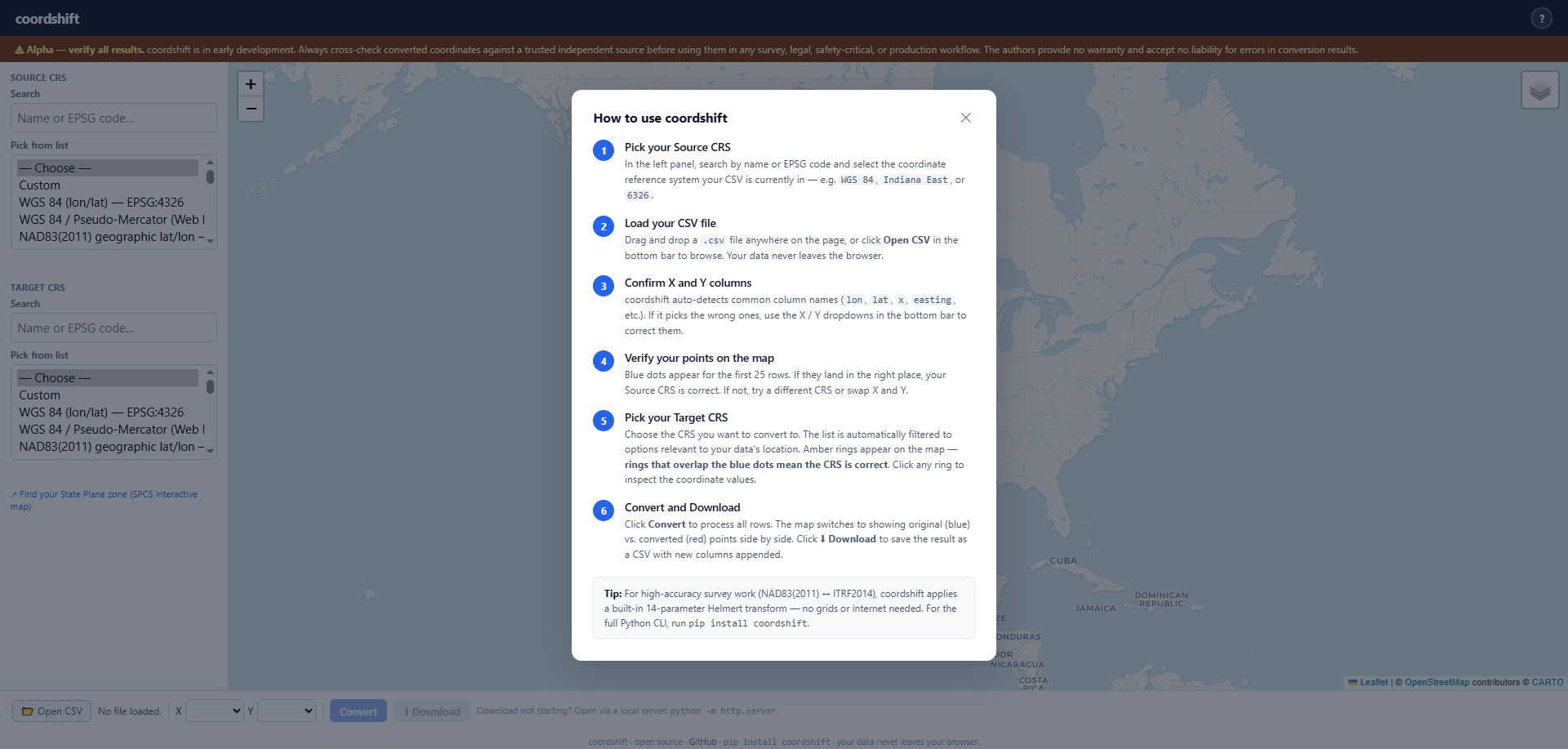
**How to use** — click **?** in the header to open the step-by-step guide:
|
|
172
|
+
|
|
173
|
+
|
|
174
|
+
|
|
175
|
+
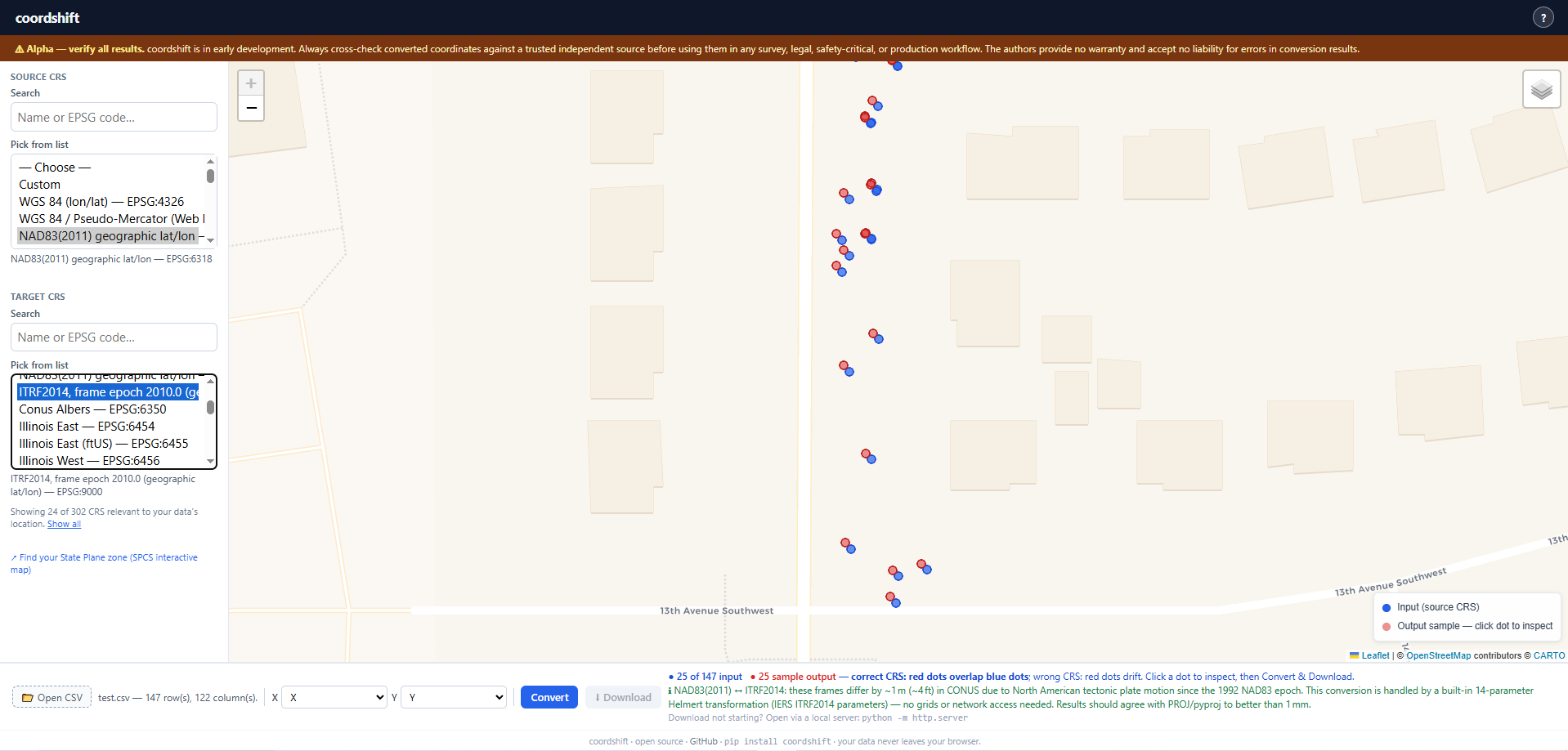
**Example** — map preview with input points (blue) and converted sample output (red); when the CRS pair is correct, the preview rings overlap the input dots:
|
|
176
|
+
|
|
177
|
+
|
|
178
|
+
|
|
179
|
+
Features include:
|
|
162
180
|
|
|
163
181
|
- Upload a CSV and pick coordinate columns
|
|
164
|
-
- Search and select source/target CRS from a built-in catalog
|
|
165
|
-
-
|
|
182
|
+
- Search and select source/target CRS from a built-in catalog that includes:
|
|
183
|
+
- **WGS 84** geographic (EPSG:4326) and Web Mercator (EPSG:3857)
|
|
184
|
+
- **NAD83(2011) geographic lat/lon (EPSG:6318)** — the reference frame reported by RTK GNSS
|
|
185
|
+
receivers observing from U.S. CORS networks; the correct source CRS for professional survey
|
|
186
|
+
fieldwork in the USA
|
|
187
|
+
- **ITRF2014** frame epoch 2010.0 (EPSG:9000)
|
|
188
|
+
- All **NAD83(2011) State Plane** zones for the contiguous U.S. and UTM zones
|
|
189
|
+
- **Map preview rings for all target CRS** — sample rings are back-projected to WGS 84 for
|
|
190
|
+
display, so rings land on the input points for projected output (State Plane, UTM) just as they
|
|
191
|
+
do for geographic output. Rings drift visibly if the wrong CRS is chosen.
|
|
192
|
+
- **Datum accuracy warnings** — an amber notice appears when the selected CRS pair has an offset
|
|
193
|
+
that proj4.js cannot model:
|
|
194
|
+
- *NAD83(2011) ↔ ITRF2014*: ~1 m (~4 ft) in CONUS due to tectonic plate drift since 1992
|
|
195
|
+
- *WGS 84 ↔ ITRF2014*: <2 cm (current WGS 84 G2139); directs users to EPSG:6318 for the
|
|
196
|
+
survey-grade NAD83 ↔ ITRF workflow
|
|
166
197
|
- Download the converted CSV
|
|
167
198
|
|
|
168
199
|
## Project structure
|
|
@@ -174,15 +205,15 @@ coordshift/
|
|
|
174
205
|
│ ├── core.py # Conversion (pyproj)
|
|
175
206
|
│ ├── cli.py # CLI (Click)
|
|
176
207
|
│ ├── io.py # CSV I/O, column detection
|
|
177
|
-
│
|
|
178
|
-
│ └── presets.py # Friendly name → EPSG
|
|
208
|
+
│ └── crs.py # CRS resolution and EPSG search
|
|
179
209
|
├── tests/
|
|
180
210
|
│ ├── test_core.py
|
|
181
211
|
│ ├── test_cli.py
|
|
182
212
|
│ ├── test_io.py
|
|
183
213
|
│ └── fixtures/
|
|
184
214
|
├── docs/
|
|
185
|
-
│
|
|
215
|
+
│ ├── examples.md
|
|
216
|
+
│ └── images/ # README screenshots (browser app)
|
|
186
217
|
├── scripts/ # Developer tooling (regenerate HTML catalog)
|
|
187
218
|
├── coordshift.html # Standalone browser-based converter
|
|
188
219
|
├── pyproject.toml
|
|
@@ -15,7 +15,7 @@ Universal coordinate system conversion for CSV and tabular data — built for GI
|
|
|
15
15
|
**CLI**
|
|
16
16
|
|
|
17
17
|
```bash
|
|
18
|
-
coordshift convert input.csv --from EPSG:4326 --to EPSG:
|
|
18
|
+
coordshift convert input.csv --from EPSG:4326 --to EPSG:6458 --x lon --y lat
|
|
19
19
|
```
|
|
20
20
|
|
|
21
21
|
**Python**
|
|
@@ -23,7 +23,7 @@ coordshift convert input.csv --from EPSG:4326 --to EPSG:2965 --x lon --y lat
|
|
|
23
23
|
```python
|
|
24
24
|
from coordshift import convert
|
|
25
25
|
|
|
26
|
-
df = convert("input.csv", from_crs="EPSG:4326", to_crs="EPSG:
|
|
26
|
+
df = convert("input.csv", from_crs="EPSG:4326", to_crs="EPSG:6458", x="lon", y="lat")
|
|
27
27
|
```
|
|
28
28
|
|
|
29
29
|
**Browser**
|
|
@@ -38,13 +38,15 @@ Tools like cs2cs, ogr2ogr, and raw pyproj are powerful but assume you already sp
|
|
|
38
38
|
|
|
39
39
|
- Convert any EPSG/PROJ CRS to any other
|
|
40
40
|
- Auto-detect common column names (lat, lon, x, y, easting, northing, etc.)
|
|
41
|
-
- Source and target CRS via EPSG code, PROJ string, or
|
|
41
|
+
- Source and target CRS via EPSG code, PROJ string, or anything else PROJ resolves; `coordshift search` finds USA EPSG entries by keyword
|
|
42
42
|
- Preserve all columns in output — original X/Y columns are always kept
|
|
43
43
|
- Converted coordinates written to new columns placed immediately after the originals
|
|
44
44
|
- Customisable output column suffix (default `_converted`, e.g. `lon_converted`, `lat_converted`)
|
|
45
45
|
- CLI for one-off conversions
|
|
46
46
|
- Python API for scripting and pipelines
|
|
47
|
-
- Browser-based converter (`coordshift.html`) with map preview — works offline
|
|
47
|
+
- Browser-based converter (`coordshift.html`) with map preview — works offline, supports NAD83(2011)
|
|
48
|
+
geographic (EPSG:6318) for RTK/CORS survey workflows, with datum accuracy warnings for frames that
|
|
49
|
+
proj4.js cannot rigorously transform (e.g. NAD83(2011) ↔ ITRF2014)
|
|
48
50
|
|
|
49
51
|
## Planned
|
|
50
52
|
|
|
@@ -75,19 +77,19 @@ pip install -e .
|
|
|
75
77
|
Basic conversion (original `lon`/`lat` columns are preserved; converted values go into `lon_converted`/`lat_converted` placed right after them):
|
|
76
78
|
|
|
77
79
|
```bash
|
|
78
|
-
coordshift convert input.csv --from EPSG:4326 --to EPSG:
|
|
80
|
+
coordshift convert input.csv --from EPSG:4326 --to EPSG:6458 --x lon --y lat
|
|
79
81
|
```
|
|
80
82
|
|
|
81
83
|
With output path:
|
|
82
84
|
|
|
83
85
|
```bash
|
|
84
|
-
coordshift convert input.csv --from EPSG:4326 --to EPSG:
|
|
86
|
+
coordshift convert input.csv --from EPSG:4326 --to EPSG:6458 --x lon --y lat --out output.csv
|
|
85
87
|
```
|
|
86
88
|
|
|
87
89
|
Custom column name suffix (produces `lon_proj`, `lat_proj` instead of the default `lon_converted`, `lat_converted`):
|
|
88
90
|
|
|
89
91
|
```bash
|
|
90
|
-
coordshift convert input.csv --from EPSG:4326 --to EPSG:
|
|
92
|
+
coordshift convert input.csv --from EPSG:4326 --to EPSG:6458 --suffix _proj
|
|
91
93
|
```
|
|
92
94
|
|
|
93
95
|
PROJ strings (use a single line on Windows, or wrap as your shell allows):
|
|
@@ -99,13 +101,16 @@ coordshift convert input.csv \
|
|
|
99
101
|
--x longitude --y latitude
|
|
100
102
|
```
|
|
101
103
|
|
|
102
|
-
|
|
104
|
+
Search the EPSG database (filtered to USA) — one or more words, all must match:
|
|
103
105
|
|
|
104
106
|
```bash
|
|
105
|
-
coordshift
|
|
106
|
-
coordshift search
|
|
107
|
+
coordshift search iowa south
|
|
108
|
+
coordshift search indiana east
|
|
109
|
+
coordshift search nad83 2011 utm zone 15
|
|
107
110
|
```
|
|
108
111
|
|
|
112
|
+
The browser file `coordshift.html` includes a searchable CRS catalog for convenience. The Python tools rely on EPSG/PROJ plus `search` as above.
|
|
113
|
+
|
|
109
114
|
### Python API
|
|
110
115
|
|
|
111
116
|
```python
|
|
@@ -114,25 +119,51 @@ from coordshift import convert, search_crs
|
|
|
114
119
|
df = convert(
|
|
115
120
|
"field_points.csv",
|
|
116
121
|
from_crs="EPSG:4326",
|
|
117
|
-
to_crs="EPSG:
|
|
122
|
+
to_crs="EPSG:6458",
|
|
118
123
|
x="lon",
|
|
119
124
|
y="lat",
|
|
120
125
|
)
|
|
121
126
|
# df now has lon, lon_converted, lat, lat_converted (plus any other original columns)
|
|
122
127
|
df.to_csv("field_points_converted.csv", index=False)
|
|
123
128
|
|
|
129
|
+
# Search returns all matching EPSG entries from the PROJ database (USA-filtered)
|
|
124
130
|
results = search_crs("indiana east")
|
|
131
|
+
for r in results:
|
|
132
|
+
print(r["epsg"], "—", r["name"])
|
|
125
133
|
```
|
|
126
134
|
|
|
127
135
|
See [docs/examples.md](docs/examples.md) for more detailed examples.
|
|
128
136
|
|
|
129
137
|
### Browser app
|
|
130
138
|
|
|
131
|
-
Open `coordshift.html` in any modern browser (Chrome, Firefox, Edge, Safari). No server or internet connection required after the page loads.
|
|
139
|
+
Open `coordshift.html` in any modern browser (Chrome, Firefox, Edge, Safari). No server or internet connection required after the page loads.
|
|
140
|
+
|
|
141
|
+
**How to use** — click **?** in the header to open the step-by-step guide:
|
|
142
|
+
|
|
143
|
+

|
|
144
|
+
|
|
145
|
+
**Example** — map preview with input points (blue) and converted sample output (red); when the CRS pair is correct, the preview rings overlap the input dots:
|
|
146
|
+
|
|
147
|
+

|
|
148
|
+
|
|
149
|
+
Features include:
|
|
132
150
|
|
|
133
151
|
- Upload a CSV and pick coordinate columns
|
|
134
|
-
- Search and select source/target CRS from a built-in catalog
|
|
135
|
-
-
|
|
152
|
+
- Search and select source/target CRS from a built-in catalog that includes:
|
|
153
|
+
- **WGS 84** geographic (EPSG:4326) and Web Mercator (EPSG:3857)
|
|
154
|
+
- **NAD83(2011) geographic lat/lon (EPSG:6318)** — the reference frame reported by RTK GNSS
|
|
155
|
+
receivers observing from U.S. CORS networks; the correct source CRS for professional survey
|
|
156
|
+
fieldwork in the USA
|
|
157
|
+
- **ITRF2014** frame epoch 2010.0 (EPSG:9000)
|
|
158
|
+
- All **NAD83(2011) State Plane** zones for the contiguous U.S. and UTM zones
|
|
159
|
+
- **Map preview rings for all target CRS** — sample rings are back-projected to WGS 84 for
|
|
160
|
+
display, so rings land on the input points for projected output (State Plane, UTM) just as they
|
|
161
|
+
do for geographic output. Rings drift visibly if the wrong CRS is chosen.
|
|
162
|
+
- **Datum accuracy warnings** — an amber notice appears when the selected CRS pair has an offset
|
|
163
|
+
that proj4.js cannot model:
|
|
164
|
+
- *NAD83(2011) ↔ ITRF2014*: ~1 m (~4 ft) in CONUS due to tectonic plate drift since 1992
|
|
165
|
+
- *WGS 84 ↔ ITRF2014*: <2 cm (current WGS 84 G2139); directs users to EPSG:6318 for the
|
|
166
|
+
survey-grade NAD83 ↔ ITRF workflow
|
|
136
167
|
- Download the converted CSV
|
|
137
168
|
|
|
138
169
|
## Project structure
|
|
@@ -144,15 +175,15 @@ coordshift/
|
|
|
144
175
|
│ ├── core.py # Conversion (pyproj)
|
|
145
176
|
│ ├── cli.py # CLI (Click)
|
|
146
177
|
│ ├── io.py # CSV I/O, column detection
|
|
147
|
-
│
|
|
148
|
-
│ └── presets.py # Friendly name → EPSG
|
|
178
|
+
│ └── crs.py # CRS resolution and EPSG search
|
|
149
179
|
├── tests/
|
|
150
180
|
│ ├── test_core.py
|
|
151
181
|
│ ├── test_cli.py
|
|
152
182
|
│ ├── test_io.py
|
|
153
183
|
│ └── fixtures/
|
|
154
184
|
├── docs/
|
|
155
|
-
│
|
|
185
|
+
│ ├── examples.md
|
|
186
|
+
│ └── images/ # README screenshots (browser app)
|
|
156
187
|
├── scripts/ # Developer tooling (regenerate HTML catalog)
|
|
157
188
|
├── coordshift.html # Standalone browser-based converter
|
|
158
189
|
├── pyproject.toml
|
|
@@ -20,7 +20,6 @@ from pandas.errors import EmptyDataError, ParserError
|
|
|
20
20
|
from coordshift import __version__
|
|
21
21
|
from coordshift.core import convert as convert_file
|
|
22
22
|
from coordshift.crs import CRSError, search_crs
|
|
23
|
-
from coordshift.presets import PRESETS
|
|
24
23
|
|
|
25
24
|
|
|
26
25
|
def _configure_utf8_stdio() -> None:
|
|
@@ -45,9 +44,6 @@ def _default_output_path(input_path: str) -> str:
|
|
|
45
44
|
return str(p.with_name(f"{p.name}_converted"))
|
|
46
45
|
|
|
47
46
|
|
|
48
|
-
def _format_preset_line(name: str, epsg: str, description: str) -> str:
|
|
49
|
-
"""Format one preset for terminal output."""
|
|
50
|
-
return f"{name} → {epsg} — {description}"
|
|
51
47
|
|
|
52
48
|
|
|
53
49
|
@click.group()
|
|
@@ -59,8 +55,8 @@ def cli():
|
|
|
59
55
|
|
|
60
56
|
@cli.command()
|
|
61
57
|
@click.argument("filepath", type=click.Path(exists=True))
|
|
62
|
-
@click.option("--from", "from_crs", required=True, help="Source CRS (e.g. EPSG:4326
|
|
63
|
-
@click.option("--to", "to_crs", required=True, help="Target CRS (e.g. EPSG:
|
|
58
|
+
@click.option("--from", "from_crs", required=True, help="Source CRS (e.g. EPSG:4326 or PROJ string)")
|
|
59
|
+
@click.option("--to", "to_crs", required=True, help="Target CRS (e.g. EPSG:6458 or PROJ string)")
|
|
64
60
|
@click.option("--x", default=None, help="X/longitude/easting column name (auto-detected if omitted)")
|
|
65
61
|
@click.option("--y", default=None, help="Y/latitude/northing column name (auto-detected if omitted)")
|
|
66
62
|
@click.option(
|
|
@@ -114,32 +110,21 @@ def convert(filepath, from_crs, to_crs, x, y, suffix, out):
|
|
|
114
110
|
|
|
115
111
|
|
|
116
112
|
@cli.command()
|
|
117
|
-
@click.argument("query")
|
|
118
|
-
def search(query):
|
|
119
|
-
"""Search for a CRS by name or keyword.
|
|
120
|
-
results = search_crs(query)
|
|
121
|
-
if not results:
|
|
122
|
-
click.echo(f"No presets found matching: {query}")
|
|
123
|
-
return
|
|
124
|
-
for row in sorted(results, key=lambda r: r["name"]):
|
|
125
|
-
click.echo(
|
|
126
|
-
_format_preset_line(
|
|
127
|
-
row["name"],
|
|
128
|
-
str(row["epsg"]),
|
|
129
|
-
str(row["description"]),
|
|
130
|
-
)
|
|
131
|
-
)
|
|
113
|
+
@click.argument("query", nargs=-1, required=True)
|
|
114
|
+
def search(query: tuple[str, ...]) -> None:
|
|
115
|
+
"""Search for a CRS by name or keyword.
|
|
132
116
|
|
|
117
|
+
Accepts one or more words — all words must match.
|
|
133
118
|
|
|
134
|
-
|
|
135
|
-
|
|
136
|
-
|
|
137
|
-
|
|
138
|
-
|
|
139
|
-
|
|
140
|
-
|
|
141
|
-
|
|
142
|
-
|
|
143
|
-
|
|
144
|
-
|
|
145
|
-
)
|
|
119
|
+
\b
|
|
120
|
+
Examples:
|
|
121
|
+
coordshift search iowa
|
|
122
|
+
coordshift search iowa south
|
|
123
|
+
coordshift search state plane north
|
|
124
|
+
"""
|
|
125
|
+
results = search_crs(" ".join(query))
|
|
126
|
+
if not results:
|
|
127
|
+
click.echo(f"No results found for: {' '.join(query)}")
|
|
128
|
+
return
|
|
129
|
+
for row in results:
|
|
130
|
+
click.echo(f"{row['epsg']} — {row['name']}")
|
|
@@ -38,8 +38,8 @@ def transform_points(
|
|
|
38
38
|
except PyprojCRSError as e:
|
|
39
39
|
raise CRSError(
|
|
40
40
|
f"Could not build coordinate transform from {from_crs!r} to {to_crs!r}: {e}. "
|
|
41
|
-
"Use resolvable
|
|
42
|
-
"Run `coordshift search` to
|
|
41
|
+
"Use resolvable EPSG codes or PROJ strings. "
|
|
42
|
+
"Run `coordshift search` to find EPSG codes by name (USA-filtered)."
|
|
43
43
|
) from e
|
|
44
44
|
tx, ty = transformer.transform(xs, ys)
|
|
45
45
|
return [float(v) for v in tx], [float(v) for v in ty]
|
|
@@ -63,8 +63,8 @@ def convert(
|
|
|
63
63
|
|
|
64
64
|
Args:
|
|
65
65
|
filepath: Path to the input CSV file.
|
|
66
|
-
from_crs: Source CRS — EPSG code (e.g. "EPSG:4326"), PROJ string, or
|
|
67
|
-
to_crs: Target CRS — same formats
|
|
66
|
+
from_crs: Source CRS — EPSG code (e.g. "EPSG:4326"), PROJ string, or other form PROJ accepts.
|
|
67
|
+
to_crs: Target CRS — same formats as ``from_crs``.
|
|
68
68
|
x: Name of the X/longitude/easting column. Auto-detected if not provided.
|
|
69
69
|
y: Name of the Y/latitude/northing column. Auto-detected if not provided.
|
|
70
70
|
output: Path to save the output CSV. If None, returns DataFrame only.
|