convert-md 1.0.0__tar.gz
This diff represents the content of publicly available package versions that have been released to one of the supported registries. The information contained in this diff is provided for informational purposes only and reflects changes between package versions as they appear in their respective public registries.
- convert_md-1.0.0/CHANGELOG.md +42 -0
- convert_md-1.0.0/DEPLOY.md +145 -0
- convert_md-1.0.0/LICENSE +21 -0
- convert_md-1.0.0/MANIFEST.in +3 -0
- convert_md-1.0.0/PKG-INFO +164 -0
- convert_md-1.0.0/README.md +129 -0
- convert_md-1.0.0/RELEASING.md +66 -0
- convert_md-1.0.0/SECURITY.md +38 -0
- convert_md-1.0.0/docs/screenshots.md +20 -0
- convert_md-1.0.0/install.ps1 +128 -0
- convert_md-1.0.0/pyproject.toml +61 -0
- convert_md-1.0.0/requirements.txt +7 -0
- convert_md-1.0.0/samples/Example.md +30 -0
- convert_md-1.0.0/setup.cfg +4 -0
- convert_md-1.0.0/src/convert_md/__init__.py +3 -0
- convert_md-1.0.0/src/convert_md/__main__.py +5 -0
- convert_md-1.0.0/src/convert_md/cli.py +241 -0
- convert_md-1.0.0/src/convert_md/convert-md-hotkey.ahk +135 -0
- convert_md-1.0.0/src/convert_md/converter.py +367 -0
- convert_md-1.0.0/src/convert_md/paths.py +29 -0
- convert_md-1.0.0/src/convert_md/windows.py +212 -0
- convert_md-1.0.0/src/convert_md.egg-info/PKG-INFO +164 -0
- convert_md-1.0.0/src/convert_md.egg-info/SOURCES.txt +30 -0
- convert_md-1.0.0/src/convert_md.egg-info/dependency_links.txt +1 -0
- convert_md-1.0.0/src/convert_md.egg-info/entry_points.txt +2 -0
- convert_md-1.0.0/src/convert_md.egg-info/requires.txt +10 -0
- convert_md-1.0.0/src/convert_md.egg-info/top_level.txt +1 -0
- convert_md-1.0.0/tests/test_conversions.py +84 -0
- convert_md-1.0.0/tests/test_helpers.py +70 -0
- convert_md-1.0.0/tests/test_packaging.py +62 -0
- convert_md-1.0.0/tests/test_windows.py +48 -0
- convert_md-1.0.0/uninstall.ps1 +71 -0
|
@@ -0,0 +1,42 @@
|
|
|
1
|
+
# Changelog
|
|
2
|
+
|
|
3
|
+
All notable changes to convert-md are listed here.
|
|
4
|
+
The format follows [Keep a Changelog](https://keepachangelog.com/en/1.1.0/) and the project uses
|
|
5
|
+
[Semantic Versioning](https://semver.org/).
|
|
6
|
+
|
|
7
|
+
## [Unreleased]
|
|
8
|
+
|
|
9
|
+
## [1.0.0] - 2026-11-13
|
|
10
|
+
|
|
11
|
+
First public release.
|
|
12
|
+
|
|
13
|
+
### Added
|
|
14
|
+
- Right-click **Convert to** submenu on `.md` and `.markdown` files: Word, PDF, Excel (tables only),
|
|
15
|
+
PowerPoint, Web page, All formats, and "As set in the file".
|
|
16
|
+
- Right-click **Convert to Markdown** on `.docx .pdf .xlsx .xls .pptx .html .htm .csv .epub .msg`.
|
|
17
|
+
- **Ctrl+Alt+M** hotkey in File Explorer (needs AutoHotkey v2). It reads only the active Explorer tab
|
|
18
|
+
and splits mixed selections: Markdown files go out, other files come in.
|
|
19
|
+
- "As set in the file": formats from `outputs:` front-matter or the filename (`Report.docx.pdf.md`).
|
|
20
|
+
- PDF output through Microsoft Word when installed, otherwise a Pandoc PDF engine.
|
|
21
|
+
- Excel output with one sheet per table, named after the heading above it; numbers, currency,
|
|
22
|
+
percentages and bracketed negatives become real numbers; header row frozen and filtered.
|
|
23
|
+
- House styling with `reference.docx`, `reference.pptx` and `style.css` in the templates folder;
|
|
24
|
+
`convert-md templates` creates starter copies.
|
|
25
|
+
- `convert-md setup`, `remove` and `doctor` commands; `install.ps1` and `uninstall.ps1`.
|
|
26
|
+
- Existing files are never overwritten; repeat runs write `Report (1).docx`.
|
|
27
|
+
- Success/problem popup, and a log at `%LOCALAPPDATA%\ConvertMd\convert-md.log`.
|
|
28
|
+
|
|
29
|
+
### Security
|
|
30
|
+
- Menus and hotkey run Python with `-P`, so a file named `convert_md.py` in the document's folder
|
|
31
|
+
can't be run in place of convert-md.
|
|
32
|
+
- Per-user install only: registry changes are under `HKEY_CURRENT_USER`; no administrator rights.
|
|
33
|
+
|
|
34
|
+
### Upgrading from a pre-release copy
|
|
35
|
+
Earlier private copies were called md-convert. They ran `md_convert.py` from the project folder and
|
|
36
|
+
used `install.reg`, `make_reg.py` and a hand-edited `md-convert-hotkey.ahk`. Run `install.ps1`: it
|
|
37
|
+
removes the old md-convert menus, Startup shortcut and running hotkey and installs convert-md in their
|
|
38
|
+
place. The old files are no longer used and can be deleted, as can `%LOCALAPPDATA%\MdConvert`
|
|
39
|
+
(it only holds the old log).
|
|
40
|
+
|
|
41
|
+
[Unreleased]: https://github.com/W3i-io/convert-md/compare/v1.0.0...HEAD
|
|
42
|
+
[1.0.0]: https://github.com/W3i-io/convert-md/releases/tag/v1.0.0
|
|
@@ -0,0 +1,145 @@
|
|
|
1
|
+
# Installing, updating and removing convert-md
|
|
2
|
+
|
|
3
|
+
For what convert-md does and how to use it, see [README.md](README.md).
|
|
4
|
+
|
|
5
|
+
## What gets installed where
|
|
6
|
+
|
|
7
|
+
Everything is for the current Windows account only; no administrator rights are needed.
|
|
8
|
+
|
|
9
|
+
| Item | Location |
|
|
10
|
+
|---|---|
|
|
11
|
+
| convert-md code and libraries | Your Python's site-packages (installed by pip) |
|
|
12
|
+
| Right-click menus | `HKEY_CURRENT_USER\Software\Classes\SystemFileAssociations\<ext>\shell\ConvertMd` and `...\ConvertMdToMarkdown` |
|
|
13
|
+
| Hotkey script and its settings | `%LOCALAPPDATA%\ConvertMd\convert-md-hotkey.ahk` and `convert-md.ini` |
|
|
14
|
+
| Hotkey start at login | `convert-md-hotkey.lnk` in your Startup folder (`shell:startup`) |
|
|
15
|
+
| Style templates | `%LOCALAPPDATA%\ConvertMd\templates\` |
|
|
16
|
+
| Log | `%LOCALAPPDATA%\ConvertMd\convert-md.log` |
|
|
17
|
+
|
|
18
|
+
The menus and hotkey run `pythonw.exe -P -m convert_md ...` using the Python that ran setup.
|
|
19
|
+
The download folder isn't used after installation, so you can move or delete it.
|
|
20
|
+
|
|
21
|
+
---
|
|
22
|
+
|
|
23
|
+
## 1. Install
|
|
24
|
+
|
|
25
|
+
### Option A: installer script (recommended)
|
|
26
|
+
|
|
27
|
+
1. **Python 3.11 or newer**, the python.org build:
|
|
28
|
+
|
|
29
|
+
```powershell
|
|
30
|
+
winget install --id Python.Python.3.12 -e --scope user
|
|
31
|
+
```
|
|
32
|
+
|
|
33
|
+
Open a new PowerShell window and check `py --version` works. If typing `python` opens the
|
|
34
|
+
Microsoft Store, turn that off in **Settings → Apps → Advanced app settings → App execution aliases**.
|
|
35
|
+
|
|
36
|
+
2. **Get convert-md**: download **Source code (zip)** from the
|
|
37
|
+
[latest release](https://github.com/W3i-io/convert-md/releases/latest) and extract it, or
|
|
38
|
+
|
|
39
|
+
```powershell
|
|
40
|
+
git clone https://github.com/W3i-io/convert-md
|
|
41
|
+
```
|
|
42
|
+
|
|
43
|
+
3. **Run the installer** from that folder:
|
|
44
|
+
|
|
45
|
+
```powershell
|
|
46
|
+
powershell -ExecutionPolicy Bypass -File .\install.ps1
|
|
47
|
+
```
|
|
48
|
+
|
|
49
|
+
| Option | Effect |
|
|
50
|
+
|---|---|
|
|
51
|
+
| `-NoHotkey` | Right-click menus only; no AutoHotkey |
|
|
52
|
+
| `-Yes` | Install AutoHotkey without asking if it's missing |
|
|
53
|
+
| `-Hotkey '^!k'` | Use a different key (AutoHotkey notation: `^` Ctrl, `!` Alt, `+` Shift, `#` Win) |
|
|
54
|
+
| `-SkipTest` | Skip the test conversions |
|
|
55
|
+
|
|
56
|
+
### Option B: pip
|
|
57
|
+
|
|
58
|
+
```powershell
|
|
59
|
+
py -m pip install convert-md
|
|
60
|
+
py -m convert_md setup
|
|
61
|
+
```
|
|
62
|
+
|
|
63
|
+
For the hotkey, install AutoHotkey first (`winget install AutoHotkey.AutoHotkey -e`), then run setup.
|
|
64
|
+
`pipx install convert-md` followed by `convert-md setup` also works.
|
|
65
|
+
|
|
66
|
+
### PDF output
|
|
67
|
+
|
|
68
|
+
PDFs are made through Microsoft Word when it's installed. Without Word, install a PDF engine:
|
|
69
|
+
|
|
70
|
+
```powershell
|
|
71
|
+
winget install Typst.Typst
|
|
72
|
+
```
|
|
73
|
+
|
|
74
|
+
### Check it works
|
|
75
|
+
|
|
76
|
+
```powershell
|
|
77
|
+
py -m convert_md doctor
|
|
78
|
+
```
|
|
79
|
+
|
|
80
|
+
| Check | Expected |
|
|
81
|
+
|---|---|
|
|
82
|
+
| `doctor` | `OK` for Python, Pandoc, MarkItDown, PDF and Right-click menus (and Hotkey if installed) |
|
|
83
|
+
| Right-click a `.md` file → **Show more options** | **Convert to** submenu |
|
|
84
|
+
| Right-click a `.docx` → **Show more options** | **Convert to Markdown** |
|
|
85
|
+
| Select a file in File Explorer, press **Ctrl+Alt+M** | Convert menu at the mouse pointer |
|
|
86
|
+
|
|
87
|
+
---
|
|
88
|
+
|
|
89
|
+
## 2. Update
|
|
90
|
+
|
|
91
|
+
From a new download or `git pull` in your clone, run the installer again:
|
|
92
|
+
|
|
93
|
+
```powershell
|
|
94
|
+
powershell -ExecutionPolicy Bypass -File .\install.ps1
|
|
95
|
+
```
|
|
96
|
+
|
|
97
|
+
With pip:
|
|
98
|
+
|
|
99
|
+
```powershell
|
|
100
|
+
py -m pip install --upgrade convert-md
|
|
101
|
+
py -m convert_md setup
|
|
102
|
+
```
|
|
103
|
+
|
|
104
|
+
Setup replaces the menus, hotkey script and Startup shortcut, and restarts the hotkey.
|
|
105
|
+
|
|
106
|
+
## 3. Moving to a new Python version
|
|
107
|
+
|
|
108
|
+
The menus point at a specific Python. After installing a new Python version (for example 3.12 to 3.13),
|
|
109
|
+
run the installer again, or `py -m pip install convert-md` followed by `py -m convert_md setup`.
|
|
110
|
+
`doctor` reports **Right-click menus: point at a different Python** when this is needed.
|
|
111
|
+
|
|
112
|
+
## 4. Uninstall
|
|
113
|
+
|
|
114
|
+
```powershell
|
|
115
|
+
powershell -ExecutionPolicy Bypass -File .\uninstall.ps1
|
|
116
|
+
```
|
|
117
|
+
|
|
118
|
+
This removes the right-click menus, stops the hotkey and removes it from Startup.
|
|
119
|
+
|
|
120
|
+
| Option | Also removes |
|
|
121
|
+
|---|---|
|
|
122
|
+
| `-RemovePackage` | The convert-md Python package |
|
|
123
|
+
| `-RemoveData` | `%LOCALAPPDATA%\ConvertMd`: your templates and the log |
|
|
124
|
+
|
|
125
|
+
Without the script: `py -m convert_md remove`, then `py -m pip uninstall convert-md`.
|
|
126
|
+
Python and AutoHotkey are left installed; remove them in **Settings → Apps** if nothing else uses them.
|
|
127
|
+
|
|
128
|
+
---
|
|
129
|
+
|
|
130
|
+
## Troubleshooting
|
|
131
|
+
|
|
132
|
+
Start with `py -m convert_md doctor`; it names most problems.
|
|
133
|
+
|
|
134
|
+
| Symptom | Likely cause | Fix |
|
|
135
|
+
|---|---|---|
|
|
136
|
+
| Menu item does nothing | Menus point at a Python that has moved or been removed | Run the installer again |
|
|
137
|
+
| Popup says something failed | See the message, then the log | `%LOCALAPPDATA%\ConvertMd\convert-md.log` |
|
|
138
|
+
| Ctrl+Alt+M does nothing | Hotkey not running | Double-click `%LOCALAPPDATA%\ConvertMd\convert-md-hotkey.ahk`, or run setup again |
|
|
139
|
+
| "convert-md can't find Python" message at login | Python was upgraded or removed | Run the installer again |
|
|
140
|
+
| Ctrl+Alt+M on the desktop shows a tip instead of a menu | The hotkey works in File Explorer windows only | Right-click the file instead |
|
|
141
|
+
| PDF option fails | No Word and no PDF engine | `winget install Typst.Typst` |
|
|
142
|
+
| `convert-md` is not recognised | pip's Scripts folder isn't on PATH | Use `py -m convert_md` instead |
|
|
143
|
+
| Script blocked: "running scripts is disabled" | PowerShell execution policy | Use `powershell -ExecutionPolicy Bypass -File .\install.ps1` |
|
|
144
|
+
| `python` opens the Microsoft Store | Windows app execution alias | Turn it off (step 1) and use `py` |
|
|
145
|
+
| Menus missing on Windows 11 | They're in the classic menu | **Show more options**, Shift + right-click, or Shift + F10 |
|
convert_md-1.0.0/LICENSE
ADDED
|
@@ -0,0 +1,21 @@
|
|
|
1
|
+
MIT License
|
|
2
|
+
|
|
3
|
+
Copyright (c) 2026 W3i
|
|
4
|
+
|
|
5
|
+
Permission is hereby granted, free of charge, to any person obtaining a copy
|
|
6
|
+
of this software and associated documentation files (the "Software"), to deal
|
|
7
|
+
in the Software without restriction, including without limitation the rights
|
|
8
|
+
to use, copy, modify, merge, publish, distribute, sublicense, and/or sell
|
|
9
|
+
copies of the Software, and to permit persons to whom the Software is
|
|
10
|
+
furnished to do so, subject to the following conditions:
|
|
11
|
+
|
|
12
|
+
The above copyright notice and this permission notice shall be included in all
|
|
13
|
+
copies or substantial portions of the Software.
|
|
14
|
+
|
|
15
|
+
THE SOFTWARE IS PROVIDED "AS IS", WITHOUT WARRANTY OF ANY KIND, EXPRESS OR
|
|
16
|
+
IMPLIED, INCLUDING BUT NOT LIMITED TO THE WARRANTIES OF MERCHANTABILITY,
|
|
17
|
+
FITNESS FOR A PARTICULAR PURPOSE AND NONINFRINGEMENT. IN NO EVENT SHALL THE
|
|
18
|
+
AUTHORS OR COPYRIGHT HOLDERS BE LIABLE FOR ANY CLAIM, DAMAGES OR OTHER
|
|
19
|
+
LIABILITY, WHETHER IN AN ACTION OF CONTRACT, TORT OR OTHERWISE, ARISING FROM,
|
|
20
|
+
OUT OF OR IN CONNECTION WITH THE SOFTWARE OR THE USE OR OTHER DEALINGS IN THE
|
|
21
|
+
SOFTWARE.
|
|
@@ -0,0 +1,164 @@
|
|
|
1
|
+
Metadata-Version: 2.4
|
|
2
|
+
Name: convert-md
|
|
3
|
+
Version: 1.0.0
|
|
4
|
+
Summary: Right-click conversion between Markdown and Word, PDF, Excel, PowerPoint and HTML on Windows, using Pandoc and Microsoft MarkItDown.
|
|
5
|
+
Author: W3i
|
|
6
|
+
License-Expression: MIT
|
|
7
|
+
Project-URL: Homepage, https://github.com/W3i-io/convert-md
|
|
8
|
+
Project-URL: Documentation, https://github.com/W3i-io/convert-md/blob/main/DEPLOY.md
|
|
9
|
+
Project-URL: Issues, https://github.com/W3i-io/convert-md/issues
|
|
10
|
+
Project-URL: Changelog, https://github.com/W3i-io/convert-md/blob/main/CHANGELOG.md
|
|
11
|
+
Keywords: markdown,pandoc,markitdown,docx,pdf,xlsx,pptx,windows,context-menu,converter
|
|
12
|
+
Classifier: Development Status :: 5 - Production/Stable
|
|
13
|
+
Classifier: Environment :: Win32 (MS Windows)
|
|
14
|
+
Classifier: Intended Audience :: End Users/Desktop
|
|
15
|
+
Classifier: Operating System :: Microsoft :: Windows
|
|
16
|
+
Classifier: Programming Language :: Python :: 3
|
|
17
|
+
Classifier: Programming Language :: Python :: 3 :: Only
|
|
18
|
+
Classifier: Programming Language :: Python :: 3.11
|
|
19
|
+
Classifier: Programming Language :: Python :: 3.12
|
|
20
|
+
Classifier: Programming Language :: Python :: 3.13
|
|
21
|
+
Classifier: Topic :: Office/Business
|
|
22
|
+
Classifier: Topic :: Text Processing :: Markup :: Markdown
|
|
23
|
+
Classifier: Topic :: Utilities
|
|
24
|
+
Requires-Python: >=3.11
|
|
25
|
+
Description-Content-Type: text/markdown
|
|
26
|
+
License-File: LICENSE
|
|
27
|
+
Requires-Dist: markitdown[docx,outlook,pdf,pptx,xls,xlsx]<0.2,>=0.1.7
|
|
28
|
+
Requires-Dist: pypandoc_binary>=1.17
|
|
29
|
+
Requires-Dist: openpyxl>=3.1.5
|
|
30
|
+
Requires-Dist: beautifulsoup4>=4.12
|
|
31
|
+
Requires-Dist: pywin32>=306; sys_platform == "win32"
|
|
32
|
+
Provides-Extra: test
|
|
33
|
+
Requires-Dist: pytest>=8; extra == "test"
|
|
34
|
+
Dynamic: license-file
|
|
35
|
+
|
|
36
|
+
# convert-md
|
|
37
|
+
|
|
38
|
+
Right-click conversion between Markdown and Word, PDF, Excel, PowerPoint and HTML on Windows,
|
|
39
|
+
built on [Pandoc](https://pandoc.org) and Microsoft [MarkItDown](https://github.com/microsoft/markitdown).
|
|
40
|
+
|
|
41
|
+
[](https://github.com/W3i-io/convert-md/actions/workflows/tests.yml)
|
|
42
|
+
[](https://github.com/W3i-io/convert-md/blob/main/LICENSE)
|
|
43
|
+
|
|
44
|
+
## What it does
|
|
45
|
+
|
|
46
|
+
| Right-click on | Menu | Produces |
|
|
47
|
+
|---|---|---|
|
|
48
|
+
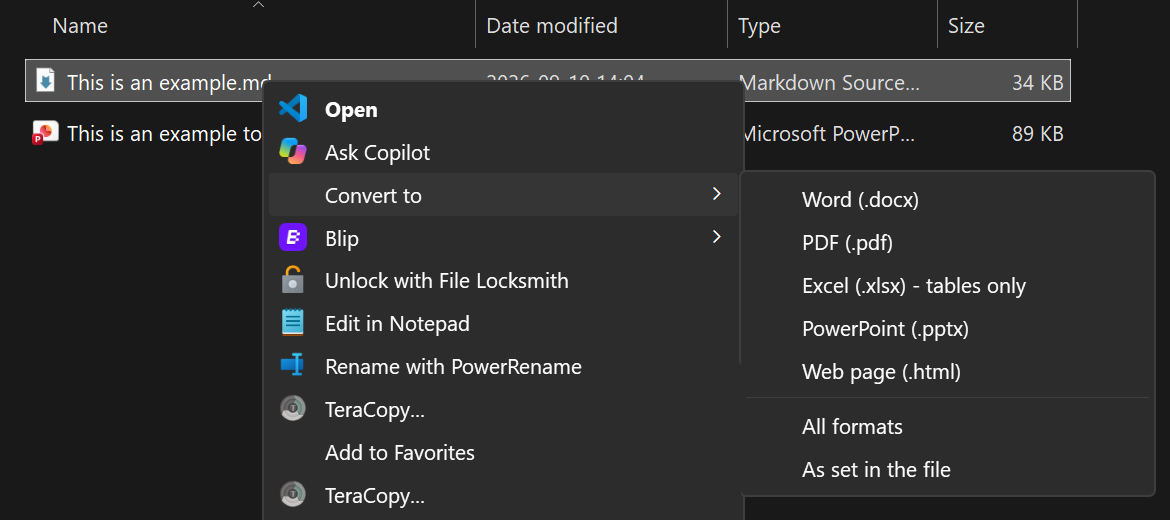
| `.md`, `.markdown` | **Convert to → Word** | `.docx` |
|
|
49
|
+
| | **Convert to → PDF** | `.pdf` (through Microsoft Word, or a Pandoc PDF engine) |
|
|
50
|
+
| | **Convert to → Excel** | `.xlsx`, one sheet per table |
|
|
51
|
+
| | **Convert to → PowerPoint** | `.pptx`, one slide per heading |
|
|
52
|
+
| | **Convert to → Web page** | self-contained `.html` |
|
|
53
|
+
| | **Convert to → All formats** | all of the above |
|
|
54
|
+
| | **Convert to → As set in the file** | the formats the file asks for (see below) |
|
|
55
|
+
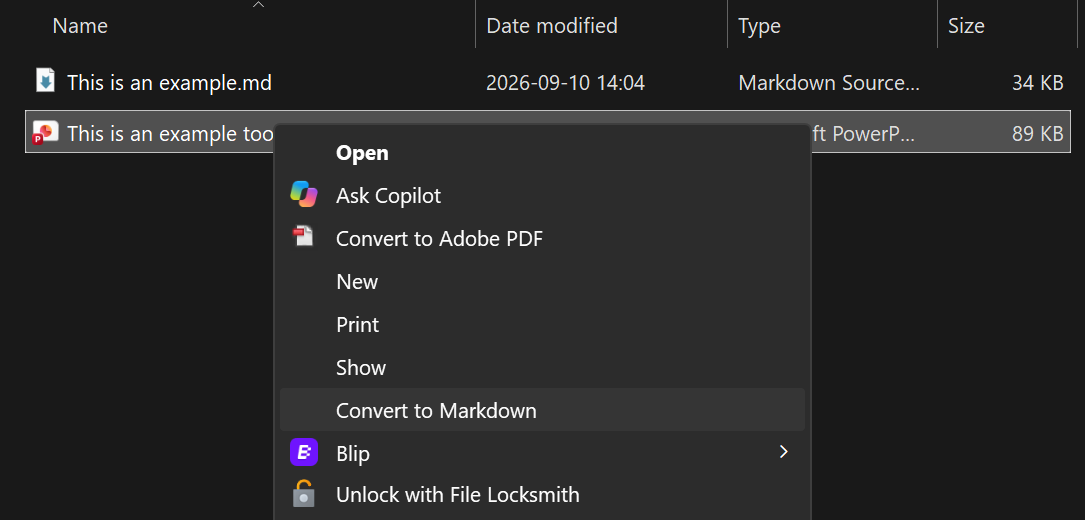
| `.docx .pdf .xlsx .xls .pptx .html .htm .csv .epub .msg` | **Convert to Markdown** | `.md` |
|
|
56
|
+
|
|
57
|
+
|
|
58
|
+
|
|
59
|
+
|
|
60
|
+
|
|
61
|
+
- Output is saved next to the original. Nothing is overwritten: a repeat run writes `Report (1).docx`.
|
|
62
|
+
- A small popup confirms what was created and lists any problems.
|
|
63
|
+
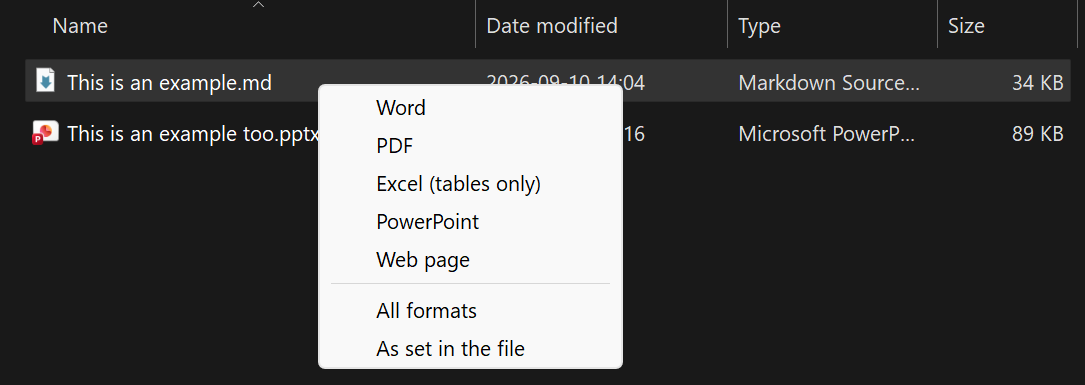
- Optional **Ctrl+Alt+M** hotkey: select files in File Explorer and press it to get the same menu at the
|
|
64
|
+
mouse pointer. Mixed selections work: Markdown files go out, everything else comes in.
|
|
65
|
+
|
|
66
|
+
| Ctrl+Alt+M on a Markdown file | Ctrl+Alt+M on any other file |
|
|
67
|
+
|---|---|
|
|
68
|
+
|  |  |
|
|
69
|
+
|
|
70
|
+
## Install
|
|
71
|
+
|
|
72
|
+
Needs Windows 10 or 11 and Python 3.11 or newer from python.org
|
|
73
|
+
(`winget install --id Python.Python.3.12 -e --scope user`).
|
|
74
|
+
|
|
75
|
+
1. Download the latest release from the [Releases page](https://github.com/W3i-io/convert-md/releases)
|
|
76
|
+
(**Source code (zip)**) and extract it, or `git clone https://github.com/W3i-io/convert-md`.
|
|
77
|
+
2. In PowerShell, in that folder:
|
|
78
|
+
|
|
79
|
+
```powershell
|
|
80
|
+
powershell -ExecutionPolicy Bypass -File .\install.ps1
|
|
81
|
+
```
|
|
82
|
+
|
|
83
|
+
The installer sets everything up for your Windows account only (no administrator rights), offers to
|
|
84
|
+
install [AutoHotkey v2](https://www.autohotkey.com) for the hotkey, and runs a test conversion.
|
|
85
|
+
Use `-NoHotkey` for the right-click menus only.
|
|
86
|
+
|
|
87
|
+
Prefer pip? Once it's published to PyPI:
|
|
88
|
+
|
|
89
|
+
```powershell
|
|
90
|
+
py -m pip install convert-md
|
|
91
|
+
py -m convert_md setup
|
|
92
|
+
```
|
|
93
|
+
|
|
94
|
+
Updating, moving, uninstalling and troubleshooting: see [DEPLOY.md](https://github.com/W3i-io/convert-md/blob/main/DEPLOY.md).
|
|
95
|
+
|
|
96
|
+
On Windows 11 the menu entries are under **Show more options**, Shift + right-click, or Shift + F10.
|
|
97
|
+
|
|
98
|
+
## Choosing formats inside the file
|
|
99
|
+
|
|
100
|
+
**Convert to → As set in the file** reads `outputs:` from the front-matter first, then the filename,
|
|
101
|
+
and otherwise makes a Word document.
|
|
102
|
+
|
|
103
|
+
```markdown
|
|
104
|
+
---
|
|
105
|
+
outputs: [docx, pdf, xlsx]
|
|
106
|
+
---
|
|
107
|
+
```
|
|
108
|
+
|
|
109
|
+
Or name the file `Proposal.docx.pdf.md` to get `Proposal.docx` and `Proposal.pdf`.
|
|
110
|
+
|
|
111
|
+
## House styling
|
|
112
|
+
|
|
113
|
+
```powershell
|
|
114
|
+
convert-md templates
|
|
115
|
+
```
|
|
116
|
+
|
|
117
|
+
creates starter `reference.docx` and `reference.pptx` in `%LOCALAPPDATA%\ConvertMd\templates` and opens the
|
|
118
|
+
folder. Change their **styles** (fonts, heading colours, margins, slide masters) in Word or PowerPoint,
|
|
119
|
+
not their text. From then on every conversion uses them, and Word-made PDFs follow the Word styles.
|
|
120
|
+
Add a `style.css` in the same folder to style HTML output.
|
|
121
|
+
|
|
122
|
+
## Command line
|
|
123
|
+
|
|
124
|
+
```powershell
|
|
125
|
+
convert-md --to docx Report.md
|
|
126
|
+
convert-md --to docx,pdf,xlsx Report.md
|
|
127
|
+
convert-md --to all Report.md
|
|
128
|
+
convert-md --to md Contract.pdf Deck.pptx
|
|
129
|
+
convert-md doctor # check the installation
|
|
130
|
+
```
|
|
131
|
+
|
|
132
|
+
If `convert-md` isn't found, use `py -m convert_md` instead: pip may have put the command in a folder
|
|
133
|
+
that isn't on your PATH.
|
|
134
|
+
|
|
135
|
+
## Known limitations
|
|
136
|
+
|
|
137
|
+
| Area | Limitation |
|
|
138
|
+
|---|---|
|
|
139
|
+
| Platform | The menus and hotkey are Windows only. The command line also works on macOS and Linux. |
|
|
140
|
+
| Windows 11 menu | Entries appear under **Show more options**, not in the compact top-level menu. |
|
|
141
|
+
| Excel output | Only tables are exported. Text, lists and images outside tables are left out; there are no formulas. |
|
|
142
|
+
| PDF output | Needs Microsoft Word, or a PDF engine such as Typst (`winget install Typst.Typst`). Engine-made PDFs look different from Word-made ones. |
|
|
143
|
+
| PowerPoint output | One slide per heading with Pandoc's default layout; long sections overflow the slide. Use `reference.pptx` for your own master. |
|
|
144
|
+
| Scanned PDFs | Image-only PDFs have no text to extract; run OCR on them first. |
|
|
145
|
+
| Conversion quality | Complex layouts (multi-column PDFs, merged table cells, text boxes, charts) come through partially or as plain text. |
|
|
146
|
+
| Protected files | Password-protected or rights-managed documents can't be converted. |
|
|
147
|
+
| Legacy formats | Old `.doc` and `.ppt` files aren't supported; save them as `.docx` / `.pptx` first. |
|
|
148
|
+
| Several files at once | Windows starts one conversion per file from the right-click menu, so each shows its own popup. |
|
|
149
|
+
| Hotkey | Needs AutoHotkey v2. Works in File Explorer windows only: not on the desktop, in Open/Save dialogs or in other file managers. |
|
|
150
|
+
| Output folder | Files are written next to the original, so read-only folders fail. |
|
|
151
|
+
| Remote images | Images linked by URL in Markdown are downloaded by Pandoc when embedded. |
|
|
152
|
+
|
|
153
|
+
## Privacy and security
|
|
154
|
+
|
|
155
|
+
Conversions run entirely on your PC; convert-md sends nothing anywhere. It changes the registry only
|
|
156
|
+
under your own account (`HKEY_CURRENT_USER`). See [SECURITY.md](https://github.com/W3i-io/convert-md/blob/main/SECURITY.md)
|
|
157
|
+
for details and how to report a vulnerability.
|
|
158
|
+
|
|
159
|
+
## Credits and licence
|
|
160
|
+
|
|
161
|
+
convert-md is MIT licensed. It relies on [Pandoc](https://pandoc.org) (GPL, installed separately through
|
|
162
|
+
`pypandoc_binary`), [MarkItDown](https://github.com/microsoft/markitdown) (MIT),
|
|
163
|
+
[openpyxl](https://openpyxl.readthedocs.io), [Beautiful Soup](https://www.crummy.com/software/BeautifulSoup/),
|
|
164
|
+
[pywin32](https://github.com/mhammond/pywin32) and, for the hotkey, [AutoHotkey](https://www.autohotkey.com) (GPL).
|
|
@@ -0,0 +1,129 @@
|
|
|
1
|
+
# convert-md
|
|
2
|
+
|
|
3
|
+
Right-click conversion between Markdown and Word, PDF, Excel, PowerPoint and HTML on Windows,
|
|
4
|
+
built on [Pandoc](https://pandoc.org) and Microsoft [MarkItDown](https://github.com/microsoft/markitdown).
|
|
5
|
+
|
|
6
|
+
[](https://github.com/W3i-io/convert-md/actions/workflows/tests.yml)
|
|
7
|
+
[](https://github.com/W3i-io/convert-md/blob/main/LICENSE)
|
|
8
|
+
|
|
9
|
+
## What it does
|
|
10
|
+
|
|
11
|
+
| Right-click on | Menu | Produces |
|
|
12
|
+
|---|---|---|
|
|
13
|
+
| `.md`, `.markdown` | **Convert to → Word** | `.docx` |
|
|
14
|
+
| | **Convert to → PDF** | `.pdf` (through Microsoft Word, or a Pandoc PDF engine) |
|
|
15
|
+
| | **Convert to → Excel** | `.xlsx`, one sheet per table |
|
|
16
|
+
| | **Convert to → PowerPoint** | `.pptx`, one slide per heading |
|
|
17
|
+
| | **Convert to → Web page** | self-contained `.html` |
|
|
18
|
+
| | **Convert to → All formats** | all of the above |
|
|
19
|
+
| | **Convert to → As set in the file** | the formats the file asks for (see below) |
|
|
20
|
+
| `.docx .pdf .xlsx .xls .pptx .html .htm .csv .epub .msg` | **Convert to Markdown** | `.md` |
|
|
21
|
+
|
|
22
|
+

|
|
23
|
+
|
|
24
|
+

|
|
25
|
+
|
|
26
|
+
- Output is saved next to the original. Nothing is overwritten: a repeat run writes `Report (1).docx`.
|
|
27
|
+
- A small popup confirms what was created and lists any problems.
|
|
28
|
+
- Optional **Ctrl+Alt+M** hotkey: select files in File Explorer and press it to get the same menu at the
|
|
29
|
+
mouse pointer. Mixed selections work: Markdown files go out, everything else comes in.
|
|
30
|
+
|
|
31
|
+
| Ctrl+Alt+M on a Markdown file | Ctrl+Alt+M on any other file |
|
|
32
|
+
|---|---|
|
|
33
|
+
|  |  |
|
|
34
|
+
|
|
35
|
+
## Install
|
|
36
|
+
|
|
37
|
+
Needs Windows 10 or 11 and Python 3.11 or newer from python.org
|
|
38
|
+
(`winget install --id Python.Python.3.12 -e --scope user`).
|
|
39
|
+
|
|
40
|
+
1. Download the latest release from the [Releases page](https://github.com/W3i-io/convert-md/releases)
|
|
41
|
+
(**Source code (zip)**) and extract it, or `git clone https://github.com/W3i-io/convert-md`.
|
|
42
|
+
2. In PowerShell, in that folder:
|
|
43
|
+
|
|
44
|
+
```powershell
|
|
45
|
+
powershell -ExecutionPolicy Bypass -File .\install.ps1
|
|
46
|
+
```
|
|
47
|
+
|
|
48
|
+
The installer sets everything up for your Windows account only (no administrator rights), offers to
|
|
49
|
+
install [AutoHotkey v2](https://www.autohotkey.com) for the hotkey, and runs a test conversion.
|
|
50
|
+
Use `-NoHotkey` for the right-click menus only.
|
|
51
|
+
|
|
52
|
+
Prefer pip? Once it's published to PyPI:
|
|
53
|
+
|
|
54
|
+
```powershell
|
|
55
|
+
py -m pip install convert-md
|
|
56
|
+
py -m convert_md setup
|
|
57
|
+
```
|
|
58
|
+
|
|
59
|
+
Updating, moving, uninstalling and troubleshooting: see [DEPLOY.md](https://github.com/W3i-io/convert-md/blob/main/DEPLOY.md).
|
|
60
|
+
|
|
61
|
+
On Windows 11 the menu entries are under **Show more options**, Shift + right-click, or Shift + F10.
|
|
62
|
+
|
|
63
|
+
## Choosing formats inside the file
|
|
64
|
+
|
|
65
|
+
**Convert to → As set in the file** reads `outputs:` from the front-matter first, then the filename,
|
|
66
|
+
and otherwise makes a Word document.
|
|
67
|
+
|
|
68
|
+
```markdown
|
|
69
|
+
---
|
|
70
|
+
outputs: [docx, pdf, xlsx]
|
|
71
|
+
---
|
|
72
|
+
```
|
|
73
|
+
|
|
74
|
+
Or name the file `Proposal.docx.pdf.md` to get `Proposal.docx` and `Proposal.pdf`.
|
|
75
|
+
|
|
76
|
+
## House styling
|
|
77
|
+
|
|
78
|
+
```powershell
|
|
79
|
+
convert-md templates
|
|
80
|
+
```
|
|
81
|
+
|
|
82
|
+
creates starter `reference.docx` and `reference.pptx` in `%LOCALAPPDATA%\ConvertMd\templates` and opens the
|
|
83
|
+
folder. Change their **styles** (fonts, heading colours, margins, slide masters) in Word or PowerPoint,
|
|
84
|
+
not their text. From then on every conversion uses them, and Word-made PDFs follow the Word styles.
|
|
85
|
+
Add a `style.css` in the same folder to style HTML output.
|
|
86
|
+
|
|
87
|
+
## Command line
|
|
88
|
+
|
|
89
|
+
```powershell
|
|
90
|
+
convert-md --to docx Report.md
|
|
91
|
+
convert-md --to docx,pdf,xlsx Report.md
|
|
92
|
+
convert-md --to all Report.md
|
|
93
|
+
convert-md --to md Contract.pdf Deck.pptx
|
|
94
|
+
convert-md doctor # check the installation
|
|
95
|
+
```
|
|
96
|
+
|
|
97
|
+
If `convert-md` isn't found, use `py -m convert_md` instead: pip may have put the command in a folder
|
|
98
|
+
that isn't on your PATH.
|
|
99
|
+
|
|
100
|
+
## Known limitations
|
|
101
|
+
|
|
102
|
+
| Area | Limitation |
|
|
103
|
+
|---|---|
|
|
104
|
+
| Platform | The menus and hotkey are Windows only. The command line also works on macOS and Linux. |
|
|
105
|
+
| Windows 11 menu | Entries appear under **Show more options**, not in the compact top-level menu. |
|
|
106
|
+
| Excel output | Only tables are exported. Text, lists and images outside tables are left out; there are no formulas. |
|
|
107
|
+
| PDF output | Needs Microsoft Word, or a PDF engine such as Typst (`winget install Typst.Typst`). Engine-made PDFs look different from Word-made ones. |
|
|
108
|
+
| PowerPoint output | One slide per heading with Pandoc's default layout; long sections overflow the slide. Use `reference.pptx` for your own master. |
|
|
109
|
+
| Scanned PDFs | Image-only PDFs have no text to extract; run OCR on them first. |
|
|
110
|
+
| Conversion quality | Complex layouts (multi-column PDFs, merged table cells, text boxes, charts) come through partially or as plain text. |
|
|
111
|
+
| Protected files | Password-protected or rights-managed documents can't be converted. |
|
|
112
|
+
| Legacy formats | Old `.doc` and `.ppt` files aren't supported; save them as `.docx` / `.pptx` first. |
|
|
113
|
+
| Several files at once | Windows starts one conversion per file from the right-click menu, so each shows its own popup. |
|
|
114
|
+
| Hotkey | Needs AutoHotkey v2. Works in File Explorer windows only: not on the desktop, in Open/Save dialogs or in other file managers. |
|
|
115
|
+
| Output folder | Files are written next to the original, so read-only folders fail. |
|
|
116
|
+
| Remote images | Images linked by URL in Markdown are downloaded by Pandoc when embedded. |
|
|
117
|
+
|
|
118
|
+
## Privacy and security
|
|
119
|
+
|
|
120
|
+
Conversions run entirely on your PC; convert-md sends nothing anywhere. It changes the registry only
|
|
121
|
+
under your own account (`HKEY_CURRENT_USER`). See [SECURITY.md](https://github.com/W3i-io/convert-md/blob/main/SECURITY.md)
|
|
122
|
+
for details and how to report a vulnerability.
|
|
123
|
+
|
|
124
|
+
## Credits and licence
|
|
125
|
+
|
|
126
|
+
convert-md is MIT licensed. It relies on [Pandoc](https://pandoc.org) (GPL, installed separately through
|
|
127
|
+
`pypandoc_binary`), [MarkItDown](https://github.com/microsoft/markitdown) (MIT),
|
|
128
|
+
[openpyxl](https://openpyxl.readthedocs.io), [Beautiful Soup](https://www.crummy.com/software/BeautifulSoup/),
|
|
129
|
+
[pywin32](https://github.com/mhammond/pywin32) and, for the hotkey, [AutoHotkey](https://www.autohotkey.com) (GPL).
|
|
@@ -0,0 +1,66 @@
|
|
|
1
|
+
# Releasing convert-md
|
|
2
|
+
|
|
3
|
+
For maintainers. Releases are built and published by GitHub Actions when a version tag is pushed.
|
|
4
|
+
|
|
5
|
+
## Every release
|
|
6
|
+
|
|
7
|
+
1. Make sure the **Tests** workflow is green on `main`.
|
|
8
|
+
2. Update the version in `src/convert_md/__init__.py` (for example `1.0.1`), following
|
|
9
|
+
[Semantic Versioning](https://semver.org/): fixes bump the last number, new features the middle one,
|
|
10
|
+
breaking changes the first.
|
|
11
|
+
3. In `CHANGELOG.md`, move the items under **Unreleased** into a new `## [1.0.1] - YYYY-MM-DD` section
|
|
12
|
+
and update the links at the bottom.
|
|
13
|
+
4. Commit, tag and push:
|
|
14
|
+
|
|
15
|
+
```powershell
|
|
16
|
+
git commit -am "Release 1.0.1"
|
|
17
|
+
git tag v1.0.1
|
|
18
|
+
git push origin main --tags
|
|
19
|
+
```
|
|
20
|
+
|
|
21
|
+
The **Release** workflow then:
|
|
22
|
+
|
|
23
|
+
| Job | Does |
|
|
24
|
+
|---|---|
|
|
25
|
+
| build | Checks the tag matches the version, builds the wheel and source package, runs `twine check` |
|
|
26
|
+
| github-release | Creates the GitHub release with notes from `CHANGELOG.md` and attaches the packages |
|
|
27
|
+
| pypi | Publishes to PyPI (only when PyPI publishing is turned on, below) |
|
|
28
|
+
|
|
29
|
+
If the tag doesn't match the version, the workflow stops before anything is published. Delete the tag
|
|
30
|
+
(`git tag -d v1.0.1` and `git push origin :refs/tags/v1.0.1`), fix the version, and tag again.
|
|
31
|
+
|
|
32
|
+
## One-time PyPI setup
|
|
33
|
+
|
|
34
|
+
The PyPI project name is **convert-md**, the same as the repository and the command.
|
|
35
|
+
(The working name `md-convert` couldn't be used: PyPI already has `mdconvert` and treats names that
|
|
36
|
+
differ only by `-`, `_` or `.` as the same.)
|
|
37
|
+
|
|
38
|
+
Publishing uses PyPI trusted publishing, so no API token is stored in GitHub.
|
|
39
|
+
|
|
40
|
+
1. Create a PyPI account at https://pypi.org (turn on two-factor authentication).
|
|
41
|
+
2. Go to **Your account → Publishing → Add a new pending publisher** and enter:
|
|
42
|
+
|
|
43
|
+
| Field | Value |
|
|
44
|
+
|---|---|
|
|
45
|
+
| PyPI project name | `convert-md` |
|
|
46
|
+
| Owner | `W3i-io` |
|
|
47
|
+
| Repository name | `convert-md` |
|
|
48
|
+
| Workflow name | `release.yml` |
|
|
49
|
+
| Environment name | `pypi` |
|
|
50
|
+
|
|
51
|
+
3. In the GitHub repository: **Settings → Environments → New environment** named `pypi`.
|
|
52
|
+
Optionally add yourself as a required reviewer so each PyPI upload waits for approval.
|
|
53
|
+
4. **Settings → Secrets and variables → Actions → Variables → New repository variable**:
|
|
54
|
+
`PUBLISH_TO_PYPI` = `true`.
|
|
55
|
+
5. Publish by re-running the **Release** workflow for the current tag, or with the next tag.
|
|
56
|
+
|
|
57
|
+
To rehearse first, register the same pending publisher on https://test.pypi.org and temporarily add
|
|
58
|
+
`repository-url: https://test.pypi.org/legacy/` under the `pypa/gh-action-pypi-publish` step.
|
|
59
|
+
|
|
60
|
+
## Repository settings worth turning on
|
|
61
|
+
|
|
62
|
+
| Setting | Where |
|
|
63
|
+
|---|---|
|
|
64
|
+
| Private vulnerability reporting | **Settings → Code security → Private vulnerability reporting** (used by SECURITY.md) |
|
|
65
|
+
| Dependabot alerts and security updates | **Settings → Code security** |
|
|
66
|
+
| Branch protection for `main`, requiring the Tests workflow | **Settings → Branches** |
|
|
@@ -0,0 +1,38 @@
|
|
|
1
|
+
# Security policy
|
|
2
|
+
|
|
3
|
+
## Supported versions
|
|
4
|
+
|
|
5
|
+
Security fixes are made in the latest release. Please update before reporting.
|
|
6
|
+
|
|
7
|
+
| Version | Supported |
|
|
8
|
+
|---|---|
|
|
9
|
+
| 1.x (latest) | Yes |
|
|
10
|
+
| Earlier | No |
|
|
11
|
+
|
|
12
|
+
## Reporting a vulnerability
|
|
13
|
+
|
|
14
|
+
Please report security problems privately, not in a public issue:
|
|
15
|
+
on GitHub, open the repository's **Security** tab and choose **Report a vulnerability**.
|
|
16
|
+
|
|
17
|
+
Include the convert-md version (`convert-md --version`), your Windows and Python versions, and the steps
|
|
18
|
+
or a sample file that shows the problem. We aim to acknowledge reports within a week and will keep you
|
|
19
|
+
informed while a fix is prepared. Please give us a reasonable chance to release a fix before disclosing
|
|
20
|
+
the issue publicly.
|
|
21
|
+
|
|
22
|
+
## How convert-md behaves
|
|
23
|
+
|
|
24
|
+
| Area | Behaviour |
|
|
25
|
+
|---|---|
|
|
26
|
+
| Network | convert-md makes no network requests of its own and sends nothing anywhere. Pandoc downloads images that a Markdown file links to by URL when it embeds them in the output. |
|
|
27
|
+
| Permissions | Installs and runs as the current user. No administrator rights; registry changes are limited to `HKEY_CURRENT_USER\Software\Classes\SystemFileAssociations`. |
|
|
28
|
+
| Startup | The optional hotkey adds one shortcut to the user's Startup folder, which runs an AutoHotkey script in `%LOCALAPPDATA%\ConvertMd`. |
|
|
29
|
+
| Files | Reads only the files you choose. Writes new files next to them and never overwrites existing files. Writes a log of file paths and errors to `%LOCALAPPDATA%\ConvertMd`. |
|
|
30
|
+
| Code loading | The menus and hotkey run Python with `-P`, so a file named `convert_md.py` placed in a document's folder can't be run in place of convert-md. MarkItDown plugins are disabled. |
|
|
31
|
+
| PDF through Word | Word opens only the `.docx` that convert-md has just generated, read-only. Macros in your source documents are never run. |
|
|
32
|
+
|
|
33
|
+
## Converting untrusted documents
|
|
34
|
+
|
|
35
|
+
convert-md passes documents to Pandoc, MarkItDown and the libraries they use (for example PDF and Office
|
|
36
|
+
parsers). A deliberately malformed document could exploit a bug in one of those libraries. Keep convert-md
|
|
37
|
+
and its dependencies up to date (run the installer again, or `py -m pip install --upgrade convert-md`),
|
|
38
|
+
and take the same care with unknown files as you would when opening them in any other program.
|
|
@@ -0,0 +1,20 @@
|
|
|
1
|
+
# Screenshots
|
|
2
|
+
|
|
3
|
+
Images used in the README live in `docs/images/`. They are referenced by absolute
|
|
4
|
+
`raw.githubusercontent.com` URLs so they also show on PyPI.
|
|
5
|
+
|
|
6
|
+
| File | Shows | Status |
|
|
7
|
+
|---|---|---|
|
|
8
|
+
| `menu-convert-to.png` | The **Convert to** submenu on a `.md` file | Done |
|
|
9
|
+
| `menu-to-markdown.png` | **Convert to Markdown** on a PowerPoint file | Done |
|
|
10
|
+
| `hotkey-menu.png` | The Ctrl+Alt+M menu for a Markdown file | Done |
|
|
11
|
+
| `hotkey-to-markdown.png` | The Ctrl+Alt+M menu for any other file | Done |
|
|
12
|
+
| `before-after.png` | A Markdown file beside the Word document it produced | Optional |
|
|
13
|
+
| `excel-output.png` | The Excel output: one sheet per table, numbers formatted | Optional |
|
|
14
|
+
| `demo.gif` | 10–15 seconds: right-click → Convert to → Word → popup → open the result (under 5 MB) | Optional |
|
|
15
|
+
|
|
16
|
+
Tips for new screenshots:
|
|
17
|
+
- Use example files, so no real documents or names appear.
|
|
18
|
+
- Hide anything personal: your user name in the address bar, other files in the folder, the taskbar.
|
|
19
|
+
- Use the same Windows theme for all of them (the current set is dark).
|
|
20
|
+
- Crop tightly to the menu or window; about 800–1200 px wide reads well on GitHub.
|