codegraphcontext 0.1.10__tar.gz → 0.1.12__tar.gz
This diff represents the content of publicly available package versions that have been released to one of the supported registries. The information contained in this diff is provided for informational purposes only and reflects changes between package versions as they appear in their respective public registries.
- {codegraphcontext-0.1.10 → codegraphcontext-0.1.12}/LICENSE +0 -0
- codegraphcontext-0.1.12/MANIFEST.in +2 -0
- {codegraphcontext-0.1.10/src/codegraphcontext.egg-info → codegraphcontext-0.1.12}/PKG-INFO +40 -14
- {codegraphcontext-0.1.10 → codegraphcontext-0.1.12}/README.md +38 -12
- {codegraphcontext-0.1.10 → codegraphcontext-0.1.12}/pyproject.toml +2 -2
- {codegraphcontext-0.1.10 → codegraphcontext-0.1.12}/src/codegraphcontext/__init__.py +0 -0
- {codegraphcontext-0.1.10 → codegraphcontext-0.1.12}/src/codegraphcontext/__main__.py +0 -0
- {codegraphcontext-0.1.10 → codegraphcontext-0.1.12}/src/codegraphcontext/cli/__init__.py +0 -0
- {codegraphcontext-0.1.10 → codegraphcontext-0.1.12}/src/codegraphcontext/cli/main.py +1 -1
- {codegraphcontext-0.1.10 → codegraphcontext-0.1.12}/src/codegraphcontext/cli/setup_wizard.py +106 -3
- {codegraphcontext-0.1.10 → codegraphcontext-0.1.12}/src/codegraphcontext/core/__init__.py +0 -0
- {codegraphcontext-0.1.10 → codegraphcontext-0.1.12}/src/codegraphcontext/core/database.py +0 -0
- {codegraphcontext-0.1.10 → codegraphcontext-0.1.12}/src/codegraphcontext/core/jobs.py +0 -0
- {codegraphcontext-0.1.10 → codegraphcontext-0.1.12}/src/codegraphcontext/core/watcher.py +0 -0
- {codegraphcontext-0.1.10 → codegraphcontext-0.1.12}/src/codegraphcontext/prompts.py +0 -0
- {codegraphcontext-0.1.10 → codegraphcontext-0.1.12}/src/codegraphcontext/server.py +46 -28
- {codegraphcontext-0.1.10 → codegraphcontext-0.1.12}/src/codegraphcontext/tools/__init__.py +0 -0
- {codegraphcontext-0.1.10 → codegraphcontext-0.1.12}/src/codegraphcontext/tools/code_finder.py +0 -0
- {codegraphcontext-0.1.10 → codegraphcontext-0.1.12}/src/codegraphcontext/tools/graph_builder.py +16 -11
- {codegraphcontext-0.1.10 → codegraphcontext-0.1.12}/src/codegraphcontext/tools/import_extractor.py +2 -8
- {codegraphcontext-0.1.10 → codegraphcontext-0.1.12}/src/codegraphcontext/tools/system.py +1 -3
- codegraphcontext-0.1.12/src/codegraphcontext/utils/debug_log.py +10 -0
- {codegraphcontext-0.1.10 → codegraphcontext-0.1.12/src/codegraphcontext.egg-info}/PKG-INFO +40 -14
- {codegraphcontext-0.1.10 → codegraphcontext-0.1.12}/src/codegraphcontext.egg-info/SOURCES.txt +2 -0
- {codegraphcontext-0.1.10 → codegraphcontext-0.1.12}/src/codegraphcontext.egg-info/dependency_links.txt +0 -0
- {codegraphcontext-0.1.10 → codegraphcontext-0.1.12}/src/codegraphcontext.egg-info/entry_points.txt +0 -0
- {codegraphcontext-0.1.10 → codegraphcontext-0.1.12}/src/codegraphcontext.egg-info/requires.txt +0 -0
- {codegraphcontext-0.1.10 → codegraphcontext-0.1.12}/src/codegraphcontext.egg-info/top_level.txt +0 -0
- {codegraphcontext-0.1.10 → codegraphcontext-0.1.12}/tests/test_cgc_integration.py +0 -0
- {codegraphcontext-0.1.10 → codegraphcontext-0.1.12}/tests/test_imports.py +0 -0
- {codegraphcontext-0.1.10 → codegraphcontext-0.1.12}/tests/test_jsonrpc.py +0 -0
- {codegraphcontext-0.1.10 → codegraphcontext-0.1.12}/tests/test_tools.py +37 -3
- {codegraphcontext-0.1.10 → codegraphcontext-0.1.12}/setup.cfg +0 -0
|
File without changes
|
|
@@ -1,6 +1,6 @@
|
|
|
1
1
|
Metadata-Version: 2.4
|
|
2
2
|
Name: codegraphcontext
|
|
3
|
-
Version: 0.1.
|
|
3
|
+
Version: 0.1.12
|
|
4
4
|
Summary: An MCP server that indexes local code into a graph database to provide context to AI assistants.
|
|
5
5
|
Author-email: Shashank Shekhar Singh <shashankshekharsingh1205@gmail.com>
|
|
6
6
|
License: MIT License
|
|
@@ -33,7 +33,7 @@ Classifier: Operating System :: OS Independent
|
|
|
33
33
|
Classifier: Development Status :: 3 - Alpha
|
|
34
34
|
Classifier: Intended Audience :: Developers
|
|
35
35
|
Classifier: Topic :: Software Development :: Libraries :: Application Frameworks
|
|
36
|
-
Requires-Python: >=3.
|
|
36
|
+
Requires-Python: >=3.9
|
|
37
37
|
Description-Content-Type: text/markdown
|
|
38
38
|
License-File: LICENSE
|
|
39
39
|
Requires-Dist: neo4j>=5.15.0
|
|
@@ -56,14 +56,26 @@ Dynamic: license-file
|
|
|
56
56
|
[](https://pypi.org/project/codegraphcontext/)
|
|
57
57
|
[](https://github.com/Shashankss1205/CodeGraphContext/stargazers)
|
|
58
58
|
[](LICENSE)
|
|
59
|
+
[](http://codegraphcontext.vercel.app/)
|
|
60
|
+
[](https://youtu.be/KYYSdxhg1xU)
|
|
61
|
+
[](https://discord.gg/dR4QY32uYQ)
|
|
59
62
|
|
|
60
63
|
An MCP server that indexes local code into a graph database to provide context to AI assistants.
|
|
61
64
|
|
|
65
|
+
### Indexing a codebase
|
|
66
|
+

|
|
67
|
+
|
|
68
|
+
### Using the MCP server
|
|
69
|
+

|
|
70
|
+
|
|
62
71
|
## Project Details
|
|
63
|
-
- **Version:** 0.1.
|
|
72
|
+
- **Version:** 0.1.11
|
|
64
73
|
- **Authors:** Shashank Shekhar Singh <shashankshekharsingh1205@gmail.com>
|
|
65
74
|
- **License:** MIT License (See [LICENSE](LICENSE) for details)
|
|
66
|
-
- **Website:** [CodeGraphContext](http://
|
|
75
|
+
- **Website:** [CodeGraphContext](http://codegraphcontext.vercel.app/)
|
|
76
|
+
|
|
77
|
+
## Star History
|
|
78
|
+
[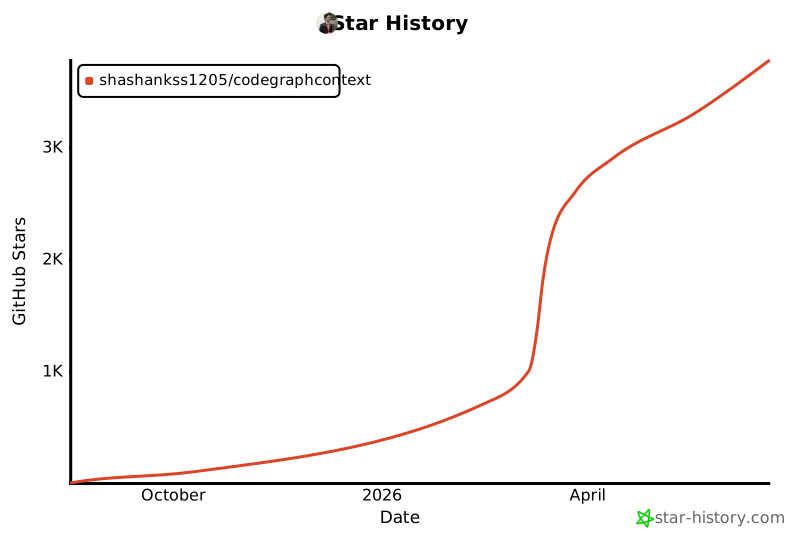](https://www.star-history.com/#Shashankss1205/CodeGraphContext&Date)
|
|
67
79
|
|
|
68
80
|
## Features
|
|
69
81
|
|
|
@@ -97,19 +109,33 @@ If you’re using CodeGraphContext in your project, feel free to open a PR and a
|
|
|
97
109
|
|
|
98
110
|
1. **Install:** `pip install codegraphcontext`
|
|
99
111
|
2. **Setup:** `cgc setup`
|
|
100
|
-
This interactive command guides you through configuring your Neo4j database connection
|
|
101
|
-
|
|
102
|
-
|
|
112
|
+
This interactive command guides you through configuring your Neo4j database connection and automatically setting up your IDE.
|
|
113
|
+
|
|
114
|
+
**Database Configuration:**
|
|
115
|
+
* **Local Setup (Docker Recommended):** Helps you set up a local Neo4j instance using Docker. Requires Docker and Docker Compose to be installed.
|
|
116
|
+
* **Local Setup (Linux Binary):** For Debian-based Linux systems (like Ubuntu), `cgc setup` can automate the installation of Neo4j. Requires `sudo` privileges.
|
|
103
117
|
* **Hosted Setup:** Allows you to connect to an existing remote Neo4j database (e.g., Neo4j AuraDB).
|
|
104
|
-
|
|
105
|
-
|
|
106
|
-
|
|
118
|
+
|
|
119
|
+
**IDE/CLI Configuration:**
|
|
120
|
+
After setting up your database, the wizard will ask to configure your development environment. It can automatically detect and configure the following:
|
|
121
|
+
* VS Code
|
|
122
|
+
* Cursor
|
|
123
|
+
* Claude
|
|
124
|
+
* Gemini CLI
|
|
125
|
+
|
|
126
|
+
Upon successful configuration, `cgc setup` will generate and place the necessary configuration files:
|
|
127
|
+
* It creates an `mcp.json` file in your current directory for reference.
|
|
128
|
+
* It stores your Neo4j credentials securely in `~/.codegraphcontext/.env`.
|
|
129
|
+
* It updates the settings file of your chosen IDE/CLI (e.g., `.claude.json` or VS Code's `settings.json`).
|
|
130
|
+
|
|
107
131
|
3. **Start:** `cgc start`
|
|
108
132
|
|
|
109
133
|
|
|
110
134
|
## MCP Client Configuration
|
|
111
135
|
|
|
112
|
-
|
|
136
|
+
The `cgc setup` command attempts to automatically configure your IDE/CLI. If you choose not to use the automatic setup, or if your tool is not supported, you can configure it manually.
|
|
137
|
+
|
|
138
|
+
Add the following server configuration to your client's settings file (e.g., VS Code's `settings.json` or `.claude.json`):
|
|
113
139
|
|
|
114
140
|
```json
|
|
115
141
|
{
|
|
@@ -120,9 +146,9 @@ Add the following to your MCP client's configuration:
|
|
|
120
146
|
"start"
|
|
121
147
|
],
|
|
122
148
|
"env": {
|
|
123
|
-
"NEO4J_URI": "
|
|
124
|
-
"
|
|
125
|
-
"NEO4J_PASSWORD": "
|
|
149
|
+
"NEO4J_URI": "YOUR_NEO4J_URI",
|
|
150
|
+
"NEO4J_USERNAME": "YOUR_NEO4J_USERNAME",
|
|
151
|
+
"NEO4J_PASSWORD": "YOUR_NEO4J_PASSWORD"
|
|
126
152
|
},
|
|
127
153
|
"tools": {
|
|
128
154
|
"alwaysAllow": [
|
|
@@ -4,14 +4,26 @@
|
|
|
4
4
|
[](https://pypi.org/project/codegraphcontext/)
|
|
5
5
|
[](https://github.com/Shashankss1205/CodeGraphContext/stargazers)
|
|
6
6
|
[](LICENSE)
|
|
7
|
+
[](http://codegraphcontext.vercel.app/)
|
|
8
|
+
[](https://youtu.be/KYYSdxhg1xU)
|
|
9
|
+
[](https://discord.gg/dR4QY32uYQ)
|
|
7
10
|
|
|
8
11
|
An MCP server that indexes local code into a graph database to provide context to AI assistants.
|
|
9
12
|
|
|
13
|
+
### Indexing a codebase
|
|
14
|
+

|
|
15
|
+
|
|
16
|
+
### Using the MCP server
|
|
17
|
+

|
|
18
|
+
|
|
10
19
|
## Project Details
|
|
11
|
-
- **Version:** 0.1.
|
|
20
|
+
- **Version:** 0.1.11
|
|
12
21
|
- **Authors:** Shashank Shekhar Singh <shashankshekharsingh1205@gmail.com>
|
|
13
22
|
- **License:** MIT License (See [LICENSE](LICENSE) for details)
|
|
14
|
-
- **Website:** [CodeGraphContext](http://
|
|
23
|
+
- **Website:** [CodeGraphContext](http://codegraphcontext.vercel.app/)
|
|
24
|
+
|
|
25
|
+
## Star History
|
|
26
|
+
[](https://www.star-history.com/#Shashankss1205/CodeGraphContext&Date)
|
|
15
27
|
|
|
16
28
|
## Features
|
|
17
29
|
|
|
@@ -45,19 +57,33 @@ If you’re using CodeGraphContext in your project, feel free to open a PR and a
|
|
|
45
57
|
|
|
46
58
|
1. **Install:** `pip install codegraphcontext`
|
|
47
59
|
2. **Setup:** `cgc setup`
|
|
48
|
-
This interactive command guides you through configuring your Neo4j database connection
|
|
49
|
-
|
|
50
|
-
|
|
60
|
+
This interactive command guides you through configuring your Neo4j database connection and automatically setting up your IDE.
|
|
61
|
+
|
|
62
|
+
**Database Configuration:**
|
|
63
|
+
* **Local Setup (Docker Recommended):** Helps you set up a local Neo4j instance using Docker. Requires Docker and Docker Compose to be installed.
|
|
64
|
+
* **Local Setup (Linux Binary):** For Debian-based Linux systems (like Ubuntu), `cgc setup` can automate the installation of Neo4j. Requires `sudo` privileges.
|
|
51
65
|
* **Hosted Setup:** Allows you to connect to an existing remote Neo4j database (e.g., Neo4j AuraDB).
|
|
52
|
-
|
|
53
|
-
|
|
54
|
-
|
|
66
|
+
|
|
67
|
+
**IDE/CLI Configuration:**
|
|
68
|
+
After setting up your database, the wizard will ask to configure your development environment. It can automatically detect and configure the following:
|
|
69
|
+
* VS Code
|
|
70
|
+
* Cursor
|
|
71
|
+
* Claude
|
|
72
|
+
* Gemini CLI
|
|
73
|
+
|
|
74
|
+
Upon successful configuration, `cgc setup` will generate and place the necessary configuration files:
|
|
75
|
+
* It creates an `mcp.json` file in your current directory for reference.
|
|
76
|
+
* It stores your Neo4j credentials securely in `~/.codegraphcontext/.env`.
|
|
77
|
+
* It updates the settings file of your chosen IDE/CLI (e.g., `.claude.json` or VS Code's `settings.json`).
|
|
78
|
+
|
|
55
79
|
3. **Start:** `cgc start`
|
|
56
80
|
|
|
57
81
|
|
|
58
82
|
## MCP Client Configuration
|
|
59
83
|
|
|
60
|
-
|
|
84
|
+
The `cgc setup` command attempts to automatically configure your IDE/CLI. If you choose not to use the automatic setup, or if your tool is not supported, you can configure it manually.
|
|
85
|
+
|
|
86
|
+
Add the following server configuration to your client's settings file (e.g., VS Code's `settings.json` or `.claude.json`):
|
|
61
87
|
|
|
62
88
|
```json
|
|
63
89
|
{
|
|
@@ -68,9 +94,9 @@ Add the following to your MCP client's configuration:
|
|
|
68
94
|
"start"
|
|
69
95
|
],
|
|
70
96
|
"env": {
|
|
71
|
-
"NEO4J_URI": "
|
|
72
|
-
"
|
|
73
|
-
"NEO4J_PASSWORD": "
|
|
97
|
+
"NEO4J_URI": "YOUR_NEO4J_URI",
|
|
98
|
+
"NEO4J_USERNAME": "YOUR_NEO4J_USERNAME",
|
|
99
|
+
"NEO4J_PASSWORD": "YOUR_NEO4J_PASSWORD"
|
|
74
100
|
},
|
|
75
101
|
"tools": {
|
|
76
102
|
"alwaysAllow": [
|
|
@@ -1,11 +1,11 @@
|
|
|
1
1
|
[project]
|
|
2
2
|
name = "codegraphcontext"
|
|
3
|
-
version = "0.1.
|
|
3
|
+
version = "0.1.12"
|
|
4
4
|
description = "An MCP server that indexes local code into a graph database to provide context to AI assistants."
|
|
5
5
|
authors = [{ name = "Shashank Shekhar Singh", email = "shashankshekharsingh1205@gmail.com" }]
|
|
6
6
|
readme = "README.md"
|
|
7
7
|
license = { file = "LICENSE" }
|
|
8
|
-
requires-python = ">=3.
|
|
8
|
+
requires-python = ">=3.9"
|
|
9
9
|
classifiers = [
|
|
10
10
|
"Programming Language :: Python :: 3",
|
|
11
11
|
"License :: OSI Approved :: MIT License",
|
|
File without changes
|
|
File without changes
|
|
File without changes
|
|
@@ -31,7 +31,7 @@ app = typer.Typer(
|
|
|
31
31
|
help="CodeGraphContext: An MCP server for AI-powered code analysis.",
|
|
32
32
|
add_completion=False,
|
|
33
33
|
)
|
|
34
|
-
console = Console()
|
|
34
|
+
console = Console(stderr=True)
|
|
35
35
|
|
|
36
36
|
# Configure basic logging for the application.
|
|
37
37
|
logging.basicConfig(level=logging.INFO, format='%(asctime)s - %(levelname)s - %(name)s - %(message)s')
|
{codegraphcontext-0.1.10 → codegraphcontext-0.1.12}/src/codegraphcontext/cli/setup_wizard.py
RENAMED
|
@@ -15,7 +15,7 @@ def _generate_mcp_json(creds):
|
|
|
15
15
|
"""Generates and prints the MCP JSON configuration."""
|
|
16
16
|
cgc_path = shutil.which("cgc") or sys.executable
|
|
17
17
|
|
|
18
|
-
if "python" in Path(cgc_path).name:
|
|
18
|
+
if "python" in Path(cgc_path).name:
|
|
19
19
|
# fallback to running as module if no cgc binary is found
|
|
20
20
|
command = cgc_path
|
|
21
21
|
args = ["-m", "cgc", "start"]
|
|
@@ -49,11 +49,11 @@ def _generate_mcp_json(creds):
|
|
|
49
49
|
}
|
|
50
50
|
}
|
|
51
51
|
}
|
|
52
|
-
|
|
52
|
+
|
|
53
53
|
console.print("\n[bold green]Configuration successful![/bold green]")
|
|
54
54
|
console.print("Copy the following JSON and add it to your MCP server configuration file:")
|
|
55
55
|
console.print(json.dumps(mcp_config, indent=2))
|
|
56
|
-
|
|
56
|
+
|
|
57
57
|
# Also save to a file for convenience
|
|
58
58
|
mcp_file = Path.cwd() / "mcp.json"
|
|
59
59
|
with open(mcp_file, "w") as f:
|
|
@@ -69,6 +69,109 @@ def _generate_mcp_json(creds):
|
|
|
69
69
|
f.write(f"NEO4J_PASSWORD={creds.get('password', '')}\n")
|
|
70
70
|
|
|
71
71
|
console.print(f"[cyan]Neo4j credentials also saved to: {env_file}[/cyan]")
|
|
72
|
+
_configure_ide(mcp_config)
|
|
73
|
+
|
|
74
|
+
def _configure_ide(mcp_config):
|
|
75
|
+
"""Asks user for their IDE and configures it automatically."""
|
|
76
|
+
questions = [
|
|
77
|
+
{
|
|
78
|
+
"type": "confirm",
|
|
79
|
+
"message": "Automatically configure your IDE/CLI (VS Code, Cursor, Claude, Gemini)?",
|
|
80
|
+
"name": "configure_ide",
|
|
81
|
+
"default": True,
|
|
82
|
+
}
|
|
83
|
+
]
|
|
84
|
+
result = prompt(questions)
|
|
85
|
+
if not result or not result.get("configure_ide"):
|
|
86
|
+
console.print("\n[cyan]Skipping automatic IDE configuration. You can add the MCP server manually.[/cyan]")
|
|
87
|
+
return
|
|
88
|
+
|
|
89
|
+
ide_questions = [
|
|
90
|
+
{
|
|
91
|
+
"type": "list",
|
|
92
|
+
"message": "Choose your IDE/CLI to configure:",
|
|
93
|
+
"choices": ["VS Code", "Cursor", "Claude code", "Gemini CLI", "None of the above"],
|
|
94
|
+
"name": "ide_choice",
|
|
95
|
+
}
|
|
96
|
+
]
|
|
97
|
+
ide_result = prompt(ide_questions)
|
|
98
|
+
ide_choice = ide_result.get("ide_choice")
|
|
99
|
+
|
|
100
|
+
if not ide_choice or ide_choice == "None of the above":
|
|
101
|
+
console.print("\n[cyan]You can add the MCP server manually to your IDE/CLI.[/cyan]")
|
|
102
|
+
return
|
|
103
|
+
|
|
104
|
+
if ide_choice in ["VS Code", "Cursor", "Claude code", "Gemini CLI"]:
|
|
105
|
+
console.print(f"\n[bold cyan]Configuring for {ide_choice}...[/bold cyan]")
|
|
106
|
+
|
|
107
|
+
config_paths = {
|
|
108
|
+
"VS Code": [
|
|
109
|
+
Path.home() / ".config" / "Code" / "User" / "settings.json",
|
|
110
|
+
Path.home() / "Library" / "Application Support" / "Code" / "User" / "settings.json",
|
|
111
|
+
Path.home() / "AppData" / "Roaming" / "Code" / "User" / "settings.json"
|
|
112
|
+
],
|
|
113
|
+
"Cursor": [
|
|
114
|
+
Path.home() / ".cursor" / "settings.json",
|
|
115
|
+
Path.home() / ".config" / "cursor" / "settings.json",
|
|
116
|
+
Path.home() / "Library" / "Application Support" / "cursor" / "settings.json",
|
|
117
|
+
Path.home() / "AppData" / "Roaming" / "cursor" / "settings.json",
|
|
118
|
+
Path.home() / ".config" / "Cursor" / "User" / "settings.json",
|
|
119
|
+
],
|
|
120
|
+
"Claude code": [
|
|
121
|
+
Path.home() / ".claude.json"
|
|
122
|
+
],
|
|
123
|
+
"Gemini CLI": [
|
|
124
|
+
Path.home() / ".gemini" / "settings.json"
|
|
125
|
+
]
|
|
126
|
+
}
|
|
127
|
+
|
|
128
|
+
target_path = None
|
|
129
|
+
paths_to_check = config_paths.get(ide_choice, [])
|
|
130
|
+
for path in paths_to_check:
|
|
131
|
+
if path.exists():
|
|
132
|
+
target_path = path
|
|
133
|
+
break
|
|
134
|
+
|
|
135
|
+
if not target_path:
|
|
136
|
+
# If file doesn't exist, check if parent directory exists
|
|
137
|
+
for path in paths_to_check:
|
|
138
|
+
if path.parent.exists():
|
|
139
|
+
target_path = path
|
|
140
|
+
break
|
|
141
|
+
|
|
142
|
+
if not target_path:
|
|
143
|
+
console.print(f"[yellow]Could not automatically find or create the configuration directory for {ide_choice}.[/yellow]")
|
|
144
|
+
console.print("Please add the MCP configuration manually from the `mcp.json` file generated above.")
|
|
145
|
+
return
|
|
146
|
+
|
|
147
|
+
console.print(f"Using configuration file at: {target_path}")
|
|
148
|
+
|
|
149
|
+
try:
|
|
150
|
+
with open(target_path, "r") as f:
|
|
151
|
+
try:
|
|
152
|
+
settings = json.load(f)
|
|
153
|
+
except json.JSONDecodeError:
|
|
154
|
+
settings = {}
|
|
155
|
+
except FileNotFoundError:
|
|
156
|
+
settings = {}
|
|
157
|
+
|
|
158
|
+
if not isinstance(settings, dict):
|
|
159
|
+
console.print(f"[red]Error: Configuration file at {target_path} is not a valid JSON object.[/red]")
|
|
160
|
+
return
|
|
161
|
+
|
|
162
|
+
if "mcpServers" not in settings:
|
|
163
|
+
settings["mcpServers"] = {}
|
|
164
|
+
|
|
165
|
+
settings["mcpServers"].update(mcp_config["mcpServers"])
|
|
166
|
+
|
|
167
|
+
try:
|
|
168
|
+
with open(target_path, "w") as f:
|
|
169
|
+
json.dump(settings, f, indent=2)
|
|
170
|
+
console.print(f"[green]Successfully updated {ide_choice} configuration.[/green]")
|
|
171
|
+
except Exception as e:
|
|
172
|
+
console.print(f"[red]Failed to write to configuration file: {e}[/red]")
|
|
173
|
+
|
|
174
|
+
|
|
72
175
|
|
|
73
176
|
|
|
74
177
|
def get_project_root() -> Path:
|
|
File without changes
|
|
File without changes
|
|
File without changes
|
|
File without changes
|
|
File without changes
|
|
@@ -7,6 +7,7 @@ import stdlibs
|
|
|
7
7
|
import sys
|
|
8
8
|
import traceback
|
|
9
9
|
import os
|
|
10
|
+
import re
|
|
10
11
|
from datetime import datetime
|
|
11
12
|
from pathlib import Path
|
|
12
13
|
from neo4j.exceptions import CypherSyntaxError
|
|
@@ -21,18 +22,10 @@ from .core.watcher import CodeWatcher
|
|
|
21
22
|
from .tools.graph_builder import GraphBuilder
|
|
22
23
|
from .tools.code_finder import CodeFinder
|
|
23
24
|
from .tools.import_extractor import ImportExtractor
|
|
24
|
-
|
|
25
|
+
from .utils.debug_log import debug_log
|
|
25
26
|
|
|
26
27
|
logger = logging.getLogger(__name__)
|
|
27
28
|
|
|
28
|
-
def debug_log(message):
|
|
29
|
-
"""Write debug message to a file for development and testing."""
|
|
30
|
-
debug_file = os.path.expanduser("~/mcp_debug.log")
|
|
31
|
-
timestamp = datetime.now().strftime("%Y-%m-%d %H:%M:%S")
|
|
32
|
-
with open(debug_file, "a") as f:
|
|
33
|
-
f.write(f"[{timestamp}] {message}\n")
|
|
34
|
-
f.flush()
|
|
35
|
-
|
|
36
29
|
class MCPServer:
|
|
37
30
|
"""
|
|
38
31
|
The main MCP Server class.
|
|
@@ -132,7 +125,7 @@ class MCPServer:
|
|
|
132
125
|
"properties": {
|
|
133
126
|
"query_type": {"type": "string", "description": "Type of relationship query to run.", "enum": ["find_callers", "find_callees", "find_all_callers", "find_all_callees", "find_importers", "who_modifies", "class_hierarchy", "overrides", "dead_code", "call_chain", "module_deps", "variable_scope", "find_complexity", "find_functions_by_argument", "find_functions_by_decorator"]},
|
|
134
127
|
"target": {"type": "string", "description": "The function, class, or module to analyze."},
|
|
135
|
-
"context": {"type": "string", "description": "Optional: specific file path for precise results."}
|
|
128
|
+
"context": {"type": "string", "description": "Optional: specific file path for precise results."}
|
|
136
129
|
},
|
|
137
130
|
"required": ["query_type", "target"]
|
|
138
131
|
}
|
|
@@ -197,7 +190,7 @@ class MCPServer:
|
|
|
197
190
|
"type": "object",
|
|
198
191
|
"properties": {
|
|
199
192
|
"function_name": {"type": "string", "description": "The name of the function to analyze."},
|
|
200
|
-
"file_path": {"type": "string", "description": "Optional: The full path to the file containing the function for a more specific query."}
|
|
193
|
+
"file_path": {"type": "string", "description": "Optional: The full path to the file containing the function for a more specific query."}
|
|
201
194
|
},
|
|
202
195
|
"required": ["function_name"]
|
|
203
196
|
}
|
|
@@ -307,12 +300,21 @@ class MCPServer:
|
|
|
307
300
|
return {"error": "Cypher query cannot be empty."}
|
|
308
301
|
|
|
309
302
|
# Safety Check: Prevent any write operations to the database.
|
|
303
|
+
# This check first removes all string literals and then checks for forbidden keywords.
|
|
310
304
|
forbidden_keywords = ['CREATE', 'MERGE', 'DELETE', 'SET', 'REMOVE', 'DROP', 'CALL apoc']
|
|
311
|
-
|
|
312
|
-
|
|
313
|
-
|
|
314
|
-
|
|
315
|
-
|
|
305
|
+
|
|
306
|
+
# Regex to match single or double quoted strings, handling escaped quotes.
|
|
307
|
+
string_literal_pattern = r'"(?:\\.|[^"\\])*"|\'(?:\\.|[^\'\\])*\''
|
|
308
|
+
|
|
309
|
+
# Remove all string literals from the query.
|
|
310
|
+
query_without_strings = re.sub(string_literal_pattern, '', cypher_query)
|
|
311
|
+
|
|
312
|
+
# Now, check for forbidden keywords in the query without strings.
|
|
313
|
+
for keyword in forbidden_keywords:
|
|
314
|
+
if re.search(r'\b' + keyword + r'\b', query_without_strings, re.IGNORECASE):
|
|
315
|
+
return {
|
|
316
|
+
"error": "This tool only supports read-only queries. Prohibited keywords like CREATE, MERGE, DELETE, SET, etc., are not allowed."
|
|
317
|
+
}
|
|
316
318
|
|
|
317
319
|
try:
|
|
318
320
|
debug_log(f"Executing Cypher query: {cypher_query}")
|
|
@@ -785,7 +787,7 @@ class MCPServer:
|
|
|
785
787
|
response = {
|
|
786
788
|
"jsonrpc": "2.0", "id": request_id,
|
|
787
789
|
"result": {
|
|
788
|
-
"protocolVersion": "
|
|
790
|
+
"protocolVersion": "2025-03-26",
|
|
789
791
|
"serverInfo": {
|
|
790
792
|
"name": "CodeGraphContext", "version": "0.1.0",
|
|
791
793
|
"systemPrompt": LLM_SYSTEM_PROMPT
|
|
@@ -804,24 +806,40 @@ class MCPServer:
|
|
|
804
806
|
tool_name = params.get('name')
|
|
805
807
|
args = params.get('arguments', {})
|
|
806
808
|
result = await self.handle_tool_call(tool_name, args)
|
|
807
|
-
|
|
808
|
-
|
|
809
|
-
|
|
810
|
-
|
|
809
|
+
|
|
810
|
+
if "error" in result:
|
|
811
|
+
response = {
|
|
812
|
+
"jsonrpc": "2.0", "id": request_id,
|
|
813
|
+
"error": {"code": -32000, "message": "Tool execution error", "data": result}
|
|
814
|
+
}
|
|
815
|
+
else:
|
|
816
|
+
response = {
|
|
817
|
+
"jsonrpc": "2.0", "id": request_id,
|
|
818
|
+
"result": {"content": [{"type": "text", "text": json.dumps(result, indent=2)}]}
|
|
819
|
+
}
|
|
820
|
+
elif method == 'notifications/initialized':
|
|
821
|
+
# This is a notification, no response needed.
|
|
822
|
+
pass
|
|
811
823
|
else:
|
|
812
824
|
# Handle unknown methods.
|
|
813
|
-
|
|
814
|
-
|
|
815
|
-
|
|
816
|
-
|
|
825
|
+
if request_id is not None:
|
|
826
|
+
response = {
|
|
827
|
+
"jsonrpc": "2.0", "id": request_id,
|
|
828
|
+
"error": {"code": -32601, "message": f"Method not found: {method}"}
|
|
829
|
+
}
|
|
817
830
|
|
|
818
|
-
# Send the response to standard output.
|
|
819
|
-
|
|
831
|
+
# Send the response to standard output if it's not a notification.
|
|
832
|
+
if request_id is not None and response:
|
|
833
|
+
print(json.dumps(response), flush=True)
|
|
820
834
|
|
|
821
835
|
except Exception as e:
|
|
822
836
|
logger.error(f"Error processing request: {e}\n{traceback.format_exc()}")
|
|
837
|
+
request_id = "unknown"
|
|
838
|
+
if 'request' in locals() and isinstance(request, dict):
|
|
839
|
+
request_id = request.get('id', "unknown")
|
|
840
|
+
|
|
823
841
|
error_response = {
|
|
824
|
-
"jsonrpc": "2.0", "id":
|
|
842
|
+
"jsonrpc": "2.0", "id": request_id,
|
|
825
843
|
"error": {"code": -32603, "message": f"Internal error: {str(e)}", "data": traceback.format_exc()}
|
|
826
844
|
}
|
|
827
845
|
print(json.dumps(error_response), flush=True)
|
|
File without changes
|
{codegraphcontext-0.1.10 → codegraphcontext-0.1.12}/src/codegraphcontext/tools/code_finder.py
RENAMED
|
File without changes
|
{codegraphcontext-0.1.10 → codegraphcontext-0.1.12}/src/codegraphcontext/tools/graph_builder.py
RENAMED
|
@@ -9,6 +9,7 @@ from datetime import datetime
|
|
|
9
9
|
|
|
10
10
|
from ..core.database import DatabaseManager
|
|
11
11
|
from ..core.jobs import JobManager, JobStatus
|
|
12
|
+
from ..utils.debug_log import debug_log
|
|
12
13
|
|
|
13
14
|
logger = logging.getLogger(__name__)
|
|
14
15
|
|
|
@@ -16,15 +17,6 @@ logger = logging.getLogger(__name__)
|
|
|
16
17
|
# Set to 1 to enable, 0 to disable.
|
|
17
18
|
debug_mode = 0
|
|
18
19
|
|
|
19
|
-
def debug_log(message):
|
|
20
|
-
"""Write debug message to a file"""
|
|
21
|
-
debug_file = os.path.expanduser("~/mcp_debug.log")
|
|
22
|
-
timestamp = datetime.now().strftime("%Y-%m-%d %H:%M:%S")
|
|
23
|
-
with open(debug_file, "a") as f:
|
|
24
|
-
f.write(f"[{timestamp}] {message}\n")
|
|
25
|
-
f.flush()
|
|
26
|
-
|
|
27
|
-
|
|
28
20
|
class CyclomaticComplexityVisitor(ast.NodeVisitor):
|
|
29
21
|
"""Calculates cyclomatic complexity for a given AST node."""
|
|
30
22
|
def __init__(self):
|
|
@@ -985,16 +977,29 @@ class GraphBuilder:
|
|
|
985
977
|
""", path=path)
|
|
986
978
|
|
|
987
979
|
def delete_repository_from_graph(self, repo_path: str):
|
|
988
|
-
"""
|
|
980
|
+
"""
|
|
981
|
+
Deletes a repository and all its contents from the graph, then cleans up
|
|
982
|
+
any orphaned Module nodes that are no longer referenced.
|
|
983
|
+
"""
|
|
989
984
|
repo_path_str = str(Path(repo_path).resolve())
|
|
990
985
|
with self.driver.session() as session:
|
|
986
|
+
# Delete the repository and all its contained elements, including parameters
|
|
991
987
|
session.run("""
|
|
992
988
|
MATCH (r:Repository {path: $path})
|
|
993
989
|
OPTIONAL MATCH (r)-[:CONTAINS*]->(e)
|
|
994
|
-
|
|
990
|
+
OPTIONAL MATCH (e)-[:HAS_PARAMETER]->(p)
|
|
991
|
+
DETACH DELETE r, e, p
|
|
995
992
|
""", path=repo_path_str)
|
|
996
993
|
logger.info(f"Deleted repository and its contents from graph: {repo_path_str}")
|
|
997
994
|
|
|
995
|
+
# Clean up orphaned Module nodes that are no longer imported by any file
|
|
996
|
+
session.run("""
|
|
997
|
+
MATCH (m:Module)
|
|
998
|
+
WHERE NOT ()-[:IMPORTS]->(m)
|
|
999
|
+
DETACH DELETE m
|
|
1000
|
+
""")
|
|
1001
|
+
logger.info("Cleaned up orphaned Module nodes.")
|
|
1002
|
+
|
|
998
1003
|
def update_file_in_graph(self, file_path: Path, repo_path: Path, imports_map: dict):
|
|
999
1004
|
"""
|
|
1000
1005
|
Updates a single file's nodes in the graph and returns its new parsed data.
|
{codegraphcontext-0.1.10 → codegraphcontext-0.1.12}/src/codegraphcontext/tools/import_extractor.py
RENAMED
|
@@ -13,15 +13,9 @@ import stdlibs
|
|
|
13
13
|
import os
|
|
14
14
|
from datetime import datetime
|
|
15
15
|
|
|
16
|
-
|
|
16
|
+
from ..utils.debug_log import debug_log
|
|
17
17
|
|
|
18
|
-
|
|
19
|
-
"""Write debug message to a file for development and testing."""
|
|
20
|
-
debug_file = os.path.expanduser("~/mcp_debug.log")
|
|
21
|
-
timestamp = datetime.now().strftime("%Y-%m-%d %H:%M:%S")
|
|
22
|
-
with open(debug_file, "a") as f:
|
|
23
|
-
f.write(f"[{timestamp}] {message}\n")
|
|
24
|
-
f.flush()
|
|
18
|
+
logger = logging.getLogger(__name__)
|
|
25
19
|
|
|
26
20
|
class ImportExtractor:
|
|
27
21
|
"""
|
|
@@ -8,12 +8,10 @@ from neo4j.exceptions import CypherSyntaxError
|
|
|
8
8
|
|
|
9
9
|
from ..core.database import DatabaseManager
|
|
10
10
|
from ..core.jobs import JobManager, JobStatus
|
|
11
|
+
from ..utils.debug_log import debug_log
|
|
11
12
|
|
|
12
13
|
logger = logging.getLogger(__name__)
|
|
13
14
|
|
|
14
|
-
def debug_log(message):
|
|
15
|
-
# This helper can be moved to a shared utils.py file later
|
|
16
|
-
...
|
|
17
15
|
|
|
18
16
|
class SystemTools:
|
|
19
17
|
"""Handles system-level tools like job management and direct DB queries."""
|
|
@@ -0,0 +1,10 @@
|
|
|
1
|
+
import os
|
|
2
|
+
from datetime import datetime
|
|
3
|
+
|
|
4
|
+
def debug_log(message):
|
|
5
|
+
"""Write debug message to a file"""
|
|
6
|
+
debug_file = os.path.expanduser("~/mcp_debug.log")
|
|
7
|
+
timestamp = datetime.now().strftime("%Y-%m-%d %H:%M:%S")
|
|
8
|
+
with open(debug_file, "a") as f:
|
|
9
|
+
f.write(f"[{timestamp}] {message}\n")
|
|
10
|
+
f.flush()
|
|
@@ -1,6 +1,6 @@
|
|
|
1
1
|
Metadata-Version: 2.4
|
|
2
2
|
Name: codegraphcontext
|
|
3
|
-
Version: 0.1.
|
|
3
|
+
Version: 0.1.12
|
|
4
4
|
Summary: An MCP server that indexes local code into a graph database to provide context to AI assistants.
|
|
5
5
|
Author-email: Shashank Shekhar Singh <shashankshekharsingh1205@gmail.com>
|
|
6
6
|
License: MIT License
|
|
@@ -33,7 +33,7 @@ Classifier: Operating System :: OS Independent
|
|
|
33
33
|
Classifier: Development Status :: 3 - Alpha
|
|
34
34
|
Classifier: Intended Audience :: Developers
|
|
35
35
|
Classifier: Topic :: Software Development :: Libraries :: Application Frameworks
|
|
36
|
-
Requires-Python: >=3.
|
|
36
|
+
Requires-Python: >=3.9
|
|
37
37
|
Description-Content-Type: text/markdown
|
|
38
38
|
License-File: LICENSE
|
|
39
39
|
Requires-Dist: neo4j>=5.15.0
|
|
@@ -56,14 +56,26 @@ Dynamic: license-file
|
|
|
56
56
|
[](https://pypi.org/project/codegraphcontext/)
|
|
57
57
|
[](https://github.com/Shashankss1205/CodeGraphContext/stargazers)
|
|
58
58
|
[](LICENSE)
|
|
59
|
+
[](http://codegraphcontext.vercel.app/)
|
|
60
|
+
[](https://youtu.be/KYYSdxhg1xU)
|
|
61
|
+
[](https://discord.gg/dR4QY32uYQ)
|
|
59
62
|
|
|
60
63
|
An MCP server that indexes local code into a graph database to provide context to AI assistants.
|
|
61
64
|
|
|
65
|
+
### Indexing a codebase
|
|
66
|
+

|
|
67
|
+
|
|
68
|
+
### Using the MCP server
|
|
69
|
+

|
|
70
|
+
|
|
62
71
|
## Project Details
|
|
63
|
-
- **Version:** 0.1.
|
|
72
|
+
- **Version:** 0.1.11
|
|
64
73
|
- **Authors:** Shashank Shekhar Singh <shashankshekharsingh1205@gmail.com>
|
|
65
74
|
- **License:** MIT License (See [LICENSE](LICENSE) for details)
|
|
66
|
-
- **Website:** [CodeGraphContext](http://
|
|
75
|
+
- **Website:** [CodeGraphContext](http://codegraphcontext.vercel.app/)
|
|
76
|
+
|
|
77
|
+
## Star History
|
|
78
|
+
[](https://www.star-history.com/#Shashankss1205/CodeGraphContext&Date)
|
|
67
79
|
|
|
68
80
|
## Features
|
|
69
81
|
|
|
@@ -97,19 +109,33 @@ If you’re using CodeGraphContext in your project, feel free to open a PR and a
|
|
|
97
109
|
|
|
98
110
|
1. **Install:** `pip install codegraphcontext`
|
|
99
111
|
2. **Setup:** `cgc setup`
|
|
100
|
-
This interactive command guides you through configuring your Neo4j database connection
|
|
101
|
-
|
|
102
|
-
|
|
112
|
+
This interactive command guides you through configuring your Neo4j database connection and automatically setting up your IDE.
|
|
113
|
+
|
|
114
|
+
**Database Configuration:**
|
|
115
|
+
* **Local Setup (Docker Recommended):** Helps you set up a local Neo4j instance using Docker. Requires Docker and Docker Compose to be installed.
|
|
116
|
+
* **Local Setup (Linux Binary):** For Debian-based Linux systems (like Ubuntu), `cgc setup` can automate the installation of Neo4j. Requires `sudo` privileges.
|
|
103
117
|
* **Hosted Setup:** Allows you to connect to an existing remote Neo4j database (e.g., Neo4j AuraDB).
|
|
104
|
-
|
|
105
|
-
|
|
106
|
-
|
|
118
|
+
|
|
119
|
+
**IDE/CLI Configuration:**
|
|
120
|
+
After setting up your database, the wizard will ask to configure your development environment. It can automatically detect and configure the following:
|
|
121
|
+
* VS Code
|
|
122
|
+
* Cursor
|
|
123
|
+
* Claude
|
|
124
|
+
* Gemini CLI
|
|
125
|
+
|
|
126
|
+
Upon successful configuration, `cgc setup` will generate and place the necessary configuration files:
|
|
127
|
+
* It creates an `mcp.json` file in your current directory for reference.
|
|
128
|
+
* It stores your Neo4j credentials securely in `~/.codegraphcontext/.env`.
|
|
129
|
+
* It updates the settings file of your chosen IDE/CLI (e.g., `.claude.json` or VS Code's `settings.json`).
|
|
130
|
+
|
|
107
131
|
3. **Start:** `cgc start`
|
|
108
132
|
|
|
109
133
|
|
|
110
134
|
## MCP Client Configuration
|
|
111
135
|
|
|
112
|
-
|
|
136
|
+
The `cgc setup` command attempts to automatically configure your IDE/CLI. If you choose not to use the automatic setup, or if your tool is not supported, you can configure it manually.
|
|
137
|
+
|
|
138
|
+
Add the following server configuration to your client's settings file (e.g., VS Code's `settings.json` or `.claude.json`):
|
|
113
139
|
|
|
114
140
|
```json
|
|
115
141
|
{
|
|
@@ -120,9 +146,9 @@ Add the following to your MCP client's configuration:
|
|
|
120
146
|
"start"
|
|
121
147
|
],
|
|
122
148
|
"env": {
|
|
123
|
-
"NEO4J_URI": "
|
|
124
|
-
"
|
|
125
|
-
"NEO4J_PASSWORD": "
|
|
149
|
+
"NEO4J_URI": "YOUR_NEO4J_URI",
|
|
150
|
+
"NEO4J_USERNAME": "YOUR_NEO4J_USERNAME",
|
|
151
|
+
"NEO4J_PASSWORD": "YOUR_NEO4J_PASSWORD"
|
|
126
152
|
},
|
|
127
153
|
"tools": {
|
|
128
154
|
"alwaysAllow": [
|
{codegraphcontext-0.1.10 → codegraphcontext-0.1.12}/src/codegraphcontext.egg-info/SOURCES.txt
RENAMED
|
@@ -1,4 +1,5 @@
|
|
|
1
1
|
LICENSE
|
|
2
|
+
MANIFEST.in
|
|
2
3
|
README.md
|
|
3
4
|
pyproject.toml
|
|
4
5
|
src/codegraphcontext/__init__.py
|
|
@@ -23,6 +24,7 @@ src/codegraphcontext/tools/code_finder.py
|
|
|
23
24
|
src/codegraphcontext/tools/graph_builder.py
|
|
24
25
|
src/codegraphcontext/tools/import_extractor.py
|
|
25
26
|
src/codegraphcontext/tools/system.py
|
|
27
|
+
src/codegraphcontext/utils/debug_log.py
|
|
26
28
|
tests/test_cgc_integration.py
|
|
27
29
|
tests/test_imports.py
|
|
28
30
|
tests/test_jsonrpc.py
|
|
File without changes
|
{codegraphcontext-0.1.10 → codegraphcontext-0.1.12}/src/codegraphcontext.egg-info/entry_points.txt
RENAMED
|
File without changes
|
{codegraphcontext-0.1.10 → codegraphcontext-0.1.12}/src/codegraphcontext.egg-info/requires.txt
RENAMED
|
File without changes
|
{codegraphcontext-0.1.10 → codegraphcontext-0.1.12}/src/codegraphcontext.egg-info/top_level.txt
RENAMED
|
File without changes
|
|
File without changes
|
|
File without changes
|
|
File without changes
|
|
@@ -16,9 +16,18 @@ def call_tool(server, name, args):
|
|
|
16
16
|
"params": {"name": name, "arguments": args}
|
|
17
17
|
}
|
|
18
18
|
response = server(request)
|
|
19
|
-
|
|
20
|
-
|
|
21
|
-
|
|
19
|
+
|
|
20
|
+
# Handle both success and error responses
|
|
21
|
+
if "result" in response:
|
|
22
|
+
content = json.loads(response["result"]["content"][0]["text"])
|
|
23
|
+
return content
|
|
24
|
+
elif "error" in response:
|
|
25
|
+
# For error responses, return the error data
|
|
26
|
+
error_data = response["error"].get("data", {})
|
|
27
|
+
return error_data
|
|
28
|
+
else:
|
|
29
|
+
raise ValueError(f"Unexpected response format: {response}")
|
|
30
|
+
|
|
22
31
|
@pytest.fixture(scope="module")
|
|
23
32
|
def server():
|
|
24
33
|
"""
|
|
@@ -371,3 +380,28 @@ def test_execute_cypher_query(indexed_project):
|
|
|
371
380
|
assert len(results) > 0, "No results from Cypher query."
|
|
372
381
|
assert "functionName" in results[0], "Cypher query result missing 'functionName' key."
|
|
373
382
|
print("Successfully executed Cypher query.")
|
|
383
|
+
|
|
384
|
+
def test_execute_cypher_query_with_forbidden_keyword_in_string(indexed_project):
|
|
385
|
+
"""
|
|
386
|
+
Tests that a read-only query with a forbidden keyword inside a string literal is allowed.
|
|
387
|
+
"""
|
|
388
|
+
server = indexed_project
|
|
389
|
+
print("\n--- Executing Cypher query with forbidden keyword in string ---")
|
|
390
|
+
# This query should not be blocked by the safety check
|
|
391
|
+
cypher_query = "MATCH (n:Function) WHERE n.name = 'create_user_function' RETURN n.name AS functionName"
|
|
392
|
+
query_result = call_tool(server, "execute_cypher_query", {"cypher_query": cypher_query})
|
|
393
|
+
assert query_result.get("success") is True, f"execute_cypher_query with forbidden keyword in string failed: {query_result.get('error')}"
|
|
394
|
+
print("Successfully executed Cypher query with forbidden keyword in string.")
|
|
395
|
+
|
|
396
|
+
def test_execute_cypher_query_with_write_operation(indexed_project):
|
|
397
|
+
"""
|
|
398
|
+
Tests that a query with a write operation is blocked.
|
|
399
|
+
"""
|
|
400
|
+
server = indexed_project
|
|
401
|
+
print("\n--- Executing Cypher query with write operation ---")
|
|
402
|
+
cypher_query = "CREATE (n:TestNode) RETURN n"
|
|
403
|
+
query_result = call_tool(server, "execute_cypher_query", {"cypher_query": cypher_query})
|
|
404
|
+
assert query_result.get("success") is None, "execute_cypher_query with write operation should have failed"
|
|
405
|
+
assert "error" in query_result, "execute_cypher_query with write operation should have returned an error"
|
|
406
|
+
assert "read-only" in query_result.get("error", ""), "Error message should indicate that only read-only queries are supported"
|
|
407
|
+
print("Successfully blocked a write operation.")
|
|
File without changes
|