codebase-brief 0.1.0__tar.gz
This diff represents the content of publicly available package versions that have been released to one of the supported registries. The information contained in this diff is provided for informational purposes only and reflects changes between package versions as they appear in their respective public registries.
- codebase_brief-0.1.0/CHANGELOG.md +13 -0
- codebase_brief-0.1.0/CONTRIBUTING.md +30 -0
- codebase_brief-0.1.0/LICENSE +22 -0
- codebase_brief-0.1.0/MANIFEST.in +6 -0
- codebase_brief-0.1.0/PKG-INFO +138 -0
- codebase_brief-0.1.0/README.md +113 -0
- codebase_brief-0.1.0/codebase_brief.egg-info/PKG-INFO +138 -0
- codebase_brief-0.1.0/codebase_brief.egg-info/SOURCES.txt +15 -0
- codebase_brief-0.1.0/codebase_brief.egg-info/dependency_links.txt +1 -0
- codebase_brief-0.1.0/codebase_brief.egg-info/entry_points.txt +4 -0
- codebase_brief-0.1.0/codebase_brief.egg-info/top_level.txt +1 -0
- codebase_brief-0.1.0/context_inject/__init__.py +2 -0
- codebase_brief-0.1.0/context_inject/__main__.py +4 -0
- codebase_brief-0.1.0/context_inject/cli.py +895 -0
- codebase_brief-0.1.0/pyproject.toml +42 -0
- codebase_brief-0.1.0/setup.cfg +4 -0
- codebase_brief-0.1.0/tests/test_cli.py +400 -0
|
@@ -0,0 +1,13 @@
|
|
|
1
|
+
# Changelog
|
|
2
|
+
|
|
3
|
+
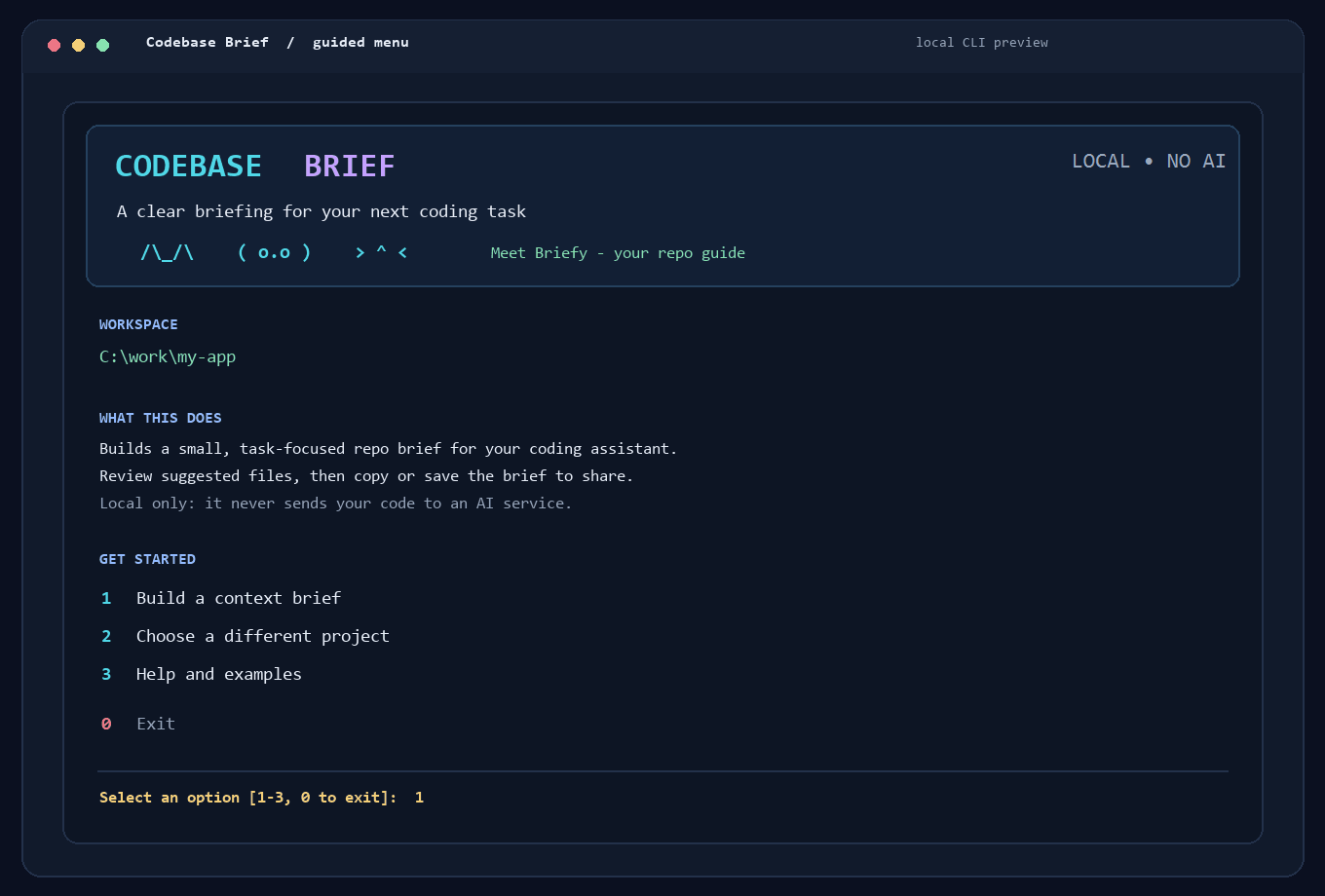
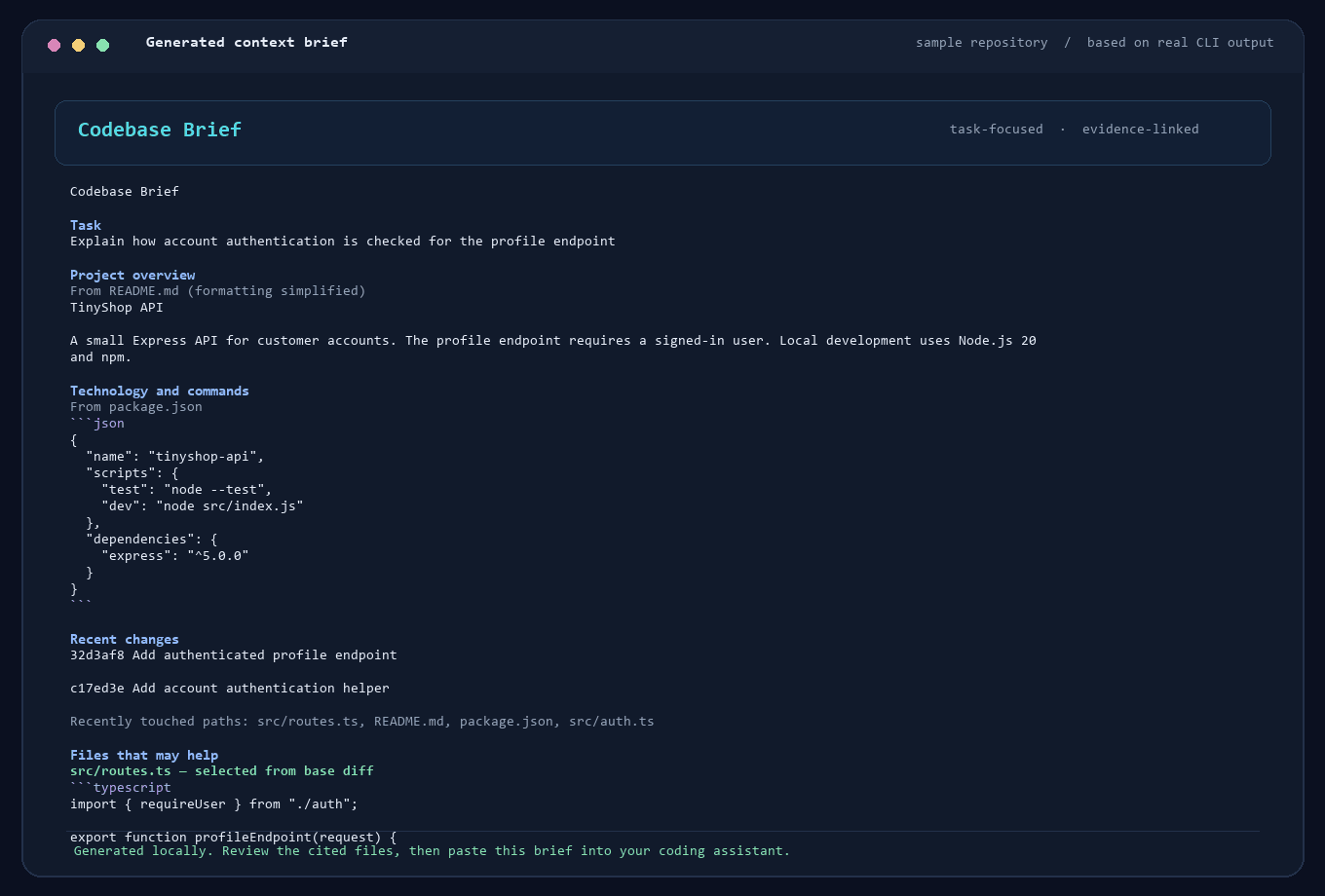
## 0.1.0 - Unreleased
|
|
4
|
+
|
|
5
|
+
- Generate bounded, local Markdown context briefs from project documentation, manifests, Git history, and selected source files.
|
|
6
|
+
- Add an interactive terminal menu with ranked file selection, output choices, and overwrite confirmation.
|
|
7
|
+
- Explain first-run usage in the menu and CLI help; show why each source file was selected.
|
|
8
|
+
- Follow one level of local Python and JavaScript/TypeScript imports; allow approximate token budgets and clipboard handoff to any coding assistant.
|
|
9
|
+
- Format generated briefs with plain-language section titles, readable documentation excerpts, and code fences only for source/configuration where useful.
|
|
10
|
+
- Exclude common credential files and Git-ignored untracked files, reject credential-named or external symlinks, redact common secret formats, and keep source excerpts within fixed limits.
|
|
11
|
+
- Preserve normal typed password parameters and conditions in source excerpts while redacting quoted credential assignments.
|
|
12
|
+
- Package the CLI as `codebase-brief`, retaining `context-inject` as a compatibility command.
|
|
13
|
+
|
|
@@ -0,0 +1,30 @@
|
|
|
1
|
+
# Contributing
|
|
2
|
+
|
|
3
|
+
## Development setup
|
|
4
|
+
|
|
5
|
+
Use Python 3.10 or newer and Git. Create a virtual environment from the project root:
|
|
6
|
+
|
|
7
|
+
```sh
|
|
8
|
+
python -m venv .venv
|
|
9
|
+
```
|
|
10
|
+
|
|
11
|
+
Activate it with `.venv/Scripts/Activate.ps1` in Windows PowerShell or `source .venv/bin/activate` on macOS/Linux, then install the project in editable mode:
|
|
12
|
+
|
|
13
|
+
```sh
|
|
14
|
+
python -m pip install --editable .
|
|
15
|
+
```
|
|
16
|
+
|
|
17
|
+
## Checks
|
|
18
|
+
|
|
19
|
+
Run the test suite before submitting changes:
|
|
20
|
+
|
|
21
|
+
```sh
|
|
22
|
+
python -m unittest discover -s tests -v
|
|
23
|
+
```
|
|
24
|
+
|
|
25
|
+
Tests use temporary directories and temporary Git repositories. They should not require network access, external credentials, or modifications to a user's repository.
|
|
26
|
+
|
|
27
|
+
## Scope and privacy
|
|
28
|
+
|
|
29
|
+
Keep processing local and dependency-light. Do not add telemetry, hosted processing, or an LLM call without an explicit product decision. Treat repository contents and filenames as untrusted input, retain bounds and secret exclusions, and keep the README aligned with tested behavior. Secret filtering is best-effort; never describe it as a guarantee.
|
|
30
|
+
|
|
@@ -0,0 +1,22 @@
|
|
|
1
|
+
MIT License
|
|
2
|
+
|
|
3
|
+
Copyright (c) 2026 Mohamed Maggy
|
|
4
|
+
|
|
5
|
+
Permission is hereby granted, free of charge, to any person obtaining a copy
|
|
6
|
+
of this software and associated documentation files (the "Software"), to deal
|
|
7
|
+
in the Software without restriction, including without limitation the rights
|
|
8
|
+
to use, copy, modify, merge, publish, distribute, sublicense, and/or sell
|
|
9
|
+
copies of the Software, and to permit persons to whom the Software is
|
|
10
|
+
furnished to do so, subject to the following conditions:
|
|
11
|
+
|
|
12
|
+
The above copyright notice and this permission notice shall be included in all
|
|
13
|
+
copies or substantial portions of the Software.
|
|
14
|
+
|
|
15
|
+
THE SOFTWARE IS PROVIDED "AS IS", WITHOUT WARRANTY OF ANY KIND, EXPRESS OR
|
|
16
|
+
IMPLIED, INCLUDING BUT NOT LIMITED TO THE WARRANTIES OF MERCHANTABILITY,
|
|
17
|
+
FITNESS FOR A PARTICULAR PURPOSE AND NONINFRINGEMENT. IN NO EVENT SHALL THE
|
|
18
|
+
AUTHORS OR COPYRIGHT HOLDERS BE LIABLE FOR ANY CLAIM, DAMAGES OR OTHER
|
|
19
|
+
LIABILITY, WHETHER IN AN ACTION OF CONTRACT, TORT OR OTHERWISE, ARISING FROM,
|
|
20
|
+
OUT OF OR IN CONNECTION WITH THE SOFTWARE OR THE USE OR OTHER DEALINGS IN THE
|
|
21
|
+
SOFTWARE.
|
|
22
|
+
|
|
@@ -0,0 +1,138 @@
|
|
|
1
|
+
Metadata-Version: 2.4
|
|
2
|
+
Name: codebase-brief
|
|
3
|
+
Version: 0.1.0
|
|
4
|
+
Summary: Local-first CLI that builds task-focused context briefs from code repositories
|
|
5
|
+
Author: Mohamed Maggy
|
|
6
|
+
License-Expression: MIT
|
|
7
|
+
Project-URL: Homepage, https://github.com/mohamed1111111m/codebase-brief
|
|
8
|
+
Project-URL: Repository, https://github.com/mohamed1111111m/codebase-brief
|
|
9
|
+
Project-URL: Issues, https://github.com/mohamed1111111m/codebase-brief/issues
|
|
10
|
+
Keywords: developer-tools,codebase,context,cli
|
|
11
|
+
Classifier: Development Status :: 3 - Alpha
|
|
12
|
+
Classifier: Environment :: Console
|
|
13
|
+
Classifier: Intended Audience :: Developers
|
|
14
|
+
Classifier: Operating System :: OS Independent
|
|
15
|
+
Classifier: Programming Language :: Python :: 3
|
|
16
|
+
Classifier: Programming Language :: Python :: 3.10
|
|
17
|
+
Classifier: Programming Language :: Python :: 3.11
|
|
18
|
+
Classifier: Programming Language :: Python :: 3.12
|
|
19
|
+
Classifier: Programming Language :: Python :: 3.13
|
|
20
|
+
Classifier: Topic :: Software Development
|
|
21
|
+
Requires-Python: >=3.10
|
|
22
|
+
Description-Content-Type: text/markdown
|
|
23
|
+
License-File: LICENSE
|
|
24
|
+
Dynamic: license-file
|
|
25
|
+
|
|
26
|
+
# Codebase Brief
|
|
27
|
+
|
|
28
|
+
[](https://github.com/mohamed1111111m/codebase-brief/actions/workflows/test.yml)
|
|
29
|
+
[](https://www.python.org/)
|
|
30
|
+
[](LICENSE)
|
|
31
|
+
|
|
32
|
+
**Give a coding assistant a clear map of a repository before it starts a task.** Codebase Brief reads a local project and creates a compact Markdown brief with relevant files, recent Git changes, and source paths you can check.
|
|
33
|
+
|
|
34
|
+
It works locally, without an AI service or account. You choose what to do with the brief: review it, save it, or paste it into Claude Code, Cursor, OpenCode, Codex, or another coding assistant.
|
|
35
|
+
|
|
36
|
+
## See it in action
|
|
37
|
+
|
|
38
|
+
The first image is a terminal-style rendering of the app's actual numbered menu. The sample brief was generated by running Codebase Brief on a small example repository with a Git base ref.
|
|
39
|
+
|
|
40
|
+
|
|
41
|
+
|
|
42
|
+
|
|
43
|
+
|
|
44
|
+
[Watch the 12-second product walkthrough](https://raw.githubusercontent.com/mohamed1111111m/codebase-brief/main/docs/images/product-hunt-demo.mp4).
|
|
45
|
+
|
|
46
|
+
## Get started
|
|
47
|
+
|
|
48
|
+
You need Python 3.10 or newer. Git is optional, but it enables recent-history and base-diff details.
|
|
49
|
+
|
|
50
|
+
Once the first PyPI release is available, install it in a virtual environment and launch the menu:
|
|
51
|
+
|
|
52
|
+
```powershell
|
|
53
|
+
python -m venv .venv
|
|
54
|
+
.venv\Scripts\Activate.ps1
|
|
55
|
+
python -m pip install --upgrade codebase-brief
|
|
56
|
+
codebase-brief
|
|
57
|
+
```
|
|
58
|
+
|
|
59
|
+
Until then, install the current version directly from GitHub:
|
|
60
|
+
|
|
61
|
+
```powershell
|
|
62
|
+
python -m venv .venv
|
|
63
|
+
.venv\Scripts\Activate.ps1
|
|
64
|
+
python -m pip install git+https://github.com/mohamed1111111m/codebase-brief.git
|
|
65
|
+
codebase-brief
|
|
66
|
+
```
|
|
67
|
+
|
|
68
|
+
On macOS or Linux, activate the environment with `source .venv/bin/activate` after creating it with `python3 -m venv .venv`.
|
|
69
|
+
|
|
70
|
+
If the `brief` command is not available, use `python -m context_inject` while that same virtual environment is active.
|
|
71
|
+
|
|
72
|
+
## Use the menu
|
|
73
|
+
|
|
74
|
+
When the menu opens, it uses the folder you launched it from as the starting project. Type a number and press Enter:
|
|
75
|
+
|
|
76
|
+
1. **Build a context brief** — describe the coding task, optionally enter a Git base ref, then accept or change the approximate size limit.
|
|
77
|
+
2. **Choose a different project** — point the tool at another local repository or source folder.
|
|
78
|
+
3. **Help and examples** — see the workflow and an example command.
|
|
79
|
+
0. **Exit** — close the menu.
|
|
80
|
+
|
|
81
|
+
Before generating the brief, the tool shows suggested files and why they were selected. Press Enter to keep the checked files, type file numbers to toggle selections, or type `none` for an overview without source excerpts. Then choose whether to show the result, save it, choose another output path, or copy it to your clipboard. The menu's save-here choice writes `context.md` in the folder where you launched the menu; if that is the target repository, the file will be created there. Choose the show or copy option to avoid writing a file into that folder.
|
|
82
|
+
|
|
83
|
+
For your first try, choose a project you know and a task you understand. Check whether the suggested files are the ones you would have shown a coding assistant yourself.
|
|
84
|
+
|
|
85
|
+
## Run it with a command
|
|
86
|
+
|
|
87
|
+
You can skip the menu and generate a brief directly:
|
|
88
|
+
|
|
89
|
+
```powershell
|
|
90
|
+
codebase-brief "C:\work\my-app" --task "Add authentication middleware" --base main --budget 2400 --output context.md
|
|
91
|
+
```
|
|
92
|
+
|
|
93
|
+
Replace the example folder and task with your own. `--base main` prioritizes files changed between `main` and the current `HEAD`; omit it if you do not want a Git diff. `--output context.md` saves the result to that path. Without `--output`, the brief is printed in the terminal.
|
|
94
|
+
|
|
95
|
+
To copy the result directly to your clipboard, use `--copy` instead of `--output`:
|
|
96
|
+
|
|
97
|
+
```powershell
|
|
98
|
+
codebase-brief "C:\work\my-app" --task "Find the login flow" --copy
|
|
99
|
+
```
|
|
100
|
+
|
|
101
|
+
The generated Markdown is a starting map for your assistant, not a complete copy or analysis of the repository. Review it, then paste it into the coding assistant where you want to work.
|
|
102
|
+
|
|
103
|
+
## What it includes
|
|
104
|
+
|
|
105
|
+
- Project documentation and common stack manifests, such as `package.json` and `pyproject.toml`.
|
|
106
|
+
- Recent Git commit subjects and changed paths when Git is available.
|
|
107
|
+
- A short list of task-related files with a note explaining each suggestion.
|
|
108
|
+
- Small excerpts from selected files, within the requested size budget.
|
|
109
|
+
- Source paths throughout the brief so you can open and verify the material.
|
|
110
|
+
|
|
111
|
+
The file picker uses task words, recent changes, selected Git diffs, common entry points, and direct local Python or JavaScript/TypeScript imports. These are simple heuristics, not semantic code analysis. It traces at most one direct import hop for supported languages, so it can miss relevant files.
|
|
112
|
+
|
|
113
|
+
## Privacy and limitations
|
|
114
|
+
|
|
115
|
+
- Repository reading and brief generation happen on your computer. The application has no AI calls, telemetry, or hosted service.
|
|
116
|
+
- The tool does not write to the target repository just to read it or generate a brief. It writes a file only when you choose a save option; menu option 2 saves `context.md` in the current working folder, which may be the target repository.
|
|
117
|
+
- Common credential files, ignored files, generated files, and private-key files are excluded. Some recognizable secret formats and assignments are redacted.
|
|
118
|
+
- Filtering is best-effort, not a security guarantee or full secret scan. Review the brief before sharing it, especially when working with private code.
|
|
119
|
+
- The size budget is approximate: it estimates tokens from character count and is not tied to a particular model tokenizer.
|
|
120
|
+
- Without Git, the tool still reads supported documentation and manifests, but cannot include Git history or diff details.
|
|
121
|
+
|
|
122
|
+
## Development
|
|
123
|
+
|
|
124
|
+
Clone the repository, create a virtual environment, and install the project in editable mode:
|
|
125
|
+
|
|
126
|
+
```powershell
|
|
127
|
+
python -m venv .venv
|
|
128
|
+
.venv\Scripts\Activate.ps1
|
|
129
|
+
python -m pip install --editable .
|
|
130
|
+
python -m unittest discover -s tests -v
|
|
131
|
+
```
|
|
132
|
+
|
|
133
|
+
See [CONTRIBUTING.md](CONTRIBUTING.md) for contribution notes, [CHANGELOG.md](CHANGELOG.md) for project changes, and [LICENSE](LICENSE) for the MIT terms.
|
|
134
|
+
|
|
135
|
+
## Help shape Codebase Brief
|
|
136
|
+
|
|
137
|
+
This is an early open-source project. If you try it, feedback about which suggested files were useful or missing is especially helpful. Use [GitHub Issues](https://github.com/mohamed1111111m/codebase-brief/issues) for reproducible bugs and concrete feature requests. The [launch kit](docs/launch-kit.md) has a short demo plan, the [Product Hunt draft](docs/product-hunt-launch.md) contains prepared listing copy, and PyPI setup is in [PYPI_PUBLISHING.md](docs/PYPI_PUBLISHING.md).
|
|
138
|
+
|
|
@@ -0,0 +1,113 @@
|
|
|
1
|
+
# Codebase Brief
|
|
2
|
+
|
|
3
|
+
[](https://github.com/mohamed1111111m/codebase-brief/actions/workflows/test.yml)
|
|
4
|
+
[](https://www.python.org/)
|
|
5
|
+
[](LICENSE)
|
|
6
|
+
|
|
7
|
+
**Give a coding assistant a clear map of a repository before it starts a task.** Codebase Brief reads a local project and creates a compact Markdown brief with relevant files, recent Git changes, and source paths you can check.
|
|
8
|
+
|
|
9
|
+
It works locally, without an AI service or account. You choose what to do with the brief: review it, save it, or paste it into Claude Code, Cursor, OpenCode, Codex, or another coding assistant.
|
|
10
|
+
|
|
11
|
+
## See it in action
|
|
12
|
+
|
|
13
|
+
The first image is a terminal-style rendering of the app's actual numbered menu. The sample brief was generated by running Codebase Brief on a small example repository with a Git base ref.
|
|
14
|
+
|
|
15
|
+

|
|
16
|
+
|
|
17
|
+

|
|
18
|
+
|
|
19
|
+
[Watch the 12-second product walkthrough](https://raw.githubusercontent.com/mohamed1111111m/codebase-brief/main/docs/images/product-hunt-demo.mp4).
|
|
20
|
+
|
|
21
|
+
## Get started
|
|
22
|
+
|
|
23
|
+
You need Python 3.10 or newer. Git is optional, but it enables recent-history and base-diff details.
|
|
24
|
+
|
|
25
|
+
Once the first PyPI release is available, install it in a virtual environment and launch the menu:
|
|
26
|
+
|
|
27
|
+
```powershell
|
|
28
|
+
python -m venv .venv
|
|
29
|
+
.venv\Scripts\Activate.ps1
|
|
30
|
+
python -m pip install --upgrade codebase-brief
|
|
31
|
+
codebase-brief
|
|
32
|
+
```
|
|
33
|
+
|
|
34
|
+
Until then, install the current version directly from GitHub:
|
|
35
|
+
|
|
36
|
+
```powershell
|
|
37
|
+
python -m venv .venv
|
|
38
|
+
.venv\Scripts\Activate.ps1
|
|
39
|
+
python -m pip install git+https://github.com/mohamed1111111m/codebase-brief.git
|
|
40
|
+
codebase-brief
|
|
41
|
+
```
|
|
42
|
+
|
|
43
|
+
On macOS or Linux, activate the environment with `source .venv/bin/activate` after creating it with `python3 -m venv .venv`.
|
|
44
|
+
|
|
45
|
+
If the `brief` command is not available, use `python -m context_inject` while that same virtual environment is active.
|
|
46
|
+
|
|
47
|
+
## Use the menu
|
|
48
|
+
|
|
49
|
+
When the menu opens, it uses the folder you launched it from as the starting project. Type a number and press Enter:
|
|
50
|
+
|
|
51
|
+
1. **Build a context brief** — describe the coding task, optionally enter a Git base ref, then accept or change the approximate size limit.
|
|
52
|
+
2. **Choose a different project** — point the tool at another local repository or source folder.
|
|
53
|
+
3. **Help and examples** — see the workflow and an example command.
|
|
54
|
+
0. **Exit** — close the menu.
|
|
55
|
+
|
|
56
|
+
Before generating the brief, the tool shows suggested files and why they were selected. Press Enter to keep the checked files, type file numbers to toggle selections, or type `none` for an overview without source excerpts. Then choose whether to show the result, save it, choose another output path, or copy it to your clipboard. The menu's save-here choice writes `context.md` in the folder where you launched the menu; if that is the target repository, the file will be created there. Choose the show or copy option to avoid writing a file into that folder.
|
|
57
|
+
|
|
58
|
+
For your first try, choose a project you know and a task you understand. Check whether the suggested files are the ones you would have shown a coding assistant yourself.
|
|
59
|
+
|
|
60
|
+
## Run it with a command
|
|
61
|
+
|
|
62
|
+
You can skip the menu and generate a brief directly:
|
|
63
|
+
|
|
64
|
+
```powershell
|
|
65
|
+
codebase-brief "C:\work\my-app" --task "Add authentication middleware" --base main --budget 2400 --output context.md
|
|
66
|
+
```
|
|
67
|
+
|
|
68
|
+
Replace the example folder and task with your own. `--base main` prioritizes files changed between `main` and the current `HEAD`; omit it if you do not want a Git diff. `--output context.md` saves the result to that path. Without `--output`, the brief is printed in the terminal.
|
|
69
|
+
|
|
70
|
+
To copy the result directly to your clipboard, use `--copy` instead of `--output`:
|
|
71
|
+
|
|
72
|
+
```powershell
|
|
73
|
+
codebase-brief "C:\work\my-app" --task "Find the login flow" --copy
|
|
74
|
+
```
|
|
75
|
+
|
|
76
|
+
The generated Markdown is a starting map for your assistant, not a complete copy or analysis of the repository. Review it, then paste it into the coding assistant where you want to work.
|
|
77
|
+
|
|
78
|
+
## What it includes
|
|
79
|
+
|
|
80
|
+
- Project documentation and common stack manifests, such as `package.json` and `pyproject.toml`.
|
|
81
|
+
- Recent Git commit subjects and changed paths when Git is available.
|
|
82
|
+
- A short list of task-related files with a note explaining each suggestion.
|
|
83
|
+
- Small excerpts from selected files, within the requested size budget.
|
|
84
|
+
- Source paths throughout the brief so you can open and verify the material.
|
|
85
|
+
|
|
86
|
+
The file picker uses task words, recent changes, selected Git diffs, common entry points, and direct local Python or JavaScript/TypeScript imports. These are simple heuristics, not semantic code analysis. It traces at most one direct import hop for supported languages, so it can miss relevant files.
|
|
87
|
+
|
|
88
|
+
## Privacy and limitations
|
|
89
|
+
|
|
90
|
+
- Repository reading and brief generation happen on your computer. The application has no AI calls, telemetry, or hosted service.
|
|
91
|
+
- The tool does not write to the target repository just to read it or generate a brief. It writes a file only when you choose a save option; menu option 2 saves `context.md` in the current working folder, which may be the target repository.
|
|
92
|
+
- Common credential files, ignored files, generated files, and private-key files are excluded. Some recognizable secret formats and assignments are redacted.
|
|
93
|
+
- Filtering is best-effort, not a security guarantee or full secret scan. Review the brief before sharing it, especially when working with private code.
|
|
94
|
+
- The size budget is approximate: it estimates tokens from character count and is not tied to a particular model tokenizer.
|
|
95
|
+
- Without Git, the tool still reads supported documentation and manifests, but cannot include Git history or diff details.
|
|
96
|
+
|
|
97
|
+
## Development
|
|
98
|
+
|
|
99
|
+
Clone the repository, create a virtual environment, and install the project in editable mode:
|
|
100
|
+
|
|
101
|
+
```powershell
|
|
102
|
+
python -m venv .venv
|
|
103
|
+
.venv\Scripts\Activate.ps1
|
|
104
|
+
python -m pip install --editable .
|
|
105
|
+
python -m unittest discover -s tests -v
|
|
106
|
+
```
|
|
107
|
+
|
|
108
|
+
See [CONTRIBUTING.md](CONTRIBUTING.md) for contribution notes, [CHANGELOG.md](CHANGELOG.md) for project changes, and [LICENSE](LICENSE) for the MIT terms.
|
|
109
|
+
|
|
110
|
+
## Help shape Codebase Brief
|
|
111
|
+
|
|
112
|
+
This is an early open-source project. If you try it, feedback about which suggested files were useful or missing is especially helpful. Use [GitHub Issues](https://github.com/mohamed1111111m/codebase-brief/issues) for reproducible bugs and concrete feature requests. The [launch kit](docs/launch-kit.md) has a short demo plan, the [Product Hunt draft](docs/product-hunt-launch.md) contains prepared listing copy, and PyPI setup is in [PYPI_PUBLISHING.md](docs/PYPI_PUBLISHING.md).
|
|
113
|
+
|
|
@@ -0,0 +1,138 @@
|
|
|
1
|
+
Metadata-Version: 2.4
|
|
2
|
+
Name: codebase-brief
|
|
3
|
+
Version: 0.1.0
|
|
4
|
+
Summary: Local-first CLI that builds task-focused context briefs from code repositories
|
|
5
|
+
Author: Mohamed Maggy
|
|
6
|
+
License-Expression: MIT
|
|
7
|
+
Project-URL: Homepage, https://github.com/mohamed1111111m/codebase-brief
|
|
8
|
+
Project-URL: Repository, https://github.com/mohamed1111111m/codebase-brief
|
|
9
|
+
Project-URL: Issues, https://github.com/mohamed1111111m/codebase-brief/issues
|
|
10
|
+
Keywords: developer-tools,codebase,context,cli
|
|
11
|
+
Classifier: Development Status :: 3 - Alpha
|
|
12
|
+
Classifier: Environment :: Console
|
|
13
|
+
Classifier: Intended Audience :: Developers
|
|
14
|
+
Classifier: Operating System :: OS Independent
|
|
15
|
+
Classifier: Programming Language :: Python :: 3
|
|
16
|
+
Classifier: Programming Language :: Python :: 3.10
|
|
17
|
+
Classifier: Programming Language :: Python :: 3.11
|
|
18
|
+
Classifier: Programming Language :: Python :: 3.12
|
|
19
|
+
Classifier: Programming Language :: Python :: 3.13
|
|
20
|
+
Classifier: Topic :: Software Development
|
|
21
|
+
Requires-Python: >=3.10
|
|
22
|
+
Description-Content-Type: text/markdown
|
|
23
|
+
License-File: LICENSE
|
|
24
|
+
Dynamic: license-file
|
|
25
|
+
|
|
26
|
+
# Codebase Brief
|
|
27
|
+
|
|
28
|
+
[](https://github.com/mohamed1111111m/codebase-brief/actions/workflows/test.yml)
|
|
29
|
+
[](https://www.python.org/)
|
|
30
|
+
[](LICENSE)
|
|
31
|
+
|
|
32
|
+
**Give a coding assistant a clear map of a repository before it starts a task.** Codebase Brief reads a local project and creates a compact Markdown brief with relevant files, recent Git changes, and source paths you can check.
|
|
33
|
+
|
|
34
|
+
It works locally, without an AI service or account. You choose what to do with the brief: review it, save it, or paste it into Claude Code, Cursor, OpenCode, Codex, or another coding assistant.
|
|
35
|
+
|
|
36
|
+
## See it in action
|
|
37
|
+
|
|
38
|
+
The first image is a terminal-style rendering of the app's actual numbered menu. The sample brief was generated by running Codebase Brief on a small example repository with a Git base ref.
|
|
39
|
+
|
|
40
|
+

|
|
41
|
+
|
|
42
|
+

|
|
43
|
+
|
|
44
|
+
[Watch the 12-second product walkthrough](https://raw.githubusercontent.com/mohamed1111111m/codebase-brief/main/docs/images/product-hunt-demo.mp4).
|
|
45
|
+
|
|
46
|
+
## Get started
|
|
47
|
+
|
|
48
|
+
You need Python 3.10 or newer. Git is optional, but it enables recent-history and base-diff details.
|
|
49
|
+
|
|
50
|
+
Once the first PyPI release is available, install it in a virtual environment and launch the menu:
|
|
51
|
+
|
|
52
|
+
```powershell
|
|
53
|
+
python -m venv .venv
|
|
54
|
+
.venv\Scripts\Activate.ps1
|
|
55
|
+
python -m pip install --upgrade codebase-brief
|
|
56
|
+
codebase-brief
|
|
57
|
+
```
|
|
58
|
+
|
|
59
|
+
Until then, install the current version directly from GitHub:
|
|
60
|
+
|
|
61
|
+
```powershell
|
|
62
|
+
python -m venv .venv
|
|
63
|
+
.venv\Scripts\Activate.ps1
|
|
64
|
+
python -m pip install git+https://github.com/mohamed1111111m/codebase-brief.git
|
|
65
|
+
codebase-brief
|
|
66
|
+
```
|
|
67
|
+
|
|
68
|
+
On macOS or Linux, activate the environment with `source .venv/bin/activate` after creating it with `python3 -m venv .venv`.
|
|
69
|
+
|
|
70
|
+
If the `brief` command is not available, use `python -m context_inject` while that same virtual environment is active.
|
|
71
|
+
|
|
72
|
+
## Use the menu
|
|
73
|
+
|
|
74
|
+
When the menu opens, it uses the folder you launched it from as the starting project. Type a number and press Enter:
|
|
75
|
+
|
|
76
|
+
1. **Build a context brief** — describe the coding task, optionally enter a Git base ref, then accept or change the approximate size limit.
|
|
77
|
+
2. **Choose a different project** — point the tool at another local repository or source folder.
|
|
78
|
+
3. **Help and examples** — see the workflow and an example command.
|
|
79
|
+
0. **Exit** — close the menu.
|
|
80
|
+
|
|
81
|
+
Before generating the brief, the tool shows suggested files and why they were selected. Press Enter to keep the checked files, type file numbers to toggle selections, or type `none` for an overview without source excerpts. Then choose whether to show the result, save it, choose another output path, or copy it to your clipboard. The menu's save-here choice writes `context.md` in the folder where you launched the menu; if that is the target repository, the file will be created there. Choose the show or copy option to avoid writing a file into that folder.
|
|
82
|
+
|
|
83
|
+
For your first try, choose a project you know and a task you understand. Check whether the suggested files are the ones you would have shown a coding assistant yourself.
|
|
84
|
+
|
|
85
|
+
## Run it with a command
|
|
86
|
+
|
|
87
|
+
You can skip the menu and generate a brief directly:
|
|
88
|
+
|
|
89
|
+
```powershell
|
|
90
|
+
codebase-brief "C:\work\my-app" --task "Add authentication middleware" --base main --budget 2400 --output context.md
|
|
91
|
+
```
|
|
92
|
+
|
|
93
|
+
Replace the example folder and task with your own. `--base main` prioritizes files changed between `main` and the current `HEAD`; omit it if you do not want a Git diff. `--output context.md` saves the result to that path. Without `--output`, the brief is printed in the terminal.
|
|
94
|
+
|
|
95
|
+
To copy the result directly to your clipboard, use `--copy` instead of `--output`:
|
|
96
|
+
|
|
97
|
+
```powershell
|
|
98
|
+
codebase-brief "C:\work\my-app" --task "Find the login flow" --copy
|
|
99
|
+
```
|
|
100
|
+
|
|
101
|
+
The generated Markdown is a starting map for your assistant, not a complete copy or analysis of the repository. Review it, then paste it into the coding assistant where you want to work.
|
|
102
|
+
|
|
103
|
+
## What it includes
|
|
104
|
+
|
|
105
|
+
- Project documentation and common stack manifests, such as `package.json` and `pyproject.toml`.
|
|
106
|
+
- Recent Git commit subjects and changed paths when Git is available.
|
|
107
|
+
- A short list of task-related files with a note explaining each suggestion.
|
|
108
|
+
- Small excerpts from selected files, within the requested size budget.
|
|
109
|
+
- Source paths throughout the brief so you can open and verify the material.
|
|
110
|
+
|
|
111
|
+
The file picker uses task words, recent changes, selected Git diffs, common entry points, and direct local Python or JavaScript/TypeScript imports. These are simple heuristics, not semantic code analysis. It traces at most one direct import hop for supported languages, so it can miss relevant files.
|
|
112
|
+
|
|
113
|
+
## Privacy and limitations
|
|
114
|
+
|
|
115
|
+
- Repository reading and brief generation happen on your computer. The application has no AI calls, telemetry, or hosted service.
|
|
116
|
+
- The tool does not write to the target repository just to read it or generate a brief. It writes a file only when you choose a save option; menu option 2 saves `context.md` in the current working folder, which may be the target repository.
|
|
117
|
+
- Common credential files, ignored files, generated files, and private-key files are excluded. Some recognizable secret formats and assignments are redacted.
|
|
118
|
+
- Filtering is best-effort, not a security guarantee or full secret scan. Review the brief before sharing it, especially when working with private code.
|
|
119
|
+
- The size budget is approximate: it estimates tokens from character count and is not tied to a particular model tokenizer.
|
|
120
|
+
- Without Git, the tool still reads supported documentation and manifests, but cannot include Git history or diff details.
|
|
121
|
+
|
|
122
|
+
## Development
|
|
123
|
+
|
|
124
|
+
Clone the repository, create a virtual environment, and install the project in editable mode:
|
|
125
|
+
|
|
126
|
+
```powershell
|
|
127
|
+
python -m venv .venv
|
|
128
|
+
.venv\Scripts\Activate.ps1
|
|
129
|
+
python -m pip install --editable .
|
|
130
|
+
python -m unittest discover -s tests -v
|
|
131
|
+
```
|
|
132
|
+
|
|
133
|
+
See [CONTRIBUTING.md](CONTRIBUTING.md) for contribution notes, [CHANGELOG.md](CHANGELOG.md) for project changes, and [LICENSE](LICENSE) for the MIT terms.
|
|
134
|
+
|
|
135
|
+
## Help shape Codebase Brief
|
|
136
|
+
|
|
137
|
+
This is an early open-source project. If you try it, feedback about which suggested files were useful or missing is especially helpful. Use [GitHub Issues](https://github.com/mohamed1111111m/codebase-brief/issues) for reproducible bugs and concrete feature requests. The [launch kit](docs/launch-kit.md) has a short demo plan, the [Product Hunt draft](docs/product-hunt-launch.md) contains prepared listing copy, and PyPI setup is in [PYPI_PUBLISHING.md](docs/PYPI_PUBLISHING.md).
|
|
138
|
+
|
|
@@ -0,0 +1,15 @@
|
|
|
1
|
+
CHANGELOG.md
|
|
2
|
+
CONTRIBUTING.md
|
|
3
|
+
LICENSE
|
|
4
|
+
MANIFEST.in
|
|
5
|
+
README.md
|
|
6
|
+
pyproject.toml
|
|
7
|
+
codebase_brief.egg-info/PKG-INFO
|
|
8
|
+
codebase_brief.egg-info/SOURCES.txt
|
|
9
|
+
codebase_brief.egg-info/dependency_links.txt
|
|
10
|
+
codebase_brief.egg-info/entry_points.txt
|
|
11
|
+
codebase_brief.egg-info/top_level.txt
|
|
12
|
+
context_inject/__init__.py
|
|
13
|
+
context_inject/__main__.py
|
|
14
|
+
context_inject/cli.py
|
|
15
|
+
tests/test_cli.py
|
|
@@ -0,0 +1 @@
|
|
|
1
|
+
|
|
@@ -0,0 +1 @@
|
|
|
1
|
+
context_inject
|