clipper-gg 0.3.5__tar.gz
This diff represents the content of publicly available package versions that have been released to one of the supported registries. The information contained in this diff is provided for informational purposes only and reflects changes between package versions as they appear in their respective public registries.
- clipper_gg-0.3.5/LICENSE +21 -0
- clipper_gg-0.3.5/PKG-INFO +570 -0
- clipper_gg-0.3.5/README.md +531 -0
- clipper_gg-0.3.5/pyproject.toml +73 -0
- clipper_gg-0.3.5/setup.cfg +4 -0
- clipper_gg-0.3.5/src/clipper/__init__.py +4 -0
- clipper_gg-0.3.5/src/clipper/__main__.py +4 -0
- clipper_gg-0.3.5/src/clipper/assets/fonts/IBMPlexMono-Bold.ttf +0 -0
- clipper_gg-0.3.5/src/clipper/assets/fonts/IBMPlexMono-Regular.ttf +0 -0
- clipper_gg-0.3.5/src/clipper/assets/fonts/Inter-Bold.ttf +0 -0
- clipper_gg-0.3.5/src/clipper/assets/fonts/Inter-Regular.ttf +0 -0
- clipper_gg-0.3.5/src/clipper/assets/fonts/OFL.txt +96 -0
- clipper_gg-0.3.5/src/clipper/assets/icon.png +0 -0
- clipper_gg-0.3.5/src/clipper/cli.py +636 -0
- clipper_gg-0.3.5/src/clipper/config.py +224 -0
- clipper_gg-0.3.5/src/clipper/desktop.py +1832 -0
- clipper_gg-0.3.5/src/clipper/detect/__init__.py +15 -0
- clipper_gg-0.3.5/src/clipper/detect/ai.py +448 -0
- clipper_gg-0.3.5/src/clipper/detect/audio.py +119 -0
- clipper_gg-0.3.5/src/clipper/detect/merge.py +143 -0
- clipper_gg-0.3.5/src/clipper/detect/visual.py +113 -0
- clipper_gg-0.3.5/src/clipper/ffmpeg.py +428 -0
- clipper_gg-0.3.5/src/clipper/models.py +146 -0
- clipper_gg-0.3.5/src/clipper/pipeline.py +360 -0
- clipper_gg-0.3.5/src/clipper/update.py +516 -0
- clipper_gg-0.3.5/src/clipper/web/__init__.py +1 -0
- clipper_gg-0.3.5/src/clipper/web/app.py +419 -0
- clipper_gg-0.3.5/src/clipper/web/static/index.html +889 -0
- clipper_gg-0.3.5/src/clipper_gg.egg-info/PKG-INFO +570 -0
- clipper_gg-0.3.5/src/clipper_gg.egg-info/SOURCES.txt +40 -0
- clipper_gg-0.3.5/src/clipper_gg.egg-info/dependency_links.txt +1 -0
- clipper_gg-0.3.5/src/clipper_gg.egg-info/entry_points.txt +3 -0
- clipper_gg-0.3.5/src/clipper_gg.egg-info/requires.txt +14 -0
- clipper_gg-0.3.5/src/clipper_gg.egg-info/top_level.txt +1 -0
- clipper_gg-0.3.5/tests/test_api.py +63 -0
- clipper_gg-0.3.5/tests/test_audio.py +46 -0
- clipper_gg-0.3.5/tests/test_e2e.py +61 -0
- clipper_gg-0.3.5/tests/test_merge.py +88 -0
- clipper_gg-0.3.5/tests/test_performance.py +45 -0
- clipper_gg-0.3.5/tests/test_pipeline.py +48 -0
- clipper_gg-0.3.5/tests/test_update.py +116 -0
- clipper_gg-0.3.5/tests/test_visual.py +21 -0
clipper_gg-0.3.5/LICENSE
ADDED
|
@@ -0,0 +1,21 @@
|
|
|
1
|
+
MIT License
|
|
2
|
+
|
|
3
|
+
Copyright (c) 2026 Clipper contributors
|
|
4
|
+
|
|
5
|
+
Permission is hereby granted, free of charge, to any person obtaining a copy
|
|
6
|
+
of this software and associated documentation files (the "Software"), to deal
|
|
7
|
+
in the Software without restriction, including without limitation the rights
|
|
8
|
+
to use, copy, modify, merge, publish, distribute, sublicense, and/or sell
|
|
9
|
+
copies of the Software, and to permit persons to whom the Software is
|
|
10
|
+
furnished to do so, subject to the following conditions:
|
|
11
|
+
|
|
12
|
+
The above copyright notice and this permission notice shall be included in all
|
|
13
|
+
copies or substantial portions of the Software.
|
|
14
|
+
|
|
15
|
+
THE SOFTWARE IS PROVIDED "AS IS", WITHOUT WARRANTY OF ANY KIND, EXPRESS OR
|
|
16
|
+
IMPLIED, INCLUDING BUT NOT LIMITED TO THE WARRANTIES OF MERCHANTABILITY,
|
|
17
|
+
FITNESS FOR A PARTICULAR PURPOSE AND NONINFRINGEMENT. IN NO EVENT SHALL THE
|
|
18
|
+
AUTHORS OR COPYRIGHT HOLDERS BE LIABLE FOR ANY CLAIM, DAMAGES OR OTHER
|
|
19
|
+
LIABILITY, WHETHER IN AN ACTION OF CONTRACT, TORT OR OTHERWISE, ARISING FROM,
|
|
20
|
+
OUT OF OR IN CONNECTION WITH THE SOFTWARE OR THE USE OR OTHER DEALINGS IN THE
|
|
21
|
+
SOFTWARE.
|
|
@@ -0,0 +1,570 @@
|
|
|
1
|
+
Metadata-Version: 2.4
|
|
2
|
+
Name: clipper-gg
|
|
3
|
+
Version: 0.3.5
|
|
4
|
+
Summary: Automatic gaming highlight trimmer: audio + motion detection, lossless FFmpeg cuts, local web UI.
|
|
5
|
+
Author: hatermedia
|
|
6
|
+
License: MIT
|
|
7
|
+
Project-URL: Homepage, https://github.com/hatermedia/clipper
|
|
8
|
+
Project-URL: Repository, https://github.com/hatermedia/clipper
|
|
9
|
+
Project-URL: Issues, https://github.com/hatermedia/clipper/issues
|
|
10
|
+
Keywords: gaming,highlights,clipper,ffmpeg,video-editing,twitch,youtube,opencv
|
|
11
|
+
Classifier: Development Status :: 4 - Beta
|
|
12
|
+
Classifier: Environment :: Console
|
|
13
|
+
Classifier: Intended Audience :: End Users/Desktop
|
|
14
|
+
Classifier: License :: OSI Approved :: MIT License
|
|
15
|
+
Classifier: Operating System :: OS Independent
|
|
16
|
+
Classifier: Programming Language :: Python :: 3
|
|
17
|
+
Classifier: Programming Language :: Python :: 3.10
|
|
18
|
+
Classifier: Programming Language :: Python :: 3.11
|
|
19
|
+
Classifier: Programming Language :: Python :: 3.12
|
|
20
|
+
Classifier: Programming Language :: Python :: 3.13
|
|
21
|
+
Classifier: Topic :: Multimedia :: Video
|
|
22
|
+
Classifier: Topic :: Multimedia :: Video :: Non-Linear Editor
|
|
23
|
+
Requires-Python: >=3.10
|
|
24
|
+
Description-Content-Type: text/markdown
|
|
25
|
+
License-File: LICENSE
|
|
26
|
+
Requires-Dist: numpy>=1.26
|
|
27
|
+
Requires-Dist: scipy>=1.11
|
|
28
|
+
Requires-Dist: opencv-python-headless>=4.9
|
|
29
|
+
Requires-Dist: fastapi>=0.110
|
|
30
|
+
Requires-Dist: uvicorn[standard]>=0.27
|
|
31
|
+
Provides-Extra: desktop
|
|
32
|
+
Requires-Dist: PySide6>=6.7; extra == "desktop"
|
|
33
|
+
Provides-Extra: dev
|
|
34
|
+
Requires-Dist: pytest>=8.0; extra == "dev"
|
|
35
|
+
Requires-Dist: httpx>=0.27; extra == "dev"
|
|
36
|
+
Requires-Dist: build>=1.2; extra == "dev"
|
|
37
|
+
Requires-Dist: twine>=5.0; extra == "dev"
|
|
38
|
+
Dynamic: license-file
|
|
39
|
+
|
|
40
|
+
# Clipper
|
|
41
|
+
|
|
42
|
+
**Raw gameplay in. Highlights out.**
|
|
43
|
+
|
|
44
|
+
Clipper is a native Windows desktop app and Python CLI that scans a folder of gameplay, finds the loud reactions and sudden motion, merges overlapping moments, and cuts them into ready-to-post clips with FFmpeg. It runs entirely on your machine — no browser, no uploads, no accounts, no cloud. Optional AI review runs locally through Ollama.
|
|
45
|
+
|
|
46
|
+
[](https://github.com/hatermedia/clipper/actions/workflows/ci.yml)
|
|
47
|
+
[](LICENSE)
|
|
48
|
+
[](https://www.python.org/)
|
|
49
|
+
[](#privacy)
|
|
50
|
+
|
|
51
|
+
**Website:** [hatermedia.github.io/clipper](https://hatermedia.github.io/clipper/) · **Release:** [v0.3.5](https://github.com/hatermedia/clipper/releases/tag/v0.3.5)
|
|
52
|
+
|
|
53
|
+
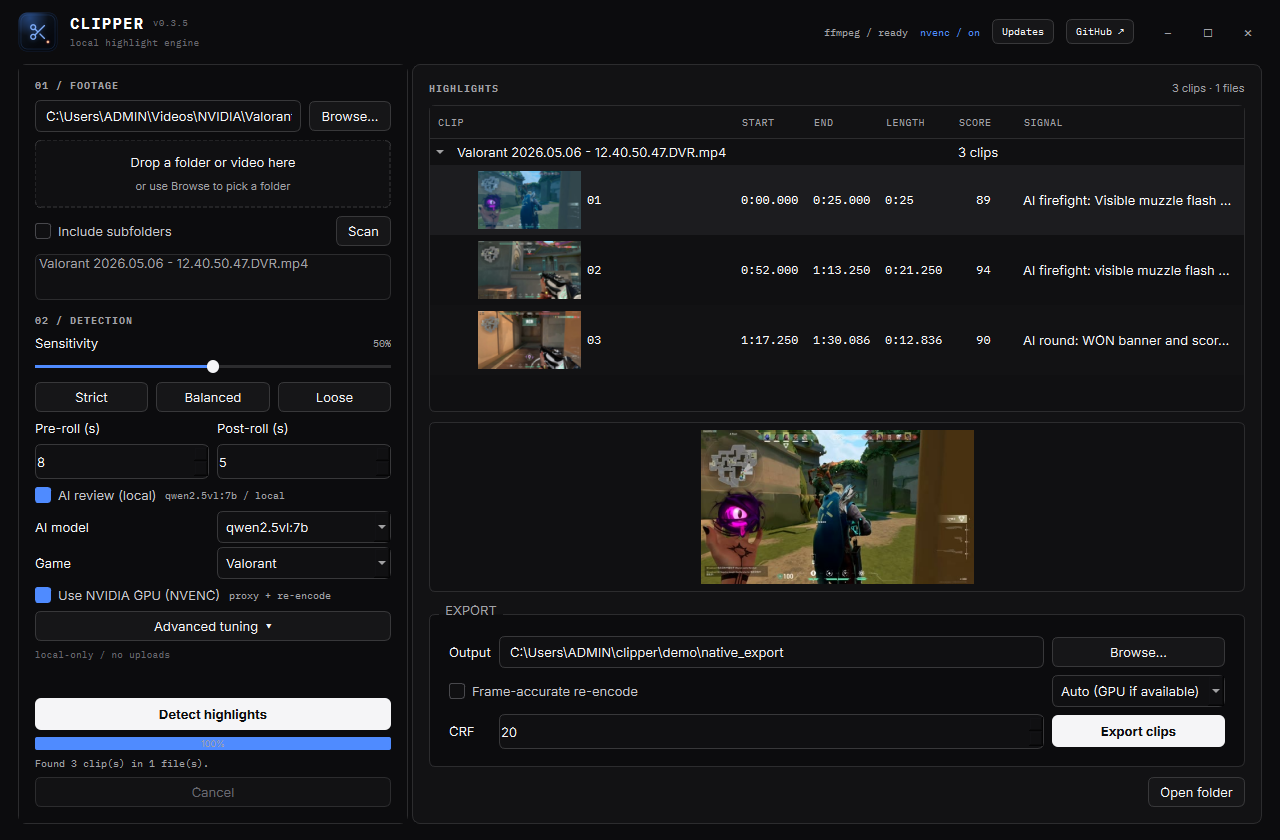
|
|
54
|
+
|
|
55
|
+
[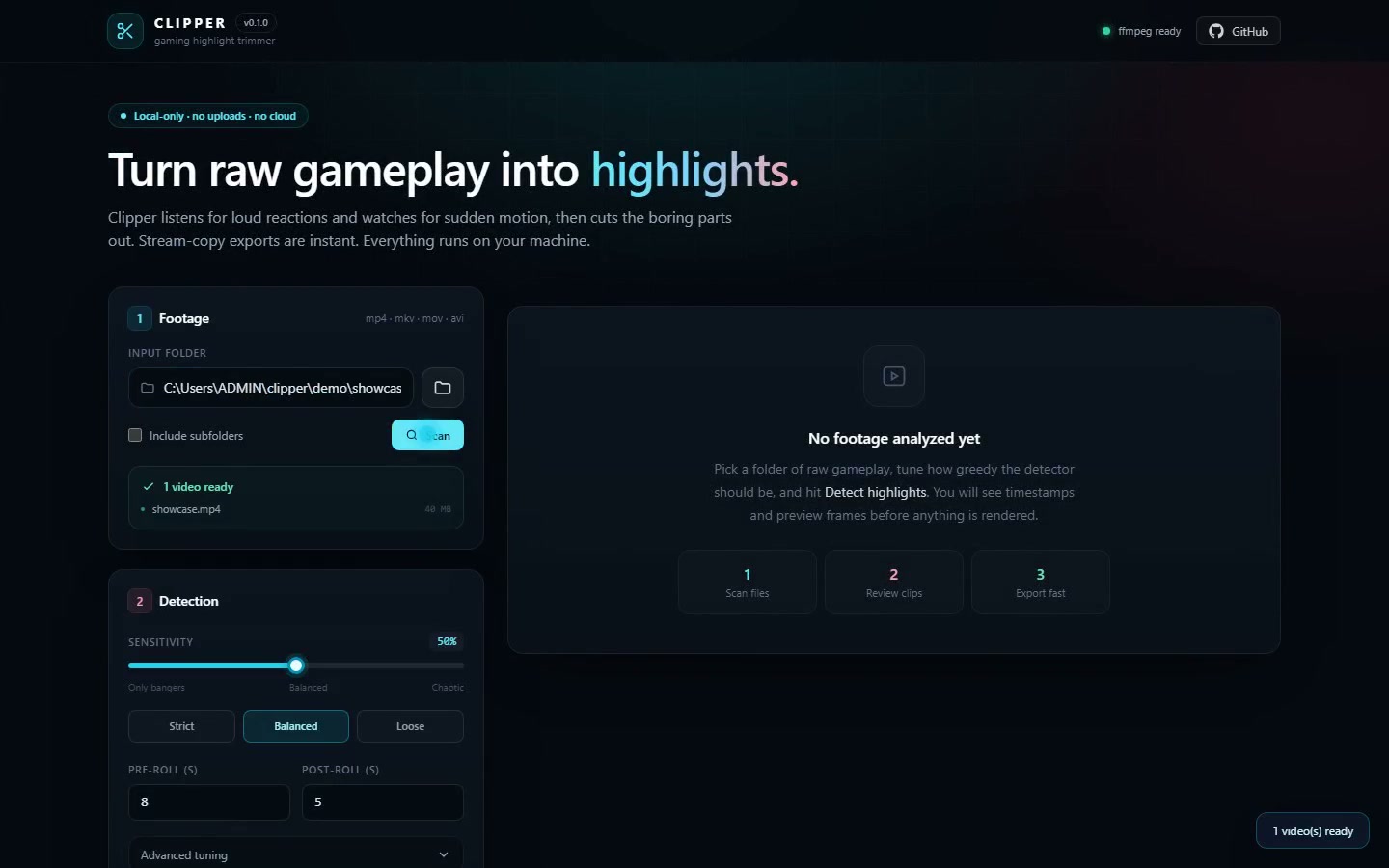](https://github.com/hatermedia/clipper/blob/main/docs/media/demo.mp4)
|
|
56
|
+
|
|
57
|
+
*Optional web UI demo: scan → detect → export. The native app uses the same engine. Synthetic demo footage.*
|
|
58
|
+
|
|
59
|
+
---
|
|
60
|
+
|
|
61
|
+
## What it does
|
|
62
|
+
|
|
63
|
+
- **Batch a whole folder** of `.mp4`, `.mkv`, `.mov`, and `.avi` captures.
|
|
64
|
+
- **Audio spike detection** — short-time RMS, rolling loudness baseline, robust z-score. Finds gunfights, reactions, hype moments.
|
|
65
|
+
- **Visual motion detection** — samples a tiny proxy through OpenCV and scores frame deltas, hard cuts, and kill-feed flashes.
|
|
66
|
+
- **Hybrid excitement score** — blends both signals, rewards agreement, smooths the result, and adapts its threshold to each video.
|
|
67
|
+
- **Smart padding and merging** — 8s before / 5s after by default; overlapping windows merge so a continuous fight stays one clip.
|
|
68
|
+
- **Fast exports** — stream copy by default (`ffmpeg -c copy`), optional frame-accurate re-encode with `libx264`, `h264_nvenc`, `hevc_nvenc`, or `libx265`.
|
|
69
|
+
- **Native Windows app** — Qt desktop UI with a native folder picker, drag-and-drop, preview frames, progress, cancel, and export. No browser tab, no console window, no background command prompt.
|
|
70
|
+
- **Proper Windows installer** — per-user install, no admin prompt, Desktop/Start Menu shortcuts, and a normal uninstaller. The portable zip is still available.
|
|
71
|
+
- **Built-in updates** — checks GitHub Releases, shows an update bar in the app, downloads the installer, verifies its SHA-256, installs silently, and reopens.
|
|
72
|
+
- **Optional local AI review** — sends a few frames per candidate to a local Ollama vision model on the GPU. It skips black screens, desktops, menus, and loading screens, and looks for kill-feed entries, round results, spike events, and firefights. No cloud calls.
|
|
73
|
+
- **GPU + CPU controls** — GPU is enabled by default when a real one-frame NVENC test passes; NVENC handles the analysis proxy, re-encode, and the local AI runtime. CPU defaults to a balanced thread cap, with Low (2 threads), Max, and a low-power mode that lowers process priority and uses a 256px/2fps proxy.
|
|
74
|
+
- **Dry run** — see timestamps and preview frames before rendering anything.
|
|
75
|
+
- **Optional local web UI** — FastAPI + one HTML file for browser/remote use. No Node build pipeline.
|
|
76
|
+
- **No database, no telemetry.**
|
|
77
|
+
|
|
78
|
+
## Why another clip tool?
|
|
79
|
+
|
|
80
|
+
Most auto-clippers are built around one game, one streaming platform, or one vertical-caption workflow. Clipper is deliberately smaller and more general:
|
|
81
|
+
|
|
82
|
+
| | Clipper | Typical auto-clipper |
|
|
83
|
+
|---|---|---|
|
|
84
|
+
| Input | Any local gameplay folder | One platform / one game |
|
|
85
|
+
| Detection | Audio + motion, optional local VLM | Chat reactions, speech models, or cloud AI |
|
|
86
|
+
| Setup | Native Windows app, or Python + FFmpeg | Node, API keys, browser sessions, model downloads |
|
|
87
|
+
| Export | Lossless stream copy by default | Re-encode everything |
|
|
88
|
+
| Privacy | 100% local | Often uploads footage |
|
|
89
|
+
| License | MIT | Varies |
|
|
90
|
+
|
|
91
|
+
No shade to the bigger tools — they do things Clipper doesn't. Clipper is for the "I have 40GB of ShadowPlay clips and want the good 30 seconds" problem.
|
|
92
|
+
|
|
93
|
+
## Install
|
|
94
|
+
|
|
95
|
+
### Windows installer (recommended)
|
|
96
|
+
|
|
97
|
+
No Python install. No FFmpeg install. No console. No admin rights.
|
|
98
|
+
|
|
99
|
+
**[Download ClipperSetup-0.3.5.exe](https://github.com/hatermedia/clipper/releases/download/v0.3.5/ClipperSetup-0.3.5.exe)** (~155 MB)
|
|
100
|
+
|
|
101
|
+
The installer places Clipper in `%LOCALAPPDATA%\Programs\Clipper`, adds Desktop
|
|
102
|
+
and Start Menu shortcuts, registers an uninstaller in Windows Settings, and can
|
|
103
|
+
upgrade in place. It bundles Python 3.13, PySide6, FFmpeg, and FFprobe. Windows
|
|
104
|
+
SmartScreen may warn because the executable is unsigned; the source and
|
|
105
|
+
reproducible build scripts are in [`packaging/`](packaging/). SHA-256 checksums
|
|
106
|
+
are attached to the release as `SHA256SUMS.txt`, and the in-app updater refuses
|
|
107
|
+
to install a download that does not match.
|
|
108
|
+
|
|
109
|
+
Prefer a portable copy? The zip still works: unzip it and double-click
|
|
110
|
+
`Clipper.exe`.
|
|
111
|
+
|
|
112
|
+
**[Download clipper-0.3.5-windows-x64-native.zip](https://github.com/hatermedia/clipper/releases/download/v0.3.5/clipper-0.3.5-windows-x64-native.zip)** (~225 MB)
|
|
113
|
+
|
|
114
|
+
### Native app from source
|
|
115
|
+
|
|
116
|
+
```bash
|
|
117
|
+
pip install "clipper-gg[desktop]"
|
|
118
|
+
clipper desktop
|
|
119
|
+
```
|
|
120
|
+
|
|
121
|
+
`clipper` with no arguments opens the native app when PySide6 is installed.
|
|
122
|
+
|
|
123
|
+
### Requirements for source installs
|
|
124
|
+
|
|
125
|
+
- Python **3.10+**
|
|
126
|
+
- **FFmpeg 5+** with `ffmpeg` and `ffprobe` on `PATH`
|
|
127
|
+
|
|
128
|
+
```powershell
|
|
129
|
+
# Windows
|
|
130
|
+
winget install Gyan.FFmpeg
|
|
131
|
+
```
|
|
132
|
+
|
|
133
|
+
```bash
|
|
134
|
+
# macOS
|
|
135
|
+
brew install ffmpeg
|
|
136
|
+
|
|
137
|
+
# Debian / Ubuntu
|
|
138
|
+
sudo apt install ffmpeg
|
|
139
|
+
```
|
|
140
|
+
|
|
141
|
+
Verify:
|
|
142
|
+
|
|
143
|
+
```bash
|
|
144
|
+
ffmpeg -version
|
|
145
|
+
ffprobe -version
|
|
146
|
+
```
|
|
147
|
+
|
|
148
|
+
If FFmpeg is not on `PATH`, point Clipper at it:
|
|
149
|
+
|
|
150
|
+
```powershell
|
|
151
|
+
$env:CLIPPER_FFMPEG = "C:\tools\ffmpeg\bin\ffmpeg.exe"
|
|
152
|
+
```
|
|
153
|
+
|
|
154
|
+
### From source
|
|
155
|
+
|
|
156
|
+
```bash
|
|
157
|
+
git clone https://github.com/hatermedia/clipper.git
|
|
158
|
+
cd clipper
|
|
159
|
+
python -m venv .venv
|
|
160
|
+
|
|
161
|
+
# Windows
|
|
162
|
+
.venv\Scripts\activate
|
|
163
|
+
|
|
164
|
+
# macOS / Linux
|
|
165
|
+
source .venv/bin/activate
|
|
166
|
+
|
|
167
|
+
pip install -e ".[desktop]"
|
|
168
|
+
```
|
|
169
|
+
|
|
170
|
+
Drop `[desktop]` if you only want the CLI.
|
|
171
|
+
|
|
172
|
+
### Release wheel
|
|
173
|
+
|
|
174
|
+
```bash
|
|
175
|
+
python -m pip install https://github.com/hatermedia/clipper/releases/download/v0.3.5/clipper_gg-0.3.5-py3-none-any.whl
|
|
176
|
+
```
|
|
177
|
+
|
|
178
|
+
### pipx
|
|
179
|
+
|
|
180
|
+
```bash
|
|
181
|
+
# once the PyPI release is live
|
|
182
|
+
pipx install clipper-gg
|
|
183
|
+
|
|
184
|
+
# or install straight from GitHub today
|
|
185
|
+
pipx install git+https://github.com/hatermedia/clipper.git
|
|
186
|
+
```
|
|
187
|
+
|
|
188
|
+
The installed command is `clipper`; the Python import is `clipper`; the PyPI distribution is `clipper-gg` (the plain `clipper` name on PyPI is an unrelated 2014 bioinformatics package).
|
|
189
|
+
|
|
190
|
+
## Quick start
|
|
191
|
+
|
|
192
|
+
```bash
|
|
193
|
+
# 1. Native app (installed build or `pip install "clipper-gg[desktop]"`)
|
|
194
|
+
clipper
|
|
195
|
+
|
|
196
|
+
# 2. See what Clipper would cut, without pinning the CPU
|
|
197
|
+
clipper --input "D:\Captures" --dry-run --low-power
|
|
198
|
+
|
|
199
|
+
# 3. Export the highlights. Default output: ./trimmed
|
|
200
|
+
clipper --input "D:\Captures" --output "D:\Highlights"
|
|
201
|
+
|
|
202
|
+
# 4. Use NVENC for the proxy/re-encode (default when available)
|
|
203
|
+
clipper --input "D:\Captures" --gpu --reencode --encoder auto
|
|
204
|
+
|
|
205
|
+
# 5. Review candidates with a local GPU vision model
|
|
206
|
+
clipper --input "D:\Captures" --ai --ai-game Valorant --dry-run
|
|
207
|
+
|
|
208
|
+
# 6. Check for or install a newer release
|
|
209
|
+
clipper update
|
|
210
|
+
clipper update --install
|
|
211
|
+
|
|
212
|
+
# 7. Diagnose GPU/NVENC and Ollama
|
|
213
|
+
clipper gpu
|
|
214
|
+
|
|
215
|
+
# 8. Optional local web UI
|
|
216
|
+
clipper ui
|
|
217
|
+
```
|
|
218
|
+
|
|
219
|
+
`clipper` with no arguments opens the native app when PySide6 is installed. The
|
|
220
|
+
optional web UI starts at **http://127.0.0.1:8765** and binds to localhost.
|
|
221
|
+
Footage never leaves the machine.
|
|
222
|
+
|
|
223
|
+
## Local AI review (optional)
|
|
224
|
+
|
|
225
|
+
The default detector is audio + motion. AI review is a second stage: Clipper
|
|
226
|
+
builds a wider candidate list, then asks a local vision model whether each
|
|
227
|
+
candidate is real gameplay and whether a concrete event is visible. It looks for
|
|
228
|
+
kill-feed entries, multikill/ace/clutch text, round-result banners, score
|
|
229
|
+
changes, spike events, and active firefights.
|
|
230
|
+
|
|
231
|
+
```bash
|
|
232
|
+
# One-time: install Ollama from https://ollama.com, then pull a vision model
|
|
233
|
+
ollama pull qwen2.5vl:7b
|
|
234
|
+
|
|
235
|
+
# Review with Valorant context
|
|
236
|
+
clipper --input "D:\Valorant" --ai --ai-game Valorant --dry-run
|
|
237
|
+
```
|
|
238
|
+
|
|
239
|
+
In the native app, tick **AI review (local)**, pick the model and game, and run
|
|
240
|
+
as usual. The header still reports `GPU: NVENC on`; `ollama ps` shows whether the
|
|
241
|
+
model is on the GPU.
|
|
242
|
+
|
|
243
|
+
- Default: `qwen2.5vl:7b` (~6 GB VRAM at 8k context, 100% GPU on an RTX 3080).
|
|
244
|
+
- Smaller/faster: `qwen2.5vl:3b`, with lower accuracy.
|
|
245
|
+
- The model receives three center-cropped frames plus a zoomed top-HUD strip
|
|
246
|
+
(score/timer/kill feed), so it can read HUD text instead of guessing.
|
|
247
|
+
- A blank-frame gate rejects black/desktop frames before the model is called.
|
|
248
|
+
- Verdicts are cached under `%LOCALAPPDATA%\Clipper\ai-cache`; re-runs are fast.
|
|
249
|
+
- Everything is local. No frames or prompts leave the machine.
|
|
250
|
+
|
|
251
|
+
**Honest limits:** this is a review layer, not a trained kill detector. It is
|
|
252
|
+
good at skipping menus, loading screens, black frames, and dead time, and it
|
|
253
|
+
finds many clear firefights and round ends. It can still miss a quiet kill or
|
|
254
|
+
accept a tense standoff. Preview the clips before exporting. Smaller vision
|
|
255
|
+
models are noticeably worse; a 3B model hallucinated highlights on black frames
|
|
256
|
+
during testing, which is why 7B is the default.
|
|
257
|
+
|
|
258
|
+
## Updates
|
|
259
|
+
|
|
260
|
+
The installed app checks GitHub Releases at launch (cached for six hours) and
|
|
261
|
+
shows an update bar when a newer version exists. **Download update** fetches the
|
|
262
|
+
installer, verifies it against the release's `SHA256SUMS.txt`, then changes the
|
|
263
|
+
button to **Restart & install**. Clipper closes, installs silently, and reopens.
|
|
264
|
+
|
|
265
|
+
```bash
|
|
266
|
+
clipper update # check only
|
|
267
|
+
clipper update --install # download, verify, install
|
|
268
|
+
```
|
|
269
|
+
|
|
270
|
+
### Dry run
|
|
271
|
+
|
|
272
|
+
```text
|
|
273
|
+
demo_gameplay.mp4 0:46.021 1280x720 30.0fps
|
|
274
|
+
01 0:12.500 -> 0:18.500 6.0s score 100 [audio + motion]
|
|
275
|
+
preview: ...\trimmed\previews\demo_gameplay_clip01_00015500.jpg
|
|
276
|
+
02 0:30.250 -> 0:36.250 6.0s score 100 [audio + motion]
|
|
277
|
+
preview: ...\trimmed\previews\demo_gameplay_clip02_00033250.jpg
|
|
278
|
+
|
|
279
|
+
Total: 2 clip(s) from 1 file(s)
|
|
280
|
+
Dry run: nothing rendered. Report: ...\trimmed\clipper-report-20261122-223201.json
|
|
281
|
+
```
|
|
282
|
+
|
|
283
|
+
Every run also writes `clipper-report-*.json` with per-file media info, clips, scores, warnings, and export results. `--json` prints the same payload to stdout for scripts.
|
|
284
|
+
|
|
285
|
+
## CLI options
|
|
286
|
+
|
|
287
|
+
| Option | Default | Description |
|
|
288
|
+
|---|---:|---|
|
|
289
|
+
| `-i, --input` | required | Folder or single video |
|
|
290
|
+
| `-o, --output` | `./trimmed` | Output folder |
|
|
291
|
+
| `--dry-run` | off | Detect + preview only; no rendering |
|
|
292
|
+
| `--recursive` | off | Scan subfolders |
|
|
293
|
+
| `--sensitivity` | `0.5` | `0..1`; higher = more clips |
|
|
294
|
+
| `--pre` | `8` | Seconds before each peak |
|
|
295
|
+
| `--post` | `5` | Seconds after each peak |
|
|
296
|
+
| `--min-clip` | `3` | Drop clips shorter than this |
|
|
297
|
+
| `--max-clips` | `30` | Cap per video |
|
|
298
|
+
| `--audio-weight` | `0.6` | Audio contribution |
|
|
299
|
+
| `--visual-weight` | `0.4` | Motion contribution |
|
|
300
|
+
| `--sample-fps` | `4` | Visual sampling rate (2 with `--low-power`) |
|
|
301
|
+
| `--proxy-width` | `320` | Analysis proxy width (256 with `--low-power`) |
|
|
302
|
+
| `--threads` | balanced | CPU thread cap; `0` = let FFmpeg decide |
|
|
303
|
+
| `--gpu` | auto | Hardware decode + NVENC proxy/re-encode when the NVENC test passes; use `--no-gpu` to force CPU |
|
|
304
|
+
| `--low-power` | off | 2 threads, 2fps/256px proxy, below-normal priority |
|
|
305
|
+
| `--ai` | off | Review candidates with a local Ollama vision model |
|
|
306
|
+
| `--ai-model` | `qwen2.5vl:7b` | Ollama vision model |
|
|
307
|
+
| `--ai-game` | `generic` | Game context for the prompt, e.g. `Valorant` |
|
|
308
|
+
| `--ai-min-confidence` | `0.55` | Minimum model confidence to keep a candidate |
|
|
309
|
+
| `--ai-max-candidates` | `60` | Cap on windows sent to the vision model |
|
|
310
|
+
| `--merge-gap` | `1.0` | Merge clips closer than this |
|
|
311
|
+
| `--reencode` | off | Frame-accurate encode instead of copy |
|
|
312
|
+
| `--encoder` | `auto` | `auto`, `libx264`, `h264_nvenc`, `hevc_nvenc`, `libx265` |
|
|
313
|
+
| `--crf` | `20` | Quality for re-encode |
|
|
314
|
+
| `--preset` | `veryfast` | x264/x265 preset |
|
|
315
|
+
| `--no-previews` | off | Skip dry-run thumbnails |
|
|
316
|
+
| `--json` | off | Machine-readable output |
|
|
317
|
+
| `--quiet` | off | Suppress progress |
|
|
318
|
+
|
|
319
|
+
Subcommands `batch`, `run`, `trim`, and `detect` are accepted as aliases for the default batch mode.
|
|
320
|
+
|
|
321
|
+
## How detection works
|
|
322
|
+
|
|
323
|
+
Clipper is a heuristic engine first, with an optional local semantic review pass. That is intentional: predictable behavior, no cloud dependency, and it works on any game. GPU acceleration covers decode, proxy encode, re-encode, and the optional AI runtime; motion scoring and audio RMS stay on the CPU.
|
|
324
|
+
|
|
325
|
+
### 1. Audio spikes
|
|
326
|
+
|
|
327
|
+
- Extract mono 16 kHz PCM with FFmpeg.
|
|
328
|
+
- Compute RMS in 50 ms windows.
|
|
329
|
+
- Compare each window to a **4-second rolling median** baseline.
|
|
330
|
+
- Convert the excess into a robust z-score; blend with absolute loudness.
|
|
331
|
+
- Normalize by the 99th percentile and smooth over ~0.6s.
|
|
332
|
+
|
|
333
|
+
A quiet tactical stretch with one loud reload will score differently from a constant-loud gunfight, which is what you want.
|
|
334
|
+
|
|
335
|
+
### 2. Visual activity
|
|
336
|
+
|
|
337
|
+
- Build a temporary **320px-wide, 4fps proxy** with FFmpeg (configurable; 256px/2fps in low-power mode).
|
|
338
|
+
- Read it with OpenCV, with its thread count capped.
|
|
339
|
+
- Per frame: grayscale, blur, absolute difference against the previous frame.
|
|
340
|
+
- Score = mean difference + 90th-percentile difference + brightness flash.
|
|
341
|
+
- Normalize with a p95 scale plus percentile rank, so both sustained motion and one-frame flashes register.
|
|
342
|
+
|
|
343
|
+
The proxy keeps analysis fast on 1440p/4K footage and avoids decoding every frame at full resolution.
|
|
344
|
+
|
|
345
|
+
### 3. Fusion and window selection
|
|
346
|
+
|
|
347
|
+
- Resample both tracks onto a 0.25s grid.
|
|
348
|
+
- Weighted blend (default 60% audio / 40% motion) with a small agreement bonus.
|
|
349
|
+
- Smooth, then pick peaks with an **adaptive threshold** (`99.5 - 9 × sensitivity` percentile), minimum 4s spacing, and prominence filtering.
|
|
350
|
+
- Pad each peak by `--pre` / `--post`.
|
|
351
|
+
- Merge overlapping or near-overlapping windows.
|
|
352
|
+
- Clamp to the video, drop clips under `--min-clip`, cap at `--max-clips`, sort chronologically.
|
|
353
|
+
|
|
354
|
+
### Tuning
|
|
355
|
+
|
|
356
|
+
| Preset | Sensitivity | Pre | Post | Best for |
|
|
357
|
+
|---|---:|---:|---:|---|
|
|
358
|
+
| Strict | `0.30` | `10` | `6` | Only the biggest moments |
|
|
359
|
+
| Balanced | `0.50` | `8` | `5` | Default |
|
|
360
|
+
| Loose | `0.75` | `6` | `4` | Fast-paced montages |
|
|
361
|
+
|
|
362
|
+
- **Too many clips?** Lower sensitivity, raise `--min-clip`, or raise the audio weight.
|
|
363
|
+
- **Missing quiet moments?** Raise sensitivity or raise `--visual-weight` (e.g. `0.7`) for flick-heavy games.
|
|
364
|
+
- **Clips cut off too early?** Increase `--post`.
|
|
365
|
+
- **Continuous fights split in two?** Increase `--merge-gap` or `--pre`/`--post`.
|
|
366
|
+
|
|
367
|
+
## Lossless vs frame-accurate
|
|
368
|
+
|
|
369
|
+
By default Clipper uses **stream copy**:
|
|
370
|
+
|
|
371
|
+
```bash
|
|
372
|
+
ffmpeg -ss START -i input.mp4 -t DURATION -map 0:v:0 -map 0:a:0? -c copy output.mp4
|
|
373
|
+
```
|
|
374
|
+
|
|
375
|
+
This is effectively instant and does not touch quality. The trade-off: copy can only start on a keyframe, so a clip may include a little extra footage before the requested timestamp. That is usually fine for highlights — you get the moment plus a bit of run-up.
|
|
376
|
+
|
|
377
|
+
Use `--reencode` when the edges matter:
|
|
378
|
+
|
|
379
|
+
```bash
|
|
380
|
+
clipper --input ./footage --reencode --encoder auto
|
|
381
|
+
clipper --input ./footage --reencode --encoder libx264 --crf 20
|
|
382
|
+
clipper --input ./footage --gpu --reencode --encoder h264_nvenc
|
|
383
|
+
```
|
|
384
|
+
|
|
385
|
+
- `auto`: NVENC when available, otherwise libx264.
|
|
386
|
+
- `libx264` / `libx265`: CPU, predictable, works everywhere.
|
|
387
|
+
- `h264_nvenc` / `hevc_nvenc`: NVIDIA GPU. If the encoder is listed but unusable (driver/GPU mismatch), Clipper automatically retries with `libx264`.
|
|
388
|
+
- Re-encoded output is always `.mp4` (H.264/HEVC + AAC).
|
|
389
|
+
|
|
390
|
+
## Native desktop app
|
|
391
|
+
|
|
392
|
+
The Windows portable zip ships `Clipper.exe` — a windowed Qt app with:
|
|
393
|
+
|
|
394
|
+
- Native folder picker and drag-and-drop.
|
|
395
|
+
- Sensitivity, padding, max clips, sample FPS, and proxy width.
|
|
396
|
+
- GPU/NVENC toggle, CPU thread cap (Balanced / Low / Max), and low-power mode.
|
|
397
|
+
- Results table with peak-frame previews.
|
|
398
|
+
- Re-encode toggle, encoder picker, CRF, export progress, and “Open output folder”.
|
|
399
|
+
- No browser, no console window, no background command prompt.
|
|
400
|
+
|
|
401
|
+
From source:
|
|
402
|
+
|
|
403
|
+
```bash
|
|
404
|
+
pip install "clipper-gg[desktop]"
|
|
405
|
+
clipper desktop
|
|
406
|
+
```
|
|
407
|
+
|
|
408
|
+
## Optional web UI
|
|
409
|
+
|
|
410
|
+
```bash
|
|
411
|
+
clipper ui
|
|
412
|
+
# custom port / no browser tab
|
|
413
|
+
clipper ui --port 9000 --no-browser
|
|
414
|
+
# expose to your LAN (only if you understand the risk)
|
|
415
|
+
clipper ui --host 0.0.0.0
|
|
416
|
+
```
|
|
417
|
+
|
|
418
|
+
The UI includes:
|
|
419
|
+
|
|
420
|
+
- Folder browser with drives, parent navigation, and single-file selection.
|
|
421
|
+
- Sensitivity slider + Strict/Balanced/Loose presets.
|
|
422
|
+
- Pre/post padding, max clips, sample FPS, audio/motion weights.
|
|
423
|
+
- Per-file clip list with preview thumbnails and score breakdown.
|
|
424
|
+
- Export panel with output path, re-encode toggle, encoder picker, live progress, cancel.
|
|
425
|
+
- Local-only FastAPI backend; the frontend is one static HTML file (Tailwind + Alpine via CDN).
|
|
426
|
+
|
|
427
|
+
### API
|
|
428
|
+
|
|
429
|
+
| Method | Path | Purpose |
|
|
430
|
+
|---|---|---|
|
|
431
|
+
| `GET` | `/api/health` | FFmpeg status, version, NVENC availability |
|
|
432
|
+
| `GET` | `/api/browse?path=` | Folder browser |
|
|
433
|
+
| `POST` | `/api/scan` | List supported videos |
|
|
434
|
+
| `POST` | `/api/analyze` | Start a background detection job |
|
|
435
|
+
| `GET` | `/api/jobs/{id}` | Poll job progress/result |
|
|
436
|
+
| `POST` | `/api/jobs/{id}/cancel` | Cancel analysis/export |
|
|
437
|
+
| `POST` | `/api/export` | Export a stored analysis |
|
|
438
|
+
| `GET` | `/api/thumb?file=&t=&w=` | Cached preview frame |
|
|
439
|
+
| `GET` | `/api/docs` | OpenAPI UI |
|
|
440
|
+
|
|
441
|
+
## Docker
|
|
442
|
+
|
|
443
|
+
```bash
|
|
444
|
+
docker build -t clipper .
|
|
445
|
+
docker run --rm -it \
|
|
446
|
+
-p 127.0.0.1:8765:8765 \
|
|
447
|
+
-v "/path/to/footage:/footage" \
|
|
448
|
+
-v "/path/to/clips:/out" \
|
|
449
|
+
clipper ui --host 0.0.0.0 --port 8765
|
|
450
|
+
```
|
|
451
|
+
|
|
452
|
+
Inside the container, use `/footage` in the UI. Batch mode:
|
|
453
|
+
|
|
454
|
+
```bash
|
|
455
|
+
docker run --rm \
|
|
456
|
+
-v "/path/to/footage:/footage" \
|
|
457
|
+
-v "/path/to/clips:/out" \
|
|
458
|
+
clipper --input /footage --output /out
|
|
459
|
+
```
|
|
460
|
+
|
|
461
|
+
The image runs as a non-root user. If your mounted folders are not writable, adjust permissions or pass `--user "$(id -u):$(id -g)"` on Linux.
|
|
462
|
+
|
|
463
|
+
## Performance notes
|
|
464
|
+
|
|
465
|
+
- Analysis is one audio pass + one proxy pass + OpenCV scanning. The proxy is 320px at 4fps by default; `--proxy-width` and `--sample-fps` change it. A 46-second 720p clip takes a few seconds here; 4K and long VODs take longer.
|
|
466
|
+
- **The default CPU behavior is balanced, not “all cores.”** Threads default to about half the logical cores. Use `--threads 2`, `--low-power`, or the native app’s Low setting to keep the machine usable while gaming/streaming. Use `--threads 0` or Max only when you want the whole CPU.
|
|
467
|
+
- **GPU:** enabled by default when a **real one-frame NVENC test** passes, not merely because the encoder is listed. It handles the proxy and `--encoder auto` re-encode. If NVENC is listed but unusable, Clipper falls back to libx264 and reports it. `clipper gpu` prints the test result and `nvidia-smi` summary. OpenCV motion scoring and audio RMS remain CPU work; decode may still be CPU-bound depending on the codec.
|
|
468
|
+
- Stream-copy export is nearly instant and uses almost no CPU.
|
|
469
|
+
- Re-encoding is the slow path. `h264_nvenc` is much faster than `libx264` when it works.
|
|
470
|
+
- Preview thumbnails are cached by file mtime + timestamp in the OS temp folder.
|
|
471
|
+
|
|
472
|
+
## Supported formats
|
|
473
|
+
|
|
474
|
+
Input containers: `.mp4`, `.mkv`, `.mov`, `.avi`. If FFmpeg can decode it, Clipper can usually analyze it. Output keeps the source container for lossless copy, or uses `.mp4` for re-encode. HDR/10-bit footage is best re-encoded to SDR H.264 for sharing.
|
|
475
|
+
|
|
476
|
+
## Troubleshooting
|
|
477
|
+
|
|
478
|
+
| Problem | Fix |
|
|
479
|
+
|---|---|
|
|
480
|
+
| `ffmpeg/ffprobe not found` | Install FFmpeg or set `CLIPPER_FFMPEG` to the executable |
|
|
481
|
+
| `No supported video files found` | Check the folder, extension, and `--recursive` |
|
|
482
|
+
| No clips detected | Raise `--sensitivity`, check the audio track, or raise `--visual-weight` |
|
|
483
|
+
| Clips start a second early | Expected with stream copy; use `--reencode` |
|
|
484
|
+
| Export says “re-encoded because stream copy was not compatible” | Container/codec mismatch; this is automatic and safe |
|
|
485
|
+
| NVENC fails at runtime | Run `clipper gpu`; update GPU drivers; Clipper falls back to `libx264` |
|
|
486
|
+
| CPU is pinned during analysis | Use `--low-power`, `--threads 2`, a lower `--sample-fps`/`--proxy-width`, or the native app's Low-power toggle |
|
|
487
|
+
| GPU toggle shows CPU mode | Run `clipper gpu`; the NVENC test failed or the FFmpeg build lacks NVENC. CPU still works |
|
|
488
|
+
| Native app says PySide6 missing | `pip install "clipper-gg[desktop]"` or use the Windows portable build |
|
|
489
|
+
| UI says FFmpeg missing | Restart the terminal after installing FFmpeg, then restart `clipper ui` |
|
|
490
|
+
| Very long Windows paths fail | Enable Win32 long paths or use a shorter output path |
|
|
491
|
+
| Web UI port busy | `clipper ui --port 9000` |
|
|
492
|
+
|
|
493
|
+
## Development
|
|
494
|
+
|
|
495
|
+
```bash
|
|
496
|
+
git clone https://github.com/hatermedia/clipper.git
|
|
497
|
+
cd clipper
|
|
498
|
+
python -m venv .venv
|
|
499
|
+
.venv\Scripts\activate # Windows
|
|
500
|
+
pip install -e ".[dev,desktop]"
|
|
501
|
+
|
|
502
|
+
pytest -q
|
|
503
|
+
```
|
|
504
|
+
|
|
505
|
+
End-to-end test (generates a synthetic 46s clip with known action windows):
|
|
506
|
+
|
|
507
|
+
```powershell
|
|
508
|
+
$env:CLIPPER_E2E = "1"
|
|
509
|
+
pytest -q tests/test_e2e.py
|
|
510
|
+
```
|
|
511
|
+
|
|
512
|
+
Generate demo footage manually:
|
|
513
|
+
|
|
514
|
+
```bash
|
|
515
|
+
python scripts/make_demo_video.py --output demo/demo_gameplay.mp4
|
|
516
|
+
```
|
|
517
|
+
|
|
518
|
+
Project layout:
|
|
519
|
+
|
|
520
|
+
```text
|
|
521
|
+
src/clipper/
|
|
522
|
+
cli.py argparse CLI, dry-run report, export
|
|
523
|
+
desktop.py native PySide6 app (folder picker, GPU/CPU controls)
|
|
524
|
+
assets/ app icon and desktop assets
|
|
525
|
+
ffmpeg.py probe / PCM / proxy / thumbnail / render
|
|
526
|
+
pipeline.py scan → analyze → export
|
|
527
|
+
detect/audio.py RMS spike scoring
|
|
528
|
+
detect/visual.py OpenCV motion scoring
|
|
529
|
+
detect/merge.py fusion, peak picking, window merging
|
|
530
|
+
web/app.py optional FastAPI API + job manager
|
|
531
|
+
web/static/ optional single-page web UI
|
|
532
|
+
tests/ unit + API + desktop smoke + gated end-to-end
|
|
533
|
+
scripts/ synthetic footage generator
|
|
534
|
+
packaging/ Windows native/CLI build scripts
|
|
535
|
+
```
|
|
536
|
+
|
|
537
|
+
## Roadmap
|
|
538
|
+
|
|
539
|
+
- Manual clip editor with waveform + timeline scrub.
|
|
540
|
+
- Scene-cut-aware lossless splitting.
|
|
541
|
+
- Per-game presets (Apex, Valorant, CS2, Fortnite, racing).
|
|
542
|
+
- Vertical crop + captions (9:16) as an optional second stage.
|
|
543
|
+
- Full GPU motion scoring (OpenCV scoring is CPU today; NVENC covers decode/encode).
|
|
544
|
+
- Whisper-based reaction/speech cues as an optional third detector.
|
|
545
|
+
- Twitch/YouTube VOD import (explicitly opt-in, local download).
|
|
546
|
+
- Drag-and-drop UI for individual clips.
|
|
547
|
+
|
|
548
|
+
## Done-for-you clips (optional)
|
|
549
|
+
|
|
550
|
+
If you want the output without the setup, there are limited pilot slots for
|
|
551
|
+
trimmed clip packs. You keep the rights; the tool stays free and MIT licensed.
|
|
552
|
+
See [SERVICE.md](SERVICE.md) for packages, process, and terms. This is separate
|
|
553
|
+
from the open-source project and does not affect the free release.
|
|
554
|
+
|
|
555
|
+
## Contributing
|
|
556
|
+
|
|
557
|
+
Issues and PRs are welcome. Please include:
|
|
558
|
+
|
|
559
|
+
- OS + Python version + `ffmpeg -version`.
|
|
560
|
+
- The command you ran.
|
|
561
|
+
- A short description of the footage (resolution, fps, codec, audio).
|
|
562
|
+
- If detection missed, the timestamps you expected.
|
|
563
|
+
|
|
564
|
+
Do not upload copyrighted gameplay you don't own. A synthetic reproduction or a short, rights-cleared sample is enough.
|
|
565
|
+
|
|
566
|
+
## License
|
|
567
|
+
|
|
568
|
+
MIT — see [LICENSE](LICENSE).
|
|
569
|
+
|
|
570
|
+
Clipper is not affiliated with Twitch, YouTube, NVIDIA, or any game publisher. You are responsible for the footage you process and publish.
|