clip-anything 0.5.2__tar.gz
This diff represents the content of publicly available package versions that have been released to one of the supported registries. The information contained in this diff is provided for informational purposes only and reflects changes between package versions as they appear in their respective public registries.
- clip_anything-0.5.2/.gitignore +16 -0
- clip_anything-0.5.2/CHANGELOG.md +67 -0
- clip_anything-0.5.2/LICENSE +21 -0
- clip_anything-0.5.2/NOTICE +53 -0
- clip_anything-0.5.2/PKG-INFO +252 -0
- clip_anything-0.5.2/README.md +208 -0
- clip_anything-0.5.2/THIRD_PARTY_LICENSES.md +77 -0
- clip_anything-0.5.2/clip-anything.toml +42 -0
- clip_anything-0.5.2/clip_anything/__init__.py +3 -0
- clip_anything-0.5.2/clip_anything/ai.py +598 -0
- clip_anything-0.5.2/clip_anything/ai_prompts.py +88 -0
- clip_anything-0.5.2/clip_anything/app/__init__.py +3 -0
- clip_anything-0.5.2/clip_anything/app/data.py +114 -0
- clip_anything-0.5.2/clip_anything/app/jobs.py +369 -0
- clip_anything-0.5.2/clip_anything/app/launch.py +244 -0
- clip_anything-0.5.2/clip_anything/app/server.py +863 -0
- clip_anything-0.5.2/clip_anything/app/static/app.css +306 -0
- clip_anything-0.5.2/clip_anything/app/static/app.js +852 -0
- clip_anything-0.5.2/clip_anything/app/static/favicon.svg +10 -0
- clip_anything-0.5.2/clip_anything/app/static/fonts/Barlow-Medium.woff2 +0 -0
- clip_anything-0.5.2/clip_anything/app/static/fonts/Barlow-Regular.woff2 +0 -0
- clip_anything-0.5.2/clip_anything/app/static/fonts/BarlowCondensed-Bold.woff2 +0 -0
- clip_anything-0.5.2/clip_anything/app/static/fonts/BarlowCondensed-SemiBold.woff2 +0 -0
- clip_anything-0.5.2/clip_anything/app/static/fonts/OFL-Barlow.txt +93 -0
- clip_anything-0.5.2/clip_anything/app/static/index.html +312 -0
- clip_anything-0.5.2/clip_anything/audio_signals.py +245 -0
- clip_anything-0.5.2/clip_anything/cache.py +75 -0
- clip_anything-0.5.2/clip_anything/captions.py +159 -0
- clip_anything-0.5.2/clip_anything/cli.py +296 -0
- clip_anything-0.5.2/clip_anything/config.py +349 -0
- clip_anything-0.5.2/clip_anything/crashlog.py +145 -0
- clip_anything-0.5.2/clip_anything/cropplan.py +136 -0
- clip_anything-0.5.2/clip_anything/errors.py +25 -0
- clip_anything-0.5.2/clip_anything/events.py +25 -0
- clip_anything-0.5.2/clip_anything/facecam.py +195 -0
- clip_anything-0.5.2/clip_anything/gui.py +428 -0
- clip_anything-0.5.2/clip_anything/inputs.py +336 -0
- clip_anything-0.5.2/clip_anything/pipeline.py +1123 -0
- clip_anything-0.5.2/clip_anything/probe.py +533 -0
- clip_anything-0.5.2/clip_anything/render.py +327 -0
- clip_anything-0.5.2/clip_anything/report.py +110 -0
- clip_anything-0.5.2/clip_anything/scoring.py +810 -0
- clip_anything-0.5.2/clip_anything/setup_cmd.py +418 -0
- clip_anything-0.5.2/clip_anything/speech.py +259 -0
- clip_anything-0.5.2/clip_anything/ui.py +106 -0
- clip_anything-0.5.2/clip_anything/video_signals.py +300 -0
- clip_anything-0.5.2/clip_anything/vision.py +402 -0
- clip_anything-0.5.2/pyproject.toml +72 -0
|
@@ -0,0 +1,16 @@
|
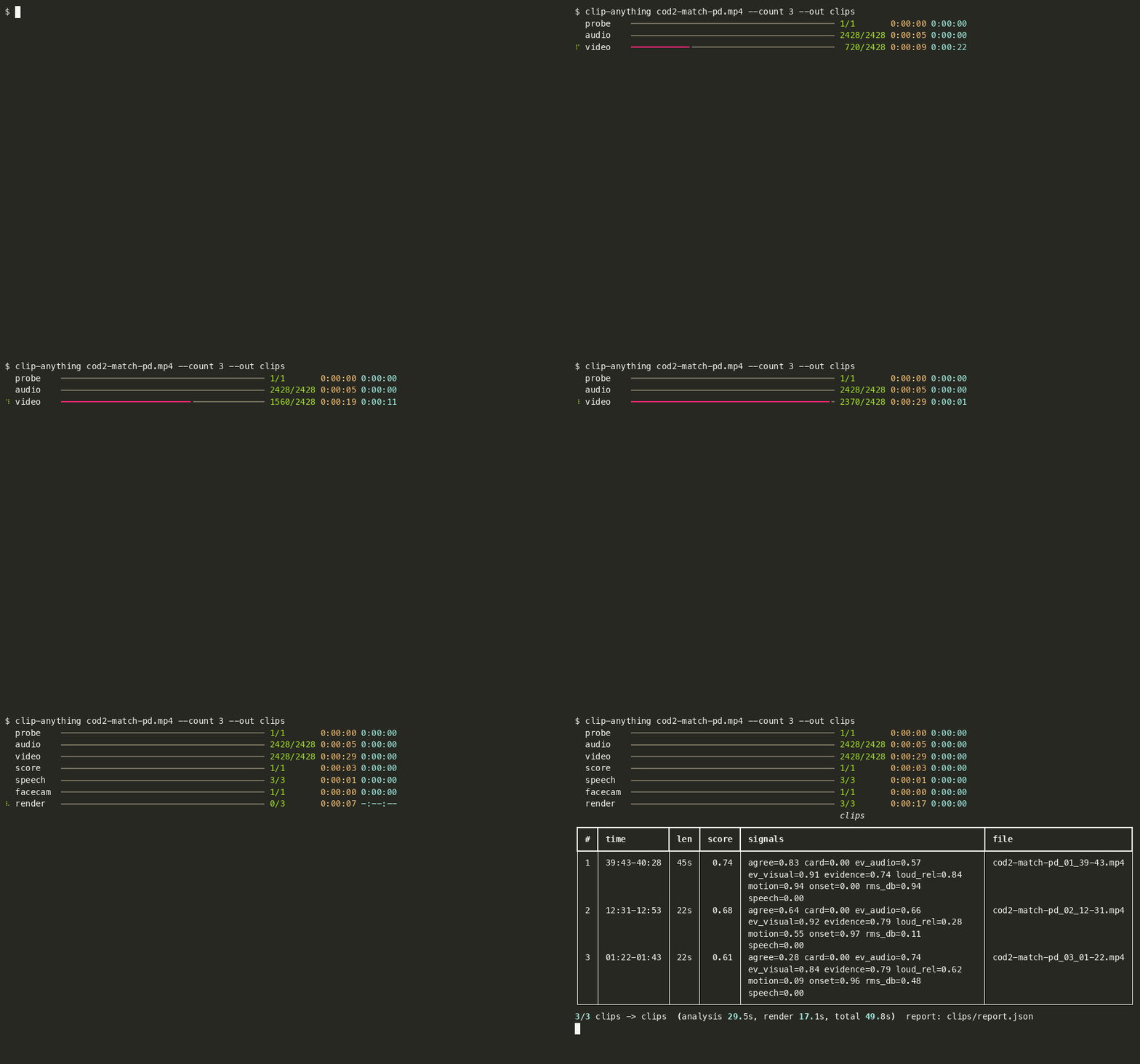
|
|
1
|
+
.venv/
|
|
2
|
+
__pycache__/
|
|
3
|
+
dist/
|
|
4
|
+
tests/fixtures/*.mp4
|
|
5
|
+
clips/
|
|
6
|
+
.planning/**/shots/
|
|
7
|
+
tests/fixtures/*.json
|
|
8
|
+
.clipanything/
|
|
9
|
+
*.egg-info/
|
|
10
|
+
.pytest_cache/
|
|
11
|
+
.ruff_cache/
|
|
12
|
+
tests/fixtures/inputs/
|
|
13
|
+
.DS_Store
|
|
14
|
+
build/
|
|
15
|
+
packaging/ffmpeg/
|
|
16
|
+
launch-video/out/
|
|
@@ -0,0 +1,67 @@
|
|
|
1
|
+
# Changelog
|
|
2
|
+
|
|
3
|
+
All notable changes to Clip Anything. Dates are the day the change landed.
|
|
4
|
+
|
|
5
|
+
## Unreleased
|
|
6
|
+
|
|
7
|
+
- Racing and other constant-motion recordings no longer come back empty: a recording that moves and sounds the same all the way through is detected (`report.json` → `scoring.profile: continuous`) and scored for sudden changes inside the moving stretches (motion drops and jumps, a high-pitched impact over the drone) against the previous 12 seconds; `--preset racing` / the Racing & sports chip force it. Reason lines say "A sudden jolt", "An impact sound"
|
|
8
|
+
- Never "Nothing stood out" when there are moments: if fewer than three clear the action bar, the recording's strongest moments are returned by its own scale with the note "No moment cleared the usual bar for this recording, so these are its strongest moments" (`below_bar_fallback`); static cards are still never picked, and Lower the bar stays available
|
|
9
|
+
- Privacy and terms written down: `docs/privacy.md`, `docs/terms.md`, an About screen in the app (version, licences, privacy summary), a first-run line, GPL/LGPL texts for the bundled ffmpeg in the desktop app, and the same notices on the npm launcher, the agent skill and the release notes
|
|
10
|
+
- The desktop app is a real product UI: drop zone with recent runs, one visible settings strip, a run screen with a live action-score curve and time estimate, a results grid of playable vertical clips with per-clip actions, a setup checklist with consent per install. Same page in a native window (`[app]` extra, pywebview) or the default browser; served from 127.0.0.1 with a per-launch token
|
|
11
|
+
- `clip-anything app` opens it from the CLI; `clip-anything-gui` still works
|
|
12
|
+
- Pipeline progress events carry a live audio level and the final score curve with the picked spans
|
|
13
|
+
|
|
14
|
+
## 0.5.2 — 2026-11-15
|
|
15
|
+
|
|
16
|
+
- Racing, sports and other constant-motion recordings: the tool notices when sound and motion are steady throughout and looks for sudden changes instead (crashes, spins, impacts, replay cuts); a "Racing & sports" chip forces it
|
|
17
|
+
- Never an empty result: when no moment clears the usual bar, the recording's strongest moments come back, labelled as such
|
|
18
|
+
- Measured across genres (open-world, shooter, RPG, racing, sports, fighting, horror, platformer); see docs/benchmark.md
|
|
19
|
+
|
|
20
|
+
## 0.5.1 — 2026-11-14
|
|
21
|
+
|
|
22
|
+
- Windows: the app opens in your default browser (the native window needed a .NET bridge that failed on first launch); any window failure on any system now falls back to the browser instead of closing
|
|
23
|
+
|
|
24
|
+
## 0.5.0 — 2026-11-14
|
|
25
|
+
|
|
26
|
+
- Tell it what you're looking for: quick chips (Fights, Funny, Big plays, Crashes, Calm but tense) that work without AI, and a free-text brief in AI mode that scores every moment on how well it matches and says what matched
|
|
27
|
+
- Several bursts close together become one longer clip; fades to black end clips cleanly
|
|
28
|
+
- A failure in an optional part (captions, AI, facecam) no longer stops a run; it is switched off with a note in the report
|
|
29
|
+
- Problems are written to a log file (Application Support / AppData) and the app says where
|
|
30
|
+
- Corrupt cache or preference files are ignored and rebuilt
|
|
31
|
+
- A reminder to move the app to Applications when it is launched from the disk image
|
|
32
|
+
|
|
33
|
+
## 0.4.0 — 2026-11-13
|
|
34
|
+
|
|
35
|
+
- The app, made intuitive: a drop-zone hero that names your file, a "Make N clips" button, plain-word settings with one-line helpers, first-run hints, human empty and error states, a Best moment badge, keyboard control of clips, smoother motion, system dark mode, remembered window size and output folder
|
|
36
|
+
|
|
37
|
+
## 0.3.0 — 2026-11-13
|
|
38
|
+
|
|
39
|
+
- New app for Windows and Mac: drop a recording or a folder, see the action curve draw live, play and scrub the clips, copy post text, re-run with different settings in seconds; a Setup screen with one-click installs
|
|
40
|
+
- `clip-anything app` opens it; `clip-anything-gui` still works
|
|
41
|
+
|
|
42
|
+
## 0.2.0 — 2026-11-13
|
|
43
|
+
|
|
44
|
+
- Desktop app for Windows and Mac (download, open, drop a recording in); Windows supported and tested in CI
|
|
45
|
+
- `clip-anything setup`: installs ffmpeg, captions and an optional local AI model if missing, skips what is there
|
|
46
|
+
- `--ai` mode: better picks, titles and a hook line from a local Ollama model, or your own OpenAI/Anthropic key
|
|
47
|
+
- Plain-language README with step-by-step scenarios; Claude Code and Cursor skills; `npx clip-anything` launcher
|
|
48
|
+
- Logo and images; feedback issue template
|
|
49
|
+
|
|
50
|
+
## 0.1.0 — 2026-11-12
|
|
51
|
+
|
|
52
|
+
First release, built in the open for the Ship at Midnight launch.
|
|
53
|
+
|
|
54
|
+
- One command: `uvx clip-anything gameplay.mp4` turns a long recording into the top N vertical 9:16 clips plus `report.json`
|
|
55
|
+
- Action-first scoring with no speech required: audio onsets, loudness over a rolling baseline, visual motion, scene cuts, and an audio-and-motion agreement term; static cards (menus, lobbies, loading screens) penalised
|
|
56
|
+
- Build-up windows (60 % before the peak, 40 % after) snapped to quiet points and cuts, de-duplicated; `--count` is a maximum, never padded
|
|
57
|
+
- Streamed analysis on 16 kHz mono audio and a 320 px / 5 fps proxy; signal cache in `.clipanything/` for second-run tweaks in seconds
|
|
58
|
+
- Action-following 9:16 crop (smoothed, dead-band, pan cap) with centre fallback; HDR tone-mapped on ffmpeg 8+
|
|
59
|
+
- Robust inputs: VFR (OBS), HEVC, HDR, rotated sources; ffmpeg preflight with install help and clear exit codes
|
|
60
|
+
- Optional captions via faster-whisper (word-synced, burned in when libass is available, sidecar `.ass` otherwise) and excitement-word bonus; `--speech-rank` re-rank
|
|
61
|
+
- Optional facecam detection, stacked above the gameplay
|
|
62
|
+
- Optional `--vision` re-rank and titles with a local Ollama vision model; degrades silently when Ollama is absent
|
|
63
|
+
- Advanced `--ai` mode: re-rank of the top 3N candidates, titles, post hooks and a featured spoken line via a local Ollama or your own OpenAI/Anthropic key (`--ai-provider`, `--ai-model`, `--ai-vision-model`, `--ai-key`); AI text marked `ai_generated`; degrades to the action-only order with one warning (`docs/ai-mode.md`)
|
|
64
|
+
- One-shot `clip-anything setup`: checks ffmpeg, Python, the captions extra, the Whisper model and optional Ollama; installs only after `--yes` or confirmation; idempotent
|
|
65
|
+
- Library-first design: `clip_anything.pipeline.run()` with progress events, thin typer CLI, TOML config with every weight exposed
|
|
66
|
+
- No telemetry, no accounts, no uploads
|
|
67
|
+
- Repository: CI (ruff and pytest on macOS and Ubuntu, Python 3.11 and 3.13), Dependabot, security policy, third-party licence list, `uv.lock`
|
|
@@ -0,0 +1,21 @@
|
|
|
1
|
+
MIT License
|
|
2
|
+
|
|
3
|
+
Copyright (c) 2026 Ship at Midnight
|
|
4
|
+
|
|
5
|
+
Permission is hereby granted, free of charge, to any person obtaining a copy
|
|
6
|
+
of this software and associated documentation files (the "Software"), to deal
|
|
7
|
+
in the Software without restriction, including without limitation the rights
|
|
8
|
+
to use, copy, modify, merge, publish, distribute, sublicense, and/or sell
|
|
9
|
+
copies of the Software, and to permit persons to whom the Software is
|
|
10
|
+
furnished to do so, subject to the following conditions:
|
|
11
|
+
|
|
12
|
+
The above copyright notice and this permission notice shall be included in all
|
|
13
|
+
copies or substantial portions of the Software.
|
|
14
|
+
|
|
15
|
+
THE SOFTWARE IS PROVIDED "AS IS", WITHOUT WARRANTY OF ANY KIND, EXPRESS OR
|
|
16
|
+
IMPLIED, INCLUDING BUT NOT LIMITED TO THE WARRANTIES OF MERCHANTABILITY,
|
|
17
|
+
FITNESS FOR A PARTICULAR PURPOSE AND NONINFRINGEMENT. IN NO EVENT SHALL THE
|
|
18
|
+
AUTHORS OR COPYRIGHT HOLDERS BE LIABLE FOR ANY CLAIM, DAMAGES OR OTHER
|
|
19
|
+
LIABILITY, WHETHER IN AN ACTION OF CONTRACT, TORT OR OTHERWISE, ARISING FROM,
|
|
20
|
+
OUT OF OR IN CONNECTION WITH THE SOFTWARE OR THE USE OR OTHER DEALINGS IN THE
|
|
21
|
+
SOFTWARE.
|
|
@@ -0,0 +1,53 @@
|
|
|
1
|
+
Clip Anything
|
|
2
|
+
Copyright (c) 2026 Ship at Midnight
|
|
3
|
+
Licensed under the MIT License (see LICENSE).
|
|
4
|
+
|
|
5
|
+
This software depends on the following third-party components. They are not
|
|
6
|
+
bundled in the source tree; they are installed from PyPI or provided by the
|
|
7
|
+
user's system. Each keeps its own licence.
|
|
8
|
+
|
|
9
|
+
Python packages (installed by pip/uv/pipx):
|
|
10
|
+
numpy BSD-3-Clause https://numpy.org
|
|
11
|
+
scipy BSD-3-Clause https://scipy.org
|
|
12
|
+
opencv-python-headless Apache-2.0 https://github.com/opencv/opencv-python
|
|
13
|
+
(wheels bundle OpenCV, Apache-2.0, and an FFmpeg build, LGPL-2.1+)
|
|
14
|
+
rich MIT https://github.com/Textualize/rich
|
|
15
|
+
typer MIT https://github.com/fastapi/typer
|
|
16
|
+
click BSD-3-Clause https://github.com/pallets/click
|
|
17
|
+
|
|
18
|
+
Optional extra `captions`:
|
|
19
|
+
faster-whisper MIT https://github.com/SYSTRAN/faster-whisper
|
|
20
|
+
CTranslate2 MIT https://github.com/OpenNMT/CTranslate2
|
|
21
|
+
onnxruntime MIT https://onnxruntime.ai
|
|
22
|
+
av (PyAV) BSD-3-Clause https://pyav.basswood.io
|
|
23
|
+
(wheels bundle an FFmpeg build, LGPL-2.1+)
|
|
24
|
+
huggingface_hub Apache-2.0 https://github.com/huggingface/huggingface_hub
|
|
25
|
+
tqdm MPL-2.0 and MIT https://tqdm.github.io
|
|
26
|
+
Whisper model weights MIT (OpenAI) downloaded once, only after the user agrees
|
|
27
|
+
|
|
28
|
+
External programs (never bundled, found on PATH):
|
|
29
|
+
FFmpeg / ffprobe LGPL-2.1+ or GPL-2.0+ depending on the build https://ffmpeg.org
|
|
30
|
+
Ollama (optional) MIT https://ollama.com
|
|
31
|
+
Vision models pulled into Ollama carry their own licences
|
|
32
|
+
(for example Qwen: Apache-2.0; Gemma: Gemma Terms of Use).
|
|
33
|
+
|
|
34
|
+
The full transitive list with versions is in THIRD_PARTY_LICENSES.md.
|
|
35
|
+
|
|
36
|
+
Desktop app builds (GitHub Releases) additionally ship ffmpeg/ffprobe as separate
|
|
37
|
+
programs in the "ffmpeg" folder: Windows from BtbN FFmpeg-Builds
|
|
38
|
+
(autobuild-2026-11-12-15-40, ffmpeg n9.0.2 win64-gpl-shared), macOS from
|
|
39
|
+
eugeneware/ffmpeg-static b6.1.1 (ffmpeg 6.0; arm64 build by osxexperts.net,
|
|
40
|
+
x86_64 build by evermeet.cx). Both are GPL builds (--enable-gpl
|
|
41
|
+
--enable-version3, libx264/libx265). Their licence texts travel in the bundle
|
|
42
|
+
(ffmpeg/LICENSE.txt, ffmpeg/COPYING.GPLv3.txt and the LGPL texts) and are
|
|
43
|
+
listed in THIRD_PARTY_NOTICE.txt next to this file; sources at
|
|
44
|
+
https://ffmpeg.org/download.html. Run `ffmpeg -version` / `ffmpeg -L` in that
|
|
45
|
+
folder for the build's own configuration and licence statement.
|
|
46
|
+
|
|
47
|
+
Clip Anything makes no network connection except the ones you turn on: the
|
|
48
|
+
optional Whisper model download (asked first), the local Ollama server at
|
|
49
|
+
127.0.0.1 (--ai, --vision; `ollama pull` downloads a model), and, only when
|
|
50
|
+
you set your own key, the OpenAI or Anthropic API (--ai-provider), which then
|
|
51
|
+
receives small frames and caption text for the candidate moments.
|
|
52
|
+
Details: docs/privacy.md.
|
|
53
|
+
Game titles are mentioned only to describe recordings; no affiliation is implied.
|
|
@@ -0,0 +1,252 @@
|
|
|
1
|
+
Metadata-Version: 2.5
|
|
2
|
+
Name: clip-anything
|
|
3
|
+
Version: 0.5.2
|
|
4
|
+
Summary: Free, local CLI: long gameplay recording in, top N vertical highlight clips out.
|
|
5
|
+
Project-URL: Homepage, https://shipatmidnight.dev/clip-anything
|
|
6
|
+
Project-URL: Source, https://github.com/shreyassaw5394/clip-anything
|
|
7
|
+
Project-URL: Changelog, https://github.com/shreyassaw5394/clip-anything/blob/main/CHANGELOG.md
|
|
8
|
+
Project-URL: Issues, https://github.com/shreyassaw5394/clip-anything/issues
|
|
9
|
+
Author: Ship at Midnight
|
|
10
|
+
License-Expression: MIT
|
|
11
|
+
License-File: LICENSE
|
|
12
|
+
License-File: NOTICE
|
|
13
|
+
License-File: THIRD_PARTY_LICENSES.md
|
|
14
|
+
Keywords: cli,clips,ffmpeg,gameplay,highlights,shorts,video
|
|
15
|
+
Classifier: Development Status :: 4 - Beta
|
|
16
|
+
Classifier: Environment :: Console
|
|
17
|
+
Classifier: Intended Audience :: End Users/Desktop
|
|
18
|
+
Classifier: License :: OSI Approved :: MIT License
|
|
19
|
+
Classifier: Operating System :: MacOS
|
|
20
|
+
Classifier: Operating System :: Microsoft :: Windows
|
|
21
|
+
Classifier: Operating System :: POSIX :: Linux
|
|
22
|
+
Classifier: Programming Language :: Python :: 3
|
|
23
|
+
Classifier: Programming Language :: Python :: 3.11
|
|
24
|
+
Classifier: Programming Language :: Python :: 3.12
|
|
25
|
+
Classifier: Programming Language :: Python :: 3.13
|
|
26
|
+
Classifier: Topic :: Multimedia :: Video
|
|
27
|
+
Classifier: Topic :: Multimedia :: Video :: Conversion
|
|
28
|
+
Requires-Python: >=3.11
|
|
29
|
+
Requires-Dist: numpy<3,>=2.0
|
|
30
|
+
Requires-Dist: opencv-python-headless<5,>=4.10
|
|
31
|
+
Requires-Dist: rich<16,>=13
|
|
32
|
+
Requires-Dist: scipy<2,>=1.13
|
|
33
|
+
Requires-Dist: typer<1,>=0.12
|
|
34
|
+
Provides-Extra: app
|
|
35
|
+
Requires-Dist: pywebview<7,>=5; extra == 'app'
|
|
36
|
+
Provides-Extra: captions
|
|
37
|
+
Requires-Dist: faster-whisper<2,>=1.1; extra == 'captions'
|
|
38
|
+
Provides-Extra: desktop
|
|
39
|
+
Requires-Dist: pyinstaller<7,>=6.10; extra == 'desktop'
|
|
40
|
+
Provides-Extra: dev
|
|
41
|
+
Requires-Dist: pytest<10,>=8; extra == 'dev'
|
|
42
|
+
Requires-Dist: ruff<1,>=0.8; extra == 'dev'
|
|
43
|
+
Description-Content-Type: text/markdown
|
|
44
|
+
|
|
45
|
+
<p align="center"><img src="assets/logo.svg" alt="Clip Anything" width="360"></p>
|
|
46
|
+
|
|
47
|
+
**Give it a long gameplay recording. It finds the best moments and cuts them into vertical clips for TikTok, Shorts and Reels. Free, open source, runs on your own computer.**
|
|
48
|
+
|
|
49
|
+

|
|
50
|
+
|
|
51
|
+
|
|
52
|
+
|
|
53
|
+
No account, no upload, no watermark. You type one line, wait a minute or two, and a folder called `clips` appears with the clips and a `report.json` that says why each one was picked. You do not need Claude, ChatGPT or any AI assistant to use it.
|
|
54
|
+
|
|
55
|
+
## Get it
|
|
56
|
+
|
|
57
|
+
### Windows
|
|
58
|
+
|
|
59
|
+
1. Open PowerShell (press Start, type `PowerShell`, press Enter).
|
|
60
|
+
2. Paste these two lines, one at a time, and press Enter after each:
|
|
61
|
+
```powershell
|
|
62
|
+
winget install astral-sh.uv
|
|
63
|
+
winget install Gyan.FFmpeg
|
|
64
|
+
```
|
|
65
|
+
3. Close PowerShell and open it again so it finds the new programs. Then paste:
|
|
66
|
+
```powershell
|
|
67
|
+
uvx clip-anything "C:\Users\you\Videos\my-session.mp4"
|
|
68
|
+
```
|
|
69
|
+
|
|
70
|
+
### Mac
|
|
71
|
+
|
|
72
|
+
1. Open Terminal (press Cmd+Space, type `Terminal`, press Enter).
|
|
73
|
+
2. Paste this and press Enter (if it says `brew` is not found, install [Homebrew](https://brew.sh) first):
|
|
74
|
+
```bash
|
|
75
|
+
brew install uv ffmpeg
|
|
76
|
+
```
|
|
77
|
+
3. Then paste:
|
|
78
|
+
```bash
|
|
79
|
+
uvx clip-anything ~/Videos/my-session.mp4
|
|
80
|
+
```
|
|
81
|
+
|
|
82
|
+
### No terminal?
|
|
83
|
+
|
|
84
|
+
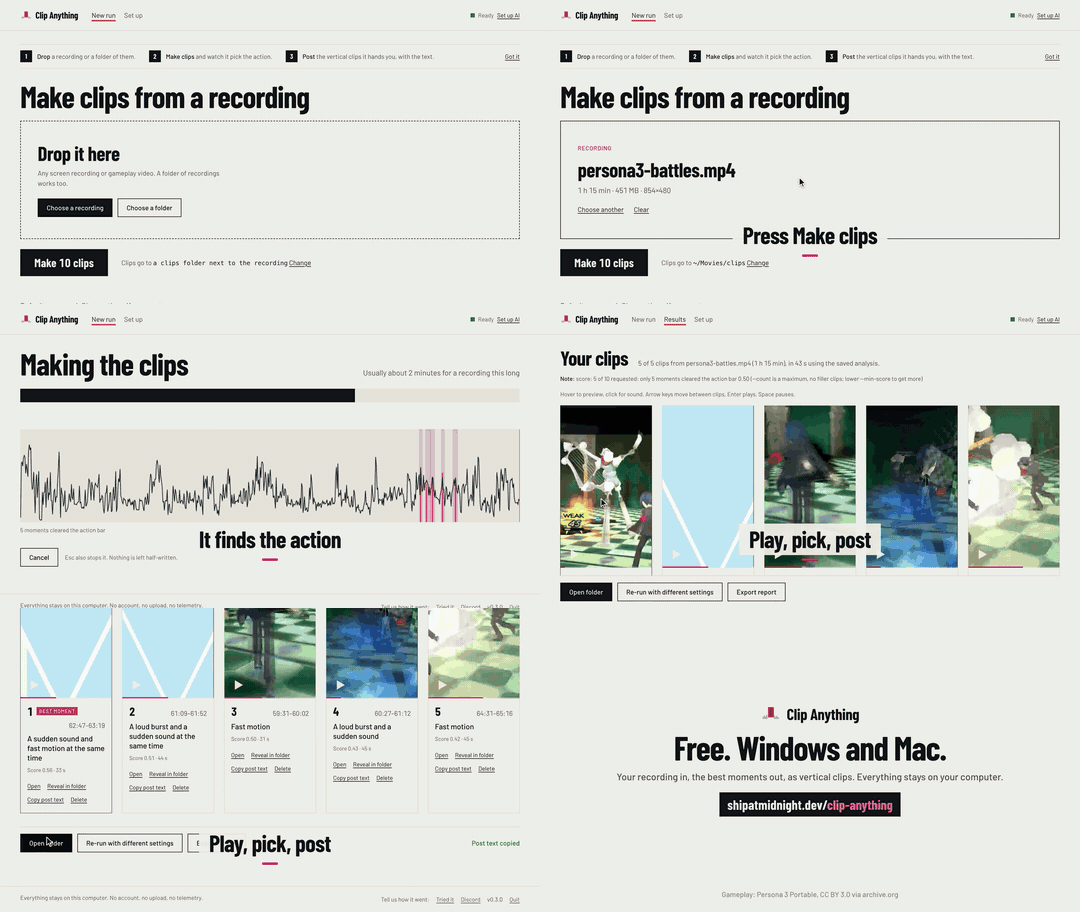
A desktop app for Windows and Mac is coming on the [Releases page](https://github.com/shreyassaw5394/clip-anything/releases). Download, open, drop a recording on it: one strip of settings, a live action curve while it works, then the clips themselves to preview, copy a post line from, or delete. Already installed the command line? `clip-anything app` opens the same thing ([docs/desktop.md](docs/desktop.md)).
|
|
85
|
+
|
|
86
|
+
**See it in 30 seconds**
|
|
87
|
+
|
|
88
|
+
|
|
89
|
+
|
|
90
|
+
Drop, Make clips, play, pick, post. The same walk-through as a video: [16:9](https://shipatmidnight.dev/clip-anything/media/howto-16x9.mp4) or the [vertical version](https://shipatmidnight.dev/clip-anything/media/howto-reel.mp4).
|
|
91
|
+
|
|
92
|
+
<details>
|
|
93
|
+
<summary>Before Nov 15 (package not on PyPI yet)</summary>
|
|
94
|
+
|
|
95
|
+
Until the package is published, run it straight from GitHub. Same thing, longer line:
|
|
96
|
+
|
|
97
|
+
```
|
|
98
|
+
uvx --from git+https://github.com/shreyassaw5394/clip-anything clip-anything my-session.mp4
|
|
99
|
+
```
|
|
100
|
+
|
|
101
|
+
Everywhere this page says `uvx clip-anything`, use that longer form instead.
|
|
102
|
+
</details>
|
|
103
|
+
|
|
104
|
+
Linux, pipx, captions, and other ways to install are in [docs/reference.md](docs/reference.md#install).
|
|
105
|
+
|
|
106
|
+
## Use it
|
|
107
|
+
|
|
108
|
+
Every scenario below is the same idea: get the recording onto your computer, run one line on it, open the `clips` folder. No AI assistant is involved.
|
|
109
|
+
|
|
110
|
+
The first run downloads the tool (about a minute). After that it starts right away. While it works you see a progress bar for each step, then a table like this, then the folder path:
|
|
111
|
+
|
|
112
|
+
```
|
|
113
|
+
# time len score signals file
|
|
114
|
+
1 12:33-12:51 18s 0.57 onset=1.00 motion=0.26 match_01_12-33.mp4
|
|
115
|
+
2 40:03-40:20 16s 0.56 agree=0.84 motion=0.88 match_02_40-03.mp4
|
|
116
|
+
2/2 clips -> /Users/you/Videos/clips (analysis 41s, render 7s)
|
|
117
|
+
```
|
|
118
|
+
|
|
119
|
+
### PS5 or Xbox
|
|
120
|
+
|
|
121
|
+
1. Get your clips off the console. PS5: plug in a USB drive, go to Media Gallery, select the clips, Copy to USB Drive; or share them to the PS App and save to your phone. Xbox: in the Xbox app on PC, go to Captures and download them, or turn on OneDrive upload in the console's Capture settings.
|
|
122
|
+
2. Put all the files in one folder on your computer, for example `C:\Users\you\Videos\ps5` or `~/Videos/ps5`.
|
|
123
|
+
3. Run it on the folder:
|
|
124
|
+
```
|
|
125
|
+
uvx clip-anything ~/Videos/ps5
|
|
126
|
+
```
|
|
127
|
+
4. Console clips are short, so each file is treated as one candidate and the tool ranks them. If a file is a long full-session recording, it searches inside it.
|
|
128
|
+
5. Open the `clips` folder that appears where you ran the command.
|
|
129
|
+
|
|
130
|
+
### PC recording (OBS, ShadowPlay, Game Bar, Steam)
|
|
131
|
+
|
|
132
|
+
1. Find the recording. OBS: the folder set under Settings, Output, Recording Path (often `Videos`). ShadowPlay: `Videos\<game name>`. Game Bar: `Videos\Captures`. Steam: open Recordings & Screenshots, make a clip and Export it as MP4 (the raw Steam folder is not a video file).
|
|
133
|
+
2. Run it on the file:
|
|
134
|
+
```
|
|
135
|
+
uvx clip-anything "C:\Users\you\Videos\Valorant\2026-11-12 21-04-33.mkv"
|
|
136
|
+
```
|
|
137
|
+
Tip: type `uvx clip-anything ` and drag the file into the window to fill in the path.
|
|
138
|
+
3. Wait. A one-hour 1080p30 recording takes about a minute to analyse, plus a few seconds per clip to render.
|
|
139
|
+
4. Open `clips` in the folder you ran the command from.
|
|
140
|
+
|
|
141
|
+
### A stream VOD you downloaded (Twitch, YouTube, Kick)
|
|
142
|
+
|
|
143
|
+
1. Download the VOD with the tool you already use (Twitch's own Download button on your own VODs, or any downloader you trust). You end up with an `.mp4` or `.mkv`.
|
|
144
|
+
2. Run it:
|
|
145
|
+
```
|
|
146
|
+
uvx clip-anything ~/Downloads/stream-2026-11-11.mp4
|
|
147
|
+
```
|
|
148
|
+
3. If your webcam is in a corner of the stream, the tool spots it and stacks it above the gameplay in the clip. If you talk on stream, see "captions" below.
|
|
149
|
+
4. Open `clips`.
|
|
150
|
+
|
|
151
|
+
### Phone screen recordings
|
|
152
|
+
|
|
153
|
+
1. Send the recordings to your computer (AirDrop, cable, Google Photos download).
|
|
154
|
+
2. Put them in one folder and run it on the folder:
|
|
155
|
+
```
|
|
156
|
+
uvx clip-anything ~/Downloads/phone-recordings
|
|
157
|
+
```
|
|
158
|
+
3. Portrait recordings are already vertical, so the crop does little; landscape ones get cropped to follow the action.
|
|
159
|
+
4. Open `clips`.
|
|
160
|
+
|
|
161
|
+
### Change what it makes
|
|
162
|
+
|
|
163
|
+
One flag each. Add it to the end of the command.
|
|
164
|
+
|
|
165
|
+
- Only 5 clips: `--count 5`
|
|
166
|
+
- Clips too short or too long: `--min 20 --max 60` (seconds)
|
|
167
|
+
- It picked a menu or loading screen: `--min-score 0.6` (a higher bar; the default is 0.5)
|
|
168
|
+
- It found nothing, or you want more: `--min-score 0.3`, or `--min-score 0` to rank the file against itself
|
|
169
|
+
- No captions: `--no-captions`
|
|
170
|
+
- Captions when someone talks: install the bigger version once, `uvx --from "clip-anything[captions]" clip-anything my-session.mp4`. The first run asks before downloading a 145 MB speech model; answer `y`.
|
|
171
|
+
- Keep the picture still instead of following the action: `--crop center`
|
|
172
|
+
- Run it again with different flags: analysis is saved next to the video, so a second run takes seconds. Add `--force` to overwrite clips from the last run.
|
|
173
|
+
|
|
174
|
+
### A folder of many sessions
|
|
175
|
+
|
|
176
|
+
A folder is treated as one session. If you have several nights of footage, keep one folder per night and run once per folder with its own output name:
|
|
177
|
+
|
|
178
|
+
```
|
|
179
|
+
uvx clip-anything ~/Videos/monday --out clips-monday
|
|
180
|
+
uvx clip-anything ~/Videos/tuesday --out clips-tuesday
|
|
181
|
+
```
|
|
182
|
+
|
|
183
|
+
The full list of flags is in [docs/reference.md](docs/reference.md#all-options).
|
|
184
|
+
|
|
185
|
+
## What it works on
|
|
186
|
+
|
|
187
|
+
- `.mp4 .mkv .mov .m4v .ts .m2ts .mts .webm .avi .flv .wmv`
|
|
188
|
+
- One file, several files, or a folder of files
|
|
189
|
+
- Any game. There is no list of supported titles and nothing to set up per game.
|
|
190
|
+
- Recordings with no commentary at all
|
|
191
|
+
- Variable frame rate, HEVC, HDR and rotated sources
|
|
192
|
+
- Mac, Linux and Windows (Windows is less tested; see [docs/reference.md](docs/reference.md#known-limits))
|
|
193
|
+
|
|
194
|
+
## What's on by default
|
|
195
|
+
|
|
196
|
+
- Captions, word by word, when someone talks (needs the captions install above; recordings with no speech skip this)
|
|
197
|
+
- Facecam stack: a webcam in a corner is detected and placed above the gameplay
|
|
198
|
+
- The 9:16 crop follows the action instead of staying centred
|
|
199
|
+
- A `report.json` next to the clips with the time, score and reason for each one
|
|
200
|
+
- Tell it what you're looking for: `--preset shooter|racing|sports|horror|story|funny` (or the chips in the app) leans the picks without AI; with `--ai`, `--ai-brief "funny fails"` scores every moment on how well it matches and says what matched
|
|
201
|
+
- Racing, sports and other recordings that move and sound the same all the way through are detected and scored for sudden changes instead (a jolt, an impact, a stop); `--preset racing` forces it. When too few moments clear the action bar, the recording's strongest moments come back anyway, with a note saying so
|
|
202
|
+
|
|
203
|
+
Want AI titles and smarter picks? Run `clip-anything setup`, then add `--ai`. Local Ollama by default, or your own OpenAI/Anthropic key; see [docs/ai-mode.md](docs/ai-mode.md).
|
|
204
|
+
|
|
205
|
+
## How it picks moments
|
|
206
|
+
|
|
207
|
+
It listens for sudden loud sounds (shots, explosions, hits, shouting) and loudness jumps over what the recording sounded like a minute earlier. It watches for motion across the whole frame, scene cuts and flashes. A moment needs both the sound and the picture to spike; a loud menu sound on a still screen does not count. A recording that moves and sounds the same all the way through (racing, sports) is scored differently: inside the moving stretches it looks for sudden motion drops or jumps and a high-pitched impact over the engine drone, against the previous 12 seconds. Each clip starts a bit before the peak so you see the build-up, and ends at a quiet point. A 30-second [explainer video](https://shipatmidnight.dev/clip-anything/media/explainer-16x9.mp4) draws this from the saved signals of a real match. Details and measured numbers are in [docs/benchmark.md](docs/benchmark.md).
|
|
208
|
+
|
|
209
|
+
## Compared with other clippers
|
|
210
|
+
|
|
211
|
+
- Many clippers find moments in the transcript (a sentence, a joke, a keyword). That works for talking streams and misses silent plays. Clip Anything scores the action and treats speech as a bonus.
|
|
212
|
+
- Tools that detect game action usually do it per game (kill feeds, HUD templates, trained models for a list of titles). Clip Anything has no per-game profile, so a game released this week works the same as an old one.
|
|
213
|
+
- It runs on your machine with no account, credit meter or expiry. If a quiet session only has four real moments you get four clips, and the report says why.
|
|
214
|
+
|
|
215
|
+
## Use it with an AI editor
|
|
216
|
+
|
|
217
|
+
You do not need one. If you already use one, it can run the tool for you and explain the picks.
|
|
218
|
+
|
|
219
|
+
**Claude Code**
|
|
220
|
+
```
|
|
221
|
+
/plugin marketplace add shreyassaw5394/clip-anything
|
|
222
|
+
/plugin install clip-anything@clip-anything
|
|
223
|
+
```
|
|
224
|
+
Then say "make 5 shorts from ~/Videos/last-night.mkv". The skill previews the picks before rendering and explains each one from `report.json`.
|
|
225
|
+
|
|
226
|
+
**Cursor**
|
|
227
|
+
Copy [`.cursor/skills/clip-anything/`](.cursor/skills/clip-anything/) into your project (or into `~/.cursor/skills/` for every project). Cursor finds `SKILL.md` on its own; type `/clip-anything` in Agent chat to call it directly. The short rule in [`.cursor/rules/clip-anything.mdc`](.cursor/rules/clip-anything.mdc) points the agent at it when you ask for clips.
|
|
228
|
+
|
|
229
|
+
**ChatGPT, Copilot, or anything else**
|
|
230
|
+
Paste the "Change what it makes" list above and the one-line command into the chat and ask it to write the command for your file. Then run that line yourself in PowerShell or Terminal.
|
|
231
|
+
|
|
232
|
+
## Privacy and safety
|
|
233
|
+
|
|
234
|
+
- Nothing leaves your computer by default: no account, no upload, no telemetry. The recording, clips, `report.json` and the `.clipanything` analysis cache all stay on your disk.
|
|
235
|
+
- The only network use is what you turn on: the one-time captions model download from Hugging Face (asks first), a local Ollama model on `127.0.0.1`, or a cloud AI provider (OpenAI/Anthropic) that receives small frames and caption text only when you set your own key. The Setup screen installs ffmpeg and friends only after you say yes to each command.
|
|
236
|
+
- The desktop app runs on `127.0.0.1` with a per-launch token; it is not signed yet, so macOS and Windows warn once. Check the download against `SHA256SUMS.txt` on the release page ([docs/desktop.md](docs/desktop.md)).
|
|
237
|
+
- Clip choices, captions, titles and hooks are automated (and AI text is labelled `ai_generated`); they can be wrong. You are responsible for the rights to what you process and post: game video policies, music in the stream, other people's voice or likeness.
|
|
238
|
+
- Free, non-commercial, MIT, provided as is. Details: [docs/privacy.md](docs/privacy.md) and [docs/terms.md](docs/terms.md).
|
|
239
|
+
## Problems?
|
|
240
|
+
|
|
241
|
+
- Ask on [Discord](https://discord.gg/s8wj7tBAM).
|
|
242
|
+
- Ran it on a real recording? Fill in the three-question [Tried it](https://github.com/shreyassaw5394/clip-anything/issues/new?template=tried-it.md) issue. It is the most useful thing you can send.
|
|
243
|
+
- Something broke: open a [bug](https://github.com/shreyassaw5394/clip-anything/issues/new?template=bug.md). Security problems go to [SECURITY.md](SECURITY.md).
|
|
244
|
+
- Need help or have an idea? [Discord](https://discord.gg/s8wj7tBAM), [email](mailto:shreyassaw@gmail.com), or [upvote the hosted version](https://github.com/shreyassaw5394/shipatmidnight-ideas/issues/7).
|
|
245
|
+
|
|
246
|
+
## About
|
|
247
|
+
|
|
248
|
+
Clip Anything is a free, non-commercial passion project by an independent developer, shipped under [Ship at Midnight](https://shipatmidnight.dev). MIT licence, see [LICENSE](LICENSE); third-party components are in [NOTICE](NOTICE). Provided as is, without warranty.
|
|
249
|
+
|
|
250
|
+
Clip choices are automated and can be wrong. Captions come from speech recognition and `--vision` titles from a local model; both can mishear or misdescribe, so check them before you post. Game names appear only to describe what a recording contains; they belong to their owners, and Clip Anything is not affiliated with any game publisher.
|
|
251
|
+
|
|
252
|
+
More: [docs/reference.md](docs/reference.md) (every option, config file, library use, limits, roadmap) and [docs/benchmark.md](docs/benchmark.md) (how the defaults were tuned and what was measured). Changes: [CHANGELOG.md](CHANGELOG.md).
|
|
@@ -0,0 +1,208 @@
|
|
|
1
|
+
<p align="center"><img src="assets/logo.svg" alt="Clip Anything" width="360"></p>
|
|
2
|
+
|
|
3
|
+
**Give it a long gameplay recording. It finds the best moments and cuts them into vertical clips for TikTok, Shorts and Reels. Free, open source, runs on your own computer.**
|
|
4
|
+
|
|
5
|
+

|
|
6
|
+
|
|
7
|
+

|
|
8
|
+
|
|
9
|
+
No account, no upload, no watermark. You type one line, wait a minute or two, and a folder called `clips` appears with the clips and a `report.json` that says why each one was picked. You do not need Claude, ChatGPT or any AI assistant to use it.
|
|
10
|
+
|
|
11
|
+
## Get it
|
|
12
|
+
|
|
13
|
+
### Windows
|
|
14
|
+
|
|
15
|
+
1. Open PowerShell (press Start, type `PowerShell`, press Enter).
|
|
16
|
+
2. Paste these two lines, one at a time, and press Enter after each:
|
|
17
|
+
```powershell
|
|
18
|
+
winget install astral-sh.uv
|
|
19
|
+
winget install Gyan.FFmpeg
|
|
20
|
+
```
|
|
21
|
+
3. Close PowerShell and open it again so it finds the new programs. Then paste:
|
|
22
|
+
```powershell
|
|
23
|
+
uvx clip-anything "C:\Users\you\Videos\my-session.mp4"
|
|
24
|
+
```
|
|
25
|
+
|
|
26
|
+
### Mac
|
|
27
|
+
|
|
28
|
+
1. Open Terminal (press Cmd+Space, type `Terminal`, press Enter).
|
|
29
|
+
2. Paste this and press Enter (if it says `brew` is not found, install [Homebrew](https://brew.sh) first):
|
|
30
|
+
```bash
|
|
31
|
+
brew install uv ffmpeg
|
|
32
|
+
```
|
|
33
|
+
3. Then paste:
|
|
34
|
+
```bash
|
|
35
|
+
uvx clip-anything ~/Videos/my-session.mp4
|
|
36
|
+
```
|
|
37
|
+
|
|
38
|
+
### No terminal?
|
|
39
|
+
|
|
40
|
+
A desktop app for Windows and Mac is coming on the [Releases page](https://github.com/shreyassaw5394/clip-anything/releases). Download, open, drop a recording on it: one strip of settings, a live action curve while it works, then the clips themselves to preview, copy a post line from, or delete. Already installed the command line? `clip-anything app` opens the same thing ([docs/desktop.md](docs/desktop.md)).
|
|
41
|
+
|
|
42
|
+
**See it in 30 seconds**
|
|
43
|
+
|
|
44
|
+

|
|
45
|
+
|
|
46
|
+
Drop, Make clips, play, pick, post. The same walk-through as a video: [16:9](https://shipatmidnight.dev/clip-anything/media/howto-16x9.mp4) or the [vertical version](https://shipatmidnight.dev/clip-anything/media/howto-reel.mp4).
|
|
47
|
+
|
|
48
|
+
<details>
|
|
49
|
+
<summary>Before Nov 15 (package not on PyPI yet)</summary>
|
|
50
|
+
|
|
51
|
+
Until the package is published, run it straight from GitHub. Same thing, longer line:
|
|
52
|
+
|
|
53
|
+
```
|
|
54
|
+
uvx --from git+https://github.com/shreyassaw5394/clip-anything clip-anything my-session.mp4
|
|
55
|
+
```
|
|
56
|
+
|
|
57
|
+
Everywhere this page says `uvx clip-anything`, use that longer form instead.
|
|
58
|
+
</details>
|
|
59
|
+
|
|
60
|
+
Linux, pipx, captions, and other ways to install are in [docs/reference.md](docs/reference.md#install).
|
|
61
|
+
|
|
62
|
+
## Use it
|
|
63
|
+
|
|
64
|
+
Every scenario below is the same idea: get the recording onto your computer, run one line on it, open the `clips` folder. No AI assistant is involved.
|
|
65
|
+
|
|
66
|
+
The first run downloads the tool (about a minute). After that it starts right away. While it works you see a progress bar for each step, then a table like this, then the folder path:
|
|
67
|
+
|
|
68
|
+
```
|
|
69
|
+
# time len score signals file
|
|
70
|
+
1 12:33-12:51 18s 0.57 onset=1.00 motion=0.26 match_01_12-33.mp4
|
|
71
|
+
2 40:03-40:20 16s 0.56 agree=0.84 motion=0.88 match_02_40-03.mp4
|
|
72
|
+
2/2 clips -> /Users/you/Videos/clips (analysis 41s, render 7s)
|
|
73
|
+
```
|
|
74
|
+
|
|
75
|
+
### PS5 or Xbox
|
|
76
|
+
|
|
77
|
+
1. Get your clips off the console. PS5: plug in a USB drive, go to Media Gallery, select the clips, Copy to USB Drive; or share them to the PS App and save to your phone. Xbox: in the Xbox app on PC, go to Captures and download them, or turn on OneDrive upload in the console's Capture settings.
|
|
78
|
+
2. Put all the files in one folder on your computer, for example `C:\Users\you\Videos\ps5` or `~/Videos/ps5`.
|
|
79
|
+
3. Run it on the folder:
|
|
80
|
+
```
|
|
81
|
+
uvx clip-anything ~/Videos/ps5
|
|
82
|
+
```
|
|
83
|
+
4. Console clips are short, so each file is treated as one candidate and the tool ranks them. If a file is a long full-session recording, it searches inside it.
|
|
84
|
+
5. Open the `clips` folder that appears where you ran the command.
|
|
85
|
+
|
|
86
|
+
### PC recording (OBS, ShadowPlay, Game Bar, Steam)
|
|
87
|
+
|
|
88
|
+
1. Find the recording. OBS: the folder set under Settings, Output, Recording Path (often `Videos`). ShadowPlay: `Videos\<game name>`. Game Bar: `Videos\Captures`. Steam: open Recordings & Screenshots, make a clip and Export it as MP4 (the raw Steam folder is not a video file).
|
|
89
|
+
2. Run it on the file:
|
|
90
|
+
```
|
|
91
|
+
uvx clip-anything "C:\Users\you\Videos\Valorant\2026-11-12 21-04-33.mkv"
|
|
92
|
+
```
|
|
93
|
+
Tip: type `uvx clip-anything ` and drag the file into the window to fill in the path.
|
|
94
|
+
3. Wait. A one-hour 1080p30 recording takes about a minute to analyse, plus a few seconds per clip to render.
|
|
95
|
+
4. Open `clips` in the folder you ran the command from.
|
|
96
|
+
|
|
97
|
+
### A stream VOD you downloaded (Twitch, YouTube, Kick)
|
|
98
|
+
|
|
99
|
+
1. Download the VOD with the tool you already use (Twitch's own Download button on your own VODs, or any downloader you trust). You end up with an `.mp4` or `.mkv`.
|
|
100
|
+
2. Run it:
|
|
101
|
+
```
|
|
102
|
+
uvx clip-anything ~/Downloads/stream-2026-11-11.mp4
|
|
103
|
+
```
|
|
104
|
+
3. If your webcam is in a corner of the stream, the tool spots it and stacks it above the gameplay in the clip. If you talk on stream, see "captions" below.
|
|
105
|
+
4. Open `clips`.
|
|
106
|
+
|
|
107
|
+
### Phone screen recordings
|
|
108
|
+
|
|
109
|
+
1. Send the recordings to your computer (AirDrop, cable, Google Photos download).
|
|
110
|
+
2. Put them in one folder and run it on the folder:
|
|
111
|
+
```
|
|
112
|
+
uvx clip-anything ~/Downloads/phone-recordings
|
|
113
|
+
```
|
|
114
|
+
3. Portrait recordings are already vertical, so the crop does little; landscape ones get cropped to follow the action.
|
|
115
|
+
4. Open `clips`.
|
|
116
|
+
|
|
117
|
+
### Change what it makes
|
|
118
|
+
|
|
119
|
+
One flag each. Add it to the end of the command.
|
|
120
|
+
|
|
121
|
+
- Only 5 clips: `--count 5`
|
|
122
|
+
- Clips too short or too long: `--min 20 --max 60` (seconds)
|
|
123
|
+
- It picked a menu or loading screen: `--min-score 0.6` (a higher bar; the default is 0.5)
|
|
124
|
+
- It found nothing, or you want more: `--min-score 0.3`, or `--min-score 0` to rank the file against itself
|
|
125
|
+
- No captions: `--no-captions`
|
|
126
|
+
- Captions when someone talks: install the bigger version once, `uvx --from "clip-anything[captions]" clip-anything my-session.mp4`. The first run asks before downloading a 145 MB speech model; answer `y`.
|
|
127
|
+
- Keep the picture still instead of following the action: `--crop center`
|
|
128
|
+
- Run it again with different flags: analysis is saved next to the video, so a second run takes seconds. Add `--force` to overwrite clips from the last run.
|
|
129
|
+
|
|
130
|
+
### A folder of many sessions
|
|
131
|
+
|
|
132
|
+
A folder is treated as one session. If you have several nights of footage, keep one folder per night and run once per folder with its own output name:
|
|
133
|
+
|
|
134
|
+
```
|
|
135
|
+
uvx clip-anything ~/Videos/monday --out clips-monday
|
|
136
|
+
uvx clip-anything ~/Videos/tuesday --out clips-tuesday
|
|
137
|
+
```
|
|
138
|
+
|
|
139
|
+
The full list of flags is in [docs/reference.md](docs/reference.md#all-options).
|
|
140
|
+
|
|
141
|
+
## What it works on
|
|
142
|
+
|
|
143
|
+
- `.mp4 .mkv .mov .m4v .ts .m2ts .mts .webm .avi .flv .wmv`
|
|
144
|
+
- One file, several files, or a folder of files
|
|
145
|
+
- Any game. There is no list of supported titles and nothing to set up per game.
|
|
146
|
+
- Recordings with no commentary at all
|
|
147
|
+
- Variable frame rate, HEVC, HDR and rotated sources
|
|
148
|
+
- Mac, Linux and Windows (Windows is less tested; see [docs/reference.md](docs/reference.md#known-limits))
|
|
149
|
+
|
|
150
|
+
## What's on by default
|
|
151
|
+
|
|
152
|
+
- Captions, word by word, when someone talks (needs the captions install above; recordings with no speech skip this)
|
|
153
|
+
- Facecam stack: a webcam in a corner is detected and placed above the gameplay
|
|
154
|
+
- The 9:16 crop follows the action instead of staying centred
|
|
155
|
+
- A `report.json` next to the clips with the time, score and reason for each one
|
|
156
|
+
- Tell it what you're looking for: `--preset shooter|racing|sports|horror|story|funny` (or the chips in the app) leans the picks without AI; with `--ai`, `--ai-brief "funny fails"` scores every moment on how well it matches and says what matched
|
|
157
|
+
- Racing, sports and other recordings that move and sound the same all the way through are detected and scored for sudden changes instead (a jolt, an impact, a stop); `--preset racing` forces it. When too few moments clear the action bar, the recording's strongest moments come back anyway, with a note saying so
|
|
158
|
+
|
|
159
|
+
Want AI titles and smarter picks? Run `clip-anything setup`, then add `--ai`. Local Ollama by default, or your own OpenAI/Anthropic key; see [docs/ai-mode.md](docs/ai-mode.md).
|
|
160
|
+
|
|
161
|
+
## How it picks moments
|
|
162
|
+
|
|
163
|
+
It listens for sudden loud sounds (shots, explosions, hits, shouting) and loudness jumps over what the recording sounded like a minute earlier. It watches for motion across the whole frame, scene cuts and flashes. A moment needs both the sound and the picture to spike; a loud menu sound on a still screen does not count. A recording that moves and sounds the same all the way through (racing, sports) is scored differently: inside the moving stretches it looks for sudden motion drops or jumps and a high-pitched impact over the engine drone, against the previous 12 seconds. Each clip starts a bit before the peak so you see the build-up, and ends at a quiet point. A 30-second [explainer video](https://shipatmidnight.dev/clip-anything/media/explainer-16x9.mp4) draws this from the saved signals of a real match. Details and measured numbers are in [docs/benchmark.md](docs/benchmark.md).
|
|
164
|
+
|
|
165
|
+
## Compared with other clippers
|
|
166
|
+
|
|
167
|
+
- Many clippers find moments in the transcript (a sentence, a joke, a keyword). That works for talking streams and misses silent plays. Clip Anything scores the action and treats speech as a bonus.
|
|
168
|
+
- Tools that detect game action usually do it per game (kill feeds, HUD templates, trained models for a list of titles). Clip Anything has no per-game profile, so a game released this week works the same as an old one.
|
|
169
|
+
- It runs on your machine with no account, credit meter or expiry. If a quiet session only has four real moments you get four clips, and the report says why.
|
|
170
|
+
|
|
171
|
+
## Use it with an AI editor
|
|
172
|
+
|
|
173
|
+
You do not need one. If you already use one, it can run the tool for you and explain the picks.
|
|
174
|
+
|
|
175
|
+
**Claude Code**
|
|
176
|
+
```
|
|
177
|
+
/plugin marketplace add shreyassaw5394/clip-anything
|
|
178
|
+
/plugin install clip-anything@clip-anything
|
|
179
|
+
```
|
|
180
|
+
Then say "make 5 shorts from ~/Videos/last-night.mkv". The skill previews the picks before rendering and explains each one from `report.json`.
|
|
181
|
+
|
|
182
|
+
**Cursor**
|
|
183
|
+
Copy [`.cursor/skills/clip-anything/`](.cursor/skills/clip-anything/) into your project (or into `~/.cursor/skills/` for every project). Cursor finds `SKILL.md` on its own; type `/clip-anything` in Agent chat to call it directly. The short rule in [`.cursor/rules/clip-anything.mdc`](.cursor/rules/clip-anything.mdc) points the agent at it when you ask for clips.
|
|
184
|
+
|
|
185
|
+
**ChatGPT, Copilot, or anything else**
|
|
186
|
+
Paste the "Change what it makes" list above and the one-line command into the chat and ask it to write the command for your file. Then run that line yourself in PowerShell or Terminal.
|
|
187
|
+
|
|
188
|
+
## Privacy and safety
|
|
189
|
+
|
|
190
|
+
- Nothing leaves your computer by default: no account, no upload, no telemetry. The recording, clips, `report.json` and the `.clipanything` analysis cache all stay on your disk.
|
|
191
|
+
- The only network use is what you turn on: the one-time captions model download from Hugging Face (asks first), a local Ollama model on `127.0.0.1`, or a cloud AI provider (OpenAI/Anthropic) that receives small frames and caption text only when you set your own key. The Setup screen installs ffmpeg and friends only after you say yes to each command.
|
|
192
|
+
- The desktop app runs on `127.0.0.1` with a per-launch token; it is not signed yet, so macOS and Windows warn once. Check the download against `SHA256SUMS.txt` on the release page ([docs/desktop.md](docs/desktop.md)).
|
|
193
|
+
- Clip choices, captions, titles and hooks are automated (and AI text is labelled `ai_generated`); they can be wrong. You are responsible for the rights to what you process and post: game video policies, music in the stream, other people's voice or likeness.
|
|
194
|
+
- Free, non-commercial, MIT, provided as is. Details: [docs/privacy.md](docs/privacy.md) and [docs/terms.md](docs/terms.md).
|
|
195
|
+
## Problems?
|
|
196
|
+
|
|
197
|
+
- Ask on [Discord](https://discord.gg/s8wj7tBAM).
|
|
198
|
+
- Ran it on a real recording? Fill in the three-question [Tried it](https://github.com/shreyassaw5394/clip-anything/issues/new?template=tried-it.md) issue. It is the most useful thing you can send.
|
|
199
|
+
- Something broke: open a [bug](https://github.com/shreyassaw5394/clip-anything/issues/new?template=bug.md). Security problems go to [SECURITY.md](SECURITY.md).
|
|
200
|
+
- Need help or have an idea? [Discord](https://discord.gg/s8wj7tBAM), [email](mailto:shreyassaw@gmail.com), or [upvote the hosted version](https://github.com/shreyassaw5394/shipatmidnight-ideas/issues/7).
|
|
201
|
+
|
|
202
|
+
## About
|
|
203
|
+
|
|
204
|
+
Clip Anything is a free, non-commercial passion project by an independent developer, shipped under [Ship at Midnight](https://shipatmidnight.dev). MIT licence, see [LICENSE](LICENSE); third-party components are in [NOTICE](NOTICE). Provided as is, without warranty.
|
|
205
|
+
|
|
206
|
+
Clip choices are automated and can be wrong. Captions come from speech recognition and `--vision` titles from a local model; both can mishear or misdescribe, so check them before you post. Game names appear only to describe what a recording contains; they belong to their owners, and Clip Anything is not affiliated with any game publisher.
|
|
207
|
+
|
|
208
|
+
More: [docs/reference.md](docs/reference.md) (every option, config file, library use, limits, roadmap) and [docs/benchmark.md](docs/benchmark.md) (how the defaults were tuned and what was measured). Changes: [CHANGELOG.md](CHANGELOG.md).
|