chess-game-analyzer 0.1.0__tar.gz
This diff represents the content of publicly available package versions that have been released to one of the supported registries. The information contained in this diff is provided for informational purposes only and reflects changes between package versions as they appear in their respective public registries.
- chess_game_analyzer-0.1.0/LICENSE +21 -0
- chess_game_analyzer-0.1.0/PKG-INFO +489 -0
- chess_game_analyzer-0.1.0/README.md +452 -0
- chess_game_analyzer-0.1.0/chess_analyzer/__init__.py +3 -0
- chess_game_analyzer-0.1.0/chess_analyzer/accuracy.py +245 -0
- chess_game_analyzer-0.1.0/chess_analyzer/classify.py +355 -0
- chess_game_analyzer-0.1.0/chess_analyzer/cli.py +248 -0
- chess_game_analyzer-0.1.0/chess_analyzer/engines.py +835 -0
- chess_game_analyzer-0.1.0/chess_analyzer/jobs.py +156 -0
- chess_game_analyzer-0.1.0/chess_analyzer/library.py +250 -0
- chess_game_analyzer-0.1.0/chess_analyzer/live.py +546 -0
- chess_game_analyzer-0.1.0/chess_analyzer/openings.py +192 -0
- chess_game_analyzer-0.1.0/chess_analyzer/paths.py +82 -0
- chess_game_analyzer-0.1.0/chess_analyzer/position.py +271 -0
- chess_game_analyzer-0.1.0/chess_analyzer/review.py +425 -0
- chess_game_analyzer-0.1.0/chess_analyzer/server.py +781 -0
- chess_game_analyzer-0.1.0/chess_analyzer/sources/__init__.py +140 -0
- chess_game_analyzer-0.1.0/chess_analyzer/sources/chesscom.py +310 -0
- chess_game_analyzer-0.1.0/chess_analyzer/sources/common.py +206 -0
- chess_game_analyzer-0.1.0/chess_analyzer/sources/lichess.py +270 -0
- chess_game_analyzer-0.1.0/chess_analyzer/tcn.py +120 -0
- chess_game_analyzer-0.1.0/chess_analyzer/web/app.js +2469 -0
- chess_game_analyzer-0.1.0/chess_analyzer/web/index.html +337 -0
- chess_game_analyzer-0.1.0/chess_analyzer/web/style.css +448 -0
- chess_game_analyzer-0.1.0/chess_game_analyzer.egg-info/PKG-INFO +489 -0
- chess_game_analyzer-0.1.0/chess_game_analyzer.egg-info/SOURCES.txt +32 -0
- chess_game_analyzer-0.1.0/chess_game_analyzer.egg-info/dependency_links.txt +1 -0
- chess_game_analyzer-0.1.0/chess_game_analyzer.egg-info/entry_points.txt +2 -0
- chess_game_analyzer-0.1.0/chess_game_analyzer.egg-info/requires.txt +11 -0
- chess_game_analyzer-0.1.0/chess_game_analyzer.egg-info/top_level.txt +1 -0
- chess_game_analyzer-0.1.0/pyproject.toml +57 -0
- chess_game_analyzer-0.1.0/setup.cfg +4 -0
- chess_game_analyzer-0.1.0/tests/test_analyzer.py +675 -0
- chess_game_analyzer-0.1.0/tests/test_layout.py +210 -0
|
@@ -0,0 +1,21 @@
|
|
|
1
|
+
MIT License
|
|
2
|
+
|
|
3
|
+
Copyright (c) 2026 Shubhro Dev
|
|
4
|
+
|
|
5
|
+
Permission is hereby granted, free of charge, to any person obtaining a copy
|
|
6
|
+
of this software and associated documentation files (the "Software"), to deal
|
|
7
|
+
in the Software without restriction, including without limitation the rights
|
|
8
|
+
to use, copy, modify, merge, publish, distribute, sublicense, and/or sell
|
|
9
|
+
copies of the Software, and to permit persons to whom the Software is
|
|
10
|
+
furnished to do so, subject to the following conditions:
|
|
11
|
+
|
|
12
|
+
The above copyright notice and this permission notice shall be included in all
|
|
13
|
+
copies or substantial portions of the Software.
|
|
14
|
+
|
|
15
|
+
THE SOFTWARE IS PROVIDED "AS IS", WITHOUT WARRANTY OF ANY KIND, EXPRESS OR
|
|
16
|
+
IMPLIED, INCLUDING BUT NOT LIMITED TO THE WARRANTIES OF MERCHANTABILITY,
|
|
17
|
+
FITNESS FOR A PARTICULAR PURPOSE AND NONINFRINGEMENT. IN NO EVENT SHALL THE
|
|
18
|
+
AUTHORS OR COPYRIGHT HOLDERS BE LIABLE FOR ANY CLAIM, DAMAGES OR OTHER
|
|
19
|
+
LIABILITY, WHETHER IN AN ACTION OF CONTRACT, TORT OR OTHERWISE, ARISING FROM,
|
|
20
|
+
OUT OF OR IN CONNECTION WITH THE SOFTWARE OR THE USE OR OTHER DEALINGS IN THE
|
|
21
|
+
SOFTWARE.
|
|
@@ -0,0 +1,489 @@
|
|
|
1
|
+
Metadata-Version: 2.4
|
|
2
|
+
Name: chess-game-analyzer
|
|
3
|
+
Version: 0.1.0
|
|
4
|
+
Summary: Review any chess game -- Lichess, Chess.com or your own PGN -- with a local engine.
|
|
5
|
+
Author-email: Shubhro Dev <shubhro2004@gmail.com>
|
|
6
|
+
License-Expression: MIT
|
|
7
|
+
Project-URL: Homepage, https://github.com/spearb0lt/Lichess-Essentials
|
|
8
|
+
Project-URL: Repository, https://github.com/spearb0lt/Lichess-Essentials
|
|
9
|
+
Project-URL: Issues, https://github.com/spearb0lt/Lichess-Essentials/issues
|
|
10
|
+
Project-URL: Documentation, https://github.com/spearb0lt/Lichess-Essentials/blob/main/ChessAnalyzer/README.md
|
|
11
|
+
Keywords: chess,lichess,chess.com,pgn,stockfish,analysis,game-review
|
|
12
|
+
Classifier: Development Status :: 4 - Beta
|
|
13
|
+
Classifier: Environment :: Console
|
|
14
|
+
Classifier: Environment :: Web Environment
|
|
15
|
+
Classifier: Framework :: FastAPI
|
|
16
|
+
Classifier: Intended Audience :: End Users/Desktop
|
|
17
|
+
Classifier: Operating System :: OS Independent
|
|
18
|
+
Classifier: Programming Language :: Python :: 3
|
|
19
|
+
Classifier: Programming Language :: Python :: 3.10
|
|
20
|
+
Classifier: Programming Language :: Python :: 3.11
|
|
21
|
+
Classifier: Programming Language :: Python :: 3.12
|
|
22
|
+
Classifier: Programming Language :: Python :: 3.13
|
|
23
|
+
Classifier: Topic :: Games/Entertainment :: Board Games
|
|
24
|
+
Requires-Python: >=3.10
|
|
25
|
+
Description-Content-Type: text/markdown
|
|
26
|
+
License-File: LICENSE
|
|
27
|
+
Requires-Dist: chess>=1.11
|
|
28
|
+
Requires-Dist: requests>=2.31
|
|
29
|
+
Requires-Dist: fastapi>=0.110
|
|
30
|
+
Requires-Dist: uvicorn[standard]>=0.27
|
|
31
|
+
Requires-Dist: pydantic>=2.0
|
|
32
|
+
Provides-Extra: cloud
|
|
33
|
+
Requires-Dist: lichess-study-to-pdf>=0.1.0; extra == "cloud"
|
|
34
|
+
Provides-Extra: dev
|
|
35
|
+
Requires-Dist: pytest>=8.0; extra == "dev"
|
|
36
|
+
Dynamic: license-file
|
|
37
|
+
|
|
38
|
+
# Chess Analyzer
|
|
39
|
+
|
|
40
|
+
[](https://pypi.org/project/chess-game-analyzer/)
|
|
41
|
+
[](https://pypi.org/project/chess-game-analyzer/)
|
|
42
|
+
[](https://pepy.tech/project/chess-game-analyzer)
|
|
43
|
+
[](https://pepy.tech/project/chess-game-analyzer)
|
|
44
|
+
[](LICENSE)
|
|
45
|
+
|
|
46
|
+
|
|
47
|
+
Review any chess game with an engine on your own machine — a Lichess game, a
|
|
48
|
+
Chess.com game, a PGN you pasted, or a position you typed. Accuracy, move
|
|
49
|
+
labels, an eval graph, the engine's best line at every point, and a live mode
|
|
50
|
+
that follows a game while it is still being played.
|
|
51
|
+
|
|
52
|
+
The two things it does that the sites do not: it works on **both** sites from
|
|
53
|
+
one place, and it tells you **why** it gave a move the label it gave it.
|
|
54
|
+
|
|
55
|
+
```powershell
|
|
56
|
+
cd ChessAnalyzer
|
|
57
|
+
& "..\.lichess\Scripts\python.exe" -m chess_analyzer.cli serve # port 8779
|
|
58
|
+
```
|
|
59
|
+
|
|
60
|
+
Then open <http://127.0.0.1:8779>.
|
|
61
|
+
|
|
62
|
+
|
|
63
|
+
|
|
64
|
+
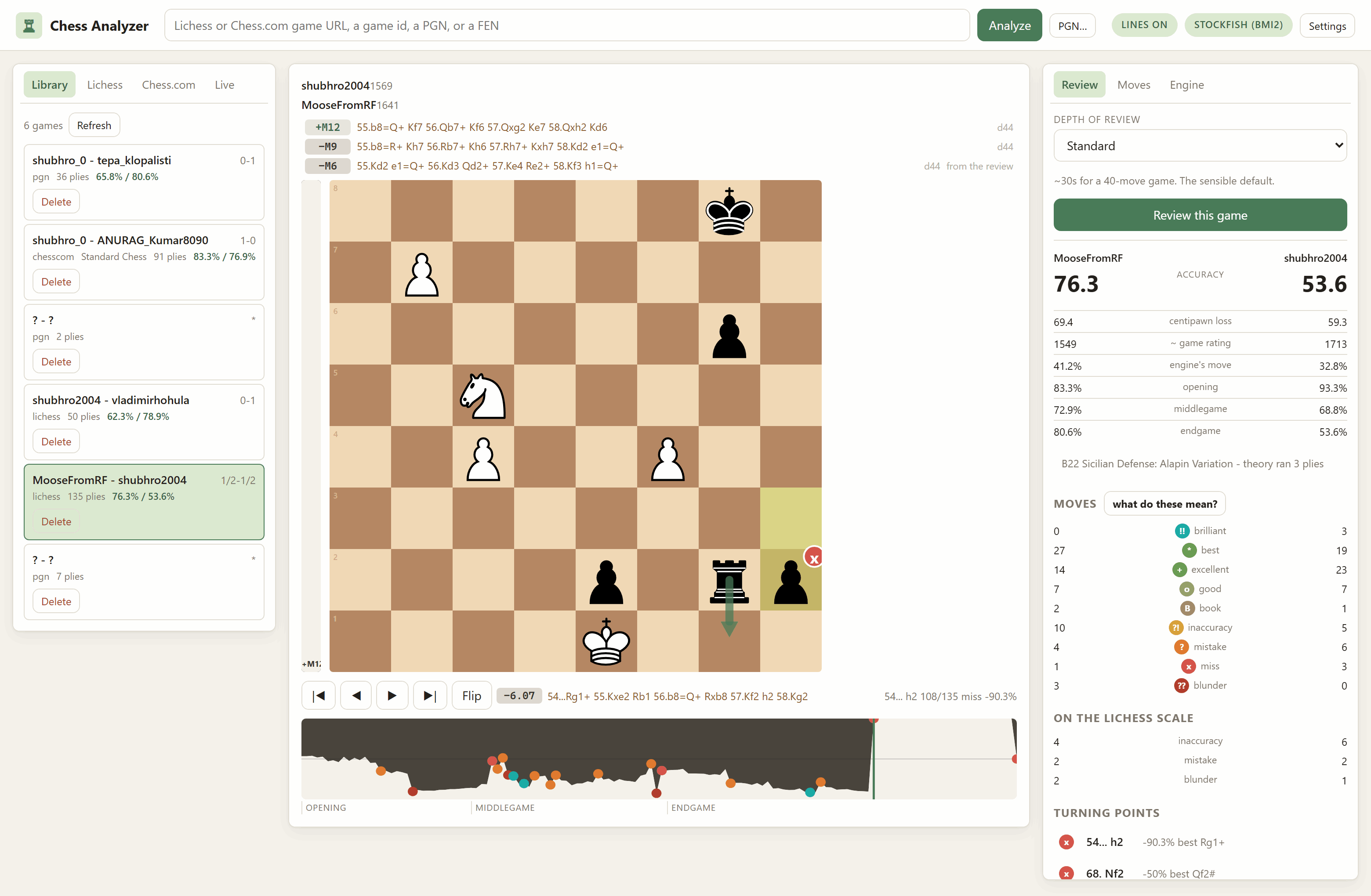
*Above: `54... h2`, the move this review calls the game's biggest turning point.
|
|
65
|
+
The strip over the board says `from the review`, so those three lines cost
|
|
66
|
+
nothing — the review already analysed this position to depth 44.*
|
|
67
|
+
|
|
68
|
+
---
|
|
69
|
+
|
|
70
|
+
## Install
|
|
71
|
+
|
|
72
|
+
```bash
|
|
73
|
+
pip install chess-game-analyzer
|
|
74
|
+
chess-analyzer serve
|
|
75
|
+
```
|
|
76
|
+
|
|
77
|
+
**Optional.** Lichess cloud-eval fallback: `pip install "chess-game-analyzer[cloud]"`.
|
|
78
|
+
|
|
79
|
+
Or take all five at once with `pip install lichess-essentials`. Installed this
|
|
80
|
+
way your files live in the usual per-user folder for your platform, and the
|
|
81
|
+
app prints the path in its startup banner. To run it from a checkout instead,
|
|
82
|
+
see [the repository README](https://github.com/spearb0lt/Lichess-Essentials/blob/main/README.md#setup-from-a-checkout).
|
|
83
|
+
|
|
84
|
+
## Getting a game in
|
|
85
|
+
|
|
86
|
+
One box takes all of these — it works out which is which by looking at them,
|
|
87
|
+
not by asking you:
|
|
88
|
+
|
|
89
|
+
| Paste this | What happens |
|
|
90
|
+
|---|---|
|
|
91
|
+
| `https://lichess.org/Wi8IPxc3` | Fetched from Lichess. Public API, no token. |
|
|
92
|
+
| `https://www.chess.com/game/live/146864147370` | Fetched from Chess.com, **including a game still in progress**. |
|
|
93
|
+
| A PGN, from anywhere | Read as-is. A `Site` tag saying lichess.org does not make it a link. |
|
|
94
|
+
| A FEN | Becomes a position you can analyse and play from. |
|
|
95
|
+
| A bare game id | 8 characters is Lichess, a long number is Chess.com. |
|
|
96
|
+
|
|
97
|
+
Or use the sidebar: type a username on the **Lichess** or **Chess.com** tab
|
|
98
|
+
and get their recent games with the PGN already attached, so opening one costs
|
|
99
|
+
no second request.
|
|
100
|
+
|
|
101
|
+
## The review
|
|
102
|
+
|
|
103
|
+
Pick a depth and press the button. Four presets, from ~10 seconds to a fixed
|
|
104
|
+
depth 22; a 90-ply game takes about 10 seconds on Quick and half a minute on
|
|
105
|
+
Standard.
|
|
106
|
+
|
|
107
|
+
<table>
|
|
108
|
+
<tr>
|
|
109
|
+
<td width="50%"><img src="docs/report.png" width="100%" alt="The review panel: accuracy for both players, centipawn loss, an ACPL-implied rating, how often each found the engine's move, per-phase accuracy, the opening name, the Chess.com-style label counts, the Lichess-scale counts, and the turning points ranked by what they cost"></td>
|
|
110
|
+
<td width="50%"><img src="docs/moves.png" width="100%" alt="The Moves panel: every move of the game with its label badge and its evaluation, White down the left and Black down the right"></td>
|
|
111
|
+
</tr>
|
|
112
|
+
<tr>
|
|
113
|
+
<td>The report. Two scales side by side, per-phase accuracy, and the turning points ranked by what they cost.</td>
|
|
114
|
+
<td>The move list. Every move wears its label, and the evaluation beside it is the one the review computed.</td>
|
|
115
|
+
</tr>
|
|
116
|
+
</table>
|
|
117
|
+
|
|
118
|
+
You get two scales side by side, on purpose:
|
|
119
|
+
|
|
120
|
+
**The Lichess scale** — inaccuracy, mistake, blunder at 10, 20 and 30
|
|
121
|
+
winning-chance points lost. Lichess publishes both these thresholds and the
|
|
122
|
+
accuracy formula, so the arithmetic here is theirs rather than an
|
|
123
|
+
approximation of it.
|
|
124
|
+
|
|
125
|
+
Checked against a game Lichess had already analysed
|
|
126
|
+
([Wi8IPxc3](https://lichess.org/Wi8IPxc3)), at the Deep preset:
|
|
127
|
+
|
|
128
|
+
| | this app | lichess.org |
|
|
129
|
+
|---|---|---|
|
|
130
|
+
| White accuracy | 76.3% | 76% |
|
|
131
|
+
| Black accuracy | 53.6% | 60% |
|
|
132
|
+
| White blunders | 2 | 6 |
|
|
133
|
+
|
|
134
|
+
Accuracy lands where it should. **The blunder counts do not, and will not** —
|
|
135
|
+
those depend on what the engine actually saw, and a different engine at a
|
|
136
|
+
different depth disagrees about which moves were losing. Treat the counts as
|
|
137
|
+
this engine's opinion, and the accuracy as comparable. Both apps agree about
|
|
138
|
+
the move that mattered: the app independently flagged `68. Nf2` as throwing
|
|
139
|
+
away a forced mate, which is what Lichess says about it too.
|
|
140
|
+
|
|
141
|
+
**The Chess.com-style ladder** — brilliant, great, best, book, excellent,
|
|
142
|
+
good, inaccuracy, mistake, miss, blunder. Chess.com has never published its
|
|
143
|
+
criteria, so this cannot be a reimplementation and does not pretend to be.
|
|
144
|
+
What it is: the same idea, built from rules that are **written down and shown
|
|
145
|
+
in the app** — click *what do these mean?* in the review panel. When a label
|
|
146
|
+
surprises you, you can read why it fired instead of guessing.
|
|
147
|
+
|
|
148
|
+
<img src="docs/rules.png" width="640" alt="The what the labels mean dialog: every label from brilliant down to blunder with the rule that fires it written out, including the material threshold for brilliant and the winning-chance bands for the rest">
|
|
149
|
+
|
|
150
|
+
The rules that took the most tuning:
|
|
151
|
+
|
|
152
|
+
- **Brilliant** — the engine's top move, which gives up at least 1.8 pawns of
|
|
153
|
+
material that the engine's own line never wins back, and still leaves you at
|
|
154
|
+
45% or better. Material is read off the engine's principal variation four
|
|
155
|
+
plies deep rather than from a hand-rolled exchange evaluator: if the engine's
|
|
156
|
+
best play leaves you a piece down and still says you are fine, you sacrificed
|
|
157
|
+
and it worked.
|
|
158
|
+
- **Great** — the top move, where the second-best is at least 15 points worse.
|
|
159
|
+
- Neither is ever given for a **recapture**, or once the game is decided past
|
|
160
|
+
92%. Taking back the piece that was just taken beats the alternatives for
|
|
161
|
+
reasons that are not to your credit; without that rule, a third of every game
|
|
162
|
+
comes out "great".
|
|
163
|
+
- **Book** moves are excluded from accuracy and centipawn loss entirely, so
|
|
164
|
+
preparation is not scored as skill.
|
|
165
|
+
|
|
166
|
+
Also in the report: per-phase accuracy (opening / middlegame / endgame, with
|
|
167
|
+
the boundaries found from the position rather than a fixed move number),
|
|
168
|
+
average centipawn loss, how often you found the engine's move, the turning
|
|
169
|
+
points ranked by what they cost, and a rough ACPL-implied rating shown with its
|
|
170
|
+
formula attached — it is a fit, not a measurement, and it moves 200 points on
|
|
171
|
+
one blunder.
|
|
172
|
+
|
|
173
|
+
## Reading it
|
|
174
|
+
|
|
175
|
+
- **The engine's ranked lines sit above the board**, in small text, and stay
|
|
176
|
+
there while the **Lines** pill in the top bar is lit — they follow whatever
|
|
177
|
+
position you are looking at rather than waiting to be asked. How many lines
|
|
178
|
+
and how long the engine gets are on the *Engine* tab. Click one to play it.
|
|
179
|
+
|
|
180
|
+
On a game you have reviewed these cost nothing: the review already analysed
|
|
181
|
+
every position several variations deep, so scrolling through it shows those
|
|
182
|
+
lines instantly, at the review's depth, and the strip says *from the review*
|
|
183
|
+
so you know which they are. Only the final position, which the review has no
|
|
184
|
+
row for, falls back to a live engine call.
|
|
185
|
+
- **The engine's preferred continuation sits beside the board controls**, as a
|
|
186
|
+
score chip and the line. On a reviewed move it is deliberately retrospective
|
|
187
|
+
— the line you could have played *instead* — because that is the question you
|
|
188
|
+
are asking while reading a review. Anywhere else it is the best line from
|
|
189
|
+
here.
|
|
190
|
+
- **Scroll the mouse wheel over the board** to step through the game — down
|
|
191
|
+
goes forward, up goes back. Every position is already in the browser, so this
|
|
192
|
+
is instant; it is the reason the board is drawn client-side rather than
|
|
193
|
+
fetched as an image. Trackpads work too: deltas are accumulated to a
|
|
194
|
+
threshold, so a flick is one move rather than ten. (The two sibling apps now
|
|
195
|
+
do this as well.)
|
|
196
|
+
- Arrow keys do the same; `f` flips; `Home`/`End` jump to the ends.
|
|
197
|
+
- Click the eval graph to jump to that moment.
|
|
198
|
+
- Each move wears its label as a badge on the destination square, and when you
|
|
199
|
+
did not play the engine's move, an arrow shows what it wanted.
|
|
200
|
+
- **Play any move on the board to explore.** The game itself is never touched:
|
|
201
|
+
your move becomes a variation, shown in the move list in brackets and a
|
|
202
|
+
lighter colour right after the move it replaces, the way Lichess and
|
|
203
|
+
Chess.com do it — `5...O-O (5...d5 6.Bb5 Bg4)`. Keep playing and it extends;
|
|
204
|
+
go back and try something else and you get a second variation beside the
|
|
205
|
+
first; try something inside a variation and it nests in its own brackets.
|
|
206
|
+
The engine follows you into them, so an exploratory move gets its own
|
|
207
|
+
evaluation. *Back to the game* returns to the mainline, *Clear variations*
|
|
208
|
+
throws them all away, and the review's labels and stored lines stay attached
|
|
209
|
+
to the moves that were actually played.
|
|
210
|
+
|
|
211
|
+
## Live games
|
|
212
|
+
|
|
213
|
+
Five ways in, because the five situations are genuinely different.
|
|
214
|
+
|
|
215
|
+
| Mode | How it works |
|
|
216
|
+
|---|---|
|
|
217
|
+
| **Lichess** | A real push stream. `/api/stream/game/{id}` is public and sends a line per move — any game, yours or anyone's. Give it a game URL, an id, or just a username. |
|
|
218
|
+
| **Chess.com** | Polling `chess.com/callback/live/game/{id}` every two seconds and decoding the move list. **Undocumented** — see below. |
|
|
219
|
+
| **Follow along** | You click the moves as they are played. No network at all, so it works for a Chess.com blitz game, a stream you are watching, or a board in front of you. |
|
|
220
|
+
| **Arrange the board** | There is no URL and no PGN, only a position. Put the pieces where they are, say who is to move, and the engine evaluates it. See below. |
|
|
221
|
+
| **Paste PGN** | Paste, and re-paste as the game grows. Only ever moves forward: a short or scrambled paste cannot rewind the game. |
|
|
222
|
+
|
|
223
|
+
In every mode the eval bar and the engine's ranked lines keep up with the
|
|
224
|
+
current position, you can scroll back through the game without losing your
|
|
225
|
+
place when the players move, and **Save & review** freezes the game into the
|
|
226
|
+
library so you can run a full review on it.
|
|
227
|
+
|
|
228
|
+
### Arranging a position
|
|
229
|
+
|
|
230
|
+
Pick **Arrange the board** and the board becomes an editor, outlined in green
|
|
231
|
+
so it is obvious that clicking it no longer plays moves. Choose a piece from
|
|
232
|
+
the palette and click squares; clicking the piece that is already there
|
|
233
|
+
removes it, and right-clicking any square clears it. **From the board** copies
|
|
234
|
+
whatever position you are already looking at, which beats building from empty
|
|
235
|
+
when you only need to move two pieces.
|
|
236
|
+
|
|
237
|
+
|
|
238
|
+
|
|
239
|
+
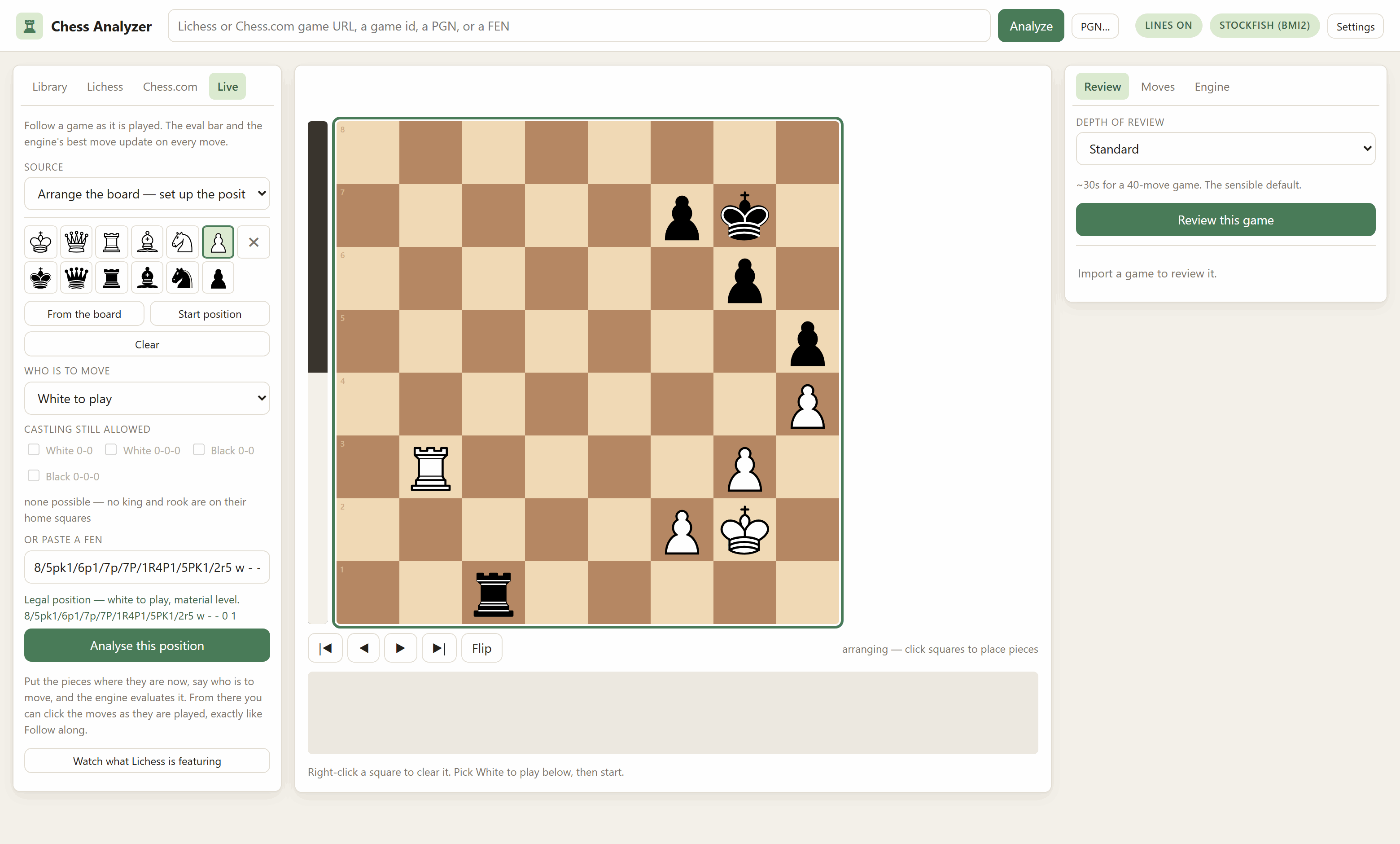
*The castling row in that shot reads **none possible** on its own — no king and
|
|
240
|
+
rook are on their home squares in this position, so there is nothing to offer
|
|
241
|
+
and nothing left over from a previous arrangement to pass to the engine.*
|
|
242
|
+
|
|
243
|
+
Then say **White to play** or **Black to play**, and press *Analyse this
|
|
244
|
+
position*. From that point it behaves exactly like Follow along: the eval bar
|
|
245
|
+
and the engine's lines are live, and you click the moves as they happen.
|
|
246
|
+
**Save & review** turns it into a game in your library, with the arranged
|
|
247
|
+
position kept as the PGN's starting position.
|
|
248
|
+
|
|
249
|
+
Every click is validated, because most arrangements of pieces are not
|
|
250
|
+
positions. Two white kings, a pawn on the first rank, or Black in check while
|
|
251
|
+
White is to move cannot occur in a game, and an engine handed one either
|
|
252
|
+
refuses to start or produces a confident number about nothing. The editor says
|
|
253
|
+
which of those is wrong, in a sentence, before you can start.
|
|
254
|
+
|
|
255
|
+
Two details it fills in rather than asking about:
|
|
256
|
+
|
|
257
|
+
- **Castling rights** are offered only for a king and rook still on their home
|
|
258
|
+
squares — and a tick left over from a previous arrangement is dropped rather
|
|
259
|
+
than passed to the engine.
|
|
260
|
+
- **En passant** is offered only where a double pawn push could really just
|
|
261
|
+
have happened *and* the capture would be legal. (python-chess's
|
|
262
|
+
`has_legal_en_passant` is not enough on its own here: it asks whether a pawn
|
|
263
|
+
could capture *onto* the square and will say yes when there is no pawn there
|
|
264
|
+
to take. `status` is what checks a double push could have produced it. The
|
|
265
|
+
editor needs both, or it would offer you a square its own validator then
|
|
266
|
+
rejects.)
|
|
267
|
+
|
|
268
|
+
### The honest part about Chess.com live games
|
|
269
|
+
|
|
270
|
+
Chess.com's documented public API cannot see a live game. `/pub/player/{u}/games`
|
|
271
|
+
is documented as "games in progress" and returns **daily/correspondence games
|
|
272
|
+
only** — a blitz game you are playing right now is not in it, and no documented
|
|
273
|
+
endpoint has it.
|
|
274
|
+
|
|
275
|
+
`chess.com/callback/live/game/{id}` does have it. It is undocumented, which
|
|
276
|
+
means it is not covered by Chess.com's API terms and can change or vanish
|
|
277
|
+
without notice. This app therefore treats it as optional: if it stops
|
|
278
|
+
answering, the session keeps the moves it already has and tells you to switch
|
|
279
|
+
to Paste PGN, which always works.
|
|
280
|
+
|
|
281
|
+
That endpoint returns moves in **TCN**, Chess.com's own two-characters-per-ply
|
|
282
|
+
encoding, which nothing in python-chess speaks. The decoder in
|
|
283
|
+
[`tcn.py`](https://github.com/spearb0lt/Lichess-Essentials/blob/main/ChessAnalyzer/chess_analyzer/tcn.py) is verified against 40 real games that
|
|
284
|
+
Chess.com shipped as *both* TCN and PGN — every move and every final position
|
|
285
|
+
matches, promotions and en passant included. The fixture is in the repository
|
|
286
|
+
so the check runs with no network.
|
|
287
|
+
|
|
288
|
+
**Also**: Chess.com sits behind Cloudflare and returns a 403 challenge page to
|
|
289
|
+
any request without a `User-Agent` header. Not a rate limit and not a ban —
|
|
290
|
+
just a missing header, which is a confusing hour to spend if you do not know.
|
|
291
|
+
|
|
292
|
+
## Engines
|
|
293
|
+
|
|
294
|
+
The app uses whatever Stockfish it can find first — including the one in the
|
|
295
|
+
sibling app's `Lichess-Study-to-PDF/engine/` folder, so following this
|
|
296
|
+
repository's setup instructions means never being asked to download a second
|
|
297
|
+
copy.
|
|
298
|
+
|
|
299
|
+
Click the engine pill to see the picker. It reads each project's own GitHub
|
|
300
|
+
releases, so a new Stockfish appears the day it ships:
|
|
301
|
+
|
|
302
|
+
<img src="docs/engines.png" width="620" alt="The engine picker: the Stockfish already found on this machine at the top, then every Stockfish release available to download with its size and the CPU builds it ships, then Lc0">
|
|
303
|
+
|
|
304
|
+
- **Stockfish**, any recent version (~77 MB).
|
|
305
|
+
- **Lc0** (~24 MB) plus a network file. The **Maia** networks are the
|
|
306
|
+
interesting ones: they predict what a human *of a given rating* actually
|
|
307
|
+
plays rather than what is best. Use one to ask whether a move was findable —
|
|
308
|
+
never to judge one.
|
|
309
|
+
|
|
310
|
+
You can set the review engine and the analysis engine separately.
|
|
311
|
+
|
|
312
|
+
**About CPU builds.** Stockfish publishes one binary per instruction set —
|
|
313
|
+
`bmi2`, `avx2`, `avx512`, down to a plain `x86-64` — and running one your
|
|
314
|
+
processor cannot execute does not fail politely, it dies on an illegal
|
|
315
|
+
instruction. There is no portable way to read CPU feature flags from Python on
|
|
316
|
+
Windows, so the app does not guess: it downloads a build, **runs it**, waits
|
|
317
|
+
for it to answer `uci`, and on failure walks down to the next-safest build
|
|
318
|
+
automatically. What worked is remembered, so it happens at most once.
|
|
319
|
+
|
|
320
|
+
## What is kept on disk
|
|
321
|
+
|
|
322
|
+
`ChessAnalyzer/games/` holds one JSON file per imported game — the record, the
|
|
323
|
+
PGN and the finished review — plus `positions.json`, a shared cache of analysed
|
|
324
|
+
positions keyed by position **and** engine settings. That cache is why
|
|
325
|
+
re-reviewing a game at the same settings is instant, and why a 0.1-second
|
|
326
|
+
answer never masquerades as a depth-22 one.
|
|
327
|
+
|
|
328
|
+
`ChessAnalyzer/data/openings.json` is the opening index, built once from
|
|
329
|
+
Lichess's own openings dataset (3,810 named positions, no token needed). It is
|
|
330
|
+
indexed by position rather than by move order, so a transposition into a named
|
|
331
|
+
line is still recognised.
|
|
332
|
+
|
|
333
|
+
Downloaded engines go in `ChessAnalyzer/engines/`. All three directories are
|
|
334
|
+
gitignored.
|
|
335
|
+
|
|
336
|
+
A Lichess API token is accepted in Settings and is **never written to disk** —
|
|
337
|
+
it lives in the process and dies with it. Nothing here needs one; every
|
|
338
|
+
endpoint the app uses is public. It only raises the rate limit for bulk
|
|
339
|
+
imports.
|
|
340
|
+
|
|
341
|
+
## Command line
|
|
342
|
+
|
|
343
|
+
```bash
|
|
344
|
+
python -m chess_analyzer.cli serve # the browser interface
|
|
345
|
+
python -m chess_analyzer.cli review <url|id|pgn> # review and print it
|
|
346
|
+
python -m chess_analyzer.cli review <url> --preset deep --depth 20
|
|
347
|
+
python -m chess_analyzer.cli engines # what is here, what is available
|
|
348
|
+
python -m chess_analyzer.cli engines --install stockfish:sf_18
|
|
349
|
+
python -m chess_analyzer.cli import <url> # add to the library
|
|
350
|
+
python -m chess_analyzer.cli library # list saved games
|
|
351
|
+
```
|
|
352
|
+
|
|
353
|
+
## Tests
|
|
354
|
+
|
|
355
|
+
```bash
|
|
356
|
+
python -m pytest ChessAnalyzer/tests -q # 51 tests
|
|
357
|
+
node ChessAnalyzer/tests/test_variations.js # 10 more, if you have node
|
|
358
|
+
python ChessAnalyzer/tests/test_layout.py # 21 in a real browser
|
|
359
|
+
```
|
|
360
|
+
|
|
361
|
+
No network and no engine required — a suite that needs both is a suite nobody
|
|
362
|
+
runs.
|
|
363
|
+
|
|
364
|
+
The second file covers the variation tree, which is browser code. Rather than
|
|
365
|
+
duplicating the logic, it lifts the functions out of the shipped `app.js` by
|
|
366
|
+
name and runs them against a `state` it controls; a copy would keep passing
|
|
367
|
+
after `app.js` changed underneath it, which is the one thing a test must not
|
|
368
|
+
do. (Checked by deliberately reintroducing the old behaviour, which failed
|
|
369
|
+
three of them.)
|
|
370
|
+
|
|
371
|
+
The third drives a real headless browser over the DevTools protocol, against a
|
|
372
|
+
server you have already started. It needs no new dependency — Edge or Chrome is
|
|
373
|
+
already on the machine and `websockets` came in with `uvicorn[standard]` — and
|
|
374
|
+
it skips if neither is there.
|
|
375
|
+
|
|
376
|
+
It exists because the app's worst bug could not be found by reading. The board
|
|
377
|
+
and the scrolling panel were resizing each other several times a second, so the
|
|
378
|
+
whole page shook; the stylesheet looked perfectly reasonable. One measurement
|
|
379
|
+
found it. It now checks that the board, the controls and the graph fit at seven
|
|
380
|
+
window sizes, that the board's size *settles* rather than drifting, that an
|
|
381
|
+
arriving evaluation does not move it, that trying a move leaves the game's
|
|
382
|
+
notation alone, and that a wheel notch and a trackpad flick each move exactly
|
|
383
|
+
one move.
|
|
384
|
+
|
|
385
|
+
## Things worth knowing if you change this
|
|
386
|
+
|
|
387
|
+
**A warm engine stops the process from exiting.** python-chess runs each
|
|
388
|
+
engine's event loop on a *non-daemon* thread, and CPython joins non-daemon
|
|
389
|
+
threads *before* it runs `atexit` handlers. So a program that leaves an engine
|
|
390
|
+
open prints its last line and then blocks for ever, with no output and no
|
|
391
|
+
traceback to explain it. An `atexit` hook does not fix this — it runs too late.
|
|
392
|
+
Every entry point must call `engines.close()`; the server does it in its
|
|
393
|
+
shutdown handler and the CLI in a `finally`.
|
|
394
|
+
|
|
395
|
+
**Lichess's single-game export is not under `/api`.** It is
|
|
396
|
+
`https://lichess.org/game/export/{id}`, while everything else this app uses is
|
|
397
|
+
`https://lichess.org/api/...`. Getting it wrong returns a 404 HTML page.
|
|
398
|
+
|
|
399
|
+
**The opening explorer needs a token; the openings dataset does not.**
|
|
400
|
+
`explorer.lichess.org` now requires an authenticated request, which is why book
|
|
401
|
+
detection here uses the downloadable dataset instead — it never changes, so a
|
|
402
|
+
380 KB download once beats an authenticated request per position.
|
|
403
|
+
|
|
404
|
+
**Scores are White's point of view everywhere**, matching `PovScore.white()`
|
|
405
|
+
and the sibling app's `Eval`. Only `classify.py` flips, and it does so once, at
|
|
406
|
+
the boundary. A 30-point drop in White's winning chances is a *gain* for Black,
|
|
407
|
+
and there is a test that keeps that sign honest.
|
|
408
|
+
|
|
409
|
+
## Hosting it for free
|
|
410
|
+
|
|
411
|
+
Same profile as
|
|
412
|
+
[the other two apps](https://github.com/spearb0lt/Lichess-Essentials/blob/main/Lichess-Study-to-PDF/README.md#hosting-it-for-free) —
|
|
413
|
+
FastAPI/Uvicorn needing a real container, not a serverless host. Unlike
|
|
414
|
+
Repertoire-Creator, this app doesn't actually import the sibling package
|
|
415
|
+
anywhere in its code despite the `cloud` extra in `pyproject.toml` (that's an
|
|
416
|
+
unused hook for later), so [`Dockerfile`](https://github.com/spearb0lt/Lichess-Essentials/blob/main/ChessAnalyzer/Dockerfile) is self-contained in
|
|
417
|
+
this folder — no repo-root build context needed.
|
|
418
|
+
|
|
419
|
+
It installs Stockfish via `apt-get` rather than letting the app's own
|
|
420
|
+
GitHub-releases downloader (`chess_analyzer/engines.py`) fetch one at
|
|
421
|
+
runtime — simpler, and `apt` already picks the build matching the container's
|
|
422
|
+
actual CPU. `engines.py` checks `$STOCKFISH_PATH` directly
|
|
423
|
+
([engines.py:214](https://github.com/spearb0lt/Lichess-Essentials/blob/main/ChessAnalyzer/chess_analyzer/engines.py#L214)), which the Dockerfile
|
|
424
|
+
sets, so it shows up in the engine picker as "Engine from $STOCKFISH_PATH"
|
|
425
|
+
with nothing else to configure. Lc0/Maia are left out — they're optional, and
|
|
426
|
+
downloadable from the same picker at runtime if you want them.
|
|
427
|
+
|
|
428
|
+
### What does *not* persist on a free host
|
|
429
|
+
|
|
430
|
+
`games/`, `data/openings.json` and `engines/` are already gitignored locally
|
|
431
|
+
because they're regenerated on demand (see "What is kept on disk", above) —
|
|
432
|
+
but on a free container they also get wiped by every redeploy, and possibly
|
|
433
|
+
every wake from sleep. Unlike Repertoire-Creator, there is no git-autosave
|
|
434
|
+
here to fix that. In practice that means: the openings index rebuilds itself
|
|
435
|
+
on first use, Stockfish is already baked into the image so there's nothing to
|
|
436
|
+
re-download for the main engine, and **your reviewed-game library does not
|
|
437
|
+
survive a restart**. Treat a hosted instance as a live analysis tool, not a
|
|
438
|
+
permanent archive — export or note anything from `games/` you want to keep,
|
|
439
|
+
or do that curation against a local run instead.
|
|
440
|
+
|
|
441
|
+
### Render
|
|
442
|
+
|
|
443
|
+
1. Push this repo to GitHub.
|
|
444
|
+
2. **New Web Service** → connect the repo → **Root Directory**:
|
|
445
|
+
`ChessAnalyzer` → Render auto-detects the Dockerfile → **Free** instance.
|
|
446
|
+
3. Optional environment variables, marked **secret**: `ANALYZER_AUTH_USER` /
|
|
447
|
+
`ANALYZER_AUTH_PASS` — see "Locking it behind a password" below.
|
|
448
|
+
4. Deploy. You get a URL like `https://<name>.onrender.com`.
|
|
449
|
+
|
|
450
|
+
### Hugging Face Spaces
|
|
451
|
+
|
|
452
|
+
Spaces are their own separate git repo, so:
|
|
453
|
+
|
|
454
|
+
1. **New Space** → **SDK: Docker** → **Hardware: CPU basic (free)**.
|
|
455
|
+
2. Clone the Space's repo locally, then copy this folder's **contents**
|
|
456
|
+
(`Dockerfile`, `requirements.txt`, `chess_analyzer/`, etc.) into its
|
|
457
|
+
root — not the `ChessAnalyzer` folder itself, what's inside it.
|
|
458
|
+
3. Add this to the top of the Space's `README.md`:
|
|
459
|
+
```yaml
|
|
460
|
+
---
|
|
461
|
+
title: Chess Analyzer
|
|
462
|
+
sdk: docker
|
|
463
|
+
app_port: 7860
|
|
464
|
+
---
|
|
465
|
+
```
|
|
466
|
+
4. **Settings → Repository secrets**: `ANALYZER_AUTH_USER` /
|
|
467
|
+
`ANALYZER_AUTH_PASS`, if you want the password gate below.
|
|
468
|
+
5. Commit and push (a Hugging Face access token as the git password).
|
|
469
|
+
|
|
470
|
+
### Locking it behind a password
|
|
471
|
+
|
|
472
|
+
[`server.py`](https://github.com/spearb0lt/Lichess-Essentials/blob/main/ChessAnalyzer/chess_analyzer/server.py) already has an HTTP Basic Auth gate
|
|
473
|
+
that only activates when both `ANALYZER_AUTH_USER` and `ANALYZER_AUTH_PASS`
|
|
474
|
+
are set — leave them unset and local `chess-analyzer serve` is unaffected.
|
|
475
|
+
Set both as secrets on whichever host you use and every route, API included,
|
|
476
|
+
asks for that username and password first. It's one shared credential pair,
|
|
477
|
+
not per-user accounts, sent over the HTTPS both Render and Hugging Face
|
|
478
|
+
Spaces terminate by default.
|
|
479
|
+
|
|
480
|
+
### One less thing to worry about here
|
|
481
|
+
|
|
482
|
+
This app never asks for a Lichess token via an environment variable at all —
|
|
483
|
+
the token field in Settings lives in memory only and every endpoint it calls
|
|
484
|
+
is public (see "What is kept on disk", above). The public-token caveat that
|
|
485
|
+
applies to the other two apps' `LICHESS_TOKEN` doesn't apply here.
|
|
486
|
+
|
|
487
|
+
## Licence
|
|
488
|
+
|
|
489
|
+
MIT — see [LICENSE](https://github.com/spearb0lt/Lichess-Essentials/blob/main/LICENSE).
|