chatdeck 0.1.0__tar.gz
This diff represents the content of publicly available package versions that have been released to one of the supported registries. The information contained in this diff is provided for informational purposes only and reflects changes between package versions as they appear in their respective public registries.
- chatdeck-0.1.0/LICENSE +21 -0
- chatdeck-0.1.0/PKG-INFO +164 -0
- chatdeck-0.1.0/README.md +146 -0
- chatdeck-0.1.0/pyproject.toml +34 -0
- chatdeck-0.1.0/setup.cfg +4 -0
- chatdeck-0.1.0/src/chatdeck/__init__.py +2 -0
- chatdeck-0.1.0/src/chatdeck/__main__.py +3 -0
- chatdeck-0.1.0/src/chatdeck/autostart.py +91 -0
- chatdeck-0.1.0/src/chatdeck/cli.py +152 -0
- chatdeck-0.1.0/src/chatdeck/config.py +34 -0
- chatdeck-0.1.0/src/chatdeck/demo.py +141 -0
- chatdeck-0.1.0/src/chatdeck/desktop.py +93 -0
- chatdeck-0.1.0/src/chatdeck/hooks.py +131 -0
- chatdeck-0.1.0/src/chatdeck/server.py +345 -0
- chatdeck-0.1.0/src/chatdeck/static/index.html +342 -0
- chatdeck-0.1.0/src/chatdeck/static/logo-192.png +0 -0
- chatdeck-0.1.0/src/chatdeck/static/logo-512.png +0 -0
- chatdeck-0.1.0/src/chatdeck/static/logo.ico +0 -0
- chatdeck-0.1.0/src/chatdeck/static/logo.svg +13 -0
- chatdeck-0.1.0/src/chatdeck/terminals.py +218 -0
- chatdeck-0.1.0/src/chatdeck/transcripts.py +216 -0
- chatdeck-0.1.0/src/chatdeck/usage.py +96 -0
- chatdeck-0.1.0/src/chatdeck/windows/bubble.ps1 +303 -0
- chatdeck-0.1.0/src/chatdeck/windows/focus_wt.ps1 +68 -0
- chatdeck-0.1.0/src/chatdeck/windows/start.ps1 +35 -0
- chatdeck-0.1.0/src/chatdeck.egg-info/PKG-INFO +164 -0
- chatdeck-0.1.0/src/chatdeck.egg-info/SOURCES.txt +29 -0
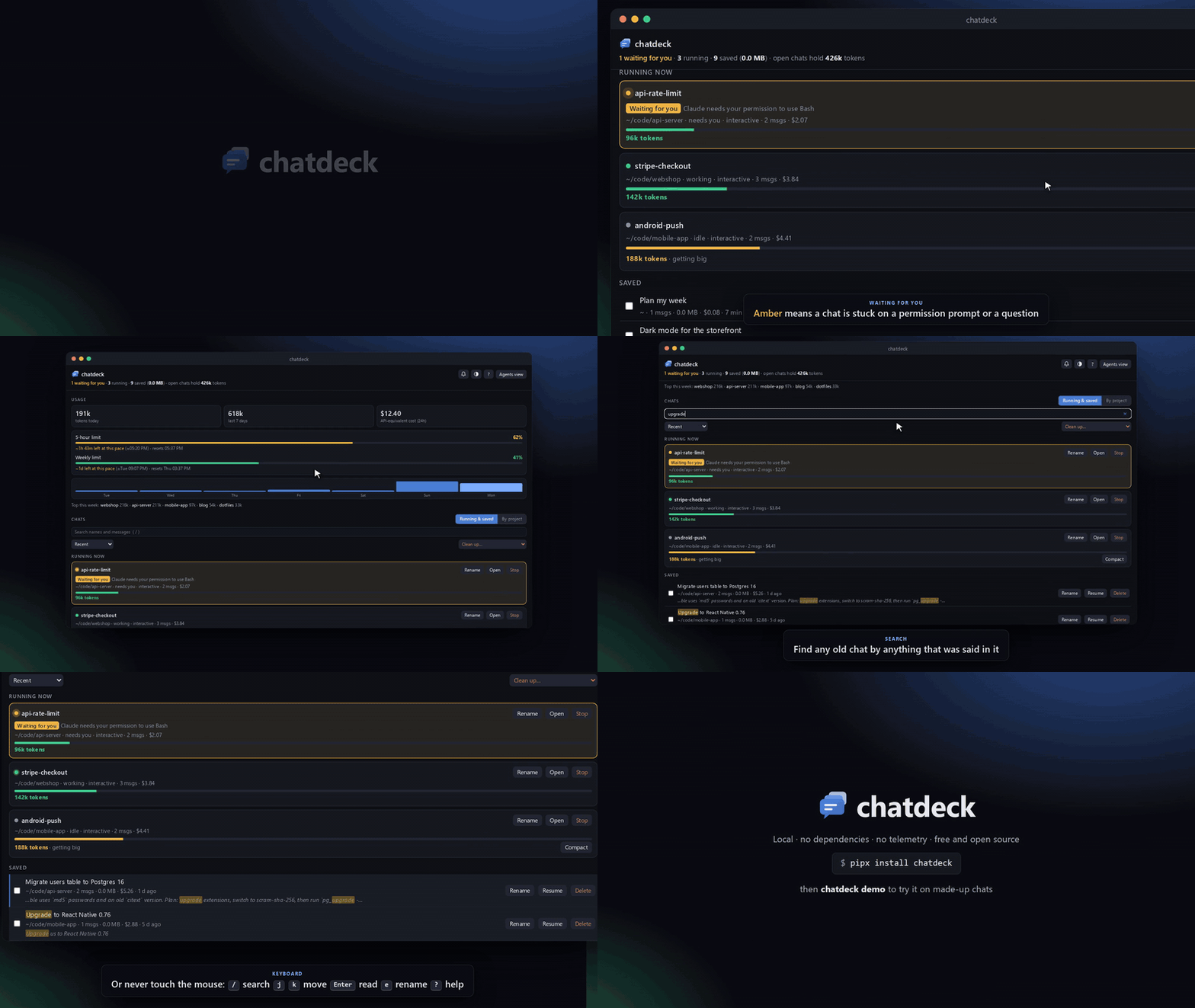
- chatdeck-0.1.0/src/chatdeck.egg-info/dependency_links.txt +1 -0
- chatdeck-0.1.0/src/chatdeck.egg-info/entry_points.txt +2 -0
- chatdeck-0.1.0/src/chatdeck.egg-info/top_level.txt +1 -0
- chatdeck-0.1.0/tests/test_chatdeck.py +343 -0
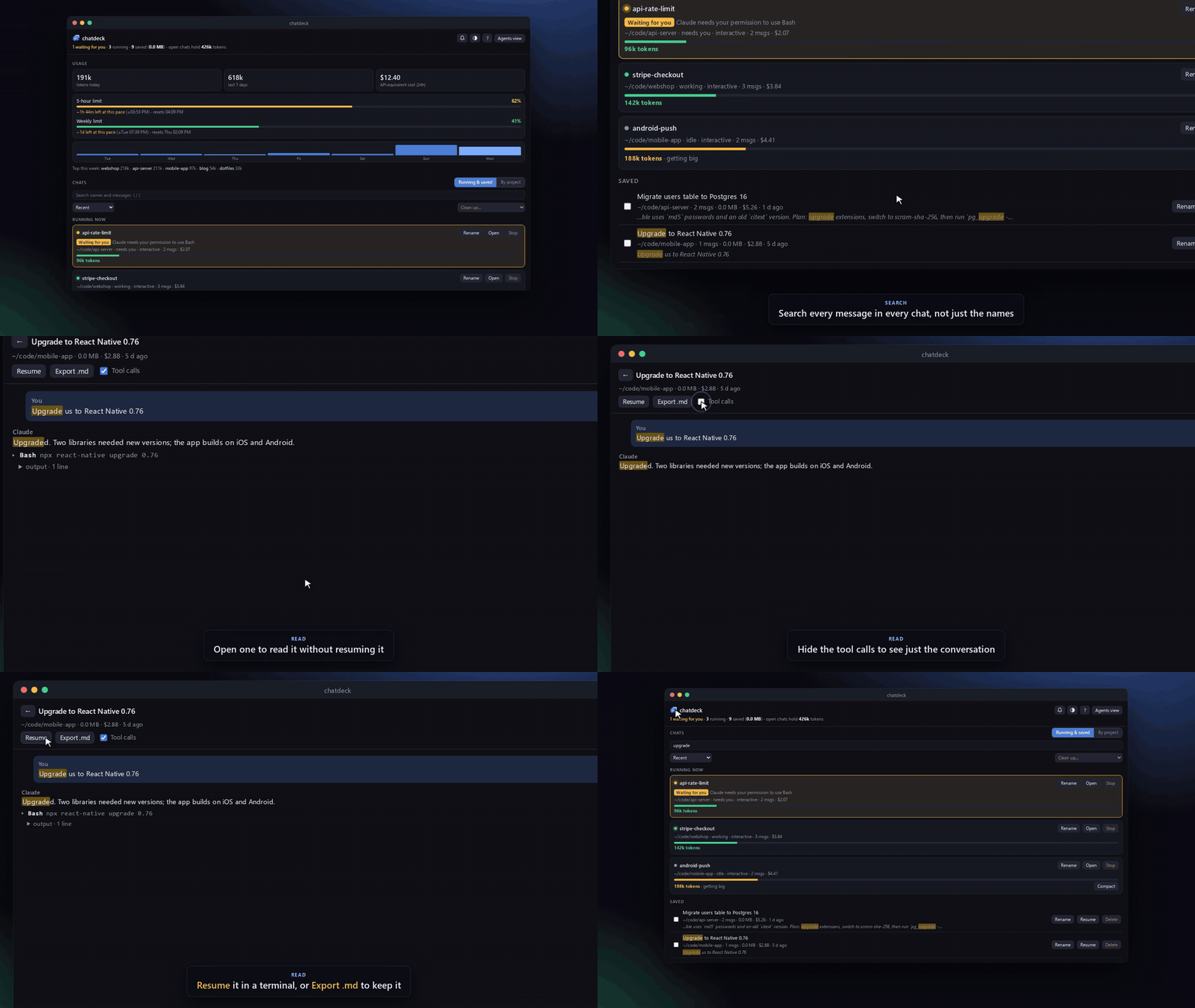
chatdeck-0.1.0/LICENSE
ADDED
|
@@ -0,0 +1,21 @@
|
|
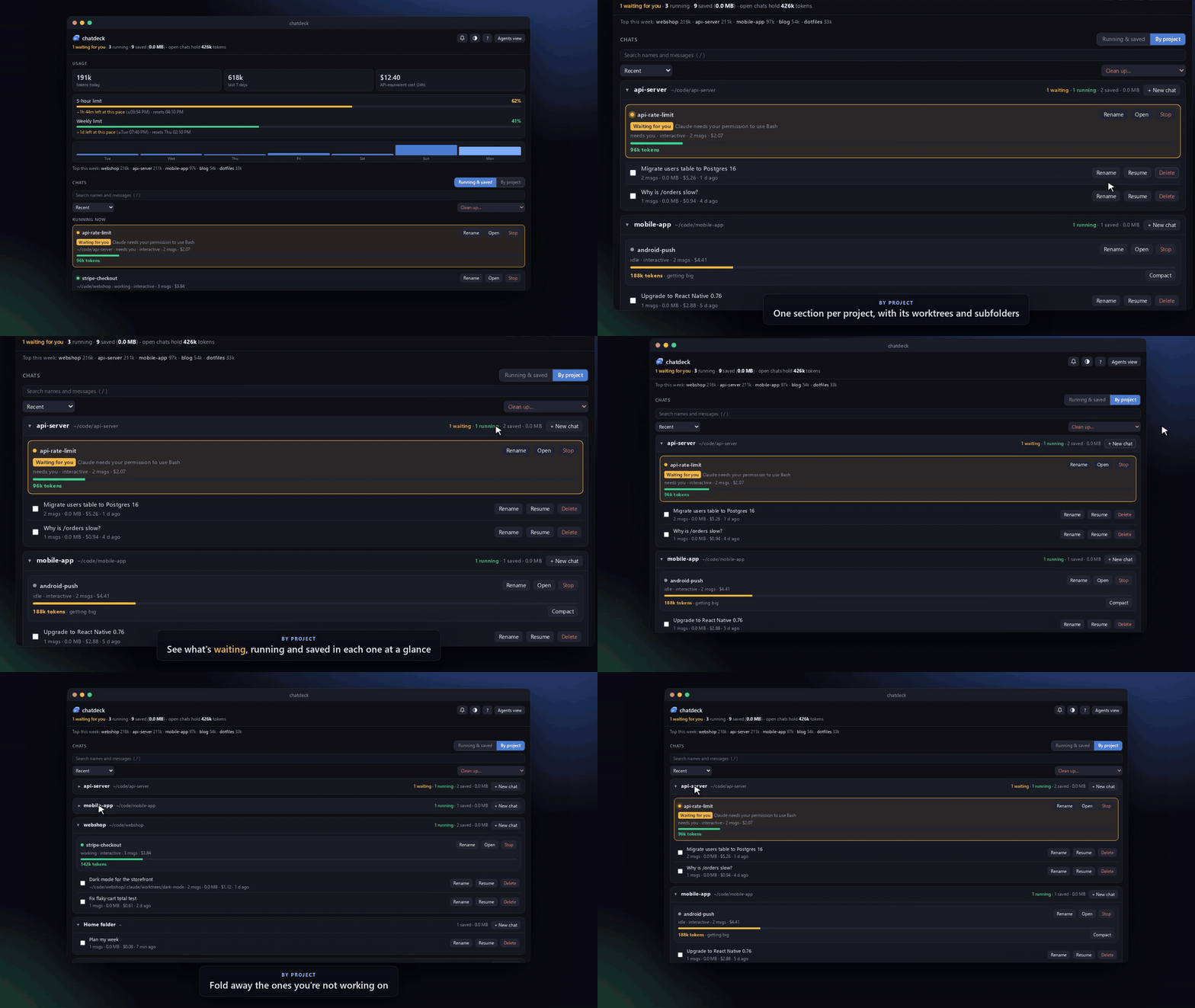
|
1
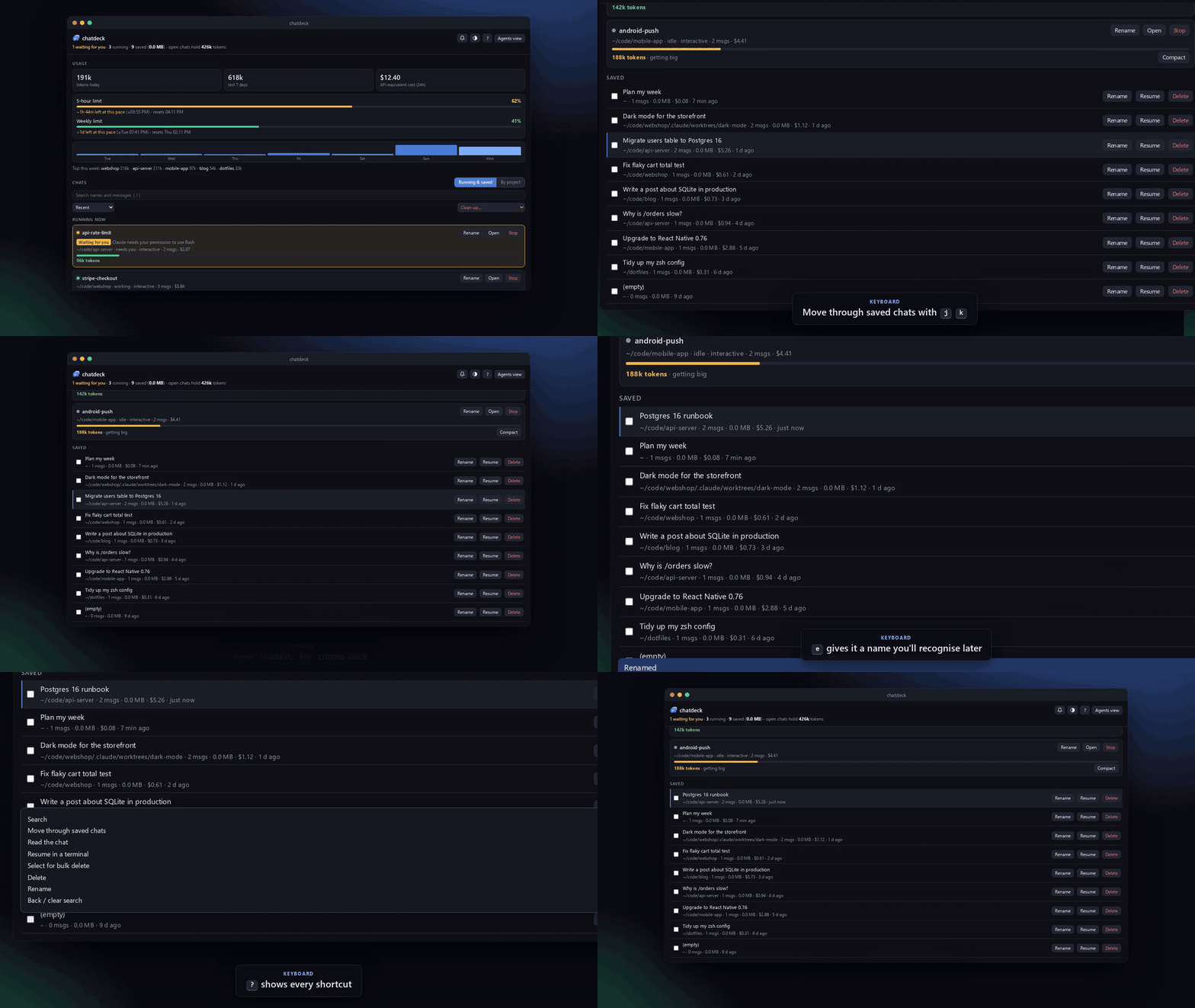
|
+
MIT License
|
|
2
|
+
|
|
3
|
+
Copyright (c) 2026 Abdifatah
|
|
4
|
+
|
|
5
|
+
Permission is hereby granted, free of charge, to any person obtaining a copy
|
|
6
|
+
of this software and associated documentation files (the "Software"), to deal
|
|
7
|
+
in the Software without restriction, including without limitation the rights
|
|
8
|
+
to use, copy, modify, merge, publish, distribute, sublicense, and/or sell
|
|
9
|
+
copies of the Software, and to permit persons to whom the Software is
|
|
10
|
+
furnished to do so, subject to the following conditions:
|
|
11
|
+
|
|
12
|
+
The above copyright notice and this permission notice shall be included in all
|
|
13
|
+
copies or substantial portions of the Software.
|
|
14
|
+
|
|
15
|
+
THE SOFTWARE IS PROVIDED "AS IS", WITHOUT WARRANTY OF ANY KIND, EXPRESS OR
|
|
16
|
+
IMPLIED, INCLUDING BUT NOT LIMITED TO THE WARRANTIES OF MERCHANTABILITY,
|
|
17
|
+
FITNESS FOR A PARTICULAR PURPOSE AND NONINFRINGEMENT. IN NO EVENT SHALL THE
|
|
18
|
+
AUTHORS OR COPYRIGHT HOLDERS BE LIABLE FOR ANY CLAIM, DAMAGES OR OTHER
|
|
19
|
+
LIABILITY, WHETHER IN AN ACTION OF CONTRACT, TORT OR OTHERWISE, ARISING FROM,
|
|
20
|
+
OUT OF OR IN CONNECTION WITH THE SOFTWARE OR THE USE OR OTHER DEALINGS IN THE
|
|
21
|
+
SOFTWARE.
|
chatdeck-0.1.0/PKG-INFO
ADDED
|
@@ -0,0 +1,164 @@
|
|
|
1
|
+
Metadata-Version: 2.4
|
|
2
|
+
Name: chatdeck
|
|
3
|
+
Version: 0.1.0
|
|
4
|
+
Summary: A local dashboard for your Claude Code chats: what's running, what needs you, and what it costs.
|
|
5
|
+
License-Expression: MIT
|
|
6
|
+
Project-URL: Homepage, https://github.com/Abdifatah09/chatdeck
|
|
7
|
+
Project-URL: Issues, https://github.com/Abdifatah09/chatdeck/issues
|
|
8
|
+
Keywords: claude,claude-code,dashboard,ai,cli
|
|
9
|
+
Classifier: Environment :: Console
|
|
10
|
+
Classifier: Environment :: Web Environment
|
|
11
|
+
Classifier: Operating System :: MacOS
|
|
12
|
+
Classifier: Operating System :: POSIX :: Linux
|
|
13
|
+
Classifier: Programming Language :: Python :: 3
|
|
14
|
+
Requires-Python: >=3.9
|
|
15
|
+
Description-Content-Type: text/markdown
|
|
16
|
+
License-File: LICENSE
|
|
17
|
+
Dynamic: license-file
|
|
18
|
+
|
|
19
|
+
# chatdeck
|
|
20
|
+
|
|
21
|
+
A local dashboard for your Claude Code chats: see which chats are running and which need you,
|
|
22
|
+
read and search old chats, track usage against your plan limits, and clean up transcripts.
|
|
23
|
+
Python 3.9+ standard library only, no dependencies.
|
|
24
|
+
|
|
25
|
+
|
|
26
|
+
|
|
27
|
+
## Features
|
|
28
|
+
|
|
29
|
+
- **Running now** – every live session with its context size and cost. Sessions stuck on a
|
|
30
|
+
permission prompt or a question get an amber **Waiting for you** badge and an optional chime.
|
|
31
|
+
**Open** jumps to the chat's terminal tab, **Rename** runs `/rename` in it so Claude names it after what it's about (double-click the name to type your own), and big chats get a
|
|
32
|
+
**Compact** button that runs `/compact`.
|
|
33
|
+
- **Saved chats** – read any chat without resuming it, search across all messages,
|
|
34
|
+
rename (so you know what's in it), export to Markdown, resume in a terminal, delete.
|
|
35
|
+
- **Usage** – tokens today and this week, top projects, 24h cost, and your 5-hour and weekly
|
|
36
|
+
limits with a forecast of when you'd hit them at the current pace.
|
|
37
|
+
- **Cleanup** – delete empty chats or chats older than 7, 30 or 90 days. Shows disk usage.
|
|
38
|
+
Running chats are never deleted.
|
|
39
|
+
- **By project** view: one section per project (git repo, including its worktrees and subfolders)
|
|
40
|
+
with its running and saved chats, and a **New chat** button that starts Claude Code in that project. Sort by recent, size, cost or messages. Light and dark themes.
|
|
41
|
+
Keyboard shortcuts: `/` search, `j`/`k` move, `Enter` read, `r` resume, `e` rename, `x` select, `Del` delete, `?` help.
|
|
42
|
+
- **Windows corner button and tray icon** – pop the dashboard up from the corner of the screen.
|
|
43
|
+
|
|
44
|
+
## Install
|
|
45
|
+
|
|
46
|
+
```sh
|
|
47
|
+
pipx install chatdeck # once it's on PyPI; until then:
|
|
48
|
+
pipx install git+https://github.com/Abdifatah09/chatdeck
|
|
49
|
+
```
|
|
50
|
+
|
|
51
|
+
No pip? Clone the repo and run `./install.sh`. It puts a `chatdeck` command in `~/.local/bin`
|
|
52
|
+
that runs straight from the clone.
|
|
53
|
+
|
|
54
|
+
## Try it first
|
|
55
|
+
|
|
56
|
+
```sh
|
|
57
|
+
chatdeck demo
|
|
58
|
+
```
|
|
59
|
+
|
|
60
|
+
opens chatdeck on a set of made-up chats (in a temporary folder, deleted when you stop it with Ctrl+C),
|
|
61
|
+
so you can click around without touching your own. The screenshots here are from the demo.
|
|
62
|
+
|
|
63
|
+
## Use
|
|
64
|
+
|
|
65
|
+
```sh
|
|
66
|
+
chatdeck # start the dashboard and open it
|
|
67
|
+
chatdeck setup # add the Claude Code hooks for plan limits and "waiting for you"
|
|
68
|
+
chatdeck autostart on # start it at login (Windows via WSL, macOS, Linux)
|
|
69
|
+
chatdeck bubble # Windows: the corner button and tray icon
|
|
70
|
+
chatdeck demo # try it with made-up chats
|
|
71
|
+
chatdeck stop # stop the background server
|
|
72
|
+
chatdeck uninstall # take the hooks and autostart out again
|
|
73
|
+
```
|
|
74
|
+
|
|
75
|
+
`chatdeck setup` keeps your existing status line: it saves the usage data first, then runs
|
|
76
|
+
yours, so your status line looks the same. `chatdeck uninstall` puts it back, and your previous
|
|
77
|
+
settings are backed up in `~/.chatdeck/backups`.
|
|
78
|
+
|
|
79
|
+
## Privacy and security
|
|
80
|
+
|
|
81
|
+
- Everything stays on your machine. chatdeck reads the transcripts Claude Code already writes to
|
|
82
|
+
`~/.claude/projects` and sends nothing anywhere: no accounts, no telemetry, no network calls
|
|
83
|
+
except to itself.
|
|
84
|
+
- The server binds to 127.0.0.1 only. Every API call needs a token that changes each run, sent in a
|
|
85
|
+
custom header, so other websites open in your browser can't call it.
|
|
86
|
+
- It only changes things you ask it to: deleting a chat removes its transcript (running chats are
|
|
87
|
+
never deleted), renaming adds a title line to it, and Rename and Compact on a running chat type
|
|
88
|
+
`/rename` or `/compact` into that chat's terminal, only while it's idle.
|
|
89
|
+
- `chatdeck setup` edits `~/.claude/settings.json` and backs it up first; `chatdeck uninstall` undoes it.
|
|
90
|
+
|
|
91
|
+
## See it in action
|
|
92
|
+
|
|
93
|
+
| Find any chat by what was said in it | Every project in one place |
|
|
94
|
+
|---|---|
|
|
95
|
+
|  |  |
|
|
96
|
+
|
|
97
|
+
| Keyboard only: `j`/`k`, `Enter`, `e` to rename, `?` for help | Running chats, at a glance |
|
|
98
|
+
|---|---|
|
|
99
|
+
|  | 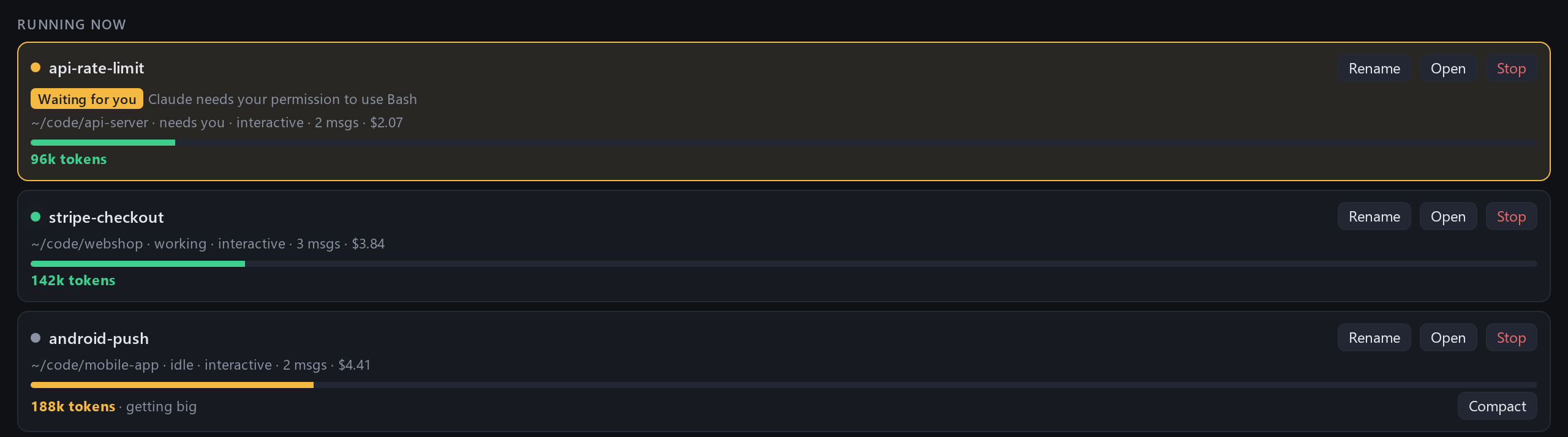 |
|
|
100
|
+
|
|
101
|
+
## Screenshots
|
|
102
|
+
|
|
103
|
+
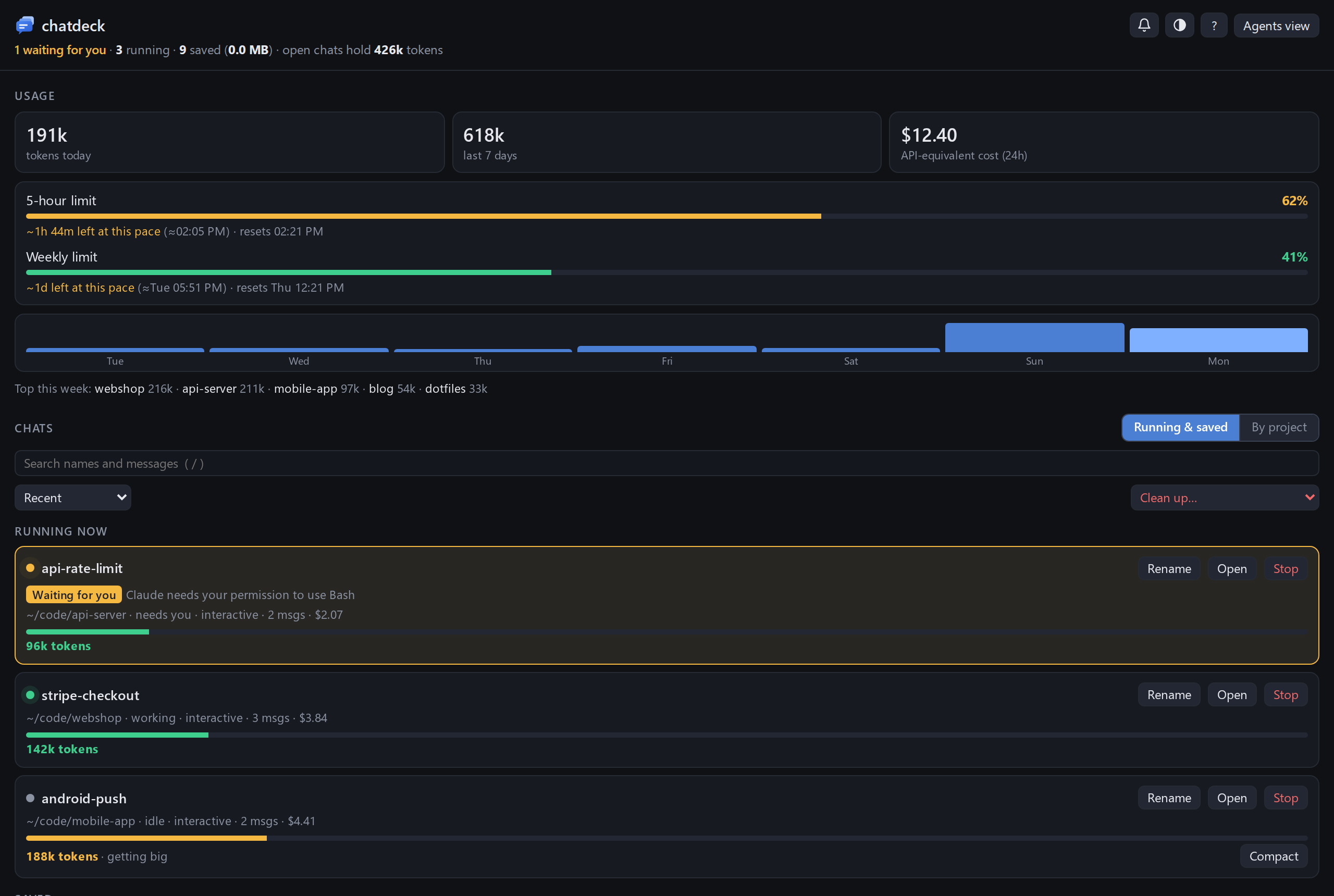
|
|
104
|
+
|
|
105
|
+
| By project | Reading a chat |
|
|
106
|
+
|---|---|
|
|
107
|
+
| 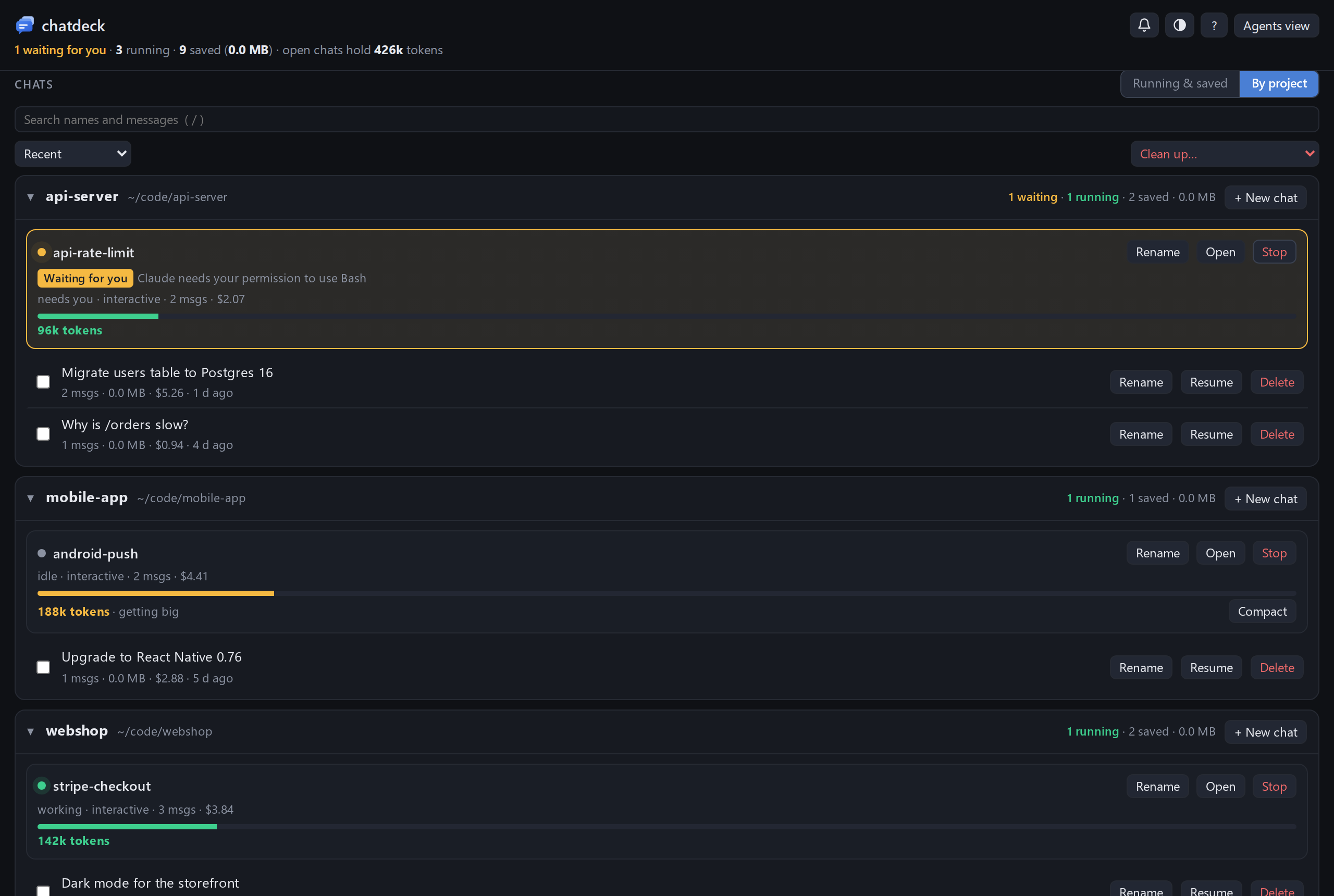 | 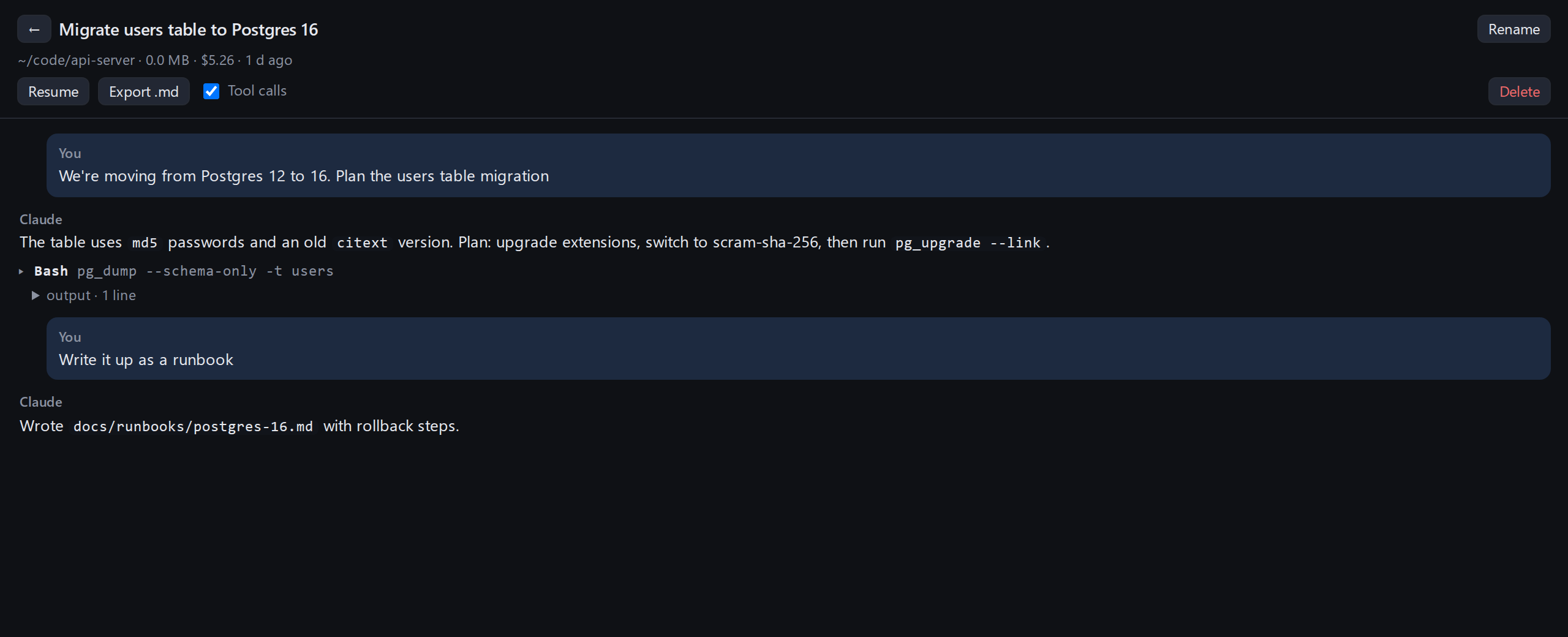 |
|
|
108
|
+
|
|
109
|
+
| Light theme | The Windows pop-up |
|
|
110
|
+
|---|---|
|
|
111
|
+
| 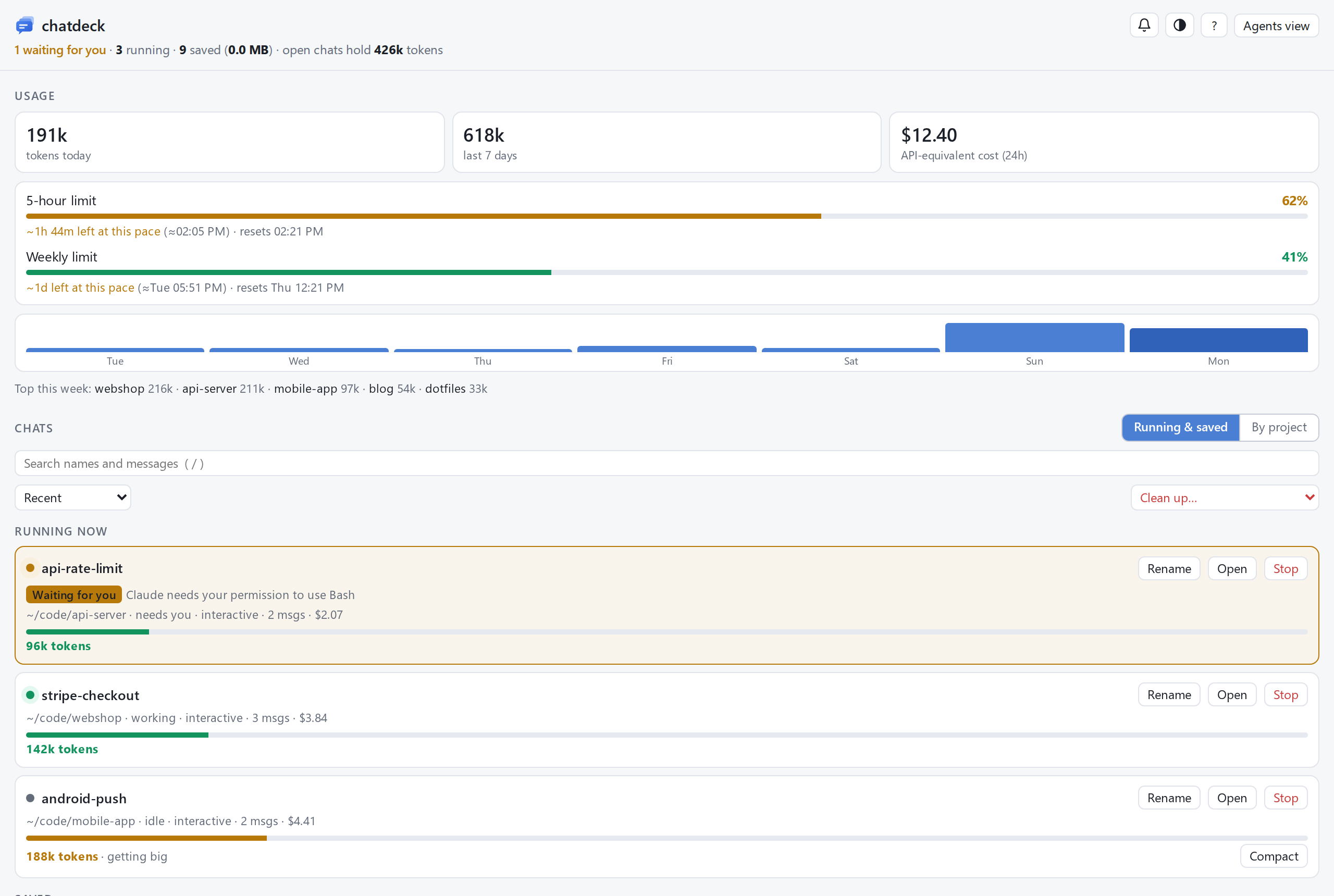 | 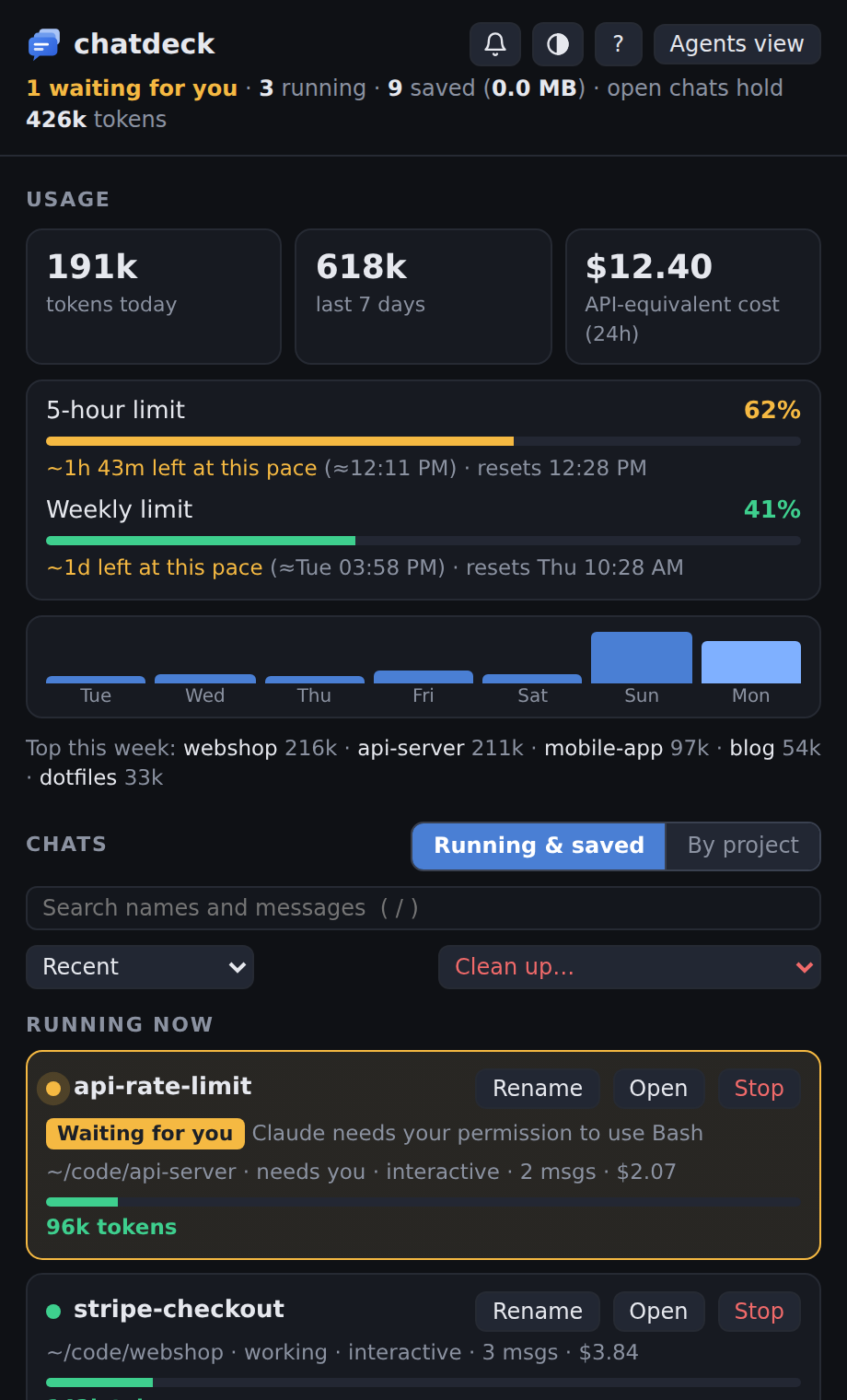 |
|
|
112
|
+
|
|
113
|
+
## Windows corner button and tray icon
|
|
114
|
+
|
|
115
|
+
A small always-on-top button sits in the bottom-left corner of the screen. Click it and the
|
|
116
|
+
dashboard pops up above it; click again, or anywhere else, and it tucks away. The badge counts
|
|
117
|
+
running chats and turns amber, with a pulsing ring, when one is waiting for you. Drag it to move
|
|
118
|
+
it; right-click to hide it or for more. The same badge sits in the notification area by the
|
|
119
|
+
clock, where a click pops the dashboard up in the bottom-right corner. It needs Chrome or Edge.
|
|
120
|
+
Start it with `chatdeck bubble`, or let `chatdeck autostart on` start it at login.
|
|
121
|
+
|
|
122
|
+
## Terminals
|
|
123
|
+
|
|
124
|
+
**Resume**, **Open** and **Agents view** open or find a terminal for you:
|
|
125
|
+
|
|
126
|
+
| Platform | Opens chats in | Open on a running chat |
|
|
127
|
+
|---|---|---|
|
|
128
|
+
| WSL | Windows Terminal (a new window each time) | finds its tab on any virtual desktop and switches to it |
|
|
129
|
+
| macOS | Terminal, or iTerm2 if you run the dashboard from it | finds its tab by tty |
|
|
130
|
+
| Linux | gnome-terminal, konsole, kitty, alacritty, wezterm, xfce4-terminal, tilix, foot or xterm | finds its window with `wmctrl` or `xdotool` (X11) |
|
|
131
|
+
|
|
132
|
+
When no terminal can be opened, the dashboard copies the command to paste instead.
|
|
133
|
+
Finding a running chat works by briefly giving its tab a unique title, so it doesn't work for
|
|
134
|
+
tabs whose title is locked (Windows Terminal's `suppressApplicationTitle`).
|
|
135
|
+
|
|
136
|
+
## Settings
|
|
137
|
+
|
|
138
|
+
Settings live in `~/.chatdeck/config.json`, and environment variables override them:
|
|
139
|
+
|
|
140
|
+
- `port` / `CHATDECK_PORT`: default 47123
|
|
141
|
+
- `terminal` / `CHATDECK_TERMINAL`: which terminal to use, e.g. `kitty` or `iterm`
|
|
142
|
+
- `tabs` / `CHATDECK_TABS` (WSL): `true` opens chats as tabs in your last Windows Terminal window instead of a new window each
|
|
143
|
+
- `vdlib` / `CHATDECK_VDLIB` (WSL): Windows path to [VirtualDesktopLib.cs](https://github.com/MScholtes/VirtualDesktop),
|
|
144
|
+
which makes switching to a chat on another virtual desktop reliable
|
|
145
|
+
- `CHATDECK_DIR`: where chatdeck keeps its data, default `~/.chatdeck`
|
|
146
|
+
|
|
147
|
+
## Tests
|
|
148
|
+
|
|
149
|
+
```sh
|
|
150
|
+
python3 -m unittest discover -s tests
|
|
151
|
+
```
|
|
152
|
+
|
|
153
|
+
## Screenshots and videos
|
|
154
|
+
|
|
155
|
+
Everything in `docs/` is recorded from `chatdeck demo` by a script, so it can be redone after UI changes
|
|
156
|
+
(needs Node; uses Segoe UI from `/mnt/c/Windows/Fonts` when run under WSL):
|
|
157
|
+
|
|
158
|
+
```sh
|
|
159
|
+
cd scripts/promo && npm install && npx playwright-core install chromium-headless-shell
|
|
160
|
+
npm run record # or just some: npm run record -- shots tour search projects keyboard
|
|
161
|
+
```
|
|
162
|
+
|
|
163
|
+
It writes the README screenshots to `docs/` and the GIFs, MP4s, framed screenshots and a 1280×640
|
|
164
|
+
social preview card to `docs/media/`.
|
chatdeck-0.1.0/README.md
ADDED
|
@@ -0,0 +1,146 @@
|
|
|
1
|
+
# chatdeck
|
|
2
|
+
|
|
3
|
+
A local dashboard for your Claude Code chats: see which chats are running and which need you,
|
|
4
|
+
read and search old chats, track usage against your plan limits, and clean up transcripts.
|
|
5
|
+
Python 3.9+ standard library only, no dependencies.
|
|
6
|
+
|
|
7
|
+

|
|
8
|
+
|
|
9
|
+
## Features
|
|
10
|
+
|
|
11
|
+
- **Running now** – every live session with its context size and cost. Sessions stuck on a
|
|
12
|
+
permission prompt or a question get an amber **Waiting for you** badge and an optional chime.
|
|
13
|
+
**Open** jumps to the chat's terminal tab, **Rename** runs `/rename` in it so Claude names it after what it's about (double-click the name to type your own), and big chats get a
|
|
14
|
+
**Compact** button that runs `/compact`.
|
|
15
|
+
- **Saved chats** – read any chat without resuming it, search across all messages,
|
|
16
|
+
rename (so you know what's in it), export to Markdown, resume in a terminal, delete.
|
|
17
|
+
- **Usage** – tokens today and this week, top projects, 24h cost, and your 5-hour and weekly
|
|
18
|
+
limits with a forecast of when you'd hit them at the current pace.
|
|
19
|
+
- **Cleanup** – delete empty chats or chats older than 7, 30 or 90 days. Shows disk usage.
|
|
20
|
+
Running chats are never deleted.
|
|
21
|
+
- **By project** view: one section per project (git repo, including its worktrees and subfolders)
|
|
22
|
+
with its running and saved chats, and a **New chat** button that starts Claude Code in that project. Sort by recent, size, cost or messages. Light and dark themes.
|
|
23
|
+
Keyboard shortcuts: `/` search, `j`/`k` move, `Enter` read, `r` resume, `e` rename, `x` select, `Del` delete, `?` help.
|
|
24
|
+
- **Windows corner button and tray icon** – pop the dashboard up from the corner of the screen.
|
|
25
|
+
|
|
26
|
+
## Install
|
|
27
|
+
|
|
28
|
+
```sh
|
|
29
|
+
pipx install chatdeck # once it's on PyPI; until then:
|
|
30
|
+
pipx install git+https://github.com/Abdifatah09/chatdeck
|
|
31
|
+
```
|
|
32
|
+
|
|
33
|
+
No pip? Clone the repo and run `./install.sh`. It puts a `chatdeck` command in `~/.local/bin`
|
|
34
|
+
that runs straight from the clone.
|
|
35
|
+
|
|
36
|
+
## Try it first
|
|
37
|
+
|
|
38
|
+
```sh
|
|
39
|
+
chatdeck demo
|
|
40
|
+
```
|
|
41
|
+
|
|
42
|
+
opens chatdeck on a set of made-up chats (in a temporary folder, deleted when you stop it with Ctrl+C),
|
|
43
|
+
so you can click around without touching your own. The screenshots here are from the demo.
|
|
44
|
+
|
|
45
|
+
## Use
|
|
46
|
+
|
|
47
|
+
```sh
|
|
48
|
+
chatdeck # start the dashboard and open it
|
|
49
|
+
chatdeck setup # add the Claude Code hooks for plan limits and "waiting for you"
|
|
50
|
+
chatdeck autostart on # start it at login (Windows via WSL, macOS, Linux)
|
|
51
|
+
chatdeck bubble # Windows: the corner button and tray icon
|
|
52
|
+
chatdeck demo # try it with made-up chats
|
|
53
|
+
chatdeck stop # stop the background server
|
|
54
|
+
chatdeck uninstall # take the hooks and autostart out again
|
|
55
|
+
```
|
|
56
|
+
|
|
57
|
+
`chatdeck setup` keeps your existing status line: it saves the usage data first, then runs
|
|
58
|
+
yours, so your status line looks the same. `chatdeck uninstall` puts it back, and your previous
|
|
59
|
+
settings are backed up in `~/.chatdeck/backups`.
|
|
60
|
+
|
|
61
|
+
## Privacy and security
|
|
62
|
+
|
|
63
|
+
- Everything stays on your machine. chatdeck reads the transcripts Claude Code already writes to
|
|
64
|
+
`~/.claude/projects` and sends nothing anywhere: no accounts, no telemetry, no network calls
|
|
65
|
+
except to itself.
|
|
66
|
+
- The server binds to 127.0.0.1 only. Every API call needs a token that changes each run, sent in a
|
|
67
|
+
custom header, so other websites open in your browser can't call it.
|
|
68
|
+
- It only changes things you ask it to: deleting a chat removes its transcript (running chats are
|
|
69
|
+
never deleted), renaming adds a title line to it, and Rename and Compact on a running chat type
|
|
70
|
+
`/rename` or `/compact` into that chat's terminal, only while it's idle.
|
|
71
|
+
- `chatdeck setup` edits `~/.claude/settings.json` and backs it up first; `chatdeck uninstall` undoes it.
|
|
72
|
+
|
|
73
|
+
## See it in action
|
|
74
|
+
|
|
75
|
+
| Find any chat by what was said in it | Every project in one place |
|
|
76
|
+
|---|---|
|
|
77
|
+
|  |  |
|
|
78
|
+
|
|
79
|
+
| Keyboard only: `j`/`k`, `Enter`, `e` to rename, `?` for help | Running chats, at a glance |
|
|
80
|
+
|---|---|
|
|
81
|
+
|  |  |
|
|
82
|
+
|
|
83
|
+
## Screenshots
|
|
84
|
+
|
|
85
|
+

|
|
86
|
+
|
|
87
|
+
| By project | Reading a chat |
|
|
88
|
+
|---|---|
|
|
89
|
+
|  |  |
|
|
90
|
+
|
|
91
|
+
| Light theme | The Windows pop-up |
|
|
92
|
+
|---|---|
|
|
93
|
+
|  |  |
|
|
94
|
+
|
|
95
|
+
## Windows corner button and tray icon
|
|
96
|
+
|
|
97
|
+
A small always-on-top button sits in the bottom-left corner of the screen. Click it and the
|
|
98
|
+
dashboard pops up above it; click again, or anywhere else, and it tucks away. The badge counts
|
|
99
|
+
running chats and turns amber, with a pulsing ring, when one is waiting for you. Drag it to move
|
|
100
|
+
it; right-click to hide it or for more. The same badge sits in the notification area by the
|
|
101
|
+
clock, where a click pops the dashboard up in the bottom-right corner. It needs Chrome or Edge.
|
|
102
|
+
Start it with `chatdeck bubble`, or let `chatdeck autostart on` start it at login.
|
|
103
|
+
|
|
104
|
+
## Terminals
|
|
105
|
+
|
|
106
|
+
**Resume**, **Open** and **Agents view** open or find a terminal for you:
|
|
107
|
+
|
|
108
|
+
| Platform | Opens chats in | Open on a running chat |
|
|
109
|
+
|---|---|---|
|
|
110
|
+
| WSL | Windows Terminal (a new window each time) | finds its tab on any virtual desktop and switches to it |
|
|
111
|
+
| macOS | Terminal, or iTerm2 if you run the dashboard from it | finds its tab by tty |
|
|
112
|
+
| Linux | gnome-terminal, konsole, kitty, alacritty, wezterm, xfce4-terminal, tilix, foot or xterm | finds its window with `wmctrl` or `xdotool` (X11) |
|
|
113
|
+
|
|
114
|
+
When no terminal can be opened, the dashboard copies the command to paste instead.
|
|
115
|
+
Finding a running chat works by briefly giving its tab a unique title, so it doesn't work for
|
|
116
|
+
tabs whose title is locked (Windows Terminal's `suppressApplicationTitle`).
|
|
117
|
+
|
|
118
|
+
## Settings
|
|
119
|
+
|
|
120
|
+
Settings live in `~/.chatdeck/config.json`, and environment variables override them:
|
|
121
|
+
|
|
122
|
+
- `port` / `CHATDECK_PORT`: default 47123
|
|
123
|
+
- `terminal` / `CHATDECK_TERMINAL`: which terminal to use, e.g. `kitty` or `iterm`
|
|
124
|
+
- `tabs` / `CHATDECK_TABS` (WSL): `true` opens chats as tabs in your last Windows Terminal window instead of a new window each
|
|
125
|
+
- `vdlib` / `CHATDECK_VDLIB` (WSL): Windows path to [VirtualDesktopLib.cs](https://github.com/MScholtes/VirtualDesktop),
|
|
126
|
+
which makes switching to a chat on another virtual desktop reliable
|
|
127
|
+
- `CHATDECK_DIR`: where chatdeck keeps its data, default `~/.chatdeck`
|
|
128
|
+
|
|
129
|
+
## Tests
|
|
130
|
+
|
|
131
|
+
```sh
|
|
132
|
+
python3 -m unittest discover -s tests
|
|
133
|
+
```
|
|
134
|
+
|
|
135
|
+
## Screenshots and videos
|
|
136
|
+
|
|
137
|
+
Everything in `docs/` is recorded from `chatdeck demo` by a script, so it can be redone after UI changes
|
|
138
|
+
(needs Node; uses Segoe UI from `/mnt/c/Windows/Fonts` when run under WSL):
|
|
139
|
+
|
|
140
|
+
```sh
|
|
141
|
+
cd scripts/promo && npm install && npx playwright-core install chromium-headless-shell
|
|
142
|
+
npm run record # or just some: npm run record -- shots tour search projects keyboard
|
|
143
|
+
```
|
|
144
|
+
|
|
145
|
+
It writes the README screenshots to `docs/` and the GIFs, MP4s, framed screenshots and a 1280×640
|
|
146
|
+
social preview card to `docs/media/`.
|
|
@@ -0,0 +1,34 @@
|
|
|
1
|
+
[build-system]
|
|
2
|
+
requires = ["setuptools>=77"] # for license = "MIT" and license-files
|
|
3
|
+
build-backend = "setuptools.build_meta"
|
|
4
|
+
|
|
5
|
+
[project]
|
|
6
|
+
name = "chatdeck"
|
|
7
|
+
dynamic = ["version"]
|
|
8
|
+
description = "A local dashboard for your Claude Code chats: what's running, what needs you, and what it costs."
|
|
9
|
+
readme = "README.md"
|
|
10
|
+
license = "MIT"
|
|
11
|
+
license-files = ["LICENSE"]
|
|
12
|
+
requires-python = ">=3.9"
|
|
13
|
+
dependencies = []
|
|
14
|
+
keywords = ["claude", "claude-code", "dashboard", "ai", "cli"]
|
|
15
|
+
classifiers = [
|
|
16
|
+
"Environment :: Console",
|
|
17
|
+
"Environment :: Web Environment",
|
|
18
|
+
"Operating System :: MacOS",
|
|
19
|
+
"Operating System :: POSIX :: Linux",
|
|
20
|
+
"Programming Language :: Python :: 3",
|
|
21
|
+
]
|
|
22
|
+
|
|
23
|
+
[project.urls]
|
|
24
|
+
Homepage = "https://github.com/Abdifatah09/chatdeck"
|
|
25
|
+
Issues = "https://github.com/Abdifatah09/chatdeck/issues"
|
|
26
|
+
|
|
27
|
+
[project.scripts]
|
|
28
|
+
chatdeck = "chatdeck.cli:main"
|
|
29
|
+
|
|
30
|
+
[tool.setuptools.dynamic]
|
|
31
|
+
version = { attr = "chatdeck.__version__" }
|
|
32
|
+
|
|
33
|
+
[tool.setuptools.package-data]
|
|
34
|
+
chatdeck = ["static/*", "windows/*"]
|
chatdeck-0.1.0/setup.cfg
ADDED
|
@@ -0,0 +1,91 @@
|
|
|
1
|
+
"""Starting chatdeck at login.
|
|
2
|
+
|
|
3
|
+
WSL: a "chatdeck" shortcut in the Windows Startup folder runs the launcher (server in WSL, then
|
|
4
|
+
the corner bubble and tray icon); another in the Start menu also opens the dashboard.
|
|
5
|
+
macOS: a LaunchAgent. Linux: a systemd user service, or an XDG autostart entry without systemd."""
|
|
6
|
+
import os, shutil, subprocess
|
|
7
|
+
|
|
8
|
+
from . import config, desktop, hooks, terminals
|
|
9
|
+
|
|
10
|
+
LABEL = "io.github.chatdeck"
|
|
11
|
+
MAC_PLIST = os.path.expanduser(f"~/Library/LaunchAgents/{LABEL}.plist")
|
|
12
|
+
SYSTEMD_UNIT = os.path.expanduser("~/.config/systemd/user/chatdeck.service")
|
|
13
|
+
XDG_ENTRY = os.path.expanduser("~/.config/autostart/chatdeck.desktop")
|
|
14
|
+
|
|
15
|
+
|
|
16
|
+
def _serve_args(port):
|
|
17
|
+
"""The command line that runs the server, as a list (for launchd/systemd)."""
|
|
18
|
+
exe = shutil.which("chatdeck")
|
|
19
|
+
if exe: return [exe, "serve", "--port", str(port)]
|
|
20
|
+
return None # running from a clone without the installed command: use the shell form
|
|
21
|
+
|
|
22
|
+
|
|
23
|
+
def _shell_cmd(port):
|
|
24
|
+
return f"{hooks.command()} serve --port {port}"
|
|
25
|
+
|
|
26
|
+
|
|
27
|
+
def enable(port, hotkey=""):
|
|
28
|
+
k = terminals.kind()
|
|
29
|
+
if k == "wsl":
|
|
30
|
+
distro = os.environ.get("WSL_DISTRO_NAME") or "Ubuntu"
|
|
31
|
+
folder = desktop.install_windows_files(port, distro, hooks.command())
|
|
32
|
+
f = desktop.win_folders()
|
|
33
|
+
desktop.shortcut(f["startup"] + "\\chatdeck.lnk", folder)
|
|
34
|
+
desktop.shortcut(f["programs"] + "\\chatdeck.lnk", folder, "-Open", hotkey)
|
|
35
|
+
return [f"Windows Startup: starts chatdeck and the corner button at login",
|
|
36
|
+
f"Start menu: \"chatdeck\" opens the dashboard" + (f" ({hotkey})" if hotkey else "")]
|
|
37
|
+
if k == "mac":
|
|
38
|
+
args = _serve_args(port) or ["/bin/sh", "-lc", _shell_cmd(port)]
|
|
39
|
+
items = "".join(f"<string>{a}</string>" for a in args)
|
|
40
|
+
os.makedirs(os.path.dirname(MAC_PLIST), exist_ok=True)
|
|
41
|
+
with open(MAC_PLIST, "w") as fh:
|
|
42
|
+
fh.write(f'<?xml version="1.0" encoding="UTF-8"?>\n<!DOCTYPE plist PUBLIC "-//Apple//DTD PLIST 1.0//EN" '
|
|
43
|
+
f'"http://www.apple.com/DTDs/PropertyList-1.0.dtd">\n<plist version="1.0"><dict>'
|
|
44
|
+
f"<key>Label</key><string>{LABEL}</string><key>ProgramArguments</key><array>{items}</array>"
|
|
45
|
+
f"<key>RunAtLoad</key><true/><key>KeepAlive</key><true/>"
|
|
46
|
+
f"<key>StandardErrorPath</key><string>{config.DATA}/server.log</string></dict></plist>\n")
|
|
47
|
+
subprocess.run(["launchctl", "bootout", f"gui/{os.getuid()}/{LABEL}"], capture_output=True)
|
|
48
|
+
subprocess.run(["launchctl", "bootstrap", f"gui/{os.getuid()}", MAC_PLIST], capture_output=True)
|
|
49
|
+
return ["LaunchAgent: chatdeck starts at login"]
|
|
50
|
+
if k == "linux":
|
|
51
|
+
if shutil.which("systemctl") and subprocess.run(["systemctl", "--user", "is-system-running"], capture_output=True).returncode in (0, 1):
|
|
52
|
+
exec_line = " ".join(_serve_args(port) or ["/bin/sh", "-lc", f"'{_shell_cmd(port)}'"])
|
|
53
|
+
os.makedirs(os.path.dirname(SYSTEMD_UNIT), exist_ok=True)
|
|
54
|
+
with open(SYSTEMD_UNIT, "w") as fh:
|
|
55
|
+
fh.write(f"[Unit]\nDescription=chatdeck dashboard for Claude Code\n\n[Service]\nExecStart={exec_line}\n"
|
|
56
|
+
f"Restart=on-failure\n\n[Install]\nWantedBy=default.target\n")
|
|
57
|
+
subprocess.run(["systemctl", "--user", "daemon-reload"], capture_output=True)
|
|
58
|
+
subprocess.run(["systemctl", "--user", "enable", "--now", "chatdeck.service"], capture_output=True)
|
|
59
|
+
return ["systemd user service: chatdeck starts at login"]
|
|
60
|
+
os.makedirs(os.path.dirname(XDG_ENTRY), exist_ok=True)
|
|
61
|
+
with open(XDG_ENTRY, "w") as fh:
|
|
62
|
+
fh.write(f"[Desktop Entry]\nType=Application\nName=chatdeck\nExec=/bin/sh -lc '{_shell_cmd(port)}'\n"
|
|
63
|
+
f"X-GNOME-Autostart-enabled=true\n")
|
|
64
|
+
return ["desktop autostart entry: chatdeck starts when you log in"]
|
|
65
|
+
raise SystemExit("Starting at login isn't supported on this system.")
|
|
66
|
+
|
|
67
|
+
|
|
68
|
+
def disable():
|
|
69
|
+
k = terminals.kind(); done = []
|
|
70
|
+
if k == "wsl":
|
|
71
|
+
f = desktop.win_folders()
|
|
72
|
+
for lnk in (f["startup"] + "\\chatdeck.lnk", f["programs"] + "\\chatdeck.lnk"):
|
|
73
|
+
p = desktop.to_wsl(lnk)
|
|
74
|
+
if os.path.exists(p): os.remove(p); done.append(f"removed {lnk}")
|
|
75
|
+
elif k == "mac":
|
|
76
|
+
subprocess.run(["launchctl", "bootout", f"gui/{os.getuid()}/{LABEL}"], capture_output=True)
|
|
77
|
+
if os.path.exists(MAC_PLIST): os.remove(MAC_PLIST); done.append("removed the LaunchAgent")
|
|
78
|
+
elif k == "linux":
|
|
79
|
+
if os.path.exists(SYSTEMD_UNIT):
|
|
80
|
+
subprocess.run(["systemctl", "--user", "disable", "--now", "chatdeck.service"], capture_output=True)
|
|
81
|
+
os.remove(SYSTEMD_UNIT); done.append("removed the systemd user service")
|
|
82
|
+
if os.path.exists(XDG_ENTRY): os.remove(XDG_ENTRY); done.append("removed the autostart entry")
|
|
83
|
+
return done
|
|
84
|
+
|
|
85
|
+
|
|
86
|
+
def status():
|
|
87
|
+
k = terminals.kind()
|
|
88
|
+
if k == "wsl": return os.path.exists(desktop.to_wsl(desktop.win_folders()["startup"] + "\\chatdeck.lnk"))
|
|
89
|
+
if k == "mac": return os.path.exists(MAC_PLIST)
|
|
90
|
+
if k == "linux": return os.path.exists(SYSTEMD_UNIT) or os.path.exists(XDG_ENTRY)
|
|
91
|
+
return False
|
|
@@ -0,0 +1,152 @@
|
|
|
1
|
+
"""chatdeck command line.
|
|
2
|
+
|
|
3
|
+
chatdeck start the dashboard (in the background) and open it
|
|
4
|
+
chatdeck serve run the server in the foreground (what autostart uses)
|
|
5
|
+
chatdeck stop stop a background server
|
|
6
|
+
chatdeck setup add the Claude Code hooks for plan limits and "waiting for you"
|
|
7
|
+
chatdeck autostart on|off start chatdeck at login, or stop doing that
|
|
8
|
+
chatdeck uninstall remove the hooks and autostart
|
|
9
|
+
chatdeck demo try it with made-up chats (nothing real is read or changed)
|
|
10
|
+
chatdeck bubble Windows (WSL): start the corner button and tray icon
|
|
11
|
+
chatdeck hook ... used by Claude Code itself"""
|
|
12
|
+
import argparse, os, signal, subprocess, sys, time, urllib.request
|
|
13
|
+
|
|
14
|
+
from . import __version__, config, hooks
|
|
15
|
+
|
|
16
|
+
|
|
17
|
+
def _up(port):
|
|
18
|
+
try:
|
|
19
|
+
with urllib.request.urlopen(f"http://127.0.0.1:{port}/", timeout=2) as r:
|
|
20
|
+
return b"<title>chatdeck</title>" in r.read(4096)
|
|
21
|
+
except OSError:
|
|
22
|
+
return False
|
|
23
|
+
|
|
24
|
+
|
|
25
|
+
def _start_background(port):
|
|
26
|
+
os.makedirs(config.DATA, exist_ok=True)
|
|
27
|
+
log = open(os.path.join(config.DATA, "server.log"), "ab")
|
|
28
|
+
env = dict(os.environ, PYTHONPATH=os.pathsep.join(filter(None, [os.path.dirname(os.path.dirname(os.path.abspath(__file__))),
|
|
29
|
+
os.environ.get("PYTHONPATH")])))
|
|
30
|
+
subprocess.Popen([sys.executable, "-m", "chatdeck", "serve", "--port", str(port)], stdout=log, stderr=log,
|
|
31
|
+
stdin=subprocess.DEVNULL, start_new_session=True, env=env)
|
|
32
|
+
for _ in range(40):
|
|
33
|
+
if _up(port): return True
|
|
34
|
+
time.sleep(0.25)
|
|
35
|
+
return False
|
|
36
|
+
|
|
37
|
+
|
|
38
|
+
def cmd_open(a):
|
|
39
|
+
from . import desktop
|
|
40
|
+
if not _up(a.port):
|
|
41
|
+
print(f"Starting chatdeck on http://127.0.0.1:{a.port} ...")
|
|
42
|
+
if not _start_background(a.port):
|
|
43
|
+
sys.exit(f"chatdeck didn't start - see {os.path.join(config.DATA, 'server.log')}")
|
|
44
|
+
if not a.no_open: desktop.open_dashboard(f"http://127.0.0.1:{a.port}/")
|
|
45
|
+
print(f"chatdeck is running at http://127.0.0.1:{a.port}")
|
|
46
|
+
if not os.path.exists(os.path.join(config.DATA, "status")) and "statusline_command" not in config.load():
|
|
47
|
+
print("Tip: run `chatdeck setup` so it can show your plan limits and which chats are waiting for you.")
|
|
48
|
+
|
|
49
|
+
|
|
50
|
+
def cmd_serve(a):
|
|
51
|
+
from . import server
|
|
52
|
+
if _up(a.port): sys.exit(f"chatdeck is already running on port {a.port}.")
|
|
53
|
+
print(f"chatdeck on http://127.0.0.1:{a.port} (Ctrl+C to stop)", flush=True)
|
|
54
|
+
try:
|
|
55
|
+
server.serve(a.port)
|
|
56
|
+
except OSError as e:
|
|
57
|
+
sys.exit(f"Can't use port {a.port}: {e.strerror}. Pick another with --port.")
|
|
58
|
+
except KeyboardInterrupt:
|
|
59
|
+
pass
|
|
60
|
+
|
|
61
|
+
|
|
62
|
+
def cmd_stop(a):
|
|
63
|
+
try:
|
|
64
|
+
with open(os.path.join(config.DATA, "server.pid")) as f: pid = int(f.read())
|
|
65
|
+
os.kill(pid, signal.SIGTERM); print("Stopped chatdeck.")
|
|
66
|
+
except (OSError, ValueError):
|
|
67
|
+
print("chatdeck isn't running in the background.")
|
|
68
|
+
|
|
69
|
+
|
|
70
|
+
def cmd_setup(a):
|
|
71
|
+
for line in hooks.install(): print(" " + line)
|
|
72
|
+
print(f"Done. Your previous settings were backed up to {os.path.join(config.DATA, 'backups')}.")
|
|
73
|
+
print("New and restarted Claude Code sessions pick this up.")
|
|
74
|
+
|
|
75
|
+
|
|
76
|
+
def cmd_uninstall(a):
|
|
77
|
+
done = hooks.uninstall()
|
|
78
|
+
try:
|
|
79
|
+
from . import autostart
|
|
80
|
+
done += autostart.disable()
|
|
81
|
+
except SystemExit:
|
|
82
|
+
pass
|
|
83
|
+
for line in done or ["nothing to remove"]: print(" " + line)
|
|
84
|
+
|
|
85
|
+
|
|
86
|
+
def cmd_autostart(a):
|
|
87
|
+
from . import autostart
|
|
88
|
+
if a.state == "on":
|
|
89
|
+
cfg = config.load(); cfg["port"] = a.port; config.save(cfg)
|
|
90
|
+
for line in autostart.enable(a.port, a.hotkey): print(" " + line)
|
|
91
|
+
elif a.state == "off":
|
|
92
|
+
for line in autostart.disable() or ["it wasn't set to start at login"]: print(" " + line)
|
|
93
|
+
else:
|
|
94
|
+
print("on" if autostart.status() else "off")
|
|
95
|
+
|
|
96
|
+
|
|
97
|
+
def cmd_bubble(a):
|
|
98
|
+
from . import desktop, terminals
|
|
99
|
+
if terminals.kind() != "wsl": sys.exit("The corner button is Windows-only for now (run chatdeck from WSL).")
|
|
100
|
+
desktop.start_bubble(a.port)
|
|
101
|
+
|
|
102
|
+
|
|
103
|
+
def cmd_demo(a):
|
|
104
|
+
import shutil, tempfile
|
|
105
|
+
from . import demo, desktop
|
|
106
|
+
root = tempfile.mkdtemp(prefix="chatdeck-demo-")
|
|
107
|
+
try:
|
|
108
|
+
env = dict(os.environ, HOME=root, CHATDECK_DIR=demo.build(root), CHATDECK_DEMO="1",
|
|
109
|
+
PYTHONPATH=os.pathsep.join(filter(None, [os.path.dirname(os.path.dirname(os.path.abspath(__file__))),
|
|
110
|
+
os.environ.get("PYTHONPATH")])))
|
|
111
|
+
srv = subprocess.Popen([sys.executable, "-m", "chatdeck", "serve", "--port", str(a.port)], env=env)
|
|
112
|
+
url = f"http://127.0.0.1:{a.port}/"
|
|
113
|
+
for _ in range(40):
|
|
114
|
+
if _up(a.port) or srv.poll() is not None: break
|
|
115
|
+
time.sleep(0.25)
|
|
116
|
+
if not a.no_open and srv.poll() is None: desktop.open_dashboard(url)
|
|
117
|
+
srv.wait()
|
|
118
|
+
except KeyboardInterrupt:
|
|
119
|
+
srv.wait()
|
|
120
|
+
finally:
|
|
121
|
+
shutil.rmtree(root, ignore_errors=True)
|
|
122
|
+
|
|
123
|
+
|
|
124
|
+
def cmd_hook(a):
|
|
125
|
+
if a.name == "statusline": hooks.statusline()
|
|
126
|
+
elif a.name == "waiting": hooks.waiting()
|
|
127
|
+
|
|
128
|
+
|
|
129
|
+
def main(argv=None):
|
|
130
|
+
p = argparse.ArgumentParser(prog="chatdeck", description="A local dashboard for your Claude Code chats.")
|
|
131
|
+
p.add_argument("--version", action="version", version=f"chatdeck {__version__}")
|
|
132
|
+
sub = p.add_subparsers(dest="cmd")
|
|
133
|
+
def port_arg(sp): sp.add_argument("--port", type=int, default=config.port(), help=f"default {config.port()}")
|
|
134
|
+
o = sub.add_parser("open", help="start the dashboard if needed and open it (the default)")
|
|
135
|
+
port_arg(o); o.add_argument("--no-open", action="store_true", help="start it but don't open a window")
|
|
136
|
+
port_arg(sub.add_parser("serve", help="run the server in the foreground"))
|
|
137
|
+
sub.add_parser("stop", help="stop a background server")
|
|
138
|
+
sub.add_parser("setup", help="add the Claude Code hooks chatdeck uses")
|
|
139
|
+
sub.add_parser("uninstall", help="remove the hooks and autostart")
|
|
140
|
+
s = sub.add_parser("autostart", help="start chatdeck at login: on, off or status")
|
|
141
|
+
s.add_argument("state", choices=["on", "off", "status"]); port_arg(s)
|
|
142
|
+
s.add_argument("--hotkey", default="", help='Windows: shortcut key for the Start menu entry, e.g. "Ctrl+Alt+A"')
|
|
143
|
+
d = sub.add_parser("demo", help="try chatdeck with made-up chats")
|
|
144
|
+
d.add_argument("--port", type=int, default=47199, help="default 47199"); d.add_argument("--no-open", action="store_true")
|
|
145
|
+
port_arg(sub.add_parser("bubble", help="Windows: start the corner button and tray icon"))
|
|
146
|
+
h = sub.add_parser("hook", help=argparse.SUPPRESS); h.add_argument("name", choices=["statusline", "waiting"])
|
|
147
|
+
argv = list(sys.argv[1:] if argv is None else argv)
|
|
148
|
+
if not argv or (argv[0].startswith("-") and argv[0] not in ("-h", "--help", "--version")):
|
|
149
|
+
argv.insert(0, "open") # plain `chatdeck` (with or without options) starts and opens the dashboard
|
|
150
|
+
a = p.parse_args(argv)
|
|
151
|
+
{"open": cmd_open, "serve": cmd_serve, "stop": cmd_stop, "setup": cmd_setup, "uninstall": cmd_uninstall,
|
|
152
|
+
"autostart": cmd_autostart, "demo": cmd_demo, "bubble": cmd_bubble, "hook": cmd_hook}[a.cmd](a)
|
|
@@ -0,0 +1,34 @@
|
|
|
1
|
+
"""Where chatdeck keeps its data, and its settings (~/.chatdeck/config.json).
|
|
2
|
+
Environment variables (CHATDECK_PORT, CHATDECK_TERMINAL, CHATDECK_VDLIB, CHATDECK_DIR) override the file."""
|
|
3
|
+
import json, os
|
|
4
|
+
|
|
5
|
+
HOME = os.path.expanduser("~")
|
|
6
|
+
DATA = os.environ.get("CHATDECK_DIR") or os.path.join(HOME, ".chatdeck")
|
|
7
|
+
FILE = os.path.join(DATA, "config.json")
|
|
8
|
+
DEFAULT_PORT = 47123
|
|
9
|
+
CLAUDE_SETTINGS = os.path.join(HOME, ".claude", "settings.json")
|
|
10
|
+
DEMO = bool(os.environ.get("CHATDECK_DEMO")) # `chatdeck demo`: made-up chats, nothing outside them is touched
|
|
11
|
+
|
|
12
|
+
|
|
13
|
+
def load():
|
|
14
|
+
try:
|
|
15
|
+
with open(FILE) as f: return json.load(f)
|
|
16
|
+
except (OSError, ValueError):
|
|
17
|
+
return {}
|
|
18
|
+
|
|
19
|
+
|
|
20
|
+
def save(cfg):
|
|
21
|
+
os.makedirs(DATA, exist_ok=True)
|
|
22
|
+
tmp = FILE + ".tmp"
|
|
23
|
+
with open(tmp, "w") as f: json.dump(cfg, f, indent=2)
|
|
24
|
+
os.replace(tmp, FILE)
|
|
25
|
+
|
|
26
|
+
|
|
27
|
+
def get(key, default=None):
|
|
28
|
+
env = os.environ.get("CHATDECK_" + key.upper())
|
|
29
|
+
if env: return env
|
|
30
|
+
return load().get(key, default)
|
|
31
|
+
|
|
32
|
+
|
|
33
|
+
def port():
|
|
34
|
+
return int(get("port") or DEFAULT_PORT)
|